Quick take: classic hub-and-spoke gives you total control of the routing plane and pays you back in operational toil — you own every route table, peering, and firewall sandwich. Azure Virtual WAN hands the global routing matrix to Microsoft and is hard to beat once you have many regions, many branches, and any-to-any traffic. The decision is not “which is better” but “at my scale, which control plane do I want to operate, and what am I willing to give up to stop hand-wiring routes.”
You inherit an Azure estate that started, as almost all of them do, as two VNets and a peering. By the time it reaches you it is a hub-and-spoke topology: a central hub VNet holding the VPN gateway, the ExpressRoute gateway, Azure Firewall, and DNS, with a dozen spoke VNets peered back to it, and a forest of user-defined routes forcing spoke-to-spoke and spoke-to-internet traffic through a network virtual appliance in the hub. It works. Then the company acquires a business in another region, opens forty retail branches that each need a site-to-site tunnel, and signs an SD-WAN contract — and suddenly you are maintaining a route table per spoke, per region, by hand, and a single mistyped 0.0.0.0/0 next hop takes down a production subnet at 2am. This is the moment every enterprise meets the real question: keep building hub-and-spoke and own the routing plane, or move to Azure Virtual WAN and let Microsoft own it.
This article is the decision and the mechanics behind it. We treat the two topologies not as competing products but as two points on a spectrum of who operates the transit routing plane — you, with full control and full responsibility, or the platform, with a constrained model and far less toil. You will learn the moving parts of each: the hub VNet, gateway transit, peering transitivity limits, the NVA load-balancer sandwich, and UDRs on one side; managed virtual hubs, hub-to-hub any-to-any, routing intent, Secured Virtual Hub with Firewall Manager, and the branch/SD-WAN/P2S/S2S/ExpressRoute on-ramps on the other. Every concept comes with the real az/Terraform that builds it, the real scale limits that bound it, and the failure modes that bite at 2am. Because this is a reference you will return to during a design review, the limits, the routing behaviours, the migration steps, and the decision criteria are all laid out as scannable tables — read the prose once, then keep the tables open when you draw the diagram on the whiteboard.
By the end you will stop arguing topology by gut. When the architecture board asks “hub-and-spoke or Virtual WAN,” you will be able to answer with the number of regions and branches above which managed transit wins, the exact features each one fixes (and which it cannot), the cost crossover, and a migration path that does not require a flag-day cutover. Picking the wrong one is a multi-year mistake — Virtual WAN is not a VNet you can casually re-peer, and a sprawling hand-managed hub-and-spoke does not gracefully become a managed backbone. Choosing deliberately, with the limits in front of you, is the entire job.
What problem this solves
Cloud networking at one VNet is trivial and at fifty VNets is a discipline. The thing that breaks first is not bandwidth or security — it is transit routing at scale. Azure VNet peering is, by deliberate design, non-transitive: if spoke A and spoke B are both peered to the hub, A cannot reach B through the hub unless you make it, with user-defined routes pointing at a router (an NVA or Azure Firewall) in the hub that forwards between them. Every new spoke means new route tables on the existing spokes (or a UDR strategy that scales), new peerings, and a re-validation that nothing now routes where it should not. The toil is quadratic in feeling even when it is linear in fact, because a single wrong next hop is a production outage and every change touches the blast radius.
What breaks without a deliberate topology choice: a network team spends its week editing route tables instead of improving the network; spoke-to-spoke traffic silently blackholes because someone forgot a UDR on the return path; a new branch waits because the gateway is at its connection limit; an acquisition in a new region forces a second hub with hand-maintained routes between the regions’ spokes; and the firewall — the one device everything routes through — becomes a single point of failure because nobody put a load-balancer sandwich around the NVA. These are not exotic failures. They are the normal failure modes of a hub-and-spoke that outgrew its design size.
Who hits this: every enterprise past the “a handful of VNets in one region” stage. It bites hardest on multi-region estates (each region needs transit and the regions need to talk), branch-heavy organisations (retail, logistics, banking — dozens to thousands of sites needing on-ramp), companies with an SD-WAN investment they want to land in the cloud, and any team running third-party NVAs for inspection who have discovered that an NVA without a load-balancer in front of it is a liability. The fix is not “add more route tables faster.” It is to consciously decide which transit model you operate — and that decision is what this article equips you to make.
To frame the whole field before the deep dive, here is the spectrum, from the topology you grow into by accident to the one you adopt on purpose, and what each one costs you:
| Topology | Who manages the routing plane | Transitive by default? | Scales to many branches? | Multi-region transit | You operate | Best when |
|---|---|---|---|---|---|---|
| Single VNet | You (trivial) | N/A | No | No | Nothing | One app, one region |
| Peered VNets (mesh) | You | No | No | Manual | Every peering pair | 2–4 VNets, no transit |
| Hub-and-spoke (single region) | You | No (UDR-forced) | Limited by gateway | No | Hub + every UDR | Control matters, one region |
| Hub-and-spoke (multi-region) | You | No (UDR + hub-to-hub peering) | Limited | Manual hub-to-hub | A routing plane per region | Strong NVA needs, few regions |
| Azure Virtual WAN | Microsoft (managed hubs) | Yes (any-to-any) | Yes (1000s of sites) | Native | Connections + policy, not routes | Many regions/branches, want managed transit |
| Virtual WAN Secured Hub | Microsoft + you (policy) | Yes, with inspection | Yes | Native + inspected | Firewall policy only | Above, plus centralised inspection |
Learning objectives
By the end of this article you can:
- Explain the non-transitive nature of VNet peering and enumerate every way to achieve spoke-to-spoke transit (UDR-to-NVA, gateway transit, Virtual WAN any-to-any) with the trade-off of each.
- Design a classic hub-and-spoke topology end to end: hub VNet layout, shared services, the NVA load-balancer sandwich, UDRs, peering settings (
allowGatewayTransit/useRemoteGateways), and multi-region hub-to-hub interconnect. - Design an Azure Virtual WAN topology: managed virtual hubs, hub-to-hub any-to-any routing, the four on-ramps (S2S VPN, P2S VPN, ExpressRoute, SD-WAN/NVA), and how spokes (VNet connections) attach.
- Configure routing intent and routing policies to send internet and/or private traffic through a Secured Virtual Hub (Azure Firewall or a partner NVA) without hand-writing route tables.
- Quote the real scale limits of both models — peerings per VNet, hubs per vWAN, VPN tunnels per hub, ExpressRoute connections, aggregate throughput, route-table entries — and design within them.
- Reason about cost: Virtual WAN’s hub + connection-unit + data-processing charges versus hub-and-spoke’s gateway + firewall + peering-egress charges, and where the crossover sits.
- Plan a migration from hub-and-spoke to Virtual WAN (or deliberately choose to stay) using a phased, no-flag-day approach, and recognise the cases where migration is the wrong call.
- Produce a defensible decision mapped to region count, branch count, inspection requirements, control appetite, and team size.
Prerequisites & where this fits
You should already be comfortable with Azure VNet fundamentals: a virtual network is a regional, private IP space (one or more CIDR blocks) carved into subnets, and VNet peering links two VNets so resources route to each other over the Microsoft backbone. You should understand network security groups (stateful subnet/NIC firewalls), user-defined routes (route tables that override the default system routes), and the basics of BGP (how routes are advertised between gateways and on-premises). If those are shaky, read Azure Virtual Network, Subnets and NSGs: Networking Fundamentals and Azure VNet IP Address Planning: CIDR, Subnetting and Avoiding Overlap Before You Deploy first — overlapping address space is the single most common reason a topology cannot be built or migrated.
This sits at the top of the Networking — Topology & Connectivity track. It assumes the peering mechanics from Azure VNet Peering Done Right: Gateway Transit, Global Peering and Transitivity Limits and the routing mechanics from User-Defined Routes and Route Tables: Steering Azure Traffic the Way You Intend — those two articles are the substrate this one builds the enterprise pattern on. It pairs with the on-ramp deep dives: How to Build a Site-to-Site VPN to Azure, ExpressRoute Deep Dive: Private Peering, Route Filters, and VPN Failover, and Integrating SD-WAN into a Cloud Backbone: Partner NVAs, Branch Onboarding, and Route Exchange. For the inspection layer, Deploying HA Third-Party NVAs in Azure: The Load Balancer Sandwich Pattern is the device pattern that makes a hub-and-spoke firewall actually highly available.
A quick map of who owns what during a topology design, so the right people are in the room:
| Layer | What lives here | Who usually owns it | The decision it forces |
|---|---|---|---|
| IP address management | CIDR allocation, non-overlap | Network architecture | Can a spoke even be peered/migrated? |
| Transit routing plane | Peering + UDR, or managed hub | Network engineering | Hub-and-spoke vs Virtual WAN |
| Inspection / firewall | Azure Firewall / NVA, policy | Security / NetSec | Secured Hub vs self-managed sandwich |
| Hybrid on-ramp | VPN, ExpressRoute, SD-WAN | Network + connectivity | Where branches and on-prem attach |
| Identity & governance | Subscriptions, landing zones | Platform / Cloud CoE | Connectivity subscription, RBAC |
| Workload teams | Spoke VNets, app subnets | App / product teams | How a new app gets connected |
Core concepts
Six mental models make every later decision obvious.
Peering is non-transitive on purpose, and that single fact creates both topologies. When you peer the hub to a spoke, traffic flows hub↔spoke directly. But peering does not forward: spoke A peered to hub, hub peered to spoke B, does not give A→B. Azure refuses to relay traffic through an intermediate VNet’s peering unless you route it there explicitly. So to get spoke-to-spoke you must either (a) put a router in the hub — an NVA or Azure Firewall — and point UDRs on both spokes at it, or (b) use a fabric that is transitive, which is exactly what Virtual WAN’s managed hub provides. Hub-and-spoke is “peering plus UDRs to fake transitivity”; Virtual WAN is “a managed hub that is transitive natively.” Everything else follows from this.
The hub is a role, not a SKU. In classic hub-and-spoke the hub VNet is an ordinary VNet you create and own, that happens to hold the shared network services: the VPN gateway and ExpressRoute gateway (the hybrid on-ramps), the firewall (Azure Firewall or a third-party NVA), DNS (private resolver or DNS forwarders), and Bastion for management. Spokes peer to it and route through it. In Virtual WAN the hub is a Microsoft-managed resource — you do not deploy VMs or gateways into it the way you do a VNet; you enable gateways on it and connect VNets and sites to it, and Microsoft runs the routing fabric inside. Same role, radically different operational model: one you build and babysit, one you configure and consume.
Gateway transit lets spokes borrow the hub’s gateway — and it is the seam where hybrid meets the topology. A spoke with no gateway of its own can use the hub’s VPN/ExpressRoute gateway to reach on-premises, via two peering flags: the hub side sets allowGatewayTransit and the spoke side sets useRemoteGateways. This is how you avoid paying for a gateway per spoke. In Virtual WAN this is automatic — a VNet connected to a hub reaches on-premises through the hub’s gateways with no flags to set. Gateway transit is the classic-topology mechanism that the managed model absorbs for free.
Routing intent is Virtual WAN’s “send it through the firewall” button — the thing UDRs do by hand in hub-and-spoke. In hub-and-spoke, forcing all traffic through inspection means UDRs on every spoke: a 0.0.0.0/0 route to the NVA for internet, and spoke-prefix routes to the NVA for east-west. Routing intent on a Virtual WAN Secured Hub replaces all of that with a policy: “send Internet Traffic to the security solution” and/or “send Private Traffic to the security solution,” and the platform programs the route tables on every connected VNet and branch automatically. It is the single biggest operational difference — the UDR forest collapses into two checkboxes, at the cost of the granular per-subnet control UDRs gave you.
Allocation is finite, and the limits differ sharply between the two. A VNet has a peering limit (hundreds, but bounded); a VPN gateway has a tunnel and aggregate-throughput limit tied to its SKU; route tables have an entry limit. A Virtual WAN hub has its own ceilings: VNet connections per hub, VPN/ExpressRoute throughput per hub measured in routing infrastructure units, branch and tunnel limits, and route-table-entry limits. You design within whichever model’s limits, and at the very large end (thousands of branches, very high aggregate throughput) the limits themselves can decide the topology. Never quote a topology as “infinitely scalable” — every fabric has a ceiling, and the ceilings are different.
Control and convenience trade against each other, and the trade is the whole decision. Hub-and-spoke gives you every knob: exact route tables, your choice of NVA vendor, custom inspection chains, per-subnet routing. You pay for that control by operating it — the routing plane is yours, including its outages. Virtual WAN gives you a managed, transitive, globally-connected fabric with a constrained model — you route the way the hub routes, inspect the way routing intent allows, and use the gateways Microsoft offers. You pay for that convenience in lost granularity and a dependency on the platform’s roadmap. Neither is “better.” The right answer is the one whose operating model matches your scale and your team.
The vocabulary in one table
Before the deep sections, pin down every moving part. The glossary at the end repeats these for lookup; this table is the mental model side by side:
| Term | One-line definition | Lives in | Why it matters |
|---|---|---|---|
| Hub VNet | A VNet you own holding shared network services | Classic topology | The thing everything routes through |
| Spoke VNet | A workload VNet peered to the hub | Both models | Where apps actually run |
| VNet peering | A direct, non-transitive link between two VNets | Classic topology | The substrate; not transitive |
| UDR (route table) | Routes that override system defaults | Classic topology | How you fake transitivity / force inspection |
| NVA | A third-party firewall/router VM | Hub (classic) | Custom inspection; needs an LB sandwich |
| Gateway transit | Spoke borrows the hub’s VPN/ER gateway | Classic peering | Avoids a gateway per spoke |
| Virtual hub | A Microsoft-managed hub in a region | Virtual WAN | Transitive routing fabric, managed |
| VNet connection | A spoke attached to a virtual hub | Virtual WAN | The vWAN equivalent of a peering |
| Hub-to-hub | Automatic any-to-any between vWAN hubs | Virtual WAN | Free multi-region transit |
| Routing intent | Policy: send internet/private traffic to inspection | Secured Hub | Replaces the UDR forest |
| Secured Virtual Hub | A virtual hub with an integrated firewall | Virtual WAN | Inspection without a sandwich |
| Routing infrastructure unit | The scale unit of a vWAN hub (throughput/VMs) | Virtual WAN | Drives hub capacity and cost |
| Firewall Manager | Central management of Azure Firewall policies | Both | Where Secured Hub policy lives |
How VNet peering forces the whole design
Start where every estate starts: two VNets and a peering. Peering is fast (backbone latency), cheap (no gateway), and non-transitive. That last property is not a limitation to work around casually — it is the deliberate Azure design that makes you choose a transit model. The table below is the fork in the road; commit it to memory because every later section is a consequence of it.
| Connectivity goal | Peering alone? | What you must add (classic) | What Virtual WAN does |
|---|---|---|---|
| Hub ↔ spoke | Yes | Nothing | VNet connection to hub |
| Spoke A ↔ Spoke B (same region) | No | UDR on both → NVA/Firewall in hub | Automatic (any-to-any) |
| Spoke ↔ on-premises (via hub gateway) | No | allowGatewayTransit + useRemoteGateways |
Automatic via hub gateway |
| Spoke A (region 1) ↔ Spoke B (region 2) | No | Hub-to-hub peering + UDRs both ends | Automatic (hub-to-hub) |
| Spoke → internet via central firewall | No | UDR 0.0.0.0/0 → NVA on every spoke |
Routing intent (one policy) |
| Branch (VPN) ↔ spoke | No | Gateway in hub + UDRs | Connect site to hub |
Three peering behaviours people repeatedly trip over, because they invert in subtle ways:
| Peering setting | What it does | Set on which side | The trap |
|---|---|---|---|
allowVirtualNetworkAccess |
Allows traffic between the two VNets | Both | Off → peering exists but no traffic flows |
allowForwardedTraffic |
Allows traffic forwarded by an NVA in the peer | The receiving side | Off → NVA-routed spoke-to-spoke silently drops |
allowGatewayTransit |
Hub shares its gateway with spokes | Hub side | Wrong side → spokes can’t reach on-prem |
useRemoteGateways |
Spoke uses the hub’s gateway | Spoke side | Both useRemoteGateways and a local gateway → conflict |
The non-obvious killer is allowForwardedTraffic. When you route spoke A → hub NVA → spoke B, the packet arriving at spoke B was forwarded by the NVA, not originated by the hub VNet. If spoke B’s peering does not allow forwarded traffic, it drops the packet — and your spoke-to-spoke “works” in one direction (the SYN) and dies on the return path, producing the maddening half-broken connectivity that costs an afternoon. In Virtual WAN this entire class of bug does not exist, because there are no peerings to misconfigure — connections to a hub are transitive by construction.
Designing classic hub-and-spoke
Hub-and-spoke is the topology you build when you want control. The hub is a VNet; the discipline is in how you lay it out and how you route.
The hub VNet layout
The hub holds shared services and nothing else — no workloads. A clean hub has a subnet per shared function, sized for growth, with the gateway subnets at the names Azure mandates (GatewaySubnet, AzureFirewallSubnet, AzureBastionSubnet — these names are not optional and the resources refuse to deploy in a differently-named subnet). A reference hub layout:
| Subnet | Holds | Mandatory name? | Minimum size | Why this size |
|---|---|---|---|---|
GatewaySubnet |
VPN + ExpressRoute gateways | Yes | /27 | Gateways need room; /29 too small for ER+VPN coexist |
AzureFirewallSubnet |
Azure Firewall | Yes | /26 | Azure Firewall mandates /26 minimum |
AzureFirewallManagementSubnet |
Forced-tunnel mgmt (if used) | Yes | /26 | Required for forced tunneling |
AzureBastionSubnet |
Bastion host | Yes | /26 | Bastion mandates /26 |
snet-nva (if third-party) |
NVA NICs (trusted/untrusted) | No | /27+ | Per-NIC IPs + LB |
snet-dns |
Private DNS resolver / forwarders | No | /28 | Resolver inbound/outbound endpoints |
snet-shared |
Jump/management, shared tooling | No | /27 | Grows with tooling |
Two reasons to over-allocate the hub address space now: gateway subnets cannot be resized once gateways are deployed without recreating the gateway (an outage), and you will add shared services over the years. Reserve a generous CIDR for the hub and document it in your IPAM before the first spoke exists — see Azure VNet IP Address Planning for the allocation discipline.
Build the hub with the gateway-transit flags ready for spokes:
# Hub VNet with the mandated gateway subnets
az network vnet create -g rg-connectivity -n vnet-hub \
  --address-prefixes 10.0.0.0/22 \
  --subnet-name GatewaySubnet --subnet-prefixes 10.0.0.0/27

az network vnet subnet create -g rg-connectivity --vnet-name vnet-hub \
  -n AzureFirewallSubnet --address-prefixes 10.0.1.0/26
# Terraform: hub VNet + the gateway/firewall subnets
resource "azurerm_virtual_network" "hub" {
  name                = "vnet-hub"
  location            = "centralindia"
  resource_group_name = "rg-connectivity"
  address_space       = ["10.0.0.0/22"]
}

resource "azurerm_subnet" "gateway" {
  name                 = "GatewaySubnet"   # exact name is mandatory
  resource_group_name  = "rg-connectivity"
  virtual_network_name = azurerm_virtual_network.hub.name
  address_prefixes     = ["10.0.0.0/27"]
}

resource "azurerm_subnet" "firewall" {
  name                 = "AzureFirewallSubnet"  # exact name is mandatory
  resource_group_name  = "rg-connectivity"
  virtual_network_name = azurerm_virtual_network.hub.name
  address_prefixes     = ["10.0.1.0/26"]   # /26 minimum for Azure Firewall
}
Peering spokes to the hub with gateway transit
Each spoke peers to the hub. The hub side allows gateway transit; the spoke side consumes it and allows forwarded traffic so the hub’s NVA/Firewall can route between spokes:
# Hub -> spoke peering: share the gateway, allow forwarded traffic
az network vnet peering create -g rg-connectivity -n hub-to-spoke1 \
  --vnet-name vnet-hub --remote-vnet vnet-spoke1 \
  --allow-vnet-access --allow-forwarded-traffic --allow-gateway-transit

# Spoke -> hub peering: use the hub's gateway, allow forwarded traffic
az network vnet peering create -g rg-spoke1 -n spoke1-to-hub \
  --vnet-name vnet-spoke1 --remote-vnet vnet-hub \
  --allow-vnet-access --allow-forwarded-traffic --use-remote-gateways
resource "azurerm_virtual_network_peering" "hub_to_spoke1" {
  name                         = "hub-to-spoke1"
  resource_group_name          = "rg-connectivity"
  virtual_network_name         = azurerm_virtual_network.hub.name
  remote_virtual_network_id    = azurerm_virtual_network.spoke1.id
  allow_forwarded_traffic      = true
  allow_gateway_transit        = true
}

resource "azurerm_virtual_network_peering" "spoke1_to_hub" {
  name                         = "spoke1-to-hub"
  resource_group_name          = "rg-spoke1"
  virtual_network_name         = azurerm_virtual_network.spoke1.name
  remote_virtual_network_id    = azurerm_virtual_network.hub.id
  allow_forwarded_traffic      = true
  use_remote_gateways          = true   # spoke borrows the hub gateway
}
The peering flag matrix, as a checklist you verify on every spoke (a wrong combination is the most common hub-and-spoke outage):
| Direction | allow_forwarded_traffic |
allow_gateway_transit |
use_remote_gateways |
Result if wrong |
|---|---|---|---|---|
| Hub → spoke | true | true | false | No transit → spokes can’t reach on-prem |
| Spoke → hub | true | false | true | No forwarded → spoke-to-spoke return drops |
| Spoke with its own gateway | true | false | false | use_remote_gateways=true + local gateway = deploy error |
The NVA load-balancer sandwich and UDRs
If you use a third-party firewall (Palo Alto, Fortinet, Check Point) instead of Azure Firewall, a single NVA VM is a single point of failure and offers no scale. The production pattern is the load-balancer sandwich: an internal Standard Load Balancer in front of the NVAs’ trusted NICs, another in front of the untrusted NICs, with the NVAs in an availability set or zones, and UDRs pointing at the load balancer’s frontend IP, not at any single NVA. This is involved enough to warrant its own treatment — Deploying HA Third-Party NVAs in Azure: The Load Balancer Sandwich Pattern walks the full build — but the routing principle is simple: UDR next hop = the LB frontend, and HA Ports on the internal LB so all protocols/ports fail over together.
The UDRs that make hub-and-spoke route are the heart of the operational toil. Here is the route table you attach to each spoke subnet to force internet and east-west through the hub firewall, with the NVA/Firewall private IP (or LB frontend) as the next hop:
# Route table forcing all egress through the hub firewall (10.0.1.4 = AzFW private IP)
az network route-table create -g rg-spoke1 -n rt-spoke1

az network route-table route create -g rg-spoke1 --route-table-name rt-spoke1 \
  -n default-to-firewall --address-prefix 0.0.0.0/0 \
  --next-hop-type VirtualAppliance --next-hop-ip-address 10.0.1.4

# East-west to other spokes also via the firewall
az network route-table route create -g rg-spoke1 --route-table-name rt-spoke1 \
  -n spoke2-via-firewall --address-prefix 10.1.2.0/24 \
  --next-hop-type VirtualAppliance --next-hop-ip-address 10.0.1.4

az network vnet subnet update -g rg-spoke1 --vnet-name vnet-spoke1 \
  -n snet-app --route-table rt-spoke1
resource "azurerm_route_table" "spoke1" {
  name                = "rt-spoke1"
  location            = "centralindia"
  resource_group_name = "rg-spoke1"

  route {
    name                   = "default-to-firewall"
    address_prefix         = "0.0.0.0/0"
    next_hop_type          = "VirtualAppliance"
    next_hop_in_ip_address = "10.0.1.4"   # AzFW private IP or NVA LB frontend
  }
}
The route-table archetypes you maintain in a mature hub-and-spoke — and this enumeration is the operational burden:
| Route table lives on | Routes it carries | Next hop | Maintained when |
|---|---|---|---|
| Spoke subnets | 0.0.0.0/0 (internet) |
Hub firewall | Every spoke, forever |
| Spoke subnets | Each other spoke’s prefix | Hub firewall | Every new spoke (east-west) |
GatewaySubnet (hub) |
Spoke prefixes (return path) | Hub firewall | Force on-prem→spoke through FW |
AzureFirewallSubnet |
(usually none — let it learn) | System | Avoid breaking FW’s own routing |
| Spoke → PaaS via private endpoint | Specific /32 if needed | Direct or FW | Per private endpoint design |
The “spoke subnets carry each other spoke’s prefix” row is the quadratic-feeling toil: add the tenth spoke and you may touch the route tables of the previous nine. Disciplined teams use a summarised supernet route (a single route covering all spoke space pointed at the firewall) to collapse this — but that only works if your spoke CIDRs are contiguous and planned, which is exactly why IP planning upstream matters so much.
Multi-region hub-and-spoke
One hub per region. To let region-1 spokes reach region-2 spokes you peer the two hubs (global VNet peering) and add UDRs on both sides so cross-region east-west routes through each region’s firewall. There is no automatic transit between regions — you build and maintain the inter-hub routing by hand. This is where hub-and-spoke’s operational cost climbs steeply, because the route-table matrix is now per-region and cross-region.
| Multi-region concern | Hub-and-spoke reality | Effort |
|---|---|---|
| Region-1 spoke ↔ region-2 spoke | Global hub peering + UDRs both regions | High, manual |
| On-prem reaches all regions | ER/VPN per region, or one region transit + inter-hub routes | High |
| Consistent firewall policy across regions | Firewall Manager / shared policy by hand | Medium |
| A new region | Stand up a whole hub + gateways + firewall + peerings | Days of work |
| Asymmetric routing risk | High — return path must mirror forward path | Constant vigilance |
Designing with Azure Virtual WAN
Virtual WAN inverts the model: the hub is Microsoft-managed and transitive, and you stop writing route tables.
Virtual hubs and the any-to-any fabric
You create a Virtual WAN resource (a global container) and one or more virtual hubs, each in a region with a hub address space you assign (a /24 or larger that Microsoft uses for the managed fabric). Into each hub you enable gateways (VPN, ExpressRoute, P2S) and connect VNets and sites. The defining behaviours, none of which require a UDR:
| vWAN behaviour | What it gives you | Equivalent classic effort |
|---|---|---|
| VNet-to-VNet within a hub | Any-to-any among connected spokes | UDRs to NVA on every spoke |
| Hub-to-hub (multi-region) | Automatic any-to-any across regions | Hub peering + UDRs both regions |
| Branch-to-VNet | Sites reach all connected spokes | Gateway in hub + UDRs |
| Branch-to-branch | Sites reach each other through the backbone | Not natively possible classic |
| Spoke reaches on-prem | Through the hub’s gateways automatically | allowGatewayTransit/useRemoteGateways |
Create the Virtual WAN and a hub, then connect a spoke:
# Virtual WAN container + a regional hub
az network vwan create -g rg-vwan -n vwan-global --type Standard --location centralindia

az network vhub create -g rg-vwan -n hub-cin --vwan vwan-global \
  --address-prefix 10.100.0.0/24 --location centralindia --sku Standard

# Connect a spoke VNet to the hub (this is the vWAN "peering")
az network vhub connection create -g rg-vwan --vhub-name hub-cin \
  -n conn-spoke1 --remote-vnet \
  $(az network vnet show -g rg-spoke1 -n vnet-spoke1 --query id -o tsv)
resource "azurerm_virtual_wan" "global" {
  name                = "vwan-global"
  resource_group_name = "rg-vwan"
  location            = "centralindia"
  type                = "Standard"
}

resource "azurerm_virtual_hub" "cin" {
  name                = "hub-cin"
  resource_group_name = "rg-vwan"
  location            = "centralindia"
  virtual_wan_id      = azurerm_virtual_wan.global.id
  address_prefix      = "10.100.0.0/24"
  sku                 = "Standard"
}

resource "azurerm_virtual_hub_connection" "spoke1" {
  name                      = "conn-spoke1"
  virtual_hub_id            = azurerm_virtual_hub.cin.id
  remote_virtual_network_id = azurerm_virtual_network.spoke1.id
  # no route tables to write — the hub is transitive
}
Note the Standard SKU: the Basic Virtual WAN supports only site-to-site VPN and has no hub-to-hub, no any-to-any, no ExpressRoute, and no Secured Hub. For any enterprise topology you use Standard. The SKU difference is not a tier of performance — it is a capability gate:
| Capability | Basic vWAN | Standard vWAN |
|---|---|---|
| Site-to-site VPN | Yes | Yes |
| Hub-to-hub / any-to-any transit | No | Yes |
| ExpressRoute | No | Yes |
| Point-to-site (User VPN) | No | Yes |
| VNet-to-VNet transit through hub | No | Yes |
| Secured Virtual Hub (Azure Firewall) | No | Yes |
| Custom route tables / routing intent | No | Yes |
The four on-ramps
Everything external attaches to a hub through one of four gateways you enable on it. This is the strongest reason enterprises adopt Virtual WAN — branch and SD-WAN onboarding becomes a managed, repeatable operation instead of a per-site gateway build.
| On-ramp | What attaches | Enabled on the hub as | Scale signal |
|---|---|---|---|
| Site-to-site VPN | Branch routers / on-prem firewalls (IPsec) | VPN gateway (scale units) | Many tunnels per hub |
| Point-to-site VPN | Remote users / devices (OpenVPN/IKEv2) | P2S (User VPN) gateway | Per-user client config |
| ExpressRoute | Private circuits from on-prem/colo | ExpressRoute gateway | High bandwidth, private |
| SD-WAN / partner NVA | SD-WAN edges via the integrated NVA-in-hub | Network Virtual Appliance in hub | Automated branch onboarding |
The SD-WAN-in-hub option is what makes Virtual WAN compelling for branch-heavy estates: SD-WAN vendors (Cisco, VMware/VeloCloud, Barracuda, Fortinet, and others) deploy their edge directly into the managed hub via the Virtual WAN partner program, and your branches connect to the cloud through the same SD-WAN overlay they already run — no per-site IPsec to hand-build. The full mechanics are in Integrating SD-WAN into a Cloud Backbone: Partner NVAs, Branch Onboarding, and Route Exchange. For the VPN and ExpressRoute on-ramps, the classic deep dives still apply conceptually — How to Build a Site-to-Site VPN to Azure for IPsec/IKE policy and ExpressRoute Deep Dive for private peering and failover.
Routing intent: collapsing the UDR forest
A plain virtual hub routes any-to-any with no inspection. To force traffic through a firewall you make the hub a Secured Virtual Hub (integrate Azure Firewall, or a supported partner NVA) and turn on routing intent. Routing intent is a policy with up to two rules:
| Routing intent policy | What it sends to the firewall | Replaces (classic) |
|---|---|---|
| Internet Traffic | All 0.0.0.0/0 from connected VNets and branches |
0.0.0.0/0 UDR → NVA on every spoke |
| Private Traffic | All RFC1918 east-west (VNet↔VNet, VNet↔branch) | Per-spoke prefix UDRs → NVA |
| Both | All internet and all private traffic inspected | The entire UDR forest |
When you enable routing intent, the platform programs the effective routes on every connected VNet and branch so their traffic lands at the firewall — automatically, and re-programmed as you add spokes. The two checkboxes do what a route-table-per-spoke did, across regions, with no asymmetric-routing risk because the platform owns both directions.
# Make the hub a Secured Hub by deploying Azure Firewall into it, then set routing intent
az network firewall create -g rg-vwan -n azfw-hub-cin \
  --vhub hub-cin --sku AZFW_Hub --tier Premium \
  --public-ip-count 1 --location centralindia

# Routing intent: inspect both internet and private traffic via the hub firewall
az network vhub routing-intent create -g rg-vwan --vhub-name hub-cin -n ri-cin \
  --routing-policies \
  "[{name:Internet,destinations:[Internet],nextHop:azfw-hub-cin},{name:Private,destinations:[PrivateTraffic],nextHop:azfw-hub-cin}]"
The Secured Hub gives you centralised inspection without building a load-balancer sandwich — Azure Firewall in a hub is highly available and auto-scaling by design, and its policy is managed in Azure Firewall Manager alongside any classic-hub policies. The trade is that you inspect the way routing intent allows (internet, private, or both), not with the arbitrary per-subnet UDR chains a self-managed hub permits.
Custom route tables (when the defaults are not enough)
Virtual WAN hubs have a Default and a None route table, and you can add custom route tables to create routing domains — for example, a “shared services” route table that production and dev spokes can reach but that cannot reach back, or isolated environments that must not route to each other. You associate a connection with a route table (where its traffic is evaluated) and propagate its routes to chosen route tables (who learns about it). This is the controlled-segmentation escape hatch within the managed model — less granular than UDRs, but enough for most landing-zone isolation needs.
| vWAN routing construct | What it controls | Classic equivalent |
|---|---|---|
| Default route table | Where most connections associate/propagate | The “everyone routes through hub” baseline |
| None route table | Isolate a connection (no propagation) | A spoke with restrictive UDRs/NSGs |
| Custom route table | A routing domain (e.g. shared-services-only) | UDR sets + careful peering |
| Association | Which table a connection’s traffic uses | The route table on the subnet |
| Propagation | Which tables learn a connection’s routes | Which UDRs reference the prefix |
| Static routes (in a table) | Send specific prefixes to an NVA in a spoke | A UDR to a VNet appliance |
Scale limits that decide the topology
Both models have ceilings, and at the high end the limits pick the topology for you. These are the numbers you design against. (Azure publishes the authoritative current values; treat these as the order-of-magnitude reality you plan around and confirm the exact figure for your subscription/SKU before committing.)
Classic hub-and-spoke limits:
| Limit | Classic hub-and-spoke | Consequence at the ceiling |
|---|---|---|
| VNet peerings per VNet | Hundreds (bounded) | Caps spokes directly peered to one hub |
| Routes per route table (UDR) | Hundreds | Caps explicit spoke-to-spoke routes; forces supernets |
| VPN gateway tunnels (per gateway) | Tens to ~hundreds by SKU | Caps branches on one hub gateway |
| VPN gateway aggregate throughput | Up to ~10 Gbps (AZ SKUs) | Caps total branch bandwidth per hub |
| ExpressRoute connections per gateway | Small number by SKU | Caps circuits terminating on one hub |
| BGP routes learned per gateway | Thousands | Caps on-prem route advertisement |
Azure Virtual WAN limits:
| Limit | Azure Virtual WAN | Consequence at the ceiling |
|---|---|---|
| Virtual hubs per Virtual WAN | Many (one+ per region typically) | Effectively per-region, not a constraint |
| VNet connections per hub | ~500 | Caps spokes per hub; add hubs/regions to grow |
| VPN (S2S) branch connections per hub | Thousands of tunnels (scale units) | Designed for very large branch counts |
| Aggregate VPN throughput per hub | Scales with VPN scale units (multi-Gbps) | Higher branch bandwidth than a single classic gateway |
| ExpressRoute throughput per hub | Driven by routing infrastructure units | Scales the hub fabric to the circuits |
| Routing infrastructure units (per hub) | Scale up to raise throughput/VM support | The hub’s capacity dial |
The decision-relevant reading of those two tables, side by side — this is where scale alone can settle the argument:
| Scale dimension | Hub-and-spoke ceiling | Virtual WAN ceiling | Who wins on scale |
|---|---|---|---|
| Branches / VPN sites | Tens–low hundreds per gateway | Thousands per hub | Virtual WAN decisively |
| Regions with transit between them | Manual hub-to-hub, any count | Native any-to-any, any count | Virtual WAN on effort |
| Spokes per hub | Hundreds (peering limit) | ~500 per hub | Comparable; vWAN grows by adding hubs |
| Aggregate hybrid throughput | ~10 Gbps per gateway | Multi-Gbps, scale-unit driven | Virtual WAN at the very top |
| Granular per-subnet routing | Unlimited (UDRs) | Constrained (route tables) | Hub-and-spoke on control |
Architecture at a glance
Three diagrams capture the decision. Read them in order: the classic topology you grow into, the managed topology you adopt on purpose, and the flow that chooses between them.
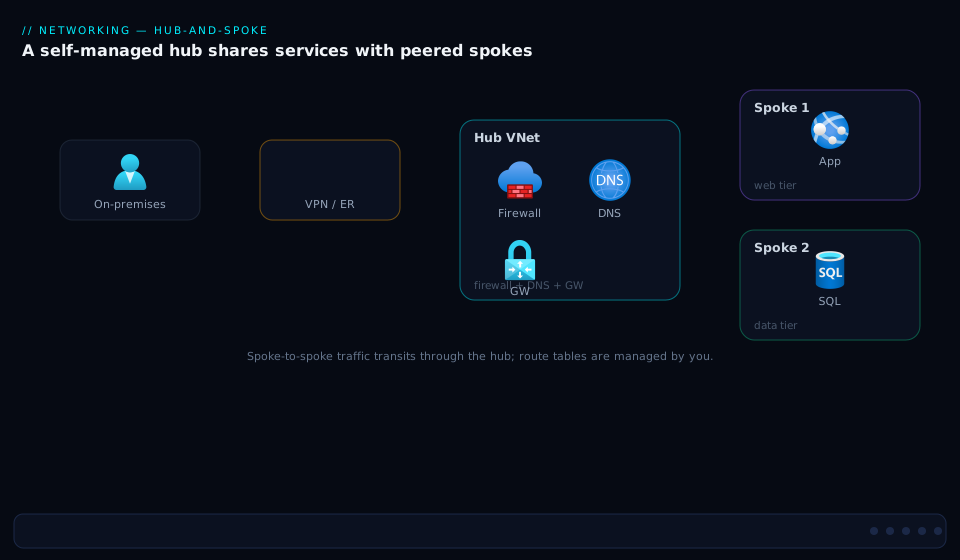
First, classic hub-and-spoke. Trace it from the centre out: a hub VNet holds the VPN/ExpressRoute gateways, the firewall (Azure Firewall or an NVA load-balancer sandwich), and DNS. Around it sit spoke VNets, each joined by a VNet peering (hub↔spoke, non-transitive). The arrows that matter are the UDR-forced ones: a spoke’s 0.0.0.0/0 route bends internet-bound traffic into the hub firewall, and spoke-to-spoke traffic hairpins through the same firewall because peering will not relay it directly. On-premises reaches the spokes through the hub’s gateway via gateway transit. Every arrow that is not a raw peering is a route table you wrote and must maintain — the diagram is, quite literally, a picture of your operational burden.
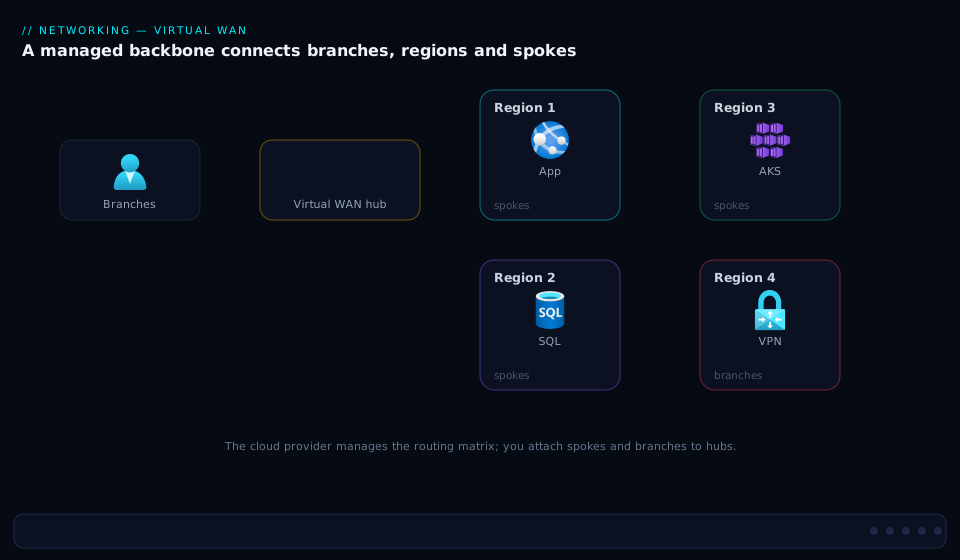
Second, Azure Virtual WAN. The centre is now a Microsoft-managed virtual hub — a transitive fabric, not a VNet you babysit. Branches arrive over site-to-site VPN and SD-WAN edges deployed into the hub via the partner program; remote users arrive over point-to-site VPN; the datacentre arrives over ExpressRoute; and workload spoke VNets attach as VNet connections. The key visual difference from the first diagram: there are no UDR arrows. Spoke-to-spoke, branch-to-spoke, and (with routing intent) traffic-through-the-firewall are all programmed by the platform. A second hub in another region connects to the first automatically (hub-to-hub any-to-any), so a spoke in one region reaches a branch in another with nothing for you to route.
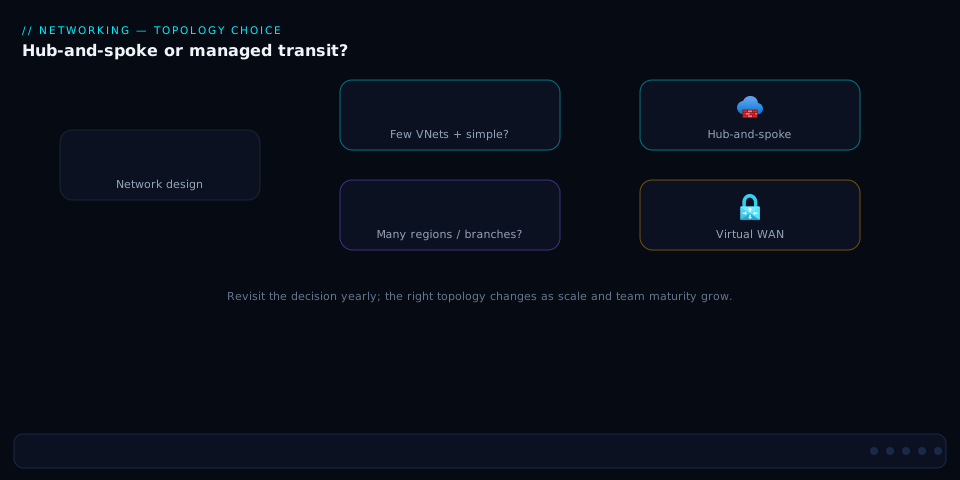
Third, the selection flow. Read it as a decision tree: start at scale (how many regions and branches), branch on inspection needs (do you require a specific third-party NVA chain, or will Azure Firewall in a Secured Hub do), branch on control appetite (do you need per-subnet routing granularity), and arrive at one of three outcomes — stay hub-and-spoke, adopt Virtual WAN, or Virtual WAN with a Secured Hub. The flow encodes the rule the whole article builds to: managed transit wins as region and branch counts climb, unless a hard requirement for granular control or a specific NVA forces the self-managed hub.
Real-world scenario
Meridian Logistics runs a parcel network across India and Southeast Asia: a core platform in Central India and Southeast Asia (Singapore) Azure regions, plus 180 depots that each need connectivity to the central tracking and dispatch systems. The cloud team is six engineers; the original Azure footprint was a textbook hub-and-spoke in Central India — one hub VNet with Azure Firewall, a VPN gateway, and twenty spoke VNets for the various product teams, every spoke wired with 0.0.0.0/0-to-firewall UDRs.
The cracks showed up in three places at once. First, branch onboarding did not scale: each new depot meant a hand-built IPsec tunnel on the hub VPN gateway, and at around 90 sites the team was spending a full engineer-week per month just adding and troubleshooting tunnels, with the gateway’s connection count becoming a planning constraint. Second, the second region (Singapore, opened for the SEA expansion) required a whole second hub — gateways, firewall, peerings — and a hand-maintained global peering plus cross-region UDRs so a Singapore spoke could reach the Central India tracking service. The route-table matrix was now two-dimensional and a single asymmetric route caused a half-day outage when on-prem→Singapore-spoke return traffic bypassed the firewall and got dropped by an NSG. Third, the business bought an SD-WAN product for the depots, and landing that SD-WAN into a classic hub meant running the vendor’s NVAs in the hub themselves, with the load-balancer sandwich and the lifecycle that implies.
The architecture review put the numbers on the table: 2 regions, 180 branches climbing toward 300, an SD-WAN overlay, and a six-person team. Against the decision matrix this was squarely Virtual WAN territory — many branches, multi-region transit, a partner SD-WAN that deploys into a managed hub, and a small team that could not afford to operate a growing routing plane by hand. They chose Standard Virtual WAN with Secured Hubs.
The migration ran in phases over a quarter, with no flag day. They stood up a Virtual WAN with a hub in each region, deployed Azure Firewall into each hub (Secured Hub) and set routing intent to inspect both internet and private traffic — which deleted the entire UDR forest in one move. They migrated spokes hub-by-hub: connect the spoke VNet to the virtual hub, validate east-west and egress through the new firewall, then remove the old peering and route table. Branches moved onto the SD-WAN-in-hub overlay through the vendor’s partner integration, retiring the hand-built IPsec tunnels in batches. The cross-region case that had caused the asymmetric-routing outage became automatic hub-to-hub any-to-any — nothing to route, nothing to mirror.
The phased migration as a runbook, because the order is what makes it flag-day-free:
| Phase | Action | Validate before proceeding | Rollback if it fails |
|---|---|---|---|
| 0 | Audit IP space for overlap across all spokes/hub | No CIDR overlaps anywhere | Re-IP offending spokes first |
| 1 | Create Standard vWAN + a hub per region | Hub routingState: Provisioned |
Delete hub (nothing else attached yet) |
| 2 | Deploy AzFW into each hub; set routing intent | Test inspection on a throwaway spoke | Disable routing intent; remove AzFW |
| 3 | Connect one pilot spoke to the hub | East-west + egress through new firewall | Remove the connection; spoke still on old hub |
| 4 | Migrate remaining spokes one at a time | Each spoke validated before old peering removed | Re-add the old peering/UDR for that spoke |
| 5 | Move branches to SD-WAN-in-hub in batches | Each batch’s sites reachable | Keep old IPsec tunnels until batch confirmed |
| 6 | Retire old hub(s) and route tables | No traffic left on the old path | Old hub stays until traffic is zero |
The outcome was operational, not just architectural. Branch onboarding dropped from an engineer-week a month to a templated SD-WAN provisioning step; the cross-region routing matrix vanished; and the team stopped touching route tables. The cost went up in absolute terms — Virtual WAN’s hub, connection-unit, and data-processing charges are real and exceeded the old gateway+firewall bill — but the team did the math on the engineer-time the old model consumed and judged the trade clearly worth it. The lesson they wrote down: “Hub-and-spoke is cheaper on the invoice and more expensive on the calendar. Past two regions and a hundred branches, the calendar wins.”
The decision as the board saw it, scored against what actually mattered to them:
| Criterion | Hub-and-spoke (current) | Virtual WAN | Weight for Meridian |
|---|---|---|---|
| Branch onboarding effort | Engineer-week / month, manual | Templated SD-WAN, managed | Decisive |
| Multi-region transit | Manual hub peering + UDRs | Automatic any-to-any | Decisive |
| SD-WAN landing | Run vendor NVAs yourself | Deploy into managed hub | High |
| Operational toil (routing) | High and growing | Near-zero (routing intent) | Decisive |
| Granular per-subnet control | Full (UDRs) | Constrained | Low (didn’t need it) |
| Absolute monthly cost | Lower | Higher | Medium (accepted) |
| Team size fit (6 engineers) | Poor at this scale | Good | High |
Advantages and disadvantages
Each topology’s strengths are the other’s weaknesses — which is why the choice is real and not obvious. Weigh them honestly:
| Advantages | Disadvantages | |
|---|---|---|
| Hub-and-spoke | Total control of the routing plane; any NVA vendor and inspection chain; per-subnet UDR granularity; predictable, often lower cost for small estates; no dependency on a managed-fabric roadmap | You operate the entire routing plane (including its outages); non-transitive peering forces UDR toil that grows with spokes; multi-region transit is manual and asymmetric-routing-prone; branch onboarding is per-tunnel; NVA HA is your problem (sandwich) |
| Virtual WAN | Native any-to-any and hub-to-hub transit; branch/SD-WAN onboarding at thousands of sites; routing intent collapses the UDR forest; Secured Hub gives HA Azure Firewall with no sandwich; multi-region is automatic; small teams can operate large networks | Higher and more complex cost (hub + connection units + data processing); constrained routing model (you route the hub’s way); fewer NVA choices than self-managed; harder to do exotic per-subnet inspection chains; a strategic commitment that is non-trivial to reverse |
Reduced to a chooser, the decision maps cleanly onto a handful of drivers — find your dominant row and the topology usually falls out:
| If your dominant driver is… | Lean | Because |
|---|---|---|
| A mandated specific NVA vendor + custom inspection chain | Hub-and-spoke | Full vendor choice and per-subnet chaining; Secured Hub is more constrained |
| Many branches (100+) / SD-WAN overlay | Virtual WAN | Managed, templated on-ramp; classic per-tunnel onboarding doesn’t scale |
| Multiple regions needing transit | Virtual WAN | Automatic hub-to-hub any-to-any vs hand-maintained hub peering |
| A small estate (≤ ~5 spokes, one region) | Hub-and-spoke | Free hub VNet; vWAN’s hourly hub floor is poor value here |
| A small team running a large network | Virtual WAN | Routing intent removes the routing plane you’d otherwise operate |
| Exotic per-subnet routing granularity | Hub-and-spoke | UDRs give unlimited control; vWAN route tables are coarser |
| Lowest possible invoice at small scale | Hub-and-spoke | One meter (gateways/firewall) vs vWAN’s three |
Hub-and-spoke is the right call when control is a hard requirement and scale is moderate: a regulated workload that mandates a specific firewall vendor with a custom inspection chain; a single-region estate with a stable, small number of spokes; or a network team that genuinely wants — and is staffed to operate — the full routing plane. Virtual WAN is the right call when scale and operational leverage dominate: many regions, many branches, an SD-WAN overlay, heavy any-to-any traffic, or a small team that cannot afford to hand-maintain transit. The misery cases are the mismatches: a tiny estate forced onto Virtual WAN (paying hub costs to connect three VNets) or a sprawling 200-branch multi-region estate clinging to hand-managed hub-and-spoke (drowning in route tables). Size the topology to the scale and the team, not to fashion.
Hands-on lab
Build a minimal Virtual WAN with one hub and connect a spoke, observe the any-to-any transit that needs no UDR, then tear it down. This uses real Azure resources that bill while they exist — a virtual hub and gateways are not free-tier, so keep the lab short and delete at the end. Run in Cloud Shell (Bash). (We deliberately skip deploying gateways/firewall to keep the cost and time low; the spoke-connection step is what proves the transit point.)
Step 1 — Variables and resource group.
RG=rg-vwan-lab
LOC=centralindia
az group create -n $RG -l $LOC -o table
Step 2 — Create the Virtual WAN (Standard) and a hub. The hub takes several minutes to provision.
az network vwan create -g $RG -n vwan-lab --type Standard -l $LOC -o table
az network vhub create -g $RG -n hub-lab --vwan vwan-lab \
  --address-prefix 10.200.0.0/24 -l $LOC --sku Standard -o table
Expected: a hub resource with provisioningState moving to Succeeded and routingState: Provisioned. (Allow ~10–30 minutes — hub creation is the slow step.)
Step 3 — Create two spoke VNets to demonstrate transit.
az network vnet create -g $RG -n vnet-spokeA --address-prefixes 10.201.0.0/24 \
  --subnet-name snet-a --subnet-prefixes 10.201.0.0/27 -o table
az network vnet create -g $RG -n vnet-spokeB --address-prefixes 10.202.0.0/24 \
  --subnet-name snet-b --subnet-prefixes 10.202.0.0/27 -o table
Step 4 — Connect both spokes to the hub (the vWAN “peering”).
az network vhub connection create -g $RG --vhub-name hub-lab -n conn-spokeA \
  --remote-vnet $(az network vnet show -g $RG -n vnet-spokeA --query id -o tsv)
az network vhub connection create -g $RG --vhub-name hub-lab -n conn-spokeB \
  --remote-vnet $(az network vnet show -g $RG -n vnet-spokeB --query id -o tsv)
Step 5 — Prove transit needs no route table. Inspect the hub’s effective routes and the spoke connections — note that spoke A learns spoke B’s prefix through the hub with no UDR written anywhere:
az network vhub connection list -g $RG --vhub-name hub-lab \
  --query "[].{name:name, vnet:remoteVirtualNetwork.id}" -o table

# The hub's default route table now carries both spoke prefixes automatically
az network vhub route-table show -g $RG --vhub-name hub-lab -n defaultRouteTable \
  --query "routes" -o json
The point of the lab: spoke A and spoke B can reach each other (any-to-any) purely because both are connected to the hub — the exact spoke-to-spoke case that, in classic hub-and-spoke, required a UDR-to-firewall on each spoke and allowForwardedTraffic on each peering. Here you wrote zero routes.
Step 6 — (Optional) Observe what routing intent would add. Without deploying a firewall you can still read the routing constructs that would enforce inspection:
az network vhub route-table list -g $RG --vhub-name hub-lab -o table
# 'defaultRouteTable' and 'noneRouteTable' exist; custom tables and routing intent
# layer on top to steer traffic through a Secured Hub firewall.
Validation checklist. You created a Standard Virtual WAN and a managed hub, connected two spokes, and confirmed they reach each other through the hub’s transitive fabric with no route table. That single observation is the entire value proposition versus the UDR forest of classic hub-and-spoke. The lab steps mapped to what each proves:
| Step | What you did | What it proves | Classic equivalent it replaces |
|---|---|---|---|
| 2 | Create Standard vWAN + hub | The managed, transitive hub exists | Building a hub VNet + gateways + firewall |
| 4 | Connect two spokes | Attaching a spoke = one command | A peering pair + flags per spoke |
| 5 | Read effective routes | Any-to-any with zero UDRs | UDR-to-NVA on every spoke + allowForwardedTraffic |
| 6 | Inspect route tables | Where routing intent would steer inspection | The 0.0.0.0/0-to-firewall UDR forest |
Cleanup (the hub bills hourly — delete promptly).
az group delete -n $RG --yes --no-wait
Cost note. A virtual hub and its scale units bill per hour even idle; a short lab is a modest amount but do not leave it running overnight. Deleting the resource group removes the hub, connections, and VNets together. There is no free tier for Virtual WAN hubs — this is a fundamental cost difference from a hub-and-spoke whose hub VNet is free (you pay only for the gateways/firewall you put in it).
Common mistakes & troubleshooting
The failures cluster by topology — hub-and-spoke fails in the routing plane you maintain, Virtual WAN fails in the model you must respect. First as a scannable table, then the reasoning for the ones that bite hardest.
| # | Symptom | Root cause | Confirm (exact cmd / portal path) | Fix |
|---|---|---|---|---|
| 1 | Spoke-to-spoke works one way, dies on return | allowForwardedTraffic off on the return spoke’s peering |
az network vnet peering show --query allowForwardedTraffic |
Set --allow-forwarded-traffic on both peerings |
| 2 | Spokes can’t reach on-premises | Gateway transit flags wrong/missing | Check allowGatewayTransit (hub) + useRemoteGateways (spoke) |
Set transit on hub, remote-gateways on spoke |
| 3 | New spoke can’t talk to existing spokes | Missing UDR on the existing spokes for the new prefix | az network route-table route list on each spoke |
Add route (or use a planned supernet route) |
| 4 | On-prem→spoke bypasses the firewall (asymmetric) | No UDR on GatewaySubnet for return traffic |
az network nic show-effective-route-table on a spoke VM |
Add return-path UDR; mirror forward path |
| 5 | Azure Firewall won’t deploy | Subnet not named AzureFirewallSubnet or smaller than /26 |
Check subnet name/prefix | Recreate subnet AzureFirewallSubnet /26 |
| 6 | useRemoteGateways deploy error |
Spoke also has its own gateway | az network vnet-gateway list -g <spoke-rg> |
Remove local gateway or drop remote-gateways |
| 7 | vWAN: spokes connected but no any-to-any | Basic SKU (no transit), or hub still provisioning | az network vwan show --query type; hub routingState |
Use Standard; wait for Provisioned |
| 8 | vWAN: traffic not hitting the firewall | Routing intent not enabled (plain hub, not Secured) | az network vhub routing-intent list |
Deploy AzFW into hub; set routing intent |
| 9 | vWAN: a spoke can reach things it shouldn’t | Default route table propagation (everything any-to-any) | Check connection association/propagation | Use a custom/None route table to isolate |
| 10 | Migration: spoke can’t be connected to a hub | Overlapping address space with hub or another spoke | az network vnet show --query addressSpace |
Re-IP the spoke (no overlap allowed) |
| 11 | Branch tunnel won’t come up on classic gateway | Gateway at its tunnel/connection limit, or SKU too small | az network vpn-connection list; gateway SKU |
Scale gateway SKU; or move branches to vWAN |
| 12 | Cross-region spoke-to-spoke (classic) fails | No hub-to-hub peering or missing cross-region UDRs | az network vnet peering list on both hubs |
Global peer the hubs + UDRs both regions |
| 13 | vWAN cost surprise on the invoice | Hub + connection units + data processing all bill | Cost analysis filtered to the vWAN RG | Right-size; consolidate hubs; expected, not a bug |
| 14 | DNS resolves but traffic still blackholes | Route exists but NSG drops forwarded/inter-spoke | az network watcher show-next-hop; NSG flow logs |
Fix NSG; allow the inter-spoke/forwarded flow |
The expanded reasoning for the entries that cost the most time:
1. Spoke-to-spoke works one way and dies on the return path. Root cause: the packet from spoke A to spoke B is forwarded by the hub NVA/Firewall, so spoke B sees it as forwarded traffic — and if spoke B’s peering to the hub does not set allowForwardedTraffic, it drops it even though the route is correct. Confirm: az network vnet peering show -g rg-spokeB --vnet-name vnet-spokeB -n spokeB-to-hub --query allowForwardedTraffic. Fix: set --allow-forwarded-traffic on both spokes’ peerings to the hub. This is the single most common classic hub-and-spoke bug. See Diagnosing Azure VNet Connectivity: NSGs, UDRs, Effective Routes & Network Watcher for the effective-route walk-through.
4. On-prem to a spoke bypasses the firewall (asymmetric routing). Root cause: forward traffic (spoke→on-prem) goes through the firewall via the spoke’s UDR, but return traffic (on-prem→spoke) arrives at the hub gateway and routes straight to the spoke unless a UDR on GatewaySubnet forces it back through the firewall — so the firewall sees only one direction and stateful inspection drops the flow. Confirm: az network nic show-effective-route-table on a spoke VM and compare forward vs return next hops. Fix: add a route table on GatewaySubnet sending spoke prefixes to the firewall, mirroring the forward path. Asymmetric routing is the multi-region hub-and-spoke killer and the bug Virtual WAN’s platform-owned routing eliminates entirely.
7. Virtual WAN spokes are connected but there is no any-to-any. Root cause: either the Virtual WAN is Basic (which has no transit at all), or the hub has not finished provisioning (routingState not yet Provisioned). Confirm: az network vwan show -g rg-vwan -n vwan-global --query type and the hub’s routingState. Fix: recreate as Standard (the SKU is a capability gate, not a performance tier) and wait for provisioning to complete.
8. Virtual WAN traffic is not being inspected. Root cause: a plain virtual hub routes any-to-any but does not inspect — you must make it a Secured Hub (deploy Azure Firewall or a partner NVA into it) and enable routing intent. People assume connecting a firewall is enough; without routing intent, traffic flows around it. Confirm: az network vhub routing-intent list -g rg-vwan --vhub-name hub-cin. Fix: deploy AZFW_Hub into the hub and set routing intent for Internet and/or Private traffic.
10. A spoke cannot be connected to a hub during migration. Root cause: overlapping address space — the spoke’s CIDR overlaps the hub’s address space or another connected spoke’s, and Azure refuses to route ambiguous prefixes. Confirm: az network vnet show --query addressSpace across the spoke, the hub, and existing connections. Fix: re-IP the offending spoke before connecting. This is why IP planning is the true prerequisite for any topology and the most common blocker in real migrations — there is no override for overlap.
13. The Virtual WAN bill is higher than expected. Root cause: Virtual WAN charges for the hub (an hourly scale-unit cost even when idle), connection units (per connected VNet/branch), and data processing (per GB through the hub) — three meters where hub-and-spoke had effectively one (the gateways/firewall). Confirm: Cost analysis scoped to the Virtual WAN resource group, grouped by meter. Fix: this is expected, not a defect — right-size hubs, consolidate where a region does not need its own hub, and accept the cost as the price of the operational leverage. The crossover is real: below a certain scale hub-and-spoke is cheaper, above it Virtual WAN’s leverage justifies the higher bill.
Best practices
- Plan IP space before you choose a topology. Non-overlapping, contiguous, well-summarised CIDRs make spoke-to-spoke routes collapsible (a single supernet UDR) in classic and make migration to Virtual WAN possible at all — overlap has no override in either model.
- Keep the hub workload-free. The hub (classic or virtual) holds shared network services only — gateways, firewall, DNS, Bastion. Putting workloads in the hub couples their lifecycle to your core routing plane.
- Always put a load-balancer sandwich around third-party NVAs. A single NVA VM is a single point of failure; HA Ports on an internal Standard LB with UDR next hop = the LB frontend is the only production-grade pattern. See the NVA sandwich deep dive.
- Mirror every forward route on the return path. Asymmetric routing through a stateful firewall is the top classic hub-and-spoke outage —
GatewaySubnetneeds return-path UDRs whenever spokes route egress through the firewall. - Use
allowForwardedTrafficon both peerings whenever spoke-to-spoke is routed through a hub appliance — the return path is forwarded traffic and silently drops otherwise. - Choose Standard Virtual WAN, never Basic, for enterprise. Basic has no transit, no ExpressRoute, no P2S, no Secured Hub — it is a single-purpose S2S product, not an enterprise topology.
- Use routing intent instead of UDR forests the moment you adopt a Secured Hub — two policy rules replace a route table per spoke and eliminate asymmetric-routing risk because the platform owns both directions.
- Standardise firewall policy in Firewall Manager across classic and Virtual WAN hubs so inspection rules are consistent and reviewed as code, not drifting per hub.
- Size for the branch count first. Past roughly a hundred branches or a second region, the operational case for Virtual WAN usually dominates regardless of the invoice — branch onboarding and multi-region transit are where hub-and-spoke toil explodes.
- Migrate hub-by-hub, spoke-by-spoke, with no flag day. Connect a spoke to the new hub, validate east-west and egress, then retire the old peering and route table — never cut the whole estate at once.
- Revisit the decision every 12–18 months. Scale changes; a topology right at twenty spokes in one region is wrong at two hundred across four. Document the decision and its triggers so the next review is fast.
- Manage all of it as IaC. Peerings, route tables, hubs, connections, and routing intent are all expressible in Terraform/Bicep — hand-clicked routing is how asymmetric-routing landmines get planted.
Security notes
- Centralise inspection, deliberately. Both topologies exist largely to force traffic through a firewall — classic via UDRs to an NVA/Azure Firewall, Virtual WAN via routing intent to a Secured Hub. The security goal is identical (no spoke reaches the internet or another spoke un-inspected); only the mechanism differs. Decide your inspection scope (internet only, or internet + east-west) explicitly.
- Prefer Azure Firewall Premium for IDPS/TLS inspection where the workload warrants it; in Virtual WAN it deploys as
AZFW_Huband is HA and auto-scaling with no sandwich to operate. In classic hub-and-spoke, third-party NVAs give you vendor-specific inspection at the cost of running the HA pattern yourself. - Segment with route tables and NSGs together. Routing forces the path; NSGs enforce what is allowed on it. A spoke that routes through the firewall can still be blocked from talking to another tier by NSGs/ASGs — pair the two. See Micro-Segmentation with NSGs and Application Security Groups.
- Use Virtual WAN custom/None route tables (or restrictive UDRs) to isolate environments — production and dev should not reach each other just because both connect to the same hub. Default any-to-any is convenient and a segmentation risk if left unconstrained.
- Lock down the gateways and management plane. VPN/ExpressRoute gateways, Bastion, and the hub firewall are high-value targets; restrict management with RBAC, use Bastion (not public RDP/SSH) for jump access, and keep gateway public IPs minimal.
- Keep DNS private and consistent. Route private-endpoint and internal name resolution through a private resolver/forwarders in the hub so spokes resolve PaaS to private IPs — a topology that routes correctly but resolves to public IPs leaks traffic to the internet. See Private Endpoints and DNS at Scale.
- Inspect east-west, not just north-south. Routing intent’s Private Traffic policy (or per-spoke east-west UDRs in classic) ensures lateral movement is inspected — the breach that matters most is often the one that already got a foothold in one spoke.
- Audit effective routes as a control. A misrouted
0.0.0.0/0is both an outage and a security event (traffic bypassing the firewall). Periodically validate effective routes against the intended design, ideally in CI against the IaC.
Cost & sizing
The bill drivers differ structurally between the two models, and the crossover is the heart of the cost decision:
- Hub-and-spoke charges are dominated by the gateways (VPN and/or ExpressRoute gateway, billed per hour by SKU), the firewall (Azure Firewall hourly + per-GB processed, or NVA VM compute + licensing), and inter-region peering egress (data crossing a global peering is charged per GB). The hub VNet itself is free — you pay for what you put in it. For a small single-region estate this is often the cheaper model.
- Virtual WAN charges are dominated by the hub (an hourly scale-unit / routing-infrastructure-unit cost that exists even when idle), connection units (per connected VNet and per branch/VPN connection), and data processing (per GB flowing through the hub), plus the same gateway and Secured-Hub firewall costs when enabled. Three meters where classic had one — which is why Virtual WAN’s floor is higher and why a tiny estate on Virtual WAN is poor value.
- The crossover is driven by scale and operational cost, not raw bandwidth: below a handful of spokes in one region, hub-and-spoke wins on the invoice; as branches, regions, and any-to-any traffic climb, Virtual WAN’s per-hub cost is offset by the gateways and inter-hub routing you don’t build and the engineer-time you don’t spend.
- Right-sizing. In classic, match the gateway SKU to branch count and throughput and the firewall tier to inspection needs; don’t run an ExpressRoute gateway you don’t use. In Virtual WAN, scale routing infrastructure units to actual throughput, consolidate hubs where a region has little traffic, and watch the data-processing meter on chatty east-west.
A rough monthly picture (figures are order-of-magnitude; confirm current Azure pricing for your region):
| Cost driver | Hub-and-spoke | Virtual WAN | Notes |
|---|---|---|---|
| Hub itself | Free (VNet) | Hourly scale-unit cost (real, even idle) | The structural floor difference |
| VPN gateway | Per-hour by SKU (~₹? to multi-Gbps) | Per-hour, scale-unit driven | vWAN scales tunnels far higher |
| ExpressRoute gateway | Per-hour by SKU | Per-hour, RIU driven | Plus the circuit cost (separate) |
| Firewall | AzFW hourly + per-GB, or NVA compute+license | AzFW AZFW_Hub hourly + per-GB |
Same firewall, HA built-in in vWAN |
| Connection / peering | Peering egress per GB (esp. cross-region) | Connection units per VNet/branch + data processing per GB | vWAN meters connections explicitly |
| Operational (engineer-time) | High and growing with scale | Low (routing intent, managed) | The hidden cost that often decides it |
The sizing rule in one line: price both models at your projected scale (not today’s), add the engineer-time the routing plane consumes, and let the crossover — not the brochure — decide. For three VNets in one region, stay hub-and-spoke. For two-plus regions and a hundred-plus branches, Virtual WAN almost always wins once you count the calendar.
Interview & exam questions
1. Why is VNet peering non-transitive, and what are the ways to achieve spoke-to-spoke connectivity? Peering is non-transitive by deliberate design — Azure will not relay traffic through an intermediate VNet’s peering. To get spoke-to-spoke you either route both spokes through a router in the hub (an NVA or Azure Firewall) using UDRs (classic hub-and-spoke), or use a fabric that is transitive by construction — a Virtual WAN virtual hub, which gives any-to-any automatically. The non-transitivity is the single fact that creates the two topologies.
2. In classic hub-and-spoke, which peering flags enable a spoke to reach on-premises through the hub’s gateway? The hub side sets allowGatewayTransit (it shares its gateway) and the spoke side sets useRemoteGateways (it uses the hub’s gateway instead of its own). The spoke must not also have its own gateway, or the deployment conflicts. This is gateway transit, and it is automatic in Virtual WAN.
3. What does allowForwardedTraffic do and why is it the most common spoke-to-spoke bug? It permits traffic that was forwarded by an NVA in the peered VNet (as opposed to originated by that VNet). When spoke A reaches spoke B through the hub firewall, spoke B sees forwarded traffic; if its peering does not allow forwarded traffic, the return path silently drops, producing half-broken connectivity. Set it on both spokes’ peerings.
4. What is routing intent in Virtual WAN and what does it replace? Routing intent is a policy on a Secured Virtual Hub with up to two rules — send Internet Traffic and/or Private Traffic to the integrated security solution (Azure Firewall or partner NVA). The platform then programs the effective routes on every connected VNet and branch automatically. It replaces the entire UDR forest (a 0.0.0.0/0-to-firewall route plus per-spoke east-west routes on every spoke) of classic hub-and-spoke, and eliminates asymmetric-routing risk because the platform owns both directions.
5. What is the difference between Basic and Standard Virtual WAN? Basic supports only site-to-site VPN — no hub-to-hub, no any-to-any transit, no ExpressRoute, no point-to-site, no Secured Hub, no custom route tables. Standard supports all of those. The SKU is a capability gate, not a performance tier; any enterprise topology requires Standard.
6. What is a Secured Virtual Hub and how does it differ from running an NVA sandwich in a classic hub? A Secured Virtual Hub is a virtual hub with an integrated firewall (Azure Firewall deployed as AZFW_Hub, or a supported partner NVA), managed via Firewall Manager and steered by routing intent. Azure Firewall in a hub is HA and auto-scaling by design — you do not build the internal-load-balancer sandwich a third-party NVA needs in a classic hub. The trade is fewer vendor choices and a routing model you must accept.
7. Above roughly what scale does Virtual WAN typically beat hub-and-spoke, and why? Past two regions or ~100 branches, Virtual WAN usually wins — not on raw bandwidth but on operational cost: branch onboarding becomes templated instead of per-tunnel, multi-region transit becomes automatic any-to-any instead of hand-maintained hub peering plus cross-region UDRs, and a small team can operate a large network. The invoice may go up; the engineer-time goes sharply down.
8. How does multi-region transit differ between the two models? In classic hub-and-spoke you global-peer the two hubs and add cross-region UDRs on both sides, owning the inter-hub routing (and its asymmetric-routing risk) by hand. In Virtual WAN, two hubs in two regions connect via automatic hub-to-hub any-to-any — a spoke in one region reaches a branch in another with nothing for you to route.
9. What blocks a VNet from being connected to a Virtual WAN hub, and how do you fix it? Overlapping address space — if the VNet’s CIDR overlaps the hub’s address space or another connected VNet’s, Azure refuses the ambiguous prefix. The only fix is to re-IP the offending VNet; there is no override. This is why IP planning is the true prerequisite for any topology and the most common real migration blocker.
10. You see on-prem-to-spoke traffic bypassing the firewall in a hub-and-spoke. What’s happening and how do you fix it? Asymmetric routing: the forward path (spoke→on-prem) goes through the firewall via the spoke’s UDR, but the return path (on-prem→spoke) arrives at the hub gateway and routes straight to the spoke unless a UDR on GatewaySubnet forces it back through the firewall. The stateful firewall sees one direction and drops the flow. Fix by adding a return-path UDR on GatewaySubnet that mirrors the forward path.
11. Why might a small organisation deliberately choose hub-and-spoke over Virtual WAN? Because for a single region with a handful of spokes the hub VNet is free and only the gateways/firewall cost money, making it cheaper on the invoice; because it offers full per-subnet routing control and any NVA vendor; and because a small stable estate does not generate the branch/multi-region toil that justifies Virtual WAN’s higher floor. Control and cost, at small scale, favour classic.
12. How do you migrate from hub-and-spoke to Virtual WAN without a flag day? Phase it: stand up the Virtual WAN and hub(s), deploy the Secured Hub firewall and set routing intent, then migrate spoke-by-spoke — connect the spoke to the virtual hub, validate east-west and egress through the new firewall, and only then remove the old peering and route table. Move branches onto the new on-ramp (SD-WAN-in-hub or VPN) in batches. Never cut the whole estate at once.
These map to AZ-700 (Azure Network Engineer Associate) — design and implement core networking, hybrid connectivity, routing, and Virtual WAN — most directly, with the landing-zone and governance angles touching AZ-305 (Solutions Architect Expert). A compact cert-mapping:
| Question theme | Primary cert | Objective area |
|---|---|---|
| Peering, transitivity, gateway transit | AZ-700 | Design and implement VNet connectivity |
| UDRs, NVA, asymmetric routing | AZ-700 | Implement and manage routing |
| Virtual WAN, hubs, routing intent | AZ-700 | Design and implement Virtual WAN |
| Hybrid on-ramps (VPN/ER/SD-WAN) | AZ-700 | Design and implement hybrid connectivity |
| Topology choice for a landing zone | AZ-305 | Design network architecture |
| Secured Hub / Firewall Manager | AZ-700 / AZ-500 | Secure connectivity; central inspection |
Quick check
- Spoke A reaches spoke B through the hub firewall, but only the SYN gets there and the connection never establishes. Name the single most likely peering setting and which side(s) it’s wrong on.
- True or false: a plain Virtual WAN virtual hub inspects east-west traffic through a firewall by default.
- Which two peering flags implement gateway transit, and on which side does each go?
- You need to connect an existing VNet to a Virtual WAN hub and Azure refuses. What is the most likely cause, and is there an override?
- Past roughly what scale does Virtual WAN usually become the right choice, and is the deciding factor the invoice or something else?
Answers
allowForwardedTraffic— it must be set on both spokes’ peerings to the hub (the bug is usually that it’s off on the return spoke’s peering). The return packet is forwarded by the firewall, so without forwarded-traffic allowed it drops, giving one-way connectivity.- False. A plain virtual hub routes any-to-any but performs no inspection. You must make it a Secured Virtual Hub (deploy Azure Firewall/partner NVA) and enable routing intent for traffic to be inspected.
allowGatewayTransiton the hub side (it shares its gateway) anduseRemoteGatewayson the spoke side (it uses the hub’s gateway). The spoke must not also have its own gateway.- Overlapping address space between the VNet and the hub or another connected VNet. There is no override — you must re-IP the VNet so its CIDR does not overlap.
- Past about two regions or ~100 branches, Virtual WAN usually wins. The deciding factor is typically not the invoice (which often goes up) but operational cost — branch onboarding, multi-region transit, and the engineer-time the classic routing plane consumes.
Glossary
- Hub VNet — in classic hub-and-spoke, an ordinary VNet you own that holds shared network services (gateways, firewall, DNS, Bastion) and that spokes peer to and route through.
- Spoke VNet — a workload VNet peered (classic) or connected (Virtual WAN) to a hub, where applications run.
- VNet peering — a direct link between two VNets over the Microsoft backbone; non-transitive by design (it does not relay traffic through an intermediate VNet).
allowForwardedTraffic— a peering setting permitting traffic forwarded by an NVA in the peer; required on both spokes for firewall-routed spoke-to-spoke to work in both directions.- Gateway transit — letting a spoke use the hub’s VPN/ExpressRoute gateway via
allowGatewayTransit(hub) anduseRemoteGateways(spoke), avoiding a gateway per spoke. - UDR (user-defined route) / route table — routes that override Azure’s default system routes; the mechanism that forces spoke traffic through a hub firewall and fakes transitivity in classic hub-and-spoke.
- NVA (network virtual appliance) — a third-party firewall/router VM (Palo Alto, Fortinet, etc.); needs a load-balancer sandwich for HA in a classic hub.
- Load-balancer sandwich — the HA pattern of internal Standard Load Balancers (HA Ports) in front of NVA NICs, with UDR next hop set to the LB frontend.
- Virtual WAN — a Microsoft global networking service offering managed virtual hubs with transitive any-to-any routing and integrated on-ramps; Standard SKU unlocks the enterprise capabilities.
- Virtual hub — a Microsoft-managed hub (per region) within a Virtual WAN; transitive and managed, not a VNet you deploy into.
- VNet connection — the attachment of a spoke VNet to a virtual hub (the Virtual WAN equivalent of a peering); needs no route table for transit.
- Hub-to-hub (any-to-any) — automatic transitive routing between virtual hubs in different regions, providing multi-region transit with nothing to route by hand.
- Routing intent — a policy on a Secured Virtual Hub that sends Internet and/or Private traffic to the integrated firewall, replacing the per-spoke UDR forest.
- Secured Virtual Hub — a virtual hub with an integrated firewall (Azure Firewall
AZFW_Hubor a partner NVA), HA and auto-scaling, managed via Firewall Manager. - Routing infrastructure unit (scale unit) — the capacity dial of a virtual hub that drives its throughput and supported VM count (and its hourly cost).
- Custom route table (Virtual WAN) — an additional hub route table that creates routing domains for controlled segmentation (association = whose traffic uses it; propagation = who learns its routes).
- Firewall Manager — central management of Azure Firewall policies across classic and Virtual WAN hubs.
- Asymmetric routing — forward and return traffic taking different paths so a stateful firewall sees only one direction and drops the flow; the top classic hub-and-spoke outage, eliminated by Virtual WAN’s platform-owned routing.
Next steps
You can now choose a topology on evidence and build either one. Go deeper on the pieces:
- Next: Azure VNet Peering Done Right: Gateway Transit, Global Peering and Transitivity Limits — the peering mechanics this whole topology rests on.
- Related: User-Defined Routes and Route Tables: Steering Azure Traffic the Way You Intend — the UDR discipline that is classic hub-and-spoke’s entire operational burden.
- Related: Deploying HA Third-Party NVAs in Azure: The Load Balancer Sandwich Pattern — make a hub firewall actually highly available.
- Related: Integrating SD-WAN into a Cloud Backbone: Partner NVAs, Branch Onboarding, and Route Exchange — the branch on-ramp that makes Virtual WAN compelling at scale.
- Related: ExpressRoute Deep Dive: Private Peering, Route Filters, and VPN Failover — the private circuit on-ramp for both topologies.
- Related: Production Site-to-Site VPN to Azure: Active-Active Gateways with BGP — resilient hybrid connectivity into the hub.
- Related: Diagnosing Azure VNet Connectivity: NSGs, UDRs, Effective Routes & Network Watcher — the tools to debug whichever topology you run.