Your on-premises data centre runs the ERP, file servers and a SQL cluster that new Azure workloads need to reach over private IPs — no public exposure, no exceptions from the security team. The answer they’ll sign off on is a Site-to-Site (S2S) VPN: an encrypted IPsec/IKE tunnel between your on-prem edge device and an Azure VPN Gateway, carrying traffic between your corporate 10.x space and your Azure VNet 10.y space across the public internet as if the two were one routed network. It’s the workhorse of hybrid connectivity — cheaper than ExpressRoute, provisioned in under an hour, good for steady tens-to-hundreds of Mbps per tunnel.
The trouble is that an S2S VPN has two ends, and Azure controls only one. Half the config lives in the portal or az; the other half lives on a Cisco ASA, Palo Alto, FortiGate or strongSwan box a different team owns. The two ends must agree, byte for byte, on the pre-shared key, IKE version, encryption and integrity algorithms, Diffie-Hellman group, SA lifetimes and — the part that silently breaks more tunnels than anything else — the address prefixes each side may send. Get one wrong and the tunnel never comes up, or comes up and drops traffic, with the error buried in an IKE log on a device you may not have access to.
This guide builds the whole thing end to end and teaches you to reason about every knob. You will stand up a VPN Gateway with the right GatewaySubnet, create a local network gateway describing your on-prem side, wire a connection with a strong custom IPsec/IKE policy, and configure the matching on-prem device — in the portal, in az, and as repeatable Bicep. You will choose route-based over policy-based, decide between static routing and BGP, size the SKU against real throughput and tunnel limits, and walk away with a validation checklist and a phase-1/phase-2 troubleshooting playbook. By the end the tunnel is not a black box — it is a system you can debug at 2 a.m.
What problem this solves
Without a private link, Azure workloads can only reach on-prem services over the public internet — so you either expose them publicly (a firewall and audit nightmare) or copy data into Azure and live with it going stale. Neither survives a security review for regulated data, so teams resort to brittle reverse proxies, inbound holes for specific IPs, or batch exports — all workarounds for the absence of a routed private path.
What breaks without it is concrete: an App Service app needing on-prem AD for LDAP can’t reach a domain controller; an Azure Data Factory pipeline can’t pull from the on-prem warehouse; a lift-and-shift VM expects its old 10.50.x database one hop away and times out. The S2S VPN makes “the network is flat between on-prem and Azure” true. It is the default first hybrid-connectivity build for nearly every migration — fast and inexpensive, with ExpressRoute reserved for guaranteed bandwidth or a non-internet path later.
The moving-parts inventory — the four Azure objects you create plus the one device you don’t own, and what each is responsible for:
| Component | Where it lives | What it represents | Who owns/configures it | Break it and… |
|---|---|---|---|---|
| VPN Gateway | Azure VNet (GatewaySubnet) |
Azure’s encryption endpoint | You (Azure) | No tunnel at all; or wrong SKU caps throughput |
| GatewaySubnet | A reserved subnet in the VNet | The IP range the gateway VMs use | You (Azure) | Deployment fails or future SKUs can’t grow |
| Local network gateway (LNG) | Azure resource group | A description of your on-prem side | You (Azure) | Azure can’t route to on-prem prefixes |
| Connection | Azure resource group | The tunnel binding gateway↔LNG + PSK + policy | You (Azure) | Mismatched policy → tunnel won’t negotiate |
| On-prem VPN device | Your data centre / branch | The other IPsec endpoint | Network team (not Azure) | Phase 1/2 mismatch → tunnel down or flapping |
Learning objectives
By the end of this article you can:
- Explain the four Azure objects in an S2S VPN — VPN Gateway, GatewaySubnet, local network gateway, connection — and how they bind together with the on-prem device.
- Choose between a route-based and a policy-based gateway and justify why route-based is the answer for almost every modern build.
- Pick a VPN Gateway SKU (
VpnGw1–VpnGw5,AZzone-redundant variants) against real aggregate-throughput numbers, tunnel counts and BGP support. - Author a strong, matched custom IPsec/IKE policy (IKEv2, AES-256-GCM, SHA-384, DH Group 24, sensible SA lifetimes) and know which defaults Azure offers if you don’t.
- Decide between static routing and BGP, allocate APIPA BGP peer addresses, and understand active-active and dual-tunnel resilience.
- Build the full tunnel three ways — portal, az CLI, and Bicep — including the on-prem-side configuration concepts for the common firewalls.
- Validate a tunnel end to end (connection status, effective routes, ICMP/TCP reachability) and run a phase-1/phase-2 troubleshooting playbook with the exact
azcommands and packet-capture path.
Prerequisites & where this fits
You should already be comfortable with the Azure networking basics: a virtual network (VNet) is your private address space in Azure, carved into subnets, and resources get private IPs from those subnets. You should understand CIDR notation and non-overlapping address planning — the single most important precondition for any VPN, covered in depth in Azure VNet IP Address Planning: CIDR & Subnetting. You should know how to run az in Cloud Shell or locally and read JSON output. The concrete checklist before you start:
| Prerequisite | Why it’s needed | How to confirm |
|---|---|---|
| Azure subscription + Network Contributor on the RG | Create gateways, LNGs, connections | az role assignment list --assignee <you> |
| Non-overlapping Azure and on-prem CIDRs | Overlapping ranges cannot be routed | Compare VNet prefix vs on-prem prefix |
A VNet with room for a GatewaySubnet (/27+) |
The gateway VMs need reserved space | az network vnet show address space |
| On-prem device’s public IP (static) | The tunnel destination for the LNG | Ask the network team / check the WAN IP |
| Admin access to the on-prem firewall | To configure the matching IPsec policy | You or a teammate owns the device |
| Agreed IPsec/IKE policy + PSK | Both ends must match every field | Runbook with exact crypto fields |
This sits in the Hybrid Networking track — the next step after VNets and NSGs from Azure Virtual Network, Subnets & NSGs, and the sibling of How to Configure Point-to-Site VPN with Microsoft Entra Authentication (same gateway, a per-user connection type instead of device-to-Azure). Once a VNet is connected you extend reach with VNet Peering, Gateway Transit & Global Peering, and when a tunnel misbehaves you fall back on Azure Network Watcher Connectivity Diagnostics. In an enterprise build the gateway lives in the hub of an Azure enterprise-scale landing zone.
A map of who confirms what when a tunnel misbehaves, so you escalate fast:
| Layer | What lives here | Who usually owns it | Failure classes it causes |
|---|---|---|---|
| On-prem device | IPsec config, PSK, policy, routing | Network / firewall team | Phase 1/2 mismatch, tunnel down |
| Internet path | UDP 500/4500, ESP, public IPs | ISP / both edges | Tunnel won’t establish; intermittent drops |
| VPN Gateway | Azure endpoint, SKU, BGP | You (Azure) | Throughput cap, no BGP on Basic |
| Local network gateway | On-prem prefixes + public IP | You (Azure) | Azure can’t route to on-prem; stale IP |
| Connection | PSK, IPsec policy, prefixes | You (Azure) | Negotiation fails; selectors mismatch |
| VNet routing / NSG | Effective routes, subnet rules | You (Azure) | Tunnel up but traffic blocked |
Core concepts
Six mental models make every later decision obvious.
An S2S VPN is two IPsec endpoints agreeing on everything. IPsec negotiates in two phases: Phase 1 (the IKE SA) authenticates the peers with the pre-shared key and builds a secure channel; Phase 2 (the IPsec SA) negotiates the keys that encrypt your data packets. Both must match on encryption, integrity, Diffie-Hellman group and lifetime — Azure terms its tunable set the IPsec/IKE policy. A mismatch in any single field means the tunnel never comes up, and the error is logged on the device, not always surfaced cleanly in Azure. The two phases differ in what they negotiate and how they fail — the key to fast diagnosis:
| Aspect | IKE Phase 1 (IKE SA) | IKE Phase 2 (IPsec SA) |
|---|---|---|
| Purpose | Authenticate peers, build a secure channel | Negotiate the keys that encrypt data packets |
| Authenticates with | The pre-shared key | (Inherits the phase-1 trust) |
| Negotiates | Encryption, integrity, DH group, lifetime | Encryption, integrity, PFS group, SA lifetime, selectors |
| Failure looks like | Connection stuck Connecting; “no proposal chosen” |
Tunnel “Connecting” after phase 1 succeeds |
| Most common cause | PSK mismatch, DH-group mismatch | Traffic-selector / proxy-ID mismatch |
| Cisco / device term | crypto ikev2 proposal |
crypto ipsec transform-set / proxy IDs |
The gateway is a managed pair of VMs in a reserved subnet. Azure deploys (at least) two VMs into a subnet that must be named GatewaySubnet — the name is load-bearing. You don’t see, patch or SSH them; you see only the gateway resource and its public IP(s). Because they’re real VMs, creation takes 30–45 minutes — the longest wait in this build. Size the GatewaySubnet at least /27 (/26 recommended) so the SKU can grow and coexist with ExpressRoute later.
Route-based, not policy-based, for anything new. A route-based gateway (routing table; multiple tunnels, BGP, active-active, IKEv2) is the right choice over policy-based (static ACL; one tunnel, IKEv1, Basic only) for essentially every build. The --vpn-type is fixed at creation — the dedicated section below covers the full comparison and the selector nuance.
The local network gateway is “on-prem, described to Azure.” Despite the name, the local network gateway (LNG) is not a device — it’s an Azure object telling Azure two things about your on-prem side: the public IP of your VPN device (the tunnel destination) and the prefixes behind it (what to send down the tunnel, for static routing). Grow a new on-prem subnet and you must add its prefix to the LNG — or use BGP to advertise routes dynamically and skip the list.
Resilience is built from tunnels, not single connections. A single gateway gives one tunnel to one device — a single point of failure on both ends. The 99.95% SLA (non-Basic SKUs) assumes redundant tunnels, not a lone link. Plan the topology first, because converting to active-active touches the public IP config. The HA designs, least to most resilient:
| Topology | Azure public IPs | On-prem devices | Tunnels | Survives |
|---|---|---|---|---|
| Single (active-standby) | 1 | 1 | 1 | Nothing (single point of failure) |
| Active-active (Azure) | 2 | 1 | 2 | One Azure gateway instance failing |
| Active-active → two devices | 2 | 2 | 2 | One Azure instance or one on-prem device |
| Dual-redundancy | 2 | 2 | 4 | Any single instance or device, both ends |
The vocabulary in one table
Every term, side by side, before the deep sections (the glossary repeats these for lookup):
| Term | One-line definition | Where it lives | Why it matters |
|---|---|---|---|
| VPN Gateway | Azure’s managed IPsec endpoint (≥2 VMs) | GatewaySubnet in the VNet |
The Azure side of every tunnel |
| GatewaySubnet | The reserved, exactly-named subnet | The VNet | Wrong name/size → deploy fails |
| Local network gateway (LNG) | On-prem described to Azure (IP + prefixes) | A resource group | Wrong prefixes → no on-prem routing |
| Connection | Binds gateway↔LNG with PSK + policy | A resource group | The tunnel object you toggle/debug |
| Pre-shared key (PSK) | Shared secret authenticating both ends | On the connection + on-prem device | Mismatch → phase 1 fails |
| IKE Phase 1 (IKE SA) | Authenticates peers, builds secure channel | IPsec negotiation | Mismatch → “no proposal chosen” |
| IKE Phase 2 (IPsec SA) | Negotiates the data-encryption keys | IPsec negotiation | Mismatch → tunnel “connecting” forever |
| IPsec/IKE policy | Azure’s tunable crypto parameter set | On the connection | Custom policy = lock down ciphers |
| Traffic selectors | Prefix pairs the tunnel will carry | Phase 2 | Mismatch → no traffic flows |
| Route-based gateway | Routing-table tunnel; BGP/multi-tunnel | Gateway type (fixed at create) | The right choice for new builds |
| BGP | Dynamic route exchange over the tunnel | Gateway + LNG + connection | Auto-propagate prefixes; faster failover |
| APIPA | 169.254.x.x BGP peer IPs over VPN |
BGP config | Required for some on-prem BGP peers |
Route-based vs policy-based: choose once, live with it
This is the first irreversible decision. The gateway’s vpnType (RouteBased or PolicyBased) is set at creation and cannot be changed; switching means deleting the gateway (another 30–45-minute rebuild) and every connection on it.
| Capability | Route-based | Policy-based |
|---|---|---|
| Tunnels supported | Many (multi-site, multiple LNGs) | Exactly one |
| IKE version | IKEv2 (and IKEv1) | IKEv1 only |
| BGP | Yes | No |
| Active-active gateway | Yes | No |
| ExpressRoute coexistence | Yes | No |
| Point-to-Site coexistence | Yes | No |
| Supported SKUs | VpnGw1–VpnGw5 (+AZ), Basic |
Basic only |
| Custom IPsec/IKE policy | Yes (full control) | Limited |
| Traffic selectors | Any-to-any by default (narrowable) | Specific by definition |
| When to choose | Almost always | Only a legacy peer that requires it |
The practical read: choose route-based unless a legacy peer’s vendor explicitly cannot do route-based / IKEv2. It unlocks everything else here — strong custom policy, BGP, redundancy, growing from one site to many without touching the gateway. For one stubborn legacy peer, the middle path is a route-based gateway with --use-policy-based-traffic-selectors true on that single connection — the specific selectors it wants, a modern gateway everywhere else.
Sizing the gateway SKU
The SKU sets aggregate throughput, tunnel count, BGP support and the SLA. Unlike the gateway type, you can resize within the same generation later (VpnGw1 → VpnGw2), so size for today and plan to bump it. Two reading notes: throughput is aggregate across all tunnels (not per tunnel), and a single tunnel is practically capped at the low hundreds of Mbps regardless of SKU because one flow over one IPsec tunnel is the limit.
| SKU | Aggregate VPN throughput (approx) | S2S tunnels (max) | BGP | Zone-redundant | Typical fit |
|---|---|---|---|---|---|
| Basic | ~100 Mbps | 10 | No | No | Dev/test only; avoid in prod (no BGP, no SLA on HA) |
| VpnGw1 / VpnGw1AZ | ~650 Mbps | 30 | Yes | AZ variant only | Small prod, single site |
| VpnGw2 / VpnGw2AZ | ~1 Gbps | 30 | Yes | AZ variant only | Mid prod, multi-site |
| VpnGw3 / VpnGw3AZ | ~1.25 Gbps | 30 | Yes | AZ variant only | Larger prod, busy hub |
| VpnGw4 / VpnGw4AZ | ~5 Gbps | 100 | Yes | AZ variant only | High-throughput hub |
| VpnGw5 / VpnGw5AZ | ~10 Gbps | 100 | Yes | AZ variant only | Max VPN; consider ExpressRoute instead |
Hard rules: don’t run Basic in production (no BGP, no active-active — no HA story). Choose an AZ SKU (VpnGw1AZ+) where zones exist for zone-redundancy — modest premium, the production default. Past a few Gbps sustained or with strict latency needs, evaluate ExpressRoute rather than chasing VpnGw5. The 99.95% SLA (non-Basic) still assumes redundant tunnels.
Designing the IPsec/IKE policy
By default Azure negotiates from a broad interoperability list that includes weak combinations (it accepts SHA-1 and DH Group 2 if the peer offers them first). For real data, define a custom IPsec/IKE policy on the connection. A custom policy is all-or-nothing: Azure then proposes only that single combination, so the on-prem device must match it precisely — no fallback.
The field-by-field menu, with a strong modern recommendation. AES-GCM is an AEAD cipher (encryption + integrity together), so for IPsec the integrity is implied — but IKE phase 1 still needs its own integrity choice.
| Policy field | Phase | Azure-accepted values | Strong recommendation | Notes |
|---|---|---|---|---|
| IKE encryption | 1 | AES256, AES192, AES128, GCMAES256, GCMAES128, DES, DES3 | GCMAES256 |
Avoid DES/3DES (legacy, weak) |
| IKE integrity | 1 | SHA384, SHA256, SHA1, MD5, GCMAES256, GCMAES128 | SHA384 |
Never SHA1/MD5 for new builds |
| DH Group | 1 | DHGroup24, ECP384, ECP256, DHGroup14, DHGroup2, DHGroup1, None | DHGroup24 |
Group 1/2 are weak; ECP for ECDH peers |
| IPsec encryption | 2 | GCMAES256, GCMAES128, AES256/192/128, DES, DES3, None | GCMAES256 |
GCM = AEAD; integrity implied |
| IPsec integrity | 2 | GCMAES256, GCMAES128, SHA256, SHA1, MD5 | GCMAES256 |
Must pair with the GCM cipher |
| PFS Group | 2 | PFS24, ECP384, ECP256, PFS14, PFS2, PFS1, PFSMM, None | PFS24 |
Perfect Forward Secrecy; rekey uses fresh DH |
| SA lifetime (sec) | 2 | 300 – 172,799 seconds | 27000 (7.5 h) |
Time before phase-2 rekey |
| SA data size (KB) | 2 | 1024 – 2,147,483,647 KB; 0 = no limit |
102400000 |
Rekey after N KB; many peers ignore |
| DPD timeout (sec) | — | 9 – 3,600 seconds | 45 |
Dead-peer detection on the connection |
Two cautions. GCMAES for IPsec must use the same key length for encryption and integrity (both 256 or both 128) — mixing is rejected. And SA lifetimes need not match exactly (each side rekeys on its own shorter timer), but wildly different values cause confusing renegotiations, so align them. The DH/PFS group is the field most likely to differ in vendors’ naming — confirm the numeric group, not the label.
Recommended starting policy
A strong, broadly-interoperable policy most modern firewalls (Palo Alto, FortiGate, recent Cisco) support: IKEv2, phase 1 GCMAES256 / SHA384 / DHGroup24, phase 2 GCMAES256 / PFS24, SA lifetime 27000 s. If a peer can’t do Group 24 or GCM, the common fallback is AES256 / SHA256 / DHGroup14 both phases — still strong, near-universal. Whatever you choose, document every field in your runbook; “we think it’s AES-256” is how a 2 a.m. negotiation failure starts.
Static routing vs BGP
The last fork is how Azure learns which prefixes live on-prem. Static routing means you list the on-prem prefixes on the LNG by hand; Azure installs routes to them via the tunnel. BGP means the two gateways peer across the tunnel and exchange prefixes dynamically — each advertises its networks and both adjust automatically when a network is added or a tunnel fails.
| Aspect | Static routing | BGP |
|---|---|---|
| On-prem prefixes | Listed by hand on the LNG | Advertised dynamically |
| Adding a new on-prem subnet | Edit the LNG manually | Automatic (re-advertised) |
| Failover speed (multi-tunnel) | Slow; relies on re-config | Fast; BGP withdraws/repaths |
| Transit / multi-site routing | Manual and fragile | Natural and scalable |
| SKU requirement | Any (incl. Basic) | VpnGw1+ (not Basic) |
| Extra config | None | ASN + BGP peer IP each side |
| Overlap safety | You control prefixes exactly | Watch for advertising overlaps |
| When to choose | One site, stable prefixes | Multi-site, ExpressRoute coexist, churn |
For a single site with stable subnets, static routing is simpler and perfectly fine — no ASN to coordinate. Choose BGP for multiple tunnels (real failover), an evolving address plan (no manual LNG edits), or ExpressRoute coexistence. BGP needs an ASN per side — Azure’s default is 65515; your on-prem side picks a private ASN (64512–65534, avoiding 65515). Azure assigns each gateway a BGP peer IP from the GatewaySubnet, or you use APIPA (169.254.21.x) for devices that require a link-local peer. The lab uses static routing, then shows the BGP add-ons.
Architecture at a glance
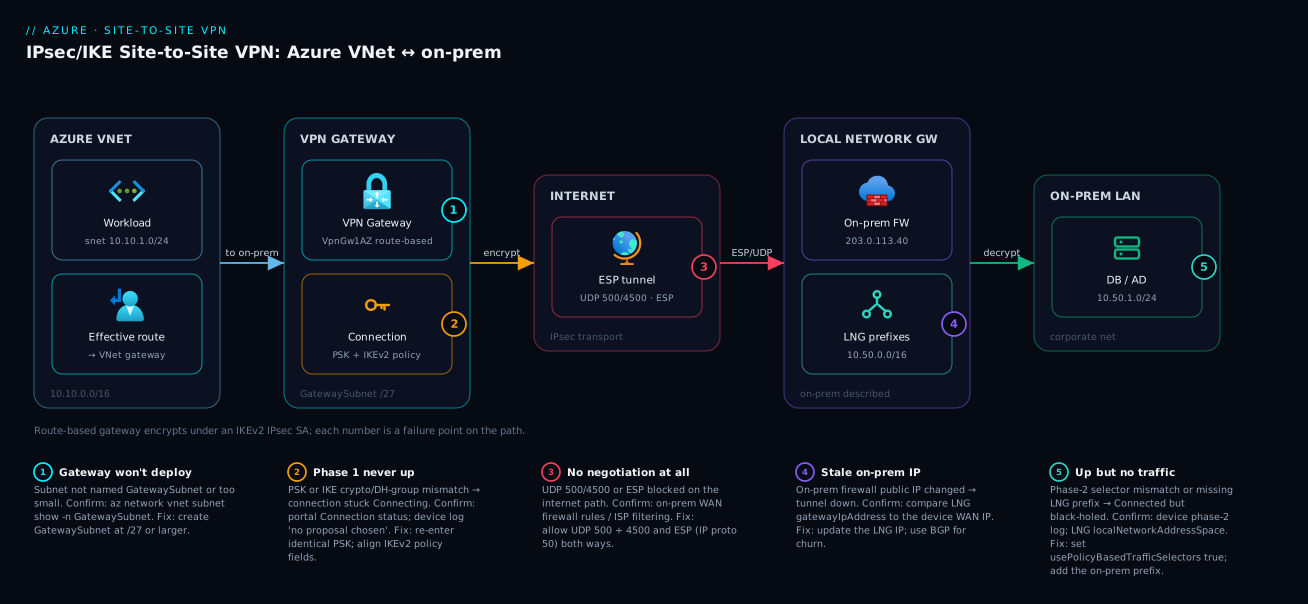
Follow the path left to right. A workload VM in the Azure VNet sends a packet to an on-prem address (10.50.10.20). The VNet’s route table — populated by the gateway and the LNG’s prefix list — marks that destination reachable via the virtual network gateway, so the packet is steered to the VPN Gateway in the reserved GatewaySubnet (10.10.255.0/27). The gateway encrypts it under the negotiated IPsec SA and sends it wrapped in ESP over UDP 4500 (NAT-traversal) or UDP 500 (IKE) across the internet to the on-prem device’s public IP. That device — the peer described by the local network gateway object — decrypts and delivers onto the corporate 10.50.0.0/16 network. Return traffic reverses: the on-prem device matches Azure’s 10.10.0.0/16, encrypts, and the Azure gateway decrypts into the VNet.
The diagram marks the five places this path breaks — the GatewaySubnet (badge 1, wrong name → no deploy), the connection (badge 2, PSK/policy mismatch → phase 1 stalls), the internet path (badge 3, missing UDP/ESP → no negotiation), the LNG (badge 4, stale IP/missing prefix → no routing), and on-prem (badge 5, selector mismatch → “connecting” forever). The legend narrates each as symptom · confirm · fix, and the troubleshooting playbook refers back to these exact hops.
Real-world scenario
Meridian Logistics runs a 14-year-old on-prem stack in a Mumbai data centre — Oracle ERP, a Windows file cluster and Active Directory on 10.50.0.0/16 behind a pair of FortiGates at 203.0.113.40. They were migrating a tracking portal to Azure App Service in Central India, but it needs LDAP auth against on-prem AD and read access to an Oracle replica — both private-only, and the security team’s rule was absolute: nothing on 10.50.x gets a public listener. ExpressRoute meant a multi-month lead time and five-figure monthly cost they couldn’t justify for ~80 Mbps. So: Site-to-Site VPN.
The architect, Priya, planned the address space first and caught the landmine early — the Azure VNet had been drafted as 10.50.0.0/16, directly overlapping the on-prem range. Overlap makes a VPN impossible to route, so she re-IP’d Azure to 10.10.0.0/16 with a GatewaySubnet of 10.10.255.0/27, deployed a VpnGw1AZ route-based gateway, and created an LNG for 203.0.113.40 (prefix 10.50.0.0/16) and a connection with a custom policy: IKEv2, GCMAES256 / SHA384 / DHGroup24 / PFS24.
The first attempt failed exactly as the playbook predicts. Phase 1 came up, phase 2 didn’t — stuck “Connecting.” The FortiGate had specific traffic selectors (10.50.0.0/16 ↔ 10.10.0.0/16) while Azure offered wildcards; setting --use-policy-based-traffic-selectors true brought the tunnel up in seconds. A week later, a DH-group mismatch (the reused FortiGate template defaulted phase 1 to Group 14, not 24) threw “no proposal chosen” in the FortiGate IKE log — they aligned on Group 24 and documented it.
Once stable, they hardened: the gateway went active-active, the team added a second FortiGate, and BGP repathed automatically on failure instead of black-holing. Six months on, the portal authenticates against on-prem AD, the Oracle replica is reachable privately, and the cost is a fraction of the ExpressRoute quote. The lessons that generalised: plan non-overlapping IP first, expect a phase-2 selector mismatch with picky firewalls, pin the exact crypto policy in the runbook, and don’t ship a single tunnel to production.
Advantages and disadvantages
Weigh the S2S VPN against ExpressRoute and against doing nothing before committing.
| Advantages | Disadvantages |
|---|---|
| Fast to stand up (under an hour, minus gateway-create wait) | Runs over the public internet — variable latency/jitter |
| Cheap relative to ExpressRoute (gateway-hour + egress) | Throughput practically capped at low hundreds of Mbps per tunnel |
| No carrier/circuit lead time; you control both ends | Two ends to keep in sync; on-prem device is yours to manage |
| Works with any IPsec-capable on-prem device | No bandwidth guarantee; subject to internet weather |
| Encrypted end to end (IPsec) by design | Gateway-create and resize operations are slow (30–45 min) |
| Multi-site, BGP, active-active on route-based SKUs | Basic SKU is a trap (no BGP, weak HA) — must size up |
| Backstops/fails over for ExpressRoute | Mismatched policy fails opaquely (errors live on the device) |
When each side matters: the advantages dominate for hybrid integration, migrations, branch connectivity and dev/test — anywhere you need a private path quickly at tens-to-hundreds of Mbps. The disadvantages dominate when you need guaranteed multi-Gbps, predictable low latency, a contractually private path off the internet, or very large sustained data movement — ExpressRoute’s job, with the VPN as its failover. A common mature pattern is both: ExpressRoute primary, S2S VPN as automatic failover (which BGP makes clean).
Hands-on lab
This is the centrepiece. You will build a complete, working S2S VPN three ways. Because a real on-prem device is rarely available in a lab, the standard, fully-supported technique is a second Azure VNet with its own VPN Gateway, joined by a VNet-to-VNet IPsec tunnel — this exercises the exact same gateway, connection and IPsec/IKE machinery as an on-prem tunnel (same negotiation, SKUs and validation), both ends under your control. A final section maps each step to the equivalent on-prem-device config. Everything is teardown-able; the gateways bill per hour.
Cost warning: A VPN Gateway bills per hour while it exists, even idle — roughly ₹3–₹4/hour (~$0.04) for
VpnGw1, and this lab uses two. Budget a few hundred rupees per day and run the teardown the moment you’re done. There is no free-tier VPN Gateway.
Here is the whole build at a glance — the nine steps, what each produces, and where the time goes:
| Step | What you do | Key Azure object | Time | Validate |
|---|---|---|---|---|
| 0 | Set variables, create resource group | resource group | seconds | az group create → Succeeded |
| 1 | Two VNets, each with a GatewaySubnet |
virtual networks + subnets | seconds | subnet named GatewaySubnet exists |
| 2 | Two Standard public IPs | public IP addresses | seconds | two IPs allocated |
| 3 | Two VPN Gateways (--no-wait) |
virtual network gateways | 30–45 min | both provisioningState = Succeeded |
| 4 | Two local network gateways | local network gateways | seconds | correct peer IP + prefixes |
| 5 | Two connections + custom IPsec policy | connections | seconds | policy applied |
| 6 | Check tunnel status + effective routes | — | seconds | both Connected; route via gateway |
| 7 | Two test VMs, ping across the tunnel | virtual machines | minutes | private-to-private ICMP replies |
| 8 | (Optional) enable BGP, check learned routes | gateway/connection BGP | seconds | remote prefix learned via EBgp |
| 9 | Teardown | (delete RG) | minutes | az group exists → false |
Step 0 — Prerequisites and variables
You need an Azure subscription with Network Contributor on a resource group, and az (Cloud Shell is easiest). Set shell variables so every later command is copy-paste-safe.
# --- Lab variables (Bash / Cloud Shell) ---
LOCATION="centralindia"
RG="rg-s2s-vpn-lab"

# "Azure" side (stands in for your cloud VNet)
AZ_VNET="vnet-azure"; AZ_PREFIX="10.10.0.0/16"
AZ_WORKLOAD_SUBNET="snet-workload"; AZ_WORKLOAD_PREFIX="10.10.1.0/24"
AZ_GWSUBNET_PREFIX="10.10.255.0/27"          # GatewaySubnet — name is fixed, NOT the prefix
AZ_GW="vng-azure"; AZ_PIP="pip-vng-azure"

# "On-prem" side (a 2nd Azure VNet standing in for the data centre)
OP_VNET="vnet-onprem"; OP_PREFIX="10.50.0.0/16"
OP_WORKLOAD_SUBNET="snet-onprem"; OP_WORKLOAD_PREFIX="10.50.1.0/24"
OP_GWSUBNET_PREFIX="10.50.255.0/27"
OP_GW="vng-onprem"; OP_PIP="pip-vng-onprem"

SKU="VpnGw1"                                  # smallest BGP-capable SKU; resize later if needed
PSK="K1oudVin-S2S-Lab-$(openssl rand -hex 8)" # strong shared secret; same value both ends
echo "Pre-shared key for this lab: $PSK"
Expected output: the printed PSK. Save it — you set the identical value on both connections.
Create the resource group:
az group create --name "$RG" --location "$LOCATION" -o table
Expected output: a table row showing Succeeded for $RG.
Step 1 — Create both VNets with a GatewaySubnet each
The most common deploy failure is an absent or misnamed GatewaySubnet. Create each VNet with its workload subnet, then add the exactly-named GatewaySubnet.
# Azure-side VNet + workload subnet
az network vnet create -g "$RG" -n "$AZ_VNET" -l "$LOCATION" \
  --address-prefix "$AZ_PREFIX" \
  --subnet-name "$AZ_WORKLOAD_SUBNET" --subnet-prefix "$AZ_WORKLOAD_PREFIX" -o table

# The reserved subnet — the name MUST be exactly "GatewaySubnet"
az network vnet subnet create -g "$RG" --vnet-name "$AZ_VNET" \
  -n "GatewaySubnet" --address-prefix "$AZ_GWSUBNET_PREFIX" -o table

# On-prem-side VNet + workload subnet + GatewaySubnet
az network vnet create -g "$RG" -n "$OP_VNET" -l "$LOCATION" \
  --address-prefix "$OP_PREFIX" \
  --subnet-name "$OP_WORKLOAD_SUBNET" --subnet-prefix "$OP_WORKLOAD_PREFIX" -o table
az network vnet subnet create -g "$RG" --vnet-name "$OP_VNET" \
  -n "GatewaySubnet" --address-prefix "$OP_GWSUBNET_PREFIX" -o table
Expected output: four Succeeded rows. Validation: confirm both GatewaySubnets exist and are sized right:
az network vnet subnet show -g "$RG" --vnet-name "$AZ_VNET" -n GatewaySubnet \
  --query "{name:name, prefix:addressPrefix}" -o table
You should see GatewaySubnet at 10.10.255.0/27. If the name is anything else, the gateway create in the next step fails — always create it exactly as GatewaySubnet.
Step 2 — Create two public IPs
A route-based VPN Gateway needs a Standard public IP (required for AZ gateways, and the modern default).
az network public-ip create -g "$RG" -n "$AZ_PIP" -l "$LOCATION" \
  --sku Standard --allocation-method Static -o table
az network public-ip create -g "$RG" -n "$OP_PIP" -l "$LOCATION" \
  --sku Standard --allocation-method Static -o table
Expected output: two Succeeded rows. These IPs are the tunnel endpoints; you’ll reference them when building the local network gateways.
Step 3 — Create both VPN Gateways (the long wait)
The 30–45-minute step, per gateway. Start both in parallel with --no-wait so you wait once, not twice.
# Azure-side gateway (route-based, VpnGw1) — kick off and return immediately
az network vnet-gateway create -g "$RG" -n "$AZ_GW" -l "$LOCATION" \
  --vnet "$AZ_VNET" --public-ip-addresses "$AZ_PIP" \
  --gateway-type Vpn --vpn-type RouteBased --sku "$SKU" \
  --no-wait

# On-prem-side gateway — also in the background
az network vnet-gateway create -g "$RG" -n "$OP_GW" -l "$LOCATION" \
  --vnet "$OP_VNET" --public-ip-addresses "$OP_PIP" \
  --gateway-type Vpn --vpn-type RouteBased --sku "$SKU" \
  --no-wait

echo "Both gateways provisioning. This takes ~30-45 minutes."
Validation (wait for both): poll provisioning state until both read Succeeded. Do not proceed until they do.
# Poll both gateways' provisioning state
for GW in "$AZ_GW" "$OP_GW"; do
  echo -n "$GW: "
  az network vnet-gateway show -g "$RG" -n "$GW" --query provisioningState -o tsv
done
# Re-run until BOTH print "Succeeded"
Expected output (eventually): both lines print Succeeded. While you wait, grab the public IPs — you need them for the local network gateways:
AZ_GW_IP=$(az network public-ip show -g "$RG" -n "$AZ_PIP" --query ipAddress -o tsv)
OP_GW_IP=$(az network public-ip show -g "$RG" -n "$OP_PIP" --query ipAddress -o tsv)
echo "Azure GW public IP: $AZ_GW_IP"
echo "On-prem GW public IP: $OP_GW_IP"
Step 4 — Create the local network gateways (describe each “remote” side)
A local network gateway describes the other end: its public IP and prefixes. Each side sees the opposite VNet as remote, so you create two LNGs pointing at the opposite gateway’s IP and address space. In a real build, $OP_GW_IP is your on-prem firewall’s public IP and $OP_PREFIX your corporate address space.
# LNG describing the "on-prem" side, used by the Azure-side gateway's connection
az network local-gateway create -g "$RG" -n "lng-to-onprem" -l "$LOCATION" \
  --gateway-ip-address "$OP_GW_IP" \
  --local-address-prefixes "$OP_PREFIX" -o table

# LNG describing the "Azure" side, used by the on-prem-side gateway's connection
az network local-gateway create -g "$RG" -n "lng-to-azure" -l "$LOCATION" \
  --gateway-ip-address "$AZ_GW_IP" \
  --local-address-prefixes "$AZ_PREFIX" -o table
Expected output: two Succeeded rows. Validation: confirm prefixes and IPs — a stale IP or missing prefix here is Badge 4:
az network local-gateway show -g "$RG" -n "lng-to-onprem" \
  --query "{ip:gatewayIpAddress, prefixes:localNetworkAddressSpace.addressPrefixes}" -o jsonc
Step 5 — Author the custom IPsec/IKE policy and create both connections
Bind each gateway to its LNG with a connection carrying the identical PSK and a matched custom policy. Both ends are Azure here so the policy matches by construction; against a real device you’d mirror these fields on the firewall.
# Azure-side connection: gateway -> lng-to-onprem, with a strong custom IPsec/IKE policy
az network vpn-connection create -g "$RG" -n "cn-azure-to-onprem" -l "$LOCATION" \
  --vnet-gateway1 "$AZ_GW" --local-gateway2 "lng-to-onprem" \
  --shared-key "$PSK"

# Apply the custom policy (IKEv2 / GCMAES256 / SHA384 / DHGroup24 / PFS24)
az network vpn-connection ipsec-policy add -g "$RG" --connection-name "cn-azure-to-onprem" \
  --ike-encryption GCMAES256 --ike-integrity SHA384 --dh-group DHGroup24 \
  --ipsec-encryption GCMAES256 --ipsec-integrity GCMAES256 --pfs-group PFS24 \
  --sa-lifetime 27000 --sa-max-size 102400000

# On-prem-side connection: the mirror image, SAME PSK
az network vpn-connection create -g "$RG" -n "cn-onprem-to-azure" -l "$LOCATION" \
  --vnet-gateway1 "$OP_GW" --local-gateway2 "lng-to-azure" \
  --shared-key "$PSK"

az network vpn-connection ipsec-policy add -g "$RG" --connection-name "cn-onprem-to-azure" \
  --ike-encryption GCMAES256 --ike-integrity SHA384 --dh-group DHGroup24 \
  --ipsec-encryption GCMAES256 --ipsec-integrity GCMAES256 --pfs-group PFS24 \
  --sa-lifetime 27000 --sa-max-size 102400000
Expected output: the connections created, then the policy applied (the gateway briefly re-negotiates). Note: both connections must exist for the tunnel to come up — each side needs an IPsec endpoint actively negotiating. Against a real on-prem device you create only the Azure connection; the matching config lives on the firewall.
Step 6 — Validate the tunnel is connected
Check both connection statuses:
for CN in "cn-azure-to-onprem" "cn-onprem-to-azure"; do
  echo -n "$CN: "
  az network vpn-connection show -g "$RG" -n "$CN" \
    --query "{status:connectionStatus, ingressBytes:ingressBytesTransferred, egressBytes:egressBytesTransferred}" -o tsv
done
Expected output: both connections report Connected, with non-zero byte counters once traffic flows. If you see Connecting for more than a couple of minutes, jump to the troubleshooting playbook — it’s almost always a policy or selector mismatch (in this all-Azure lab the fields match by construction, so re-check that both connections exist and the PSKs are identical).
Deeper validation — effective routes. Prove the route to the remote prefix is installed via the gateway. Create a small workload VM and inspect its effective routes:
# (Optional) quick test VM on the Azure workload subnet
az vm create -g "$RG" -n "vm-test-azure" --image Ubuntu2204 \
  --vnet-name "$AZ_VNET" --subnet "$AZ_WORKLOAD_SUBNET" \
  --admin-username azureuser --generate-ssh-keys --public-ip-address "" --size Standard_B1s -o table

NIC_ID=$(az vm show -g "$RG" -n "vm-test-azure" --query "networkProfile.networkInterfaces[0].id" -o tsv)
az network nic show-effective-route-table --ids "$NIC_ID" \
  --query "value[?contains(addressPrefix, '10.50')].{prefix:addressPrefix, nextHop:nextHopType}" -o table
Expected output: a row with prefix 10.50.0.0/16 and next-hop VirtualNetworkGateway — proof Azure will steer on-prem-bound traffic into the tunnel.
Step 7 — End-to-end reachability test
Put a VM on each side and confirm private connectivity. Build the on-prem-side VM and ping the Azure-side VM by its private IP (open ICMP if you’ve added NSGs; default rules allow intra-tunnel traffic).
az vm create -g "$RG" -n "vm-test-onprem" --image Ubuntu2204 \
  --vnet-name "$OP_VNET" --subnet "$OP_WORKLOAD_SUBNET" \
  --admin-username azureuser --generate-ssh-keys --public-ip-address "" --size Standard_B1s -o table

AZ_VM_IP=$(az vm show -g "$RG" -n "vm-test-azure" -d --query privateIps -o tsv)
echo "Azure test VM private IP: $AZ_VM_IP"
# From vm-test-onprem (e.g. via Bastion or serial console), run:  ping $AZ_VM_IP
Expected output: ICMP replies between 10.10.1.x and 10.50.1.x across the IPsec tunnel — private-to-private, no public hop. If ping fails while the connection shows Connected, it’s routing/NSG, not the tunnel (Badge 6). Watch the Step 6 byte counters increment as traffic flows — live proof data is crossing.
Step 8 — (Optional) Convert to BGP
To exercise dynamic routing, enable BGP on both gateways and connections. BGP needs an ASN per side and advertises each gateway’s prefixes automatically.
# Enable BGP on each gateway with distinct private ASNs (avoid Azure's default 65515)
az network vnet-gateway update -g "$RG" -n "$AZ_GW" --asn 65010 -o none
az network vnet-gateway update -g "$RG" -n "$OP_GW" --asn 65020 -o none

# Discover each gateway's BGP peering address (from the GatewaySubnet)
az network vnet-gateway show -g "$RG" -n "$AZ_GW" \
  --query "bgpSettings.bgpPeeringAddresses[0].defaultBgpIpAddresses" -o tsv

# Turn BGP on for the connections
az network vpn-connection update -g "$RG" -n "cn-azure-to-onprem" --enable-bgp true -o none
az network vpn-connection update -g "$RG" -n "cn-onprem-to-azure" --enable-bgp true -o none
Validation: check learned routes — each gateway should learn the other’s VNet prefix via BGP:
az network vnet-gateway list-learned-routes -g "$RG" -n "$AZ_GW" \
  --query "value[].{network:network, origin:origin, asPath:asPath, nextHop:nextHop}" -o table
Expected output: the remote prefix (10.50.0.0/16) appears with origin EBgp. For a real on-prem peer you’d also set --bgp-peering-address (often an APIPA 169.254.21.x address) and the peer’s ASN on the LNG.
Step 9 — Teardown (do this when finished)
Gateways bill per hour, so tear the lab down completely. Deleting the resource group removes everything in one shot.
# Nuke the entire lab resource group (gateways, VNets, VMs, IPs, connections)
az group delete --name "$RG" --yes --no-wait
Expected output: the command returns immediately (--no-wait); deletion of the gateways takes several minutes in the background. Validation: confirm it’s gone:
az group exists --name "$RG" # should eventually print: false
If you want to keep the VNets but stop the bill, delete just the gateways (az network vnet-gateway delete) and their public IPs — those are the only hourly-billed resources here.
Doing it as Bicep (repeatable, reviewable)
For anything beyond a one-off lab, define the build as Bicep — version-controlled and reproducible. This template provisions one side (VNet + GatewaySubnet + public IP + gateway + LNG + connection with the custom policy). Deploy it twice for a VNet-to-VNet lab, or once pointing the LNG at your real on-prem device; dependsOn is implicit through the symbolic references.
// s2s-vpn.bicep — one side of a Site-to-Site VPN
@description('Deployment region')
param location string = resourceGroup().location

@description('VNet name and address space for the Azure side')
param vnetName string = 'vnet-azure'
param vnetPrefix string = '10.10.0.0/16'
param workloadSubnetPrefix string = '10.10.1.0/24'
param gatewaySubnetPrefix string = '10.10.255.0/27'

@description('On-prem (remote) device public IP and prefixes')
param onPremPublicIp string
param onPremPrefixes array = [ '10.50.0.0/16' ]

@description('Pre-shared key — pass as a secure parameter, never hardcode')
@secure()
param sharedKey string

@description('VPN Gateway SKU (VpnGw1 = smallest BGP-capable)')
@allowed([ 'VpnGw1', 'VpnGw2', 'VpnGw3', 'VpnGw1AZ', 'VpnGw2AZ' ])
param gatewaySku string = 'VpnGw1'

resource vnet 'Microsoft.Network/virtualNetworks@2023-11-01' = {
  name: vnetName
  location: location
  properties: {
    addressSpace: { addressPrefixes: [ vnetPrefix ] }
    subnets: [
      { name: 'snet-workload', properties: { addressPrefix: workloadSubnetPrefix } }
      // The reserved subnet — name MUST be exactly 'GatewaySubnet'
      { name: 'GatewaySubnet', properties: { addressPrefix: gatewaySubnetPrefix } }
    ]
  }
}

resource gwPip 'Microsoft.Network/publicIPAddresses@2023-11-01' = {
  name: 'pip-${vnetName}-gw'
  location: location
  sku: { name: 'Standard' }                 // Standard required for AZ gateways
  properties: { publicIPAllocationMethod: 'Static' }
}

resource gateway 'Microsoft.Network/virtualNetworkGateways@2023-11-01' = {
  name: 'vng-${vnetName}'
  location: location
  properties: {
    gatewayType: 'Vpn'
    vpnType: 'RouteBased'                    // route-based — fixed at create; the right default
    sku: { name: gatewaySku, tier: gatewaySku }
    ipConfigurations: [ {
      name: 'gwIpConfig'
      properties: {
        privateIPAllocationMethod: 'Dynamic'
        subnet: { id: '${vnet.id}/subnets/GatewaySubnet' }
        publicIPAddress: { id: gwPip.id }
      }
    } ]
  }
}

resource lng 'Microsoft.Network/localNetworkGateways@2023-11-01' = {
  name: 'lng-to-onprem'
  location: location
  properties: {
    gatewayIpAddress: onPremPublicIp                 // your on-prem firewall's public IP
    localNetworkAddressSpace: { addressPrefixes: onPremPrefixes }
  }
}

resource connection 'Microsoft.Network/connections@2023-11-01' = {
  name: 'cn-azure-to-onprem'
  location: location
  properties: {
    connectionType: 'IPsec'
    virtualNetworkGateway1: { id: gateway.id, properties: {} }
    localNetworkGateway2: { id: lng.id, properties: {} }
    sharedKey: sharedKey
    // Custom IPsec/IKE policy — IKEv2, GCMAES256/SHA384/DHGroup24, PFS24
    ipsecPolicies: [ {
      ikeEncryption: 'GCMAES256'
      ikeIntegrity: 'SHA384'
      dhGroup: 'DHGroup24'
      ipsecEncryption: 'GCMAES256'
      ipsecIntegrity: 'GCMAES256'
      pfsGroup: 'PFS24'
      saLifeTimeSeconds: 27000
      saDataSizeKilobytes: 102400000
    } ]
    // Uncomment for picky peers (e.g. Cisco ASA) that need specific selectors:
    // usePolicyBasedTrafficSelectors: true
  }
}

output gatewayPublicIp string = gwPip.properties.ipAddress
Deploy and validate:
az deployment group create -g "$RG" \
  --template-file s2s-vpn.bicep \
  --parameters onPremPublicIp="203.0.113.40" sharedKey="$PSK" \
  --query "properties.outputs.gatewayPublicIp.value" -o tsv
Expected output: the gateway’s public IP — hand this number to the on-prem network engineer; it is the tunnel destination they configure on the firewall.
Mapping the lab to a real on-prem device
In production the “on-prem” VNet and its gateway/connection are replaced by your firewall. What each Azure object maps to on the common platforms, so the network team can mirror your config:
| Azure object / field | Cisco ASA / IOS | Palo Alto (PAN-OS) | FortiGate | strongSwan (Linux) |
|---|---|---|---|---|
| Gateway public IP (peer) | crypto map ... set peer |
IKE Gateway → Peer Address | Phase 1 → Remote Gateway | right= |
| On-prem prefixes (LNG) | crypto ACL / VTI route | Proxy IDs / route | Phase 2 selectors / route | leftsubnet= |
| Pre-shared key | tunnel-group ... pre-shared-key |
IKE Gateway → PSK | Phase 1 → Pre-shared Key | secret in ipsec.secrets |
| IKEv2 / phase 1 crypto | crypto ikev2 proposal |
IKE Crypto Profile | Phase 1 Proposal | ike= |
| Phase 2 crypto / PFS | crypto ipsec transform-set |
IPSec Crypto Profile | Phase 2 Proposal | esp= |
| Specific selectors | crypto ACL (always specific) | Proxy IDs (specific) | Phase 2 selectors | leftsubnet/rightsubnet |
| BGP ASN / peer | router bgp / neighbor |
Virtual Router → BGP | Router → BGP | FRR/BIRD alongside |
The recurring gotcha across all of them: specific traffic selectors / proxy IDs. ASA, Palo Alto and FortiGate templates often default to specific subnet pairs while Azure offers wildcards — set usePolicyBasedTrafficSelectors: true on the connection (or configure the device for any-to-any) to make phase 2 agree.
Common mistakes & troubleshooting
When a tunnel won’t come up or won’t pass traffic, work it as a layered playbook — phase 1, then phase 2, then routing. The table is the playbook; the prose after expands the trickiest rows.
| # | Symptom | Root cause | Confirm (exact command / path) | Fix |
|---|---|---|---|---|
| 1 | Gateway create fails immediately | No subnet named exactly GatewaySubnet, or it’s too small |
az network vnet subnet show -g RG --vnet-name V -n GatewaySubnet |
Create GatewaySubnet at /27 or larger |
| 2 | Connection stuck Connecting, phase 1 never up |
PSK mismatch, or IKE version/crypto mismatch | Portal → Connection → Connection status; device IKE log “no proposal chosen” | Re-enter identical PSK both ends; align IKE policy fields |
| 3 | Phase 1 up, phase 2 fails, tunnel “Connecting” | Traffic-selector / proxy-ID mismatch | Device phase-2 log; check selectors | Set usePolicyBasedTrafficSelectors: true, or narrow both ends |
| 4 | Tunnel won’t establish at all, no logs on Azure side | UDP 500/4500 or ESP blocked on the internet path | On-prem firewall WAN rules; ISP filtering | Allow UDP 500 + 4500 inbound/outbound and ESP (IP proto 50) |
| 5 | Tunnel Connected but no traffic to on-prem |
Missing/wrong prefix on the local network gateway | az network local-gateway show ... --query localNetworkAddressSpace |
Add the on-prem subnet prefix to the LNG (or use BGP) |
| 6 | Tunnel Connected, ping fails one direction |
NSG / UDR / host firewall blocking, not the tunnel | az network nic show-effective-route-table; NSG rules; OS firewall |
Allow ICMP/TCP in NSG + OS firewall; check effective routes |
| 7 | DH-group / “no proposal chosen” error | Phase-1 DH group mismatch (24 vs 14) | Device IKE log shows offered vs accepted groups | Align the numeric DH group on both ends |
| 8 | Tunnel flaps every few hours | SA-lifetime mismatch or DPD too aggressive | Connection status history; device rekey logs | Align SA lifetimes; set DPD timeout ~45 s |
| 9 | Works, then breaks after on-prem change | On-prem device public IP changed | Compare LNG gatewayIpAddress to the device’s real WAN IP |
Update LNG --gateway-ip-address; use BGP for churn |
| 10 | Two VNets can’t reach via the gateway | Forgot gateway transit / peering for spoke VNets | Peering settings; effective routes | Enable allowGatewayTransit + useRemoteGateways |
| 11 | Throughput plateaus well below SKU | Single-tunnel/single-flow limit, not the gateway | SnatConnectionCount/TunnelEgressBytes metrics; iperf |
Multiple tunnels/flows; consider ExpressRoute |
| 12 | Overlapping address spaces | Azure VNet range overlaps on-prem range | Compare AZ_PREFIX vs OP_PREFIX |
Re-IP one side to non-overlapping CIDR (cannot coexist) |
Row 3 — the phase-2 selector trap (the most common real failure). Phase 1 succeeds (PSK fine) but phase 2 fails because Azure offers wildcard 0.0.0.0/0 selectors and the peer insists on specific subnet pairs. The connection sits at “Connecting” with no obvious Azure-side error; the tell is a phase-2 / “IPsec SA” failure in the device’s log while phase 1 shows established. Fix: set usePolicyBasedTrafficSelectors: true on the connection, or configure the peer for any-to-any.
Row 4 — the silent internet-path block. If neither side logs a negotiation attempt, the IKE packets aren’t reaching the peer. IPsec needs three things allowed end to end — Azure’s gateway already permits these inbound by design, so the block is almost always on the on-prem perimeter or the ISP:
| Protocol | Port / number | Role | Direction | When it bites |
|---|---|---|---|---|
| UDP | 500 | IKE (key exchange) | Both ways | Always required; blocked → no negotiation |
| UDP | 4500 | IKE NAT-Traversal | Both ways | Required whenever a NAT is in the path (almost always) |
| ESP | IP protocol 50 | Encrypted data payload | Both ways | Some firewalls/ISPs drop ESP → phase 1 ok, no data |
Confirm by checking the WAN-facing rules on the on-prem device and asking the ISP whether ESP and UDP 4500 are permitted; many consumer/ISP edges silently drop ESP.
Row 6 — “Connected but can’t ping.” Connected means the tunnel is healthy, not that a given packet is allowed. If reachability fails while the connection is up, the block is in the VNet (an NSG denying ICMP, a UDR mis-routing the return path) or the guest OS firewall (Windows blocks ICMP by default). Confirm the route with az network nic show-effective-route-table and that the NSG permits the traffic — this is where Azure Network Watcher Connectivity Diagnostics and Azure NSG Flow Debugging with IP Flow Verify pay off.
The Azure-side diagnostic you should know. When the device logs are inaccessible, capture IKE/IPsec packets on the gateway itself:
# Start a gateway packet capture (writes to a SAS-addressed blob)
az network vnet-gateway packet-capture start -g "$RG" -n "$AZ_GW"
# ...reproduce the failure for ~60s...
az network vnet-gateway packet-capture stop -g "$RG" -n "$AZ_GW" \
  --sas-url "<blob-SAS-URL-with-write>"
When a peer claims “the PSK is right,” az network vpn-connection shared-key show -g "$RG" --connection-name cn-azure-to-onprem prints exactly what Azure has — ending the “no, you have it wrong” argument in one command.
Best practices
- Plan non-overlapping IP space first — there is no routing fix for an overlap; you must re-IP. Confirm with Azure VNet IP Address Planning: CIDR & Subnetting before creating anything.
- Size the GatewaySubnet at
/27(prefer/26), named exactlyGatewaySubnet, and never put workload NICs in it. - Build route-based, never policy-based unless a legacy peer truly forces it — it’s the only path to BGP, multiple tunnels, active-active and IKEv2.
- Set a strong custom IPsec/IKE policy (IKEv2 / GCMAES256 / SHA384 / DH Group 24) and pin every field in your runbook; defaults accept weak ciphers.
- Don’t run Basic in production. Use
VpnGw1AZor higher; chooseAZSKUs where zones exist. - Design redundant tunnels for HA — active-active plus two on-prem devices, ideally with BGP. The 99.95% SLA assumes you did this.
- Prefer BGP for multi-site or churn; static routing is fine only for one site with stable subnets.
- Use a strong, unique pre-shared key and rotate it; store it in Azure Key Vault and pass it to Bicep as a
@secure()parameter — never hardcode it. - Open UDP 500, UDP 4500 and ESP on the on-prem perimeter, and confirm the ISP doesn’t filter them, before blaming Azure.
- Monitor the tunnel — alert on connection status,
TunnelEgressBytes/TunnelIngressBytesand BGP peer state via Azure Monitor. - Define everything as Bicep and review changes; gateways are slow to rebuild, so keep a known-good template, not click-ops.
- Document the exact crypto policy and LNG prefix list as a shared runbook — most failures are a mismatch one side didn’t know about.
Security notes
The tunnel is an encrypted pipe, but a pipe carries whatever you let through it. Treat the connection as a trust boundary, not a flat extension of the corporate LAN.
- Authentication and the PSK. The pre-shared key is the entire authentication. Use a long, random secret (32+ chars), store it in Azure Key Vault, inject it into IaC as a secure parameter, and rotate it. A weak/leaked PSK lets anyone who reaches the gateway IP attempt the tunnel.
- Encryption in transit. Pin a modern policy (GCMAES256, SHA384, DH/PFS Group 24). A custom policy disables IKEv1 and weak DH groups — the defaults accept legacy algorithms an auditor will flag.
- Least-privilege routing. Don’t reflexively route
0.0.0.0/0across the tunnel; advertise (or list on the LNG) only the specific prefixes each side needs. Narrow selectors limit blast radius if either end is compromised. - Segment with NSGs after the tunnel. The tunnel delivers packets into the VNet; NSGs decide what they can touch. Restrict on-prem-originated traffic to only the subnets/ports it needs — see Azure NSG Rules, Priorities & Effective Rules.
- Filter east-west for sensitive flows. For regulated workloads, route inter-network traffic through Azure Firewall (or an NVA) in the hub for application-aware filtering and logging, not just L3/L4 rules.
- Protect the BGP control plane. If you use BGP, keep peering to the tunnel only and monitor learned routes for unexpected prefixes — an attacker who can inject BGP could repath traffic.
- Audit and alert. Send gateway diagnostic logs (
TunnelDiagnosticLog,IKEDiagnosticLog,RouteDiagnosticLog) to Log Analytics and alert on tunnel-down and unexpected route changes — see Azure Monitor Diagnostic Settings: Resource Logs Routing.
Cost & sizing
Three things drive the VPN bill, and the gateway-hour is by far the largest and most-overlooked:
| Cost driver | How it’s billed | Rough figure | Notes |
|---|---|---|---|
| Gateway-hour | Per hour the gateway exists (idle or not) | VpnGw1 ≈ ₹3–4/hr (~$0.04); VpnGw1AZ a bit more |
The dominant cost; bills even with no traffic |
| Outbound data (egress) | Per GB leaving Azure over the tunnel | First GB/month free, then per-GB (region-dependent) | Inbound to Azure is free |
| Public IP | Standard static public IP per hour | ~₹0.30/hr (~$0.004) each | Two for active-active |
| SKU upgrade | Higher gateway-hour at larger SKUs | Scales VpnGw1→VpnGw5 |
Resize within generation without rebuild |
Start at the smallest SKU that meets today’s aggregate throughput and supports BGP — VpnGw1/VpnGw1AZ for most single-site prod (≈650 Mbps, 30 tunnels). Resize up only when sustained TunnelEgressBytes nears the cap (no rebuild within the generation), so don’t over-buy. Past a few Gbps sustained, model ExpressRoute — predictable and often cheaper at high throughput. There’s no free-tier VPN Gateway, so in dev/test delete the idle gateway (the only meaningful charge); active-active adds only a second public IP, since the second instance is in the SKU.
Interview & exam questions
These map to AZ-700 (Azure Network Engineer Associate) and the networking portions of AZ-104 and AZ-305.
-
What is the difference between a route-based and a policy-based VPN gateway, and which should you choose? Route-based uses a routing table (a route to remote prefixes points at the tunnel) and supports multiple tunnels, BGP, active-active, IKEv2 and ExpressRoute coexistence. Policy-based uses static ACL-style policy, supports a single tunnel, IKEv1 only, Basic SKU only. Choose route-based for essentially all new builds; policy-based only for a legacy peer that requires it.
-
What must the gateway subnet be named, and why does its size matter? It must be named exactly
GatewaySubnet— the platform places gateway VMs there by name. Size it/27or larger (/26recommended) so larger SKUs and ExpressRoute coexistence have address room; too small and deployment or future expansion fails. -
What does a local network gateway represent? It is an Azure object describing the remote (on-prem) side: the public IP of the on-prem VPN device and the address prefixes behind it. With static routing you list those prefixes by hand; with BGP they’re learned dynamically and the LNG carries the peer’s BGP IP/ASN.
-
Phase 1 establishes but phase 2 fails and the tunnel stays “Connecting.” What’s the likely cause? A traffic-selector / proxy-ID mismatch: Azure offers wildcard any-to-any selectors while the peer (often Cisco ASA/FortiGate) wants specific subnet pairs. Fix by enabling
usePolicyBasedTrafficSelectorson the connection or configuring the peer for any-to-any. -
Which ports/protocols must be open for an IPsec S2S VPN? UDP 500 (IKE), UDP 4500 (IKE NAT-Traversal, used when NAT is in the path), and ESP (IP protocol 50). If the tunnel won’t establish with no logs on the Azure side, suspect these being blocked on the on-prem perimeter or by the ISP.
-
When do you choose static routing vs BGP? Static for a single site with stable prefixes — simplest, no ASN coordination. BGP for multiple tunnels (real failover), an evolving on-prem address plan (no manual LNG edits), or ExpressRoute coexistence. BGP requires VpnGw1+ (not Basic) and an ASN on each side; Azure’s default gateway ASN is 65515.
-
What does a custom IPsec/IKE policy do, and what’s the catch? It pins the exact IKE/IPsec algorithms (encryption, integrity, DH/PFS group, SA lifetimes) instead of Azure’s permissive defaults. The catch: it’s all-or-nothing — Azure proposes only that single combination, so the on-prem device must match every field exactly or negotiation fails.
-
How do you make an S2S VPN highly available? Run the gateway active-active (two public IPs, two tunnels) terminating on two on-prem devices, and use BGP so a device/tunnel failure repaths automatically. Use a non-Basic SKU (
AZvariant for zone redundancy). The 99.95% SLA assumes redundant tunnels, not a single link. -
Two networks need to talk but their address spaces overlap. What do you do? You cannot route between overlapping ranges over a standard S2S VPN — re-IP one side to a non-overlapping CIDR. (Some NVAs offer NAT-over-VPN, but the clean answer for the exam and production is to fix the addressing.)
-
A spoke VNet (peered to the hub that holds the gateway) can’t reach on-prem. Why? Gateway transit isn’t configured: the hub peering needs
allowGatewayTransitand the spoke peering needsuseRemoteGateways, so the spoke uses the hub’s gateway. Without it the spoke has no route to the tunnel. -
The connection shows “Connected” but a VM can’t ping across the tunnel. Where do you look? Not the tunnel — it’s healthy. Check VNet routing (effective routes via
az network nic show-effective-route-table), NSG rules, UDRs and the guest OS firewall (Windows blocks ICMP by default). “Connected” is about IPsec, not about whether a given packet is permitted. -
What practically limits throughput on a single tunnel? A single IPsec tunnel and single flow are bounded well below the gateway’s aggregate SKU number (which is across all tunnels). To go faster, use multiple tunnels/flows or, for guaranteed high bandwidth and low latency, ExpressRoute.
Quick check
- What is the one mandatory name for the subnet that hosts a VPN Gateway, and the recommended minimum size?
- Your tunnel reaches phase 1 but phase 2 fails and stays “Connecting” — what’s the first thing to suspect?
- Name the three ports/protocols that must be permitted end-to-end for IPsec.
- Which gateway type (route-based or policy-based) supports BGP and multiple tunnels — and can you change the type after creation?
- The connection status is “Connected” but a VM can’t reach on-prem. Is the tunnel the problem?
Answers
GatewaySubnet(exact name, case-sensitive in intent), at least /27 (prefer /26). A wrong name or too-small range fails the gateway deployment.- A traffic-selector / proxy-ID mismatch — Azure offers wildcard selectors while the peer wants specific subnet pairs. Set
usePolicyBasedTrafficSelectors: trueor configure the peer for any-to-any. - UDP 500 (IKE), UDP 4500 (NAT-T), and ESP (IP protocol 50). If they’re blocked, the tunnel never establishes and Azure logs nothing.
- Route-based supports BGP, multiple tunnels, active-active and IKEv2. The type is fixed at creation — changing it means deleting and rebuilding the gateway.
- No. “Connected” means the IPsec tunnel is healthy. A reachability failure is routing (effective routes/UDRs), an NSG, or the guest OS firewall — not the tunnel itself.
Glossary
- Site-to-Site (S2S) VPN — an encrypted IPsec/IKE tunnel between an on-prem network’s edge device and an Azure VPN Gateway, joining the two address spaces.
- VPN Gateway — the Azure-managed pair (or more) of VMs that terminate IPsec tunnels, deployed into the
GatewaySubnet. - GatewaySubnet — the reserved, exactly-named subnet (
/27+) where the platform places VPN/ExpressRoute gateway resources. - Local network gateway (LNG) — an Azure object describing the remote/on-prem side: its public IP and the address prefixes behind it.
- Connection — the Azure resource binding a VPN Gateway to a local network gateway, carrying the pre-shared key and IPsec/IKE policy.
- Pre-shared key (PSK) — the shared secret that authenticates the two IPsec peers; must be identical on both ends.
- IKE (Internet Key Exchange) — the protocol that authenticates peers (phase 1) and negotiates the data-encryption SAs (phase 2). IKEv2 is preferred.
- IPsec/IKE policy — Azure’s tunable crypto set (encryption, integrity, DH/PFS group, SA lifetimes); set a custom one to enforce strong algorithms.
- Traffic selectors — the prefix pairs phase 2 negotiates to decide what the tunnel carries; wildcard (any-to-any) on Azure by default.
- Route-based vs policy-based gateway — route-based routes via a table (BGP, multi-tunnel, active-active, IKEv2 — the default); policy-based uses static policy (single tunnel, IKEv1, Basic only).
- BGP (Border Gateway Protocol) — dynamic route exchange across the tunnel; auto-propagates prefixes and enables fast failover. Needs an ASN per side.
- APIPA —
169.254.x.xlink-local addresses used as BGP peer IPs for devices that require it. - Active-active — a gateway exposing two public IPs / two tunnels for high availability.
- DH Group / PFS Group — Diffie-Hellman groups for key exchange (phase 1) and rekey forward secrecy (phase 2); higher numbers are stronger.
Next steps
- Give remote individuals (not whole sites) secure VNet access with How to Configure Point-to-Site VPN with Microsoft Entra Authentication — the same gateway, a per-user connection type.
- Extend the connected VNet’s reach to other VNets through the hub with VNet Peering, Gateway Transit & Global Peering.
- Lock down what crosses the tunnel using Azure NSG Rules, Priorities & Effective Rules and User-Defined Routes & Route Tables Basics.
- When a tunnel or route misbehaves, run Azure Network Watcher Connectivity Diagnostics and the VNet Connectivity Troubleshooting playbook.
- Place the gateway correctly in a hub-and-spoke topology with the Azure enterprise-scale landing zone blueprint.