You deploy a virtual machine into an Azure subnet, give it no public IP, attach nothing special — and it can still reach the internet, reach other subnets, and reach Azure storage. Nobody wrote a single route. That magic is Azure’s system routes: every subnet gets a hidden, automatically managed routing table that already knows how to send traffic to the local VNet, to peered networks, to on-premises over a gateway, and out to the internet. For a huge number of workloads that default routing is exactly right and you never think about it.
Then one day security says “all outbound traffic must pass through the firewall for inspection,” or you stand up a hub-and-spoke network and need spoke-to-spoke traffic to hairpin through a central appliance, or you want to blackhole a range so nothing in that subnet can reach it. Now the defaults are wrong, and you need to override them. The tool for that override is the user-defined route (UDR) — a route you write yourself — packaged inside a route table resource that you associate with one or more subnets. A UDR says “for this destination prefix, ignore what the system would do and send the packet to this next hop instead.”
This article is the mental model for that machinery, aimed at someone who knows what a VNet and a subnet are but has never bent Azure’s routing. We lead with the concepts — how Azure decides where a packet goes (the effective routes for a NIC and the longest-prefix-match → priority algorithm), what each next-hop type does, and the two settings that trip up almost every beginner (0.0.0.0/0 forced tunneling and the IP forwarding flag on an appliance) — then walk a real hub-spoke design and give you a copy-pasteable lab.
What problem this solves
The pain is always the same shape: traffic that should flow doesn’t, or traffic that shouldn’t bypass a control point does. Without UDRs you’re stuck with Azure’s defaults, which send every subnet’s internet-bound traffic straight out and route inter-subnet traffic directly NIC-to-NIC. Fast and simple — but there is no chokepoint: you can’t force outbound through a firewall, can’t inspect east-west traffic, and can’t centralise egress so every spoke shares one set of public IPs and rules.
What breaks without route control shows up three ways. Compliance: an auditor asks “show me every byte leaving the app subnet is inspected,” and with system routes the honest answer is “it isn’t.” Hub-and-spoke: peering is non-transitive, so spoke A can’t reach spoke B through the hub unless a route says “to reach B’s range, send to the hub firewall.” Selective control: one subnet on the internet but a second tunnelled on-prem, or dropping a known-bad CIDR without touching an NSG.
Who hits this: anyone building a landing zone (forced-tunnel egress through a central firewall appliance is the default pattern), anyone running a network virtual appliance (NVA), and anyone whose security baseline says “centralise and inspect.” The flip side is the danger: a single mis-scoped UDR can black-hole an entire subnet, break Azure’s own management traffic, or create asymmetric routing that silently breaks a stateful firewall. The defaults are safe; override them and you own the consequences, so you need to know how routing actually decides.
Learning objectives
By the end of this article you can:
- Explain Azure’s system routes — what each default route does and why a subnet has connectivity with zero configuration.
- Describe how Azure builds the effective routes for a NIC and how longest-prefix match plus route source priority picks exactly one next hop per packet.
- List every next-hop type (
VirtualNetwork,VnetLocal,Internet,VirtualNetworkGateway,VirtualAppliance,None) and say when each is used. - Author a user-defined route and a route table, then associate it with a subnet, in both
azCLI and Bicep. - Force outbound traffic through a firewall with a
0.0.0.0/0default route, and explain why the appliance needs IP forwarding enabled to pass that traffic. - Recognise and fix asymmetric routing and black-holed subnets, and read
az network nic show-effective-route-tableto confirm what is really happening. - Place route tables correctly in a hub-and-spoke topology so spoke-to-spoke and spoke-to-internet traffic both flow through the hub.
Prerequisites & where this fits
You should already understand the building blocks: a virtual network (VNet) is your private IP space in Azure, a subnet is a slice of that space, and a network security group (NSG) filters traffic by allowing or denying flows. If those are new, read Azure Virtual Network, Subnets and NSGs: Networking Fundamentals first — routing and security are two different layers, and this article assumes you know the security one.
The crucial separation: NSGs decide whether a packet is allowed; routes decide where an allowed packet goes. They’re independent. A packet can be allowed by every NSG and still never arrive because the route black-holed it — and a perfectly routed packet can still be dropped by an NSG. Beginners conflate the two and waste hours; keep them in separate boxes.
This topic sits in the Networking track, just above VNet fundamentals and just below the big topologies. It is the foundation for hub-and-spoke landing zones (see Azure Enterprise-Scale Landing Zone: Foundation for Large Organizations), and it interacts with private connectivity to PaaS — when you read Azure Private Endpoint vs Service Endpoint: Secure PaaS Access, notice that a private endpoint injects a /32 route into your subnet, and that route can collide with a broad UDR if you are not careful. When routing goes wrong in practice, the companion troubleshooting guide is Diagnosing Azure VNet Connectivity: NSGs, UDRs, Effective Routes & Network Watcher.
Core concepts
Five ideas make every later decision obvious. Read them once; the rest of the article is detail hanging off these.
Every subnet already has a routing table — you just don’t see it. Azure auto-creates system routes per subnet covering the local VNet, peered VNets, on-prem ranges reachable over a gateway, and a catch-all to the internet. They’re invisible, always present, and updated automatically as you add peerings or gateways. A UDR does not add to an empty table; it overrides an entry in this rich default table.
A route table is a resource; routes live inside it; you attach it to subnets. A route table (Microsoft.Network/routeTables) holds zero or more routes (each a destination address prefix + next-hop type + optional next-hop IP) and is associated with one or more subnets. One table can be shared across many subnets; one subnet has at most one table. Associate it, and every NIC in that subnet inherits its routes on top of the system routes.
Azure picks the route with the longest matching prefix; ties break by source priority. For a destination IP, Azure considers all routes (system + user + propagated) whose prefix contains it and chooses the most specific (longest) prefix — a /32 beats a /24 beats a /0. On equal prefix length, user-defined routes win over system routes, which is the entire point of a UDR. This one rule — longest prefix, then UDR over system — explains every routing outcome you’ll see.
The next-hop type is the verb. A route’s prefix says which packets; its next-hop type says what to do with them: keep them inside the VNet (VnetLocal), send them to a peer (VirtualNetwork), send them out to the internet (Internet), tunnel them to a gateway for on-prem/VPN (VirtualNetworkGateway), hand them to an appliance like a firewall (VirtualAppliance, the only type that needs a next-hop IP), or drop them silently (None, a deliberate black hole). When you write a UDR, you are almost always choosing VirtualAppliance (force through a firewall) or None (block a range).
An appliance only forwards traffic that isn’t addressed to it — if you let it. When you route packets to a VM acting as a firewall/NVA, that VM receives packets whose destination IP is not its own, and by default Azure and the OS drop those. You must enable IP forwarding in two places: the Azure NIC setting and the guest OS (net.ipv4.ip_forward=1 on Linux). Forget either and your “firewall” silently swallows everything — a UDR pointing at an NVA without IP forwarding is the most common self-inflicted outage in this topic.
The vocabulary in one table
Pin down every moving part before the deep sections. The glossary repeats these for lookup; this is the side-by-side mental model.
| Term | One-line meaning | Where it lives | Why it matters |
|---|---|---|---|
| System route | Azure’s auto-created default route | Implicit on every subnet | Gives free connectivity; what UDRs override |
| Route table | The resource holding your routes | Resource group; assoc. to subnets | The container you create and attach |
| User-defined route (UDR) | A route you author to override defaults | Inside a route table | Forces traffic the way you intend |
| Address prefix | The destination CIDR a route matches | A field on each route | Specificity drives longest-prefix match |
| Next-hop type | What to do with matched packets | A field on each route | The “verb”: forward, drop, tunnel |
| Next-hop IP | The appliance address (NVA only) | Field, required for VirtualAppliance |
Where the firewall/NVA actually is |
| Effective routes | The merged final table on a NIC | Computed per NIC | The single source of truth for “where does it go” |
| IP forwarding | Lets a NIC pass non-local packets | NIC setting + guest OS | Mandatory on any NVA you route through |
| Route propagation | Gateway/BGP routes auto-added | Route-table toggle | On-prem routes appear without you typing them |
| Forced tunneling | 0.0.0.0/0 sent to firewall/on-prem |
A UDR you write | Centralises and inspects all egress |
Azure’s system routes — the defaults you’re overriding
Before you write a single UDR, understand what is already there. Azure creates these default system routes on every subnet automatically; you cannot delete or edit them, only override them with a more-specific or equal-prefix UDR. Each has a destination prefix and a next-hop type.
| System route | Address prefix | Next-hop type | What it does |
|---|---|---|---|
| Local VNet | Your VNet’s address space(s) | VnetLocal |
Routes traffic between subnets in the same VNet, NIC-to-NIC |
| Peered VNet | Peer VNet’s address space(s) | VirtualNetwork |
Routes to a directly peered VNet (added when you peer) |
| Gateway / on-prem | Ranges advertised over the gateway | VirtualNetworkGateway |
Routes to on-premises over VPN/ExpressRoute (added with a gateway) |
| Default / internet | 0.0.0.0/0 |
Internet |
The catch-all: anything not matched above goes to the internet |
| Reserved (RFC 1918) | 10/8, 172.16/12, 192.168/16 |
None (no destination) |
Private ranges with no route default to dropped unless your VNet uses them |
| Reserved (shared) | 100.64.0.0/10 |
None |
Carrier-grade NAT range, dropped by default |
Two things to internalise. First, the 0.0.0.0/0 → Internet default route is why a VM with no public IP still reaches the internet (Azure SNATs it through a platform address); to force egress through a firewall, this is the exact route you override with 0.0.0.0/0 → VirtualAppliance. Second, the reserved RFC 1918 routes drop traffic to private ranges you are not using rather than leaking it — but once your VNet’s address space includes one of those ranges, the routes for your actual space take precedence (longer prefix).
There are also optional system routes that appear when you enable a feature:
| Feature enabled | Route added | Next-hop type | Effect |
|---|---|---|---|
| Service endpoint (e.g. Storage) | Service tag prefix (e.g. Storage) |
VirtualNetworkServiceEndpoint |
Sends that PaaS traffic over the Azure backbone, optimised path |
| Private endpoint | /32 of the endpoint’s private IP |
InterfaceEndpoint |
A host route that pulls PaaS DNS-resolved traffic to the private IP |
| VNet peering | Peer’s address space | VirtualNetwork |
Direct peer connectivity (non-transitive) |
| Gateway transit | Remote ranges via the peer’s gateway | VirtualNetworkGateway |
A spoke uses the hub’s gateway to reach on-prem |
The private-endpoint /32 is the sneaky one: as the longest possible prefix it wins over any broader UDR, so PaaS goes direct to the endpoint even with a 0.0.0.0/0 → firewall default in place.
The next-hop types, end to end
A UDR’s power is entirely in its next-hop type. Here is every type, what it means, whether it needs a next-hop IP, and the typical reason you’d choose it in a hand-written route.
| Next-hop type | Meaning | Needs next-hop IP? | Typical UDR use |
|---|---|---|---|
VirtualAppliance |
Send to a specific IP (firewall/NVA) | Yes (the appliance’s private IP) | Force traffic through Azure Firewall or an NVA |
VirtualNetworkGateway |
Send to the VPN/ExpressRoute gateway | No | Force-tunnel internet egress on-premises |
VnetLocal |
Keep inside this VNet | No | Rarely hand-written; override a broad UDR for a local range |
VirtualNetwork |
Send across the VNet/peering | No | Steer a range toward a peered network |
Internet |
Send out to the public internet | No | Carve an exception so one range bypasses the firewall |
None |
Drop the packet (black hole) | No | Deliberately block a CIDR with no NSG involved |
Three dominate real designs. VirtualAppliance is the workhorse: every “route outbound through the firewall” pattern is a 0.0.0.0/0 → VirtualAppliance UDR pointing at the firewall’s private IP — whether that appliance is Azure Firewall, a third-party NVA, or an L7 device like Application Gateway v2 WAF: End-to-End TLS, mTLS, and Custom Rule Tuning. None is the surgical blocker — a None route to 203.0.113.0/24 silently drops everything to that range, faster than editing NSGs across many subnets. Internet is the exception carver: with a 0.0.0.0/0 → firewall default in place, narrower Internet UDRs (e.g. for AzureMonitor) let essential telemetry bypass the firewall so it isn’t a single point of failure.
One subtle rule for the appliance case: the next-hop IP for a VirtualAppliance route must be in the same VNet or a peered VNet, and reachable — Azure validates that the address is routable. You can’t point a UDR at an arbitrary public IP; the type is for your in-network firewall.
To pick the right type without memorising, work backwards from intent:
| If you need to… | Use next-hop type | Prefix you’d write |
|---|---|---|
| Force outbound through a firewall/NVA | VirtualAppliance (+ IP) |
0.0.0.0/0 |
| Force internet egress on-premises | VirtualNetworkGateway |
0.0.0.0/0 |
| Send on-prem traffic to the VPN gateway | VirtualNetworkGateway |
the on-prem CIDR |
| Block a bad range silently | None |
the bad CIDR |
| Let one range skip the firewall | Internet |
that narrow CIDR |
| Keep a range inside the VNet | VnetLocal |
the local CIDR |
Writing a route and a route table
The workflow is always: create the route table, add routes, associate it with a subnet. With the CLI:
# 1) Create an (empty) route table
az network route-table create \
  --name rt-spoke-app --resource-group rg-net-prod --location eastus \
  --disable-bgp-route-propagation false

# 2) Add a default route that forces ALL outbound to the firewall (an NVA)
az network route-table route create \
  --route-table-name rt-spoke-app --resource-group rg-net-prod \
  --name to-firewall \
  --address-prefix 0.0.0.0/0 \
  --next-hop-type VirtualAppliance \
  --next-hop-ip-address 10.0.1.4         # the Azure Firewall / NVA private IP

# 3) Add a surgical black-hole route for a known-bad range
az network route-table route create \
  --route-table-name rt-spoke-app --resource-group rg-net-prod \
  --name drop-badnet \
  --address-prefix 203.0.113.0/24 \
  --next-hop-type None

# 4) Associate the route table with the app subnet
az network vnet subnet update \
  --vnet-name vnet-spoke-prod --name snet-app --resource-group rg-net-prod \
  --route-table rt-spoke-app
The same in Bicep, which is how you should ship it (declarative, repeatable, reviewable):
resource rt 'Microsoft.Network/routeTables@2023-11-01' = {
  name: 'rt-spoke-app'
  location: location
  properties: {
    disableBgpRoutePropagation: false   // let gateway/BGP routes still propagate
    routes: [
      {
        name: 'to-firewall'
        properties: {
          addressPrefix: '0.0.0.0/0'
          nextHopType: 'VirtualAppliance'
          nextHopIpAddress: '10.0.1.4'   // firewall private IP
        }
      }
      {
        name: 'drop-badnet'
        properties: {
          addressPrefix: '203.0.113.0/24'
          nextHopType: 'None'            // black hole; no next-hop IP
        }
      }
    ]
  }
}

// Associate by setting routeTable on the subnet
resource appSubnet 'Microsoft.Network/virtualNetworks/subnets@2023-11-01' = {
  name: '${vnetName}/snet-app'
  properties: {
    addressPrefix: '10.1.1.0/24'
    routeTable: { id: rt.id }
  }
}
A few field-level rules beginners get wrong:
| Field | Rule | Common mistake |
|---|---|---|
addressPrefix |
Any valid CIDR; more specific wins | Using 0.0.0.0/0 when you meant a narrow range, black-holing everything |
nextHopType |
One of the six types; exact casing | Typing Firewall or NVA (invalid) instead of VirtualAppliance |
nextHopIpAddress |
Required only for VirtualAppliance; must be reachable |
Setting it for None/Internet (rejected) or pointing at an unreachable IP |
| Subnet association | One route table per subnet max | Expecting two route tables to merge on one subnet (only one applies) |
| Route table sharing | One table can serve many subnets | Cloning near-identical tables per subnet instead of sharing one |
disableBgpRoutePropagation |
true stops gateway/BGP routes reaching the subnet |
Leaving it true and wondering why on-prem became unreachable |
That last setting, disableBgpRoutePropagation (portal: “Propagate gateway routes” = No), deserves a flag: when true, the route table blocks the on-prem routes a gateway normally injects. People enable it for a clean table, then lose on-prem connectivity because the routes that made it work vanished. Leave it false unless you’ve replaced those routes with explicit UDRs.
Effective routes — the one diagnostic that tells the truth
Here is the most important operational skill in this topic. When traffic doesn’t go where you expect, don’t guess — ask Azure for the effective routes on the NIC: the final merged table (system + UDR + propagated) after longest-prefix and priority resolution. This is ground truth; everything else is theory.
# Show the effective routes for a specific NIC — this is what Azure ACTUALLY uses
az network nic show-effective-route-table \
  --name nic-app-vm01 --resource-group rg-net-prod -o table
Typical output columns and how to read them:
| Column | What it tells you | What to look for |
|---|---|---|
| Source | Default (system), User (your UDR), or VirtualNetworkGateway (BGP) |
Confirms your UDR is actually applied (User) |
| State | Active or Invalid |
An Invalid route (e.g. NVA IP unreachable) is silently ignored |
| Address Prefix | The destination CIDR | Find the row whose prefix matches your destination |
| Next Hop Type | Where it sends matched traffic | Is it VirtualAppliance as you intended, or still Internet? |
| Next Hop IP | The appliance address (for VirtualAppliance) |
Matches your firewall IP, and is reachable |
The two failure signatures you’ll see most: a UDR row with State = Invalid (Azure couldn’t validate the next-hop IP — usually a non-peered VNet or a wrong IP), and no User row at all for your destination (the table isn’t associated, or your prefix is less specific than a winning system route). Either way, effective routes end the argument in seconds.
Network Watcher’s Next hop tool is the portal equivalent — give it a source VM and destination IP and it names the next-hop type and route ID used — but for routing, show-effective-route-table is the fastest answer.
Architecture at a glance
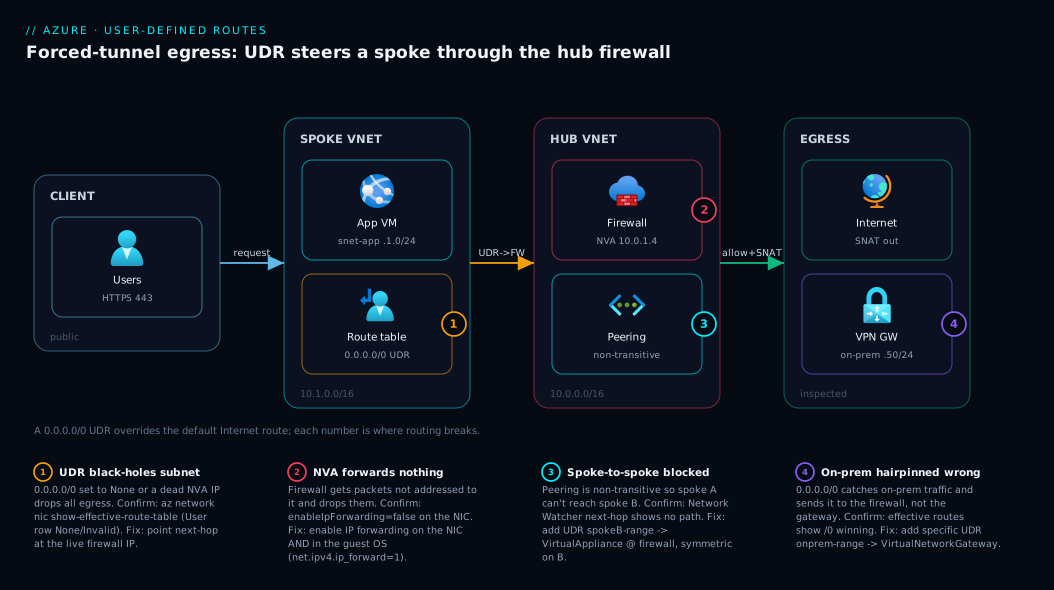
The canonical use of UDRs is forced-tunnel egress in a hub-and-spoke topology — the architecture to internalise. Follow one outbound packet. A user request lands on the app VM in the spoke VNet (10.1.0.0/16), whose snet-app subnet (10.1.1.0/24) carries a route table with one decisive UDR: 0.0.0.0/0 → VirtualAppliance pointing at the Azure Firewall private IP in the hub (10.0.1.4). That route overrides the system 0.0.0.0/0 → Internet, so instead of going straight out the packet crosses the VNet peering into the hub VNet (10.0.0.0/16) to the firewall in AzureFirewallSubnet (10.0.1.0/26). The firewall inspects it, applies SNAT, and forwards allowed traffic to the internet via the hub’s public IP. Spoke-to-spoke traffic works the same way: a UDR for the other spoke’s range (10.2.0.0/16 → VirtualAppliance @ 10.0.1.4) hairpins it through the firewall, because non-transitive peering would otherwise have no path.
The diagram traces this left-to-right — clients, the spoke workload subnet with its route table, the hub firewall as the forced next hop, and the egress points (internet plus an on-prem gateway) — with numbered badges on the four places routing breaks in practice (black-holed subnet, missing IP forwarding, asymmetric return, gateway-propagation toggle) and a legend that says how to confirm and fix each.
Real-world scenario
Northwind Retail, a mid-size e-commerce company, ran a single flat VNet for two years: web, API, and database tiers as three subnets, each with NSGs, all egressing directly to the internet via Azure’s default routes. It worked. Then a PCI assessment landed with one blunt requirement: all outbound traffic from the cardholder-data environment must traverse a stateful firewall and be logged. Their design had no chokepoint — every subnet went straight out.
The networking lead, Priya, built a hub-and-spoke: a new hub VNet (10.0.0.0/16) hosting an Azure Firewall in AzureFirewallSubnet (10.0.1.0/26, private IP 10.0.1.4), and the workloads moved into a spoke VNet (10.1.0.0/16) peered to the hub. She created one route table, rt-spoke-egress, with a single UDR — 0.0.0.0/0 → VirtualAppliance @ 10.0.1.4 — and associated it with the API and database subnets. She left the public web subnet on default routing: that tier needed direct ingress through an Application Gateway and wasn’t in PCI scope.
The first deploy broke all outbound in the API subnet. Priya pulled the effective routes: the 0.0.0.0/0 row showed Source: User, Next Hop: VirtualAppliance, State: Active — the route was fine; the firewall was eating the traffic. The cause: the Azure Firewall had no rule allowing the API subnet’s outbound to its payment-gateway and package-update destinations, so it denied by default (correct firewall behaviour, just unconfigured). She added the allow rules and outbound returned — now inspected and logged, exactly as PCI demanded.
Two weeks later, intermittent failures hit database-subnet calls to an on-premises license server over the VPN gateway. The effective routes again told the story: the on-prem range (192.168.50.0/24) was caught by the 0.0.0.0/0 → firewall UDR and hairpinned to the firewall — which had no route back to on-prem — instead of using the gateway. The fix was a more-specific UDR: 192.168.50.0/24 → VirtualNetworkGateway, a longer prefix than 0.0.0.0/0, which won the longest-prefix match and sent on-prem traffic straight to the gateway. The runbook lesson: a 0.0.0.0/0 forced-tunnel UDR catches everything, including traffic that should go elsewhere; carve explicit, more-specific exceptions for on-prem ranges, PaaS service tags, and platform endpoints. Cost added: one Azure Firewall (Standard) at roughly ₹65,000–₹85,000/month, which the PCI requirement justified.
Advantages and disadvantages
User-defined routing is powerful and dangerous in equal measure. The honest trade-off:
| Advantages | Disadvantages |
|---|---|
| Centralises egress through one inspected chokepoint | One bad UDR can black-hole an entire subnet instantly |
| Enables hub-and-spoke (spoke-to-spoke via the hub) | Asymmetric routing silently breaks stateful firewalls |
| Forced tunneling satisfies “inspect all traffic” compliance | The firewall/NVA becomes a single point of failure and a bottleneck |
None routes blackhole bad ranges without touching NSGs |
Routing is invisible until you check effective routes — hard to debug blind |
| One route table shared across many subnets (DRY) | Easy to forget IP forwarding on an NVA and lose all traffic |
| Longest-prefix exceptions give surgical control | Broad 0.0.0.0/0 catches PaaS/on-prem traffic you didn’t intend |
The advantages matter for any regulated workload or landing zone where you need a single inspection point and shared egress IPs. The disadvantages bite on small, simple workloads where the chokepoint adds cost and a failure domain for no compliance benefit — there, default system routing is the right answer and adding UDRs is over-engineering. The discipline: use UDRs only where a real requirement demands them, and keep route tables minimal and exceptions explicit.
Hands-on lab
A free-tier-friendly walk-through that demonstrates a UDR overriding the default internet route — without needing a firewall. We will create a VNet, two subnets, and a route table that black-holes a range, then prove the override with effective routes. Use Azure Cloud Shell.
Step 1 — Resource group and VNet:
az group create --name rg-udr-lab --location eastus

az network vnet create \
  --name vnet-udr-lab --resource-group rg-udr-lab \
  --address-prefix 10.20.0.0/16 \
  --subnet-name snet-workload --subnet-prefix 10.20.1.0/24
Step 2 — Create a route table and a black-hole route. We drop all traffic to 1.1.1.0/24 (a test range) to prove a UDR overrides the system internet route:
az network route-table create \
  --name rt-lab --resource-group rg-udr-lab --location eastus

az network route-table route create \
  --route-table-name rt-lab --resource-group rg-udr-lab \
  --name blackhole-test \
  --address-prefix 1.1.1.0/24 \
  --next-hop-type None
Step 3 — Associate the route table with the subnet:
az network vnet subnet update \
  --vnet-name vnet-udr-lab --name snet-workload --resource-group rg-udr-lab \
  --route-table rt-lab
Step 4 — Create a tiny VM in the subnet to inspect its NIC (B1s is the cheapest; delete it after):
az vm create \
  --name vm-lab --resource-group rg-udr-lab \
  --image Ubuntu2204 --size Standard_B1s \
  --vnet-name vnet-udr-lab --subnet snet-workload \
  --public-ip-address "" --nsg "" \
  --admin-username azureuser --generate-ssh-keys
Step 5 — Read the effective routes (the proof):
az network nic show-effective-route-table \
  --name vm-labVMNic --resource-group rg-udr-lab -o table
Expected output: the system 0.0.0.0/0 → Internet route (Source Default), the VnetLocal route for 10.20.0.0/16, and your new 1.1.1.0/24 → None route with Source User, State Active. That User row is the override working: any packet to 1.1.1.0/24 is now silently dropped while everything else follows the defaults. Change the prefix to 0.0.0.0/0 with next-hop None and you’d black-hole all egress — exactly how people accidentally cut a subnet off.
Step 6 — Teardown (delete everything so you pay nothing):
az group delete --name rg-udr-lab --yes --no-wait
Common mistakes & troubleshooting
The failures here are remarkably consistent. Symptom → root cause → how to confirm → fix.
| # | Symptom | Root cause | Confirm with | Fix |
|---|---|---|---|---|
| 1 | Whole subnet lost all outbound | A 0.0.0.0/0 → None (or to a dead NVA) UDR |
show-effective-route-table: User row to None/Invalid |
Correct the next-hop; point at a live firewall or remove the route |
| 2 | Traffic reaches firewall but reply never returns | Asymmetric routing — request via NVA, reply direct | NVA logs show request, not the reply; check return-path UDR | Add a UDR on the destination subnet routing the source range back via the NVA |
| 3 | Routed to an NVA but nothing forwards | IP forwarding disabled on the NVA NIC or guest OS | az network nic show --query 'enableIpForwarding' = false |
Enable on the NIC and in the OS (net.ipv4.ip_forward=1) |
| 4 | On-prem unreachable after adding a route table | disableBgpRoutePropagation: true blocked gateway routes |
Effective routes: no VirtualNetworkGateway rows |
Set propagation back to enabled, or add explicit on-prem UDRs |
| 5 | Spoke A can’t reach spoke B | Peering is non-transitive; no route via the hub | Next-hop check shows no path to spoke B’s range | Add UDR spokeB-range → VirtualAppliance @ firewall on spoke A |
| 6 | UDR shows State: Invalid |
Next-hop IP not reachable (wrong IP, non-peered VNet) | Effective routes State column = Invalid |
Fix the next-hop IP; ensure it’s in the local or a peered VNet |
| 7 | PaaS (Storage) traffic bypasses the firewall | Private endpoint’s /32 route wins longest-prefix match |
Effective routes show InterfaceEndpoint /32 row |
Intended — for inspection, use the firewall’s PaaS rules instead |
| 8 | Two subnets, only one is forced through firewall | Route table associated to one subnet, not both | Each subnet’s effective routes differ | Associate the same route table with both subnets |
| 9 | Route table edits seem to do nothing | Editing the table but it’s not associated to the subnet | Subnet shows no routeTable id |
Associate the table with the subnet (step 4 above) |
| 10 | Azure platform traffic (LB probes, KMS) broke | 0.0.0.0/0 → firewall caught required platform endpoints |
Effective routes; failing platform features | Add Internet exception UDRs for needed service tags/IPs |
The two that cost the most hours are #2 (asymmetric routing) and #3 (IP forwarding). Asymmetric routing is insidious because the request works — but the reply, lacking a return UDR, comes back NIC-to-NIC and the stateful firewall drops it as unsolicited; the fix is always symmetry. IP forwarding is the silent killer for home-grown NVAs (managed Azure Firewall handles it for you): a firewall VM with the Azure NIC flag set but the OS flag unset accepts packets and drops them on the floor.
Best practices
- Default to system routes. Only add UDRs where a real requirement (inspection, topology, blocking) demands them. Every UDR is a thing that can break.
- Keep route tables minimal and shared. One route table per role (e.g. “spoke-egress”), associated with all subnets that need it — not a near-duplicate table per subnet.
- Always carve explicit exceptions to
0.0.0.0/0. A forced-tunnel default catches everything; add more-specific UDRs for on-prem ranges (→ VirtualNetworkGateway), required platform service tags (→ Internet), and PaaS where appropriate. - Make routing symmetric. If A→B goes through the firewall, ensure B→A’s return path does too, or stateful inspection drops the replies.
- Enable IP forwarding in both places for any NVA — the Azure NIC flag and the guest OS — and prefer the managed Azure Firewall where you can, so this is one less footgun.
- Leave
disableBgpRoutePropagation= false unless you have replaced the gateway/BGP routes with explicit UDRs and know exactly what you’re blocking. - Check effective routes after every change.
show-effective-route-tableis the proof; never assume a UDR took effect. - Use
Noneroutes to blackhole bad ranges fast — it’s cleaner and quicker than editing NSGs across many subnets for a temporary block. - Ship route tables as Bicep/IaC, peer-reviewed, so a
0.0.0.0/0change is visible in a pull request, not a midnight portal click. - Document each non-obvious UDR in the route’s name or a tag —
to-firewall,onprem-via-gw,drop-badnet— so the next engineer reads intent at a glance.
Security notes
Routing is a security control, not just a connectivity tool. Forced tunneling exists to guarantee a single inspected egress path, and that value collapses if traffic sneaks around the firewall — so audit for bypasses (a stray Internet exception UDR, a private endpoint /32, or a service endpoint can all skip it) by periodically reviewing effective routes on sensitive subnets.
Apply least privilege on the routing resources. Editing a route table is the power to silently reroute or black-hole production traffic — scope Microsoft.Network/routeTables/* write tightly via RBAC, and put a resource lock on critical route tables so nobody deletes the one forcing egress through the firewall (see Azure Resource Locks: Prevent Accidental Deletion). Treat routing as one layer of defense in depth: routes decide the path, NSGs decide allow/deny, the firewall decides application-aware allow/deny — none sufficient alone. And remember the None route drops silently with no logging; for anything you need an audit trail on, deny at the firewall instead.
Cost & sizing
Route tables and UDRs themselves are free — there is no charge for the Microsoft.Network/routeTables resource, the routes inside it, or associating them with subnets. You can create the maximum number of UDRs at no cost. What costs money is the infrastructure the routes point at: the firewall or NVA, the gateway, and the data they process.
| Cost driver | What you pay for | Rough figure (INR/month) | Notes |
|---|---|---|---|
| Route table + UDRs | Nothing — free | ₹0 | No charge for the resource or routes |
| Azure Firewall (Standard) | Deployment + per-GB processed | ~₹65,000–₹85,000 + data | The usual forced-tunnel next hop |
| Azure Firewall (Premium) | Higher fixed + per-GB | ~₹1,10,000+ + data | TLS inspection, IDPS |
| Third-party NVA (VM) | VM compute + license + egress | Varies by VM size + vendor | You also own IP forwarding/HA |
| VPN Gateway (forced tunnel) | Gateway SKU/hour + egress | ~₹2,500–₹30,000+ by SKU | For tunnel-to-on-prem egress |
Key limits to size against: up to 400 UDRs per route table, and a table serves many subnets but each subnet has at most one. There’s no free-tier “firewall” — the cheapest way to learn UDRs (the lab) is a None route plus a B1s VM, paying only the VM’s hours. Right-sizing: don’t buy a Premium firewall when Standard meets the requirement, route only traffic that must be inspected (carve PaaS exceptions via private endpoints so you don’t pay per-GB to inspect backup traffic), and tear down lab gateways/firewalls immediately — an idle gateway still bills hourly.
Interview & exam questions
Q1. What is the difference between a system route and a user-defined route?
System routes are Azure’s auto-created defaults on every subnet (local VNet, peered VNets, gateway/on-prem, and a 0.0.0.0/0 → Internet catch-all). A UDR is a route you author inside a route table to override a system route; for the same or a more specific prefix, the UDR wins. You can’t delete system routes, only override them.
Q2. How does Azure choose which route applies to a packet? Longest-prefix match first: among routes whose prefix contains the destination IP, the most specific (longest) prefix wins. If prefixes tie on length, source priority breaks it — UDRs beat system routes. “Longest prefix, then UDR over system” explains every outcome.
Q3. You routed 0.0.0.0/0 to an NVA but no traffic flows. First thing to check?
IP forwarding. The NVA gets packets not addressed to it, which Azure and the OS drop by default. Confirm enableIpForwarding is true on the NIC and the guest OS has forwarding on (net.ipv4.ip_forward=1), then check the NVA’s allow rules. The managed Azure Firewall handles forwarding for you.
Q4. What is asymmetric routing and why does it break a firewall? The request and reply take different paths — request through the firewall via a UDR, reply back NIC-to-NIC because the destination subnet has no return UDR. A stateful firewall that never saw the outbound flow drops the reply as unsolicited. Fix it by making both directions traverse the firewall.
Q5. Why can’t spoke A reach spoke B by default, and how do UDRs fix it?
VNet peering is non-transitive: A↔hub and B↔hub don’t create an A↔B path. Add a UDR on spoke A for spoke B’s range pointing at the hub firewall (VirtualAppliance), plus a symmetric one on B, so the firewall relays spoke-to-spoke traffic.
Q6. What does the None next-hop type do, and when would you use it?
It silently black-holes any packet matching the prefix — no NSG involved. Use it to block a known-bad CIDR across many subnets via one shared route table. Caveat: it logs nothing, so for auditable blocks, deny at the firewall instead.
Q7. A private endpoint’s traffic is skipping your 0.0.0.0/0 → firewall UDR. Why?
The private endpoint injects a /32 host route (InterfaceEndpoint) for its private IP. As a /32 it’s the longest possible prefix and wins over your /0 UDR, so PaaS traffic goes direct to the endpoint, not via the firewall. This is by design.
Q8. What does disableBgpRoutePropagation (Propagate gateway routes = No) do?
Set to true, the route table blocks the on-prem routes a VPN/ExpressRoute gateway propagates via BGP. People enable it for a “clean” table and lose on-prem connectivity. Leave it false unless you’ve replaced those routes with explicit UDRs.
Q9. How do you prove a UDR is actually being used by a VM?
Run az network nic show-effective-route-table for the NIC. It shows the final merged table after resolution; look for your route with Source: User and State: Active. An Invalid state means the next-hop IP wasn’t reachable, so the route is ignored.
Q10. How many UDRs per route table, and how many route tables per subnet? Up to 400 UDRs per route table; a subnet has at most one route table (though one table can serve many subnets). If you expected two tables to merge on a subnet, only one applies.
Q11. You need most egress inspected but AzureMonitor telemetry to go direct. How?
Keep the 0.0.0.0/0 → VirtualAppliance default, then add a more-specific UDR for the AzureMonitor service-tag ranges with next-hop Internet. Longest-prefix match sends that traffic direct, so platform telemetry isn’t bottlenecked by the chokepoint.
Q12. Where do UDRs fit relative to NSGs? Independent layers. Routing decides the next hop; NSGs decide allow/deny at the subnet and NIC. A packet must be both allowed and routable to arrive. Debug both — effective routes for the path, IP-flow-verify for allow/deny.
These map most directly to AZ-700 (Designing and Implementing Microsoft Azure Networking Solutions) and appear in AZ-104 and AZ-305 networking sections.
Quick check
- For destination
10.5.3.7, you have a system route10.5.0.0/16 → VnetLocaland a UDR10.5.3.0/24 → VirtualAppliance. Which one applies and why? - You add a
0.0.0.0/0 → Noneroute to a subnet. What happens to that subnet’s internet access? - Name the only next-hop type that requires a next-hop IP address.
- Your NVA receives packets but forwards none. Name the two places IP forwarding must be enabled.
- Spoke A and spoke B are both peered to a hub but can’t reach each other. Why, in one sentence?
Answers
- The UDR (
10.5.3.0/24 → VirtualAppliance) applies — it has the longer (more specific) prefix, and longest-prefix match wins regardless of source. (Even at equal length, the UDR would win over the system route.) - The subnet loses all internet egress — every packet to
0.0.0.0/0(anything not matched by a more-specific route) is silently dropped. This is the classic accidental black-hole. VirtualAppliance— it needs the appliance’s private IP as the next hop. All other types (Internet,None,VnetLocal,VirtualNetwork,VirtualNetworkGateway) take no IP.- On the Azure NIC (
enableIpForwarding = true) and inside the guest OS (e.g.net.ipv4.ip_forward=1on Linux). Both, or the NVA drops the traffic. - Because VNet peering is non-transitive — A↔hub and B↔hub don’t create an A↔B path; you need UDRs routing each spoke’s traffic to the other via the hub.
Glossary
- System route — An Azure-managed default route present on every subnet (local VNet, peered VNets, gateway, internet catch-all). Cannot be deleted, only overridden.
- User-defined route (UDR) — A route you author to override a system route, defined inside a route table.
- Route table — The
Microsoft.Network/routeTablesresource that holds UDRs and is associated with subnets. - Address prefix — The destination CIDR a route matches; specificity drives longest-prefix match.
- Next-hop type — What to do with matched packets:
VnetLocal,VirtualNetwork,Internet,VirtualNetworkGateway,VirtualAppliance, orNone. - Next-hop IP — The private IP of the appliance, required only for
VirtualApplianceroutes. - Longest-prefix match — The rule that selects the route with the most specific matching prefix for a destination.
- Effective routes — The final merged routing table on a NIC (system + user + propagated), the source of truth for routing decisions.
- IP forwarding — A NIC + OS setting that lets a VM (NVA) pass packets not addressed to itself; mandatory for any routed-through appliance.
- Network virtual appliance (NVA) — A VM acting as a firewall/router/proxy that traffic is routed through via a
VirtualApplianceUDR. - Forced tunneling — Overriding
0.0.0.0/0to send all egress to a firewall or on-premises gateway instead of direct to the internet. - Asymmetric routing — When request and reply take different paths, breaking stateful firewalls that never saw the outbound flow.
- Route propagation (BGP) — Gateway/BGP routes automatically injected into a route table unless
disableBgpRoutePropagationis true. - Black hole (
Noneroute) — A route that silently drops all matched traffic, used to block ranges without NSGs. - Hub-and-spoke — A topology with a central hub VNet (shared services like a firewall) and peered spoke VNets; UDRs route spoke traffic through the hub.
Next steps
- Solidify the foundation routing sits on with Azure Virtual Network, Subnets and NSGs: Networking Fundamentals.
- Learn to debug routing in production with Diagnosing Azure VNet Connectivity: NSGs, UDRs, Effective Routes & Network Watcher.
- See how UDRs underpin a full landing zone in Azure Enterprise-Scale Landing Zone: Foundation for Large Organizations.
- Understand the
/32route that PaaS injects in Azure Private Endpoint vs Service Endpoint: Secure PaaS Access. - Protect the route tables that force your egress with Azure Resource Locks: Prevent Accidental Deletion.