You deployed a virtual machine, opened the right port, and tried to connect — and nothing happened. The connection just hangs until it times out, or it comes straight back as “connection refused.” Nothing changed. Except, in Azure networking, something almost always changed somewhere you weren’t looking. The most common reason a packet never reaches your VM is a Network Security Group (NSG) — the stateful, priority-ordered allow/deny list Azure evaluates on the way into and out of a network interface or subnet. When an NSG drops a packet it sends nothing back; you just get silence, and silence is the hardest thing to debug.
The good news: you almost never have to guess which rule blocked you. Azure gives you two tools that turn the guesswork into a lookup. Effective Security Rules flattens every NSG that applies to a network interface into the single ordered list Azure actually enforces. IP Flow Verify (a Network Watcher feature) takes a specific 5-tuple — source IP, destination IP, port, protocol, direction — and tells you, in one line, Allow or Deny and the exact name of the rule that decided it. Used together they answer “why is my traffic blocked?” in under two minutes — no packet captures, no trial-and-error rule edits.
By the end you will stop poking at rules hoping one sticks. When a connection fails you will localise it — is it really the NSG, or routing, DNS, a closed listener, or a firewall further along? — and when it is the NSG, you will name the offending rule and understand why it won. Keep the symptom-to-fix playbook open the next time a port refuses to answer.
What problem this solves
An NSG block is uniquely frustrating because it is invisible by default. A firewall appliance logs a drop; a web server returns a 403; a database refuses a login with a message. An NSG, when it denies a packet, sends nothing back — the client waits for a SYN-ACK that never comes and reports a timeout. Beginners read “timeout” as “the server is down,” restart the VM, or open a ticket, when the real cause is one deny rule at priority 200 quietly doing its job.
What breaks without this skill: an engineer adds an allow at a higher priority number than an existing deny (deny still wins); opens the port on the NIC’s NSG while a subnet NSG above it still blocks; or spends an hour on the NSG when the packet never reached it — a User-Defined Route sent it elsewhere, or the app was never listening. Every one is diagnosable in minutes with the two tools — if you know they exist. This bites first-timers on RDP/SSH, teams exposing a web app on 443, anyone wiring a VM to Azure SQL or Storage, and engineers juggling a subnet and a NIC NSG. The fix is rarely “open everything” — it’s “find the rule Azure actually applied, and understand why.”
The shape of every case is the same: a timeout points at a silent NSG drop or routing black-hole (reach for IP Flow Verify), a refusal points at a dead listener (reach for the VM), and “worked yesterday” points at a changed rule (reach for Effective Security Rules and the Activity Log). The full symptom→tool decision table is in Telling an NSG block from everything else below.
Learning objectives
By the end of this article you can:
- Explain what an NSG is, where it attaches (subnet vs NIC), and why it evaluates rules in strict priority order with an implicit deny at the end.
- Read the Effective Security Rules for a network interface and explain why it is the only list that tells you what Azure actually enforces.
- Run IP Flow Verify from the portal and with
az network watcherto get a one-line Allow/Deny verdict plus the name of the deciding rule. - Tell an NSG block apart from a routing problem, a DNS failure, a closed listener, or a downstream firewall — and pick the right tool for each.
- Apply a structured symptom → root cause → confirm (exact command/portal path) → fix playbook to the dozen most common NSG failures.
- Avoid the classic beginner traps: a wrong priority number, a forgotten subnet NSG, blocked return traffic, and misused service tags.
- Keep NSGs auditable and turn on NSG flow logs when you need a record of what was actually dropped.
Prerequisites & where this fits
You should know the basics of an Azure Virtual Network (VNet): it holds subnets, each with a CIDR range, and resources like VMs get a network interface (NIC) with a private IP. Helpful but not required: running az in Cloud Shell, reading JSON, and a rough sense of TCP (SYN/SYN-ACK), ports, and inbound vs outbound. New to subnets and private IPs? Start with Azure Virtual Network, Subnets and NSGs: Networking Fundamentals.
This sits in the Networking → Troubleshooting track. It assumes the rules model from Azure NSG Rules Explained: Priorities, Default Rules and Augmented Security Rules for Beginners — that article teaches how to write NSG rules; this one how to debug them. It pairs with Diagnosing Azure VNet Connectivity: NSGs, UDRs, Effective Routes & Network Watcher, the broader playbook covering routes too; when the cause turns out to be routing, User-Defined Routes and Route Tables: Steering Azure Traffic the Way You Intend is where you go next.
A quick map of who owns what, so you escalate to the right layer instead of staring at the wrong tool:
| Layer | What lives here | Tool that confirms it | Failure it causes |
|---|---|---|---|
| NSG (subnet + NIC) | Allow/deny rules, priorities, service tags | Effective Security Rules, IP Flow Verify | Silent drop → timeout |
| Routing (UDR / system routes) | Where the packet is sent next | Effective Routes, Next Hop | Reply lost, traffic black-holed |
| The app inside the VM | The process listening on the port | ss -tlnp / netstat on the VM |
Connection refused |
| Downstream / PaaS firewall | Azure Firewall, Storage/SQL firewall, DNS | The firewall’s own blade; nslookup for DNS |
Block after the NSG passes it |
Core concepts
Five ideas make every later diagnosis obvious.
An NSG is an ordered allow/deny list, lowest priority number first. Each rule has a priority from 100 to 4096; Azure evaluates in ascending order per direction and stops at the first match. Lower number wins, so a deny at 200 beats an allow at 300 — which is the most common beginner mistake: an allow with a bigger number than an existing deny, baffled that nothing changed.
There is always an implicit “deny everything” at the bottom. Every NSG has hidden, non-deletable default rules (65000–65500): they allow traffic within the VNet (AllowVnetInBound) and from the load balancer (AllowAzureLoadBalancerInBound), then DenyAllInBound/DenyAllOutBound at 65500 catch the rest. So “I didn’t write a deny but it’s still blocked” is normal — absence of an allow is a deny.
NSGs are stateful — allow the request, the reply is automatic. You do not add an outbound rule for return traffic: an allowed inbound flow’s reply is permitted automatically (and vice versa). A lost reply is therefore almost never the NSG — it’s usually asymmetric routing (a UDR sending the reply out a different path) masquerading as a security problem.
An NSG can attach to a subnet, a NIC, or both — and both apply. Inbound is filtered subnet-first then NIC, outbound the reverse, and a packet must be allowed by both. So “I opened the port on the NIC” can still fail because the subnet NSG above it denies — and Effective Security Rules is the only view that shows the combined result.
The status you don’t get is the clue. A timeout almost always means a packet was silently dropped — NSG deny, no route, or a black-hole. A connection refused (instant) means the packet arrived but nothing was listening — an application problem, because an NSG never sends a reset. Timeout → suspect the NSG/route; refused → suspect the listener.
How NSG evaluation actually works
Most “wrong rule won” bugs are really “I misunderstood the order.” Azure evaluates per direction, in ascending priority, and stops at the first match (protocol, source, destination, and port all fall inside the rule). That match’s action is final. When a subnet NSG and a NIC NSG both exist the packet must clear both, and the order flips by direction:
| Direction | NSG order | Drops the packet when… |
|---|---|---|
| Inbound | Subnet NSG → NIC NSG | Either NSG’s first match is a Deny, or only the 65500 implicit deny matches |
| Outbound (incl. replies) | NIC NSG → Subnet NSG | A too-strict outbound deny blocks new outbound (updates, API calls); allowed inbound’s reply is auto-permitted |
| After NSGs | Routing takes over | A bad route/UDR black-holes it — now a route question, not an NSG one |
Reading the Effective Security Rules
A single NSG blade shows only its rules — not the combined effect of a subnet NSG plus a NIC NSG plus the hidden defaults. Effective Security Rules flattens all of that into the single ordered list Azure enforces on a network interface: the ground truth, and the first thing to read when traffic is blocked.
Portal path: the NIC → Help → Effective security rules (also from the VM’s Networking blade or Network Watcher). It lists every rule, both directions, in priority order, tagged with which NSG it came from, defaults included. With the CLI, pull them as JSON and filter:
# Effective security rules for a specific NIC (the ground-truth combined list)
az network nic list-effective-nsg \
  --name nic-web-01 --resource-group rg-net-prod -o json \
  --query "value[].{nsg:name, rules:effectiveSecurityRules[].{name:name, dir:direction, prio:priority, access:access, port:destinationPortRange, src:sourceAddressPrefix}}"
The method is mechanical: scanning from the lowest priority number down, find the first rule whose direction, source, destination, and port all match — its Access is the verdict. A Deny (or nothing matching until the 65500 implicit deny) means blocked. Watch the traps: an allow sitting below a broad deny never fires; a rule on the wrong direction does nothing; an allow scoped to one CIDR won’t help a different source; 443 allowed won’t help an app on 8443. The source NSG column tells you where to edit — subnet or NIC.
IP Flow Verify: the one-line answer
Effective Security Rules shows the whole list; IP Flow Verify does the matching for you. Give it a precise packet — local IP, remote IP, port, protocol, direction — and it returns Allow/Deny plus the rule name that decided. It’s a Network Watcher feature (enabled per region, usually automatic). Point it at a target VM/NIC and describe the flow as Azure sees it:
# Is inbound HTTPS from a public client allowed to this VM's private IP?
az network watcher test-ip-flow \
  --vm vm-web-01 --nic nic-web-01 \
  --resource-group rg-net-prod \
  --direction Inbound --protocol TCP \
  --local 10.20.1.4:443 \
  --remote 203.0.113.10:51514 -o json
# → { "access": "Allow" | "Deny", "ruleName": "<NSG>/<ruleName or DefaultRule_DenyAllInBound>" }
The two fields that matter, and how to read them:
| Field | Value | What it means |
|---|---|---|
access |
Allow |
The NSG would let the packet through — the block is elsewhere (route, listener, downstream firewall) |
access |
Deny |
The NSG is blocking it — read ruleName to know which |
ruleName |
nsg-web/Allow-HTTPS (a real rule) |
Edit this rule or its priority |
ruleName |
DefaultRule_DenyAllInBound |
No allow matched — the implicit deny caught it; add an allow |
Portal path: Network Watcher → IP flow verify → pick the VM/NIC, set direction, protocol, local and remote IP:port → Check. Use this first in almost every incident — in ten seconds it tells you whether you’re even in the right layer. If it says Allow, stop blaming the NSG and look at routing, the listener, or a downstream firewall. That single fact saves the most time of anything here.
Use the IP/port as Azure sees the packet: --local is the VM’s own private IP (not its public IP), --remote is the other end’s IP (not a hostname), --direction is from the VM’s perspective (test Outbound for the VM’s own calls), and --nic disambiguates a multi-NIC VM.
Telling an NSG block from everything else
The biggest beginner time-sink is debugging the NSG when it was never the problem. Before editing a rule, localise the failure — the symptom plus one tool usually settles it:
| If you see… | It’s probably… | Confirm with | Not the NSG if… |
|---|---|---|---|
| Timeout, and IP Flow Verify says Deny | An NSG rule (or implicit deny) | az network watcher test-ip-flow → ruleName |
— (it is the NSG) |
| Timeout, but IP Flow Verify says Allow | Routing, downstream firewall, or dead listener | Effective Routes / Next Hop; the app’s port | NSG already passed it |
| Connection refused (instant) | Nothing listening on the port | ss -tlnp / netstat -an on the VM |
NSG never sends a reset |
| “Host not found” / wrong IP | DNS, not connectivity at all | nslookup <name> on the client |
You haven’t reached the network yet |
| Reply never returns though inbound allowed | Asymmetric routing (a UDR) | Effective Routes; check next hop of the return path | NSGs are stateful — not the rule |
| Works from inside the VNet, not from internet | Missing Internet-sourced allow, or no public IP/LB |
IP Flow Verify with the public source IP | Internal works because AllowVnetInBound |
The whole method is one ordering: verify, then route, then listener, then downstream. Run IP Flow Verify first — Deny puts you in the NSG (read ruleName); Allow clears it, so move to Effective Routes, the listener, and any downstream firewall instead of editing rules that were never the cause.
Architecture at a glance
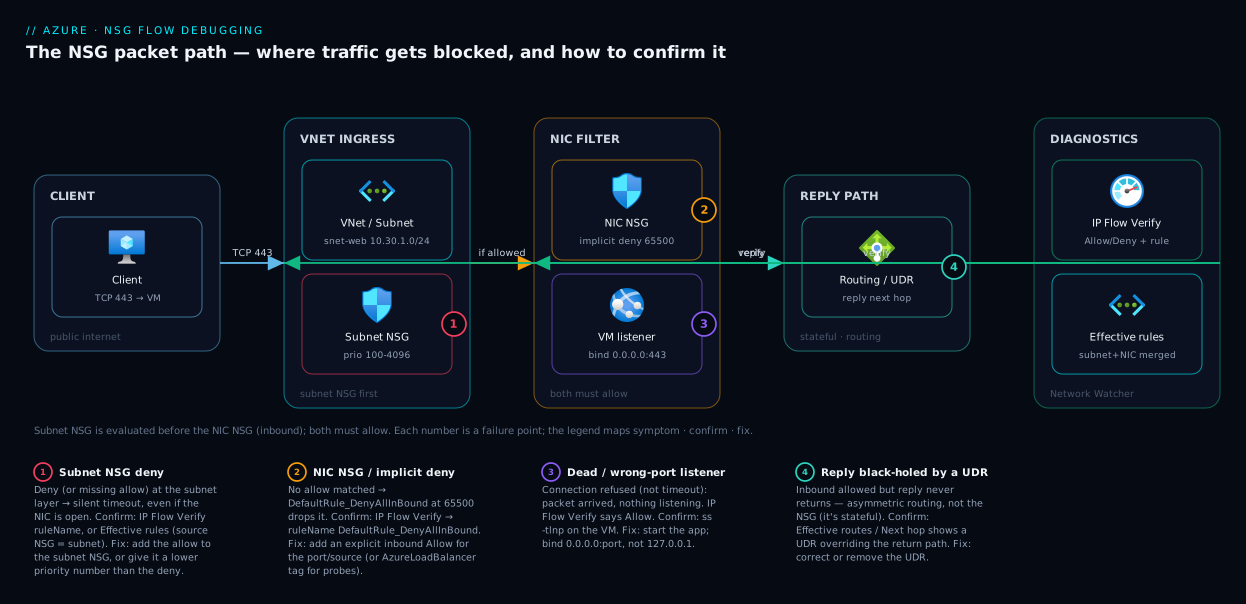
The diagram traces a single inbound HTTPS request from a public client to the app inside the VM, and pins each common failure to the hop where it bites. Read it left to right: a client sends TCP 443 into the VNet, where the subnet NSG is evaluated first (inbound order) then the NIC NSG — both must allow it. Only then does it reach the VM, where the app must be listening on 443; if it isn’t, you get connection refused, not an NSG drop. The reply is automatic (NSGs are stateful) but leaves via routing, where a stray User-Defined Route can black-hole the return path.
Underneath sits the diagnostic band — IP Flow Verify against the NSG hops, Effective Security Rules for the combined list, Effective Routes for the routing question when IP Flow Verify says Allow — and the numbered badges mark the four places this most often breaks, with the legend narrating each as symptom · confirm · fix.
Real-world scenario
Saffron Logistics, a mid-size freight company, runs a customer tracking portal on a Linux VM in Central India: a web app on port 443 behind a Standard Load Balancer, NIC in snet-web. One Tuesday a release went out at 14:00 and by 14:20 the portal was unreachable from the public internet — every request timed out — yet from a jump box in the same VNet it loaded fine. The deploy had only updated the app binary; nothing touched the network.
The on-call engineer’s first instinct was to restart the VM (no change), then scale the Load Balancer (no change, needless cost). Twenty minutes in, with customers calling, they ran IP Flow Verify for the exact failing flow — inbound TCP to 10.30.1.5:443, remote the public client range. In seconds: Deny, ruleName: nsg-web-subnet/Deny-Internet-Inbound, a rule at priority 150. Weeks earlier someone had added a temporary “lock it down during maintenance” deny on the subnet NSG and never removed it; the existing Allow-HTTPS rule sat at 300, behind it, and a scheduled automation had just re-applied the deny. Because it lived on the subnet NSG, nobody scanning the VM’s NIC rules had seen it. Effective Security Rules confirmed why: the deny at 150 sat above the allow at 300, so it matched first and stopped — public requests died while VNet-internal traffic (AllowVnetInBound) sailed through.
The fix was a one-liner: delete Deny-Internet-Inbound, re-run IP Flow Verify — now Allow — and the portal recovered within a minute. The follow-ups mattered more: they removed the automation that re-applied the deny and added an Activity Log alert on NSG rule changes. Downtime was ~35 minutes; with IP Flow Verify reached first, it would have been five.
The incident as a timeline, because the order of moves is the lesson:
| Time | Action taken | Effect | What it should have been |
|---|---|---|---|
| 14:20 | Restart the VM | No change | Run IP Flow Verify first |
| 14:28 | Scale the Load Balancer | No change, extra cost | Don’t scale to mask |
| 14:40 | Run IP Flow Verify (Inbound 443) | Deny + rule name in seconds | The breakthrough |
| 14:46 | Remove stale Deny-Internet-Inbound |
Re-verify → Allow; portal recovers | Correct fix |
| +1 day | Activity Log alert on rule changes | Won’t silently recur | The durable fix |
Advantages and disadvantages
The same properties that make NSGs simple make them confusing to debug. Weigh it honestly:
| Advantages (why NSGs are good) | Disadvantages (why they bite) |
|---|---|
| Free and built in — no appliance to deploy or pay for | A denied packet is silent — you get a timeout, not an error |
| Stateful — allow the request, the reply is automatic | The statefulness fools firewall veterans into adding pointless reverse rules |
| Priority-ordered and deterministic — the same packet always gets the same verdict | The order is unforgiving — one wrong priority number and your allow never fires |
| Effective Security Rules + IP Flow Verify make root cause a lookup, not a guess | Beginners don’t know these tools exist and debug blind |
Service tags (Internet, Storage, AzureLoadBalancer) avoid hard-coding Azure IPs |
Misusing a tag (e.g. forgetting AzureLoadBalancer) silently breaks health probes |
| Layer subnet + NIC for defence in depth; deny-by-default is safe | Two NSGs = two places to check (people forget the subnet one), and “I wrote no deny” + still blocked confuses first-timers |
NSGs are the right default for almost every VNet — they only become painful when you debug them without the tools. For L7 inspection, TLS, or centralised egress filtering you add Application Gateway v2 WAF or Azure Firewall alongside NSGs, not instead of them — a packet still clears the NSG first.
Hands-on lab
Reproduce an NSG block, see it in IP Flow Verify and Effective Security Rules, then fix it — free-tier-friendly (one B-series VM; delete at the end). Run in Cloud Shell (Bash).
Step 1 — Variables and resource group.
RG=rg-nsg-lab
LOC=centralindia
VM=vm-web-lab
az group create -n $RG -l $LOC -o table
Step 2 — Create a small Linux VM (this also creates a VNet, subnet, NIC and NSG).
az vm create -n $VM -g $RG --image Ubuntu2204 --size Standard_B1s \
  --admin-username azureuser --generate-ssh-keys --public-ip-sku Standard -o table
# Note the publicIpAddress and (we'll fetch) the private IP next.
PRIV_IP=$(az vm list-ip-addresses -n $VM -g $RG \
  --query "[0].virtualMachine.network.privateIpAddresses[0]" -o tsv)
echo "Private IP: $PRIV_IP"
Step 3 — Install a web server, then confirm the port is open by default-block. Open port 80 logically on the OS, but don’t add an NSG allow rule yet:
az vm run-command invoke -n $VM -g $RG --command-id RunShellScript \
  --scripts "sudo apt-get update -y && sudo apt-get install -y nginx && sudo systemctl enable --now nginx"
Browse to http://<publicIp> — it times out. Nginx is running and listening on 80, but no NSG rule allows inbound HTTP, so the implicit DenyAllInBound drops it. This is the silent block, reproduced.
Step 4 — Prove it’s the NSG with IP Flow Verify.
NIC=$(az vm show -n $VM -g $RG --query "networkProfile.networkInterfaces[0].id" -o tsv | xargs -I{} az network nic show --ids {} --query name -o tsv)
az network watcher test-ip-flow \
  --vm $VM --nic $NIC -g $RG \
  --direction Inbound --protocol TCP \
  --local ${PRIV_IP}:80 \
  --remote 203.0.113.5:40000 -o json
# Expect: "access": "Deny", "ruleName": ".../DefaultRule_DenyAllInBound"
The DefaultRule_DenyAllInBound in ruleName is the proof: no allow rule matched, so the implicit deny caught it.
Step 5 — Read the Effective Security Rules to see the same truth.
az network nic list-effective-nsg --name $NIC -g $RG \
  --query "value[].effectiveSecurityRules[?direction=='Inbound'].{name:name, prio:priority, access:access, port:destinationPortRange}" -o table
# You'll see the default Deny at 65500 and no Allow for port 80.
Step 6 — Fix it by adding an allow rule, then re-verify. Find the NSG (the VM created one), add an inbound allow for 80 at a sensible priority:
NSG=$(az network nic show --name $NIC -g $RG --query "networkSecurityGroup.id" -o tsv | xargs -I{} az network nsg show --ids {} --query name -o tsv)
az network nsg rule create -g $RG --nsg-name $NSG -n Allow-HTTP \
  --priority 300 --direction Inbound --access Allow \
  --protocol Tcp --destination-port-ranges 80 --source-address-prefixes Internet -o table

az network watcher test-ip-flow --vm $VM --nic $NIC -g $RG \
  --direction Inbound --protocol TCP --local ${PRIV_IP}:80 --remote 203.0.113.5:40000 -o json
# Now: "access": "Allow", "ruleName": ".../Allow-HTTP"
Reload http://<publicIp> — the nginx page renders. You watched the verdict flip from Deny to Allow.
Validation. You reproduced a silent NSG block, confirmed it was the implicit deny (DefaultRule_DenyAllInBound, not a rule you wrote) via IP Flow Verify, corroborated it in Effective Security Rules, and fixed it with one allow rule — re-verifying to prove it. No code involved: a silent timeout that was purely the rule set.
Cleanup (avoid lingering charges):
az group delete -n $RG --yes --no-wait
A Standard_B1s is a few rupees/hour; an hour of this lab is well under ₹50, and deleting the resource group stops everything.
Common mistakes & troubleshooting
This is the playbook — the part you bookmark and read mid-incident. It spans the basic traps (wrong priority, forgotten subnet NSG) and the ones that only look like NSG problems: routing (see User-Defined Routes and Route Tables), dead listeners, and downstream firewalls — including a PaaS service’s own, e.g. Fixing Azure Storage 403 Errors. Each row is symptom → root cause → confirm (exact command/portal path) → fix.
| # | Symptom | Root cause | Confirm (exact cmd / portal path) | Fix |
|---|---|---|---|---|
| 1 | Added an allow rule, still blocked | Allow has a higher priority number than an existing deny | Effective security rules: the deny sits above the allow; or IP Flow Verify ruleName shows the deny |
Give the allow a lower number than the deny (e.g. 200), or remove the deny |
| 2 | Opened the port on the NIC, still times out | A subnet NSG above the NIC NSG denies it | az network nic list-effective-nsg shows a deny from the subnet NSG |
Add the allow to the subnet NSG too (both must allow) |
| 3 | “I wrote no deny rule” yet inbound is blocked | Implicit DenyAllInBound (65500) — no allow matched |
IP Flow Verify → ruleName: DefaultRule_DenyAllInBound |
Add an explicit Allow rule for the port/source |
| 4 | Connection refused instantly (not a timeout) | Nothing listening on the port — not the NSG | ss -tlnp / netstat -an on the VM; NSG never sends RST |
Start/bind the app on the port (0.0.0.0, not 127.0.0.1) |
| 5 | IP Flow Verify says Allow but it still fails | The block is downstream: routing, firewall, or PaaS firewall | Effective Routes / Next hop; the downstream service’s own firewall | Fix the route / Azure Firewall rule / Storage-SQL firewall — not the NSG |
| 6 | Inbound allowed, but the reply never returns | Asymmetric routing (a UDR sends the reply elsewhere) | Effective routes: a UDR overrides the system route for the return CIDR | Fix/remove the UDR; route the reply symmetrically |
| 7 | Some source IPs work, others are blocked | Allow rule scoped to specific source CIDRs | Effective security rules: read the rule’s Source prefix | Widen the source prefix or add the missing CIDR / service tag |
| 8 | App works on 443 but a second port (e.g. 8443) doesn’t | Allow rule port range doesn’t include the new port | Effective security rules: rule covers 443 only | Add the port to the rule’s destination range |
| 9 | Load Balancer health probe fails; backend marked unhealthy | Inbound from AzureLoadBalancer service tag not allowed |
IP Flow Verify with remote = LB probe source; check for the tag rule | Add an inbound allow with source AzureLoadBalancer |
| 10 | Outbound to the internet (updates, APIs) suddenly fails | An outbound deny (often a custom DenyAllOutBound or to Internet) |
Effective security rules (Outbound); IP Flow Verify --direction Outbound |
Add an outbound allow for the needed destination/port |
| 11 | “Host not found” or connecting to the wrong IP | DNS, not connectivity — you never reached the network | nslookup <name> / dig on the client returns wrong/no IP |
Fix DNS (record, private DNS zone, resolver) — NSG is irrelevant |
| 12 | RDP/SSH works from your office, fails from home | Allow rule pinned to a single office IP/CIDR | Effective security rules: management rule source = office CIDR only | Add your current IP, or use Bastion instead of a public mgmt port |
| 13 | Private Endpoint traffic blocked despite an allow | NSG on the PE subnet, or older PE/NSG interaction nuance | IP Flow Verify on the PE NIC; check the PE subnet NSG | Allow the consumer source on the PE subnet NSG; verify private DNS |
| 14 | Flow worked, broke after an automation/IaC run | A pipeline re-applied a deny or changed priorities | Activity log filtered to NSG operations; diff the rule set | Fix the IaC source; add an Activity Log alert on rule changes |
Two rows carry reasoning the table can’t fully spell out. Row 1 (allow still blocked) is pure priority order — the deny’s lower number matches first and stops evaluation; the same trap hides at the subnet layer, and a low-priority DenyAllInBound silently overrides the default AllowAzureLoadBalancerInBound, which is how you accidentally kill health probes (row 9). Row 5 (IP Flow Verify says Allow, still failing) is the key habit: the NSG passed, so stop editing rules — the block is downstream, and an allowed-but-lost reply is asymmetric routing, not a rule. For exposed management ports (row 12), front the VM with Azure Bastion rather than widening the CIDR (Cannot RDP or SSH into Your Azure VM?).
NSG-relevant codes and signals reference
NSGs don’t emit HTTP codes, but the signals you observe map cleanly to causes:
| Signal you observe | What it strongly implies | Confirm with | Note |
|---|---|---|---|
| TCP timeout (SYN, no SYN-ACK) | Silent drop — NSG deny, no route, or black-hole | IP Flow Verify (Deny?) → Effective routes | The classic NSG fingerprint |
| Connection refused (RST) | Packet arrived, no listener | ss -tlnp on the VM |
An NSG never sends RST |
DefaultRule_DenyAllInBound in ruleName |
No allow matched the inbound flow | IP Flow Verify | Add an explicit allow |
DefaultRule_DenyAllOutBound in ruleName |
No allow matched the outbound flow | IP Flow Verify --direction Outbound |
Add an outbound allow |
| Allow in IP Flow Verify, still failing | Block is downstream (route/firewall/listener) | Effective routes; downstream firewall blade | Leave the NSG alone |
| Probe-down / unhealthy backend | AzureLoadBalancer tag not allowed |
Effective security rules | Restore the LB allow |
| Intermittent loss under load only | Likely not the NSG (NSG is deterministic) | Look at the app / SNAT / capacity | NSGs allow or deny consistently |
Best practices
- Run IP Flow Verify first, before editing anything. Ten seconds of Allow/Deny + rule name beats an hour of trial-and-error rule edits. It tells you whether you’re even in the right layer.
- Read Effective Security Rules, never a single NSG blade. Only the flattened, combined (subnet + NIC + defaults) list reflects what Azure actually enforces.
- Leave wide gaps between rule priorities (100, 200, 300…), so you can insert a rule above an existing one later without renumbering everything.
- Never blanket-deny inbound without re-allowing
AzureLoadBalancerand the VNet where needed — a carelessDenyAllInBoundat priority 100 takes down health probes and east-west traffic. - Scope source prefixes tightly, but knowingly, and don’t add outbound rules for replies — NSGs are stateful, so a lost reply is a routing bug, not a missing rule.
- Put broadly-shared rules on the subnet NSG, app-specific ones on the NIC NSG, and document which is which so the next person checks both.
- Name rules for intent (
Allow-HTTPS-FromInternet), not generically — IP Flow Verify returns the name, and a clear name is half the diagnosis. - Alert on NSG rule changes (Activity Log) and turn on flow logs when you need a record of what was dropped over time — so automation can’t silently re-introduce a deny.
- Prefer service tags over hard-coded Azure IP ranges (
Storage,Sql,AzureLoadBalancer) — Microsoft keeps them current; a hard-coded list goes stale.
Security notes
- Deny by default is the whole point — keep it. The implicit
DenyAllInBoundis a feature: open only what you must, and narrow back any “open everything to make it work” the moment you confirm the fix. - Don’t expose management ports to
Internet. An inbound allow for 22/3389 from source*invites brute-force. Scope to a known CIDR, or front it with Azure Bastion so the VM needs no public management port. - Least-privilege source and port. One source CIDR to one port beats a wide
Any/Anyallow — every widening is attack surface, so make it deliberate. - Layer NSGs with the rest of your edge. NSGs are L3/L4 only — they don’t inspect payloads. For WAF/TLS/request inspection put Application Gateway/Front Door + WAF or Azure Firewall in front; the packet clears the NSG and the L7 control.
- Guard the blast radius of subnet NSGs, and treat flow logs as security telemetry. A subnet-NSG change affects every NIC in the subnet — review and alert on those more carefully, and keep flow logs for an auditable record of allowed and denied connections.
Cost & sizing
NSGs themselves are free — no per-rule, per-NSG, or per-evaluation charge — and the diagnostic tools (IP Flow Verify, Effective Security Rules, Next Hop, Effective Routes) run on demand without a bill. So “sizing” an NSG is about limits and hygiene, not money. The only NSG-adjacent cost is NSG flow logs — storage plus optional Traffic Analytics ingestion — typically a few hundred rupees a month, growing with connection volume, so scope them to the NSGs you actually audit:
| Item | Cost | Limit / sizing note |
|---|---|---|
| NSGs, rules, and the diagnostic tools | Free | ~1000 rules per NSG (soft, raisable); IP Flow Verify / Effective Rules / Next Hop are free, on-demand |
| NSG flow logs (storage) | Per-GB storage | Scope to needed NSGs; set retention to control growth |
| Traffic Analytics | Log Analytics ingestion + retention | Optional; adds cost — enable only where you need the analysis |
Keep the number of rules small and intentional (fewer rules are faster to debug — NSGs evaluate fine either way).
Interview & exam questions
1. A connection to a VM times out. How do you decide in seconds whether an NSG is to blame, and which rule? Run IP Flow Verify (Network Watcher) for the exact 5-tuple — direction, protocol, the VM’s private IP:port as local, the remote IP:port. It returns Allow/Deny plus the deciding rule’s name: Deny means the NSG is blocking (and which rule); Allow means it’s innocent and the problem is downstream.
2. Why doesn’t a single NSG blade tell the whole story, and what does? A single NSG shows only its own rules, not the combined effect of a subnet NSG, a NIC NSG, and the hidden defaults. Effective Security Rules flattens all of those into the single ordered list Azure enforces on a NIC — the ground truth for debugging.
3. You added an allow rule but traffic is still blocked. Most likely cause? The allow has a higher priority number than an existing deny. Azure evaluates in ascending priority and stops at the first match, so the lower-numbered deny wins. Give the allow a lower number, or remove the deny.
4. Difference between a connection that times out and one that’s refused, in NSG terms? A timeout means a packet was silently dropped — a classic NSG deny or a routing black-hole. A refusal (instant RST) means the packet arrived but nothing was listening — an app problem, because an NSG never sends a reset. Timeout → suspect NSG/route; refused → suspect the listener.
5. You wrote no deny rule, yet inbound is blocked. Why? Every NSG has an implicit DenyAllInBound at 65500. If no allow matches, it denies — absence of an allow is effectively a deny. Add an explicit allow.
6. A subnet NSG and a NIC NSG both exist. Which applies, and in what order? Both, and the packet must clear both. Inbound: subnet NSG first, then NIC NSG. Outbound: NIC NSG first, then subnet NSG. Effective Security Rules shows the combined result.
7. A Load Balancer marks your backend unhealthy after you tightened the NSG. What broke? You blocked the health probe from the AzureLoadBalancer service tag, so the instance was pulled from rotation. Add an inbound allow with source AzureLoadBalancer for the probe port; never blanket-deny inbound without preserving it.
8. IP Flow Verify returns Allow but the connection still fails. Where next? Not the NSG — it passed. Check routing (Next Hop / Effective Routes for a black-holing UDR or a route to a firewall), the listener on the VM, and any downstream firewall (Azure Firewall or a PaaS service’s own firewall).
9. What is a service tag and why prefer it over IP ranges? A service tag (Internet, Storage, Sql, AzureLoadBalancer) is a Microsoft-managed group of Azure IP ranges. Referencing the tag avoids hard-coding IPs that go stale and makes the rule’s intent readable.
10. How would you get an auditable record of what an NSG actually dropped over time? Enable NSG flow logs (written to a storage account), recording allowed and denied flows, optionally analysed with Traffic Analytics. IP Flow Verify is point-in-time; flow logs give you history.
These map to AZ-104 (Administrator) and AZ-700 (Network Engineer); the “is it the route or the rule?” reasoning is squarely AZ-700. A compact cert-mapping for revision:
| Question theme | Primary cert | Objective area |
|---|---|---|
| NSG rules, priorities, defaults | AZ-104 | Configure & manage virtual networking |
| IP Flow Verify / Effective Rules / Next Hop | AZ-104 / AZ-700 | Network Watcher; troubleshoot connectivity |
| Service tags, NSG vs firewall | AZ-700 | Design & implement network security |
| Subnet vs NIC NSG, statefulness | AZ-700 | Implement NSGs and ASGs |
| Flow logs / Traffic Analytics | AZ-700 | Monitor & troubleshoot networks |
Quick check
- A connection to your VM times out. What is the first tool you run, and what two pieces of information does it return?
- You added an allow rule for port 443 but traffic is still blocked. What’s the single most likely reason, given how NSGs evaluate rules?
- True or false: if an inbound flow is allowed, you must add a matching outbound rule for the reply to get back.
- A connection is refused instantly (not a timeout). Is the NSG the likely cause? Why or why not?
- IP Flow Verify says Allow, yet the connection still fails. Name two places you should look next.
Answers
- IP Flow Verify (Network Watcher). It returns the access decision (Allow or Deny) for the exact 5-tuple and the name of the rule that decided it (including
DefaultRule_DenyAllInBoundwhen no allow matched). - Your allow rule has a higher priority number than an existing deny. Azure evaluates rules in ascending priority and stops at the first match, so the lower-numbered deny wins. Give the allow a lower number (or remove the deny).
- False. NSGs are stateful — the reply to an allowed inbound flow is permitted automatically. A lost reply is almost always asymmetric routing (a UDR), not a missing rule.
- No. An NSG silently drops (causing a timeout); it never sends a TCP reset. A refusal means the packet reached the VM but nothing was listening on the port — an application/listener problem. Confirm with
ss -tlnpon the VM. - Routing (Next Hop / Effective Routes — a black-holing UDR or a route to a firewall) and the listener on the VM (or a downstream firewall such as Azure Firewall or a PaaS service’s own firewall).
Glossary
- Network Security Group (NSG) — a stateful set of priority-ordered allow/deny rules on a subnet and/or NIC, filtering inbound and outbound traffic at L3/L4.
- Priority — 100–4096 per rule; Azure evaluates in ascending order and stops at the first match (lower number wins).
- Default rules / implicit deny — hidden, non-deletable rules (65000–65500):
AllowVnetInBound,AllowAzureLoadBalancerInBound, andDenyAllInBound/DenyAllOutBoundat 65500 that catch any packet no allow matched (absence of an allow is effectively a deny). - Stateful — an allowed flow’s return traffic is permitted automatically; you never add a reverse rule for the reply.
- Service tag — a Microsoft-managed group of Azure IP ranges (
Internet,Storage,Sql,AzureLoadBalancer) usable as a rule’s source or destination. - Effective Security Rules — the flattened, combined list (subnet NSG + NIC NSG + defaults) Azure enforces on a NIC; the ground truth for debugging.
- IP Flow Verify — a Network Watcher check that takes a 5-tuple (source IP, destination IP, source port, destination port, protocol) and returns Allow/Deny plus the deciding rule’s name.
- Network Watcher — Azure’s regional network-diagnostics service hosting IP Flow Verify, Next Hop / Effective Routes (where a packet routes next / the combined route table — used when the problem is routing), and NSG flow logs (a record of allowed and denied flows over time).
- Asymmetric routing — a reply leaving by a different path than the request arrived (usually a UDR); looks like a dropped reply but is a routing, not an NSG, issue.
Next steps
You can now localise any “blocked traffic” symptom to a hop, confirm it, and fix the one thing that’s wrong. Build outward:
- Next: Diagnosing Azure VNet Connectivity: NSGs, UDRs, Effective Routes & Network Watcher — the broader connectivity playbook that adds routing to the rules you debugged here.
- Foundations: Azure NSG Rules Explained: Priorities, Default Rules and Augmented Security Rules for Beginners — how to write the rules you’ve now learned to debug.
- Related: User-Defined Routes and Route Tables: Steering Azure Traffic the Way You Intend — when IP Flow Verify says Allow but routing is the real culprit.
- Related: Cannot RDP or SSH into Your Azure VM? A Beginner’s Connectivity Troubleshooting Checklist — the sibling checklist for the most common “I can’t connect” case.
- Related: Azure Private Endpoint vs Service Endpoint: Secure PaaS Access — NSG behaviour around private connectivity to PaaS services.