The deployment fails with a message you have never seen: “The address prefix 10.0.0.0/16 overlaps with an existing peered virtual network.” Or worse — it succeeds, everything looks fine for three weeks, and then you try to peer your app VNet to the shared services VNet so it can reach DNS and the domain controllers, and the peering is refused because both networks chose 10.0.0.0/16. Now you cannot peer them without renumbering one side, which means redeploying every subnet, every NIC, every private endpoint, and every firewall rule that referenced an IP. A five-minute planning decision you skipped at the start has become a multi-day migration.
This is the single most common self-inflicted wound in Azure networking, and it is entirely preventable. An Azure Virtual Network (VNet) is your private slice of the cloud network — a range of private IP addresses, carved into subnets, that your VMs, App Services, databases and private endpoints live inside. The address range is written in CIDR notation like 10.1.0.0/16, and once resources are deployed into it, that range is effectively permanent: you cannot meaningfully shrink it, you cannot overlap it with anything you ever want to connect to, and renumbering after the fact is painful. So the entire game is getting the numbers right before you deploy — mostly arithmetic plus a few Azure-specific rules nobody tells you until you hit them.
By the end of this article you will read 10.1.0.0/16 and instantly know it holds 65,536 addresses, size a subnet for “about 40 VMs” without guessing, know that Azure silently takes 5 addresses out of every subnet (so a /29 gives 3 usable IPs, not 8), and — most importantly — plan an address scheme that lets you peer, VPN and ExpressRoute your VNets on the first try because none of them overlap. This is a concept-and-mental-model article: we lead with how CIDR actually works, then give you the decision tables and an architecture you can copy.
What problem this solves
Without a plan, address space gets handed out the way most things do under deadline pressure: the first person to spin up a VNet picks 10.0.0.0/16 because the portal suggests it, the next team does the same in their own subscription, and a third copies a tutorial that uses 10.0.0.0/16 too. Each works perfectly in isolation. The pain appears later, the moment the business needs these networks to talk — hub-and-spoke connectivity, a site-to-site VPN to on-prem, an ExpressRoute circuit, or simply peering a spoke to shared DNS. Connectivity in Azure requires non-overlapping ranges, no exceptions, and by then you have running workloads you cannot easily move.
What breaks without planning is therefore not the first deployment — it is every connection you try to make afterwards. Two VNets with overlapping ranges cannot be peered. A VNet whose range overlaps your on-premises 10.0.0.0/8 corporate network cannot route to it over VPN or ExpressRoute. A subnet sized too small (/29 “to be tidy”) runs out of IPs the day you scale the VM set or add a few private endpoints, and resizing a non-empty subnet is blocked.
Who hits this: essentially everyone who deploys more than one VNet, which is everyone past the smallest hobby project. It bites hardest on organisations adopting a hub-and-spoke or landing zone topology, on anyone integrating Azure with an existing on-premises network (where the corporate IP plan is already fixed and you must fit around it), and on teams that let each app team self-serve VNets with no central address allocation. The fix costs nothing but ten minutes with a spreadsheet — before the first az network vnet create.
Here is the whole problem in one frame: the four planning decisions, why each one is effectively irreversible, and what it costs to get it wrong.
| Decision | When you make it | Reversible later? | Cost of getting it wrong |
|---|---|---|---|
| VNet address space (the big CIDR) | First, before any subnet | Add ranges yes; change/shrink existing no | Overlap blocks all future peering/VPN; must renumber |
| Subnet sizes (the small CIDRs) | When you carve the VNet | Resize only if subnet is empty | Too small → run out of IPs, blocked from growing in place |
Where the range sits in 10/8 172.16/12 192.168/16 |
At design time | Effectively no, once peered | Clash with on-prem or another spoke → no route |
| Reserved-IP headroom (the +5 per subnet) | Implicit in subnet size | No (it is platform behaviour) | Undersize and a /29 gives 3 usable, not 8 — surprise outages |
Learning objectives
By the end of this article you can:
- Read any CIDR block (
/16,/24,/27,/29) and state its total address count and usable host count from memory. - Convert “I need room for about N machines” into the correct subnet prefix, accounting for Azure’s reserved addresses.
- Explain the 5 reserved addresses Azure removes from every subnet and name exactly which ones (network, gateway, two DNS, broadcast).
- Choose a VNet address range from the RFC 1918 private space that will not overlap your on-premises network or sibling VNets.
- Lay out a hub-and-spoke address scheme where every VNet and subnet is non-overlapping, leaving room to grow.
- Reserve the special subnets (
GatewaySubnet,AzureBastionSubnet,AzureFirewallSubnet) at their required minimum sizes. - Create a VNet and subnets with both
azCLI and Bicep, and verify the plan withaz network vnetqueries. - Diagnose the common failures: overlap-refused peering, exhausted subnets, and “why does my
/27only have 27 IPs?”
Prerequisites & where this fits
You should know what an IP address is (four numbers like 10.1.2.3) and that private networks use special, non-internet-routable ranges, and be able to run az commands in Azure Cloud Shell. No prior subnetting knowledge is assumed — we build CIDR from the ground up. If you have set up a home router and seen 192.168.0.0/24, you already have the intuition; we make it precise.
This sits at the very foundation of Azure networking — the layer underneath everything else. You plan addresses first, then create the VNet and subnets (Azure Virtual Network, Subnets and NSGs: Networking Fundamentals is the natural next read). The scheme you design here is what makes a hub-and-spoke landing zone possible, and it is the precondition for private endpoints (each consumes an IP) and any gateway-based connectivity. When peering or routing later misbehaves, diagnosing VNet connectivity with effective routes and Network Watcher is where you confirm the address plan is the culprit.
Core concepts
Five mental models make every later decision obvious. Read these once and the arithmetic stops being scary.
An IP address is 32 bits, and CIDR just says how many of them are fixed. An IPv4 address like 10.1.2.3 is really 32 binary bits, written as four 8-bit chunks (octets) for human eyes. A CIDR prefix — the /16 in 10.1.0.0/16 — says “the first 16 bits are the network part and are fixed; the rest are free for hosts.” So /16 fixes the first two octets (10.1) and lets the last two vary (.0.0 through .255.255). The smaller the number after the slash, the bigger the network (fewer fixed bits = more free host bits). That inversion is the one thing beginners trip on: a /16 is larger than a /24.
The host count is just 2 to the power of the free bits. Free host bits = 32 minus the prefix. A /24 has 8 free bits, so 2⁸ = 256 total addresses; a /16 → 2¹⁶ = 65,536; a /27 → 2⁵ = 32. Every time the prefix grows by one the network halves; every time it shrinks, it doubles. You do not do binary in your head — you memorise the handful of sizes in the table below.
Azure takes 5 addresses out of every subnet — always. This is the Azure-specific rule that surprises everyone. A normal network loses 2 per subnet (network + broadcast); Azure reserves 5: the first (network/.0), the next two for Azure DNS and platform use (.1, .2, .3), and the last (broadcast/.255). So usable host count is total − 5, not total − 2. A /29 (8 addresses) gives 3 usable, not 8; a /24 (256) gives 251. Forget this and you undersize subnets and hit “no available IPs” with the subnet looking half-empty.
Private address space is finite and you must not overlap it. Private networks draw from three ranges defined by RFC 1918: 10.0.0.0/8 (16.7M addresses), 172.16.0.0/12 (1M), and 192.168.0.0/16 (65K). Your VNet uses a slice of one. The iron law: any two networks you want to connect must not overlap. Two VNets, or a VNet and your on-prem datacentre, that share even one address cannot be peered or routed together. This is the reason address planning exists.
A VNet is a container of address space; subnets carve it up; the range is set in stone once used. The VNet holds one or more big CIDR blocks (its address space); inside, you cut subnets — smaller CIDRs that fit within it and must not overlap each other. Resources attach to a subnet and draw an IP from it. You can add a new range to a VNet later, but you cannot change or shrink one that has resources in it, nor resize a non-empty subnet. That irreversibility is exactly why you plan up front.
The CIDR cheat sheet you will use every day
Pin this table. These are the prefixes you will actually use in Azure; the “Azure usable” column already subtracts the 5 reserved addresses. Memorise the bold rows (/24, /27, /29) and you can size 90% of subnets on sight.
| CIDR | Total addresses | Azure usable (−5) | Typical use | Mental shorthand |
|---|---|---|---|---|
/16 |
65,536 | 65,531 | A whole VNet (spoke or hub) | “first two octets fixed” |
/20 |
4,096 | 4,091 | Large VNet / region block | “16 × a /24” |
/22 |
1,024 | 1,019 | Big subnet (large AKS node pool) | “4 × a /24” |
/24 |
256 | 251 | The default workhorse subnet | “last octet free” |
/25 |
128 | 123 | Half a /24 | “two /25s in a /24” |
/26 |
64 | 59 | Medium subnet | “AzureFirewallSubnet min” |
/27 |
32 | 27 | Small app/data subnet, Bastion min | “32 addresses” |
/28 |
16 | 11 | Tiny subnet, few private endpoints | “16 addresses” |
/29 |
8 | 3 | Smallest practical Azure subnet | “8 → only 3 usable” |
/30 |
4 | −1 (invalid) | Too small for Azure | “do not use” |
The smallest subnet Azure allows is
/29(3 usable). The largest is/2. In practice you live between/29and/16. A/30or smaller cannot satisfy the 5-address reservation, so Azure rejects it.
How CIDR and subnet masks actually work
Let us make the arithmetic concrete. Take 10.1.0.0/16. The /16 means 16 network bits, so the boundary falls between the second and third octets — everything from 10.1.0.0 to 10.1.255.255 is inside. To split it into subnets you borrow host bits and turn them into network bits; each bit borrowed doubles the subnet count and halves their size.
Borrow 8 bits and you get /24 subnets: 10.1.0.0/24, 10.1.1.0/24, … up to 10.1.255.0/24 — 256 subnets of 256 addresses each. For a /16 carved into /24s the third octet becomes the subnet number and the fourth is the host. This is why /24-on-a-/16 is so popular — it reads like a phone extension: 10.1.7.0/24 is “subnet 7,” 10.1.7.50 is “host 50 in subnet 7.”
Going smaller than a /24 borrows bits inside the last octet. A /27 borrows 3 bits, leaving 5, so subnets land on multiples of 32: .0, .32, .64 … .224; a /28 lands on multiples of 16. The rule: subnets always start on a multiple of their own size. You cannot put a /27 at .10 — it must start at .0, .32, .64, and so on. Azure enforces this and rejects an off-boundary prefix as invalid.
Reading the boundary in your head
You rarely need a dotted mask in Azure (you write CIDR), so all you need to lay out subnets is the block size in the changing octet — the spacing between subnet starts. Here is that mapping for the octet where the split happens.
| Prefix | Changing octet | Block size | Subnet starts land on | Subnets per parent /24 |
|---|---|---|---|---|
/25 |
4th | 128 | .0, .128 | 2 |
/26 |
4th | 64 | .0, .64, .128, .192 | 4 |
/27 |
4th | 32 | .0, .32, .64 … .224 | 8 |
/28 |
4th | 16 | .0, .16, .32 … .240 | 16 |
/29 |
4th | 8 | .0, .8, .16 … .248 | 32 |
/24 |
3rd | 1 (whole octet) | .0.0, .1.0, .2.0 … | 256 per /16 |
/20 |
3rd | 16 | .0.0, .16.0, .32.0 … | 16 per /16 |
The practical takeaway: default to /24, drop to /27 or /26 for small purpose-built subnets, reserve /29 for a tiny management subnet, and go up to /22//23 only for high-IP workloads like large AKS clusters with Azure CNI (where every pod consumes an address).
The 5 reserved addresses, named
This single rule causes more “subnet full” surprises than anything else, so let us name the five addresses Azure takes from every subnet, using 10.1.7.0/24 as the example. You never get to use these; your usable pool starts at .4.
| Address (in 10.1.7.0/24) | Reserved for | Why you can’t use it |
|---|---|---|
10.1.7.0 |
Network address | Identifies the subnet itself (standard networking) |
10.1.7.1 |
Default gateway | Azure’s virtual router for the subnet |
10.1.7.2 |
Azure DNS mapping | Reserved by the platform (maps to Azure DNS 168.63.129.16) |
10.1.7.3 |
Azure platform / future use | Reserved by the platform |
10.1.7.255 |
Broadcast address | Standard networking broadcast (last address) |
So in 10.1.7.0/24 the first usable IP a VM can get is 10.1.7.4 and the last is 10.1.7.254 — 251 usable. Scale down and the loss hurts proportionally: a /29 leaves 3, a /28 leaves 11, a /27 leaves 27. This is why “/29 to keep it tidy” is a trap for anything that grows — three private endpoints and you are full.
| Subnet size | Total | Reserved | Usable | Good for |
|---|---|---|---|---|
/29 |
8 | 5 | 3 | A handful of fixed resources (tiny mgmt) |
/28 |
16 | 5 | 11 | A few private endpoints / small VM set |
/27 |
32 | 5 | 27 | Small app tier; Bastion’s minimum |
/26 |
64 | 5 | 59 | Medium tier; Firewall’s minimum |
/25 |
128 | 5 | 123 | Larger app tier |
/24 |
256 | 5 | 251 | Default — fits most tiers with headroom |
/22 |
1,024 | 5 | 1,019 | Large AKS node pool (Azure CNI) |
Rule of thumb: size for 2–3× your day-one count, then round up to the next clean prefix. If you expect ~40 VMs, a
/26(59 usable) is tight; a/25(123) gives comfortable growth. Subnets cost nothing extra, but you cannot grow one in place once it has resources — so buy headroom now.
Choosing your address space without overlap
This decision determines whether your networks will ever connect. You are picking a slice of RFC 1918 space, and the goal is disjoint from everything you will ever peer or route to. The practical default for Azure is to live in 10.0.0.0/8 and give each VNet a /16 — roomy and easy to reason about.
| RFC 1918 range | Size | Best for | Watch out for |
|---|---|---|---|
10.0.0.0/8 |
16,777,216 | Hub-and-spoke, large orgs; one /16 per VNet | On-prem often uses 10/8 too — coordinate! |
172.16.0.0/12 |
1,048,576 | Mid-size; avoids common 10/8 and 192.168 clashes | Easy to forget its bounds (172.16–172.31) |
192.168.0.0/16 |
65,536 | Tiny labs, home-style setups | Overlaps home routers and many VPN clients |
The non-negotiable rules:
- Never use
192.168.x.xfor anything that touches a VPN. Home routers and client VPNs default to it; you will clash with someone’s laptop network. - Coordinate with on-premises. If the corporate datacentre owns
10.0.0.0/8, do not blindly take10.0.0.0/16— pick a block on-prem has not used (e.g. they carve10.100.0.0/14to Azure). Overlap with on-prem means no VPN/ExpressRoute route there. - Give each VNet its own
/16(or/20) and never reuse it. The portal default10.0.0.0/16on every new VNet is the root cause of most overlaps — change it deliberately, from a central registry. - Leave gaps between allocations. Sequential (
10.1,10.2,10.3) is fine and readable; the point is each is unique across the whole organisation, including future regions.
A simple, durable scheme that scales to a real landing zone: reserve a /16 per VNet, encode meaning in the second octet, and keep a table everyone reads before creating a VNet.
| VNet / purpose | Address space | Region | Notes |
|---|---|---|---|
| Hub (shared services) | 10.0.0.0/16 |
East US | Firewall, gateways, DNS, Bastion |
| Spoke — Prod App | 10.1.0.0/16 |
East US | Peered to hub |
| Spoke — Prod Data | 10.2.0.0/16 |
East US | Peered to hub |
| Spoke — Non-Prod | 10.10.0.0/16 |
East US | Lower octet band for non-prod |
| Hub — DR region | 10.128.0.0/16 |
West US | High band reserved for DR |
| On-prem (reserved, do not use in Azure) | 10.200.0.0/16 |
Datacentre | Routed via ExpressRoute |
The discipline is boring and that is the point: one authoritative table, every VNet unique, gaps left for growth, on-prem ranges off-limits. Ten minutes of this prevents the renumbering nightmare entirely.
The special Azure subnets you must reserve
Several Azure services demand a dedicated subnet with a specific, case-sensitive name and a minimum size, and they will not share it with your VMs. Plan these in from day one — retro-fitting a GatewaySubnet into a fully-carved /16 is exactly the “no room left” problem you are avoiding.
| Subnet (exact name) | Minimum size | Recommended | Used by | Notes |
|---|---|---|---|---|
GatewaySubnet |
/29 |
/27 |
VPN / ExpressRoute gateway | Name is mandatory; no NSG; /27 allows coexistence + growth |
AzureBastionSubnet |
/26 |
/26 |
Azure Bastion | Name mandatory; /26 required for newer Bastion SKUs |
AzureFirewallSubnet |
/26 |
/26 |
Azure Firewall | Name mandatory; cannot be smaller |
AzureFirewallManagementSubnet |
/26 |
/26 |
Firewall (forced-tunnel mode) | Only if using management traffic separation |
RouteServerSubnet |
/27 |
/27 |
Azure Route Server | Name mandatory |
| App Service / Functions VNet integration | /26 (deleg.) |
/26 |
Regional VNet integration | Delegated subnet, dedicated to the app |
Reserve these first, at the top of your VNet, before carving workload subnets. A common pattern: in a
/16VNet, allocate the first/24to “platform” subnets (Gateway/27, Bastion/26, Firewall/26) and start workloads at10.x.1.0/24. That keeps the special subnets together and leaves the rest of the space clean.
Architecture at a glance
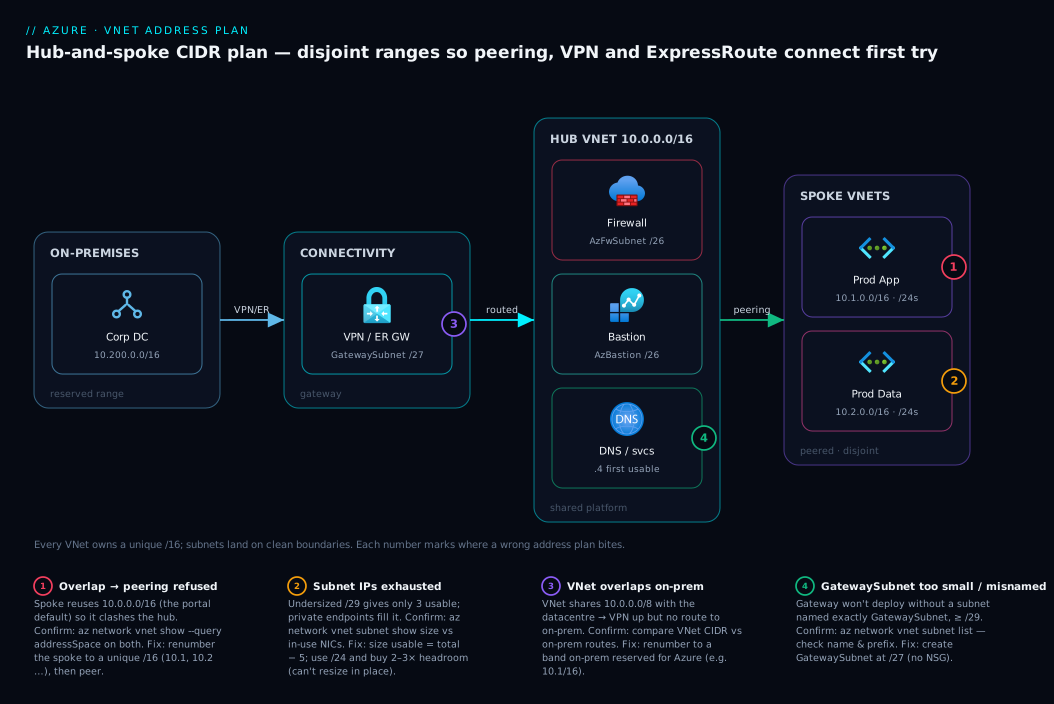
The diagram below shows a textbook hub-and-spoke address plan — the layout 90% of organisations should copy. Read it left to right. On the left, your on-premises network owns a reserved slice of 10.0.0.0/8 (here 10.200.0.0/16) and reaches Azure over a VPN or ExpressRoute gateway; because that range is reserved and never used inside Azure, the route is clean. In the centre sits the hub VNet at 10.0.0.0/16, carrying the shared platform subnets — GatewaySubnet /27, AzureFirewallSubnet /26, AzureBastionSubnet /26 — each a dedicated, correctly-named, correctly-sized block. On the right are two spoke VNets, Prod App at 10.1.0.0/16 and Prod Data at 10.2.0.0/16, each carved into /24 workload subnets.
The flows are the whole point: the spokes peer to the hub (peering requires non-overlap, which holds because 10.0, 10.1 and 10.2 are disjoint), and on-prem routes to all of them via the gateway because 10.200 overlaps none of them. The numbered badges mark the places this design fails when the address plan is wrong — overlapping spoke ranges that refuse to peer, an undersized subnet that exhausts its usable IPs, a VNet that overlaps on-prem, and a too-small GatewaySubnet that blocks the gateway. Trace any path and you see why disjoint ranges are non-negotiable.
Real-world scenario
Northwind Retail, a mid-size company, ran one VNet, 10.0.0.0/16, created eighteen months ago by the first engineer who clicked through the portal and accepted the default. It worked fine: a /24 for web, a /24 for the database tier, a /29 someone made for a “quick test” that became the management subnet. Nobody thought about address planning because there was nothing to connect to.
Then two things happened the same quarter. First, the company acquired a smaller firm whose Azure estate also lived in 10.0.0.0/16, and the integration plan called for peering the two so the acquired apps could reach Northwind’s shared SQL. The peering failed instantly: overlapping address space. Second, the platform team stood up a hub for a site-to-site VPN to the on-premises datacentre, which owned 10.0.0.0/8 corporate-wide. Northwind’s 10.0.0.0/16 VNet overlapped the corporate range, so even after the VPN came up, on-prem traffic for 10.0.x.x could not tell whether to route to the datacentre or the Azure VNet. Half the corporate intranet became unreachable from the Azure web tier.
The root cause was a single skipped decision: nobody picked a unique, coordinated range, so the default 10.0.0.0/16 collided with both the acquisition and on-prem. The fix was a renumbering project — the expensive kind: hub kept at 10.0.0.0/16 (on-prem agreed to carve around it), the original workload VNet renumbered to 10.1.0.0/16, the acquired estate to 10.5.0.0/16. That meant recreating every subnet, reissuing private IPs to VMs and private endpoints, updating NSG rules that referenced literal IPs, and re-pointing connection strings — the better part of two sprints and a weekend cutover.
What would have prevented all of it: a ten-minute allocation table at the start, giving the original VNet 10.1.0.0/16 instead of the default, reserving 10.0.0.0/16 for a future hub, and marking on-prem 10.0.0.0/8 off-limits inside Azure. The lesson is this article’s thesis — the address plan is the cheapest thing to get right and the most expensive thing to get wrong.
Advantages and disadvantages
Address planning is almost pure upside, but there are real trade-offs in how much you reserve and how rigidly you govern it:
| Advantages of disciplined planning | Disadvantages / costs |
|---|---|
| Peering, VPN, ExpressRoute work first try (no overlap) | Up-front coordination effort and a central registry to maintain |
| Subnets have growth headroom; no in-place resize blocks | Generous /16 per VNet “wastes” address space (but it is free) |
| Renumbering nightmares avoided entirely | Central allocation can feel like bureaucracy to fast-moving teams |
| Special subnets (Gateway/Bastion/Firewall) fit cleanly | Over-reserving can exhaust 10/8 in very large multi-cloud estates |
Readable scheme (10.1 = prod app) aids operations |
Requires governance to stop teams self-serving overlapping ranges |
| On-prem integration is a non-event | IPv4 is finite; huge orgs may need IPv6 / careful right-sizing |
The address-space “waste” deserves a word: Azure does not bill per IP, so a /16 a VNet never fills costs nothing on the invoice. The only real scarcity is the total 10.0.0.0/8 pool across your entire organisation (on-prem and other clouds included), which constrains only the largest estates. For 99% of organisations the right answer is to be generous with VNet size (/16) and disciplined about uniqueness — headroom is free, overlap is expensive.
Hands-on lab
This lab plans and creates a correct VNet with a reserved gateway subnet and two workload subnets, verifies the addressing, and triggers the overlap failure deliberately. Everything is free — VNets and subnets carry no charge. Run it in Cloud Shell.
1. Create a resource group and a VNet with a deliberately chosen, non-default address space.
az group create --name rg-net-lab --location eastus

# A /16 VNet at 10.1.0.0/16 (NOT the 10.0.0.0/16 default — we reserve that for a hub)
az network vnet create \
  --resource-group rg-net-lab \
  --name vnet-app-prod \
  --address-prefix 10.1.0.0/16 \
  --location eastus
2. Add the reserved gateway subnet first, then two workload subnets on clean /24 boundaries.
# Gateway subnet — exact name, /27 (above the /29 minimum, room to grow)
az network vnet subnet create \
  --resource-group rg-net-lab --vnet-name vnet-app-prod \
  --name GatewaySubnet --address-prefix 10.1.0.0/27

# Web tier — a full /24 (251 usable) starting at the next clean octet
az network vnet subnet create \
  --resource-group rg-net-lab --vnet-name vnet-app-prod \
  --name snet-web --address-prefix 10.1.1.0/24

# Data tier — another /24
az network vnet subnet create \
  --resource-group rg-net-lab --vnet-name vnet-app-prod \
  --name snet-data --address-prefix 10.1.2.0/24
3. Verify the plan — list subnets and confirm there are no gaps or overlaps.
az network vnet subnet list \
  --resource-group rg-net-lab --vnet-name vnet-app-prod \
  --query "[].{Name:name, Prefix:addressPrefix}" -o table
Expected output — three clean, non-overlapping prefixes:
Name           Prefix
-------------  -----------
GatewaySubnet  10.1.0.0/27
snet-web       10.1.1.0/24
snet-data      10.1.2.0/24
4. Prove the reserved-5 rule. Check available IPs in the web subnet — Azure reports usable addresses, and you will see it is total minus the reservation:
az network vnet subnet show \
  --resource-group rg-net-lab --vnet-name vnet-app-prod \
  --name snet-web --query "{Prefix:addressPrefix}" -o tsv
# 10.1.1.0/24 = 256 total, 251 usable; first assignable IP is 10.1.1.4
5. Deliberately trigger an overlap error (the lesson, made tangible). Try to add a subnet that overlaps an existing one:
# This FAILS — 10.1.1.0/25 overlaps the existing snet-web (10.1.1.0/24)
az network vnet subnet create \
  --resource-group rg-net-lab --vnet-name vnet-app-prod \
  --name snet-clash --address-prefix 10.1.1.0/25
# Error: "Subnet 'snet-clash' is not valid because its IP address range
#         overlaps with that of an existing subnet."
6. Equivalent Bicep — the same VNet as infrastructure-as-code, which is how you should do this for real (the address plan lives in source control, reviewable):
resource vnet 'Microsoft.Network/virtualNetworks@2023-09-01' = {
  name: 'vnet-app-prod'
  location: 'eastus'
  properties: {
    addressSpace: {
      addressPrefixes: [ '10.1.0.0/16' ]   // chosen, not defaulted
    }
    subnets: [
      { name: 'GatewaySubnet', properties: { addressPrefix: '10.1.0.0/27' } }
      { name: 'snet-web',      properties: { addressPrefix: '10.1.1.0/24' } }
      { name: 'snet-data',     properties: { addressPrefix: '10.1.2.0/24' } }
    ]
  }
}
7. Tear down.
az group delete --name rg-net-lab --yes --no-wait
You have now planned a VNet on purpose, reserved the gateway subnet, sized workload subnets with headroom, and seen the overlap guard fire — the exact muscle memory that prevents a renumbering project.
Common mistakes & troubleshooting
These are the address-planning failures you will actually hit, with the symptom, the root cause, how to confirm it, and the fix.
| # | Symptom | Root cause | How to confirm | Fix |
|---|---|---|---|---|
| 1 | Peering fails: “address space overlaps” | Both VNets use the same/overlapping CIDR (often the 10.0.0.0/16 default) |
az network vnet show --query addressSpace on both |
Renumber one VNet to a unique range; re-peer |
| 2 | VPN/ExpressRoute up but on-prem subnet unreachable | VNet range overlaps the on-prem range | Compare VNet CIDR vs on-prem routes | Renumber the VNet to a range on-prem hasn’t used |
| 3 | “No available IP addresses” with subnet looking empty | Forgot the 5 reserved; subnet too small (e.g. /29 = 3 usable) |
az network vnet subnet show size vs in-use NICs |
Use a larger subnet; size for usable = total − 5 |
| 4 | Cannot resize / shrink a subnet | Subnet has resources in it (resize blocked) | az network vnet subnet show --query ipConfigurations |
Empty the subnet, or add a new larger subnet and migrate |
| 5 | Gateway won’t deploy / errors on creation | GatewaySubnet missing, misnamed, or smaller than /29 |
az network vnet subnet list — check name & prefix |
Create a subnet named exactly GatewaySubnet, ≥ /27 |
| 6 | Bastion deployment fails | AzureBastionSubnet absent or smaller than /26 |
Check subnet name and size | Create AzureBastionSubnet at /26 |
| 7 | Subnet create rejected: “not valid / overlaps” | Prefix off its natural boundary (e.g. /27 at .10) |
Confirm start = multiple of block size | Start the subnet on a multiple of its size (.0, .32, …) |
| 8 | Can’t add a needed subnet — “no room in VNet” | VNet /16 fully carved; special subnets never reserved |
List subnets; sum the space | Add a second address range to the VNet, or plan platform subnets first |
| 9 | Private endpoints fill a subnet fast | Each private endpoint consumes one IP; subnet sized too small | Count private endpoints vs usable IPs | Put private endpoints in their own appropriately-sized subnet |
| 10 | Two regions clash when you finally connect them | Each region reused the same range independently | Compare both regions’ VNet CIDRs | Use distinct octet bands per region (e.g. 10.0/10.128) |
The meta-pattern: overlap or undersize, decided at creation time, surfacing later when you connect or scale. The confirm step is almost always az network vnet show/subnet list to read the actual prefixes; the fix for overlap is almost always “renumber” — which is why prevention beats cure so decisively here.
Best practices
- Always change the default. When the portal suggests
10.0.0.0/16, treat it as a prompt to consult your allocation table, never accept it blindly — default-acceptance is the #1 cause of overlap. - Keep one authoritative registry (spreadsheet or IPAM tool) listing every VNet’s CIDR, region and purpose; no VNet is created without an allocation from it, and on-premises ranges are marked off-limits.
- Give each VNet a
/16(or/20if space-constrained) and never reuse it across the org, including future regions and DR. - Reserve platform subnets first —
GatewaySubnet,AzureFirewallSubnet,AzureBastionSubnet— at the top of the VNet, before workloads, at their minimum sizes. - Default workload subnets to
/24. Drop to/26//27only for genuinely small tiers; reserve/22+ for high-IP workloads like Azure CNI AKS. - Size for usable, not total. Subtract Azure’s 5 reserved addresses, and buy 2–3× day-one headroom because you cannot grow a subnet in place.
- Leave gaps and use meaningful octet bands (prod vs non-prod, primary vs DR region) so the scheme reads at a glance.
- Define VNets and subnets in Bicep/Terraform, so the address plan is in source control, peer-reviewed, and repeatable.
- Never use
192.168.x.xfor anything that touches a VPN — client devices and home routers clash with it. - Re-check the whole scheme before a merger, a new region, or a VPN/ExpressRoute project — those are the moments overlap bites.
Security notes
Address planning is a foundation for network security, not a security control by itself, but several practices intersect.
- Subnets are your segmentation boundary. NSGs and routes apply per subnet, so plan subnets along trust boundaries (web / app / data / management), not just by size. A clean plan makes NSG rules readable — allow
10.1.1.0/24(web) to reach10.1.2.0/24(data) on a port and deny the rest. - The
GatewaySubnetmust not have an NSG — Azure manages it, and an NSG there breaks the gateway. Other subnets should carry NSGs. - Plan a dedicated subnet for private endpoints; do not scatter them through workload subnets where they complicate NSG rules and consume IPs unpredictably.
- Avoid overlap as a security property too — ranges you later “fix” with NAT or complex routing create blind spots and asymmetric routes that are hard to audit. Disjoint ranges keep effective routes simple and reviewable.
- Use private ranges only and keep the registry access-controlled. Never put public ranges in a VNet (RFC 1918 by design); treat the address map as sensitive design documentation.
Cost & sizing
The reassuring headline: VNets, subnets and IP address space are free. Azure does not bill for address-space size or the number of private IPs you reserve — you pay for the resources in the subnets and for gateways, not the IP plan itself. This is why “be generous with VNet size” is sound: there is no invoice penalty for a roomy /16.
| Item | Charged? | What actually drives cost |
|---|---|---|
| VNet address space (any size) | No | Free — size your /16 generously |
| Subnets | No | Free — number/size of subnets is free |
| Private IP addresses | No | Free — reserve as many as the subnet holds |
| VNet peering | Yes (per GB) | Data transferred across the peering, not the peering itself |
| VPN Gateway | Yes (per hour + SKU) | The gateway SKU (Basic → VpnGw5) and egress |
| Public IP addresses | Yes (small monthly) | Each static public IP (not part of VNet planning) |
| NAT Gateway | Yes | Hourly + data processed (for outbound) |
The only true scarcity is the finite 10.0.0.0/8 pool across your whole organisation, and a /16 per VNet still allows 256 VNets inside 10/8. Only at very large multi-cloud or multi-region scale do you economise (smaller allocations, tighter subnets, IPv6). For everyone else, right-sizing means a generous VNet (/16), a default subnet (/24), and shrinking only where a tier is genuinely tiny. The cost of under-sizing — a renumbering project — dwarfs any saving from a small address plan.
Interview & exam questions
These map to AZ-104 (Administrator) and AZ-700 (Network Engineer), plus AZ-900 fundamentals on networking basics.
Q: How many usable IP addresses are in an Azure /24 subnet, and why is it not 254?
A: 251. A /24 has 256 total addresses, and Azure reserves 5 per subnet (network, default gateway, two for DNS/platform, and broadcast), versus the 2 a standard network reserves. So usable = 256 − 5 = 251.
Q: What is the smallest subnet size Azure allows, and how many usable IPs does it give?
A: /29, which gives 3 usable addresses (8 total − 5 reserved). A /30 or smaller is rejected because it cannot satisfy the 5-address reservation.
Q: Why can’t you peer two VNets that both use 10.0.0.0/16?
A: VNet peering requires non-overlapping address spaces. Two VNets sharing 10.0.0.0/16 overlap entirely, so the peering is refused. One must be renumbered to a unique range before peering can succeed.
Q: Is /16 larger or smaller than /24, and by how much?
A: /16 is larger. The prefix counts fixed network bits, so a smaller number means more free host bits. /16 = 65,536 addresses; /24 = 256 — /16 is 256× larger.
Q: Which subnet name is mandatory for a VPN/ExpressRoute gateway, and what is its minimum size?
A: It must be named exactly GatewaySubnet (case-sensitive), minimum /29, with /27 recommended. The name is how Azure identifies the gateway subnet; a wrong name blocks gateway deployment.
Q: You picked 10.0.0.0/16 for your VNet and now a VPN to on-prem (which owns 10.0.0.0/8) can’t reach on-prem hosts. Why?
A: The VNet range overlaps the on-prem range. Traffic to 10.0.x.x is ambiguous — it could be the VNet or on-prem — so routing breaks. Fix by renumbering the VNet to a range on-prem has not used.
Q: Can you resize a subnet after deploying VMs into it? A: Not while it has resources. Subnet resize is blocked if the subnet is non-empty. You must empty it first, or create a new, correctly-sized subnet and migrate resources to it.
Q: Which three RFC 1918 ranges can a VNet use, and which should you avoid for VPN scenarios?
A: 10.0.0.0/8, 172.16.0.0/12, and 192.168.0.0/16. Avoid 192.168.0.0/16 for anything touching a VPN, because home routers and VPN clients commonly use it and will clash.
Q: A /27 subnet — how many addresses total and usable in Azure?
A: 32 total, 27 usable (32 − 5 reserved). It is the minimum size for AzureBastionSubnet’s older requirement and a common small-tier subnet.
Q: What does the portal default 10.0.0.0/16 cause in practice, and how do you prevent it?
A: Every VNet accepting the default ends up with the same range, causing overlap when you later peer or VPN them. Prevent it by maintaining a central address registry and assigning a unique range to each VNet deliberately.
Q: Why is being generous with VNet size (a /16) considered good practice when it “wastes” addresses?
A: Azure does not bill for address space or private IPs, so a roomy /16 costs nothing, while running out of room (and renumbering) is expensive. Headroom is free; overlap and undersizing are costly.
Q: Where do the 5 reserved addresses in a 10.1.7.0/24 subnet sit, specifically?
A: 10.1.7.0 (network), 10.1.7.1 (gateway), 10.1.7.2 and 10.1.7.3 (Azure DNS/platform), and 10.1.7.255 (broadcast). The first assignable IP is 10.1.7.4.
Quick check
- How many usable IP addresses does an Azure
/27subnet provide? - Is a
/20bigger or smaller than a/24, and roughly how many times? - Name two of the five addresses Azure reserves in every subnet.
- Two VNets both use
10.0.0.0/16. Can you peer them? Why or why not? - What is the exact, case-sensitive name a VPN gateway’s subnet must have?
Answers
- 27 usable (32 total − 5 reserved).
- Bigger, by 16× — a
/20is 4,096 addresses, a/24is 256. - Any two of: network address (
.0), default gateway (.1), Azure DNS/platform (.2and.3), broadcast (.255). - No. Peering requires non-overlapping address space; identical
10.0.0.0/16ranges overlap completely, so peering is refused. One must be renumbered. GatewaySubnet(case-sensitive; minimum/29,/27recommended).
Glossary
- VNet (Virtual Network): Your private, isolated network in Azure, defined by one or more CIDR address ranges, into which subnets and resources are placed.
- Subnet: A smaller CIDR block carved from a VNet’s address space; resources attach to a subnet and draw an IP from it. NSGs and routes apply per subnet.
- CIDR (Classless Inter-Domain Routing): The
address/prefixnotation (e.g.10.1.0.0/16) where the prefix says how many leading bits are the fixed network part. - Prefix length (the
/n): The count of fixed network bits. Smaller/n= larger network./16>/24>/27. - Octet: One of the four 8-bit chunks of an IPv4 address (
10.1.0.0). - Address space: The set of CIDR ranges a VNet owns; the pool subnets are carved from.
- Reserved addresses: The 5 IPs Azure removes from every subnet (network, gateway, two DNS/platform, broadcast); usable = total − 5.
- RFC 1918: The standard defining private IP ranges:
10.0.0.0/8,172.16.0.0/12,192.168.0.0/16. - Overlap: Two ranges sharing one or more addresses; blocks peering, VPN and ExpressRoute connectivity between them.
- VNet peering: A direct, private connection between two VNets; requires non-overlapping address space.
- Hub-and-spoke: A topology with a central hub VNet (shared services, gateways) peered to multiple spoke VNets (workloads).
- GatewaySubnet: The mandatory, exact-named subnet (min
/29) that hosts a VPN or ExpressRoute gateway; must not have an NSG. - Block size: The spacing between subnet start addresses for a given prefix (e.g.
/27→ every 32;/28→ every 16). - IPAM: IP Address Management — a registry/tool tracking which ranges are allocated, preventing overlap.
Next steps
- Azure Virtual Network, Subnets and NSGs: Networking Fundamentals — build the VNet and add security rules once your address plan is set.
- Azure Enterprise-Scale Landing Zone: Foundation for Large Organizations — apply this address scheme inside a governed hub-and-spoke landing zone.
- Azure Private Endpoint vs Service Endpoint: Secure PaaS Access — understand how each private endpoint consumes an IP from your planned subnets.
- Diagnosing Azure VNet Connectivity: NSGs, UDRs, Effective Routes & Network Watcher — confirm whether an address-plan issue is behind a routing failure.
- Azure Regions and Availability Zones: Designing for Resilience — plan distinct address bands per region before you go multi-region.