You have two virtual networks. An app in vnet-app needs to reach a database in vnet-data. Both live in the same subscription, same region, and yet the connection times out. Someone suggests “just peer them” — you click Add peering, it goes green, and suddenly traffic flows at near-wire speed with no gateway, no public IP, no NAT in the middle. That is Azure VNet peering: a control-plane stitch that makes two separate virtual networks behave like one flat private network, routing over the Microsoft backbone instead of the public internet. It feels like magic until you add a third VNet, peer it to the second, and discover the first one still cannot reach it. Peering is not transitive, and that single fact shapes every multi-VNet design in Azure.
This article builds the mental model a senior network engineer carries: what peering really is (a pair of one-directional links plus injected system routes), why “A peered to B, B peered to C” does not give you “A to C,” how gateway transit lets a hub’s VPN or ExpressRoute gateway serve every spoke, and what changes across regions (global peering) — including the egress charge that quietly shows up on your bill. You’ll learn the exact az network vnet peering flags, the four toggles that make or break a peering (allowVirtualNetworkAccess, allowForwardedTraffic, allowGatewayTransit, useRemoteGateways), the states (Initiated vs Connected vs Disconnected), and the real limits — 500 peerings per VNet, address spaces that must not overlap, and the hub-and-spoke pattern every production landing zone is built on.
By the end you will stop treating peering as a black box. You will know when a flat peering is right, when you need a hub-and-spoke topology with a transit hub, when peering silently fails to deliver transitivity (and what to put in the hub instead — an NVA, Azure Firewall, or a gateway), and how to tell a healthy peering from a half-configured one. This is a concept and design article first, with the commands, limits and a lab to make it concrete.
What problem this solves
Without peering, the only private path between two VNets is a VPN gateway on each side — slow, gateway-priced, bandwidth-capped by the SKU, and two managed appliances to size and pay for. The panic alternative is a public endpoint locked with a firewall, which drags private database traffic across the internet and turns a routing problem into a security-surface one. Both are wrong for the common case: two VNets you own that simply need to talk privately.
Peering solves exactly that: resources in either VNet reach each other by private IP over the Microsoft backbone — no gateway, no public IP, no encryption overhead in-region, low latency and high bandwidth capped only by the VM. It is the foundation of the hub-and-spoke topology nearly every enterprise landing zone uses: a central hub VNet holds shared services (firewall, VPN/ExpressRoute gateway, DNS, jump boxes) and each workload lives in its own spoke VNet peered to the hub. Shared egress, central inspection, blast-radius isolation — all from peering plus a few transit toggles.
What breaks when you misunderstand it: teams peer three VNets in a chain expecting full mesh and lose a day to “why can’t spoke A reach spoke B” — peering is non-transitive and they needed routing through the hub, not peerings to it. Or they drop a VPN gateway in the hub but never enable gateway transit, so no spoke reaches on-premises. Or they peer across regions, see it work, and get a finance question about inter-region egress a same-region peering would never have incurred. This article kills all three.
Learning objectives
By the end of this article you can:
- Explain what a VNet peering actually creates — a pair of directional links plus system routes injected into each VNet — and why both sides must be configured for traffic to flow.
- State precisely why peering is non-transitive and choose the right transit mechanism (gateway transit, an NVA/Azure Firewall in the hub, or a full mesh) for a given topology.
- Configure the four peering toggles (
allowVirtualNetworkAccess,allowForwardedTraffic,allowGatewayTransit,useRemoteGateways) correctly for both flat and hub-and-spoke designs. - Set up gateway transit so every spoke uses the hub’s single VPN or ExpressRoute gateway to reach on-premises, without each spoke owning a gateway.
- Decide between regional and global (cross-region) peering, and predict the cost and feature differences — including the inter-region egress charge.
- Read peering state (
Initiated,Connected,Disconnected) and sync status, and diagnose a half-configured or broken peering withazand Network Watcher. - Apply the real limits — non-overlapping address spaces, 500 peerings per VNet, one gateway-transit relationship per spoke — and size a hub-and-spoke that won’t hit a wall.
Prerequisites & where this fits
You should already understand the building blocks: a virtual network (VNet) is your private IPv4/IPv6 address space in a region, carved into subnets; a network security group (NSG) filters traffic at the subnet/NIC; a route table (UDR) overrides Azure’s default routing; and a VM reaches another resource by its private IP. If those terms are fuzzy, start with Azure Virtual Network & Subnets with NSGs and Azure VNet IP Address Planning: CIDR & Subnetting — non-overlapping CIDR planning is a hard prerequisite for peering, because overlapping address spaces cannot be peered, full stop.
This sits in the core networking track, one layer above single-VNet design and one layer below hybrid connectivity. Peering is how you scale beyond one VNet. It composes with route tables (you will steer spoke-to-spoke traffic through a hub NVA with a UDR — see Azure User-Defined Routes & Route Tables), with NSGs (peering does not bypass them — see Azure NSG Rules & Priorities), and with VPN/ExpressRoute gateways for the hybrid leg. When peering “doesn’t work,” the diagnosis usually lands in effective routes and effective security rules, which is the playbook in Troubleshooting VNet Connectivity with Network Watcher.
Where peering sits relative to the other ways two networks connect in Azure, so you reach for the right tool:
| Mechanism | Connects | Path | Throughput limit | Cost driver | Use when |
|---|---|---|---|---|---|
| VNet peering | VNet ↔ VNet (same tenant or cross-tenant) | Microsoft backbone, private | VM NIC (no appliance cap) | Per-GB in/out (tiny same-region; higher cross-region) | Two+ VNets you own need private, fast connectivity |
| VPN Gateway (VNet-to-VNet) | VNet ↔ VNet over IPsec | Encrypted tunnel | Gateway SKU (e.g. 650 Mbps–10 Gbps) | Gateway hours + egress | Overlapping address spaces, or encryption mandated |
| ExpressRoute | VNet(s) ↔ on-premises | Private circuit | Circuit SKU (50 Mbps–100 Gbps) | Circuit + port + egress | Hybrid, predictable bandwidth, no internet |
| VPN Gateway (Site-to-Site) | VNet ↔ on-premises over internet | Encrypted tunnel | Gateway SKU | Gateway hours + egress | Hybrid over the public internet |
| Public endpoint + firewall | Anything ↔ anything | Public internet | Service-dependent | Egress + firewall | Last resort; avoid for private VNet-to-VNet |
Peering is the default answer whenever both ends are VNets and their address spaces don’t overlap. The rest of this article assumes that case unless stated.
Core concepts
Five mental models make every later decision obvious. Internalise these and the limits, toggles and topologies all follow.
Peering is a stitch in the control plane, not a tunnel in the data plane. When you peer vnet-a to vnet-b, Azure does not build an encrypted tunnel or stand up an appliance — it updates the routing tables of the Azure software-defined network so each VNet’s address space becomes a directly-reachable destination from the other. Traffic then flows VM-to-VM over the Microsoft backbone at the VM’s own speed. There is nothing in the middle to size, patch or pay hourly for — that is why peering is fast and cheap relative to a gateway: there is no gateway.
A peering is two one-directional links, and both must exist. “Peering A to B” is really two objects: a link on vnet-a pointing at vnet-b, and one on vnet-b pointing back. Each carries its own toggles. Until both are Connected, traffic does not flow — a single-sided link sits in Initiated and is inert. Same-subscription, the portal creates both at once; across subscriptions or tenants, each owner creates their side and the peering only “completes” when the second appears. This is why a peering can look “half done” and why the state field matters.
Peering injects routes, but it does not bypass NSGs or your UDRs. After peering, each VNet gets a system route of next-hop type VNetPeering (or VirtualNetworkGateway for transit) for the remote space — that is what makes the remote IPs reachable. But your NSGs still apply on both ends, and any user-defined route still wins over the peering’s system route (UDRs outrank system routes for the same or more-specific prefix). So “peered” means routable, not permitted — if traffic still fails after a green peering, the two suspects are an NSG denying it and a UDR black-holing it. The NIC’s effective routes and effective security rules are the source of truth.
Peering is non-transitive — connectivity does not chain. If spoke-a peers to hub and hub peers to spoke-b, that does not let spoke-a reach spoke-b. Peering only ever connects the two VNets it names; it never forwards on to a third. The hub knows routes to both spokes, but each spoke only knows a route to the hub’s own space, not to the other. To get spoke-to-spoke traffic you add something the spokes can route through: a UDR on each spoke pointing at an NVA or Azure Firewall in the hub that forwards the packet (which is exactly why allowForwardedTraffic and allowGatewayTransit exist). Non-transitivity isn’t a bug — it’s the property that keeps peering simple and keeps you in control of what flows where.
Address spaces must not overlap — ever. Two VNets can be peered only if no IP range in one overlaps any range in the other (and, for transit, no spoke overlaps any other spoke or on-premises). Overlap is the one constraint Azure will not let you work around with peering — the peering create simply fails. This is why CIDR planning across your whole estate has to happen before you build VNets: you are reserving non-overlapping blocks so that any two may be peered later. If you’ve inherited overlapping VNets, peering is off the table and you fall back to a VPN gateway with NAT, or you re-IP. There is no “peer with translation” in Azure peering.
Each model has a direct design consequence — this is the table to keep when the rest fades:
| Mental model | The consequence | What you must do |
|---|---|---|
| Control-plane stitch, not a tunnel | No appliance to size/patch/pay hourly | Nothing — that’s the win |
| Two one-directional links | One side alone is inert (Initiated) |
Always create/verify both directions |
| Injects routes, not permissions | “Peered” ≠ “allowed” | Still gate with NSGs; check effective rules/routes |
| Non-transitive | Connectivity never chains to a third VNet | Add a hub NVA/firewall + UDRs, or a direct peer |
| No overlapping address space | Overlap → create fails, no NAT | Plan non-overlapping CIDRs estate-wide first |
The vocabulary in one table
Before the deep sections, pin every moving part side by side. The glossary repeats these for lookup; this is the mental model at a glance:
| Term | One-line definition | Where it lives | Why it matters |
|---|---|---|---|
| VNet peering | A link making two VNets privately reachable | A child object on each VNet | The whole topic; non-transitive |
| Peering link | One direction of a peering (A→B) | On one VNet, names the remote | Both directions needed to connect |
| Peering state | Initiated / Connected / Disconnected |
On the link | Tells you if the pair is complete |
| Regional peering | Both VNets in the same region | — | Cheapest; in-region per-GB rate |
| Global peering | VNets in different regions | — | Adds inter-region egress cost |
| Hub VNet | Central VNet holding shared services | A VNet | The “core” of hub-and-spoke |
| Spoke VNet | A workload VNet peered to the hub | A VNet | Isolated blast radius per workload |
| Gateway transit | Spokes use the hub’s gateway | Peering toggles | One gateway serves all spokes |
allowVirtualNetworkAccess |
Permit traffic across the peering | Peering toggle (default on) | Off = peered but no traffic |
allowForwardedTraffic |
Accept traffic forwarded (not originated) by the peer | Peering toggle | Needed for NVA/spoke-to-spoke |
allowGatewayTransit |
Hub offers its gateway to the peer | Hub-side toggle | Half of gateway transit |
useRemoteGateways |
Spoke uses the hub’s gateway | Spoke-side toggle | Other half; only one per spoke |
| NVA | Network virtual appliance (firewall/router) | A VM in the hub | The hub’s transit/inspection engine |
How a peering is actually wired
Stop seeing “peering” as one switch and see it as two links, each with four toggles, plus the routes Azure injects when both connect. Hold that picture and gateway transit and non-transitivity become obvious consequences rather than surprises.
The two links and the connection handshake
Inside one subscription, Azure creates both link objects atomically and both go to Connected. Across subscriptions or tenants, each owner creates one link: the first sits in Initiated (partner doesn’t exist yet, no traffic) until the second is created pointing back, when both flip to Connected and routes are injected. Delete one side later and the survivor goes Disconnected — recreate the missing half.
| State | Meaning | What traffic does | What to do |
|---|---|---|---|
Initiated |
This side exists; partner link not yet created | Nothing flows | Create the matching link on the other VNet |
Connected |
Both links exist and agree | Traffic flows (subject to toggles, NSG, UDR) | Nothing — healthy |
Disconnected |
The partner link was deleted/changed | Nothing flows | Recreate or fix the other side, then sync |
You mostly see Initiated and Disconnected in cross-subscription/tenant designs, or when automation created one side and failed on the other.
The four toggles that decide everything
Each link carries four booleans whose meaning depends on which side you’re on. Get these wrong and you have a “green” peering that drops the traffic you care about.
| Toggle | Side it’s set on | Default | What ON means | When OFF is correct |
|---|---|---|---|---|
allowVirtualNetworkAccess |
Both | true |
Resources in the peer VNet are reachable across this link | You want the peering present for gateway transit only, but no direct VM-to-VM traffic |
allowForwardedTraffic |
Receiving side | false |
This VNet accepts packets the peer forwarded (source not in the peer’s own space) — e.g. via an NVA | No NVA/transit; only directly-originated traffic |
allowGatewayTransit |
Hub side (the one with the gateway) | false |
This VNet lets peers use its VPN/ExpressRoute gateway | The peer has its own gateway, or no hybrid need |
useRemoteGateways |
Spoke side (no gateway) | false |
This VNet routes via the peer’s gateway instead of its own | The spoke has its own gateway, or no hybrid need |
Three rules govern these in practice:
allowVirtualNetworkAccessoff ≠ peering off. With it off, the peering still exists and gateway transit still works, but direct cross-VNet VM access is blocked at the link level. Most people leave it on.allowForwardedTrafficis about the source, not the destination. When the hub NVA forwards a spoke-A→spoke-B packet, the receiving spoke sees a source that is not in the hub’s space — so the hub→spoke link needsallowForwardedTraffic = truefor the spoke to accept it. This single toggle is the most-missed step in spoke-to-spoke designs.allowGatewayTransit+useRemoteGatewaysare a matched pair on opposite sides. Hub: “use my gateway” (allowGatewayTransiton hub→spoke); spoke: “I’ll use the peer’s” (useRemoteGatewayson spoke→hub). Setting only one does nothing. And a spoke can setuseRemoteGatewaystoward exactly one peer.
The routes peering injects
Once both links are Connected, Azure adds system routes so the remote space is reachable. You can see them in the NIC’s effective routes:
| Next hop type | When it appears | Destination prefix | Notes |
|---|---|---|---|
VNetPeering |
Plain peering, both sides up | The peer VNet’s address space | Reachable directly over the backbone |
VirtualNetworkGateway |
Spoke with useRemoteGateways |
On-prem ranges learned via the hub’s gateway | Spoke reaches on-prem through the hub gateway |
VirtualNetwork |
Always (own VNet) | The VNet’s own space | Local routing |
Internet / VirtualAppliance / None |
From your UDRs | As you define | UDRs override the peering route for spoke-to-spoke via NVA |
The key insight: peering gives you the VNetPeering route to the directly peered VNet only. It never injects a route to a VNet two hops away — which is exactly why connectivity doesn’t chain, the subject of the next section.
Why peering is non-transitive (and what to do about it)
This is the concept that trips up the most people, so it earns its own model and a decision table. Non-transitive means a peering connects only the two VNets it names, and a VNet never relays between two of its peers. If A↔Hub and Hub↔B are both peered, A and B still cannot talk, because:
- A and B each get a
VNetPeeringroute to Hub’s address space only — not to each other’s. - Even though Hub knows routes to both, it will not forward an A→B packet unless you deliberately put a forwarding device in the path and route through it.
So to achieve spoke-to-spoke (or spoke-to-on-prem) connectivity, you choose one of these transit mechanisms. Pick by what’s in the middle:
| You want | Put in the hub | On the spokes | Hub-side toggle | Spoke-side toggle | Trade-off |
|---|---|---|---|---|---|
| Spoke → on-premises (VPN/ER) | A VPN or ExpressRoute gateway | Nothing extra | allowGatewayTransit = true |
useRemoteGateways = true |
One gateway serves all spokes; cheapest hybrid |
| Spoke → spoke, inspected | Azure Firewall or an NVA | A UDR: spoke ranges → firewall private IP | allowForwardedTraffic = true |
(UDR does the steering) | Central inspection; firewall is a paid hop & latency |
| Spoke → spoke, not inspected | Nothing | A direct peering between the two spokes | — | — | Simple & fast but O(n²) peerings as spokes grow |
| Many spokes, managed transit | Azure Virtual WAN hub | Connections to the vWAN hub | (managed) | (managed) | Microsoft-managed transit; different pricing model |
Three honest notes on this table:
- Gateway transit IS transitive for the on-prem leg — by design. A spoke with
useRemoteGatewaysgets routes to the on-prem prefixes the gateway learned. That’s the one deliberate “transit,” and it covers only the gateway’s routes (on-prem / other gateway-connected networks), not other spokes. - A full mesh works but doesn’t scale. Peerings grow as n·(n−1)/2 — fine for 3–4 VNets, unmanageable at 20. Hub-and-spoke with a transit hub stays linear (one peering per spoke).
- A hub firewall/NVA is the standard enterprise answer — spoke-to-spoke transit and inspection in one hop, at the cost of the firewall charge and one extra hop of latency.
If you need a deeper packet-level walk of “peered but still can’t connect,” the effective-routes / effective-rules method in Troubleshooting VNet Connectivity with Network Watcher is the companion to this section.
Gateway transit: one gateway for every spoke
Gateway transit makes hub-and-spoke economical for hybrid connectivity. A VPN or ExpressRoute gateway is expensive and slow to deploy, and you do not want one per spoke. Gateway transit shares a single gateway in the hub across every spoke: spokes route on-premises-bound traffic through the hub’s gateway, and on-premises learns routes to the spokes via the hub.
The mechanism is the matched toggle pair from earlier: set allowGatewayTransit = true on each hub → spoke link (the hub advertising “use my gateway”) and useRemoteGateways = true on each spoke → hub link (the spoke accepting it and deploying none of its own). When both are set and the hub actually has a gateway, the spoke’s effective routes gain VirtualNetworkGateway next-hop entries for the on-prem prefixes — and the spoke reaches on-premises with no gateway of its own.
The rules and limits of gateway transit
These constraints decide whether your design is valid:
| Rule | Detail | Consequence if violated |
|---|---|---|
| The hub must have a gateway | allowGatewayTransit is meaningless without a deployed VPN/ER gateway in the hub |
Spoke useRemoteGateways has nothing to point at; on-prem unreachable |
| A spoke uses one remote gateway | useRemoteGateways = true toward exactly one peer |
You cannot multi-home a spoke across two hub gateways via peering |
A spoke with useRemoteGateways must not have its own gateway |
The two are mutually exclusive on the same VNet | Configuration error / unpredictable routing |
| Both must be set | Hub allowGatewayTransit and spoke useRemoteGateways |
One alone does nothing |
| Overlap still forbidden | Spokes, hub and on-prem ranges must all be unique | Routing ambiguity; peering or routing fails |
| Same-region constraint (classic) | Gateway transit works regionally and, with caveats, across regions for ExpressRoute | Check the SKU/feature before assuming global transit |
A subtle point: enabling gateway transit on a spoke that already had its own gateway requires removing that gateway first. And if you add the hub gateway after the peerings exist, re-sync the spoke peerings so the new routes propagate.
Configuring gateway transit (hub-and-spoke) with az CLI
Assume vnet-hub (with a VPN gateway already deployed) and vnet-spoke1, all in rg-net. Create both directions with the right toggles:
# Hub -> Spoke1 : hub offers its gateway, allows forwarded traffic for spoke-to-spoke later
az network vnet peering create \
  --name hub-to-spoke1 \
  --resource-group rg-net \
  --vnet-name vnet-hub \
  --remote-vnet vnet-spoke1 \
  --allow-vnet-access true \
  --allow-forwarded-traffic true \
  --allow-gateway-transit true

# Spoke1 -> Hub : spoke uses the hub's remote gateway (it deploys NO gateway of its own)
az network vnet peering create \
  --name spoke1-to-hub \
  --resource-group rg-net \
  --vnet-name vnet-spoke1 \
  --remote-vnet vnet-hub \
  --allow-vnet-access true \
  --use-remote-gateways true
Note that --use-remote-gateways true fails if the hub has no gateway yet or if --allow-gateway-transit isn’t set on the hub side — Azure validates the pair at create time. Confirm the spoke now sees on-prem routes:
# After deploying a test NIC in the spoke, read its effective routes
az network nic show-effective-route-table \
  --name nic-spoke1-test \
  --resource-group rg-net \
  --query "value[?nextHopType=='VirtualNetworkGateway']" -o table
The same thing in Bicep
Peerings are child resources of the VNet. The matched pair, with gateway transit, looks like this:
// Hub side: offer the gateway to the spoke
resource hubToSpoke1 'Microsoft.Network/virtualNetworks/virtualNetworkPeerings@2023-11-01' = {
  name: 'vnet-hub/hub-to-spoke1'
  properties: {
    remoteVirtualNetwork: { id: spoke1.id }
    allowVirtualNetworkAccess: true
    allowForwardedTraffic: true     // enables spoke-to-spoke via a hub NVA later
    allowGatewayTransit: true       // hub advertises its gateway
    useRemoteGateways: false
  }
}

// Spoke side: consume the hub's gateway
resource spoke1ToHub 'Microsoft.Network/virtualNetworks/virtualNetworkPeerings@2023-11-01' = {
  name: 'vnet-spoke1/spoke1-to-hub'
  properties: {
    remoteVirtualNetwork: { id: hub.id }
    allowVirtualNetworkAccess: true
    allowForwardedTraffic: false
    allowGatewayTransit: false
    useRemoteGateways: true         // spoke routes on-prem traffic via the hub gateway
  }
  dependsOn: [ hubToSpoke1 ]        // deploy the transit-offering side first
}
Deploy the allowGatewayTransit side before the useRemoteGateways side — the spoke link’s validation depends on the hub already offering transit. The dependsOn makes that ordering explicit.
Global (cross-region) VNet peering
Everything so far assumed both VNets sit in the same region. Global VNet peering connects VNets in different regions (and even different Azure geographies). Functionally it is the same stitch — private connectivity over the Microsoft backbone, no gateway — but four things change, and one of them is on your invoice.
What’s the same and what’s different
| Aspect | Regional peering | Global peering |
|---|---|---|
| VNets in | Same region | Different regions |
| Path | Microsoft backbone | Microsoft global backbone |
| Gateway needed | No | No |
| Private connectivity | Yes | Yes |
| Address overlap allowed | No | No |
| Egress cost | In-region per-GB (very low) | Inter-region per-GB (higher, both directions billed by region) |
| Gateway transit across the peering | Yes (regional) | ExpressRoute transit supported with caveats; classic VPN-gateway transit historically limited cross-region |
| Some platform services reaching across | Generally fine | A few load-balanced/basic-SKU scenarios behave differently across regions |
The headline differences, in plain terms:
- It costs more, and symmetrically. Global peering charges an inter-region rate (by source-region zone) for data leaving each region. Move 1 TB/day across regions and it’s a real line item; the same traffic in-region is rounding error. Always ask “do these VNets need different regions?” first — sometimes the answer is to colocate.
- Gateway transit across regions is the sharp edge. Sharing a hub’s VPN gateway with spokes in other regions has historically been constrained; ExpressRoute transit across regions is the supported pattern for global hub-and-spoke, subject to SKU. Don’t assume one VPN gateway serves spokes worldwide — verify the feature matrix for your gateway type before designing around it.
- A few SKU-bound services differ. Some Basic-SKU load-balancer or platform-endpoint scenarios behave differently across a global peering. For modern Standard-SKU designs this is rarely a blocker, but it’s why “worked in-region, not cross-region” sometimes has nothing to do with routing.
Setting up a global peering
The command is identical to a regional peering — there is no --global flag; Azure infers “global” from the two VNets being in different regions:
# vnet-eus is in eastus, vnet-weu is in westeurope -> this is a global peering automatically
az network vnet peering create \
  --name eus-to-weu \
  --resource-group rg-net \
  --vnet-name vnet-eus \
  --remote-vnet "/subscriptions/<sub>/resourceGroups/rg-net/providers/Microsoft.Network/virtualNetworks/vnet-weu" \
  --allow-vnet-access true

az network vnet peering create \
  --name weu-to-eus \
  --resource-group rg-net \
  --vnet-name vnet-weu \
  --remote-vnet "/subscriptions/<sub>/resourceGroups/rg-net/providers/Microsoft.Network/virtualNetworks/vnet-eus" \
  --allow-vnet-access true
Because the remote VNet is in a different region (and possibly different RG/subscription), pass its full resource ID to --remote-vnet rather than a bare name. Everything else — states, toggles, non-overlap rule — is exactly as regional. The only operational difference you’ll notice is the bill and the gateway-transit caveats above.
Before reaching for a global peering, run this decision check — cross a region only when you must:
| If the driver is… | Cross a region? | Better/cheaper option |
|---|---|---|
| DR / regional failover | Yes — that’s the point | Accept inter-region egress; batch/compress replication |
| Data-residency in another geo | Yes | None — residency forces the region |
| Lower latency to distant users | Sometimes | Front Door/Traffic Manager edge, not a peering |
| “We had spare capacity over there” | No | Colocate the VNets in one region; peer regionally (free-ish) |
| Chatty backup/log shipping across regions | Reconsider | Keep source + sink in-region, or compress + budget the egress |
Limits, quotas and constraints you must design around
Peering is generous but not infinite. These are the numbers that shape a large estate. Treat them as design inputs, not afterthoughts:
| Limit / constraint | Value | Why it matters | Design response |
|---|---|---|---|
| Address spaces must not overlap | Hard rule | Overlap → peering create fails | Plan non-overlapping CIDRs estate-wide first |
| Peerings per virtual network | 500 (default; raise via support) | Caps fan-out from one VNet (e.g. a busy hub) | Keep hubs lean; consider Virtual WAN at extreme scale |
useRemoteGateways per spoke |
One peer only | A spoke can’t use two hub gateways via peering | One transit hub per spoke; design regions accordingly |
| Gateway transit needs a real gateway | Hub must have a VPN/ER gateway deployed | Toggle alone does nothing | Deploy the gateway before enabling transit on spokes |
| Peering is non-transitive | Always | Spoke↔spoke needs an NVA/firewall or direct peer | Hub firewall/NVA, or accept a partial mesh |
| No transitive on-prem via a spoke | Always | A spoke can’t be a transit point for others | Put shared connectivity in the hub, not a spoke |
| NSGs and UDRs still apply | Always | “Peered” ≠ “allowed” | Check effective rules/routes when traffic fails |
| Cross-region egress is billed | Inter-region per-GB | Global peering has real data cost | Colocate where possible; measure cross-region GB |
Two cause outages, not just inefficiency: overlap is non-negotiable (two business units both on 10.0.0.0/16 cannot be peered — re-IP or NAT-VPN), and a spoke cannot be a transit hub (chaining spoke→spoke→on-prem hits non-transitivity at every hop). Shared connectivity belongs in the hub.
Architecture at a glance
The canonical production shape is hub-and-spoke. Read the diagram left to right as a packet’s life. On the far left, on-premises connects into Azure through the hub’s VPN or ExpressRoute gateway — this is the single hybrid entry point for the whole topology. The hub VNet in the centre holds the shared services every workload needs: that gateway, an Azure Firewall (or NVA) that inspects and forwards traffic, and typically DNS and management hosts. Each spoke VNet on the right is one isolated workload — an app spoke, a data spoke — peered only to the hub, never to each other. The peering between hub and each spoke carries the transit toggles: allowGatewayTransit on the hub side, useRemoteGateways on the spoke side, so every spoke reaches on-premises through that one hub gateway without owning a gateway itself.
Now trace the two traffic patterns the badges call out. A spoke reaching on-premises follows its VirtualNetworkGateway route into the hub and out the gateway — gateway transit at work (badge 3). A spoke reaching another spoke is where non-transitivity bites: the spokes have no route to each other, so a UDR on each spoke steers spoke-to-spoke traffic to the firewall’s private IP in the hub (badge 2), the firewall forwards it on, and the receiving spoke accepts it only because the hub→spoke peering has allowForwardedTraffic = true (badge 4). Badge 1 marks the most common silent failure — a half-configured peering stuck in Initiated or with allowVirtualNetworkAccess off — and badge 5 marks the cross-region egress cost that appears the moment a spoke lives in a different region from the hub. The legend maps each number to the symptom, how to confirm it, and the fix.
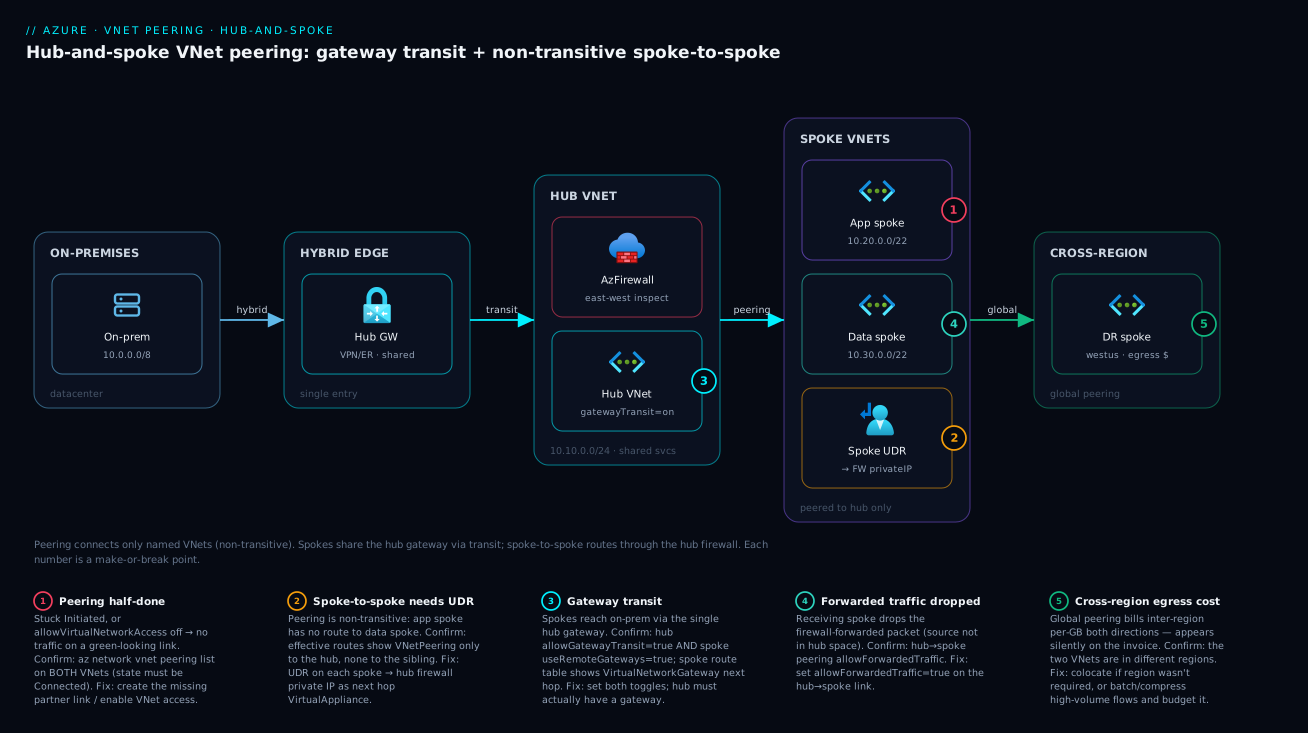
The shape generalises: add a spoke by peering it to the hub (one peering, linear growth), route its inter-spoke traffic through the hub firewall, and let it ride the hub gateway to on-premises. The hub is the only place with shared connectivity, which is exactly what keeps blast radius small and policy central.
Real-world scenario
Meridian Retail, a mid-size e-commerce company, ran everything in a single flat vnet-prod (10.0.0.0/16): web tier, an order-processing API, a PostgreSQL flexible server, and a batch analytics job, all in subnets of one VNet, all able to reach each other freely. It worked, until it didn’t scale organisationally. The analytics team wanted to deploy aggressively without risking the payment path; the security team wanted east-west traffic inspected; and a new B2B integration needed an ExpressRoute circuit to a partner — but only for the order API, not the whole VNet. One flat VNet couldn’t express any of that.
The network architect, Priya, redesigned to hub-and-spoke. She carved non-overlapping space up front, leaving gaps for growth, having read Azure VNet IP Address Planning: CIDR & Subnetting:
| VNet | CIDR | Role | Peers to | Transit toggles |
|---|---|---|---|---|
vnet-hub |
10.10.0.0/24 |
Firewall + ExpressRoute gateway | (all spokes) | allowGatewayTransit = true, allowForwardedTraffic = true |
vnet-app |
10.20.0.0/22 |
Web + order API | hub only | useRemoteGateways = true |
vnet-data |
10.30.0.0/22 |
PostgreSQL flexible server | hub only | useRemoteGateways = true |
vnet-analytics |
10.40.0.0/22 |
Batch jobs | hub only | useRemoteGateways = true |
Each spoke peered to the hub only — never to a sibling — so all three spokes reached the partner over the single ExpressRoute gateway via transit. That alone saved three gateways’ worth of cost and patching.
Then the first incident. The app spoke needed to call the data spoke’s PostgreSQL, and it timed out — even though both were “peered to the hub.” Priya hit the textbook non-transitivity wall: app→hub and data→hub peerings did not give app→data connectivity. The fix had two parts. First, a UDR on the app spoke (and the data spoke) routing the other spoke’s range to the firewall’s private IP as next hop VirtualAppliance — see Azure User-Defined Routes & Route Tables. Second, flipping allowForwardedTraffic = true on the hub→data peering, so the data spoke would accept a packet the firewall forwarded (whose source was the app spoke, not the hub). With the route steering traffic through the firewall and the receiving spoke accepting forwarded packets, app→data worked — and now every cross-spoke flow was inspected and logged by the firewall, which the security team had wanted all along.
The second incident was financial. Six weeks in, Meridian opened a DR region and globally peered vnet-data (East US) to a new vnet-data-dr (West US) for nightly replication. It worked perfectly — and the next invoice carried a noticeable inter-region egress charge for the replication. Nobody was wrong; global peering simply bills cross-region data movement that an in-region peering never would. Priya batched and compressed the replication and the team accepted the now-quantified cost. The lesson stuck: same-region peering is effectively free to move data across; global peering is not, and that delta belongs in the design review, not the post-mortem.
Net result: four VNets, four peerings (linear, not a mesh), one shared gateway, central firewall inspection, per-workload blast-radius isolation, and a DR leg with a known cost. The flat VNet could express none of that; hub-and-spoke expressed all of it with peering plus a handful of toggles and UDRs.
Advantages and disadvantages
Peering is the right default for VNet-to-VNet, but not free of trade-offs:
| Advantages | Disadvantages |
|---|---|
| Private connectivity over the Microsoft backbone — no public IP, no internet path | Non-transitive — spoke-to-spoke and chaining need extra plumbing |
| No gateway to deploy, size, patch or pay hourly (regional) | No overlapping address spaces — a hard, no-NAT constraint |
| Low latency, high bandwidth — limited by the VM NIC, not an appliance | Cross-region (global) peering incurs inter-region egress cost |
| Near-instant to set up; both sides auto-created in-subscription | Each direction is a separate link — cross-tenant ones can sit half-done in Initiated |
| Scales linearly in hub-and-spoke (one peering per spoke) | A busy hub can approach the 500 peerings/VNet ceiling |
| Composes cleanly with NSGs, UDRs, firewalls and gateway transit | “Peered” ≠ “allowed” — NSGs/UDRs still gate traffic, so green ≠ working |
| Gateway transit shares one VPN/ER gateway across all spokes | Gateway transit has rules (one remote gateway per spoke; cross-region caveats) |
When the disadvantages bite: overlapping address space is a hard stop (re-IP or a NAT-capable VPN gateway are your only outs); non-transitivity bites the moment three+ VNets must all talk, so design the hub firewall/NVA in from day one; and global egress cost bites at volume, so quantify cross-region GB before committing. When the advantages dominate — the common case of two-to-many VNets you own, in one region, non-overlapping, needing fast private connectivity and shared hybrid egress — peering plus hub-and-spoke is unbeatable on simplicity and cost.
Hands-on lab
This lab builds a minimal hub-and-spoke with two spokes, peers them, and proves the two spokes cannot reach each other directly (non-transitivity). Tiny B1s VMs, a few rupees if you delete promptly. Run it in Cloud Shell.
Step 1 — Resource group and three non-overlapping VNets.
LOC=eastus
RG=rg-peering-lab
az group create -n $RG -l $LOC

# Hub and two spokes, deliberately non-overlapping
az network vnet create -g $RG -n vnet-hub    -l $LOC --address-prefix 10.10.0.0/24 --subnet-name snet-core   --subnet-prefix 10.10.0.0/27
az network vnet create -g $RG -n vnet-spoke1 -l $LOC --address-prefix 10.20.0.0/24 --subnet-name snet-app    --subnet-prefix 10.20.0.0/27
az network vnet create -g $RG -n vnet-spoke2 -l $LOC --address-prefix 10.30.0.0/24 --subnet-name snet-data   --subnet-prefix 10.30.0.0/27
Step 2 — Peer each spoke to the hub (both directions). No gateway in this lab, so no transit toggles — just basic connectivity.
# Hub <-> Spoke1
az network vnet peering create -g $RG --vnet-name vnet-hub    -n hub-to-spoke1 --remote-vnet vnet-spoke1 --allow-vnet-access true
az network vnet peering create -g $RG --vnet-name vnet-spoke1 -n spoke1-to-hub --remote-vnet vnet-hub    --allow-vnet-access true

# Hub <-> Spoke2
az network vnet peering create -g $RG --vnet-name vnet-hub    -n hub-to-spoke2 --remote-vnet vnet-spoke2 --allow-vnet-access true
az network vnet peering create -g $RG --vnet-name vnet-spoke2 -n spoke2-to-hub --remote-vnet vnet-hub    --allow-vnet-access true
Step 3 — Confirm all four links are Connected.
for V in vnet-hub vnet-spoke1 vnet-spoke2; do
  echo "== $V =="
  az network vnet peering list -g $RG --vnet-name $V -o table --query "[].{Name:name, State:peeringState, Remote:remoteVirtualNetwork.id}"
done
You should see Connected for all four. Note there is no peering between vnet-spoke1 and vnet-spoke2 — that’s the point.
Step 4 — Deploy one tiny Linux VM in each spoke. (Open SSH only from your IP in a real setup; here we keep it simple and delete fast.)
for S in spoke1 spoke2; do
  SUB=$( [ "$S" = "spoke1" ] && echo snet-app || echo snet-data )
  az vm create -g $RG -n vm-$S --image Ubuntu2204 --size Standard_B1s \
    --vnet-name vnet-$S --subnet $SUB \
    --admin-username azureuser --generate-ssh-keys --public-ip-sku Standard --nsg-rule SSH
done

# Capture private IPs
IP1=$(az vm list-ip-addresses -g $RG -n vm-spoke1 --query "[0].virtualMachine.network.privateIpAddresses[0]" -o tsv)
IP2=$(az vm list-ip-addresses -g $RG -n vm-spoke2 --query "[0].virtualMachine.network.privateIpAddresses[0]" -o tsv)
echo "spoke1=$IP1  spoke2=$IP2"
Step 5 — Prove non-transitivity. SSH into vm-spoke1 and try to ping vm-spoke2 by private IP. (Enable ICMP first, or use nc/Test-NetConnection-style TCP if ICMP is blocked.)
# From vm-spoke1, attempt to reach spoke2 directly -> this should FAIL (no spoke-to-spoke peering, no hub NVA)
ping -c 3 $IP2 || echo "EXPECTED: spoke1 cannot reach spoke2 directly — peering is non-transitive"
The ping fails — no peering and no transit path between the spokes, exactly the non-transitivity rule. Peer the two spokes directly (or add a hub NVA + UDRs) and it would succeed.
Step 6 — Inspect the injected routes. Look at the spoke NIC’s effective routes to see the VNetPeering entry to the hub (and the absence of any route to the other spoke):
NIC=$(az vm show -g $RG -n vm-spoke1 --query "networkProfile.networkInterfaces[0].id" -o tsv)
az network nic show-effective-route-table --ids $NIC -o table --query "value[?nextHopType=='VNetPeering']"
You’ll see a VNetPeering route for 10.10.0.0/24 (the hub) and no route for 10.30.0.0/24 (spoke2) — that missing route is non-transitivity, made visible.
Step 7 — Tear down. One command removes everything:
az group delete -n $RG --yes --no-wait
What you proved: peering connects exactly the two VNets it names (Connected to the hub), and connectivity does not chain to a third VNet — you saw the missing route yourself. Add a hub firewall + UDRs (or a direct spoke peering) to extend to spoke-to-spoke.
Common mistakes & troubleshooting
These are the failures that actually page people, with the exact way to confirm and fix each. Scan the table, then read the detail for your row.
| # | Symptom | Root cause | How to confirm | Fix |
|---|---|---|---|---|
| 1 | Peering create fails immediately | Overlapping address space | Compare both VNets’ addressSpace.addressPrefixes |
Re-IP one VNet; peering can’t NAT |
| 2 | Peering shows Initiated, never connects |
Only one side’s link exists | az network vnet peering list on both VNets |
Create the matching link on the other side |
| 3 | Peering went Disconnected |
Partner link was deleted/altered | Check the remote VNet’s peering list | Recreate/fix the remote link, then sync |
| 4 | Green peering but traffic blocked | NSG denying the flow | az network nic ... show-effective-security-rules |
Add/adjust the NSG allow rule |
| 5 | Green peering but traffic blocked | A UDR black-holes it | ... show-effective-route-table |
Fix the UDR (next hop / prefix) |
| 6 | Spoke can’t reach the other spoke | Non-transitivity (no transit path) | No VNetPeering route to the sibling |
Add hub NVA + UDRs, or peer spokes directly |
| 7 | Spoke can’t reach on-premises | Gateway transit half-configured | Toggles on both links; gateway exists? | Set allowGatewayTransit + useRemoteGateways; deploy gateway |
| 8 | Spoke-to-spoke via NVA still fails | allowForwardedTraffic off on receiver |
Inspect hub→spoke peering toggle | Set allowForwardedTraffic = true on hub→spoke |
| 9 | Can’t add useRemoteGateways |
Spoke already has its own gateway | Check the spoke for a VNet gateway | Remove the spoke gateway first |
| 10 | New hub gateway routes not reaching spokes | Peerings need re-sync after gateway change | Effective routes lack VirtualNetworkGateway |
Sync/re-create the spoke peerings |
| 11 | Surprise cross-region data charge | Global peering inter-region egress | It’s a cross-region peering | Colocate, batch/compress, or accept the cost |
| 12 | Hub can’t take another peering | Approaching 500 peerings/VNet | Count peerings on the hub | Raise quota via support, or split / use Virtual WAN |
Mistake 1 — Overlapping address spaces
The peering create errors the instant Azure detects any overlap — no override, no translation. Confirm by listing both address spaces:
az network vnet show -g $RG -n vnet-a --query "addressSpace.addressPrefixes"
az network vnet show -g $RG -n vnet-b --query "addressSpace.addressPrefixes"
If any range intersects, you must re-IP one VNet or fall back to a NAT-capable VPN gateway — which is why estate-wide non-overlapping CIDR planning is a hard prerequisite (Azure VNet IP Address Planning: CIDR & Subnetting).
Mistake 2 & 3 — Initiated and Disconnected states
A peering needs both directional links. If you (or your automation) created only one side, that side sits in Initiated and nothing flows. If a previously-working peering shows Disconnected, the partner link was deleted or its key properties changed. Confirm by listing peerings on both VNets and comparing states:
az network vnet peering list -g $RG --vnet-name vnet-a -o table
az network vnet peering list -g $RG --vnet-name vnet-b -o table
Fix by creating the missing link (for Initiated) or recreating/realigning the remote link (for Disconnected). After fixing the remote side, the local side returns to Connected. In cross-subscription setups, ensure the identity creating each side has network-contributor rights on its VNet.
Mistakes 4 & 5 — Green peering, blocked traffic (NSG or UDR)
This is the “peered but can’t connect” classic, and it is always one of two things: an NSG denies the packet, or a UDR sends it somewhere that drops it. Confirm with the effective rules and routes on the source NIC — these merge every NSG and route that actually applies:
NIC=$(az vm show -g $RG -n vm-app --query "networkProfile.networkInterfaces[0].id" -o tsv)
# Is something denying it?
az network nic show-effective-security-rules --ids $NIC -o table
# Is the route what you expect (VNetPeering), or a UDR black-holing it?
az network nic show-effective-route-table --ids $NIC -o table
If an NSG denies it, fix the allow rule (mind priorities — Azure NSG Rules & Priorities); if a UDR points at a wrong next hop or down appliance, correct the route. The full method (Network Watcher IP Flow Verify, Connection Troubleshoot) is in Troubleshooting VNet Connectivity with Network Watcher.
Mistakes 6 & 8 — Spoke-to-spoke failures
If spoke A can’t reach spoke B, confirm non-transitivity: A’s effective routes have no VNetPeering entry for B’s range, only for the hub. The fix is a UDR on each spoke routing the sibling’s range to the hub firewall/NVA, plus allowForwardedTraffic = true on the hub→spoke peering. Forget that toggle and the route delivers the packet but the spoke drops it (source not in the hub’s space) — the maddening “route is right but it still fails” symptom whose single cause is the missing allowForwardedTraffic.
Mistake 7 & 9 — Gateway transit not working
On-prem-from-spoke failures are almost always one of: the hub has no gateway; allowGatewayTransit unset on hub→spoke; useRemoteGateways unset on spoke→hub; or the spoke still has its own gateway (which conflicts). Confirm the toggles and the spoke’s effective routes:
az network vnet peering show -g $RG --vnet-name vnet-hub    -n hub-to-spoke1 --query "{transit:allowGatewayTransit}"
az network vnet peering show -g $RG --vnet-name vnet-spoke1 -n spoke1-to-hub --query "{useRemote:useRemoteGateways}"
# Spoke should show a VirtualNetworkGateway next hop for on-prem ranges
az network nic show-effective-route-table --ids $NIC --query "value[?nextHopType=='VirtualNetworkGateway']" -o table
Set both toggles, ensure the hub gateway exists, and remove any spoke-owned gateway. If you added the hub gateway after the peerings, re-sync the spoke peerings so the gateway routes propagate.
Mistake 11 — Surprise cross-region charges
A global peering quietly bills inter-region egress for every GB crossing regions — no error, just a line on the invoice. Confirm the two VNets are in different regions and quantify with cost analysis or NSG flow logs. Fix by colocating if the regions weren’t required, or batching/compressing high-volume flows (backups, replication) and budgeting the rest.
Best practices
Production-grade rules distilled from real landing zones:
- Plan non-overlapping CIDRs across the whole estate before building any VNet — generous blocks per environment/region so any two may be peered later. Overlap is the one mistake peering cannot undo.
- Default to hub-and-spoke beyond two VNets — one hub of shared services (firewall, gateway, DNS), each workload in its own spoke peered only to the hub. Linear growth, central control, small blast radius.
- Put shared connectivity in the hub, never a spoke. Gateways, firewalls and the on-prem leg live in the hub; a spoke is never a transit point.
- Use gateway transit to share one gateway — don’t deploy one per spoke. Set
allowGatewayTransiton the hub anduseRemoteGatewayson each spoke. - Route spoke-to-spoke through the hub firewall with UDRs and
allowForwardedTraffic— inspection and logging on east-west, and the only correct way to do spoke-to-spoke without a direct mesh. - Treat “peered” as routable, not permitted. Pair every peering with explicit NSGs; green peering + deny-by-default is the secure baseline.
- Verify both link directions in CI/CD — assert every peering is
Connected(notInitiated/Disconnected), especially cross-subscription. - Be deliberate about global peering — cross regions only when required; quantify cross-region GB and budget the egress first.
- Keep the hub lean to stay clear of the 500-peering ceiling — hundreds of spokes is a signal to consider Azure Virtual WAN’s managed transit.
- Codify peerings in Bicep/Terraform with explicit
dependsOn— deploy theallowGatewayTransitside before theuseRemoteGatewaysside; never click them in for production. - Keep a current topology diagram — a hub-and-spoke is only as maintainable as the picture every engineer shares.
Security notes
Peering changes your network topology, so it changes your security posture — design for least privilege at the link and the route, not just the NSG. Map each risk to its control:
| Risk the peering introduces | Least-privilege control | How to apply it |
|---|---|---|
| Flattened segmentation (any-any) | NSGs + hub firewall gate the flows | Deny-by-default NSGs; route east-west via the firewall |
| Direct VM-to-hub access when only transit is wanted | Disable direct access, keep transit | allowVirtualNetworkAccess = false on that link |
| Un-inspected east-west traffic | Force traffic through inspection | UDR spoke→hub firewall; log every cross-zone packet |
| Cross-tenant VNet reachable | Tight scope + conservative toggles | allowForwardedTraffic = false unless needed; lock down RBAC |
| Anyone can create a peering | Restrict the write permission | RBAC on .../virtualNetworkPeerings/write; alert on creation |
| PaaS exposed publicly | Keep services off the internet | Private Endpoint + private DNS across the peering |
Two of these carry links worth following: NSG design is the segmentation lever (Azure NSG Rules & Priorities), and reaching PaaS privately across a peering pairs with Azure Private Link & Private DNS for PaaS — peering carries the packet; Private Endpoint keeps the service off the public internet. Treat peering create/delete and toggle changes as control-plane events in the Activity Log and alert on unexpected peering creation, which can be a lateral-movement enabler.
Cost & sizing
Peering’s cost model is simple — no appliance to pay for — but two distinct rates catch people:
| Cost element | Regional peering | Global peering | Notes |
|---|---|---|---|
| Gateway / appliance | None | None | The whole point — no gateway to pay hourly for |
| Data ingress | Small per-GB | Inter-region per-GB | Billed per GB into the VNet |
| Data egress | Small per-GB | Inter-region per-GB | Billed per GB out of the VNet |
| Hub firewall (if used) | Firewall hourly + per-GB | Same | A separate, often larger, cost than peering itself |
| Hub gateway (if used) | Gateway hourly + egress | Same | Shared across spokes via transit — that’s the saving |
The practical sizing guidance:
- Same-region peering data is a rounding error for most workloads — the per-GB rate is tiny. Peer freely within a region.
- Global peering is the line item to watch. The inter-region rate is materially higher, billed both directions by source region. A high-volume cross-region flow (backups, replication, log shipping) becomes a real monthly charge — estimate the GB/month before committing, and prefer colocating or batching/compressing.
- The biggest costs in a hub-and-spoke usually aren’t the peerings at all — they’re the hub firewall and the gateway. Gateway transit’s real value is letting one gateway (one bill) serve every spoke instead of N gateways. Size the gateway SKU to your aggregate hybrid bandwidth, not per spoke.
- There is no free tier for peering data, but the regional rate rarely drives decisions. What drives decisions is the cross-region rate and the shared firewall/gateway costs — a few TB/month in-region is negligible; the same across regions is a noticeable figure; and either way the hub firewall and gateway dwarf the peering data charge. Budget those explicitly.
Interview & exam questions
Common questions for Azure networking interviews and the AZ-700 (Azure Network Engineer Associate) and AZ-104 exams, with model answers.
1. Is Azure VNet peering transitive? Explain. No. A peering connects only the two VNets it names and never relays between two peers. If A↔Hub and Hub↔B are peered, A cannot reach B — each spoke only gets a route to the hub’s space, not to the other. Spoke-to-spoke needs a hub NVA/firewall with UDRs, or a direct peering.
2. What is gateway transit and which two settings enable it?
Gateway transit lets spokes use the hub’s VPN/ExpressRoute gateway instead of each deploying its own. Enable it by setting allowGatewayTransit = true on the hub→spoke peering link and useRemoteGateways = true on the spoke→hub link. The hub must already have a gateway deployed.
3. Can you peer two VNets with overlapping address spaces? No. Overlapping address spaces cannot be peered — there is no NAT in peering. Re-IP one VNet so the ranges are unique, or use a NAT-capable VPN gateway connection. Non-overlapping CIDR planning is a hard prerequisite.
4. What’s the difference between regional and global VNet peering? Regional peering connects VNets in the same region; global peering connects VNets in different regions. Both are private over the Microsoft backbone with no gateway. The key differences: global peering incurs an inter-region egress charge, and some gateway-transit and Basic-SKU scenarios behave differently across regions.
5. A spoke can’t reach on-premises through the hub gateway. What do you check?
Four things: the hub actually has a VPN/ER gateway; allowGatewayTransit = true on the hub→spoke link; useRemoteGateways = true on the spoke→hub link; and the spoke has no conflicting gateway of its own. Then confirm the spoke’s effective routes show a VirtualNetworkGateway next hop for on-prem ranges.
6. Two VNets are peered (Connected) but a VM still can’t reach the other. Why?
Peering makes the remote space routable, not permitted. Check the source NIC’s effective security rules (an NSG may deny it) and effective routes (a UDR may black-hole it). NSGs and UDRs apply on top of peering; “green” peering doesn’t mean traffic is allowed.
7. What does allowForwardedTraffic do and when do you need it?
It lets a VNet accept packets that the peer forwarded rather than originated — i.e. packets whose source isn’t in the peer’s own address space. You need it on the hub→spoke link when spoke-to-spoke traffic is routed through a hub NVA/firewall, otherwise the receiving spoke drops the forwarded packet.
8. What does a peering in Initiated state mean?
Only one direction of the peering exists; the matching link on the other VNet hasn’t been created yet, so no traffic flows. Create the partner link (common in cross-subscription/tenant setups) and both flip to Connected. A previously-working peering that went Disconnected means the partner link was deleted or changed.
9. How many spokes can use a single hub gateway, and how many remote gateways can one spoke use?
Many spokes can share one hub gateway via gateway transit. But a single spoke can set useRemoteGateways = true toward exactly one peer — it cannot route through two remote gateways simultaneously.
10. When would you choose a full mesh of peerings over hub-and-spoke, or vice versa? A full mesh gives every-to-every connectivity with no NVA but grows as n·(n−1)/2 — fine for 3–4 VNets, unmanageable at scale. Hub-and-spoke stays linear (one peering per spoke) and centralises inspection/egress, at the cost of a hub firewall/NVA and one hop. Beyond a handful of VNets, hub-and-spoke wins.
11. What’s the peering limit per VNet and why does it matter? The default is 500 peerings per VNet (raisable via support). It matters for a busy hub peered to many spokes; approaching it is a signal to consider Azure Virtual WAN’s managed transit instead of classic hub-and-spoke.
12. Does peering encrypt traffic? Peering does not add encryption — traffic stays on the private Microsoft backbone but isn’t IPsec-encrypted. If you mandate encryption in transit, terminate TLS at the app layer or use a VPN gateway connection (IPsec) alongside peering.
Quick check
spoke-ais peered tohub, andhubis peered tospoke-b. Canspoke-areachspoke-bwith no other config? Why or why not?- Which two peering settings, on which sides, enable a spoke to use the hub’s VPN gateway?
- Your peering shows
Initiatedand never connects. What’s the single most likely cause? - You globally peer two VNets and later see an unexpected charge. What is it?
- A
Connectedpeering exists but a VM still can’t reach the peer. Name the two things to check.
Answers
- No. Peering is non-transitive —
spoke-aonly gets a route to the hub’s space, not tospoke-b. You’d need a hub NVA/firewall with UDRs (andallowForwardedTraffic), or a directspoke-a↔spoke-bpeering. allowGatewayTransit = trueon the hub→spoke link, anduseRemoteGateways = trueon the spoke→hub link (and the hub must have a gateway).- Only one side’s link exists — the matching peering link on the other VNet hasn’t been created. Create it and both go
Connected. - Inter-region (global peering) egress. Cross-region peering bills per-GB data movement that same-region peering does not.
- An NSG denying the flow (check effective security rules) and a UDR black-holing it (check effective routes). Peering makes traffic routable, not permitted.
Glossary
- VNet peering — A link making two virtual networks privately reachable over the Microsoft backbone, without a gateway.
- Peering link — One direction of a peering (A→B). A peering is two links; both must be
Connectedfor traffic to flow. - Peering state —
Initiated(one side only),Connected(both sides, healthy), orDisconnected(partner link deleted/changed). - Regional peering — Peering between VNets in the same Azure region; the lowest-cost form.
- Global peering — Peering between VNets in different regions; same private connectivity, plus an inter-region egress charge.
- Hub VNet — The central VNet in hub-and-spoke holding shared services (firewall, gateway, DNS, jump hosts).
- Spoke VNet — A workload VNet peered only to the hub; isolated from sibling spokes by default.
- Gateway transit — Letting spokes use the hub’s VPN/ExpressRoute gateway instead of deploying their own.
allowVirtualNetworkAccess— Peering toggle (default on) permitting direct VM-to-VM traffic across the link.allowForwardedTraffic— Peering toggle letting a VNet accept packets the peer forwarded (source not in the peer’s space); needed for NVA/spoke-to-spoke.allowGatewayTransit— Hub-side toggle advertising the hub’s gateway to peers.useRemoteGateways— Spoke-side toggle making the spoke route via the peer’s gateway; one peer maximum.- NVA (Network Virtual Appliance) — A VM (or Azure Firewall) in the hub that inspects and forwards transit traffic.
- Non-transitive — A peering connects only the two named VNets and never relays to a third.
- Effective routes — The merged system + peering + user-defined routes applied to a NIC; the source of truth for where a packet goes.
Next steps
- Lock down the CIDR plan that makes peering possible: Azure VNet IP Address Planning: CIDR & Subnetting.
- Steer spoke-to-spoke traffic through the hub firewall: Azure User-Defined Routes & Route Tables.
- Gate every peered flow with the right rules: Azure NSG Rules & Priorities.
- When a peering “works” but traffic doesn’t, run the playbook: Troubleshooting VNet Connectivity with Network Watcher.
- Reach PaaS privately across the peering: Azure Private Link & Private DNS for PaaS.