At 02:14 on a release night the pager fires: “checkout API returning 500s, can’t reach the database.” The logs show three exceptions interleaved — A network-related or instance-specific error occurred, Login failed for user, and The service has encountered an error processing your request (40613). The on-call developer is convinced the database is down. It is not — it is healthy, serving four other apps fine. What changed is one firewall rule, one connection-pool setting, and a peered VNet that quietly started routing egress through a new NAT gateway. Three layers, three errors, one incident — and the only way to resolve it fast is to know exactly which layer each symptom belongs to.
Azure SQL Database is a Platform-as-a-Service relational engine: Microsoft runs the SQL Server engine, OS, patching, HA replicas and backups; you own the schema, queries, indexes, connection settings, and the network path that reaches it. That managed boundary is a blessing for uptime and a curse for troubleshooting, because failures you once debugged by RDP-ing into a box now surface as error numbers over the wire. There is no service to restart, no errorlog on a C: drive to tail, no host to ping. You diagnose from error codes, Dynamic Management Views (DMVs), Query Store, Azure Monitor metrics, and the connection policy of the logical server.
This article leads with diagnosis, not theory. We walk the connection path the way a packet does — DNS → firewall → connection policy/gateway → login → engine → query — naming at every hop the real error number, the exact az/T-SQL/KQL command to confirm it, and the fix. Then we go deep on the three failure families that page senior engineers most: transient connectivity and the redirect-vs-proxy port trap, resource throttling (DTU/vCore limits, log-rate governance, worker exhaustion, tempdb pressure), and blocking, locking and deadlocks. Because this is a reference you keep open mid-incident, the playbook, the error codes, the limits and the DMVs are all laid out as scannable tables — read the prose once, then keep the tables open at 02:14. By the end you can take any Azure SQL incident and, within minutes, point at the failing layer and prove it.
To frame the whole field before the deep dive, here is every symptom class this article covers, the hop it belongs to, the question it forces, and the one place to look first:
| Symptom class | Connection hop it lives at | First question to ask | First place to look | Most common single cause |
|---|---|---|---|---|
| Can’t connect at all from a VNet | DNS / firewall | Does the name resolve, and is the egress IP allowed? | nslookup + az sql server firewall-rule list |
Private DNS not linked, or 40615 firewall |
| Connects then queries hang/drop | Connection policy | Can the client reach 11000–11999, or only 1433? | az sql server conn-policy show + nc -vz |
Redirect policy + blocked high-port range |
| Login failed despite right network | Login / auth | Right database, right identity model? | sys.database_principals in the target DB |
18456: contained user vs master confusion |
| Intermittent timeouts under load | Engine (governance) | Pass at rest, fail under load? | sys.dm_db_resource_stats (last hour) |
10928/10929 throttling (workers/log rate) |
| Whole app halts, CPU is fine | Engine (locks) | One transaction blocking a chain? | Blocking-chain DMV query / sp_who2 |
A long writer holding LCK_M_X |
| Pool drains, “can’t get a connection” | Client driver | “From the pool” in the message? | App pool config + upstream blocking | Leaked connections or blocking-amplified pool |
What problem this solves
Azure SQL failures are miscategorised more than any other Azure service, and miscategorisation turns a 10-minute fix into a 3-hour outage. One surface symptom — “the app can’t talk to the database” — can be a DNS misconfiguration, a missing firewall rule, a connection-policy mismatch blocking a port range, an exhausted client pool, a login that lost permission, a database at its DTU ceiling, or one runaway query holding an exclusive lock 400 sessions queue behind. Each has a different owner, fix and blast radius. Treat a throttling event (10928) like a connectivity bug and you waste an hour on firewalls while an unindexed query saturating the log melts your tail latency.
The pain shows up in three shapes. First, “works on my machine, fails in production”: the app connects fine from a laptop or Cloud Shell but times out from inside a peered VNet — almost always the redirect vs proxy connection policy and the 11000–11999 port range that on-prem firewalls and hub-and-spoke topologies silently drop. Second, intermittent timeouts under load that no single query explains: the database hits resource governance limits (DTU/vCore, log rate, workers, tempdb) and sheds work with 10928/10929/40613, but retry logic masks it until the retries pile up. Third, the whole app halts while CPU looks fine: one transaction is blocking a chain of others, sessions stack behind LCK_M_* waits, the pool drains, and even healthy queries can’t get a connection.
Who hits this? Everyone running Azure SQL at scale — especially teams migrating from on-prem SQL Server (carrying forward 1433-only firewall assumptions), teams adopting Private Link (who break DNS in subtle ways), and teams on Basic/Standard DTU or small vCore tiers (who hit governance limits early). The three failure families differ in owner, blast radius and the first move — naming them apart up front is the whole discipline:
| Failure family | Typical owner | Blast radius | Pass at rest? | Fixed by restart? | Right first move |
|---|---|---|---|---|---|
| Connectivity (DNS/firewall/policy) | Network + DBA | One app / one subnet | Often (from elsewhere) | No (no host to restart) | Walk hops 1–3 left to right |
| Auth (18456/40532/233) | DBA + app | The mis-credentialed app only | No (fails identically) | No | Check identity exists in the right DB |
| Throttling (10928/10929/log rate) | DBA + app | Every session on the DB/pool | Usually (load-driven) | No (re-throttles instantly) | sys.dm_db_resource_stats peaks |
| Blocking / deadlock | App + DBA | Cascades across all sessions | Sometimes (load-driven) | Kill releases it, doesn’t fix it | Blocking-chain DMV → root blocker |
| Client pool / retry | App developer | The one app process | No | No (re-exhausts) | Look for “from the pool” + dispose |
Learning objectives
By the end of this article you can:
- Walk the full Azure SQL connection path — DNS, server-level and database-level firewall, VNet rules/service endpoints, Private Link, the gateway and connection policy, login, engine — and name the error number each layer produces.
- Diagnose and fix the redirect vs proxy connection-policy trap, including the 1433 vs 11000–11999 port implications that cause “works from on-prem, fails from a peered VNet.”
- Decode every key error number — 40615, 18456, 40613, 10928, 10929, 49918, 49919, 49920, 40914, 40532, 233, 40544, 40551, 40553, 1205, 10060 — to its root cause and exact confirmation step.
- Detect resource throttling (DTU vs vCore, log rate governance, worker/session caps, tempdb pressure) from both Azure Monitor metrics (KQL) and in-database DMVs, with the real per-tier limit numbers in hand.
- Find and break blocking chains, read wait statistics, and capture deadlock graphs using
sys.dm_exec_requests,sys.dm_os_wait_stats,sys.dm_tran_locks, and the systemxeventring buffer. - Use Query Store, Intelligent Insights, and the Performance overview to find the regressed query without guessing.
- Fix the client side: connection-pool exhaustion, transient-fault retry with backoff, and the difference between connection timeout and command timeout.
- Reproduce every diagnostic in both
az sqlCLI and T-SQL/KQL.
Prerequisites & where this fits
You should be comfortable with Azure SQL basics — that a logical server (*.database.windows.net) hosts one or more databases, the DTU vs vCore models, and connecting with sqlcmd/SSMS/Azure Data Studio. You should know what a VNet, subnet, NSG and route table are, and run az in Cloud Shell. We define every error code and DMV; we don’t re-teach T-SQL.
Where this fits: an Advanced Troubleshooting article in the Azure data track. It assumes the networking primers (Azure Private Endpoint vs Service Endpoint, Azure Virtual Network, Subnets & NSGs) and turns them into a diagnostic discipline. The same connection-path model applies, with minor differences, to Azure SQL Managed Instance and Azure Database for PostgreSQL/MySQL. It is the data-tier sibling of Troubleshooting Azure App Service: 502/503, Cold Starts & Restart Loops — the same “localise to the failing hop” method, applied to the database instead of the web tier.
A quick map of who confirms what during an incident, so you call the right person fast and stop the wrong team from chasing a red herring:
| Layer | What lives here | Who usually owns it | Failure classes it can cause | Tool to confirm |
|---|---|---|---|---|
| Client driver / pool | Connection string, pool, retry, timeouts | App / dev team | “From the pool” timeouts, no retry → flaky | App config; the exception text |
| DNS resolution | Public CNAME vs privatelink zone |
Network + platform | Private Link “resolves to public IP” | nslookup; az network private-dns |
| Firewall (server/DB/VNet) | IP allow-lists, VNet rules, public access | DBA + network | 40615, 40914, flat refusal | az sql server firewall-rule list |
| Gateway / connection policy | Redirect vs Proxy, 1433 vs 11000–11999 | Network + DBA | 10060/10054 connect-then-timeout | az sql server conn-policy show; nc |
| Login / auth | SQL logins, Entra principals, TLS | DBA + identity | 18456, 40532, 233 | sys.database_principals; az sql ... ad-admin |
| Engine governance | DTU/vCore, log rate, workers, tempdb | DBA + app | 10928/10929/40544/40551/40553/40613 | sys.dm_db_resource_stats |
| Locks / concurrency | Transactions, isolation, indexes | App + DBA | Blocking, deadlock (1205) | sys.dm_exec_requests, sys.dm_tran_locks |
Core concepts
Before the playbook, fix five mental models. Every diagnostic maps back to one of them.
The connection is a path, not a wire — the first failing hop owns the incident. A request to a row traverses, in order: client driver → DNS resolution of <server>.database.windows.net → TCP to the gateway → firewall → connection-policy decision (redirect or proxy) → possibly a second TCP hop to the node on 11000–11999 → TLS handshake → login → engine → query → locks and waits. Each hop fails its own way with its own error. Identify the leftmost failing hop; everything to its right is a red herring. A 40615 (firewall) means you never reached login — chasing a “login failed” theory is wasted effort.
Logical server vs database — two firewalls, two scopes. Azure SQL has a logical server (the *.database.windows.net endpoint) hosting one or more databases. Firewall rules exist at both levels: server-level rules (stored in master, apply to every database) and database-level rules (stored in the user database, checked first). A request is allowed if it matches a database-level or a server-level rule. That two-tier model is why an IP can work for one database and be rejected for another on the same server.
Control plane and data plane fail independently. Creating a server, opening a firewall rule, scaling the tier and configuring Private Link are control-plane operations — done with az sql/ARM/Bicep/portal, governed by Azure RBAC. Logging in and running queries are data-plane — governed by SQL logins/Entra principals and database permissions. A correct firewall rule with a wrong password still fails. The plane tells you where to look: az/portal for control-plane, T-SQL/DMVs for data-plane.
Throttling is the platform protecting itself, not a bug. Azure SQL governs you to your purchased limits — CPU, memory, log generation rate, worker threads, concurrent sessions, tempdb — and rejects or queues work over them with specific codes (10928/10929/40544/40551/40613). A throttling incident names exactly which resource you ran out of. The fix is never “restart”; it is “reduce demand, fix the query, or buy more limit.”
Transient vs persistent — why retry logic is mandatory. Azure SQL performs reconfigurations (failovers, node moves for patching, load balancing). During one (usually under ~60 seconds) your connection is dropped and you get a transient error (40613, 40197, 10928, 10053, 40143, 233) — expected and recoverable; reconnect and retry with exponential backoff. A persistent error (40615 firewall, 18456 auth) fails every retry identically; retrying just burns time. Distinguishing the two and retrying only the transient set is the key client-side competence.
The vocabulary in one table
Before the deep sections, pin down every moving part. The glossary at the end repeats these for lookup; this table is the mental model side by side:
| Concept | One-line definition | Where it lives | Why it matters to the incident |
|---|---|---|---|
| Logical server | The *.database.windows.net endpoint + security boundary |
Subscription / resource group | Server firewall + Entra admin live here |
| Database | One database hosted on a logical server | On the server | Database-level firewall + contained users |
| Gateway | Regional front-end terminating your first TCP hit | Microsoft-managed | Always hit on 1433; emits the redirect decision |
| Connection policy | Redirect / Proxy / Default routing after handshake | Server setting | Decides if you need 11000–11999 |
| DTU | Blended CPU/IO/memory unit (one composite number) | Service objective | One metric hides which resource throttled |
| vCore | A dedicated logical CPU with separate metrics | Service objective | CPU/Data IO/Log IO/Workers split out |
| Resource governance | Capping you to the tier’s limits | Engine | Sheds work with 10928/10929/4055x |
| Log rate governor | Cap on transaction-log MB/s per tier | Engine | The most-missed throttle (LOG_RATE_GOVERNOR) |
| Worker thread | Engine thread running one active request | Engine | Hidden ceiling → 10928 Resource ID 1 |
| DMV | System view exposing live engine state | In each database | sys.dm_exec_requests et al. |
| Wait type | What a request is currently waiting on | DMV column | LCK_M_X, PAGEIOLATCH_*, THREADPOOL |
| Blocking | One session waiting on a lock another holds | Engine | Persists until released; won’t auto-resolve |
| Deadlock | Mutual blocking; engine kills a victim (1205) | Engine | Auto-resolves but fails a transaction |
| Reconfiguration | Platform failover/node-move for HA/patching | Platform | Briefly drops connections → transient errors |
| Private Link | Private IP in your VNet for the server | VNet + DNS zone | Resolves via privatelink.database.windows.net |
The error-number reference
Before the per-hop anatomy, here is the lookup table you scan first: every error number you realistically see from Azure SQL, what it means, the likely cause, how to confirm it, and the first fix. The class column tells you whether to retry (transient) or stop and fix config (persistent / control-plane). Bookmark this — at 02:14 the error number is the diagnosis.
| Code | Class | Meaning (message gist) | Likely cause | How to confirm | First fix |
|---|---|---|---|---|---|
| 40615 | Persistent | Cannot open server '<x>' ... IP '<ip>' is not allowed |
Egress IP in no firewall rule (NAT IP for VNet traffic) | IP is in the error; az sql server firewall-rule list |
Add egress IP, or VNet rule / Private Link |
| 40914 | Persistent | Cannot open server ... not allowed by VNet rule |
Subnet not on the VNet-rule allow list / missing service endpoint | az sql server vnet-rule list |
Add the subnet via VNet rule + Microsoft.Sql endpoint |
| 18456 | Persistent | Login failed for user '<u>' (state narrows it) |
Wrong password; user not in this DB; wrong tenant token; on master |
sys.database_principals in target DB |
Connect to right DB; create/map the principal |
| 40532 | Persistent | Cannot open server "<x>" requested by the login |
Server name in conn string didn’t parse; wrong user@server format |
Check the FQDN and User ID format |
Fix server name / connection-string format |
| 233 | Often transient | error during the pre-login handshake |
TLS mismatch (client 1.0/1.1 vs server 1.2+); Encrypt off |
az sql server show --query minimalTlsVersion |
Encrypt=True; upgrade driver; enable TLS 1.2 |
| 10060 | Transient | Connection Timeout Expired / TCP timeout |
Redirect port range blocked; NSG/firewall on the path | nc -vz srv 1433 ok but 11000 times out |
Force Proxy, or open 11000–11999 to Sql tag |
| 40613 | Transient | Database '<db>' ... is not currently available |
Reconfiguration/failover (seconds) or overloaded & recycling | Clears in <1 min → transient; persists → check governance | Retry w/ backoff; if persistent, scale/fix load |
| 10928 | Transient | Resource ID: %d ... limit ... has been reached |
Worker threads (ID 1) or sessions (ID 2) exhausted | max_worker_percent / max_session_percent near 100% |
Break blocking; fix pool; scale up |
| 10929 | Transient | ... minimum guarantee is %d ... server is too busy |
Server / elastic pool saturated; min guarantee unmet | Pool metrics; pool-mate noisy neighbour | Scale pool; isolate noisy DB |
| 40544 | Persistent | The database has reached its size quota. |
Data size hit the tier max | SUM(size)*8/1024 vs tier max |
Free space, or raise maxSizeBytes/scale |
| 40549 | Transient | Session is terminated ... long-running transaction |
A transaction held resources too long | Find the long-running tran in sys.dm_exec_requests |
Shorten/batch the transaction |
| 40551 | Transient | Session terminated ... excessive TEMPDB usage |
tempdb blown (sorts/spills/temp tables) | Wait RESOURCE_SEMAPHORE; query plan spills |
Reduce sort/hash; add index; paginate |
| 40553 | Transient | Session terminated ... excessive memory usage |
Oversized memory grant (huge sort/hash) | RESOURCE_SEMAPHORE waits; grant size in plan |
Cut grant: index, smaller batch, MAX_GRANT_PERCENT |
| 49918 | Control-plane | Cannot process request. Not enough resources |
Too many operations in progress for the subscription | The failing call is az sql ... create/update |
Serialise + back off management calls |
| 49919 | Control-plane | ... too many create or update operations ... |
Subscription create/update op cap hit | ARM loop over many DBs | Batch/throttle the deployment loop |
| 49920 | Control-plane | ... too many requests for the subscription |
Subscription request-rate cap | Automation hammering the control plane | Add delays/retries to the pipeline |
| 1205 | Transient | ... chosen as the deadlock victim |
Two+ transactions locked in opposite order | Deadlock graph in system_health ring buffer |
Consistent lock order; retry 1205 |
| 40143 | Transient | ... encountered a connection error |
Reconfiguration / transport blip | Clears on reconnect | Retry with backoff |
| 40197 | Transient | The service has encountered an error (reconfiguration) |
Platform reconfiguration in progress | Brief metric gap; recovers | Retry with backoff |
| 10053 / 10054 | Transient | transport-level error / connection reset |
Connection dropped (reconfig, idle reset, redirect fail) | Correlate with reconfig or the redirect trap | Retry; check connection policy |
Three reading notes that save the most time:
| Distinction | The trap | How to tell them apart |
|---|---|---|
| Transient vs persistent | Retrying a persistent error burns minutes and looks like “flaky DB” | Transient clears within ~60 s on reconnect (40613/40197/10928); persistent fails identically every attempt (40615/18456/40544) |
| Data-plane vs control-plane throttle | 10928 and 49918 both say “limit reached” but live in different worlds | 10928/10929 come from a query; 49918/49919/49920 come from an az/ARM management call |
| Network timeout vs slow query | Both surface as “timeout” in the app | A connection timeout (15 s) = hops 1–4; a command timeout (30 s) = the query ran too long |
The connection path, hop by hop
The spine of the article. Walk the path left to right; for each hop you get the failure signature, the confirm command, and the fix. This summary maps each hop to its error and tool before we go deep:
| # | Hop | What it does | Signature error(s) | Confirm with | Fix lever |
|---|---|---|---|---|---|
| 1 | DNS | Resolve *.database.windows.net |
timeout (resolves to public IP) | nslookup; az network private-dns ... |
Link the privatelink zone; forward to 168.63.129.16 |
| 2 | Firewall | Allow the egress IP / subnet | 40615, 40914 | az sql server firewall-rule list |
Add IP, VNet rule, or Private Link |
| 3 | Connection policy | Redirect vs Proxy after handshake | 10060, 10054 | az sql server conn-policy show; nc |
Force Proxy or open 11000–11999 |
| 4 | Login / auth | Authenticate the principal | 18456, 40532, 233 | sys.database_principals; ad-admin list |
Right DB + identity; TLS 1.2 |
| 5 | Engine governance | Cap to tier limits | 10928/10929/4055x/40613 | sys.dm_db_resource_stats |
Reduce demand; scale tier |
| 6 | Query / locks | Run the query under concurrency | blocking; 1205 | sys.dm_exec_requests, sys.dm_tran_locks |
Kill blocker; index; RCSI |
Hop 1 — DNS: resolving *.database.windows.net
Your driver first resolves myserver.database.windows.net. By default this is a public CNAME chain ending at a regional gateway’s public IP. With Private Link it must instead resolve to a private IP in your VNet via the privatelink.database.windows.net private DNS zone. The number-one Private Link failure is DNS resolving to the public IP because the private DNS zone is missing, not linked to the right VNet, or overridden by a custom DNS server that doesn’t forward to Azure DNS (168.63.129.16).
Symptom. Timeouts or A network-related or instance-specific error only from inside the VNet meant to use Private Link; fine from the public internet. Or the reverse: the public path is intentionally disabled and a new subnet not linked to the DNS zone fails.
Resolution outcomes and what each tells you — read your nslookup result against this:
What nslookup returns |
What it means | Healthy for which setup? | Next step |
|---|---|---|---|
CNAME → privatelink... → private A (10.x/172.16-31.x/192.168.x) |
Private DNS zone is working | Private Link | Good; move to firewall/policy |
| Public gateway IP, from inside the VNet | Zone missing/not linked, or custom DNS not forwarding | Public access only | Link the zone; fix forwarder |
| Public gateway IP, from the internet | Normal public resolution | Public access | Good; move to firewall |
NXDOMAIN / no record |
Wrong FQDN, or A record never registered | Neither | Check endpoint state + record-set |
| Private A but you intended public | Stale private zone overriding | Public access | Unlink the zone or fix split-horizon |
Confirm. Resolve from the client, then check the private DNS zone and its VNet links from the control plane:
# From a VM inside the VNet — what does the name resolve to?
nslookup myserver.database.windows.net
# Healthy Private Link: a CNAME to myserver.privatelink.database.windows.net then a
# PRIVATE A record (10.x / 172.16-31.x / 192.168.x). Broken: a PUBLIC gateway IP.

# Is the zone linked to THIS VNet, and does the endpoint have an A record?
az network private-dns zone show -g rg-data -n privatelink.database.windows.net -o table
az network private-dns link vnet list -g rg-data -z privatelink.database.windows.net -o table
az network private-dns record-set a list -g rg-data -z privatelink.database.windows.net -o table
Fix. Create/link the privatelink.database.windows.net zone to the VNet, ensure the endpoint registered its A record, and forward custom DNS to 168.63.129.16 (Azure DNS). In Bicep, the private endpoint + zone group:
resource pe 'Microsoft.Network/privateEndpoints@2023-11-01' = {
  name: 'pe-sql'
  location: location
  properties: {
    subnet: { id: subnetId }
    privateLinkServiceConnections: [ {
      name: 'sql'
      properties: {
        privateLinkServiceId: sqlServerId
        groupIds: [ 'sqlServer' ]   // the correct groupId for Azure SQL DB
      }
    } ]
  }
}

resource zoneGroup 'Microsoft.Network/privateEndpoints/privateDnsZoneGroups@2023-11-01' = {
  parent: pe
  name: 'default'
  properties: {
    privateDnsZoneConfigs: [ {
      name: 'sql'
      properties: { privateDnsZoneId: privateDnsZoneId }   // privatelink.database.windows.net
    } ]
  }
}
The private DNS zone and group IDs are exact and unforgiving — the right values for Azure SQL DB versus its neighbours:
| Resource | Private DNS zone | groupId (sub-resource) |
Note |
|---|---|---|---|
| Azure SQL Database (logical server) | privatelink.database.windows.net |
sqlServer |
This article’s case |
| Azure SQL Managed Instance | privatelink.<region>.database.windows.net (MI domain) |
(MI endpoint) | Different domain; MI is VNet-native already |
| Azure Synapse (SQL) | privatelink.sql.azuresynapse.net |
Sql |
Synapse dedicated SQL |
| Azure Database for PostgreSQL (flex) | privatelink.postgres.database.azure.com |
postgresqlServer |
Same hop model, different zone |
Storage (blob, for bcp/BACPAC) |
privatelink.blob.core.windows.net |
blob |
Relevant for import/export paths |
Subtle but lethal: with Private Link, set the connection policy to Proxy — Redirect would hand your client a node port (11000–11999) and node address the private-endpoint path doesn’t expose cleanly. More in Hop 3.
Hop 2 — Firewall: server-level, database-level, VNet rules, public access
If DNS resolved correctly, the next gate is the firewall. Azure SQL rejects an IP matching no rule with error 40615: Cannot open server '<name>' requested by the login. Client with IP address '<ip>' is not allowed to access the server. The IP in the message is the public egress IP the gateway saw — for a VNet behind NAT/Azure Firewall that’s the NAT public IP, not the VM’s private IP, a constant source of confusion.
Symptom. 40615 (server firewall) on connect. Less commonly 40914 when a VNet rule / service-endpoint check fails (request from a subnet not on the allow list), or a flat connection refusal when Public network access is Disabled and you’re outside the private path.
Azure SQL has four distinct ways to admit traffic, evaluated in a definite order. Knowing which one applies stops you adding the wrong kind of rule:
| Mechanism | Scope | Stored in | Checked | Best for | Gotcha |
|---|---|---|---|---|---|
| Database-level firewall rule | One database | The user DB (sys.database_firewall_rules) |
First | Per-DB isolation on a shared server | Easy to forget it exists; overrides need not match server rules |
| Server-level firewall rule | Every DB on the server | master (sys.firewall_rules) |
After DB rules | A shared allow-list | NAT IPs rotate → constant churn |
| VNet rule (service endpoint) | A subnet | Server config | Per request | In-VNet apps without chasing IPs | Needs Microsoft.Sql endpoint on the subnet → 40914 if missing |
| Private endpoint | A private IP in your VNet | VNet | N/A (private path) | Strong isolation; disable public access | Breaks if DNS resolves public (Hop 1) |
“Allow Azure services” (0.0.0.0) |
Any Azure IP | master (special rule) |
With server rules | Quick demos | Far too broad for production — avoid |
Confirm. List both firewall layers and the public-access setting:
# Server-level firewall rules (live in master)
az sql server firewall-rule list -g rg-data -s myserver -o table

# Is public access disabled entirely? (then only Private Link works)
az sql server show -g rg-data -n myserver --query "publicNetworkAccess" -o tsv

# VNet rules (service-endpoint based)
az sql server vnet-rule list -g rg-data -s myserver -o table
For the database-level rules (checked before server-level), query sys.database_firewall_rules from the user database and sys.firewall_rules from master. The error text gives the offending IP; curl -s ifconfig.me from the client shows its egress IP.
Fix. Add the egress IP/range as a server-level rule, or (preferred for VNet traffic) use a VNet rule / service endpoint to allow the subnet rather than chase changing NAT IPs, or move to Private Link and disable public access. The “Allow Azure services and resources to access this server” toggle is the special 0.0.0.0 rule — convenient but broad; avoid it in production.
# Add a server firewall rule for a specific egress IP range
az sql server firewall-rule create -g rg-data -s myserver \
  -n office-egress --start-ip-address 203.0.113.10 --end-ip-address 203.0.113.10

# Better for VNet traffic: allow the subnet via a VNet rule (needs Microsoft.Sql service endpoint on the subnet)
az network vnet subnet update -g rg-net --vnet-name vnet-app -n snet-app \
  --service-endpoints Microsoft.Sql
az sql server vnet-rule create -g rg-data -s myserver -n allow-app-subnet \
  --vnet-name vnet-app --subnet snet-app
// Server firewall rule + a VNet rule, as code
resource fw 'Microsoft.Sql/servers/firewallRules@2023-08-01-preview' = {
  parent: sqlServer
  name: 'office-egress'
  properties: { startIpAddress: '203.0.113.10', endIpAddress: '203.0.113.10' }
}

resource vnetRule 'Microsoft.Sql/servers/virtualNetworkRules@2023-08-01-preview' = {
  parent: sqlServer
  name: 'allow-app-subnet'
  properties: { virtualNetworkSubnetId: subnetId, ignoreMissingVnetServiceEndpoint: false }
}
Pick the right admission model by where the client lives — this decision table ends the “which rule do I add?” debate:
| If the client is… | And you want… | Use | Why |
|---|---|---|---|
| A fixed office / on-prem range | Simplicity | Server firewall rule | One stable IP range |
| An app in a peered/spoke VNet | No IP churn | VNet rule (service endpoint) | Allow the subnet, not the rotating NAT IP |
| Anything, with strong isolation | Private-only | Private endpoint + disable public access | Traffic never touches the public gateway |
| A short-lived demo | Speed over safety | (temporarily) server rule for your IP | Remove it after; never 0.0.0.0 in prod |
| Many Azure services, low sensitivity | Convenience | “Allow Azure services” | Accept the broad blast radius (rarely worth it) |
Hop 3 — Connection policy: Redirect vs Proxy, and the 11000–11999 trap
The single most misunderstood failure in Azure SQL networking, and the cause of the classic “works from on-prem/Cloud Shell, times out from a peered VNet.” You always hit the gateway on TCP 1433 first. What happens next depends on the connection policy:
| Policy | First hop | Subsequent traffic | Ports the client must reach | Latency / throughput | When it applies |
|---|---|---|---|---|---|
| Proxy | Gateway on 1433 | All traffic stays proxied through the gateway on 1433 | 1433 only | Slightly higher latency, lower throughput (extra hop) | Default from outside Azure; required when only 1433 is open; mandatory for Private Link |
| Redirect | Gateway on 1433 for the handshake | After handshake the client is redirected straight to the database node | 1433 and 11000–11999 | Lower latency, higher throughput (direct) | Default from inside Azure; the perf choice when you control the ports |
| Default | Picks Redirect for in-Azure clients, Proxy for outside-Azure clients | — | depends on where the client is | — | The out-of-the-box setting |
The trap: a client inside a VNet defaults to Redirect. After the 1433 handshake, the gateway says “now talk to the node on 11000–11999.” If that subnet only permits 1433 (an NSG, hub firewall, forced-tunnel UDR, or on-prem firewall on the return path blocks the high ports), the handshake succeeds but the redirect fails. The symptom is maddening: connections sometimes work but queries hang or drop with 10060/10054 timeouts, and it “only happens from the peered VNet,” never from Cloud Shell (which sits outside and falls back to Proxy).
Symptom. Intermittent connect-then-timeout from inside a VNet (especially hub-and-spoke with a central firewall or forced tunneling); fine from outside Azure. Connection Timeout Expired after a successful-looking connect, or error: 10060.
The exact ports each scenario must allow outbound — print this for the network team:
| Source → SQL | Policy in effect | Must allow outbound | Common blocker |
|---|---|---|---|
| Cloud Shell / laptop (outside Azure) | Proxy (default) | TCP 1433 | Corporate firewall blocking 1433 |
| In-VNet app, default policy | Redirect (default) | TCP 1433 + 11000–11999 | NSG / hub firewall dropping 11000–11999 |
| In-VNet app, forced to Proxy | Proxy | TCP 1433 | None (that’s the point) |
| On-prem over ExpressRoute/VPN | Set to Proxy | TCP 1433 | On-prem firewall on return path for high ports |
| Private Link (any source) | Proxy (set it) | TCP 1433 to the private IP | DNS resolving public (Hop 1) |
Confirm. Check the connection policy and test the port range:
# What connection policy is set on the server?
az sql server conn-policy show -g rg-data -s myserver --query "connectionType" -o tsv
# Returns: Default | Proxy | Redirect
# From the VNet client, can you actually reach the redirect port range?
# Test 1433 (should work) then a sample high port.
nc -vz myserver.database.windows.net 1433
nc -vz myserver.database.windows.net 11000
# If 1433 connects but 11000 times out, Redirect cannot complete from here.
Fix. Either open 11000–11999 outbound from the subnet to the Sql service tag (the lowest-latency answer for in-VNet workloads), or force the connection policy to Proxy so everything funnels over 1433 (simpler, slightly higher latency/lower throughput, the right call for Private Link and where you can’t open the high-port range).
# Option A: force Proxy so only 1433 is needed
az sql server conn-policy update -g rg-data -s myserver --connection-type Proxy

# Option B (preferred for performance): allow the redirect port range to the Sql service tag
az network nsg rule create -g rg-net --nsg-name nsg-app -n allow-sql-redirect \
  --priority 200 --direction Outbound --access Allow --protocol Tcp \
  --destination-address-prefixes Sql --destination-port-ranges 1433 11000-11999
// Force Proxy connection policy as code
resource connPolicy 'Microsoft.Sql/servers/connectionPolicies@2023-08-01-preview' = {
  parent: sqlServer
  name: 'default'
  properties: { connectionType: 'Proxy' }
}
Proxy vs Redirect is a real trade-off, not just a workaround — choose deliberately:
| Dimension | Proxy | Redirect |
|---|---|---|
| Ports needed | 1433 only | 1433 + 11000–11999 |
| Latency | Higher (gateway relays every packet) | Lower (direct to node) |
| Throughput | Lower under heavy load | Higher |
| Works through restrictive firewalls | Yes | Only if high ports are opened |
| Private Link compatibility | Recommended | Awkward (node address/ports) |
| Failover transparency | Gateway abstracts node moves | Client may need to re-resolve node |
| Best for | On-prem, Private Link, locked-down subnets | In-VNet, latency-sensitive, controllable ports |
Rule of thumb: Private Link → Proxy. In-VNet, performance-sensitive, ports controllable → Redirect + open 11000–11999. On-prem over ExpressRoute/VPN where you can only guarantee 1433 → Proxy. Forcing Proxy is also the fastest way to prove the high-port range is the problem: if Proxy makes the timeouts vanish, the redirect ports were being blocked.
Hop 4 — Login & authentication: 18456, 40532, 233
The engine now authenticates you. The canonical failure is 18456 — Login failed for user ‘<user>’ (generic; the state suffix narrows it). Common causes: wrong password; the user doesn’t exist in that database (contained-user vs server-login confusion); the Entra ID token is for the wrong tenant/audience; or you connected to master when the user only exists in the user DB. A cousin, 40532 — Cannot open server “<name>” requested by the login, means the server name in the connection string didn’t match (a database parsed into the server name, or the wrong User ID=user@server format some drivers require).
Symptom. 18456 (auth), 40532 (server-name parse / login routing), or 233/10060 (handshake closed before auth — often a TLS mismatch, below).
The 18456 state number is the real diagnosis — it tells you why the login failed when the message deliberately won’t. The states you actually meet:
| 18456 State | Meaning | Most likely cause | Fix |
|---|---|---|---|
| 2 / 5 | Invalid user ID | Login/user doesn’t exist | Create the login/user; check spelling |
| 6 | Attempt with a Windows login over SQL auth | Wrong auth mode | Use the correct auth method |
| 7 | Login disabled, and password wrong | Disabled account | Re-enable; reset password |
| 8 | Password mismatch | Wrong password | Fix the secret (check Key Vault) |
| 38 / 40 | Cannot open the database requested | DB doesn’t exist / no access / wrong DB | Connect to the right DB; grant access |
| 102–111 | Entra/AAD auth failures | Token audience/tenant/expiry issue | Re-acquire token for database.windows.net |
| (generic, no state surfaced) | Client masks it | Connected to master not the user DB |
Set Initial Catalog/-d to the user DB |
Confirm. Establish which identity model you’re using and whether the principal exists where you expect:
-- In the USER database: does the contained user / Entra principal exist?
SELECT name, type_desc, authentication_type_desc
FROM sys.database_principals
WHERE type IN ('S','E','X','U');   -- SQL user, Entra user, Entra group, Windows

-- In master: server-level logins (for non-contained logins)
SELECT name, type_desc FROM sys.sql_logins;
For token auth, verify the server’s Entra admin with az sql server ad-admin list -g rg-data -s myserver -o table.
Fix. Match the auth model to where the principal lives. For SQL auth, create a login in master and a user in the database, or a contained database user directly in the user DB. For Entra auth, ensure the server has an Entra admin, the database maps the user, and the client requests an https://database.windows.net/ audience token. Concrete fixes:
-- Contained user for an app, scoped to one database (preferred for least privilege)
CREATE USER [app_orders] WITH PASSWORD = '<strong-secret>';
ALTER ROLE db_datareader ADD MEMBER [app_orders];
ALTER ROLE db_datawriter ADD MEMBER [app_orders];

-- Map a managed identity / Entra app as a database user (no password)
CREATE USER [mi-checkout-api] FROM EXTERNAL PROVIDER;
ALTER ROLE db_datareader ADD MEMBER [mi-checkout-api];
The identity models differ in where the principal lives and how it breaks — pick the row your app uses:
| Auth model | Where the principal lives | Connection string shape | Fails as | Best for |
|---|---|---|---|---|
| SQL login + DB user | Login in master, user in the DB |
User ID=app;Password=... |
18456 if user missing in DB | Legacy / cross-DB logins |
| Contained DB user (SQL) | Only in the user DB | User ID=app;Password=...;Database=db |
18456 if you connect to master |
Per-DB isolation, portability |
| Entra user / group | Entra + mapped DB user | Authentication=Active Directory Password/Interactive |
18456 state 102–111 (token) | Human admins, MFA |
| Managed identity | Entra + FROM EXTERNAL PROVIDER user |
Authentication=Active Directory Managed Identity |
18456 if mapping missing | App-to-DB, no passwords |
| Service principal | Entra app + DB user | Authentication=Active Directory Service Principal |
Token audience/tenant errors | CI/CD, automation |
The
233/error occurred during the pre-login handshakeerror is usually not auth — it’s TLS. Azure SQL enforces TLS 1.2+; a client pinned to TLS 1.0/1.1 or an old driver fails here. SetEncrypt=True, update the driver, and checkaz sql server show -g rg-data -n myserver --query minimalTlsVersion.
Resource throttling: when the engine sheds load
You’re authenticated, but queries start failing under load. This is resource governance: Azure SQL caps you to your tier and rejects/queues work over it. The codes are unambiguous once you know them.
The throttling error codes
| Code | Meaning | The resource you exhausted | Class | First lever |
|---|---|---|---|---|
| 10928 | Resource ID: %d. The %s limit for the database is %d and has been reached. (Resource ID 1 = worker threads, 2 = sessions) |
Worker threads or concurrent sessions | Data-plane | Break blocking; fix pool; scale |
| 10929 | The %s minimum guarantee is %d, maximum limit is %d ... However, the server is currently too busy |
Throttled because the server/elastic pool is saturated; your min guarantee couldn’t be met | Data-plane | Isolate noisy pool-mate; scale pool |
| 40544 | The database has reached its size quota. |
Storage (data size limit for the tier) | Persistent | Free space; raise maxSizeBytes |
| 40549 | Session terminated because of a long-running transaction | A transaction held resources too long | Data-plane | Shorten/batch transactions |
| 40551 | Session terminated due to excessive tempdb usage | tempdb | Data-plane | Reduce sort/hash/temp; add index |
| 40553 | Session terminated due to excessive memory usage (e.g. a huge sort/hash) | Memory grant | Data-plane | Cap grant; index; smaller batch |
| 40613 | Database '<db>' on server '<server>' is not currently available. |
Transient — reconfiguration/failover or the database is overloaded and being recycled | Transient | Retry; if persistent, scale/fix |
| 49918 / 49919 / 49920 | Cannot process request: too many operations in progress / subscription has too many DTU/create operations / too many requests for the subscription | Control-plane operation throttling (scaling, create) | Control-plane | Serialise + back off az/ARM |
The 49918/49919/49920 family is control-plane throttling — scale/create operations fired faster than the subscription allows, common in automation looping over many databases. Fix by serializing and backing off those az/ARM calls, not by touching the database.
DTU vs vCore — which metric to watch
In the DTU model the single composite metric is DTU percentage — pinned at 100% means throttled, but you can’t tell whether CPU, IO or log was the bottleneck. The vCore model gives separate metrics — CPU percent, Data IO percent, Log IO percent, Workers percent — far more diagnosable, one of the strongest operational arguments for vCore at scale: you see which resource is the ceiling.
The two models, side by side on the dimensions that matter when you’re throttled:
| Dimension | DTU model | vCore model |
|---|---|---|
| Resource exposed | One blended number (DTU%) | Separate CPU / Data IO / Log IO / Workers % |
| Diagnosability when throttled | Poor — can’t tell which resource | High — the saturated metric is obvious |
| Tiers | Basic, Standard (S0–S12), Premium (P1–P15) | General Purpose, Business Critical, Hyperscale |
| Scaling granularity | Service objective steps | Per-vCore, plus tier |
| Storage scaling | Coupled to the objective | Independent (esp. Hyperscale) |
| Best for | Small/steady, simple cost | Production at scale, tunable, diagnosable |
| Reserved-capacity discount | Limited | Yes (1/3-year) |
The most commonly-missed governor is log rate. Azure SQL caps the transaction-log generation rate per tier (a few MB/s on small tiers, scaling with size). A bulk insert, index rebuild or chatty write workload saturates Log IO percent at 100% while CPU sits at 20%, and every write waits on LOG_RATE_GOVERNOR/INSTANCE_LOG_GOVERNOR. Engineers see low CPU and conclude “not busy,” when it’s actually log-bound.
Real limit numbers, so you know which ceiling you’re near. These are representative figures (they scale with the exact objective; treat them as the order of magnitude, and read live values from sys.dm_user_db_resource_governance):
| Service objective | Model | Max vCores / DTUs | Max concurrent workers | Max concurrent sessions | Approx log rate | Max data size |
|---|---|---|---|---|---|---|
| Basic | DTU | 5 DTU | ~30 | ~300 | ~0.6 MB/s | 2 GB |
| S0 | DTU | 10 DTU | ~60 | ~600 | ~0.6 MB/s | 250 GB |
| S2 | DTU | 50 DTU | ~120 | ~1,200 | ~2.5 MB/s | 250 GB |
| S3 | DTU | 100 DTU | ~200 | ~2,400 | ~5 MB/s | 1 TB |
| S7 | DTU | 800 DTU | ~1,600 | ~19,200 | ~20 MB/s | 1 TB |
| P1 | DTU | 125 DTU | ~200 | ~30,000 | ~12 MB/s | 1 TB |
| P6 | DTU | 1,000 DTU | ~1,600 | ~30,000 | ~50 MB/s | 1 TB |
| GP_Gen5_2 | vCore | 2 vCore | ~200 | ~30,000 | ~9 MB/s | 1 TB |
| GP_Gen5_8 | vCore | 8 vCore | ~800 | ~30,000 | ~36 MB/s | 1 TB |
| BC_Gen5_8 | vCore | 8 vCore | ~800 | ~30,000 | ~96 MB/s | 1 TB+ |
| Hyperscale Gen5_8 | vCore | 8 vCore | ~800 | ~30,000 | ~100 MB/s (sustained) | up to 100 TB |
The pattern to remember: workers ≈ 75 × vCores (and step up with DTU tier), sessions cap around 30,000 on most paid tiers but far lower on Basic/Standard-low, and log rate scales with compute size up to a per-tier ceiling (Business Critical roughly doubles General Purpose). When you hit a wall, the number you crossed tells you exactly which to raise.
Confirm (KQL, Azure Monitor / Log Analytics). Find the saturated dimension:
// AzureMetrics: peak utilisation per metric over the last hour for one database
AzureMetrics
| where ResourceProvider == "MICROSOFT.SQL"
| where TimeGenerated > ago(1h)
| where MetricName in ("cpu_percent","log_write_percent","physical_data_read_percent",
                       "workers_percent","sessions_percent","dtu_consumption_percent")
| summarize Max = max(Maximum), Avg = avg(Average) by MetricName, bin(TimeGenerated, 5m)
| order by TimeGenerated desc
The metric names you alert on, and what crossing each one means:
| Metric (Azure Monitor) | DMV equivalent | Saturated → | Alert threshold I use | The fix it points to |
|---|---|---|---|---|
cpu_percent |
avg_cpu_percent |
CPU-bound (plans, scans, compute) | > 80% for 5 min | Tune query / add index / scale CPU |
log_write_percent |
avg_log_write_percent |
Log-rate governor | > 90% for 5 min | Batch writes; maintenance window; scale |
physical_data_read_percent |
avg_data_io_percent |
Data IO (cold reads, missing index) | > 80% for 10 min | Index; more memory (bigger tier) |
workers_percent |
max_worker_percent |
Worker exhaustion → 10928 ID 1 | > 80% | Break blocking; fix pool; scale |
sessions_percent |
max_session_percent |
Session cap → 10928 ID 2 | > 80% | Fix pool leak; scale |
dtu_consumption_percent |
(DTU only) | Some resource (unknown which) | > 85% | Move to vCore to see which |
tempdb_data_size / spills |
(plan warnings) | tempdb → 40551 | trend-based | Reduce sort/hash; paginate |
storage_percent |
SUM(size) vs max |
Size quota → 40544 | > 85% | Archive; raise maxSizeBytes |
Confirm (T-SQL, live). sys.dm_db_resource_stats samples every ~15 seconds for the last hour — the most precise in-database governance view:
-- Last hour, 15-second granularity: which governor is hitting 100%?
SELECT TOP 50
    end_time,
    avg_cpu_percent,
    avg_data_io_percent,
    avg_log_write_percent,          -- log rate governor
    max_worker_percent,             -- worker thread pressure -> 10928
    max_session_percent             -- session cap -> 10928
FROM sys.dm_db_resource_stats
ORDER BY end_time DESC;
For a longer window (14 days, 5-minute granularity) query sys.resource_stats from master. To see what is waiting on a governor right now:
-- Requests currently blocked on resource governors
SELECT session_id, wait_type, wait_time, command, status
FROM sys.dm_exec_requests
WHERE wait_type IN ('LOG_RATE_GOVERNOR','INSTANCE_LOG_GOVERNOR',
                    'SE_REPL_SLOW_SECONDARY_THROTTLE','HADR_THROTTLE_LOG_RATE_SEND_RECV')
ORDER BY wait_time DESC;
The governance DMVs, ranked by how you use them in an incident:
| DMV | Window / grain | Scope | Best for | Note |
|---|---|---|---|---|
sys.dm_db_resource_stats |
Last 1 hour, ~15 s | Current DB | “Which governor is at 100% right now” | Most precise; your go-to |
sys.resource_stats (in master) |
14 days, 5 min | All DBs on server | Trend / capacity planning | Coarser; historical |
sys.dm_user_db_resource_governance |
Point-in-time | Current DB | The actual limit numbers for this objective | Confirms caps before scaling |
sys.dm_exec_requests (wait_type filter) |
Live | Current DB | “Who is waiting on a governor now” | Catches LOG_RATE_GOVERNOR live |
sys.dm_os_performance_counters |
Live counters | Engine | Log flushes, batch req/s | Advanced corroboration |
Fix, in order: (1) reduce demand — fix the query generating excessive log/IO (batch large deletes, add the missing index so a scan becomes a seek, avoid tempdb spills); (2) scale the tier (more DTUs/vCores raises CPU, log rate and workers together); (3) for worker/session exhaustion, fix pooling. Scaling is a control-plane op:
# Scale a single database up a service objective (raises CPU, log rate, workers together)
az sql db update -g rg-data -s myserver -n orders --service-objective S3      # DTU model
az sql db update -g rg-data -s myserver -n orders \
  --edition GeneralPurpose --family Gen5 --capacity 4                          # vCore: 4 vCores
// vCore General Purpose, 4 vCores, as code
resource db 'Microsoft.Sql/servers/databases@2023-08-01-preview' = {
  parent: sqlServer
  name: 'orders'
  location: location
  sku: { name: 'GP_Gen5', tier: 'GeneralPurpose', family: 'Gen5', capacity: 4 }
  properties: { maxSizeBytes: 268435456000 }   // 250 GB
}
A reduce-demand-vs-scale decision table — because scaling a query bug just makes you pay more to fail later:
| Symptom | Reduce demand first (cheap) | Scale (costs money) | When scaling is the right answer |
|---|---|---|---|
| Log IO 100%, CPU low | Batch writes; maintenance window; drop redundant indexes | Bigger compute raises log rate | Legitimately high steady write rate |
| CPU 100%, IO low | Tune the top query (Query Store); add index | More vCores/DTUs | Genuine compute demand at peak |
| Data IO 100% | Add covering index; reduce scans | Bigger tier = more memory to cache | Working set legitimately exceeds memory |
| Workers 100% (10928 ID 1) | Break blocking; cut active request count | Higher tier raises worker cap | Real concurrency need, no blocking |
| Sessions 100% (10928 ID 2) | Fix pool leak; lower Max Pool Size churn |
Higher tier raises session cap | Genuinely many clients |
| tempdb (40551) | Index away sorts; paginate; smaller batches | Bigger tier = more tempdb | Inherently large aggregations |
Worker threads, not connections, are the hidden ceiling. Each active request consumes a worker; the cap scales with tier (low hundreds on small tiers, thousands on large). A pool of 200 firing at once needs 200 workers; add blocking and they pile up waiting, you hit the cap, and new requests fail with 10928 Resource ID: 1. Throttling and blocking are often the same incident.
Blocking, locking, deadlocks & waits
CPU is at 30%, log rate is fine, the network is clean — and the app is dead. This is almost always blocking: one session holds a lock a chain of others wait for. It’s the most lucrative diagnostic skill here — invisible to resource metrics, and the platform won’t fix it for you.
The wait types you must recognise
Every stalled request has a wait_type that names exactly what it is waiting on. Memorise this table — it is the fastest triage in SQL Server, Azure or on-prem:
| Wait type | What the request is waiting on | Points at | First action |
|---|---|---|---|
LCK_M_S |
A shared lock (a read blocked by a writer) | Reader blocked by a long write transaction | RCSI; shorten the writer |
LCK_M_U |
An update lock (taken before a modify) | Update path contention | Shorten transaction; index the predicate |
LCK_M_X |
An exclusive lock (writer vs writer/reader) | Write-write contention | Find/kill root blocker; consistent order |
LCK_M_IX / LCK_M_IS |
Intent locks (page/table level intent) | Lock escalation under big modifies | Batch writes; avoid escalation |
PAGEIOLATCH_SH / PAGEIOLATCH_EX |
Reading a data page from storage | IO-bound: missing index or too little memory | Add index; bigger tier (more cache) |
WRITELOG |
Flushing the transaction log to storage | Log-bound (commit-heavy / small batches) | Batch writes; check log rate |
LOG_RATE_GOVERNOR |
The per-tier log-rate cap | Throttling (governance), not IO | Batch; maintenance window; scale |
RESOURCE_SEMAPHORE |
A memory grant for a sort/hash | Memory pressure → 40553 | Cut grant: index, smaller batch |
THREADPOOL |
A worker thread to even run | Worker exhaustion → 10928 ID 1 | Break blocking; fix pool; scale |
SOS_SCHEDULER_YIELD |
A CPU scheduler quantum | CPU pressure | Tune query; scale CPU |
ASYNC_NETWORK_IO |
The client consuming results | Slow client / huge result set | Page results; fix client consumption |
PAGELATCH_* (non-IO) |
An in-memory page latch (e.g. tempdb hotspot) | tempdb allocation contention / hot page | Reduce tempdb churn; spread inserts |
Reading the dominant wait is the 30-second diagnosis: LCK_M_* → blocking; PAGEIOLATCH_* → IO/missing index; WRITELOG/LOG_RATE_GOVERNOR → log bottleneck; RESOURCE_SEMAPHORE → memory grants; THREADPOOL → worker exhaustion; SOS_SCHEDULER_YIELD → CPU. Each row sends you to a different fix.
The DMV reference matrix
You diagnose Azure SQL from DMVs the way you once tailed errorlog. These are the views this section uses — what each exposes and the question it answers:
| DMV | Exposes | The question it answers | Key columns |
|---|---|---|---|
sys.dm_exec_requests |
Every executing request right now | “Who is running / waiting / blocking whom?” | session_id, blocking_session_id, wait_type, wait_time, sql_handle |
sys.dm_exec_sessions |
All sessions (active + sleeping) | “Which login/host/program owns this SPID?” | session_id, login_name, host_name, program_name, status |
sys.dm_tran_locks |
Every lock held and requested | “What lock mode is held vs waited, on which object?” | request_session_id, resource_type, request_mode, request_status |
sys.dm_os_wait_stats |
Aggregate waits since reset | “What is the database waiting on overall?” | wait_type, wait_time_ms, waiting_tasks_count |
sys.dm_db_resource_stats |
Governance utilisation, last hour | “Which resource am I throttled on?” | avg_cpu_percent, avg_log_write_percent, max_worker_percent |
sys.dm_exec_query_stats |
Aggregated stats per cached plan | “Which query burns the most CPU/IO across executions?” | total_worker_time, total_logical_reads, execution_count |
sys.dm_exec_sql_text(handle) |
The SQL text for a handle | “What is this SPID actually running?” | text |
sys.dm_exec_query_plan(handle) |
The cached plan XML | “What plan is it using (scan vs seek)?” | query_plan |
sys.dm_exec_connections |
Transport-level connection info | “Encrypt on? client net address? protocol?” | encrypt_option, client_net_address, net_transport |
sys.dm_xe_database_session_targets |
Extended Events target data | “Capture deadlock graphs from system_health” |
target_data |
See the blocking chain right now
The fastest “who is blocking whom” query joins sys.dm_exec_requests to itself by blocking_session_id:
-- Live blocking chain: blocker -> victim, with the SQL text and wait type
SELECT
    r.session_id            AS victim_session,
    r.blocking_session_id   AS blocker_session,
    r.wait_type,                       -- e.g. LCK_M_X, LCK_M_U
    r.wait_time              AS wait_ms,
    r.command,
    r.status,
    DB_NAME(r.database_id)   AS db,
    SUBSTRING(t.text, (r.statement_start_offset/2)+1,
        ((CASE r.statement_end_offset WHEN -1 THEN DATALENGTH(t.text)
              ELSE r.statement_end_offset END - r.statement_start_offset)/2)+1) AS running_sql
FROM sys.dm_exec_requests r
CROSS APPLY sys.dm_exec_sql_text(r.sql_handle) t
WHERE r.blocking_session_id <> 0
ORDER BY r.wait_time DESC;
The session at the head of the chain — blocking_session_id = 0, pointed to by everyone else — is the root blocker. The classic EXEC sp_who2 gives a quick human-readable view (its BlkBy column shows each victim’s blocking SPID), but the DMV query above is what you script. To see the actual locks held and requested (granularity and mode), use sys.dm_tran_locks:
-- What locks is the blocker holding vs the victim waiting for?
SELECT
    l.request_session_id,
    l.resource_type,
    l.resource_database_id,
    l.request_mode,            -- S, U, X, IX, etc.
    l.request_status,          -- GRANT vs WAIT
    OBJECT_NAME(p.object_id, l.resource_database_id) AS object_name
FROM sys.dm_tran_locks l
LEFT JOIN sys.partitions p ON l.resource_associated_entity_id = p.hobt_id
WHERE l.request_session_id IN (<blocker_spid>, <victim_spid>)
ORDER BY l.request_session_id, l.request_status;
The LCK_M_* wait types decode the lock mode: LCK_M_S (shared — a read waiting on a writer), LCK_M_U (update — taken before a modify), LCK_M_X (exclusive — writer vs writer/reader), LCK_M_IX/LCK_M_IS (intent locks). A chain saturated with LCK_M_X/LCK_M_U is write-write contention; lots of LCK_M_S is readers blocked by a long writer — the cue for snapshot isolation / RCSI.
The lock modes and their compatibility — why a reader and a writer collide but two readers don’t:
| Lock mode | Taken by | Compatible with | Blocks | Typical wait seen |
|---|---|---|---|---|
| S (Shared) | Reads | other S, IS | X, U (writers) | LCK_M_S |
| U (Update) | The “about to modify” scan | S, IS | U, X | LCK_M_U |
| X (Exclusive) | INSERT/UPDATE/DELETE | nothing | everything | LCK_M_X |
| IS (Intent Shared) | Higher-level intent to read | S, IS, IX | X | LCK_M_IS |
| IX (Intent Exclusive) | Higher-level intent to write | IS, IX | S, U, X | LCK_M_IX |
| Sch-M (Schema Modify) | DDL / index rebuild | nothing | all access | LCK_M_SCH_M |
Fix the immediate incident. Decide whether the root blocker is a legitimate long transaction (let it finish, or fix the app to commit sooner) or a stuck/abandoned one (open transaction from a crashed client), then kill it to release the chain:
KILL <root_blocker_session_id>; -- releases its locks; the chain drains
Fix the root cause. Blocking is almost always: a transaction doing too much between BEGIN TRAN and COMMIT (especially waiting on app/user input while holding locks — the cardinal sin), a missing index forcing a scan that over-locks, lock escalation (row → table) under large modifications, or the wrong isolation level. Durable fixes: shorten transactions, add the covering index, batch large writes, and adopt Read Committed Snapshot Isolation so reads use row-versioning instead of shared locks:
-- RCSI: readers stop blocking writers (uses tempdb row-versioning)
ALTER DATABASE [orders] SET READ_COMMITTED_SNAPSHOT ON;
The root causes of blocking and their durable fixes, ordered by how often they’re the culprit:
| Root cause | Tell-tale | Durable fix | Trade-off |
|---|---|---|---|
| Transaction held across app/user/network I/O | Long wait_time, blocker idle (sleeping, open tran) |
Commit before I/O; never BEGIN TRAN around a user prompt |
App refactor |
| Missing index → scan over-locks | Plan shows a scan; many rows locked | Add covering/seek index | Index maintenance + storage |
| Lock escalation (row → table) | LCK_M_IX/table-level X on big modifies |
Batch writes (< 5,000 rows); partition | More batches, slight overhead |
| Wrong isolation (readers block writers) | Lots of LCK_M_S |
RCSI / snapshot isolation | tempdb row-version store usage |
| Long single statement (big delete/update) | One statement, huge runtime | Batch + WAITFOR DELAY |
More elapsed time, less contention |
| Abandoned/orphaned transaction | Blocker status = sleeping, open tran, no command |
KILL; fix client to dispose |
Lost work in that transaction |
Aggregate waits — what is the database waiting on overall?
When the question is “what is the general bottleneck,” sys.dm_os_wait_stats aggregates every wait since the last reset. Filter benign system waits and see what dominates:
-- Top real waits (exclude benign/idle waits), as a % of total
WITH waits AS (
  SELECT wait_type, wait_time_ms, waiting_tasks_count,
         100.0 * wait_time_ms / SUM(wait_time_ms) OVER() AS pct
  FROM sys.dm_os_wait_stats
  WHERE wait_type NOT IN (
    'CLR_SEMAPHORE','LAZYWRITER_SLEEP','RESOURCE_QUEUE','SLEEP_TASK',
    'SLEEP_SYSTEMTASK','SQLTRACE_BUFFER_FLUSH','WAITFOR','LOGMGR_QUEUE',
    'CHECKPOINT_QUEUE','REQUEST_FOR_DEADLOCK_SEARCH','XE_TIMER_EVENT',
    'BROKER_TO_FLUSH','BROKER_TASK_STOP','CLR_MANUAL_EVENT','CLR_AUTO_EVENT',
    'DISPATCHER_QUEUE_SEMAPHORE','XE_DISPATCHER_WAIT','XE_DISPATCHER_JOIN',
    'SQLTRACE_INCREMENTAL_FLUSH_SLEEP','HADR_FILESTREAM_IOMGR_IOCOMPLETION')
)
SELECT TOP 20 wait_type, waiting_tasks_count, wait_time_ms, CAST(pct AS DECIMAL(5,2)) AS pct
FROM waits ORDER BY wait_time_ms DESC;
Reading the result: dominant LCK_M_* → blocking (back to the chain query). PAGEIOLATCH_* → reading pages from storage (IO-bound / missing index / too little memory to cache the working set). WRITELOG/LOG_RATE_GOVERNOR → log bottleneck (throttling). SOS_SCHEDULER_YIELD → CPU pressure. RESOURCE_SEMAPHORE → memory-grant starvation (big sorts/hashes queuing). THREADPOOL → worker exhaustion (10928). Each points at a different fix; this is the best 30-second triage in SQL.
Deadlocks — capturing the graph
A deadlock is mutual blocking the engine resolves by killing one session as the deadlock victim (error 1205: Transaction was deadlocked on lock resources and has been chosen as the deadlock victim. Rerun your transaction.). Unlike plain blocking, deadlocks auto-resolve — but they fail transactions and must be designed out. Azure SQL captures recent deadlocks in the system_health Extended Events ring buffer:
-- Extract recent deadlock graphs from the system_health XEvent session
SELECT
    xed.value('@timestamp','datetime2')               AS deadlock_time,
    xed.query('.')                                     AS deadlock_graph
FROM (
  SELECT CAST(target_data AS XML) AS tx
  FROM sys.dm_xe_database_session_targets t
  JOIN sys.dm_xe_database_sessions s ON s.address = t.event_session_address
  WHERE s.name = 'system_health' AND t.target_name = 'ring_buffer'
) AS x
CROSS APPLY tx.nodes('//RingBufferTarget/event[@name="xml_deadlock_report"]') AS q(xed)
ORDER BY deadlock_time DESC;
The graph XML shows both processes, the resources each held and requested, and the victim. Blocking and deadlock are different beasts and need different fixes — don’t conflate them:
| Aspect | Blocking | Deadlock |
|---|---|---|
| Definition | One session waits on another’s lock | Two+ sessions wait on each other’s locks |
| Resolution | Persists until the blocker releases | Engine auto-kills a victim (1205) |
| Error surfaced | None (just slow / timeout) | 1205 to the victim |
| Detect with | sys.dm_exec_requests (blocking_session_id) |
system_health deadlock graph |
| Immediate fix | KILL the root blocker |
Victim auto-rolled back; retry it |
| Durable fix | Shorten transactions; index; RCSI | Consistent lock order; short trans; index |
| Retry-able? | No (fix the cause) | Yes — 1205 is transient |
The fixes: access objects in a consistent order across transactions (the cure for the “A-then-B vs B-then-A” deadlock), keep transactions short, add indexes so fewer rows lock, and consider RCSI/snapshot for read-write deadlocks.
Query Store & Intelligent Insights — finding the regressed query
DMVs show now; Query Store shows over time, persisting query text, plans and runtime stats so you can prove “this regressed at 09:00 when the plan changed.” On by default for new databases. The most useful query is “top resource consumers in the last day”:
-- Top 20 queries by total duration over the last 24h, with plan count
SELECT TOP 20
    qt.query_sql_text,
    rs.count_executions,
    CAST(rs.avg_duration/1000.0 AS DECIMAL(10,2))    AS avg_ms,
    CAST(rs.avg_cpu_time/1000.0 AS DECIMAL(10,2))    AS avg_cpu_ms,
    rs.avg_logical_io_reads,
    COUNT(DISTINCT p.plan_id)                        AS plans
FROM sys.query_store_runtime_stats rs
JOIN sys.query_store_plan p           ON p.plan_id = rs.plan_id
JOIN sys.query_store_query q          ON q.query_id = p.query_id
JOIN sys.query_store_query_text qt    ON qt.query_text_id = q.query_text_id
JOIN sys.query_store_runtime_stats_interval i ON i.runtime_stats_interval_id = rs.runtime_stats_interval_id
WHERE i.start_time > DATEADD(HOUR, -24, SYSUTCDATETIME())
GROUP BY qt.query_sql_text, rs.count_executions, rs.avg_duration, rs.avg_cpu_time, rs.avg_logical_io_reads
ORDER BY rs.avg_duration * rs.count_executions DESC;
The Query Store metrics and what each surfaces — pick the dimension that matches your symptom:
| Query Store metric | Surfaces | Use when | Mitigation it leads to |
|---|---|---|---|
avg_duration × count_executions |
The overall worst offender (total time) | “What’s eating the database’s time?” | Tune/index the top query |
avg_cpu_time |
CPU-heavy queries | CPU governor at 100% | Reduce scans; better plan |
avg_logical_io_reads |
Buffer-pool churn / missing index | Data IO pressure | Covering index |
avg_tempdb_space_used |
Sort/hash spills | tempdb (40551) | Smaller grants; paginate |
avg_rowcount |
Over-fetching / cartesian blow-ups | Huge result sets | Add predicates / TOP |
count_compiles |
Recompile storms / no plan reuse | Plan-cache thrash | Parameterise; avoid RECOMPILE |
Distinct plan_id count (plans > 1) |
Plan regression candidate | “Fast yesterday, slow today” | Force the good plan |
A query with plans > 1 is a plan regression candidate — Query Store lets you force the previously-good plan (sys.sp_query_store_force_plan) without touching code, the fastest mitigation after a stats change or parameter-sniffing flip.
Intelligent Insights and the Performance overview (portal Intelligent Performance blade) are the managed layer: Azure continuously analyses the workload and raises diagnostics (“queries waiting on locks,” “tempdb contention,” “plan regression on query_id X”) plus missing-index and high-DTU recommendations. Database Advisor automatic tuning can even create/drop indexes and force plans. The recommendation types it raises, and what each costs you to accept:
| Recommendation (Advisor / Insights) | What it detects | The action | Risk of auto-applying |
|---|---|---|---|
CreateIndex |
A missing index that would cut a scan | Creates a nonclustered index | Write overhead; storage |
DropIndex |
Duplicate/unused index | Drops it | Could hurt an unseen query — review |
ForceLastGoodPlan |
A regressed plan vs a prior good one | Forces the good plan | Stale if stats change again |
| “Queries waiting on locks” | Blocking pattern | (diagnostic only) | None — it just flags |
| “tempdb contention” | Sort/hash spills | (diagnostic only) | None |
| “High DTU consumers” | Top resource queries | (diagnostic only) | None |
Pull active recommendations:
# Performance recommendations Azure has generated for the database
az sql db advisor list -g rg-data -s myserver -d orders -o table
# Drill into one (e.g. createIndex) to see the recommended action
az sql db advisor show  -g rg-data -s myserver -d orders -n createIndex
Client-side: pooling, retries, timeouts
A large share of “Azure SQL is unreliable” tickets are client-side. Three issues dominate.
Connection-pool exhaustion. Drivers (ADO.NET/Microsoft.Data.SqlClient, JDBC) keep a pool per unique connection string (default max pool size 100 in ADO.NET). If code leaks connections, holds them across slow external calls, or blocking makes each live longer, the pool drains. The error is unmistakable: Timeout expired. The timeout period elapsed prior to obtaining a connection from the pool ... all pooled connections were in use and max pool size was reached. This is a client pool timeout, not a database timeout — the database may be idle. Fixes: dispose connections (using/try-with-resources), don’t hold them across I/O, fix upstream blocking (a frequent cause of pool exhaustion), and only then raise Max Pool Size.
Transient-fault retry with backoff. Because of reconfigurations, your app must retry the transient set and must not blindly retry persistent errors. Microsoft.Data.SqlClient ships configurable retry logic (SqlConnection.RetryLogicProvider); EF Core has EnableRetryOnFailure(). The shape is exponential backoff with jitter, capped attempts — never a tight loop, which amplifies a reconfiguration into a thundering herd that delays recovery.
The retry/no-retry decision is binary and must be encoded in the app. Get this list right and “flaky DB” tickets disappear:
| Error | Retry? | Why | Backoff guidance |
|---|---|---|---|
| 40613, 40197, 40143 | Yes | Reconfiguration / failover (seconds) | Exp. backoff + jitter, 3–5 attempts |
| 10928, 10929 | Yes | Transient governance / server busy | Backoff; if persistent, scale |
| 10053, 10054, 10060 | Yes | Transport drop / connect timeout | Backoff; also check the redirect trap |
| 233 | Yes (then fix TLS) | Handshake blip / TLS | Retry once; if persistent fix Encrypt/driver |
| 1205 | Yes | Deadlock victim — re-runnable | Immediate retry (small jitter) |
| 40615, 40914 | No | Firewall — fails identically | Fix the rule; do not loop |
| 18456, 40532 | No | Auth — fails identically | Fix credential/identity |
| 40544 | No | Size quota — fails identically | Free space / scale storage |
| 49918/49919/49920 | No (in the DB path) | Control-plane — fix the pipeline | Serialise management calls |
The retry settings to configure, and what each controls:
| Setting | Where | Typical value | What it controls |
|---|---|---|---|
NumberOfTries / max attempts |
SqlRetryLogicOption / EF maxRetryCount |
5 | How many total tries |
DeltaTime / base delay |
SqlRetryLogicOption / EF maxRetryDelay |
1–5 s | Base of the exponential backoff |
MaxTimeInterval |
SqlRetryLogicOption |
30 s | Cap on a single backoff |
| Jitter | Built into provider | on | Spreads retries to avoid a herd |
TransientErrors list |
SqlRetryLogicOption |
the set above | Which codes are retried |
EF errorNumbersToAdd |
EnableRetryOnFailure(...) |
extras | Add codes EF doesn’t retry by default |
Connection timeout vs command timeout — conflated constantly. The connection timeout (ADO.NET Connect Timeout, default 15s; JDBC loginTimeout) bounds establishing the connection (DNS+TCP+TLS+login); hitting it means a Hops 1–4 (network/auth) problem, and raising it just delays the error. The command timeout (SqlCommand.CommandTimeout, default 30s) bounds a single query; hitting it means the query is slow (blocking, missing index, parameter sniffing) — an engine/query fix, not network. The classic mistake is bumping the connection timeout to “fix” slow queries (does nothing) or the command timeout to mask blocking (hides it until worse). Diagnose which timeout fired, then fix that layer.
The full client timeout/pool settings reference — these four values cause most “timeout” confusion:
| Setting | ADO.NET keyword | Default | Bounds | Hitting it means | Don’t use it to… |
|---|---|---|---|---|---|
| Connection timeout | Connect Timeout / Connection Timeout |
15 s | DNS + TCP + TLS + login | Hops 1–4 problem (network/auth) | …mask a slow query (it won’t) |
| Command timeout | Command Timeout (or CommandTimeout) |
30 s | One query’s execution | Slow query (blocking/index/plan) | …mask blocking (it hides it worse) |
| Max pool size | Max Pool Size |
100 | Concurrent pooled connections | Pool exhaustion (“from the pool”) | …paper over leaked connections |
| Min pool size | Min Pool Size |
0 | Warm connections kept open | (perf) avoids cold connect spikes | — |
| Pool lifetime | Load Balance Timeout / Connection Lifetime |
0 (off) | Max connection age | Rebalancing after failover | — |
| Encrypt | Encrypt |
True (modern drivers) | TLS on the wire | 233 if mismatched | — |
| Multiple Active Result Sets | MultipleActiveResultSets |
False | Interleaved result sets | Pool pressure if misused | — |
# Quick connectivity isolation test with sqlcmd, with explicit short login timeout (-l)
# If THIS fails fast, it's hops 1-4 (network/firewall/auth), not a slow query.
sqlcmd -S tcp:myserver.database.windows.net,1433 -d orders \
  -G -l 15 -Q "SELECT 1"      # -G = Entra auth; -l 15 = 15s login timeout
The diagnostic toolkit: which tool answers which question
Knowing where to look is half the battle. Before the deep work, the tools matrix — what each shows, how to reach it, the plane it lives in, and what it’s best for:
| Tool | What it shows | Plane | How to access | Best for |
|---|---|---|---|---|
nslookup / Resolve-DnsName |
Name → IP (public vs private) | Network | Any client | Private Link DNS (Hop 1) |
nc -vz / Test-NetConnection |
Port reachability | Network | VNet client | The 11000–11999 redirect trap |
az sql server firewall-rule list |
Server firewall rules | Control | CLI / Cloud Shell | 40615 (Hop 2) |
az sql server conn-policy show |
Redirect/Proxy/Default | Control | CLI | The connection-policy hop (Hop 3) |
sqlcmd -l 15 -Q "SELECT 1" |
Fast connect isolation | Data | CLI | Network/auth vs slow query |
sys.dm_db_resource_stats |
Governance utilisation (1 h) | Data | T-SQL | Throttling (which governor) |
sys.dm_exec_requests |
Live requests + blocking | Data | T-SQL | Blocking chains, live waits |
sys.dm_os_wait_stats |
Aggregate waits | Data | T-SQL | “What’s the bottleneck overall?” |
sys.dm_tran_locks |
Locks held/requested | Data | T-SQL | Lock mode/object in a block |
system_health ring buffer |
Deadlock graphs | Data | T-SQL | 1205 deadlocks |
| Query Store views | Query/plan history | Data | T-SQL / portal | Plan regression, top consumers |
AzureMetrics (KQL) |
Metric trends | Telemetry | Log Analytics | Alerts on log/workers/CPU |
| Intelligent Insights / Performance overview | Managed diagnostics | Telemetry | Portal | Auto-found regressions, missing indexes |
az sql db advisor list |
Tuning recommendations | Control | CLI / portal | Index + plan recommendations |
| Microsoft Defender for SQL | Threat alerts | Security | Portal | Injection, anomalous logins |
The same tools, mapped to the symptom they crack — start from your symptom, not from the tool:
| If your symptom is… | Reach for | Because it shows |
|---|---|---|
| “Can’t connect, only from the VNet” | nslookup + nc -vz |
DNS target + which ports actually open |
| “40615 in the logs” | az sql server firewall-rule list |
Whether the egress IP is allowed |
| “Connects then hangs from a spoke” | az sql server conn-policy show + nc 11000 |
Redirect policy + blocked high ports |
| “Login failed” | sys.database_principals (right DB) |
Whether the principal exists where you connect |
| “Timeouts under load” | sys.dm_db_resource_stats |
Which governor is at 100% |
| “App halts, CPU fine” | blocking-chain DMV + sys.dm_tran_locks |
The root blocker and the lock mode |
| “Fast yesterday, slow today” | Query Store (plans > 1) |
A plan regression to force away |
| “Random 1205s” | system_health deadlock graph |
The two processes and lock order |
| “Timeout from the pool” | App pool config + upstream blocking | A client-side, not database, problem |
Architecture at a glance
The diagram lays out the connection path as a horizontal pipeline — the order a request travels and the order you diagnose in. Left to right across the top: the Client / App (retry logic, pool size) reaches DNS to resolve *.database.windows.net, passes the Firewall (server rules, VNet rules, Private Endpoint), hits the Gateway where the redirect vs proxy decision is made, lands on the Database (login, then DTU/vCore limits), and runs a Query that may stall on waits and blocking. Cyan arrows trace the happy path; dashed red arrows drop from each hop to the failure it produces.
The bottom row is the troubleshooting key: transient → retry; wrong CNAME / Private DNS → DNS hop; 40615 IP not allowed → firewall hop; port 11000–11999 blocked → connection-policy hop (the on-prem/peered-VNet trap); 10928/10929 → governance throttling; LCK_M_X / sp_who2 → blocking. The caption is the whole discipline — walk the path left to right and the first failing layer owns the incident — so once DNS resolves and the firewall lets you through, you never look at them again for that incident.
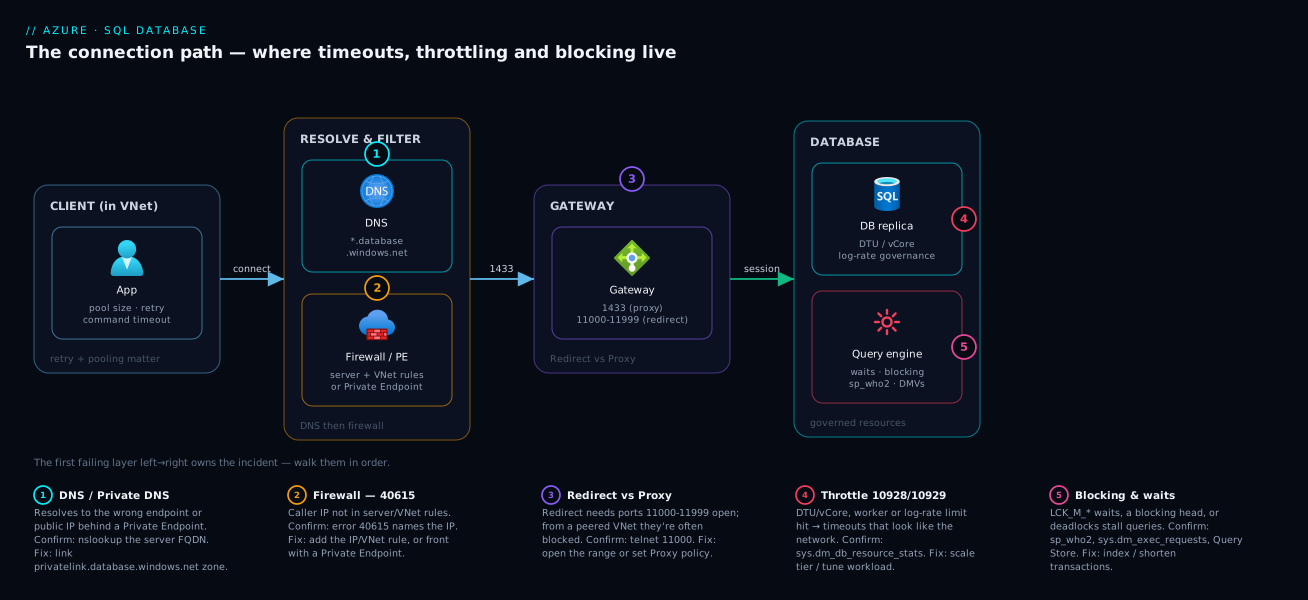
To anchor the diagram, here is each hop with the exact instrument and the single most common failure it produces — read it alongside the picture:
| Pipeline node | Owns these errors | One instrument | Most common single failure |
|---|---|---|---|
| Client / App | “from the pool”, no-retry flakiness | App config | Per-request connection, no retry |
| DNS | resolves to public IP | nslookup |
privatelink zone not linked |
| Firewall | 40615, 40914 | az sql server firewall-rule list |
NAT egress IP not allowed |
| Gateway / policy | 10060, 10054 | conn-policy show + nc 11000 |
Redirect + blocked 11000–11999 |
| Database (login) | 18456, 40532, 233 | sys.database_principals |
User exists only in user DB, connected master |
| Database (governance) | 10928/10929/4055x/40613 | sys.dm_db_resource_stats |
Log-rate or worker exhaustion |
| Query (locks) | blocking, 1205 | blocking-chain DMV | A long writer holding LCK_M_X |
Real-world scenario
Northwind Logistics runs a parcel-tracking platform on Azure. Its core database tracking sits on a single logical server nwl-sql-prod.database.windows.net — a vCore General Purpose, Gen5, 8 vCores instance holding ~600 GB. An App Service web tier and a VM Scale Set of scanner-ingestion workers (in vnet-app) both hit it. Average load is comfortable (CPU ~35%); they process ~9 million scan events/day, bursting to ~600/second during the afternoon delivery wave.
The incident began at 16:05 on a Friday during peak. The ingestion API started throwing 40613 Database not currently available and Timeout expired ... obtaining a connection from the pool in roughly equal measure; the customer website threw 40615 for a subset of users behind one corporate proxy. The on-call engineer’s first instinct — “the database is down” — was wrong: the Performance overview showed it online, and four internal dashboards were fine.
They walked the path. DNS resolved correctly to the private endpoint (Private Link added two weeks earlier). Firewall: the 40615s were a red herring from a separate change — a corporate proxy’s egress IP had rotated out of the server firewall, affecting only a slice of website users, unrelated to ingestion. The real incident was at the query layer. The blocking-chain DMV query revealed one root blocker: a nightly archival job triggered early, running an un-batched DELETE FROM scan_events WHERE created < @cutoff — ~40 million rows in one transaction. It escalated to table locks and saturated the log rate (Log IO 100%, CPU 38%). Ingestion writes piled up behind LCK_M_X and LOG_RATE_GOVERNOR waits; each held a worker and a pooled connection; within four minutes the pool exhausted and worker count neared the cap, producing 10928 and 40613 as the engine shed load.
Resolution took eleven minutes once they saw the chain. They KILLed the runaway delete; locks released, the chain drained, the pool refilled, and ingestion recovered in ~90 seconds. They added the rotated proxy IP to clear the website 40615s. Durable fixes: rewrote the delete to batch in 5,000-row chunks with WAITFOR DELAY to stay under the log governor; added a non-clustered index on created; added retry-with-backoff for the transient set; restricted the archival job to a maintenance window; and added Azure Monitor alerts on log_write_percent > 90% for 5 minutes and on blocking. Net effect: an incident that took 3+ hours the first time now self-alerts and is a sub-15-minute fix.
The incident as a timeline, because the order of the symptoms is itself the lesson — one root cause cascaded into four different error codes:
| Time | What surfaced | What the team thought | What it actually was | Right move |
|---|---|---|---|---|
| 16:05 | 40613 + pool timeouts on ingestion |
“Database is down” | Engine shedding load | Check Performance overview (it was online) |
| 16:06 | 40615 for some website users |
“Firewall broke too” | Unrelated rotated proxy IP (red herring) | Park it; chase the main incident |
| 16:08 | Ran the blocking-chain DMV | — | One root blocker: a 40M-row delete | Found the chain head |
| 16:09 | LOG_RATE_GOVERNOR + LCK_M_X waits |
“Network/throttle?” | Un-batched delete saturating log + locking | Confirm via dm_db_resource_stats |
| 16:11 | 10928 Resource ID 1 appearing | “Scale up now” | Workers piling behind the blocker | Kill the blocker, don’t scale |
| 16:14 | KILL the delete |
— | Chain drained | Ingestion recovered in ~90 s |
| +1 week | Durable fixes shipped | — | Batched delete, index, retries, alerts | 3-hour incident → sub-15-min |
Advantages and disadvantages
The trade-off here is the managed troubleshooting model — diagnosing Azure SQL from codes/DMVs/metrics versus the old on-prem “RDP in and look at the box.”
| Advantages of the Azure SQL diagnostic model | Disadvantages / friction |
|---|---|
| Rich, precise error numbers tell you the exact resource/limit you hit (10928 → workers, 40551 → tempdb) | No host access — you cannot restart a service, tail errorlog on disk, or run host-level tools; you diagnose only through the data plane and metrics |
DMVs, Query Store and system_health XEvents are always on and queryable live |
DMV scope is per-database in Azure SQL; some server-wide DMVs/instance-level features behave differently than boxed SQL Server |
| The platform handles HA/failover for you (reconfigurations) — fewer real outages | Those same reconfigurations cause transient errors you must code retry logic for; ignore them and the app looks flaky |
| Resource governance prevents one workload from taking the server down hard | Governance also throttles you at the tier’s limits (log rate especially) — you hit ceilings you didn’t choose and must scale or optimise |
| Intelligent Insights / Automatic Tuning find regressions and missing indexes automatically | Auto-tuning can surprise you (a forced plan or auto-created index) if you don’t watch its actions |
| Private Link + firewall + VNet rules give strong network isolation | The same controls add failure modes (DNS, the redirect/proxy port trap) that don’t exist for a simple LAN connection to a local server |
The advantages dominate for teams that want uptime without running infrastructure — the diagnostics are more precise than grovelling through host logs. The disadvantages bite hardest on migrations (on-prem assumptions about always-available connections, 1433-only firewalls and host access carry over and break) and cost-constrained tiers (governance limits — especially log rate and workers — hit far sooner than teams expect). Concretely, which workloads feel which edge of the trade-off:
| Workload | Feels the advantage as… | Feels the disadvantage as… |
|---|---|---|
| Greenfield cloud-native app | Precise codes + retries = robust by design | Must learn the redirect/proxy trap once |
| On-prem migration (“lift & shift”) | Managed HA/backups, no patching | 1433-only firewalls + always-on assumptions break |
| Cost-sensitive small tier | Cheap, serverless auto-pause | Log-rate/worker governors hit early |
| Large analytical/batch | Hyperscale + separate metrics | tempdb/memory/log governors on big jobs |
| High-concurrency OLTP | Governance prevents a meltdown | Worker cap + blocking can cascade fast |
| Strict-compliance data | Private Link + Defender + auditing | DNS/private-path failure modes to manage |
The redirect/proxy port trap and the mandatory retry logic are the two things every team underestimates.
Hands-on lab
This lab provisions a small Azure SQL Database, then deliberately triggers and diagnoses two failure families: a firewall block (40615) and a blocking chain. It uses General Purpose serverless so it auto-pauses and costs almost nothing. Run az in Cloud Shell and T-SQL in the portal Query editor or sqlcmd. The phases at a glance:
| Step | Goal | Key command / query | Expected outcome |
|---|---|---|---|
| 1 | Provision serverless DB | az sql db create ... --compute-model Serverless |
Server + DB Succeeded |
| 2 | Reproduce + fix 40615 | sqlcmd ... SELECT 1 → add firewall rule |
40615, then 1 |
| 3 | Inspect connection policy | az sql server conn-policy show |
Default |
| 4 | Create a blocking chain | two sessions, one uncommitted UPDATE |
Session 2 hangs |
| 5 | Diagnose + resolve | blocking-chain DMV → KILL |
Chain drains |
| 6 | Watch governance | sys.dm_db_resource_stats |
Live CPU/log/worker % |
| 7 | Teardown | az group delete |
Resources removed |
Step 1 — Create a server and a tiny serverless database.
RG=rg-sql-lab; LOC=eastus; SRV=nwl-sqllab-$RANDOM; DB=lab
az group create -n $RG -l $LOC -o table
az sql server create -g $RG -n $SRV -l $LOC \
  --admin-user sqladminuser --admin-password 'P@ssw0rd-$(openssl rand -hex 4)!'
# Serverless GP, auto-pause after 60 min idle, 1 min vCore -> near-zero cost
az sql db create -g $RG -s $SRV -n $DB \
  --edition GeneralPurpose --family Gen5 --capacity 1 --compute-model Serverless \
  --auto-pause-delay 60 -o table
Server and database both report Succeeded. The FQDN is $SRV.database.windows.net.
Step 2 — Reproduce a firewall block (40615), then fix it. Connect without a firewall rule:
sqlcmd -S tcp:$SRV.database.windows.net,1433 -d $DB \
  -U sqladminuser -P '<the password you set>' -Q "SELECT 1"
# Expected: Msg 40615 — Cannot open server ... Client with IP address 'x.x.x.x' is not allowed.
Read the IP from the error, add it, and reconnect:
MYIP=$(curl -s ifconfig.me)
az sql server firewall-rule create -g $RG -s $SRV -n cloudshell \
  --start-ip-address $MYIP --end-ip-address $MYIP
sqlcmd -S tcp:$SRV.database.windows.net,1433 -d $DB \
  -U sqladminuser -P '<password>' -Q "SELECT 1"   # now returns 1
Step 3 — Inspect the connection policy (the redirect/proxy hop).
az sql server conn-policy show -g $RG -s $SRV --query "connectionType" -o tsv # Default
Step 4 — Create a table and trigger a blocking chain. In two separate query sessions:
-- Setup (session 1)
CREATE TABLE dbo.accounts(id INT PRIMARY KEY, balance INT);
INSERT dbo.accounts VALUES (1,100),(2,100);

-- Session 1: open a transaction and DON'T commit (the blocker)
BEGIN TRAN;
UPDATE dbo.accounts SET balance = balance - 10 WHERE id = 1;
-- leave this session open, do not commit
-- Session 2: try to update the same row -> it BLOCKS on session 1
UPDATE dbo.accounts SET balance = balance + 10 WHERE id = 1;   -- hangs
Step 5 — Diagnose and resolve the block (a third session).
-- Find the chain: victim, blocker, wait type
SELECT session_id, blocking_session_id, wait_type, wait_time, command
FROM sys.dm_exec_requests WHERE blocking_session_id <> 0;
-- Expected: session 2 blocked by session 1 with wait_type LCK_M_U / LCK_M_X

-- Resolve: either COMMIT in session 1, or kill the blocker:
-- KILL <session_1_id>;
After committing/killing session 1, session 2 completes instantly — you’ve produced and read a real blocking chain.
Step 6 — Watch resource governance.
SELECT TOP 5 end_time, avg_cpu_percent, avg_log_write_percent, max_worker_percent
FROM sys.dm_db_resource_stats ORDER BY end_time DESC;
Validation checklist. You triggered and fixed a 40615, confirmed the connection policy, produced and resolved a blocking chain via the DMV workflow, and viewed live governance metrics — the full diagnostic loop end to end.
Teardown (do this — serverless still carries a tiny storage cost).
az group delete -n $RG --yes --no-wait
Cost note. Serverless GP with a 1-vCore minimum and auto-pause bills only for the compute-seconds used plus a few rupees of storage; deleting the resource group removes everything. Net cost: a few rupees.
Common mistakes & troubleshooting
The playbook. Scan the master table first to localise the incident to a row, then read the matching detail entry below for the exact commands. Each detail entry follows the same shape: symptom → root cause → confirm (exact command/path) → fix.
| # | Symptom | Tell-tale signal | Confirm (exact cmd / portal) | Fix | Band-aid that masks it |
|---|---|---|---|---|---|
| 1 | Works from Cloud Shell, times out from peered VNet | Connects then hangs only from the VNet | conn-policy show = Redirect; nc 11000 times out |
Force Proxy or open 11000–11999 to Sql tag |
Raising the command timeout |
| 2 | 40615 IP not allowed |
The egress IP printed in the error | az sql server firewall-rule list lacks it |
Add the egress IP, or VNet rule / Private Link | “Allow Azure services” (0.0.0.0) — too broad |
| 3 | Private Link added, now VNet times out | nslookup returns a public IP |
az network private-dns link vnet list shows no link |
Link the zone; fix DNS forwarder; set Proxy | Re-enabling public access |
| 4 | 18456 Login failed |
Same login fails identically every try | sys.database_principals in the target DB |
Connect to right DB; create/map the principal | Retrying (it’s persistent) |
| 5 | 40613 not currently available |
Clears in <1 min with a metric gap | If persists, dm_db_resource_stats pinned |
Retry w/ backoff; if persistent, scale/fix load | Restart loop in the app |
| 6 | 10928 Resource ID: 1 |
max_worker_percent near 100% |
Blocking-chain DMV + dm_db_resource_stats |
Break blocking; fix pool; scale up | Scaling up while a blocker runs |
| 7 | Writes crawl, CPU low | avg_log_write_percent = 100%, low CPU |
dm_exec_requests shows LOG_RATE_GOVERNOR |
Batch writes; maintenance window; scale | Bigger command timeout |
| 8 | Timeout ... from the pool |
The phrase “from the pool” | DB metrics healthy; app missing using/dispose |
Dispose; don’t hold across I/O; fix blocking | Raising Max Pool Size first |
| 9 | Fast yesterday, slow today | No code change; latency jump | Query Store top-consumers shows plans > 1 |
Force the good plan; update stats; index | OPTION(RECOMPILE) everywhere |
| 10 | 1205 deadlock victim |
Periodic 1205s under load | system_health deadlock graph |
Consistent lock order; short trans; index; retry | Just retrying without fixing order |
| 11 | 40544 size quota reached |
Writes fail; storage at max | SUM(size)*8/1024 vs tier max; Overview blade |
Archive/delete; raise maxSizeBytes/scale |
Retrying (it’s persistent) |
| 12 | 49918/49919/49920 too many ops |
The failing call is az/ARM, not a query |
Message names the subscription | Serialise + back off management calls | Touching the database |
| 13 | 233 pre-login handshake |
Fails before auth; old client | --query minimalTlsVersion = 1.2 |
Encrypt=True; upgrade driver; enable TLS 1.2 |
Lowering the TLS floor |
| 14 | 40551 / 40553 tempdb / memory |
Session killed mid-aggregate | RESOURCE_SEMAPHORE waits; plan spills |
Index away sorts; paginate; cap grant | Scaling without fixing the query |
1. “Works from Cloud Shell / on-prem, times out from the peered VNet.”
Cause: connection policy is Redirect (the in-Azure default) and the subnet reaches the gateway on 1433 but not 11000–11999 (blocked by a hub firewall, NSG, or forced-tunnel UDR) — handshake succeeds, redirect fails.
Confirm: az sql server conn-policy show -g rg -s srv --query connectionType returns Default/Redirect; from the VNet host nc -vz srv.database.windows.net 1433 works but nc -vz srv.database.windows.net 11000 times out.
Fix: force Proxy (az sql server conn-policy update --connection-type Proxy) or allow 1433 11000-11999 outbound to the Sql service tag.
2. 40615 — Client with IP address 'x.x.x.x' is not allowed.
Cause: the public egress IP the gateway saw (NAT/proxy IP for VNet traffic, not the private IP) isn’t in any server- or database-level firewall rule.
Confirm: the IP is in the error text; az sql server firewall-rule list -g rg -s srv -o table and SELECT * FROM sys.database_firewall_rules don’t contain it.
Fix: add the egress IP as a rule, or use a VNet rule/Private Link to allow the subnet instead of chasing rotating NAT IPs.
3. Private Link added, now it times out from inside the VNet.
Cause: DNS still resolves to the public gateway IP — the privatelink.database.windows.net zone isn’t linked to the VNet (or custom DNS doesn’t forward to 168.63.129.16), or Redirect is fighting the private path.
Confirm: nslookup srv.database.windows.net from the VNet returns a public IP; az network private-dns link vnet list -g rg -z privatelink.database.windows.net shows no link for that VNet.
Fix: link the zone to the VNet, ensure the private-endpoint A record exists, forward custom DNS to Azure DNS, and set connection policy to Proxy.
4. 18456 — Login failed for user.
Cause: wrong password; or a contained user that exists only in the user DB but you connected to master; or an Entra token for the wrong tenant/audience.
Confirm: SELECT name FROM sys.database_principals in the target database; az sql server ad-admin list -g rg -s srv for token auth; check you’re on the right database, not master. The state number in the message narrows it (state 8 = bad password, 38/40 = wrong/no DB, 102–111 = Entra token).
Fix: connect to the correct database; create the contained user / map the Entra principal; for SQL auth use a user/login that actually exists.
5. 40613 — Database '<db>' is not currently available.
Cause: usually transient — a reconfiguration/failover (seconds) — or the database is so overloaded it’s being recycled.
Confirm: clears within a minute with a brief metric gap → reconfiguration; persists → check sys.dm_db_resource_stats for pinned CPU/log/workers (overload).
Fix: retry with exponential backoff; if persistent, treat as overload — scale or fix the saturating workload.
6. 10928 — Resource ID: 1 ... limit for the database is N and has been reached.
Cause: worker-thread (Resource ID 1) or session (Resource ID 2) exhaustion — too many concurrent active requests, often because of blocking making each live longer, or a pool storm.
Confirm: SELECT max_worker_percent, max_session_percent FROM sys.dm_db_resource_stats ORDER BY end_time DESC near 100%; run the blocking-chain query — a long blocker is frequently the cause.
Fix: break the blocking chain (KILL root blocker / shorten transactions), fix pooling, and/or scale up (raises worker/session caps).
7. Writes crawl but CPU is low; WRITELOG / LOG_RATE_GOVERNOR waits dominate.
Cause: the log generation rate is governed at the tier cap — a bulk insert, big un-batched delete or index rebuild saturates Log IO percent while CPU idles.
Confirm: SELECT avg_log_write_percent FROM sys.dm_db_resource_stats pinned at 100% with low avg_cpu_percent; sys.dm_exec_requests shows LOG_RATE_GOVERNOR.
Fix: batch large writes with small delays, add indexes so modifies touch fewer rows, do maintenance in a window, or scale (log rate scales with size).
8. App throws Timeout expired ... obtaining a connection from the pool.
Cause: client pool exhaustion (default max 100 in ADO.NET) — leaked connections, held across slow calls, or blocking making them live longer. A client timeout; the database may be idle.
Confirm: the error says “from the pool”; sys.dm_db_resource_stats looks healthy; check app code for missing using/dispose.
Fix: dispose promptly, don’t hold across I/O, fix upstream blocking, and only then raise Max Pool Size.
9. A query fast yesterday is suddenly slow (no code change).
Cause: plan regression — a stats update or parameter-sniffing flip gave a worse plan; or a missing/changed index.
Confirm: the Query Store top-consumers query shows plans > 1; compare in the portal Query Store → Regressed Queries.
Fix: force the good plan (sys.sp_query_store_force_plan), update stats, or add the covering index; consider OPTIMIZE FOR/RECOMPILE for sniffing-sensitive queries.
10. 1205 — chosen as the deadlock victim.
Cause: two+ transactions acquired locks in opposite order and deadlocked; the engine killed the cheaper one.
Confirm: extract the deadlock graph from system_health (the XEvent ring-buffer query above) to see both processes, resources and the victim.
Fix: access objects in a consistent order, keep transactions short, add indexes to reduce locked rows, adopt RCSI/snapshot for read-write deadlocks, and retry 1205 (transient).
11. 40544 — The database has reached its size quota.
Cause: the database hit the max data size for its tier — not transient; data-growing writes fail.
Confirm: SELECT SUM(size)*8/1024 AS used_mb FROM sys.database_files vs the tier max; portal Overview shows used/max storage.
Fix: free space (archive/delete), or raise maxSizeBytes/scale to a tier with more storage (az sql db update --max-size 500GB). Do not retry.
12. 49918/49919/49920 — too many operations in progress for subscription.
Cause: control-plane throttling — automation firing too many scale/create operations across many databases at once (not a database problem).
Confirm: the failing call is an az sql db update/create or ARM loop, not a query; the message names the subscription.
Fix: serialize and back off the management operations (delays/retries in the loop) or batch them — a deployment-pipeline fix, not a SQL fix.
13. 233 / error during the pre-login handshake.
Cause: TLS mismatch — the client negotiates TLS 1.0/1.1 but the server requires 1.2+, or Encrypt is off.
Confirm: az sql server show -g rg -n srv --query minimalTlsVersion returns 1.2; the client driver is old.
Fix: set Encrypt=True, upgrade the driver (ODBC/JDBC/Microsoft.Data.SqlClient), and ensure the OS/runtime enables TLS 1.2.
14. 40551 / 40553 — session killed for excessive tempdb / memory.
Cause: a single query needs a huge sort/hash (memory grant) or spills heavily to tempdb — an oversized aggregation, a missing index forcing a sort, or an unbounded result.
Confirm: RESOURCE_SEMAPHORE waits in sys.dm_exec_requests; the plan shows spill warnings / large memory grants; Query Store avg_tempdb_space_used high.
Fix: add the index that removes the sort, paginate, reduce the batch size, or cap the grant (OPTION (MAX_GRANT_PERCENT = n)); scale only if the demand is legitimate.
Best practices
- Diagnose left to right. Prove DNS, firewall, policy, auth, then engine — the first failing hop owns the incident; stop checking the hops to its left.
- Set connection policy deliberately. Proxy for Private Link and any client that can only guarantee 1433; Redirect for in-VNet performance, and then open 11000–11999 to the
Sqltag. - Make retry logic non-negotiable. Driver configurable retry (or EF Core
EnableRetryOnFailure) with exponential backoff + jitter, retry only the transient set, never tight-loop. - Prefer vCore over DTU at scale — separate CPU/Data IO/Log IO/Workers metrics make throttling diagnosable; the blended DTU number hides which resource you hit.
- Watch log rate, not just CPU. Alert on
log_write_percentandworkers_percent, not onlycpu_percent— log and worker exhaustion are the most-missed throttles. - Keep transactions short and consistent-ordered. Never hold one open across app/user/network I/O; access objects in the same order everywhere to design out deadlocks.
- Batch large writes (a few thousand rows per batch with brief delays) to stay under the log governor and avoid lock escalation.
- Adopt RCSI where reads block writers, so readers row-version instead of taking shared locks.
- Index from evidence — Query Store top-consumers and
az sql db advisorrecommendations, not guesswork; force good plans on regression. - Allow subnets, not IPs — VNet rules or Private Link instead of firewall rules chasing rotating NAT/proxy IPs.
- Separate connection timeout from command timeout — network path vs query duration; never use one to mask the other.
- Alert proactively on blocking — a scheduled DMV check on long
blocking_session_idchains pages you in minutes, not after a customer complains.
The alerts that turn these into self-detecting incidents — wire each into Azure Monitor:
| Alert on | Signal source | Threshold | Catches |
|---|---|---|---|
log_write_percent |
AzureMetrics | > 90% for 5 min | Log-rate throttling (most-missed) |
workers_percent |
AzureMetrics | > 80% for 5 min | Worker exhaustion → 10928 |
cpu_percent |
AzureMetrics | > 85% for 10 min | Compute saturation |
storage_percent |
AzureMetrics | > 85% | Approaching 40544 |
| Long blocking chain | Scheduled DMV query / Log Analytics | blocker > 30 s | Blocking before customers notice |
| Deadlocks/min | system_health / metric |
> 0 sustained | Deadlock storms (1205) |
| Failed connections | AzureMetrics connection_failed |
spike | Firewall/policy/auth regressions |
| Plan regression | Query Store / Insights | plans > 1 on top query |
Latency jumps with no deploy |
Security notes
- Default to Private Link and disable public network access (
az sql server update --set publicNetworkAccess=Disabled) for sensitive data, paired with correct private DNS so resolution stays internal. - Prefer Entra ID authentication and managed identities over SQL logins — no passwords to leak, central revocation, MFA-capable. Map app identities as
FROM EXTERNAL PROVIDERusers with least-privilege roles (db_datareader/db_datawriter, notdb_owner). - Enforce TLS 1.2+ (
minimalTlsVersion) and connect withEncrypt=True; fix the old-driver233by upgrading clients, not lowering the TLS floor. - Scope firewall narrowly — avoid the broad “Allow Azure services” (
0.0.0.0) rule; use specific IP ranges, VNet rules or Private Link, and audit regularly (a stale wide-open rule is an attack surface). - Guard the control plane with RBAC — restrict
Microsoft.Sql/servers/*/writeand firewall-rule permissions; review who can change connection policy or disable private-only access. - Treat DMV/Query Store access as sensitive — query text can reveal data and structure; grant
VIEW DATABASE STATE/VIEW DATABASE PERFORMANCE STATEdeliberately. - Enable auditing and Microsoft Defender for SQL for threat detection (injection, anomalous logins, brute-force on 18456) and vulnerability assessment.
The least-privilege role choices, so you grant the smallest thing that works:
| Need | Grant | Not | Why |
|---|---|---|---|
| App reads data | db_datareader |
db_owner |
Read-only blast radius |
| App writes data | db_datawriter (+reader) |
db_owner |
No DDL/permission rights |
| Run diagnostic DMVs | VIEW DATABASE STATE |
db_owner / sysadmin |
See state without data control |
| Read Query Store / perf | VIEW DATABASE PERFORMANCE STATE |
broad admin | Perf data without full state |
| Manage schema in CI/CD | db_ddladmin (scoped) |
server admin | DDL without data ownership |
| Manage server (control plane) | RBAC SQL Server Contributor (scoped) |
Owner on the subscription | Narrow control-plane scope |
The connection-string hardening checklist — what each keyword should be in production:
| Keyword | Secure value | Why |
|---|---|---|
Encrypt |
True (or Strict/Mandatory) |
Forces TLS; avoids 233 downgrade |
TrustServerCertificate |
False |
Validate the server cert (no MITM) |
Authentication |
Active Directory Managed Identity |
No password to leak |
User ID / Password |
omitted (use MI/Entra) | Secrets out of config |
Connection Timeout |
15–30 s | Fail fast on network/auth issues |
Application Name |
a real app name | Identifies the SPID in dm_exec_sessions |
Cost & sizing
The bill drivers and where troubleshooting intersects cost:
- Service tier / compute size is the dominant cost — DTUs (Basic/Standard/Premium) or vCores (General Purpose/Business Critical/Hyperscale). The trap is under-provisioning then paying in incidents: a too-small tier hits log-rate and worker governors, causing throttling outages costlier (engineer time, downtime) than the next tier up. Right-size from
sys.dm_db_resource_statspeaks (CPU/log/workers), not guesswork. - Serverless (vCore) auto-pauses idle databases and bills per-second — ideal for dev/test and spiky workloads; it eliminates idle cost but adds a brief resume (cold-start) latency after a pause.
- Hyperscale decouples storage from compute and bills storage by actual size with fast snapshots — for very large databases where you don’t want to pre-provision max storage.
- Storage and backup bill by used data size and retention (PITR + LTR). The
40544size-quota incident is also a cost decision — raisingmaxSizeBytescosts money. - Reserved capacity (1/3-year) on vCore cuts steady-state cost substantially; commit the baseline, leave burst on-demand.
- Elastic pools share a DTU/vCore budget across many databases with uneven peaks — cheaper for fleets, but a noisy database can throttle pool-mates (10929).
- Free/low-cost for learning: the Azure free account includes a small monthly serverless GP allotment for 12 months; the lab above fits comfortably and otherwise costs a few rupees thanks to auto-pause.
Rough monthly figures (East US / South-India region, list price, single database — always confirm in the pricing calculator) so you can frame the tier conversation:
| Tier / objective | Model | What you get | Approx INR / month | Approx USD / month | Fits |
|---|---|---|---|---|---|
| Basic | DTU | 5 DTU, 2 GB | ~₹420 | ~$5 | Tiny dev/test |
| S0 | DTU | 10 DTU, 250 GB | ~₹1,250 | ~$15 | Small app, light load |
| S3 | DTU | 100 DTU, 1 TB | ~₹12,500 | ~$150 | Mid OLTP |
| GP serverless 1 vCore | vCore | auto-pause, per-sec | ~₹0–1,000 (idle-dependent) | ~$0–12 | Spiky / non-prod |
| GP provisioned 2 vCore | vCore | 2 vCore, 1 TB | ~₹21,000 | ~$250 | Steady prod baseline |
| GP provisioned 8 vCore | vCore | 8 vCore, 1 TB | ~₹84,000 | ~$1,000 | Busy OLTP |
| BC 8 vCore | vCore | 8 vCore, local SSD, readable replica | ~₹2,20,000 | ~$2,600 | Low-latency / HA-critical |
| Hyperscale 8 vCore | vCore | 8 vCore, up to 100 TB | ~₹95,000+ (storage-driven) | ~$1,150+ | Very large DBs |
What each lever buys, and when it pays for itself:
| Cost lever | Saves | Best for | Trade-off |
|---|---|---|---|
| Serverless auto-pause | Idle compute cost | Dev/test, spiky | Resume latency after pause |
| Reserved capacity (1/3-yr) | ~30–55% on steady compute | Predictable baseline | Commitment |
| Elastic pool | Compute across many DBs | Fleets with uneven peaks | Noisy-neighbour 10929 |
| Right-size from peaks | Over-provisioning | Everything | Needs measurement discipline |
| Hyperscale storage model | Pre-provisioned storage | Large/growing DBs | Different ops model |
| Fix the query, don’t scale | A whole tier’s spend | Throttle from one bad query | Engineering time |
Discipline: size from measured peaks, use serverless for spiky/non-prod, reserve the baseline, and treat a recurring throttle as “fix the query first, then scale if the demand is legitimate.”
Interview & exam questions
1. A connection works from Cloud Shell but times out from a peered VNet. Hypothesis and confirmation? The redirect vs proxy trap: in-VNet clients default to Redirect, sending traffic to the node on 11000–11999 after the 1433 handshake; if that range is blocked it fails. Confirm via az sql server conn-policy show and nc to port 11000 vs 1433; fix by forcing Proxy or opening 11000–11999 to the Sql tag.
2. What does 40615 mean and the gotcha about the IP? The client’s public egress IP isn’t allowed by any firewall rule — and for VNet traffic the IP shown is the NAT/proxy public IP, not the VM’s private IP, so allow the egress IP (or use a VNet rule/Private Link).
3. Distinguish 10928 and 10929. 10928 = your database hit a hard per-database limit (Resource ID 1 = workers, 2 = sessions); 10929 = the server/elastic pool is too busy to honour your minimum guarantee — shared-level contention versus your DB’s own ceiling.
4. Network problem vs slow query? Look at which timeout fired: a connection timeout (15s) means the connection failed (Hops 1–4 — DNS/firewall/policy/auth); a command timeout (30s) means the query ran too long (blocking/index/plan). Different layers.
5. CPU at 30% but writes crawl? Log-rate governance: the log rate is capped at the tier, so writes wait on LOG_RATE_GOVERNOR/WRITELOG while CPU idles. Confirm with avg_log_write_percent at 100% in sys.dm_db_resource_stats; fix by batching writes or scaling.
6. Find a blocking chain. Query sys.dm_exec_requests where blocking_session_id <> 0, joined to sys.dm_exec_sql_text; the root blocker has blocking_session_id = 0. sp_who2 (BlkBy) is the quick view, sys.dm_tran_locks shows lock modes. Resolve by killing/committing the root blocker, then fix the cause.
7. Blocking vs deadlock? Blocking is one session waiting on another’s lock — it persists until released. A deadlock is mutual blocking the engine resolves by killing a victim (error 1205), so it auto-resolves but a transaction fails. Break blocking manually; design out deadlocks with consistent lock order.
8. Which errors should an app retry? The transient set — 40613, 40197, 40143, 10928, 10929, 10053/10054/10060, 233, 1205 — with exponential backoff. Never the persistent ones — 40615/40914 (firewall), 18456 (auth), 40544 (size quota) — which fail identically.
9. Query Store for a query that regressed with no code change? It persists query text, multiple plans and runtime stats over time, so you spot plans > 1 and a slower new plan; force the previously good plan (sp_query_store_force_plan) as an immediate fix without changing code.
10. Private Link added, in-VNet connections fail. What broke? Almost always DNS — the name still resolves to the public gateway IP because the privatelink.database.windows.net zone isn’t linked to the VNet (or custom DNS doesn’t forward to 168.63.129.16). Confirm with nslookup and az network private-dns link vnet list; set policy to Proxy.
11. What are 49918/49919/49920 and where to fix them? Control-plane (subscription-level) throttles — too many scale/create operations in progress, typically from automation looping over databases. Fix in the deployment pipeline (serialize, back off the az/ARM calls), not in any database.
12. How do tempdb and memory show up in throttling? 40551 terminates a session for excessive tempdb (sorts/spills/temp tables), 40553 for excessive memory (oversized grants); waits show RESOURCE_SEMAPHORE. The fix is query-side — reduce sort/hash size, add indexes, paginate.
13. The 18456 message gives no detail. How do you narrow it? Read the error state: state 8 = wrong password, 38/40 = wrong or inaccessible database (often connected to master), 102–111 = Entra token problems. The state turns a generic “login failed” into a precise cause.
14. Why prefer a VNet rule or Private Link over a server firewall rule for in-VNet apps? VNet traffic egresses through a NAT/firewall public IP that rotates, so firewall rules chase a moving target and produce intermittent 40615. A VNet rule allows the subnet, and Private Link removes the public path entirely — both stable.
Cert mapping: DP-300 (Azure Database Administrator Associate) — monitor and optimize operational resources / query performance, configure resources for optimal performance — and AZ-305 for network-isolation design (Private Link, firewall, connection policy) of data tiers.
Quick check
- From a peered VNet, your app connects but queries hang; from Cloud Shell it’s fine. What’s the most likely cause and the two valid fixes?
- You see
10928 Resource ID: 1. Which resource did you exhaust, and what’s a frequent indirect cause of it? - Your writes are slow but CPU is at 25%. Which governor do you suspect, and which DMV column confirms it?
- Which of these should an app retry: 40615, 40613, 18456, 10929? Why?
- What is the difference between the connection timeout and the command timeout, and what does each one’s expiry tell you about where the problem is?
Answers
- Redirect connection policy + blocked 11000–11999. In-VNet clients default to Redirect, which moves traffic to the node on the high-port range after the 1433 handshake; if that range is blocked the connection fails (Cloud Shell uses Proxy and works). Fix by forcing Proxy (
az sql server conn-policy update --connection-type Proxy) or opening 1433 + 11000–11999 outbound to theSqlservice tag. - Worker threads (Resource ID 1; Resource ID 2 would be sessions). A frequent indirect cause is blocking — a long blocker makes every queued request hold a worker longer, so worker count climbs to the cap. Fix the blocking chain and/or scale up.
- Log-rate governance. Confirm with
avg_log_write_percent(near 100%) insys.dm_db_resource_stats, alongsideLOG_RATE_GOVERNOR/WRITELOGwaits insys.dm_exec_requests. Fix by batching writes or scaling. - Retry only 40613 and 10929 (transient — reconfiguration / shared-capacity busy). Do not retry 40615 (firewall) or 18456 (auth) — they’re persistent and fail identically until you fix the config/credential.
- The connection timeout (default 15s) bounds establishing the connection (DNS+TCP+TLS+login); its expiry means the problem is in the network/auth hops (1–4). The command timeout (default 30s) bounds a single query’s runtime; its expiry means the query is slow (blocking, missing index, plan regression) — an engine/query problem, not a network one.
Glossary
- Logical server — the
*.database.windows.netendpoint and security boundary that hosts one or more Azure SQL databases; where server-level firewall rules and the Entra admin live. - Connection policy (Redirect / Proxy / Default) — how traffic reaches the node after the initial 1433 hit on the gateway (the regional front-end): Proxy stays on 1433; Redirect moves to the node on 11000–11999; Default chooses by client location.
- DTU vs vCore — DTU is a blended CPU/IO/memory unit (one composite number); vCore is a dedicated logical CPU with separate CPU/Data IO/Log IO/Worker metrics.
- Resource governance — the engine capping you to your tier’s limits and rejecting/queuing work over them (10928/10929/40551/40553).
- Log rate governor — the cap on transaction-log generation rate per tier; surfaces as
LOG_RATE_GOVERNOR/INSTANCE_LOG_GOVERNORwaits. - Worker thread — the engine thread that runs an active request; the per-tier cap on workers is a common hidden ceiling (10928 Resource ID 1).
- DMV (Dynamic Management View) — a system view exposing live engine state (e.g.
sys.dm_exec_requests,sys.dm_os_wait_stats). - Wait type — what a request is currently waiting on (
LCK_M_X,PAGEIOLATCH_*,RESOURCE_SEMAPHORE,THREADPOOL). - Blocking — one session waiting on a lock another holds; persists until released (won’t auto-resolve).
- Deadlock — mutual blocking the engine resolves by killing a victim session (error 1205).
- RCSI (Read Committed Snapshot Isolation) — row-versioning so readers don’t take shared locks and don’t block writers.
- Query Store — the built-in store of query text, plans and runtime stats over time; enables plan-regression diagnosis and plan forcing.
- Intelligent Insights / Database Advisor — Azure’s managed performance analysis that raises diagnostics (blocking, tempdb, plan regression) and tuning recommendations.
- Reconfiguration — a platform-initiated failover/node-move (for HA/patching) that briefly drops connections and produces transient errors.
- Private Link / private endpoint — a private IP in your VNet for the server, resolved via the
privatelink.database.windows.netDNS zone. - Transient error — a recoverable, retry-able error from a momentary condition (40613, 40197, 10928, 10929, 233, 1205); contrast with persistent errors (40615, 18456, 40544).
- Connection timeout vs command timeout — the connection timeout bounds establishing the connection (network/auth); the command timeout bounds a single query’s execution (engine/query).
Next steps
You can now triage any Azure SQL incident by hop and prove the failing layer. Build on it with the adjacent topics:
- Network the data tier correctly: Azure Private Endpoint vs Service Endpoint: Secure PaaS Access and Azure Private Link & Private DNS for PaaS — the DNS and Private Link mechanics behind Hops 1–3.
- Foundational networking: Azure Virtual Network, Subnets & NSGs — to reason about the NSG/UDR/firewall rules that block the 11000–11999 redirect range.
- Observe it properly: Azure Monitor & Application Insights: Production Observability — wire the KQL metric queries above into alerts on
log_write_percent,workers_percentand blocking. - Secure the credentials: Azure Key Vault: Secrets, Keys & Certificates — to move connection strings and SQL secrets out of config and behind managed identity.
- Compare the web-tier playbook: Troubleshooting Azure App Service: 502/503, Cold Starts & Restart Loops — the same “localise to the failing hop” discipline applied one tier up.