A support ticket lands in your queue: “can we automatically strip credit-card numbers out of chat transcripts, flag the angry ones, and route the ‘cancel my account’ messages to retention?” Three different asks — redaction, sentiment, intent — and the instinct is three different machine-learning projects. It isn’t. All three are single REST calls to one Azure resource: the Azure AI Language service (formerly “Text Analytics” plus “LUIS”, now consolidated). It is the natural-language brain of Azure AI Services — a managed API that reads unstructured text and hands back structure: which spans are personal data, whether the tone is positive or negative, what real-world things (people, places, orgs, dates, quantities) are named, and — with a model you train — what the user is trying to do and the parameters they gave.
This article is the mental model, not a click-through of the portal. The Language service bundles roughly a dozen capabilities behind one endpoint and one key, and the single most useful thing you can learn is which capability answers which question — because once you can name the feature, the API call, the limits and the price are trivial. We split the dozen into two families that behave very differently: prebuilt features (PII, sentiment, key-phrase, language detection, NER, entity linking, summarization) that work out of the box with zero training, and custom features (Custom NER, Custom Text Classification, and Conversational Language Understanding / CLU) where you bring labelled data and train a model. Knowing that fork tells you the cost, the latency, the data-residency story and the maintenance burden before you write a line of code.
By the end you will reach for the Language service the way a senior engineer does: you will hear “redact”, “sentiment”, “extract the dates”, “what does the customer want”, “summarize this thread” and immediately map each to a feature, an API action, a sync-or-async decision, and a rough cost — and you will know the handful of gotchas (the 5,120-character document limit, opinion mining being off by default, PII categories you must allow-list, CLU versus the newer orchestration workflow) that separate a demo from production. It is squarely on the AI-900 and AI-102 exam paths, and it is the cheapest way to add language intelligence to an app without owning a model.
What problem this solves
Unstructured text is where business meaning hides and where code is blind. A chat transcript, a product review, an email, a contract clause, a voice-to-text snippet — to a database it is one opaque string. The questions you actually want answered (“is there a passport number in here?”, “is this customer about to churn?”, “what city is this address in?”, “is the user asking to book or to cancel?”) all require reading, and reading is exactly what traditional code cannot do. The historical answer was to hire data scientists, collect a corpus, train an NLP model, host it, and re-train it forever. For most teams that is months of work and a permanent operational tax for a feature that is not their core product.
The Language service collapses that. For the common questions, Microsoft has already trained the models and exposes them as prebuilt actions — you send text, you get structured JSON back, and you pay per character processed. There is no model to train, no GPU to rent, no corpus to label. For the questions that are specific to your domain — your product’s intents, your contract’s custom entity types — you still train, but on Microsoft’s platform with a labelling UI (Language Studio), managed training, and a one-line deploy, so you operate an application, not an ML stack.
Who hits this: any team with text and a question about it. Support and contact-centre teams (sentiment, intent routing, summarization), compliance and privacy teams (PII/PHI redaction before storage or logging), search and knowledge teams (entity extraction and linking to enrich an index), product teams building assistants and bots (CLU for intent + entities), and data teams cleaning or classifying document streams. What breaks without it is either a stalled feature (“we can’t ship redaction, we’d need an ML team”) or a fragile home-grown regex that misses the passport number formatted differently and leaks it into your logs.
To frame the whole service before the deep dive, here is every capability family, the one question it answers, and whether you train it:
| Capability | The question it answers | Family | You train it? | Typical caller |
|---|---|---|---|---|
| Language detection | “What language is this text?” | Prebuilt | No | Any pipeline, as a pre-step |
| Sentiment analysis | “Is the tone positive, negative or neutral?” | Prebuilt | No | Reviews, support, social |
| Opinion mining | “What is the sentiment about (which aspect)?” | Prebuilt (flag) | No | Product feedback |
| Key-phrase extraction | “What are the main talking points?” | Prebuilt | No | Tagging, search, digests |
| Named-entity recognition (NER) | “What people/places/orgs/dates/quantities are named?” | Prebuilt | No | Search enrichment, extraction |
| Entity linking | “Which real-world entity (Wikipedia) is this?” | Prebuilt | No | Disambiguation, knowledge |
| PII detection | “Which spans are personal data, and redact them” | Prebuilt | No | Compliance, logging, storage |
| Text summarization | “Give me the gist (extractive or abstractive)” | Prebuilt (LLM-backed) | No | Long threads, documents |
| Custom NER | “Extract my entity types from my documents” | Custom | Yes | Domain document extraction |
| Custom text classification | “Classify docs into my categories” | Custom | Yes | Routing, triage, taxonomy |
| Conversational Language Understanding (CLU) | “What is the user’s intent and the entities in it?” | Custom | Yes | Bots, voice assistants, IVR |
| Question answering | “Answer from my knowledge base / FAQ” | Custom | Yes (curate) | FAQ bots, support deflection |
Learning objectives
By the end of this article you can:
- Map a plain-English request (“redact this”, “is it angry”, “what’s the intent”) to the exact Language feature, API action, and whether it is prebuilt or custom.
- Explain the difference between the prebuilt family (zero training, per-character billing) and the custom family (you label and train, then deploy) and pick correctly for a given need.
- Describe what PII detection, sentiment + opinion mining, NER, entity linking, key-phrase extraction and summarization each return, and the key knobs on each (PII categories, opinion-mining flag, extractive vs abstractive summarization).
- Define Conversational Language Understanding (CLU) — intents and entities — and contrast it with the orchestration workflow that routes across CLU, custom QnA and other projects.
- Reason about the document and request model: the 5,120-character document limit, batch sizes, sync vs async (Long-Running Operation) actions, and Text Analytics for health as the async PHI case.
- Provision a Language resource with
azCLI and Bicep, call it securely with Microsoft Entra ID / managed identity instead of keys, and lock it behind a private endpoint. - Estimate cost from the per-1,000-text-records model, identify the free tier, and right-size between S (standard, pay-as-you-go) and commitment-tier pricing.
Prerequisites & where this fits
You should be comfortable calling a REST API (or using an SDK) with a bearer token or key, reading JSON, and running az in Cloud Shell. You should know what an Azure AI Services (Cognitive Services) resource is — a single Azure resource that exposes an AI capability behind an endpoint + key — and the basic idea of a managed identity for keyless auth. No machine-learning background is required; that is the point of the prebuilt features.
This sits in the AI/ML track, at the applied services layer — above the raw model platforms (Azure Machine Learning, Azure OpenAI) and beside the other prebuilt AI services (Vision, Speech, Document Intelligence). It is the text-reading sibling of those. It pairs naturally with Azure Functions and Serverless Patterns: Event-Driven Compute when you wire it into an event pipeline (a blob lands, a function calls Language, the result is stored), with Azure Key Vault: Secrets, Keys and Certificates Done Right for the endpoint key if you must use keys, and with Azure Monitor and Application Insights: Full-Stack Observability for latency and error telemetry on the calls. If you are heading toward generative AI and retrieval, it is upstream of Azure AI Search for RAG: Vector Indexing, Hybrid Search, Semantic Ranking, and Indexer Pipelines (NER and key phrases enrich the index) and a sibling of the broader survey in AI-900: Azure AI Services — Vision, Language, Speech, Document Intelligence & Search.
Where each capability lives relative to the platforms around it, so you call the right tool:
| Need | Right Azure service | Why not the Language service |
|---|---|---|
| Read text: PII, sentiment, NER, intent | AI Language | This is the right tool |
| Generate / rewrite / chat over text | Azure OpenAI | Language is analysis, not generation |
| Extract fields from invoices/forms (layout) | Document Intelligence | Language reads text, not document layout |
| Transcribe audio → text | Azure AI Speech | Feed Speech output into Language |
| Detect objects/text in images | Azure AI Vision | Different modality |
| Train your own from scratch, full control | Azure Machine Learning | Only if prebuilt/custom won’t fit |
| Semantic/vector search over a corpus | Azure AI Search | Language enriches the index, doesn’t host it |
Core concepts
Five mental models make every later decision obvious.
One resource, one endpoint, one key, many features. You provision a single Azure AI Language resource (a kind: TextAnalytics Cognitive Services account, or a multi-service AI Services account). Every capability — PII, sentiment, NER, CLU — is reached at the same HTTPS endpoint (https://<name>.cognitiveservices.azure.com/) authenticated by the same key or Entra token. You do not deploy one resource per feature. The feature you want is selected by the API path and the request body, not by which resource you call. This is why “add sentiment” to an app that already does PII is zero new infrastructure.
Text goes in as documents; results come back per document. The API is batch-first. You send an array of documents, each with an id, the text, and optionally a language hint. The service processes each independently and returns results keyed by your id, plus a separate errors array for any document that failed (too long, unsupported language). The hard rule that bites everyone: a single document is capped at 5,120 characters for most synchronous text-analytics actions — longer text must be chunked by you before sending. Batch size and total payload are also bounded (commonly up to 25 documents and ~1 MB per sync request, with higher limits for async). You design around the document model, not around “send me the whole 50-page PDF”.
Prebuilt vs custom is the fork that decides everything. Prebuilt features (language detection, sentiment, key phrase, NER, entity linking, PII, summarization) ship Microsoft-trained models — call them immediately, pay per character, nothing to maintain. Custom features (Custom NER, Custom Text Classification, CLU, custom question answering) require you to create a project in Language Studio, label data, train a model, and deploy it to a named deployment, which you then call by project + deployment name. Custom buys you domain-specific accuracy at the cost of labelling effort, a training step, and per-model maintenance. Choosing prebuilt when “people, places, orgs, dates” is enough — and custom only when you need your entity types or your intents — is the most important design call.
Some actions are synchronous, some are long-running (async). Lightweight analyses (sentiment, key phrase, language, prebuilt NER/PII on a small batch) return in one synchronous call. Heavier or composite work — summarization, Text Analytics for health (extracting medical entities/relations, the PHI case), large multi-action batches, and custom-model analysis — runs as a Long-Running Operation (LRO): you POST to start a job, get back an operation URL, then poll until status: succeeded and read the results. Mixing these up (“why does summarize not return text immediately?”) is a classic first-call confusion. The async ones are async by design because they take longer.
CLU answers “what does the user want”, not “what does the text contain”. The prebuilt features describe text objectively (this span is an email; the tone is negative). Conversational Language Understanding (CLU) is purpose-built for utterances: you define intents (the goals: BookFlight, CancelAccount, CheckBalance) and entities (the parameters: a date, a destination, an amount), label example utterances, and train. At runtime CLU returns the top intent with a confidence score and the entities it pulled out. It is the engine behind bots and IVR. Its bigger sibling, the orchestration workflow, sits above multiple CLU/QnA/custom projects and routes an utterance to the right one — the pattern when a single assistant must “do many different things”.
The vocabulary in one table
Pin down every moving part before the deep sections; the glossary repeats these for lookup.
| Term | One-line definition | Family | Why it matters |
|---|---|---|---|
| Language resource | The single Cognitive Services account you call | — | One endpoint/key for all features |
| Document | One {id, text, language?} unit you submit |
— | The 5,120-char limit is per document |
| Prebuilt feature | Microsoft-trained, call-and-go | Prebuilt | No training, per-char billing |
| Custom feature | You label + train + deploy | Custom | Domain accuracy, you maintain it |
| PII detection | Finds + redacts personal-data spans | Prebuilt | Compliance before storage/logging |
| PHI / Text Analytics for health | Medical entities + relations (async) | Prebuilt | Healthcare; runs as an LRO |
| Sentiment / opinion mining | Polarity; opinion = aspect-level | Prebuilt | Opinion mining is off by default |
| NER | Named-entity recognition (typed spans) | Prebuilt | Extraction/search enrichment |
| Entity linking | Disambiguate to a Wikipedia entity | Prebuilt | “Apple” the company vs the fruit |
| Key-phrase extraction | Main talking points | Prebuilt | Tagging, digests |
| Summarization | Extractive (pick sentences) or abstractive (LLM) | Prebuilt | Long threads/docs; async |
| Intent (CLU) | The user’s goal in an utterance | Custom | Routing in bots/IVR |
| Entity (CLU) | A parameter in the utterance | Custom | Slot-filling |
| Orchestration workflow | Routes utterances across CLU/QnA projects | Custom | One assistant, many skills |
| LRO | Long-Running Operation (start → poll) | — | How async actions return |
The prebuilt features, one by one
These need no training. Send text, get structure. Here is the full prebuilt menu with what each returns and the one knob you must know.
| Feature | API action (analyze) | What it returns | Key knob / gotcha |
|---|---|---|---|
| Language detection | LanguageDetection |
ISO code + confidence per doc | Use as a pre-step; ambiguous short text is low-confidence |
| Sentiment analysis | SentimentAnalysis |
doc + sentence polarity + scores | Opinion mining is opt-in (opinionMining=true) |
| Key-phrase extraction | KeyPhraseExtraction |
list of phrases per doc | No scores; language-dependent quality |
| Named-entity recognition | EntityRecognition |
typed entities + category + offset | Categories are fixed; not your types |
| Entity linking | EntityLinking |
entities linked to Wikipedia URLs | English-centric; links can be absent |
| PII detection | PiiEntityRecognition |
PII spans + redactedText |
Allow-list categories; default detects many |
| Summarization (extractive) | ExtractiveSummarization |
top N original sentences | Async (LRO); you set sentence count |
| Summarization (abstractive) | AbstractiveSummarization |
newly-written summary | Async (LRO); LLM-backed, longer latency |
PII detection and redaction
The compliance workhorse. Send text, and PII detection returns the spans that are personal data — each with a category (Email, PhoneNumber, CreditCardNumber, Person, Address, government IDs such as USSocialSecurityNumber, and many country-specific types), a confidence score, and the character offset/length. Critically, it also returns a redactedText field with those spans masked (replaced by *), so you can store or log the redacted version directly. The mental model: PII is “NER specialised for personal data, plus a ready-made redacted string”.
Two knobs matter. First, the PII categories (piiCategories): by default the service detects a broad set, but you can pass an explicit allow-list so it only flags, say, CreditCardNumber and USSocialSecurityNumber and ignores Person (you may want names). Second, the domain: a phi domain narrows detection to protected health information for healthcare text. The classic mistake is assuming a regex is “good enough” and leaking a differently-formatted card number into logs — the trained model catches formats your regex won’t.
# PII detection over a small batch (synchronous) — returns redactedText per document
curl -s -X POST "$LANG_ENDPOINT/language/:analyze-text?api-version=2024-11-01" \
  -H "Ocp-Apim-Subscription-Key: $LANG_KEY" -H "Content-Type: application/json" \
  -d '{
    "kind": "PiiEntityRecognition",
    "parameters": { "piiCategories": ["CreditCardNumber","Email","PhoneNumber"] },
    "analysisInput": { "documents": [
      { "id": "1", "language": "en",
        "text": "Charge card 4111-1111-1111-1111, email me at jo@contoso.com." }
    ]}
  }'
# Response includes: "redactedText": "Charge card ********************, email me at *************."
The PII categories you will reach for most, and where each shows up:
| Category (sample) | Example match | Common use |
|---|---|---|
Email |
jo@contoso.com |
Logging hygiene, GDPR |
PhoneNumber |
+91 98xxxxxxx |
Contact-centre transcripts |
CreditCardNumber |
4111 1111 1111 1111 |
PCI scope reduction |
Person |
Priya Sharma |
Anonymising case notes |
Address |
12 MG Road, Bengaluru |
Shipping/KYC text |
USSocialSecurityNumber / national IDs |
123-45-6789 |
Compliance redaction |
IPAddress |
203.0.113.7 |
Security/log scrubbing |
phi domain (health) |
diagnoses, medications | HIPAA-adjacent workflows |
Sentiment analysis and opinion mining
Sentiment returns a label — positive / negative / neutral / mixed — at both the document and sentence level, each with confidence scores for all three classes (they sum to ~1.0). “Mixed” appears at the document level when sentences disagree. That alone routes angry tickets and scores reviews.
The depth knob is opinion mining (aspect-based sentiment), which is off by default — you must pass opinionMining=true. With it on, the service links a sentiment to the target it is about: from “the battery is great but the screen is terrible” it returns two opinions — battery → positive, screen → negative — instead of a muddy “mixed”. For product feedback this is the difference between “customers are unhappy” and “customers love X but hate Y”. The trade-off is slightly higher latency and a richer payload to parse.
# Sentiment WITH opinion mining (aspect-level). Note opinionMining must be true.
curl -s -X POST "$LANG_ENDPOINT/language/:analyze-text?api-version=2024-11-01" \
  -H "Ocp-Apim-Subscription-Key: $LANG_KEY" -H "Content-Type: application/json" \
  -d '{
    "kind": "SentimentAnalysis",
    "parameters": { "opinionMining": true },
    "analysisInput": { "documents": [
      { "id": "1", "language": "en",
        "text": "The battery is great but the screen is terrible." }
    ]}
  }'
Reading the output has three layers, each with a trap: the document level gives one label plus three scores — and “mixed” is not neutral, it means the sentences disagree; the sentence level gives a label per sentence, which is how you find which sentence is negative; and the opinion level (target plus assessment) gives aspect-level polarity but is off by default until you set opinionMining=true.
Named-entity recognition and entity linking
NER finds typed real-world spans — Person, Location, Organization, DateTime, Quantity, Email, URL, PhoneNumber and more — each with a category, optional subcategory, confidence, and offset. It is the extraction engine for search enrichment (“pull every organisation and date out of these filings”) and lightweight structuring of free text. The categories are fixed; if you need your domain’s entity types (a part number, a policy clause), that is Custom NER, not prebuilt.
Entity linking goes one step further: it disambiguates a recognised entity to a specific real-world identity, returning a Wikipedia URL and a unique data-source ID. From “Apple released a phone” it links Apple → en.wikipedia.org/wiki/Apple_Inc. (the company) rather than the fruit. It is English-centric and a link is not always available, but for knowledge-graph and disambiguation work it resolves the ambiguity NER leaves open.
NER vs entity linking vs Custom NER — pick the right one:
| You need… | Use | Returns | Train? |
|---|---|---|---|
| Generic typed entities (people, dates, orgs) | Prebuilt NER | Category + offset + score | No |
| The specific real-world entity (disambiguated) | Entity linking | Wikipedia URL + ID | No |
| Your own entity types from your docs | Custom NER | Your labels + offset | Yes |
Key-phrase extraction and summarization
Key-phrase extraction returns the main talking points of a document as a flat list of phrases — no scores, no categories. It is the cheap way to tag content, build digests, or generate search keywords. Quality is language-dependent and it will not invent structure; treat it as “the nouns that matter”.
Summarization comes in two flavours, both asynchronous (LRO). Extractive summarization selects the most important original sentences (you choose how many) — faithful to the source, no paraphrase. Abstractive summarization is LLM-backed and writes a new, condensed summary in its own words — more fluent, but it generates text, so it carries the usual generative caveats. There is also a conversation summarization mode tuned for chat transcripts (issue/resolution). The decision is fidelity vs fluency: extractive when you must not alter wording (legal, compliance), abstractive when you want a readable gist.
Key phrase vs the two summarizations:
| Feature | Output | Sync/async | Pick when |
|---|---|---|---|
| Key-phrase extraction | List of phrases | Sync | Tagging, keywords, quick digest |
| Extractive summarization | N original sentences | Async (LRO) | Must preserve exact wording |
| Abstractive summarization | Newly-written summary | Async (LRO) | Want a fluent, condensed gist |
The custom features and CLU
Custom features trade a labelling-and-training step for accuracy on your problem. All follow the same lifecycle: create project → label data in Language Studio → train → evaluate → deploy → call by project + deployment name.
| Custom feature | You define | You label | At runtime returns | Replaces |
|---|---|---|---|---|
| Custom NER | Your entity types | Spans in your documents | Your typed entities + offsets | Generic NER (when it’s not enough) |
| Custom text classification | Your categories (single/multi-label) | Whole-document labels | Predicted class(es) + scores | Manual triage/routing |
| Conversational Language Understanding (CLU) | Intents + entities | Example utterances | Top intent + entities + scores | The retired LUIS |
| Custom question answering | A knowledge base (Q/A pairs, from URLs/docs) | Curate Q&A pairs | Best answer + confidence | FAQ bot logic |
Conversational Language Understanding (CLU)
CLU is the headline custom feature and the modern replacement for LUIS (Language Understanding, retired). Its job is to read a short utterance — what a user typed or said — and return what they want and the details. You model two things:
- Intents — the user’s goal.
BookFlight,CancelSubscription,CheckOrderStatus. You provide example utterances per intent (“I want to fly to Goa next Friday” →BookFlight). - Entities — the parameters inside the utterance. A
Destination(Goa), aDate(next Friday), anOrderNumber. CLU supports learned entities (taught by example), list entities (a fixed vocabulary with synonyms), and prebuilt entities (numbers, datetimes, etc.).
At inference, CLU returns the top intent with a confidence score, a ranked list of the runners-up, and the entities it extracted with their types and spans. A bot reads the intent to choose a handler and the entities to fill the slots. The whole thing is trained and deployed in Language Studio and then called by project name + deployment name — the deployment name lets you run, say, a staging and a production model from the same project.
# Query a deployed CLU model: send the utterance, get top intent + entities
curl -s -X POST "$LANG_ENDPOINT/language/:analyze-conversations?api-version=2024-11-01" \
  -H "Ocp-Apim-Subscription-Key: $LANG_KEY" -H "Content-Type: application/json" \
  -d '{
    "kind": "Conversation",
    "analysisInput": { "conversationItem": {
      "id": "1", "participantId": "user",
      "text": "Book me a flight to Goa next Friday"
    }},
    "parameters": {
      "projectName": "travel-bot", "deploymentName": "production",
      "verbose": true
    }
  }'
# Returns: topIntent = "BookFlight", plus entities Destination=Goa, Date=next Friday
CLU concepts and the choice each forces:
| CLU concept | What it is | Choice you make |
|---|---|---|
| Intent | The user’s goal | One per distinct action; keep them separable |
| Learned entity | Taught by labelled examples | When values vary freely (free text) |
| List entity | Fixed vocabulary + synonyms | When values are a known set (cities, plans) |
| Prebuilt entity | Numbers, datetimes, etc. | Free, reuse instead of teaching |
| Deployment | A named, callable model version | staging vs production slots |
| Confidence threshold | Min score to accept the intent | Below it → fall back / clarify |
CLU vs the orchestration workflow
One CLU project handles one cohesive set of intents. When a single assistant must do fundamentally different jobs — answer FAQs and book travel and run a custom classifier — you do not cram them into one CLU project. You build an orchestration workflow: a top-level project whose “intents” are other projects (a CLU project, a custom question-answering knowledge base, another CLU). It reads the utterance and routes to the right child project, which then does the real work. The rule of thumb: one CLU project per skill; an orchestration workflow to choose the skill.
| Aspect | CLU project | Orchestration workflow |
|---|---|---|
| Scope | One coherent skill | Many skills, one entry point |
| “Intents” point to | Handlers in your app | Other projects (CLU/QnA/custom) |
| Use when | A bot does one job well | An assistant juggles unrelated jobs |
| Returns | Intent + entities | Which project to call (then its result) |
Architecture at a glance
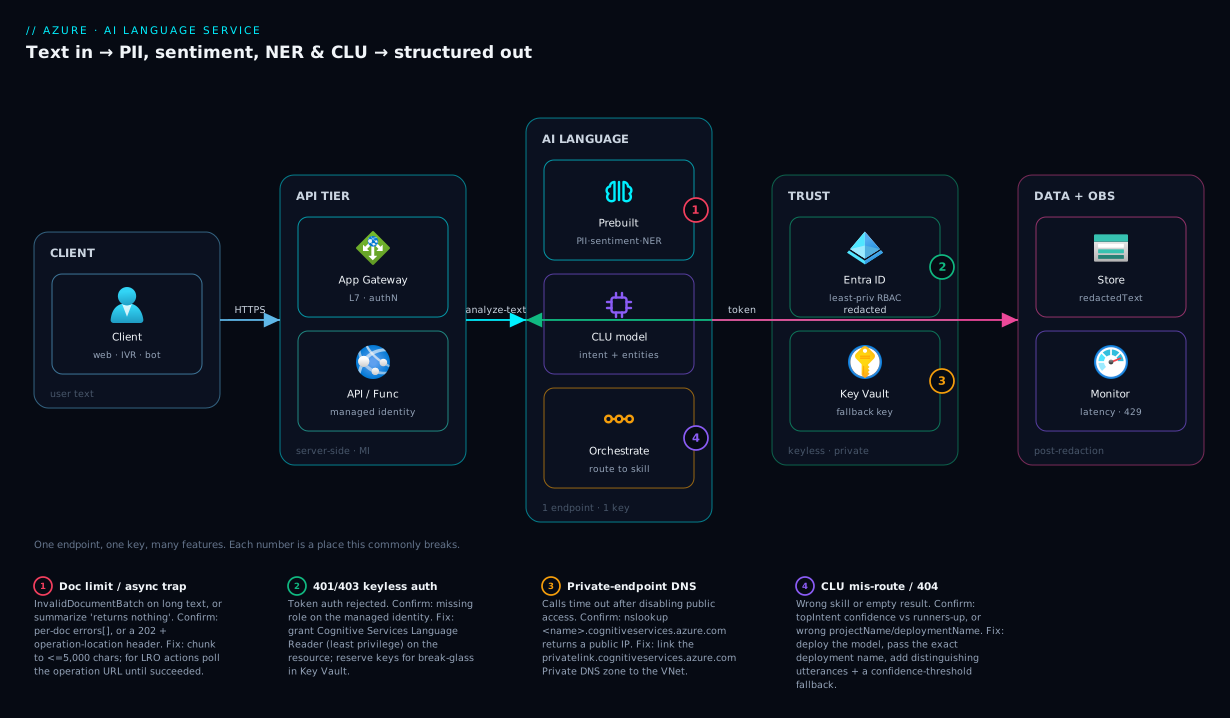
The diagram traces a single piece of text from the caller to the right Language capability and back, the way a production system actually wires it. Read it left to right. A client (web app, IVR, mobile) sends user text to your API tier — typically an App Service / Functions front controller behind Application Gateway — which authenticates the caller and then makes a server-side call to the Azure AI Language endpoint. The API tier holds a managed identity; it never ships a key to the browser. It fans the text to whichever capability the request needs: the prebuilt analyzer (PII redaction, sentiment, NER, key phrase, summarization) for objective analysis, or a deployed CLU model when the question is “what does the user want”. CLU, in turn, may sit behind an orchestration workflow that first decides which skill should handle the utterance.
Two cross-cutting paths complete the picture. On the trust side, the Language resource is reached over a private endpoint inside your VNet, authenticated by Entra ID (the API tier’s managed identity), with any fallback key kept in Key Vault — so text never traverses the public internet and no static secret lives in code. On the data and observability side, the redacted/structured result is written to storage (a blob or database, post-redaction so PII never lands raw) while latency, throughput and error telemetry stream to Azure Monitor / Application Insights. The numbered badges mark the four places this most often breaks: the 5,120-character document limit, the keyless-auth role grant, the private-endpoint DNS, and the async-poll contract for summarization/health.
Real-world scenario
Medanta Connect, a fictional mid-size health-insurance provider in Bengaluru, runs a customer-support contact centre handling ~30,000 chat and email contacts a month. Three problems landed on the platform team’s desk at once: agents were pasting customer messages (with Aadhaar numbers, policy IDs and phone numbers) into a logging tool, tripping a compliance review; the retention team had no way to spot “I want to cancel” early; and the new self-service bot was a brittle keyword matcher that failed the moment a customer phrased a request differently. The team of three had no data scientists and a tight budget (target under ₹12,000/month for the language layer).
They reached for the Language service deliberately, mapping each problem to a feature. Problem one (compliance) → PII detection: a small Azure Function triggers whenever a transcript is finalised, calls PiiEntityRecognition with an allow-list of Aadhaar-style national IDs plus PhoneNumber and Email, and writes only the redactedText to the log store. Raw text never reaches the logging tool. Problem two (churn signal) → sentiment analysis with opinion mining on: each inbound message is scored, and any document where sentiment is negative and the opinion target is “cancellation” or “refund” raises a flag that routes the contact to retention within seconds. Problem three (the bot) → CLU: they modelled eight intents (CheckClaimStatus, CancelPolicy, UpdateContact, …) and entities for PolicyNumber and ClaimNumber, labelled ~40 utterances each in Language Studio, trained, and deployed a production model the bot calls.
The first cut had two stumbles, both instructive. The PII function intermittently returned InvalidDocumentBatch errors on long email threads — they had ignored the 5,120-character limit; the fix was to chunk each thread into ≤5,000-character documents (one API call, multiple documents) and stitch the redacted parts back. And the bot mis-routed “cancel my claim” to CancelPolicy because the two intents shared vocabulary; they fixed it by adding distinguishing utterances and raising the confidence threshold so low-confidence predictions fall back to “let me connect you to an agent” instead of guessing.
Cost came in comfortably under budget. At ~30,000 contacts averaging two text records each (~60,000 PII + 60,000 sentiment + ~25,000 CLU calls a month), they landed in the low ₹8,000–10,000/month range on the standard S tier, with the first chunk of monthly records covered by the free allowance during development. The wins were concrete: zero raw PII in logs (compliance signed off), retention engaged 4× more “cancel” intents before the customer churned, and bot containment rose from 22% to 48% because CLU understood paraphrase. The lesson on the wall: “We didn’t build NLP. We called it. The only ‘ML’ work was labelling forty sentences per intent and respecting the document limit.”
The build as a mapping, because the feature choice is the lesson:
| Business problem | Feature chosen | Key setting | Outcome |
|---|---|---|---|
| Aadhaar/phone in logs | PII detection | piiCategories allow-list; store redactedText |
Zero raw PII logged |
| Spot churn early | Sentiment + opinion mining | opinionMining=true; route on negative+target |
4× earlier retention engagement |
| Brittle keyword bot | CLU | 8 intents, threshold fallback | Containment 22% → 48% |
| Long email threads erroring | (fix) chunking | ≤5,000 chars/document | InvalidDocumentBatch gone |
Advantages and disadvantages
The managed-API model is what makes the Language service worth reaching for — and also where its limits live. Weigh it honestly.
| Advantages (why this model helps you) | Disadvantages (why it bites) |
|---|---|
| Prebuilt models, zero training — call PII/sentiment/NER today, no ML team, no GPUs | Prebuilt categories are fixed; your entity types need Custom NER (labelling + training) |
| One endpoint/key for a dozen features — add a capability with zero new infra | Everything routes through one resource — its quota/throttle is a shared ceiling |
| Per-character pricing, generous free tier — cheap to start, predictable to scale | At very high volume, per-record cost adds up; needs commitment-tier planning |
Ready-made redactedText — PII redaction is a field, not a project |
Redaction is span-replacement; semantic anonymisation (consistent pseudonyms) is on you |
| Custom features on a managed platform — label in a UI, train and deploy in clicks | Custom models are yours to maintain — drift, re-labelling, re-training over time |
| Data-residency + private endpoint + Entra auth — enterprise-grade controls | Defaults are public-endpoint + key auth; you must turn the security knobs on |
| Exam-relevant, well-documented — AI-900/AI-102, stable SDKs | The async (LRO) actions trip first-timers expecting a synchronous reply |
The model is right when your text questions are common (the prebuilt set covers them) or domain-specific but bounded (a handful of intents/entity types you can label). It bites when you need generation (that is Azure OpenAI), full model control (Azure Machine Learning), or document-layout extraction (Document Intelligence) — using Language for those is the wrong tool. The disadvantages are all manageable, but only if you know the prebuilt/custom fork, the document limit, and the sync/async split before you design.
Hands-on lab
Provision a Language resource, then run PII redaction and sentiment from the shell — free-tier-friendly (use the F0 free SKU; delete at the end). Run in Cloud Shell (Bash).
Step 1 — Variables and resource group.
RG=rg-lang-lab
LOC=eastus
LANG=lang-lab-$RANDOM   # globally-unique account name
az group create -n $RG -l $LOC -o table
Step 2 — Create the Language resource (free F0 SKU). It is a Cognitive Services account of kind TextAnalytics:
az cognitiveservices account create -n $LANG -g $RG -l $LOC \
  --kind TextAnalytics --sku F0 --yes -o table
Expected: an account row; kind = TextAnalytics, sku.name = F0. (One F0 per subscription per region.)
Step 3 — Grab the endpoint and a key into env vars.
LANG_ENDPOINT=$(az cognitiveservices account show -n $LANG -g $RG --query properties.endpoint -o tsv)
LANG_KEY=$(az cognitiveservices account keys list -n $LANG -g $RG --query key1 -o tsv)
echo "$LANG_ENDPOINT"
Step 4 — Redact PII (synchronous). Send one document; read redactedText:
curl -s -X POST "$LANG_ENDPOINT/language/:analyze-text?api-version=2024-11-01" \
  -H "Ocp-Apim-Subscription-Key: $LANG_KEY" -H "Content-Type: application/json" \
  -d '{ "kind":"PiiEntityRecognition",
        "analysisInput": { "documents": [
          { "id":"1","language":"en",
            "text":"Call me on +91 9876543210 or mail jo@contoso.com." } ]}}' | jq '.results.documents[0].redactedText'
Expected: the phone number and email replaced with *.
Step 5 — Score sentiment with opinion mining.
curl -s -X POST "$LANG_ENDPOINT/language/:analyze-text?api-version=2024-11-01" \
  -H "Ocp-Apim-Subscription-Key: $LANG_KEY" -H "Content-Type: application/json" \
  -d '{ "kind":"SentimentAnalysis",
        "parameters": { "opinionMining": true },
        "analysisInput": { "documents": [
          { "id":"1","language":"en",
            "text":"Delivery was fast but the packaging was damaged." } ]}}' \
  | jq '.results.documents[0] | {sentiment, confidenceScores}'
Expected: a document-level mixed (fast = positive, damaged = negative), with per-sentence and opinion detail in the full payload.
Step 6 — Detect language (the cheap pre-step).
curl -s -X POST "$LANG_ENDPOINT/language/:analyze-text?api-version=2024-11-01" \
  -H "Ocp-Apim-Subscription-Key: $LANG_KEY" -H "Content-Type: application/json" \
  -d '{ "kind":"LanguageDetection",
        "analysisInput": { "documents": [ { "id":"1","text":"Bonjour, comment ça va?" } ]}}' \
  | jq '.results.documents[0].detectedLanguage'
Expected: name: French, iso6391Name: fr, with a confidence score.
Step 7 — Teardown. Delete the whole resource group:
az group delete -n $RG --yes --no-wait
End to end, the lab proves four things with zero training and one resource: the account creates on the free F0 SKU (step 2), the endpoint and key drop into env vars (step 3), PII detection returns a masked redactedText (step 4), sentiment returns a document-level mixed with opinions when opinionMining is on (step 5), and language detection identifies fr (step 6) — then the resource group teardown leaves no lingering cost (step 7).
Common mistakes & troubleshooting
The Language API is forgiving until a handful of contract details bite. Each below is symptom → root cause → confirm → fix.
| # | Symptom | Root cause | Confirm | Fix |
|---|---|---|---|---|
| 1 | InvalidDocument / InvalidDocumentBatch, some docs error |
A document exceeds 5,120 chars (or batch too big) | Check the per-doc errors[] in the response |
Chunk to ≤5,000 chars; ≤25 docs/sync request |
| 2 | Summarize “returns nothing”/202 only | It is async (LRO), not synchronous | Response is 202 with an operation-location header |
Poll the operation URL until succeeded |
| 3 | 401/403 Unauthorized |
Wrong key, wrong region endpoint, or missing RBAC for Entra auth | Re-check key + endpoint; for token auth check role | Use matching key+endpoint; grant Cognitive Services Language Reader/User |
| 4 | Opinion mining “doesn’t work” | opinionMining left at its default false |
Inspect the request parameters |
Set opinionMining: true |
| 5 | PII misses a category you expected | An allow-list (piiCategories) excluded it, or wrong domain |
Diff the piiCategories you sent |
Omit the allow-list (detect all) or add the category |
| 6 | 429 Too Many Requests |
Throttled past the tier’s rate (TPS) | Response code 429 + Retry-After |
Back off/retry; raise tier or use commitment tier |
| 7 | CLU 404/empty result |
Wrong projectName/deploymentName, or model not deployed |
Confirm the deployment name in Language Studio | Deploy the model; pass the exact deployment name |
| 8 | CLU mis-routes similar intents | Overlapping training utterances; threshold too low | Inspect topIntent confidence vs runners-up | Add distinguishing utterances; raise the confidence threshold + fallback |
| 9 | Private-endpoint calls time out | Public network disabled but DNS still resolves public IP | nslookup <name>.cognitiveservices.azure.com returns public IP |
Wire the privatelink Private DNS zone to the VNet |
| 10 | Wrong language results | No language hint and auto-detect guessed wrong |
Check detectedLanguage on the doc |
Pass the language field explicitly per document |
| 11 | Health/PHI call “slow or missing” | Text Analytics for health is async by design | It is an LRO job, not sync | Start the job, poll, then read entities/relations |
| 12 | Custom model accuracy poor | Too few / imbalanced labelled examples | Review the evaluation metrics in Language Studio | Add balanced examples per label; re-train |
Two distinctions waste the most time. Sync vs async: some analyze calls return data immediately while others return 202 with an operation-location header — a 202 means poll the operation URL, a 200 means read the body now. Prebuilt vs custom call shape: prebuilt actions select the feature with a kind, but custom actions (CLU and friends) also need a projectName and deploymentName — omit those and the custom call fails outright.
Best practices
- Detect language first when text is multilingual. A cheap
LanguageDetectionpass lets you pass the rightlanguagehint downstream, lifting accuracy on every other feature. - Always pass the
languagefield when you know it. Don’t make the service guess; explicit hints beat auto-detect on short or code-switched text. - Chunk to ≤5,000 characters per document and batch up to the documented limit (~25/sync) — design the chunker once, reuse it everywhere.
- Redact before you store or log. Persist
redactedText, not the raw input, so raw PII never lands in a log store, a database, or an exception trace. - Allow-list PII categories deliberately. Detect exactly what your compliance scope needs; don’t redact
Personif your workflow needs names. - Turn opinion mining on for product feedback, off for simple polarity — pay the extra latency only when aspect-level insight is worth it.
- Pick extractive summarization when wording is load-bearing (legal/compliance) and abstractive when you want fluency — and treat both as async jobs.
- One CLU project per skill; an orchestration workflow to route across skills. Don’t overload a single CLU project with unrelated intents.
- Use a confidence threshold with a fallback in CLU — below the bar, ask a clarifying question or hand to a human, never guess.
- Use Entra ID / managed identity, not keys. Grant the caller a least-privilege Cognitive Services role; reserve keys for break-glass and keep them in Key Vault.
- Lock the endpoint with a private endpoint and disable public network access for sensitive workloads — and wire the Private DNS zone so names resolve internally.
- Instrument the calls with Application Insights: track latency,
429rate and per-document error rate so throttling and limit breaches surface before users feel them.
Security notes
The Language service reads your text, so the security posture is about who can call it, how the call is authenticated, where the text travels, and what you keep afterwards.
Identity and access. Prefer Microsoft Entra ID authentication over keys: assign the calling identity (a managed identity on your App Service/Function) a least-privilege role — Cognitive Services Language Reader for read/analyze, or Cognitive Services User/Contributor only where management is needed — scoped to the resource. This removes a static secret from your code path entirely. If you must use keys, store them in Key Vault (referenced via the app’s managed identity), rotate the two keys on a schedule (regenerate key2, swap, regenerate key1), and never embed a key in client-side code — all calls are server-side.
Network isolation. By default the endpoint is public. For sensitive data, disable public network access and place a private endpoint in your VNet so traffic stays on the Azure backbone; pair it with the privatelink.cognitiveservices.azure.com Private DNS zone so the hostname resolves to the private IP. This is the same pattern as Azure Private Link and Private DNS: Keeping PaaS Off the Public Internet.
Data handling. Redact PII before persistence and before logging — the redactedText field exists precisely so raw personal data never lands at rest. Encryption at rest is on by default with Microsoft-managed keys; bring customer-managed keys (CMK) in Key Vault for regulated workloads. Choose a region that meets your data-residency obligations, and review the service’s data-retention behaviour for your features (prebuilt text analysis does not retain your input to train Microsoft’s models, but always confirm against current terms for the specific feature and region).
The security knobs at a glance:
| Control | Default | Hardened setting | Why |
|---|---|---|---|
| Auth method | Key | Entra ID / managed identity | No static secret in code |
| RBAC role | — | Cognitive Services Language Reader (least priv) | Read/analyze only |
| Key storage | In app config | Key Vault reference | Centralised, rotatable |
| Network | Public endpoint | Private endpoint + DNS zone | Text off the public internet |
| Encryption at rest | Microsoft-managed | Customer-managed key (CMK) | Regulated workloads |
| Data at rest you create | Raw output | Store redactedText only |
No raw PII persisted |
Cost & sizing
Billing is per text record — a unit of up to 1,000 characters of processed text — and you are charged per feature applied. A 2,500-character document run through sentiment counts as 3 text records for that feature; running it through both PII and sentiment counts the records twice (once per feature). That model makes cost easy to estimate from volume and the number of features you apply.
What drives the bill, and how to control each:
| Cost driver | Effect | How to control |
|---|---|---|
| Characters processed | More text → more records | Trim/strip boilerplate before sending |
| Features per document | Each feature bills separately | Apply only the features you need |
| Tier (S vs commitment) | Per-record vs reserved capacity | High volume → commitment tier for a flat rate |
| Custom model usage | Custom features bill per record too | Cache/avoid re-analysing unchanged text |
| Summarization (abstractive) | LLM-backed → priced higher | Use extractive when fluency isn’t required |
| Async health/PHI | Specialised, distinct meter | Batch and dedupe before submitting |
Sizing guidance: the free F0 tier gives a monthly allowance (commonly several thousand text records) — enough for development and small workloads, one F0 per subscription per region. The standard S tier is pay-as-you-go per record with a per-second throughput ceiling that you raise by tier; if you process millions of records a month, a commitment tier (a reserved monthly capacity at a discounted flat rate) beats per-record pricing. Right-sizing is mostly “stop paying for features and characters you don’t need”: detect language once, strip signatures and quoted history from emails before sending, and don’t run abstractive summarization where extractive (cheaper, faster) suffices.
A rough order-of-magnitude monthly picture (illustrative — confirm current rates and your region):
| Workload | Volume (records/mo) | Tier | Rough monthly order |
|---|---|---|---|
| Dev / spike | a few thousand | F0 (free) | ₹0 |
| Small app (PII + sentiment) | ~120,000 | S (PAYG) | low thousands of ₹ |
| Contact centre (multi-feature) | ~1–2 million | S → commitment | tens of thousands of ₹ |
| High-volume platform | 10M+ | Commitment tier | flat reserved rate, best unit cost |
Interview & exam questions
Q1. What is the Azure AI Language service and how does it relate to the old Text Analytics and LUIS? It is the consolidated natural-language API in Azure AI Services, exposing prebuilt features (PII, sentiment, key phrase, NER, entity linking, language detection, summarization) and custom features (Custom NER, custom text classification, CLU, custom question answering) behind one endpoint and key. It absorbed the former Text Analytics service and replaced LUIS with CLU. (AI-900/AI-102.)
Q2. Difference between prebuilt and custom features? Prebuilt features use Microsoft-trained models you call immediately and pay per record — no training. Custom features require you to create a project, label data in Language Studio, train, evaluate and deploy your own model, then call it by project + deployment name. Choose prebuilt for generic needs, custom for domain-specific entities, classes or intents.
Q3. A team must strip personal data from chat logs. Which feature, and what does it return?
PII detection (PiiEntityRecognition). It returns each PII span with a category, confidence and offset, plus a redactedText field with those spans masked — store the redacted text so raw PII never persists. Optionally pass piiCategories to allow-list, or the phi domain for health data.
Q4. What is opinion mining and how do you enable it?
Aspect-based sentiment: instead of one document polarity, it ties sentiment to the specific target (“battery → positive, screen → negative”). It is off by default; you enable it by setting opinionMining: true in the sentiment request parameters.
Q5. NER vs entity linking — when each? NER returns generic typed spans (Person, Location, Organization, DateTime, Quantity…) with categories and offsets. Entity linking goes further and disambiguates a recognised entity to a specific real-world identity (a Wikipedia URL), e.g. “Apple” the company vs the fruit. Use NER for extraction, linking for disambiguation/knowledge.
Q6. What is CLU and what does it return at runtime? Conversational Language Understanding reads a user utterance and returns the top intent (the user’s goal) with a confidence score plus a ranked list, and the entities (parameters like dates, destinations) extracted from it. You model intents and entities, label utterances, train and deploy. It is the modern replacement for LUIS and powers bots/IVR.
Q7. When do you use an orchestration workflow instead of a single CLU project? When one assistant must handle fundamentally different jobs (FAQ answering and booking and a custom classifier). The orchestration workflow’s “intents” point to other projects and route the utterance to the right one. Rule: one CLU project per skill, an orchestration workflow to choose the skill.
Q8. Which features are asynchronous and why does it matter?
Summarization (extractive and abstractive), Text Analytics for health (PHI), and large/custom analyses run as Long-Running Operations — you POST to start, receive 202 with an operation URL, and poll until succeeded. Treating them as synchronous (“it returned nothing”) is a common first-call error.
Q9. What is the per-document character limit and how do you handle longer text? A single document is capped at 5,120 characters for most synchronous text-analytics actions (with batch and payload limits too). For longer text you chunk it into multiple ≤5,000-character documents in one (or more) batched request and reassemble the results client-side.
Q10. How should you authenticate to the Language service in production? Prefer Microsoft Entra ID with a managed identity on the calling service, granted a least-privilege role (e.g. Cognitive Services Language Reader) — no static secret in code. If keys are unavoidable, keep them in Key Vault, rotate the two keys, and call only server-side. Lock the endpoint behind a private endpoint for sensitive data.
Q11. How is the service priced and how do you control cost? Per text record (up to 1,000 characters), billed per feature applied. Control it by trimming boilerplate, applying only needed features, using extractive over abstractive summarization, and moving high volume from pay-as-you-go S to a commitment tier. The F0 free tier covers development.
Q12. Customer says CLU mis-routes “cancel my claim” to a “cancel policy” intent — how do you fix it? The intents share vocabulary and training is ambiguous. Add distinguishing example utterances to each intent, retrain, and raise the confidence threshold so low-confidence predictions fall back to a clarifying question or a human handoff instead of guessing.
Quick check
- Which prebuilt feature returns a ready-to-store
redactedTextfield, and what must you set to restrict which categories it flags? - Opinion mining is enabled by which parameter, and what does it add over plain sentiment?
- Name two features that run as asynchronous Long-Running Operations.
- What does CLU return at runtime, and how do you call a specific trained model?
- What is the per-document character limit for most synchronous text-analytics actions, and how do you process longer text?
Answers
- PII detection (
PiiEntityRecognition) returnsredactedText. Set thepiiCategoriesallow-list to restrict which categories it flags (e.g. onlyCreditCardNumber,Email). - The
opinionMining: trueparameter. It adds aspect-level sentiment — tying polarity to the specific target (“battery → positive, screen → negative”) rather than one document-level label. - Any two of: extractive summarization, abstractive summarization, Text Analytics for health (PHI), and large/custom-model analyses.
- CLU returns the top intent (with confidence + ranked runners-up) and the entities extracted from the utterance. You call a specific model by passing its
projectNameanddeploymentName. - 5,120 characters per document. For longer text, chunk it into multiple ≤5,000-character documents in batched requests and reassemble the results client-side.
Glossary
- Azure AI Language service — the consolidated natural-language API in Azure AI Services; prebuilt + custom text features behind one endpoint/key.
- Prebuilt feature — a Microsoft-trained capability (PII, sentiment, NER, etc.) you call with no training, billed per record.
- Custom feature — a capability where you create a project, label data, train and deploy your own model (Custom NER, custom classification, CLU, custom QnA).
- Document — one
{id, text, language?}unit submitted to the API; subject to the 5,120-character limit. - Text record — the billing unit: up to 1,000 characters of processed text, charged per feature applied.
- PII detection — finds personal-data spans (category + offset) and returns a masked
redactedText. - PHI / Text Analytics for health — extracts medical entities and relations from clinical text; runs as a Long-Running Operation.
- Sentiment analysis — returns positive/negative/neutral/mixed polarity at document and sentence level with confidence scores.
- Opinion mining — aspect-based sentiment tying polarity to a target; enabled with
opinionMining: true. - Key-phrase extraction — returns the main talking points of a document as a list of phrases.
- Named-entity recognition (NER) — recognises typed real-world spans (Person, Location, Organization, DateTime, Quantity, …).
- Entity linking — disambiguates a recognised entity to a specific real-world identity (a Wikipedia URL).
- Summarization (extractive / abstractive) — selects key original sentences (extractive) or writes a new condensed summary (abstractive, LLM-backed); both async.
- Conversational Language Understanding (CLU) — reads an utterance and returns the top intent and entities; the modern replacement for LUIS.
- Intent — the user’s goal in an utterance (e.g.
BookFlight); the unit CLU classifies. - Entity (CLU) — a parameter inside an utterance (date, destination, amount); learned, list, or prebuilt.
- Orchestration workflow — a top-level project that routes an utterance to the right child project (CLU/QnA/custom).
- Long-Running Operation (LRO) — the start-then-poll pattern for asynchronous actions (summarization, health, custom analysis).
- Language Studio — the web UI for creating projects, labelling data, training, evaluating and deploying custom models.
Next steps
- Survey the sibling prebuilt services and where Language fits among them in AI-900: Azure AI Services — Vision, Language, Speech, Document Intelligence & Search.
- Go from analysis to production AI assistants and copilots in AI-102: Building Production AI — RAG, Copilots, Vision & Document Intelligence.
- Enrich a search index with the entities and key phrases you extract here in Azure AI Search for RAG: Vector Indexing, Hybrid Search, Semantic Ranking, and Indexer Pipelines.
- Wire Language calls into an event-driven pipeline with Azure Functions and Serverless Patterns: Event-Driven Compute.
- Lock the endpoint and secrets down with Azure Key Vault: Secrets, Keys and Certificates Done Right and Azure Private Link and Private DNS: Keeping PaaS Off the Public Internet.