You have a folder of PDFs, a SQL table, or a Cosmos container, and someone wants a search box over it — fast, typo-tolerant, ranked, and ideally feeding a chatbot. Azure AI Search (the service formerly called Azure Cognitive Search, and before that Azure Search) is the managed search-and-retrieval engine that does exactly this: you push or pull your content into an index, and it serves full-text, fuzzy, faceted, semantic, and vector queries over it in milliseconds. It is also the most common retrieval backend for RAG (retrieval-augmented generation) — the “R” that grounds an LLM in your own data. The trouble for a first-timer is that AI Search has four moving parts that must line up — a data source, an index, an indexer, and an optional skillset — and if you get the field attributes or the indexer mapping wrong, you get an empty index, a cryptic 207, or a search box that returns nothing and tells you why only if you know where to look.
This article is a build, not a survey. By the end you will have stood up a real AI Search service, connected it to a Blob container of documents, defined an index whose fields are searchable/filterable/sortable exactly as they should be, run an indexer that crawls and populates it, attached a skillset that splits documents into chunks and pulls out key phrases and (optionally) vector embeddings, and run queries — keyword, filtered, faceted, and semantic — that actually return ranked results. You will do the whole thing three ways: in the portal (the “Import data” wizard, fastest to first result), with the az CLI plus the REST API (the way you script and automate it), and in Bicep (the way you put it in a repo). Each step states the expected output and how to validate it, and the whole thing fits in the Free or Basic tier so the lab costs almost nothing.
You will also leave knowing the things that trip people up: why a field can be retrievable but not searchable, what an indexer’s 207 Multi-Status means, how the document key is encoded, and how to keep the service off the public internet with a managed identity instead of API keys. The prose stays tight; every option, attribute, error code, limit, and tier goes in a scannable table — read once, then keep the tables open while you build.
What problem this solves
A database LIKE '%term%' does not scale and does not rank. The moment you need typo tolerance, relevance scoring, faceted navigation (“filter by author, year, category”), highlighting, synonyms, or — increasingly — semantic and vector retrieval to feed a chatbot, you need a real search engine. Running Elasticsearch or Solr yourself means VMs, JVM heap tuning, shard management, and an on-call rotation. Azure AI Search gives you that engine as a managed service: you define the schema and the ingestion, and Azure runs the cluster, replication, and scaling.
What breaks when it’s set up wrong: a team makes every field searchable and retrievable by default, bloats the index, and still can’t filter by date because the field isn’t filterable; or they point an indexer at a Blob container, see “0 documents indexed,” and never realise the document key collided or a single bad file tripped the failure threshold. For RAG specifically, a badly chunked index returns irrelevant passages and the LLM hallucinates — the retrieval layer is where most “the bot is wrong” bugs actually live.
Who hits this: anyone building search over documents, catalogs, knowledge bases, or support tickets; and every team building a RAG chatbot on Azure, because AI Search is the default vector + keyword store behind Azure OpenAI “on your data.” This article is the on-ramp — the smallest complete, correct, end-to-end build, with the gotchas called out so your first index is not also your first three-hour debugging session.
To frame the whole field before the build, here are the four objects you will create, what each is, and what goes wrong if you skip or misconfigure it:
| Object | What it is | Required? | Most common first-timer mistake |
|---|---|---|---|
| Data source | A connection (Blob, SQL, Cosmos, ADLS Gen2…) the indexer pulls from | Only for pull (indexer) ingestion | Wrong connection string / no access to the container |
| Index | The schema + the populated search corpus (fields, attributes, analyzers) | Always | Every field searchable; key field not set or not a string |
| Indexer | The crawler that reads the data source and writes documents into the index | Only for pull ingestion | 0 docs indexed (key collision, failure threshold, skipped files) |
| Skillset | An enrichment pipeline (split, OCR, key phrases, entities, embeddings) attached to an indexer | Optional (enrichment / chunking / vectors) | Output field mappings not wired to index fields |
Learning objectives
By the end of this article you can:
- Explain the difference between push (you
POSTdocuments) and pull (an indexer crawls a data source) indexing, and pick the right one. - Provision an Azure AI Search service at the right tier (Free / Basic / Standard) and reason about replicas vs partitions.
- Define an index with correct field attributes (
key,searchable,filterable,sortable,facetable,retrievable) and an analyzer, and explain why each attribute costs something. - Create a data source pointing at Blob storage, run an indexer, and read its execution status — including what a
207 Multi-Statusand “0 documents indexed” actually mean. - Attach a skillset that splits documents into chunks and extracts key phrases (and optionally generates vector embeddings via Azure OpenAI), and wire its outputs back into index fields.
- Query the index four ways — simple keyword, filtered (
$filter), faceted, and semantic ranking — using the portal Search Explorer, REST, andaz. - Build the whole solution in the portal, with
azCLI + REST, and in Bicep, and tear it down cleanly. - Secure the service with managed identity and RBAC instead of admin keys, and right-size it for cost.
Prerequisites & where this fits
You need an Azure subscription with rights to create resources, the Azure CLI (az, 2.55+) or Cloud Shell, and a tool to call REST — curl is used throughout, but the portal’s Search Explorer and the REST client in the portal work too. Some sample documents help: a handful of PDFs or text files you can drop in a Blob container (we create some). For the optional vector/skillset section you need access to an Azure OpenAI resource with an embedding deployment (e.g. text-embedding-3-small) — that part is clearly marked optional so the core build works without it.
You should be comfortable with resource groups, Blob storage basics (a storage account → container → blobs), and reading JSON. Familiarity with REST verbs (PUT/POST/GET) helps because AI Search is, under the portal, a REST API — every object is a JSON document you PUT to a named endpoint.
This sits at the front of the AI/ML and retrieval track. It is the foundation under Enterprise LLM Gateway and RAG Architecture: Grounding GenAI Safely and Azure Enterprise Architecture: Generative-AI / RAG Platform — AI Search is the retrieval store both of those assume you already have. It leans on Azure Storage Account Fundamentals: Blobs, Files, Queues and Tables for the data source, on Azure Key Vault: Secrets, Keys and Certificates Done Right for credentials, and on Azure Monitor and Application Insights: Full-Stack Observability once you operate it. To keep it private, Azure Private Link and Private DNS: Keeping PaaS Off the Public Internet is the next layer.
Core concepts
Six ideas make every later step obvious.
Search is two phases: ingest, then query. First you get content into an index (ingest); then you ask questions of it (query). Ingest is either push or pull; query is keyword, filter, facet, semantic, or vector — over the same index.
Push vs pull is the first fork. In push indexing your app calls the REST API and POSTs JSON documents directly into the index (“Add/Update Documents”). You own the pipeline; it works with any source; it’s real-time. In pull indexing you create a data source and an indexer, and AI Search crawls the source on a schedule, mapping rows/blobs to documents for you — far less code for supported sources (Blob, ADLS Gen2, SQL DB, Cosmos DB, Table storage). This article uses pull for the main build (Blob → indexer), the fastest path to a populated index, and shows push for contrast.
An index is a schema plus a corpus. The index lists fields, each with a type (Edm.String, Edm.Int32, Collection(Edm.Single) for vectors…) and a set of attributes that decide what you can do with the field. One field is the key (a unique string per document). Attributes are not free — making everything searchable and facetable inflates index size and indexing time, so you choose deliberately.
Field attributes are a contract — set them right or re-create the index. A field can be searchable (tokenized by an analyzer), filterable ($filter), sortable ($orderby), facetable (navigation counts), retrievable (returned), and exactly one is the key. Many changes — adding filterable to an existing field, changing an analyzer — require dropping and rebuilding the index. Getting this right up front saves a full re-index.
An indexer maps a source to documents and remembers where it stopped. It reads the data source, applies field mappings (source property → index field), optionally runs a skillset, and tracks a high-water mark so the next run is incremental. It also enforces a failure threshold. “0 documents indexed” almost always means every item was skipped or the key collided — not that the source is empty.
A skillset enriches documents during ingestion. It’s a pipeline of cognitive skills the indexer runs per document: split into chunks, OCR images, detect language, extract key phrases and entities, or call Azure OpenAI for vector embeddings. Outputs land in an enriched document tree and map back into index fields via output field mappings — this is how a folder of PDFs becomes a chunked, vectorized, semantically searchable index, and where RAG retrieval quality is won or lost.
The vocabulary in one table
Pin down every moving part before the build; the glossary repeats these for lookup.
| Term | One-line definition | Where it lives | Why it matters |
|---|---|---|---|
| Search service | The managed resource (endpoint + SKU) | Resource group | The thing you pay for; sets capacity ceilings |
| Index | Schema + the searchable corpus | On the service | What you query; attributes decide capability |
| Field | One typed, attributed column in the index | In the index | Wrong attributes → can’t filter/sort/facet |
| Document key | Unique string id per document | A field flagged key |
Collisions → docs overwrite / 0 indexed |
| Analyzer | Tokenizer + filters for a searchable field | Per field | Drives matching (language, n-gram, keyword) |
| Data source | Connection to Blob/SQL/Cosmos for pull | On the service | Indexer reads nothing if it’s wrong |
| Indexer | Crawler mapping source → index | On the service | 0 docs, 207, schedule, incremental state |
| Skillset | Enrichment pipeline (split/OCR/KP/vectors) | On the service | Chunks + embeddings for RAG |
| Replica | A copy of the index for query throughput + HA | Service capacity | More replicas → more QPS, SLA needs ≥2/≥3 |
| Partition | A shard storing part of the index | Service capacity | More partitions → more storage + write speed |
| Search unit (SU) | replicas × partitions; the billing/scale unit | Service capacity | The number your bill is based on |
| Semantic ranker | L2 re-ranker over the top keyword hits | Query feature | Better relevance + captions/answers |
| Vector field | Collection(Edm.Single) holding an embedding |
In the index | Enables similarity (vector) search for RAG |
Push vs pull: choosing your ingestion path
Before you build, decide how content gets in. This single choice determines whether you create a data source + indexer at all.
| Dimension | Push (you POST documents) | Pull (data source + indexer) |
|---|---|---|
| How content arrives | Your app calls “Add/Update Documents” REST API | Indexer crawls a supported source on a schedule |
| Sources | Anything — you transform it | Blob, ADLS Gen2, SQL DB, Cosmos DB, Table storage, (preview: others) |
| Code to write | You own the whole pipeline | Almost none for supported sources |
| Freshness | Real-time, in your control | Scheduled (min interval 5 min) or on-demand run |
| Enrichment (skillsets) | You call skills yourself (or use integrated vectorization on push, preview) | Built in — attach a skillset to the indexer |
| Change tracking | You implement it | Indexer tracks a high-water mark automatically |
| Best for | Streaming updates, custom transforms, unsupported sources | Documents in Blob/ADLS, rows in SQL/Cosmos — the common case |
The decision rule in one line: files in Blob/ADLS or rows in SQL/Cosmos → pull (an indexer, least code, scheduled — add a skillset if PDFs need OCR/chunking/vectors); real-time events, custom shaping, or a source AI Search can’t crawl → push.
For the rest of this article we build the pull path (Blob → indexer → index), because it exercises all four objects and is the fastest route to a populated, queryable index. Push is one REST call once you have an index; we note it where relevant.
Sizing the service: tiers, replicas, and partitions
You pick a tier (SKU) at create time, and it’s largely fixed — you cannot change tier in place, you create a new service and reindex. Within a tier you scale by adding replicas (query copies → throughput + availability) and partitions (shards → storage + write throughput). Your billable search units = replicas × partitions.
The tiers you’ll actually choose between, with real limits:
| Tier | Storage (per partition) | Max partitions | Max replicas | Indexes | Semantic ranker | Vectors | Typical use |
|---|---|---|---|---|---|---|---|
| Free | 50 MB total | 1 (shared) | 1 | 3 | No | Limited | Learning / this lab |
| Basic | ~15 GB | 3 | 3 | 15 | Yes | Yes | Small prod, dev |
| Standard S1 | ~25 GB | 12 | 12 | 50 | Yes | Yes | Most production |
| Standard S2 | ~100 GB | 12 | 12 | 200 | Yes | Yes | Larger corpora |
| Standard S3 | ~200 GB | 12 | 12 | 200 | Yes | Yes | Large / high QPS |
| Storage Optimized L1/L2 | ~1–2 TB | 12 | 12 | 10 | Yes | Yes | Huge, low-QPS archives |
Exact storage and document limits vary by region and change over time — always confirm current numbers in the service-limits docs before sizing production. The shape (Free is tiny and single-shard; Basic/S1 are the common starting points) is stable.
Within a tier you scale on two axes. Replicas are copies of the index that add query throughput (QPS) and availability — but not storage. Partitions are shards that add storage and write/indexing throughput — but don’t speed up queries on small data. Your bill is replicas × partitions × SU price. The SLA detail matters: a single-replica service has no query SLA, 2 replicas gives the read (query) SLA, 3 replicas is required for read-write (indexing), and the Free tier has no SLA at all. So: near the storage ceiling → add a partition; queries throttling → add a replica; need an uptime SLA → ≥2 (read) or 3 (read-write) replicas.
Designing the index: fields, attributes, and analyzers
The schema is the most consequential thing you author — several attribute changes force a full rebuild, so spend five minutes here.
Field types
AI Search uses EDM (Entity Data Model) types: Edm.String (the workhorse — the key must be this), Edm.Int32/Edm.Int64 and Edm.Double (numeric filter/sort/facets), Edm.Boolean (flags), Edm.DateTimeOffset (ISO-8601 timestamps for date sort/filter), Edm.GeographyPoint (geo), Collection(Edm.String) (multi-value tags/facets), Collection(Edm.Single) (vector embeddings, with a dimensions and a vector profile), and Edm.ComplexType (nested sub-documents).
Field attributes — the contract
Every field carries a set of booleans that decide what it can do. This is the table you keep open while authoring:
| Attribute | What it enables | Cost of turning it on | Change requires rebuild? |
|---|---|---|---|
key |
Marks the unique document id (exactly one, Edm.String) |
— | Yes (it’s structural) |
searchable |
Full-text search (field is analyzed/tokenized) | Larger index, slower indexing | Yes (changes tokenization) |
filterable |
Use in $filter (exact match, ranges) |
Extra index structures | Yes (adding it later) |
sortable |
Use in $orderby |
Extra index structures | Yes (adding it later) |
facetable |
Faceted counts for navigation | Extra index structures | Yes (adding it later) |
retrievable |
Returned in result documents | Negligible (storage only) | No (can toggle freely) |
analyzer |
Which tokenizer/filters apply to a searchable field | — | Yes (re-tokenizes) |
The single most useful insight: retrievable is independent of searchable. A field can be retrievable but not searchable (returned but never matched — e.g. a URL), or searchable but not retrievable (matched for relevance but never shown — e.g. a big OCR blob). Don’t make a field searchable just to display it. A practical recipe for a typical document index:
| Field | Type | key | searchable | filterable | sortable | facetable | retrievable | Why |
| — | — | — | — | — | — | — | — |
| id | Edm.String | ✅ | — | ✅ | — | — | ✅ | Unique key; filter by id |
| content | Edm.String | — | ✅ | — | — | — | ✅ | The body; match + display snippet |
| title | Edm.String | — | ✅ | ✅ | ✅ | — | ✅ | Search, filter, sort by title |
| category | Edm.String | — | ✅ | ✅ | — | ✅ | ✅ | Faceted navigation |
| tags | Collection(Edm.String) | — | ✅ | ✅ | — | ✅ | ✅ | Multi-value facet/filter |
| lastModified | Edm.DateTimeOffset | — | — | ✅ | ✅ | — | ✅ | Sort/filter by date |
| url | Edm.String | — | — | — | — | — | ✅ | Display only; never matched |
| contentVector | Collection(Edm.Single) | — | — | — | — | — | — | Vector search (separate config) |
Analyzers
A searchable field is tokenized by an analyzer. The default standard.lucene (lowercase, split on whitespace/punctuation) is fine for general text. Use the keyword analyzer for codes/SKUs you want matched exactly (it treats the whole value as one token); use a language analyzer (en.microsoft, de.microsoft, <lang>.lucene) when your content is mono-lingual and not English, for proper stemming; and build a custom analyzer (tokenizer + filters) only when you need n-gram/edge-n-gram for autocomplete or partial match. Changing a field’s analyzer is structural — it re-tokenizes, so it needs a rebuild.
The document key — the rule that bites
The key must be a unique Edm.String. For Blob indexers it defaults to the blob’s metadata storage path (a full URL), which must be base64-encoded because keys may only contain URL-safe characters (letters, digits, _ - =). Map a raw path or a value containing / or # straight to the key and every document is rejected — “0 documents indexed” with key errors. The fix is the built-in base64Encode mapping function on the key field mapping (the Import-data wizard applies it for you). The pitfalls: a non-string key (index won’t create), two docs sharing a key (the second silently overwrites the first), an unencoded path (documents rejected), or no key mapping at all (the indexer can’t form a key).
Architecture at a glance
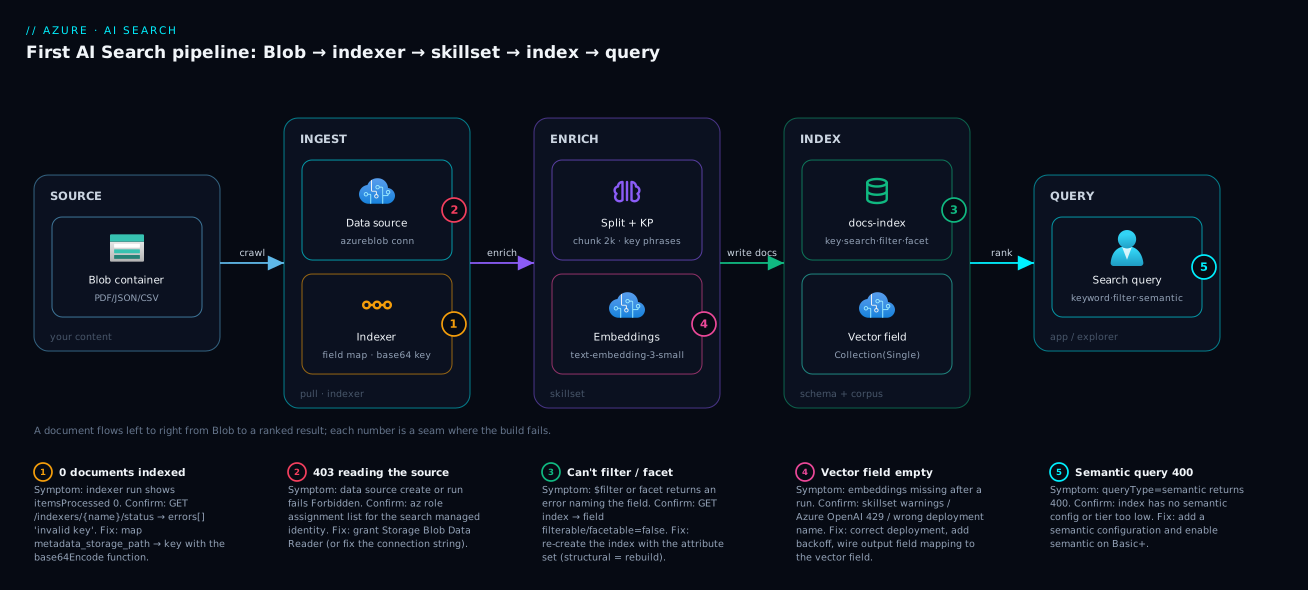
The diagram traces a document left to right, from a file in Blob storage to a ranked answer, through the four AI Search objects you build here. Your source content lives in a Blob container. The service’s indexer connects through a data source object, crawls each blob, and runs it through a skillset: the document is split into chunks, key phrases are extracted, and (optionally) each chunk is sent to an Azure OpenAI embedding deployment that returns a vector. The indexer writes the enriched documents, via output field mappings, into the index — fields-with-attributes plus the populated corpus. On the right, your app (or the portal Search Explorer) issues queries: keyword, $filter, facet, semantic re-rank, or vector similarity — each returning ranked documents.
The numbered badges mark the failure-prone seams. The indexer↔data source seam (badge 1/2) is where access and key problems bite — a wrong connection string, missing RBAC, or a key collision yields “0 documents indexed.” The skillset↔Azure OpenAI seam (badge 4) is where enrichment fails — a 429 throttle or a missing deployment leaves the vector field empty. The index schema (badge 3) is where attribute mistakes live — a non-filterable field can’t be filtered however you write the query. Trace any “search returns nothing” backwards along this line and you land on exactly one seam.
Real-world scenario
Northwind Support runs a customer-support knowledge base: about 42,000 documents — PDFs of product manuals, HTML help articles, and a SQL table of resolved tickets — searched dozens of times an hour. The old search was a SQL LIKE over a Description column: slow (2–4 s on a busy afternoon), no ranking, no typo tolerance, and no way to power the new “ask the docs” chatbot. A two-person platform team had a sprint and a tight budget.
They started exactly as this article does: a Basic service in Central India, the PDFs and HTML in a Blob container, the tickets in Azure SQL. The documents went through a Blob indexer with a skillset that split each doc into ~2,000-char chunks, pulled key phrases, and generated embeddings via an Azure OpenAI text-embedding-3-small deployment into a Collection(Edm.Single) field. The tickets used a SQL indexer with change tracking, syncing every 15 minutes. Two indexers, two data sources, one index each, one service.
The first run failed instructively: the Blob indexer reported “0 documents indexed” with a 207. The cause was the document key — they had mapped the raw metadata_storage_path (a https://…/manual#section URL with / and #) straight to the key, and every document was rejected as an invalid key. Applying the base64Encode field-mapping function (which the wizard does automatically) fixed it; the next run indexed 41,880 documents, with 120 corrupt PDFs cleanly surfaced in the per-item errors. The second lesson was relevance: the first index made content searchable but left category and productLine only retrievable, so agents couldn’t filter by product. Because filterable can’t be added without a rebuild, they re-created the index and re-ran — a 12-minute reindex, not a redesign.
The payoff: keyword search dropped from 2–4 s to under 80 ms p95, agents got facets and typo tolerance, and the semantic ranker lifted “answer in the first result” from roughly 55% to about 78% in spot-checks. The vector field plus semantic config became the chatbot’s retrieval layer — one index served both classic search and RAG. Spend landed around ₹16,000/month for a Basic service (1 replica, scaled to 2 for the query SLA) plus a few hundred rupees of embedding calls during backfill. The lesson on the wall: “Get the key and the field attributes right on day one — everything else is a re-run, but those two are a rebuild.”
The build as a timeline, because the order is the lesson:
| Step | What they did | Result | What it taught |
|---|---|---|---|
| 1 | Basic service, Blob + SQL sources | Service + data in place | Tier choice is fixed; start at Basic |
| 2 | Blob indexer, raw path → key | 0 docs, 207 | Key must be URL-safe |
| 3 | base64Encode on key, re-run |
41,880 indexed, 120 skipped | Per-item errors are visible — read them |
| 4 | First queries; can’t filter by product | Missing filterable |
Some attributes need a rebuild |
| 5 | Rebuild index with right attributes | 12-min reindex | Schema first, data second |
| 6 | Enable semantic ranker + vectors | 55% → 78% top-1; RAG backend | One index serves search + RAG |
Advantages and disadvantages
Azure AI Search trades operational simplicity and rich retrieval for cost-at-scale and a schema you must design up front. Weigh it honestly:
| Advantages | Disadvantages |
|---|---|
| Fully managed — no cluster, JVM, or shard ops to run | You pay per search unit even at idle; cost scales with replicas × partitions |
| Pull indexers crawl Blob/SQL/Cosmos with almost no code | Indexers only support a fixed set of sources; anything else is push (your code) |
| Skillsets give OCR, chunking, key phrases, and vectors built in | Skillset enrichment (especially OpenAI embeddings) adds latency and per-call cost |
| Keyword + semantic + vector (hybrid) in one index | Several field-attribute changes force a full index rebuild + re-ingest |
| Semantic ranker materially improves relevance with one config | Semantic ranker has its own quota/cost and a monthly free allotment |
| Strong security: RBAC, managed identity, private endpoints, CMK | Free tier has no SLA and tiny limits; you outgrow it immediately in prod |
| The default RAG retrieval store for Azure OpenAI “on your data” | Tier is not changeable in place — resizing means a new service + reindex |
The model is right when you want production search or a RAG backend without running a cluster, and your sources are the common ones. It bites when your corpus is enormous and mostly idle (you pay for capacity you rarely query), when your source is exotic (you write a push pipeline anyway), or when you discover a needed attribute after go-live (a rebuild) — all manageable if you design the schema deliberately and size to measured load.
Hands-on lab
This is the centerpiece: build a complete AI Search solution end to end, three ways. Path A uses the portal Import-data wizard — fastest to a first result. Path B uses az CLI + REST — the scriptable way, and the way you’ll automate. Path C is the Bicep that puts the service and (control-plane) objects in a repo. Then we query, then we tear down. Everything fits the Basic tier (the Free tier also works for the core build but lacks semantic/vector headroom). Run it in Cloud Shell (Bash) or locally with az logged in.
Lab prerequisites
# Confirm CLI and login
az version          # need 2.55+
az account show -o table
az account set --subscription "<your-subscription>"
Set variables used throughout. The search service name must be globally unique, 2–60 chars, lowercase letters/digits/hyphens, not starting/ending with a hyphen.
RG=rg-aisearch-lab
LOC=centralindia
SEARCH=srch-lab-$RANDOM          # globally unique
STG=stglabaisearch$RANDOM        # 3-24 lowercase alnum, globally unique
CONTAINER=docs
INDEX=docs-index
DS=docs-blob-ds
INDEXER=docs-indexer
SKILLSET=docs-skillset
API=2024-07-01                   # stable REST API version used below
az group create -n $RG -l $LOC -o table
Part 0 — Create the storage account and upload sample documents
Both the portal and CLI paths need source content. Create a storage account, a container, and drop a few files in.
az storage account create -n $STG -g $RG -l $LOC --sku Standard_LRS -o table
KEY=$(az storage account keys list -n $STG -g $RG --query "[0].value" -o tsv)
az storage container create --account-name $STG --name $CONTAINER --account-key "$KEY" -o table

# Create three tiny sample docs locally and upload them
printf 'Azure AI Search is a managed search service. It supports keyword, semantic, and vector search.\n' > doc1.txt
printf 'An indexer crawls a data source such as Blob storage and populates an index automatically.\n'      > doc2.txt
printf 'A skillset enriches documents during indexing: chunking, key phrases, OCR, and embeddings.\n'     > doc3.txt
for f in doc1.txt doc2.txt doc3.txt; do
  az storage blob upload --account-name $STG --container-name $CONTAINER --name $f --file $f --account-key "$KEY" -o none
done
echo "Uploaded 3 blobs to $CONTAINER"
Expected: three blobs listed in the container. Validate:
az storage blob list --account-name $STG --container-name $CONTAINER --account-key "$KEY" \
  --query "[].name" -o tsv
# -> doc1.txt  doc2.txt  doc3.txt
Part 1 — Create the AI Search service (shared by all paths)
az search service create -n $SEARCH -g $RG -l $LOC --sku basic \
  --replica-count 1 --partition-count 1 -o table
Expected: a service row with status: running (provisioning takes a couple of minutes). Capture the endpoint and an admin key (we use the key for the lab; Part C-security swaps to managed identity).
ENDPOINT="https://$SEARCH.search.windows.net"
ADMIN_KEY=$(az search admin-key show --service-name $SEARCH -g $RG --query primaryKey -o tsv)
echo "$ENDPOINT"
# Sanity check: list indexes (empty array on a fresh service)
curl -s "$ENDPOINT/indexes?api-version=$API" -H "api-key: $ADMIN_KEY" | head -c 200
# -> {"@odata.context":"...","value":[]}
A value:[] confirms the service is reachable and the key works.
Path A — The portal (Import data wizard)
The wizard creates the data source, index, indexer, and (optionally) skillset in one flow. Fastest path to a populated index.
| # | Portal step | Where | What to enter / expect |
|---|---|---|---|
| A1 | Open the service | Portal → your srch-lab-* service |
Overview blade, Import data button on top |
| A2 | Click Import data | Overview toolbar | Wizard opens at “Connect to your data” |
| A3 | Data Source = Azure Blob Storage | Connect to your data | Pick subscription → storage account → docs container |
| A4 | Parsing mode | Same page | Leave Default (one doc per blob); name the data source docs-blob-ds |
| A5 | (Optional) Add cognitive skills | Next page | Expand it to add enrichment (skip for the minimal build) |
| A6 | (Optional) Enrichment | Same page | Tick Extract key phrases; set “Enriched data” target fields |
| A7 | Customize target index | Next page | Index name docs-index; the wizard proposes fields |
| A8 | Set attributes | Index grid | Ensure metadata_storage_path is the Key (base64-encoded automatically); tick Retrievable/Searchable/Filterable per field |
| A9 | Create an indexer | Next page | Name docs-indexer; schedule Once (or hourly); click Submit |
| A10 | Watch it run | Service → Indexers | Status goes to Success; “Docs succeeded: 3” |
| A11 | Query it | Service → Search explorer | Leave query blank → Search → 3 documents returned |
Validation in the portal: Indexers blade shows the run Success with 3 documents; Indexes shows docs-index with Document count: 3; Search explorer with an empty query returns all three, and search=indexer returns doc2.txt. If the count is 0, open the indexer run and read the per-document errors — almost always the key (see Common mistakes).
Path B — az CLI + REST (the scriptable build)
The portal is convenient; this is how you automate. AI Search objects (index, data source, indexer, skillset) are data-plane REST objects — az manages the service (control plane), and you PUT the rest via REST with the admin key. We use curl.
B1 — Create the index (schema with deliberate attributes). Save the definition and PUT it:
cat > index.json <<'JSON'
{
  "name": "docs-index",
  "fields": [
    { "name": "id",          "type": "Edm.String", "key": true,  "filterable": true, "retrievable": true, "searchable": false },
    { "name": "content",     "type": "Edm.String", "searchable": true, "retrievable": true },
    { "name": "title",       "type": "Edm.String", "searchable": true, "filterable": true, "sortable": true, "retrievable": true },
    { "name": "metadata_storage_name", "type": "Edm.String", "searchable": true, "filterable": true, "retrievable": true },
    { "name": "metadata_storage_path", "type": "Edm.String", "filterable": false, "retrievable": true },
    { "name": "lastModified","type": "Edm.DateTimeOffset", "filterable": true, "sortable": true, "retrievable": true }
  ]
}
JSON

curl -s -X PUT "$ENDPOINT/indexes/$INDEX?api-version=$API" \
  -H "api-key: $ADMIN_KEY" -H "Content-Type: application/json" \
  -d @index.json | python3 -c "import sys,json;d=json.load(sys.stdin);print('created index:', d.get('name', d))"
Expected: created index: docs-index. Validate the field count:
curl -s "$ENDPOINT/indexes/$INDEX?api-version=$API" -H "api-key: $ADMIN_KEY" \
  | python3 -c "import sys,json;print('fields:', len(json.load(sys.stdin)['fields']))"
# -> fields: 6
B2 — Create the data source (connection to the Blob container). The connection string can be the full account key string; in Part C-security we replace it with a managed identity.
CONN="DefaultEndpointsProtocol=https;AccountName=$STG;AccountKey=$KEY;EndpointSuffix=core.windows.net"
cat > datasource.json <<JSON
{
  "name": "$DS",
  "type": "azureblob",
  "credentials": { "connectionString": "$CONN" },
  "container": { "name": "$CONTAINER" }
}
JSON

curl -s -X PUT "$ENDPOINT/datasources/$DS?api-version=$API" \
  -H "api-key: $ADMIN_KEY" -H "Content-Type: application/json" \
  -d @datasource.json | python3 -c "import sys,json;d=json.load(sys.stdin);print('created datasource:', d.get('name', d))"
Expected: created datasource: docs-blob-ds.
B3 — Create the indexer with field mappings. The critical mapping is the key: map metadata_storage_path → id with the base64Encode function so the URL becomes a valid key.
cat > indexer.json <<JSON
{
  "name": "$INDEXER",
  "dataSourceName": "$DS",
  "targetIndexName": "$INDEX",
  "fieldMappings": [
    { "sourceFieldName": "metadata_storage_path", "targetFieldName": "id",
      "mappingFunction": { "name": "base64Encode" } },
    { "sourceFieldName": "metadata_storage_name", "targetFieldName": "title" },
    { "sourceFieldName": "metadata_storage_last_modified", "targetFieldName": "lastModified" }
  ],
  "parameters": { "configuration": { "parsingMode": "default" } }
}
JSON

curl -s -X PUT "$ENDPOINT/indexers/$INDEXER?api-version=$API" \
  -H "api-key: $ADMIN_KEY" -H "Content-Type: application/json" \
  -d @indexer.json | python3 -c "import sys,json;d=json.load(sys.stdin);print('created indexer:', d.get('name', d))"
Creating an indexer runs it once automatically. To re-run on demand:
curl -s -X POST "$ENDPOINT/indexers/$INDEXER/run?api-version=$API" -H "api-key: $ADMIN_KEY" -o /dev/null -w "run HTTP %{http_code}\n"
# -> run HTTP 202   (accepted)
B4 — Check indexer status (the step everyone skips, then wonders why the index is empty):
curl -s "$ENDPOINT/indexers/$INDEXER/status?api-version=$API" -H "api-key: $ADMIN_KEY" \
  | python3 -c "import sys,json;d=json.load(sys.stdin);r=d['lastResult'];print('status:',r['status'],'| items:',r['itemsProcessed'],'| failed:',r['itemsFailed'])"
# -> status: success | items: 3 | failed: 0
Expected: status: success | items: 3 | failed: 0. If failed is non-zero, the same JSON has an errors array naming each blob and reason.
B5 — Confirm the index is populated:
curl -s "$ENDPOINT/indexes/$INDEX/docs/\$count?api-version=$API" -H "api-key: $ADMIN_KEY"
# -> 3
A return of 3 means the full pull pipeline (data source → indexer → index) worked.
B6 — (Push, for contrast.) You can also add a document directly without an indexer — this is push indexing:
curl -s -X POST "$ENDPOINT/indexes/$INDEX/docs/index?api-version=$API" \
  -H "api-key: $ADMIN_KEY" -H "Content-Type: application/json" -d '{
    "value": [ { "@search.action": "upload", "id": "cHVzaGVk", "content": "Pushed document via the REST API", "title": "push-demo" } ]
  }' | python3 -c "import sys,json;print('push status:', json.load(sys.stdin)['value'][0]['status'])"
# -> push status: True
Re-running the $count now returns 4. That one call is the entire push model.
Part 2 — Query the index (all paths converge here)
You have a populated index. Now query it five ways. (api-key here can be a query key, not the admin key, in real apps — least privilege.)
Keyword search:
curl -s "$ENDPOINT/indexes/$INDEX/docs?api-version=$API&search=indexer&\$select=title,content" \
  -H "api-key: $ADMIN_KEY" | python3 -c "import sys,json;[print('-',d.get('title'),'::',d.get('content','')[:50]) for d in json.load(sys.stdin)['value']]"
Expected: the document mentioning “indexer” (doc2.txt) ranks first.
Filtered search (uses a filterable field):
curl -s "$ENDPOINT/indexes/$INDEX/docs?api-version=$API&search=*&\$filter=title eq 'doc1.txt'&\$select=title" \
  -H "api-key: $ADMIN_KEY" | python3 -c "import sys,json;print([d['title'] for d in json.load(sys.stdin)['value']])"
# -> ['doc1.txt']
Faceted search — first re-create needs a facetable field; with our schema, facet on title only if facetable (here we demo the call shape):
curl -s "$ENDPOINT/indexes/$INDEX/docs?api-version=$API&search=*&facet=metadata_storage_name&\$top=0" \
  -H "api-key: $ADMIN_KEY" | head -c 300
# (facets require the field to be facetable; if not, you get an error naming the field — see mistakes)
Count + select (validation query):
curl -s "$ENDPOINT/indexes/$INDEX/docs?api-version=$API&search=*&\$count=true&\$top=2&\$select=id,title" \
  -H "api-key: $ADMIN_KEY" | python3 -c "import sys,json;d=json.load(sys.stdin);print('total:',d['@odata.count'],'| sample:',[x['title'] for x in d['value']])"
Semantic ranking (Basic+ tier; requires a semantic configuration on the index). To enable it you add a semantic block to the index definition and query with queryType=semantic. The query shape:
# Requires the index to declare a semantic configuration named e.g. 'default'
curl -s "$ENDPOINT/indexes/$INDEX/docs?api-version=$API" \
  -H "api-key: $ADMIN_KEY" -H "Content-Type: application/json" -X POST -d '{
    "search": "how does indexing work",
    "queryType": "semantic",
    "semanticConfiguration": "default",
    "select": "title,content",
    "top": 3
  }' | head -c 400
The query reference you’ll keep open:
| Query parameter | Does what | Requires field attribute | Example |
|---|---|---|---|
search |
Full-text query string | searchable |
search=azure indexer |
searchFields |
Restrict match to named fields | searchable |
searchFields=title |
$filter |
Boolean/range filter (OData) | filterable |
$filter=lastModified ge 2026-01-01T00:00:00Z |
$orderby |
Sort results | sortable |
$orderby=lastModified desc |
facet |
Return facet buckets | facetable |
facet=category,count:10 |
$select |
Choose returned fields | retrievable |
$select=title,url |
$top / $skip |
Page size / offset | — | $top=10&$skip=20 |
$count |
Return total match count | — | $count=true |
queryType=semantic |
Semantic L2 re-rank + captions | semantic config + Basic+ | with semanticConfiguration |
highlight |
Hit highlighting | searchable |
highlight=content |
Path C — Bicep (infrastructure as code)
Bicep provisions the search service (and the storage account) declaratively. Note an important limit: Bicep/ARM manages the control plane — the service, its SKU, replicas, partitions, identity, and network rules. The data-plane objects (index, indexer, data source, skillset) are not ARM resources; you create those via REST/SDK after deployment (Part B), or via a deployment script that calls REST. This separation surprises people, so it’s the first row of the limits table below.
@description('Azure AI Search + storage for the first-index lab')
param location string = resourceGroup().location
param searchName string
param storageName string

resource storage 'Microsoft.Storage/storageAccounts@2023-05-01' = {
  name: storageName
  location: location
  sku: { name: 'Standard_LRS' }
  kind: 'StorageV2'
  properties: { allowBlobPublicAccess: false, minimumTlsVersion: 'TLS1_2' }
}

resource container 'Microsoft.Storage/storageAccounts/blobServices/containers@2023-05-01' = {
  name: '${storageName}/default/docs'
  dependsOn: [ storage ]
}

resource search 'Microsoft.Search/searchServices@2024-06-01-preview' = {
  name: searchName
  location: location
  sku: { name: 'basic' }                 // free | basic | standard | standard2 | standard3 | storage_optimized_l1/l2
  identity: { type: 'SystemAssigned' }   // managed identity for keyless data-source access
  properties: {
    replicaCount: 1
    partitionCount: 1
    hostingMode: 'default'
    publicNetworkAccess: 'enabled'       // set 'disabled' + private endpoint to lock down
    semanticSearch: 'standard'           // enables the semantic ranker (Basic+)
    authOptions: { aadOrApiKey: { aadAuthFailureMode: 'http401WithBearerChallenge' } }
  }
}

// Grant the search service's managed identity read access to the storage (keyless data source)
resource roleAssign 'Microsoft.Authorization/roleAssignments@2022-04-01' = {
  name: guid(storage.id, search.id, 'StorageBlobDataReader')
  scope: storage
  properties: {
    // Storage Blob Data Reader
    roleDefinitionId: subscriptionResourceId('Microsoft.Authorization/roleDefinitions', '2a2b9908-6ea1-4ae2-8e65-a410df84e7d1')
    principalId: search.identity.principalId
    principalType: 'ServicePrincipal'
  }
}

output searchEndpoint string = 'https://${searchName}.search.windows.net'
output searchPrincipalId string = search.identity.principalId
Deploy and then create the data-plane objects (Part B) against the new service:
az deployment group create -g $RG \
  --template-file aisearch.bicep \
  --parameters searchName=$SEARCH storageName=$STG \
  --query "properties.outputs" -o json
Expected: outputs with searchEndpoint and a non-empty searchPrincipalId. What Bicep does and does not cover:
| Object | Managed by Bicep/ARM? | How to create it |
|---|---|---|
| Search service (SKU, replicas, partitions) | ✅ Yes (Microsoft.Search/searchServices) |
Bicep above |
| Managed identity + RBAC | ✅ Yes | identity block + role assignment |
| Network rules / private endpoint | ✅ Yes | publicNetworkAccess, Microsoft.Search/.../privateEndpointConnections |
| Index | ❌ No | REST PUT /indexes (Part B1) / SDK |
| Data source | ❌ No | REST PUT /datasources (Part B2) / SDK |
| Indexer | ❌ No | REST PUT /indexers (Part B3) / SDK |
| Skillset | ❌ No | REST PUT /skillsets / SDK |
Part 3 — (Optional) Attach a skillset for chunking, key phrases, and vectors
This is the enrichment that turns documents into a RAG-ready, chunked, vectorized index. It is optional for the core build and requires the index to have the matching fields. Here is the skillset shape — a Split skill to chunk, a KeyPhraseExtraction skill, and (if you have an Azure OpenAI embedding deployment) an AzureOpenAIEmbedding skill:
cat > skillset.json <<'JSON'
{
  "name": "docs-skillset",
  "skills": [
    {
      "@odata.type": "#Microsoft.Skills.Text.SplitSkill",
      "name": "chunk",
      "textSplitMode": "pages",
      "maximumPageLength": 2000,
      "pageOverlapLength": 200,
      "inputs": [ { "name": "text", "source": "/document/content" } ],
      "outputs": [ { "name": "textItems", "targetName": "chunks" } ]
    },
    {
      "@odata.type": "#Microsoft.Skills.Text.KeyPhraseExtractionSkill",
      "name": "keyphrases",
      "context": "/document/chunks/*",
      "inputs": [ { "name": "text", "source": "/document/chunks/*" } ],
      "outputs": [ { "name": "keyPhrases", "targetName": "keyPhrases" } ]
    }
  ]
}
JSON

curl -s -X PUT "$ENDPOINT/skillsets/$SKILLSET?api-version=$API" \
  -H "api-key: $ADMIN_KEY" -H "Content-Type: application/json" \
  -d @skillset.json | python3 -c "import sys,json;d=json.load(sys.stdin);print('created skillset:', d.get('name', d))"
To use it, reference it from the indexer ("skillsetName": "docs-skillset") and add output field mappings so enriched values land in index fields. To add vectors, append an AzureOpenAIEmbedding skill (pointing at your text-embedding-3-small deployment) whose output maps to a Collection(Edm.Single) vector field declared with a vectorSearch profile. The skills you’ll reach for first:
Skill (@odata.type) |
Purpose | Key inputs/outputs | Cost / dependency |
|---|---|---|---|
SplitSkill |
Chunk text into pages/sentences | in text → out textItems |
Free (built-in) |
KeyPhraseExtractionSkill |
Extract key phrases | in text → out keyPhrases |
Billed cognitive enrichment over free tier |
OcrSkill |
Text from images/scanned PDFs | in image → out text |
Billed enrichment |
EntityRecognitionSkill |
People/orgs/places | in text → out entities |
Billed enrichment |
LanguageDetectionSkill |
Detect language | in text → out languageCode |
Billed enrichment |
AzureOpenAIEmbeddingSkill |
Generate vector embeddings | in text → out embedding |
Azure OpenAI tokens; needs a deployment |
Skillsets that call cognitive skills require either the free enrichment allotment (small daily quota) or an attached Azure AI services (multi-service) key for volume; embedding skills consume Azure OpenAI tokens. Budget for both before a large backfill.
Part 4 — Teardown
Delete the whole resource group so nothing keeps billing:
az group delete -n $RG --yes --no-wait
Validation: az group show -n $RG eventually returns “not found.” A Basic search service is the main cost — deleting the group stops it. You have now built the full pipeline three ways: the wizard (which sets the key for you), REST (where you author the schema and diagnose “0 docs” from the indexer status), and Bicep (which provisions the service while the index/indexer/data source/skillset come from REST) — plus the five query types and the optional RAG-ready skillset.
Common mistakes & troubleshooting
The failures you will actually hit, as a scannable table, then the worst offenders expanded with the exact confirm-and-fix.
| # | Symptom | Root cause | Confirm (exact cmd / portal path) | Fix |
|---|---|---|---|---|
| 1 | Indexer “0 documents indexed” | Document key invalid (raw path with /,#) |
Indexer status errors[] → “invalid key” / itemsFailed>0 |
Map key with base64Encode field-mapping function |
| 2 | “0 documents”, no errors | Failure threshold tripped or all blobs skipped (size/type) | Indexer status: itemsProcessed:0; check maxFailedItems |
Fix source; set maxFailedItems; check unsupported types |
| 3 | 403/Forbidden creating data source or running indexer |
No access to storage (key wrong, or RBAC missing for MI) | az role assignment list for the search MI; test connection string |
Grant Storage Blob Data Reader to the search identity |
| 4 | $filter returns error naming a field |
Field is not filterable |
Index def: that field’s filterable:false |
Re-create index with filterable:true (rebuild) |
| 5 | facet=... returns an error |
Field not facetable |
Index def: facetable:false |
Re-create index with facetable:true (rebuild) |
| 6 | Search returns nothing for a known word | Field not searchable, or wrong searchFields |
Query without searchFields; check field searchable:true |
Make the field searchable (rebuild) or fix searchFields |
| 7 | Field changes “don’t take” / 400 on index update |
Changing an attribute that needs a rebuild | Update returns 400 “cannot change field…” | Drop + re-create the index, re-run the indexer |
| 8 | Indexer 207 Multi-Status |
Some items succeeded, some failed | Status shows mixed; errors[]/warnings[] per item |
Read per-item errors; fix or raise maxFailedItems |
| 9 | Semantic query 400 |
No semantic configuration / wrong tier | Index has no semantic block, or service tier too low / disabled |
Add semantic config; enable semantic on Basic+ |
| 10 | Vector field empty after indexing | Embedding skill failed/throttled or not mapped | Skillset run warnings; OpenAI 429; check output field mapping |
Fix deployment name; add retry/backoff; map output→vector field |
| 11 | 429 Too Many Requests on queries |
Replica/throughput limit | Query latency spikes; throttling responses | Add a replica; cache; reduce query rate |
| 12 | Index near full / writes fail | Storage partition ceiling reached | Index storage vs tier limit in portal Usage | Add a partition or move to a larger tier (rebuild) |
| 13 | Duplicate/fewer docs than files | Two blobs map to the same key | Doc count < blob count; inspect keys | Ensure key uniqueness (full path, base64-encoded) |
| 14 | Indexer not picking up new files | On a schedule not yet due, or change-tracking state | Status lastResult; next run time |
Run on demand (/run); verify schedule interval ≥ 5 min |
The three that cost the most time, expanded:
1. Indexer reports “0 documents indexed.”
Root cause: the document key is invalid — Blob keys default to metadata_storage_path (a URL with / and :, illegal in a key), so every document is rejected. (Other causes: every blob is a size/type the parser skips, or a failure threshold of 0 tripped on the first error.)
Confirm: read the indexer status (GET /indexers/{name}/status, as in lab step B4) and inspect itemsFailed and the errors array.
Fix: add a field mapping that applies base64Encode to the key (lab step B3). The wizard does this automatically — which is why the portal “just works” and a hand-written indexer doesn’t until you add the function.
4–7. “I can’t filter / sort / facet on that field” or a 400 when I change the schema.
Root cause: filterable, sortable, facetable, and the analyzer are structural — they can’t be added or changed on an existing field; the service returns a 400 like “Cannot change field ‘category’ from non-filterable to filterable.”
Confirm: fetch the index (GET /indexes/{name}) and inspect that field’s attributes.
Fix: drop and re-create the index with the right attributes, then re-run the indexer to repopulate — which is why getting attributes right on day one matters. (You can freely toggle retrievable; it’s the only one that doesn’t need a rebuild.)
10. Vector field is empty after a skillset run.
Root cause: the AzureOpenAIEmbedding skill failed — usually a 429 throttle during backfill, a wrong deployment name, or the output not mapped to the vector field.
Confirm: the indexer/skillset status shows per-document warnings; check for OpenAI throttling and verify the output field mapping targets your Collection(Edm.Single) field with the right profile and dimensions.
Fix: correct the deployment name, add retry/backoff (or raise the quota), and wire the output to the vector field — the embedding’s dimensions must match the field’s declared dimensions exactly.
Best practices
- Design the schema first. Decide every field’s
searchable/filterable/sortable/facetablebefore you create the index — these are structural and changing them means a rebuild.retrievableis the only free-to-toggle one. - Don’t make everything searchable. Each searchable/facetable field costs index size and indexing time. Make a field searchable only if you match on it, retrievable only if you display it; the two are independent.
- Always base64-encode Blob keys. Map
metadata_storage_path→ key withbase64Encode, or let the Import-data wizard do it. This single step prevents the most common “0 documents” failure. - Read the indexer status, always. After every run, check
itemsProcessed/itemsFailedand theerrors/warningsarrays. “0 documents” is diagnosable in one command. - Use push for streaming, pull for stores. Indexers for Blob/SQL/Cosmos (least code, scheduled); the push API for real-time or unsupported sources.
- Right-size replicas and partitions to the job. Replicas for QPS/SLA (≥2 read, ≥3 read-write), partitions for storage/write throughput. Don’t add SUs to fix the other axis’s problem.
- Turn on the semantic ranker for relevance. On Basic+ it materially improves top-result quality with one config block and a
queryType=semanticquery — within its free monthly allotment to start. - Chunk before you vectorize. For RAG, split documents (~1,000–2,000 chars with overlap) before embedding so retrieved passages are focused; whole-document vectors retrieve poorly.
- Use a query key in apps, admin key only for management. Query keys are read-only; never ship the admin key to a client. Better still, use RBAC + managed identity.
- Keep credentials out of the data source. Prefer a managed identity connection over an account-key connection string; if you must use a key, store it in Key Vault.
- Schedule incremental indexing, not full re-crawls. Indexers track a high-water mark; a 5-minute–or-longer schedule keeps the index fresh without reprocessing everything.
- Monitor it. Send diagnostics to Azure Monitor / Log Analytics: query latency, throttled queries, indexer success/failure, and storage usage are your leading indicators.
Security notes
- Prefer RBAC + managed identity over keys. Enable
aadOrApiKey(or AAD-only) auth on the service and use the search service’s managed identity to read the storage account (Storage Blob Data Reader) — no account keys in the data-source connection string. For apps, assign Search Index Data Reader (query) or Search Index Data Contributor (write) to the caller’s identity. - Two keys, two scopes. Admin keys create/modify objects and documents — treat them like a root credential; query keys are read-only for searching. Apps get query keys (or RBAC), never admin keys.
- Lock down the network. Set
publicNetworkAccess: 'disabled'and add a private endpoint so the service is reachable only from your VNet; use a shared private link so the indexer reaches a private storage account/OpenAI without going over the internet. - Encrypt with your own key if required. Data is encrypted at rest by Microsoft-managed keys by default; for compliance, configure customer-managed keys (CMK) in Key Vault on the index.
- Scope storage access tightly. The data source needs only read on the one container — grant Storage Blob Data Reader, not Contributor, and scope the role to the container/account, not the subscription.
- Don’t leak data through query keys. A query key can read any document in the index; if users should see only their own data, implement security trimming (a
filterablefield of allowed group ids, filtered per user) — the index itself has no row-level security. - Protect the enrichment path. If a skillset calls Azure OpenAI or AI services, secure those with managed identity and private endpoints too — an embedding skill sends your document text to the model endpoint.
Cost & sizing
What drives the bill, and how to keep it small:
- Tier and search units dominate. You pay per search unit (replicas × partitions) per hour regardless of query volume — a Basic 1-SU service bills continuously even at zero queries. Free is genuinely free (and tiny); Basic is the cheapest real tier; S1 is the production floor. Going 1×1 → 2×1 for the query SLA doubles the SU cost, so scale to the SLA/throughput you need, not “to be safe.”
- Semantic ranker has a free monthly allotment, then bills per query unit — cheap, but meter it on high-traffic apps.
- Enrichment is billed separately. Cognitive skills (key phrases, OCR, entities) get a small free daily quota, then bill per 1,000 enrichments via an attached AI services key; embedding skills consume Azure OpenAI tokens — the cost is the initial backfill, not steady-state.
- Storage is included up to the tier’s per-partition ceiling; add partitions only as you approach it.
Rough monthly figures (indicative — confirm current regional pricing):
| Configuration | What you get | Rough INR / month | Fixes / suits |
|---|---|---|---|
| Free (1 SU shared) | 50 MB, 3 indexes, no SLA | ₹0 | Learning, this lab |
| Basic 1×1 | ~15 GB, semantic, vectors, no SLA | ~₹6,000–8,000 | Dev, small prod (single instance) |
| Basic 2×1 | + query SLA, more QPS | ~₹12,000–16,000 | Small prod with uptime SLA |
| Standard S1 1×1 | ~25 GB/partition, more scale | ~₹18,000–22,000 | Production floor |
| Standard S1 3×1 | + read-write SLA, high QPS | ~₹55,000–65,000 | Busy production |
| Semantic ranker | Beyond free monthly allotment | per-query, small | Relevance uplift |
| Embedding backfill (OpenAI) | One-time vectorization | per-token, one-off | Standing up RAG |
The cost rule: start on Free to learn, move to Basic 1×1 for dev, and Basic 2×1 or S1 for production where you need the SLA. Scale replicas for query load and partitions for data growth — and remember the tier is fixed in place, so size with a little headroom (resizing = new service + reindex).
Interview & exam questions
1. What are the four objects in a pull (indexer) pipeline? A data source (connection to Blob/SQL/Cosmos), an index (schema + corpus), an indexer (crawler with field mappings and incremental tracking), and an optional skillset (enrichment). The indexer ties the other three together.
2. Push vs pull — when each? Pull uses a data source + indexer to crawl supported stores with almost no code and scheduled refresh; push has your app POST documents directly — real-time, any source, but you own the pipeline. Pull for stores, push for streaming or unsupported sources.
3. Why might field attributes force an index rebuild? filterable, sortable, facetable, and the analyzer are structural — they change how the field is stored, so adding/changing them on an existing field returns a 400 and you must drop, re-create, and re-index. Only retrievable is freely toggleable.
4. A Blob indexer reports “0 documents indexed” — cause and fix? The document key is invalid: by default it’s metadata_storage_path (a URL with / and :), not a legal key. Apply the base64Encode field-mapping function (the wizard does this automatically); confirm via the indexer status errors array.
5. Replicas vs partitions? Replicas are index copies that add query throughput and availability (≥2 read SLA, ≥3 read-write); partitions are shards that add storage and write throughput. Billable search units = replicas × partitions; add the one matching your bottleneck.
6. What’s a skillset for RAG? A pipeline of skills the indexer runs per document: a Split skill to chunk (~1–2k chars with overlap), optionally OCR, and an AzureOpenAIEmbedding skill to vectorize each chunk into a Collection(Edm.Single) field, wired via output field mappings.
7. What does the semantic ranker do, and what does it need? It’s an L2 re-ranker that reorders the top keyword hits with a language model and can return captions/answers. It needs a semantic configuration on the index, a Basic+ tier with semantic enabled, and queryType=semantic.
8. How do you secure AI Search without API keys? Enable AAD/RBAC, give the service a managed identity with Storage Blob Data Reader (no keys in the connection string), and assign callers Search Index Data Reader/Contributor. Lock the network with a private endpoint and publicNetworkAccess: disabled.
9. A user should see only their own documents — how? AI Search has no row-level security; use security trimming — store allowed group ids in a filterable field and add a $filter per user (e.g. groups/any(g: search.in(g, 'g1,g2'))).
10. What does a 207 Multi-Status mean? Partial success — some items indexed, some failed; the status carries per-item errors/warnings. Read them; raise maxFailedItems only if the failures are acceptable, otherwise fix the source.
11. Can Bicep/ARM create the index and indexer? No — ARM manages the control plane (Microsoft.Search/searchServices: SKU, replicas, partitions, identity, network); the data-plane objects (index, data source, indexer, skillset) come from REST/SDK after deployment or a deployment script.
12. When does pull indexing refresh, and how do you force it? On the indexer’s schedule (minimum 5-minute interval) via a high-water mark for incremental crawls, or on demand with POST /indexers/{name}/run.
These map to AI-102 (Azure AI Engineer Associate) — implement knowledge mining and information extraction with Azure AI Search, indexers, skillsets, and semantic/vector search — and to AZ-204 (Developer Associate) for the REST/SDK integration. The networking and identity parts touch AZ-500. A compact cert mapping:
| Question theme | Primary cert | Objective area |
|---|---|---|
| Index/indexer/skillset pipeline | AI-102 | Implement knowledge mining |
| Vector/semantic/RAG retrieval | AI-102 | Implement generative AI / retrieval |
| REST/SDK push + query | AZ-204 | Connect to and consume Azure services |
| RBAC, managed identity, private endpoint | AZ-500 | Secure data and applications |
| Replicas/partitions, tiers, scaling | AI-102 / AZ-204 | Provision and manage AI solutions |
Quick check
- You create a Blob indexer by hand and it reports “0 documents indexed,” yet the container has files. What is the single most likely cause and the exact fix?
- True or false: you can add
filterableto an existing field without rebuilding the index. - You need more query throughput and an uptime SLA. Do you add replicas or partitions, and how many for the read SLA?
- Which two AI Search objects are not created by Bicep/ARM, and how do you create them instead?
- For a RAG chatbot over PDFs, name the two skills you’d put in the skillset and the field type the embeddings go into.
Answers
- The document key is invalid — Blob keys default to
metadata_storage_path(a URL with/and:), which isn’t a legal key, so every document is rejected. Fix by applying thebase64Encodefield-mapping function to the key field (the Import-data wizard does this automatically). Confirm via the indexer statuserrorsarray. - False.
filterable(likesortable,facetable, and the analyzer) is structural — adding it to an existing field requires dropping and re-creating the index and re-indexing. Onlyretrievablecan be toggled freely. - Add replicas (replicas drive query throughput and availability; partitions drive storage/write throughput). You need ≥2 replicas for the read (query) SLA, and 3 for the read-write SLA.
- The index and the indexer (also the data source and skillset) are data-plane objects, not ARM resources — create them via the REST API or an SDK (or a deployment script that calls REST) after Bicep provisions the service.
- A Split skill (to chunk the PDF text) and an AzureOpenAIEmbedding skill (to vectorize each chunk); the embeddings go into a
Collection(Edm.Single)field configured with a vector-search profile and matching dimensions.
Glossary
- Azure AI Search — the managed keyword/semantic/vector search service (formerly Cognitive Search / Azure Search).
- Index — the schema (fields + attributes + analyzers) plus the populated, queryable corpus.
- Field attribute — a per-field flag:
key,searchable,filterable,sortable,facetable,retrievable; most are structural (rebuild to change). - Document key — a document’s unique
Edm.Stringid; for Blob it’s typicallymetadata_storage_path, base64-encoded to be URL-safe. - Analyzer — the tokenizer + filter chain on a
searchablefield (standard.lucene,keyword,en.microsoft). - Data source — the connection pointing an indexer at Blob/ADLS/SQL/Cosmos/Table content.
- Indexer — the crawler that reads a data source, applies field mappings and an optional skillset, and writes documents, tracking a high-water mark.
- Skillset / Skill — an enrichment pipeline of cognitive skills (split, OCR, key phrases, entities, embeddings) the indexer runs per document.
- Output field mapping — the rule mapping a skill-produced value back into an index field.
- Push / Pull indexing — uploading documents directly via REST vs letting an indexer crawl a source on a schedule.
- Replica — an index copy serving queries; more → more QPS and availability (≥2 read SLA, ≥3 read-write).
- Partition — a shard; more → more storage and write throughput. Search unit (SU) = replicas × partitions (the billing unit).
- Semantic ranker — an L2 re-ranker that reorders top keyword hits and can return captions/answers.
- Vector / Hybrid search — similarity search over
Collection(Edm.Single)embeddings, optionally combined with keyword + semantic re-ranking; the basis of RAG retrieval. - Security trimming — per-user
$filteron afilterablefield of allowed group ids (AI Search has no row-level security).
Next steps
You can now build and query a complete AI Search solution. Build outward:
- Next: Enterprise LLM Gateway and RAG Architecture: Grounding GenAI Safely — turn this index into the retrieval layer of a production RAG chatbot.
- Related: Azure Enterprise Architecture: Generative-AI / RAG Platform — the full platform pattern AI Search sits inside.
- Related: Azure Storage Account Fundamentals: Blobs, Files, Queues and Tables — the Blob source your indexer crawls, done right.
- Related: Azure Private Link and Private DNS: Keeping PaaS Off the Public Internet — put AI Search behind a private endpoint for production.
- Related: Azure Key Vault: Secrets, Keys and Certificates Done Right — keep any connection secrets out of your data-source config.
- Related: Azure Monitor and Application Insights: Full-Stack Observability — monitor query latency, throttling, and indexer health once you’re live.