You stood up an Azure API Management (APIM) instance, imported an OpenAPI spec, and got a working /products endpoint behind a managed gateway. It works — and it is also wide open. Anyone with the URL can hammer it as fast as they like, there is no check on who is calling, and the backend’s raw response (internal field names, a Server: Kestrel header, a 500 stack trace) flows straight back to the caller. The gateway is doing the one thing a gateway exists to not do: passing traffic through untouched. The piece that turns APIM from a reverse proxy into an actual API gateway is policies — small XML statements that run on every request and response and let you throttle, authenticate, rewrite, cache, and mock without touching backend code.
This article is a build guide for the three policies you will reach for on day one and use forever: rate-limit-by-key (throttle callers so one client cannot starve the rest or run up your backend bill), validate-jwt (reject requests that do not carry a valid OAuth2 / OpenID Connect token from your identity provider, before they touch the backend), and request/response transformation (set-header, rewrite-uri, set-body, find-and-replace — reshape what goes in and what comes back). You will learn the four-section policy pipeline (inbound → backend → outbound → on-error) that every policy lives inside, the scope hierarchy (Global → Product → API → Operation) that decides which policies apply where, and the exact az, portal and Bicep moves to ship each one.
By the end you will not just have copied an XML snippet — you will understand why a rate-limit-by-key counter is per-gateway-region, why validate-jwt needs the OpenID configuration URL and not just a key, and why set-header with exists-action="override" behaves differently from "append". The centrepiece is a hands-on lab that builds all three policies on a real APIM instance using the free Consumption or Developer tier, validates each one with curl, and tears it all down. Everything is concrete: real policy XML, real az apim commands, real error codes (401, 429, the Retry-After header), and the limits that matter.
What problem this solves
Without policies, your gateway is a thin pass-through, and three categories of pain show up in production within weeks.
No throttling means one caller can ruin the day for everyone. A buggy client in a retry loop, a partner who “tests” with a load generator, or a scraper can drive your request volume from 50/second to 5,000/second. Your backend — an App Service plan, a database, a downstream paid API charging per call — has no idea this is abuse; it just sees load and either falls over (503s for every user) or runs up a bill. The gateway is the only place you can see “all calls from this subscription key / this IP / this user” and say no further. Rate limiting is not a nice-to-have; it is the blast-radius control for your whole API surface.
No token validation means your backend trusts the network. If APIM forwards every request to the backend regardless of whether it carries a valid token, then the backend must authenticate every call — duplicating identity logic in every service, and leaving a window where an unauthenticated request reaches your code before being rejected. Worse, teams often “solve” this by making the backend network-private and assuming anything that reached it is trusted — which is exactly the flat-trust model that lets one compromised component pivot everywhere. Validating the JWT at the gateway means a request without a valid, correctly-scoped token is rejected with 401 at the edge and never costs you a backend invocation.
No transformation means backend internals leak and clients break on every change. The shape your backend returns is rarely the shape you want to expose: it has internal field names, debug headers, a different version of a URL path, an HTTP error body that exposes your stack. And when the backend changes — a renamed field, a moved route — every client breaks unless the gateway absorbs the difference. Transformation policies let the gateway present a stable, clean contract to callers while the backend evolves underneath. Who hits all three of these? Anyone running a public or partner-facing API, anyone fronting a legacy backend they cannot freely change, and anyone whose API costs money to serve.
Here is the field at a glance — the three policy jobs, what breaks without each, and the single policy that fixes it:
| Policy job | What breaks without it | The policy | Scope you usually apply it at |
|---|---|---|---|
| Throttle callers | One client starves the rest; runaway backend cost | rate-limit-by-key |
Product (per plan) or API |
| Authenticate the caller | Backend trusts the network; unauth requests reach code | validate-jwt |
Global or API (all operations) |
| Reshape the request | Backend route/version churn breaks clients | rewrite-uri, set-header, set-body |
API or Operation |
| Clean the response | Internal headers/fields and error stacks leak out | set-header (delete), find-and-replace |
Global (strip headers) + API |
| Cap quota over time | A caller drains a daily/monthly allowance unevenly | quota-by-key (sibling of rate-limit) |
Product |
Learning objectives
By the end of this article you can:
- Explain the four-section policy pipeline (
inbound,backend,outbound,on-error) and trace exactly when each section runs for a successful and a failed request. - Reason about the policy scope hierarchy (Global → Product → API → Operation) and use
<base />to control whether parent policies run before or after yours. - Author and ship a
rate-limit-by-keypolicy keyed on a subscription key, an IP, or a JWT claim — and explain why its counter is per gateway region, not global. - Configure
validate-jwtagainst Microsoft Entra ID (or any OIDC provider): set theopenid-configURL, requiredaudiences/issuers, andrequired-claims, and read the resulting401correctly. - Build request/response transformation with
set-header,rewrite-uri,set-bodyandfind-and-replace, including the difference betweenexists-actionvalues. - Drive all of this three ways: the portal policy editor, the
az apimCLI, and Bicep (Microsoft.ApiManagement/.../policies), and validate each withcurl. - Diagnose the common failures:
401from a misconfigured audience,429arriving sooner than expected because of multiple regions/scopes, and a transformation that fires in the wrong section.
Prerequisites & where this fits
You should already have an APIM instance (any tier — Consumption, Developer, Basic, Standard, or Premium) and at least one API imported, plus a backend it routes to (an App Service, an Azure Function, or even a public sample API). You should be comfortable running az in Cloud Shell, reading XML, and you should understand at a high level what a JWT is (a signed token carrying claims like aud, iss, exp, scp/roles). Familiarity with OAuth2 / OIDC helps for the JWT section — if you want the deeper identity grounding, the OIDC and OAuth2 on Entra ID: Choosing the Right Flow (Auth Code, PKCE, Client Credentials) article covers how the token is issued in the first place, and App Registrations vs Enterprise Applications: The Service Principal Model Explained explains the app registration that defines your API’s audience.
This sits in the API & integration layer of an Azure architecture, in front of your compute. It pairs naturally with the compute-choice decision in Azure App Service vs Container Apps vs AKS: Choose the Right Compute (APIM fronts any of them), with Azure Key Vault: Secrets, Keys and Certificates Done Right for storing backend secrets as named values, and with Azure Monitor and Application Insights: Full-Stack Observability because APIM emits its policy decisions (a 429, a validate-jwt rejection) as telemetry you will want to see. A quick map of where each concern lives:
| Layer | What lives here | Owns which policy concern |
|---|---|---|
| Caller (client app) | Acquires a token, sends the subscription key | Must send valid JWT + Ocp-Apim-Subscription-Key |
| APIM gateway | Runs the policy pipeline | Rate limit, JWT validation, transformation |
| Named values / Key Vault | Secrets, backend URLs, signing config | Backend credentials referenced by policies |
| Identity provider (Entra ID) | Issues and signs the JWT | Publishes OIDC metadata validate-jwt reads |
| Backend (App Service / Function) | Your actual business logic | Should trust only gateway-validated traffic |
Core concepts
Four mental models make every later step obvious.
A policy is code that runs on the request path, expressed as XML. Each scope has a single policy document — an XML file with up to four sections. You do not write one policy per rule; you write a document whose sections contain an ordered list of policy statements (<rate-limit-by-key />, <validate-jwt>…</validate-jwt>, <set-header>…</set-header>). The gateway executes them top to bottom. Policies are evaluated per request, in the gateway, before (and after) your backend is ever called — which is the whole reason a rejected request costs you nothing downstream.
The pipeline has four sections and they run in a fixed order. inbound runs on the way in (this is where you throttle, authenticate, and reshape the request). backend wraps the call to your backend (retries, timeouts, the actual forward-request). outbound runs on the way back (reshape the response, strip headers). on-error runs only if any section throws. Putting a policy in the wrong section is the single most common authoring bug: a set-header meant to clean the response does nothing if you place it in inbound. The order is always inbound → backend → outbound, with on-error as an exception handler around the lot.
Scope is a four-level hierarchy and parents wrap children. A policy document can exist at Global (all APIs in the instance), Product (all APIs in a product/plan), API (all operations of one API), and Operation (a single method+path). At runtime APIM composes them: the effective inbound is Global-inbound, then Product, then API, then Operation. The magic word is <base /> — it marks where the parent scope’s policy is injected. Put <base /> first in your inbound and the parent runs before you; put it last and you run before the parent. Leave it out and the parent scope is skipped entirely for that section. This is how you decide, for example, that a global “strip Server header” rule always runs, or that an API overrides the product’s rate limit.
Rate-limit counters are scoped to the gateway, not to your whole tenant. This trips everyone. A rate-limit-by-key counter is maintained per gateway region (and historically per gateway unit in some configurations). If your APIM is deployed to two regions, a limit of “100 calls / 60 s” can admit up to ~200 across both, because each region counts independently. On the self-hosted gateway the counter is per-replica unless you wire up an external cache. None of this is a bug — it is the cost of a low-latency, distributed counter — but you must size the limit knowing it is per region, and reach for quota-by-key (longer windows) or an external Redis cache when you need a tighter shared count. The mental model: rate limit = “smooth out bursts, cheap and local”; quota = “enforce a total allowance over a long window.”
The vocabulary in one table
| Term | One-line definition | Where it lives | Why it matters |
|---|---|---|---|
| Policy document | The XML for one scope | Per Global/Product/API/Operation | The unit you edit |
| Section | inbound/backend/outbound/on-error |
Inside a policy document | Decides when a statement runs |
<base /> |
Injects the parent scope’s section | Inside a section | Decides parent-vs-child order |
| Scope | Global / Product / API / Operation | The four levels | Decides where a policy applies |
rate-limit-by-key |
Throttle by an expression (key/IP/claim) | inbound |
Per-region counter; returns 429 |
quota-by-key |
Total-allowance cap over a long window | inbound |
Renewable quota; returns 403 |
validate-jwt |
Verify a bearer token’s signature/claims | inbound |
Returns 401 on failure |
set-header |
Add/override/delete a header | inbound/outbound |
Reshape request or response |
rewrite-uri |
Change the path sent to the backend | inbound |
Decouple public path from backend |
set-body |
Replace the body with an expression | inbound/outbound |
Reshape payloads |
| Named value | A reusable key/value (can be secret/KV) | Instance-level | Reference secrets in policies |
| Policy expression | C#-ish @(...) snippet |
Inside attributes/elements | Dynamic values from context |
Concept 1 — The policy pipeline: the four sections in order
Every policy document is the same shape. Memorise it; you will type it hundreds of times:
<policies>
  <inbound>
    <base />
    <!-- runs on the way IN: throttle, authenticate, rewrite request -->
  </inbound>
  <backend>
    <base />
    <!-- wraps the backend call: forward-request, retry, timeout -->
  </backend>
  <outbound>
    <base />
    <!-- runs on the way OUT: reshape response, strip headers -->
  </outbound>
  <on-error>
    <base />
    <!-- runs ONLY if something above threw -->
  </on-error>
</policies>
The execution order for a successful request is inbound (top→bottom) → backend → outbound (top→bottom). If anything throws — a validate-jwt rejection, a backend timeout, an explicit <return-response> — control jumps to on-error, and the outbound section is skipped unless you deliberately resume it. That asymmetry matters: response-cleaning policies you put in outbound do not run on an error path, so if you must (for example) strip an internal header even on errors, you also handle it in on-error.
Here is what belongs in each section and what does not:
| Section | Runs when | Put here | Never put here |
|---|---|---|---|
inbound |
On every request, first | rate-limit-by-key, validate-jwt, rewrite-uri, request set-header/set-body, check-header |
Response-only logic |
backend |
Around the backend call | forward-request (implicit), retry, set-backend-service, timeouts |
Caller authentication |
outbound |
On a successful response | Response set-header, find-and-replace, set-body, json-to-xml |
Throttling (too late) |
on-error |
Only if a section threw | Shape the error, log via trace, set a clean error body |
Anything that itself can throw |
A subtle but critical rule about <base />: it is the seam where the parent scope’s matching section is spliced in. Get its position right and you control composition precisely:
<base /> placement |
Effect | Use it when |
|---|---|---|
| First in the section | Parent runs before your statements | You extend the parent (e.g. add to a global baseline) |
| Last in the section | Your statements run before the parent | You must act first (e.g. set context the parent reads) |
| Omitted | Parent section is skipped for that scope | You fully override the parent (rare; be deliberate) |
| Present but parent empty | No-op | Harmless; keep it for forward-compatibility |
The portal’s policy editor shows the computed policy (with <base /> expanded inline) when you choose “Calculated effective policy” — use that view to confirm what actually runs, because reasoning about four nested documents in your head is where mistakes hide.
Concept 2 — Scope: Global, Product, API, Operation
The four scopes nest like Russian dolls, and a request can be subject to all four at once. Knowing where to place a policy is half the skill:
| Scope | Applies to | Edit it via | Typical policies here |
|---|---|---|---|
| Global (“All APIs”) | Every API in the instance | Portal → APIs → All APIs → Policies | Strip Server/X-Powered-By, global CORS, baseline logging |
| Product | Every API added to that product | Portal → Products → Product → Policies | rate-limit-by-key, quota-by-key (the plan’s limits) |
| API | Every operation of one API | Portal → APIs → API → Design → Policies (API level) | validate-jwt, API-wide rewrite-uri/headers |
| Operation | One method+path | Portal → APIs → API → Operation → Policies | Operation-specific transforms, mock for one route |
The composition order at runtime is Global → Product → API → Operation for inbound, and the reverse-friendly nesting means each child’s <base /> pulls in its parent. A few placement rules that come from experience, not docs:
- Rate limits belong at the Product scope when the limit is a plan characteristic (“Free tier: 100/min, Paid tier: 10,000/min”). Put it at the API scope when the limit is about protecting one specific backend regardless of plan.
- JWT validation usually belongs at the API scope (so every operation of that API is protected with one document), unless different operations need different scopes/roles — then push specifics to the Operation scope.
- Header stripping belongs at Global, because you never want an internal
ServerorX-AspNet-Versionheader leaking from any API, and one document covers them all. - Operation scope is for the exceptions — the one route that needs a different transform, a mock response, or a tighter limit than its API or product. As a one-line decision rule: a plan’s allowance goes at Product, an API’s authentication contract at API, server-internal hiding at Global, and a single route’s quirk (or a shared backend URL via
set-backend-service) at the smallest scope that owns that fact.
Concept 3 — rate-limit-by-key: throttling callers
rate-limit-by-key lets N calls through per time window, keyed on an expression you choose, and returns HTTP 429 Too Many Requests (with a Retry-After header) once the window is exhausted. The “by-key” part is the power: you decide what identity to count against. The minimal form, keyed on the subscription key:
<rate-limit-by-key
    calls="100"
    renewal-period="60"
    counter-key="@(context.Subscription?.Key ?? "anonymous")" />
That admits 100 calls per 60 seconds per subscription key. The counter-key is a policy expression; swap it to change what you throttle:
counter-key expression |
Throttles per… | Use when |
|---|---|---|
@(context.Subscription.Id) |
Subscription | The standard “per API key” limit |
@(context.Request.IpAddress) |
Client IP | Anonymous/public APIs with no key |
@(context.Request.Headers.GetValueOrDefault("X-User-Id","")) |
A header value | A header your client sets per end-user |
@(context.User.Id) |
Authenticated user | Per-user fairness on an authenticated API |
@((string)context.Variables["jwt-sub"]) |
A JWT claim | Per-token-subject after validate-jwt |
The key attributes and their real limits:
| Attribute | Meaning | Values / limit | Gotcha |
|---|---|---|---|
calls |
Calls allowed per window | Positive integer | Counter is per gateway region — multi-region multiplies it |
renewal-period |
Window length in seconds | 1 – 300 (max 5 minutes) | For longer windows use quota-by-key (up to a renewal of a full period) |
counter-key |
What to count against | Any policy expression | If it evaluates to the same value for everyone, you throttle the whole API |
increment-condition |
Only count when true | Boolean expression | E.g. count only 5xx responses to limit retries |
increment-count |
How much each call adds | Integer (default 1) | Weight expensive operations heavier |
retry-after-header-name |
Custom Retry-After header |
Header name | Default emits Retry-After in seconds |
remaining-calls-header-name |
Surface remaining budget | Header name | Great DX — clients self-throttle |
The two policies are siblings but solve different problems — choose deliberately:
| Aspect | rate-limit-by-key |
quota-by-key |
|---|---|---|
| Purpose | Smooth bursts (rate) | Cap a total allowance (volume) |
| Window | Seconds (≤ 300) | Long (e.g. per day/week/month via renewal-period seconds) |
| On exceed | 429 Too Many Requests | 403 Forbidden (“quota exceeded”) |
| Counter scope | Per gateway region | Per gateway region |
| Typical use | “≤ 10 req/s per key” | “≤ 1,000,000 calls/month per key” |
| Headers | Retry-After, remaining-calls |
remaining-calls, remaining-quota |
The non-obvious production reality, stated plainly: the counter is per region, and on the Consumption and self-hosted gateways it can be even less global than that. If you run APIM in two regions behind Front Door, a “100/60s” limit can admit ~200/60s globally. For a hard shared ceiling, either size per region, use quota-by-key (whose drift matters less over a long window), or register an external Redis cache on a self-hosted gateway so counters are shared across replicas. Do not assume the limit is a global truth.
<!-- A richer rate limit: per subscription, surfacing budget to the client -->
<rate-limit-by-key
    calls="600"
    renewal-period="60"
    counter-key="@(context.Subscription?.Key ?? context.Request.IpAddress)"
    remaining-calls-header-name="X-RateLimit-Remaining"
    retry-after-header-name="Retry-After" />
Concept 4 — validate-jwt: authenticating the caller
validate-jwt checks that the request carries a valid bearer token and rejects it with HTTP 401 Unauthorized if not. “Valid” means: the signature verifies against the issuer’s published signing keys, the token is not expired (exp/nbf), and the claims you require — aud (audience), iss (issuer), and any custom required-claims like a scope or role — match. Crucially, validate-jwt fetches the issuer’s signing keys automatically from the OpenID configuration URL; you do not paste a key, you point at metadata and APIM keeps keys fresh through rotation.
The canonical form against Microsoft Entra ID:
<validate-jwt header-name="Authorization" failed-validation-httpcode="401"
              failed-validation-error-message="Unauthorized. Access token is missing or invalid.">
  <openid-config url="https://login.microsoftonline.com/{tenant-id}/v2.0/.well-known/openid-configuration" />
  <audiences>
    <audience>api://your-api-app-id</audience>
  </audiences>
  <issuers>
    <issuer>https://login.microsoftonline.com/{tenant-id}/v2.0</issuer>
  </issuers>
  <required-claims>
    <claim name="scp" match="any">
      <value>Products.Read</value>
    </claim>
  </required-claims>
</validate-jwt>
The configuration knobs and what each one guards against:
| Element / attribute | Purpose | Get it wrong → |
|---|---|---|
header-name |
Which header holds the token | Default Authorization; token in a different header → 401 |
openid-config url |
Where to fetch signing keys + metadata | Wrong/unreachable URL → every request 401 (no keys) |
<audiences> |
Who the token is for (your API’s app-ID URI) | Mismatch (e.g. used the client ID) → 401, audience invalid |
<issuers> |
Who issued the token (your tenant authority) | v1 vs v2 issuer mismatch is a classic 401 |
required-claims |
Scopes/roles the token must carry | Missing scope → 401 even with a valid token |
match="any"|"all" |
Whether one or all claim values must match | all is stricter; default is all |
failed-validation-httpcode |
Status returned on failure | Default 401; some set 403 for “valid token, wrong scope” |
require-expiration-time |
Demand an exp claim |
Default true; do not disable in prod |
require-signed-tokens |
Reject unsigned tokens | Default true; never disable |
clock-skew |
Allowed time drift | Default ~5 min; widen only if clocks genuinely differ |
The single most common validate-jwt failure is an audience mismatch, worth burning into memory: the aud claim in an Entra-issued access token is the Application ID URI of the API being called (e.g. api://<api-app-id>), not the client app’s ID and not Microsoft Graph’s. People acquire a token for the wrong resource and get a 401 that says nothing useful. Decode the token at jwt.ms and compare its aud to your <audience> — they must be identical strings.
A second classic is the v1/v2 issuer split: the v1 endpoint issues tokens with issuer https://sts.windows.net/{tenant}/, the v2 endpoint https://login.microsoftonline.com/{tenant}/v2.0. If your <issuer> says v2 but the token came from a v1 flow, validation fails — match the issuer to the endpoint your clients actually use.
You can validate tokens from any OIDC provider the same way — Auth0, Okta, a custom IdP — by pointing openid-config at their .well-known/openid-configuration. The mechanism is standard; only the URLs and claim names change.
Concept 5 — Request and response transformation
Transformation policies reshape what flows through the gateway. The four you use constantly:
| Policy | Section(s) | What it does | Example |
|---|---|---|---|
set-header |
inbound/outbound |
Add, override, or delete a header | Inject X-Forwarded-Host; delete Server |
rewrite-uri |
inbound |
Change the path sent to the backend | Public /v2/products → backend /api/products |
set-body |
inbound/outbound |
Replace the body via an expression | Wrap/unwrap a payload, redact a field |
find-and-replace |
inbound/outbound |
String replace in the body | Rewrite a hostname in returned URLs |
set-header is the workhorse, and its exists-action attribute is where people slip:
exists-action |
If the header already exists… | Use for |
|---|---|---|
override |
Replace its value | Forcing a value (Content-Type, an auth header) |
append |
Add another value | Multi-value headers (e.g. Set-Cookie) |
skip |
Leave the existing value | “Set a default only if absent” |
delete |
Remove the header | Stripping Server, X-Powered-By (no <value> needed) |
Examples that show the patterns. Strip server internals on the way out (do this Globally):
<outbound>
  <base />
  <set-header name="Server" exists-action="delete" />
  <set-header name="X-Powered-By" exists-action="delete" />
  <set-header name="X-AspNet-Version" exists-action="delete" />
</outbound>
Inject a header the backend needs (on the way in):
<inbound>
  <base />
  <set-header name="X-Forwarded-Host" exists-action="override">
    <value>@(context.Request.OriginalUrl.Host)</value>
  </set-header>
</inbound>
Rewrite the public path to the backend path:
<inbound>
  <base />
  <rewrite-uri template="/api/products/{id}" />
</inbound>
Rewrite a backend hostname that leaks into response URLs (find-and-replace over the body):
<outbound>
  <base />
  <find-and-replace from="https://internal-backend.azurewebsites.net" to="https://api.contoso.com" />
</outbound>
The two rules that prevent most transformation bugs: request transforms go in inbound, response transforms go in outbound (a response set-header in inbound silently does nothing), and set-body buffers the whole body — fine for JSON APIs, but avoid it on large streaming/binary payloads where buffering hurts latency and memory.
Architecture at a glance
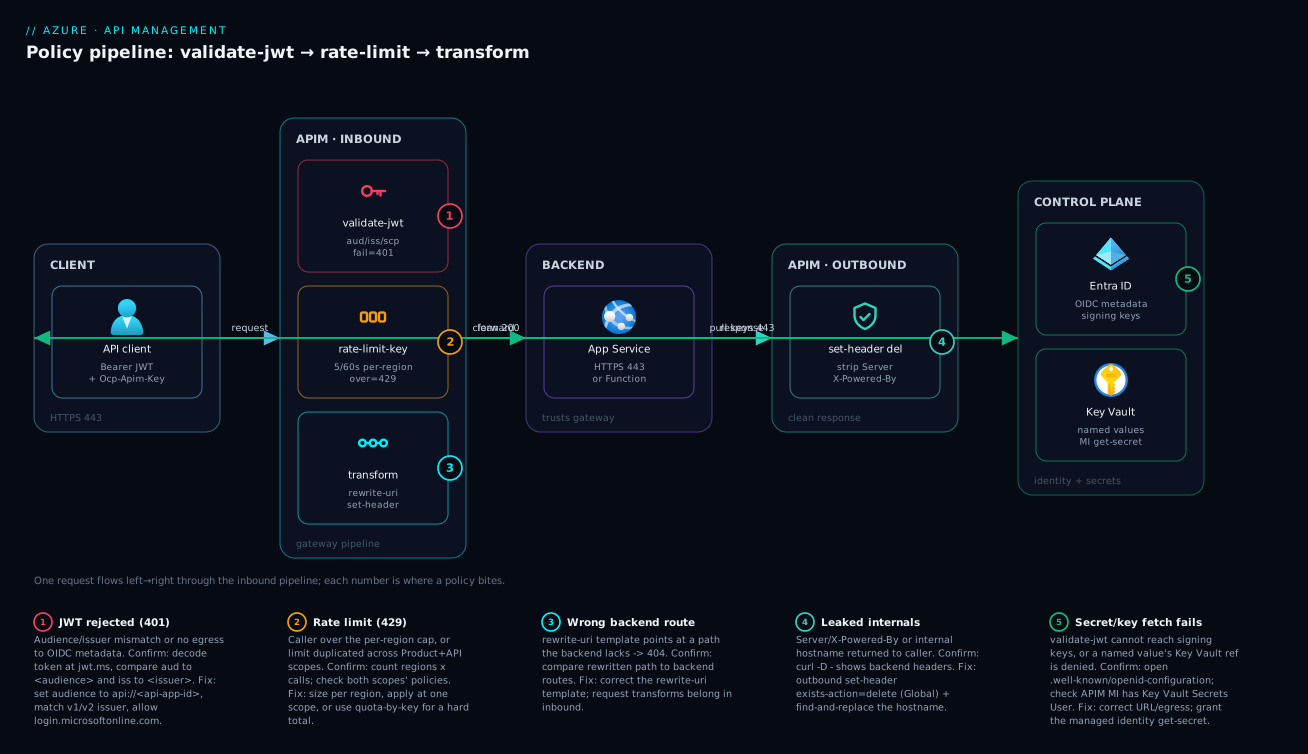
The diagram traces a single request left to right through the policy pipeline so you can see where each policy bites. A client sends an HTTPS request carrying two things: a bearer JWT in the Authorization header and the Ocp-Apim-Subscription-Key that identifies its subscription. The request lands on the APIM gateway, where the inbound section runs in order: first validate-jwt verifies the token’s signature and claims against the OIDC metadata it pulls from Microsoft Entra ID (failure short-circuits the whole pipeline with a 401); then rate-limit-by-key increments the per-region counter for this caller (over the cap → 429 with Retry-After); then transformation policies (rewrite-uri, set-header) reshape the request. Only a request that survives all three reaches the backend (an App Service, Function, or container) via the backend section. On the way back, the outbound section strips internal headers and rewrites any leaked hostnames before the clean response returns to the client.
Read the numbered badges as the four failure points you will actually hit: a rejected token (1), an exhausted rate limit (2), a wrong backend route after rewrite-uri (3), and a leaked internal header that outbound should have stripped (4). Notice that policies run as a strict pipeline — a failure at an earlier policy means later ones never execute, which is exactly why ordering (validate-jwt before rate-limit-by-key, both before transforms) is a deliberate choice, not an accident. The whole method is: authenticate first, throttle second, reshape third, call the backend, then clean the response.
Real-world scenario
Mintleaf Logistics exposes a partner shipping API: GET /v2/shipments/{id} and POST /v2/shipments, fronting a .NET App Service backend on an S1 plan in Central India. They run APIM Standard in a single region, fronted by Front Door. They have two partner tiers as APIM products: Bronze (free, low volume) and Gold (paid, high volume). The platform team is three engineers; APIM costs about ₹48,000/month on the Standard tier.
The trouble started with a single Bronze partner whose integration had a retry bug: on any 5xx it retried immediately with no backoff, and during a backend deploy it generated 40,000 requests in ninety seconds, saturating the S1 backend and causing 503s for every partner, Gold included. The on-call engineer’s first instinct was to scale the backend up — which helped for ten minutes until the retry storm resumed. The real problem was that the gateway was throttling nothing: there was a rate-limit-by-key on the Gold product but none on Bronze, and the misbehaving partner was on Bronze.
The breakthrough was realising APIM, not the backend, was the right control point. They added rate-limit-by-key calls="60" renewal-period="60" keyed on the subscription at the Bronze product scope, and quota-by-key for a daily cap. The retry storm now hit a 429 at the gateway in under a millisecond, never touching the backend. But they also noticed something during the incident review: the backend’s 503 error body was leaking the internal hostname (mintleaf-ship-prod.azurewebsites.net) and a Server: Kestrel header straight to partners — minor, but exactly the kind of internal detail that should never cross the gateway. A Global outbound policy now deletes Server/X-Powered-By and a find-and-replace rewrites the internal hostname to api.mintleaf.com.
The third fix closed a quieter gap. Both operations were “protected” only by the subscription key — which is an identification mechanism, not authentication; a leaked key was full access. They added validate-jwt at the API scope, requiring an Entra-issued token with the Shipments.Write scope on the POST and Shipments.Read on the GET (the scope check pushed to the Operation level). The first deploy 401’d every request — because they had set <audience> to the client app’s ID, not the API’s api:// URI. Five minutes with jwt.ms showed the aud mismatch; correcting the audience fixed it.
The outcome: the next backend deploy generated zero partner-visible errors because the retry storm was absorbed at the gateway; the Bronze partner saw 429s and Retry-After headers and fixed their backoff; Gold traffic was never affected. APIM cost was unchanged (policies are free — they run in the gateway you already pay for), and the backend was downsized from the over-provisioned state the incident had pushed it to. The lesson on the wall: “The gateway is the throttle, the bouncer, and the editor. If the backend is doing any of those three jobs, you put the policy in the wrong place.”
The incident as a timeline, because the order of moves is the lesson:
| Time | Symptom | Action taken | Effect | What it should have been |
|---|---|---|---|---|
| 14:02 | 503s for all partners | (alert fires) | — | Ask: is the gateway throttling at all? |
| 14:05 | Still 503ing | Scale backend up | 10 min relief, recurs | Don’t scale to mask a missing limit |
| 14:20 | Root cause: Bronze partner retry storm, no rate limit | Add rate-limit-by-key + quota-by-key at Bronze product |
Storm hits 429 at gateway | Correct fix — throttle at the edge |
| 14:40 | Review: internal hostname/Server header leaking |
Global outbound delete + find-and-replace |
Clean responses | Should have been there from day one |
| +1 day | Gap: only subscription key, no JWT | Add validate-jwt at API scope |
First deploy 401s everything | Audience set to client ID, not api:// |
| +1 day | 401 storm | Fix <audience> to the API’s app-ID URI |
Auth works | Always verify aud at jwt.ms |
Advantages and disadvantages
Running these controls as gateway policies — rather than in backend code — is a strong default, but it has real trade-offs. Weigh them:
| Advantages (why policies at the gateway win) | Disadvantages (where it bites) |
|---|---|
| Centralised: one place to throttle/authenticate/reshape every API, no per-service duplication | The policy XML becomes its own codebase; ungoverned, it sprawls across four scopes |
| Rejected requests cost zero backend invocations (429/401 at the edge) | Debugging “why did this 401?” means reasoning about composed policy across scopes |
| Backend stays simple — it can trust gateway-validated traffic | A wrong policy (bad audience, wrong section) can break every API at once |
| Change the contract (rewrite paths, strip headers) without redeploying backend | Transformation hides backend reality — drift between public contract and backend can surprise |
| Limits/auth are config, shippable via Bicep and reviewed in PRs | Rate-limit counters are per region, not a global truth — easy to misjudge |
| Policy expressions give real logic (claims, variables) without code | Expression bugs are runtime-only; weak local testing story vs unit tests |
The model is right when you have multiple APIs/partners and want one consistent control plane, when the backend should not (or cannot) own auth and throttling, and when you need to evolve the public contract independently of backends. It bites when teams treat policies as an afterthought, when a single broad-scope policy can take everything down, and when people size limits as if the per-region counter were global. The disadvantages are all governable — keep policies in Bicep, test in a non-prod APIM, scope deliberately — which is what the rest of this article sets you up to do.
Hands-on lab
This is the centrepiece. You will build all three policies end to end on a real APIM instance, validate each with curl, and tear it down. You will do it twice — once in the portal (to see the editor and effective-policy view) and once with az CLI — plus a Bicep version you can commit. Use the Consumption tier (serverless, pay-per-call, cheapest for a lab) or Developer tier (no SLA, full feature set) so cost is negligible.
Prerequisites
# Verify you're logged in and have a subscription selected
az account show --query "{sub:name, id:id}" -o table

# Variables used throughout (edit the names; APIM name must be globally unique)
RG=rg-apim-lab
LOC=centralindia
APIM=apim-lab-$RANDOM            # globally-unique
PUBLISHER_EMAIL=you@example.com
PUBLISHER_NAME="APIM Lab"
Part A — Create the instance and import a test API
Step 1 — Resource group.
az group create -n $RG -l $LOC -o table
Expected: a table row with provisioningState = Succeeded.
Step 2 — Create the APIM instance (Consumption tier). Consumption provisions in a couple of minutes; Developer/other tiers can take 30–45 minutes, so Consumption is best for a lab.
az apim create -n $APIM -g $RG -l $LOC \
  --publisher-email "$PUBLISHER_EMAIL" --publisher-name "$PUBLISHER_NAME" \
  --sku-name Consumption -o table
Expected: a long-running operation that finishes with provisioningState = Succeeded and a gatewayUrl like https://apim-lab-12345.azure-api.net. Capture it:
GATEWAY=$(az apim show -n $APIM -g $RG --query gatewayUrl -o tsv)
echo "$GATEWAY"
Step 3 — Import a public sample API (the Microsoft “Demo Conference” / httpbin-style backend works; here we use the public httpbin.org as a stand-in backend so the lab needs no backend of your own):
az apim api create -g $RG --service-name $APIM \
  --api-id httpbin --path bin \
  --display-name "HTTPBin" \
  --service-url "https://httpbin.org" \
  --protocols https -o table

# Add one operation: GET /get  (httpbin echoes the request back as JSON)
az apim api operation create -g $RG --service-name $APIM --api-id httpbin \
  --operation-id get-anything --display-name "Get" \
  --method GET --url-template "/get" -o table
Expected: the API and an operation, reachable at $GATEWAY/bin/get.
Step 4 — Get a subscription key to call it. Consumption requires a subscription for the built-in all-APIs product. List keys:
# The built-in "master" subscription works for the lab; or use the all-access sub
SUBKEY=$(az apim subscription list -g $RG --service-name $APIM \
  --query "[?scope=='/apis' || contains(scope,'allApis') || displayName=='Built-in all-access subscription'].primaryKey | [0]" -o tsv)
# Fallback: pull the master subscription key
if [ -z "$SUBKEY" ]; then SUBKEY=$(az apim subscription show -g $RG --service-name $APIM --sid master --query primaryKey -o tsv); fi
echo "key length: ${#SUBKEY}"

# Smoke test — should return httpbin's JSON echo
curl -s -o /dev/null -w "%{http_code}\n" "$GATEWAY/bin/get" -H "Ocp-Apim-Subscription-Key: $SUBKEY"
Expected: 200. If you get 401, the subscription key is wrong; if 404, the path/operation is off.
Part B — Policy 1: rate-limit-by-key (portal, then CLI)
Step 5 — Apply the rate limit in the portal. In the portal: APIs → HTTPBin → Design → All operations → Inbound processing → Policies (</> editor). Replace the <inbound> section so it reads:
<inbound>
  <base />
  <rate-limit-by-key calls="5" renewal-period="60"
      counter-key="@(context.Subscription?.Key ?? context.Request.IpAddress)"
      remaining-calls-header-name="X-RateLimit-Remaining"
      retry-after-header-name="Retry-After" />
</inbound>
Click Save. (To see the merged result, switch the editor’s view to Calculated effective policy — you will see <base /> expanded with the global/product policies inline.)
Step 6 — Apply the same rate limit with az (API scope), so you have it as a repeatable command. Write the policy XML to a file and set it at the API scope:
cat > /tmp/ratelimit-policy.xml <<'XML'
<policies>
  <inbound>
    <base />
    <rate-limit-by-key calls="5" renewal-period="60"
        counter-key="@(context.Subscription?.Key ?? context.Request.IpAddress)"
        remaining-calls-header-name="X-RateLimit-Remaining"
        retry-after-header-name="Retry-After" />
  </inbound>
  <backend><base /></backend>
  <outbound><base /></outbound>
  <on-error><base /></on-error>
</policies>
XML

az apim api policy create -g $RG --service-name $APIM --api-id httpbin \
  --policy-format xml --value "$(cat /tmp/ratelimit-policy.xml)" -o table
# (use `az apim api policy update` if a policy already exists)
Expected: the command returns the stored policy.
Step 7 — Validate the rate limit. Fire 8 calls; the first 5 succeed (200), the rest are throttled (429):
for i in $(seq 1 8); do
  printf "call %s -> " "$i"
  curl -s -o /dev/null -w "%{http_code}  Retry-After=%header{retry-after}  Remaining=%header{x-ratelimit-remaining}\n" \
    "$GATEWAY/bin/get" -H "Ocp-Apim-Subscription-Key: $SUBKEY"
done
Expected: calls 1–5 return 200 with a decreasing X-RateLimit-Remaining; calls 6–8 return 429 with a Retry-After value in seconds. (If your curl is older and %header{} is unsupported, drop those format fields and just observe the status codes.)
Part C — Policy 2: validate-jwt
Step 8 — Add JWT validation at the API scope. For the lab, you need an OIDC provider. If you have an Entra tenant, point at its metadata; the policy below requires a valid token for your tenant. (If you do not want to mint a token, you can still prove the policy works by confirming an unauthenticated call now returns 401.)
TENANT_ID=$(az account show --query tenantId -o tsv)

cat > /tmp/jwt-policy.xml <<XML
<policies>
  <inbound>
    <base />
    <validate-jwt header-name="Authorization" failed-validation-httpcode="401"
                  failed-validation-error-message="Unauthorized. Token missing or invalid.">
      <openid-config url="https://login.microsoftonline.com/$TENANT_ID/v2.0/.well-known/openid-configuration" />
      <issuers>
        <issuer>https://login.microsoftonline.com/$TENANT_ID/v2.0</issuer>
      </issuers>
      <!-- Add your API's Application ID URI once you register it:
      <audiences><audience>api://YOUR-API-APP-ID</audience></audiences>
      -->
    </validate-jwt>
    <rate-limit-by-key calls="5" renewal-period="60"
        counter-key="@(context.Subscription?.Key ?? context.Request.IpAddress)"
        remaining-calls-header-name="X-RateLimit-Remaining"
        retry-after-header-name="Retry-After" />
  </inbound>
  <backend><base /></backend>
  <outbound><base /></outbound>
  <on-error><base /></on-error>
</policies>
XML

az apim api policy update -g $RG --service-name $APIM --api-id httpbin \
  --policy-format xml --value "$(cat /tmp/jwt-policy.xml)" -o table
Note the ordering: validate-jwt runs before rate-limit-by-key, so an unauthenticated flood is rejected as 401 before it even consumes the rate-limit budget — authenticate first, throttle second.
Step 9 — Validate JWT rejection and acceptance.
# No token -> 401 (validate-jwt rejects before the backend is touched)
curl -s -o /dev/null -w "no-token -> %{http_code}\n" \
  "$GATEWAY/bin/get" -H "Ocp-Apim-Subscription-Key: $SUBKEY"

# A real token for a registered API audience -> 200.
# Acquire one for your API (replace api://YOUR-API-APP-ID with your App ID URI):
TOKEN=$(az account get-access-token --resource api://YOUR-API-APP-ID --query accessToken -o tsv 2>/dev/null)
if [ -n "$TOKEN" ]; then
  curl -s -o /dev/null -w "with-token -> %{http_code}\n" \
    "$GATEWAY/bin/get" -H "Ocp-Apim-Subscription-Key: $SUBKEY" -H "Authorization: Bearer $TOKEN"
fi
Expected: the no-token call returns 401. With a valid token whose aud matches your <audience>, the call returns 200. If you get 401 with a token, decode it at jwt.ms and compare its aud and iss to your policy — an audience mismatch is the number-one cause.
Part D — Policy 3: request/response transformation
Step 10 — Add transforms: inject a request header, strip response internals, rewrite a value. Replace the policy with the full three-policy stack:
cat > /tmp/full-policy.xml <<XML
<policies>
  <inbound>
    <base />
    <validate-jwt header-name="Authorization" failed-validation-httpcode="401"
                  failed-validation-error-message="Unauthorized. Token missing or invalid.">
      <openid-config url="https://login.microsoftonline.com/$TENANT_ID/v2.0/.well-known/openid-configuration" />
      <issuers><issuer>https://login.microsoftonline.com/$TENANT_ID/v2.0</issuer></issuers>
    </validate-jwt>
    <rate-limit-by-key calls="5" renewal-period="60"
        counter-key="@(context.Subscription?.Key ?? context.Request.IpAddress)"
        remaining-calls-header-name="X-RateLimit-Remaining"
        retry-after-header-name="Retry-After" />
    <set-header name="X-Forwarded-Host" exists-action="override">
      <value>@(context.Request.OriginalUrl.Host)</value>
    </set-header>
  </inbound>
  <backend><base /></backend>
  <outbound>
    <base />
    <set-header name="Server" exists-action="delete" />
    <set-header name="X-Powered-By" exists-action="delete" />
    <set-header name="X-APIM-Gateway" exists-action="override">
      <value>mintleaf</value>
    </set-header>
    <find-and-replace from="httpbin.org" to="api.contoso.com" />
  </outbound>
  <on-error><base /></on-error>
</policies>
XML

az apim api policy update -g $RG --service-name $APIM --api-id httpbin \
  --policy-format xml --value "$(cat /tmp/full-policy.xml)" -o table
Step 11 — Validate the transforms. Inspect the response headers and body:
# (Use a valid token if you kept validate-jwt strict; or temporarily comment it out)
curl -s -D - "$GATEWAY/bin/get" -H "Ocp-Apim-Subscription-Key: $SUBKEY" -H "Authorization: Bearer $TOKEN" | sed -n '1,25p'
Expected: the response carries X-APIM-Gateway: mintleaf, no Server header from the backend, and any httpbin.org string in the JSON body is rewritten to api.contoso.com. The request echo from httpbin shows the injected X-Forwarded-Host header proving the inbound transform fired.
Part E — Bicep (commit this, not click-ops)
Step 12 — The same three policies as Bicep, so your gateway config lives in source control. This deploys the API-scope policy document:
@description('Existing APIM instance name')
param apimName string
param tenantId string = subscription().tenantId

resource apim 'Microsoft.ApiManagement/service@2023-05-01-preview' existing = {
  name: apimName
}

resource api 'Microsoft.ApiManagement/service/apis@2023-05-01-preview' existing = {
  parent: apim
  name: 'httpbin'
}

// The full inbound/outbound policy document at API scope
resource apiPolicy 'Microsoft.ApiManagement/service/apis/policies@2023-05-01-preview' = {
  parent: api
  name: 'policy'
  properties: {
    format: 'rawxml'
    value: '''
<policies>
  <inbound>
    <base />
    <validate-jwt header-name="Authorization" failed-validation-httpcode="401">
      <openid-config url="https://login.microsoftonline.com/${tenantId}/v2.0/.well-known/openid-configuration" />
      <issuers><issuer>https://login.microsoftonline.com/${tenantId}/v2.0</issuer></issuers>
    </validate-jwt>
    <rate-limit-by-key calls="5" renewal-period="60"
        counter-key="@(context.Subscription?.Key ?? context.Request.IpAddress)"
        remaining-calls-header-name="X-RateLimit-Remaining"
        retry-after-header-name="Retry-After" />
  </inbound>
  <backend><base /></backend>
  <outbound>
    <base />
    <set-header name="Server" exists-action="delete" />
    <set-header name="X-Powered-By" exists-action="delete" />
  </outbound>
  <on-error><base /></on-error>
</policies>
'''
  }
}
Deploy and validate:
az deployment group create -g $RG \
  --template-file ./apim-policy.bicep \
  --parameters apimName=$APIM -o table
Expected: provisioningState = Succeeded; re-running Step 7 and Step 9 shows the same throttling and 401 behaviour, now reproducible from code.
Validation checklist and teardown
What each part proved, mapped to the real-world job:
| Part | What you did | What it proves | Real-world analogue |
|---|---|---|---|
| B | rate-limit-by-key, 8 calls |
6th call 429s at the gateway |
Absorbing a retry storm at the edge |
| C | validate-jwt, no token |
Unauth request 401s before backend |
Bouncing leaked-key/anon traffic |
| C | Token with wrong aud |
401 until audience corrected |
The #1 JWT misconfig in the wild |
| D | set-header delete + find-and-replace |
Internals stripped, hostname rewritten | Not leaking backend details to partners |
| E | Bicep policy document | Same behaviour, reproducible from code | Governed, reviewed gateway config |
Teardown (stops all charges — Consumption is pay-per-call, but delete to be clean):
az group delete -n $RG --yes --no-wait
Cost note. On the Consumption tier you pay per call (a generous monthly free grant covers a lab’s handful of requests), so this lab costs effectively nothing. On the Developer tier it is a fixed low hourly rate (~₹4/hour) with no SLA — fine for a few hours, but delete the resource group when done so the meter stops.
Common mistakes & troubleshooting
The failures you will actually hit, as a scannable table first, then the high-bite ones expanded.
| # | Symptom | Root cause | Confirm (exact check) | Fix |
|---|---|---|---|---|
| 1 | 401 even with a valid token |
<audience> set to client ID, not the API’s api:// URI |
Decode token at jwt.ms; compare aud to <audience> |
Set <audience> to the API’s Application ID URI |
| 2 | 401 on all requests, no keys fetched |
openid-config url wrong/unreachable, or gateway has no egress |
Open the URL in a browser; check gateway outbound | Correct URL; allow egress to login.microsoftonline.com |
| 3 | 401 from a v1-flow token vs v2 issuer |
Issuer mismatch (sts.windows.net vs …/v2.0) |
Compare token iss to <issuer> |
Match issuer to the endpoint clients use |
| 4 | 429 arrives sooner than expected |
Limit applied at multiple scopes (product and API) — both count | Check Product + API + Operation policies | Apply the limit at one scope; remove duplicates |
| 5 | 429 arrives later than expected (over-admits) |
Counter is per region; multi-region multiplies the cap | Count regions/units behind the limit | Size per region, or use quota-by-key/external cache |
| 6 | Response set-header does nothing |
Placed in inbound instead of outbound |
Read the policy; check the section | Move response transforms to outbound |
| 7 | Policy save fails with a validation error | Malformed XML, unknown attribute, expression typo | Portal editor underlines the line; error message names it | Fix XML; validate @(...) expression syntax |
| 8 | rate-limit-by-key throttles everyone together |
counter-key evaluates to a constant for all callers |
Log/trace the computed counter-key |
Key on subscription/IP/claim, not a fixed string |
| 9 | Backend gets a 404 after rewrite-uri |
template points at a path the backend doesn’t have |
Compare rewritten path to backend routes | Fix the rewrite-uri template |
| 10 | Retry-After/remaining headers missing |
Header-name attributes not set on the policy | Check retry-after-header-name/remaining-calls-header-name |
Add the header-name attributes |
| 11 | validate-jwt passes but scope check should fail |
required-claims not set, or match too loose |
Inspect the policy’s <required-claims> |
Add the scope/role claim; set match correctly |
| 12 | 500 from on-error itself |
A policy in on-error threw (e.g. read a missing variable) |
Trace the on-error section |
Keep on-error minimal and exception-safe |
1. 401 even though the token is valid. The token’s aud claim does not match your <audience>. In Entra, the audience of an access token for your API is the API’s Application ID URI (api://<api-app-id> or a custom URI), not the client app’s ID and not Graph. Confirm by pasting the raw token into jwt.ms and comparing aud to your <audience> value — they must be byte-identical. Fix by setting <audience> to the exact URI the token carries (and expose the right scope on the API app registration so clients can request it).
2. Every request 401s and the gateway seems to have no keys. validate-jwt could not fetch the signing keys from openid-config url — either the URL is wrong (a typo’d tenant ID, a v1/v2 mismatch in the metadata path) or the gateway has no outbound route to login.microsoftonline.com. Confirm by opening the exact …/.well-known/openid-configuration URL in a browser (it should return JSON with a jwks_uri). Fix the URL; if you run a VNet-injected or self-hosted gateway, ensure egress to the IdP is allowed.
4 & 5. 429 at the wrong time. Two opposite failures. Sooner than expected: you applied the limit at both the Product and the API (or Operation) scope, and they count independently, so the effective ceiling is lower than either number suggests. Resolve by choosing one scope for the limit. Later than expected / over-admitting: the counter is per gateway region — a two-region deployment admits roughly double. This is by design; size the per-region calls accordingly, or switch to quota-by-key over a longer window where the drift is negligible, or use an external Redis cache on a self-hosted gateway for shared counters.
6. A response transform does nothing. set-header, find-and-replace, and set-body only affect the response when they sit in the outbound section. The same statement in inbound transforms the request (or no-ops if the header is response-only). Confirm by reading which section the statement is in; move it to outbound. Remember the corollary: outbound is skipped on an error path, so if a header must be stripped even on errors, repeat it in on-error.
8. The rate limit throttles all callers as one. Your counter-key evaluates to the same value for everybody — for example a literal string, or context.Subscription?.Key on an API where no subscription is required (so it is null for all). Confirm by adding a temporary <trace> that logs the computed key, or reason it through. Fix by keying on something that actually varies per caller: subscription ID, client IP, a per-user header, or a JWT claim.
Best practices
- Authenticate before you throttle. Put
validate-jwtfirst ininbound, thenrate-limit-by-key, then transforms. An unauthenticated flood should be rejected as401before it ever consumes rate-limit budget or touches a transform. - Put rate limits where the limit logically lives. Plan-based limits go at the Product scope; backend-protection limits go at the API scope. Don’t scatter the same limit across scopes — they count independently and confuse the effective ceiling.
- Size rate limits as per region. The counter is regional. If you run multi-region, either size each region’s
callsso the sum is acceptable, or usequota-by-keyfor hard total allowances. - Strip server internals globally. A Global
outboundpolicy that deletesServer,X-Powered-By,X-AspNet-Versionensures no API leaks them, regardless of backend. - Always set
<audience>and<issuer>explicitly onvalidate-jwt, and verify them against a real token atjwt.ms. Never disablerequire-signed-tokensorrequire-expiration-time. - Use
<base />deliberately. Know whether you’re extending the parent (base first) or overriding it (base omitted). Use the “Calculated effective policy” view to confirm what actually runs. - Surface limits to clients. Set
remaining-calls-header-nameandretry-after-header-nameso well-behaved clients self-throttle instead of hammering into429s. - Keep
on-errorminimal and safe. It is your last line; a policy that throws there yields a raw500. Use it to shape a clean error body andtrace, nothing risky. - Store secrets as named values / Key Vault references, never inline in policy XML. Backend keys, signing config, and credentials belong in named values the policy references.
- Keep policy XML in source control and ship it via Bicep. Click-ops in the portal is fine for exploring; production policies must be reviewed in PRs and reproducible.
- Test policies in a non-prod APIM first. A broad-scope mistake (bad audience, wrong section) can break every API at once; validate in a Developer-tier instance before promoting.
- Watch the telemetry. Pipe APIM to Application Insights and alert on
401/429rates — a spike is either an attack you’re correctly bouncing or a misconfiguration you just shipped.
Security notes
- A subscription key is identification, not authentication.
Ocp-Apim-Subscription-Keysays which subscription a call belongs to (for metering and the rate-limitcounter-key), but it is a shared bearer secret — a leaked key is full access. Real authentication isvalidate-jwt. Use both: the key for metering/throttling, the JWT for identity and authorization. - Validate the token at the edge, not just the backend.
validate-jwtensures an invalid or wrongly-scoped request is rejected with401before it costs a backend invocation, removing the window where unauthenticated traffic reaches your code. - Scope down with
required-claims. Don’t accept “any valid token from the tenant” — require the specificscp/rolesthe operation needs (Shipments.ReadonGET,Shipments.WriteonPOST). This is authorization, not just authentication. - Never leak backend internals. Strip
Server/X-Powered-By, rewrite internal hostnames out of bodies (find-and-replace), and ensure error bodies don’t carry stack traces — avalidate-jwtfailure should return a terse message, not diagnostics. - Keep secrets in named values backed by Key Vault, with the APIM managed identity granted
Key Vault Secrets User— see Azure Key Vault: Secrets, Keys and Certificates Done Right. No credential should appear in policy XML or be checked into the repo in plaintext. - Lock down the gateway’s network posture for production — private inbound via Front Door/Application Gateway, and for sensitive backends use Private Endpoints so the backend isn’t directly reachable; the gateway becomes the only front door.
- Protect the management plane. The APIM instance, its named values, and its policy documents are powerful — control who can edit policies with RBAC (a bad policy is a production outage), and review policy changes like code.
The controls that secure and harden, side by side:
| Control | Mechanism | Secures against | Also prevents |
|---|---|---|---|
| JWT validation at edge | validate-jwt (aud/iss/scp) |
Anonymous/leaked-key access | Backend duplicating auth logic |
| Scope enforcement | required-claims |
Over-privileged token use | Wrong operation called with broad token |
| Header stripping | set-header … delete (Global) |
Internal info disclosure | Fingerprinting your stack |
| Secrets as named values | Key Vault reference + MI | Secrets in plaintext policy/repo | Manual rotation breaking the gateway |
| Rate/quota limits | rate-limit-by-key/quota-by-key |
Abuse, runaway cost | One client starving the rest |
| Private networking | Front Door + Private Endpoint | Direct backend hits bypassing gateway | Throttle/auth being skipped |
Cost & sizing
The good news: policies themselves are free. They run inside the APIM gateway you already pay for — adding rate-limit-by-key, validate-jwt, and transforms costs zero extra. The bill is the APIM tier, and the policies are precisely what let you run a smaller tier safely (by absorbing abuse at the edge instead of over-provisioning the backend). The drivers:
- Tier dominates. Consumption is serverless, pay-per-call (cheapest for low/spiky volume, but no VNet injection and a smaller feature set). Developer is a low fixed hourly rate with no SLA (for non-prod). Basic/Standard/Premium are fixed monthly per-unit, scaling features (VNet, multi-region, capacity). Choosing the right tier is the cost decision; the policies are free once you’re on one.
- Rate/quota limits protect the backend bill. The real saving is downstream: throttling a retry storm at the gateway means you don’t scale the backend (or a paid downstream API) to absorb abuse. Mintleaf downsized its backend because the gateway now caps load.
- Per-region/per-unit capacity is what you size on Standard/Premium — add units or regions for throughput, not because of policy count. Policy execution is cheap relative to the network hop.
- Application Insights ingestion for APIM telemetry is billed per GB — worth it to see
401/429rates, but sample high-traffic instances so a flood doesn’t spike the telemetry bill.
A rough monthly picture and what each tier buys:
| Tier | Rough cost | Policies supported | Use it for | Watch-out |
|---|---|---|---|---|
| Consumption | Pay-per-call (free grant covers a lab) | Full policy set (some limits) | Spiky/low volume, serverless | No VNet injection; per-call counters less global |
| Developer | ~₹3,000–3,500/month (or hourly) | Full | Non-prod, testing policies | No SLA — never production |
| Basic | ~₹12,000–15,000/month per unit | Full | Small prod, no VNet | No multi-region |
| Standard | ~₹48,000/month per unit | Full | Mainstream prod | VNet via Standard v2 |
| Premium | ~₹2,40,000+/month per unit | Full + multi-region | Large/regulated, multi-region | Highest floor; per-region counters |
The sizing rule: pick the tier for the features and throughput you need (VNet, multi-region, capacity), then lean on free policies to keep that tier as small as it can safely be. A rate-limit-by-key that stops a retry storm is the cheapest “capacity” you will ever add.
Interview & exam questions
1. What are the four sections of an APIM policy document and when does each run? inbound (on the way in — throttle, authenticate, reshape the request), backend (around the backend call — retries, timeouts, forward-request), outbound (on the way out — reshape the response, strip headers), and on-error (only if a section throws). The order is inbound → backend → outbound, with on-error as the exception path; outbound is skipped on an error unless you resume it.
2. What does <base /> do and what happens if you omit it? <base /> marks where the parent scope’s matching section is injected when policies are composed across Global → Product → API → Operation. Placed first, the parent runs before your statements; placed last, your statements run first; omitted, the parent section is skipped entirely for that scope. It is how you control parent-vs-child ordering and overrides.
3. Why is a rate-limit-by-key counter described as “per region,” and why does it matter? APIM maintains the throttling counter per gateway region (and per replica on a self-hosted gateway without an external cache) to keep it low-latency and distributed. In a multi-region deployment a “100/60s” limit can admit roughly 100 per region, so the global ceiling is higher than the number suggests. You must size limits per region or use quota-by-key/an external cache for a hard shared count.
4. Difference between rate-limit-by-key and quota-by-key? rate-limit-by-key smooths bursts over a short window (≤ 300 s) and returns 429 when exceeded; quota-by-key caps a total allowance over a long renewable window (e.g. per day/month) and returns 403 when exhausted. Use rate limiting for “requests per second,” quota for “calls per month.”
5. A request with a valid Entra token still gets 401 from validate-jwt. Most likely cause? An audience mismatch: <audience> is set to the client app’s ID (or Graph) instead of the called API’s Application ID URI (api://<api-app-id>). The token’s aud claim must exactly match <audience>. Confirm by decoding the token at jwt.ms; fix by setting the correct audience and exposing the right scope on the API app registration.
6. How does validate-jwt get the keys to verify a token’s signature? It fetches them from the issuer’s OpenID configuration at the openid-config url you specify (which points to a jwks_uri), and caches/refreshes them — so signing-key rotation is handled automatically. You configure metadata URLs and required audiences/issuers/required-claims, not raw keys.
7. Where should you place a policy that strips the Server header, and in which section? At the Global scope (so it applies to every API) in the outbound section (because it transforms the response). A response set-header … exists-action="delete" in inbound would do nothing.
8. What is the difference between exists-action="override" and "append" on set-header? override replaces the header’s value if it already exists; append adds an additional value (for multi-value headers). skip leaves an existing value (set-a-default-if-absent), and delete removes the header.
9. You apply a rate limit at both the Product and the API scope. What happens? Both counters apply independently, so the effective limit is tighter than either number alone implies (a caller can be throttled by whichever fills first). Apply the limit at a single, deliberate scope to avoid a confusing effective ceiling.
10. Why authenticate (validate-jwt) before throttling (rate-limit-by-key) in inbound? So an unauthenticated flood is rejected with 401 before it consumes rate-limit budget or touches transforms — it costs nothing and doesn’t let anonymous traffic exhaust a legitimate caller’s allowance. Order in inbound is significant; authentication is the cheapest, earliest gate.
11. A response transform you wrote isn’t taking effect. What’s the first thing to check? Which section it’s in: response transforms (set-header, find-and-replace, set-body) must be in outbound. The same statement in inbound affects the request, not the response. Also check that the request didn’t error (then outbound is skipped and on-error runs instead).
12. How do you keep backend secrets out of policy XML? Store them as named values (marked secret, or backed by Key Vault with the APIM managed identity granted Key Vault Secrets User) and reference them from policies. Never inline credentials in the XML, and never commit them in plaintext.
These map mainly to AZ-204 (Developer Associate) — implement API Management, policies, and securing APIs — with the identity/JWT angle touching AZ-500 and the networking posture AZ-700. A compact cert map for revision:
| Question theme | Primary cert | Objective area |
|---|---|---|
Policy sections, <base />, scopes |
AZ-204 | Implement API Management |
rate-limit-by-key / quota-by-key |
AZ-204 | Configure API policies |
validate-jwt, audiences/issuers/claims |
AZ-204 / AZ-500 | Secure APIs; protect with OAuth2/OIDC |
| Named values / Key Vault references | AZ-204 / AZ-500 | Manage secrets; secure config |
| Private networking / multi-region | AZ-700 | Network connectivity for APIM |
Quick check
- In which policy section do you put
validate-jwt, and what status code does it return on failure? - Your
rate-limit-by-keyis configured for 100 calls/60 s, but in a two-region deployment callers seem to get through ~200/60 s. Why? - A
set-header name="Server" exists-action="delete"isn’t removing the header. Name the most likely placement mistake. - A caller presents a valid Entra token and still gets
401. What single value do you compare atjwt.ms, and against what? - You want plan-based throttling (Free vs Paid) — at which scope do you place the rate-limit policy, and why?
Answers
- In the
inboundsection (authenticate on the way in, before throttling and transforms). It returns401Unauthorized by default (configurable viafailed-validation-httpcode). - The
rate-limit-by-keycounter is maintained per gateway region, so each region independently admits up to ~100/60 s — the global total is roughly the sum across regions. Size per region, or usequota-by-key/an external cache for a hard shared ceiling. - It’s in the
inboundsection instead ofoutbound. Response transforms only affect the response when placed inoutbound. - Compare the token’s
aud(audience) claim to your policy’s<audience>value — they must be identical. The usual bug is<audience>set to the client app ID instead of the API’sapi://<api-app-id>Application ID URI. - At the Product scope, because the limit is a property of the plan (the product) and is shared across every API in that product — Free and Paid become two products with different
calls/renewal-period.
Glossary
- API Management (APIM) — Azure’s managed API gateway; fronts backends with a gateway, developer portal, and a policy engine.
- Policy — an XML statement (e.g.
<rate-limit-by-key />) that runs on the request/response path in the gateway. - Policy document — the XML for one scope, with up to four sections (
inbound/backend/outbound/on-error). <base />— the marker that injects the parent scope’s matching section during policy composition; controls parent-vs-child order.- Scope — one of Global, Product, API, or Operation; determines where a policy applies.
rate-limit-by-key— throttles to N calls per window keyed on an expression; returns 429 when exceeded; counter is per gateway region.quota-by-key— caps a total allowance over a long renewable window; returns 403 when exhausted.validate-jwt— verifies a bearer token’s signature (via OIDC metadata) and claims (aud/iss/scp/roles); returns 401 on failure.openid-config— the OpenID configuration URLvalidate-jwtreads to fetch signing keys and metadata.- Audience (
aud) — the claim naming who a token is for; for an API, its Application ID URI (api://…). - Issuer (
iss) — the claim naming who issued the token; must match your<issuer>(mind v1 vs v2). set-header— adds/overrides/appends/deletes a header (exists-action); request transform ininbound, response inoutbound.rewrite-uri— changes the path sent to the backend, decoupling the public route from the backend route.find-and-replace— string replacement over the request or response body.set-body— replaces the body via a policy expression; buffers the whole body.- Named value — a reusable, optionally secret/Key-Vault-backed key/value referenced from policies.
- Policy expression — a
@(...)C#-style snippet that readscontext(subscription, request, user, variables) for dynamic values. Ocp-Apim-Subscription-Key— the header carrying the subscription key; identification and metering, not authentication.- Subscription — the APIM object that issues keys and ties a caller to a product/plan.
Next steps
You can now ship the three policies every API needs. Build outward:
- Next: OIDC and OAuth2 on Entra ID: Choosing the Right Flow (Auth Code, PKCE, Client Credentials) — understand how the JWT
validate-jwtchecks is actually issued. - Related: App Registrations vs Enterprise Applications: The Service Principal Model Explained — the app registration that defines your API’s audience and scopes.
- Related: Azure Key Vault: Secrets, Keys and Certificates Done Right — store backend secrets as named values instead of inline policy XML.
- Related: Azure Monitor and Application Insights: Full-Stack Observability — see your
401/429policy decisions as telemetry and alert on them. - Related: Azure App Service vs Container Apps vs AKS: Choose the Right Compute — pick the backend APIM fronts, and trust gateway-validated traffic.