You shipped an app on iOS and Android plus a progressive web app, and now product wants a “flash sale starts in 10 minutes” banner on every device at once. Simple, right? Except Apple devices only accept pushes from APNs (Apple Push Notification service), Android wants FCM (Firebase Cloud Messaging), the browser speaks Web Push over VAPID — each a different protocol, credential, payload shape, and way of telling you a token went stale. Build that yourself and you are running three delivery clients, storing millions of tokens, batching sends to dodge throttling, and pruning dead tokens forever — plumbing that has nothing to do with your product and never stops needing maintenance.
Azure Notification Hubs is the managed service that collapses all of that into one backend call. You send a single message to the hub; it holds every device’s registration, knows each one’s platform, translates your message into the right native payload, and pushes it through APNs, FCM, Web Push, and the Windows and Amazon stacks on your behalf — to one device, a segment, or millions, in a single operation. It is a broadcast and fan-out engine for push, not a general message queue and not a real-time socket. Knowing exactly what it is — and the four or five services it is constantly confused with — is the point of this article.
By the end you will hold a crisp mental model of how a push travels from your backend through the hub to a lock screen, what a registration and a tag actually are, when Notification Hubs is the right tool versus SignalR, Event Grid, or Service Bus, and how to stand up a hub, register a device, and send a targeted notification with az CLI and Bicep. This is a concept-first explainer: the model first, then comparison grids and decision tables, then a hands-on lab and a short troubleshooting playbook for the failures everyone hits the first week.
What problem this solves
The pain is platform fan-out. A push notification is not one thing — it is N things, one per platform, each a walled garden with its own rules. Apple wants a token (.p8) or certificate connection to APNs; Google moved Android off the legacy server key to FCM v1 (service-account JSON + OAuth2, a migration that broke many homegrown senders); the browser needs a VAPID key pair and an encrypted Web Push payload. Write to these directly and you maintain four codebases that break independently whenever a platform changes its API.
What breaks without a hub: you store and index every token yourself (tens of millions of churning rows), implement per-platform batching/retry so a broadcast does not throttle APNs, and build the feedback loop that removes tokens APNs/FCM report as unregistered — because pushing to dead tokens degrades your sender reputation. Teams routinely under-build that loop, then wonder why delivery rates quietly fall over months.
Who hits this: anyone with a mobile app (native or cross-platform like .NET MAUI, React Native, Flutter) plus often a web client, who needs engagement, transactional, or operational push — “your order shipped”, “you have a new message”, or a broadcast to a segment. The moment you push to more than one platform, or to a segment rather than a single token, the do-it-yourself cost crosses the line. The core problem the hub removes:
| The push problem | Doing it yourself | With Notification Hubs |
|---|---|---|
| Talk to each platform | Maintain APNs + FCM + Web Push + WNS clients | One send API; hub translates per platform |
| Store device identities | Build a token store for tens of millions of rows | Hub holds registrations/installations |
| Target a segment | Join your own user → token tables, batch sends | Tags + tag expressions, one call |
| Broadcast at scale | Hand-roll batching/throttle/retry | Hub fans out to millions per operation |
| Prune dead tokens | Build a feedback processor per platform | Hub auto-expires on PNS feedback |
| Per-platform payload shape | Format aps, android, Web Push by hand |
Templates render one message per platform |
Learning objectives
By the end of this article you can:
- Explain in one breath what Azure Notification Hubs is, what a PNS (Platform Notification System) is, and why the hub sits between your backend and APNs/FCM.
- Describe the full push path — device → PNS registration → backend send → hub → PNS → device — and name what happens at each hop.
- Distinguish a registration from an installation, and explain what a device handle, a tag, and a template each do.
- Target a push three ways — broadcast, tag-based segment, and single-device — and write a basic tag expression.
- Choose correctly between Notification Hubs, Azure SignalR Service, Event Grid, Service Bus, and Event Hubs for a “notify users” requirement.
- Stand up a namespace and hub, configure APNs/FCM v1 credentials, register a device, and send a targeted notification with
azCLI and Bicep. - Reason about the Free / Basic / Standard tiers, what drives the bill (pushes/month + extra devices), and the security model (Listen vs Full SAS).
Prerequisites & where this fits
You should be comfortable with a mobile app that runs on a device and a backend (an API, an Azure Function, a web app) it talks to, know roughly what a REST call and a JSON payload are, and have the Azure CLI available (Cloud Shell is fine). No mobile-dev expertise is required; the lab uses CLI and a test send so you see a hub work without shipping an app.
This sits in the messaging and engagement layer, next to but distinct from the eventing and queueing services. Your backend is typically an Azure Functions and Serverless Patterns: Event-Driven Compute app or App Service that decides when to notify and calls the hub; APNs/FCM credentials belong in a vault (Azure Key Vault: Secrets, Keys and Certificates Done Right); and Message Queues vs Pub/Sub: Choosing an Async Pattern frames where push fits among queues and pub/sub. In short: the mobile team owns the app SDK, the PNS is the hub’s downstream, your backend triggers sends, Key Vault holds the credentials, and Azure Monitor reads send telemetry.
Core concepts
Five mental models make everything else obvious.
The hub is a translator and a megaphone, not a mailbox. Your backend hands it one logical message — “Flash sale!” — and it does two jobs: translates it into each platform’s native payload (an aps dictionary for Apple, an FCM message for Android, an encrypted Web Push body for the browser), and fans out, pushing to one device or to millions in a single operation. It does not store messages for a device to pull later; if a device is offline, delivery is the PNS’s problem. Think broadcast amplifier, not queue.
A device registers first with its platform, then with the hub. Push always originates from the platform owner: an iOS app gets a device token from APNs, an Android app a registration token from FCM, a browser a Web Push endpoint. That platform-issued token is the device handle. The app sends it to the hub so it knows “this iOS device exists, here is how to reach it.” Without the handle the hub cannot push — the handle is the address.
A registration (or installation) is the hub’s record of one device. Per device, the hub stores the handle (PNS + token), any tags, and optionally a template. Two shapes exist: the older registration model and the newer, recommended installation model (richer JSON, per-device template/tag updates, idempotent by a stable installationId). Both mean the same thing to the fan-out engine: a row saying “push here, it has these labels.”
Tags target a segment without your own database. A tag is a string label on a registration — country_IN, user_8842, topic_sports, pro_tier. At send time you push to a tag or a tag expression ((country_IN && pro_tier)), and the hub delivers only to matching devices. This turns “broadcast to everyone” into “broadcast to paying users in India” with no join of user to token tables. One device can carry many tags, landing one user in many segments at once.
Templates let one send render differently per platform — and per language. Normally your backend formats the payload itself. Templates flip that: each device registers a skeleton with $(placeholders), and your backend sends only the values. The hub renders each device’s own template, so one send reaches iOS, Android, and web in each platform’s correct shape, and you can localize by registering a per-language template per device — a little registration-time complexity for a much simpler, platform-agnostic send.
Those five terms in bold — handle, registration/installation, tag, template, plus the PNS they all hang off — are the entire vocabulary; the Glossary at the end repeats each for quick lookup, and the credential and SAS-policy concepts arrive in their own sections below.
How a push actually travels (the path)
Follow one notification end to end. There are five hops, and almost every problem you will ever debug lives at exactly one of them.
Hop 1 — the app gets a handle from its PNS. On launch, after the user grants permission, the app’s SDK receives a token (APNs device token, FCM registration token, or browser push subscription). Tokens rotate on reinstall, OS update, or periodically, so treat them as volatile.
Hop 2 — the app registers the handle with the hub, plus any tags and a template. With the installation model this is one idempotent upsert keyed by a stable installationId, so re-registering each launch refreshes the record rather than duplicating it.
Hop 3 — your backend decides to push and calls the hub. A business event fires (“order shipped”); the backend calls the send API with a message and a target (broadcast, tag, or tag expression), using a Full-access SAS policy. It never talks to APNs/FCM directly.
Hop 4 — the hub translates and fans out. It matches registrations, renders the right payload per platform (templated or native), and pushes batches to APNs, FCM, and Web Push, managing throughput and retries against each PNS.
Hop 5 — the PNS delivers and reports back. The PNS does last-mile delivery to the lock screen and returns feedback: a token reported Unregistered/NotRegistered (app uninstalled) makes the hub automatically expire that registration — the dead-token pruning you would otherwise build by hand.
The same path as a table — what each hop owns and where it fails:
| Hop | What happens | Owned by | Most common failure here |
|---|---|---|---|
| 1. Get handle | App gets APNs/FCM/Web Push token | App + PNS | Permission denied → no token at all |
| 2. Register | App upserts handle+tags to hub | App → hub | Stale/duplicate handles; missing tags |
| 3. Backend send | Backend calls hub send API | Backend → hub | Wrong/Listen-only SAS; bad target |
| 4. Translate + fan-out | Hub renders payload, pushes per PNS | Hub → PNS | Bad/expired PNS credential |
| 5. Deliver + feedback | PNS delivers; reports dead tokens | PNS → hub | Throttling; silent drop; token expired |
Registration vs installation — pick installation
You can model a device with the legacy registration API or the newer installation API. They both produce a record the fan-out engine reads, but the installation model is what you should build on today: it is JSON, keyed by a stable installationId, and lets you patch tags and templates per device idempotently. Side by side:
| Aspect | Registration (legacy) | Installation (recommended) |
|---|---|---|
| Identity | Server-assigned registration ID | Your stable installationId (e.g. a GUID) |
| Idempotency | Re-register can duplicate | Upsert by installationId — no dupes |
| Shape | XML-ish per platform | One JSON document |
| Per-device templates | Supported, clunkier | First-class templates map |
| Partial updates | Replace whole registration | JSON-patch individual tags/templates |
| Tag editing | Per registration | Per installation, patchable |
| When to use | Maintaining older code | All new apps |
Targeting: broadcast, tags, and single device
Targeting is undervalued until you need it, and tag expressions are what make the hub a real engagement platform rather than a dumb broadcaster. Broadcast hits every registration — fine for “the service is back up”, dangerous for marketing (you annoy everyone and tank opt-in rates). Tag-based targeting reaches devices carrying a tag (topic_cricket, country_IN). Tag expressions combine tags with boolean logic, so (country_IN && pro_tier && topic_cricket) reaches only paying cricket fans in India. Single-device is the degenerate case: attach a unique user_8842 tag (or use the installation’s userId) and target it.
The mechanics and limits of each approach:
| Targeting mode | How you target | Typical use | Key limit / gotcha |
|---|---|---|---|
| Broadcast | Send with no tag | “Service restored”, app-wide news | Hits everyone; reserve for rare global pushes |
| Single tag | topic_sports |
Topic/interest segments | Tag must be set at registration |
| Tag expression | (a && b) || c |
Multi-attribute segments | Expression length is bounded; keep it simple |
| Single device | Unique per-user tag | Transactional (“order shipped”) | A device may have many handles (phone + tablet) |
A few rules that save grief. Tags are set by the client at registration (or patched later) — the hub knows a user’s attributes only if a tag encodes them, so design your taxonomy up front around five patterns: high-cardinality identity (user_8842, for single-device sends), low-cardinality geography (country_IN), language (lang_en/lang_hi, which pairs with templates), interest/topic (topic_cricket, opt-in), and tier/segment (tier_pro, beta). Because there are per-registration tag limits and tag-expression complexity limits, do not model every attribute as a tag — push identity plus a handful of segment tags and keep volatile state in your backend.
Notification Hubs vs the services it gets confused with
This section resolves 80% of the confusion. “I need to notify users” maps to different Azure services depending on what “notify” means — pick wrong and you try to broadcast push from a socket service (impossible at scale) or drive a live dashboard from a hub (it cannot talk back to a connected client). The decisive question is who the recipient is and whether the app is in the foreground.
| Service | What it delivers | Recipient | Connection model | Use it when |
|---|---|---|---|---|
| Notification Hubs | OS-level push to a device | Devices via APNs/FCM/Web Push | Fire-and-forget through a PNS | App is backgrounded/closed; lock-screen alerts; mass broadcast |
| Azure SignalR Service | Real-time messages to a connected client | Open web/app sockets | Persistent WebSocket | App is open: live chat, dashboards, presence |
| Event Grid | Discrete events to subscribers | Services / webhooks / functions | Push (HTTP) pub-sub | React to “blob created” — system events, not user alerts |
| Service Bus | Durable messages/commands | Backend consumers | Pull queues / topics | Reliable backend work, ordering, transactions |
| Event Hubs | High-throughput event stream | Stream consumers | Partitioned log | Telemetry/ingestion at millions/sec |
The one-line rule: closed app → Notification Hubs; open tab to live-update → SignalR; “blob uploaded” event → Event Grid; reliable ordered processing → Service Bus; telemetry ingestion → Event Hubs. The hub alone targets devices through a PNS; the rest target services or connected sockets.
A common, correct combination: Event Grid or Service Bus triggers a Function, which calls Notification Hubs — the eventing service handles the system side (“order shipped” landed), the hub the device side. They are partners, not competitors; SignalR and the hub also coexist, SignalR updating the app while it is open and the hub catching the user when it is closed.
Credentials: how the hub authenticates to each platform
The hub can only push to a PNS if you give it that platform’s credential — the most common source of “nothing is being delivered” (a wrong, expired, or wrong-environment credential). Each platform has its own:
| Platform (PNS) | Credential the hub needs | Modern form | Notes / gotchas |
|---|---|---|---|
| Apple (APNs) | Token (.p8 key) or certificate (.p12) |
Token-based (.p8) — recommended |
Token keys don’t expire yearly like certs; pick Sandbox vs Production correctly |
| Google (FCM) | Service-account JSON | FCM v1 | Legacy server key is retired — must use v1 + service account |
| Web Push | VAPID key pair | VAPID (public/private) | Browser subscriptions; public key shipped to the client |
| Windows (WNS) | Package SID + secret (Entra-based) | WNS (Entra app) | For UWP/Windows apps only |
| Amazon (ADM) | Client ID + secret | ADM | For Fire/Amazon devices |
Two distinctions cause most credential incidents. First, APNs has separate Sandbox and Production environments — a dev-signed build talks to Sandbox, a TestFlight/App Store build to Production, and a token registered against one will not deliver from the other (you get a clean 200 from the hub and silence on the device). Second, FCM v1 replaced the legacy API — an old server key now fails; you must upload the service-account JSON and use the FCM v1 platform. Keep both in Azure Key Vault: Secrets, Keys and Certificates Done Right, never in source or plaintext app settings.
Architecture at a glance
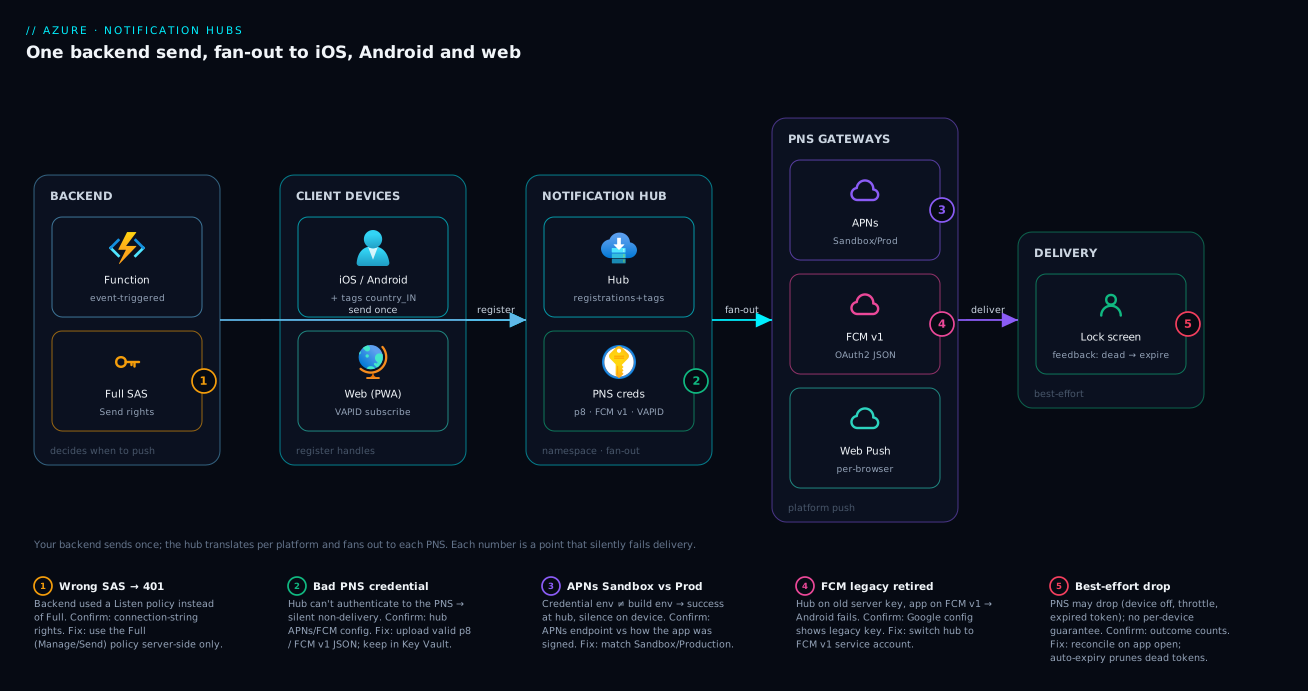
Walk the diagram left to right. On the far left, three client devices — iOS, Android, and a browser — each obtain a device handle from their respective PNS and register it (with tags like country_IN, topic_cricket) into the Notification Hub. The hub, inside a namespace, is the center: it holds every device’s registration/installation, the tags that segment them, and the APNs .p8, FCM v1, and VAPID credentials it needs downstream. To its left, your backend — a Function or App Service triggered by a business event — issues one send with a target (broadcast, tag, or tag expression) using a Full SAS policy.
When a send arrives, the hub matches registrations, renders the right native payload per platform, and fans out to the three PNS endpoints on the right; each PNS does last-mile delivery and reports dead tokens back so the hub auto-expires them. The numbered badges mark what fails in practice: the SAS policy on the send call, the per-platform credential, the APNs Sandbox-vs-Production split, and the FCM v1 migration. Follow the arrows and you can place any “my push didn’t arrive” symptom on exactly one hop.
Real-world scenario
Kreeda, a fictional Bengaluru sports-streaming startup, runs apps on iOS, Android, and a PWA with about 1.4 million monthly active devices. They wanted three kinds of push: transactional (“subscription renews tomorrow”), topical (“⚡ India needs 12 off the last over — watch live”), and the occasional global (“maintenance tonight 2–3 AM IST”). Their first version pushed straight to APNs and FCM from a Node service, and it unravelled at scale: the FCM legacy key broke after Google’s v1 migration, their token table grew to 40+ million unpruned rows so delivery sagged, and a “all cricket fans” broadcast meant a hand-rolled loop that APNs throttled — half the audience got the alert ten minutes late, after the over was bowled.
They moved to a single Standard Notification Hub in Central India. Each app registered an installation keyed by a per-device GUID, attaching tags: user_<id>, country_IN, lang_en/lang_hi, and per-match topic_<matchId> when a user opened a match. Their existing event pipeline already produced “match event” messages on Service Bus; an Azure Function consumed those and called the hub with a tag expression like (topic_match_8841 && lang_en) for English subscribers and a parallel send for lang_hi, using templates so each platform and language rendered correctly from one set of values.
The results were the kind a hub is built to deliver. The match-day broadcast that used to leak over ten minutes now fanned out in seconds, because the hub batched against each PNS for them. Dead-token pruning became automatic — uninstalls reported by APNs/FCM expired the registrations, and delivery rates climbed back as the dead ~18% of tokens aged out. The FCM v1 migration that had broken their homegrown sender was a one-time credential upload. And because targeting moved into tags, marketing could request “paying Hindi-speaking cricket fans” — (tier_pro && lang_hi && topic_cricket) — with no database join. The one scar: an early week of “iOS gets nothing”, caused entirely by an APNs Sandbox credential on a hub serving an App Store (Production) build — a five-minute fix once they knew the split exists, which is why it leads the troubleshooting table below.
Advantages and disadvantages
The trade-off is managed cross-platform fan-out versus a purpose-built broadcaster that deliberately does not do queueing, real-time, or per-message delivery guarantees.
| Advantages | Disadvantages |
|---|---|
| One backend call → all platforms (APNs/FCM/Web/WNS/ADM) | Push is best-effort — no per-device delivery guarantee (PNS behaviour) |
| Scales to millions per send with platform batching/throttling | Not a queue: no ordering, no replay, no dead-letter for app logic |
| Tag-based segmentation without your own token DB | Tag taxonomy must be designed up front; limits on tags/expressions |
| Templates render the right payload per platform/language | Cannot message an open connected client — that’s SignalR’s job |
| Auto-pruning of dead tokens via PNS feedback | You still own credential lifecycle (APNs env, FCM v1 JSON) |
| Generous Free tier; pay mainly per push at scale | Rich open/click analytics need extra wiring (Insights/your own) |
When each side matters: the advantages dominate any consumer app that must reach users on the lock screen across platforms. The disadvantages matter only when you mistake the hub for something it is not — ordered processing is Service Bus, live dashboard updates are SignalR, open/conversion analytics need separate instrumentation. Used for its actual job, the disadvantages are non-issues; used as a general message bus, they are blockers.
Hands-on lab
Stand up a namespace and hub, inspect access policies, and send a notification — all from the CLI, free-tier friendly. You do not need a real mobile app: the lab uses the debug/test send so you can watch a hub work end to end. Replace names as needed.
Step 1 — variables and resource group.
RG=rg-nh-lab
LOC=centralindia
NS=nhns-kreeda-$RANDOM      # namespace name must be globally unique
HUB=nh-kreeda

az group create --name $RG --location $LOC -o table
Step 2 — create the Notification Hubs namespace and a Free hub. The namespace is the billable container; the hub lives inside it.
# Create the namespace (sku Free for the lab)
az notification-hub namespace create \
  --resource-group $RG --name $NS --location $LOC --sku Free -o table

# Create the hub inside the namespace
az notification-hub create \
  --resource-group $RG --namespace-name $NS --name $HUB --location $LOC -o table
Expected: both commands return the created resource with provisioningState: Succeeded.
Step 3 — inspect the access policies (SAS). A new hub ships with two policies: a Listen policy for clients (register only) and a Full policy for your backend (send + manage). This separation is the security model.
az notification-hub authorization-rule list \
  --resource-group $RG --namespace-name $NS --notification-hub-name $HUB \
  --query "[].{name:name, rights:rights}" -o table
Expected: a DefaultListenSharedAccessSignature (Listen) and a DefaultFullSharedAccessSignature (Manage, Send, Listen).
Step 4 — grab the Full connection string for backend sends. Your backend uses this; never ship it to a client.
az notification-hub authorization-rule list-keys \
  --resource-group $RG --namespace-name $NS --notification-hub-name $HUB \
  --name DefaultFullSharedAccessSignature \
  --query primaryConnectionString -o tsv
Step 5 — (real apps) upload the PNS credentials. Skip for the lab; in production you upload APNs and FCM v1 here so the hub can authenticate downstream. The APNs (token-based) call:
# Apple APNs, token-based (.p8) — Sandbox for dev builds, Production for store builds
az notification-hub credential apns update \
  --resource-group $RG --namespace-name $NS --notification-hub-name $HUB \
  --apns-certificate "" \
  --key-id <APNS_KEY_ID> --app-id <TEAM_ID> --app-name <BUNDLE_ID> \
  --token "$(cat AuthKey_XXXX.p8)" --endpoint "https://api.push.apple.com:443/3/device"
FCM v1 is configured with the service-account JSON via the portal or the management API (the legacy server-key path is retired). Treat both credentials as secrets and store them in Key Vault.
Step 6 — send a test notification. The test send delivers to a small number of registered devices and returns the outcome, validating wiring before your app is live. A native APNs-shaped payload:
az notification-hub test-send \
  --resource-group $RG --namespace-name $NS --notification-hub-name $HUB \
  --notification-format apple \
  --message '{"aps":{"alert":"Hello from Notification Hubs"}}'
Expected: a JSON result with success / failure counts and per-registration outcomes. With no registered Apple devices yet, you will see zero successes — that is correct; it proves the send path and credential plumbing work.
Step 7 — the same hub as Bicep (for real deployments). Infrastructure-as-code version of steps 2–3:
param location string = resourceGroup().location

resource ns 'Microsoft.NotificationHubs/namespaces@2023-09-01' = {
  name: 'nhns-kreeda-prod'
  location: location
  sku: { name: 'Standard' }   // Free | Basic | Standard
}

resource hub 'Microsoft.NotificationHubs/namespaces/notificationHubs@2023-09-01' = {
  parent: ns
  name: 'nh-kreeda'
  location: location
}

// A Listen-only policy for clients to register with
resource listenRule 'Microsoft.NotificationHubs/namespaces/notificationHubs/authorizationRules@2023-09-01' = {
  parent: hub
  name: 'client-listen'
  properties: { rights: [ 'Listen' ] }
}
Step 8 — teardown. Delete the resource group to remove the namespace, hub, and policies.
az group delete --name $RG --yes --no-wait
Common mistakes & troubleshooting
The hub returns a clean success while the device stays silent more often than any other Azure service, because the delivery failure happens at the PNS, one hop past the hub. Here is the playbook — symptom, root cause, how to confirm, fix. The first two rows are the near-universal first-week failures.
| # | Symptom | Likely root cause | How to confirm | Fix |
|---|---|---|---|---|
| 1 | iOS gets nothing; hub reports success | APNs Sandbox vs Production mismatch (credential env ≠ build env) | Hub’s APNs endpoint vs how the app was signed (dev → Sandbox; store/TestFlight → Production) | Match the APNs environment; re-register against it |
| 2 | Android delivery fails after working before | FCM legacy key retired; app on v1, hub on legacy | Google config shows a legacy server key, not a v1 service account | Upload the FCM v1 service-account JSON; switch the hub to v1 |
| 3 | “Unauthorized”/401 from the send call | Backend used a Listen SAS, not Full | Inspect the connection string’s rights | Use the Full (Manage/Send) policy for sends |
| 4 | A tagged send reaches no one | Tag never set at registration, or a typo | List the installation and inspect its tags |
Set the correct tag; tags are case-sensitive |
| 5 | Delivery rate slowly falls over weeks | Dead tokens accumulating (uninstalls) | Outcome counts show a high “expired/invalid” share | Use installation upserts + auto-expiry; stop re-adding stale handles |
| 6 | Duplicate notifications to one user | Multiple registrations per device (no idempotent key) | Same handle in several registrations | Move to the installation model keyed by installationId |
| 7 | Payload rejected / truncated | Native payload exceeds the PNS size limit (~4 KB) | PNS error in the send outcome | Shrink the payload; fetch large data on tap |
| 8 | Web push never arrives | Missing/wrong VAPID keys, or unsupported browser | Browser console; hub Web Push config | Configure VAPID; verify browser support |
| 9 | Send “succeeds” but device never gets it | Push is best-effort; PNS dropped it (device off/quota) | Expected PNS behaviour — no hub fix | Use push for alerts only; sync on app open |
| 10 | Throttled during a huge broadcast | Sending faster than a PNS accepts | 429/throttle in outcomes | Let the hub batch (don’t loop); use Standard for scale |
| 11 | Some users on a tag get it, others don’t | A stale handle the PNS rejects | Outcome shows invalid handle for those devices | Refresh handles on launch via installation upsert |
| 12 | Can’t push to a single user reliably | Targeting by handle, not a stable identity | No per-user tag exists | Attach a user_<id> tag (or use installation userId) |
The meta-rule: a success from the hub means “I accepted and forwarded it to the PNS,” not “the device received it.” When something is silent, the cause is almost always one hop downstream — wrong credential environment (rows 1–2), wrong access policy (row 3), or a targeting/tag error (rows 4, 12). Confirm the credential and the tags before suspecting the hub.
Best practices
- Use the installation model, keyed by a stable
installationId— idempotent, patchable tags/templates, and “push to this exact user” becomes trivial. - Design your tag taxonomy before you ship (
country_*,lang_*,topic_*,user_*,tier_*); keep it case-consistent; push identity plus a few segments, not every attribute. - Refresh the handle on every app launch via an installation upsert — PNS tokens rotate, and a stale handle is a silently-dead device.
- Keep APNs/FCM credentials in Key Vault, not in app settings or source. Prefer APNs token-based (
.p8) auth — it does not expire annually like certificates. - Match the APNs environment to the build: dev/ad-hoc → Sandbox, TestFlight/App Store → Production. Mismatch = silent non-delivery.
- Let the hub do the fan-out — send once with a tag or tag expression; never loop and call the hub once per device.
- Use templates for multi-platform, multi-language sends so the backend ships values, not platform-specific payloads.
- Separate Listen and Full SAS — clients get Listen, only the backend holds Full; rotate keys periodically.
- Treat push as best-effort — for anything that must arrive, reconcile state when the app next opens.
- Pick the right partner service: trigger sends from Functions off Service Bus/Event Grid (system side); pair with SignalR (app-is-open side).
- Mind payload size (APNs/FCM ~4 KB): send a pointer, fetch the rest on tap.
- Enable diagnostic logs to Azure Monitor to see send outcomes and failures over time.
Security notes
The hub’s security model is SAS access policies plus PNS credentials you must protect. Two SAS rights matter: Listen (a client registers its own device, nothing else) and Full (Manage + Send + Listen — your backend). Never embed a Full connection string in a mobile app; a leaked Full key lets anyone broadcast to your entire audience. Ship clients Listen only, and prefer minting short-lived, per-client SAS tokens from your backend over embedding any shared secret.
| Concern | Risk if ignored | Control |
|---|---|---|
| Backend send key | Leaked Full SAS → attacker broadcasts to all users | Full policy stays server-side; rotate keys; per-client Listen tokens |
| PNS credentials | Stolen APNs .p8/FCM JSON → impersonate your sender |
Store in Key Vault; least-privilege access; rotate |
| Client registration | A rogue client tags itself into premium segments | Validate/assign sensitive tags server-side, not from the client |
| PII in payloads | Sensitive data on a lock screen / in PNS logs | Keep payloads minimal; fetch details in-app after tap |
| Network exposure | Management plane reachable broadly | Use Entra-ID RBAC for control-plane ops; scope SAS narrowly |
| Auditing | No record of who sent what | Send diagnostic logs to a Log Analytics workspace |
Two non-obvious points. First, tags are client-asserted unless you mediate them — if the app lets a device add tier_pro directly, a user can grant themselves premium pushes; assign entitlement tags from your backend after verifying the user. Second, payloads pass through Apple/Google infrastructure, so treat the notification body as visible on a locked screen and in provider telemetry — push the signal, fetch the secret in-app.
Cost & sizing
Notification Hubs pricing is per namespace tier plus pushes/month and extra active devices beyond the included quota. The three tiers — Free, Basic, Standard — differ in included pushes and devices, per-extra-device price, and feature gates (rich telemetry, scheduled and multi-tenant push). Free is genuinely useful for dev and small apps; Basic and Standard scale by paying mostly for additional devices and pushes.
| Tier | Best for | Included pushes/mo (order of magnitude) | Included active devices | Notable feature gates |
|---|---|---|---|---|
| Free | Dev, small apps | ~1 million | ~500 | Core push; limited throughput |
| Basic | Production, mid scale | ~10 million | ~200,000 | Higher limits; per-extra-device charge |
| Standard | Large/enterprise | ~10 million base | ~10 million | Richer telemetry, scheduled push, multi-tenancy, higher SLAs |
What drives the bill: the tier base fee, the active-device count above the included quota (the dominant cost at consumer scale), and pushes/month above the included pool. Rules of thumb: a hobby or internal app fits Free; a consumer app with a few hundred thousand devices fits Basic; millions of devices, frequent broadcasts, or a need for scheduled push and richer analytics make Standard the floor. Because device count dominates, prune dead registrations — auto-expiry plus the installation model do this for you, so target with tags, refresh handles on launch, and never pay for millions of uninstalled devices (the most common avoidable cost). Confirm current numbers on the Azure pricing page; tiers and quotas change.
Interview & exam questions
1. What is Azure Notification Hubs in one sentence? A managed service that takes a single backend send and fans it out as native push notifications to devices across APNs, FCM, Web Push, WNS, and ADM, handling per-platform translation, device registration, segmentation, and dead-token pruning. (Maps to AZ-204, AZ-305 messaging topics.)
2. How does Notification Hubs differ from Azure SignalR Service? Notification Hubs delivers OS-level push to a device even when the app is backgrounded or closed, via the platform’s PNS. SignalR pushes real-time messages over a persistent WebSocket to a client that is currently connected. Closed app → Notification Hubs; open app/live UI → SignalR.
3. What is a PNS, and why can’t your backend just push to the device? A Platform Notification System (APNs, FCM, Web Push, WNS) is the only entity a platform allows to deliver a push to its devices. Your backend must go through the PNS; Notification Hubs is the layer that holds the credentials and registrations and talks to each PNS for you.
4. Explain registration vs installation. Both are the hub’s record of a device (handle + tags + optional template). A registration is the older model with a server-assigned ID and is prone to duplicates. An installation is JSON keyed by a stable installationId you provide — idempotent upserts, patchable tags/templates — and is recommended for all new apps.
5. What is a tag, and how do you target a segment? A tag is a string label on a registration (country_IN, tier_pro). You target by sending to a tag or a tag expression ((country_IN && tier_pro)), and the hub delivers only to devices carrying matching tags — segmentation without your own token database.
6. Your iOS pushes return success but never arrive. First suspicion? An APNs Sandbox vs Production environment mismatch: the hub’s APNs credential environment must match how the app was signed (dev build → Sandbox, store/TestFlight → Production). The hub reports success because it forwarded to the PNS; the PNS dropped it.
7. What changed with FCM v1 and why does it matter here? Google retired the legacy FCM server-key API in favour of FCM v1, which uses a service-account JSON and OAuth2. A hub still configured with a legacy key fails to deliver to Android; you must upload the v1 service account and switch the hub to FCM v1.
8. When would you choose Event Grid or Service Bus over Notification Hubs? When the recipient is a service, not a device. Event Grid routes discrete system events (e.g. “blob created”) to subscribers; Service Bus carries durable, ordered messages/commands to backend consumers. A common pattern is Event Grid/Service Bus → Function → Notification Hubs.
9. Is push delivery guaranteed? No — push is best-effort. The PNS may drop a notification (device off, quota, throttling) with no per-device guarantee. For data that must arrive, reconcile state when the app next opens; never rely on push alone.
10. What’s the difference between Listen and Full SAS policies? Listen lets a client register its own device and nothing more — safe to expose. Full (Manage + Send + Listen) lets the holder broadcast and manage the hub — backend only. A leaked Full key lets anyone push to your entire audience.
11. How does Notification Hubs help you manage dead device tokens? When a PNS reports a token as unregistered (app uninstalled), the hub automatically expires that registration so future sends skip it — the feedback loop you would otherwise build per platform. Combined with installation upserts, this keeps your registration store (and bill) clean.
12. What is a template and when is it useful? A template is a payload skeleton with $(placeholders) registered per device. Your backend sends only values; the hub renders each device’s template, producing the correct shape per platform and per language from one send — ideal for multi-platform, localized notifications.
Quick check
- The app is closed and you must alert the user on the lock screen — Notification Hubs or SignalR?
- Your backend send returns 401 Unauthorized. What is the most likely cause?
- You send to the tag
country_INand nobody receives it, though devices are registered. Name two likely reasons. - A success response from the hub guarantees the device received the push — true or false?
- Which device record model should new apps use, and what is its key benefit?
Answers
- Notification Hubs — it delivers OS-level push through the PNS to a backgrounded/closed app; SignalR only reaches a connected client.
- The backend used a Listen SAS policy instead of a Full (Manage/Send) policy. Listen can only register devices, not send.
- The tag was never set at registration on those devices, or there is a case/typo mismatch (
country_invscountry_IN— tags are case-sensitive). A stale handle the PNS rejects is a third possibility. - False. Success means the hub accepted and forwarded to the PNS; push is best-effort and the PNS may still drop it.
- The installation model, keyed by a stable
installationId— idempotent upserts (no duplicate registrations) with patchable per-device tags and templates.
Glossary
- Azure Notification Hubs — Managed service that fans out a single send to multiple platforms’ push systems (APNs/FCM/Web Push/WNS/ADM).
- PNS (Platform Notification System) — A platform’s push gateway (APNs, FCM, Web Push, WNS, ADM); the only thing allowed to deliver a push to its devices.
- Device handle / PNS token — The platform-issued token that addresses one specific device; volatile and must be refreshed.
- Namespace — The container that holds one or more hubs; where the SKU/tier and SAS policies live.
- Notification hub — One logical hub: its registrations, PNS credentials, and the fan-out engine you send to.
- Registration — The legacy device record (handle + tags + optional template) with a server-assigned ID.
- Installation — The recommended device record: a JSON document keyed by a stable
installationId, supporting idempotent upserts and patchable tags/templates. - Tag / tag expression — A string label on a registration, combined with boolean logic (
(a && b) || c) to target a segment at send time. - Template — A payload skeleton with
$(placeholders)registered per device, so one send renders the right shape per platform/language. - APNs — Apple Push Notification service; needs a token (
.p8) or certificate, with separate Sandbox and Production environments. - FCM — Firebase Cloud Messaging (Android/cross-platform); modern access is FCM v1 with a service-account JSON.
- Web Push / VAPID — Browser push standard; uses a VAPID public/private key pair.
- SAS policy — Shared Access Signature rule on the namespace/hub; Listen (client) vs Full (backend).
Next steps
- The backend that decides when to push is usually serverless — see Azure Functions and Serverless Patterns: Event-Driven Compute.
- Keep APNs/FCM credentials and SAS keys out of source — Azure Key Vault: Secrets, Keys and Certificates Done Right.
- Decide where push fits among async options with Message Queues vs Pub/Sub: Choosing an Async Pattern.
- Choose where to host the backend that calls the hub with Azure App Service vs Container Apps vs AKS: Choose the Right Compute.
- Track send outcomes and failures over time with Azure Monitor and Application Insights: Full-Stack Observability.