“What happens when the host your VM is running on dies?” is near the top of every production checklist. A single Azure Virtual Machine is a single point of failure: the moment its physical server, rack power feed, top-of-rack switch, or hypervisor needs attention — planned or unplanned — your application goes dark. Azure gives you three escalating tools to fix that — availability sets, availability zones, and VM Scale Sets — and exactly how each one spreads your machines, and what SLA each one buys, is one of the most reliably asked topics in Azure interviews and on the AZ-104 and AZ-305 exams.
This is the deep, no-hand-waving treatment. By the end you can explain fault domains versus update domains without hesitating, know why a single VM gets no uptime guarantee unless it uses Premium disks, choose between zonal and zone-redundant deployments, describe how a Scale Set layers on top, and reason about planned versus unplanned maintenance, live migration, and region pairs for disaster recovery. It assumes you have already met the VM itself in the companion lesson; here we focus entirely on keeping it available.
Learning objectives
By the end of this lesson you can:
- Explain what an availability set is and describe fault domains (FD) and update domains (UD) precisely — defaults, maximums, and how Azure spreads VMs across the FD×UD grid.
- State the SLA for a single VM, an availability set, an availability-zone deployment, and a Scale Set, and explain why each number is what it is.
- Distinguish zonal from zone-redundant deployments.
- Describe how VM Scale Sets (Uniform vs Flexible) combine with fault domains and zones, and how autoscale works.
- Compare single VM vs set vs zone vs Scale Set on SLA, blast radius, and when to use each.
- Explain planned vs unplanned maintenance, live migration, maintenance configurations, and how region pairs provide DR.
- Create an availability set and a zonal VM with
azand read back the FD/UD counts.
Prerequisites & where this fits
You should already understand what an Azure Virtual Machine is and how to create one — sizes, disks, NICs, and the basics of regions and resource groups. If any of that is shaky, read the companion Azure Virtual Machines Deep Dive: Every Creation & Post-Creation Setting first; this lesson assumes that vocabulary and concentrates entirely on resilience. It is a Compute module lesson in the Azure Zero-to-Hero course, sitting immediately after the VM deep-dive and before storage. The concepts here — fault domains, update domains, zones — recur throughout Azure (databases, load balancers, Kubernetes node pools, storage redundancy), so the mental models pay off far beyond VMs. For the lab you need a subscription with permission to create VMs in a region that supports availability zones.
Core concepts: failure domains, SLAs, and blast radius
Before the features, internalise three ideas the whole topic hangs on.
A failure domain is a set of components that share a single point of failure. If a power distribution unit fails, every server it feeds goes down together — that PDU defines a failure domain; if a rack’s top-of-rack switch dies, the whole rack loses connectivity. High availability is spreading replicas across different failure domains so no single failure takes all of them. Azure’s resilience features are, at heart, increasingly large failure-domain boundaries to spread across: different racks (availability sets), different buildings (availability zones), and different regions (region pairs).
An SLA (Service Level Agreement) is a financially backed uptime promise — a monthly availability percentage Microsoft commits to, with service credits if it misses. The numbers look small but the difference is enormous:
| Monthly SLA | Allowed downtime per month | Allowed downtime per year |
|---|---|---|
| 99.9% (“three nines”) | ~43.2 minutes | ~8.77 hours |
| 99.95% | ~21.9 minutes | ~4.38 hours |
| 99.99% (“four nines”) | ~4.38 minutes | ~52.6 minutes |
The crucial subtlety, and a favourite interview trap: a single VM has no availability SLA at all unless every OS and data disk uses Premium SSD or Ultra Disk (and even then it is only 99.9%). With Standard SSD a single VM gets 99.5%; with Standard HDD there is no uptime guarantee. The instant you need a real promise you either put the VM on premium storage (99.9% single instance) or — far better — deploy two or more instances into an availability set (99.95%) or across zones (99.99%). HA on Azure is about redundancy of instances, not making one instance bulletproof.
Blast radius is how much breaks when one thing fails. A single VM has a blast radius of “everything.” An availability set shrinks a rack/power/network fault to a fraction of the fleet; availability zones shrink a whole-datacentre fault; region pairs shrink a regional disaster. Climbing that ladder trades cost and complexity for a smaller blast radius — the architect’s job is to pick the rung that matches the workload’s downtime tolerance.
One last pair of terms used throughout: unplanned maintenance is hardware failing unexpectedly (Azure must react), and planned maintenance is Azure proactively updating the host fleet on its own schedule. The features below keep you running through both — we return to the mechanics later.
Availability Sets: fault domains and update domains
An availability set is a logical grouping you place two or more VMs into so Azure guarantees it spreads them across different physical hardware within a single datacentre. It costs nothing extra — you pay only for the VMs — and its sole job is to ensure a single rack failure or a single wave of host maintenance can never take down all the VMs performing the same role. It is the original datacentre-local HA mechanism, built from two independent kinds of failure domain: fault domains and update domains.
Fault domains (FD) — protection from unplanned hardware failure
A fault domain is a group of physical hardware sharing a common power source and network switch — roughly a server rack. If that rack’s power feed or switch fails, every VM in that fault domain goes down together, but VMs in other fault domains are unaffected. Fault domains protect you from unplanned failures: the dead PSU, the failed switch, the rack that loses power.
| Property | Value |
|---|---|
| What it represents | A rack-level boundary: separate power source + network switch |
| Protects against | Unplanned hardware failure (power, network, server) |
| Default count | 2 |
| Maximum | 3 per region |
| After creation | Fixed at creation; cannot be changed in place |
At creation you choose how many fault domains the set uses, from 2 (default) up to 3 depending on the region (every region supports at least 2; many support 3). Azure then guarantees the VMs you add land in different fault domains, so a single rack failure takes at most a fraction of them. With the default 2 FDs and 2 VMs, the VMs sit on two separate racks — lose one and you still have a VM serving traffic.
Update domains (UD) — protection from planned maintenance reboots
An update domain is a logical group of VMs (and underlying hardware) that can be rebooted together during planned maintenance. When Azure needs an update that requires a reboot, it processes update domains one at a time, sequentially: it reboots everything in UD 0, waits for those VMs to recover (a window historically around 30 minutes), then moves to UD 1, and so on. Because only one update domain is ever down at a time, the rest of the fleet keeps serving. Update domains protect against planned maintenance, not hardware failure.
| Property | Value |
|---|---|
| What it represents | A group rebooted together during planned host maintenance |
| Protects against | Planned maintenance reboots (one UD at a time) |
| Default count | 5 |
| Maximum | 20 |
| After creation | Fixed at creation; cannot be changed in place |
Default is 5 update domains, maximum 20. More update domains means each maintenance wave touches a smaller slice of the fleet (20 UDs and 20 VMs = only 5% reboots at a time), at the cost of maintenance taking longer to roll through. For most workloads the default of 5 is the right balance.
The crucial distinction: fault domain vs update domain
This is the interview question, so commit it to memory. Fault domains are physical and protect against unplanned failure; update domains are logical and protect against planned maintenance. A fault domain is a rack — separate power and network — and a rack dying is an accident Azure did not choose. An update domain is a reboot group Azure deliberately takes down together when it schedules a host update. One is the building burning; the other is the landlord repainting one floor at a time. You need both because availability has two enemies: failures you don’t control and maintenance Azure does.
How VMs spread across the FD×UD grid
Azure places the VMs you add across the two-dimensional grid of fault domains × update domains, striping so no single FD or UD holds a disproportionate share. Picture a default set as a grid 2 FDs wide and 5 UDs tall — Azure increments the update domain and alternates the fault domain per VM, spreading them as evenly as possible across both axes:
| VM | Fault domain | Update domain |
|---|---|---|
| VM 0 | FD 0 | UD 0 |
| VM 1 | FD 1 | UD 1 |
| VM 2 | FD 0 | UD 2 |
| VM 3 | FD 1 | UD 3 |
| VM 4 | FD 0 | UD 4 |
| VM 5 | FD 1 | UD 0 |
The payoff: no single rack failure or maintenance wave takes down more than a known, bounded fraction of your VMs. That is why you must put at least two VMs of the same role into a set — one VM is pointless, since the whole mechanism is about distributing multiple instances. Put a load balancer in front so traffic flows only to healthy instances while one FD or UD is down.
The 99.95% SLA
With two or more VMs in the same availability set, Microsoft guarantees connectivity to at least one instance 99.95% of the time — roughly 22 minutes of allowed downtime per month. Note what it does not promise: it guarantees the set stays reachable (at least one VM up), not that every individual VM stays up. During maintenance one UD’s VMs reboot and are momentarily unavailable, but the set keeps serving — which is why your app must run across multiple instances behind a load balancer, not depend on any single one.
Key constraints and gotchas:
- Same datacentre. All VMs in a set live in one datacentre (one zone). A set survives rack and maintenance failures but not a whole-datacentre outage — for that you need availability zones.
- Set at creation, fixed for life. Set membership and FD/UD counts are chosen at creation; you cannot move an existing VM into or out of a set without recreating it.
- Size consistency. All VMs in a set should be the same or compatible size families; mixing wildly different sizes can cause allocation failures.
- Aligned vs classic. Modern managed (aligned) sets align managed-disk fault domains with the VM’s fault domain so a rack failure doesn’t independently take out compute and storage. Always use managed disks — the unmanaged variant is legacy.
- No combining with zones. A VM (or set) is either in an availability set or pinned to a zone, never both — they are mutually exclusive placement strategies.
Availability Zones: surviving a whole datacentre
An availability set only spreads VMs across racks inside one datacentre. If the whole building loses power, floods, or burns, every VM in the set goes down together. Availability zones raise the failure-domain boundary to the level of the datacentre itself.
An availability zone is one or more physically separate datacentres within an Azure region, each with independent power, cooling, and networking — far enough apart that a localised disaster (fire, flood, power loss) in one zone won’t affect the others, yet close enough (high-bandwidth, low-latency private fibre) that synchronous replication between them is practical. Regions that support zones have at least three, labelled 1, 2, and 3. Placing VMs in different zones lets you survive the loss of an entire datacentre.
Two fundamentally different ways a resource can use zones — telling them apart is another classic exam point:
| Approach | What it means | Example | Failure it survives |
|---|---|---|---|
| Zonal (zone-pinned) | The resource is placed in one specific zone you choose; you deploy multiple copies across zones yourself | A VM created with --zone 1; a zonal public IP |
Loss of a different zone (you must spread copies yourself) |
| Zone-redundant | Azure automatically spreads the single resource across all zones for you | A zone-redundant Standard Load Balancer; ZRS storage; a zone-redundant gateway | Loss of any one zone, transparently |
A zonal resource lives in exactly one zone — a VM is inherently zonal because it runs on hardware physically in one place. For zone resilience you create VMs in different zones (one each in zones 1, 2, 3) and load-balance across them. A zone-redundant resource is one Azure replicates across zones on your behalf so the single logical resource keeps working if a zone fails — Standard Load Balancers, standard public IPs (configured zone-redundant), zone-redundant storage (ZRS), and many PaaS services work this way. The shortcut: zonal = you place copies in zones; zone-redundant = Azure spreads one resource across zones for you.
The 99.99% SLA
Deploy two or more VMs across two or more availability zones and Microsoft raises the SLA to 99.99% — four nines, about 4.4 minutes of allowed downtime per month. This is the highest standard VM availability SLA Azure offers, the gold standard for workloads that must survive a datacentre-level event. The jump from 99.95% (set, same datacentre) to 99.99% (zones, separate datacentres) reflects the larger failure domain you now spread across.
Zones in practice:
- Not every region has zones, and not every service is zonal. Zones exist only in supported regions, and within those only certain VM sizes and services support zonal deployment. Check zone support for both your region and your VM size before designing.
- Inter-zone data transfer can incur charges. Traffic between zones within a region may be billed, so chatty cross-zone communication has a small cost — usually negligible next to the resilience it buys.
- Latency between zones is low but non-zero. A synchronous write replicated across zones pays a small latency tax versus a single zone; for most apps it’s invisible.
- Zones are per-subscription-mapped. Your logical “zone 1” may map to a different physical datacentre than a colleague’s “zone 1” — Azure does this to balance load across physical zones. It doesn’t affect your design.
- Zones and availability sets are mutually exclusive for a given VM — pick one.
VM Scale Sets: resilience plus elasticity
An availability set or zonal layout keeps a fixed set of VMs available. A VM Scale Set (VMSS) keeps a variable set of identical VMs available and automatically grows or shrinks it with demand — the natural choice when you want both high availability and elasticity from one managed group, and how you run stateless web and API fleets on Azure IaaS.
A Scale Set manages a group of VMs from a single configuration, giving you in one resource: automatic spreading across fault domains (and optionally zones), autoscale on metrics or schedule, rolling and automatic OS-image upgrades, and integrated load balancing with health probes. Crucially, Scale Sets come in two orchestration modes that determine how they relate to the fault-domain and zone machinery above.
| Orchestration mode | What the instances are | Fault-domain & zone control | Best for |
|---|---|---|---|
| Uniform | Identical, fungible instances managed via a VMSS proxy object (not standard VM resources) | Spread automatically; large FD ceilings | Very large homogeneous fleets (thousands), Service Fabric |
| Flexible | Real Microsoft.Compute/virtualMachines resources that are members of the set |
Explicit fault-domain count; gives availability-set-style placement with scale machinery | The default for most new workloads; mixed sizes, per-instance ops |
Uniform orchestration is the original model: identical, interchangeable units behind a scale-set proxy, scaling to very large numbers — still the right choice for huge homogeneous fleets and Service Fabric. Flexible orchestration — now the default for most new workloads — makes each instance a real VM resource that belongs to the set, so it behaves like a normal VM for tooling and extensions, supports mixed sizes, and gives explicit fault-domain spreading. In effect Flexible unifies the placement guarantees of an availability set with the scaling and upgrade machinery of a Scale Set.
How Scale Sets combine with fault domains and zones
Within a single region (no zones), a Scale Set spreads instances across fault domains automatically — you set a platformFaultDomainCount and Azure distributes across that many racks, like an availability set but elastic. Deploy a Scale Set across availability zones (list zones 1, 2, 3) and it balances instances across both zones and fault domains — datacentre-level resilience and rack-level resilience and autoscale in one resource. A zone-spanning Scale Set with 2+ instances across 2+ zones earns the same 99.99% SLA as discrete zonal VMs; one within a single datacentre across fault domains earns 99.95%. This is why a zone-redundant Flexible Scale Set is the modern default shape for resilient IaaS fleets.
Autoscale
The defining superpower of Scale Sets is autoscale: rules that add or remove instances automatically. Two styles, often combined:
- Metric-based (reactive) — rules watching a metric (CPU, memory, queue length, a custom Application Insights metric) that scale out past a threshold and back in when it falls. You set a min, max, and default count plus cool-down periods so the set doesn’t thrash. E.g. “average CPU > 70% for 10 min → add 2; < 30% for 10 min → remove 1.”
- Schedule-based (predictive) — rules tied to time for known patterns: scale to 10 at 08:00 weekdays and back to 2 at 20:00, or pre-scale before a sales event. Layer schedule profiles on metric rules so the floor moves with the clock while CPU rules handle spikes.
Always set a sensible minimum (keep redundancy at idle — at least 2 instances across FDs or zones) and a maximum (so a runaway metric or attack can’t scale into a surprise bill). Autoscale turns a Scale Set from “redundant” into “cost-efficient and redundant” — just enough instances for current load while keeping the resilience guarantees.
Comparison: single VM vs availability set vs availability zone vs Scale Set
The table to internalise for interviews and exams — SLA, blast radius, and when to reach for each.
| Option | SLA | Failure-domain boundary | Protects against | Blast radius | Elastic? | When to use |
|---|---|---|---|---|---|---|
| Single VM | 99.9% (Premium/Ultra disks only); 99.5% Standard SSD; none for Standard HDD | None — one host, one rack, one datacentre | Nothing beyond Azure’s best effort | Everything — one failure kills the workload | No | Dev/test, non-critical, or stateful singletons where downtime is acceptable |
| Availability set | 99.95% (2+ VMs) | Racks within one datacentre (FD + UD) | Unplanned rack/power/network failure and planned host maintenance | A fraction of the fleet (bounded by FD/UD striping) | No (fixed size) | Two or more VMs of the same role needing datacentre-local HA without zones |
| Availability zones | 99.99% (2+ VMs across 2+ zones) | Separate datacentres within a region | All of the above plus loss of an entire datacentre | One zone’s worth of instances | No (fixed size unless combined with VMSS) | Production HA that must survive a building/datacentre outage |
| Scale Set (VMSS) | 99.95% single-datacentre; 99.99% across zones | Fault domains, optionally across zones | Rack/maintenance, optionally datacentre — and absorbs load spikes | A fault domain or a zone, depending on layout | Yes — autoscale | Stateless web/API fleets needing HA and elasticity; the modern default |
Read this ladder practically: start at the bottom for anything that can tolerate downtime; move to an availability set the moment you have two instances of a role and want a real SLA without zones; move to availability zones when a single datacentre failure is unacceptable; and reach for a Scale Set across zones when the workload is stateless and its load varies — that one option gives the best SLA, the smallest blast radius for its cost, and elasticity in a single managed resource.
Planned vs unplanned maintenance, and live migration
How Azure maintains its fleet explains why the resilience features are shaped the way they are.
Unplanned maintenance is hardware failing without warning — a disk, memory, CPU, power supply, or network component dies. Azure detects it and reacts: if the host is unrecoverable, your VM is automatically redeployed (recreated) on a healthy host elsewhere — a reboot and a few minutes of downtime for that instance. This automatic recovery is called Service Healing. Fault domains exist precisely so an unplanned failure in one rack doesn’t take your other instances with it: while the failed instance heals onto new hardware, instances in other fault domains keep serving.
Planned maintenance is Azure proactively patching its own infrastructure — host OS/hypervisor patches, firmware, security fixes. Microsoft has made most of this non-impactful: many host updates need no VM reboot, and memory-preserving updates pause the VM only briefly (often under a second). When an update genuinely needs a reboot, that is where update domains come in — Azure walks them one at a time so only a slice of your fleet reboots at once.
Live migration makes most planned maintenance invisible: Azure moves a running VM from one host to another without rebooting it — memory state is copied to the destination and execution resumes with a brief pause (usually well under a second) during switch-over. Not every size or workload is eligible (some specialised, local-temp-disk-dependent, or GPU configurations require a reboot/redeploy instead), but for the great majority of general-purpose VMs it dramatically reduces maintenance impact.
Two mechanisms give visibility and some control:
- Scheduled Events — a metadata endpoint (
http://169.254.169.254/metadata/scheduledevents) the VM polls to learn of imminent maintenance (reboot, redeploy, freeze) seconds-to-minutes ahead, so the app can drain connections, checkpoint state, or fail over before it lands. - Maintenance Configurations (below) — let you, within limits, control when certain maintenance is applied.
Maintenance Configurations
A maintenance configuration is an Azure resource defining a maintenance window — a recurring schedule during which Azure-controlled (and, for some scopes, guest OS) updates are applied — so maintenance lands when you choose, not whenever Azure happens to schedule it. You create it, give it a scope and a schedule (e.g. “Sundays 02:00–04:00”), and assign VMs or Scale Sets to it. The main scopes:
| Maintenance scope | Controls | Notes |
|---|---|---|
| Host | Platform/host updates to the underlying server | Lets you defer host updates to your window; for certain isolated/large VM sizes |
| OS image (Scale Sets) | Rolling OS-image upgrades across VMSS instances | Used with automatic/rolling upgrades |
| Guest | Guest OS and extension updates (via Azure Update Manager) | Patches inside the VM on your schedule |
Maintenance configurations reconcile Azure’s need to keep its fleet patched with your need to control change windows for sensitive workloads. They are covered end-to-end in the Azure Update Manager: Maintenance Configurations & Patch Orchestration lesson.
Region pairs for disaster recovery
Everything above keeps you running within one region. To survive the loss of an entire region — rare but real — you replicate to a second region. Azure organises most regions into region pairs: two regions in the same geography (for data-residency and latency) that Azure treats specially for resilience. Within a pair Microsoft sequences planned platform updates so both halves are never updated at once, prioritises recovery of one region during a broad outage, and replicates certain services (like geo-redundant storage) to the paired region by default. To use a pair for DR you replicate VMs and data across — typically with Azure Site Recovery for VM replication and failover orchestration, plus geo-redundant storage and a tested failover runbook. Region pairs are the DR rung of the ladder, above availability zones; for the deep treatment see Azure Site Recovery: Zone-to-Zone & Region Failover Runbooks and the multi-region lessons linked at the end.
Diagram: the resilience picture
The diagram ties the three local mechanisms together: an availability set’s VMs striped across a grid of fault domains (racks) and update domains (reboot groups), the same workload spread instead across three availability zones (separate datacentres), and a Scale Set layering autoscale over zonal placement.
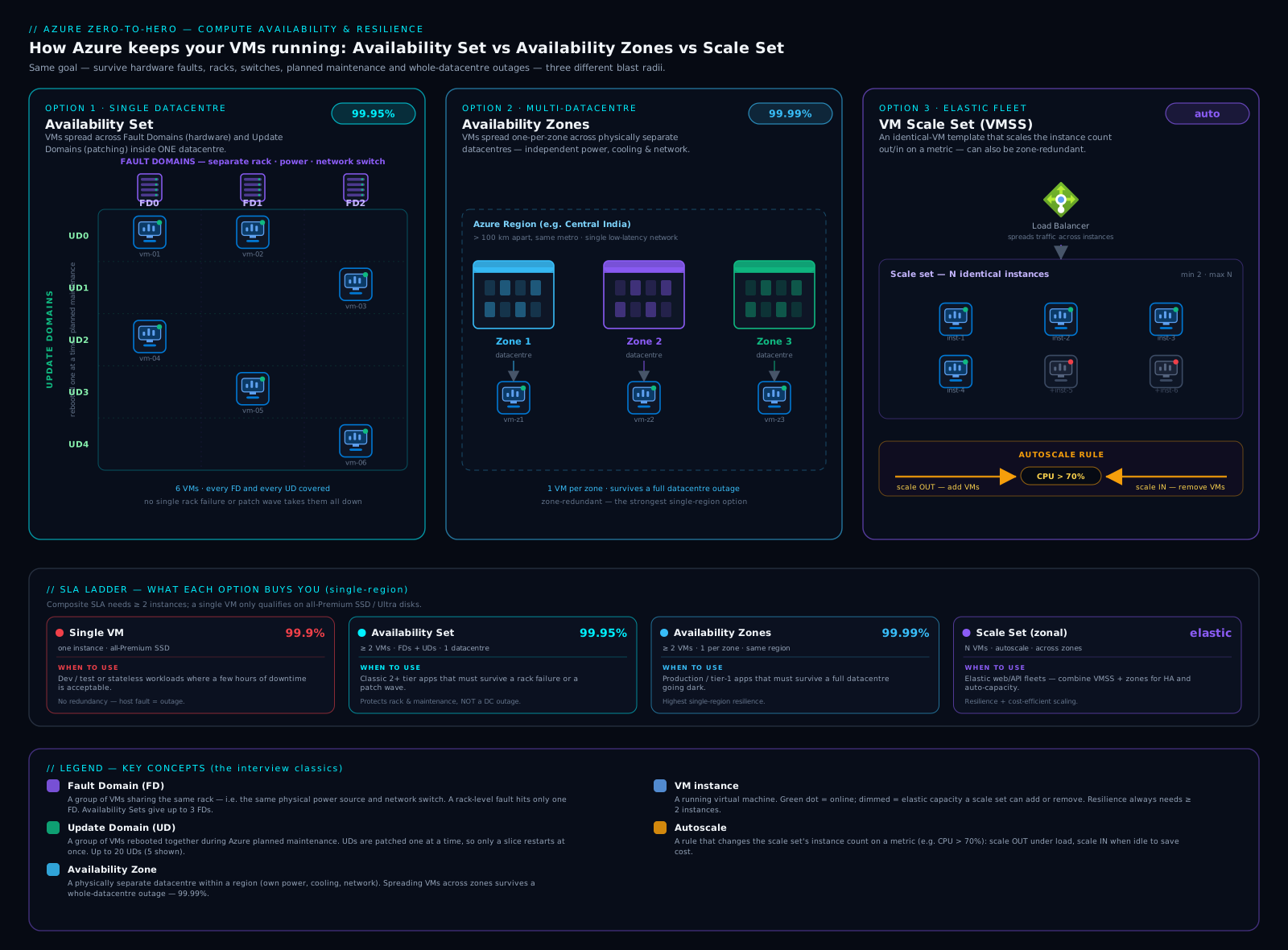
Read it left to right as the ladder of escalating failure-domain boundaries — rack, datacentre, then (off-diagram) region — and note the Scale Set is not a separate boundary but a way of managing placement across fault domains and zones elastically.
Hands-on lab: an availability set and a zonal VM
You will create an availability set, inspect its fault- and update-domain counts, then create a VM pinned to a specific availability zone — both placement strategies side by side. Run everything in Azure Cloud Shell or a local shell where you are logged in with az login, in a region that supports zones (e.g. eastus, westeurope).
Step 1 — Set up variables and a resource group
LOC=eastus
RG=rg-resilience-lab

az group create --name $RG --location $LOC --output table
Expected: a table showing the resource group rg-resilience-lab with provisioningState of Succeeded.
Step 2 — Create an availability set and read its FD/UD counts
az vm availability-set create \
  --resource-group $RG \
  --name avset-web \
  --platform-fault-domain-count 2 \
  --platform-update-domain-count 5 \
  --output table
Now read back the counts to confirm the FD×UD grid:
az vm availability-set show \
  --resource-group $RG \
  --name avset-web \
  --query "{name:name, faultDomains:platformFaultDomainCount, updateDomains:platformUpdateDomainCount, sku:sku.name}" \
  --output table
Expected output (values as configured):
Name       FaultDomains    UpdateDomains    Sku
---------  --------------  ---------------  -------
avset-web  2               5                Aligned
The Aligned SKU confirms this is a managed (aligned) set — the modern variant that aligns disk fault domains with the VM. You now have a 2×5 grid: any VM you add stripes across 2 fault domains and 5 update domains.
Step 3 — Add two VMs to the availability set
for i in 1 2; do
  az vm create \
    --resource-group $RG \
    --name vm-web-$i \
    --availability-set avset-web \
    --image Ubuntu2204 \
    --size Standard_B2s \
    --admin-username azureuser \
    --generate-ssh-keys \
    --public-ip-address "" \
    --nsg "" \
    --output none
done
echo "Two VMs created in the availability set."
--generate-ssh-keys creates a key pair if needed; --public-ip-address "" and --nsg "" keep the lab cheap and private. The two VMs now sit in different fault and update domains — lose a rack or hit a maintenance wave and at most one is affected.
Step 4 — Create a zonal VM (pinned to availability zone 1)
az vm create \
  --resource-group $RG \
  --name vm-zonal \
  --zone 1 \
  --image Ubuntu2204 \
  --size Standard_B2s \
  --admin-username azureuser \
  --generate-ssh-keys \
  --public-ip-address "" \
  --nsg "" \
  --output none

az vm show --resource-group $RG --name vm-zonal \
  --query "{name:name, zone:zones[0], size:hardwareProfile.vmSize}" \
  --output table
Expected:
Name      Zone    Size
--------  ------  -------------
vm-zonal  1       Standard_B2s
The Zone column shows 1 — this VM is pinned to zone 1. For the 99.99% SLA you would add matching VMs in zones 2 and 3 behind a zone-redundant Standard Load Balancer. Note you used --zone here and --availability-set in step 3: a VM is either zonal or in a set, never both — the CLI enforces it.
Step 5 — Validation
Confirm the whole picture:
az vm list --resource-group $RG \
  --query "[].{name:name, zone:zones[0], avset:availabilitySet.id}" \
  --output table
You should see vm-web-1 and vm-web-2 with an Avset value (and no zone), and vm-zonal with Zone 1 (and no availability set) — the two resilience strategies side by side.
Cleanup
Delete the whole resource group to stop all charges in one step:
az group delete --name $RG --yes --no-wait
Cost note
The three Standard_B2s VMs are the only meaningful cost — cheap burstable machines you delete within the lab. Availability sets, zones, fault domains, and update domains cost nothing — they are placement guarantees, not billed resources. The only zone-related production charge is a small inter-zone data-transfer fee. az vm deallocate pauses a VM (stops compute charges; you still pay for disks); delete the resource group when finished to avoid lingering disk costs.
Common mistakes & troubleshooting
| Symptom | Cause | Fix |
|---|---|---|
| Single VM had unexpected downtime; “but Azure has an SLA!” | A single VM has no SLA on Standard HDD, 99.5% on Standard SSD; the 99.9% single-instance SLA requires Premium/Ultra disks | Use Premium disks for 99.9% single-instance, or deploy 2+ VMs in an availability set (99.95%) / across zones (99.99%) |
| Can’t move an existing VM into an availability set | Availability-set membership is fixed at creation | Recreate the VM with --availability-set; you cannot change it in place |
az vm create fails when using both --zone and --availability-set |
A VM is either zonal or in an availability set — mutually exclusive | Choose one placement strategy; remove the conflicting flag |
| Created an availability set with 1 VM and saw no resilience benefit | An availability set only helps with 2+ VMs; one VM has nothing to spread across | Deploy at least two instances of the role into the set, behind a load balancer |
| Wanted to increase fault-domain count after creation | FD and UD counts are fixed at availability-set creation | Create a new availability set with the desired counts and recreate VMs into it |
| Zonal VM creation fails with “zone not supported” | The chosen region or VM size doesn’t support availability zones | Pick a zone-enabled region and a size that supports zones; check support before designing |
| Maintenance still rebooted “all” instances at once | VMs not actually in an availability set/zones, or a load balancer not steering traffic away from rebooting instances | Verify set/zone membership; ensure UD-by-UD maintenance and a health-probed load balancer in front |
| Scale Set scaled into a huge bill | No autoscale maximum set, or a runaway metric/attack | Set a hard --max-count, sensible cool-downs, and alerting on instance count |
Best practices
- Always deploy at least two instances of any production role, and put them in an availability set or — better — across availability zones. A single VM is for dev/test or truly disposable workloads.
- Prefer availability zones over availability sets for new designs when the region supports zones; four nines beats two-and-a-half nines, and surviving a datacentre outage is worth the small inter-zone cost.
- Front multi-instance deployments with a load balancer (zone-redundant Standard Load Balancer for zonal designs) with health probes, so traffic only reaches healthy instances during a fault or maintenance wave.
- Use a zone-redundant Flexible VM Scale Set as the default shape for stateless web/API fleets — you get HA, the 99.99% SLA across zones, autoscale, and per-instance operability in one resource.
- Keep instances stateless; store state in zone-redundant or geo-redundant data services (databases, ZRS storage) so that losing an instance, a rack, or a zone never loses data.
- Set FD/UD counts deliberately at creation (defaults 2/5 are right for most), remembering they are immutable afterwards.
- Use managed disks so availability sets are aligned (disk and VM fault domains coordinated).
- Plan DR with region pairs and Azure Site Recovery for anything that must survive a regional disaster, and test the failover — an untested runbook is not a DR plan.
- Subscribe to Scheduled Events in latency- or state-sensitive workloads so the app can drain and checkpoint before a maintenance event.
- Cap autoscale with a maximum and alert on instance count to avoid runaway scaling.
Security notes
Resilience and security overlap more than people expect. Availability is a security property — the “A” in the CIA triad — so a DoS or ransomware event that takes your only instance offline is as much a security failure as a breach; multi-instance, multi-zone designs are part of your security posture. When spreading across zones, keep NSGs, firewalls, and private endpoints consistent across all zones so a failover never lands traffic on an instance with weaker rules. Inter-zone traffic stays on Azure’s private backbone but is still traffic you may want to inspect. For DR, give the secondary region the same security baseline as primary — identical RBAC, policy, encryption, monitoring — so failing over never means failing into a weaker environment, and keep DR backups immutable so an attacker who reaches primary cannot destroy your recovery point.
Cost & sizing
The headline good news: the resilience features themselves are free. Availability sets, fault domains, update domains, and zones add no charge — you pay only for VMs, disks, and networking. The levers that move the bill:
- Number of instances. Redundancy means more than one VM, so HA roughly multiplies compute cost by instance count (two for a set, three for full three-zone coverage). Autoscale keeps this minimal — run the redundancy floor and scale out only under load.
- Inter-zone data transfer. Cross-zone traffic within a region may be billed per GB — usually small, but chatty cross-zone microservices add up; co-locate tightly coupled components where it doesn’t hurt resilience.
- DR replication and the secondary region. Region-pair DR means paying for replication (Site Recovery, geo-redundant storage) and some standing secondary capacity; active-passive with minimal warm capacity is cheaper than active-active.
- Disk tier for single-VM SLA. A single VM with an SLA needs Premium/Ultra disks for 99.9% — often the multi-instance route is better value and more resilient.
Right-sizing for resilience is choosing the cheapest layout that meets the downtime budget: don’t pay for three-zone active-active for something that tolerates an hour of downtime a year, and don’t run a single Standard-HDD VM for something the business cannot live without.
Interview & exam questions
These come up again and again — practise saying the answers out loud.
-
“Difference between a fault domain and an update domain?” A fault domain is physical — hardware sharing a power source and network switch (≈ a rack) — protecting against unplanned failures like a dead PSU or switch (default 2, max 3). An update domain is a logical reboot group Azure cycles through one at a time during planned maintenance, so only a slice is ever down (default 5, max 20). FD = unplanned hardware failure; UD = planned maintenance reboots.
-
“Availability set vs availability zone — when each?” A set spreads VMs across racks within one datacentre (FD + UD) for 99.95% — survives rack/power/network faults and host maintenance but not a datacentre outage. Zones spread VMs across separate datacentres in a region for 99.99% — survives losing an entire datacentre. Use a set for datacentre-local HA (or where zones aren’t available), zones when a building-level outage is unacceptable. Mutually exclusive for a given VM.
-
“What SLA does a single VM get?” None if any disk is Standard HDD; 99.5% with Standard SSD; 99.9% only if all disks are Premium SSD or Ultra. Anything higher needs multiple instances in a set (99.95%) or across zones (99.99%).
-
“How does Azure place VMs across fault and update domains?” It stripes them across the 2-D FD×UD grid — incrementing the UD and alternating the FD per VM — so no single rack failure or maintenance wave takes a disproportionate share. That’s why you need at least two VMs for the set to mean anything.
-
“Can you change FD/UD counts after creating a set?” No — both are fixed at creation; to change them you create a new set and recreate the VMs. Likewise you cannot move an existing VM into or out of a set in place.
-
“Zonal vs zone-redundant?” Zonal = a resource pinned to one zone you choose, and you deploy copies across zones (e.g. a VM with
--zone 1). Zone-redundant = Azure automatically spreads a single resource across zones (e.g. a zone-redundant Standard Load Balancer, ZRS). Zonal = you place copies; zone-redundant = Azure spreads one resource. -
“Uniform vs Flexible orchestration?” Uniform treats instances as identical fungible units behind a VMSS proxy and scales to very large fleets (and Service Fabric). Flexible makes each instance a real VM with explicit fault-domain placement — combining availability-set placement with scale-set machinery — and is the default for most new workloads, being more operable and supporting mixed sizes.
-
“How do you achieve 99.99% availability for a VM workload?” Run 2+ instances across 2+ zones (discrete zonal VMs or a zone-spanning Scale Set), front them with a zone-redundant Standard Load Balancer with health probes, and keep instances stateless with state in zone-redundant data services.
-
“What is live migration and why does it matter?” It moves a running VM to another host without a reboot — memory is copied to the destination and execution resumes with a sub-second pause. It lets Azure do host maintenance with minimal impact, which is why most planned maintenance no longer means a reboot.
-
“Planned vs unplanned maintenance, and how does Azure handle each?” Unplanned is unexpected hardware failure; Azure auto-heals the VM onto healthy hardware (a reboot for that instance) while fault domains keep your other instances up. Planned is Azure proactively patching hosts, using live migration and memory-preserving updates where possible; where a reboot is needed it walks update domains one at a time.
-
“What are region pairs and what do they give you?” Two regions in the same geography that Azure sequences platform updates across, prioritises for recovery, and replicates certain services to by default. You use them for disaster recovery — replicating VMs/data (e.g. via Site Recovery) so you can fail over if an entire region is lost.
-
“Stateless web app with spiky traffic that must survive a datacentre outage — what do you build?” A Flexible Scale Set across three zones with autoscale (metric + schedule, sensible min/max) behind a zone-redundant Standard Load Balancer with health probes — 99.99% availability, datacentre-fault tolerance, elasticity, and a bounded blast radius in one managed resource.
Quick check
- State the default and maximum counts for fault domains and for update domains in an availability set, and say which kind of failure each protects against.
- Your manager insists a single production VM is “covered by Azure’s 99.95% SLA.” Where are they wrong, and what does it actually take to get an SLA on one VM?
- Explain the difference between a zonal and a zone-redundant resource, with one example of each.
- Why must an availability set contain at least two VMs to be useful, and what should sit in front of those VMs?
- You need 99.99% availability and the ability to absorb traffic spikes. Describe the layout you would deploy.
Answers
- Fault domains: default 2, max 3 — protect against unplanned hardware failure (rack power/network). Update domains: default 5, max 20 — protect against planned maintenance, rebooted one group at a time. Physical/unplanned vs logical/planned.
- A single VM has no 99.95% SLA — that requires 2+ VMs in an availability set. A single VM gets at best 99.9%, and only if all disks are Premium/Ultra (Standard SSD 99.5%, Standard HDD none). Use Premium disks, or far better, multiple instances in a set (99.95%) or across zones (99.99%).
- Zonal = pinned to one zone you choose, copies deployed by you (e.g.
--zone 1). Zone-redundant = Azure spreads one resource across zones (e.g. zone-redundant Standard Load Balancer, ZRS). - A set’s only job is to spread multiple instances across FD/UD; with one VM there’s nothing to spread. Put a load balancer with health probes in front so traffic reaches only healthy instances while an FD or UD is down.
- 2+ instances across 2+ zones — ideally a zone-spanning Flexible Scale Set with autoscale (min ≥ 2, capped max, metric + schedule rules) behind a zone-redundant Standard Load Balancer with health probes. That gives 99.99%, datacentre-fault tolerance, and elasticity together.
Exercise
Using the az CLI in a zone-enabled region, build a minimal but real three-zone layout and prove it spreads:
- Create a resource group
rg-resilience-exercise. - Create three small VMs —
vm-z1,vm-z2,vm-z3— each pinned to availability zone 1, 2, and 3 respectively (--zone 1,--zone 2,--zone 3), with no public IP (--public-ip-address ""). - Run
az vm list --resource-group rg-resilience-exercise --query "[].{name:name, zone:zones[0]}" --output tableand confirm you see one VM in each of zones 1, 2, and 3. - As a bonus, create a Standard zone-redundant public IP (
az network public-ip create --sku Standard --zone 1 2 3 ...) and read back its zones to see a zone-redundant resource alongside your zonal VMs. - Delete the resource group with
az group delete --name rg-resilience-exercise --yes --no-wait.
If steps 3 and 4 show three zonal VMs plus a public IP spanning all three zones, you have hands-on proof of the zonal vs zone-redundant distinction and a layout that would earn the 99.99% SLA once load-balanced.
Certification mapping
This lesson maps directly to both the administrator and architect exams:
- AZ-104 (Azure Administrator): Deploy and manage Azure compute resources — configure VM availability: availability sets (FD/UD), availability zones, and Scale Sets (orchestration modes, autoscale). Expect questions hinging on the FD-vs-UD distinction and which SLA a given layout earns.
- AZ-305 (Designing Azure Infrastructure Solutions): Design for high availability and disaster recovery — choose between sets, zones, Scale Sets, and multi-region/region-pair designs to meet a stated SLA, RTO, and RPO, reasoning about blast radius and cost. Scenarios give a downtime budget and ask you to pick the right rung.
- It also underpins AZ-900 conceptually (regions, zones, region pairs) and the reliability pillar of the Azure Well-Architected Framework.
Glossary
- Availability set — a logical grouping spreading 2+ VMs across racks (FDs) and reboot groups (UDs) within one datacentre; 99.95% SLA, no extra cost.
- Fault domain (FD) — hardware sharing a power source and network switch (≈ a rack); protects against unplanned failure. Default 2, max 3.
- Update domain (UD) — a logical group rebooted together, one at a time, during planned maintenance. Default 5, max 20.
- Availability zone — physically separate datacentre(s) within a region with independent power/cooling/networking; spreading across zones gives 99.99%.
- Zonal — a resource pinned to one zone you choose; you deploy copies across zones.
- Zone-redundant — a resource Azure spreads across zones for you (e.g. zone-redundant Standard Load Balancer, ZRS).
- VM Scale Set (VMSS) — a managed group of identical VMs with autoscale, rolling upgrades, and FD/zone spreading; Uniform vs Flexible orchestration.
- Autoscale — rules adding/removing Scale Set instances by metric (reactive) or schedule (predictive), within a min/max.
- Planned maintenance — Azure proactively patching its hosts; minimised by live migration, walked UD-by-UD when a reboot is needed.
- Unplanned maintenance — Azure auto-healing (redeploying) a VM after unexpected hardware failure.
- Live migration — moving a running VM to another host without a reboot (sub-second pause).
- Maintenance configuration — an Azure resource defining a maintenance window so updates land on your schedule.
- Region pair — two regions in one geography Azure sequences updates across and prioritises for recovery; used for DR.
- Blast radius — how much fails when one component fails; smaller is better, and is what the resilience ladder reduces.
- SLA — a financially backed monthly uptime commitment, with service credits if missed.
Next steps
You now understand every local and regional resilience mechanism Azure offers for VMs and exactly which SLA each one earns — the core of any production IaaS design.
- Next lesson: Azure Managed Disks Deep Dive: Every Disk Type, Caching, Encryption & Performance — durable storage is the other half of a resilient VM, and disk tier is what gives a single VM its SLA.
Related reading to go deeper:
- VM Scale Sets with Flexible Orchestration: Image Builder, Compute Gallery & Rolling Upgrades — operate elastic, self-healing fleets with golden images and health-gated upgrades.
- Azure Multi-Region Active-Active & Disaster Recovery — climb the final rung of the ladder, from zones to full multi-region resilience.