Every Azure deployment that does anything real sits inside a Virtual Network (VNet) — your private, isolated slice of the Azure backbone, a software-defined Layer-3 network where you choose the IP address space, carve it into subnets, and decide exactly what can talk to what. Get the design wrong and everything downstream hurts: you run out of IPs mid-migration, you cannot peer because ranges overlap, traffic leaks out the wrong egress, or a “simple” private endpoint silently resolves to a public IP. Get it right and the network just works.
This is the exhaustive lesson. We go setting by setting — address space, every field on a subnet, NSGs down to the default rules, route tables and next-hop types, peering and the three checkboxes that trip up half the interviews, the service-endpoint-versus-private-endpoint decision, DNS in all its forms, NAT Gateway, Bastion, DDoS tiers, and flow logs — until you can whiteboard an Azure network from memory and answer the follow-ups an interviewer or the AZ-104/AZ-305 exams will throw at you.
Learning objectives
- Design a VNet address space with non-overlapping CIDR ranges that leave room to grow, and resize it safely after creation.
- Size subnets correctly, account for the 5 reserved IP addresses, and configure delegation, service endpoints, private-endpoint policies, and NAT/route-table/NSG associations.
- Author NSG rules with the right priorities, understand the default rules and service tags, and group workloads with Application Security Groups (ASGs).
- Steer traffic with route tables / user-defined routes (UDR), including the
0.0.0.0/0default route, the next-hop types, and how BGP routes interact. - Connect VNets with peering and reason correctly about gateway transit and the allow-forwarded-traffic flags.
- Choose between service endpoints and private endpoints, and configure VNet DNS (Azure-provided, custom, Private DNS zones, Private Resolver), NAT Gateway, Azure Bastion, DDoS Protection, and flow logs.
Prerequisites & where this fits
You need an Azure subscription and the basics of resource groups, regions, and the CLI from the earlier Fundamentals lessons. This is the Networking deep-dive of the Azure Zero-to-Hero course and the logical sequel to the compute deep-dives — every VM, App Service with VNet integration, AKS cluster, and private endpoint lives inside the network you design here. If “subnet” and “CIDR” are brand new, skim Azure Virtual Network Basics: Subnets, NSGs & Peering first; this lesson assumes you know what an IP range is and goes deep on every knob. The compute side (Azure Managed Disks Deep Dive) relates only in that those VMs need a network — there’s no hard dependency.
Core concepts
A Virtual Network (VNet) is a regional resource living in exactly one region and one subscription, defining a private IP address space — one or more CIDR blocks — that is yours alone inside Azure. Nothing touches the public internet by default.
Mental models to anchor everything that follows:
- VNet = the building; subnets = the floors. You give the building an address space (e.g.
10.0.0.0/16) and partition it into subnets (10.0.1.0/24,10.0.2.0/24, …). Resources attach to subnets, never to the VNet directly. - Subnets are the unit of policy. NSGs, route tables, NAT Gateways, service endpoints, and delegations all attach at the subnet level (NSGs can also attach to a NIC).
- Everything is software-defined. No VLANs, no cabling, no spanning tree — routing, filtering, and addressing are all SDN. That’s why a
/16and a/24cost the same: you pay for what flows through, not for the address space. - Regional, but connectable. You stitch VNets together with peering (same or cross-region) or connect to on-prem with a VPN Gateway or ExpressRoute. Peering is the workhorse of hub-and-spoke.
- Permissive inside, blocked outside. Within a VNet and across peered VNets, everything routes to everything by default (system routes); NSGs restrict that. Outbound internet is allowed by default; inbound internet is denied by default.
Key terms you’ll see throughout: CIDR (Classless Inter-Domain Routing — the /16, /24 notation that defines how many addresses a block holds), NSG (Network Security Group — a stateful packet filter), ASG (Application Security Group — a named group of NICs you can reference in NSG rules), UDR (User-Defined Route — a route you add to override Azure’s system routes), service tag (a Microsoft-maintained label like Storage or AzureCloud that expands to a set of IP ranges), and effective routes / effective rules (the computed result of system routes + UDRs, and default + custom NSG rules, as applied to a specific NIC).
Creating a VNet: every setting
When you create a VNet in the portal you walk through tabs: Basics, Security, IP addresses, Tags, and Review + create. (Microsoft has reordered these over time and folded Bastion/DDoS/Firewall into a single “Security” tab.) We’ll cover each field with the what / choices / default / when / trade-off / limit / cost / gotcha treatment.
Basics tab
| Field | What it is | Choices / default | When / trade-off / gotcha |
|---|---|---|---|
| Subscription | Billing and isolation boundary the VNet lives in | Any subscription you have rights to | A VNet cannot span subscriptions; peering crosses them instead. |
| Resource group | Logical container for lifecycle and RBAC | New or existing | Network resources are often grouped per-environment (rg-network-prod); keep the VNet, its NSGs, and route tables together. |
| Name | The VNet resource name | 2–64 chars, unique in the RG | Use a convention like vnet-hub-eastus-prod. Renaming is not supported — you’d recreate. |
| Region | Azure region the VNet is pinned to | Any region | A VNet is regional and cannot be moved between regions. Peering connects across regions instead. Pick deliberately. |
The address space and subnets also appear here on the IP addresses tab — covered in their own deep sections below because they’re the heart of the design.
Security tab
This tab lets you enable three optional services at creation time. All can be added later, so don’t feel locked in.
| Service | What it does | Default | Notes |
|---|---|---|---|
| Azure Bastion | Browser-based RDP/SSH to VMs without public IPs | Off | Requires a subnet named exactly AzureBastionSubnet (min /26). See the Bastion section. |
| Azure Firewall | Managed stateful network/application firewall | Off | Requires AzureFirewallSubnet (min /26). Significant cost; usually a hub-only resource. |
| DDoS Network Protection | Tenant-wide DDoS mitigation plan attached to the VNet | Off (Basic is always on) | Flat monthly fee for the plan; see the DDoS section. |
IP addresses tab
Where you define the address space (one or more CIDR ranges) and create subnets. Both get full sections below.
Tags tab
Key/value pairs for cost allocation and governance (env=prod, owner=platform, costcenter=1234). Tags are free, apply to the VNet resource itself, and do not automatically propagate to subnets or NICs. Use them; FinOps and policy both depend on them.
CLI and Bicep for the VNet shell
# Resource group + VNet with an initial address space and one subnet
az group create -n rg-net-lab -l eastus

az network vnet create \
  --resource-group rg-net-lab \
  --name vnet-hub \
  --location eastus \
  --address-prefixes 10.0.0.0/16 \
  --subnet-name snet-app \
  --subnet-prefixes 10.0.1.0/24
resource vnet 'Microsoft.Network/virtualNetworks@2023-11-01' = {
  name: 'vnet-hub'
  location: 'eastus'
  properties: {
    addressSpace: {
      addressPrefixes: [ '10.0.0.0/16' ]
    }
    subnets: [
      {
        name: 'snet-app'
        properties: { addressPrefix: '10.0.1.0/24' }
      }
    ]
  }
}
Gotcha: in Bicep, defining subnets inline under the VNet versus as separate child resources (
Microsoft.Network/virtualNetworks/subnets) matters. Inline is cleaner, but if another resource (a private endpoint, a NAT association) modifies the subnet out of band, a redeploy of the inline VNet can wipe that change. For estates that mutate subnets dynamically, declare subnets as separate resources.
Address space: CIDR, multiple ranges, resizing
The address space is the set of private IP ranges the VNet owns. You should use the RFC 1918 private ranges:
| Block | CIDR | Total addresses | Typical use |
|---|---|---|---|
| 10.0.0.0/8 | 10.0.0.0/8 |
~16.7M | Large enterprises; carve /16s per region/hub. |
| 172.16.0.0/12 | 172.16.0.0/12 |
~1M | Mid-size; less commonly used (overlaps with some defaults). |
| 192.168.0.0/16 | 192.168.0.0/16 |
65,536 | Small/lab; collides with home routers — avoid for hybrid. |
How CIDR sizing works in practice — the prefix length determines the host count (and Azure reserves 5 per subnet, covered next):
| CIDR | Total IPs | Usable in a subnet (minus 5) |
|---|---|---|
/29 |
8 | 3 |
/28 |
16 | 11 |
/27 |
32 | 27 |
/26 |
64 | 59 |
/24 |
256 | 251 |
/22 |
1,024 | 1,019 |
/16 |
65,536 | 65,531 |
Smallest and largest: the smallest VNet/subnet Azure accepts is /29 (8 addresses, 3 usable); the largest VNet is /8. Some services demand a minimum subnet size — AzureBastionSubnet and AzureFirewallSubnet need /26, a GatewaySubnet should be /27 or larger.
Multiple address ranges. A VNet can have several non-contiguous CIDR blocks (e.g. 10.1.0.0/16 and 10.5.0.0/24). This is how you bolt on more space when a single contiguous range can’t grow. Subnets must fit within one of the VNet’s ranges and cannot span two.
Non-overlapping is the cardinal rule. Two VNets you ever intend to peer — or a VNet and your on-prem network — must not have overlapping address space. Overlap makes peering impossible and breaks routing. Plan a central IP address-management (IPAM) scheme before you create anything. This is the single most common day-one design mistake.
Resizing after creation. You can:
- Add address ranges at any time, freely.
- Expand an existing range (e.g. grow
10.0.0.0/24to10.0.0.0/16) provided the larger block doesn’t overlap anything and contains the existing one. - Shrink or remove a range only if no subnet uses the affected addresses.
# Add a second address range to an existing VNet
az network vnet update \
  --resource-group rg-net-lab --name vnet-hub \
  --address-prefixes 10.0.0.0/16 10.5.0.0/24
Historically, resizing a VNet’s address space required no gateway to exist; that restriction is gone, and you can now modify address space even with a VPN/ExpressRoute gateway present. Still, peered VNets re-sync automatically — verify peering status after a change.
Subnets: every setting
Subnets partition the VNet’s address space and are where most network policy lives. When you create a subnet you set:
| Setting | What it is | Default | When / gotcha |
|---|---|---|---|
| Name | Subnet name | — | Some services require an exact name (AzureBastionSubnet, GatewaySubnet, AzureFirewallSubnet, RouteServerSubnet). |
| Subnet address range | A CIDR within the VNet’s space | — | Min /29. Cannot overlap other subnets. Resizing requires no resources (or no conflicting ones) in the affected range. |
| NAT gateway | Associates a NAT Gateway for outbound | None | Gives deterministic, scalable SNAT egress. One NAT GW per subnet; a NAT GW serves multiple subnets in the same VNet/zone. |
| Network security group | Associates an NSG to filter traffic | None | Subnet-level NSG applies to all NICs in the subnet. |
| Route table | Associates a UDR table | None | Overrides system routes for this subnet. |
| Service endpoints | Optimized routing to PaaS over the backbone | None | Per-service (Microsoft.Storage, Microsoft.Sql, …). See comparison section. |
| Subnet delegation | Hands subnet control to a PaaS service | None | Required by services that inject into your VNet (see below). |
| Private endpoint network policies | Whether NSGs/UDRs apply to private endpoints | Historically disabled by default | Must be enabled for NSGs/route tables to affect PE traffic. |
| Private link service network policies | Same, for Private Link service NICs | Enabled | Disable when hosting a Private Link service. |
The 5 reserved IP addresses (classic interview question)
Azure reserves 5 IP addresses in every subnet — you cannot assign them to your resources:
Address (in a 10.0.1.0/24) |
Reserved for |
|---|---|
10.0.1.0 |
Network address (first IP of the subnet) |
10.0.1.1 |
Default gateway |
10.0.1.2 |
Azure DNS mapping (reserved) |
10.0.1.3 |
Azure DNS mapping (reserved) |
10.0.1.255 |
Network broadcast address (last IP) |
So a /24 (256 addresses) gives 251 usable, a /29 (8) gives only 3 usable, and a /30 or smaller is rejected — there’d be nothing left. This is why the practical minimum subnet is /29. Always size a subnet at least one notch larger than the host count you think you need, because PaaS services that inject NICs (private endpoints, App Service integration) consume addresses too.
Subnet delegation
Delegation designates a subnet for exclusive use by a specific Azure PaaS service, granting that service permission to create service-specific resources (NICs, etc.) in the subnet. Services that inject themselves into your VNet require it:
| Service | Delegation value (example) |
|---|---|
| App Service / Functions (VNet integration, regional) | Microsoft.Web/serverFarms |
| Azure Container Instances | Microsoft.ContainerInstance/containerGroups |
| Azure NetApp Files | Microsoft.NetApp/volumes |
| PostgreSQL / MySQL Flexible Server (VNet-injected) | Microsoft.DBforPostgreSQL/flexibleServers |
| API Management (stv2, VNet) | Microsoft.ApiManagement/service |
A delegated subnet is dedicated — don’t mix delegated and non-delegated resources. Once a subnet is delegated and in use, you usually can’t re-delegate it without removing the resource.
# Create a subnet, associate an NSG, enable a service endpoint, and delegate
az network vnet subnet create \
  --resource-group rg-net-lab --vnet-name vnet-hub \
  --name snet-data --address-prefixes 10.0.2.0/24 \
  --service-endpoints Microsoft.Storage \
  --network-security-group nsg-data

# Delegate a subnet to App Service regional VNet integration
az network vnet subnet update \
  --resource-group rg-net-lab --vnet-name vnet-hub --name snet-web \
  --delegations Microsoft.Web/serverFarms
Private endpoint network policies
A subtle but exam-relevant default. Historically, when you put a private endpoint in a subnet, NSGs and route tables on that subnet did not apply to the private endpoint’s NIC, because PrivateEndpointNetworkPolicies was Disabled by default. To filter or route private-endpoint traffic, you must set it to Enabled:
az network vnet subnet update \
  --resource-group rg-net-lab --vnet-name vnet-hub --name snet-pe \
  --disable-private-endpoint-network-policies false   # i.e. ENABLE policies
(Newer subnets may default to enabled; always check rather than assume.) Without this, you might write a “deny all” NSG and be surprised that the private endpoint still answers.
Network Security Groups (NSGs): rules, priority, defaults, service tags, ASGs
An NSG is a stateful Layer-3/4 packet filter. “Stateful” means if you allow an inbound flow, the return traffic is automatically allowed — you don’t write a matching outbound rule (and vice versa). You attach an NSG to a subnet, a NIC, or both.
Rule anatomy and priority
Each rule has:
| Property | Choices | Notes |
|---|---|---|
| Priority | 100–4096 | Lower number = higher priority. First match wins; evaluation stops. |
| Direction | Inbound / Outbound | Two independent rule sets. |
| Source / Destination | IP/CIDR, service tag, ASG, Any, VirtualNetwork |
Use tags/ASGs over hardcoded IPs. |
| Port (source & dest) | Single, range, list, * |
Usually source *, destination the service port. |
| Protocol | TCP / UDP / ICMP / Any | |
| Action | Allow / Deny |
You get 1000 rules per NSG by default (raisable). Number rules in gaps (100, 200, 300) so you can insert later.
Default rules (you can’t delete them, only override)
Every NSG ships with six default rules — three inbound, three outbound — at priorities 65000–65500:
| Priority | Direction | Name | Source → Dest | Action |
|---|---|---|---|---|
| 65000 | Inbound | AllowVnetInBound | VirtualNetwork → VirtualNetwork |
Allow |
| 65001 | Inbound | AllowAzureLoadBalancerInBound | AzureLoadBalancer → Any |
Allow |
| 65500 | Inbound | DenyAllInBound | Any → Any | Deny |
| 65000 | Outbound | AllowVnetOutBound | VirtualNetwork → VirtualNetwork |
Allow |
| 65001 | Outbound | AllowInternetOutBound | Any → Internet |
Allow |
| 65500 | Outbound | DenyAllOutBound | Any → Any | Deny |
The takeaways that get tested: intra-VNet traffic is allowed by default, all inbound from the internet is denied by default, and all outbound to the internet is allowed by default. Your custom rules (100–4096) always win over these because they have lower priority numbers. To block outbound internet, add a high-priority Deny to Internet.
Service tags
A service tag is a Microsoft-maintained label that expands to the current set of IP ranges for an Azure service, so you don’t hardcode and chase changing IPs. Examples: VirtualNetwork, Internet, AzureLoadBalancer, AzureCloud (all of Azure public IPs, regionable as AzureCloud.EastUS), Storage, Sql, AzureActiveDirectory, AzureMonitor, AzureKeyVault, EventHub. Many are regionable (Storage.WestEurope). Microsoft updates the ranges weekly; your rules stay correct automatically.
Application Security Groups (ASGs)
An ASG is a named group of NICs. Instead of writing NSG rules against IPs or subnets, you put NICs into ASGs (asg-web, asg-app, asg-db) and write rules like “allow asg-web → asg-app on 8080.” When you scale out, new NICs join the ASG and inherit the policy — no rule edits. ASGs and the NSG that references them must be in the same region/VNet.
az network nsg create -g rg-net-lab -n nsg-app

# Create ASGs
az network asg create -g rg-net-lab -n asg-web -l eastus
az network asg create -g rg-net-lab -n asg-app -l eastus

# Allow HTTPS from internet to the web tier
az network nsg rule create -g rg-net-lab --nsg-name nsg-app \
  -n Allow-HTTPS-In --priority 100 --direction Inbound --access Allow \
  --protocol Tcp --source-address-prefixes Internet \
  --destination-asgs asg-web --destination-port-ranges 443

# Allow web tier -> app tier on 8080, deny everything else inbound is implicit
az network nsg rule create -g rg-net-lab --nsg-name nsg-app \
  -n Allow-Web-to-App --priority 110 --direction Inbound --access Allow \
  --protocol Tcp --source-asgs asg-web \
  --destination-asgs asg-app --destination-port-ranges 8080
resource nsg 'Microsoft.Network/networkSecurityGroups@2023-11-01' = {
  name: 'nsg-app'
  location: 'eastus'
  properties: {
    securityRules: [
      {
        name: 'Allow-HTTPS-In'
        properties: {
          priority: 100
          direction: 'Inbound'
          access: 'Allow'
          protocol: 'Tcp'
          sourceAddressPrefix: 'Internet'
          sourcePortRange: '*'
          destinationAddressPrefix: '*'
          destinationPortRange: '443'
        }
      }
    ]
  }
}
Route tables and User-Defined Routes (UDR)
Azure auto-creates system routes so traffic flows without configuration: within the VNet, to peered VNets, to the internet (0.0.0.0/0 → next hop Internet), and to gateways. You override these with a route table containing user-defined routes (UDRs), which you associate to a subnet. Routing uses longest-prefix match; on a tie, UDR beats BGP beats system route.
Next-hop types
| Next-hop type | Meaning | Typical use |
|---|---|---|
| Virtual appliance | Send to a specific IP (a firewall/NVA’s NIC) | Force traffic through Azure Firewall or a third-party NVA. The appliance NIC needs IP forwarding enabled. |
| Virtual network gateway | Send to the VPN/ExpressRoute gateway | Route on-prem-bound or forced-tunneled traffic. |
| Virtual network | Keep within the VNet | Rarely set manually. |
| Internet | Send to the public internet | The default for 0.0.0.0/0. |
| None | Drop the traffic (black-hole) | Block a CIDR entirely. |
The 0.0.0.0/0 default route and forced tunneling
The classic UDR is 0.0.0.0/0 → Virtual appliance (the firewall). This forces all internet-bound traffic through the firewall for inspection — the foundation of hub-and-spoke security and of forced tunneling (sending internet traffic back on-prem via the gateway). Without it, each subnet’s system route sends 0.0.0.0/0 straight to the internet.
BGP and route propagation
When you have a VPN or ExpressRoute gateway, on-prem routes can be learned dynamically via BGP and propagated into your subnets. A route table has a “Propagate gateway routes” toggle (the API field is disableBgpRoutePropagation). Turn propagation off on a subnet when you want a UDR to fully control routing and not be overridden by learned routes — common on the firewall’s own subnet to avoid loops.
az network route-table create -g rg-net-lab -n rt-spoke

# Force all egress through the firewall NVA at 10.0.0.4
az network route-table route create -g rg-net-lab --route-table-name rt-spoke \
  -n default-to-fw --address-prefix 0.0.0.0/0 \
  --next-hop-type VirtualAppliance --next-hop-ip-address 10.0.0.4

# Associate to the spoke's workload subnet
az network vnet subnet update -g rg-net-lab --vnet-name vnet-spoke \
  --name snet-workload --route-table rt-spoke
Gotcha: a virtual appliance that forwards traffic must have IP forwarding enabled on its NIC (
az network nic update --ip-forwarding true) and an OS/firewall configured to forward — otherwise packets are silently dropped.
To debug what’s actually in effect, query effective routes on a NIC (also used in the lab):
az network nic show-effective-route-table -g rg-net-lab -n my-nic -o table
VNet peering: intra/cross-region, gateway transit, allow-forwarded-traffic
Peering connects two VNets so their resources communicate over the Microsoft backbone using private IPs — low latency, no public exposure, no gateway hop required for the data path. Peering is non-transitive: if A peers B and B peers C, A cannot reach C through B unless you add a route via an NVA/gateway (this is why hub-and-spoke uses UDRs and a firewall in the hub).
Two flavours:
| Type | Scope | Notes |
|---|---|---|
| VNet peering | Same region | Lowest latency. |
| Global VNet peering | Different regions | Same experience; traffic crosses regions on the backbone. A few features behave differently cross-region (e.g. some basic load balancer scenarios). |
Peering is configured as two links (one from each VNet); both must exist for status to show Connected. Address spaces must not overlap. Each link has these toggles:
| Setting | What it controls | When to use |
|---|---|---|
| Allow virtual network access | Whether the two VNets can reach each other at all | On by default — leave on for normal peering. |
| Allow forwarded traffic | Whether traffic not originating in the peer VNet (e.g. forwarded by an NVA) is accepted | Turn on in hub-and-spoke so spoke-to-spoke traffic routed through the hub firewall is accepted. |
| Allow gateway transit (on the hub side) | Lets the peer use this VNet’s VPN/ExpressRoute gateway | Set on the hub so spokes share the hub’s gateway. |
| Use remote gateways (on the spoke side) | Lets this VNet use the peer’s gateway for on-prem/transit | Set on the spoke; only one VNet in a peering can use remote gateways, and the hub must allow gateway transit. |
The gateway-transit pair is the part people get wrong: hub = Allow gateway transit; spoke = Use remote gateways. Get them backwards and on-prem connectivity from spokes silently fails.
# Hub <-> Spoke peering (run both directions)
az network vnet peering create -g rg-net-lab -n hub-to-spoke \
  --vnet-name vnet-hub --remote-vnet vnet-spoke \
  --allow-vnet-access --allow-forwarded-traffic --allow-gateway-transit

az network vnet peering create -g rg-net-lab -n spoke-to-hub \
  --vnet-name vnet-spoke --remote-vnet vnet-hub \
  --allow-vnet-access --allow-forwarded-traffic --use-remote-gateways
Pricing note: peering traffic is billed per GB in and out, and global (cross-region) peering costs more per GB than same-region. It’s still usually cheaper and faster than routing through a gateway, but it’s not free like intra-VNet traffic.
Service endpoints vs private endpoints
Both keep traffic to PaaS (Storage, SQL, Key Vault, …) off the public internet, but they work very differently. This comparison is a near-guaranteed interview/exam question.
| Dimension | Service endpoint | Private endpoint |
|---|---|---|
| What it is | A subnet-level setting that routes traffic to the PaaS service over the Azure backbone and presents your VNet identity to the service | A private IP (a NIC) in your subnet that maps to a specific PaaS resource via Azure Private Link |
| IP used | The resource keeps its public IP; traffic just takes the backbone path | The resource gets a private IP in your VNet |
| DNS impact | None — you still resolve the public FQDN | You must resolve the public FQDN to the private IP (Private DNS zone) |
| Granularity | Per service type in a subnet (all storage accounts) | Per specific resource (one storage account, one sub-resource like blob) |
| On-prem access | No — service endpoints don’t extend to on-prem | Yes — reachable from on-prem over VPN/ExpressRoute |
| Cross-region / cross-tenant | Service stays public; limited | Works across regions, subscriptions, even tenants |
| NSG filtering | Use the Storage/Sql service tags; firewall on the PaaS resource by VNet/subnet |
The PE NIC can be filtered if PE network policies are enabled |
| Cost | Free | Hourly charge per endpoint + per-GB processing |
| Data-exfiltration risk | Higher — your subnet can reach any account of that service type | Lower — pinned to one specific resource |
When to use which:
- Private endpoint is the modern default for anything sensitive, anything that needs on-prem or cross-region private access, and anywhere you want to fully remove the public endpoint. It’s what the Zero-Trust / landing-zone guidance recommends. See Private Endpoints and Private DNS at Scale for the DNS architecture at fleet scale.
- Service endpoint is fine when you just want backbone routing + the PaaS firewall locked to your subnet, you don’t need on-prem access, and you want zero cost. It’s lighter weight but coarser and doesn’t give you a private IP.
# Service endpoint: enable on the subnet, then lock the storage firewall to it
az network vnet subnet update -g rg-net-lab --vnet-name vnet-hub \
  --name snet-data --service-endpoints Microsoft.Storage
az storage account network-rule add --account-name mystg \
  -g rg-net-lab --vnet-name vnet-hub --subnet snet-data

# Private endpoint: project a private NIC for the blob sub-resource
az network private-endpoint create -g rg-net-lab -n pe-stg-blob \
  --vnet-name vnet-hub --subnet snet-pe \
  --private-connection-resource-id "$STG_ID" --group-id blob \
  --connection-name conn-stg-blob
DNS in a VNet: Azure-provided, custom, Private DNS zones, Private Resolver
DNS is where networking quietly breaks, so know all four mechanisms.
Azure-provided DNS (default, 168.63.129.16). Out of the box, VMs use Azure’s internal resolver at the magic IP 168.63.129.16. It resolves public names and provides automatic name resolution within the same VNet (VMs resolve each other by hostname). It needs no configuration and is highly available. Its limit: default Azure DNS doesn’t resolve across peered VNets by hostname, and it can’t do conditional forwarding to on-prem.
Custom DNS servers. Set one or more DNS server IPs at the VNet level (applies to all NICs) or per-NIC. Point them at your own DNS VMs, an on-prem AD, or a forwarder. The catch: once you set custom DNS, you own resolution of everything — including Azure public names — so your servers must be reachable and usually forward to 168.63.129.16 for Azure names.
az network vnet update -g rg-net-lab -n vnet-hub --dns-servers 10.0.0.4 10.0.0.5
Azure Private DNS zones. A managed authoritative DNS zone (e.g. internal.contoso.com, or privatelink.blob.core.windows.net for private endpoints). You link the zone to VNets; a link with auto-registration automatically creates A records for VMs in that VNet. For private endpoints you link the privatelink.* zones so the public FQDN’s CNAME resolves to the private IP. This is the mechanism behind private-endpoint resolution.
az network private-dns zone create -g rg-net-lab -n privatelink.blob.core.windows.net
az network private-dns link vnet create -g rg-net-lab \
  --zone-name privatelink.blob.core.windows.net \
  --name link-hub --virtual-network vnet-hub --registration-enabled false
Azure DNS Private Resolver. A fully managed resolver you deploy into a VNet (with inbound and outbound endpoints and forwarding rulesets) so on-prem can resolve Azure private names and Azure can conditionally forward specific domains to on-prem DNS — without running DNS-forwarder VMs. It’s the modern, HA replacement for the old “two DNS VMs in the hub” pattern. Inbound endpoints give on-prem a target IP to forward to; outbound endpoints + rulesets send chosen domains to on-prem servers.
For the full enterprise DNS design — centralized zones, policy-driven links, and on-prem conditional forwarding — see Private Endpoints and Private DNS at Scale.
NAT Gateway
By default, VMs get outbound internet via Azure’s default SNAT, which uses ephemeral, shared, and unpredictable public IPs and a limited pool of SNAT ports — under load you hit SNAT port exhaustion and connections fail. NAT Gateway fixes this: a fully managed, zonal resource you attach to a subnet that provides deterministic, scalable outbound with up to 16 public IPs (and prefixes), each contributing 64,512 SNAT ports, plus a configurable idle timeout.
| Property | Detail |
|---|---|
| Scope | Attached to one or more subnets in the same VNet and zone |
| Public IPs | Up to 16 standard public IPs / public IP prefixes |
| SNAT ports | 64,512 per attached public IP — vastly more headroom than default SNAT |
| Zonality | Zonal (deploy one per zone for zone resilience) |
| Precedence | If a subnet has a NAT Gateway, it overrides default outbound and load-balancer outbound rules for that subnet |
| Cost | Hourly resource charge + per-GB data processed + the public IP(s) |
az network public-ip create -g rg-net-lab -n pip-nat --sku Standard --zone 1
az network nat gateway create -g rg-net-lab -n natgw --public-ip-addresses pip-nat --location eastus
az network vnet subnet update -g rg-net-lab --vnet-name vnet-hub --name snet-app --nat-gateway natgw
NAT Gateway is the right answer whenever you have many VMs making outbound calls (to APIs, package repos, telemetry) and need a stable egress IP to allow-list. For the full treatment see Azure NAT Gateway: Deterministic Egress & SNAT Exhaustion.
Azure Bastion
Azure Bastion is a managed jump-host PaaS that gives you RDP/SSH to VMs without public IPs and without opening 3389/22 to the internet. You connect through the Azure portal (or native client on higher SKUs) over TLS; Bastion sits in a dedicated subnet and proxies to the VM’s private IP.
| Item | Detail |
|---|---|
| Required subnet | Named exactly AzureBastionSubnet, minimum /26 |
| SKUs | Developer (free, single-VNet, basic), Basic, Standard (native client, IP-based connection, scaling), Premium (session recording, private-only) |
| Connectivity | Portal HTML5 RDP/SSH; native az network bastion ssh/rdp on Standard+ |
| Cost | Hourly per Bastion host + outbound data; Standard scales with instances |
Bastion removes the entire class of “VM exposed on 3389” attacks. Combine it with NSGs that deny direct internet RDP/SSH. For the deep dive (native client, shareable links, tunneling), see Azure Bastion: Secure RDP/SSH.
DDoS Protection: Basic vs Network Protection
Every Azure public IP gets DDoS infrastructure protection (Basic) for free — platform-level mitigation of large volumetric attacks, always on, no config, no tuned thresholds, no per-resource telemetry.
| Capability | Basic (free) | DDoS Network Protection | DDoS IP Protection |
|---|---|---|---|
| Cost | Included | Flat monthly per plan (covers up to 100 public IPs) + overage | Per-protected-public-IP monthly |
| Scope | All Azure traffic, platform-wide | Resources in protected VNets | Individual public IPs |
| Adaptive tuning | No | Yes (per-app traffic baselining) | Yes |
| Attack metrics/alerts/reports | No | Yes | Yes |
| Cost-protection / WAF credit | No | Yes (SLA + cost guarantee) | Limited |
Enable Network Protection for production internet-facing workloads where an attack would be costly or reputationally damaging; the flat plan fee is justified by adaptive tuning, alerting, post-attack reports, and the cost-protection guarantee. IP Protection is the cheaper, granular option for protecting a handful of public IPs without a full plan.
az network ddos-protection create -g rg-net-lab -n ddos-plan -l eastus
az network vnet update -g rg-net-lab -n vnet-hub \
  --ddos-protection-plan ddos-plan --ddos-protection true
Flow logs
NSG flow logs (and the newer VNet flow logs) record allowed/denied 5-tuple flows to a storage account for security analysis, forensics, and feeding Traffic Analytics. VNet flow logs are the successor — they log at the VNet level (covering all NICs/subnets, including some traffic NSG logs miss) and Microsoft is retiring NSG flow logs in favour of them. Enable via Network Watcher; pair with Traffic Analytics (Log Analytics) to visualize top talkers, denied flows, and malicious IPs.
az network watcher flow-log create -l eastus -n fl-hub \
  --vnet vnet-hub --storage-account mystgdiag \
  --enabled true --retention 30 \
  --traffic-analytics true --workspace "$LAW_ID"
Cost note: flow logs charge for log volume and Traffic Analytics processing, plus storage. On busy networks this adds up — set a retention period and scope to what you’ll actually investigate.
Diagram: VNet anatomy
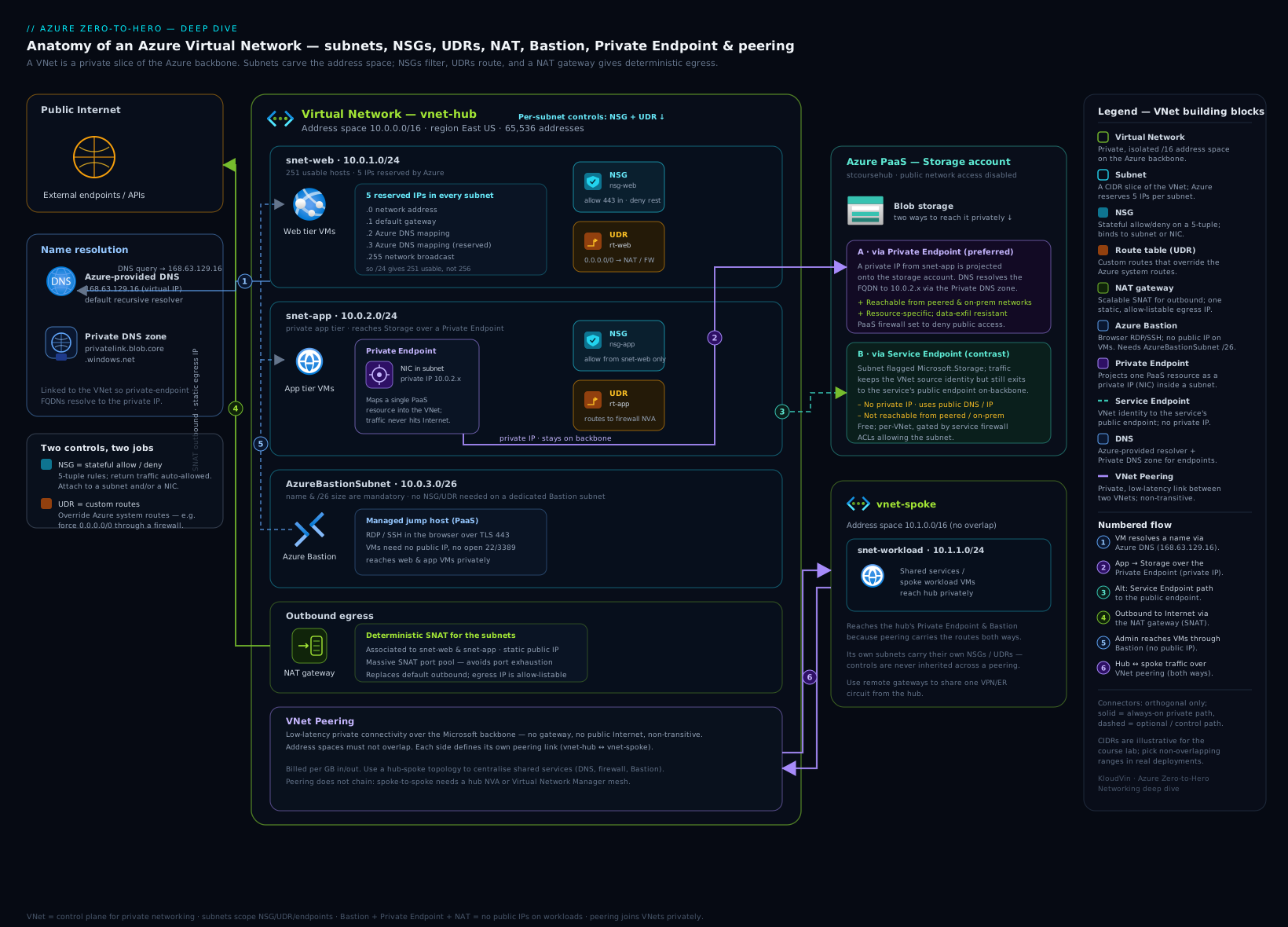
The diagram above ties the pieces together: a hub VNet with its address space carved into subnets, NSGs filtering at the subnet/NIC boundary, a route table forcing 0.0.0.0/0 through the firewall, peering linking a spoke (with gateway transit so the spoke uses the hub’s gateway), a NAT Gateway providing deterministic egress, and a private endpoint projecting a PaaS resource’s NIC into a subnet with its privatelink DNS zone. Trace a packet from a spoke VM to the internet, then to a private endpoint, and you’ve covered most of this lesson.
Hands-on lab
Build a two-subnet VNet with an NSG, peer it to a second VNet, then inspect the effective routes and rules — exactly what you’d do (and be asked to do) on the job. Everything here is az CLI in Cloud Shell; the only billable pieces are tiny and cleaned up at the end.
1. Resource group and the first VNet with two subnets
LOC=eastus
RG=rg-vnet-lab
az group create -n $RG -l $LOC

# VNet 1 with two subnets
az network vnet create -g $RG -n vnet-app -l $LOC \
  --address-prefixes 10.10.0.0/16 \
  --subnet-name snet-web --subnet-prefixes 10.10.1.0/24

az network vnet subnet create -g $RG --vnet-name vnet-app \
  -n snet-app --address-prefixes 10.10.2.0/24
2. NSG with a rule, associated to the web subnet
az network nsg create -g $RG -n nsg-web -l $LOC

az network nsg rule create -g $RG --nsg-name nsg-web \
  -n Allow-HTTPS --priority 100 --direction Inbound --access Allow \
  --protocol Tcp --source-address-prefixes Internet \
  --destination-port-ranges 443 --destination-address-prefixes '*'

az network vnet subnet update -g $RG --vnet-name vnet-app \
  -n snet-web --network-security-group nsg-web
3. Second VNet and peering (both directions)
az network vnet create -g $RG -n vnet-svc -l $LOC \
  --address-prefixes 10.20.0.0/16 \
  --subnet-name snet-svc --subnet-prefixes 10.20.1.0/24

az network vnet peering create -g $RG -n app-to-svc \
  --vnet-name vnet-app --remote-vnet vnet-svc --allow-vnet-access

az network vnet peering create -g $RG -n svc-to-app \
  --vnet-name vnet-svc --remote-vnet vnet-app --allow-vnet-access
4. Verify
# Peering should show "Connected"
az network vnet peering list -g $RG --vnet-name vnet-app -o table

# Confirm the NSG is on the web subnet
az network vnet subnet show -g $RG --vnet-name vnet-app -n snet-web \
  --query "networkSecurityGroup.id" -o tsv
Expected: the peering peeringState is Connected in both directions, and the subnet query returns the nsg-web resource ID.
5. Inspect effective routes and rules
Effective routes/rules are computed per-NIC, so create a tiny NIC to inspect (no VM needed):
az network nic create -g $RG -n nic-probe \
  --vnet-name vnet-app --subnet snet-web --network-security-group nsg-web

# Effective routes: you'll see system routes to VirtualNetwork, the peered
# 10.20.0.0/16 range (next hop VNetPeering), and 0.0.0.0/0 -> Internet
az network nic show-effective-route-table -g $RG -n nic-probe -o table

# Effective security rules: your Allow-HTTPS plus the six default rules
az network nic list-effective-nsg -g $RG -n nic-probe -o json \
  --query "value[0].effectiveSecurityRules[].{name:name,priority:priority,access:access,direction:direction}"
Read the output: confirm the peered range appears with next hop VNetGlobalPeering/VNetPeering, that 0.0.0.0/0 points to Internet, and that your Allow-HTTPS rule sits at priority 100 above the default DenyAllInBound at 65500.
Cleanup
az group delete -n $RG --yes --no-wait
Cost note
VNets, subnets, NSGs, route tables, and peering definitions are free. In this lab the only metered items are the NIC (negligible while not attached to a running VM) and any peering data (you sent none). Total cost for an hour: effectively ₹0–₹5. The expensive networking resources — NAT Gateway, Bastion, Azure Firewall, DDoS plans, VPN/ExpressRoute gateways — are all things you add deliberately; none were created here. Always az group delete labs so a forgotten Bastion or gateway doesn’t quietly bill.
Common mistakes & troubleshooting
| Symptom | Likely cause | Fix |
|---|---|---|
| Can’t create peering / “address space overlaps” | Two VNets share an IP range | Re-plan IPAM; peered VNets must have non-overlapping CIDRs. |
| Spoke-to-spoke traffic fails through the hub | Missing Allow forwarded traffic, or no UDR routing spokes via the hub NVA | Enable allow-forwarded-traffic on peerings; add 0.0.0.0/0→firewall UDRs; enable IP forwarding on the NVA NIC. |
| Spokes can’t reach on-prem via the hub gateway | Gateway-transit flags reversed | Hub = Allow gateway transit, spoke = Use remote gateways. |
| Private endpoint still answers despite a deny-all NSG | Private-endpoint network policies disabled on the subnet | Set PrivateEndpointNetworkPolicies to Enabled. |
| App resolves PaaS to a public IP, not the private endpoint | Missing/unlinked privatelink.* Private DNS zone |
Create the zone, link it to the VNet, ensure the A record exists (use a zone group). |
| Custom DNS set, now nothing resolves Azure names | Custom DNS servers don’t forward Azure names | Forward to 168.63.129.16 from your DNS servers, or add a Private Resolver. |
| Outbound calls fail intermittently under load | SNAT port exhaustion on default outbound | Attach a NAT Gateway to the subnet. |
| Traffic isn’t going through the firewall | UDR not associated to the subnet, or BGP route overriding it | Associate the route table to the subnet; consider disabling gateway route propagation on that subnet. |
Best practices
- Plan address space centrally (IPAM) before creating anything. Non-overlapping, room to grow, RFC 1918, document who owns each
/16. This single decision prevents most future pain. - Size subnets one notch larger than you think. Account for the 5 reserved IPs and for PaaS NICs (private endpoints, App Service integration) that quietly consume addresses.
- Filter with service tags and ASGs, not hardcoded IPs. Tags self-update; ASGs make rules scale with workloads.
- Adopt hub-and-spoke early. Central firewall + shared gateway + centralized Private DNS in the hub; spokes peer to the hub and inherit egress and resolution.
- Force egress through inspection with a
0.0.0.0/0UDR to the firewall for any subnet that matters. - Prefer private endpoints for sensitive PaaS; reserve service endpoints for low-sensitivity, cost-zero cases.
- Tag everything for cost and governance; enforce naming and topology with Azure Policy.
- Keep NSG rules sparse and numbered in gaps (100, 200, 300) so you can insert without renumbering.
Security notes
- Default deny inbound from the internet is your friend — don’t punch holes; use Bastion for management and a load balancer/App Gateway/Front Door for app ingress.
- Never expose 3389/22 to
Internet. Use Azure Bastion; if you must, scope NSG source to specific admin IPs and prefer just-in-time access. - Enable private-endpoint network policies so NSGs/UDRs actually apply to PE traffic — otherwise your controls are bypassed.
- Turn on flow logs + Traffic Analytics for forensics and to spot denied/malicious flows; retain them somewhere immutable for incident response.
- Use DDoS Network Protection for production internet-facing IPs; the adaptive tuning and alerting are worth the flat fee.
- Watch for data exfiltration: service endpoints let a subnet reach any account of a service type — private endpoints (pinned to one resource) plus the PaaS firewall are tighter.
- Lock the management plane with RBAC: the Network Contributor role is powerful; scope it tightly and audit changes to NSGs and route tables.
Cost & sizing
The levers that move a networking bill, roughly in order of impact:
| Lever | Cost behaviour |
|---|---|
| VNets / subnets / NSGs / route tables / peering definitions | Free to define. |
| VNet peering data | Per GB in and out; global (cross-region) costs more per GB than same-region. |
| NAT Gateway | Hourly resource charge + per-GB processed + the public IP(s). |
| Azure Bastion | Hourly per host + outbound data; Standard/Premium scale with instances. |
| Azure Firewall | Significant hourly + per-GB; a hub-only resource — don’t put one per spoke. |
| VPN / ExpressRoute gateway | Hourly per gateway SKU + (for ExpressRoute) circuit/port charges. |
| DDoS Network Protection | Flat monthly per plan (covers up to 100 public IPs) + overage. |
| Private endpoints | Hourly per endpoint + per-GB processed. |
| Flow logs / Traffic Analytics | Log volume + analytics processing + storage. |
| Public IPs | Standard public IPs are billed hourly even when idle. |
Sizing rules of thumb: the resource sizes (a /16 vs a /24) don’t change cost — data movement and add-on resources do. The biggest accidental bills are forgotten gateways, Bastion hosts, Firewalls, and idle public IPs. Consolidate egress (one NAT GW / Firewall in the hub), keep chatty workloads in the same region to avoid global-peering charges, and delete lab resources promptly.
Interview & exam questions
-
How many usable IPs are in an Azure
/24subnet, and why? 251. Azure reserves 5 per subnet: the network address, the default gateway, two for Azure DNS, and the broadcast address.256 − 5 = 251. -
What’s the difference between a service endpoint and a private endpoint? A service endpoint is a subnet setting that routes to the PaaS service over the backbone while the resource keeps its public IP (free, per-service, no on-prem). A private endpoint creates a private IP/NIC in your subnet mapped to a specific resource via Private Link (paid, per-resource, works from on-prem and across regions, needs Private DNS).
-
Is VNet peering transitive? What does that imply for hub-and-spoke? No. If A↔B and B↔C are peered, A cannot reach C through B automatically. So in hub-and-spoke you route spoke-to-spoke traffic through an NVA/firewall in the hub using UDRs, and enable allow forwarded traffic.
-
In a hub-spoke gateway-transit setup, which flag goes on which side? The hub sets Allow gateway transit; the spoke sets Use remote gateways. Reversing them breaks spoke-to-on-prem connectivity.
-
Walk me through NSG rule evaluation. Rules are evaluated by priority, lowest number first; the first match (Allow or Deny) wins and evaluation stops. Custom rules (100–4096) override the six default rules (65000–65500). NSGs are stateful, so return traffic is auto-allowed.
-
What are the default NSG rules and what do they permit? Inbound: allow VNet-to-VNet, allow Azure Load Balancer, deny all else. Outbound: allow VNet-to-VNet, allow internet, deny all else. Net effect: intra-VNet allowed, internet inbound denied, internet outbound allowed.
-
What is a service tag and why use one over an IP range? A Microsoft-maintained label (e.g.
Storage,AzureCloud.EastUS,Internet) that expands to the service’s current IP ranges and is updated automatically — so your NSG/UDR rules don’t break when Azure’s IPs change. -
What problem does a NAT Gateway solve, and how is it better than default SNAT? It gives deterministic, scalable outbound: up to 16 public IPs with 64,512 SNAT ports each, fixing SNAT port exhaustion and providing a stable egress IP to allow-list. Default SNAT uses a small, shared, unpredictable pool.
-
A VM can reach the internet but resolves an internal app by IP only, not by name across a peering. Why? Azure-provided DNS gives automatic name resolution only within a single VNet, not across peerings. Use a Private DNS zone linked to both VNets (with auto-registration) or custom DNS / Private Resolver.
-
You set custom DNS servers and now Azure public names won’t resolve. What happened? Once you set custom DNS, your servers own all resolution. They must forward unknown/Azure names to 168.63.129.16 (or to a Private Resolver) — Azure no longer answers automatically.
-
What’s the difference between DDoS Basic and Network Protection? Basic is free, always-on, platform-wide volumetric mitigation with no tuning, metrics, or alerts. Network Protection is a paid plan that adds per-application adaptive tuning, attack metrics/alerts/reports, and a cost-protection SLA for resources in protected VNets.
-
How do you make NSGs and route tables apply to a private endpoint’s traffic? Enable PrivateEndpointNetworkPolicies on the subnet (it was historically disabled by default). Without it, NSGs and UDRs are bypassed for the private-endpoint NIC.
Quick check
- What is the smallest subnet CIDR Azure will accept, and how many usable IPs does it have?
- Which two peering flags must be set, and on which side, for spokes to use the hub’s VPN gateway?
- Name three next-hop types for a user-defined route.
- Which special IP address is Azure’s internal DNS resolver?
- True or false: enabling a service endpoint gives the PaaS resource a private IP in your subnet.
Answers
/29— 8 total addresses, 3 usable after the 5 reserved.- Hub: Allow gateway transit; Spoke: Use remote gateways.
- Any three of: Virtual appliance, Virtual network gateway, Virtual network, Internet, None.
- 168.63.129.16.
- False — that’s a private endpoint. A service endpoint keeps the resource’s public IP and just routes over the backbone.
Exercise
Design and build (in CLI) a minimal hub-and-spoke: a hub VNet (10.0.0.0/16) with a GatewaySubnet and an AzureBastionSubnet, and two spoke VNets (10.1.0.0/16, 10.2.0.0/16) each peered to the hub with allow forwarded traffic. Add a route table to each spoke’s workload subnet sending 0.0.0.0/0 to a placeholder NVA IP in the hub (10.0.0.4). Then run az network nic show-effective-route-table on a probe NIC in each spoke and confirm: (a) the hub range appears via peering, (b) the other spoke’s range does not appear (proving peering is non-transitive), and © 0.0.0.0/0 now points to the virtual appliance, not Internet. Write one paragraph explaining why spoke-to-spoke traffic would still fail until you also enable IP forwarding on the NVA and add return routes. Clean up with az group delete.
Certification mapping
| Exam | Skills this lesson covers |
|---|---|
| AZ-104 (Administrator) | Configure and manage virtual networks: address space/subnets, NSGs and ASGs, service tags, route tables/UDR, VNet peering, service vs private endpoints, Azure DNS / Private DNS zones, Bastion. The hands-on az work mirrors the exam’s lab-style tasks. |
| AZ-305 (Solutions Architect) | Design network solutions: choosing peering vs gateways, hub-and-spoke topology, gateway transit, private-endpoint vs service-endpoint strategy, DNS architecture with the Private Resolver, DDoS tier selection, and egress design with NAT Gateway/Firewall. |
Glossary
- VNet (Virtual Network) — A regional, isolated private network in Azure defined by one or more CIDR address ranges.
- CIDR — Classless Inter-Domain Routing notation (
/16,/24) defining the size of an IP block. - Subnet — A CIDR partition of a VNet; the unit at which NSGs, routes, NAT, delegation, and service endpoints attach.
- NSG (Network Security Group) — A stateful Layer-3/4 packet filter applied to a subnet or NIC; rules evaluated by priority.
- ASG (Application Security Group) — A named group of NICs referenced in NSG rules so policy scales with workloads.
- Service tag — A Microsoft-maintained label (e.g.
Storage,Internet) that expands to current Azure IP ranges. - UDR (User-Defined Route) — A route you add to a route table to override Azure’s system routes.
- Next hop — Where a route sends matching traffic (virtual appliance, gateway, VNet, Internet, None).
- Peering — A connection joining two VNets over the backbone using private IPs; non-transitive.
- Gateway transit — A peering capability letting a spoke use the hub’s VPN/ExpressRoute gateway.
- Service endpoint — A subnet setting that routes to a PaaS service type over the backbone (resource keeps its public IP).
- Private endpoint — A private NIC/IP in your subnet mapped to a specific PaaS resource via Private Link.
- Private DNS zone — A managed authoritative DNS zone linked to VNets; resolves
privatelink.*and internal names. - Private Resolver — Managed DNS resolver (inbound/outbound endpoints + rulesets) for hybrid name resolution.
- NAT Gateway — Managed outbound SNAT with up to 16 public IPs, solving SNAT port exhaustion.
- Azure Bastion — Managed jump host for RDP/SSH to VMs without public IPs.
- Effective routes / rules — The computed result of system routes + UDRs, and default + custom NSG rules, on a specific NIC.
Next steps
- Azure Firewall, Forced Tunneling & Hub-Spoke Routing — the natural sequel: put a managed firewall in the hub, force
0.0.0.0/0through it, and route spoke-to-spoke and on-prem traffic for inspection. - Private Endpoints and Private DNS at Scale — the full enterprise DNS architecture for hundreds of private endpoints across a hub-and-spoke estate.
- Azure Virtual Network Basics: Subnets, NSGs & Peering — the gentler primer if any concept here needs reinforcing.
- Azure NAT Gateway: Deterministic Egress & SNAT Exhaustion and Azure Bastion: Secure RDP/SSH — deep dives on the two egress/management resources introduced here.