A university’s online learning platform — a Moodle estate behind a pair of origin virtual appliances — gets hammered the night before exams every term. Last cycle it was credential stuffing against the SSO login page (40,000 POST attempts in twenty minutes from a residential botnet), a scraper pulling every quiz question into a paste site, and a clumsy “load test” from a third-party integrator that knocked the gradebook API offline for the staff who needed it most. The origin’s own rate limiting was useless because by the time a request reached the appliance the damage was already counted, and the WAF bolted onto the load balancer matched on static signatures that the botnet rotated around in an afternoon. The mandate from the CISO is concrete: stop the bad traffic at the edge, before it touches the origin, with rules that adapt instead of rules someone has to hand-patch at 2 a.m. This guide configures Akamai App & API Protector (AAP) for the adaptive WAF and rate controls, and Akamai Bot Manager for bot detection and scoring — deployed as code, validated, and made reversible.
We will treat the edge configuration the way we treat any other piece of infrastructure: defined in Terraform, reviewed in a pull request, promoted through staging, and rolled back with one command. The origin in the examples is origin.learn.example.edu (the Moodle appliances behind an internal load balancer); the public hostname is learn.example.edu.
Prerequisites
- An Akamai contract with App & API Protector and Bot Manager entitlements, and access to Akamai Control Center (the GUI) plus the
akamaiCLI with theproperty-manager,appsec, andbotmanpackages installed. - API client credentials provisioned in Identity & Access Management (an
.edgercfile withclient_token,client_secret,access_token, andhost). These are short-lived API credentials, not the WAF config itself — store them in HashiCorp Vault and inject them at pipeline runtime; never commit.edgerc. - The Akamai Terraform provider (
akamai/akamai, v6.x) and Terraform 1.6+. - An existing delivery property (or the rights to create one) for
learn.example.edu, with the origin pointing at the Moodle load balancer. Edge DNS or your own CNAME (learn.example.edu→learn.example.edu.edgekey.net) cutover planned. - Workforce access to Control Center federated through Okta (brokered to Entra ID for the staff who also hold Azure roles), so operators authenticate with corporate SSO and MFA rather than local Akamai logins.
- A way to generate load for validation (
curl,hey, ork6) and read access to Datadog or Dynatrace where edge logs land.
Target topology
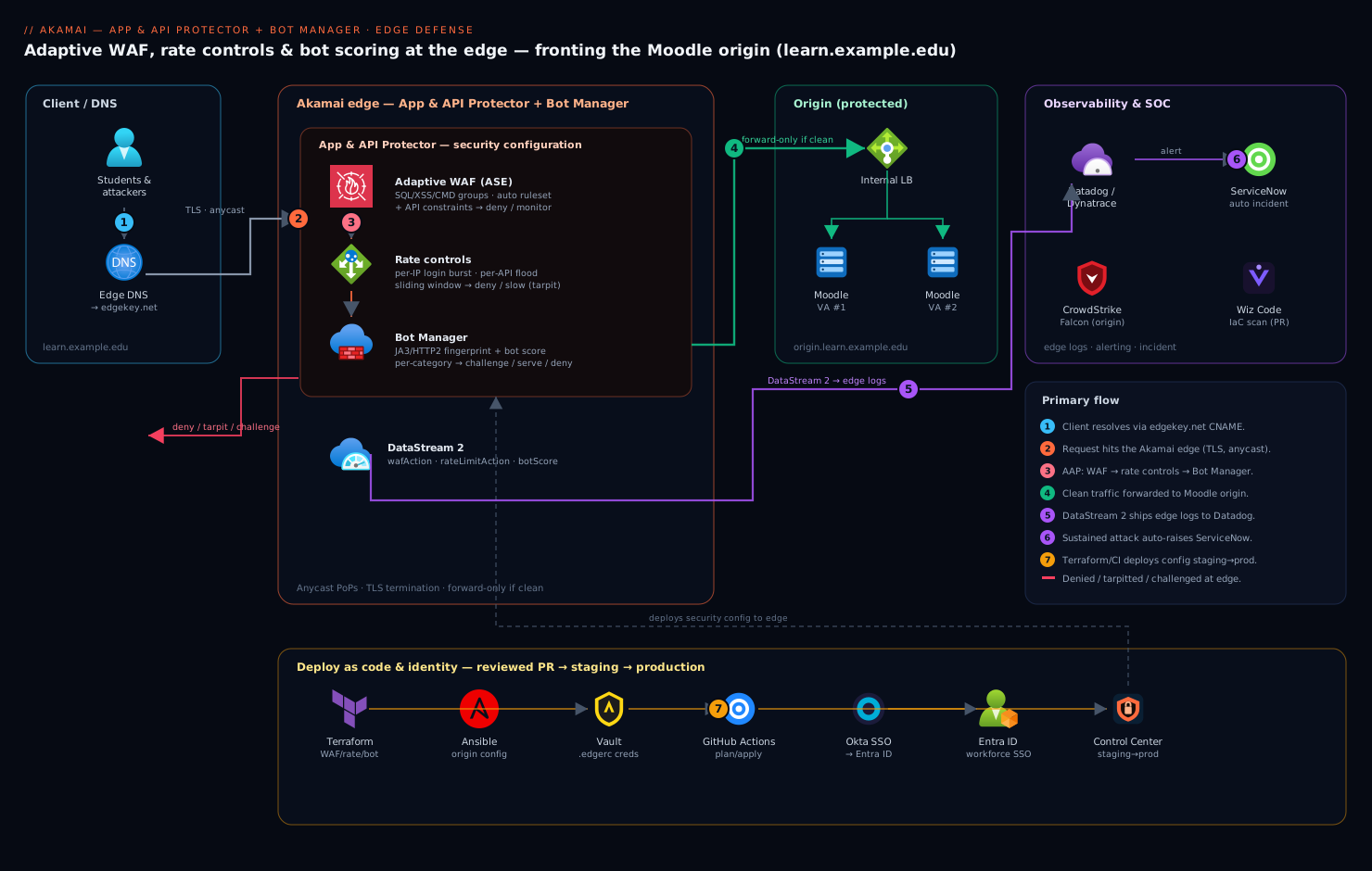
Requests for learn.example.edu resolve to an Akamai edge server via the edgekey.net CNAME. At the edge, three layers run in order before any byte reaches the origin: the App & API Protector security configuration evaluates adaptive WAF rules (the Adaptive Security Engine, plus API constraints), rate controls count requests per client over sliding windows, and Bot Manager fingerprints the client and assigns a bot score. A request that survives all three is forwarded to origin.learn.example.edu — the Moodle virtual appliances behind an internal load balancer. Everything else is denied, tarpitted, served a challenge, or monitored, depending on the action you bind to each control. Edge logs stream via DataStream 2 to Datadog/Dynatrace for observability, and a confirmed attack auto-raises a ServiceNow incident.
learn.example.edu (client)
        │  TLS, anycast
        ▼
  ┌─────────────────────────── Akamai edge ───────────────────────────┐
  │  App & API Protector                                              │
  │   1. Adaptive WAF (ASE) + API constraints   → deny / monitor      │
  │   2. Rate controls (per-IP, per-API)        → deny / tarpit       │
  │   3. Bot Manager (fingerprint + score)      → challenge / serve   │
  │  DataStream 2 ──► Datadog / Dynatrace ; alerts ──► ServiceNow      │
  └────────────────────────────────┬──────────────────────────────────┘
                                   ▼  forward-only if clean
                 origin.learn.example.edu  (Moodle appliances + LB)
1. Wire up credentials and the Terraform provider
Pull the Akamai API credentials from HashiCorp Vault into an ephemeral .edgerc for this run only (in CI, this happens in a step that scrubs the file afterward). Vault holds the secret; the file is transient.
# Render an ephemeral .edgerc from Vault (CI does this in a masked step)
vault kv get -format=json secret/akamai/appsec-deploy \
  | jq -r '.data.data.edgerc' > /tmp/.edgerc
chmod 600 /tmp/.edgerc

# Sanity-check the credentials reach the right contract/group
akamai --edgerc /tmp/.edgerc appsec list-configs
Pin the provider so an upstream release never silently changes behavior:
# versions.tf
terraform {
  required_version = ">= 1.6.0"
  required_providers {
    akamai = {
      source  = "akamai/akamai"
      version = "~> 6.6"
    }
  }
}

provider "akamai" {
  edgerc         = "/tmp/.edgerc"
  config_section = "default"
}
terraform init
2. Create the App & API Protector security configuration
A security configuration is the container that holds the WAF policy, rate policies, and the match targets that bind them to hostnames. Create it from Akamai’s recommended preset so you start with sane Adaptive Security Engine settings rather than an empty ruleset.
# config.tf
data "akamai_contract" "edu" {
  group_name = "Learn-Platform-Prod"
}

resource "akamai_appsec_configuration" "learn" {
  name        = "learn.example.edu-AAP"
  description = "App & API Protector for the Moodle estate"
  contract_id = data.akamai_contract.edu.id
  group_id    = data.akamai_contract.edu.group_id
  host_names  = ["learn.example.edu"]
}

# A security policy with the recommended baseline (ASE adaptive WAF on)
resource "akamai_appsec_security_policy" "learn" {
  config_id              = akamai_appsec_configuration.learn.id
  default_settings       = true
  security_policy_name   = "learn-default"
  security_policy_prefix = "lrn1"
}
terraform apply -target=akamai_appsec_configuration.learn \
                -target=akamai_appsec_security_policy.learn
After apply, capture the generated config_id and security_policy_id — every later resource references them.
terraform output -json | jq '{config: .config_id, policy: .policy_id}'
3. Tune the adaptive WAF (Adaptive Security Engine)
App & API Protector’s Adaptive Security Engine (ASE) ships rules that auto-tune their action and ruleset version from Akamai’s threat intelligence, which is the whole point — you are not pinning static signatures the botnet rotates around. Your job is to set the attack-group actions (SQL injection, XSS, command injection, etc.), enable automatic ruleset upgrades, and add exceptions only where a legitimate Moodle request trips a rule.
Start every group in alert (monitor) mode, watch for two or three days, then promote the clean ones to deny. This staged rollout is what keeps you from blocking a legitimate quiz submission on day one.
# Turn on automatic ruleset upgrades (adaptive, hands-off)
resource "akamai_appsec_advanced_settings_attack_payload_logging" "logs" {
  config_id = akamai_appsec_configuration.learn.id
  enabled   = true
}

resource "akamai_appsec_aap_selected_hostnames" "scope" {
  config_id     = akamai_appsec_configuration.learn.id
  hostnames     = ["learn.example.edu"]
  mode          = "APPEND"
}

# Attack-group actions. Promote to "deny" after the monitor soak.
locals {
  attack_groups = {
    SQL = "alert"   # SQL injection
    XSS = "alert"   # cross-site scripting
    CMD = "alert"   # command injection
    LFI = "alert"   # local file inclusion
    RFI = "alert"   # remote file inclusion
    WAT = "deny"    # web attack tool / known-bad — safe to deny day one
  }
}

resource "akamai_appsec_attack_group" "groups" {
  for_each            = local.attack_groups
  config_id           = akamai_appsec_configuration.learn.id
  security_policy_id  = akamai_appsec_security_policy.learn.security_policy_id
  attack_group        = each.key
  attack_group_action = each.value
}
Add an exception when a rule fires on legitimate traffic — for example, Moodle’s rich-text editor posts HTML that an XSS rule will flag. Scope the exception narrowly to the path and the specific rule, never disable the group:
resource "akamai_appsec_rule" "moodle_editor_exception" {
  config_id          = akamai_appsec_configuration.learn.id
  security_policy_id  = akamai_appsec_security_policy.learn.security_policy_id
  rule_id            = 950002          # the specific ASE rule that misfires
  rule_action        = "alert"
  condition_exception = jsonencode({
    exception = {
      specificHeaderCookieParamXmlOrJsonNames = [{
        names    = ["description", "introeditor[text]"]
        selector = "REQUEST_BODY_PARAM"
      }]
    }
  })
}
4. Add API constraints for the Moodle web-service endpoints
Moodle exposes /webservice/rest/server.php and /lib/ajax/service.php. Register these as API endpoints so App & API Protector can enforce per-API request limits and (optionally) JSON schema/positive-security validation, instead of treating them as anonymous web traffic.
resource "akamai_appsec_api_request_constraints" "moodle_ws" {
  config_id          = akamai_appsec_configuration.learn.id
  security_policy_id  = akamai_appsec_security_policy.learn.security_policy_id
  api_endpoint_id    = 814455      # endpoint registered in Control Center / via appsec
  action             = "alert"     # promote to "deny" after the soak
}
Register the endpoint definitions (method, path, hostname) in Control Center or via the appsec CLI; reference the returned api_endpoint_id above. Constraining the API surface is what stopped the integrator’s runaway “load test” from reaching the gradebook in our scenario.
5. Configure rate controls
Rate policies count requests per client identifier over a sliding window and act when the rate crosses a threshold. Define two: a broad per-IP policy for the login/SSO path, and a tighter per-API policy for the web-service endpoints. Bind each with an action — deny outright, or slow (tarpit) to make scraping uneconomical without hard-blocking a flaky-but-legitimate client.
resource "akamai_appsec_rate_policy" "login_burst" {
  config_id   = akamai_appsec_configuration.learn.id
  rate_policy = jsonencode({
    name                   = "login-burst-per-ip"
    averageThreshold       = 30      # req/sec averaged over the window
    burstThreshold         = 60
    clientIdentifier       = "ip"
    matchType              = "path"
    type                   = "WAF"
    sameActionOnIpv6       = true
    path = {
      positiveMatch = true
      values        = ["/login/index.php", "/login/token.php"]
    }
    requestType = "ClientRequest"
  })
}

resource "akamai_appsec_rate_policy" "api_flood" {
  config_id   = akamai_appsec_configuration.learn.id
  rate_policy = jsonencode({
    name             = "moodle-ws-per-ip"
    averageThreshold = 10
    burstThreshold   = 25
    clientIdentifier = "ip"
    matchType        = "path"
    type             = "WAF"
    path = {
      positiveMatch = true
      values        = ["/webservice/rest/server.php", "/lib/ajax/service.php"]
    }
    requestType = "ClientRequest"
  })
}

# Bind the policies to actions on the security policy
resource "akamai_appsec_rate_policy_action" "login_action" {
  config_id          = akamai_appsec_configuration.learn.id
  security_policy_id  = akamai_appsec_security_policy.learn.security_policy_id
  rate_policy_id     = akamai_appsec_rate_policy.login_burst.rate_policy_id
  ipv4_action        = "deny"
  ipv6_action        = "deny"
}

resource "akamai_appsec_rate_policy_action" "api_action" {
  config_id          = akamai_appsec_configuration.learn.id
  security_policy_id  = akamai_appsec_security_policy.learn.security_policy_id
  rate_policy_id     = akamai_appsec_rate_policy.api_flood.rate_policy_id
  ipv4_action        = "slow"      # tarpit scrapers
  ipv6_action        = "slow"
}
The 40,000-POST credential-stuffing burst from our scenario trips login-burst-per-ip at the edge and is denied long before the Moodle appliance counts a single attempt.
6. Configure Bot Manager: detection and scoring
Bot Manager fingerprints each client (TLS/JA3, HTTP/2 behavior, header order, JavaScript/cookie challenges) and assigns a bot score plus a category. You bind actions per category: serve known good bots (Googlebot for SEO), challenge the suspicious, and deny the declared-malicious. Akamai-managed bot categories are maintained for you; add custom bot definitions for clients you recognize (your own monitoring synthetics, an LMS integration partner).
# Allow your own synthetic monitors and a known partner integration
resource "akamai_botman_custom_bot_category" "trusted" {
  config_id = akamai_appsec_configuration.learn.id
  category_name = "trusted-integrations"
}

resource "akamai_botman_custom_defined_bot" "synthetics" {
  config_id    = akamai_appsec_configuration.learn.id
  bot_name     = "edu-datadog-synthetics"
  category_id  = akamai_botman_custom_bot_category.trusted.category_id
  bot_definition = jsonencode({
    conditions = [{
      type           = "headerValueMatchCondition"
      name           = "User-Agent"
      positiveMatch  = true
      valueWildcard  = ["DatadogSynthetics*"]
    }]
  })
}

# Actions per Akamai-managed category: monitor first, then enforce
resource "akamai_botman_akamai_bot_category_action" "web_scrapers" {
  config_id   = akamai_appsec_configuration.learn.id
  category_id = "0c508b65-2dc6-...-web-scrapers"
  action      = "monitor"     # promote to "deny" after review
}

resource "akamai_botman_akamai_bot_category_action" "impersonators" {
  config_id   = akamai_appsec_configuration.learn.id
  category_id = "2f1d44a2-...-impersonators"
  action      = "deny"        # fake-Googlebot etc. — deny day one
}

# Bind Bot Manager to the protected hostname's match target later (step 7)
resource "akamai_botman_bot_management_settings" "core" {
  config_id          = akamai_appsec_configuration.learn.id
  security_policy_id  = akamai_appsec_security_policy.learn.security_policy_id
  settings = jsonencode({
    enableBotManagement     = true
    javascriptInjectionMode = "AUTO"    # inject the JS challenge automatically
  })
}
For the exam-night scraper that lifted quiz questions, the web-scrapers category plus the JavaScript challenge raises the cost of automation: a headless scraper that cannot execute the challenge JS scores as a bot and gets denied; a real browser passes transparently.
7. Bind everything with a match target and activate to staging
A match target is what actually applies the security policy (WAF + rate + bot) to traffic for a hostname and path set. Without it, the configuration exists but does nothing.
resource "akamai_appsec_match_target" "learn" {
  config_id    = akamai_appsec_configuration.learn.id
  match_target = jsonencode({
    type = "website"
    hostnames = ["learn.example.edu"]
    securityPolicy = {
      policyId = akamai_appsec_security_policy.learn.security_policy_id
    }
    filePaths = ["/*"]
  })
}

# Activate to STAGING first — never straight to production
resource "akamai_appsec_activations" "staging" {
  config_id           = akamai_appsec_configuration.learn.id
  network             = "STAGING"
  notification_emails = ["edge-security@example.edu"]
  note                = "AAP + Bot Manager baseline, monitor mode"
}
terraform apply
Akamai’s staging network mirrors production behavior. Run all validation (Step 8) against staging via the Akamai-Staging edge before promoting.
8. Validation
Resolve learn.example.edu against an Akamai staging edge server and exercise every control. Map the hostname to a staging IP locally so you do not need to cut DNS first:
# Find a staging edge IP for the property's edge hostname
dig +short learn.example.edu.edgekey-staging.net

# Pin it locally (replace with the resolved IP)
echo "23.55.0.10  learn.example.edu" | sudo tee -a /etc/hosts
Test the WAF (an obvious SQLi payload should be blocked or, in monitor mode, logged):
curl -sk "https://learn.example.edu/?id=1%20OR%201=1--" -o /dev/null -w "%{http_code}\n"
# expect 403 once SQL group is in "deny"; 200 + an alert log line in "alert"
Test the rate control on login (should start returning 429/deny after the threshold):
hey -n 500 -c 50 -m POST \
  "https://learn.example.edu/login/index.php"
# watch for a wall of 403/429 once averageThreshold (30 rps) is exceeded
Test Bot Manager (a headless, non-JS client should be scored as a bot):
curl -sk -A "python-requests/2.31" \
  "https://learn.example.edu/mod/quiz/view.php?id=42" \
  -o /dev/null -w "%{http_code}\n"
# scraper-like UA + no JS challenge → bot category action applies
Confirm the controls fired by reading the edge decisions in DataStream 2 output (or Control Center → Security → Events). Pipe the stream into Datadog/Dynatrace and assert you see wafAction, rateLimitAction, and botScore fields populated:
akamai --edgerc /tmp/.edgerc appsec eval-rules \
  --config-id "$CONFIG_ID" --version "$VERSION" --security-policy lrn1
Only after staging is clean, promote to production by changing network = "PRODUCTION" in akamai_appsec_activations and re-applying. Then cut learn.example.edu to edgekey.net in DNS.
9. Wire CI/CD, IaC, and the operating tools
This configuration is code; treat it like code. A typical pipeline:
- GitHub Actions (or Jenkins) runs
terraform planon every pull request tomain; the plan is posted to the PR for review. Argo CD is not used for the Akamai config itself (it is not a Kubernetes resource), but the same Argo CD instance that syncs the Moodle appliances’ Helm release watches the cluster, so origin and edge changes land through one reviewed flow. - The merge pipeline pulls credentials from HashiCorp Vault (Step 1), runs
terraform applyto staging, runs the Step 8 validation as automated gates, and only then activates production. Vault leases are short-lived, so a leaked CI token expires in minutes. - Terraform owns the WAF/rate/bot definitions; Ansible configures the origin Moodle virtual appliances (PHP-FPM tuning, the internal load balancer health checks) so the origin is reproducible in lockstep with the edge policy.
- ServiceNow receives an auto-raised incident when DataStream 2 reports a sustained attack (a rate policy denying thousands of requests, or a bot-category spike), giving the SOC a ticket rather than a dashboard nobody is watching.
- Wiz / Wiz Code scans the Terraform in the PR (IaC misconfiguration: a match target accidentally scoped to
0.0.0.0/0, a rate action left inmonitor) and scans the origin appliances’ cloud posture, so a regression is caught before merge. - CrowdStrike Falcon sensors run on the origin Moodle virtual appliances for runtime protection — the edge stops most attacks, but Falcon is the backstop for anything that slips through or originates internally.
- Datadog / Dynatrace ingest the DataStream 2 logs and build the edge-security dashboard: blocked-request rate, bot-score distribution, top offending ASNs, and origin offload percentage.
Rollback / teardown
Akamai activations are versioned and instantly reversible — you re-activate the previous config version rather than deleting anything, so rollback is fast and non-destructive.
# List versions and find the last-known-good
akamai --edgerc /tmp/.edgerc appsec list-configs
akamai --edgerc /tmp/.edgerc appsec list-config-versions --config-id "$CONFIG_ID"
# Re-activate the prior version (fastest rollback — minutes)
resource "akamai_appsec_activations" "rollback" {
  config_id           = akamai_appsec_configuration.learn.id
  version             = var.last_known_good_version   # e.g. 11
  network             = "PRODUCTION"
  notification_emails = ["edge-security@example.edu"]
  note                = "Rollback to last-known-good"
}
To fully remove the configuration (e.g. decommissioning the property), deactivate first, then destroy — and only after DNS is pointed away from edgekey.net, or you will blackhole the site:
terraform destroy -target=akamai_appsec_match_target.learn   # stop applying policy
terraform destroy -target=akamai_appsec_configuration.learn  # remove the config
If you only need to disable enforcement without tearing down, set every attack group, rate action, and bot category back to monitor/alert and re-activate — traffic flows, you keep the telemetry, and nothing is blocked.
Common pitfalls
- Activating straight to production. Akamai has a real staging network; skipping it is how a misfiring rule blocks every legitimate login at exam time. Always soak in
monitor/alertfirst, then promote per group. - Disabling a whole attack group to fix one false positive. Scope a narrow
condition_exceptionto the offending path and parameter instead (Step 3). Disabling the group reopens the entire class of attack. - Forgetting the match target. A perfectly configured policy with no match target protects nothing — the config exists but is never bound to traffic.
- Bot challenge breaking native API clients. The JavaScript challenge assumes a browser; a legitimate mobile app or the Moodle web-service callers cannot execute it. Exempt registered API endpoints and your own synthetics with custom bot definitions (Steps 4 and 6).
- Rate thresholds set from a guess. Pull real p95 request rates per path from DataStream 2 before setting
averageThreshold; a threshold below normal exam-night legitimate load will deny real students. - DNS cutover before staging validation. Validate against
edgekey-staging.netwith a hosts-file pin; only cut production DNS toedgekey.netonce staging is clean. - Committing
.edgerc. Credentials live in HashiCorp Vault and are rendered ephemerally; a committed.edgercis a leaked Akamai API key.
Security notes
The whole posture is shift-the-perimeter-left: attacks are evaluated and dropped at Akamai’s edge before they consume origin capacity, which is the only way to absorb a volumetric credential-stuffing or scraping wave. Operator access to Control Center is federated through Okta (brokered to Entra ID), so every change is tied to a corporate identity with MFA and conditional access — no shared local Akamai logins. API deploy credentials are leased from HashiCorp Vault and short-lived. Wiz Code scans the Terraform for IaC drift (an action left in monitor, an over-broad match target) on every PR, and CrowdStrike Falcon protects the origin Moodle appliances at runtime as the backstop behind the edge. Keep the Adaptive Security Engine’s automatic ruleset upgrades on — that adaptivity is the feature, and pinning a static ruleset is how you fall behind the next botnet.
Cost notes
App & API Protector and Bot Manager are licensed on the Akamai contract (typically by traffic/requests and protected hostnames), so the marginal cost is in edge requests evaluated — but every request blocked at the edge is origin compute, bandwidth, and Moodle appliance capacity you do not pay for, which on exam nights is the dominant saving. Tune monitor → enforce promptly: leaving everything in monitor mode pays for the security evaluation while still letting the abusive traffic hit (and bill you for) the origin. Size DataStream 2 log delivery to Datadog/Dynatrace deliberately — full-fidelity edge logs for a high-traffic site can dominate observability ingestion cost, so sample non-security log fields and keep full fidelity only on wafAction/botScore events. The net trade is straightforward: a fixed edge-security license in exchange for a smaller, steadier origin footprint and far fewer 2 a.m. incident hours.