A logistics company runs its order-routing platform on three EKS clusters, and at 02:14 on a Sunday a ransomware operator who had been living in the cluster for nine days flips the switch: workloads are encrypted, and — because the attacker had cluster-admin — the first thing the malware did was call the backup API and delete every restore point it could reach. The on-call engineer opens the backup console expecting salvation and finds an empty catalog. This is the failure mode that ordinary backups do not survive, because an attacker with your credentials can delete the backups with the same credentials. The fix is not “more backups”; it is backups the attacker cannot delete even with full admin, enforced by the object store itself rather than by your software. This guide builds exactly that: Kasten K10 writing WORM (write-once-read-many) immutable backups to an S3 bucket with Object Lock in Compliance mode, so a restore point physically cannot be deleted or overwritten until its retention clock expires — not by the attacker, not by your own admins, not by Kasten. Then it proves the loop closes by recovering a real application into an isolated cleanroom.
Immutability only matters if recovery is rehearsed, so this is a two-part build: lock the backups down, then validate that an isolated, network-segregated restore actually works under ransomware assumptions. We will use AWS S3 Object Lock as the reference WORM target, but the same pattern applies to any S3-compatible store that honors Object Lock (MinIO, Wasabi, NetApp StorageGRID virtual appliances on-prem).
Prerequisites
- A Kubernetes cluster (EKS 1.28+ in the examples) with
kubectlandhelm3.12+ configured against it, and cluster-admin for the install. - Kasten K10 7.0+ license (the free tier covers up to 5 nodes and is enough to follow along).
- AWS account with permission to create S3 buckets, KMS keys, and IAM roles;
awsCLI v2 authenticated. - A stateful sample app to protect. We will deploy a small PostgreSQL + a web tier so backups actually have data and a database to restore.
- CSI snapshots working on your storage class (the EBS CSI driver with a
VolumeSnapshotClasson EKS). - Cluster-level identity through Microsoft Entra ID (brokered from Okta as the workforce IdP) for OIDC login to the K10 dashboard, so backup operators are real named humans with MFA, not a shared password.
Target topology
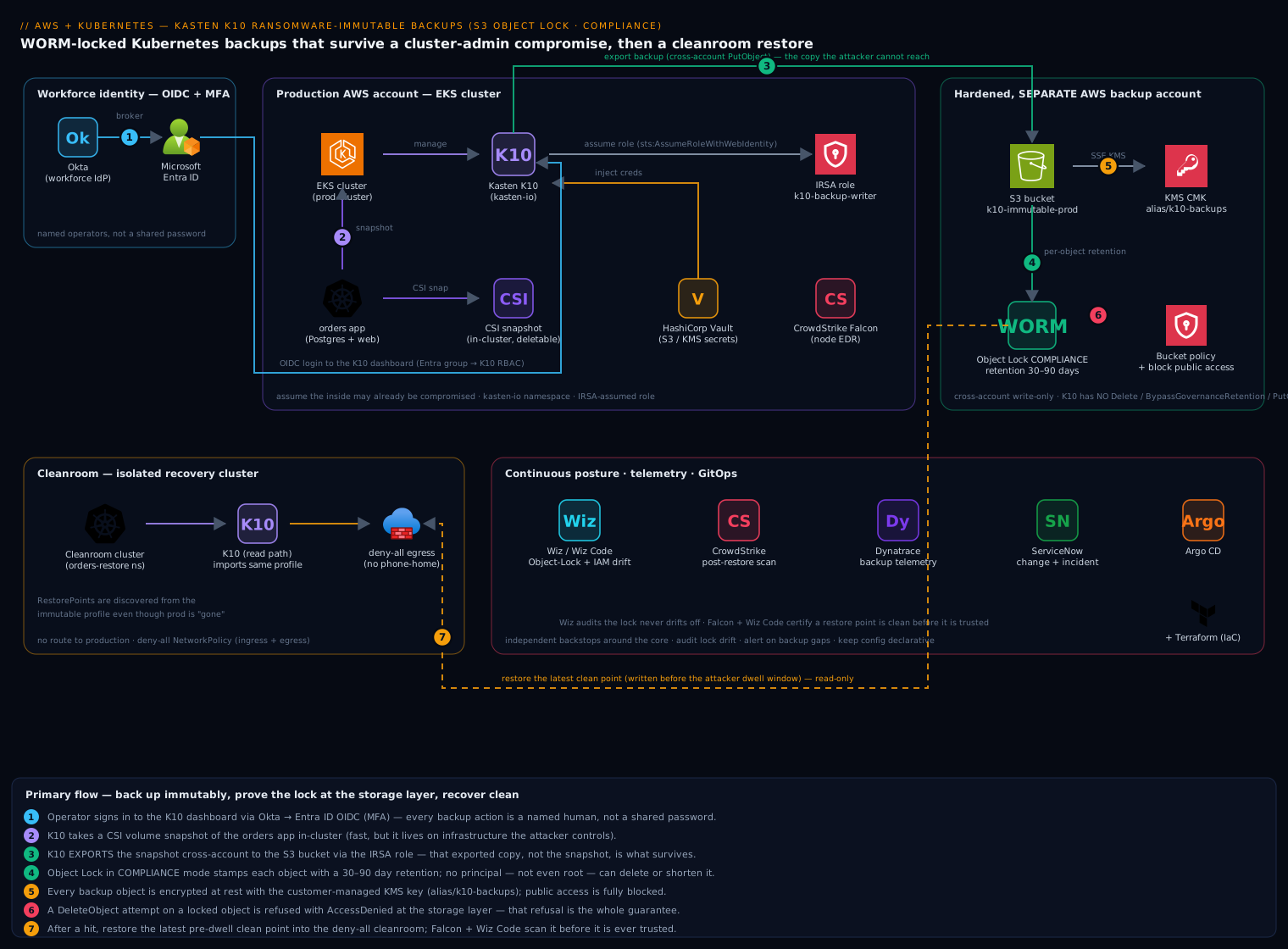
The shape of the defense is layered, and each layer assumes the one inside it may already be compromised:
- Production cluster runs K10 in the
kasten-ionamespace. K10 takes CSI volume snapshots, then exports them as backups to S3. The exported copy — not the in-cluster snapshot — is the one that survives, because in-cluster snapshots live on infrastructure the attacker controls. - The S3 backup bucket has Object Lock enabled at creation (it cannot be turned on later) in Compliance mode. Every object K10 writes gets a retention timestamp; until that timestamp passes, the AWS storage layer itself refuses every
DeleteObjectandPutObject-overwrite, returningAccessDeniedeven to the account root. - A separate, hardened AWS account owns that bucket. K10’s IAM principal in the production account can only
PutObject/GetObjectcross-account — it is not granteds3:BypassGovernanceRetention,s3:PutBucketObjectLockConfiguration, orDeleteObjectagainst locked objects. The blast radius of a stolen production credential stops at the bucket boundary. - The cleanroom is a second, isolated cluster (or a quarantined namespace with a deny-all NetworkPolicy) with no route to production, where you restore and scan before trusting anything.
Supporting tools sit around this core: HashiCorp Vault holds the S3 credentials and KMS references K10 needs so they never live in a plaintext Secret; Wiz continuously audits that Object Lock has not drifted off and that no IAM policy quietly granted bypass permissions; CrowdStrike Falcon runs on the nodes to catch the intrusion before it reaches the backup API; Dynatrace alerts on the backup-job and export telemetry; ServiceNow carries the change record and auto-opens an incident on a failed or skipped backup; and Argo CD with Terraform keeps the whole config declarative and revertable.
1. Create the WORM-locked S3 bucket and KMS key
Object Lock must be enabled when the bucket is created — there is no path to add it afterward, so getting this step right is non-negotiable. Create the bucket in the dedicated backup account, with versioning (a hard requirement for Object Lock) and a customer-managed KMS key for encryption.
# In the hardened BACKUP account
REGION=ap-south-1
BUCKET=kloudvin-k10-immutable-prod
ACCT=$(aws sts get-caller-identity --query Account --output text)

# KMS key for at-rest encryption of the backups
KEY_ID=$(aws kms create-key \
  --description "K10 immutable backup encryption" \
  --query KeyMetadata.KeyId --output text)
aws kms create-alias --alias-name alias/k10-backups --target-key-id "$KEY_ID"

# Bucket with Object Lock ENABLED AT CREATION (also turns on versioning)
aws s3api create-bucket \
  --bucket "$BUCKET" --region "$REGION" \
  --create-bucket-configuration LocationConstraint="$REGION" \
  --object-lock-enabled-for-bucket

# Default encryption with the CMK
aws s3api put-bucket-encryption --bucket "$BUCKET" \
  --server-side-encryption-configuration '{
    "Rules":[{"ApplyServerSideEncryptionByDefault":{
      "SSEAlgorithm":"aws:kms","KMSMasterKeyID":"alias/k10-backups"}}]}'

# Block all public access — backups must never be public
aws s3api put-public-access-block --bucket "$BUCKET" \
  --public-access-block-configuration \
  BlockPublicAcls=true,IgnorePublicAcls=true,BlockPublicPolicy=true,RestrictPublicBuckets=true
Now set a default retention rule so every object K10 writes is locked even if K10 forgets to ask. Compliance mode is the choice that matters: in Governance mode a principal holding s3:BypassGovernanceRetention can still delete; in Compliance mode nobody — not root, not AWS support — can delete or shorten retention until it expires. For ransomware, only Compliance mode is real protection.
aws s3api put-object-lock-configuration --bucket "$BUCKET" \
  --object-lock-configuration '{
    "ObjectLockEnabled":"Enabled",
    "Rule":{"DefaultRetention":{"Mode":"COMPLIANCE","Days":30}}}'
Pick the retention window deliberately: it must exceed your worst-case attacker dwell time + detection lag, because anything written during the period the attacker controlled the cluster may be poisoned. Thirty days is a common floor; regulated workloads often run 90.
2. Grant K10 least-privilege, bypass-free access
The production K10 principal must be able to write and read backups but must be incapable of weakening the lock. Create the IAM policy with no DeleteObject, no BypassGovernanceRetention, and no PutBucketObjectLockConfiguration.
{
  "Version": "2012-10-17",
  "Statement": [
    {
      "Sid": "K10ReadWriteNoDelete",
      "Effect": "Allow",
      "Action": [
        "s3:PutObject",
        "s3:GetObject",
        "s3:ListBucket",
        "s3:GetBucketVersioning",
        "s3:GetObjectVersion",
        "s3:PutObjectRetention"
      ],
      "Resource": [
        "arn:aws:s3:::kloudvin-k10-immutable-prod",
        "arn:aws:s3:::kloudvin-k10-immutable-prod/*"
      ]
    },
    {
      "Sid": "K10Kms",
      "Effect": "Allow",
      "Action": ["kms:Encrypt", "kms:Decrypt", "kms:GenerateDataKey"],
      "Resource": "arn:aws:kms:ap-south-1:BACKUP_ACCT:key/KEY_ID"
    }
  ]
}
K10 needs s3:PutObjectRetention so it can set a per-object retention on write, but it explicitly lacks the bypass and lock-config actions, so even with these exact credentials an attacker cannot turn the lock off. Bind this policy cross-account: K10’s service account on the production cluster assumes a backup-account role via IRSA (IAM Roles for Service Accounts), so there is no long-lived access key on the cluster at all.
# Trust policy: only the K10 service account's OIDC identity may assume this
OIDC=$(aws eks describe-cluster --name prod-cluster \
  --query 'cluster.identity.oidc.issuer' --output text | sed 's~https://~~')

aws iam create-role --role-name k10-backup-writer \
  --assume-role-policy-document "{
    \"Version\":\"2012-10-17\",
    \"Statement\":[{\"Effect\":\"Allow\",
      \"Principal\":{\"Federated\":\"arn:aws:iam::PROD_ACCT:oidc-provider/$OIDC\"},
      \"Action\":\"sts:AssumeRoleWithWebIdentity\",
      \"Condition\":{\"StringEquals\":{
        \"$OIDC:sub\":\"system:serviceaccount:kasten-io:k10-k10\"}}}]}"

aws iam put-role-policy --role-name k10-backup-writer \
  --policy-name k10-s3-immutable --policy-document file://k10-policy.json
For S3-compatible appliances that do not speak IRSA, store the access key and secret in HashiCorp Vault under a KV path and have the Vault Agent sidecar inject them, so the credential is short-lived and never sits in an etcd-stored Kubernetes Secret.
3. Install Kasten K10 with OIDC login
Install K10 via Helm, pointing the dashboard auth at Entra ID (federated from Okta) so every backup operator is a named, MFA-backed identity — critical because the people who can trigger and restore backups are exactly the people an attacker most wants to impersonate.
helm repo add kasten https://charts.kasten.io/
helm repo update

kubectl create namespace kasten-io

# Annotate the K10 service account to assume the backup-writer role (IRSA)
helm install k10 kasten/k10 --namespace kasten-io \
  --set auth.oidcAuth.enabled=true \
  --set auth.oidcAuth.providerURL="https://login.microsoftonline.com/<TENANT_ID>/v2.0" \
  --set auth.oidcAuth.clientID="<K10_APP_CLIENT_ID>" \
  --set auth.oidcAuth.clientSecretName="k10-oidc-secret" \
  --set auth.oidcAuth.redirectURL="https://k10.kloudvin.internal/k10/.../callback" \
  --set auth.oidcAuth.scopes="openid email profile" \
  --set auth.oidcAuth.usernameClaim="email" \
  --set serviceAccount.annotations."eks\.amazonaws\.com/role-arn"="arn:aws:iam::PROD_ACCT:role/k10-backup-writer"

# Wait for the platform to come up
kubectl get pods -n kasten-io -w
Confirm all pods are Running, then reach the dashboard through your ingress. RBAC inside K10 maps Entra group claims to K10 roles (k10-admin, k10-basic), so the SOC and the platform team get different powers.
4. Register the immutable location profile
A Location Profile tells K10 where to export backups. The key move is enabling immutable backups on the profile, which makes K10 set object retention on every write to match the bucket’s lock window.
apiVersion: config.kio.kasten.io/v1alpha1
kind: Profile
metadata:
  name: s3-immutable-prod
  namespace: kasten-io
spec:
  type: Location
  locationSpec:
    type: ObjectStore
    objectStore:
      name: kloudvin-k10-immutable-prod
      objectStoreType: S3
      region: ap-south-1
      endpoint: ""            # default AWS endpoint; set for MinIO/StorageGRID
      protectionPeriod: 720h  # 30 days of object-lock immutability
    credential:
      secretType: AwsAccessKey
      # With IRSA the role is assumed; for appliances, reference a Vault-injected secret here
Apply it and verify in the dashboard under Profiles that the location shows a green Immutable badge. If the badge is absent, K10 could not confirm Object Lock on the bucket — stop and fix Step 1, because a profile without it gives you a false sense of safety.
kubectl apply -f s3-immutable-profile.yaml
kubectl get profiles -n kasten-io s3-immutable-prod -o jsonpath='{.status.validation}{"\n"}'
# Expect: Success
5. Build the protection policy with immutable exports
Now the policy that actually backs the app up on a schedule, snapshotting locally then exporting the immutable copy to S3. Protect the application namespace (orders) hourly, keep the exported restore points for the lock window, and run an export to the immutable profile.
apiVersion: config.kio.kasten.io/v1alpha1
kind: Policy
metadata:
  name: orders-immutable-hourly
  namespace: kasten-io
spec:
  comment: "Hourly snapshot + immutable S3 export of the orders app"
  frequency: "@hourly"
  retention:
    hourly: 24
    daily: 14
    weekly: 4
  actions:
    - action: backup
    - action: export
      exportParameters:
        frequency: "@hourly"
        profile:
          name: s3-immutable-prod
          namespace: kasten-io
        exportData:
          enabled: true          # export the actual volume data, not just metadata
        retention:
          hourly: 24
          daily: 14
  selector:
    matchLabels:
      k10.kasten.io/appNamespace: orders
kubectl apply -f orders-immutable-policy.yaml
# Force a first run rather than waiting for the top of the hour
kubectl annotate policy orders-immutable-hourly -n kasten-io \
  k10.kasten.io/forceRun=$(date +%s) --overwrite
Watch the run complete in the dashboard or by listing the RunAction. The export phase is the one that writes to S3; that is the copy that survives a cluster compromise. Drive this declaratively from Argo CD so the policy is GitOps-managed and any tampering with it in-cluster is auto-reverted to the committed state — and wrap rollouts of new policies behind a ServiceNow change record so backup-scope changes are reviewed, not silent.
6. Prove the objects are actually locked
Do not trust the badge — prove the lock at the storage layer. Pick one object K10 wrote and inspect its retention, then try to delete it and confirm AWS refuses.
# Find a recent object K10 wrote
KEY=$(aws s3api list-objects-v2 --bucket "$BUCKET" \
  --query 'sort_by(Contents,&LastModified)[-1].Key' --output text)

# It must carry a COMPLIANCE retention timestamp in the future
aws s3api get-object-retention --bucket "$BUCKET" --key "$KEY"
# -> {"Retention":{"Mode":"COMPLIANCE","RetainUntilDate":"2026-07-10T..."}}

# The real test: deletion MUST be refused, even with full admin
aws s3api delete-object --bucket "$BUCKET" --key "$KEY" \
  --version-id "$(aws s3api list-object-versions --bucket "$BUCKET" \
     --prefix "$KEY" --query 'Versions[0].VersionId' --output text)"
# -> An error occurred (AccessDenied): Object is WORM protected and cannot be overwritten or deleted
That AccessDenied is the entire point of this guide. If the delete succeeds, your bucket is not in Compliance mode — go back to Step 1, because everything downstream is hollow without it.
7. Validate isolated recovery in a cleanroom
Immutability without a rehearsed restore is a liability. Simulate ransomware honestly: assume production is encrypted and its in-cluster snapshots are gone, so recovery must come only from the S3-exported backup, into an isolated cluster with no path back to production.
# On the CLEANROOM cluster, install K10 and import the SAME immutable profile (read access)
helm install k10 kasten/k10 --namespace kasten-io --create-namespace
kubectl apply -f s3-immutable-profile.yaml   # same bucket, read path

# Lock the cleanroom down: deny-all network so a poisoned restore cannot phone home
cat <<'EOF' | kubectl apply -f -
apiVersion: networking.k8s.io/v1
kind: NetworkPolicy
metadata: { name: deny-all-egress, namespace: orders-restore }
spec:
  podSelector: {}
  policyTypes: [Ingress, Egress]
EOF
K10’s RestorePoints are discovered from the immutable profile even though the source cluster is “gone.” Restore the latest clean point — one written before the attacker’s dwell window — into the quarantined namespace:
apiVersion: actions.kio.kasten.io/v1alpha1
kind: RestoreAction
metadata:
  generateName: orders-cleanroom-restore-
  namespace: kasten-io
spec:
  subject:
    kind: RestorePoint
    name: <restorepoint-id-from-before-the-incident>
    namespace: orders
  targetNamespace: orders-restore
kubectl create -f cleanroom-restore.yaml
kubectl get restoreactions -n kasten-io -w   # wait for Complete
Before trusting a byte of it, scan the restored workload: run a CrowdStrike Falcon on-demand scan against the restored pods and PVCs, and have Wiz Code inspect the restored manifests and images for the indicators of compromise that defined the incident. Only a restore point that scans clean and predates the dwell window is a trusted recovery point — that is the difference between recovering and re-infecting yourself. Promote the validated point to production rebuild only after sign-off, tracked as a ServiceNow major-incident task.
Validation checklist
Run these every time you change the configuration, and wire the scripted versions into the pipeline:
- Object Lock is on and Compliance:
aws s3api get-object-lock-configuration --bucket "$BUCKET"returns"Mode":"COMPLIANCE". - A real backup object is locked into the future:
get-object-retentionon a fresh K10 object shows aRetainUntilDateahead of now. - Deletion is refused: the
delete-objectin Step 6 returnsAccessDenied. This is the single most important test. - K10 cannot weaken the lock: confirm the
k10-backup-writerpolicy contains nos3:BypassGovernanceRetention,s3:DeleteObject*, ors3:PutBucketObjectLockConfiguration. - Policy is healthy and exporting: the dashboard shows the last
exportaction green withexportData: enabled. - Cleanroom restore succeeds and scans clean: a RestoreAction into the isolated namespace completes and passes the Falcon/Wiz scan.
- Egress is denied in the cleanroom:
kubectl execinto a restored pod and confirm an outbound curl times out.
Rollback / teardown
The Compliance lock is the point and it is deliberately one-way, so plan teardown accordingly.
# Remove the schedule and platform (stops new backups; does NOT delete locked objects)
kubectl delete policy orders-immutable-hourly -n kasten-io
helm uninstall k10 -n kasten-io
kubectl delete namespace kasten-io
The S3 bucket cannot be emptied or deleted until every object’s retention expires — that is Compliance mode working as designed, not a bug. You must wait out the longest RetainUntilDate in the bucket; until then aws s3 rb fails. Only after the last object’s lock lapses can you run aws s3 rm s3://$BUCKET --recursive and then aws s3api delete-bucket. Budget for this: a 90-day retention window means a 90-day minimum bucket lifespan. Tear down the cleanroom freely — it holds only ephemeral restores. Keep the KMS key until the bucket is gone, or the objects become unrecoverable before their lock even expires.
Common pitfalls
- Trying to add Object Lock to an existing bucket. Impossible — it is creation-time only. Always make a fresh bucket; this trips up most first attempts.
- Choosing Governance mode “to be safe.” Governance is bypassable with one IAM permission, which is precisely the permission a cluster-admin attacker harvests. Use Compliance for ransomware.
- Storing backups in the same AWS account as production. A root compromise then owns the backups too. Put the bucket in a separate, hardened account with cross-account write-only access.
- Skipping
exportData: enabled. Without it K10 exports only metadata; the volume data stays in deletable in-cluster snapshots and you have nothing to restore from after a wipe. - Setting retention shorter than attacker dwell time. A 7-day lock against a 9-day dwell means the only surviving backups are the poisoned ones. Size retention to your detection reality.
- Never testing the restore. An untested immutable backup is a compliance checkbox, not a recovery capability. Rehearse the cleanroom restore on a schedule.
- Restoring straight into production. A backup taken during the dwell window may carry the implant. Always restore-then-scan in isolation first.
Security notes
The architecture is defense-in-depth that assumes your own credentials are the threat. Compliance-mode Object Lock moves the deletion-prevention guarantee from your software (which the attacker controls) into the AWS storage layer (which they do not). Cross-account, bypass-free IAM caps the blast radius of a stolen production credential. HashiCorp Vault keeps the S3/KMS secrets short-lived and out of etcd. CrowdStrike Falcon on the nodes aims to detect the intrusion before it reaches the backup API, and runs the post-restore scan that certifies a recovery point as clean. Wiz / Wiz Code continuously audits that Object Lock has not been disabled, that no policy drifted to grant bypass rights, and that the restored manifests carry no known IOCs — the independent backstop behind the controls. Pair this with immutable, append-only audit logging of every K10 action so a deleted backup attempt is visible even when it is correctly refused.
Cost notes
Immutable backups cost more than ordinary ones, by design — you cannot early-delete to reclaim space, so every restore point occupies storage for its full retention window. Manage it with three levers: (1) tier exported backups to S3 Glacier-style classes where your RTO tolerates the retrieval delay, since locked objects still transition by lifecycle rules; (2) tune K10 retention so you are not keeping 24 hourly and 14 daily and 4 weekly copies all locked for 90 days unless the workload truly warrants it; (3) watch egress — cross-account and cross-region restores incur transfer charges, so keep the cleanroom in the bucket’s region. Pipe K10’s job and storage telemetry to Dynatrace (or Datadog) for a per-namespace backup-cost and success-rate dashboard, and let ServiceNow auto-open an incident on any missed or failed export so a silent backup gap never becomes the next 02:14 surprise. The storage premium is real; weighed against a ransom payment and days of downtime, it is the cheapest insurance in the stack.