A 2,200-person manufacturing firm runs Workday as its source of truth for people, Okta as the workforce IdP, and roughly forty SaaS apps plus a handful of on-prem systems behind it. Until now, joiners were provisioned by a help-desk analyst working a ServiceNow ticket by hand — which is why a contractor sat without a Slack account for three days last quarter, and why an auditor found four terminated employees who still had active Salesforce logins eleven days after their last day. The CISO’s mandate is blunt: every joiner is productive on day one, every role change re-baselines access the same day, and every leaver is fully deprovisioned within fifteen minutes of the HR record flipping to terminated — with an audit trail for each action. This guide builds exactly that, in Okta Workflows, Okta’s no-code orchestration engine, driven by HR events and fanning out to group membership, app provisioning, and SaaS APIs across the estate.
The reason this lands in Workflows rather than a pile of custom scripts is operability. Workflows gives you a visual, versioned, connector-rich automation layer that runs inside the Okta tenant, sees Okta’s own object model natively (users, groups, apps, factors), and ships with hundreds of pre-built connectors. The hard parts of JML — idempotency, retries, partial-failure recovery, and an audit record per task — become flow design instead of undifferentiated plumbing you have to maintain forever.
Prerequisites
- An Okta tenant with the Workflows feature enabled (Okta Identity Engine; Workflows is included with most Workforce Identity tiers — confirm in Admin → Settings → Features).
- A super-admin (or a custom admin role with Workflows admin) to delegate flows, and an API service app for any out-of-band calls.
- An HR source feeding Okta: Workday, SuccessFactors, or HiBob via the native HR connector, or a SCIM/CSV inbound integration that lands joiners as Okta users with a
userTypeand department attributes. - App integrations for your downstream SaaS — ideally SCIM provisioning enabled (Salesforce, Slack, Zoom, GitHub) so Okta can create/deactivate accounts directly.
- HashiCorp Vault reachable from your network for any secrets the flows must fetch (third-party API tokens), plus a place to store the Okta API token used by the optional sync job.
- ServiceNow for change records and exception tickets; GitHub for exporting and version-controlling flow definitions.
- Admin access to Akamai if your Okta tenant sits behind an Akamai edge (most enterprise tenants do) — you will allowlist Workflows’ outbound IP ranges there.
Target topology
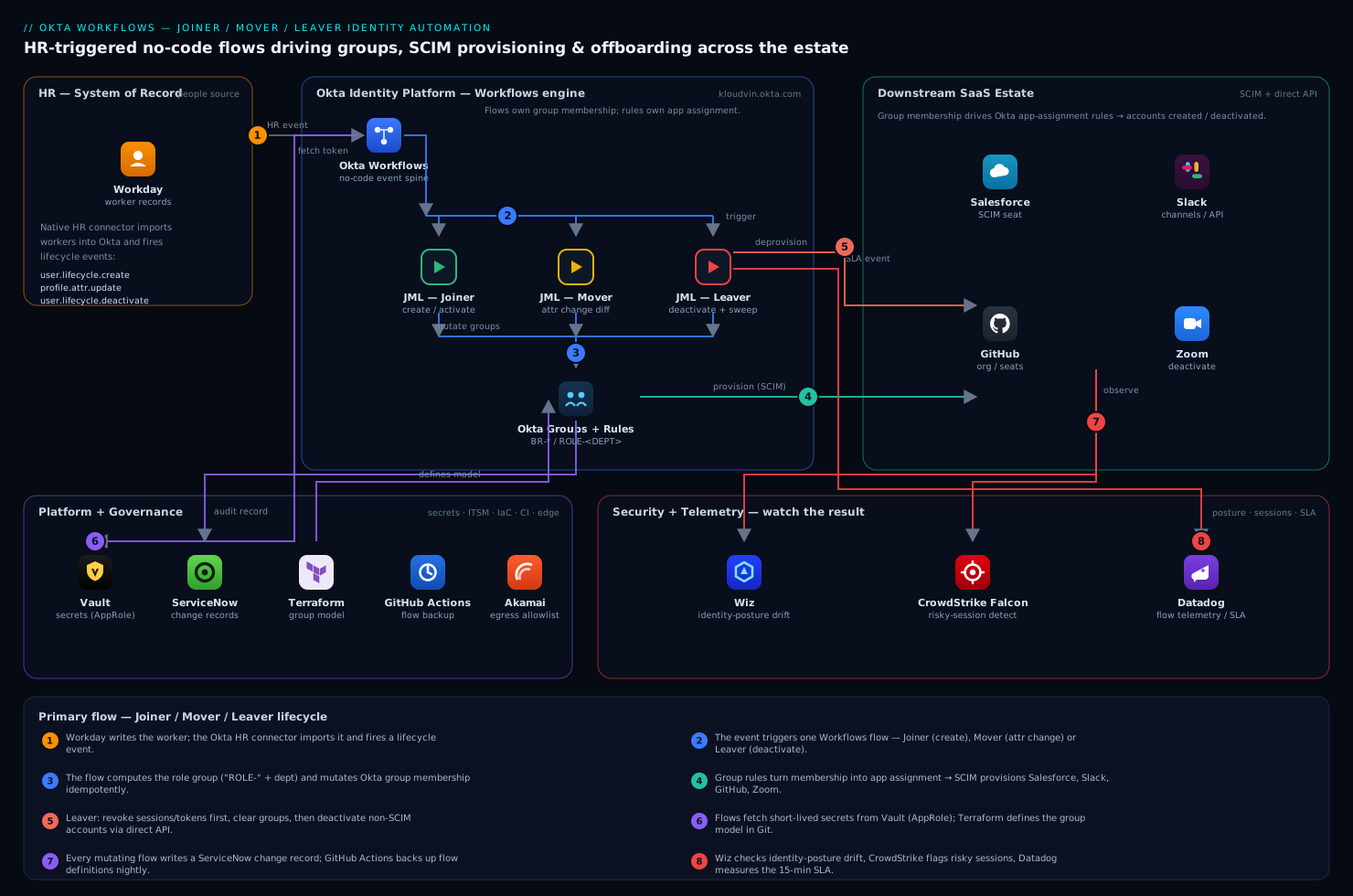
The design is a single event spine with three flows hanging off it. Workday (the system of record for employment) writes the worker; the Okta HR connector imports that worker as an Okta user and fires lifecycle events — user.lifecycle.create, profile-attribute changes, and user.lifecycle.deactivate. Each event is the trigger for one Workflows flow:
- Joiner flow — on user create / activate: derive a role from department + title, assign birthright groups, push the user into role-based app assignments, and call SaaS APIs for anything Okta cannot provision natively.
- Mover flow — on a change to department, title, manager, or
userType: diff old versus new attributes, add the new role’s groups, remove the stale role’s groups, and log a re-baseline record. - Leaver flow — on deactivate / a
terminationDatein the past: deactivate the Okta user, clear all groups, revoke sessions and OAuth grants, deactivate SaaS accounts, and transfer ownership of shared assets.
Everything that mutates access also writes to ServiceNow (the change record), and security tooling watches the result: Wiz for identity-posture drift in the connected cloud accounts, CrowdStrike Falcon Identity Protection for risky-session detection on the human identities, and Datadog for flow-execution telemetry. Group membership in Okta is the contract — it drives Okta app assignment rules, which in turn drive SCIM provisioning. Get the groups right and the apps follow.
1. Enable Workflows and stand up the HR + SaaS connectors
In the Okta Admin Console, open the Okta Workflows console (the waffle menu → Workflows). Before building flows, wire the connections each flow will reuse. Connections are created once under Connections and referenced by any flow.
Create the core Okta connection (the Okta connector authenticates back into your own tenant via OAuth — grant it okta.users.manage, okta.groups.manage, and okta.apps.manage scopes when prompted):
Workflows → Connections → New Connection → Okta
  Domain:        kloudvin.okta.com
  Authorization: OAuth 2.0 (admin consents to the scopes above)
  Name:          okta-tenant-admin
Add the downstream SaaS connections you will call directly (those without clean SCIM coverage). For example the Slack connector (used to invite users to channels on join and disable them on leave) and GitHub (used to add/remove org membership and seats):
New Connection → Slack    → name: slack-workforce    (bot token via Vault, see §6)
New Connection → GitHub    → name: github-eng-org    (fine-grained PAT, org admin scope)
New Connection → ServiceNow → name: snow-itsm         (OAuth, table API write to change_request)
For native provisioning, confirm your HR source is importing users. In Admin → Directory → Directory Integrations, the Workday integration should be running scheduled imports with attribute mappings for department, title, managerId, employeeType, and terminationDate. These attributes are what the flows branch on — if they are not mapped into the Okta profile, the flows are blind.
2. Model birthright access as Okta groups and rules
Workflows assigns access by manipulating groups; the apps are attached to groups by Okta’s own group rules and app assignment. So the foundation is a clean group model. Define groups with a strict naming convention so flows can compute names deterministically rather than hard-coding GUIDs.
Create the group scaffold with the Okta CLI or Terraform. Using Terraform (so the group model itself is version-controlled and reviewable in a pull request) with the Okta provider:
locals {
  departments = ["ENG", "SALES", "FIN", "OPS", "HR"]
}

# Birthright group every active employee gets
resource "okta_group" "all_employees" {
  name        = "BR-ALL-EMPLOYEES"
  description = "Birthright: every active full-time/part-time worker"
}

# Role groups, one per department, named deterministically: ROLE-<DEPT>
resource "okta_group" "role" {
  for_each    = toset(local.departments)
  name        = "ROLE-${each.key}"
  description = "Role group for department ${each.key}"
}
The convention ROLE-<DEPT> matters: in the joiner flow you will build the group name from the user’s department attribute ("ROLE-" + upper(department)) and assign it, with no lookup table. Attach apps to these groups with group rules (Admin → Directory → Group Rules) — e.g. membership in ROLE-ENG assigns GitHub, Jira, and the AWS SSO app — so that flows only ever touch group membership and never touch app assignment directly. This is the single most important design decision in the build: flows own group membership; group rules own app assignment. It keeps the flows small and makes “who gets what” auditable in one place.
3. Build the Joiner flow
In the Workflows console, create a flow named JML - Joiner. Set the trigger to the Okta connector’s User Activated event (or User Created if you provision on create). The event card emits the new user’s ID and profile.
Lay the flow out as a linear sequence of connector cards:
- Okta → Read User (input: User ID from the trigger) to pull the full profile including
department,employeeType, andtitle. - A Branch (the If/Else card) to skip contractors from full-time birthright if your policy differs — e.g. branch on
employeeType == "Contractor". - Compose the role group name from the department attribute. Use the Text - Concatenate and Text - To Uppercase functions:
roleGroupName = "ROLE-" + upper(  {{ user.profile.department }}  )
   e.g. department "Engineering" mapped to code "ENG" → "ROLE-ENG"
- Okta → Add User to Group twice: once for
BR-ALL-EMPLOYEES(look the group up by name with Okta → Read Group), once for the computedroleGroupName. Adding to these groups is what triggers Okta’s app-assignment rules and, downstream, SCIM provisioning to Salesforce, Slack, and the rest — you do not call those apps here at all. - For apps Okta cannot provision over SCIM, call them directly. Example: Slack → Invite User to Channel to add the joiner to
#all-companyand their department channel, and GitHub → Add or Update Org Membership to seat engineers. - ServiceNow → Create Record on
change_requestdocumenting the grant (who, which groups, which apps, the flow run ID) so the action is in the ITSM system of record, not just Okta’s log.
Because Okta’s Add User to Group is idempotent (adding an existing member is a no-op), and because group rules converge the app state, the joiner flow is safely re-runnable — if it fails halfway you can replay the event without creating duplicates. Test it with a single user before going wide:
# Create a throwaway test joiner via the Okta API and let the flow fire
curl -s -X POST "https://kloudvin.okta.com/api/v1/users?activate=true" \
  -H "Authorization: SSWS ${OKTA_API_TOKEN}" \
  -H "Content-Type: application/json" \
  -d '{
        "profile": {
          "firstName": "Test", "lastName": "Joiner",
          "email": "test.joiner@kloudvin.com",
          "login": "test.joiner@kloudvin.com",
          "department": "Engineering",
          "employeeType": "Employee"
        }
      }'
Within a few seconds the flow should run; confirm in Workflows → Flow → Execution History that the user landed in BR-ALL-EMPLOYEES and ROLE-ENG.
4. Build the Mover flow
Create a flow named JML - Mover. The trigger is the Okta connector’s User Profile Updated event, which fires when imported attributes change. The challenge with movers is you must compute the diff — what role they had versus what they now have — and surgically remove the old and add the new, never just pile on.
Okta’s profile-update event gives you the changed user; to get the previous role you compare the current department against the user’s current ROLE-* group memberships:
- Okta → Read User to get the new
departmentandtitle. - Okta → List User’s Groups to find any group matching
ROLE-*— that is their current role group. - Compose the new role group name (
"ROLE-" + upper(newDept)). - A Branch: if the new role group name equals the existing one, exit early (a title change within the same department is not a role move). Otherwise continue.
- Okta → Remove User from Group for the old
ROLE-*group, then Okta → Add User to Group for the new one. Removing the old role group causes its group rule to de-assign the old department’s apps, and SCIM deactivates those accounts; adding the new role group provisions the new set — the whole re-baseline happens through group membership. - Handle the manager change case in the same flow: if
managerIdchanged, call Okta → Read User on the new manager and notify them (a Slack → Send Message to the manager’s DM) that they have a new report and what access changed. - ServiceNow → Create Record capturing the before/after groups for the audit trail.
A subtle correctness point: list the role groups by name prefix (startsWith("ROLE-")), not by maintaining a separate map, so the flow keeps working when you add a new department. Movers are where un-deprovisioned stale access accumulates in most orgs, so the remove-before-add ordering and the explicit diff are the heart of the flow.
5. Build the Leaver flow
Create a flow named JML - Leaver. The trigger is the Okta connector’s User Deactivated event. For a hard SLA you also want a scheduled flow that catches anyone whose terminationDate is in the past but who is somehow still active — a safety net for missed events.
The leaver flow must be thorough and ordered (revoke sessions first, so an attacker cannot keep using a live session while you tidy up groups):
- Okta → Clear User Sessions (input: User ID) to kill all active sessions immediately.
- Okta → Revoke Tokens for User (or per-app Revoke Grant) so refresh tokens cannot mint new access tokens.
- Okta → List User’s Groups, then loop with Okta → Remove User from Group over every group except the default — clearing role groups triggers SCIM deactivation across all the SaaS apps the user had.
- For non-SCIM apps, call deactivation directly: GitHub → Remove Org Membership, Slack → Set User Inactive (admin API), Zoom → Deactivate User.
- Asset transfer: before fully removing a leaver, transfer ownership of shared resources. A Google → Transfer Drive Files card (or the relevant connector) reassigns documents to the manager so nothing is orphaned.
- Okta → Deactivate User to finalize the account state (if the trigger was a profile change rather than a deactivate).
- ServiceNow → Create Record with the full revocation manifest, and a Datadog → Submit Event marking the offboarding complete with a timestamp so you can measure SLA compliance.
Wire the scheduled safety-net flow to run every 15 minutes: Okta → List Users with a search filter, then for each deactivate-and-process. The search uses Okta’s expression syntax:
# Scheduled flow: find users terminated but still active
search = status eq "ACTIVE" and profile.terminationDate lt "{{ now }}"
For each hit, invoke the same leaver helper flow (Workflows lets one flow Call another), so you have a single offboarding implementation reused by both the event trigger and the scheduler. This is what actually delivers the “deprovisioned within fifteen minutes” guarantee even when an HR event is dropped.
6. Pull secrets from Vault, and keep flow definitions in Git
Some connectors need credentials that should not be pasted into the Workflows console and left there — a Slack bot token, a third-party HR API key. Keep them in HashiCorp Vault (the secrets manager of record) and fetch them at run time. Workflows can call Vault’s HTTP API with the API Connector card:
API Connector → GET
  URL:     https://vault.kloudvin.internal:8200/v1/secret/data/okta-workflows/slack
  Headers: X-Vault-Token: {{ connection.vaultToken }}
  → parse .data.data.bot_token  → pass into the Slack card
Use a Vault AppRole scoped to a read-only policy on just the okta-workflows/* path, and rotate the role’s secret-id on a schedule — the flow holds no long-lived secret, only the short-lived token it exchanges for. (Note: the AppRole’s own credentials and the Okta API token used below are themselves stored in Vault and out of scope for this guide to provision; treat them as inputs.)
Version-control the flows so they are reviewable and recoverable. Export each flow from the Workflows console (Flow → Options → Export) — this produces a JSON definition — and commit it through GitHub Actions, the CI system that gates and stores every infra change here. A minimal export-and-commit pipeline:
# .github/workflows/export-okta-flows.yml
name: Backup Okta Workflows
on:
  schedule: [{ cron: "0 2 * * *" }]   # nightly
  workflow_dispatch:
jobs:
  export:
    runs-on: ubuntu-latest
    steps:
      - uses: actions/checkout@v4
      - name: Export flows via Workflows API
        env:
          OWF_API_TOKEN: ${{ secrets.OWF_API_TOKEN }}   # injected from Vault
        run: |
          curl -s -H "Authorization: Bearer ${OWF_API_TOKEN}" \
            "https://kloudvin.workflows.okta.com/api/flo/v1/flows?export=true" \
            -o flows/all-flows.json
      - name: Commit if changed
        run: |
          git config user.name "okta-flow-bot"
          git add flows/ && git diff --cached --quiet || \
            git commit -m "chore: nightly Okta Workflows export"
          git push
The Terraform group model from §2 lives in the same repo, so the group scaffold and the flow logic are reviewed together in pull requests.
7. Validation
Prove each path end-to-end before trusting it with real people.
# 1. JOINER: confirm the test user landed in the right groups
curl -s "https://kloudvin.okta.com/api/v1/users/test.joiner@kloudvin.com/groups" \
  -H "Authorization: SSWS ${OKTA_API_TOKEN}" | \
  python3 -c "import json,sys; print([g['profile']['name'] for g in json.load(sys.stdin)])"
# expect: ['Everyone', 'BR-ALL-EMPLOYEES', 'ROLE-ENG']

# 2. MOVER: change department, then re-check groups
curl -s -X POST "https://kloudvin.okta.com/api/v1/users/test.joiner@kloudvin.com" \
  -H "Authorization: SSWS ${OKTA_API_TOKEN}" -H "Content-Type: application/json" \
  -d '{"profile":{"department":"Sales"}}'
sleep 10
# re-run the groups query above; expect ROLE-ENG gone, ROLE-SALES present

# 3. LEAVER: deactivate and confirm sessions + groups cleared
curl -s -X POST "https://kloudvin.okta.com/api/v1/users/test.joiner@kloudvin.com/lifecycle/deactivate" \
  -H "Authorization: SSWS ${OKTA_API_TOKEN}"
# then verify the groups list is empty and the SaaS accounts are deactivated
Cross-check the indirect effects, not just Okta state. Open Workflows → Flow → Execution History and confirm every card returned success (red cards are failed steps with the error inline). Confirm the ServiceNow change records were created. Then verify the security backstops are seeing the activity: Wiz should show no new public or over-privileged identity in the connected cloud accounts after the joiner run, and CrowdStrike Falcon Identity Protection should show the leaver’s sessions terminated. Finally, check the SLA metric you emitted to Datadog — build a monitor on the gap between terminationDate and the offboarding-complete event, alerting if it ever exceeds 15 minutes.
8. Rollback and teardown
Workflows changes are reversible because the flows only manipulate groups and call idempotent APIs.
- Disable a flow instantly without deleting it: Flow → toggle Off (or via API,
PUT /flo/v1/flows/{id}with"status":"INACTIVE"). This is your kill switch if a flow misbehaves — events queue/drop but nothing mutates. - Roll back a flow definition: re-import the previous JSON from the Git backup (§6) over the current flow.
- Reverse a bad joiner/mover with a compensating action — re-add or remove the affected
ROLE-*group via the API; because app assignment is rule-driven, fixing group membership re-converges app access automatically. - Full teardown for a decommission: set all JML flows
INACTIVE, thenterraform destroythe group scaffold only after confirming no production access depends on those groups (destroying aROLE-*group de-assigns its apps for everyone in it — never do this in business hours).
# Emergency: deactivate all JML flows by ID
for id in $JOINER_ID $MOVER_ID $LEAVER_ID; do
  curl -s -X PUT "https://kloudvin.workflows.okta.com/api/flo/v1/flows/${id}" \
    -H "Authorization: Bearer ${OWF_API_TOKEN}" \
    -H "Content-Type: application/json" \
    -d '{"status":"INACTIVE"}'
done
Common pitfalls
- Attributes not imported. If
department,employeeType, orterminationDateare not mapped from Workday into the Okta profile, every flow branches wrong or no-ops silently. Verify the profile mappings before building anything. - Hard-coding group GUIDs. Look groups up by name at run time. Hard-coded IDs break the moment a group is recreated and make flows un-portable between sandbox and prod tenants.
- Add-without-remove on movers. The most common audit finding. A mover flow that only adds the new role group, never removing the old, leaves accumulating access. Always diff and remove first.
- Race between HR import and the flow. If the flow reads the user before the import has written all attributes, it acts on stale data. Trigger on the lifecycle event Okta emits after import completes, not on a schedule that might run mid-import.
- Outbound IP allowlisting. Workflows calls leave from Okta’s published egress ranges. If your SaaS APIs (or your Akamai edge fronting internal endpoints) allowlist by IP, add Okta Workflows’ ranges or the calls silently 403. Akamai also fronts your Okta org login itself — keep its rules from rate-limiting the burst of API calls a wide rollout generates.
- No safety-net scheduler. Event triggers can be dropped during maintenance. Without the scheduled leaver sweep (§5), a missed
deactivateevent means a terminated user stays active — exactly the failure the project exists to prevent.
Security notes
The flows are the most privileged automation in the tenant — they create and destroy access — so treat the connections as crown jewels. Scope the Okta connection to the minimum required scopes (okta.users.manage, okta.groups.manage, okta.apps.manage) and nothing broader. Keep all third-party credentials in HashiCorp Vault with short-lived tokens, never pasted statically into a connector. Run CrowdStrike Falcon Identity Protection against the human identities so a compromised joiner or a leaver whose session lingered is flagged for step-up or termination, and let Wiz continuously check that the access these flows grant has not drifted into over-privilege or public exposure in the downstream cloud accounts. Every mutating flow writes a ServiceNow change record, giving security a ticketed audit trail independent of Okta’s own system log. Finally, protect the flows from tampering: restrict the Workflows admin role, and use the GitHub-backed nightly export as both backup and a tripwire — an unexpected diff in flows/ means someone changed automation outside the change process.
Cost notes
Okta Workflows is bundled with most Workforce Identity Cloud tiers, so the marginal cost of these flows is execution volume against your plan’s task limits rather than a new license — check your tier’s included flow executions and design for it (the leaver scheduler running every 15 minutes over a small candidate set is cheap; a poorly scoped scheduled flow listing all users every minute is not). The real savings are operational: each fully automated joiner removes ~30 minutes of help-desk handling, and same-day leaver deprovisioning eliminates the licensing waste of paying for SaaS seats held by terminated employees — frequently the largest hard-dollar win, since a forgotten Salesforce or Zoom seat bills monthly until someone notices. Keep Datadog/Datadog-equivalent telemetry on flow execution counts so you can see runaway flows before they consume your task allowance, and prefer native SCIM provisioning (free, driven by group membership) over per-app API calls wherever an app supports it, both to reduce flow complexity and to stay inside execution budgets.