At 02:14 on a Tuesday a release migration on a fintech’s primary PostgreSQL 16 cluster runs UPDATE ledger_entry SET status = 'void' with the WHERE clause accidentally commented out, and 9.4 million rows flip to void before the on-call kills the session at 02:17. The nightly pg_dump finished at 12:30 the previous night — fourteen hours stale — so restoring it would discard a full trading day of inserts. What the DBA actually needs is to rewind the database to 02:13:30, the instant before the bad transaction committed, and not one second further. That is point-in-time recovery (PITR), and pg_dump structurally cannot do it: a logical dump is a snapshot of one moment, with no way to replay forward to an arbitrary later instant. This guide builds the capability that can — pgBackRest taking full, differential and incremental backups, PostgreSQL continuously archiving its write-ahead log (WAL) to Amazon S3, and a rehearsed restore to an exact timestamp, transaction ID, or named restore point.
PITR works because PostgreSQL already writes every change to the WAL before it touches a heap or index page (write-ahead logging is how the database survives a crash at all). If you keep one base backup plus an unbroken chain of WAL segments from that backup forward, you can restore the base and then replay WAL up to any recovery_target_time, recovery_target_xid, recovery_target_lsn, or named recovery_target_name in between. The base backup is your floor; the WAL chain is the continuous fabric that lets you land anywhere above it. pgBackRest is the tool that makes this robust at production scale where hand-rolled archive_command = 'aws s3 cp %p ...' falls apart: it does parallel compressed backups, true block-level incrementals, per-file SHA checksums, automatic retention expiry, asynchronous WAL push/get to keep up with a busy primary, repository encryption, and first-class S3 support so your backups and WAL live in durable, versioned object storage rather than on the disk that just failed.
By the end you will run a complete pgBackRest-to-S3 setup from an empty bucket to a verified restore: provision the repository, configure the stanza, turn on archiving correctly (the half everyone forgets), take and schedule backups, and — the part that actually matters at 02:14 — execute a clean PITR to a chosen target on a throwaway host, prove it landed on the right transaction, and fork a new timeline. We treat the restore runbook, retention math, verification and monitoring as first-class, because a backup you have never restored is a hypothesis, not a backup.
What problem this solves
The gap between “we take backups” and “we can recover to the second before the incident” is where most data-loss postmortems live. Three failure modes recur. First, coarse recovery granularity: nightly pg_dump or a daily snapshot means your worst-case data loss — your recovery point objective (RPO) — is up to 24 hours, and a 02:14 mistake costs you everything since the last dump. Second, backups co-located with the thing they protect: snapshots on the same EBS volume, or backups on the DB host’s local disk, die with the instance, the volume, or the ransomware that encrypts the box. Third, untested restores: teams discover their archive_command was silently failing — or their backup was encrypted with a passphrase nobody saved — only during the real incident, when there is no time to learn.
What breaks without this capability is concrete and expensive. A fat-fingered UPDATE/DELETE with no WHERE, a bad migration, an application bug that corrupts a table over hours, a dropped schema, or full disk loss — none of these are recoverable to a precise point from a logical dump alone. The team either loses hours of data (restore the stale dump) or spends the incident reconstructing rows by hand from application logs. Meanwhile pg_wal/ on a primary whose archive_command is broken fills the disk silently until PostgreSQL refuses writes and the database goes down — a backup misconfiguration causing the very outage it was meant to prevent.
Who hits this: anyone running self-managed PostgreSQL on EC2, on-prem, or in a container where the managed-service safety net (RDS automated backups, Aurora continuous backup) is not doing it for you. Regulated workloads — fintech, healthcare, anything with an auditor — additionally need the backups to be immutable (ransomware targets backups first) and encrypted, with recoveries performed under a named, audited identity and gated through change control. This guide builds all of that: pgBackRest to S3 with Object Lock and client-side encryption, a least-privilege IAM identity, and a runbook a sleepy on-call can follow without improvising.
To frame the whole field before the deep dive, here is every moving part this guide assembles, what it does, and what fails without it:
| Component | Role in the system | What breaks if it is missing or wrong |
|---|---|---|
WAL archiving (archive_command) |
Ships every completed WAL segment to the repo continuously | No PITR — you can only restore to a backup boundary; RPO = backup interval |
| pgBackRest binary | Orchestrates backups, archiving, restore, expiry, verify | Hand-rolled aws s3 cp loses checksums, retries, retention, async |
| Stanza | Named config binding one PG cluster to its repo | No isolation between clusters; ambiguous backup sets |
| S3 repository | Durable, off-host store for backups + WAL | Backups die with the host/volume; no off-site copy |
| Full / diff / incr backup | The base your WAL replays from | Nothing to replay onto; WAL alone cannot reconstruct the DB |
restore --type=time/xid/name |
Replays WAL from a base up to a precise target | Coarse, whole-backup-only recovery |
Retention (repo1-retention-full) |
Expires old backups + the WAL they pin | Repo grows without bound; S3 bill climbs forever |
check / verify |
Proves archiving works and backups are intact | You learn the backup is broken during the real incident |
| Object Lock + encryption | Immutable, opaque backups off-host | Ransomware deletes backups; a leaked key reads them |
Monitoring (pg_stat_archiver, info) |
Surfaces archive lag, failures, RPO drift | Silent failure: disk fills, or you have no recent good backup |
Learning objectives
By the end of this article you can:
- Explain how PITR works — base backup + an unbroken WAL chain + replay to a target — and why
pg_dumpcannot do it. - Configure PostgreSQL continuous WAL archiving correctly (
wal_level,archive_mode,archive_command,archive_timeout) and know which settings need a restart versus a reload. - Stand up a pgBackRest S3 repository with the right
repo1-*options: type, endpoint, region, path, encryption, compression, bundling, block incrementals, retention, and parallelism. - Choose between full, differential, and incremental backups, design a sane rotation, and reason about the restore cost and WAL-pinning of each.
- Execute a point-in-time restore to a
--type=time,--type=xid,--type=lsn,--type=name, or--type=defaulttarget, understand--target-actionand--target-exclusive, and handle the timeline fork afterward. - Set retention that meets a stated recovery window, and understand how retention interacts with the WAL chain so you never expire a segment you still need.
- Verify the whole system —
checkfor archiving health,verifyfor repository integrity, and a real restore rehearsal — and wire monitoring offpg_stat_archiverandpgbackrest info --output=json. - Reason about RPO/RTO, S3 Object Lock, encryption, least-privilege IAM, and cost so the capability is production- and audit-grade, not a demo.
Prerequisites & where this fits
You should administer a PostgreSQL 13+ primary (examples use PostgreSQL 16 on Ubuntu 22.04, data directory /var/lib/postgresql/16/main, port 5432) with sudo/root and the ability to restart the service once through change control. You need pgBackRest 2.50+ installable on the DB host (the PGDG apt repo ships current builds; the distro package is often older and may lack repo1-block). You need an S3 bucket you control — examples use s3://kv-pgbackrest-prod in ap-south-1 — and an IAM role or user scoped to that one bucket (policy shown in the deep section). Comfort with psql, basic WAL/checkpoint concepts, and reading JSON output helps; you do not need replication or HA configured first (PITR is orthogonal to streaming replication, though they compose well).
Where this sits: PITR is the recovery half of a PostgreSQL durability story whose other halves are crash safety (the WAL itself), high availability (streaming replicas, failover), and logical export (pg_dump for portability and long-term archival). pgBackRest does not replace replicas — a replica protects against host failure with near-zero RPO/RTO but happily replicates a bad DELETE to every node in milliseconds. PITR is the tool for logical disasters (bad data, bad migration, dropped object) and for rebuilding after physical loss. It pairs naturally with the same skills used elsewhere in this corpus.
A quick map of who owns what during a real PITR incident, so you call the right person fast:
| Layer | What lives here | Who usually owns it | What it can cause / fix |
|---|---|---|---|
| PostgreSQL primary | WAL generation, archive_command, data dir |
DBA / platform | Archiving broken → no PITR; disk full → outage |
| pgBackRest config | Stanza, repo options, encryption, retention | DBA / platform | Wrong target/timezone → restore to wrong instant |
| S3 bucket + IAM | Durability, Object Lock, versioning, policy | Cloud / security | Over-broad policy → ransomware deletes backups |
| KMS + cipher passphrase | At-rest and client-side encryption keys | Security / secrets team | Lost passphrase → unreadable backups |
| Change control / ITSM | Approval to restart PG, to run a restore | SRE / on-call lead | Ungoverned restore over prod → turns loss into outage |
| Monitoring | Archive lag, backup age, verify failures | SRE / observability | No alert → silent RPO drift, stale-backup surprise |
Core concepts
Six mental models make every later step obvious.
Write-ahead logging is the substrate; PITR is built on top of it. PostgreSQL writes every change first to the WAL — a sequential stream of 16 MB segment files in pg_wal/ — and only later flushes the actual data pages at a checkpoint. This is what lets the database recover from a crash: replay WAL since the last checkpoint and you are consistent. PITR generalises this: if you keep a base backup (a copy of the data directory taken while the server runs, with the WAL needed to make it consistent) plus every WAL segment generated after it, you can restore the base and replay WAL forward to any point you choose. The base is the floor; the WAL is the continuous staircase above it.
pg_dump and a physical backup are different animals. pg_dump is a logical export — INSERT/COPY statements or a custom archive that recreates objects; it is portable across versions and architectures, perfect for moving or archiving a database, and useless for PITR because it captures one instant with no forward-replay. A physical backup (what pgBackRest takes) is a byte-level copy of the cluster’s files plus WAL; it is version- and platform-specific but is the only thing you can replay WAL onto. You want both for different jobs; this guide is entirely about the physical/WAL path.
pgBackRest organises everything around a stanza and a repository. A stanza is a named configuration that binds one PostgreSQL cluster (its pg1-path, port, etc.) to one or more repositories where backups and WAL land. kv-prod is a stanza; repo1 is its S3 repository. The stanza name threads through every command (--stanza=kv-prod). One host can run several stanzas (several clusters); one stanza can write to several repos (e.g. S3 plus a local NVMe cache) for belt-and-braces durability. stanza-create is the one-time act of initialising the repo layout for a cluster.
Backups come in three intensities, and they chain. A full backup copies every file. A differential copies everything changed since the last full. An incremental copies everything changed since the last backup of any type (full, diff, or incr). Restoring a full needs only itself; restoring a diff needs the diff plus its parent full; restoring an incr needs the incr plus every backup back to its full. pgBackRest tracks this backup reference list automatically and, with --delta, only fetches files that differ from what is already on disk — so an incr restore pulls far less than a full.
The archive_command is a contract, and its return code is load-bearing. PostgreSQL calls archive_command for each completed WAL segment; if the command exits 0, PostgreSQL considers the segment safely archived and may recycle it; if it exits non-zero, PostgreSQL keeps the segment in pg_wal/ and retries later. This is why you point archive_command at pgbackrest ... archive-push and not a bare aws s3 cp: pgBackRest returns the right code, retries, deduplicates, optionally pushes asynchronously, and never silently drops a segment. A broken archive_command that returns 0 anyway is the worst case — PostgreSQL recycles WAL you never actually archived, and your chain has a hole.
Recovery has a target and a timeline. When you restore for PITR you set a recovery target — a time, an LSN, a transaction id, or a named restore point — and PostgreSQL replays WAL until it reaches that target, then stops. The moment you let it run past recovery and start accepting writes, history forks: PostgreSQL increments the timeline ID (the first 8 hex digits of a WAL filename) so the new branch’s WAL never collides with the old. Understanding timelines explains why you can restore the same base to different targets repeatedly, and why your very next action after a successful PITR is to take a fresh full backup so the new timeline has its own baseline.
The vocabulary in one table
Before the deep sections, pin down every moving part; the glossary repeats these for lookup, this table is the model side by side:
| Concept | One-line definition | Where it lives | Why it matters to PITR |
|---|---|---|---|
| WAL segment | A 16 MB file of sequential change records | pg_wal/, then the repo |
The fabric you replay; a gap breaks recovery |
| Base backup | Physical copy of the data dir + needed WAL | The repo (...F folder) |
The floor you replay onto |
| Stanza | Named config binding one cluster to repos | pgbackrest.conf |
Every command targets a stanza |
Repository (repo1) |
Where backups + WAL are stored (here S3) | S3 bucket + repo1-path |
Off-host durability; survives the box |
archive_command |
What PG runs per completed WAL segment | postgresql.conf |
The continuous-archiving contract |
| Full / diff / incr | Backup intensities that chain | The repo | Trade storage/time vs restore complexity |
| Recovery target | Where replay stops (time/xid/lsn/name) | restore --type/--target |
The “to the second” in PITR |
| Timeline (TLI) | History branch ID after a recovery | WAL filename prefix | Forks so old and new WAL never collide |
| Retention | How many backups to keep before expiry | repo1-retention-* |
Defines your recovery window + repo size |
recovery.signal |
File telling PG to enter recovery on start | Restored data dir | pgBackRest writes it; presence = “recover” |
pg_stat_archiver |
View of archiving success/failure/lag | The running server | Your primary archiving-health signal |
| Object Lock | S3 WORM retention on objects | The bucket | Makes recent backups undeletable |
How continuous WAL archiving works
WAL archiving is the half people skip, and without it you have backups but no PITR — you can only restore to the instant each backup finished. Get it right first; everything else assumes a healthy chain.
wal_level, archive_mode, and what needs a restart
PostgreSQL must be told to retain enough WAL detail and to hand completed segments to your archiver. Four settings do the work, and the trap is that two of them require a full restart — setting them with ALTER SYSTEM and a reload does nothing until you restart, so teams “enable PITR,” reload, and discover months later it was never on.
sudo -u postgres psql <<'SQL'
ALTER SYSTEM SET wal_level = 'replica';        -- minimum for archiving + replicas
ALTER SYSTEM SET archive_mode = 'on';          -- enable archiving (restart required)
ALTER SYSTEM SET archive_command = 'pgbackrest --stanza=kv-prod archive-push %p';
ALTER SYSTEM SET archive_timeout = '60';       -- force a segment at least every 60s
ALTER SYSTEM SET max_wal_senders = 10;         -- headroom for backups + replicas
SQL
%p is the path to the WAL segment PostgreSQL wants archived; pgBackRest reads it and copies the segment to the repo. The settings, their effect, and the restart/reload behaviour:
| Setting | What it controls | Default | Recommended for PITR | Restart or reload? |
|---|---|---|---|---|
wal_level |
Detail recorded in WAL | replica (PG10+) |
replica (or logical if you also need logical decoding) |
Restart |
archive_mode |
Whether completed WAL is archived | off |
on |
Restart |
archive_command |
Command run per completed segment | empty | pgbackrest --stanza=... archive-push %p |
Reload |
archive_timeout |
Max seconds before a partial segment is forced | 0 (off) |
60 (caps idle-DB RPO at ~60s) |
Reload |
max_wal_senders |
Concurrent WAL sender processes | 10 (PG13+) |
10+ |
Reload |
archive_library |
Archive module (PG15+ alternative to command) | empty | leave empty unless using a module | Restart |
The restart is the single disruptive step in this whole build — schedule it through change control:
sudo systemctl restart postgresql@16-main
sudo -u postgres psql -c "SHOW archive_mode;"      # 'on'
sudo -u postgres psql -c "SHOW archive_command;"   # the pgbackrest line
archive_timeout and your RPO floor
On a busy database, segments fill and are archived constantly, so the gap between “last archived” and “now” is tiny. On an idle or low-traffic database, a segment might not fill for hours, and until it is archived its changes are not in the repo — so a failure could lose everything since the last archived segment. archive_timeout forces PostgreSQL to switch to a fresh segment (archiving the current one, even partially filled) at least every N seconds. Setting archive_timeout = 60 means even a quiet database archives at least once a minute, capping your RPO at roughly 60 seconds. The cost is one extra (mostly empty, but still 16 MB before compression) segment per minute on idle clusters — which zst compression and repo1-bundle make cheap.
archive_timeout |
Idle-DB worst-case RPO | Extra segments on idle DB | When to use |
|---|---|---|---|
0 (default, off) |
Until the next segment naturally fills (could be hours) | None | Never for PITR; only if you accept coarse RPO |
300 (5 min) |
~5 minutes | ~12/hour idle | Low-change clusters, relaxed RPO |
60 (1 min) |
~60 seconds | ~60/hour idle | The common production choice |
10 |
~10 seconds | ~360/hour idle | Aggressive RPO; watch S3 PUT cost |
Synchronous vs asynchronous archive-push
By default pgBackRest archives each segment synchronously within the archive_command call. On a high-write primary that can become a bottleneck: if segments fill faster than they can be uploaded to S3 (which has real round-trip latency), pg_wal/ backs up and the disk fills. pgBackRest’s asynchronous archiving decouples this — PostgreSQL’s archive_command returns immediately after handing the segment to a pgBackRest async process, which uploads in parallel batches in the background. This is essential on busy systems and harmless on quiet ones.
# In the [global] section of pgbackrest.conf
archive-async=y
archive-push-queue-max=4GiB      ; cap the local async queue; alert before this
spool-path=/var/spool/pgbackrest ; local staging for async segments
process-max=4                    ; parallel upload workers
| Mode | How it behaves | Throughput ceiling | Risk | Use when |
|---|---|---|---|---|
| Synchronous (default) | archive_command blocks until upload done |
One segment at a time, S3 RTT-bound | pg_wal/ fills under bursty load |
Low/moderate write rate |
Asynchronous (archive-async=y) |
Returns fast; background parallel upload | process-max segments in parallel |
Queue can grow if S3 is down (cap it) | High write rate, production default |
archive-push-queue-max is a safety valve: if S3 is unreachable and the async queue grows past this, pgBackRest starts erroring the push so PostgreSQL retains WAL in pg_wal/ (the correct behaviour) rather than letting the spool balloon. Alert on queue depth well before it.
What archive-push actually does
A subtle but important property: archive-push is idempotent and safe under retries. If PostgreSQL calls it for a segment that is already in the repo (e.g. a retry after a transient network blip), pgBackRest compares checksums — if identical it succeeds silently; if the same segment name has different contents (a sign of a serious problem like two primaries archiving to one stanza), it errors loudly rather than overwrite. This is exactly the correctness a bare aws s3 cp lacks, and the reason “just script it with the AWS CLI” is a trap for WAL.
Installing and configuring pgBackRest
With archiving understood, install the binary and write the configuration that defines the repository and stanza.
Install from the right source
The distro package is frequently a major version behind and may lack newer options (repo1-block, repo1-bundle tuning). Use the PGDG repository for a current build:
# PGDG repo (Ubuntu/Debian) gives current pgBackRest
sudo apt-get install -y postgresql-common
sudo /usr/share/postgresql-common/pgdg/apt.postgresql.org.sh -y
sudo apt-get install -y pgbackrest
pgbackrest version   # expect 2.50+ ; older lacks block incrementals

# Create the directories pgBackRest needs, owned by postgres
sudo install -d -o postgres -g postgres -m 750 /etc/pgbackrest
sudo install -d -o postgres -g postgres -m 750 /var/log/pgbackrest
sudo install -d -o postgres -g postgres -m 750 /var/lib/pgbackrest
sudo install -d -o postgres -g postgres -m 750 /var/spool/pgbackrest
The configuration file, option by option
Write /etc/pgbackrest/pgbackrest.conf. In production this file is rendered by Ansible from a Jinja2 template so every host is byte-identical and the S3 key and cipher passphrase are injected from a secrets store, never hardcoded.
[global]
# --- repository: an S3 bucket ---
repo1-type=s3
repo1-s3-bucket=kv-pgbackrest-prod
repo1-s3-endpoint=s3.ap-south-1.amazonaws.com
repo1-s3-region=ap-south-1
repo1-s3-key-type=auto              ; use the host's IAM role / instance profile
repo1-s3-uri-style=host             ; host-style URLs (vs path) for AWS S3
repo1-path=/pgbackrest              ; key prefix inside the bucket

# --- encryption: client-side, on top of S3 SSE-KMS ---
repo1-cipher-type=aes-256-cbc       ; encrypt in pgBackRest before upload
repo1-cipher-pass=ENV:PGBACKREST_REPO_CIPHER  ; passphrase from env, never literal

# --- retention: defines the recovery window ---
repo1-retention-full=4              ; keep 4 full backups (+ the WAL they pin)
repo1-retention-diff=6              ; keep 6 differentials
repo1-retention-archive-type=full   ; expire archive in line with full retention

# --- efficiency ---
repo1-bundle=y                      ; bundle small files -> far fewer S3 objects/PUTs
repo1-block=y                       ; block-level incrementals (smaller incrs)
compress-type=zst                   ; Zstandard: great ratio, low CPU
compress-level=6
process-max=4                       ; parallel workers for backup/restore/archive

# --- WAL archiving behaviour ---
archive-async=y
archive-push-queue-max=4GiB
spool-path=/var/spool/pgbackrest

# --- operational ---
start-fast=y                        ; force an immediate checkpoint at backup start
log-level-console=info
log-level-file=detail
log-path=/var/log/pgbackrest

[kv-prod]
pg1-path=/var/lib/postgresql/16/main
pg1-port=5432
pg1-user=postgres
The repository options that matter, with the defaults and the trade-offs:
| Option | Purpose | Default | Recommended | Trade-off / gotcha |
|---|---|---|---|---|
repo1-type |
Backend kind | posix |
s3 |
Also azure, gcs, sftp |
repo1-s3-key-type |
How AWS creds are obtained | shared |
auto (IAM role/profile) |
auto avoids static keys in the file |
repo1-s3-uri-style |
host vs path URLs | host |
host for AWS |
Some S3-compatibles need path |
repo1-path |
Key prefix in the bucket | / |
/pgbackrest |
Lets one bucket host several stanzas |
repo1-cipher-type |
Client-side encryption | none |
aes-256-cbc |
Lose the pass → backups unreadable |
repo1-bundle |
Combine small files | n |
y |
Fewer S3 PUTs/objects; big cost win on busy clusters |
repo1-block |
Block-level incrementals | n |
y (2.46+) |
Much smaller incrs on large, partially-changed tables |
repo1-retention-full |
Full backups to keep | none (∞) | match recovery window | Without it the repo grows forever |
repo1-retention-archive-type |
What archive retention follows | full |
full |
Controls how far back WAL is kept |
The compression and parallelism options, side by side:
| Option | Values | Default | Effect | When to change |
|---|---|---|---|---|
compress-type |
none/gz/lz4/zst/bz2 |
gz |
zst = best ratio/CPU balance |
lz4 for max speed; none if storage is free and CPU scarce |
compress-level |
0–9 (zst: 1–19 internally mapped) | type-specific | Higher = smaller + slower | Lower on CPU-bound hosts |
process-max |
1–N | 1 | Parallel workers | Raise on multi-core hosts with bandwidth |
start-fast |
y/n | n | Immediate checkpoint at backup start | y to start backups promptly (slight I/O spike) |
delta |
y/n | n | Restore/backup only changed files | y makes restores re-fetch far less |
The cipher passphrase: the one secret you must not lose
repo1-cipher-pass=ENV:PGBACKREST_REPO_CIPHER tells pgBackRest to read the repository encryption passphrase from an environment variable rather than have it sit in the config file. The variable is populated at process start from a secrets manager (Vault, AWS Secrets Manager, SOPS) so the passphrase never lands on disk. This passphrase is non-recoverable. Client-side encryption means the bytes in S3 are opaque even to AWS; lose the passphrase and every backup is permanently undecryptable — a backup you cannot decrypt is not a backup. Store it as the single source of truth in your secrets manager, document where it lives, and back that up out-of-band. Treat rotating it as a deliberate operation (new full backups under the new key; old backups still need the old key until they expire).
Initializing the stanza and taking backups
Now create the stanza and prove the wiring before you depend on it.
stanza-create and check
# Make the cipher passphrase available (in prod, sourced from a secrets manager)
export PGBACKREST_REPO_CIPHER='<from-your-secrets-manager>'

# One-time: initialise the repository layout for this cluster
sudo -E -u postgres pgbackrest --stanza=kv-prod stanza-create

# THE most important command in this guide:
sudo -E -u postgres pgbackrest --stanza=kv-prod check
check is the command that earns its keep: it forces a WAL switch and confirms the segment actually arrived in the repository, validating the entire archiving path end to end. Run it after setup, after any config change, and on a schedule — it catches a broken archive_command before you build a month of expectations on a chain with a hole.
| Command | What it does | Run when | Failure means |
|---|---|---|---|
stanza-create |
Initialise repo layout for the cluster | Once, at setup | Repo/perm/connectivity problem |
check |
Force WAL switch, confirm it reached the repo | Setup + on a schedule | Archiving is broken — fix before trusting PITR |
stanza-upgrade |
Update stanza after a PG major upgrade | After upgrading PostgreSQL | Stanza/PG version mismatch |
stanza-delete |
Remove the stanza and its backups | Decommission only | (Destructive — requires stop first) |
The first full backup and the schedule
sudo -E -u postgres pgbackrest --stanza=kv-prod --type=full --log-level-console=info backup
Then wire a rotation. A pragmatic schedule for a busy cluster: a weekly full, daily differentials, and hourly incrementals. Run it from Jenkins, a GitHub Actions scheduled workflow, or a systemd timer so each run is logged, retried, and visible — not a silent cron line that fails unnoticed.
# crontab for the postgres user (or equivalent CI stages)
00 02 * * 0   pgbackrest --stanza=kv-prod --type=full backup   # Sun 02:00 weekly full
00 02 * * 1-6 pgbackrest --stanza=kv-prod --type=diff backup   # Mon-Sat differential
00 *  * * *   pgbackrest --stanza=kv-prod --type=incr backup   # hourly incremental
Choosing full vs differential vs incremental
The three intensities trade backup size/time against restore complexity and WAL-pinning. The defining numbers:
| Backup type | Copies | Backup size | Backup time | Restore needs | WAL it pins |
|---|---|---|---|---|---|
Full (--type=full) |
Every file | Largest | Longest | Just itself | From this full forward |
Differential (--type=diff) |
Changed since last full | Grows over the week | Medium | Diff + its full | From its parent full |
Incremental (--type=incr) |
Changed since any last backup | Smallest | Shortest | Incr + every backup back to its full | From its parent full |
How the choice maps to outcomes you care about:
| If you want… | Choose | Because |
|---|---|---|
| Simplest, fastest restore | More frequent fulls | A full restores alone; no chain to walk |
| Smallest backup window / least I/O | Incrementals | Copy only what changed since the last backup |
| A middle ground that caps chain length | Differentials | Each diff stands on just its full, not a chain |
| Minimal repo growth on huge, lightly-changed DBs | repo1-block=y + incrementals |
Block-level deltas, not whole changed files |
| Bounded restore time for an SLA | Frequent fulls or diffs | Long incr chains lengthen restore |
A worked example of the chain. After Sunday’s full 20260607-020000F, Monday’s diff is ...F_20260608-020000D (everything since the full); Monday 14:00’s incr is ...F_20260608-140000I (everything since the 13:00 incr). Restoring to Monday 14:30 fetches the full, then the Monday diff, then each incr up to 14:00, then replays WAL the last 30 minutes. With --delta, only files that differ from what is already on the restore host are pulled.
Reading pgbackrest info
Inspect what you have at any time — this is the inventory you consult before a restore:
sudo -E -u postgres pgbackrest --stanza=kv-prod info
stanza: kv-prod
    status: ok
    cipher: aes-256-cbc

    db (current)
        wal archive min/max (16): 0000000100000A8B000000C0/0000000100000A91000000F4

        full backup: 20260607-020000F
            timestamp start/stop: 2026-06-07 02:00:01 / 2026-06-07 02:06:44
            wal start/stop: 0000000100000A8B000000C0 / 0000000100000A8B000000C3
            database size: 214.7GB, database backup size: 214.7GB
            repo1: backup set size: 41.2GB, backup size: 41.2GB

        diff backup: 20260608-020000F_20260608-020000D
            wal start/stop: 0000000100000A8E0000001A / 0000000100000A8E0000001C
            database size: 215.9GB, database backup size: 3.1GB
            repo1: backup set size: 41.6GB, backup size: 612MB
            backup reference list: 20260607-020000F

        incr backup: 20260608-020000F_20260608-140000I
            database size: 216.1GB, database backup size: 740MB
            repo1: backup set size: 41.7GB, backup size: 143MB
            backup reference list: 20260607-020000F, 20260608-020000F_20260608-020000D
The fields you actually read in an incident:
| Field | What it tells you | Why it matters in a restore |
|---|---|---|
wal archive min/max |
The continuous WAL range in the repo | Your target time must fall within this range |
backup reference list |
Which earlier backups this one needs | Confirms the chain is intact before you restore |
wal start/stop (per backup) |
The WAL range that backup spans | Maps backups to LSNs/times for target selection |
database size vs backup size |
Logical size vs what landed in the repo | Shows compression + incremental savings |
status |
ok / error detail |
A non-ok stanza needs fixing before trusting it |
Performing a point-in-time recovery
The drill that matters at 02:14. The golden rule first, in bold because violating it turns a data-loss incident into an outage: always restore onto a separate host or a stopped clone first; never overwrite a live primary blind. Recover, validate, then decide how to bring the data back to production.
The restore, step by step
To rewind to 02:13:30 — the instant before the runaway UPDATE committed — on a recovery host: stop PostgreSQL (so the data dir can be replaced), restore the base with a recovery target, and let WAL replay stop precisely there.
# On the RECOVERY host (not the live primary). Stop PG so we can rebuild the data dir.
sudo systemctl stop postgresql@16-main

# Restore base + the WAL chain, targeting the exact instant.
# --delta only fetches files that differ from what is already on disk.
sudo -E -u postgres pgbackrest --stanza=kv-prod \
  --type=time --target="2026-06-10 02:13:30+05:30" \
  --target-action=promote \
  --delta \
  restore
pgBackRest restores the appropriate backup set (choosing the most recent backup at or before the target) and writes the recovery settings into postgresql.auto.conf, dropping a recovery.signal file so PostgreSQL enters recovery on start. Start the server; it replays WAL from the base up to the target and then stops as instructed:
sudo systemctl start postgresql@16-main

# Watch it reach the target and stop replaying:
sudo tail -f /var/log/postgresql/postgresql-16-main.log
#   ... "recovery stopping before commit of transaction 987654322, time 2026-06-10 02:13:30.4+05:30"
#   ... "archive recovery complete"

# Confirm we are out of recovery (promoted) and the data is correct:
sudo -u postgres psql -c "SELECT pg_is_in_recovery();"                         -- 'f' once promoted
sudo -u postgres psql -c "SELECT count(*) FROM ledger_entry WHERE status='void';"  -- back to normal
Choosing the recovery target
--type=time is the intuitive one, but pgBackRest supports several target kinds — some more precise than a wall-clock time:
--type |
--target value |
Replays until… | Best for |
|---|---|---|---|
time |
'2026-06-10 02:13:30+05:30' |
The first transaction after that timestamp | “Just before 02:14” wall-clock incidents |
xid |
'987654321' |
The given transaction id (commonly with --target-exclusive) |
“Up to but not including this known-bad transaction” |
lsn |
'A8E/1C0000F0' |
The given WAL log sequence number | Surgical, when you know the exact LSN |
name |
'pre_ledger_migration' |
A restore point you created beforehand | Gating a risky migration you pre-marked |
immediate |
(none) | Consistency is reached (end of base backup) | Fastest restore; minimal replay |
default |
(none) | The end of the available WAL | Full DR — recover everything, lose nothing |
Examples of the non-time targets:
# To a transaction id, stopping BEFORE the bad xid is applied:
pgbackrest --stanza=kv-prod --type=xid --target="987654322" \
  --target-exclusive --target-action=promote --delta restore

# To a named restore point you created before a risky change:
#   (run on the primary, BEFORE the migration)
#   SELECT pg_create_restore_point('pre_ledger_migration');
pgbackrest --stanza=kv-prod --type=name --target="pre_ledger_migration" \
  --target-action=promote --delta restore

# Full disaster recovery — replay all available WAL, lose nothing:
pgbackrest --stanza=kv-prod --type=default --target-action=promote --delta restore
--target-action, --target-exclusive, and friends
The flags that govern how recovery stops and what happens at the boundary:
| Flag | Values | Default | Effect |
|---|---|---|---|
--target-action |
pause / promote / shutdown |
pause |
At the target: pause (inspect, then promote), promote (open read-write, fork timeline), or shut down |
--target-exclusive |
(flag) | inclusive | Stop before applying the target xid/lsn rather than including it |
--target-timeline |
current / latest / <id> |
depends | Which timeline to follow during recovery |
--type |
(see table above) | default |
The kind of target |
--delta |
(flag) | off | Only fetch files that differ from what is on disk |
--set |
a backup label | latest suitable | Restore from a specific backup set explicitly |
A safer pattern for high-stakes restores is --target-action=pause: recovery stops at the target but does not open the database read-write. You connect, inspect (SELECT count(*) ...), and only when satisfied do you promote (SELECT pg_wal_replay_resume(); or pg_promote()), or — if you overshot — re-run the restore with a corrected target. Promoting is the irreversible step that forks the timeline.
After the restore: the timeline forks
The moment recovery promotes and the database accepts writes, the timeline ID increments (the WAL filename prefix goes from 00000001... to 00000002...) so the new branch’s WAL never collides with the original. Two consequences you must act on:
# 1. The new timeline has NO backup of its own yet — take a full immediately:
sudo -E -u postgres pgbackrest --stanza=kv-prod --type=full backup

# 2. If this recovery host IS the new production, archiving continues to the same
#    stanza on the new timeline — confirm check passes on the new timeline:
sudo -E -u postgres pgbackrest --stanza=kv-prod check
| After a PITR you must… | Why |
|---|---|
| Take a fresh full backup | The new timeline has no baseline; PITR on it needs a floor |
Run check |
Confirm archiving works on the new timeline |
| Decide the data-return path | Is this host the new prod, or do you export the fixed data back? |
| Document the target used | Auditors and the postmortem need the exact instant recovered to |
Bringing the data back to production
The recovery host now holds the correct data; how you get it into production depends on the incident:
| Scenario | Recovery approach | Data-return path |
|---|---|---|
| Whole-cluster disaster (host/volume lost) | Restore to a new host, --type=default, promote |
Promote the recovery host as the new primary |
| A few tables clobbered, rest of DB fine | Restore to a scratch host at the target time | pg_dump/COPY only the affected tables back into live prod |
| Need to inspect before committing | Restore with --target-action=pause |
Validate, then promote or re-target |
| Testing/forensics only | Restore to an isolated host | Investigate; discard the host afterward |
For the “few tables clobbered” case — far more common than total loss — you do not overwrite the live primary. You restore a copy to the target time on a scratch host, then surgically copy the good rows back (pg_dump -t ledger_entry then restore that table, or COPY ... TO/FROM through a foreign data wrapper), so the rest of the production database (which has legitimate writes since 02:14) is untouched.
Retention, expiration, and the WAL chain
Backups and the WAL that links them grow forever unless you expire them. Retention defines both your recovery window and your S3 bill, and it interacts with the WAL chain in a way that catches people out.
How retention works
expire runs automatically after each backup (or can be run on its own). repo1-retention-full=4 keeps the 4 most recent full backups; when a 5th full is taken, the oldest full — and the diffs/incrs that depended on it, and the WAL segments only that old chain needed — are expired and deleted from S3. This is why retention is not just “delete old backup folders”: pgBackRest also prunes the now-unneeded WAL, which is what actually controls repo growth on a busy cluster.
[global]
repo1-retention-full=4              ; keep 4 fulls -> ~4 weeks with weekly fulls
repo1-retention-diff=6              ; keep 6 most recent differentials
repo1-retention-archive=2           ; keep PITR-capable WAL for the 2 newest fulls
repo1-retention-archive-type=full   ; archive retention is measured in fulls
| Retention option | What it bounds | Example value | Effect |
|---|---|---|---|
repo1-retention-full |
Number of full backups kept | 4 |
~4 weeks of recoverability with weekly fulls |
repo1-retention-full-type |
count or time |
count |
Keep N fulls, or fulls newer than N days |
repo1-retention-diff |
Differentials kept | 6 |
Bounds the diff sprawl within the window |
repo1-retention-archive |
Fulls whose WAL stays PITR-capable | 2 |
You can PITR within the 2 newest fulls’ spans |
repo1-retention-archive-type |
Unit for archive retention | full |
Tie WAL retention to full retention |
The subtle part: retention-archive vs retention-full
Here is the gotcha that surprises people. repo1-retention-full=4 means four full backups are kept, but repo1-retention-archive controls how far back you retain the continuous WAL needed to do PITR between backups. If repo1-retention-archive is unset, pgBackRest keeps WAL for all retained fulls (full PITR across the whole window). If you set repo1-retention-archive=2, you keep PITR-capable WAL only for the 2 newest fulls; the older two fulls are still restorable to their exact backup point, but you cannot pick an arbitrary instant between them — their interstitial WAL was expired to save storage. Decide deliberately:
| Configuration | What you can recover to | Storage cost |
|---|---|---|
retention-archive unset |
Any instant within the full window (e.g. 4 weeks) | Highest — keeps all interstitial WAL |
retention-archive=2 (with 4 fulls) |
Any instant in the last 2 fulls’ span; only backup-points for the older 2 | Lower — old WAL pruned |
retention-full-type=time, retention-full=30 |
Any instant in the last 30 days (with archive matching) | Sized to the time window |
Match this to policy: “we must be able to recover to any second in the last 14 days, and to a daily restore point for 90 days” maps to time-based full retention of 90 days plus archive retention covering 14. Confirm the math before an auditor asks; the most common mistake is assuming retention-full=4 alone guarantees four weeks of to-the-second recovery when archive retention silently narrowed it.
Manual expiry and dry runs
# Run expiry on demand (also runs automatically after each backup):
sudo -E -u postgres pgbackrest --stanza=kv-prod expire

# Preview what WOULD be expired without deleting (dry run):
sudo -E -u postgres pgbackrest --stanza=kv-prod --dry-run expire

# Expire a specific backup set explicitly (e.g. a known-bad backup):
sudo -E -u postgres pgbackrest --stanza=kv-prod --set=20260601-020000F expire
Verification: proving the backups are good
A backup you have not restored is a hypothesis. pgBackRest gives you three independent levels of assurance, and you should run all three on a schedule.
check, verify, and a real restore
# 1. Archiving is healthy end-to-end (forces a WAL switch, confirms arrival).
sudo -E -u postgres pgbackrest --stanza=kv-prod check

# 2. Every backup + WAL file's checksum matches the repo manifest (catches bit-rot,
#    truncated uploads, tampering). Run after backups; it reads the whole repo.
sudo -E -u postgres pgbackrest --stanza=kv-prod verify

# 3. The only test that truly proves DR: restore to a scratch path and open it.
sudo -E -u postgres pgbackrest --stanza=kv-prod \
  --type=time --target="$(date -d '-1 hour' '+%F %T %z')" \
  --pg1-path=/var/lib/postgresql/16/restore_test \
  --target-action=promote --delta restore
The three levels, what each catches, and how often to run them:
| Level | Command | Catches | Misses | Cadence |
|---|---|---|---|---|
| Archiving health | check |
Broken archive_command, repo unreachable |
Backup corruption | Hourly (monitoring) |
| Repository integrity | verify |
Bit-rot, partial uploads, checksum drift | Whether PG can actually start from it | Daily/after backups |
| End-to-end restore | full restore rehearsal |
Everything — the only proof PG starts and data is right | (nothing — this is the gold standard) | Monthly, ticketed |
Why the restore rehearsal is non-negotiable
check proves WAL is flowing; verify proves the bytes in S3 match their checksums. Neither proves PostgreSQL will actually start from the restored files and serve correct data — that depends on version compatibility, the cipher passphrase being correct, the WAL chain being complete, and a dozen things that only a real restore exercises. Make the rehearsal a monthly, ticketed event: restore last hour’s data to a scratch host, start it, run a row-count sanity check, record the result, tear it down. A successful rehearsal closes a recurring change task — exactly the paper trail an auditor wants, and the only thing that lets you sleep before you have ever done a real one.
Reading repository state programmatically
For monitoring and CI gates, info --output=json exposes everything a script needs:
sudo -E -u postgres pgbackrest --stanza=kv-prod info --output=json | \
  jq '.[0].backup[-1] | {label, type, timestamp_stop: .timestamp.stop, error}'
| JSON field | Meaning | Alert when |
|---|---|---|
.[].status.code |
Stanza status (0 = ok) | Non-zero |
.[].backup[-1].timestamp.stop |
When the newest backup finished | Older than your SLA (e.g. > 26h) |
.[].backup[-1].error |
Whether the last backup errored | true |
.[].archive[-1].max |
Newest archived WAL segment | Not advancing (archiving stalled) |
.[].backup[].info.repository.size |
Repo size per backup | Trending past budget |
S3 repository hardening: encryption, Object Lock, versioning
The repository is the crown jewels of your recovery story; treat the bucket as immutable infrastructure provisioned by Terraform, not something clicked together in the console.
Provisioning the bucket and a scoped identity
resource "aws_s3_bucket" "pgbackrest" {
  bucket              = "kv-pgbackrest-prod"
  object_lock_enabled = true            # WORM; cannot be enabled after creation
}

resource "aws_s3_bucket_versioning" "pgbackrest" {
  bucket = aws_s3_bucket.pgbackrest.id
  versioning_configuration { status = "Enabled" }   # required for Object Lock
}

resource "aws_s3_bucket_server_side_encryption_configuration" "pgbackrest" {
  bucket = aws_s3_bucket.pgbackrest.id
  rule {
    apply_server_side_encryption_by_default {
      sse_algorithm     = "aws:kms"
      kms_master_key_id = aws_kms_key.pgbackrest.arn
    }
    bucket_key_enabled = true            # cuts KMS request cost dramatically
  }
}

resource "aws_s3_bucket_object_lock_configuration" "pgbackrest" {
  bucket = aws_s3_bucket.pgbackrest.id
  rule {
    default_retention {
      mode = "GOVERNANCE"                # or COMPLIANCE for un-overridable WORM
      days = 14                          # recent backups undeletable for 14 days
    }
  }
}

resource "aws_s3_bucket_lifecycle_configuration" "pgbackrest" {
  bucket = aws_s3_bucket.pgbackrest.id
  rule {
    id     = "expire-noncurrent"
    status = "Enabled"
    noncurrent_version_expiration { noncurrent_days = 35 }
  }
}
The IAM policy pgBackRest needs is the minimum to operate inside one bucket prefix — list, get, put, delete:
{
  "Version": "2012-10-17",
  "Statement": [
    { "Effect": "Allow",
      "Action": ["s3:ListBucket", "s3:GetBucketLocation"],
      "Resource": "arn:aws:s3:::kv-pgbackrest-prod" },
    { "Effect": "Allow",
      "Action": ["s3:GetObject", "s3:PutObject", "s3:DeleteObject"],
      "Resource": "arn:aws:s3:::kv-pgbackrest-prod/*" }
  ]
}
Two layers of encryption, and why both
| Layer | Mechanism | Protects against | Key lives in |
|---|---|---|---|
| At-rest (server-side) | S3 SSE-KMS | Disk-level access to S3 storage | AWS KMS (your CMK) |
| Client-side | pgBackRest aes-256-cbc |
AWS itself / anyone reading the object | Your secrets manager (the cipher pass) |
| In-transit | TLS to the S3 endpoint | Network interception | Ephemeral TLS session keys |
Client-side encryption is the meaningful control for a regulated shop: SSE-KMS means AWS holds a key that can decrypt your data; pgBackRest’s client-side cipher means the bytes are opaque before they ever reach S3, so even a hypothetical AWS-side compromise yields ciphertext. The trade-off is the irrecoverable-passphrase risk covered earlier.
Object Lock: GOVERNANCE vs COMPLIANCE
Object Lock applies WORM (write once, read many) retention to objects, so even a compromised DB credential — or ransomware that targets backups first — cannot delete recent backups within the retention window. Two modes:
| Mode | Who can shorten/remove the lock | Use when |
|---|---|---|
| GOVERNANCE | A principal with s3:BypassGovernanceRetention |
Operational immutability; you want a break-glass override |
| COMPLIANCE | No one, including the root account, until expiry | Hard regulatory WORM; accept that a fat-fingered long retention is permanent |
Object Lock requires versioning, which is why both are enabled together. The lifecycle rule then expires non-current versions after the lock window to control cost. Crucially, retention via pgBackRest (expire) and S3 Object Lock interact: pgBackRest will try to delete expired objects, but Object Lock prevents deletion until the lock expires — so set the Object Lock window to be ≤ your pgBackRest retention, or expiry will error on still-locked objects. CrowdStrike Falcon on the DB host and Wiz scanning the Terraform in the PR catch drift (a bucket gone public, encryption removed, an over-broad policy) before it reaches production.
Monitoring, RPO, and RTO
A backup system you do not watch is a backup system that silently fails. The two questions monitoring must answer continuously: “is archiving healthy right now?” and “do we have a recent good backup?”
The signals and where they live
-- The primary archiving-health view: success, failure, and lag.
SELECT last_archived_wal, last_archived_time,
       last_failed_wal, last_failed_time,
       archived_count, failed_count
FROM pg_stat_archiver;
-- How much un-archived WAL is sitting locally (archiving falling behind):
SELECT pg_walfile_name(pg_current_wal_lsn()) AS current_wal,
       last_archived_wal,
       (pg_current_wal_lsn() - '0/0') AS current_lsn_bytes
FROM pg_stat_archiver;
The metrics that matter, their source, and the alert threshold:
| Metric | Source | Healthy | Alert threshold | What a breach means |
|---|---|---|---|---|
last_failed_wal |
pg_stat_archiver |
NULL | Any non-NULL | Archiving is failing — chain at risk |
Time since last_archived_time |
pg_stat_archiver |
seconds–minutes | > 5 × archive_timeout |
Archiving stalled; pg_wal/ filling |
| Newest backup age | pgbackrest info JSON |
< backup interval | > 26h (for daily) | No recent backup; RPO drifting |
| Async queue depth | spool-path size |
small | Near archive-push-queue-max |
S3 trouble; WAL backing up |
pg_wal/ disk usage |
filesystem | stable | > 75% | Disk-full → PostgreSQL stops writes |
verify result |
scheduled verify |
pass | Any failure | Repository corruption |
| Restore rehearsal | monthly ticket | pass | Fail / overdue | DR unproven |
Push these into Datadog or Dynatrace via the PostgreSQL integration plus a small exporter parsing pgbackrest info --output=json. Wire the alerts so that any failed WAL archive, or no successful backup in 26 hours, pages on-call and auto-opens a ServiceNow incident — the gap is then tracked, not just logged. A successful monthly restore rehearsal closes a recurring ServiceNow change task.
RPO and RTO: setting and meeting the numbers
RPO (recovery point objective) is the maximum data loss you accept — driven almost entirely by archive_timeout and archiving health. RTO (recovery time objective) is how long recovery may take — driven by backup size, restore parallelism, network throughput from S3, and WAL-replay distance. The levers:
| Objective | Driven by | To improve it… | Cost of improving |
|---|---|---|---|
| RPO (data loss) | archive_timeout, archiving reliability |
Lower archive_timeout; async archiving; alert on failures |
More S3 PUTs; monitoring effort |
| RTO (recovery time) | Backup size, process-max, bandwidth, replay distance |
More frequent fulls/diffs (less replay); higher process-max; same-region repo; --delta |
More backup storage/I/O |
Worked numbers: with archive_timeout=60 and healthy archiving, RPO is ~60 seconds. For RTO, a 40 GB compressed backup over a same-region S3 connection at, say, ~250 MB/s effective with process-max=4 restores in roughly 3–5 minutes, plus WAL replay — if the last full was 6 days ago you might replay a week of WAL (minutes to tens of minutes depending on write volume), whereas a daily full caps replay at one day. The decision: more frequent fulls trade storage for a tighter RTO. Map your stated SLA to a backup schedule rather than guessing:
| Stated SLA | Backup schedule | Archive setting | Expected RPO / RTO |
|---|---|---|---|
| RPO ≤ 1 min, RTO ≤ 15 min | Daily full, hourly incr | archive_timeout=60, async |
~60s / ~5–15 min |
| RPO ≤ 5 min, RTO ≤ 1 h | Weekly full, daily diff, hourly incr | archive_timeout=300 |
~5 min / up to ~1 h replay |
| RPO ≤ 1 min, RTO ≤ 5 min | Twice-daily full, 15-min incr | archive_timeout=30, async, high process-max |
~30–60s / ~5 min |
Architecture at a glance
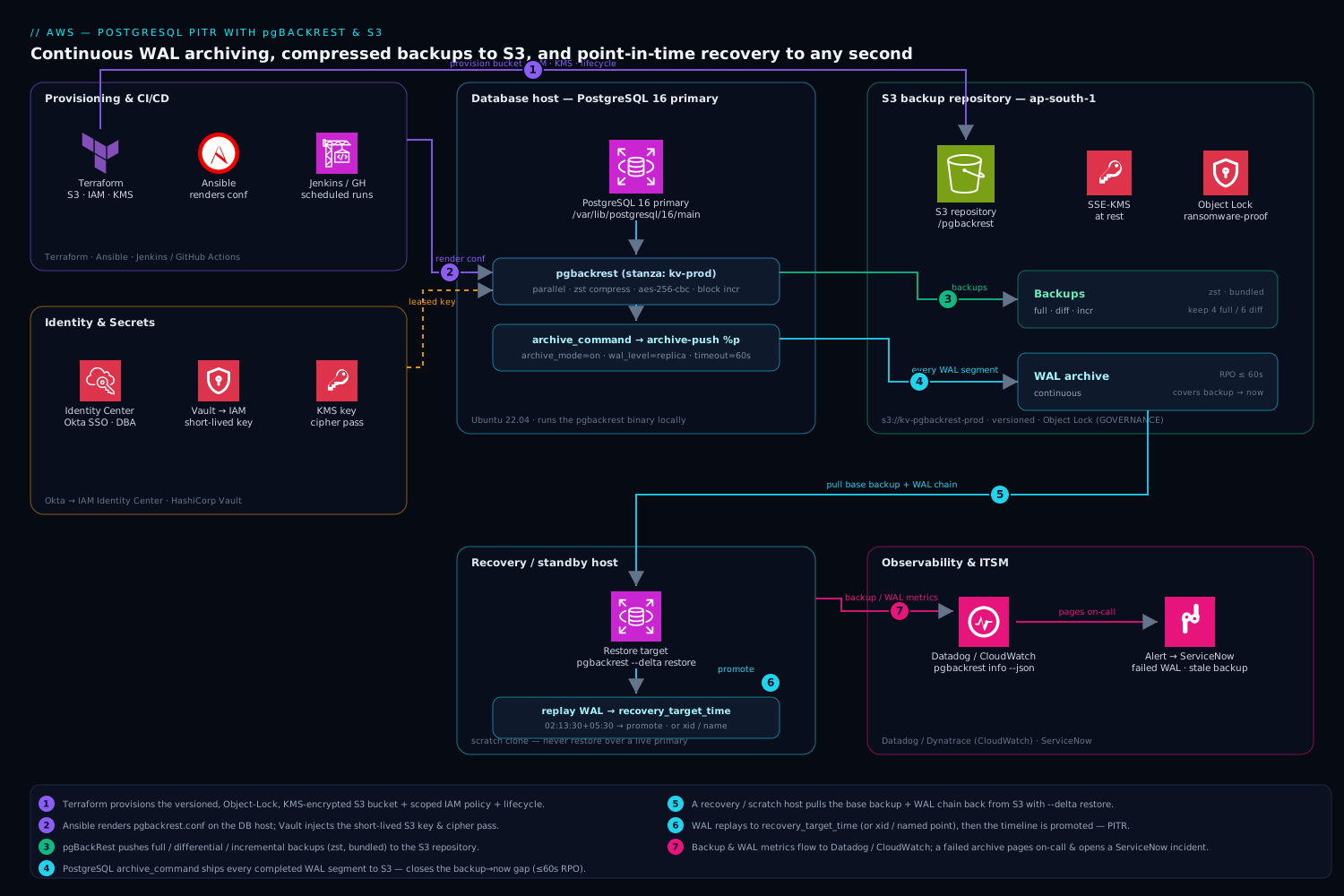
The shape is deliberately simple, and the diagram traces the two independent flows that together make PITR possible. Read it left to right. The PostgreSQL primary (data dir /var/lib/postgresql/16/main, port 5432) runs the pgbackrest binary locally. On a schedule — driven by cron, a Jenkins job, or a GitHub Actions workflow for auditable, logged runs — pgBackRest pushes full, differential, and incremental backups to the S3 repository (s3://kv-pgbackrest-prod, prefix /pgbackrest, in ap-south-1), compressed with zst and encrypted client-side with aes-256-cbc on top of SSE-KMS. Independently and continuously, PostgreSQL’s archive_command hands every completed WAL segment to pgbackrest archive-push, which (asynchronously, in parallel) copies it to the same repository — so the gap between “last backup” and “now” is always covered by archived WAL, and archive_timeout=60 caps that gap at a minute.
Follow the recovery path back the other way: a standby or throwaway recovery host pulls a base backup plus the WAL chain from S3 with pgbackrest restore --type=time/xid/name, replays WAL to the chosen target, stops, and promotes — forking onto a new timeline. The bucket itself is hardened: Object Lock (GOVERNANCE) and versioning make recent backups undeletable by a compromised host, a KMS key encrypts at rest, and a lifecycle rule expires non-current versions. Terraform provisions the bucket, IAM, KMS key, and lifecycle; Ansible templates pgbackrest.conf so every node is byte-identical and the cipher passphrase is injected from a secrets store at runtime, never written to disk. The whole system is watched: pg_stat_archiver and pgbackrest info --output=json feed Datadog/Dynatrace, and a failed archive or a stale backup pages on-call and opens a ServiceNow incident.
Real-world scenario
Meridian Pay runs a card-issuing ledger on a self-managed PostgreSQL 16 primary on EC2 (r6i.2xlarge, 8 vCPU / 64 GB, a 2 TB gp3 data volume) in ap-south-1, fronting an authorisation API at ~3,500 transactions/second peak. The data is ~280 GB and grows ~4 GB/day. For two years their backup story was a nightly pg_dump to a separate EBS volume plus daily EBS snapshots — and a vague belief that “we have backups.” The platform team is five engineers; the auditor’s annual question — “demonstrate recovery to a specific point in time” — had always been answered with a hopeful “we’d restore the snapshot,” which nobody had ever timed or tested.
The incident that changed everything came not from hardware but from a release. A 23:50 deployment shipped a data-backfill migration with a bug: a loop that was meant to update a few thousand dispute rows instead ran an unbounded UPDATE dispute SET state = 'resolved' across 2.1 million open disputes. It committed at 23:52. The on-call noticed the spike in “resolved” disputes at 00:08 and stopped the application. The nightly pg_dump had finished at 22:30 — so restoring it would lose 80 minutes of legitimate authorisation traffic (thousands of real card transactions), which for a payment processor is unacceptable: those are real settlements. The EBS snapshot was from 22:00, worse. They had no way to land on 23:51:30, the instant before the bad commit. The incident ran four hours and ended with engineers reconstructing the correct dispute states by replaying application audit logs into the live database by hand — error-prone and exhausting.
The postmortem action was unambiguous: build real PITR. They stood up pgBackRest to a new Object-Lock S3 bucket, turned on continuous WAL archiving with archive_timeout=60 and archive-async=y, and moved to a daily full / hourly incremental schedule with zst compression and repo1-bundle=y. The first full was 280 GB logical, 51 GB in the repo after compression; hourly incrementals averaged 180 MB. They wired pg_stat_archiver and pgbackrest info into Datadog with a page on any failed archive and on “no backup in 26 hours,” and scheduled a monthly ticketed restore rehearsal to a scratch instance.
The rehearsal paid off three weeks later, during a real repeat: a different bad migration clobbered an account_limit table at 14:22. This time the runbook was muscle memory. The on-call spun up a recovery instance, ran pgbackrest --stanza=meridian --type=time --target="2026-05-12 14:21:00+05:30" --target-action=pause --delta restore, started PostgreSQL, confirmed account_limit looked correct at the paused target, promoted, and — because only one table was affected — pg_dump -t account_limit from the recovery host and restored just that table into live production. Total data loss: zero. Time from detection to corrected production: 31 minutes. The bad migration had touched one table; the rest of the database, full of legitimate 14:22-onward authorisations, was never disturbed. Their numbers, before and after:
| Capability | Before (pg_dump + snapshots) | After (pgBackRest + WAL to S3) |
|---|---|---|
| RPO (worst-case data loss) | Up to 24 h (last dump/snapshot) | ~60 seconds |
| Recovery granularity | Whole-DB, to a backup boundary | Any second, any xid, single table |
| Real incident recovery time | ~4 h, manual log replay | 31 min, scripted runbook |
| Backups immutable? | No (deletable EBS volume) | Yes (S3 Object Lock GOVERNANCE) |
| Restore ever tested? | Never | Monthly, ticketed, audited |
| Auditor’s PITR question | “we’d restore the snapshot” | Demonstrated live, with the runbook |
| Monthly storage cost | ~₹6,000 (full dumps + snapshots) | ~₹4,500 (compressed incr + WAL) |
The lesson the team wrote on the runbook’s first page: “A backup you have never restored is a guess. WAL archiving is the difference between losing a trading hour and losing nothing.”
Advantages and disadvantages
The pgBackRest-to-S3 model both delivers second-level recovery and adds real operational surface. Weigh it honestly before committing:
| Advantages | Disadvantages |
|---|---|
Point-in-time recovery to any second — the headline capability pg_dump/snapshots cannot match |
The archive_command must work continuously; a silent break ends PITR until noticed |
| Backups live off-host in durable S3 (11 nines), surviving host/volume/ransomware loss | Restores depend on S3 reachability and bandwidth; a region-wide S3 issue blocks recovery |
| Block-level incrementals + zst make backups small and fast on large DBs | Long incremental chains lengthen restore (RTO) unless you take frequent fulls/diffs |
Per-file checksums + verify catch bit-rot and partial uploads automatically |
verify reads the whole repo (S3 GETs) — not free on large repos |
| Client-side encryption + Object Lock give regulated-grade immutability and opacity | A lost cipher passphrase makes every backup permanently unreadable — a real footgun |
| Async, parallel archive/backup keeps up with busy primaries | More moving parts to configure correctly than a cron’d pg_dump |
| Open-source, no licence cost; works on EC2/on-prem/containers identically | You operate it — no managed-service safety net (unlike RDS/Aurora automated backups) |
Composes with replication and pg_dump rather than replacing them |
PITR can’t undo a logical bug already replicated to standbys; it’s a separate recovery tool |
The model is right when you run self-managed PostgreSQL and need real recovery granularity, immutability, and off-host durability — fintech ledgers, healthcare records, any cluster where 24-hour data loss is unacceptable and a managed service is not handling backups for you. It is overkill for a throwaway dev database (a nightly pg_dump is fine) and is not a substitute for HA — a streaming replica protects against host failure with near-zero RPO/RTO but cheerfully replicates a bad DELETE; PITR is the complement that recovers from the logical disasters replicas cannot. The disadvantages are all manageable, but only if you treat archiving health, the cipher passphrase, and the restore rehearsal as first-class, which is the entire point of building it properly.
Hands-on lab
Build the whole capability end to end and prove a real PITR, on a single host with a real PostgreSQL and a local pgBackRest repository (so it is free and self-contained — the S3 steps are identical except for the repo1-* lines, which are called out). The centerpiece is Step 9: you deliberately destroy data, then recover to the second before you destroyed it. Run on Ubuntu 22.04 (or any host with PostgreSQL 16 + pgBackRest 2.50+).
Step 1 — Install PostgreSQL 16 and pgBackRest.
sudo apt-get update
sudo apt-get install -y postgresql-16 postgresql-common
sudo /usr/share/postgresql-common/pgdg/apt.postgresql.org.sh -y
sudo apt-get install -y pgbackrest
pgbackrest version   # expect 2.50+
psql --version       # expect 16.x
Step 2 — Create the pgBackRest directories.
sudo install -d -o postgres -g postgres -m 750 /etc/pgbackrest
sudo install -d -o postgres -g postgres -m 750 /var/log/pgbackrest
sudo install -d -o postgres -g postgres -m 750 /var/lib/pgbackrest
Step 3 — Write pgbackrest.conf for a LOCAL repo (S3 variant in the comment).
sudo tee /etc/pgbackrest/pgbackrest.conf >/dev/null <<'CONF'
[global]
# Local repo for the lab. For S3, replace the next two lines with:
#   repo1-type=s3
#   repo1-s3-bucket=kv-pgbackrest-prod
#   repo1-s3-endpoint=s3.ap-south-1.amazonaws.com
#   repo1-s3-region=ap-south-1
#   repo1-s3-key-type=auto
repo1-path=/var/lib/pgbackrest
repo1-retention-full=2
repo1-bundle=y
repo1-block=y
compress-type=zst
compress-level=3
process-max=2
start-fast=y
log-level-console=info
log-level-file=detail

[lab]
pg1-path=/var/lib/postgresql/16/main
pg1-port=5432
pg1-user=postgres
CONF
sudo chown postgres:postgres /etc/pgbackrest/pgbackrest.conf
sudo chmod 640 /etc/pgbackrest/pgbackrest.conf
Step 4 — Turn on WAL archiving and restart PostgreSQL.
sudo -u postgres psql <<'SQL'
ALTER SYSTEM SET wal_level = 'replica';
ALTER SYSTEM SET archive_mode = 'on';
ALTER SYSTEM SET archive_command = 'pgbackrest --stanza=lab archive-push %p';
ALTER SYSTEM SET archive_timeout = '60';
ALTER SYSTEM SET max_wal_senders = 10;
SQL
sudo systemctl restart postgresql@16-main
sudo -u postgres psql -c "SHOW archive_mode;"      # on
sudo -u postgres psql -c "SHOW archive_command;"   # the pgbackrest line
Expected: archive_mode = on and the archive_command showing the pgBackRest line. (If archive_mode still says off, you reloaded instead of restarting — restart.)
Step 5 — Create the stanza and run check.
sudo -u postgres pgbackrest --stanza=lab stanza-create
sudo -u postgres pgbackrest --stanza=lab check
Expected: stanza-create completes, and check ends with INFO: check command end: completed successfully — proof the archiving path works end to end. If check fails here, stop and fix it; nothing downstream is trustworthy until it passes.
Step 6 — Create test data.
sudo -u postgres psql <<'SQL'
CREATE DATABASE ledger;
\c ledger
CREATE TABLE ledger_entry (id bigserial PRIMARY KEY, status text, amount numeric);
INSERT INTO ledger_entry (status, amount)
  SELECT 'posted', (random()*1000)::numeric(10,2) FROM generate_series(1, 100000);
SELECT count(*) AS total, count(*) FILTER (WHERE status='posted') AS posted FROM ledger_entry;
SQL
Expected: total = 100000, posted = 100000.
Step 7 — Take the first full backup.
sudo -u postgres pgbackrest --stanza=lab --type=full backup
sudo -u postgres pgbackrest --stanza=lab info
Expected: info shows one full backup with a database size and a (smaller) backup size, and a wal archive min/max range.
Step 8 — Note a safe target time, then take an incremental. Capture the current time before the destructive step so you have a precise PITR target.
# Record a target timestamp BEFORE we break anything (with timezone offset):
SAFE_TS=$(sudo -u postgres psql -tAc "SELECT now();")
echo "Safe target time: $SAFE_TS"

# Make a few more changes and take an incremental, so the WAL chain advances:
sudo -u postgres psql -d ledger -c \
  "INSERT INTO ledger_entry (status, amount) SELECT 'posted', 10 FROM generate_series(1,5000);"
sudo -u postgres pgbackrest --stanza=lab --type=incr backup
Expected: SAFE_TS prints a timestamp; the incremental backup completes. Total rows now 105,000.
Step 9 — Destroy data (the incident), then recover to the second before it. This is the whole point.
# Wait a couple of seconds so the destructive change is clearly AFTER SAFE_TS, then break it:
sleep 3
sudo -u postgres psql -d ledger -c \
  "UPDATE ledger_entry SET status='void';"   # the runaway UPDATE, no WHERE
sudo -u postgres psql -d ledger -c \
  "SELECT count(*) FILTER (WHERE status='void') AS voided FROM ledger_entry;"  # 105000 -> disaster

# Force the WAL containing the bad UPDATE to archive so it's available to replay around:
sudo -u postgres psql -c "SELECT pg_switch_wal();"

# --- RECOVER ---
sudo systemctl stop postgresql@16-main
sudo -u postgres pgbackrest --stanza=lab \
  --type=time --target="$SAFE_TS" \
  --target-action=promote --delta restore
sudo systemctl start postgresql@16-main
Step 10 — Verify the recovery landed before the disaster.
# Wait for recovery to finish, then confirm we're promoted and the data is correct:
sleep 5
sudo -u postgres psql -c "SELECT pg_is_in_recovery();"   # expect 'f'
sudo -u postgres psql -d ledger -c \
  "SELECT count(*) FILTER (WHERE status='void')  AS voided,
          count(*) FILTER (WHERE status='posted') AS posted,
          count(*) AS total
   FROM ledger_entry;"
Expected: pg_is_in_recovery = f, voided = 0, posted = 105000, total = 105000. The runaway UPDATE is gone — you recovered to the instant before it, keeping the 5,000 rows added in Step 8 but discarding the void. That is PITR working.
Step 11 — Fork a fresh baseline on the new timeline.
sudo -u postgres pgbackrest --stanza=lab --type=full backup   # the new timeline needs its own floor
sudo -u postgres pgbackrest --stanza=lab check                # archiving healthy on the new timeline
sudo -u postgres pgbackrest --stanza=lab info                 # note the new timeline in the WAL range
Validation checklist. You configured archiving, proved it with check, took full and incremental backups, deliberately destroyed data, recovered to the exact second before the damage with --type=time, confirmed zero data loss for legitimate writes, and forked a new timeline with a fresh full. The steps mapped to what each proves:
| Step | What you did | What it proves | Production analogue |
|---|---|---|---|
| 4 | Enable archiving, restart | archive_mode/wal_level need a restart |
The one disruptive change in any real rollout |
| 5 | stanza-create + check |
The archiving path actually works | The check you run before trusting PITR |
| 7–8 | Full + incr; record SAFE_TS |
The chain advances; you have a target | Scheduled backups + knowing your target |
| 9 | Destroy, then --type=time restore |
PITR rewinds to a precise instant | The 02:14 runaway-UPDATE recovery |
| 10 | Row counts after recovery | The right data survived, the bad change didn’t | The validation before you trust the restore |
| 11 | Fresh full on the new timeline | A forked timeline needs its own baseline | The mandatory post-PITR step |
Cleanup.
sudo -u postgres pgbackrest --stanza=lab stop
sudo -u postgres pgbackrest --stanza=lab --force stanza-delete
sudo -u postgres psql -c "ALTER SYSTEM SET archive_mode = 'off';"
sudo -u postgres psql -c "ALTER SYSTEM RESET archive_command;"
sudo systemctl restart postgresql@16-main
sudo -u postgres psql -c "DROP DATABASE ledger;"
sudo rm -rf /var/lib/pgbackrest/*
Cost note. Run entirely locally the lab costs nothing but disk. The S3 variant (swap the repo1-* lines in Step 3) costs a few rupees for the storage and PUTs of a 100k-row table plus its WAL over an hour — well under ₹50 — and tearing down the bucket stops it.
Common mistakes & troubleshooting
The failure modes that bite in production, as a symptom → root cause → confirm → fix table you can read mid-incident, then the worst offenders expanded.
| # | Symptom | Root cause | Confirm (exact command / path) | Fix |
|---|---|---|---|---|
| 1 | “Enabled PITR” but a restore can only reach backup boundaries; no WAL between | archive_mode/wal_level set with ALTER SYSTEM + reload, never restarted |
SHOW archive_mode; returns off; pg_stat_archiver.archived_count = 0 |
Restart PostgreSQL; re-run pgbackrest check |
| 2 | pg_wal/ filling, disk approaching full, writes about to stop |
archive_command failing; PG retaining un-archived WAL |
SELECT last_failed_wal, last_failed_time FROM pg_stat_archiver; (non-NULL) |
Fix the cause pgBackRest logs (creds, endpoint, bucket); WAL drains once it succeeds |
| 3 | archive_command “succeeds” but segments aren’t in the repo |
A hand-rolled command returning 0 without uploading; or wrong stanza | pgbackrest --stanza=X check fails; compare info WAL max to current |
Use pgbackrest archive-push (idempotent, correct return codes); fix --stanza |
| 4 | stanza-create/backup fails with S3 auth/permission error |
IAM identity missing list/get/put/delete, or wrong key type | pgBackRest log shows AccessDenied/403; aws sts get-caller-identity |
Attach the scoped bucket policy; set repo1-s3-key-type=auto for instance role |
| 5 | Restore lands hours off the intended instant | Naive timestamp in --target interpreted in the wrong timezone |
Server log: “recovery stopping … time <wrong tz>” | Always pass an explicit offset (...+05:30) or run in UTC |
| 6 | Restore errors: target time outside available WAL | Target older than wal archive min, or WAL expired by archive retention |
pgbackrest info wal archive min/max doesn’t bracket the target |
Pick a target within range; loosen repo1-retention-archive going forward |
| 7 | Restore completes but PG won’t start / can’t decrypt | Wrong/missing repo1-cipher-pass on the restore host |
pgBackRest: “unable to … cipher”; PG won’t open | Provide the exact cipher passphrase from the secrets manager |
| 8 | Restored DB immediately re-applies the bad change | Recovery ran past the target (no --target-action, or inclusive xid) |
Log shows recovery continued to end of WAL | Set --target-action=promote/pause; use --target-exclusive for xid |
| 9 | Incremental restore is huge / slow | Restoring without --delta, re-fetching unchanged files |
Restore transfers ≈ full size despite small incr | Add --delta so only differing files are pulled |
| 10 | Backups silently stopped days ago; nobody noticed | No monitoring on backup age / archive failures | pgbackrest info newest backup is days old |
Alert on last_failed_wal non-NULL and “no backup in 26h” → page + ServiceNow |
| 11 | expire errors; old objects won’t delete |
S3 Object Lock window longer than pgBackRest retention | S3 shows AccessDenied on delete of locked objects |
Set Object Lock days ≤ pgBackRest retention; wait out the lock |
| 12 | Async archiving queue grows; eventually push fails | S3 unreachable/slow; spool filling toward archive-push-queue-max |
spool-path size climbing; pgBackRest async log |
Restore S3 connectivity; raise queue cautiously; alert on queue depth |
| 13 | Backup fails: “stanza … does not exist” or version mismatch | stanza-create not run, or PG was major-upgraded |
pgbackrest info missing the stanza / version warning |
Run stanza-create (new) or stanza-upgrade (after a PG upgrade) |
| 14 | Two hosts archiving to one stanza; integrity errors | A failover left two primaries pushing the same WAL names | pgBackRest errors on same-name/different-content WAL | Ensure exactly one writer per stanza; fence the old primary |
The ones that cause the most damage, expanded:
1. “Enabled” PITR that was never on. Setting wal_level/archive_mode with ALTER SYSTEM writes to postgresql.auto.conf, but these specific parameters only take effect on a restart — a reload silently ignores them. Teams enable archiving, reload, see no error, and assume PITR is live; the gap surfaces only during a real incident when there is no WAL between backups. Confirm: SHOW archive_mode; returns off, and SELECT archived_count FROM pg_stat_archiver; is 0 long after enabling. Fix: restart PostgreSQL, then pgbackrest check to prove archiving end to end. This is why check is in every runbook.
2. Archiving silently broken → disk fills. If archive_command fails, PostgreSQL correctly refuses to recycle the un-archived WAL and retains it in pg_wal/. On a busy database that fills the volume in hours; when the volume is full, PostgreSQL stops accepting writes — your backup misconfiguration becomes a production outage. Confirm: SELECT last_failed_wal, last_failed_time FROM pg_stat_archiver; returns a non-NULL failed segment, and pg_wal/ is growing. Fix: read the pgBackRest log for the actual cause (S3 credentials expired, endpoint wrong, bucket policy too tight, network egress blocked), fix it, and the queue drains. Prevent: alert on any non-NULL last_failed_wal and on pg_wal/ disk > 75%.
5. Timezone ambiguity sends you hours off. --type=time --target="2026-06-10 02:13:30" without an offset is interpreted in the server’s timezone, which on a UTC server is six hours adrift from an IST incident — you recover to 08:13 IST instead of 02:13, losing six hours of data or replaying past the bad change. Confirm: the server log’s “recovery stopping … time …” line shows a timezone you didn’t intend. Fix: always pass an explicit offset (02:13:30+05:30) or standardise on UTC everywhere and pass UTC targets. This single habit prevents the most embarrassing class of PITR error.
7. The unrecoverable cipher passphrase. Client-side encryption (repo1-cipher-type=aes-256-cbc) makes backups opaque even to AWS — and unreadable without the exact passphrase. A restore host that doesn’t have PGBACKREST_REPO_CIPHER set (or has the wrong value) fails to decrypt, and there is no recovery path. Confirm: pgBackRest errors with a cipher/decrypt message. Fix: supply the correct passphrase from the secrets manager. Prevent: store it as the single source of truth, back that up out-of-band, and verify the restore host can read it as part of the monthly rehearsal.
Best practices
- Run
pgbackrest checkafter every config change and on a schedule. It is the only command that proves the archiving path works end to end; treat acheckfailure as a P1, because it means PITR is silently broken. - Set
archive_timeoutto bound your RPO. Even an idle database should archive at least once a minute (archive_timeout=60) so a quiet period can’t widen your data-loss window to hours. - Use asynchronous archiving on busy primaries.
archive-async=ywith a cappedarchive-push-queue-maxkeepspg_wal/from backing up when S3 has latency, while still retaining WAL correctly if S3 goes down. - Always restore to a separate host first; never overwrite a live primary blind. Recover, validate (ideally with
--target-action=pause), then decide the data-return path. Overwriting the primary turns data loss into an outage. - Always pass an explicit timezone (or run in UTC) in
--target. The most common PITR error is landing hours off because of a naive timestamp. - Add
--deltato every restore. It fetches only files that differ from what’s on disk, cutting restore time and S3 GETs dramatically — especially when iterating toward the right target. - Take a fresh full backup immediately after any PITR. The recovery forks a new timeline that has no baseline of its own; the new branch can’t be PITR’d until it has a full.
- Match retention to a written recovery policy, and understand
retention-archive.repo1-retention-full=4alone does not guarantee four weeks of to-the-second recovery if archive retention narrowed the WAL window — do the math before the auditor does. - Encrypt client-side and lock the bucket.
aes-256-cbcon top of SSE-KMS makes bytes opaque to AWS; Object Lock + versioning make recent backups undeletable by ransomware. Guard the cipher passphrase like the crown jewel it is. - Rehearse a real restore monthly, ticketed.
checkandverifyare necessary but not sufficient; only a full restore proves PostgreSQL starts and the data is right. Close a change task each month. - Monitor archive failures and backup age, and page on them. A non-NULL
last_failed_walor “no backup in 26 hours” should wake someone and open a ServiceNow incident — silent backup failure is the failure mode that ruins postmortems. - Render config with config management, inject secrets at runtime. Ansible-template
pgbackrest.confso every host is identical; never write the S3 key or cipher passphrase to disk — source them from a secrets manager at process start.
Security notes
- Least-privilege IAM scoped to one bucket. The pgBackRest identity needs only
ListBucket/GetBucketLocationon the bucket andGet/Put/DeleteObjecton its contents — nothing else, no other bucket. Prefer an instance role (repo1-s3-key-type=auto) or short-lived Vault-leased credentials over a static key in a file. - Two layers of encryption. S3 SSE-KMS at rest plus pgBackRest client-side
aes-256-cbcso the bytes are opaque before they reach AWS; enforce TLS to the S3 endpoint. Defense in depth means a compromise of any single layer doesn’t expose the ledger. - Immutability against ransomware. Object Lock (GOVERNANCE or COMPLIANCE) plus versioning make recent backups undeletable — the single best control against malware that targets backups first. Set the lock window ≤ pgBackRest retention so
expiredoesn’t fight the lock. - Guard the cipher passphrase as the highest-value secret. It is non-recoverable; losing it bricks every backup. Store it in a secrets manager as the single source of truth, restrict access, and back it up out-of-band. Rotate deliberately (new fulls under the new key).
- Named, audited identities for recoveries. Human access to run a restore should flow through SSO (Okta → AWS IAM Identity Center, or Entra ID for the Microsoft tenant) so every
restoreis performed under an MFA-backed identity, not a shared key — and gated through change control. - Keep backup traffic on controlled networks. Route S3 egress through an S3 VPC endpoint (or the approved NAT/proxy path) so backups and WAL never traverse the public internet, and so a network policy can’t accidentally cut archiving.
- Continuously check for drift. Wiz (and Wiz scanning the Terraform in the PR) flags a bucket gone public, missing encryption, or an over-broad policy before merge; CrowdStrike Falcon on the DB host surfaces a process exfiltrating WAL or tampering with
pgbackrest.conf. - Protect
pg_wal/and the data dir permissions. The data directory and WAL contain the full database; keep them0700owned bypostgres, and ensure the backup spool and log paths aren’t world-readable.
Cost & sizing
The bill has two dominant components — S3 storage and S3 requests — plus small charges for KMS and (if used) NAT/VPC-endpoint egress. The levers:
- Compression is the biggest storage lever.
zsttypically shrinks PostgreSQL backups 3–5×; the Meridian Pay example went from 280 GB logical to 51 GB in the repo.compress-level=6is a good balance; raise it if CPU is cheap, lower it on CPU-bound hosts. repo1-bundle=yis the biggest request lever. Without bundling, every small file and WAL segment is its own S3 object and PUT; bundling collapses thousands of tiny objects into far fewer, materially cutting PUT cost on busy clusters. On a high-write primary this can be the difference between a trivial and a noticeable request bill.- Incrementals + block-level deltas keep ongoing cost flat. After the weekly/daily full, only changed blocks ship;
repo1-block=yshrinks incrementals further on large, partially-changed tables. Hourly incrementals of ~180 MB cost almost nothing versus re-uploading a 51 GB full each time. - Retention bounds total storage.
repo1-retention-full(and archive retention) cap how much history — and how much WAL — you keep. A lifecycle rule can transition older fulls to S3 Glacier Instant Retrieval for cheaper cold storage if your recovery policy tolerates the retrieval characteristics. - Same-region repo avoids transfer fees and improves RTO. Keep the bucket in the database’s region (
ap-south-1here): cross-region would add transfer cost and slow restores. Budget the monthly restore-rehearsal GETs as a small, predictable line item — a DR capability you never exercise is the truly expensive one.
Rough monthly figures for a mid-size cluster (a few hundred GB, hourly incrementals, weekly fulls, 4 weeks retention):
| Cost driver | What you pay for | Rough INR / month | Lever to reduce it |
|---|---|---|---|
| S3 standard storage (compressed backups + WAL) | ~150–250 GB stored | ~₹500–900 | zst, incrementals, retention, Glacier for cold fulls |
| S3 PUT requests (WAL + backup files) | Thousands of PUTs/day | ~₹200–600 | repo1-bundle=y, async batching |
| S3 GET requests (restores + monthly verify/rehearsal) | Occasional bulk reads | ~₹100–400 | Rehearse monthly not daily; --delta |
| KMS requests (SSE-KMS) | Encrypt/decrypt operations | ~₹100–300 | bucket_key_enabled = true |
| VPC endpoint / NAT egress (if routed) | Per-GB backup egress | ~₹200–700 | S3 VPC endpoint (no NAT data charge) |
| Typical total | — | ~₹1,500–3,000 | (a rounding error against losing a trading day) |
The whole capability costs single-digit thousands of rupees a month for a mid-size cluster — trivial against the cost of losing an hour of a payment ledger, which is the entire justification.
Interview & exam questions
1. Why can pgBackRest do point-in-time recovery but pg_dump cannot? pg_dump is a logical snapshot of one instant with no mechanism to replay forward. PITR needs a physical base backup plus an unbroken chain of WAL segments; you restore the base and replay WAL up to any target time/xid/lsn. pgBackRest takes the physical backup and archives the WAL; pg_dump captures neither the file-level base nor the WAL stream.
2. Which PostgreSQL settings enable continuous archiving, and which need a restart? wal_level (≥ replica), archive_mode = on, archive_command, and usually archive_timeout. wal_level and archive_mode require a full restart; archive_command and archive_timeout take effect on reload. The classic bug is setting all four with ALTER SYSTEM + reload and assuming PITR is on when it isn’t.
3. What does archive_timeout control and how does it relate to RPO? It forces PostgreSQL to switch to a new WAL segment (archiving the current one) at least every N seconds, so even an idle database archives regularly. It effectively caps your RPO: archive_timeout=60 means worst-case data loss is ~60 seconds, because no more than a minute of changes can sit in an un-archived segment.
4. Explain full vs differential vs incremental backups and their restore cost. A full copies everything and restores alone. A differential copies changes since the last full and restores with its full. An incremental copies changes since the last backup of any type and restores with every backup back to its full. Incrementals are smallest/fastest to take but have the longest restore chain; fulls are the opposite.
5. Walk through restoring to the second before a bad UPDATE at 02:14. Stop PostgreSQL on a recovery host, run pgbackrest --stanza=X --type=time --target="2026-06-10 02:13:30+05:30" --target-action=promote --delta restore, start PostgreSQL — it restores the base and replays WAL until 02:13:30, then promotes. Confirm with pg_is_in_recovery() returning f and a row-count check. Never run this against the live primary.
6. What is a timeline, and why take a full backup right after a PITR? When recovery promotes and the database accepts writes, PostgreSQL increments the timeline ID (the WAL filename prefix) so the new branch’s WAL never collides with the old. The new timeline has no backup baseline, so you cannot PITR on it until you take a fresh full — hence the mandatory post-recovery full.
7. What’s the difference between --target-action=pause and promote? With pause, recovery stops at the target but the database stays read-only so you can inspect before committing — then you promote (or re-target if you overshot). With promote, the database opens read-write immediately and forks the timeline. pause is the safer choice for high-stakes restores where you want to validate first.
8. How do repo1-retention-full and repo1-retention-archive differ, and why does it matter? retention-full keeps N full backups; retention-archive controls how far back the continuous WAL (needed for to-the-second PITR between backups) is kept. You can keep four fulls but only PITR-capable WAL for the two newest if retention-archive=2 — the older fulls are restorable only to their exact backup point. Confirm this matches your policy.
9. Why use pgbackrest archive-push instead of a scripted aws s3 cp in archive_command? archive-push returns correct exit codes (non-zero on failure so PG retains and retries), is idempotent and checksum-aware (safe under retries, errors loudly on same-name/different-content WAL), supports async parallel upload, and integrates with retention. A bare aws s3 cp can silently return 0 without uploading, leaving a hole in the chain.
10. What does S3 Object Lock protect against, and what’s the GOVERNANCE/COMPLIANCE difference? Object Lock applies WORM retention so backups can’t be deleted within the window — the key defense against ransomware that targets backups. GOVERNANCE can be overridden by a principal with s3:BypassGovernanceRetention (break-glass); COMPLIANCE cannot be removed by anyone, including root, until expiry. It requires versioning.
11. A restore lands six hours off the intended time. What’s the likely cause and fix? A naive --target timestamp interpreted in the wrong timezone (e.g. a UTC server reading an IST-intended time). Always pass an explicit offset (+05:30) or standardise on UTC. The server log’s “recovery stopping … time” line confirms which timezone was applied.
12. How do you verify the backup system is actually working? Three levels: check (forces a WAL switch and confirms it reached the repo — archiving health), verify (checksums every backup/WAL file against the manifest — integrity), and a real restore rehearsal to a scratch host (the only proof PostgreSQL starts and the data is correct). Run all three on a schedule; the rehearsal monthly and ticketed.
These map to the PostgreSQL DBA skill set (associate/professional certification programs cover WAL archiving, PITR, pgBackRest), the AWS Certified Database – Specialty and Solutions Architect exams (S3 durability, Object Lock, KMS, backup/restore strategy), and general SRE/DevOps disaster-recovery competency (RPO/RTO design, immutable backups). A compact mapping:
| Question theme | Primary domain | Objective area |
|---|---|---|
WAL archiving, archive_command, restart-vs-reload |
PostgreSQL DBA | Backup & recovery configuration |
| Full/diff/incr, restore chains, timelines | PostgreSQL DBA | PITR operations |
| S3 Object Lock, SSE-KMS, lifecycle, IAM scoping | AWS Database / SAA | Data protection & security |
| RPO/RTO design, retention math | SRE / DevOps | DR planning |
| Encryption, immutability, audited restores | Security / compliance | Controls & governance |
Quick check
- You set
wal_level,archive_mode,archive_command, andarchive_timeoutwithALTER SYSTEMand ranSELECT pg_reload_conf();, but a later restore can only reach backup boundaries. What did you miss? - A user reports a runaway
DELETEcommitted at 14:22:10. Which--typeand--target(with what one habit) do you use to recover to just before it, and what flag stops recovery cleanly at the target? - True or false: after a successful PITR you can keep using the same most-recent full backup as the baseline for future point-in-time recoveries on the recovered database.
- Your
pg_wal/directory is steadily filling and the disk is nearly full. What single view tells you whether archiving is failing, and what column do you read? - You configured
repo1-cipher-type=aes-256-cbc. During a real restore on a fresh host, pgBackRest can’t decrypt the backup. What’s the cause and the fix?
Answers
- You reloaded instead of restarting.
wal_levelandarchive_modeonly take effect on a full restart; a reload silently ignores them, so archiving never actually started and there’s no WAL between backups. Restart PostgreSQL, then runpgbackrest checkto prove the path works. - Use
--type=time --target="2026-06-10 14:22:00+05:30"— and the habit is always include the timezone offset (or run in UTC) so you don’t land hours off. Add--target-action=promote(orpauseto inspect first) so recovery stops cleanly at the target instead of replaying to the end of WAL. - False. Promoting after a PITR forks a new timeline that has no backup baseline of its own. You must take a fresh
--type=fullbackup immediately; the old full belongs to the previous timeline and cannot serve as the floor for PITR on the new one. pg_stat_archiver. Readlast_failed_wal(andlast_failed_time) — any non-NULL value means archiving is failing, so PostgreSQL is correctly retaining un-archived WAL inpg_wal/, which is filling the disk. Fix the cause pgBackRest logs and the queue drains.- The restore host doesn’t have the correct
repo1-cipher-pass(thePGBACKREST_REPO_CIPHERenvironment variable is unset or wrong). Client-side encryption is non-recoverable without the exact passphrase. Supply it from your secrets manager; store it as the single source of truth and back it up out-of-band so this never blocks a real recovery.
Glossary
- Write-ahead log (WAL) — the sequential stream of change records (16 MB segment files) PostgreSQL writes before modifying data pages; the substrate PITR replays.
- Point-in-time recovery (PITR) — restoring a base backup and replaying WAL to a chosen time, xid, lsn, or named point — recovery to any instant, not just a backup boundary.
- Base backup — a physical, file-level copy of the cluster taken while it runs, with the WAL needed to make it consistent; the floor WAL replays onto.
- pgBackRest — an open-source PostgreSQL backup tool: parallel compressed backups, block-level incrementals, per-file checksums, retention, async archiving, and S3/Azure/GCS repositories.
- Stanza — a pgBackRest configuration binding one PostgreSQL cluster to its repository(ies); every command targets a stanza (
--stanza=kv-prod). - Repository (
repo1) — where pgBackRest stores backups and archived WAL; here an S3 bucket prefix. archive_command— the PostgreSQL setting run for each completed WAL segment; its exit code is the archiving contract (0 = archived, non-zero = retain and retry).archive_timeout— seconds after which PostgreSQL forces a WAL segment switch so even an idle database archives regularly; effectively caps RPO.- Full / differential / incremental backup — backup intensities: full copies everything; differential copies changes since the last full; incremental copies changes since the last backup of any type.
- Backup reference list — the set of earlier backups a given backup depends on to restore (its chain back to a full).
- Recovery target — where WAL replay stops:
--type=time/xid/lsn/name/immediate/defaultwith--target. --target-action— what happens at the target:pause(stop, inspect),promote(open read-write, fork timeline), orshutdown.- Timeline (TLI) — a branch of WAL history; promoting after recovery increments the timeline ID (the WAL filename prefix) so branches never collide.
recovery.signal— a file pgBackRest writes into the restored data dir telling PostgreSQL to enter recovery on startup.pg_stat_archiver— the view exposing archiving success/failure/lag (last_archived_wal,last_failed_wal, counts); the primary archiving-health signal.- Asynchronous archiving — pgBackRest mode (
archive-async=y) that returns thearchive_commandfast and uploads WAL in parallel background batches, keeping busy primaries from backing up. - Block-level incremental —
repo1-block=y; copies only changed blocks within files, not whole changed files, shrinking incrementals on large partially-changed tables. - Object Lock — S3 WORM retention (GOVERNANCE or COMPLIANCE mode) making objects undeletable within a window; requires versioning; the key anti-ransomware control.
- RPO / RTO — recovery point objective (max acceptable data loss) and recovery time objective (max acceptable recovery duration); set RPO via
archive_timeout, RTO via backup frequency and restore parallelism. - Cipher passphrase (
repo1-cipher-pass) — the non-recoverable secret for pgBackRest client-side encryption; lose it and every backup is permanently unreadable.
Next steps
You can now build PITR end to end, restore to any instant, and operate it safely. Build outward:
- Next: Automate MySQL Hot Backups with Percona XtraBackup and Binlog Point-in-Time Recovery — the same PITR ideas (base backup + binlog replay) for MySQL, to round out your relational DR.
- Related: Automate Cross-Account RDS and EBS Snapshot Copy with AWS Backup and EventBridge — the managed-service backup path, and how cross-account copy adds blast-radius isolation.
- Related: Deploy Restic to Back Up Linux Fleets to S3 with Snapshots, Pruning, and Verification — file-level, deduplicated S3 backups for everything that isn’t a database.
- Related: Deploy MinIO with Object Locking and Site Replication for Immutable Backup Targets — an on-prem/self-hosted S3-compatible target for the same pgBackRest repository.
- Related: Configure Kasten K10 Ransomware Protection with Immutable Backups and S3 Object Lock — immutable backups for Kubernetes-resident PostgreSQL and stateful workloads.
- Related: Automate ServiceNow Change Requests from a CI/CD Pipeline via the Change API — gate restores and the disruptive archiving-enable restart through auditable change control.