A product analytics team is drowning in a single, vertically-scaled ClickHouse box: 14 TB of clickstream events, a nightly batch that now bleeds into business hours, and a Grafana wall that browns out whenever the VP of Growth runs an ad-hoc funnel query during a board prep. The mandate from the platform lead is blunt — “make it survive a node loss without paging anyone, and let it grow by adding machines, not by buying a bigger one.” That means moving from a standalone server to a sharded, replicated cluster: data split across shards for horizontal capacity and query parallelism, each shard mirrored across replicas for fault tolerance, and a coordination layer that keeps the replicas in agreement. This guide walks through building exactly that on six nodes — two shards, two replicas each — using ReplicatedMergeTree for the data and ClickHouse Keeper (not ZooKeeper) for coordination, then wiring up the operational reality around it: identity, secrets, monitoring, and change control.
ClickHouse Keeper is the part teams skip past and regret. ReplicatedMergeTree replicas do not gossip with each other directly — they coordinate through a consensus service that holds the replication log, part-assignment metadata, and the leader election that decides which replica merges next. Historically that service was Apache ZooKeeper, a separate JVM stack with its own tuning folklore. ClickHouse Keeper is a drop-in replacement that speaks the same client protocol, ships in the same binary, uses the RAFT consensus algorithm, and in practice consumes a fraction of the memory. We run a three-node Keeper ensemble (the minimum for a quorum that tolerates one failure) and point the ClickHouse servers at it.
Prerequisites
- Six Linux hosts (or VMs) for ClickHouse servers —
ch-s1-r1,ch-s1-r2,ch-s2-r1,ch-s2-r2plus two spare for growth — each 8+ vCPU, 32+ GB RAM, fast NVMe for/var/lib/clickhouse. A 4-node start is fine; this guide uses 4 ClickHouse nodes + 3 Keeper nodes. - Three small hosts for the Keeper ensemble —
ch-kpr-1/2/3, 2 vCPU / 4 GB is plenty (Keeper is CPU-light, latency-sensitive; keep them on low-jitter disks). - ClickHouse 24.3 LTS or newer installed on all nodes (
clickhouse-server,clickhouse-client,clickhouse-keeper). - Private network connectivity between all nodes; ports
9000(native),8123(HTTP),9009(inter-server replication), and9181/9234(Keeper client/RAFT) reachable inside the VPC, blocked at the edge. - Terraform to provision the hosts/disks/security groups and Ansible to render config and install packages — we treat the cluster topology as code, not as hand-edited XML on each box.
- A bastion or VPN; no node should have a public IP.
Target topology
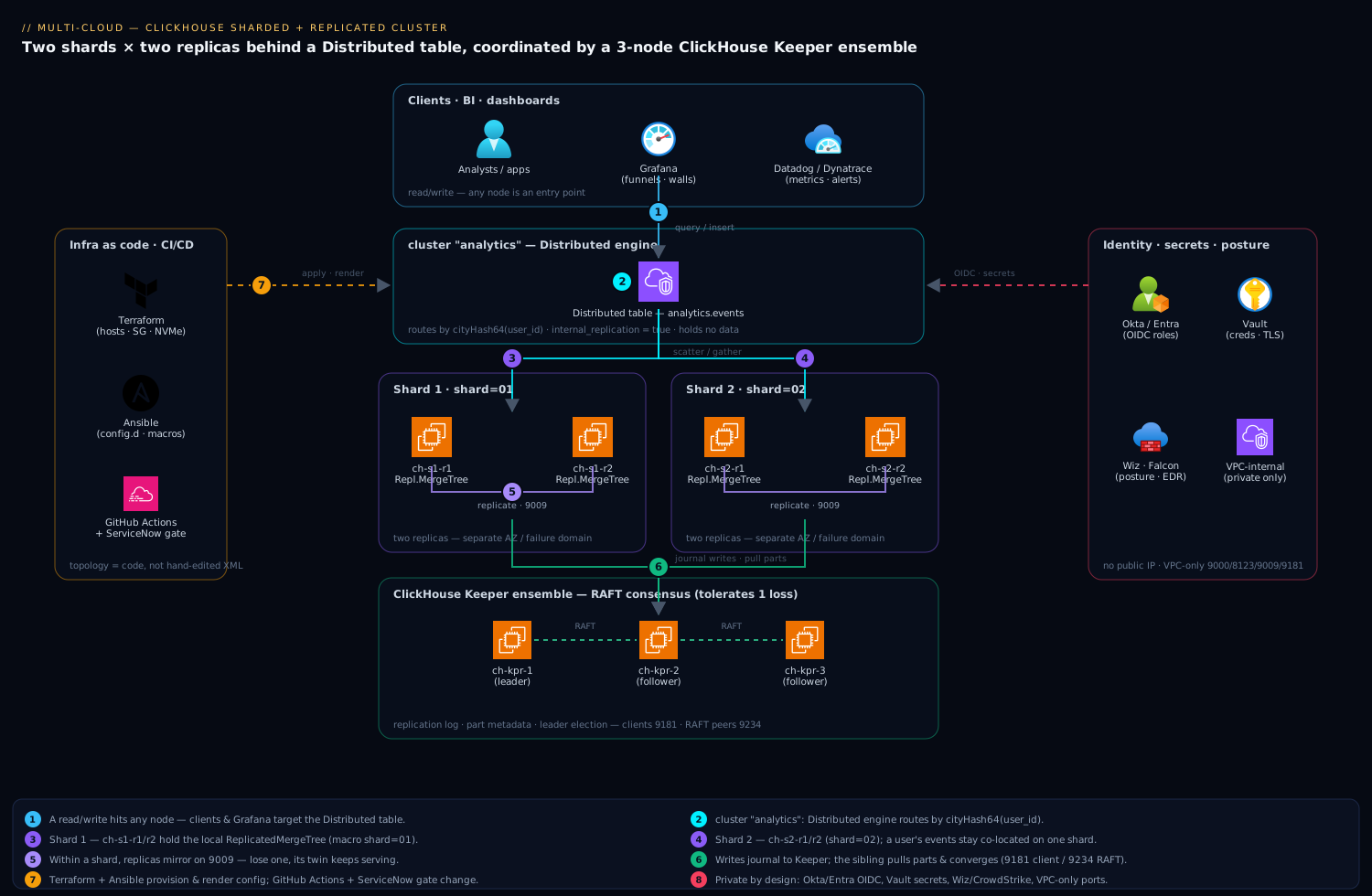
The shape is two shards, each a pair of replicas, sitting behind a logical cluster named analytics that ClickHouse’s distributed engine fans queries across. A separate three-node ClickHouse Keeper ensemble holds the replication metadata; the ClickHouse servers are clients of it and never store coordination state locally. A read/write query hits any node, lands on a Distributed table, which scatters the work to the right shard’s local ReplicatedMergeTree table and gathers the result. Writes to a replica are journaled to Keeper; the sibling replica pulls the new parts and converges. Lose a replica and the shard keeps serving from its twin; lose a Keeper node and the remaining two hold quorum.
                 clients / Grafana / BI
                          │
        ┌─────────────────┴─────────────────┐
        ▼                                   ▼
  cluster "analytics"  (Distributed engine fans out by sharding key)
        │
   ┌────┴─────┐                        ┌────┴─────┐
   │ shard 1  │                        │ shard 2  │
   │ ch-s1-r1 │◀──replicate (9009)──▶  │ ch-s2-r1 │◀──replicate──▶ ch-s2-r2
   │ ch-s1-r2 │                        │ ch-s2-r2 │
   └────┬─────┘                        └────┬─────┘
        └──────────── coordinate ───────────┘
                          │  (9181 client / 9234 RAFT)
              ┌───────────┴───────────┐
              │  ClickHouse Keeper     │
              │  ch-kpr-1 / 2 / 3      │  (RAFT quorum, tolerates 1 loss)
              └────────────────────────┘
1. Provision hosts and network with Terraform
Treat the cluster as infrastructure-as-code so a node replacement is a terraform apply, not a tribal-knowledge ritual. The intent: private subnets only, a security group that opens ClickHouse and Keeper ports inside the VPC and nowhere else, and NVMe data volumes separate from the OS disk.
# clickhouse_cluster.tf — sketch; provider-agnostic naming
locals {
  ch_nodes   = ["ch-s1-r1", "ch-s1-r2", "ch-s2-r1", "ch-s2-r2"]
  kpr_nodes  = ["ch-kpr-1", "ch-kpr-2", "ch-kpr-3"]
}

resource "aws_security_group" "clickhouse" {
  name        = "clickhouse-internal"
  description = "ClickHouse + Keeper, VPC-internal only"
  vpc_id      = var.vpc_id

  # native, http, inter-server replication — only from within the VPC CIDR
  dynamic "ingress" {
    for_each = [9000, 8123, 9009]
    content {
      from_port   = ingress.value
      to_port     = ingress.value
      protocol    = "tcp"
      cidr_blocks = [var.vpc_cidr]
    }
  }
  # Keeper client (9181) + RAFT (9234) — also VPC-internal only
  dynamic "ingress" {
    for_each = [9181, 9234]
    content {
      from_port   = ingress.value
      to_port     = ingress.value
      protocol    = "tcp"
      cidr_blocks = [var.vpc_cidr]
    }
  }
  egress {
    from_port = 0; to_port = 0; protocol = "-1"; cidr_blocks = ["0.0.0.0/0"]
  }
}

resource "aws_instance" "ch" {
  for_each               = toset(local.ch_nodes)
  ami                    = var.ch_ami
  instance_type          = "m6i.2xlarge"          # 8 vCPU / 32 GB
  subnet_id              = var.private_subnet_id
  vpc_security_group_ids = [aws_security_group.clickhouse.id]
  tags = { Name = each.key, role = "clickhouse" }
}

resource "aws_ebs_volume" "ch_data" {
  for_each          = toset(local.ch_nodes)
  availability_zone = var.az
  size              = 1024
  type              = "gp3"
  iops              = 12000
  throughput        = 500
  tags = { Name = "${each.key}-data" }
}
Spread the four ClickHouse nodes so that the two replicas of a shard never share a failure domain — different availability zones (or different racks/hypervisors on-prem). That single placement decision is what turns “replicated” into “actually survives an AZ outage.” Put the three Keeper nodes in three separate zones too, so a zone loss never costs you quorum.
2. Lay down ClickHouse Keeper as a standalone ensemble
Run Keeper as its own service on the three ch-kpr-* nodes. Each node gets the same config except its server_id. Ansible renders /etc/clickhouse-keeper/keeper_config.xml from a template; the rendered file on ch-kpr-1 looks like this:
<clickhouse>
    <logger><level>information</level></logger>
    <keeper_server>
        <tcp_port>9181</tcp_port>
        <server_id>1</server_id>                        <!-- 2 on ch-kpr-2, 3 on ch-kpr-3 -->
        <log_storage_path>/var/lib/clickhouse-keeper/log</log_storage_path>
        <snapshot_storage_path>/var/lib/clickhouse-keeper/snapshots</snapshot_storage_path>

        <coordination_settings>
            <operation_timeout_ms>10000</operation_timeout_ms>
            <session_timeout_ms>30000</session_timeout_ms>
            <raft_logs_level>information</raft_logs_level>
        </coordination_settings>

        <raft_configuration>
            <server><id>1</id><hostname>ch-kpr-1</hostname><port>9234</port></server>
            <server><id>2</id><hostname>ch-kpr-2</hostname><port>9234</port></server>
            <server><id>3</id><hostname>ch-kpr-3</hostname><port>9234</port></server>
        </raft_configuration>
    </keeper_server>
</clickhouse>
Start the ensemble and confirm a leader was elected. The mntr four-letter word is the fastest health probe — exactly one node must report zk_server_state leader:
# on each Keeper node
sudo systemctl enable --now clickhouse-keeper

# from anywhere on the VPC — which node is leader, how many followers?
for h in ch-kpr-1 ch-kpr-2 ch-kpr-3; do
  echo "== $h =="
  echo mntr | nc -q1 "$h" 9181 | grep -E 'zk_server_state|zk_followers|zk_synced_followers'
done
# expect: one 'leader', two 'follower', zk_synced_followers = 2 on the leader
If you see two leaders or standalone, the RAFT peers cannot reach each other on 9234 — that is a firewall or hostname-resolution problem, not a ClickHouse one.
3. Point every ClickHouse server at Keeper
On all four ClickHouse nodes, drop a <zookeeper> block (the tag name is historical; it points at Keeper) into /etc/clickhouse-server/config.d/keeper.xml. ClickHouse load-balances and fails over across the three endpoints automatically.
<clickhouse>
    <zookeeper>
        <node><host>ch-kpr-1</host><port>9181</port></node>
        <node><host>ch-kpr-2</host><port>9181</port></node>
        <node><host>ch-kpr-3</host><port>9181</port></node>
    </zookeeper>
    <!-- substituted into table DDL below so paths are identical cluster-wide -->
    <macros>
        <shard>01</shard>          <!-- 01 on shard-1 nodes, 02 on shard-2 nodes -->
        <replica>ch-s1-r1</replica> <!-- this node's own hostname -->
    </macros>
</clickhouse>
The <macros> matter more than they look: {shard} and {replica} get interpolated into the ReplicatedMergeTree path so the same CREATE TABLE statement, run on every node, produces shard-correct, replica-correct Keeper paths. Get the macros right per node and the DDL becomes copy-paste identical everywhere — which is the whole point of running it through Ansible.
Restart and verify each server can see Keeper:
sudo systemctl restart clickhouse-server
clickhouse-client -q "SELECT * FROM system.zookeeper WHERE path = '/' FORMAT Vertical"
# returns the Keeper root children -> connectivity + auth are good
4. Declare the cluster topology
ClickHouse learns its shard/replica layout from a <remote_servers> block. Render /etc/clickhouse-server/config.d/cluster.xml identically on all four nodes — every node must know the full map.
<clickhouse>
    <remote_servers>
        <analytics>
            <shard>
                <internal_replication>true</internal_replication>
                <replica><host>ch-s1-r1</host><port>9000</port></replica>
                <replica><host>ch-s1-r2</host><port>9000</port></replica>
            </shard>
            <shard>
                <internal_replication>true</internal_replication>
                <replica><host>ch-s2-r1</host><port>9000</port></replica>
                <replica><host>ch-s2-r2</host><port>9000</port></replica>
            </shard>
        </analytics>
    </remote_servers>
</clickhouse>
internal_replication=true is non-negotiable here: it tells the Distributed table to write to one replica per shard and let ReplicatedMergeTree replicate the data itself via Keeper. With it set to false, the Distributed engine would naively write to both replicas, double-inserting and corrupting your counts. Confirm the cluster is visible:
clickhouse-client -q "SELECT cluster, shard_num, replica_num, host_name
                      FROM system.clusters WHERE cluster='analytics' ORDER BY shard_num, replica_num"
5. Create the replicated local table and the distributed table
Two objects per dataset. First, the local ReplicatedMergeTree table — run the exact same statement on all four nodes; the macros make it shard/replica-aware. The first two path arguments to the engine are the Keeper znode path and the replica name.
-- run on all 4 ClickHouse nodes (ON CLUSTER does this for you; see note below)
CREATE TABLE analytics.events_local
(
    event_time  DateTime,
    user_id     UInt64,
    event_type  LowCardinality(String),
    url         String,
    properties  Map(String, String)
)
ENGINE = ReplicatedMergeTree('/clickhouse/tables/{shard}/events', '{replica}')
PARTITION BY toYYYYMM(event_time)
ORDER BY (event_type, user_id, event_time)
TTL event_time + INTERVAL 18 MONTH;
Then the Distributed table that the application and BI tools actually query. It holds no data — it routes. The sharding key (cityHash64(user_id)) decides which shard each row lands on; hashing user_id keeps a user’s events co-located, which makes per-user funnels a single-shard read.
CREATE TABLE analytics.events ON CLUSTER analytics
AS analytics.events_local
ENGINE = Distributed('analytics', 'analytics', 'events_local', cityHash64(user_id));
Using ON CLUSTER analytics lets you issue DDL once and have Keeper propagate it to every node — the cleaner alternative to running the CREATE four times by hand. Use ON CLUSTER for the local table too in practice:
CREATE TABLE analytics.events_local ON CLUSTER analytics ( ... )
ENGINE = ReplicatedMergeTree('/clickhouse/tables/{shard}/events', '{replica}')
PARTITION BY toYYYYMM(event_time) ORDER BY (event_type, user_id, event_time);
6. Wire identity, secrets, and access control
A production cluster is not “default user, no password.” Layer identity on cleanly:
- Okta / Entra ID for human access. Analysts do not log into ClickHouse with shared passwords. Front the HTTP interface (
8123) with a proxy that validates an OIDC token from Okta (or Microsoft Entra ID where the org is Azure-native), mapping the IdP group to a ClickHouse role. ClickHouse 24.x can also consume Entra/Okta groups directly for role mapping. The upshot: an analyst’s read-only access is their SSO identity, and offboarding in the IdP revokes cluster access with no ClickHouse change. - HashiCorp Vault for service credentials. The ingestion service’s ClickHouse password, the inter-server replication secret, and TLS material live in HashiCorp Vault, leased dynamically and injected at deploy time — never baked into the rendered XML or an Ansible var file in git. Vault’s database secrets engine can issue short-lived ClickHouse users per ingestion job.
- Roles, not user grants. Define roles and assign them; this is auditable and IdP-mappable.
-- least privilege: analysts read the distributed table only
CREATE ROLE analyst;
GRANT SELECT ON analytics.events TO analyst;

CREATE ROLE ingestor;
GRANT INSERT ON analytics.events TO ingestor;

-- enable RBAC + named-collection secrets so credentials never sit in DDL
-- (users.xml: <access_management>1</access_management> for the admin user)
Set an inter-server replication secret so a rogue host cannot impersonate a replica and pull data — add <interserver_http_credentials> (or the secret field on the cluster) consistently across nodes, sourced from Vault.
7. Hand the cluster to CI/CD
The config above should never be edited live. Manage it through a pipeline:
- GitHub Actions (or Jenkins) runs
terraform plan/applyfor infra and an Ansible play to renderconfig.d/*.xmlandusers.d/*.xmlfrom templates, with the cluster map and macros as variables. A schema-migration job applies versionedON CLUSTERDDL. - Argo CD is the right fit if ClickHouse runs on Kubernetes via the Altinity ClickHouse operator — the
ClickHouseInstallationCR becomes the desired state, and Argo reconciles shard/replica counts and config from git. - A ServiceNow change request gates production cluster changes — adding a shard or altering the TTL raises a ticket with the diff attached, giving an approval trail before the pipeline runs.
# .github/workflows/clickhouse.yml — sketch
jobs:
  deploy:
    runs-on: [self-hosted, vpc]            # runner inside the VPC; no public DB exposure
    steps:
      - uses: actions/checkout@v4
      - name: terraform apply
        run: terraform -chdir=infra apply -auto-approve
      - name: render + push config (ansible)
        run: ansible-playbook -i inventories/prod site.yml --tags clickhouse
      - name: schema migrations (ON CLUSTER, idempotent)
        run: ./scripts/migrate.sh --cluster analytics
Validation
Prove replication and sharding actually work before you call it done. Insert through the distributed table, then confirm the row lands on the right shard and both of that shard’s replicas converge.
# 1. write via the distributed table
clickhouse-client -q "INSERT INTO analytics.events (event_time,user_id,event_type,url)
                      VALUES (now(), 42, 'pageview', '/pricing')"

# 2. global count via distributed table (should be 1)
clickhouse-client -q "SELECT count() FROM analytics.events"

# 3. per-node local counts — the shard for user 42 shows 1 on BOTH its replicas;
#    the other shard shows 0. Run on each node:
for n in ch-s1-r1 ch-s1-r2 ch-s2-r1 ch-s2-r2; do
  echo -n "$n: "
  clickhouse-client -h "$n" -q "SELECT count() FROM analytics.events_local"
done
Check replication health directly from the coordination system tables — is_session_expired must be 0, and absolute_delay should hover near zero:
-- replica liveness and lag
SELECT database, table, is_leader, is_readonly, is_session_expired,
       future_parts, parts_to_check, absolute_delay, queue_size
FROM system.replicas WHERE table = 'events_local' FORMAT Vertical;

-- anything stuck in the replication queue? (healthy = empty)
SELECT node_name, type, num_tries, last_exception
FROM system.replication_queue WHERE table = 'events_local';

-- DDL propagated everywhere?
SELECT host, status, num_hosts_remaining
FROM system.distributed_ddl_queue ORDER BY entry DESC LIMIT 5;
Wire those signals into monitoring so you find out before the dashboard does. Export system.replicas and system.asynchronous_metrics via the Datadog ClickHouse integration (or Dynatrace with an OpenTelemetry/Prometheus collector scraping ClickHouse’s /metrics endpoint). The two alerts that matter most: ReadonlyReplica > 0 (a replica lost Keeper and stopped accepting writes) and ReplicasMaxAbsoluteDelay crossing your SLA. CrowdStrike Falcon sensors run on the cluster nodes for runtime threat detection feeding the SOC, and Wiz (with Wiz Code scanning the Terraform and Ansible repos pre-merge) continuously checks cloud posture — alerting the instant a security group drifts to expose 9000 publicly or a data volume is left unencrypted.
Rollback / teardown
Because the topology is Terraform + Ansible + versioned DDL, rollback is mostly “revert and re-apply.” But ClickHouse has one sharp edge: dropping a ReplicatedMergeTree table leaves metadata in Keeper unless you drop it cleanly, and a stale znode blocks recreating a table at the same path.
-- clean drop across the whole cluster (removes Keeper znodes too)
DROP TABLE analytics.events       ON CLUSTER analytics SYNC;   -- distributed first
DROP TABLE analytics.events_local ON CLUSTER analytics SYNC;   -- then the replicated local
# if a node was force-removed and left an orphan path, inspect and clear it:
clickhouse-client -q "SELECT name FROM system.zookeeper WHERE path='/clickhouse/tables/01/events/replicas'"
clickhouse-client -q "SYSTEM DROP REPLICA 'ch-s1-r2' FROM ZKPATH '/clickhouse/tables/01/events'"

# full teardown of compute (data volumes retained unless you target them):
terraform -chdir=infra destroy -target=aws_instance.ch
To roll back a single bad migration, keep DDL forward-and-back: every migration script ships its inverse, applied ON CLUSTER so all replicas revert together. For a full restore, the durable source of truth is your backup — run clickhouse-backup (or BACKUP TABLE ... TO Disk(...)) to object storage on a schedule, because replication protects against node loss, not against a bad ALTER or a fat-fingered TRUNCATE that replicates faithfully to every copy.
Common pitfalls
internal_replication=false. The single most common data-corruption bug: the Distributed table writes to both replicas, ReplicatedMergeTree also replicates, and your counts double. Alwaystruewith ReplicatedMergeTree.- Identical macros on every node. If two nodes share the same
{replica}value, they fight over the same Keeper path and one goes readonly. Every replica’s{replica}must be unique; every shard’s{shard}must be correct. Render them from the host inventory, never by hand. - Two-node Keeper “ensemble.” A quorum of two tolerates zero failures and can split-brain. Run an odd number — three for one-fault tolerance, five for two. Never two, never four.
- Keeper on the same disk as ClickHouse data. Keeper is latency-sensitive; heavy ClickHouse I/O starves its fsyncs and replicas stall. Give Keeper its own (ideally dedicated) low-jitter disk.
- Forgetting
ON CLUSTER. Hand-running DDL on three of four nodes leaves a schema skew that surfaces as a confusing distributed-query error weeks later. AlwaysON CLUSTER. - Unbounded parts from tiny inserts. Inserting single rows (as in the validation step) is fine for testing but murders a real cluster with too-many-parts errors. Batch inserts to 10k–100k rows, or front them with async inserts / a buffer table.
Security notes
The cluster is private by construction — no node has a public IP, every port is VPC-internal, and the edge proxy that fronts HTTP terminates an Okta/Entra ID OIDC session before a query reaches ClickHouse. Inter-server replication carries a shared secret from HashiCorp Vault so a replica cannot be impersonated, and data volumes are encrypted at rest with TTL-based retention capping how long PII lingers. Wiz / Wiz Code scans both the running cloud posture and the IaC repos for drift and misconfiguration, while CrowdStrike Falcon provides runtime detection on the hosts. Where the org standardizes ingress through Akamai, the analytics API and Grafana origin sit behind its WAF and bot mitigation rather than being exposed directly.
Cost notes
The whole reason for this architecture is to scale horizontally instead of buying ever-larger machines, and cost follows that logic. Size shards to steady ingest and query concurrency, not peak — add a shard pair when CPU or disk crosses ~70%, which a terraform apply plus a rebalance handles. Replication doubles storage per shard, so reserve replicas for datasets that genuinely need the availability and let cold partitions tier to cheaper object storage via a ClickHouse storage policy (MOVE PARTITION ... TO VOLUME 'cold'). The Keeper nodes are tiny — do not over-provision them; 2 vCPU / 4 GB each is right, and three of those is a rounding error against the ClickHouse fleet. Pipe per-shard CPU, disk, and query metrics from Datadog / Dynatrace into a capacity dashboard so the decision to add a shard is data-driven rather than reactive. If you also run internal training content on this stack — say a Moodle LMS analytics feed — keep its low-volume tables on a single shard rather than paying the distributed overhead for a dataset that never needs it; not every table belongs on every shard. The same restraint applies to legacy virtual appliances feeding events in: land their data through the ingestion service, not by pointing them at a raw replica, so capacity planning stays in one place.