A mid-size SaaS company has three internal apps the security team has lost sleep over: a Grafana instance, an internal admin console, and a self-hosted Moodle that the people team uses for compliance training. Today all three sit behind a flat IPsec VPN — every contractor who needs Moodle for a single onboarding course gets a VPN profile that, in practice, also grants TCP reach to the admin console’s login page. The CISO’s ask after the last audit is blunt: “Per-app access, tied to who the person is and whether the laptop is healthy, with no open inbound ports and no standing VPN.” That is exactly the problem Cloudflare Zero Trust solves. This guide walks through publishing those apps with Cloudflare Tunnel (so nothing is exposed inbound), fronting each one with a Cloudflare Access policy that validates an Okta or Microsoft Entra ID token, and tightening the highest-risk apps with WARP device-posture checks so an unmanaged or non-compliant device is refused even with valid credentials.
We will build it end to end: identity wiring, the tunnel, per-app Access policies, device posture via the WARP client and a CrowdStrike Falcon signal, and the validation, rollback, and operational notes you need before this fronts real traffic.
Prerequisites
- A Cloudflare account with Zero Trust enabled, and a domain (
example.com) using Cloudflare DNS. We will publish apps under that zone. - An identity provider you administer: Okta or Microsoft Entra ID. This is the source of truth for who the user is; Cloudflare never stores passwords.
- The WARP client deployable to managed laptops via your MDM (Intune, Jamf, or Kandji). WARP is the agent that enrolls the device into your Zero Trust org and reports posture.
- A Linux host (or container) inside the private network that can reach the internal apps over the LAN — this runs
cloudflared, the tunnel daemon. No public IP needed. cloudflaredand thecf-terraforming/Terraform Cloudflare provider installed locally if you want the config in code (recommended — examples below).- A scoped Cloudflare API token with
Zero Trust: Edit,Access: Apps and Policies: Edit,DNS: Edit, andCloudflare Tunnel: Edit. Store it in HashiCorp Vault (thecloudflareKV path) and inject it at deploy time rather than hard-coding it — your CI runner reads it from Vault, never from a file.
Target topology
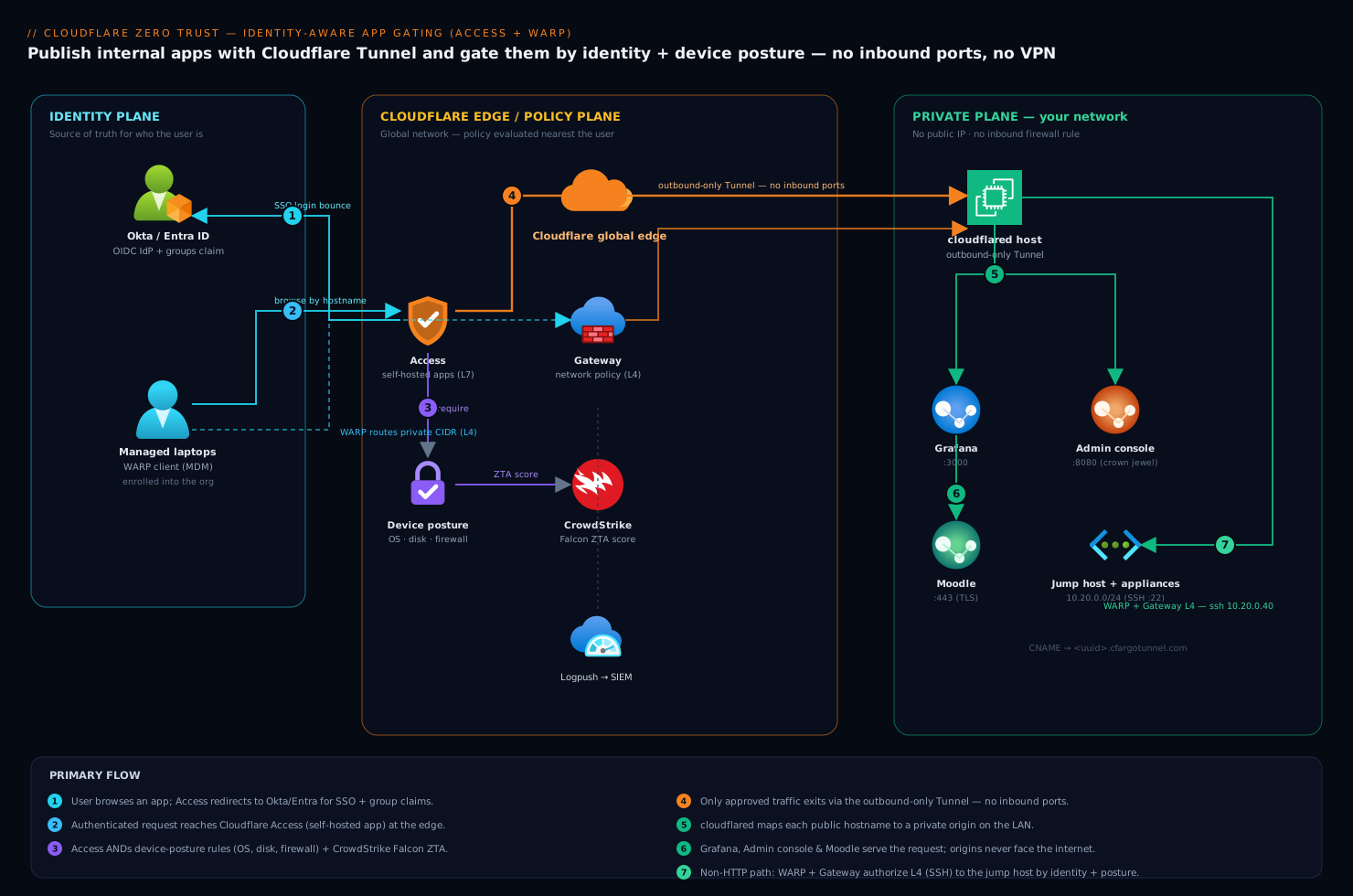
The model is a clean separation of three planes. The identity plane is your IdP (Okta or Entra), federated into Cloudflare as a login method — every app login bounces here first. The edge / policy plane is Cloudflare’s global network: Access evaluates per-app policies (identity + device posture + network) at the edge nearest the user, and the Gateway inspects traffic from enrolled WARP devices. The private plane is your network, reachable only through one or more outbound-only Tunnel connections from cloudflared — there is no inbound firewall rule, no public IP on the apps, and the origin only ever sees connections that already passed Access.
Two distinct access paths share this topology. Browser-based apps (Grafana, the admin console, Moodle’s web UI) are reached by hostname — grafana.example.com — and gated by an Access for Apps (self-hosted) policy that shows an IdP login. Non-HTTP or client-driven access (SSH to a jump host, a thick-client admin tool, or a virtual appliance’s management port) is reached through WARP + Gateway network policies, where the enrolled device routes the private CIDR through the tunnel and Gateway enforces identity-aware L4 rules. Keep those two paths separate in your head — they use different policy engines.
1. Wire the identity provider into Zero Trust
Access does not authenticate users itself; it delegates to your IdP and consumes the resulting token’s identity and group claims. Set this up first, because every later step references it.
In the Zero Trust dashboard go to Settings → Authentication → Login methods → Add new. Pick Okta or Microsoft Entra ID (Azure AD).
For Okta, you create an OIDC app in Okta and feed its values to Cloudflare:
# In Okta Admin → Applications → Create App Integration → OIDC, Web App
Sign-in redirect URI:  https://<your-team-name>.cloudflareaccess.com/cdn-cgi/access/callback
Grant types:           Authorization Code
# Then in Cloudflare Zero Trust → Authentication, supply:
App ID (Client ID):    0oa1abc...        # from Okta
Client secret:         <okta-client-secret>
Okta account URL:      https://your-org.okta.com
Crucially, enable “Read groups” (the groups OAuth scope and the Okta Groups claim) so Cloudflare receives the user’s group memberships — your Access policies will allow by group (eng-grafana, people-team) rather than by listing individual emails. The same is true for Entra ID: register an app, add the redirect URI above, grant the GroupMember.Read.All Graph permission, and turn on “Add groups claim” so Entra group object IDs flow into the token.
If you prefer this in code, the Cloudflare Terraform provider models it directly:
resource "cloudflare_access_identity_provider" "okta" {
  account_id = var.cf_account_id
  name       = "Okta Workforce"
  type       = "okta"
  config {
    client_id      = var.okta_client_id
    client_secret  = var.okta_client_secret   # sourced from Vault, not committed
    okta_account   = "https://your-org.okta.com"
    claims         = ["groups"]               # pull group membership into the token
  }
}
Click Test in the dashboard (or trigger a login) and confirm you are bounced to Okta/Entra and back with your identity and groups resolved. Until this round-trips cleanly, nothing downstream will work.
2. Create the Tunnel and connect cloudflared
The tunnel is what lets Cloudflare reach your private apps with zero inbound exposure — cloudflared dials out to Cloudflare’s edge and holds the connection open. Create a remotely-managed tunnel so its routes live in the dashboard/Terraform:
# On any admin machine, authenticate the CLI to your account
cloudflared tunnel login

# Create a named tunnel; this prints a tunnel UUID and writes a credentials file
cloudflared tunnel create internal-apps
# Tunnel credentials written to /root/.cloudflared/<TUNNEL-UUID>.json
Run the daemon on the in-network Linux host. Install it as a service so it survives reboots, and pass the token Cloudflare generates for the tunnel (retrieve it from the dashboard or cloudflared tunnel token internal-apps):
# Install as a systemd service on the private host (Debian/Ubuntu)
sudo cloudflared service install eyJhIjoi<TUNNEL-TOKEN>...
sudo systemctl enable --now cloudflared
sudo systemctl status cloudflared        # expect: active (running), 4x edge connections "Registered"
Now map public hostnames to internal origins. Each public hostname route says “traffic for this hostname leaves the tunnel and hits this private address.” Define them in the dashboard under Networks → Tunnels → internal-apps → Public Hostnames, or in Terraform:
resource "cloudflare_zero_trust_tunnel_cloudflared_config" "internal_apps" {
  account_id = var.cf_account_id
  tunnel_id  = cloudflare_zero_trust_tunnel_cloudflared.internal_apps.id
  config {
    ingress_rule {
      hostname = "grafana.example.com"
      service  = "http://10.20.0.11:3000"     # Grafana on the LAN
    }
    ingress_rule {
      hostname = "moodle.example.com"
      service  = "https://10.20.0.21:443"      # Moodle over TLS internally
      origin_request { no_tls_verify = true }  # internal self-signed cert
    }
    ingress_rule {
      hostname = "admin.example.com"
      service  = "http://10.20.0.31:8080"      # admin console
    }
    # Private network route for WARP/Gateway L4 access (jump host, appliances)
    ingress_rule { service = "http_status:404" }  # required catch-all
  }
}
Cloudflare auto-creates the proxied DNS CNAME records for those hostnames (pointing at <tunnel-uuid>.cfargotunnel.com). At this point the apps are reachable on the internet by hostname — and completely unprotected. That is intentional and temporary: we gate them in the next step before announcing them. Do not share the URLs yet.
3. Publish each app behind an Access policy
Now we put the identity gate in front of each hostname. In Access → Applications → Add an application → Self-hosted, register each app by its public hostname, then attach policies. An Access application is the protected hostname; a policy is an ordered allow/block rule evaluated against the IdP identity.
Start with the lowest-sensitivity app, Grafana, allowing a specific Okta/Entra group:
resource "cloudflare_zero_trust_access_application" "grafana" {
  account_id       = var.cf_account_id
  name             = "Grafana"
  domain           = "grafana.example.com"
  type             = "self_hosted"
  session_duration = "8h"                      # re-auth daily
  allowed_idps     = [cloudflare_access_identity_provider.okta.id]
  auto_redirect_to_identity = true             # skip the login chooser, go straight to Okta
}

resource "cloudflare_zero_trust_access_policy" "grafana_eng" {
  account_id     = var.cf_account_id
  application_id = cloudflare_zero_trust_access_application.grafana.id
  name           = "Engineering — Okta group"
  precedence     = 1
  decision       = "allow"
  include { okta { name = ["eng-grafana"] identity_provider_id = cloudflare_access_identity_provider.okta.id } }
}
Repeat for Moodle, but here the population is broader (all employees plus some external contractors) — so allow an email_domain for staff and an explicit contractor list, while requiring MFA via an Access require block:
resource "cloudflare_zero_trust_access_policy" "moodle_staff" {
  account_id     = var.cf_account_id
  application_id = cloudflare_zero_trust_access_application.moodle.id
  name           = "Staff + named contractors"
  precedence     = 1
  decision       = "allow"
  include {
    email_domain { domain = ["example.com"] }
    email        { email  = ["jane@contractor.io", "raj@vendor.com"] }
  }
  require { auth_method { auth_method = "mfa" } }   # IdP must assert MFA was used
}
The admin console is the crown jewel, so its Access policy gets the strictest identity rule now and a device-posture require added in Step 5. For the moment, allow only the platform-admins group and require the user to come from a corporate IP range:
resource "cloudflare_zero_trust_access_policy" "admin_console" {
  account_id     = var.cf_account_id
  application_id = cloudflare_zero_trust_access_application.admin_console.id
  name           = "Platform admins only"
  precedence     = 1
  decision       = "allow"
  include { okta { name = ["platform-admins"] identity_provider_id = cloudflare_access_identity_provider.okta.id } }
  require { ip { ip = ["203.0.113.0/24"] } }       # office egress; tightened by posture in step 5
}
Apply with terraform apply. Now visit grafana.example.com in a browser: you should be redirected to Okta/Entra, authenticate, and only then reach Grafana — with a Cloudflare Access cookie scoped to that one app. A user not in eng-grafana is cleanly denied.
4. Roll out WARP and enroll devices
Identity gating is in place; the remaining gap is device health. To evaluate posture, the device must be enrolled in your Zero Trust org via the WARP client, which both enrolls the device and (for L4 apps) routes traffic through Gateway.
First define who may enroll under Settings → WARP Client → Device enrollment permissions — gate enrollment behind the same IdP so only your employees can join the org:
Enrollment rule (allow):  emails ending in @example.com   (login via Okta)
Session duration:         168h   # weekly device re-auth
Deploy WARP through MDM with a managed configuration so users never type settings. The key fields are your organization (team name) and auth_mode set to identity-based:
<!-- Intune / Jamf managed config plist for Cloudflare WARP -->
<dict>
  <key>organization</key>      <string>your-team-name</string>
  <key>auto_connect</key>      <integer>0</integer>
  <key>switch_locked</key>     <true/>           <!-- users cannot disable WARP -->
  <key>service_mode</key>      <string>warp</string>   <!-- full tunnel; "proxy" for L7-only -->
  <key>support_url</key>       <string>https://help.example.com</string>
</dict>
On a managed laptop, confirm enrollment from the CLI:
warp-cli status        # expect: Status update: Connected
warp-cli account       # expect: Account type: Team, your org name
warp-cli settings      # confirm "Always On" / locked per your MDM policy
Enrolled devices now appear under My Team → Devices, each with a device ID, the logged-in user, OS, and WARP version — the raw material for posture checks.
5. Enforce device posture on the sensitive apps
This is the payoff: combine “valid user” with “healthy device.” Posture checks live under Settings → WARP Client → Device posture, and each becomes a reusable signal you reference in Access require rules.
Configure a few high-signal checks. WARP-native checks need only the client; the service-provider checks integrate an EDR you already run — here CrowdStrike Falcon, whose Zero Trust Assessment (ZTA) score tells Cloudflare the endpoint is enrolled in Falcon and meets a health bar:
# Device posture checks (Settings → WARP Client → Device posture → Add)
1. OS version       — require macOS >= 14.4 / Windows build >= 22631
2. Disk encryption  — require FileVault / BitLocker = enabled
3. Firewall         — require host firewall = on
4. CrowdStrike      — service provider = CrowdStrike; require ZTA overall score >= 70
                      (Cloudflare reads the Falcon ZTA via the CrowdStrike integration;
                       a device not running Falcon, or below the bar, fails the check)
Now tighten the admin console policy to require both the group membership and the device posture. Add the posture requirements to the existing policy’s require block — Access ANDs all require conditions, so a platform admin on a personal, un-encrypted, no-Falcon laptop is refused even with a perfect password and MFA:
resource "cloudflare_zero_trust_access_policy" "admin_console" {
  account_id     = var.cf_account_id
  application_id = cloudflare_zero_trust_access_application.admin_console.id
  name           = "Platform admins on healthy managed devices"
  precedence     = 1
  decision       = "allow"
  include { okta { name = ["platform-admins"] identity_provider_id = cloudflare_access_identity_provider.okta.id } }
  require {
    device_posture { integration_uid = [
      cloudflare_zero_trust_device_posture_rule.disk_encryption.id,
      cloudflare_zero_trust_device_posture_rule.firewall_on.id,
      cloudflare_zero_trust_device_posture_rule.crowdstrike_zta.id,
    ] }
  }
}
Apply the same crowdstrike_zta + encryption posture to Moodle only for the contractor population if you require managed devices for them, or leave Moodle at identity-only if contractors use BYOD — that is a policy decision, but the mechanism is identical.
For the non-HTTP path (SSH to the jump host, a virtual appliance’s :9443 management UI), publish the private CIDR through the same tunnel and write a Gateway network policy that requires identity and posture at L4. This is how you replace the flat VPN’s TCP reachability with an identity-aware one:
# Gateway → Firewall policies → Network policy
Name:     Jump host SSH — admins, healthy device
Selector: Destination IP in 10.20.0.40/32  AND  Destination Port = 22
Identity: User group is "platform-admins"
Posture:  Passed checks include "CrowdStrike ZTA >= 70" AND "Disk encryption"
Action:   Allow         (default action for 10.20.0.0/24 = Block)
Because WARP routes 10.20.0.0/24 through the tunnel, an enrolled admin can ssh 10.20.0.40 and Gateway permits it; an unenrolled or non-compliant device has no route and no allow rule. The legacy VPN can now be retired for these flows.
Validation
Verify each control deliberately rather than assuming apply succeeded.
# 1. Tunnel health — four edge connections, no errors
sudo cloudflared tunnel info internal-apps
journalctl -u cloudflared -n 50 --no-pager | grep -i "registered\|error"

# 2. App is gated — a raw request without an Access token must NOT reach origin.
#    Expect an HTTP 302 to the Cloudflare Access login, never a 200 from Grafana.
curl -sI https://grafana.example.com | grep -i "location"
#    location: https://<team>.cloudflareaccess.com/cdn-cgi/access/login/...

# 3. Identity allow/deny — log in as a user in eng-grafana (reaches app)
#    and one who is not (clean "you don't have access" page).

# 4. Posture enforcement — on an admin laptop:
warp-cli status                      # Connected
#    Then in Zero Trust → Logs → Access, attempt admin.example.com and confirm
#    "device_posture" appears in the allowed checks. Temporarily disable FileVault
#    on a test device and confirm the SAME user is now BLOCKED with reason
#    "failed device posture: disk_encryption".

# 5. L4 path — from an enrolled admin device:
ssh -o ConnectTimeout=5 user@10.20.0.40   # succeeds
#    From an un-enrolled device on the same network path: connection refused/timeout.
Cross-check in Zero Trust → Logs → Access (per-login allow/block with the matched policy and posture results) and Logs → Gateway (L4 decisions). Every allow should name the user, the policy, and the posture checks that passed — that audit trail is itself a deliverable for the next compliance review.
Rollback / teardown
The design is reversible without touching the apps themselves, because the tunnel and Access sit in front of unchanged origins.
-
Emergency open (single app): set the offending Access policy’s
decisiontobypass(or in the dashboard, add a temporaryEveryonebypass policy atprecedence = 1). The app stays reachable while you debug the IdP or posture rule. Remove it immediately after. -
Loosen posture, keep identity: delete the
device_postureblock from therequirestanza andterraform apply. Users still authenticate via Okta/Entra; only the device gate is lifted. This is the right first move if WARP enrollment lags the policy rollout. -
Full teardown of one app:
terraform destroy -target=cloudflare_zero_trust_access_application.grafanaremoves the Access app and its policies; the hostname then serves traffic unguarded again, so also remove its tunnelingress_ruleto take it offline. -
Decommission the tunnel: stop the daemon and delete the tunnel, which drops all routes at once and instantly makes every internal app unreachable from the internet:
sudo systemctl disable --now cloudflared cloudflared tunnel cleanup internal-apps # close stale connections cloudflared tunnel delete internal-apps # remove the tunnel + auto DNS records -
Revert to VPN (contingency): because you never deleted firewall rules to build this (the tunnel is outbound-only), the legacy VPN path is untouched and remains the fallback until you consciously retire it. Keep it enabled for one overlap sprint, then remove.
Common pitfalls
- Announcing the hostname before the Access policy exists. Between Step 2 and Step 3 the app is on the public internet with no gate. Sequence it: tunnel route, then Access app + allow policy, then share the URL. Never the reverse.
- Forgetting the catch-all ingress rule. A
cloudflaredconfig without a finalservice = "http_status:404"rule fails to start. Every ingress list needs that terminal entry. - Missing the IdP groups claim. If Access policies that allow by group silently deny everyone, the token has no
groups— re-check the Okta “Read groups” / Entra “groups claim” toggle from Step 1. Inspect a login under Logs → Access to see exactly which claims arrived. - Posture rule with no enrolled devices. A
device_posturerequirement evaluated on a browser that has never run WARP always fails, locking out the very admins you trust. Roll WARP to the target group before you flip on the posturerequire, and validate enrollment in My Team → Devices first. - Internal TLS verification. Pointing a hostname at an internal
https://origin with a self-signed cert throws a 502 unless you setorigin_request { no_tls_verify = true }(or, better, install your internal CA). Decide per origin. - Session duration mismatch. A long
session_durationon a sensitive app undercuts posture — a laptop that fell out of compliance keeps its cookie until the session expires. For the admin console, keep sessions short (e.g.2h) so posture is re-evaluated often.
Security notes
This architecture is Zero Trust by construction: no inbound ports (the tunnel dials out), no implicit network trust (every L7 request and L4 flow is authorized per-app against identity and posture), and least privilege (a contractor allowed into Moodle gets only Moodle, never the admin console’s network — the precise failure that started the project). Layer your existing tooling on top rather than replacing it: CrowdStrike Falcon supplies the endpoint health signal that Cloudflare posture consumes, and its detections continue feeding your SOC unchanged; HashiCorp Vault holds the Cloudflare API token and IdP client secrets, leased to CI at deploy time so nothing sensitive lands in a repo or a runner’s environment; a cloud-posture scanner such as Wiz (with Wiz Code checking the Terraform in PRs) verifies that no internal app accidentally regains a public origin or that an Access policy did not drift to Everyone. Pipe Cloudflare’s Access and Gateway logs to Datadog or Dynatrace via Logpush so a sudden spike in posture failures or denied logins is alertable, and auto-raise a ServiceNow ticket on a sustained block pattern so security responds to an incident, not a log line. Run the whole change through GitHub Actions (or Jenkins) with the Cloudflare Terraform provider, gated by a plan review — and use Argo CD if you keep the cloudflared deployment in Kubernetes, so the tunnel daemon is itself GitOps-managed. Ansible can baseline the cloudflared host (and any virtual appliance you front) so its OS posture matches what your policies assume.
Cost notes
The core building blocks — Cloudflare Tunnel, Access, and WARP for a single team — are included in the Zero Trust free tier up to 50 users, which comfortably covers a pilot across these three apps. Beyond that, Zero Trust is priced per seat per month (Pay-as-you-go around the low single-digit dollars per user, with volume and Enterprise tiers negotiated), so budget by enrolled users, not by app count — adding a fourth or fortieth app behind the same tunnel costs nothing extra. The real saving is structural: retiring the legacy VPN removes its concentrator licensing, the egress and support burden of VPN profiles, and an entire class of “the VPN grants too much” audit findings. Service-provider posture (the CrowdStrike Falcon ZTA integration) reuses EDR licenses you already pay for, adding signal at no new endpoint cost. Keep cloudflared on a small VM or a single Kubernetes pod — it is lightweight and scales by running additional replicas of the same tunnel for HA, not by sizing up. The dominant ongoing cost is the per-seat Zero Trust subscription; everything else here is either included or already on your books.