A media-analytics team ships a Delta Live Tables (DLT) pipeline and three jobs that feed the executive revenue dashboard. For a year, the only way changes reached production was an engineer opening the prod workspace UI on a Friday, exporting a notebook, re-pasting cluster JSON, and clicking Run — twice that quarter a stale cluster policy or a wrong catalog name silently routed test data into the prod table, and nobody could say which commit caused it because there was no commit. The mandate from the new data-platform lead is blunt: every job and pipeline is code, every change is a pull request, and a human never clicks Deploy in the prod workspace again. This guide stands up exactly that with Databricks Asset Bundles (DABs) — the native, declarative, CLI-driven way to package jobs, DLT pipelines, experiments and their supporting resources as versioned YAML — promoted through GitHub Actions (and Azure DevOps) across dev, staging, and prod workspaces, with identity, secrets, security scanning, and change control bolted on the way a regulated enterprise actually runs it.
DABs matters because it collapses three things that used to drift apart: the pipeline/notebook source, the job and DLT definitions (schedule, cluster spec, catalog, dependencies, permissions), and the target workspace configuration. One databricks.yml, one CLI (databricks bundle), one set of variables per environment. Under the hood it is Terraform — the CLI renders your bundle to a Terraform configuration and drives a state file per target — but you never write HCL and never run terraform yourself. The same artifact that an engineer validates on their laptop against dev is the byte-identical artifact GitHub Actions deploys to prod: no UI export, no copy-paste, no “works on my workspace.”
By the end of this guide you will read and write every top-level block of databricks.yml — bundle, targets, resources, variables, sync, artifacts, permissions, run_as — understand what mode: development versus mode: production actually change, authenticate CI as an OAuth machine-to-machine (M2M) service principal with zero long-lived tokens, and run the full validate → deploy → run → destroy lifecycle in both GitHub Actions and Azure DevOps. You will also know how to migrate off dbx and hand-rolled Terraform, because most teams adopting DABs are replacing one of those.
What problem this solves
Before DABs, “jobs as code” on Databricks meant one of three bad options. You clicked jobs together in the UI and exported JSON — which drifts the moment someone edits it in the console and has no notion of environments. You used the Jobs API or the databricks-cli jobs create directly from a shell script — imperative, no diff, no dry-run, you re-POST the whole definition and hope. Or you adopted dbx (the community deployment tool) or wrote Terraform with the Databricks provider — powerful, but dbx is now in maintenance mode and Terraform makes you model every Databricks primitive as a resource and manage state and providers yourself, which is a lot of undifferentiated plumbing for “deploy my three jobs to three workspaces.”
What breaks without a real deployment tool: environment drift (dev has a fix that prod never got, or prod has a hotfix nobody merged back), unauditable changes (a job’s schedule changed and there is no commit, no reviewer, no ticket), copy-paste errors (a prod job pointing at the dev catalog, a cluster policy ID from the wrong workspace), and hardcoded resource IDs (a job’s pipeline_id that only exists in one workspace, so the definition is not portable at all). Every one of these is a class of incident that “deploy the same versioned artifact everywhere, only variables differ” eliminates.
Who hits this: any team running more than a couple of Databricks jobs or DLT pipelines across more than one workspace — which is nearly everyone past the prototype stage. It bites hardest on regulated shops that need an audit trail and change approval on every prod deploy, on platform teams supporting dozens of data teams who need a repeatable pattern, and on anyone who has felt the specific pain of a Friday-night UI deploy silently writing test data to a prod table. DABs is Databricks’ answer, it is generally available, and it is now the recommended path over dbx.
Learning objectives
By the end of this article you can:
- Read and author every top-level block of
databricks.yml—bundle,targets,resources,variables,sync,artifacts,permissions,run_as,include— and explain what each controls. - Define jobs, DLT pipelines, and MLflow experiments as bundle resources, wiring cross-resource references (
${resources.pipelines.x.id}) so nothing is hardcoded per workspace. - Structure per-target overrides so dev/staging/prod share one artifact and diverge only through variables and a handful of target-scoped settings.
- Explain exactly what
mode: developmentandmode: productionchange — name-prefixing, schedule pausing, concurrency, and the validations each enforces. - Authenticate the CLI four ways — OAuth U2M for humans, OAuth M2M (service principal) for CI, workload identity federation (OIDC), and a PAT fallback — and pick the right one per context.
- Drive the full lifecycle:
bundle validate,bundle deploy,bundle run,bundle summary,bundle destroy, and read the state DABs keeps. - Build a CI pipeline in GitHub Actions and Azure DevOps with the standard three gates: PR validates, merge deploys to staging, tagged release deploys to prod behind an approval.
- Migrate an existing dbx project or a hand-written Terraform Databricks config to DABs without losing running jobs.
Prerequisites
- Three Databricks workspaces — dev, staging, prod — ideally Unity Catalog–enabled, each with a catalog (
analytics_dev,analytics_staging,analytics_prod). - Databricks CLI v0.218+ (the Go-based CLI that ships
databricks bundle; the old Pythondatabricks-cliis deprecated and has no bundle command). Confirm withdatabricks --version; anything0.2xx.xis bundle-capable. - A GitHub repository (or Azure DevOps project) with pipelines enabled and permission to add repository/environment secrets and variables.
- A service principal per non-dev environment — in Microsoft Entra ID on Azure, or a Databricks-managed service principal on AWS/GCP — added to each workspace with the right entitlements. This is the non-human identity CI deploys as.
- Familiarity with Databricks jobs and DLT at the UI level, basic YAML, and git branching. You do not need to know Terraform — DABs uses it under the hood but you never touch it.
- Cluster policies and Unity Catalog grants already created by the platform team (you reference them; you do not create them here).
Where this fits: DABs sits at the deployment layer of a lakehouse platform. It assumes governance is already in place — see Configure Databricks Unity Catalog External Locations and Storage Credentials and Lakehouse Governance with Databricks Unity Catalog for the catalog/grant model your jobs run against.
Core concepts
Six ideas make everything else fall into place. Hold these first.
A bundle is a directory with a databricks.yml at its root. The bundle is the unit DABs deploys. It contains configuration (the YAML), source (notebooks, .py, wheels), and — after deploy — a state file. The CLI finds the bundle by walking up from your working directory to the nearest databricks.yml. Everything the tool does is scoped to that one bundle.
Resources are Databricks objects declared as code. A resource is a job, a DLT pipeline, an MLflow experiment, a model, a serving endpoint, a dashboard, a Unity Catalog schema/volume, and more. You describe the desired state; DABs makes the workspace match it, creating/updating/deleting via the Databricks REST API (through Terraform). The resource schema mirrors the corresponding REST API almost field-for-field, which is why you can translate a Jobs-API JSON payload into a job resource nearly mechanically.
Targets are environments. A target (older docs say environment) is a named deployment destination — dev, staging, prod — each with its own workspace host, its own variable values, its own mode, and its own identity. -t <target> on every command selects which one. The default target (marked default: true, or the one named dev) is used when you omit -t.
Variables parameterize the difference between targets. The whole design goal is one artifact, per-target variables. A variable has a description, an optional default, and a per-target override. You reference it as ${var.name}. Catalog names, node counts, policy IDs, landing paths — anything that legitimately differs by environment — becomes a variable so the definitions stay identical.
Substitutions wire things together at deploy time. DABs resolves ${...} expressions when it renders the bundle. ${bundle.target} is the current target name; ${workspace.host} is the target’s host; ${resources.pipelines.revenue_dlt.id} is the ID of a pipeline this bundle deploys — resolved per target so you never hardcode an ID that only exists in one workspace. This is the single most important portability mechanism in the tool.
The substitutions you will actually reach for:
| Substitution | Resolves to | Typical use |
|---|---|---|
${bundle.name} |
The bundle’s name | Naming, paths |
${bundle.target} |
Current target (e.g. prod) |
Suffix resource names per env |
${workspace.host} |
Target workspace host | Rarely needed inline; set in target |
${workspace.root_path} |
Deployment root in the workspace | State/file location |
${workspace.current_user.userName} |
The deploying user | Dev-scoped paths/names |
${var.<name>} |
A variable’s resolved value | The primary parameterization |
${resources.jobs.<n>.id} |
A deployed job’s ID | Cross-job references |
${resources.pipelines.<n>.id} |
A deployed pipeline’s ID | Wire a job’s pipeline_task |
DABs is Terraform you never see. deploy renders your bundle to a Terraform config, runs a plan and apply against the target, and stores the resulting state (by default in the workspace under ${workspace.root_path}/state). destroy runs a Terraform destroy. Because state is tracked, DABs knows what it created and only touches its own resources — which is exactly why you must never hand-edit a DABs-managed job in the UI (it orphans the state).
The vocabulary in one table
| Concept | One-line definition | Where it lives | Why it matters |
|---|---|---|---|
| Bundle | A directory rooted at databricks.yml |
Your repo | The unit that gets deployed |
databricks.yml |
The bundle’s root config file | Repo root | Declares bundle, targets, variables, includes |
| Resource | A Databricks object as code (job, pipeline, …) | resources/*.yml |
The thing that actually gets created |
| Target | A named environment (dev/staging/prod) | targets: block |
Selects host, mode, identity, variable values |
| Variable | A per-target parameter (${var.x}) |
variables: block |
Keeps the artifact identical across envs |
| Substitution | A ${...} expression resolved at deploy |
Anywhere in YAML | Wires refs, hosts, target name, no hardcoding |
mode |
development or production behaviour |
Per target | Name-prefixing, schedule pause, safety checks |
run_as |
Identity a job/pipeline executes as | Per target / resource | Who owns and runs the deployed object |
| Sync | Files uploaded to the workspace | sync: block |
What source gets pushed alongside definitions |
| Artifact | A build output (e.g. a Python wheel) | artifacts: block |
Wheels built and uploaded on deploy |
| State | DABs’ record of what it created | ${workspace.root_path}/state |
Lets deploy diff and destroy cleanly |
Anatomy of databricks.yml
Every bundle is one databricks.yml plus, usually, some included files. Here is the full top-level shape, block by block. This is the reference you will scan while writing your own.
# databricks.yml — the root of the bundle
bundle:
  name: analytics_pipelines          # required; identifies the bundle
  # git metadata is auto-detected from the repo; can be pinned explicitly

include:                             # split resources into files; globs allowed
  - resources/*.yml

variables:                           # parameters that differ per target
  catalog:
    description: "Unity Catalog name"
  marts_workers:
    default: 2

sync:                                # which local files are pushed to the workspace
  include:
    - src/**
  exclude:
    - "**/*.pyc"
    - tests/**

artifacts:                           # build steps (e.g. build a wheel) run on deploy
  analytics_wheel:
    type: whl
    path: ./                         # dir containing pyproject.toml / setup.py

resources:                           # the objects to create (usually in include: files)
  jobs: { }
  pipelines: { }
  experiments: { }

targets:                             # the environments
  dev: { }
  staging: { }
  prod: { }
The top-level blocks and what each does:
| Block | Required? | Purpose | Notes |
|---|---|---|---|
bundle |
Yes | Names the bundle; holds git metadata | bundle.name seeds default paths and name prefixes |
include |
No | Pull in other YAML files (globs) | The idiomatic way to keep one resource per file |
variables |
No | Declare parameters used as ${var.x} |
Each has description, optional default, per-target override |
sync |
No | Control which local files upload to the workspace | Defaults to the whole bundle dir minus common excludes |
artifacts |
No | Build outputs (Python wheels) at deploy time | type: whl; DABs runs the build and uploads the result |
resources |
Yes (somewhere) | Declare jobs/pipelines/experiments/etc. | Usually lives in included files, merged into this block |
targets |
Yes | Declare environments | Each sets host, mode, identity, variable values, overrides |
permissions |
No | Bundle-level ACLs applied to all resources | Can also be set per resource |
run_as |
No | Default identity resources run as | Overridable per target and per resource |
presets |
No | Shared knobs (name prefix, tags, pause) | Applied across resources in a target |
The bundle block and include
bundle.name is the identity. It seeds the default workspace root path (/Workspace/Users/<you>/.bundle/<name>/<target> in dev, /Workspace/Shared/.bundle/... patterns in prod) and the dev name prefix. include lets you keep one resource per file so a job change is a small, reviewable diff — the merged result is as if everything were inline.
bundle:
  name: analytics_pipelines

include:
  - resources/revenue_pipeline.yml
  - resources/revenue_job.yml
  - resources/experiments.yml
The sync block — what actually gets uploaded
sync controls which local files land in the workspace next to your definitions. Left unset, DABs uploads the whole bundle directory (minus .git, and honouring .gitignore). Set it explicitly to keep tests and build junk out of the workspace and to make deploys faster.
sync:
  include:
    - src/**
  exclude:
    - tests/**
    - "**/__pycache__/**"
    - "**/*.pyc"
sync behaviour and the knobs:
| Setting | Meaning | Default | When to set it |
|---|---|---|---|
| (unset) | Upload the whole bundle dir | On | Fine for small bundles |
sync.include |
Only these globs are candidates | All files | Push only what jobs actually import |
sync.exclude |
Remove these from the set | .git, gitignored |
Keep tests, caches, notebooks-you-don’t-run out |
.gitignore |
Honoured automatically | Respected | Reuse existing ignore rules |
databricks bundle sync |
One-way file sync without full deploy | — | Fast inner loop while iterating on src/ |
Defining resources as code
Resources are the point. Keep each in its own file under resources/. Below are the three you will use most — a DLT pipeline, a job that triggers it, and an experiment — written so every environment-specific value is a variable.
A DLT pipeline resource
# resources/revenue_pipeline.yml
resources:
  pipelines:
    revenue_dlt:
      name: "revenue-dlt-${bundle.target}"
      catalog: ${var.catalog}                # Unity Catalog target catalog
      target: ${var.schema}                  # schema the pipeline publishes to
      serverless: true                       # serverless DLT — no cluster to size
      continuous: false                      # triggered (batch), not streaming
      development: ${var.dlt_development}     # DLT "development mode" (fast iteration)
      photon: true
      libraries:
        - notebook:
            path: ../src/dlt/revenue_transforms.py
      configuration:
        source.path: ${var.landing_path}
      notifications:
        - email_recipients: [data-oncall@example.com]
          alerts: [on-update-failure]
The DLT-specific fields worth knowing:
| Field | What it controls | Values | Gotcha |
|---|---|---|---|
catalog / target |
Where tables are published (UC) | Catalog + schema names | Make both variables; wrong catalog = data in the wrong env |
serverless |
Serverless vs classic DLT compute | true / false |
Serverless removes cluster sizing entirely; not in every region |
continuous |
Streaming vs triggered | true / false |
true = 24/7 cost; keep false for batch |
development (DLT) |
DLT’s own development mode | true / false |
Distinct from bundle mode; reuses cluster, skips retries |
photon |
Photon engine on the pipeline | true / false |
Faster; check DBU rate |
libraries |
Notebook/file backing the pipeline | notebook / file paths | Relative to the resource file’s directory |
configuration |
Pipeline config key-values | strings | Read in code via spark.conf.get(...) |
Note two different “development” flags exist and they are not the same: the DLT development field (fast iteration inside DLT — reuses compute, disables retries) versus the bundle target mode: development (name-prefixing, schedule pausing across all resources). Drive the DLT one from a variable so dev gets true and prod gets false.
A job resource that triggers the pipeline
# resources/revenue_job.yml
resources:
  jobs:
    revenue_refresh:
      name: "revenue-refresh-${bundle.target}"
      tags:
        team: media-analytics
        managed_by: dabs
      tasks:
        - task_key: run_dlt
          pipeline_task:
            pipeline_id: ${resources.pipelines.revenue_dlt.id}   # cross-resource ref
        - task_key: publish_marts
          depends_on:
            - task_key: run_dlt
          notebook_task:
            notebook_path: ../src/jobs/publish_marts.py
          job_cluster_key: marts_cluster
      job_clusters:
        - job_cluster_key: marts_cluster
          new_cluster:
            spark_version: "15.4.x-scala2.12"
            node_type_id: ${var.node_type}
            num_workers: ${var.marts_workers}
            policy_id: ${var.cluster_policy_id}
            data_security_mode: SINGLE_USER
      schedule:
        quartz_cron_expression: "0 0 6 * * ?"
        timezone_id: "Asia/Kolkata"
        pause_status: ${var.schedule_pause}
      queue:
        enabled: true
      max_concurrent_runs: 1
${resources.pipelines.revenue_dlt.id} is the portability keystone: DABs deploys the pipeline first, learns its ID in that target’s workspace, and injects it into the job’s pipeline_task. You never hardcode a pipeline ID — which would be wrong in every workspace but the one it came from.
The job fields that matter most in a bundle context:
| Field | Purpose | Common values | Bundle note |
|---|---|---|---|
tasks[].task_key |
Unique task name in the job | any string | Referenced by depends_on |
pipeline_task.pipeline_id |
Which DLT pipeline to run | a pipeline ID | Always a ${resources...id} ref |
notebook_task.notebook_path |
Notebook to run | workspace/relative path | Relative to the resource file |
job_clusters |
Reusable cluster defs for tasks | cluster specs | Share one across tasks to save spin-up |
new_cluster.policy_id |
Cluster policy to enforce | policy ID (variable) | Caps node type/size; keep it a variable |
schedule.pause_status |
PAUSED / UNPAUSED |
variable | mode: development forces PAUSED regardless |
max_concurrent_runs |
Overlap allowed | integer | mode: development may raise it for dev iteration |
queue.enabled |
Queue runs instead of skipping | bool | Recommended on scheduled jobs |
An MLflow experiment resource
Experiments (and models, and serving endpoints) are first-class resources too — useful when a job trains a model and you want the experiment tracked as code.
# resources/experiments.yml
resources:
  experiments:
    revenue_forecast:
      name: "/Shared/experiments/revenue-forecast-${bundle.target}"
      # permissions can be set per-resource
      permissions:
        - level: CAN_MANAGE
          group_name: media-analytics-eng
The resource types DABs supports (the ones you will actually reach for):
| Resource type | Block key | What it creates | Typical use |
|---|---|---|---|
| Job | jobs |
A Databricks Job (multi-task) | The workhorse — orchestrates everything |
| DLT pipeline | pipelines |
A Delta Live Tables pipeline | Declarative ETL / medallion transforms |
| MLflow experiment | experiments |
An experiment for run tracking | ML training jobs |
| Registered model | registered_models |
A UC model | Model lifecycle as code |
| Model serving endpoint | model_serving_endpoints |
A serving endpoint | Real-time inference |
| SQL / Lakeview dashboard | dashboards |
A dashboard | Ship BI as code |
| UC schema | schemas |
A Unity Catalog schema | Bundle owns its schema |
| UC volume | volumes |
A UC volume | Managed landing/scratch storage |
| Quality monitor | quality_monitors |
A Lakehouse Monitoring monitor | Data-quality as code |
| Cluster / job cluster | (inline) | Compute defs | Inline in jobs/pipelines |
Targets and per-environment overrides
Targets are where dev/staging/prod diverge — and the discipline is to let them diverge only through variables and a few target-scoped settings. Declare the variables once with sensible defaults, then override per target.
variables:
  catalog:           { description: "Unity Catalog name" }
  schema:            { description: "Target schema/database" }
  node_type:         { default: "Standard_D4ds_v5" }     # Azure; i3.xlarge on AWS
  marts_workers:     { default: 2 }
  cluster_policy_id: { description: "Shared cluster policy id" }
  landing_path:      { description: "Source landing location" }
  dlt_development:   { default: true }
  schedule_pause:    { default: "PAUSED" }

targets:
  dev:
    mode: development          # prefixes names with the user, pauses schedules, tags dev
    default: true
    workspace:
      host: https://adb-1111111111111111.7.azuredatabricks.net
    variables:
      catalog: analytics_dev
      schema:  revenue
      cluster_policy_id: "A1B2C3D4E5F60001"
      landing_path: "/Volumes/analytics_dev/raw/landing"

  staging:
    mode: production
    workspace:
      host: https://adb-2222222222222222.7.azuredatabricks.net
      root_path: /Workspace/Shared/.bundle/${bundle.name}/${bundle.target}
    run_as:
      service_principal_name: sp-analytics-staging
    variables:
      catalog: analytics_staging
      schema:  revenue
      cluster_policy_id: "A1B2C3D4E5F60002"
      landing_path: "/Volumes/analytics_staging/raw/landing"
      dlt_development: false
      schedule_pause: "PAUSED"    # staging runs on demand from CI, not on a clock

  prod:
    mode: production
    workspace:
      host: https://adb-3333333333333333.7.azuredatabricks.net
      root_path: /Workspace/Shared/.bundle/${bundle.name}/${bundle.target}
    run_as:
      service_principal_name: sp-analytics-prod
    variables:
      catalog: analytics_prod
      schema:  revenue
      cluster_policy_id: "A1B2C3D4E5F60003"
      landing_path: "/Volumes/analytics_prod/raw/landing"
      dlt_development: false
      schedule_pause: "UNPAUSED"  # prod runs on its cron
    permissions:
      - level: CAN_MANAGE
        group_name: data-platform-admins
      - level: CAN_VIEW
        group_name: media-analytics-eng
The target-level settings you actually set, and how they cascade:
| Target setting | What it does | Overrides | When to use |
|---|---|---|---|
mode |
development / production behaviour |
— | development on dev, production on staging/prod |
default: true |
Makes this the target when -t omitted |
— | Put it on dev so bare commands are safe |
workspace.host |
Which workspace to deploy to | — | One per environment |
workspace.root_path |
Where the bundle’s files/state live | mode default | Pin a shared path for CI-owned targets |
variables.<name> |
Per-target variable value | the default | The primary divergence mechanism |
run_as |
Identity resources run as | bundle run_as |
Service principal in staging/prod |
permissions |
ACLs on all resources in this target | bundle permissions |
Grant admins CAN_MANAGE in prod |
resources.* |
Deep-override a specific resource field | the resource | Rare — a genuinely env-specific field |
How merging and precedence work
DABs merges configuration in a defined order, most-specific wins. Understanding this prevents the “why didn’t my override apply” head-scratch.
| Precedence (low → high) | Source | Example |
|---|---|---|
| 1 | Variable default |
marts_workers: { default: 2 } |
| 2 | Base resources (all targets) |
the job/pipeline definition |
| 3 | Target-level variables |
staging sets catalog: analytics_staging |
| 4 | Target-level resources deep-merge |
a target overriding one field |
| 5 | --var flag on the CLI / env var |
--var="marts_workers=8" |
| 6 | mode enforced behaviours |
development forces schedules PAUSED |
The last row is a trap worth stating plainly: mode: development overrides your schedule.pause_status and forces it to PAUSED, no matter what the variable says. That is intentional (a half-built pipeline should never fire on a timer in a shared dev workspace), but it surprises people who set UNPAUSED and wonder why nothing runs.
mode: development vs mode: production
The two modes are the safety model. development is optimized for fast, collision-free iteration in a shared workspace; production is optimized for deterministic, owned, auditable deploys. Know exactly what each changes.
| Behaviour | mode: development |
mode: production |
|---|---|---|
| Resource name prefix | Prefixes with [dev <username>] |
No prefix |
| Schedules & triggers | Forced PAUSED | Left as declared |
| Cluster / job labels | Tagged as dev; marked as dev clusters | No dev tagging |
max_concurrent_runs on jobs |
May be raised to 1+ for iteration | As declared |
| Deploy target root path | Per-user path (~/.bundle/...) |
Shared/explicit path |
run_as validation |
Relaxed (deploys as you) | Must be a service principal or match; validated |
UC development on DLT |
Often left dev-friendly | Production semantics |
| Concurrent-deploy safety | Multiple engineers isolated by prefix | Single owning identity |
| Guardrails on prod-only fields | Warnings | Enforced validations |
development is doing real safety work: two engineers in the same dev workspace never collide because each one’s resources are prefixed with their username, and a half-finished pipeline never fires on a timer because schedules are force-paused. production with run_as a service principal is what makes staging and prod deterministic and owned — the deployed job is named exactly revenue-refresh-prod, runs as sp-analytics-prod, and is identical to what staging validated.
When to use which:
| Situation | Mode | Why |
|---|---|---|
| Engineer iterating on their laptop against dev | development |
Collision-free, schedules off, deploys as them |
| CI deploying to staging for an integration run | production |
Real names, owned by the staging SP, deterministic |
| CI deploying to prod on a tagged release | production |
Auditable, service-principal-owned, schedules live |
| A shared “sandbox” everyone tests in | development |
Per-user prefixing keeps everyone out of each other’s way |
Authentication: OAuth M2M, U2M, OIDC, and PAT
Identity is where “CI deploys as a human PAT” quietly rots a platform. The rule: humans use OAuth U2M; CI uses OAuth M2M (a service principal) or workload-identity federation; PAT is a last-resort short-lived fallback.
OAuth U2M — humans
User-to-machine OAuth opens a browser and authenticates you as yourself through your corporate IdP (e.g. Okta → Entra ID). One-time per host; the CLI caches a refreshing token.
# One-time per workspace host — browser-based corporate login
databricks auth login --host https://adb-1111111111111111.7.azuredatabricks.net
# Verify the profile/token
databricks auth describe
OAuth M2M — service principals for CI
Machine-to-machine OAuth authenticates a service principal with a client ID + OAuth secret (not a PAT), yielding a short-lived access token the CLI refreshes. This is the standard CI identity.
# In CI, the CLI reads these env vars and does OAuth M2M automatically:
export DATABRICKS_HOST=https://adb-3333333333333333.7.azuredatabricks.net
export DATABRICKS_CLIENT_ID=<service-principal-application-id>
export DATABRICKS_CLIENT_SECRET=<oauth-secret>   # an OAuth secret, not a PAT
databricks bundle deploy -t prod                 # authenticates as the SP
On Azure you can also authenticate the Entra ID service principal directly:
export DATABRICKS_HOST=https://adb-3333333333333333.7.azuredatabricks.net
export ARM_TENANT_ID=<tenant>
export ARM_CLIENT_ID=<app-id>
export ARM_CLIENT_SECRET=<client-secret>         # from Vault, never committed
databricks bundle deploy -t prod
Workload identity federation (OIDC) — no stored secret at all
The cleanest CI path: the runner (GitHub Actions / Azure DevOps) mints a short-lived OIDC token, the workspace (or Entra ID) trusts the runner’s issuer via a federated credential, and no static secret is stored anywhere. On GitHub Actions this needs permissions: id-token: write; the databricks/setup-cli action and the CLI pick up the token.
# GitHub Actions — federated, secretless
permissions:
  id-token: write
  contents: read
env:
  DATABRICKS_HOST: ${{ vars.PROD_HOST }}
  DATABRICKS_AUTH_TYPE: github-oidc        # use the GitHub OIDC token
  DATABRICKS_CLIENT_ID: ${{ vars.PROD_SP_CLIENT_ID }}
PAT — the fallback you minimise
A personal access token still works (DATABRICKS_TOKEN), but it is long-lived, user-scoped, and rots. Use it only where OAuth/OIDC is unavailable (some self-hosted runners), and lease it short-lived from a secrets manager — never commit it.
export DATABRICKS_HOST=https://adb-3333333333333333.7.azuredatabricks.net
export DATABRICKS_TOKEN=$(vault kv get -field=token secret/databricks/prod-sp)
databricks bundle deploy -t prod
The four methods side by side:
| Method | Identity | Secret stored? | Best for | Lifetime |
|---|---|---|---|---|
| OAuth U2M | A human | No (cached, refreshing) | Local dev against dev | Short, auto-refreshed |
| OAuth M2M | Service principal | Client ID + OAuth secret | CI to staging/prod | Short access token |
| OIDC federation | Service principal | None | CI (GitHub/Azure DevOps) | Per-run token |
| PAT | A human/SP | Long-lived token | Legacy/self-hosted fallback | Until revoked |
The env-var and config precedence the CLI resolves (know this to debug “wrong identity” fast):
| Precedence | Source | Example |
|---|---|---|
| 1 (highest) | Explicit CLI flags | --profile, -t |
| 2 | DATABRICKS_* environment variables |
DATABRICKS_CLIENT_ID, DATABRICKS_TOKEN |
| 3 | Bundle workspace block |
host, profile in databricks.yml |
| 4 | .databrickscfg profile |
~/.databrickscfg [DEFAULT] |
| 5 | Azure/cloud default credential chain | az login, managed identity |
The deploy lifecycle: validate, deploy, run, summary, destroy
Five commands cover the whole workflow. Learn what each does and, crucially, what it does not.
bundle validate — the fast feedback loop
Parses the YAML, resolves every ${...} substitution, checks the config against the schema, and calls the workspace API to confirm hosts/identities are reachable — without creating or changing anything. This is your inner loop; run it constantly.
databricks bundle validate -t dev
# Emits the fully-resolved config and any errors:
#   variable resolution, unknown fields, bad cron, unreachable host
bundle deploy — make the workspace match
Renders to Terraform, uploads synced files and built artifacts, plans, and applies — creating/updating/deleting resources so the target matches the bundle. Idempotent: re-deploying an unchanged bundle is a no-op.
databricks bundle deploy -t dev
# Flags worth knowing:
#   --force-lock       # break a stale deploy lock (use carefully)
#   --auto-approve     # skip the destructive-change confirmation
#   --var="marts_workers=8"  # override a variable at deploy time
bundle run — execute a job or pipeline now
Triggers a deployed job or pipeline and (by default) streams its output, exiting non-zero if the run fails — which is what makes it a usable CI integration-test gate.
databricks bundle run revenue_refresh -t staging     # run the job, wait, stream
databricks bundle run revenue_dlt -t staging --refresh-all   # full pipeline refresh
bundle summary — what’s actually deployed
Prints the resolved resources for a target with their real workspace URLs and IDs — the source of truth for “did it land and where.”
databricks bundle summary -t staging
bundle destroy — remove what this bundle created
Runs a Terraform destroy: removes the jobs, pipelines, and workspace files this bundle created in the target — and only those, because state is tracked.
databricks bundle destroy -t dev --auto-approve
The lifecycle at a glance:
| Command | What it does | Changes workspace? | Exit-code use in CI |
|---|---|---|---|
bundle validate |
Parse, resolve, schema + API check | No | Fail the PR on invalid config |
bundle deploy |
Create/update/delete to match bundle | Yes | Fail the deploy on error |
bundle run |
Trigger a job/pipeline, stream output | Runs compute | Fail on a failed integration run |
bundle summary |
Show resolved resources + URLs/IDs | No | Post as a deploy artifact/log |
bundle sync |
One-way push of source files | Files only | Fast local iteration |
bundle destroy |
Delete everything the bundle created | Yes | Ephemeral env teardown |
bundle generate |
Reverse-engineer YAML from an existing object | No | Bootstrap from a UI-built job |
bundle deployment bind |
Attach an existing object to bundle state | Adopts it | Migrate without recreating |
Two commands deserve a spotlight because they power migrations: bundle generate reads an existing job/pipeline from the workspace and emits the equivalent resource YAML (a great way to convert a UI-built job), and bundle deployment bind attaches an already-existing object to the bundle’s state so a subsequent deploy manages it instead of trying to create a duplicate. Together they let you adopt running production jobs into a bundle with zero downtime.
The global flags and environment variables that apply across bundle commands:
| Flag / env var | What it does | Where used |
|---|---|---|
-t, --target |
Select the target (environment) | Every bundle command |
-p, --profile |
Use a named .databrickscfg profile |
Local multi-workspace work |
--var="k=v" |
Override a variable at invocation | validate / deploy / run |
--auto-approve |
Skip destructive-change confirmation | CI deploy/destroy |
--force-lock |
Break a stale deployment lock | Recovering a killed deploy |
DATABRICKS_HOST |
Target workspace URL | CI (with M2M/OIDC) |
DATABRICKS_CLIENT_ID / _SECRET |
OAuth M2M service-principal creds | CI |
DATABRICKS_AUTH_TYPE |
Force an auth method (e.g. github-oidc) |
CI OIDC |
DATABRICKS_BUNDLE_ENV |
Default target when -t omitted |
CI convenience |
Permissions and run_as
Two related but distinct controls: run_as is who the deployed job/pipeline executes as; permissions is who can see/manage the deployed objects.
run_as can be set at the bundle level, per target, and (for jobs) per resource. In production mode it should be a service principal so runs are owned by a stable non-human identity — not by whichever engineer last deployed.
# Bundle-level default, overridden per target above
run_as:
  service_principal_name: sp-analytics-prod
permissions set ACLs. At the bundle level they apply to every resource; per-resource they scope one object. The levels mirror the Databricks permission model.
| Level | On a job | On a pipeline | On an experiment |
|---|---|---|---|
CAN_VIEW |
See runs/config | See config | View runs |
CAN_RUN (jobs) |
Trigger runs | — | — |
CAN_MANAGE_RUN |
Manage runs | Manage updates | Manage runs |
CAN_MANAGE |
Full control | Full control | Full control |
IS_OWNER (jobs) |
Owner (single) | — | — |
A sane pattern:
| Principal | Level | Where set | Rationale |
|---|---|---|---|
data-platform-admins (group) |
CAN_MANAGE |
prod target | Platform team operates prod |
media-analytics-eng (group) |
CAN_VIEW |
prod target | Owning team observes, can’t edit prod directly |
sp-analytics-prod (SP) |
IS_OWNER / run_as |
prod target | Deterministic non-human ownership |
| Individual engineers | CAN_MANAGE |
dev only (implicit) | Free rein in dev, none in prod |
Migrating from dbx and Terraform
Most teams adopting DABs are replacing dbx or hand-written Terraform. Both migrations are mechanical if you follow the object-adoption path (generate + bind) so running jobs are never recreated.
From dbx
dbx (dbx deploy / dbx launch) used conf/deployment.yml and a Jinja-templated environment model. It is now in maintenance mode; DABs is the successor. The mapping:
| dbx concept | DABs equivalent | Notes |
|---|---|---|
conf/deployment.yml |
databricks.yml + resources/*.yml |
Split resources into files |
dbx environments |
targets |
dev/staging/prod become targets |
| Jinja templating | ${var.*} + ${...} substitutions |
Native, no separate template engine |
dbx deploy |
databricks bundle deploy |
Same intent, Terraform-backed |
dbx launch |
databricks bundle run |
Trigger a job/pipeline |
| Named-property job specs | resources.jobs.<name> |
Maps to the Jobs API schema |
| dbx assets in DBFS | sync + workspace files |
DABs uploads to the workspace |
Migration steps: scaffold a bundle (databricks bundle init), translate each deployment.yml job into a resources/*.yml job (the fields line up with the Jobs API), replace Jinja with variables/substitutions, then for any already-running prod job use bundle deployment bind to adopt it into state before the first deploy so it is updated, not duplicated. Retire dbx once the bundle deploys cleanly to all targets.
From Terraform (Databricks provider)
If you already run Terraform with the databricks provider, you have HCL resources (databricks_job, databricks_pipeline) and a state file. DABs is Terraform underneath, so the concepts map cleanly, but the two tools keep separate state — you must hand objects over deliberately.
| Terraform (databricks provider) | DABs equivalent | Migration note |
|---|---|---|
databricks_job |
resources.jobs.<name> |
Same fields, YAML not HCL |
databricks_pipeline |
resources.pipelines.<name> |
Straight translation |
databricks_mlflow_experiment |
resources.experiments.<name> |
— |
terraform workspace / var files |
targets + variables |
Env model, native |
| Provider + backend config | (implicit) | DABs manages provider/state for you |
terraform apply |
databricks bundle deploy |
— |
| Existing TF state | DABs state (separate) | Don’t run both against one object |
The safe hand-over: translate the HCL to YAML resources; for each object, databricks bundle deployment bind <resource-key> <object-id> to adopt it into DABs state; terraform state rm the same object from Terraform so only one tool owns it; then bundle deploy. Never leave both tools managing the same job — they will fight, each reverting the other’s changes.
When to keep Terraform anyway:
| Keep in Terraform | Move to DABs | Why |
|---|---|---|
| Workspace provisioning, VNets, metastore | — | Platform infra, not job artifacts |
| Cluster policies, instance pools | — | Shared platform resources teams reference |
| UC catalogs, external locations, grants | Optionally UC schemas/volumes a bundle owns | Governance vs bundle-owned scratch |
| — | Jobs, DLT pipelines, experiments, dashboards | The deployable data artifacts — DABs’ sweet spot |
The clean division: Terraform provisions the platform (workspaces, policies, catalogs); DABs deploys the artifacts (jobs, pipelines, experiments) onto it. They meet where a bundle references a Terraform-created policy ID via a variable — see Terraform Module for Azure Databricks for the provisioning side.
Architecture at a glance
The system is a straight promotion ladder with identity, secrets, scanning, change control, and observability wired around it. An engineer works against the dev workspace from their laptop using OAuth U2M (their own corporate identity), deploying a personal, username-prefixed bundle copy under ~/.bundle in mode: development. A pull request triggers GitHub Actions (or Azure DevOps), which runs databricks bundle validate and a unit-test gate on every PR. Merge to main deploys the byte-identical bundle to staging as the staging service principal (OAuth M2M / OIDC, mode: production) and runs the job as an integration test. A tagged release — gated by a ServiceNow change approval and required reviewers — deploys the same bundle to prod as the prod service principal.
Around that spine: Microsoft Entra ID issues the workload identity each runner assumes and is the upstream for human SSO (Okta federates into it); HashiCorp Vault supplies any residual short-lived secrets that are not OIDC-issued; Wiz Code scans the repository and the DABs/Terraform IaC in the PR job, failing the build on critical findings; Dynatrace (or Datadog) watches the deployed jobs at runtime so a “deployed fine but runs wrong” regression surfaces immediately; and Terraform — which DABs uses under the hood — is also what the platform team used to provision the workspaces, cluster policies, and catalogs this bundle targets. Follow the diagram left-to-right: laptop/dev → PR/validate → merge/staging → tag/prod, with the identity and control-plane services annotating each hop.
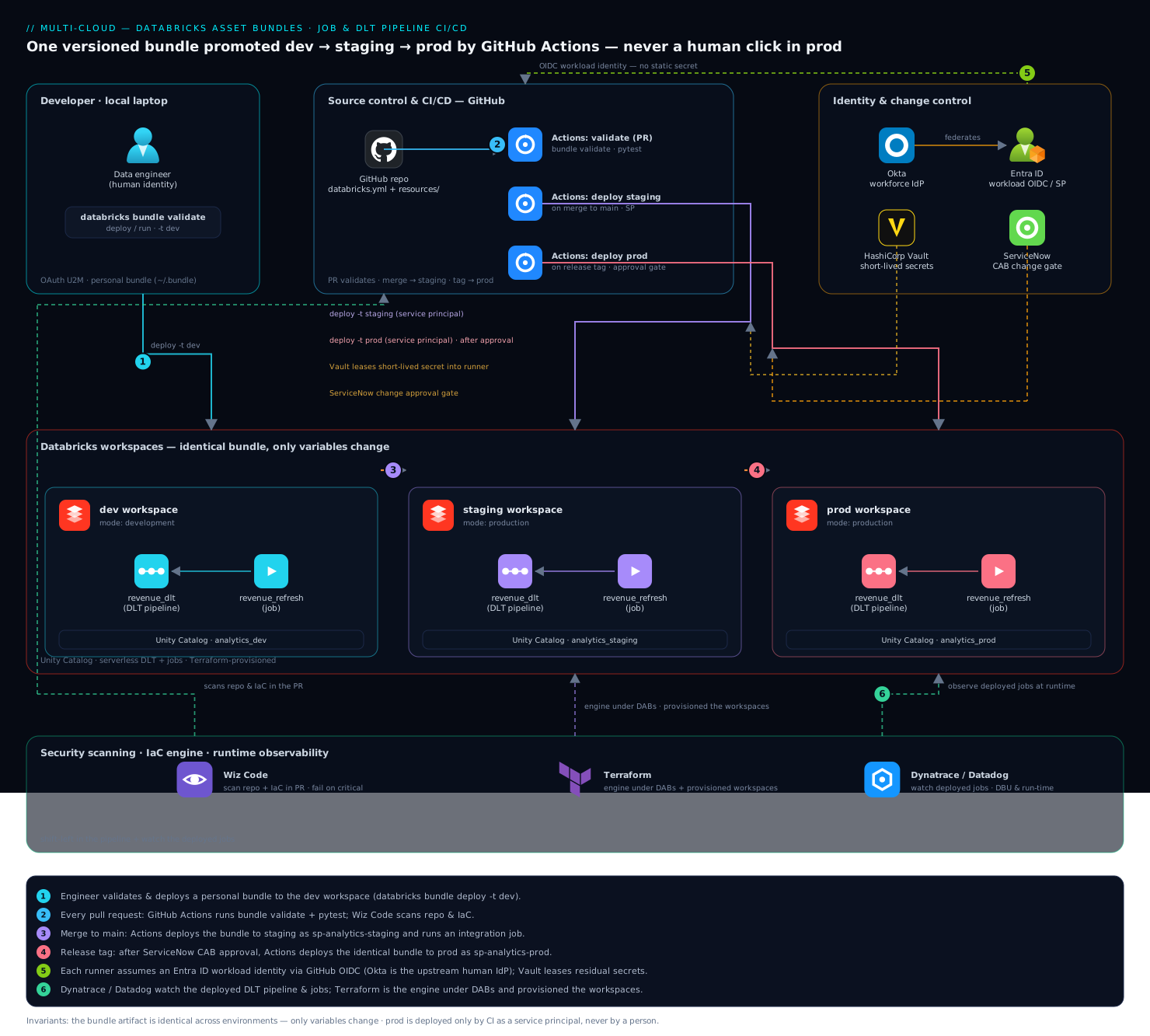
Two rules keep the whole thing safe, and they are worth holding in your head: the bundle artifact is identical across environments — only variables change, and prod is deployed only by CI as a service principal, never by a person.
Real-world scenario
Meridian Media runs revenue analytics on three Azure Databricks workspaces. The revenue dashboard is fed by one DLT pipeline (revenue-dlt) and three jobs; the largest, revenue-refresh, runs the pipeline then publishes marts. For a year, changes reached prod by an engineer exporting a notebook from staging and re-pasting it — plus cluster JSON — into the prod UI on Friday afternoons. In Q2, two incidents landed within three weeks: once a prod job ran against analytics_staging because someone pasted the staging catalog by mistake and test rows appeared in the executive dashboard; once a job launched a 32-node cluster because the prod cluster-policy ID was never applied, and the day’s compute bill jumped ~₹90,000. Neither had a commit, a reviewer, or a ticket — there was nothing to point at.
The data-platform lead mandated DABs. The team scaffolded one bundle: revenue-dlt and the three jobs as resources/*.yml, every environment-specific value (catalog, schema, policy_id, landing_path, worker count) turned into a variable, and three targets — dev (mode: development, deploy-as-you), staging and prod (mode: production, run_as a per-environment Entra ID service principal). The job’s pipeline_task referenced ${resources.pipelines.revenue_dlt.id} so the wrong-workspace-pipeline-ID class of bug became structurally impossible. CI in GitHub Actions ran three gates: PR runs bundle validate + pytest + a Wiz Code scan; merge to main deploys to staging as sp-analytics-staging and runs revenue-refresh as an integration test that asserts the write landed in analytics_staging.revenue; a tagged release deploys to prod as sp-analytics-prod behind a GitHub Environment with required reviewers and a ServiceNow change check.
The catalog-typo incident cannot recur: the catalog is a target variable, reviewed in the PR that changes it, and the staging integration run asserts the target before prod ever sees it. The 32-node incident cannot recur: policy_id is a variable set from a Terraform-provisioned policy, and mode: development plus production guardrails mean a stray edit in the UI is reverted on the next deploy. Rollback became git checkout v1.4.2 && databricks bundle deploy -t prod — the previous definitions, exactly. Three months in, every prod change has a SHA, a reviewer, and a CAB ticket; Dynatrace shows revenue-refresh running with stable duration; and the Friday UI export is gone. The migration itself took one engineer about four days, most of it translating existing job JSON into resource YAML and binding the running prod jobs into state so nothing was recreated.
Advantages and disadvantages
| Advantages | Disadvantages / costs |
|---|---|
| One versioned artifact deployed to every env; only variables differ | You must learn the databricks.yml schema and substitution rules |
| Native Databricks tool — GA, recommended over dbx | Newer than Terraform; smaller (fast-growing) ecosystem of examples |
| Terraform under the hood, but zero HCL/state/provider work for you | Shared Terraform state means never hand-editing a managed object |
Cross-resource refs (${resources...id}) kill hardcoded per-workspace IDs |
Deep per-resource overrides can get verbose |
mode: development gives collision-free multi-engineer dev automatically |
Mode’s forced behaviours (paused schedules) surprise newcomers |
First-class CI: validate/deploy/run map cleanly to PR/merge/tag gates |
You still own the CI wiring (secrets, OIDC, approvals) |
generate + bind adopt existing jobs with no downtime |
Migrating from Terraform requires deliberate state hand-over |
| Auditable: every change is a reviewed, SHA’d, ticketed PR | Requires discipline — UI edits break the model |
When each matters: the single-artifact and audit-trail advantages are decisive for regulated or multi-workspace shops — they eliminate whole incident classes. The learning-curve and state-discipline costs bite hardest on teams migrating from a mature Terraform setup, where two tools coexist during cutover. For a greenfield lakehouse, the advantages dominate and the disadvantages are mostly one-time learning.
Hands-on lab
This is the centerpiece. You will scaffold a real bundle, define a job, authenticate, validate, deploy to a dev target, run it, inspect state, promote via a per-target override, and tear it down. It is free-tier-friendly: the only compute is one short job run on a small single-node cluster (or serverless, if your workspace has it). Use a workspace you can deploy to; substitute your own workspace host and catalog where shown.
Prerequisites for the lab. A Databricks workspace you can log into, the CLI v0.218+ installed, and a catalog+schema you can write to (or use the default main/hive_metastore). Everything runs from your laptop shell.
Step 1 — Install and verify the CLI
# macOS (Homebrew); curl installer and winget also documented
brew tap databricks/tap && brew install databricks
databricks --version          # expect v0.2xx.x — the bundle-capable CLI
Expected: a version string like Databricks CLI v0.221.0. If you see 0.17 or a Python traceback, you have the old databricks-cli — uninstall it and install the Go CLI.
Step 2 — Authenticate to your workspace (OAuth U2M)
databricks auth login --host https://<your-workspace-host>
# A browser opens; complete your normal login. Name the profile 'lab' if prompted.
databricks auth describe        # confirm you're authenticated
Expected: databricks auth describe prints your username and the host. This caches a refreshing OAuth token — no PAT needed.
Step 3 — Scaffold a bundle from the default template
mkdir dab-lab && cd dab-lab
databricks bundle init default-python
# Answer the prompts: project name 'lab_pipelines'; include a notebook: yes;
# include DLT: no (keep the lab fast); include a Python file: yes.
The built-in templates you can scaffold from:
| Template | bundle init name |
What it generates | Use when |
|---|---|---|---|
| Default Python | default-python |
A job + optional DLT + src/tests layout |
Most jobs/pipelines projects |
| Default SQL | default-sql |
SQL-task job + queries | Warehouse/SQL-first work |
| DBT | dbt-sql |
A job wrapping a dbt project | Analytics-engineering on Databricks |
| MLOps stacks | mlops-stacks |
Full ML training/deploy/monitoring scaffold | End-to-end ML lifecycle |
| Custom | a Git URL or local path | Your org’s standardized layout | Platform teams enforcing a shape |
Expected: a tree containing databricks.yml, resources/, src/, and tests/. Inspect it:
find . -maxdepth 2 -type f | sort
You should see databricks.yml and at least one resources/*.yml job file the template generated.
Step 4 — Point the default target at your workspace
Open databricks.yml and set the dev target’s host (the template usually infers it, but pin it to be sure):
targets:
  dev:
    mode: development
    default: true
    workspace:
      host: https://<your-workspace-host>
Step 5 — Add a simple, self-contained job resource
Create resources/hello_job.yml — a one-task notebook job that needs no external data, so it runs anywhere:
# resources/hello_job.yml
resources:
  jobs:
    hello_lab:
      name: "hello-lab-${bundle.target}"
      tasks:
        - task_key: say_hello
          notebook_task:
            notebook_path: ../src/notebook.py     # the template's sample notebook
          job_cluster_key: lab_cluster
      job_clusters:
        - job_cluster_key: lab_cluster
          new_cluster:
            spark_version: "15.4.x-scala2.12"
            num_workers: 0                          # single-node keeps it cheap
            node_type_id: "Standard_DS3_v2"         # AWS: i3.xlarge; GCP: n2-standard-4
            data_security_mode: SINGLE_USER
      max_concurrent_runs: 1
If the template’s sample notebook has a different name, point notebook_path at whatever .py/notebook exists under src/. On a workspace with serverless jobs you can drop job_clusters and add environment_key per the serverless docs — but the single-node cluster above works everywhere.
Step 6 — Validate (nothing is created yet)
databricks bundle validate -t dev
Expected: the fully-resolved configuration prints and the command exits 0. Note the job name in the output — because mode: development, it is prefixed like [dev your_name] hello-lab-dev. If validation fails, it names the exact field (bad path, unknown key, unreachable host) — fix and re-run. This is your inner loop.
Step 7 — Deploy to the dev target
databricks bundle deploy -t dev
Expected: DABs uploads your source, plans, and applies. It prints the deployment root path (under your user’s ~/.bundle/lab_pipelines/dev) and creates the job. Confirm it exists:
databricks bundle summary -t dev # shows the job with its workspace URL + ID
Open the printed URL — you will see the job in the workspace UI, named with your [dev …] prefix, its schedule (if any) paused because of mode: development.
Step 8 — Run the job and stream its output
databricks bundle run hello_lab -t dev
Expected: the run starts, the CLI streams task output, and it exits 0 on success (non-zero if the run fails — which is exactly how CI uses this as a gate). You just deployed and executed a job entirely from code.
Step 9 — Change a variable and redeploy (see idempotence + override)
Add a node_type variable and override it per target to prove the one-artifact-many-values model. In databricks.yml:
variables:
  node_type: { default: "Standard_DS3_v2" }
Reference it in the job cluster (node_type_id: ${var.node_type}), then override at deploy time without editing YAML:
databricks bundle deploy -t dev --var="node_type=Standard_DS4_v2"
databricks bundle summary -t dev        # the cluster now reflects the override
Expected: only the changed field updates; re-running the same deploy with no change is a no-op (idempotent). This is the mechanism that lets staging and prod differ from dev by values alone.
Step 10 — Inspect the state DABs keeps
# The state lives under the deployment root in the workspace; summary shows the path.
databricks bundle summary -t dev | grep -i "path\|url"
Expected: you see the workspace path where DABs stores its Terraform state and your uploaded files. This is why destroy can cleanly remove only what the bundle created — it has a record.
Step 11 — Validation checklist
| Check | Command | Pass condition |
|---|---|---|
| CLI is bundle-capable | databricks --version |
v0.2xx.x |
| Authenticated | databricks auth describe |
Your user + host print |
| Config is valid | databricks bundle validate -t dev |
Exit 0; resolved config prints |
| Job deployed | databricks bundle summary -t dev |
Job listed with a workspace URL |
| Name is dev-prefixed | (read summary) | [dev <you>] hello-lab-dev |
| Job runs green | databricks bundle run hello_lab -t dev |
Exit 0; task succeeds |
| Override applied | deploy with --var, then summary |
Cluster reflects the new value |
Step 12 — Teardown
databricks bundle destroy -t dev --auto-approve
Expected: DABs removes the job and the uploaded workspace files it created — and nothing else. Confirm with databricks bundle summary -t dev (the resources are gone) or check the workspace UI. Because the only compute was one short single-node run, the lab cost is a few rupees at most.
What you proved. You took a job from zero to deployed-and-running purely as code, saw mode: development prefix and pause it, changed behaviour through a variable override without touching the definition, inspected the state that makes clean teardown possible, and destroyed exactly what you created. Scaling this to a DLT pipeline, three targets, and CI is more YAML and pipeline wiring — the mechanics are identical.
CI/CD: GitHub Actions and Azure DevOps
The lab ran locally; production runs in CI with three gates — PR validates, merge deploys to staging, tag deploys to prod behind approval. Both major platforms are shown.
GitHub Actions
# .github/workflows/deploy-bundle.yml
name: deploy-bundle
on:
  pull_request:
    branches: [main]
  push:
    branches: [main]
  release:
    types: [published]

permissions:
  id-token: write        # required for OIDC to the workspace / Entra ID
  contents: read

jobs:
  validate:
    if: github.event_name == 'pull_request'
    runs-on: ubuntu-latest
    steps:
      - uses: actions/checkout@v4
      - uses: databricks/setup-cli@main
        with: { version: 0.221.0 }              # pin to match local
      - uses: astral-sh/setup-uv@v3
      - run: uv pip install -r requirements-dev.txt --system
      - run: pytest tests/unit -q                # unit + transform tests
      - name: Wiz Code IaC + secret scan
        run: wiz-cli dir scan --path . --policy default   # fail PR on critical findings
      - run: databricks bundle validate -t staging        # parse + resolve vs staging API
        env:
          DATABRICKS_HOST: ${{ vars.STAGING_HOST }}
          DATABRICKS_AUTH_TYPE: github-oidc
          DATABRICKS_CLIENT_ID: ${{ vars.STAGING_SP_CLIENT_ID }}

  deploy-staging:
    if: github.ref == 'refs/heads/main' && github.event_name == 'push'
    runs-on: ubuntu-latest
    environment: staging
    steps:
      - uses: actions/checkout@v4
      - uses: databricks/setup-cli@main
        with: { version: 0.221.0 }
      - run: databricks bundle deploy -t staging
        env:
          DATABRICKS_HOST: ${{ vars.STAGING_HOST }}
          DATABRICKS_AUTH_TYPE: github-oidc
          DATABRICKS_CLIENT_ID: ${{ vars.STAGING_SP_CLIENT_ID }}
      - run: databricks bundle run revenue_refresh -t staging   # integration run

  deploy-prod:
    if: github.event_name == 'release'
    runs-on: ubuntu-latest
    environment: prod          # GitHub Environment: required reviewers + ServiceNow check
    steps:
      - uses: actions/checkout@v4
      - uses: databricks/setup-cli@main
        with: { version: 0.221.0 }
      - run: databricks bundle deploy -t prod
        env:
          DATABRICKS_HOST: ${{ vars.PROD_HOST }}
          DATABRICKS_AUTH_TYPE: github-oidc
          DATABRICKS_CLIENT_ID: ${{ vars.PROD_SP_CLIENT_ID }}
The environment: prod block is the control point: configure the GitHub Environment with required reviewers and a ServiceNow change-request check so a tagged release pauses until the CAB-approved ticket is implementable. That documented gate replaces the old Friday click — see Automate ServiceNow Change Requests in CI/CD for wiring the change API, and Integrate Wiz Code with GitHub Actions for IaC and Container Gates for the scan step.
Azure DevOps
The same three gates in azure-pipelines.yml, using an Entra ID service-principal service connection (or OIDC via workload identity federation):
# azure-pipelines.yml
trigger:
  branches: { include: [main] }
pr:
  branches: { include: [main] }

pool: { vmImage: ubuntu-latest }

stages:
  - stage: Validate
    condition: eq(variables['Build.Reason'], 'PullRequest')
    jobs:
      - job: validate
        steps:
          - script: curl -fsSL https://raw.githubusercontent.com/databricks/setup-cli/main/install.sh | sh
            displayName: Install Databricks CLI
          - script: pytest tests/unit -q
            displayName: Unit tests
          - script: databricks bundle validate -t staging
            displayName: Validate bundle
            env:
              DATABRICKS_HOST: $(STAGING_HOST)
              DATABRICKS_CLIENT_ID: $(STAGING_SP_CLIENT_ID)
              DATABRICKS_CLIENT_SECRET: $(STAGING_SP_SECRET)   # from a variable group / Key Vault

  - stage: Staging
    condition: and(succeeded(), eq(variables['Build.SourceBranch'], 'refs/heads/main'))
    jobs:
      - deployment: deploy_staging
        environment: staging
        strategy:
          runOnce:
            deploy:
              steps:
                - script: databricks bundle deploy -t staging && databricks bundle run revenue_refresh -t staging
                  env:
                    DATABRICKS_HOST: $(STAGING_HOST)
                    DATABRICKS_CLIENT_ID: $(STAGING_SP_CLIENT_ID)
                    DATABRICKS_CLIENT_SECRET: $(STAGING_SP_SECRET)

  - stage: Prod
    condition: and(succeeded(), startsWith(variables['Build.SourceBranch'], 'refs/tags/'))
    jobs:
      - deployment: deploy_prod
        environment: prod          # Azure DevOps Environment with approvals & checks
        strategy:
          runOnce:
            deploy:
              steps:
                - script: databricks bundle deploy -t prod
                  env:
                    DATABRICKS_HOST: $(PROD_HOST)
                    DATABRICKS_CLIENT_ID: $(PROD_SP_CLIENT_ID)
                    DATABRICKS_CLIENT_SECRET: $(PROD_SP_SECRET)
The two platforms mapped to the same gate model:
| Gate | GitHub Actions mechanism | Azure DevOps mechanism |
|---|---|---|
| PR validate | on: pull_request job |
condition: Build.Reason == PullRequest |
| Merge → staging deploy | push to main + environment: staging |
SourceBranch == refs/heads/main stage |
| Tag → prod deploy | release: published + environment: prod |
startsWith(SourceBranch,'refs/tags/') stage |
| Approval gate | GitHub Environment required reviewers | Environment approvals & checks |
| Change ticket | ServiceNow environment check | ServiceNow check on the Environment |
| Secretless auth | OIDC (id-token: write) |
Workload identity federation service connection |
| CLI install | databricks/setup-cli@main |
install.sh script step |
Common mistakes & troubleshooting
The failures that actually bite, as a scannable table, then the ones worth expanding.
| # | Symptom | Root cause | Confirm | Fix |
|---|---|---|---|---|
| 1 | Your change reverts after CI redeploys | Edited a DABs-managed job in the UI | Compare UI to resources/*.yml; state has the old value |
Make YAML the source of truth; never hand-edit managed objects |
| 2 | Two engineers clobber each other in dev | Missing mode: development on dev |
Job names have no [dev …] prefix |
Set mode: development on the dev target |
| 3 | Prod job runs against the wrong catalog | Catalog hardcoded or wrong target var | bundle summary -t prod shows the wrong catalog |
Make catalog a variable; assert target in the staging integration run |
| 4 | pipeline_task fails: pipeline not found |
Hardcoded a per-workspace pipeline ID | The ID in YAML is a literal, not a ${resources...} ref |
Use ${resources.pipelines.<name>.id} |
| 5 | CI deploy 401/403 unauthorized | Wrong/expired identity; SP lacks entitlement | databricks auth describe; check SP is in the workspace |
Fix OAuth M2M/OIDC config; grant the SP workspace access |
| 6 | Local validates, CI fails (or vice-versa) | CLI version skew laptop vs runner | databricks --version differs from setup-cli pin |
Pin the same version everywhere |
| 7 | deploy errors: bundle is locked |
Stale deploy lock from a killed run | Error names the lock; concurrent deploy | --force-lock (carefully) after confirming nothing else deploys |
| 8 | Deploy wants to create an already-existing job | Object not in DABs state (built in UI/TF) | bundle summary doesn’t list it; it exists in workspace |
bundle deployment bind to adopt it, then deploy |
| 9 | Schedule never fires in dev | mode: development force-pauses schedules |
Job schedule shows PAUSED regardless of the variable | Expected; test schedule behaviour on staging/prod |
| 10 | Variable override didn’t apply | Wrong precedence / typo in var name | bundle validate shows the resolved (unchanged) value |
Check name; use --var or target variables at the right level |
| 11 | destroy didn’t remove an object |
Object was removed from bundle but orphaned in state | It lingers in the workspace, unmanaged | Re-add + deploy to re-manage, then destroy; or delete manually once |
| 12 | Wheel not found by the job at runtime | artifacts build/upload misconfigured |
Job import fails; sync/artifacts didn’t push it |
Fix artifacts: (type: whl, path); reference the built lib |
The ones that cost the most time, expanded:
1. Editing a DABs-managed job in the workspace UI. Because DABs tracks state and reconciles on every deploy, your UI change is silently reverted on the next bundle deploy — or worse, causes a state conflict. The rule is absolute: the YAML is the source of truth; the UI is read-only for managed resources. If you must experiment in the UI, do it on an unmanaged copy.
4. Hardcoding a pipeline (or job) ID across workspaces. A pipeline created in dev has a different ID in prod, so a literal ID is wrong everywhere but its origin. Always reference ${resources.pipelines.<name>.id} (or ${resources.jobs.<name>.id}) so DABs resolves it per target from the object it just deployed. This is the mechanism that makes the artifact portable.
5. CI deploys as an unauthorized identity. Either the OAuth M2M/OIDC config is wrong (bad client ID, missing id-token: write, untrusted issuer) or the service principal was never added to the target workspace with the needed entitlements (cluster creation, DLT, UC grants). Confirm identity with databricks auth describe in the runner, confirm the SP is in the workspace admin console, and confirm UC grants (USE CATALOG, CREATE SCHEMA, MODIFY). The federated-credential subject must match the environment (environment:prod) — a staging SP scoped to environment:staging can never deploy prod, by design.
8. Deploy tries to create an object that already exists. Classic during migration: the job exists (built in the UI or by Terraform) but is not in DABs state, so DABs plans to create a duplicate and fails on the name clash. Use databricks bundle deployment bind <resource-key> <object-id> to adopt the existing object into state; the next deploy then updates it. For Terraform migrations, also terraform state rm the object so only DABs owns it.
Best practices
- One resource per file under
resources/, one bundle per data product. Small diffs review well; a giantdatabricks.ymldoes not. - Every environment-specific value is a variable. Catalog, schema, policy ID, worker count, landing path — never a literal that differs per target. The definitions must be identical across environments.
mode: developmenton dev,mode: productionon staging/prod. Get collision-free dev and deterministic, SP-owned staging/prod for free.- Reference IDs, never hardcode them.
${resources.*.id}for cross-resource wiring; the artifact stays portable. - CI deploys as a per-environment service principal via OIDC. No human PAT in a repo; the federated-credential subject scopes each SP to exactly its environment.
- Pin the CLI version in
setup-cliand locally. Version skew makes “works locally, fails in CI” mysteries; pin both to the same0.2xx.x. - Validate on every PR, integration-run on staging, gate prod behind approval + a change ticket. The three-gate ladder is the whole audit story.
- Assert the write target in the staging integration run. A catalog typo that
validatecan’t catch (because the catalog exists) is caught by asserting the pipeline wrote toanalytics_staging.revenue, not prod. - Adopt existing objects with
bind, never recreate. Migrating from dbx/Terraform/UI, bind running jobs into state so there is zero downtime and no duplicates. - Rollback is redeploy-the-previous-tag.
git checkout <tag> && databricks bundle deploy -t prod— no manual un-clicking. - Never hand-edit a managed object or run two tools against one object. DABs and a UI edit (or DABs and Terraform) will fight; pick one owner per object.
- Observe deployed jobs at runtime. Wire Dynatrace/Datadog so a “deployed fine but runs wrong/slow” regression surfaces the day it lands, not at month-end.
Security notes
Treat the pipeline as the privileged path it is.
- Least-privilege service principals, scoped per environment. CI deploys as an Entra ID / Databricks service principal added only to its workspace; staging’s SP can never touch prod because its federated-credential subject is
environment:staging. Grant only the entitlements it needs (cluster creation, DLT) and only the UC privileges it needs (USE CATALOG,CREATE SCHEMA,MODIFYon the target schema — not account-admin). - Secretless where possible; short-lived where not. Prefer OIDC/workload-identity federation so no secret is stored at all. Where a secret is unavoidable (self-hosted runner, third-party token a job needs at runtime), lease it short-lived from HashiCorp Vault into the runner — never commit a PAT or OAuth secret to the repo.
- Humans get dev, not prod. Human SSO is Okta → Entra ID with conditional access; engineers deploy to dev as themselves and never hold prod deploy rights — prod is CI-only.
- Scan the IaC in the PR. Wiz Code (or equivalent) scans the repo and the DABs/Terraform configuration for misconfigurations and committed secrets, failing the build on critical findings before a bad change merges.
- Enforce Unity Catalog grants and
run_as. The job’s identity should read only its landing volume and write only its own schema;run_asa service principal (not the last deployer) makes ownership deterministic and auditable. - Require a change ticket on prod. A ServiceNow change-request check on the prod environment makes every production deploy auditable change management, not tribal memory.
Security controls mapped to what they prevent:
| Control | Mechanism | Prevents |
|---|---|---|
| Per-env service principal | OIDC federated credential, environment:<env> subject |
A staging identity deploying prod |
| Least-privilege UC grants | USE CATALOG / CREATE SCHEMA / MODIFY only |
A job reading/writing outside its schema |
| Secretless CI | Workload identity federation (OIDC) | Long-lived PAT/secret in the repo |
| Vault-leased fallback | Short-lived lease into the runner | Static secrets when OIDC isn’t available |
run_as service principal |
Target-level run_as |
“Owned by whoever deployed last” ambiguity |
| IaC scanning gate | Wiz Code in the PR job | Misconfig / committed secret reaching main |
| Change-request check | ServiceNow on prod environment | Unaudited, un-approved prod deploys |
Cost & sizing
DABs itself costs nothing — the tool is free and the Terraform it runs is invisible plumbing. The spend is the compute the bundle deploys, and the bundle is exactly where you control it.
- Serverless DLT where you can. Set
serverless: trueon the pipeline so you pay only for processing time with no idle cluster to size or leave running. Keepcontinuous: falsefor batch pipelines that do not need a 24/7 stream — continuous is 24/7 DBU. - Pin job clusters to a cluster policy.
policy_id(a variable, set from a Terraform-provisioned policy) caps node type and autoscaling so a stray edit cannot launch a 32-node cluster in prod — precisely the ₹90,000 incident from the scenario. - Size compute per target via variables.
marts_workers: { default: 2 }in dev, larger only in staging/prod. Single-node (num_workers: 0) for cheap dev jobs. - Staging schedules PAUSED, run on demand. Because staging runs only from CI integration runs, you pay for staging compute during those runs, not around the clock.
- Observe run duration. Pipe job DBU and duration into Dynatrace/Datadog so a regression that quietly doubles the monthly bill is visible the day it lands.
Rough cost picture (indicative; DBU rates vary by cloud/region/tier):
| Item | What drives it | Rough magnitude | How the bundle controls it |
|---|---|---|---|
| DABs / CLI | — | Free | N/A |
| Serverless DLT run | Processing time (DBU) | Pay-per-use, no idle | serverless: true, continuous: false |
| Job cluster (classic) | Node type × workers × time | Capped by policy | policy_id, num_workers variables |
| Dev iteration | Small single-node runs | A few ₹ per run | num_workers: 0, small node type |
| Staging integration runs | On-demand, per CI run | Only during runs | Schedules PAUSED |
| Prod scheduled runs | Cron frequency × cluster size | The real line item | Policy + right-sized workers |
| Observability | Ingested job/DBU metrics | Modest | Sample high-frequency jobs |
The teardown discipline matters for cost too: databricks bundle destroy -t dev removes ephemeral dev resources cleanly, so short-lived experiment bundles don’t leave clusters or jobs running.
Interview & exam questions
1. What is a Databricks Asset Bundle and what problem does it solve? A bundle is a directory rooted at databricks.yml that packages Databricks resources (jobs, DLT pipelines, experiments) plus their source as versioned, declarative YAML deployed by the databricks bundle CLI. It solves environment drift, unauditable changes, and hardcoded per-workspace IDs by deploying one identical artifact to every environment, with only variables differing.
2. What does mode: development actually change versus mode: production? development prefixes every resource name with [dev <username>], force-pauses all schedules/triggers, marks clusters as dev, and relaxes run_as validation — giving collision-free multi-engineer iteration in a shared workspace. production applies no prefix, leaves schedules as declared, requires a proper run_as (typically a service principal), and enforces prod guardrails — giving deterministic, owned, auditable deploys.
3. How do you avoid hardcoding a pipeline ID that only exists in one workspace? Reference it with a substitution: pipeline_id: ${resources.pipelines.<name>.id}. DABs deploys the pipeline first, learns its ID in that target’s workspace, and injects it into the job’s task — so the definition is portable across dev/staging/prod without any per-workspace literal.
4. How should CI authenticate to Databricks, and why not a PAT? With OAuth M2M (a service principal client ID + OAuth secret) or, better, workload-identity federation (OIDC) where the runner mints a short-lived token and no secret is stored at all. A PAT is long-lived, user-scoped, and rots (expires, or the person leaves); it is only a last-resort fallback, leased short-lived from a vault.
5. Walk the DABs deploy lifecycle. bundle validate parses YAML, resolves substitutions, and checks against the API without changing anything (the inner loop). bundle deploy renders to Terraform and applies, creating/updating/deleting to match the bundle. bundle run triggers a job/pipeline and streams output (a CI gate). bundle summary shows what’s deployed with URLs/IDs. bundle destroy removes only what the bundle created, using tracked state.
6. You built a job in the UI (or Terraform) and now DABs wants to recreate it. What do you do? Use databricks bundle deployment bind <resource-key> <object-id> to adopt the existing object into the bundle’s state, so the next deploy updates it rather than creating a duplicate. For a Terraform migration, also terraform state rm the object so only one tool owns it.
7. Why must you never edit a DABs-managed object in the UI? DABs tracks state and reconciles on every deploy, so a UI edit is silently reverted on the next bundle deploy — or causes a state conflict. The YAML is the single source of truth; the UI is read-only for managed resources.
8. How do the three CI gates map to git events? A pull request runs bundle validate plus unit tests plus a security scan; a merge to main runs bundle deploy -t staging and a bundle run integration test; a tagged release runs bundle deploy -t prod behind an approval gate (required reviewers + a ServiceNow change check). PR validates, merge proves on staging, tag promotes the identical artifact to prod.
9. What is the difference between the DLT pipeline development field and the bundle target mode: development? They are unrelated. The DLT development field is DLT’s own fast-iteration mode (reuses compute, disables update retries) on a single pipeline. The bundle mode: development is a target-wide behaviour set (name-prefixing, schedule pausing, dev tagging) across all resources. Drive the DLT one from a variable so dev is true and prod is false.
10. How is DABs related to Terraform, and where does each belong? DABs is Terraform under the hood — it renders your bundle to a Terraform config and manages a state file per target — but you write YAML, not HCL, and never run terraform. The clean division: Terraform provisions the platform (workspaces, cluster policies, catalogs); DABs deploys the artifacts (jobs, pipelines, experiments) onto it, referencing platform IDs via variables.
11. What does run_as control and why set it to a service principal in prod? run_as sets the identity a deployed job/pipeline executes as. In prod you set it to a service principal so runs are owned by a stable, non-human identity — not by whichever engineer last deployed — which makes ownership deterministic, auditable, and unaffected by staff changes.
12. Name three failures the DABs model structurally prevents. (a) Wrong-workspace pipeline IDs — eliminated by ${resources.*.id} refs; (b) prod pointing at the wrong catalog — the catalog is a reviewed variable and the staging run asserts the target; © a stray cluster launching a huge cluster — policy_id is enforced and UI edits are reverted on deploy. Plus unauditable changes — every change is a reviewed, SHA’d, ticketed PR.
These map to Databricks’ Data Engineer Associate/Professional (jobs, DLT, deployment) and broadly to any DataOps/platform interview. The CI, OIDC, and change-management angles also touch cloud DevOps certifications.
Quick check
- You set
schedule.pause_status: UNPAUSEDvia a variable on the dev target, but the job’s schedule shows PAUSED. Why? - A job’s
pipeline_taskfails in prod with “pipeline not found,” but works in dev. What is the almost-certain cause and the fix? - CI must deploy to prod without any long-lived secret stored anywhere. Which authentication method do you use?
- You migrated a job from the UI into a bundle, and
bundle deploynow errors trying to create a duplicate. What one command fixes it? - Which two things are identical across dev/staging/prod in a well-structured bundle, and which one thing legitimately differs?
Answers
mode: developmentforce-pauses all schedules/triggers, overriding yourpause_statusvariable. It is intentional (a half-built pipeline should never fire on a timer in a shared dev workspace). Test unpaused-schedule behaviour on amode: productiontarget instead.- The job hardcodes a pipeline ID that only exists in the dev workspace; in prod that ID doesn’t exist. Fix by referencing
${resources.pipelines.<name>.id}so DABs resolves the ID per target from the pipeline it just deployed. - Workload-identity federation (OIDC) — the runner mints a short-lived OIDC token, the workspace/Entra ID trusts the runner’s issuer via a federated credential, and no static secret is stored. (
id-token: writeon GitHub Actions.) databricks bundle deployment bind <resource-key> <object-id>— it adopts the existing object into the bundle’s state so the next deploy updates it instead of creating a duplicate.- Identical: the bundle artifact (the definitions) and the source/notebooks. Legitimately different: the variable values (catalog, schema, policy ID, worker count, host) — plus the target-scoped
mode/run_as. “One artifact, per-target variables.”
Glossary
- Databricks Asset Bundle (DAB) — a directory rooted at
databricks.ymlpackaging Databricks resources and source as versioned, declarative code deployed by thedatabricks bundleCLI. databricks.yml— the bundle’s root file; declaresbundle,targets,variables,include,sync,artifacts, and (usually via includes)resources.- Resource — a Databricks object declared as code: a job, DLT pipeline, MLflow experiment, model, serving endpoint, dashboard, UC schema/volume, and more.
- Target (environment) — a named deployment destination (dev/staging/prod) with its own host,
mode, identity, and variable values; selected with-t. - Variable — a per-target parameter referenced as
${var.name}; the mechanism that keeps the artifact identical across environments. - Substitution — a
${...}expression resolved at deploy time (${bundle.target},${workspace.host},${resources.pipelines.x.id}). mode: development— target behaviour that prefixes resource names with[dev <user>], force-pauses schedules, and tags clusters as dev for collision-free iteration.mode: production— target behaviour with no prefixing, live schedules, and enforcedrun_as/guardrails for deterministic, owned deploys.run_as— the identity a deployed job/pipeline executes as; a service principal in prod for deterministic ownership.- OAuth U2M — user-to-machine OAuth; browser login authenticating a human through the corporate IdP.
- OAuth M2M — machine-to-machine OAuth; a service principal (client ID + OAuth secret) yielding a short-lived token, used by CI.
- Workload identity federation (OIDC) — CI auth where the runner mints a short-lived OIDC token trusted via a federated credential, storing no static secret.
- PAT — personal access token; long-lived, user-scoped; a last-resort auth fallback to minimise.
bundle validate— parses, resolves substitutions, and checks against the API without changing the workspace.bundle deploy— renders to Terraform and applies, creating/updating/deleting to match the bundle.bundle run— triggers a deployed job/pipeline and streams output; exits non-zero on failure (a CI gate).bundle destroy— removes only the resources the bundle created, using tracked state.bundle generate/deployment bind— reverse-engineer YAML from an existing object / adopt an existing object into bundle state (migration tools).- dbx — the earlier community deployment tool for Databricks, now in maintenance mode; DABs is its successor.
- DLT (Delta Live Tables) — Databricks’ declarative ETL framework; pipelines are first-class bundle resources.
Next steps
You can now take a job or DLT pipeline from a stub to deployed-across-three-workspaces as reviewed, audited code. Build outward:
- Next: Configure Databricks Unity Catalog External Locations and Storage Credentials — the governance layer your bundle’s jobs read and write against.
- Related: Lakehouse Governance with Databricks Unity Catalog — the catalog/grant model behind the
catalog/schemavariables. - Related: Terraform Module for Azure Databricks — the provisioning side: workspaces, policies, and pools your bundle references by ID.
- Related: Integrate Wiz Code with GitHub Actions for IaC and Container Gates — the security scan that guards the PR.
- Related: Automate ServiceNow Change Requests in CI/CD — wire the CAB approval that gates the prod deploy.
- Related: dbt Cloud Jobs with Slim CI and Snowflake Deferral — the analytics-engineering CI pattern that complements DABs on the transform layer.