A platform team runs four self-managed Kubernetes clusters on bare-metal and a fleet of EC2 nodes, and access today is a shared kubeconfig with a long-lived system:masters client certificate that nobody can rotate without rebuilding the whole cluster. The audit finding is blunt: there is no way to say who ran kubectl delete last Tuesday, off-boarding an engineer does not actually revoke their cluster access, and the cert never expires. The mandate is to put every human behind the company IdP — Okta — so that cluster access is an Okta group membership, logins are MFA-gated and short-lived, and kubectl auth whoami shows a real person. This guide builds exactly that: Okta as the OIDC identity provider, the Kubernetes API server validating Okta-issued ID tokens, kubelogin (the oidc-login kubectl plugin) driving the browser login and token refresh, and Okta group claims mapped onto Kubernetes RBAC so membership is authorization. No more shared certs, no more orphaned access.
A word on scope before the keys-and-flags part: this is authentication for humans, not service accounts. Pods and CI still use ServiceAccount tokens. We use OIDC (not SAML) for the kubectl path because the Kubernetes API server is an OIDC token validator — it speaks JWT, not SAML assertions. Okta will happily serve both: SAML for the browser apps your org already federates, OIDC for this. The two coexist in one Okta org.
Prerequisites
- An Okta org with admin rights to create apps and groups (a free Developer org works for a proof of concept; tie production to your real workforce org so off-boarding actually propagates).
- A Kubernetes cluster where you control the API server flags — kubeadm, k3s, RKE2, or any self-managed control plane. (Managed control planes like EKS/GKE/AKS do not expose these flags directly; see the Common pitfalls section for the managed-cluster path via an external issuer or the cloud’s own OIDC integration.)
kubectlv1.28+ and thekubeloginplugin (binary namekubectl-oidc_login), installed on every engineer’s laptop viakrew,brew, or a direct release download.cluster-adminaccess once, to lay down the RBAC bindings — ideally via your existing break-glass certificate, which you keep sealed in HashiCorp Vault (Vault stores and dynamically leases the break-glass kubeconfig so it is auditable and short-lived, not pasted in a wiki).- A way to reach the cluster API over TLS with a CA the laptops trust.
Target topology
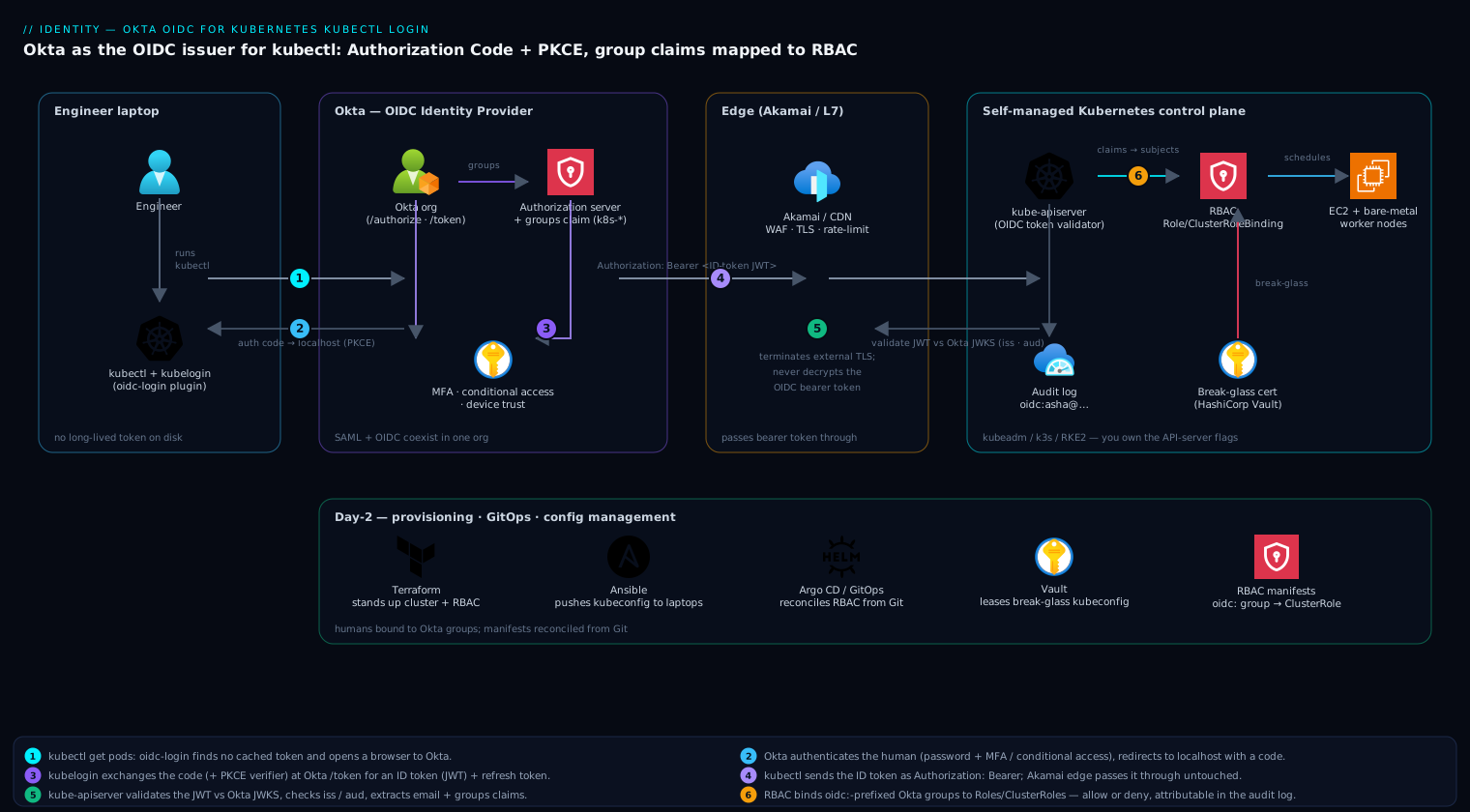
The flow is a standard OIDC Authorization Code grant with PKCE, with the Kubernetes API server acting purely as a resource server that trusts Okta as the issuer:
- An engineer runs
kubectl get pods. Theoidc-loginexec plugin sees no valid token cached and opens a browser to Okta. - Okta authenticates the human (password + MFA, plus any conditional-access / device-posture rules you enforce), then redirects back to
localhostwith an authorization code. kubeloginexchanges the code (with its PKCE verifier) at Okta’s/tokenendpoint for an ID token (a signed JWT) and a refresh token, caching them locally.kubectlputs the ID token in theAuthorization: Bearerheader of the API call.- The API server validates the JWT’s signature against Okta’s published JWKS, checks
issandaud, and extracts theemail(orsub) andgroupsclaims. - RBAC evaluates the request against
RoleBindings/ClusterRoleBindingsthat reference those Okta groups. Allowed or denied — and every decision is now attributable to a named identity in the audit log.
Akamai (or any L7 proxy/CDN fronting the API endpoint) terminates external TLS and applies WAF/rate-limit rules at the edge before traffic reaches the control plane; it never decrypts or rewrites the bearer token, so OIDC validation still happens at the API server.
1. Create the OIDC application in Okta
In the Okta Admin Console, Applications → Create App Integration → OIDC - OpenID Connect → Native Application. “Native” is the correct type for a CLI/desktop flow: it enables Authorization Code + PKCE and does not require a client secret to be embedded on every laptop (a public client). Name it k8s-kubectl-oidc.
Set the sign-in redirect URIs to the loopback addresses kubelogin listens on:
http://localhost:8000
http://localhost:18000
Grant types: enable Authorization Code and Refresh Token (refresh lets engineers go a full workday without re-authenticating). Leave Implicit off — it is deprecated and insecure.
For a non-interactive sanity check, capture the values with the Okta CLI or curl against the org’s well-known document so you have the issuer and endpoints in hand:
OKTA_ORG="https://kloudvin.okta.com"
curl -s "${OKTA_ORG}/.well-known/openid-configuration" | jq '{issuer, authorization_endpoint, token_endpoint, jwks_uri}'
Note the Client ID Okta shows on the app’s General tab — call it 0oaEXAMPLEclientid. Because this is a public Native app there is no secret to protect, but kubelogin can still send Okta’s client_secret if you chose a confidential app; keep it in Vault, never in the committed kubeconfig.
2. Configure the Authorization Server, groups, and the groups claim
Okta will not put a groups claim in the token unless you ask it to. Two pieces are required: a groups claim on an authorization server, and group membership for your users.
First, create the Okta groups that mirror your intended cluster roles. Either click through Directory → Groups → Add Group, or script it against the Okta API (token sourced from Vault):
OKTA_TOKEN="$(vault kv get -field=api_token secret/okta/admin)"
for g in k8s-cluster-admins k8s-prod-editors k8s-prod-viewers; do
  curl -s -X POST "${OKTA_ORG}/api/v1/groups" \
    -H "Authorization: SSWS ${OKTA_TOKEN}" \
    -H "Content-Type: application/json" \
    -d "{\"profile\":{\"name\":\"${g}\",\"description\":\"Kubernetes RBAC: ${g}\"}}"
done
Assign your k8s-kubectl-oidc app to these groups (Application → Assignments → Assign to Groups) so only intended users can complete the flow.
Now add the groups claim. Use the org authorization server (default) for simplicity, or a Custom Authorization Server if you want a dedicated audience and lifetime policy — production should use a custom server so the aud is a value you control rather than the generic Okta one. Under Security → API → Authorization Servers → default → Claims → Add Claim:
- Name:
groups - Include in token type: ID Token, Always
- Value type: Groups
- Filter: Matches regex
k8s-.*(only emit Kubernetes-relevant groups; do not dump every Okta group into every token) - Include in: The following scopes →
groups(orany)
Confirm the claim renders by using the Okta Token Preview tab, or decode a real token later with jwt-cli. The decoded ID token must contain something like:
{
  "iss": "https://kloudvin.okta.com",
  "aud": "0oaEXAMPLEclientid",
  "email": "asha@kloudvin.com",
  "groups": ["k8s-prod-editors", "k8s-prod-viewers"]
}
If groups is empty, the regex filter or the scope is wrong — fix it here before touching the cluster, because the API server can only bind to claims that actually exist.
3. Point the Kubernetes API server at Okta
The API server validates tokens; it does not redirect or log anyone in. On a kubeadm cluster, edit the static pod manifest /etc/kubernetes/manifests/kube-apiserver.yaml and add the OIDC flags. The kubelet restarts the API server automatically when the manifest changes.
# /etc/kubernetes/manifests/kube-apiserver.yaml  (spec.containers[0].command)
    - --oidc-issuer-url=https://kloudvin.okta.com
    - --oidc-client-id=0oaEXAMPLEclientid
    - --oidc-username-claim=email
    - --oidc-username-prefix=oidc:
    - --oidc-groups-claim=groups
    - --oidc-groups-prefix=oidc:
    - --oidc-ca-file=/etc/kubernetes/pki/okta-ca.pem   # only if Okta is behind a private/custom CA
Three details decide whether this works or silently locks you out:
--oidc-issuer-urlmust exactly equal theissclaim in the token, including https and no trailing slash. A custom authorization server changes the issuer tohttps://kloudvin.okta.com/oauth2/<authServerId>— use that string if you went custom in step 2.--oidc-client-idmust equal the token’saud. With a custom auth server,audis the audience you configured, not the client ID — match accordingly.- The
oidc:prefixes namespace every OIDC identity so it can never collide with a built-in subject likesystem:mastersor a ServiceAccount. Your RBAC subjects will therefore beoidc:asha@kloudvin.comand groupoidc:k8s-prod-editors. Skipping the prefix is a real privilege-escalation risk and the API server will warn you.
For k3s/RKE2, you do not edit a manifest — pass the same values as kube-apiserver-arg entries in /etc/rancher/k3s/config.yaml (or RKE2’s equivalent) and restart the service:
# /etc/rancher/k3s/config.yaml
kube-apiserver-arg:
  - "oidc-issuer-url=https://kloudvin.okta.com"
  - "oidc-client-id=0oaEXAMPLEclientid"
  - "oidc-username-claim=email"
  - "oidc-username-prefix=oidc:"
  - "oidc-groups-claim=groups"
  - "oidc-groups-prefix=oidc:"
sudo systemctl restart k3s
On newer clusters (v1.30+) you can alternatively use Structured Authentication Configuration — an --authentication-config YAML file that supports multiple issuers and CEL claim validation — but the flag form above is the most portable and is what most self-managed clusters run today.
Watch the API server come back healthy before going further:
kubectl get --raw='/readyz?verbose'
crictl logs "$(crictl ps --name kube-apiserver -q)" 2>&1 | grep -i oidc
If the API server crash-loops, you have a CA or flag-format error; your break-glass cert kubeconfig is how you get back in to fix it — which is why we tested it in the prerequisites.
4. Install and configure kubelogin on the client
Engineers never see a token. kubelogin (the oidc-login plugin) handles the browser dance and caches/refreshes tokens transparently. Install it:
# any one of these
kubectl krew install oidc-login          # via krew
brew install int128/kubelogin/kubelogin  # macOS
# verify
kubectl oidc-login --version
Test the login flow standalone before wiring it into a kubeconfig — this isolates Okta problems from cluster problems:
kubectl oidc-login setup \
  --oidc-issuer-url=https://kloudvin.okta.com \
  --oidc-client-id=0oaEXAMPLEclientid \
  --oidc-extra-scope=email \
  --oidc-extra-scope=groups
This opens a browser, you authenticate to Okta, and the command prints back the decoded claims plus the exact kubeconfig user stanza to add. Confirm email and groups are present in that output. (If your app is a confidential client, add --oidc-client-secret=... sourced from Vault; for a Native/public app you omit it.)
Now wire it into the user’s kubeconfig as an exec credential plugin — kubectl calls kubelogin on demand and uses the returned token:
kubectl config set-credentials okta-oidc \
  --exec-api-version=client.authentication.k8s.io/v1beta1 \
  --exec-command=kubectl \
  --exec-arg=oidc-login \
  --exec-arg=get-token \
  --exec-arg=--oidc-issuer-url=https://kloudvin.okta.com \
  --exec-arg=--oidc-client-id=0oaEXAMPLEclientid \
  --exec-arg=--oidc-extra-scope=email \
  --exec-arg=--oidc-extra-scope=groups

kubectl config set-context okta@prod --cluster=prod --user=okta-oidc
kubectl config use-context okta@prod
This generated kubeconfig contains no secret and no long-lived token — it is safe to template out to every engineer via your config-management tool (Ansible pushes this kubeconfig stanza to laptops; Terraform is what stood up the cluster and its RBAC, but the per-user client config is configuration, so Ansible owns it). The token lives only in ~/.kube/cache/oidc-login/ and expires.
5. Map Okta groups to Kubernetes RBAC
Authentication tells the cluster who you are; RBAC decides what you may do. Bind your oidc:-prefixed groups to roles. Apply this with your break-glass cert context (the one human action that still needs cluster-admin):
# rbac-okta.yaml
# Cluster admins: full control, gated entirely by Okta group membership
apiVersion: rbac.authorization.k8s.io/v1
kind: ClusterRoleBinding
metadata:
  name: okta-cluster-admins
subjects:
  - apiGroup: rbac.authorization.k8s.io
    kind: Group
    name: "oidc:k8s-cluster-admins"
roleRef:
  apiGroup: rbac.authorization.k8s.io
  kind: ClusterRole
  name: cluster-admin
---
# Prod editors: edit within the prod namespace only
apiVersion: rbac.authorization.k8s.io/v1
kind: RoleBinding
metadata:
  name: okta-prod-editors
  namespace: prod
subjects:
  - apiGroup: rbac.authorization.k8s.io
    kind: Group
    name: "oidc:k8s-prod-editors"
roleRef:
  apiGroup: rbac.authorization.k8s.io
  kind: ClusterRole
  name: edit
---
# Prod viewers: read-only in prod
apiVersion: rbac.authorization.k8s.io/v1
kind: RoleBinding
metadata:
  name: okta-prod-viewers
  namespace: prod
subjects:
  - apiGroup: rbac.authorization.k8s.io
    kind: Group
    name: "oidc:k8s-prod-viewers"
roleRef:
  apiGroup: rbac.authorization.k8s.io
  kind: ClusterRole
  name: view
kubectl --context=breakglass apply -f rbac-okta.yaml
The group name must be the prefixed value (oidc:k8s-prod-editors) because that is exactly the string the API server constructs from the token claim plus --oidc-groups-prefix. Keep these manifests in Git and apply them through your GitOps controller — Argo CD continuously reconciles the RBAC objects from the repo, so an out-of-band kubectl edit that widens access is reverted automatically, and the Git history is the change record. A GitHub Actions (or Jenkins) pipeline lints the manifests with conftest/OPA and runs kubectl auth can-i --list checks against a kind cluster before the change merges, so a binding that accidentally grants cluster-admin to viewers is caught in CI.
Validation
Re-authenticate as a normal user (not break-glass) and confirm identity and authorization line up:
# Force a fresh login and inspect the identity the cluster sees
kubectl --context=okta@prod auth whoami
# Expected:
#   Username  oidc:asha@kloudvin.com
#   Groups    [oidc:k8s-prod-editors oidc:k8s-prod-viewers system:authenticated]

# A prod editor can edit in prod but not elsewhere
kubectl --context=okta@prod auth can-i create deployments -n prod    # yes
kubectl --context=okta@prod auth can-i create deployments -n kube-system  # no
kubectl --context=okta@prod auth can-i '*' '*' --all-namespaces       # no

# Inspect the cached token's claims to prove the groups claim arrived
jq -R 'split(".")[1] | @base64d | fromjson' \
  <<<"$(jq -r '.id_token' ~/.kube/cache/oidc-login/*)" | jq '{iss,aud,email,groups}'
Confirm the audit trail now carries the human identity. With API server audit logging on (--audit-policy-file), every request shows user.username: oidc:asha@kloudvin.com and the groups — the audit gap that started this project is closed:
grep 'oidc:asha@kloudvin.com' /var/log/kubernetes/audit.log | tail -3 | jq '.user'
End-to-end, an off-boarding test is the real acceptance criterion: remove the user from the Okta group, and within the token’s lifetime (or immediately, once their cached token expires and refresh is denied) kubectl auth can-i flips to no with no cluster change at all. Membership is access.
Rollback / teardown
Because the break-glass certificate path is independent of OIDC, rollback is low-risk — the cert keeps working throughout.
# 1. Revert the API server flags. kubeadm: remove the --oidc-* lines from
#    /etc/kubernetes/manifests/kube-apiserver.yaml (kubelet restarts the pod).
#    k3s/RKE2: remove the kube-apiserver-arg entries and restart:
sudo systemctl restart k3s

# 2. Remove the RBAC bindings (using the still-valid break-glass context)
kubectl --context=breakglass delete -f rbac-okta.yaml

# 3. Clear cached tokens on clients
rm -rf ~/.kube/cache/oidc-login

# 4. In Okta, deactivate or delete the k8s-kubectl-oidc app and the k8s-* groups
curl -s -X POST "${OKTA_ORG}/api/v1/apps/${APP_ID}/lifecycle/deactivate" \
  -H "Authorization: SSWS ${OKTA_TOKEN}"
For a partial rollback during an incident — say Okta is unreachable — you do not tear anything down: you simply use the break-glass kubeconfig from Vault, which never depended on Okta. That is the entire point of keeping it sealed and tested.
Common pitfalls
- Managed control planes do not take these flags. EKS, GKE, and AKS hide the API server. On EKS, register Okta as an OIDC identity provider for the cluster (
aws eks associate-identity-provider-config) — same Okta app, configured through the EKS API instead of a manifest. On AKS, federate via Microsoft Entra ID (AKS’s native AAD integration) and let Okta feed Entra upstream; the kubectl plugin then talks to Entra. The OIDC concept is identical; only the configuration surface moves. - Issuer / audience mismatch. The single most common failure:
--oidc-issuer-urlnot byte-identical toiss, or--oidc-client-idnot equal toaud. A custom Okta authorization server changes both. Decode a real token and compare strings literally. - Empty
groupsclaim. Either the Okta groups-claim filter regex excludes your groups, thegroupsscope was not requested (--oidc-extra-scope=groups), or the user is not assigned to the app. Fix in Okta, not the cluster. - Missing the
oidc:prefix in RBAC subjects. If the API server uses--oidc-groups-prefix=oidc:but yourClusterRoleBindingsaysname: k8s-prod-editors, the binding never matches and every request is denied. Prefix in the flag and the binding must agree exactly. - Token too large / header limits. A user in dozens of Okta groups produces a large JWT; the groups-claim regex filter (
k8s-.*) keeps the token small and avoids hitting header size limits behind proxies like Akamai. - Clock skew. JWT
exp/nbfvalidation fails if the control-plane nodes’ clocks drift. Run NTP/chrony on every node. - No browser on a jump host. On headless bastions,
kubeloginsupports a device-code style flow; otherwise authenticate on a laptop and copy the short-lived token, or use the break-glass path.
Security notes
This change is a net security upgrade, but it concentrates trust in Okta, so harden accordingly. Enforce MFA and a device-trust / conditional-access policy on the k8s-kubectl-oidc app so a stolen password alone cannot reach the cluster. Keep ID-token lifetimes short (5–10 minutes) and lean on refresh tokens, so a leaked token expires fast. Never put a long-lived bearer token in a committed kubeconfig — the exec plugin exists precisely so tokens stay ephemeral and local. Retain the break-glass certificate in HashiCorp Vault with leased, audited access for the Okta-down scenario, and test it on a schedule (a cluster-admin you cannot use during an outage is not a control). Layer runtime defense on the cluster itself: CrowdStrike Falcon sensors on the nodes detect post-auth malicious behavior that RBAC alone cannot stop, and Wiz (with Wiz Code scanning the RBAC manifests in the repo) continuously flags over-broad bindings, public API exposure, and drift between the Git-declared and live RBAC — the posture backstop behind the policy. Stream API server audit logs and Okta system-log events into your SIEM, and have a guardrail breach (an unexpected cluster-admin binding, a flood of denied requests) auto-open a ServiceNow incident so security gets a ticket, not just a log line. Dynatrace (or Datadog) watches API server latency and the OIDC token-validation error rate, so a JWKS-rotation or issuer outage surfaces as an alert rather than as engineers quietly unable to log in.
Cost notes
The direct infrastructure cost here is essentially zero — OIDC validation is CPU-cheap work the API server already does, and Okta workforce licensing is a per-user cost you are paying regardless of Kubernetes. The real savings are operational: eliminating shared client certificates removes the periodic, high-risk control-plane rebuild that cert rotation used to force, and Okta-group-driven off-boarding deletes the manual, error-prone access-removal toil (and the breach exposure of orphaned access) entirely. One thing to watch: if you stood up a dedicated custom Okta authorization server purely for this, confirm it fits your Okta entitlement, since some tiers meter authorization servers. And do not over-provision the control plane for OIDC — token validation against cached JWKS is negligible load; the API server sizing is driven by your workload’s request volume, not by authentication. Net, this is one of the rare security upgrades that lowers total cost of ownership by replacing recurring manual work with an IdP integration you maintain once.