A retail group’s platform team is told the days of routing every spoke workload straight out through Azure-native NAT are over: the security org wants a single inspected chokepoint — Layer-7 app-ID, threat prevention, TLS decryption, and one consistent policy across forty spoke VNets — before the next audit. The decision is a hub-and-spoke with a pair of Palo Alto VM-Series firewalls in the hub, deployed highly available behind an Azure internal load balancer, bootstrapped so each instance comes up already licensed and config-aware, and centrally managed by Panorama so the firewall team pushes policy from one place instead of SSHing into appliances. This guide walks the build end to end with real Terraform, Azure CLI, and PAN-OS bootstrap files — not a lab toy, but the shape a regulated enterprise actually ships. It assumes you are comfortable with Azure networking and PAN-OS concepts; it does not assume you have wired VM-Series HA on Azure before.
The reason an HA pair behind a load balancer beats the obvious “two firewalls with floating-IP failover” is Azure-specific. Azure has no gratuitous-ARP-style failover for a public-facing VIP the way an on-prem PA cluster does; instead, the cloud-native pattern is active/active sandwiched between two standard load balancers — a public LB for inbound, an internal LB for east-west and egress — with Azure health probes deciding which firewall is in rotation. Panorama keeps both firewalls’ policy identical so either can serve any flow. Bootstrap is what makes this repeatable: instead of clicking through initial setup, each VM-Series reads an init-cfg.txt and a bootstrap.xml from a storage account on first boot, registers its license, dials home to Panorama, and is production-ready in minutes — which is also what makes the whole thing reproducible in Terraform.
Prerequisites
- An Azure subscription with Owner or Network Contributor + Storage Contributor on the target resource group, and quota for at least 2×
Standard_D3_v2(orStandard_DS3_v2) VMs in your region. - A running Panorama appliance (on-prem or in a management VNet) reachable from the hub, with an auth code / VM-Auth-Key generated under Panorama → Device Registration Auth Key, plus a device-group and template-stack already defined.
- VM-Series licenses / auth codes (BYOL) registered to your Palo Alto support account, or a PAYG (consumption) Marketplace plan if you prefer hourly billing. Accept the Marketplace image terms once per subscription.
- Terraform ≥ 1.6 and the azurerm provider ≥ 3.100, plus Ansible ≥ 2.16 with the
paloaltonetworks.panoscollection for post-boot policy. - Azure CLI ≥ 2.58, logged in (
az login), with a service principal or workload-identity federation for the CI runner. - An identity story: Microsoft Entra ID as the cloud directory, federated from Okta as the workforce IdP, so firewall admins authenticate to Panorama’s web UI via SAML rather than local accounts.
- A secrets store: HashiCorp Vault to hold the VM-Auth-Key, BYOL auth codes, and the bootstrap storage SAS token, injected into the pipeline at apply time rather than committed.
Target topology
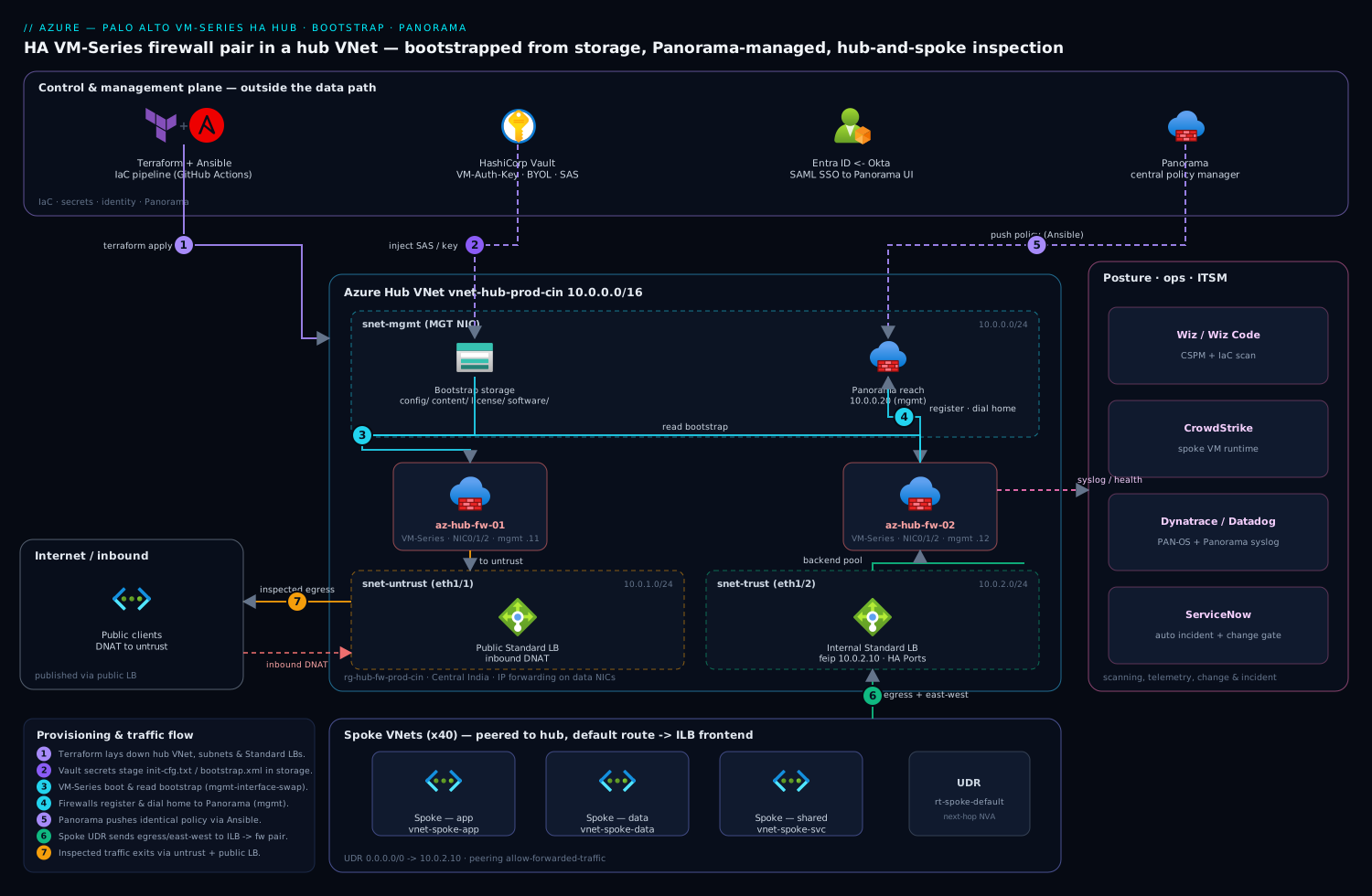
The hub VNet (10.0.0.0/16) carries four subnets that every VM-Series interface maps to: a management subnet for the dedicated MGT NIC and Panorama traffic, an untrust subnet facing the public load balancer, a trust subnet facing the internal load balancer and the spokes, and an HA subnet for HA2/HA3 state sync if you run active/passive. Each firewall is a multi-NIC VM — NIC0 is MGT, NIC1 is untrust (eth1/1), NIC2 is trust (eth1/2) — with IP forwarding enabled on the data NICs so the VM can route traffic it does not own. Spoke VNets peer to the hub and push their default route at the internal load balancer’s frontend IP via a route table (UDR), so all egress and inter-spoke traffic lands on the firewall pair. The public load balancer fronts inbound DNAT for any published service. Panorama sits outside the data path, reachable over the management subnet, and is the only place humans touch policy.
1. Lay down the hub network with Terraform
Start with the network because every later step references these subnet IDs. The two Standard SKU load balancers must be Standard (not Basic) — VM-Series HA on Azure depends on Standard LB health probes and HA Ports.
# providers.tf
terraform {
  required_providers {
    azurerm = { source = "hashicorp/azurerm", version = "~> 3.100" }
  }
}
provider "azurerm" {
  features {}
}

# network.tf
resource "azurerm_resource_group" "hub" {
  name     = "rg-hub-fw-prod-cin"
  location = "centralindia"
}

resource "azurerm_virtual_network" "hub" {
  name                = "vnet-hub-prod-cin"
  resource_group_name = azurerm_resource_group.hub.name
  location            = azurerm_resource_group.hub.location
  address_space       = ["10.0.0.0/16"]
}

resource "azurerm_subnet" "mgmt" {
  name                 = "snet-mgmt"
  resource_group_name  = azurerm_resource_group.hub.name
  virtual_network_name = azurerm_virtual_network.hub.name
  address_prefixes     = ["10.0.0.0/24"]
}
resource "azurerm_subnet" "untrust" {
  name                 = "snet-untrust"
  resource_group_name  = azurerm_resource_group.hub.name
  virtual_network_name = azurerm_virtual_network.hub.name
  address_prefixes     = ["10.0.1.0/24"]
}
resource "azurerm_subnet" "trust" {
  name                 = "snet-trust"
  resource_group_name  = azurerm_resource_group.hub.name
  virtual_network_name = azurerm_virtual_network.hub.name
  address_prefixes     = ["10.0.2.0/24"]
}
Apply just the network first so you can confirm subnets before the firewalls depend on them:
terraform init
terraform apply -target=azurerm_virtual_network.hub -auto-approve
2. Create the internal and public load balancers
The internal load balancer (ILB) is the egress/east-west gateway; its frontend IP is what every spoke’s default route points at. Enable HA Ports so all protocols and ports are load-balanced, and probe the firewalls on a port PAN-OS answers (TCP/443 on the trust interface once the mgmt-profile allows it, or a dedicated health-check service).
# ilb.tf
resource "azurerm_lb" "internal" {
  name                = "ilb-trust-prod-cin"
  resource_group_name = azurerm_resource_group.hub.name
  location            = azurerm_resource_group.hub.location
  sku                 = "Standard"
  frontend_ip_configuration {
    name                          = "feip-trust"
    subnet_id                     = azurerm_subnet.trust.id
    private_ip_address            = "10.0.2.10"
    private_ip_address_allocation = "Static"
  }
}

resource "azurerm_lb_backend_address_pool" "trust" {
  name            = "bep-trust"
  loadbalancer_id = azurerm_lb.internal.id
}

resource "azurerm_lb_probe" "trust" {
  name            = "probe-https"
  loadbalancer_id = azurerm_lb.internal.id
  protocol        = "Tcp"
  port            = 443
  interval_in_seconds = 5
  number_of_probes    = 2
}

resource "azurerm_lb_rule" "ha_ports" {
  name                           = "rule-ha-ports"
  loadbalancer_id                = azurerm_lb.internal.id
  frontend_ip_configuration_name = "feip-trust"
  backend_address_pool_ids       = [azurerm_lb_backend_address_pool.trust.id]
  probe_id                       = azurerm_lb_probe.trust.id
  protocol                       = "All"   # HA Ports
  frontend_port                  = 0
  backend_port                   = 0
  enable_floating_ip             = true
}
The public LB is analogous — a Standard public IP frontend, a backend pool the untrust NICs join, and inbound NAT/load-balancing rules for each published service. Keep it in the same module so the firewalls join both backend pools in one place.
3. Stage the bootstrap storage account
Bootstrapping is the heart of “repeatable.” A VM-Series boots, mounts an Azure Files share named with the four canonical folders — config/, content/, license/, software/ — and consumes them. You only need config/ populated for a Panorama-managed deployment; Panorama delivers content and policy after the device registers.
SA="stbootstrapfwcin$RANDOM"
az storage account create -g rg-hub-fw-prod-cin -n "$SA" \
  --sku Standard_LRS --kind StorageV2 --location centralindia

KEY=$(az storage account keys list -g rg-hub-fw-prod-cin -n "$SA" \
  --query "[0].value" -o tsv)

az storage share create   --account-name "$SA" --account-key "$KEY" --name vmseries-bootstrap
for d in config content license software; do
  az storage directory create --account-name "$SA" --account-key "$KEY" \
    --share-name vmseries-bootstrap --name "$d"
done
Now the two files that matter. init-cfg.txt tells the firewall who it is and where Panorama lives; bootstrap.xml is an optional seed config (here we keep it minimal because Panorama owns policy). The vm-auth-key and panorama-server lines are what auto-register the device into Panorama:
# init-cfg.txt
type=dhcp-client
ip-address=
default-gateway=
netmask=
hostname=az-hub-fw-01
vm-auth-key=<VM-AUTH-KEY-FROM-PANORAMA>
panorama-server=10.0.0.20
tplname=tmpl-stack-hub
dgname=dg-hub-firewalls
dhcp-send-hostname=yes
dhcp-send-client-id=yes
dhcp-accept-server-hostname=yes
dhcp-accept-server-domain=yes
op-command-modes=mgmt-interface-swap
plugin-op-commands=panorama-licensing-mode-on
Two flags earn their place. mgmt-interface-swap is mandatory on Azure — the VM-Series must swap eth0/eth1 so the dataplane uses the first data NIC while MGT moves to the right interface for Azure’s NIC ordering; without it, management and traffic interfaces are crossed and the box is unreachable. panorama-licensing-mode-on lets Panorama broker licenses so you do not bake auth codes into the image. Upload them, pulling the secret values from Vault at pipeline time rather than from disk:
VM_AUTH_KEY=$(vault kv get -field=vm_auth_key secret/paloalto/panorama)
sed "s/<VM-AUTH-KEY-FROM-PANORAMA>/${VM_AUTH_KEY}/" init-cfg.txt > /tmp/init-cfg.txt

az storage file upload --account-name "$SA" --account-key "$KEY" \
  --share-name vmseries-bootstrap --source /tmp/init-cfg.txt \
  --path config/init-cfg.txt
For the second firewall, upload an identical file with hostname=az-hub-fw-02. Everything else — device group, template stack, Panorama IP — is the same, which is exactly why the pair stays in lockstep.
4. Deploy the VM-Series pair
Accept the Marketplace terms once, then build each firewall as a multi-NIC VM that mounts the bootstrap share via the custom-data/storage plan parameters. With azurerm, the bootstrap share is passed through the VM’s plan plus a custom_data reference; the cleanest path is the official PAN-OS bootstrap convention where the storage account name and access key are handed to the image via VM tags / custom-data. The NICs are the load-bearing part:
# One-time per subscription: accept image terms (BYOL shown; swap for 'bundle1'/'bundle2' for PAYG)
az vm image terms accept \
  --publisher paloaltonetworks \
  --offer vmseries-flex \
  --plan byol
# firewall.tf  (showing fw-01; module-ize and call twice)
resource "azurerm_network_interface" "mgmt01" {
  name                = "nic-fw01-mgmt"
  resource_group_name = azurerm_resource_group.hub.name
  location            = azurerm_resource_group.hub.location
  ip_configuration {
    name                          = "ipcfg"
    subnet_id                     = azurerm_subnet.mgmt.id
    private_ip_address_allocation = "Static"
    private_ip_address            = "10.0.0.11"
  }
}

resource "azurerm_network_interface" "untrust01" {
  name                  = "nic-fw01-untrust"
  resource_group_name   = azurerm_resource_group.hub.name
  location              = azurerm_resource_group.hub.location
  ip_forwarding_enabled = true   # firewall routes traffic it does not own
  ip_configuration {
    name                          = "ipcfg"
    subnet_id                     = azurerm_subnet.untrust.id
    private_ip_address_allocation = "Static"
    private_ip_address            = "10.0.1.11"
  }
}

resource "azurerm_network_interface" "trust01" {
  name                  = "nic-fw01-trust"
  resource_group_name   = azurerm_resource_group.hub.name
  location              = azurerm_resource_group.hub.location
  ip_forwarding_enabled = true
  ip_configuration {
    name                          = "ipcfg"
    subnet_id                     = azurerm_subnet.trust.id
    private_ip_address_allocation = "Static"
    private_ip_address            = "10.0.2.11"
  }
}

# Join the trust NIC to the ILB backend pool
resource "azurerm_network_interface_backend_address_pool_association" "trust01_ilb" {
  network_interface_id    = azurerm_network_interface.trust01.id
  ip_configuration_name   = "ipcfg"
  backend_address_pool_id = azurerm_lb_backend_address_pool.trust.id
}

resource "azurerm_linux_virtual_machine" "fw01" {
  name                  = "az-hub-fw-01"
  resource_group_name   = azurerm_resource_group.hub.name
  location              = azurerm_resource_group.hub.location
  size                  = "Standard_DS3_v2"
  admin_username        = "paloadmin"
  disable_password_authentication = true
  network_interface_ids = [
    azurerm_network_interface.mgmt01.id,     # NIC0 = MGT (after swap)
    azurerm_network_interface.untrust01.id,  # NIC1 = eth1/1
    azurerm_network_interface.trust01.id,    # NIC2 = eth1/2
  ]
  admin_ssh_key {
    username   = "paloadmin"
    public_key = file("~/.ssh/paloadmin.pub")
  }
  plan {
    name      = "byol"
    publisher = "paloaltonetworks"
    product   = "vmseries-flex"
  }
  source_image_reference {
    publisher = "paloaltonetworks"
    offer     = "vmseries-flex"
    sku       = "byol"
    version   = "latest"   # or pin e.g. "1110.0.0" for PAN-OS 11.1
  }
  os_disk {
    caching              = "ReadWrite"
    storage_account_type = "Premium_LRS"
  }
  # Bootstrap: PAN-OS reads these to find the Azure Files share
  custom_data = base64encode(join(";", [
    "storage-account=${azurerm_storage_account.bootstrap.name}",
    "access-key=${azurerm_storage_account.bootstrap.primary_access_key}",
    "file-share=vmseries-bootstrap",
    "share-directory=."
  ]))
}
Apply, and watch the firewalls come up. The first boot takes 10–15 minutes as PAN-OS swaps interfaces, reads the bootstrap package, registers its license through Panorama, and connects to Panorama as a managed device.
terraform apply -auto-approve
5. Adopt the firewalls in Panorama and push policy
Pin the device IDs in Panorama and drive policy from code so the two firewalls are byte-for-byte identical. Once both devices show Connected under Panorama → Managed Devices, confirm they are in the right device group and template stack, then push baseline policy with Ansible so it is reviewable and re-runnable:
# push-baseline.yml  (paloaltonetworks.panos)
- hosts: panorama
  connection: local
  gather_facts: false
  vars:
    provider:
      ip_address: "10.0.0.20"
      username: "{{ lookup('hashi_vault', 'secret=secret/paloalto/panorama:admin_user') }}"
      password: "{{ lookup('hashi_vault', 'secret=secret/paloalto/panorama:admin_pass') }}"
  tasks:
    - name: Allow trusted spokes egress with threat prevention
      paloaltonetworks.panos.panos_security_rule:
        provider: "{{ provider }}"
        device_group: "dg-hub-firewalls"
        rule_name: "spokes-egress-inspected"
        source_zone: ["trust"]
        destination_zone: ["untrust"]
        source_ip: ["10.0.0.0/8"]
        destination_ip: ["any"]
        application: ["any"]
        service: ["application-default"]
        action: "allow"
        group_profile: "default-threat-prevention"   # AV/AS/vuln/URL profile group
        log_end: true

    - name: Commit and push to the device group
      paloaltonetworks.panos.panos_commit_panorama:
        provider: "{{ provider }}"
      notify: push_to_devices
  handlers:
    - name: push_to_devices
      paloaltonetworks.panos.panos_commit_push:
        provider: "{{ provider }}"
        style: "device group"
        name: "dg-hub-firewalls"
For the egress source-NAT that makes spoke traffic exit with the firewall’s untrust IP, add a panos_nat_rule translating 10.0.0.0/8 → untrust interface (dynamic-ip-and-port). Admin access to Panorama’s UI is via SAML to Entra ID, federated from Okta, so firewall engineers sign in with their corporate identity and Conditional Access, and there are no shared local admin passwords to rotate.
6. Steer spoke traffic at the firewall
The firewalls are useless until traffic is forced through them. Attach a route table to each spoke workload subnet whose default route is the ILB frontend IP, and enable peering with gateway/forwarded-traffic in mind:
az network route-table create -g rg-hub-fw-prod-cin -n rt-spoke-default --location centralindia

az network route-table route create -g rg-hub-fw-prod-cin \
  --route-table-name rt-spoke-default -n default-to-fw \
  --address-prefix 0.0.0.0/0 \
  --next-hop-type VirtualAppliance \
  --next-hop-ip-address 10.0.2.10        # ILB trust frontend

# Peer a spoke to the hub (run the reverse on the hub side too)
az network vnet peering create -g rg-spoke-app-prod-cin \
  --name peer-spoke-to-hub --vnet-name vnet-spoke-app \
  --remote-vnet $(az network vnet show -g rg-hub-fw-prod-cin -n vnet-hub-prod-cin --query id -o tsv) \
  --allow-vnet-access --allow-forwarded-traffic
--allow-forwarded-traffic on the peering is the flag people forget; without it the hub drops traffic the firewall forwards on the spoke’s behalf.
Validation
Verify in layers — Azure plumbing first, then PAN-OS, then a real flow:
# 1. Both firewalls healthy in the ILB backend pool
az network lb show -g rg-hub-fw-prod-cin -n ilb-trust-prod-cin \
  --query "backendAddressPools[0].loadBalancerBackendAddresses[].name"

# 2. Effective routes on a spoke NIC really point at the ILB
az network nic show-effective-route-table \
  -g rg-spoke-app-prod-cin -n nic-appvm01 -o table
# 3. On each firewall (SSH to MGT IP): confirm Panorama + license + HA
show panorama-status
request license info
show high-availability state     # if running active/passive
show interface all
# 4. End-to-end: from a spoke VM, egress and confirm it is inspected
curl -s https://ifconfig.me        # should exit via the untrust IP, not Azure NAT
# Then in Panorama: Monitor → Traffic, filter the spoke source IP — the session
# should appear with the resolved App-ID and the threat-prevention profile applied.
Layer Wiz posture scanning over the result: point Wiz (agentless) at the subscription and the Wiz Code IaC scanner at the Terraform repo, so a misconfigured NSG, a public-exposed MGT interface, or --allow-forwarded-traffic drift is flagged before and after deploy. Put CrowdStrike Falcon sensors on the spoke workload VMs (not the firewalls — VM-Series is an appliance) for runtime detection feeding the SOC. Send PAN-OS and Panorama logs to Dynatrace (or Datadog) via syslog so firewall health, session counts, and dataplane CPU sit on the same dashboards as the apps, with anomaly alerts on a firewall dropping out of the ILB pool. A health-probe failure or a managed-device disconnect auto-raises a ServiceNow incident, so the firewall team gets a ticket rather than a silent gap, and every policy push runs as a GitHub Actions (or Jenkins) job gated by a ServiceNow change record.
Rollback / teardown
Because the whole build is Terraform plus a bootstrap share, rollback is clean. Reverse traffic steering first so you never strand a spoke behind a half-deleted firewall:
# 1. Repoint spokes back to Azure default routing (or a known-good NVA)
az network route-table route update -g rg-hub-fw-prod-cin \
  --route-table-name rt-spoke-default -n default-to-fw \
  --next-hop-type Internet     # or delete the route entirely

# 2. Deregister devices in Panorama (Managed Devices → remove) so licenses free up

# 3. Tear down the firewalls and network, leaving the bootstrap SA if you want to redeploy
terraform destroy \
  -target=azurerm_linux_virtual_machine.fw01 \
  -target=azurerm_linux_virtual_machine.fw02 -auto-approve

# 4. Full teardown
terraform destroy -auto-approve
For a single-firewall rollback during an upgrade, just remove one VM from the ILB backend pool (az network nic ip-config address-pool remove), let the other carry traffic, redeploy the unhealthy one from bootstrap, and re-add it — zero-downtime because the surviving firewall holds the identical Panorama-pushed policy.
Common pitfalls
- Forgetting
mgmt-interface-swap— the single most common Azure VM-Series failure. The box boots but MGT and dataplane NICs are crossed, so it is unreachable and never registers with Panorama. It must be ininit-cfg.txt. BasicSKU load balancers — VM-Series HA on Azure requiresStandardLBs for HA Ports and proper health probes; Basic silently breaks failover.- IP forwarding left off — without
ip_forwarding_enabled = trueon the untrust/trust NICs, Azure drops every packet the firewall tries to forward, and traffic dies with no obvious error. - Missing
--allow-forwarded-trafficon peering — spokes can reach the hub but the firewall’s forwarded return traffic is dropped, so connections half-open and hang. - Bootstrap share not in the four canonical folders — PAN-OS only reads
config/ content/ license/ software/; a flat layout is silently ignored and the firewall comes up unconfigured. - Wrong Marketplace plan / un-accepted terms —
terraform applyfails late with a plan error; acceptvm image termsfor the exact publisher/offer/sku first. - Probing a port PAN-OS does not answer — the ILB health probe must hit a service the firewall actually serves, or both firewalls show unhealthy and the ILB blackholes traffic.
Security notes
Treat the management plane as the crown jewel: the MGT subnet should be reachable only from Panorama and a jump host, never the internet, enforced by an NSG and verified independently by Wiz. Disable local firewall admin accounts and drive all Panorama UI access through SAML to Entra ID federated from Okta, so access follows corporate identity, MFA, and Conditional Access, and offboarding a person removes firewall access automatically. Keep every secret — the VM-Auth-Key, BYOL auth codes, the bootstrap storage key, Panorama admin credentials — in HashiCorp Vault, injected at pipeline time and never committed (the bootstrap init-cfg.txt in git should carry a placeholder, not the real key). Enable TLS decryption policy in Panorama for outbound inspection where compliance allows, and keep threat-prevention, anti-virus, anti-spyware, and URL-filtering profiles attached to every allow rule — an allow rule without a profile group is just a hole with logging.
Cost notes
The dominant line items are the two VM-Series VMs (compute + the BYOL or PAYG software charge) running 24×7, the two Standard load balancers (priced per rule + data processed), and egress data. Levers that matter: choose BYOL if utilization is steady (a fixed annual cost beats hourly PAYG above roughly half-time use) and PAYG/consumption only for burst or short-lived environments; right-size the VM — Standard_DS3_v2 is a sane production start, but a low-throughput hub may run on a smaller flex size, and you can scale up without re-bootstrapping. Use Azure Reserved Instances or a savings plan on the firewall VMs once the topology is stable for a 1- to 3-year commit. Send only the syslog you need to Dynatrace/Datadog — full session logging at high volume is a real cost, so scope it to allow/deny and threat events rather than everything. Finally, a single HA pair in the hub inspecting forty spokes is far cheaper than per-spoke firewalls, which is the architectural cost win that justified the project in the first place.