A platform team running a 240-node EKS fleet gets the same finding in every audit: they scan images in the build pipeline, sign off, and ship — but nobody is looking at what is actually running three weeks later. A base image that was clean at build time has since picked up a critical glibc CVE, a developer patched a Deployment by hand and reintroduced runAsRoot, and a teammate pasted a real database URL into a ConfigMap during an incident and never cleaned it up. None of that shows on a build-time gate, because the build already passed. What they need is a scanner that lives inside the cluster, watches every workload as it changes, and answers a single question on a loop: “what is exposed in production right now?” That is exactly what Trivy Operator does. This guide deploys it on a real cluster, makes its findings first-class Kubernetes objects, and plugs those findings into the ticketing, GitOps, and observability tooling a platform team already runs.
The operator works by reconciling Kubernetes resources. When a Pod is created or its spec changes, the operator schedules a one-off scan Job, and writes the result back into the cluster as a Custom Resource — a VulnerabilityReport per container image, a ConfigAuditReport per workload, an ExposedSecretReport, an RbacAssessmentReport, and (optionally) an InfraAssessmentReport for the control plane. Because the reports are CRDs, everything you already use to query Kubernetes — kubectl, RBAC, admission webhooks, Prometheus exporters, GitOps drift detection — works on your security posture for free. No external SaaS is required for the core loop; the SaaS tools in this guide consume the operator’s output rather than replace it.
Prerequisites
- A Kubernetes cluster on v1.27+ (examples assume EKS, but AKS/GKE/on-prem behave the same), with a worker node pool that can absorb short-lived scan Jobs.
kubectlandhelmv3.12+ configured against the target cluster.- Cluster-admin (or rights to install CRDs and a namespace-scoped operator with a ClusterRole).
- A reachable container registry; for private images, pull credentials available as a Kubernetes
Secret. - Outbound egress (direct or via proxy) to the Trivy vulnerability database (
mirror.gcr.io/ GitHub Container Registry) — or an internal OCI mirror if the cluster is air-gapped. - Optional but assumed here: Argo CD for GitOps, HashiCorp Vault for registry credentials, and a Prometheus/Datadog stack for metrics.
Target topology
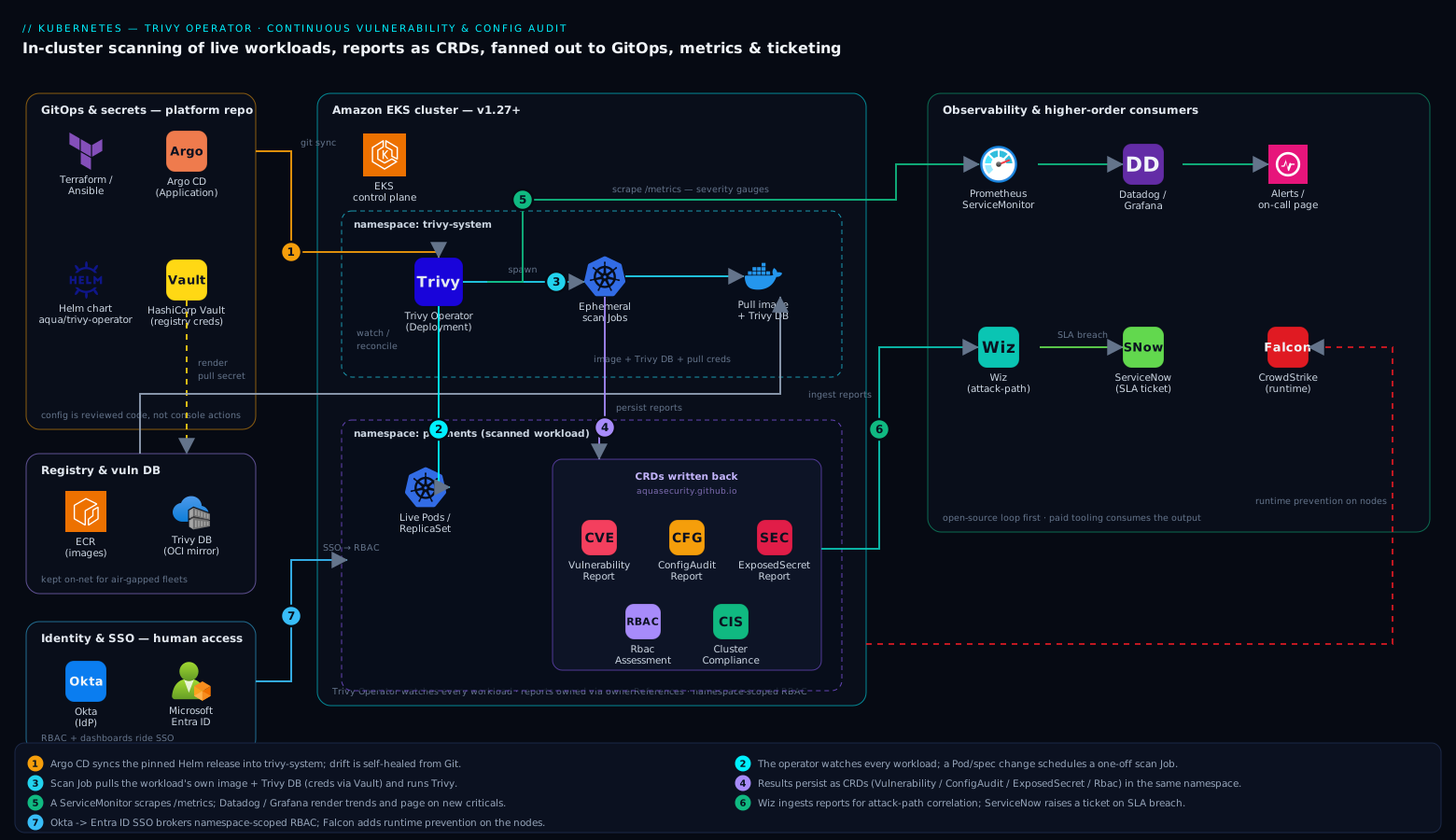
The operator runs as a single Deployment in a dedicated trivy-system namespace. It watches workloads across the cluster, spawns ephemeral scan Jobs (each Job pulls the workload’s own image, runs Trivy in client mode against a shared DB cache, and exits), and persists results as CRDs in the same namespace as the scanned workload. From there the data fans out: a Prometheus ServiceMonitor scrapes the operator’s /metrics, Datadog (or Grafana on top of Prometheus) renders the trend dashboards and pages on new criticals, Wiz ingests the reports through its Kubernetes integration to correlate an in-cluster CVE with its cloud attack path, and a small controller raises a ServiceNow change/incident ticket when a Critical crosses an SLA threshold. Identity for the humans reading any of this is brokered through Okta (federated to Entra ID on the Azure-hosted clusters) so cluster RBAC and dashboard access ride the same SSO. Runtime prevention is a separate layer — CrowdStrike Falcon sensors on the nodes catch live exploitation — while Trivy Operator owns the posture question of what is vulnerable in the first place. The two are complementary, not redundant.
1. Install the CRDs and the operator with Helm
Add Aqua’s chart repository and install the operator into its own namespace. Pin the chart version so the install is reproducible and reviewable in Git.
helm repo add aqua https://aquasecurity.github.io/helm-charts/
helm repo update

helm upgrade --install trivy-operator aqua/trivy-operator \
  --namespace trivy-system \
  --create-namespace \
  --version 0.24.1 \
  --set="trivy.ignoreUnfixed=true" \
  --set="operator.scannerReportTTL=24h" \
  --set="operator.vulnerabilityScannerScanOnlyCurrentRevisions=true" \
  --set="trivyOperator.scanJobsConcurrentLimit=5" \
  --wait
What each flag buys you in practice:
trivy.ignoreUnfixed=true— suppress CVEs that have no fixed version yet. This is the single highest-signal setting: without it, teams drown in unactionable findings and stop reading reports entirely. Turn it off later for an exhaustive audit.operator.scannerReportTTL=24h— re-scan every workload at least daily so the DB updates surface newly disclosed CVEs against images that have not changed.vulnerabilityScannerScanOnlyCurrentRevisions=true— only scan the live ReplicaSet, not historical ones, which avoids a flood of Jobs on busy clusters.scanJobsConcurrentLimit=5— cap how many scan Jobs run at once so a cold-start scan of the whole fleet does not stampede the node pool.
Confirm the CRDs registered and the operator is up:
kubectl get crd | grep aquasecurity.github.io
kubectl -n trivy-system rollout status deploy/trivy-operator
kubectl -n trivy-system logs deploy/trivy-operator | tail -n 20
You should see CRDs including vulnerabilityreports, configauditreports, exposedsecretreports, and rbacassessmentreports, and a log line like Started workers for each controller.
2. Give scanners access to private registries via Vault
Scan Jobs pull the workload’s image, so they need the same pull credentials your workloads use. Rather than committing a registry secret, pull it from HashiCorp Vault at deploy time. Here the Vault Agent Injector (already running in the cluster) renders a dockerconfigjson into the operator-managed Jobs through a referenced ServiceAccount; the operator picks up any imagePullSecrets on the scanned workload’s ServiceAccount automatically, so the cleanest pattern is to let Vault populate that secret.
# One-time: store the registry creds in Vault (run by a Vault admin, not in CI)
vault kv put secret/platform/registry \
  username="aws" \
  password="$(aws ecr get-login-password --region eu-west-1)"

# Annotate the workload's ServiceAccount so Vault Agent renders the pull secret.
# Trivy Operator inherits imagePullSecrets from the workload it is scanning.
kubectl -n payments annotate serviceaccount default \
  vault.hashicorp.com/agent-inject="true" \
  vault.hashicorp.com/role="registry-reader" --overwrite
For air-gapped clusters, point the operator at an internal mirror of the Trivy DB and the registry instead, so no scan Job ever needs public egress:
helm upgrade trivy-operator aqua/trivy-operator -n trivy-system --reuse-values \
  --set="trivy.dbRepository=registry.internal.corp/trivy-db" \
  --set="trivy.javaDbRepository=registry.internal.corp/trivy-java-db"
This is also where you would point at a registry served by Akamai’s CDN for geo-distributed clusters, keeping DB pulls on-net and fast.
3. Manage the operator declaratively with Argo CD
A security control you installed by hand will drift. Put the Helm release under Argo CD so the operator’s configuration is reconciled from Git, and any out-of-band kubectl edit is reverted automatically — drift detection on your scanner itself.
# argocd/trivy-operator.yaml — committed to the platform GitOps repo
apiVersion: argoproj.io/v1alpha1
kind: Application
metadata:
  name: trivy-operator
  namespace: argocd
spec:
  project: platform-security
  source:
    repoURL: https://aquasecurity.github.io/helm-charts/
    chart: trivy-operator
    targetRevision: 0.24.1
    helm:
      valuesObject:
        trivy:
          ignoreUnfixed: true
        operator:
          scannerReportTTL: "24h"
          metricsFindingsEnabled: true
  destination:
    server: https://kubernetes.default.svc
    namespace: trivy-system
  syncPolicy:
    automated:
      prune: true
      selfHeal: true   # revert manual changes to the scanner config
    syncOptions:
      - CreateNamespace=true
kubectl apply -f argocd/trivy-operator.yaml
argocd app sync trivy-operator
The same job done in a non-GitOps shop fits naturally into a Jenkins or GitHub Actions pipeline: a helm upgrade --install step driven by Terraform (the helm_release resource) or an Ansible kubernetes.core.helm task, gated behind a pull-request review of the values file. Whatever the runner, the principle holds — the scanner’s config is reviewed code, not a console action.
4. Read the findings as Kubernetes objects
This is the payoff: your security posture is now queryable with plain kubectl. Trigger a scan implicitly by deploying anything, or just inspect what the operator has already produced.
# Vulnerability reports across the whole cluster, summarised
kubectl get vulnerabilityreports -A \
  -o custom-columns='NS:.metadata.namespace,WORKLOAD:.metadata.labels.trivy-operator\.resource\.name,CRIT:.report.summary.criticalCount,HIGH:.report.summary.highCount'

# Drill into one report's actual CVEs, sorted by severity
kubectl -n payments get vulnerabilityreport \
  replicaset-checkout-7c9f-checkout -o json \
  | jq '.report.vulnerabilities[] | select(.severity=="CRITICAL") | {id:.vulnerabilityID, pkg:.resource, fixed:.fixedVersion}'

# Misconfigurations (runAsRoot, missing limits, hostPath mounts, …)
kubectl get configauditreports -A \
  -o custom-columns='NS:.metadata.namespace,NAME:.metadata.name,CRIT:.report.summary.criticalCount,HIGH:.report.summary.highCount'

# Hard-coded secrets the operator found baked into image layers
kubectl get exposedsecretreports -A

# Over-permissive RBAC the operator flagged
kubectl get rbacassessmentreports -A
Because these are real RBAC-scoped resources, you can hand a development team read access to their own namespace’s reports without exposing the rest of the cluster — a Role granting get/list on vulnerabilityreports.aquasecurity.github.io is all it takes. Combined with Okta-driven group-to-RBAC mapping, each squad sees exactly its own posture and nothing else.
5. Export metrics and route alerts
The operator exposes Prometheus metrics, including per-severity gauges, on its service. Wire them in so trends and alerts live next to the rest of your platform telemetry.
# servicemonitor.yaml — requires metricsFindingsEnabled: true (set in step 3)
apiVersion: monitoring.coreos.com/v1
kind: ServiceMonitor
metadata:
  name: trivy-operator
  namespace: trivy-system
  labels:
    release: kube-prometheus-stack
spec:
  selector:
    matchLabels:
      app.kubernetes.io/name: trivy-operator
  endpoints:
    - port: metrics
      interval: 30s
# Alert rule: any new CRITICAL vulnerability across the fleet
sum by (namespace) (
  trivy_image_vulnerabilities{severity="Critical"}
) > 0
For shops on Datadog rather than raw Prometheus, the Datadog Agent’s OpenMetrics check scrapes the same /metrics endpoint — add a pod annotation and the trivy_image_vulnerabilities series flows into a Datadog monitor that pages on-call. Dynatrace consumes it the same way via its Prometheus ingest. The dashboard everyone actually wants is simple: total criticals over time, trending toward zero, with a spike every time a new CVE is disclosed against a running image.
Two higher-order consumers close the loop:
- Wiz ingests Trivy Operator reports through its Kubernetes integration, then correlates an in-cluster CVE with cloud context — is the vulnerable Pod on a node with an over-permissive IAM role reachable from the internet? That attack-path view turns a list of CVEs into a ranked “fix this one first.” Wiz Code carries the same finding back to the originating repo so the fix lands at the source.
- A lightweight controller (or a Datadog webhook) opens a ServiceNow incident when a
Criticalwith a known fix breaches its remediation SLA, attaching theVulnerabilityReportso the assigned team has the CVE, package, and fixed version without leaving the ticket.
6. (Optional) Tighten with Built-in Compliance and infra checks
Enable cluster compliance reporting (CIS Kubernetes Benchmark, NSA hardening) and control-plane infra assessment for a fuller posture beyond per-workload scans.
helm upgrade trivy-operator aqua/trivy-operator -n trivy-system --reuse-values \
  --set="compliance.cron='0 */6 * * *'" \
  --set="operator.infraAssessmentScannerEnabled=true" \
  --set="operator.clusterComplianceEnabled=true"

# After the next cron tick:
kubectl get clustercompliancereports
kubectl get clustercompliancereport cis -o json | jq '.status.summary'
This is where Trivy Operator’s posture data feeds your audit narrative directly — a clustercompliancereport is exportable evidence for the CIS controls an auditor will ask about.
Validation
Prove the loop works end to end by deploying a deliberately vulnerable workload and watching the report appear.
# A known-vulnerable image used widely for testing
kubectl create deployment vuln-demo --image=docker.io/knqyf263/vuln-image:1.2.3

# Watch the scan Job spawn, run, and complete in trivy-system
kubectl -n trivy-system get jobs -w   # Ctrl-C once a scan-* Job shows Completions 1/1

# The report should now exist in the workload's namespace (default here)
kubectl get vulnerabilityreports -l trivy-operator.resource.name=vuln-demo \
  -o custom-columns='NAME:.metadata.name,CRIT:.report.summary.criticalCount,HIGH:.report.summary.highCount'
A non-zero CRIT/HIGH count confirms the operator detected the workload, spawned a scan, pulled the image, and persisted results. Then verify the supporting plumbing:
# Metrics endpoint is serving severity gauges
kubectl -n trivy-system port-forward deploy/trivy-operator 5000:5000 &
curl -s localhost:5000/metrics | grep trivy_image_vulnerabilities | head

# Config-audit and secret scans also ran
kubectl get configauditreports,exposedsecretreports -A | head
Finally, confirm Prometheus is scraping the target (Status -> Targets in the Prometheus UI should list trivy-operator as UP) and that your Datadog/Grafana panel shows the demo’s criticals. Then delete the demo: kubectl delete deployment vuln-demo. Its reports are garbage-collected automatically because they are owned by the workload.
Rollback and teardown
The operator is namespaced and additive — removing it leaves your workloads untouched. If you installed via Argo CD, delete the Application (with prune) or roll targetRevision back to the previous chart version and sync. For a direct Helm install:
helm uninstall trivy-operator -n trivy-system
Helm intentionally does not delete CRDs on uninstall, so the report objects persist until you remove them explicitly. To fully clean up:
kubectl delete vulnerabilityreports,configauditreports,exposedsecretreports,rbacassessmentreports,infraassessmentreports --all -A
kubectl get crd -o name | grep aquasecurity.github.io | xargs kubectl delete
kubectl delete namespace trivy-system
Because every report is owned (via ownerReferences) by the workload that produced it, deleting a Deployment cleans up its reports on its own — there is no orphaned-data problem to manage during normal operations.
Common pitfalls
- Scan Jobs stuck
Pending. The node pool cannot schedule the ephemeral Jobs — usually no room, or a taint the Job does not tolerate. SetscanJobsConcurrentLimitlower, or give the Jobs resource requests and tolerations via--set scanJob.podTemplateLabels/ node selectors so they land on a dedicated pool. - Every image shows hundreds of CVEs. You forgot
ignoreUnfixed=true, so unpatchable findings bury the actionable ones. Start strict-but-actionable, then widen. ImagePullBackOffon the scan Job, not the workload. The Job lacks pull credentials for a private registry. Fix the ServiceAccountimagePullSecretson the scanned workload (step 2) — the operator inherits them.- DB download failures in air-gapped clusters. The scanner cannot reach the public Trivy DB. Mirror it (
trivy.dbRepository) and serve it internally; never punch a hole to the internet for a security tool. - Reports look stale. Without
scannerReportTTL, an unchanged image is never re-scanned, so a CVE disclosed after deploy never surfaces. Set a TTL of 24h or less. - Operator OOMKilled on large clusters. Raise the operator’s memory limit and lower scan concurrency; thousands of workloads mean thousands of reconciles.
Security notes
Trivy Operator is a posture tool: it tells you what is vulnerable, not who is attacking. Pair it with a runtime sensor — CrowdStrike Falcon on the nodes catches live exploitation and lateral movement that a scanner never sees — so you cover both “what is exposed” and “what is being exploited.” Lock down the operator itself: its ClusterRole is read-heavy by design, but scan Jobs run in your cluster, so pin them to a hardened node pool and apply a restrictive seccomp/PodSecurity profile. Treat ExposedSecretReport findings as incidents, not backlog — a secret baked into an image layer is already compromised and must be rotated, not just rebuilt. And keep the trust boundary clear: human access to reports and dashboards rides Okta/Entra ID SSO and namespace-scoped RBAC, so a developer sees only their own services’ posture.
Cost notes
The operator’s own footprint is small — a single lightweight Deployment. The real cost is the burst of short-lived scan Jobs, which is CPU/memory you already pay for on existing nodes; cap it with scanJobsConcurrentLimit and a dedicated, scale-to-zero node group so scans do not compete with production at peak. Mirroring the Trivy DB internally (and optionally fronting it with Akamai) cuts repeated egress and registry-rate-limit pain on large fleets. Crucially, the core scanning loop is open-source and free; the paid tooling (Wiz for attack-path correlation, Datadog/Dynatrace for dashboards, ServiceNow for ticketing) consumes the operator’s output, so you can stand up the full continuous-audit capability first and add commercial correlation only where it earns its keep.