Most enterprises do not get to design a data platform on a blank page. They inherit one: a SQL Server data warehouse that loads overnight, a pile of CSV extracts on a file share, a “data lake” that turned into a data swamp, three teams each running their own copy of the same customer table, and a finance leader asking why two dashboards built from “the same data” show different revenue. The intelligent lakehouse on Azure is the architecture that consolidates all of that into one governed copy of the data, serves it to both SQL analysts and data scientists from the same storage, and puts a catalog and lineage layer over the top so you can answer where did this number come from without a war room.
This article is a reference architecture in the spirit of the Azure Architecture Center: it picks real Azure services, wires them end to end, and makes the trade-off calls explicit. The non-negotiable design choice is that ADLS Gen2 holding Delta tables is the single source of truth, and every compute engine — Azure Databricks, Microsoft Fabric, Azure Synapse, Power BI — reads and writes that same storage rather than keeping its own copy. The running example is a mid-market retailer, but the pattern scales down to a single team and up to a regulated bank without changing shape.
The business scenario
Picture a company — call the segment “small-to-large enterprise” because the architecture genuinely spans it. The symptoms are remarkably consistent regardless of size:
- Data is duplicated and divergent. The warehouse has a
dim_customer. The marketing team exported their own copy into a SaaS tool. The data-science notebook reads a third extract. Each has slightly different dedup and address-cleansing rules, so headcounts and revenue per customer disagree, and nobody trusts the number that disagrees with theirs. - Batch is too slow and streaming is bolted on. The warehouse loads at 02:00. By the time fraud or stockouts show up in a dashboard, the event is hours old. Someone wired a separate streaming path for one use case, and now there are two pipelines for the same data that drift apart.
- Governance is an afterthought. Nobody can say with confidence which tables contain PII, who can see them, or what feeds the board’s revenue figure. A regulator (or an acquirer’s due-diligence team) asks for data lineage and the answer is a tribal-knowledge spreadsheet.
- Cost is opaque and lumpy. The legacy warehouse is sized for the month-end peak and sits idle the other 28 days. Storage and compute are welded together, so you pay for compute to hold cold data.
- The skills split is real. SQL analysts want T-SQL and Power BI. Data scientists want Python, Spark, and notebooks. ML engineers want feature tables and a model registry. Forcing all of them through one engine pleases none of them.
The business outcome the lakehouse is chartered to deliver: one governed copy of the data, fresh enough for operational decisions, queryable by every persona in their preferred tool, with auditable lineage and a cost model that scales with usage. Concretely — month-end close that does not require a 6-hour batch window, a fraud signal visible in minutes not hours, a single certified revenue figure, and the ability to hand an auditor a lineage graph from raw file to the cell in the board deck.
A lakehouse hits this because it puts a transactional table layer (Delta Lake) over cheap object storage (ADLS Gen2), so the same files behave like a database to SQL engines and like a dataset to Spark — no second copy, no second pipeline.
Architecture overview
The end-to-end data path moves left to right through five planes — ingest, store, transform, serve, govern — with governance and security wrapping the whole thing rather than sitting at the end.
1. Ingest. Source data arrives by three doors. Batch and CDC from operational databases (Azure SQL, on-prem SQL Server, SAP, Oracle) lands via Azure Data Factory or Fabric Data Factory pipelines and mirroring. High-volume events (clickstream, IoT, application telemetry) stream through Azure Event Hubs (Kafka-compatible). Files from partners and SaaS exports drop into a landing container. All three doors write into the lake; nothing transforms data on the way in.
2. Store — the source of truth. Everything lands in Azure Data Lake Storage Gen2 (a storage account with hierarchical namespace enabled), organized as Delta Lake tables in a medallion layout: Bronze (raw, append-only, faithful to source), Silver (cleaned, conformed, deduplicated, typed), Gold (business-level aggregates and dimensional models curated for consumption). Delta’s transaction log under _delta_log/ gives ACID commits, so a reader never sees a half-written partition and streaming and batch writers can hit the same table without corrupting each other. This storage account is the centre of gravity; every other component points at it.
3. Transform. The transformation engine is the one genuine fork in this architecture, and it is Azure Databricks or Microsoft Fabric (or both, sharing storage — covered below). Spark structured streaming and batch jobs read Bronze, apply quality rules and MERGE upserts to build Silver, and aggregate Silver into Gold. Crucially the same transformation code services both the streaming and batch path, so the two cannot drift. Orchestration is Databricks Workflows / Delta Live Tables or Fabric Data Pipelines and Spark notebooks.
4. Serve. Consumers read Gold (and selectively Silver) through the engine that suits them, all pointed at the same Delta tables:
- SQL analysts query through Azure Synapse serverless SQL pools or the Fabric SQL analytics endpoint / Warehouse, or Databricks SQL warehouses — T-SQL or ANSI SQL directly over the Delta tables.
- Power BI connects in Direct Lake mode (Fabric) — reading Delta/Parquet straight from OneLake with no import and no DirectQuery round-trip — or in DirectQuery/Import against Synapse/Databricks SQL.
- Data scientists and ML engineers use Databricks notebooks, MLflow, and feature tables sitting on the same Silver/Gold layers.
5. Govern (the wrapper). A single governance plane spans all of the above. Unity Catalog (Databricks) and/or OneLake Catalog (Fabric) provide the technical catalog, fine-grained access control, and column/row security on the tables. Microsoft Purview sits above as the enterprise data map: it scans the lake, classifies PII, captures end-to-end lineage from source through Bronze/Silver/Gold to the Power BI report, and hosts the business glossary and data-quality/access policies. Microsoft Entra ID is the identity backbone — every engine authenticates with Entra, and storage access flows through managed identities and Entra groups, never storage keys.
If you sketch it: a horizontal pipeline (Event Hubs / ADF on the left → ADLS Gen2 Delta medallion in the centre → Synapse / Fabric / Power BI on the right), with Databricks or Fabric Spark as the engine bolted onto the lake in the middle, and two horizontal bands underneath everything — Entra ID + Private Link (identity and network) and Purview + Unity/OneLake Catalog (governance and lineage) — that touch every box.
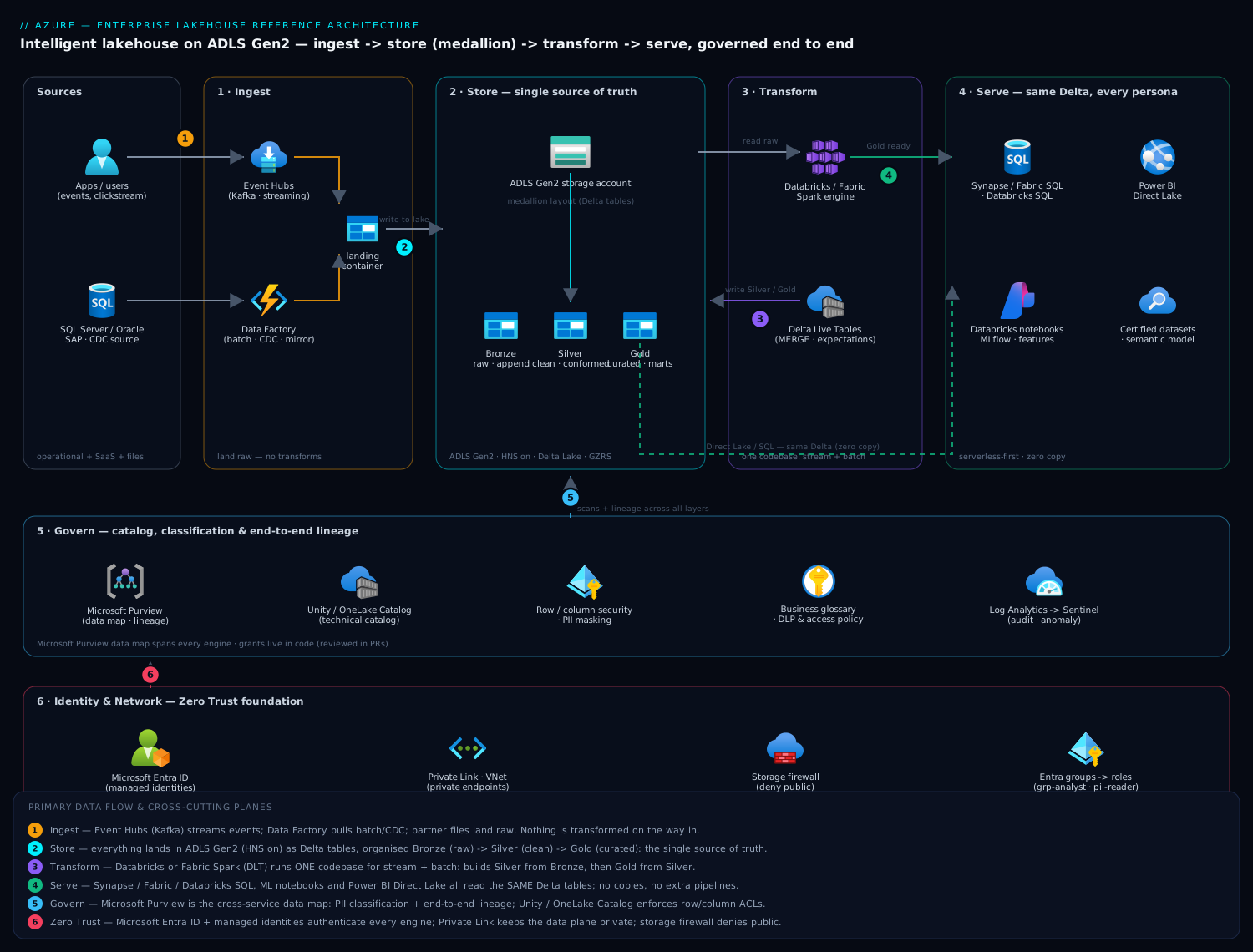
Component breakdown
| Component | Azure service | What it does | Why it’s here / key config |
|---|---|---|---|
| Lake storage | ADLS Gen2 (storage account, HNS on) | Single source of truth for all Delta tables | Hierarchical namespace required for directory-atomic operations Delta relies on; one container per medallion zone (bronze/silver/gold) or per domain; lifecycle rules to cool/archive old Bronze; soft delete + versioning on |
| Batch & CDC ingest | Azure Data Factory / Fabric Data Factory | Pulls from databases, SAP/Oracle, SaaS; CDC and mirroring | 100+ connectors; Mapping Data Flows or copy-into-Bronze only (no business logic on ingest); self-hosted IR for on-prem sources |
| Streaming ingest | Azure Event Hubs (Kafka API) | Ingests high-volume events with replay | Capture to ADLS or structured-streaming read into Bronze; partition count sized to throughput units; 1–7 day retention as the replay buffer |
| Table format | Delta Lake (open format) | ACID transactions, time travel, schema enforcement, change data feed | Snapshot isolation via optimistic concurrency lets streaming + batch share a table; OPTIMIZE/VACUUM for file sizing; liquid clustering or Z-ORDER on high-cardinality filter columns |
| Transformation engine | Azure Databricks or Microsoft Fabric Spark | Builds Silver/Gold; same code for stream + batch | Databricks for deep ML/heavy Spark; Fabric for Power BI-centric, SaaS-simple shops; DLT / pipelines for declarative ETL with expectations |
| SQL serving | Synapse serverless SQL, Fabric Warehouse / SQL endpoint, Databricks SQL | T-SQL/ANSI SQL over Delta for BI and ad-hoc | Serverless = pay per TB scanned, no cluster to manage; dedicated pools only if you need predictable, heavily concurrent warehouse SLAs |
| BI semantic layer | Power BI + Fabric Direct Lake | Dashboards, certified datasets, self-service | Direct Lake reads Delta from OneLake with no import/refresh and no DirectQuery latency; certified/promoted datasets enforce one version of the metrics |
| Technical catalog & ACL | Unity Catalog / OneLake Catalog | Catalog, fine-grained grants, row/column security, lineage within the engine | Catalog → schema → table hierarchy; ABAC/row filters and column masks; managed identities for storage credentials |
| Enterprise governance | Microsoft Purview | Cross-service data map, PII classification, end-to-end lineage, glossary, policy | Scheduled scans of ADLS/Synapse/Databricks/Power BI; auto-classification rules; lineage stitched source→report; DLP and access policies |
| Identity | Microsoft Entra ID | AuthN for every engine; group-based authZ | Managed identities for compute→storage; Entra groups map to catalog roles; Conditional Access and PIM for privileged data access |
| Networking | Private Link, VNet, NSGs | Keeps the data plane off the public internet | Private endpoints for the storage account, Databricks (VNet injection / NCC), Synapse, Event Hubs; storage firewall denies public by default |
A few configuration choices carry disproportionate weight:
- Hierarchical namespace on the storage account is mandatory, not optional. Without it the account is blob storage, directory rename is not atomic, and Delta’s commit guarantees weaken. You cannot turn HNS on after the fact — decide at creation.
- Pick the transformation engine on persona and ecosystem, not benchmark. Databricks if you are Spark- and ML-heavy and want the most mature lakehouse tooling (Unity Catalog, Photon, MLflow). Fabric if your centre of gravity is Power BI and a low-ops, SaaS-billed experience, and you want OneLake’s “one copy” story and Direct Lake to be first-class. They are not mutually exclusive — see implementation.
- Serve with serverless first. Synapse serverless SQL and Databricks/Fabric SQL warehouses bill per query or per second, which matches the bursty reality of analytics far better than a warehouse provisioned for peak. Reach for dedicated capacity only when concurrency and latency SLAs demand it.
Implementation guidance
Storage and layout. Provision one ADLS Gen2 account (or a small number, split by sensitivity/domain) with HNS enabled, soft delete, blob versioning, and Deny public network access. Create containers bronze, silver, gold, plus landing (raw drops) and checkpoints (streaming state). Within each, partition Delta tables by a low-cardinality column (typically date) and let liquid clustering handle high-cardinality filters. Tier Bronze to Cool after 30–90 days and Archive after a year via lifecycle management — Silver/Gold stay Hot.
Engine wiring (the two-engine “one copy” pattern). The strongest version of this architecture refuses to copy data between Databricks and Fabric. Two viable patterns:
- Fabric-led: OneLake is the ADLS Gen2 layer. Databricks (or Fabric Spark) writes Delta into OneLake; the Fabric SQL endpoint and Power BI Direct Lake read it with zero copy. Use OneLake shortcuts to surface existing ADLS Gen2 containers or even S3 buckets into OneLake without moving bytes.
- Databricks-led: Databricks + Unity Catalog own the lake on a standalone ADLS Gen2 account. Fabric reads those Delta tables via a OneLake shortcut to the ADLS Gen2 path, and Power BI uses Direct Lake over the shortcut. Unity Catalog remains the access-control authority; Purview scans both.
Either way the rule holds: one set of Delta files, many engines reading it. Resist the gravitational pull toward “just export a copy for the BI team.”
Orchestration. Use Delta Live Tables (Databricks) or Fabric Data Pipelines + notebooks to express the medallion graph declaratively, with built-in expectations (e.g., expect not null email, expect order_total >= 0) that quarantine or drop bad rows instead of failing the run silently. Schedule batch and run structured streaming continuously off the same notebook logic so the two paths cannot diverge.
Infrastructure as Code. Treat the platform as code from day one. Terraform is the pragmatic default because it spans both the Azure control plane and the Databricks workspace (Unity Catalog metastore, catalogs, grants) through the databricks provider, which Bicep cannot reach. Reserve Bicep/ARM for pure-Azure resource groups and policy if your org standardizes there. A sane module split:
azurerm_storage_account+azurerm_storage_data_lake_gen2_filesystem(HNS, network rules, private endpoints)azurerm_data_factory/ Fabric capacity (azurerm_fabric_capacity) and Event Hubs namespaceazurerm_databricks_workspacewith VNet injection and a Network Connectivity Config (NCC) for private storage accessdatabricks_metastore,databricks_catalog,databricks_schema,databricks_grants— Unity Catalog as code so access is reviewable in PRsazurerm_purview_accountand scan/classification configazurerm_private_endpointfor storage, Synapse, Event Hubs, Databricks;azurerm_private_dns_zonerecords
Keep state in a remote backend (an ADLS Gen2 container with a lease lock), gate apply behind a pipeline with plan review, and never put secrets in .tfvars — pull them from Key Vault at deploy time.
Identity and networking wiring. No storage account keys, anywhere. Compute reaches storage via managed identity: the Databricks access connector / Fabric workspace identity is granted Storage Blob Data Contributor on the account (or, better, on specific containers), and Unity Catalog storage credentials + external locations scope which paths a catalog can touch. Human access is Entra-group based — grp-data-analyst, grp-data-engineer, grp-pii-reader — mapped to Unity Catalog roles and Power BI workspace roles, with PIM for just-in-time elevation to PII. Lock the data plane down with Private Link: private endpoints for the storage account, Synapse, Event Hubs, and the Databricks control/data plane (VNet injection + NCC), the storage firewall set to deny public, and Conditional Access requiring compliant devices for anyone touching sensitive catalogs.
Enterprise considerations
Security & Zero Trust. The Zero Trust posture rests on four pillars. Identity: every engine authenticates with Entra; no shared keys or SAS tokens for the data plane; Conditional Access + MFA + PIM gate privileged data. Network: Private Link end to end, storage firewall denying public, no public IPs on Databricks/Synapse. Data: encryption at rest (Microsoft- or customer-managed keys in Key Vault), TLS in transit, and column masking + row filters in Unity Catalog so a grp-analyst sees a tokenized SSN while grp-pii-reader sees the value — enforced at the table, not the report. Classification: Purview auto-classifies PII on scan and drives DLP/access policies, so sensitivity labels travel with the data into Power BI. Assume breach: audit logs from Storage, Databricks, Synapse, and Purview flow to a Log Analytics workspace feeding Microsoft Sentinel for anomaly detection (e.g., a service principal suddenly reading the entire customer table).
Cost optimization. The lakehouse’s economic advantage is decoupled storage and compute — exploit it. Keep Bronze on lifecycle tiers (Hot→Cool→Archive); it is the bulk of the bytes and rarely re-read. Use serverless/auto-stopping SQL and job clusters so you pay for seconds of query, not idle warehouses, and set aggressive auto-termination (10–15 min) on interactive clusters. Right-size the transformation: OPTIMIZE and good file sizing cut scan cost on every downstream query, and Direct Lake eliminates the compute of Power BI import refreshes entirely. Buy reserved capacity / pre-purchase DBUs or Fabric capacity for the steady-state baseline and burst on demand above it. Tag every resource by domain/cost-centre and watch it in Cost Management; the failure mode is a runaway notebook or an un-terminated GPU cluster, so set budgets and alerts.
Scalability. Compute scales horizontally and independently of storage: Spark autoscaling for transformation, serverless SQL scaling per query, Event Hubs throughput units for ingest spikes. Storage scales effectively without limit. The discipline that preserves performance at scale is table hygiene — partition by date, cluster on the columns you filter on, compact small files, and prune with VACUUM — because a lake of millions of tiny files will bring any engine to its knees regardless of cluster size.
Reliability & DR (RTO/RPO). Choose targets by layer, not one number for the platform. Storage is the crown jewel: use GZRS (geo-zone-redundant) on the account for zone + region durability, which gives a low RPO on the data itself. Delta time travel is your fast recovery from logical corruption — a bad MERGE is undone with RESTORE TABLE ... VERSION AS OF, RPO of one commit and RTO of minutes, no restore-from-backup. For regional DR, the pragmatic pattern is active/passive: storage geo-replicates, and the pipelines and compute (Databricks workspace, Fabric capacity, ADF) are re-deployable from Terraform into the paired region — RTO measured in the hour or two it takes to spin compute back up, because the expensive, stateful part (the data) is already there. Set RPO ≈ minutes for streaming Bronze (Event Hubs replay covers the gap) and RTO ≈ 1–4 hours for full analytics service, and write it down per layer.
Observability. Three layers of monitoring. Platform: Azure Monitor + Log Analytics for storage, Event Hubs, ADF, Databricks, and Synapse metrics and logs. Pipeline: DLT/Fabric run history, expectation pass/fail rates, and freshness SLAs (alert when Gold is older than N minutes). Data quality and lineage: Purview holds the lineage graph and data-quality scores, so when a number looks wrong you trace it from the Power BI visual back through Gold → Silver → Bronze → source file in a few clicks. Surface a freshness and quality dashboard the business actually looks at — it is the difference between trusting the platform and quietly rebuilding extracts on the side.
Governance. This is the pillar that makes it enterprise. Unity Catalog (or OneLake Catalog) is the access-control authority — grants live in code, reviewed in PRs. Purview is the system of record for what data exists, what it means, where it came from, and who may use it: the business glossary defines “active customer,” classification tags PII, lineage proves the board number’s provenance, and access policies are auditable. Certified Power BI datasets enforce one version of the metrics so two dashboards cannot disagree again.
Reference enterprise example
NorthPeak Outfitters is a fictional mid-market outdoor-gear retailer: 180 stores, an e-commerce site, ~₹4,200 crore annual revenue, ~40 million transactions a year, and a data team of nine (four engineers, three analysts, two data scientists). Their starting point was the scenario above — a SQL Server warehouse loading at 02:00, three copies of the customer table, a board revenue figure two dashboards disagreed on, and a CFO who had stopped trusting both.
Decisions they made.
- Storage: one ADLS Gen2 account, HNS on, GZRS, containers
landing/bronze/silver/gold/checkpoints, Bronze tiering to Cool at 60 days. Private endpoint only; storage firewall denies public. - Engine: Fabric-led, Databricks for heavy lifting. Their analysts live in Power BI, so OneLake + Direct Lake was the natural serving spine. The two data scientists needed real Spark and MLflow, so Databricks writes Delta into the same OneLake via a shortcut. One copy, two engines — Unity Catalog governs the Databricks side, OneLake Catalog the Fabric side, Purview spans both.
- Ingest: Event Hubs for clickstream and POS events (kept at 3-day retention as the replay buffer); ADF mirroring for the SQL Server CDC; partner drops into
landing. - Medallion: Bronze append-only from all three doors; Silver applies the single customer-dedup and address-cleansing rule (ending the three-copies problem at the root); Gold holds
fact_sales,dim_customer,dim_productand a certified revenue model. DLT expectations quarantine orders with null store IDs. - Serving & governance: Power BI Direct Lake over Gold; one certified revenue dataset; Synapse serverless for analyst SQL ad-hoc. Purview scans everything nightly, classifies PII (email, phone, loyalty ID), and Unity Catalog masks those columns for
grp-analystwhilegrp-pii-reader(PIM-elevated) sees them.
Numbers and outcome.
- Freshness: the board’s revenue figure went from 02:00 batch, ~10 hours stale to streaming Bronze + 15-minute Gold refresh — store managers see same-day sales by lunchtime.
- One number: the certified dataset killed the duplicate-dashboard argument; finance signed off on a single source for close.
- Cost: decoupling storage from compute and moving to serverless query + auto-terminating clusters cut their run-rate roughly 35% versus the peak-sized legacy warehouse, even after adding streaming — Bronze tiering alone reclaimed a large chunk of storage spend, and Direct Lake removed nightly import-refresh compute entirely.
- DR: a fat-fingered MERGE that corrupted
dim_customerwas reverted withRESTORE TABLE dim_customer VERSION AS OFin under ten minutes — previously a half-day restore. GZRS covers the regional case; compute is Terraform-redeployable into the paired region with an RTO target of two hours. - Audit: when their bank asked for lineage during a credit review, they exported the Purview graph from POS file to board figure instead of convening a war room.
The platform paid for itself not on cost alone but on trust — the CFO using one number again was the real ROI.
When to use it
Use this architecture when you have more than one analytics persona (SQL and data science), data arriving in both batch and streaming, a governance/audit obligation, and a desire to stop paying for compute to hold cold data. It is the right default for any organization consolidating multiple warehouses, lakes, and extract-copies into one governed platform — and it scales from a single team on a modest Fabric capacity up to a regulated enterprise on Databricks + Unity Catalog without changing shape.
Trade-offs and anti-patterns.
- Don’t build a lakehouse for a single small SQL workload. If you have one source, modest volume, pure T-SQL reporting, and no data science, an Azure SQL Database or a small dedicated warehouse is simpler and cheaper. The lakehouse earns its complexity when personas and ingestion modes multiply.
- The copy-for-BI anti-pattern. The moment a team exports a “convenience copy” of Gold into their own store, you have reintroduced the divergence the lakehouse exists to kill. Enforce one copy via shortcuts and Direct Lake.
- Skipping governance until later. Bolting Purview and Unity Catalog on after two years of ungoverned ingestion is far more expensive than wiring them on day one. Governance is load-bearing, not a phase 2.
- HNS off. Creating the storage account as plain blob (no hierarchical namespace) quietly weakens Delta’s guarantees and cannot be fixed without a migration. Get this right at creation.
- Treating Databricks vs Fabric as a benchmark contest. They overlap heavily and increasingly share storage. Choose on persona, ecosystem (Power BI gravity → Fabric; Spark/ML depth → Databricks), and ops appetite — and remember you can run both over one OneLake.
Alternatives to weigh. A classic dedicated Synapse / SQL warehouse if your world is genuinely all-SQL, all-batch, with predictable high-concurrency and no data science — simpler, but you pay for peak-sized coupled compute and lose the open-format flexibility. A pure streaming architecture (Azure Stream Analytics / Flink into a serving store) if your problem is overwhelmingly real-time with little historical/batch analytics — but you then lack the cheap, queryable history a lake gives you. Snowflake or BigQuery as a managed warehouse if you want to outsource more of the platform and accept a different (often higher and more opaque) cost and lock-in profile. For most enterprises spanning SQL, ML, batch, and streaming with a governance mandate, the Azure lakehouse on ADLS Gen2 + Delta with Databricks or Fabric is the architecture that satisfies the whole org from one copy of the data — which is exactly why the official architecture centres keep converging on it.