Most “real-time analytics” projects do not fail because the technology is exotic. They fail because the team bolts a streaming pipeline onto a batch-shaped data platform, discovers that a single Kusto cluster is now doing ingestion, ad-hoc queries, dashboard refresh, and ML feature serving all at once, and then spends the next two quarters firefighting throttling and cost. This article is the architecture I keep coming back to for getting streaming analytics right on Azure the first time — partition-aware ingestion, a clean split between the hot path and the analytical store, and a query layer that scales independently of the write path.
The shape is deliberately the same whether you are a 40-store retailer or a national logistics carrier. What changes is the throughput units, the cluster SKU, and the retention policy — not the topology. That stability is the whole point of a reference architecture.
The business scenario
Picture a mid-market operator — call them a multi-channel retailer, an IoT-heavy manufacturer, or a fintech with a payments switch. They already have data: orders land in a transactional database, telemetry trickles into blob storage, and someone exports a CSV every morning that a Power BI dataset refreshes off at 6 a.m. The business runs on yesterday’s numbers, and everyone has quietly accepted that.
Then a real-time question shows up that the morning-batch world cannot answer:
- Retail / e-commerce: “A flash sale started 20 minutes ago. Which SKUs are about to stock out right now, and which fulfilment centres should we reroute from?” By the time the 6 a.m. export runs, the sale is over and the oversells are already customer-service tickets.
- Manufacturing / IoT: “This injection-moulding line’s vibration signature is drifting. Page the maintenance engineer before the bearing fails, not after we scrap 4,000 parts.”
- Fintech / payments: “Authorisation decline rates for one card BIN range just spiked. Is it a fraud attack, an issuer outage, or our own gateway? We need to know in seconds, not at end-of-day reconciliation.”
- Logistics: “A depot’s scan-to-dispatch latency crossed SLA. Surface it on the ops wall now, and keep two years of history so we can prove the SLA breach to the customer.”
These all share one structural requirement: the same event stream must serve two very different consumers. An operations dashboard needs sub-second-to-seconds freshness over the last few minutes-to-hours (the hot path). An analyst, a data scientist, and a compliance officer need to slice months or years of the same events with rich, ad-hoc, interactive queries (the cold/warm analytical path). Bolt those onto a single engine and they fight: a heavy analyst query starves the live dashboard; a burst of ingestion stalls the analyst.
The architecture below resolves that tension by giving each consumer the right engine while ingesting the stream exactly once. It starts paying for itself at a few thousand events per second and scales — without a redesign — to millions.
A useful framing: most enterprises do not need a full Lambda architecture with a hand-built batch layer. Azure Data Explorer (ADX) collapses the warm and cold paths into one columnar engine that ingests in near real time and serves interactive historical queries, so the classic “speed layer vs. batch layer” duplication largely disappears. You keep a thin stateful stream processor for the genuinely time-sensitive computations and let ADX be the system of record for analytics.
Architecture overview
End to end, an event travels through five stages: produce → ingest → process (hot path) → store & serve (analytical path) → visualise. Two paths diverge after ingestion and reconverge in the dashboard.
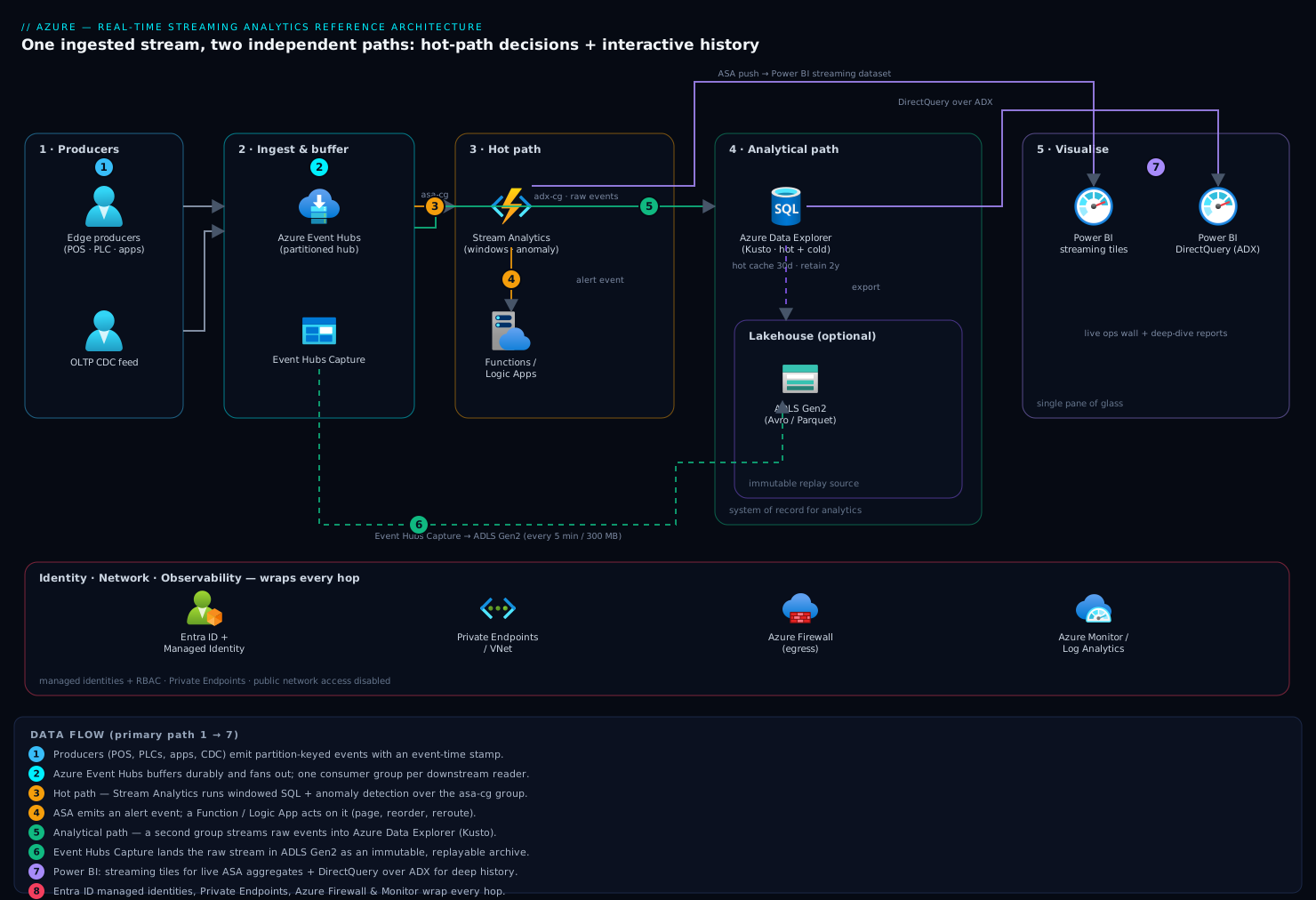
The data path, in words:
-
Producers — store POS terminals, factory PLCs/OPC-UA gateways, mobile apps, the payments switch, or a change-data-capture feed from the OLTP database — emit events. Each event is a small JSON or Avro record (an order line, a sensor reading, an auth attempt) with an event-time timestamp and a natural partition key (store ID, device ID, merchant ID).
-
Azure Event Hubs is the front door and the shock absorber. Every producer writes to a single hub (or a small set of hubs), partitioned on the natural key. Event Hubs decouples bursty, unreliable producers from the downstream processors, buffers events durably for a configurable retention window (1 to 7 days on Standard, up to 90 days on Premium/Dedicated), and lets multiple independent consumers read the same stream via separate consumer groups — this is the linchpin that makes the two-path design possible without double-publishing.
-
The hot path — Azure Stream Analytics (ASA). One ASA job reads Event Hubs over its own consumer group and runs continuous SQL: tumbling/hopping/sliding windows, joins against reference data, anomaly detection (
AnomalyDetection_SpikeAndDip), and watermark-based handling of late and out-of-order events. ASA computes the decisions that cannot wait: a 30-second rolling decline rate, a 5-minute stock-depletion forecast, a vibration threshold breach. Its low-latency aggregates feed live tiles and, critically, ASA can emit an alert event to Event Hubs / Service Bus that triggers an Azure Function or Logic App to actually do something (page an engineer, throttle a BIN, reroute fulfilment). -
The analytical path — Azure Data Explorer (ADX / Kusto, also surfaced as Real-Time Analytics in Microsoft Fabric). A second consumer group streams the raw events straight into ADX via its native, schema-on-write streaming/queued ingestion — no Stream Analytics in the middle. ADX keeps a hot cache (in-memory/SSD) for the most recent window for millisecond interactive queries and ages older data into a cold cache backed by cheap blob storage, governed by per-table retention and caching policies. Update policies and materialised views inside ADX build downsampled/rolled-up tables for fast aggregate dashboards. This is your warm + cold layer in one engine, and your queryable system of record.
-
Long-term landing & lakehouse (optional but common). Event Hubs Capture writes the raw stream to ADLS Gen2 in Avro/Parquet on a size/time trigger, with zero code, giving you an immutable, replayable archive and a source for Fabric / Databricks / Synapse batch ML and data-science workloads. ADX can also export to the lake.
-
The serving & visualisation layer — Power BI. The live operations dashboard runs in two complementary modes: ASA pushes its hot aggregates to a Power BI streaming dataset (or to a dataflow) for second-by-second tiles, while the rich exploratory and historical reports use Power BI DirectQuery over ADX — every page interaction becomes a Kusto query against the cluster, so dashboards stay live against billions of rows without importing them. The Azure Data Explorer dashboards web experience is a lighter-weight alternative for pure ops walls.
-
Identity, network, and observability wrap the whole thing: Microsoft Entra ID + managed identities for every service-to-service hop, Private Endpoints to keep traffic off the public internet, and Azure Monitor / Log Analytics collecting ASA watermark-delay, Event Hubs throttled-request, and ADX ingestion-latency metrics.
The mental model: Event Hubs is the single source of truth in motion; Stream Analytics owns “what must I decide in seconds?”; Azure Data Explorer owns “what is the truth over time, queryable interactively?”; Power BI is the pane of glass over both. Because the two paths read independent consumer groups, you can restart, re-scale, or redeploy the hot path without touching ingestion into ADX, and vice versa.
Component breakdown
| Component | Role in this architecture | Key configuration choices |
|---|---|---|
| Azure Event Hubs | Durable, partitioned ingestion buffer and fan-out point; the only place producers write. | Choose Premium/Dedicated for predictable latency, longer retention (up to 90 days), and customer-managed keys; Standard for SMB scale. Partition count sized to peak parallelism (effectively fixed on Standard — size for growth; resizable on Dedicated). One consumer group per downstream consumer (ASA, ADX, any reprocessor). Enable Capture to ADLS. Use the Kafka endpoint if producers already speak Kafka — no app rewrite. |
| Azure Stream Analytics | The stateful hot path: windowed aggregates, joins to reference data, late/out-of-order handling, and alerting. | Size in Streaming Units (SUs); partition the query (PARTITION BY) to match Event Hubs partitions for linear scale. Set a watermark / late-arrival tolerance and out-of-order tolerance explicitly. Use the event-time field, never arrival time, for windows. Enable checkpointing/replay and keep the job idempotent. Outputs: Power BI (streaming), Event Hubs/Service Bus (alerts), ADX or SQL (optional). Consider a VM-hosted or container alternative only if you need custom code beyond ASA’s SQL + UDF surface. |
| Azure Data Explorer (Kusto) | Near-real-time analytical store and interactive query engine; warm + cold layer and system of record for analytics. | Streaming ingestion for lowest latency (seconds) on small frequent batches; queued/batched for throughput. Caching policy = hot window you query interactively (e.g., 30 days); retention policy = total history (e.g., 2 years). Update policies + materialised views for pre-aggregated rollups. Partitioning policy on high-cardinality key for large tables. Pick Engine v3 and right-size the SKU + instance count (or use the autoscale and Optimized Autoscale features). Map directly from Event Hubs via a data connection (no glue code). |
| Event Hubs Capture → ADLS Gen2 | Immutable raw archive, replay source, and feed for batch ML / lakehouse. | Avro or Parquet; time/size window (e.g., every 5 min or 300 MB). Hierarchical namespace on; lifecycle rules to cool/archive tiers. This is your cheap, infinite cold storage and your “replay the last week into a fixed pipeline” insurance. |
| Power BI | Operational + analytical visualisation; the single pane of glass. | Streaming/push datasets for live ASA tiles (sub-second, no refresh). DirectQuery over ADX for historical, high-cardinality exploration (no data import; each visual = a Kusto query). Push hot aggregates, DirectQuery the deep history; combine in one report with composite models. For pure ops walls, ADX dashboards are cheaper. |
| Azure Functions / Logic Apps | The “act on it” layer: turn an ASA alert event into a real-world action. | Triggered by the ASA alert output (Event Hubs/Service Bus). Idempotent, with dead-lettering. Examples: PagerDuty/Teams alert, fraud-rule toggle, reorder API call. |
| Microsoft Entra ID + Managed Identities | Authentication and authorisation for every hop; no secrets in config. | System-assigned managed identity on ASA, ADX, Functions; RBAC (Event Hubs Data Receiver/Sender, ADX Database Ingestor/Viewer). Kusto row-level security for multi-tenant/least-privilege analyst access. |
A few non-obvious choices worth calling out:
- Why ASA and ADX, not one or the other? ASA is a stateful stream processor optimised for continuous windowed computation and ultra-low-latency alerting on the recent stream; it is not a store. ADX is a columnar analytical database optimised for interactive ad-hoc queries over history; its streaming ingestion is fast but it is not a windowed event processor with watermarks. They are complements. Trying to do rolling-window fraud scoring purely in Kusto, or trying to serve two years of ad-hoc analyst queries from ASA, both end badly.
- Why raw events into ADX, not ASA’s aggregates? You want the analytical store to hold the un-aggregated truth so analysts can ask questions you didn’t anticipate. Pre-aggregating at ingestion is a one-way door. Do the rollups inside ADX with materialised views, where they’re cheap and re-derivable.
- Consumer groups are the seam. Each downstream reads its own consumer group with its own offset/checkpoint. This is what lets the hot path and the analytical path scale, fail, and deploy independently from a single ingested copy.
Implementation guidance
Provisioning (IaC). Treat the whole pipeline as one deployable unit. Both Terraform (azurerm) and Bicep cover every resource here; pick one and keep the topology in version control.
- Event Hubs:
azurerm_eventhub_namespace(setsku = "Premium"or"Standard",capacityfor throughput units / processing units) →azurerm_eventhub(partition_count,message_retention) → oneazurerm_eventhub_consumer_groupper consumer (asa-cg,adx-cg,replay-cg). Enable Capture via thecapture_descriptionblock pointing at an ADLS Gen2 container. - Stream Analytics:
azurerm_stream_analytics_job(streaming_units,events_late_arrival_max_delay_in_seconds,events_out_of_order_max_delay_in_seconds,events_out_of_order_policy) withazurerm_stream_analytics_stream_input_eventhub(bind toasa-cg),azurerm_stream_analytics_reference_input_blobfor dimension data, and outputs (..._output_powerbi,..._output_eventhub). Keep the transformation query (azurerm_stream_analytics_job.transformation_query) in a separate.sqlfile loaded viafile(). - Azure Data Explorer:
azurerm_kusto_cluster(sku.name,sku.capacity, enableoptimized_auto_scale,streaming_ingestion_enabled = true) →azurerm_kusto_database(sethot_cache_periodandsoft_delete_period= your caching/retention) →azurerm_kusto_eventhub_data_connectionbound toadx-cg. Table schema, update policies, and materialised views are KQL DDL — manage them as ordered scripts run post-deploy (e.g., via a deployment script resource or a pipeline step), since they’re not all first-class in the providers. - Functions/Logic Apps, Power BI workspace, Log Analytics, Private Endpoints, and the Entra role assignments round out the template.
Identity wiring (no secrets). Give ASA and ADX system-assigned managed identities. Grant ASA the Azure Event Hubs Data Receiver role on the namespace and authenticate its Power BI output via Entra. Grant ADX’s identity Azure Event Hubs Data Receiver for the data connection, and grant the ADX cluster identity rights on the Capture storage account if it exports there. Inside ADX, map analysts to Database Viewer and pipelines to Database Ingestor; never share cluster admin. Eliminate every connection string from app settings — azurerm_role_assignment everywhere.
Networking (keep it private). For regulated workloads, deploy Event Hubs (Premium/Dedicated), ADX, and storage with Private Endpoints into a hub-spoke VNet and disable public network access. ADX additionally supports VNet injection for full network isolation; ASA reaches private resources via the Stream Analytics VNet integration / cluster offering. Producers on-prem connect over ExpressRoute or VPN; for internet-facing producers, front Event Hubs with the Kafka endpoint and IP filtering / Entra auth. Power BI reaches ADX privately via an on-premises data gateway or VNet data gateway when DirectQuery must stay off the public path.
The KQL that makes it work. Two patterns do most of the heavy lifting in ADX:
// Materialised view: 1-minute rollup of auth decline rate per BIN, kept cheap and live
.create materialized-view DeclineRate1m on table AuthEvents
{
    AuthEvents
    | summarize Total = count(),
                Declines = countif(Result == "DECLINE")
        by BIN, bin(EventTime, 1m)
    | extend DeclineRatePct = round(100.0 * Declines / Total, 2)
}
// Retention/caching: 30 days hot in-cache for interactive ops, 730 days total history
.alter table AuthEvents policy caching hot = 30d
.alter table AuthEvents policy retention softdelete = 730d
And the canonical ASA hot-path query — note the explicit event-time windowing and partitioning:
SELECT  BIN,
        System.Timestamp() AS WindowEnd,
        COUNT(*) AS Attempts,
        SUM(CASE WHEN Result = 'DECLINE' THEN 1 ELSE 0 END) * 100.0 / COUNT(*) AS DeclineRatePct
INTO    [powerbi-live]
FROM    [auth-events] PARTITION BY BIN
        TIMESTAMP BY EventTime
GROUP BY BIN, TumblingWindow(second, 30)
HAVING  DeclineRatePct > 15      -- emit only breaches to the alert path
CI/CD. Deploy infra (Terraform/Bicep) and KQL DDL and ASA query as code through Azure DevOps or GitHub Actions. Use ASA’s npm project / asaproj for local testing against sample data before promoting, and run KQL schema migrations idempotently (.create-or-alter).
Enterprise considerations
Security & Zero Trust. Assume breach, verify explicitly, least privilege. Every hop uses a managed identity + RBAC, not a shared key — and the data connections, ASA inputs/outputs, and Capture writes all support this today, so there is no excuse for connection strings in config. Encrypt at rest with customer-managed keys (Event Hubs Premium/Dedicated and ADX both support CMK in Key Vault). Lock the network with Private Endpoints / VNet injection and disable public access. Inside ADX, enforce row-level security so a regional analyst sees only their region’s rows from the same table — essential for multi-tenant or multi-business-unit deployments. Turn on Microsoft Defender for Cloud and stream all resource diagnostic logs to a central Log Analytics workspace for audit.
Cost optimisation — where the money actually goes. The two biggest line items are ADX cluster compute and Event Hubs throughput/processing units; ASA SUs and Power BI capacity are usually smaller. Concrete levers:
- Right-size the ADX hot cache. Caching policy drives the SSD/RAM you pay for. Cache 30 days, not 730 — older data still queries from cold storage, just slower. This single setting often halves cluster cost.
- Enable ADX Optimized Autoscale to follow the diurnal curve (a retailer’s traffic at 3 a.m. is a fraction of noon), and stop/scale-down non-prod clusters off-hours.
- Use Event Hubs Auto-Inflate (Standard) or scale Premium PUs to match real throughput; don’t pre-buy Dedicated until sustained scale justifies it.
- Reserved capacity / commitment tiers on ADX and Event Hubs Dedicated cut 30–40% off steady-state spend once you’ve found your baseline.
- Materialised views and rollups reduce the data each dashboard query scans, lowering both latency and the cluster size you need.
Scalability. Every stage scales horizontally and independently. Event Hubs throughput scales with TUs/PUs (and partitions bound the max parallelism — size partitions for future peak, as Standard partitions are effectively immutable). ASA scales with SUs and, crucially, with a partitioned query that maps 1:1 onto Event Hubs partitions for linear throughput. ADX scales out (instance count, for concurrency/ingestion) and up (SKU, for per-query horsepower) on Engine v3. The architecture has gone from a few thousand to several million events/second purely by turning these dials — no topology change. Watch the natural ceilings: under-partitioned Event Hubs caps ASA parallelism; an under-cached ADX cluster caps interactive concurrency.
Reliability & DR (RTO/RPO). Define targets explicitly and engineer to them:
- Event Hubs offers Geo-Disaster Recovery (metadata/alias failover to a paired namespace) and, on Premium/Dedicated, Geo-Replication of event data. Pair regions; RPO depends on which you choose (alias = metadata only; geo-replication = data).
- ADX supports follower clusters / leader-follower and cross-region replication for read-scale and DR; for the hot store, a standby cluster in the secondary region attached to the same Capture-backed lake gives a clean rebuild path.
- Event Hubs Capture → ADLS (GRS/ZRS) is your ultimate RPO backstop: the immutable raw stream in the lake lets you replay into a freshly stood-up pipeline. If the worst happens, RTO = time to redeploy the IaC + replay from Capture; RPO = the Capture window (minutes).
- Make ASA jobs idempotent and checkpointed so a restart resumes without duplicates or gaps. For the hot path specifically, accept that it is recomputable — losing 5 minutes of live tiles is survivable; losing the analytical store is not, which is why ADX + Capture carry the durability burden.
Observability. Stream ASA metrics (watermark delay — your single best “am I keeping up?” signal — input/output events, SU% utilisation, runtime errors), Event Hubs metrics (incoming/outgoing throughput, throttled requests — the early-warning of under-provisioning, captured-message backlog), and ADX metrics (ingestion latency, ingestion result, cache utilisation, query duration) into Log Analytics. Alert on watermark delay creeping up (ASA falling behind), throttled requests > 0 (Event Hubs too small), and ADX ingestion failures. Build an operations-of-the-pipeline dashboard distinct from the business dashboards.
Governance. Register the streams and ADX tables in Microsoft Purview for lineage and classification (PII in a payments stream will be audited). Apply Azure Policy to enforce private endpoints, CMK, and diagnostic settings across the resource group. Tag everything for cost allocation by business unit. Treat schema as a contract: version event schemas (Event Hubs Schema Registry / Avro) so a producer change can’t silently break ASA and ADX downstream.
Reference enterprise example
NordCart, a fictional European omni-channel retailer, runs 320 physical stores plus an e-commerce site. Peak (Black Friday) generates roughly 45,000 events/second — POS line items, web clickstream, and inventory movements — averaging ~6,000/s off-peak. Their pain: oversells during flash sales (yesterday’s stock numbers), and a 6 a.m. Power BI refresh that left store managers blind all day.
What they built (this architecture):
- Event Hubs Premium, one namespace, a single
retail-eventshub with 32 partitions (sized for 3× current peak), partitioned onStoreId. Three consumer groups:asa-cg,adx-cg,replay-cg. Capture writes Parquet to ADLS Gen2 every 5 minutes. - Stream Analytics, 18 SUs, partitioned query. It computes a 2-minute hopping-window stock-depletion forecast per SKU per fulfilment centre and a 30-second conversion-rate metric, pushes both to a Power BI streaming dataset, and emits a
reorder-neededalert event when projected stock-out < 15 minutes. An Azure Function consumes those alerts and calls the merchandising reorder API and reroutes fulfilment. - Azure Data Explorer, Engine v3, 2× D14 v2 instances with Optimized Autoscale (scales to 1 instance overnight). The
adx-cgconsumer group streams raw events in. Caching policy 30 days, retention 2 years. A materialised view rolls hourly sales by store/category; analysts query the raw table for anything ad-hoc. - Power BI: the store-ops wall uses the streaming dataset (live conversion + low-stock tiles, no refresh); the merchandising team’s deep-dive report uses DirectQuery over ADX across the full 2-year history. Composite model combines them on one canvas.
- Identity/network: managed identities + RBAC end to end, Event Hubs and ADX behind Private Endpoints, CMK in Key Vault, RLS in ADX so country managers see only their market.
Numbers and outcome. Hot-path latency (event → live tile) sits around 2–4 seconds; ADX makes raw events interactively queryable within 5–10 seconds of ingestion. During the next flash sale, the reorder/reroute automation cut oversells by ~70% and recovered margin the team could measure. Steady-state cost landed near ₹X-lakh/month equivalent — dominated by the ADX cluster, then Event Hubs PUs — and they shaved roughly a third off it by (a) capping the hot cache at 30 days, (b) Optimized Autoscale overnight, and © a one-year ADX reserved-capacity commitment after the baseline stabilised. DR: a standby ADX cluster in a paired region plus Event Hubs Geo-DR gives RTO ≈ 30 min (redeploy IaC, repoint the alias) and RPO ≈ 5 min (the Capture window, replayable from the lake).
The decision that mattered most: ingesting raw into ADX rather than ASA aggregates. Six weeks in, finance asked a question nobody had anticipated — basket affinity by hour during promotions — and the analysts answered it in an afternoon against history that was already there. Had they only stored ASA’s pre-computed rollups, that data would never have existed.
When to use it
Use this architecture when you have a genuine event workload (continuous, time-stamped, partitionable) that must serve both a low-latency operational consumer and an interactive historical-analytics consumer from the same stream — and when “a few seconds late” is a problem but “perfectly exactly-once, transactional, sub-millisecond” is not the core requirement. It shines for IoT/telemetry, clickstream, payments/fraud monitoring, logistics tracking, and operational observability at any scale from a few thousand to millions of events/second.
Trade-offs and anti-patterns:
- Don’t use it for low-volume or naturally-batch data. If events arrive a few thousand times a day, or the business genuinely only needs daily numbers, this is over-engineering — a scheduled pipeline into a lakehouse + Power BI import is cheaper and simpler. Real-time has a real-time cost and a real-time operational burden.
- Anti-pattern: one engine for everything. Pointing heavy analyst queries at the same engine serving the live dashboard, or doing windowed stream processing inside Kusto, or serving years of ad-hoc queries from Stream Analytics — each collapses the careful hot/analytical split that makes this work. Keep the seam.
- Anti-pattern: pre-aggregating at ingestion. Writing only ASA’s rollups into the analytical store throws away the questions you haven’t thought of yet. Land raw; roll up inside ADX.
- Anti-pattern: under-partitioned Event Hubs. Partition count caps downstream parallelism and is effectively immutable on Standard. Under-size it and you cannot scale ASA later without a migration. Size for future peak.
- Don’t reach for a hand-rolled Lambda batch layer by default — ADX’s unified warm+cold engine removes most of the reason it existed. Add a Databricks/Fabric batch layer only when you have heavy ML feature engineering or massive backfills that ADX isn’t the right tool for.
Alternatives and when they fit:
- Microsoft Fabric Real-Time Intelligence (Eventstream + KQL Database + Real-Time Dashboards) is essentially this same pattern packaged as a unified SaaS — strongly preferred if you’re standardising on Fabric and want one capacity, one governance plane, and less infra to wire. The architecture here maps onto it almost one-to-one (Eventstream ≈ Event Hubs ingestion + light routing; KQL Database = ADX).
- Azure Databricks Structured Streaming + Delta Live Tables is the better fit when your streaming workload is transformation- and ML-heavy (complex stateful joins, feature engineering, MLflow models inline) rather than interactive-query-heavy, or when you’re already all-in on the lakehouse and Delta.
- Synapse / Fabric Data Warehouse with scheduled refresh is the right answer when latency requirements are minutes-to-hours, not seconds — i.e., when it turns out you didn’t need real-time after all. Always pressure-test that assumption first; “real-time” is frequently a want, not a need, and saying so up front saves a budget.
The strength of this design is its boring stability: the same five boxes, the same seams, from your first 3,000 events/second to your millionth. You scale it by turning dials, not by redrawing the diagram — and that is exactly what you want from an enterprise reference architecture.