There is a client secret sitting in your GitHub repository right now. It is called AZURE_CREDENTIALS, it holds the password for a service principal that can deploy to your production subscription, and it expires in two years — except you will forget to rotate it, it will lapse on a Friday, and every pipeline in the org will start failing with AADSTS7000215: Invalid client secret. Worse: that secret is a bearer credential. Anyone who can read it — a compromised Action, a malicious pull request that exfiltrates secrets.*, a leaked backup of your repo — can authenticate to Azure as that principal from anywhere on the internet, for the full lifetime of the secret. This is the single most common way CI/CD pipelines leak cloud access, and the fix has existed since 2021: OpenID Connect (OIDC) federated identity credentials.
OIDC flips the model. Instead of GitHub holding a long-lived Azure password, GitHub Actions mints a short-lived OIDC token at job runtime — a signed JWT that says “this is workflow X, in repo Y, on branch Z” — and Azure’s Microsoft Entra ID (formerly Azure AD) is configured to trust tokens shaped exactly like that and exchange them for a real Azure access token that lives for roughly an hour. No secret is stored anywhere. The trust is pinned to a specific repo, branch or environment, so a token minted by some other repo is rejected at the door. When the job ends, the credential is gone. There is nothing to rotate, nothing to leak, and nothing for an attacker to steal that outlives a single workflow run.
This is a step-by-step implementation guide, and the centerpiece is the hands-on lab: you will build the whole chain end to end — an app registration in Entra ID, a federated identity credential that names your repo and branch, a role assignment that grants exactly the scope you need, and a GitHub Actions workflow that calls azure/login@v2 with id-token: write and deploys a resource — in all three of the portal, the az CLI, and Bicep, with the expected output at every step, validation, and teardown. Along the way you will learn the exact shape of the subject claim, why AADSTS70021 and AADSTS700213 happen and how to read them, and the federated-credentials limits (twenty per app, the subject must match exactly) that bite people on day one. By the end you will never paste an Azure password into a CI system again.
What problem this solves
The legacy pattern is az ad sp create-for-rbac --sdk-auth, which prints a JSON blob containing a clientSecret, and you paste that blob into a GitHub secret named AZURE_CREDENTIALS. It works on the first try, which is exactly why it spread everywhere. The problems show up later and they all stem from one fact: it is a stored, long-lived, bearer secret.
What breaks without OIDC, in production terms:
- Rotation toil and outages. The secret expires (default one or two years; people often set the maximum). Nobody owns the calendar reminder. It lapses, and every workflow that touches Azure fails simultaneously with
AADSTS7000215. You then scramble to mint a new secret under incident pressure. - Blast radius on leak. A pull-request workflow that runs untrusted code can read
secrets.AZURE_CREDENTIALS(unless you are careful withpull_requestvspull_request_target) and exfiltrate it. Now an attacker has a standalone Azure credential, usable from any machine, for up to two years. There is no IP binding, no “only from GitHub” constraint — a stored secret is portable by design. - No provenance. When the audit asks “which workflow deployed this?”, a shared service-principal secret can’t tell you. Every pipeline that shares the secret looks identical in the sign-in logs.
- Sprawl. Teams copy the secret across repos and environments. Now the same credential is in ten places, and rotating it means coordinating ten PRs.
OIDC removes the stored secret entirely. The credential is minted per job, scoped to the exact workflow context, and expires in minutes. Who hits the legacy pain hardest: any team running Terraform/Bicep deploys, container pushes to Azure Container Registry, or app releases to App Service/AKS from GitHub — which is most teams. The migration is small (one app registration, one federated credential, a three-line change to the workflow) and it is the current Microsoft-recommended pattern. If you maintain CI/CD that touches Azure, this is the upgrade.
Learning objectives
By the end of this article you can:
- Explain the OIDC token-exchange flow between GitHub Actions and Microsoft Entra ID, naming every hop:
id-token: write, the GitHub OIDC provider, thesubject/audience/issuerclaims, and the Azure token endpoint. - Create an Entra ID app registration (or user-assigned managed identity) and attach a federated identity credential in the portal, with
azCLI, and with Bicep — and know when to choose app registration vs managed identity. - Construct the subject claim correctly for branches, tags, pull requests, and GitHub Environments, and know why a wrong
subjectproducesAADSTS70021: No matching federated identity record found. - Assign least-privilege RBAC to the federated principal at the right scope (resource group, not subscription) and choose the correct built-in role.
- Author a GitHub Actions workflow that requests an OIDC token, calls
azure/login@v2, and runs a real deploy (az deployment group create) with no secret. - Diagnose the canonical failures —
AADSTS70021,AADSTS700213(multiple federated credentials matched), missingid-token: write,AADSTS900561, and “Login failed … unable to get token” — from the exact error string to the fix. - Apply the federated-credential limits and best practices (max 20 per app, exact subject match, environment-scoped credentials, branch protection) and map the design to AZ-400 and SC-300 exam topics.
Prerequisites & where this fits
You should already understand a few building blocks. An Entra ID tenant is your identity directory; within it, an app registration defines an application identity and produces a service principal (the enterprise application) that can be granted Azure RBAC. RBAC (role-based access control) grants a principal a role (like Contributor) at a scope (management group, subscription, resource group, or single resource). You should know how to run az in Cloud Shell or locally (az login), and have a GitHub repository where you can edit .github/workflows/*.yml and add environments. Basic familiarity with JWTs (a JWT has claims like iss, aud, sub) helps but the article defines the ones that matter.
This sits at the intersection of the Identity and DevOps tracks. It builds directly on the service-principal and identity model — if app registrations vs enterprise applications are fuzzy, read Entra App Registration vs Enterprise Application Explained first, and the OAuth/OIDC mechanics underneath are covered in OIDC & OAuth2 Flows in Entra ID: Authorization Code + PKCE. On the Azure-side identity choice, federated credentials are a cousin of managed identity, contrasted in Managed Identity: System-Assigned vs User-Assigned Patterns. The thing you typically deploy with this — Bicep — is introduced in Deploy Your First Bicep File From Scratch. And if your old pipeline used a Terraform service principal with a secret, the same OIDC pattern fixes the auth failures described in Terraform on Azure: Provider Authentication 401/403 SPN Troubleshooting.
Here is where the federated-identity approach sits relative to the alternatives, so you can place it before the deep dive:
| Auth method from CI to Azure | Stored secret? | Credential lifetime | Bound to workflow context? | Recommended today |
|---|---|---|---|---|
| OIDC federated credential | No | ~1 hour (per job) | Yes (repo/branch/env in subject) | Yes — preferred |
| Service principal + client secret | Yes (AZURE_CREDENTIALS) |
1–2 years | No (portable bearer) | Legacy; migrate away |
| Service principal + certificate | Yes (cert/key) | Cert validity | No | Better than secret, still stored |
| Self-hosted runner + managed identity | No | Token-lifetime | Tied to the runner VM, not the workflow | Niche (runners on Azure VMs) |
az login interactive / device code |
No | Session | N/A — human, not CI | Not for automation |
Core concepts
Five mental models make every later step obvious.
OIDC is a trust relationship, not a stored credential. With a client secret, GitHub holds a password and presents it to Azure. With OIDC, GitHub holds nothing; instead, Azure is configured to trust an external identity provider — the GitHub Actions OIDC provider at https://token.actions.githubusercontent.com — and to accept tokens it signs, provided the token’s claims match a federated identity credential you registered. The trust is the asset; there is no secret to leak.
The OIDC token is a short-lived, claim-bearing JWT. When a workflow job has permissions: id-token: write, the runner can call GitHub’s token endpoint and receive a signed JWT. Its key claims are the issuer (iss = https://token.actions.githubusercontent.com), the audience (aud, which for Azure must be api://AzureADTokenExchange), and the subject (sub) — a string that encodes which workflow context produced the token, e.g. repo:contoso/shop:ref:refs/heads/main. Azure validates the signature against GitHub’s published JWKS, then matches the iss + sub + aud triple against your registered federated credential.
The subject claim is the security boundary, and it must match exactly. A federated credential pins issuer, subject, and audience. The subject is a literal string (no wildcards in the classic form) — repo:OWNER/REPO:ref:refs/heads/main for a branch, repo:OWNER/REPO:environment:production for a GitHub Environment, repo:OWNER/REPO:pull_request for PRs, repo:OWNER/REPO:ref:refs/tags/v1.0.0 for a tag. If your workflow runs on main but your credential’s subject says develop, Azure returns AADSTS70021: No matching federated identity record found. Exactness is the feature: a token from the wrong branch or repo simply doesn’t match.
The federated credential lives on an identity object, and that identity gets RBAC. You attach the federated credential to either an app registration (creating an associated service principal) or a user-assigned managed identity. That principal is then granted an Azure role at a scope via az role assignment create. The OIDC exchange proves who you are; RBAC decides what you can do. Keep the role least-privilege and the scope tight (a resource group, ideally) — the federated credential authenticates, RBAC authorizes.
The token exchange returns a normal Azure access token. azure/login@v2 (with client-id, tenant-id, subscription-id and no creds secret) does the round trip: it asks GitHub for the OIDC JWT, posts it to Entra’s token endpoint (/oauth2/v2.0/token with grant_type=client_credentials and a client_assertion), and gets back a standard OAuth2 access token. From that point every az command in the job is authenticated exactly as if you’d run az login — the OIDC part is invisible to the rest of the workflow.
The vocabulary in one table
Pin down every moving part before the deep sections. The glossary repeats these for lookup; this is the mental model side by side:
| Term | One-line definition | Where it lives | Why it matters |
|---|---|---|---|
| App registration | The application identity definition | Entra ID → App registrations | Holds the federated credential; backs a service principal |
| Service principal | The instance of the app in your tenant | Entra ID → Enterprise apps | The thing RBAC is granted to |
| User-assigned MI | A standalone managed identity | A resource in a resource group | Alternative host for the federated credential |
| Federated credential | The trust rule (issuer + subject + audience) | On the app reg / MI | Matches the GitHub token; max 20 per object |
| OIDC token | Short-lived signed JWT from GitHub | Minted per job | Proves the workflow context to Azure |
subject (sub) |
Claim naming repo/branch/env | Inside the OIDC token | Must match the credential exactly |
audience (aud) |
Intended recipient of the token | Inside the OIDC token | Must be api://AzureADTokenExchange |
issuer (iss) |
Who signed the token | Inside the OIDC token | https://token.actions.githubusercontent.com |
id-token: write |
Workflow permission to mint a token | permissions: in the YAML |
Without it, no OIDC token exists |
azure/login@v2 |
The Action doing the exchange | Marketplace Action | Turns the JWT into an Azure token |
| GitHub Environment | A deploy target with rules | Repo → Settings → Environments | Lets the subject be environment:<name> |
| Tenant / Client / Subscription ID | Directory / app / billing-scope GUIDs | Entra + subscription | The three IDs azure/login needs |
How the OIDC token exchange works, hop by hop
The whole mechanism is one round trip, but every hop has a failure mode, so it pays to know each one precisely.
- The workflow declares intent. The job sets
permissions: id-token: write(and usuallycontents: read). Without this, GitHub will not issue an OIDC token, andazure/loginfails with “Unable to get ACTIONS_ID_TOKEN_REQUEST_URL”. This permission is job-scoped and defaults to none under the recommended security settings. - GitHub mints the OIDC JWT. At runtime the runner requests a token from GitHub’s internal endpoint. GitHub stamps it with
iss = https://token.actions.githubusercontent.com, asubderived from the trigger (branch/tag/PR/environment), and — becauseazure/loginasks for it —aud = api://AzureADTokenExchange. The token is signed with GitHub’s private key; the matching public keys are published at the issuer’s JWKS endpoint. azure/login@v2reads the JWT and calls Entra. The Action POSTs tohttps://login.microsoftonline.com/<tenant>/oauth2/v2.0/tokenwithgrant_type=client_credentials,client_id=<app>,client_assertion_type=urn:ietf:params:oauth:client-assertion-type:jwt-bearer, andclient_assertion=<the GitHub JWT>. The GitHub token is the client assertion — that is what replaces the client secret.- Entra validates the token against the federated credential. Entra fetches GitHub’s JWKS, verifies the signature, then looks for a federated identity credential on the app whose
issuer,subject, andaudienceall match the token’siss,sub, andaud. A mismatch on any of the three →AADSTS70021. Two credentials that both match →AADSTS700213. - Entra issues an Azure access token. On a match, Entra returns a normal bearer access token (lifetime around 60–90 minutes) for the requested resource (
https://management.azure.com).azure/loginstores it; the rest of the job is authenticated. az/Bicep commands run under that token.az deployment group create,az acr login,az webapp deploy— all use the cached token. RBAC on the service principal decides what succeeds. When the job ends, the token is discarded.
The claims you can pin in a federated credential, and what each constrains:
| Token claim | Federated-credential field | Example value | What it locks down |
|---|---|---|---|
iss (issuer) |
Issuer | https://token.actions.githubusercontent.com |
Only GitHub-signed tokens are accepted |
aud (audience) |
Audience | api://AzureADTokenExchange |
The token was minted for Azure, not reused elsewhere |
sub (subject) |
Subject | repo:contoso/shop:ref:refs/heads/main |
The exact repo + trigger context allowed |
| (n/a — name) | Name | gh-shop-main |
A label for you; not validated |
| (n/a — description) | Description | “prod deploys from main” | Documentation only |
A reading note that saves hours: the subject is opaque to Azure. Entra does string-equality on it; it does not understand “branch” or “environment”. So you must produce the exact string GitHub will put in the token. The next section is the canonical map.
The inputs azure/login@v2 takes, and which ones switch it from secret-mode to OIDC-mode:
azure/login@v2 input |
OIDC mode | Legacy secret mode | Notes |
|---|---|---|---|
client-id |
Required | — | The app/MI client ID (a GitHub variable, not a secret) |
tenant-id |
Required | — | Your Entra directory ID |
subscription-id |
Required | — | Sets the active subscription for later az calls |
creds |
Must be absent | Required (the JSON blob) | Presence of creds = the old secret path |
enable-AzPSSession |
Optional | Optional | Also authenticate Azure PowerShell, not just az |
audience |
Defaults to api://AzureADTokenExchange |
n/a | Don’t override unless you truly need to |
allow-no-subscriptions |
Optional | Optional | For tenant-level (no subscription) operations |
Constructing the subject claim correctly
This is where 80% of first-time failures live. The subject your federated credential stores must equal, character for character, the sub GitHub stamps into the token for the trigger you run on. Get the trigger and the string aligned.
| Trigger you run on | Subject string to register | Notes / gotcha |
|---|---|---|
| Push/deploy on a branch | repo:OWNER/REPO:ref:refs/heads/BRANCH |
main and develop need separate credentials |
| A specific tag | repo:OWNER/REPO:ref:refs/tags/TAG |
e.g. refs/tags/v1.2.0; tags need their own credential |
| Any pull request | repo:OWNER/REPO:pull_request |
One credential covers all PRs (no branch in the subject) |
| A GitHub Environment | repo:OWNER/REPO:environment:ENVNAME |
Preferred for prod — pairs with environment protection rules |
| Reusable workflow caller | repo:OWNER/REPO:ref:refs/heads/BRANCH (caller context) |
The subject reflects the calling repo/branch |
Three rules that prevent the classic mistakes:
- One credential per branch. There is no wildcard in the classic subject. A credential for
refs/heads/maindoes not coverrefs/heads/release/*. If you deploy from several branches, register several credentials (you get up to 20 per app — see limits). - Case and slashes are literal.
Main≠main;refs/heads/mainis required, notmain. The org/repo is case-insensitive in GitHub URLs but register it exactly as GitHub emits it (lowercase owner/repo as in the token) to be safe. - Environments are the recommended production pattern. When you target a GitHub Environment (
environment: productionin the job), the subject becomesenvironment:production, independent of branch. This lets you attach required reviewers and branch restrictions in GitHub’s environment settings, so a human approval gates the deploy — and the Azure trust is to “the production environment of this repo”, not to a branch anyone could push.
If you are ever unsure what GitHub will actually emit, dump the token’s claims in a throwaway job (decode only — never print it to a public log in a way that leaks it):
# Diagnostic ONLY — prints the SUBJECT so you can copy it into the federated credential.
# Remove after you have the value. Do not leave token-dumping in a shared workflow.
- name: Show OIDC subject
  run: |
    TOKEN=$(curl -s -H "Authorization: bearer $ACTIONS_ID_TOKEN_REQUEST_TOKEN" \
      "$ACTIONS_ID_TOKEN_REQUEST_URL&audience=api://AzureADTokenExchange" | jq -r '.value')
    echo "$TOKEN" | cut -d. -f2 | base64 -d 2>/dev/null | jq '{iss, aud, sub}'
The flexible-claims form (a newer federated-credential type using claimsMatchingExpression with wildcards like repo:contoso/shop:ref:refs/heads/release/*) exists for orgs that need pattern matching; it is more advanced and not required for the common case, so this guide uses the exact-subject form throughout and notes the wildcard option where relevant.
App registration vs user-assigned managed identity
You can host the federated credential on either object. Both work with azure/login@v2. The choice is mostly about where the identity “lives” and how you manage it.
| Dimension | App registration (+ service principal) | User-assigned managed identity |
|---|---|---|
| Where it lives | Entra ID directory object | An Azure resource in a resource group |
| Created with | az ad app create + az ad sp create |
az identity create |
| Federated cred command | az ad app federated-credential create |
az identity federated-credential create |
| Lifecycle / cleanup | Deleted from Entra; not tied to a subscription | Deleted with its resource group |
| RBAC target | The service principal’s object/app id | The MI’s principal id |
| Multi-tenant scenarios | Supported | Single-tenant (lives in one subscription) |
| Who can create it | Needs directory permission (App Developer+) | Needs RBAC on the resource group only |
| Best for | Cross-subscription, central identity team | Self-service teams, infra-as-code per env |
Practical guidance: if your platform team centrally owns identities and you deploy across many subscriptions, the app registration is the natural home. If each team or environment owns its own resource group and you want the identity to be created and destroyed with the infra (and you’d rather not need directory-level permissions), the user-assigned managed identity is cleaner — az identity create needs only resource-group RBAC, no Entra app-admin role. This guide does the lab with an app registration (the most common GitHub-Actions case) and gives the managed-identity equivalents in a dedicated step so you can pick either.
RBAC: granting the federated principal exactly enough
The OIDC exchange only authenticates. Without a role assignment, your authenticated principal can do nothing — az deployment group create returns AuthorizationFailed. The mistake people make is over-granting: Owner at the subscription, “to be safe”. Don’t. Match the role to the job.
| Deploy task the workflow does | Least-privilege role | Tightest sane scope |
|---|---|---|
az deployment group create (ARM/Bicep into one RG) |
Contributor | The target resource group |
| Push an image to ACR | AcrPush | The registry resource |
| Deploy app code to App Service | Website Contributor | The web app / RG |
kubectl/Helm to AKS |
Azure Kubernetes Service Cluster User Role (+ in-cluster RBAC) | The cluster |
| Assign roles as part of deploy | User Access Administrator or Owner | Avoid if possible; scope to RG |
Read-only plan / what-if |
Reader | The resource group |
Why scope to a resource group, not the subscription: a leaked-but-short-lived token (or a logic bug in the workflow) can only touch what the role+scope allow. A Contributor on rg-shop-prod cannot delete rg-payments-prod. If you must deploy across resource groups, grant at each RG rather than jumping to subscription scope. And avoid Owner/User Access Administrator unless the deploy genuinely creates role assignments — those roles let the principal grant itself more, which defeats least privilege.
Architecture at a glance
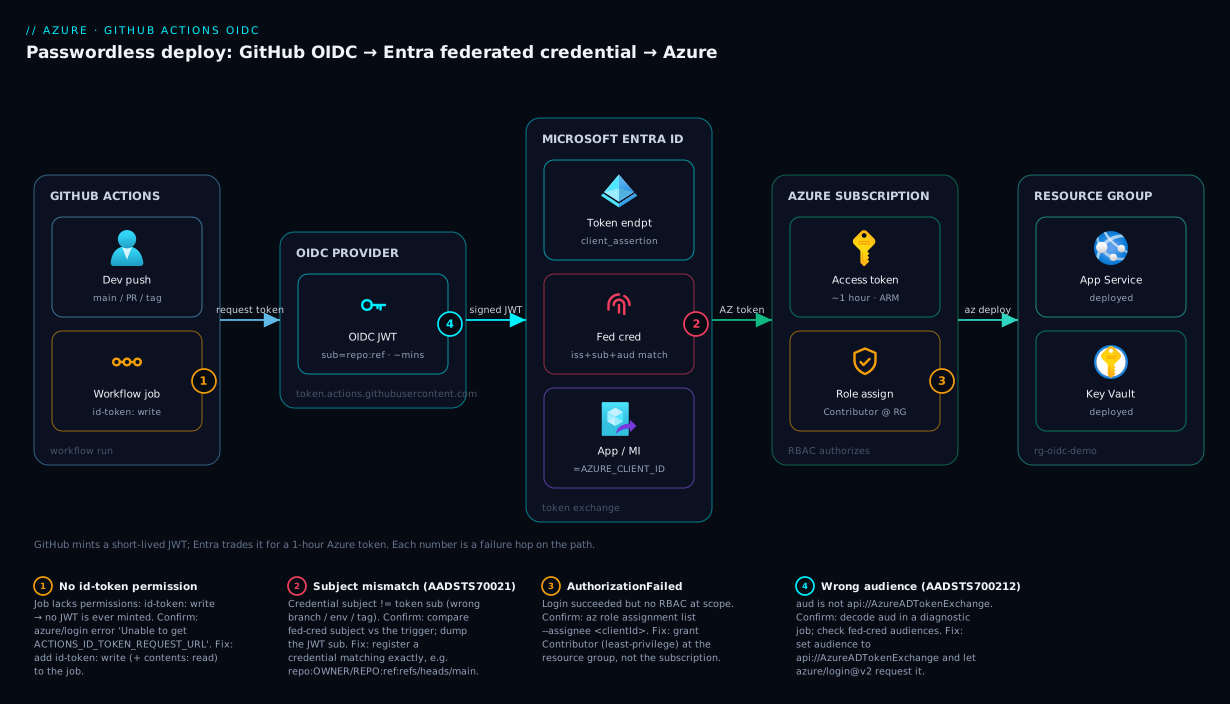
Read the diagram left to right and you are reading the token’s life. On the far left, a developer pushes to main (or opens a PR, or triggers a release), which starts a GitHub Actions workflow run. The job declares permissions: id-token: write, so the runner asks the GitHub OIDC provider for a signed JWT whose subject encodes repo:OWNER/REPO:ref:refs/heads/main and whose audience is api://AzureADTokenExchange. That JWT travels to Microsoft Entra ID, where the azure/login step presents it as a client assertion to the token endpoint. Entra verifies GitHub’s signature, then checks the token’s issuer + subject + audience against the federated identity credential stored on your app registration. On an exact match — and only then — Entra hands back a short-lived Azure access token.
From that point the flow enters the Azure subscription. The service principal, carrying its newly-minted token, runs az deployment group create against the resource group, where its Contributor role assignment (scoped to that RG, nothing wider) authorizes the create. The deployment lands real resources — say an App Service plus its Key Vault — and the job finishes. The numbered badges mark the four hops that fail in practice: a missing id-token: write (no token is ever minted), a subject mismatch (AADSTS70021 at Entra), a missing role assignment (AuthorizationFailed at the subscription), and a wrong audience (AADSTS700212). Trace any failure to its badge and you know exactly which hop lied.
Real-world scenario
Contoso Retail ran fourteen GitHub repositories that deployed to Azure — storefronts, internal APIs, a data pipeline, infrastructure modules. Every repo carried the same AZURE_CREDENTIALS secret: a single Owner-scoped service principal at the subscription, with a client secret set to the two-year maximum. It had been created during a hackathon eighteen months earlier and copied everywhere because it “just worked.”
Two things happened in the same quarter. First, the secret hit its expiry. On a Tuesday morning, twelve pipelines failed within an hour, all with AADSTS7000215: Invalid client secret is provided. The platform team scrambled, minted a fresh secret, and — because there was no automation — hand-updated the secret in fourteen repositories over an afternoon, with two typos that caused a further day of “why is this repo still failing.” Second, a security review flagged that a pull_request workflow in a public-facing repo echoed environment variables for debugging, and the reviewer demonstrated that a malicious PR could have printed secrets.AZURE_CREDENTIALS to the build log. The same subscription-Owner secret was, in effect, one careless PR away from full subscription compromise.
The remediation was an OIDC migration, run over a sprint. The platform team created one user-assigned managed identity per environment (mi-deploy-dev, mi-deploy-prod) rather than one giant principal. Each got federated credentials scoped to GitHub Environments: repo:contoso/<repo>:environment:dev and :environment:prod. The prod environment was given required reviewers in GitHub, so a production deploy now needs a human approval before the OIDC token is even minted. RBAC was tightened from subscription-Owner to Contributor on the specific resource group each app deployed into; the data pipeline’s identity got AcrPush on its registry and nothing else.
The workflow change per repo was three lines: add permissions: id-token: write, swap the azure/login step from creds: ${{ secrets.AZURE_CREDENTIALS }} to client-id + tenant-id + subscription-id, and delete the secret. The numbers afterward: zero stored Azure secrets across all fourteen repos; nothing to rotate (no more expiry outages); blast radius cut from “subscription Owner” to “one resource group, for one hour”; and full provenance — the Entra sign-in logs now show exactly which repo and environment requested each token. The one snag during rollout was the data-pipeline repo, which deployed from both main and a release/* branch family: the team initially registered only refs/heads/main and the release deploys failed with AADSTS70021. They added a second federated credential for the release branch (later consolidated onto the environment subject), and the migration was done — org-wide stored Azure secrets: zero.
Advantages and disadvantages
| Advantages | Disadvantages |
|---|---|
| No stored secret — nothing to leak or exfiltrate | Slightly more upfront setup than pasting one JSON blob |
| No rotation — credential is per-job and self-expiring | Subject must match exactly; easy to mis-type on day one |
| Bound to workflow context (repo/branch/env) | Max 20 federated credentials per identity object |
| Short-lived token (~1 hour) limits blast radius | No classic wildcards in subject (need flexible-claims for patterns) |
| Full provenance in Entra sign-in logs | Requires id-token: write and GitHub-hosted-style OIDC support |
| Pairs with GitHub Environment approvals for prod gating | Multiple matching credentials → AADSTS700213 if careless |
| Works for app reg or user-assigned managed identity | Token-dump debugging must be handled carefully (don’t leak it) |
When the advantages dominate: essentially always for GitHub-Actions-to-Azure CI/CD. The only places the legacy secret lingers defensibly are systems that genuinely cannot present an OIDC token (some third-party CI without an OIDC provider) or air-gapped scenarios. For everything running in GitHub Actions, OIDC is strictly better. The disadvantages are real but small: the setup is a one-time cost, and the “exact subject” rule that trips people initially is the very thing that makes the trust safe. The 20-credential cap pushes you toward environment-scoped subjects (one per environment) rather than one-per-branch sprawl, which is the better design anyway.
Hands-on lab
This is the centerpiece. You will build the full chain — app registration, federated credential, RBAC, and a working deploy workflow — three ways: the Azure portal, the az CLI, and Bicep. Do the CLI path first (it is the fastest and most reproducible), then the portal walkthrough so you can recognize the UI, then the Bicep version for infra-as-code. Each path ends in the same place: a green workflow run that deploys a resource with no stored secret.
Lab prerequisites and naming
| Item | Value used in this lab | Your value |
|---|---|---|
| GitHub repo | OWNER/REPO (e.g. contoso/oidc-demo) |
your repo |
| Branch to deploy from | main |
your branch |
| Resource group | rg-oidc-demo |
pick one |
| Location | centralindia |
nearest region |
| App registration name | gh-oidc-demo |
pick one |
| Federated credential name | gh-oidc-demo-main |
pick one |
| Audience (fixed) | api://AzureADTokenExchange |
(do not change) |
| Role | Contributor |
least-privilege |
You need: an Azure subscription where you can create resource groups and assign roles (you must be Owner or User Access Administrator on the scope to grant RBAC), permission to create an app registration in your tenant (Application Developer role or the tenant allows user app registration), and a GitHub repo you can edit. All Azure commands run in Cloud Shell or a local az session (az login).
Path A — the az CLI (do this first)
Step 1 — Set variables and create the resource group.
# Adjust these four lines, then paste the rest as-is.
GH_ORG="contoso"            # GitHub org/user
GH_REPO="oidc-demo"         # GitHub repository name
RG="rg-oidc-demo"
LOCATION="centralindia"

SUBSCRIPTION_ID=$(az account show --query id -o tsv)
TENANT_ID=$(az account show --query tenantId -o tsv)
az group create --name "$RG" --location "$LOCATION" -o table
Expected output: a table row showing rg-oidc-demo with provisioningState = Succeeded.
Step 2 — Create the app registration and its service principal.
APP_NAME="gh-oidc-demo"
# Create the app registration; capture its appId (this becomes AZURE_CLIENT_ID).
CLIENT_ID=$(az ad app create --display-name "$APP_NAME" --query appId -o tsv)
# Create the service principal for that app (the object RBAC is granted to).
az ad sp create --id "$CLIENT_ID" -o none
echo "CLIENT_ID=$CLIENT_ID"
echo "TENANT_ID=$TENANT_ID"
echo "SUBSCRIPTION_ID=$SUBSCRIPTION_ID"
Expected output: a GUID for CLIENT_ID. Copy all three IDs — they go into GitHub as variables (not secrets) in Step 6. Note there is no secret anywhere in this command; that is the whole point.
Step 3 — Add the federated identity credential. This is the trust rule. The subject must match the token GitHub will emit for a push to main.
SUBJECT="repo:${GH_ORG}/${GH_REPO}:ref:refs/heads/main"

az ad app federated-credential create --id "$CLIENT_ID" --parameters "{
  \"name\": \"gh-oidc-demo-main\",
  \"issuer\": \"https://token.actions.githubusercontent.com\",
  \"subject\": \"${SUBJECT}\",
  \"audiences\": [\"api://AzureADTokenExchange\"],
  \"description\": \"Deploys from main via GitHub Actions OIDC\"
}"
Expected output: JSON echoing the credential with your subject, issuer, and audiences. Validate it landed:
az ad app federated-credential list --id "$CLIENT_ID" \
  --query "[].{name:name, subject:subject, audience:audiences[0]}" -o table
You should see one row with subject = repo:contoso/oidc-demo:ref:refs/heads/main and audience = api://AzureADTokenExchange. If the subject here doesn’t match what your workflow triggers on, you will get AADSTS70021 later — fix it now.
Step 4 — Grant RBAC at the resource-group scope (least privilege).
SCOPE="/subscriptions/${SUBSCRIPTION_ID}/resourceGroups/${RG}"
az role assignment create \
  --assignee "$CLIENT_ID" \
  --role "Contributor" \
  --scope "$SCOPE" -o table
Expected output: a table row showing the role assignment with roleDefinitionName = Contributor and your scope. Validate:
az role assignment list --assignee "$CLIENT_ID" --scope "$SCOPE" \
  --query "[].{role:roleDefinitionName, scope:scope}" -o table
One row, Contributor, scoped to rg-oidc-demo. Not the subscription — the resource group.
Step 5 — Add the deploy artifact to your repo. Commit a tiny Bicep file the workflow will deploy. This proves the token works against ARM.
mkdir -p infra
cat > infra/storage.bicep <<'EOF'
// Minimal, free-to-deploy-and-delete resource to prove the OIDC deploy works.
param location string = resourceGroup().location
@minLength(3) @maxLength(24)
param storageName string = 'oidc${uniqueString(resourceGroup().id)}'

resource sa 'Microsoft.Storage/storageAccounts@2023-05-01' = {
  name: storageName
  location: location
  sku: { name: 'Standard_LRS' }
  kind: 'StorageV2'
  properties: { minimumTlsVersion: 'TLS1_2', allowBlobPublicAccess: false }
}

output storageAccount string = sa.name
EOF
(Storage account names must be globally unique and lowercase; uniqueString handles that.)
Step 6 — Set the three IDs as GitHub repository variables. These are not secrets — a client ID, tenant ID, and subscription ID are identifiers, not credentials, and there is no password to hide. Using gh:
gh variable set AZURE_CLIENT_ID --body "$CLIENT_ID" --repo "${GH_ORG}/${GH_REPO}"
gh variable set AZURE_TENANT_ID --body "$TENANT_ID" --repo "${GH_ORG}/${GH_REPO}"
gh variable set AZURE_SUBSCRIPTION_ID --body "$SUBSCRIPTION_ID" --repo "${GH_ORG}/${GH_REPO}"
(Or in the UI: Settings → Secrets and variables → Actions → Variables → New repository variable.) Expected: three variables listed under the repo’s Actions variables.
Step 7 — Create the workflow. This is the passwordless deploy. Note the two critical lines: permissions: id-token: write and an azure/login@v2 step with no creds.
# .github/workflows/deploy.yml
name: Deploy to Azure (OIDC)

on:
  push:
    branches: [ main ]
  workflow_dispatch:

permissions:
  id-token: write     # REQUIRED — lets the job mint an OIDC token
  contents: read      # to checkout the repo

jobs:
  deploy:
    runs-on: ubuntu-latest
    steps:
      - uses: actions/checkout@v4

      - name: Azure login (passwordless, via OIDC)
        uses: azure/login@v2
        with:
          client-id: ${{ vars.AZURE_CLIENT_ID }}
          tenant-id: ${{ vars.AZURE_TENANT_ID }}
          subscription-id: ${{ vars.AZURE_SUBSCRIPTION_ID }}
          # NOTE: no `creds:` — that's the legacy secret path we are removing.

      - name: Deploy Bicep to the resource group
        uses: azure/cli@v2
        with:
          azcliversion: latest
          inlineScript: |
            az deployment group create \
              --resource-group rg-oidc-demo \
              --template-file infra/storage.bicep \
              --query "properties.outputs.storageAccount.value" -o tsv
Step 8 — Run it and read the output. Commit and push to main (or trigger via Actions → Deploy to Azure (OIDC) → Run workflow).
git add infra/storage.bicep .github/workflows/deploy.yml
git commit -m "OIDC passwordless deploy"
git push origin main
Expected output in the run log: the Azure login step prints Login successful (and that it used OIDC/federated token, not a secret). The Deploy step ends by printing the new storage account name (e.g. oidc7k3f...). In the Azure portal, rg-oidc-demo now contains a storage account. You just deployed to Azure with zero stored secrets.
Step 9 — Validate the trust end to end. Confirm the resource exists and that the sign-in came through the federated credential:
az resource list -g "$RG" --query "[].{name:name, type:type}" -o table
# Optional: in Entra, Sign-in logs → Service principal sign-ins shows the app
# authenticating with credential type 'Federated Identity Credential'.
Path B — the Azure portal (recognize the UI)
The portal path produces the same three objects. Do it once so you can navigate and troubleshoot in the UI.
| # | Portal navigation | What you do | Expected result |
|---|---|---|---|
| 1 | Microsoft Entra ID → App registrations → New registration | Name gh-oidc-demo; Single tenant; no redirect URI; Register |
App created; note Application (client) ID and Directory (tenant) ID |
| 2 | The app → Certificates & secrets → Federated credentials → Add credential | Scenario: GitHub Actions deploying Azure resources | A guided form appears |
| 3 | Fill the federated form | Organization contoso, Repository oidc-demo, Entity Branch, Branch main; Name gh-oidc-demo-main |
Subject auto-builds to repo:contoso/oidc-demo:ref:refs/heads/main |
| 4 | Save | — | Credential listed; audience shows api://AzureADTokenExchange |
| 5 | Resource group rg-oidc-demo → Access control (IAM) → Add → Add role assignment |
Role Contributor; Members → User, group, or service principal → select gh-oidc-demo |
Role assignment created at RG scope |
| 6 | Subscriptions → your sub → Overview | Copy the Subscription ID | You now have all three IDs |
| 7 | GitHub repo → Settings → Secrets and variables → Actions → Variables | Add AZURE_CLIENT_ID, AZURE_TENANT_ID, AZURE_SUBSCRIPTION_ID |
Three variables set |
| 8 | Add .github/workflows/deploy.yml (Step 7 above) and push |
— | Workflow runs green; resource deployed |
The portal’s “GitHub Actions deploying Azure resources” scenario is the friendliest entry point: it builds the subject string for you from dropdowns, which eliminates the most common typo. If you choose Entity = Environment instead of Branch, it asks for the environment name and emits repo:OWNER/REPO:environment:NAME — use that for production with environment protection rules.
Path C — Bicep (infra-as-code)
For a repeatable, reviewable definition, declare the app registration’s federated credential and the role assignment as code. Two notes: classic app registrations are Microsoft Graph objects, which Bicep manages via the Graph provider (Microsoft.Graph/..., in preview) — so for a pure-ARM/Bicep flow the cleaner, fully-supported path is a user-assigned managed identity, whose federated credential and role assignment are first-class ARM resources. This is also why many teams pick the managed-identity host. Here is that Bicep:
// main.bicep — user-assigned MI + federated credential + RG-scoped Contributor.
// Deploy at resource-group scope: az deployment group create -g rg-oidc-demo -f main.bicep
param location string = resourceGroup().location
param ghOrg string = 'contoso'
param ghRepo string = 'oidc-demo'
param branch string = 'main'

resource mi 'Microsoft.ManagedIdentity/userAssignedIdentities@2023-07-31-preview' = {
  name: 'mi-gh-oidc-demo'
  location: location
}

// The federated credential: trust GitHub's OIDC for this repo + branch.
resource fic 'Microsoft.ManagedIdentity/userAssignedIdentities/federatedIdentityCredentials@2023-07-31-preview' = {
  parent: mi
  name: 'gh-oidc-demo-main'
  properties: {
    issuer: 'https://token.actions.githubusercontent.com'
    subject: 'repo:${ghOrg}/${ghRepo}:ref:refs/heads/${branch}'
    audiences: [ 'api://AzureADTokenExchange' ]
  }
}

// Grant Contributor on THIS resource group to the managed identity.
var contributorRoleId = 'b24988ac-6180-42a0-ab88-20f7382dd24c' // Contributor (built-in)
resource ra 'Microsoft.Authorization/roleAssignments@2022-04-01' = {
  name: guid(resourceGroup().id, mi.id, contributorRoleId)
  properties: {
    roleDefinitionId: subscriptionResourceId('Microsoft.Authorization/roleDefinitions', contributorRoleId)
    principalId: mi.properties.principalId
    principalType: 'ServicePrincipal'
  }
}

output clientId string = mi.properties.clientId       // → AZURE_CLIENT_ID
output principalId string = mi.properties.principalId
Deploy and read the outputs:
az deployment group create -g rg-oidc-demo -f main.bicep \
  --query "properties.outputs.clientId.value" -o tsv
Expected output: the managed identity’s client ID. Put that into AZURE_CLIENT_ID (the tenant and subscription IDs are unchanged) and use the same workflow from Step 7 — azure/login@v2 does not care whether the client ID belongs to an app registration or a managed identity. The federated-credential equivalent for the CLI managed-identity path, if you prefer not to use Bicep:
az identity create -g rg-oidc-demo -n mi-gh-oidc-demo
MI_CLIENT_ID=$(az identity show -g rg-oidc-demo -n mi-gh-oidc-demo --query clientId -o tsv)
MI_PRINCIPAL_ID=$(az identity show -g rg-oidc-demo -n mi-gh-oidc-demo --query principalId -o tsv)
az identity federated-credential create -g rg-oidc-demo --identity-name mi-gh-oidc-demo \
  --name gh-oidc-demo-main \
  --issuer "https://token.actions.githubusercontent.com" \
  --subject "repo:${GH_ORG}/${GH_REPO}:ref:refs/heads/main" \
  --audiences "api://AzureADTokenExchange"
az role assignment create --assignee-object-id "$MI_PRINCIPAL_ID" \
  --assignee-principal-type ServicePrincipal \
  --role Contributor --scope "/subscriptions/${SUBSCRIPTION_ID}/resourceGroups/${RG}"
Validation checkpoints
Before teardown, confirm each link in the chain is sound. If a row fails, the failure mode tells you exactly which object is wrong:
| Checkpoint | Command / where to look | Pass criterion | If it fails |
|---|---|---|---|
| Identity exists | az ad sp show --id $CLIENT_ID (or az identity show ...) |
Returns the principal | Re-run create; check you copied the right appId/clientId |
| Federated cred present | az ad app federated-credential list --id $CLIENT_ID |
Subject = your trigger context | Add/fix the credential (Step 3) — guards against AADSTS70021 |
| RBAC granted | az role assignment list --assignee $CLIENT_ID --scope $SCOPE |
One Contributor row at the RG |
Grant the role (Step 4) — guards against AuthorizationFailed |
| GitHub variables set | Repo → Settings → Variables | Three AZURE_* variables |
Re-set them (Step 6) |
| Login step | Workflow run → Azure login log | Login successful (federated) |
Check id-token: write + the three IDs |
| Deploy succeeded | az resource list -g $RG |
The storage account appears | Read the deploy step’s AADSTS/RBAC error and map it above |
Teardown
Remove everything so you are not billed and no stale identity lingers:
# 1) Delete the resource group (storage account, and the MI if you used Path C)
az group delete --name rg-oidc-demo --yes --no-wait

# 2) If you used Path A (app registration), delete it from Entra
az ad app delete --id "$CLIENT_ID"

# 3) In GitHub: delete the three Actions variables and the workflow file
gh variable delete AZURE_CLIENT_ID --repo "${GH_ORG}/${GH_REPO}"
gh variable delete AZURE_TENANT_ID --repo "${GH_ORG}/${GH_REPO}"
gh variable delete AZURE_SUBSCRIPTION_ID --repo "${GH_ORG}/${GH_REPO}"
Expected: the resource group enters Deleting; az ad app list --display-name gh-oidc-demo returns empty after the delete.
Common mistakes & troubleshooting
These are the failures you will actually hit, in rough order of frequency. Each is symptom → root cause → how to confirm → fix.
| # | Symptom (error / behaviour) | Root cause | Confirm with | Fix |
|---|---|---|---|---|
| 1 | Unable to get ACTIONS_ID_TOKEN_REQUEST_URL / “Please make sure to give write permissions to id-token” |
permissions: id-token: write missing |
Read the failing azure/login log line |
Add permissions: { id-token: write, contents: read } to the job |
| 2 | AADSTS70021: No matching federated identity record found for presented assertion subject |
Federated-credential subject ≠ the token’s sub |
Compare credential subject vs the trigger; dump the JWT subject (diagnostic job) | Register a credential whose subject exactly matches (branch/env/tag) |
| 3 | AADSTS700213: No matching federated identity record found ... multiple matching |
Two+ credentials match the same token | List federated creds; look for overlapping subjects | Remove the duplicate/overlapping credential |
| 4 | AADSTS700212: No matching federated identity record found ... audience |
Audience mismatch (not api://AzureADTokenExchange) |
Inspect the credential’s audiences |
Set audience to api://AzureADTokenExchange (and let azure/login request it) |
| 5 | AuthorizationFailed ... does not have authorization to perform action |
No role assignment, or wrong scope/role | az role assignment list --assignee <clientId> |
Grant Contributor (or the right role) at the target scope |
| 6 | Login failed with Error: Az.Accounts ... unable to get token / login step hangs |
Wrong client-id/tenant-id, or app reg has no service principal |
Verify the three IDs; az ad sp show --id <clientId> |
Use the correct IDs; run az ad sp create --id <appId> |
| 7 | AADSTS7000215: Invalid client secret is provided |
Workflow still uses the old creds: secret path |
Check the azure/login step for creds: |
Remove creds:; switch to client-id/tenant-id/subscription-id |
| 8 | AADSTS900561: The endpoint only accepts POST requests |
Malformed token-endpoint call (often a copy-paste of a custom curl) | Compare with azure/login@v2 defaults |
Use azure/login@v2 as-is; don’t hand-roll the token POST |
| 9 | Works on main, fails on a tag/PR/release branch |
Subject only registered for one ref type | Trigger context vs credential subject | Add a credential per ref type (or use environment subject) |
| 10 | Deploy works locally but PR runs can’t get a token | Fork PRs don’t get id-token write by default (security) |
Note the run is from a fork | Use pull_request from same-repo branches, or deploy on push/environment only |
| 11 | Cannot add federated identity credential / “limit reached” |
More than 20 federated credentials on the object | az ad app federated-credential list --id <id> |
Consolidate onto environment-scoped subjects; you get max 20 |
| 12 | Token requested but aud is api://AzureADTokenExchange ignored / default audience |
azure/login not asked for the Azure audience (rare custom setups) |
Decode aud in the diagnostic job |
Let azure/login@v2 set the audience; don’t override it |
For fast lookup mid-incident, the AADSTS codes you will actually see from the token exchange, decoded:
| Code | Where it surfaces | Literal meaning | One-line fix |
|---|---|---|---|
| AADSTS70021 | azure/login step |
No federated record matched the subject | Register a credential whose subject equals the token sub exactly |
| AADSTS700212 | azure/login step |
No match on audience | Use api://AzureADTokenExchange |
| AADSTS700213 | azure/login step |
Multiple credentials matched | Remove the overlapping/duplicate credential |
| AADSTS7000215 | azure/login step |
Invalid client secret | You’re still on the legacy creds: path — remove it |
| AADSTS900561 | azure/login step |
Endpoint only accepts POST | Don’t hand-roll the token call; use azure/login@v2 |
| AADSTS50034 / 700016 | azure/login step |
App/principal not found in tenant | Wrong client-id/tenant-id; or run az ad sp create --id <appId> |
| AuthorizationFailed (not AADSTS) | A later az step |
Authenticated but no RBAC | Grant the least-privilege role at the target scope |
The three highest-value clarifications:
| Distinction | The trap | How to tell them apart |
|---|---|---|
70021 (subject) vs 700212 (audience) vs 700213 (multiple) |
All are “no matching federated identity record” — the suffix differs | Read the suffix and the trailing clause: subject, audience, or multiple matching |
| Auth failure (Entra) vs authz failure (subscription) | Both look like “the deploy didn’t work” | AADSTS* = the login step (identity); AuthorizationFailed = a later az step (RBAC) |
| OIDC not configured vs old secret still present | A half-migrated workflow can fail either way | id-token/70021 errors = OIDC path; 7000215 = the legacy creds: secret is still wired up |
Reading AADSTS70021 precisely. The full error usually includes both the presented subject and (sometimes) the assertion details. The single most reliable fix is to run the diagnostic job from the subject section, copy the exact sub string GitHub emitted, and paste it verbatim into a new federated credential. Ninety percent of 70021 cases are refs/heads/main registered while the workflow ran on a differently-named branch, an environment deploy where the credential was branch-scoped, or a tag build with no tag credential.
Best practices
- Prefer GitHub Environment-scoped subjects for production.
repo:OWNER/REPO:environment:productionlets you attach required reviewers and wait timers in GitHub, so a human gates the deploy and the Azure trust is to the environment, not a branch. - One identity per environment, least-privilege per scope.
mi-deploy-devwithContributoronrg-app-dev;mi-deploy-prodonrg-app-prod. Never one subscription-Ownerprincipal shared across everything. - Scope RBAC to the resource group, not the subscription. Grant exactly the role the workflow needs (
Contributor,AcrPush,Website Contributor) at the tightest scope. - Set
permissions:explicitly and minimally at the job level.id-token: writeandcontents: read— nothing more. Don’t grantid-token: writeto jobs that don’t deploy. - Pin the action version (
azure/login@v2, ideally to a SHA in high-security repos) so a compromised tag can’t change auth behaviour under you. - Use repository/environment variables for the three IDs, not secrets. Client/tenant/subscription IDs are identifiers; treating them as secrets adds friction and implies a confidentiality they don’t have.
- Never leave token-dumping in a shared workflow. Use the diagnostic subject-dump once, then remove it; printing the raw OIDC JWT to logs is a (short-lived) credential leak.
- Branch-protect the branches whose subjects you trust. If
refs/heads/mainis a trusted subject, require PR review and status checks onmainso nobody can push deploy-capable code unreviewed. - Delete the old
AZURE_CREDENTIALSsecret after migrating. A dormant long-lived secret is still a liability; remove it from every repo and revoke the underlying SP credential. - Document each credential’s purpose in its
description; keep a registry mapping repo/branch/environment to identity and scope. - Watch the 20-credential cap. It’s a design smell if you approach it — consolidate onto environment subjects instead of one-per-branch.
- Audit with Entra sign-in logs. Service-principal sign-ins now carry the credential type and the calling context; alert on unexpected subjects or failures.
For reference, the workflow permissions: you actually need for an OIDC deploy (grant the minimum; everything unlisted defaults to none under the recommended setting):
| Permission | Set to | Why | Risk if over-granted |
|---|---|---|---|
id-token |
write |
Mandatory — mints the OIDC JWT | None to add; required |
contents |
read |
Checkout the repo | write lets the job push to the repo |
packages |
only if pushing to GHCR | Container publish | Avoid unless needed |
pull-requests |
only if commenting on PRs | e.g. what-if comments |
write can edit PRs |
| everything else | (omit) | Defaults to none | Broad tokens widen blast radius |
Security notes
The security win is structural: there is no long-lived bearer secret to steal, so the most common CI/CD credential-leak vector simply disappears. But OIDC is only as tight as the trust you register, so:
- The subject is the perimeter. A federated credential for
repo:contoso/shop:ref:refs/heads/mainmeans any workflow on that branch of that repo can obtain the token. If an attacker can merge tomain, they can deploy. Therefore the trusted branch must be branch-protected (required reviews, no direct pushes), or use an environment subject with required reviewers so a human approves before the token is minted. - Least privilege still applies after auth. OIDC authenticates; RBAC authorizes. A subject-scoped credential with
Ownerat subscription is still dangerous. Keep the role minimal and the scope to a resource group. - Fork pull requests are deliberately limited. GitHub does not grant
id-token: writeto workflows triggered bypull_requestfrom forks (and restricts secrets), precisely so a malicious fork can’t mint your Azure token. Don’t work around this; deploy onpushto protected branches or via environments with approvals. - Audience pinning matters.
api://AzureADTokenExchangeensures the token was minted for Azure. Don’t accept a generic audience. - Identity hygiene. Prefer a user-assigned managed identity when you want creation/cleanup tied to the resource group and to avoid needing Entra app-admin rights; prefer an app registration for central, cross-subscription identity ownership. Either way, one identity per environment and per blast-radius boundary.
- Don’t print the token. The OIDC JWT is a (short-lived) credential. Decode only the
sub/aud/issfor debugging, and remove diagnostic steps afterward; never echo the raw.value.
The identity model here complements broader Entra access governance — pair it with the access-review and conditional-access posture in Conditional Access: Deploy Baseline Policies in Report-Only for the human side of the same tenant.
Cost & sizing
The headline: OIDC federated identity is free. App registrations, service principals, user-assigned managed identities, and federated credentials carry no Azure charge. The token exchange itself is free. You pay only for what the workflow deploys. So the cost story is really about the avoided cost of the legacy approach and the resources your pipeline creates.
| Cost driver | Charge | Notes |
|---|---|---|
| App registration / service principal | Free | Directory object; no cost |
| User-assigned managed identity | Free | An Azure resource, but not billed |
| Federated credential | Free | Up to 20 per identity object |
| OIDC token exchange | Free | No per-call charge |
| GitHub Actions minutes | Per your GitHub plan | Public repos free; private repos have included minutes |
| What you actually deploy | Normal Azure rates | The storage account in the lab is < ₹5/month at Standard_LRS; delete it in teardown |
| Avoided: rotation outages | (savings) | No more org-wide failures when a secret expires |
Sizing notes that matter:
- The 20-credential limit is the only “sizing” constraint. It is per identity object (app registration or MI). Design with environment-scoped subjects (one per environment) rather than one-per-branch to stay well under it.
- Token lifetime is fixed (~1 hour) and not a cost lever — long-running jobs that exceed it should re-login or be split;
azure/loginrefreshes within the job’s life. - Lab cost is effectively zero if you run teardown: the only billable thing is the
Standard_LRSstorage account, which is fractions of a rupee for the minutes it exists.
For the surrounding spend hygiene (budgets, alerts on whatever the pipeline provisions), the foundations are in Azure Cost Management: Budgets & Alerts in the First 30 Days.
Interview & exam questions
These map to AZ-400 (DevOps Engineer Expert) — secure pipeline auth, service connections, secrets management — and SC-300 (Identity & Access Administrator) — workload identities and federation. AZ-104 touches the RBAC and app-registration basics.
Q1. What is an OIDC federated identity credential, and why is it preferred over a client secret for GitHub Actions?
It is a trust rule on an Entra app/managed identity that accepts a short-lived OIDC token from GitHub (matched on issuer, subject, audience) and exchanges it for an Azure access token. It is preferred because no long-lived secret is stored, nothing needs rotation, and the trust is bound to a specific workflow context — eliminating the leak/rotation problems of AZURE_CREDENTIALS.
Q2. Name the three claims a federated credential matches and their required values for GitHub→Azure.
issuer = https://token.actions.githubusercontent.com; subject = the workflow context, e.g. repo:OWNER/REPO:ref:refs/heads/main; audience = api://AzureADTokenExchange. All three must match the presented token or Entra returns an AADSTS7002xx “no matching record” error.
Q3. Your workflow runs on main but azure/login fails with AADSTS70021. What happened?
The federated credential’s subject does not match the token’s sub. Most often the credential is registered for a different branch/environment/tag. Fix by registering a credential whose subject exactly equals what GitHub emits for that trigger (e.g. dump the JWT subject and copy it).
Q4. What workflow permission is mandatory for OIDC, and what happens without it?
permissions: id-token: write at the job (or workflow) level. Without it, GitHub will not issue an OIDC token and azure/login fails with “Unable to get ACTIONS_ID_TOKEN_REQUEST_URL”.
Q5. App registration vs user-assigned managed identity as the federated-credential host — when do you pick each?
App registration for central, cross-subscription identity ownership (and multi-tenant). User-assigned managed identity when you want the identity created/destroyed with a resource group, manage it purely as ARM/Bicep, and avoid needing Entra app-admin permissions. Both work identically with azure/login.
Q6. After a successful OIDC login, the deploy fails with AuthorizationFailed. Auth or authorization problem?
Authorization. The login (authentication) succeeded — the identity is valid — but it lacks an RBAC role at the target scope. Grant the least-privilege role (e.g. Contributor) at the resource group.
Q7. How do GitHub Environments improve the security of an OIDC deploy?
The subject becomes repo:OWNER/REPO:environment:NAME, decoupled from branch. You can attach required reviewers, wait timers, and branch restrictions to the environment, so a human approval gates production and the Azure trust is to that environment rather than to a pushable branch.
Q8. What is the maximum number of federated credentials per identity, and how should that shape your design? Twenty per app registration or managed identity. It pushes you toward environment-scoped subjects (one per environment) rather than registering one credential per branch, which is both within the limit and the cleaner design.
Q9. A pull-request workflow from a fork can’t obtain an Azure token. Why, and is that a bug?
Not a bug — it’s by design. GitHub does not grant id-token: write (and restricts secrets) to fork-triggered PR workflows, so a malicious fork can’t mint your Azure token. Deploy on push to protected branches or via environments with approvals instead.
Q10. Which audience value must the federated credential use, and what does it protect against?
api://AzureADTokenExchange. It binds the token to Azure as the intended recipient, so a token minted for a different audience cannot be replayed against Entra’s token-exchange endpoint.
Q11. You see AADSTS700213 — what’s the cause?
Multiple federated credentials on the identity match the same presented token (overlapping subjects). Remove the duplicate/overlapping credential so exactly one matches.
Q12. How would you migrate an existing repo from AZURE_CREDENTIALS to OIDC with zero downtime?
Create the app reg/MI + federated credential + RBAC alongside the existing setup; add id-token: write and switch the azure/login step to client-id/tenant-id/subscription-id; run a test deploy; once green, delete the AZURE_CREDENTIALS secret and revoke the old SP credential.
Quick check
- What three claims does Entra match a GitHub OIDC token against, and what must the
audiencebe? - Your deploy job has no
permissions:block. Willazure/login@v2(OIDC mode) work? Why or why not? - You deploy from both
mainandrelease/2026and only registered a credential formain. What error do release deploys throw and how do you fix it? - After login succeeds,
az deployment group createreturnsAuthorizationFailed. Is the federated credential wrong? What do you fix? - Why are the client ID, tenant ID, and subscription ID stored as GitHub variables rather than secrets?
Answers
issuer(https://token.actions.githubusercontent.com),subject(therepo:...context), andaudience— which must beapi://AzureADTokenExchange.- No. Under the recommended security defaults the token permissions default to none, so without
id-token: writeGitHub won’t issue the OIDC token andazure/loginfails to getACTIONS_ID_TOKEN_REQUEST_URL. Addpermissions: { id-token: write, contents: read }. AADSTS70021: No matching federated identity record foundfor the release runs, because no credential’s subject matchesrepo:OWNER/REPO:ref:refs/heads/release/2026. Fix by adding a second federated credential for that ref (or move to an environment-scoped subject).- No — the federated credential is fine (authentication worked). It’s an authorization gap: the principal has no RBAC at the target scope. Grant
Contributor(or the least-privilege role) on the resource group. - They are identifiers, not credentials — there is no password to protect. Treating them as secrets adds friction and falsely implies confidentiality; the actual security comes from the federated-credential trust + RBAC, not from hiding these GUIDs.
Glossary
- OIDC (OpenID Connect): An identity layer over OAuth2; here, GitHub is the OIDC provider issuing signed tokens that Azure trusts.
- Federated identity credential: A trust rule on an Entra app registration or managed identity that accepts external OIDC tokens matching a specific issuer, subject, and audience.
- App registration: The application-identity definition in Entra ID; backs a service principal that can hold federated credentials and receive RBAC.
- Service principal: The instance (enterprise application) of an app registration in a tenant — the object Azure RBAC is assigned to.
- User-assigned managed identity: A standalone Azure identity resource that can also host federated credentials; created with
az identity create, cleaned up with its resource group. - Subject (
sub): The OIDC claim naming the workflow context, e.g.repo:OWNER/REPO:ref:refs/heads/main; must match the credential exactly. - Audience (
aud): The intended recipient claim; for GitHub→Azure it must beapi://AzureADTokenExchange. - Issuer (
iss): The token signer; for GitHub Actions it ishttps://token.actions.githubusercontent.com. id-token: write: The GitHub Actions job permission that allows minting an OIDC token; mandatory for the exchange.azure/login@v2: The Marketplace Action that performs the token exchange and authenticates subsequentazcommands.- Client assertion: The OIDC JWT presented to Entra’s token endpoint in place of a client secret (
client_assertion_type=...jwt-bearer). - GitHub Environment: A named deploy target with optional protection rules; lets the subject be
environment:NAMEand gate deploys with reviewers. - RBAC (role-based access control): Azure’s authorization model — a principal gets a role at a scope; authorizes what the authenticated identity may do.
- AADSTS70021 / 700212 / 700213: Entra errors for “no matching federated identity record”: subject mismatch, audience mismatch, and multiple-matching, respectively.
- Token-exchange endpoint: Entra’s
/oauth2/v2.0/token, where the GitHub JWT is swapped for an Azure access token.
Next steps
- Lock down the identities you just created with the access model in Managed Identity: System-Assigned vs User-Assigned Patterns.
- Solidify the underlying protocol with OIDC & OAuth2 Flows in Entra ID: Authorization Code + PKCE.
- Apply the same passwordless pattern to Terraform pipelines via Terraform on Azure: Provider Authentication 401/403 SPN Troubleshooting.
- Deepen the thing you deployed with Deploy Your First Bicep File From Scratch.
- Clarify the directory objects involved with Entra App Registration vs Enterprise Application Explained.