A global manufacturer is consolidating four business units onto one engineering platform, and each unit shows up with a different identity story: corporate IT lives in Microsoft Entra ID, an acquired SaaS division still runs Okta, the legacy ERP only speaks SAML 2.0, and the new internal API mesh wants nothing but short-lived, audience-scoped OAuth bearer tokens. The mandate from the CISO is blunt — “one front door, one session, and no long-lived passwords in front of the APIs.” Re-platforming every app onto a single IdP is a two-year project nobody funded. The pragmatic answer is a federation broker: PingFederate sits in the middle, accepts SAML browser SSO from whichever IdP owns the user, and then performs RFC 8693 OAuth 2.0 token exchange to mint a fresh, narrowly-scoped JWT for each downstream API call. This guide builds that broker end to end — SAML in, token exchange out — with real config, real CLI, and a rollback path.
Prerequisites
- A licensed PingFederate 12.x cluster (one admin console node + at least two runtime engine nodes behind a load balancer). This guide assumes a Linux install at
/opt/pingfederate. - Java 17 (Temurin or equivalent) on each node, and a load balancer (we use Akamai Global Traffic Management at the edge for TLS termination, anycast, and WAF in front of the runtime nodes).
- An upstream IdP you control: Microsoft Entra ID (Enterprise Application with SAML SSO) and/or Okta (a SAML app). You need admin rights to configure SAML and export IdP metadata.
- HashiCorp Vault reachable from the PingFederate nodes — we use it to store the SAML signing private key, the token-exchange signing key, and the runtime mutual-TLS material, leased to the host rather than baked into the install.
- A downstream resource server (a sample Spring Boot or Node API) that validates JWTs via the OIDC discovery/JWKS endpoint.
curl,jq, andopensslon your workstation; admin API access to PingFederate enabled (port9999).- Terraform with the
pingfederateprovider for the declarative objects, plus a GitHub Actions runner that can reach the admin API for CI promotion.
Target topology
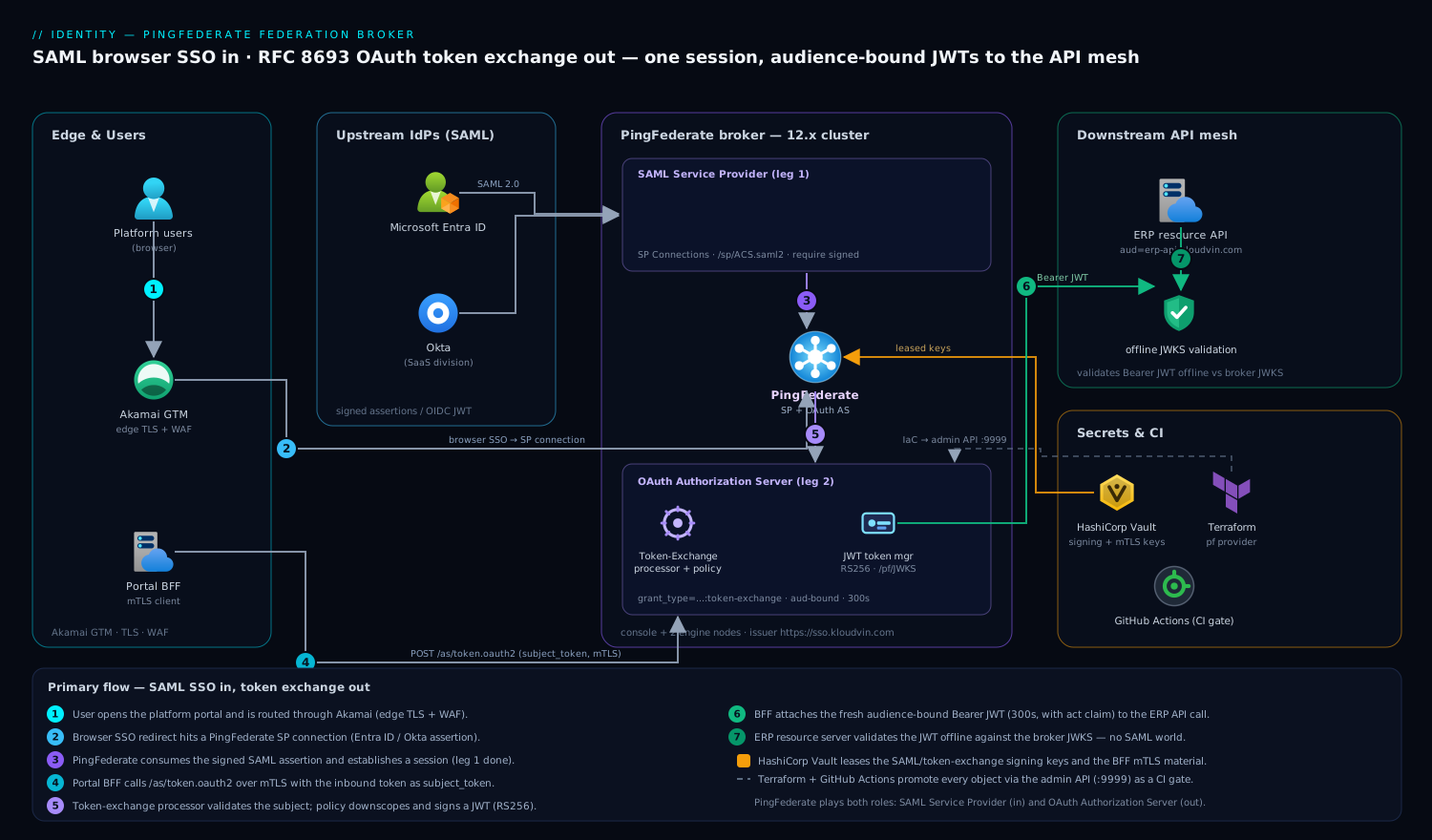
The flow has two distinct legs that share one session, and keeping them separate in your head is the whole game. Leg one is browser SSO over SAML: the user hits the platform portal, gets redirected through Akamai to a PingFederate SP connection that consumes a SAML assertion from Entra ID or Okta and establishes a PingFederate session. Leg two is machine-to-machine token exchange: the portal’s backend-for-frontend (BFF) takes the resulting token and calls PingFederate’s /as/token.oauth2 endpoint with grant_type=urn:ietf:params:oauth:grant-type:token-exchange, handing in the inbound token (a SAML assertion or an Entra/Okta JWT) as the subject_token and asking for a fresh access token whose aud is exactly the downstream API. PingFederate validates the subject, applies your policy, and signs a new JWT. The downstream microservice never sees the SAML world at all — it validates one thing, the broker’s JWKS.
PingFederate plays two roles at once here: a SAML Service Provider (it receives assertions from the upstream IdPs) and an OAuth Authorization Server (it issues tokens to the API mesh). That dual role is exactly why it can broker between the two protocols.
1. Stand up the cluster and seed keys from Vault
Install identically on every node, then differentiate by role in run.properties. The admin console node coordinates; the engine nodes serve runtime traffic.
# On every node — unpack and set the operational mode
cd /opt/pingfederate/bin
# Admin console node:
sed -i 's/^pf.operational.mode=.*/pf.operational.mode=CLUSTERED_CONSOLE/' run.properties
# Each runtime engine node:
sed -i 's/^pf.operational.mode=.*/pf.operational.mode=CLUSTERED_ENGINE/' run.properties

# Point engines at the console for config replication (run.properties)
#   pf.cluster.node.index      unique per node
#   pf.cluster.bind.address    this node's IP
#   pf.cluster.tcp.discovery.initial.hosts  console:7600
Do not let the SAML signing key or the token-exchange signing key live on disk in the clear. Pull them from HashiCorp Vault at boot and write them into the PingFederate keystore, so the secret is leased to the host and rotated centrally rather than committed anywhere:
# Authenticate the node to Vault (AppRole bound to this host's identity)
export VAULT_ADDR="https://vault.internal:8200"
ROLE_ID=$(cat /etc/pf/role_id)
SECRET_ID=$(vault write -field=secret_id auth/approle/role/pingfederate/secret-id)
export VAULT_TOKEN=$(vault write -field=token auth/approle/login \
  role_id="$ROLE_ID" secret_id="$SECRET_ID")

# Fetch the SAML signing keypair (PKCS#12) and import it into PingFederate's store
vault kv get -field=p12 secret/pingfederate/saml-signing | base64 -d > /tmp/saml-signing.p12
keytool -importkeystore \
  -srckeystore /tmp/saml-signing.p12 -srcstoretype PKCS12 \
  -destkeystore /opt/pingfederate/server/default/data/keystore.jks \
  -destalias saml-signing -deststorepass "$(vault kv get -field=kspass secret/pingfederate/keystore)"
shred -u /tmp/saml-signing.p12
Start the console first, then the engines, and confirm they join:
/opt/pingfederate/bin/run.sh &           # console node
# then on each engine:
/opt/pingfederate/bin/run.sh &
# Verify cluster membership from the admin API
curl -sk -u administrator:"$PF_ADMIN_PW" \
  https://pf-console:9999/pf-admin-api/v1/cluster/status | jq '.nodes[].mode'
2. Configure the SAML SP connection to Entra ID (and Okta)
This is leg one — PingFederate as a SAML Service Provider consuming assertions. Export your IdP metadata first; it carries the entity ID, the SSO endpoint, and the signing certificate so you do not transcribe them by hand.
# Entra ID federation metadata (per Enterprise Application)
curl -s "https://login.microsoftonline.com/<TENANT_ID>/federationmetadata/2007-06/federationmetadata.xml?appid=<APP_ID>" \
  -o entra-idp-metadata.xml

# Okta SAML app metadata (App > Sign On > "Identity Provider metadata")
curl -s "https://<your-org>.okta.com/app/<app_id>/sso/saml/metadata" -o okta-idp-metadata.xml
In the PingFederate admin console, create an SP Connection (you are the SP) for each IdP under Authentication > SP Connections > Create Connection:
- Connection Type: Browser SSO Profiles, protocol SAML 2.0.
- Import metadata: upload
entra-idp-metadata.xml. This auto-fills the Partner’s Entity ID (https://sts.windows.net/<tenant>/), the SSO endpoint, and the IdP signing cert. - Assertion Consumer Service (ACS): PingFederate’s endpoint, e.g.
https://sso.kloudvin.com/sp/ACS.saml2, binding POST. - Signature Policy: require signed assertions; encrypt the assertion if your residency rules demand it (Entra supports token encryption with an uploaded cert).
- Attribute Contract: map the inbound
http://schemas.xmlsoap.org/.../emailaddresstoSAML_SUBJECT, and pullhttp://schemas.microsoft.com/ws/2008/06/identity/claims/groupsinto agroupsattribute — you will need group claims for token-exchange scope decisions in step 4.
On the Entra side, register PingFederate’s SP metadata so the trust is mutual. PingFederate publishes it at https://sso.kloudvin.com/pf/federation_metadata.ping?PartnerSpId=<your-sp-id>. The fast path with the Microsoft Graph CLI:
# Set the Entra Enterprise App's reply URL (ACS) and identifier (SP entity ID)
az ad app update --id <APP_ID> \
  --web-redirect-uris "https://sso.kloudvin.com/sp/ACS.saml2" \
  --identifier-uris "https://sso.kloudvin.com"
Repeat the SP-connection creation for the Okta metadata. You now have two upstream SAML IdPs feeding one broker. Validate the raw SAML round-trip in the browser via PingFederate’s SP-initiated SSO test URL before going further:
https://sso.kloudvin.com/sp/startSSO.ping?PartnerIdpId=https://sts.windows.net/<tenant>/
A successful login lands on the configured target and writes a PingFederate session — that is leg one done.
3. Configure the OAuth Authorization Server and clients
Now flip PingFederate into its OAuth Authorization Server role. Enable the AS under System > OAuth Settings > Authorization Server Settings, set the issuer to https://sso.kloudvin.com, and turn on the token exchange grant type at the server level — it is off by default.
Define the access token manager that will mint the downstream JWTs. Use a JWT token manager (not internally-referenced opaque tokens) so resource servers can validate offline against JWKS:
# Create a JWT Access Token Manager via the admin API
curl -sk -u administrator:"$PF_ADMIN_PW" -X POST \
  https://pf-console:9999/pf-admin-api/v1/oauth/accessTokenManagers \
  -H 'Content-Type: application/json' -H 'X-XSRF-Header: PingFederate' -d '{
    "id": "jwt-downstream",
    "name": "Downstream API JWT",
    "pluginDescriptorRef": { "id": "com.pingidentity.pf.access.token.management.plugins.JwtBearerAccessTokenManagementPlugin" },
    "configuration": {
      "fields": [
        { "name": "Token Lifetime", "value": "300" },
        { "name": "JWS Algorithm", "value": "RS256" },
        { "name": "Active Signing Certificate Key ID", "value": "tokenexchange-signing" }
      ]
    },
    "accessControlSettings": { "restrictClients": true },
    "attributeContract": {
      "extendedAttributes": [
        { "name": "sub" }, { "name": "scope" }, { "name": "groups" }, { "name": "act" }
      ]
    }
  }'
Register the OAuth client that the portal’s BFF uses to perform the exchange. It authenticates with mutual TLS (client cert), and it is the only principal allowed to request token exchange:
curl -sk -u administrator:"$PF_ADMIN_PW" -X POST \
  https://pf-console:9999/pf-admin-api/v1/oauth/clients \
  -H 'Content-Type: application/json' -H 'X-XSRF-Header: PingFederate' -d '{
    "clientId": "platform-bff",
    "name": "Platform BFF (token exchange)",
    "grantTypes": ["urn:ietf:params:oauth:grant-type:token-exchange"],
    "clientAuthnType": "CERTIFICATE",
    "restrictScopes": true,
    "restrictedScopes": ["erp.read", "erp.write", "orders.read"],
    "defaultAccessTokenManagerRef": { "id": "jwt-downstream" }
  }'
Pull the client’s mutual-TLS keypair from HashiCorp Vault the same way you did the signing keys in step 1 — never store it next to the application code.
4. Build the token-exchange processor and policy
This is the heart of leg two. PingFederate needs to (a) recognize the inbound subject_token, (b) validate it, and © decide what scopes and audience the new token gets. Two pieces wire this up: a Token Exchange Processor (validates the subject) and a Token Generator mapping (issues the result).
Create a processor that accepts a SAML 2.0 assertion as the subject token. Under OAuth Settings > Token Exchange > Processor Policies, add a SAML 2.0 Token Processor and bind it to the subject-token type urn:ietf:params:oauth:token-type:saml2. For inbound JWTs from Entra/Okta (when the BFF already holds an OIDC token), add a JWT Token Processor validating against the upstream IdP’s JWKS:
# JWT processor that trusts Entra-issued subject tokens
curl -sk -u administrator:"$PF_ADMIN_PW" -X POST \
  https://pf-console:9999/pf-admin-api/v1/oauth/tokenProcessors \
  -H 'Content-Type: application/json' -H 'X-XSRF-Header: PingFederate' -d '{
    "id": "entra-jwt-subject",
    "name": "Entra Subject JWT",
    "pluginDescriptorRef": { "id": "com.pingidentity.pf.oauth.tokenprocessor.JwtTokenProcessor" },
    "configuration": { "fields": [
      { "name": "JWKS Endpoint", "value": "https://login.microsoftonline.com/<TENANT_ID>/discovery/v2.0/keys" },
      { "name": "Issuer", "value": "https://login.microsoftonline.com/<TENANT_ID>/v2.0" },
      { "name": "Expected Audience", "value": "api://platform-bff" }
    ] }
  }'
Now the policy that maps the validated subject into the new token’s claims. The critical decisions: the audience of the issued token must equal the downstream API’s identifier, and the scopes must be downscoped from whatever the user is entitled to. Encode least privilege here — the BFF asks for erp.read, and policy refuses to upgrade it to erp.write. Add an OAuth Token Exchange Mapping that pulls groups from the processor and emits the act (actor) claim so the downstream service can audit that platform-bff acted on the user’s behalf:
# Issuance criteria (Token Exchange Mapping > Issuance Criteria)
#   ${groups} contains "ERP-Users"      -> allow erp.read
#   ${groups} contains "ERP-Editors"    -> allow erp.write
# Contract fulfillment (claims on the NEW token):
#   sub   = ${subject.SAML_SUBJECT}
#   aud   = https://erp-api.kloudvin.com         (audience-bound!)
#   scope = ${requested_scope ∩ entitled_scope}  (downscoped)
#   act   = { "sub": "platform-bff" }            (delegation audit)
5. Perform and wire the token exchange call
With the AS, client, processor, and policy in place, the BFF can exchange tokens. Here is the literal RFC 8693 request — grant_type is the token-exchange URI, subject_token is the inbound credential, and audience pins the result to one API:
# The BFF authenticates with its client cert (mutual TLS) and exchanges
# an Entra subject token for a downstream-scoped access token.
SUBJECT_TOKEN="<inbound Entra JWT or base64 SAML assertion>"

curl -s --cert /run/secrets/bff-client.pem --key /run/secrets/bff-client.key \
  -X POST "https://sso.kloudvin.com/as/token.oauth2" \
  -d "grant_type=urn:ietf:params:oauth:grant-type:token-exchange" \
  -d "subject_token=${SUBJECT_TOKEN}" \
  -d "subject_token_type=urn:ietf:params:oauth:token-type:jwt" \
  -d "audience=https://erp-api.kloudvin.com" \
  -d "scope=erp.read" \
  -d "requested_token_type=urn:ietf:params:oauth:token-type:access_token" | jq .
A correct response returns a fresh access_token (a JWT whose aud is https://erp-api.kloudvin.com, lifetime 300s, carrying the act claim), plus issued_token_type echoing the requested type. The BFF attaches that token as Authorization: Bearer … on the downstream call and never forwards the original SAML/Entra credential.
The downstream microservice validates offline against the broker’s JWKS — no call back to PingFederate per request. A Spring Boot resource server needs only:
# application.yml on the ERP API
spring:
  security:
    oauth2:
      resourceserver:
        jwt:
          issuer-uri: https://sso.kloudvin.com
          # audiences enforced in a custom validator:
          audiences: https://erp-api.kloudvin.com
6. Automate with Terraform and a CI gate
Keep every PingFederate object — SP connections, AS settings, clients, processors, mappings — in Terraform so the broker is reproducible and reviewable, not click-built. The pingfederate provider talks to the same admin API:
provider "pingfederate" {
  username = "administrator"
  password = var.pf_admin_password          # sourced from Vault, never in state plaintext
  base_url = "https://pf-console:9999"
}

resource "pingfederate_oauth_client" "bff" {
  client_id          = "platform-bff"
  name               = "Platform BFF (token exchange)"
  grant_types        = ["urn:ietf:params:oauth:grant-type:token-exchange"]
  client_auth_type   = "CERTIFICATE"
  restrict_scopes    = true
  restricted_scopes  = ["erp.read", "erp.write", "orders.read"]
  default_access_token_manager_ref { id = "jwt-downstream" }
}
Promote through environments with GitHub Actions, authenticating to the admin API over a short-lived credential and running a smoke test (step 7) as a required gate before the change reaches production:
# .github/workflows/pingfederate.yml (excerpt)
jobs:
  apply:
    runs-on: self-hosted          # runner inside the VPC, reaches pf-console:9999
    steps:
      - uses: actions/checkout@v4
      - run: terraform init && terraform plan -out tf.plan
      - run: terraform apply -auto-approve tf.plan
      - run: ./scripts/smoke-token-exchange.sh   # fails the job if exchange breaks
Validation
Verify each leg independently, then end to end.
# 1. AS is healthy and advertises token exchange + the JWKS the API will use
curl -s https://sso.kloudvin.com/.well-known/openid-configuration | \
  jq '{issuer, grant_types_supported, jwks_uri, token_endpoint}'
curl -s https://sso.kloudvin.com/pf/JWKS | jq '.keys[].kid'

# 2. SAML leg: SP-initiated SSO returns a 200 and sets a PingFederate session cookie
curl -sI "https://sso.kloudvin.com/sp/startSSO.ping?PartnerIdpId=https://sts.windows.net/<tenant>/"

# 3. Token-exchange leg: the response token has the right aud, scope, and act claim
RESP=$(curl -s --cert bff-client.pem --key bff-client.key \
  -X POST https://sso.kloudvin.com/as/token.oauth2 \
  -d grant_type=urn:ietf:params:oauth:grant-type:token-exchange \
  -d subject_token="$SUBJECT_TOKEN" \
  -d subject_token_type=urn:ietf:params:oauth:token-type:jwt \
  -d audience=https://erp-api.kloudvin.com -d scope=erp.read)
echo "$RESP" | jq -r .access_token | cut -d. -f2 | base64 -d 2>/dev/null | \
  jq '{aud, scope, act, exp}'   # expect aud=erp-api, scope="erp.read", act.sub="platform-bff"

# 4. End to end: the downstream API accepts the new token and rejects the old one
curl -s -H "Authorization: Bearer $(echo "$RESP" | jq -r .access_token)" \
  https://erp-api.kloudvin.com/api/v1/orders | jq '.[0]'
Drive the live login through a synthetic check in Dynatrace (or Datadog) so SSO availability and the p95 of the /as/token.oauth2 endpoint are dashboards, not surprises — the token endpoint is now on the critical path of every API call. Pipe PingFederate’s audit log (one line per issuance) to your SIEM and alert on a spike in failed_token_exchange.
Rollback / teardown
Because everything is in Terraform, rollback is a revert — but do it in the safe order so you never strand a live session. Tear down the consumers before the issuer.
# 1. Stop new exchanges: disable the client (keeps existing 5-min tokens valid till expiry)
curl -sk -u administrator:"$PF_ADMIN_PW" -X PATCH \
  https://pf-console:9999/pf-admin-api/v1/oauth/clients/platform-bff \
  -H 'Content-Type: application/json' -H 'X-XSRF-Header: PingFederate' \
  -d '{"enabled": false}'

# 2. Revert the IaC change set (returns AS settings, processors, mappings to last good)
terraform plan -destroy -target=pingfederate_oauth_client.bff
terraform apply -auto-approve   # or: git revert <sha> && terraform apply

# 3. Disable the SAML SP connections last, so in-flight browser logins can complete
curl -sk -u administrator:"$PF_ADMIN_PW" -X PATCH \
  https://pf-console:9999/pf-admin-api/v1/idp/spConnections/<conn-id> \
  -H 'Content-Type: application/json' -H 'X-XSRF-Header: PingFederate' \
  -d '{"active": false}'
If you must fully decommission, drain the engine nodes at Akamai first (pull them from the GTM pool), let the 5-minute access tokens expire, then stop the services. Keep the Vault-held signing keys until you have confirmed no downstream service still trusts the old JWKS kid.
Common pitfalls
- Clock skew breaks SAML and JWT validation at once. A node drifting by minutes will reject valid assertions (
NotOnOrAfter) and mint tokens a strict resource server distrusts. Runchrony/NTP on every node and alert on drift; this is the single most common federation outage. - Audience confusion / token replay. If you skip the
audienceparameter, PingFederate may issue a general-purpose token that the BFF can replay against any API. Always pinaudience, and enforce it in the resource server’s validator — issuer alone is not enough. - Over-broad scopes. Letting the exchange echo the subject’s full entitlement set defeats the point. The mapping in step 4 must downscope: requested ∩ entitled, never the union. Test the negative case (request
erp.writeas a read-only user and confirm ainvalid_scopedenial). - Forgetting the
actclaim. Without it, the downstream audit log shows the end user making calls and loses the fact that a service acted on their behalf — a finding in any delegation audit. Emitact.sub = platform-bff. - JWKS rotation with no overlap. Rotating the signing key without publishing the new
kidalongside the old breaks every resource server mid-flight. Keep both keys in JWKS through one full token lifetime, then retire the old one. - Trusting an unsigned or unencrypted assertion. Require signed assertions on every SP connection; do not accept
subject_tokentypes you have not explicitly configured a processor for.
Security notes
The whole design exists to shrink the blast radius of a credential. The downstream tokens are audience-bound and 5-minute-lived, so a leaked bearer token is useless against a different API and stale within minutes. The BFF authenticates to the token endpoint with mutual TLS, not a shared secret, and all signing/MTLS material is leased from HashiCorp Vault rather than stored on disk — so a node compromise does not hand over a permanent key. Put Akamai’s WAF in front of the runtime nodes to absorb credential-stuffing and assertion-replay floods before they reach PingFederate. Run Wiz / Wiz Code continuously over the IaC and the running infra to catch a drift that re-enables public network access or widens a client’s scope grant, and run CrowdStrike Falcon sensors on the PingFederate hosts for runtime threat detection feeding the SOC. A failed-exchange spike or a config drift should auto-raise a ServiceNow incident so security has a ticket, not just a log line. Finally, keep upstream IdP trust narrow: PingFederate should validate Entra/Okta tokens against the exact issuer and JWKS, and reject anything else — the broker is only as trustworthy as the IdPs it federates.
Cost notes
PingFederate is licensed per environment/throughput, so the real cost levers are operational. Right-size the engine tier: token exchange is cheap CPU, but JWKS validation and SAML signature checks add up at thousands of logins per minute — start with two engines and scale on the /as/token.oauth2 p95, not on a guess. Cache JWKS at the resource servers (they validate offline, so PingFederate is not in the per-request path — do not accidentally put it there). The Vault, Akamai, Dynatrace/Datadog, Wiz, and Falcon line items are shared platform services you are almost certainly already paying for; folding the broker into them adds marginal cost, not new contracts. The largest hidden cost is avoided: not re-platforming four business units onto a single IdP. The broker is the cheap path precisely because it lets the legacy SAML ERP, the Okta SaaS division, and the Entra corporate estate keep their own identity stores while the API mesh sees one clean, short-lived, auditable token.