In the last lesson you built a Docker image and ran a single container on your laptop. That works for one container on one machine — but real systems have dozens or hundreds of containers spread across many machines, and they need to survive crashes, scale up under load, and roll out new versions without downtime. Doing that by hand is exhausting and error-prone. Kubernetes (often shortened to K8s — “K”, eight letters, “s”) is the open-source system that does it for you: you declare what you want running, and Kubernetes continuously works to make reality match.
In this lesson you’ll build a clear mental model of what a Kubernetes cluster is and how its pieces fit together — the control plane that makes decisions and the worker nodes that run your containers — and you’ll see the declarative model and reconciliation loop that make the whole thing self-healing. Then you’ll spin up a real cluster on your own machine, for free, and look inside it with kubectl.
Learning objectives
By the end of this lesson you will be able to:
- Explain in plain terms why container orchestration exists and what problems Kubernetes solves.
- Name the control-plane components (kube-apiserver, etcd, kube-scheduler, kube-controller-manager, cloud-controller-manager) and say what each one does.
- Name the worker-node components (kubelet, kube-proxy, container runtime / containerd) and their roles.
- Describe the declarative model and the reconciliation loop (desired state vs actual state) in your own words.
- Distinguish managed Kubernetes (AKS/EKS/GKE) from self-managed clusters and when each makes sense.
- Create a local cluster, run
kubectl get nodes, and inspect the control-plane pods yourself.
Prerequisites & where this fits
You only need comfort with a basic Linux/shell prompt and the previous lesson’s idea of a container (an isolated, packaged process). No prior Kubernetes experience is assumed, and every term is defined on first use. This is the third lesson in Module 1 — Foundations: containers to clusters of the Kubernetes Zero-to-Hero course. It bridges “I can run a container” (Module 1) and “I can deploy and operate workloads” (Module 2). For the lab you’ll want Docker Desktop or Podman installed, plus one free local-cluster tool — we’ll install that together.
Why orchestration exists
Imagine you’ve containerised a small web app. On day one you run it with docker run on a single server. Then reality arrives:
- The server reboots at 3 a.m. — who restarts your container?
- Traffic triples on launch day — who starts more copies, and where?
- A container hits a bug and exits — who notices and replaces it?
- You ship v2 — who rolls it out gradually and rolls back if it’s broken?
- One server isn’t enough — who decides which of your ten servers each container runs on?
You could script all of this. People did, for years, and it was brittle. Container orchestration is the category of tools that automate scheduling, healing, scaling, networking, and rollout of containers across a fleet of machines. Kubernetes won this category and is now the de-facto standard, governed by the CNCF (Cloud Native Computing Foundation), the vendor-neutral home for cloud-native projects.
The core promise is simple: you describe the desired end state; Kubernetes makes it happen and keeps it that way. You don’t write “start three containers on server B”; you write “I want three replicas of this app,” and the system figures out the rest — and re-does it whenever something drifts.
Doing it by hand (docker run on N boxes) |
With Kubernetes |
|---|---|
| You pick which server runs each container | The scheduler places it for you |
| A crashed container stays dead until you notice | Controllers restart/replace it automatically |
| Scaling = SSH into boxes and run more containers | Change one number; Kubernetes reconciles |
| Rollouts are manual and risky | Rolling updates + rollback are built in |
| Networking/discovery wired up per host | Cluster-wide networking and Services (Module 2) |
What a cluster is: control plane + nodes
A Kubernetes cluster is a set of machines (physical or virtual) that work together as one system. Those machines fall into two roles:
- The control plane — the “brain.” It stores the cluster’s desired state, makes decisions (like where to run things), and runs the control loops that drive reality toward that state. In production the control plane usually runs on its own dedicated machines (often three, for high availability).
- The worker nodes — the “muscle.” A node is just a machine that actually runs your application containers. Each node runs a small set of Kubernetes agents plus a container runtime.
The unit Kubernetes schedules onto nodes is not a bare container but a Pod — the smallest deployable object, one or more tightly-coupled containers that share networking and storage. (Pods get a full lesson next; for now, “Pod ≈ your running container.”)
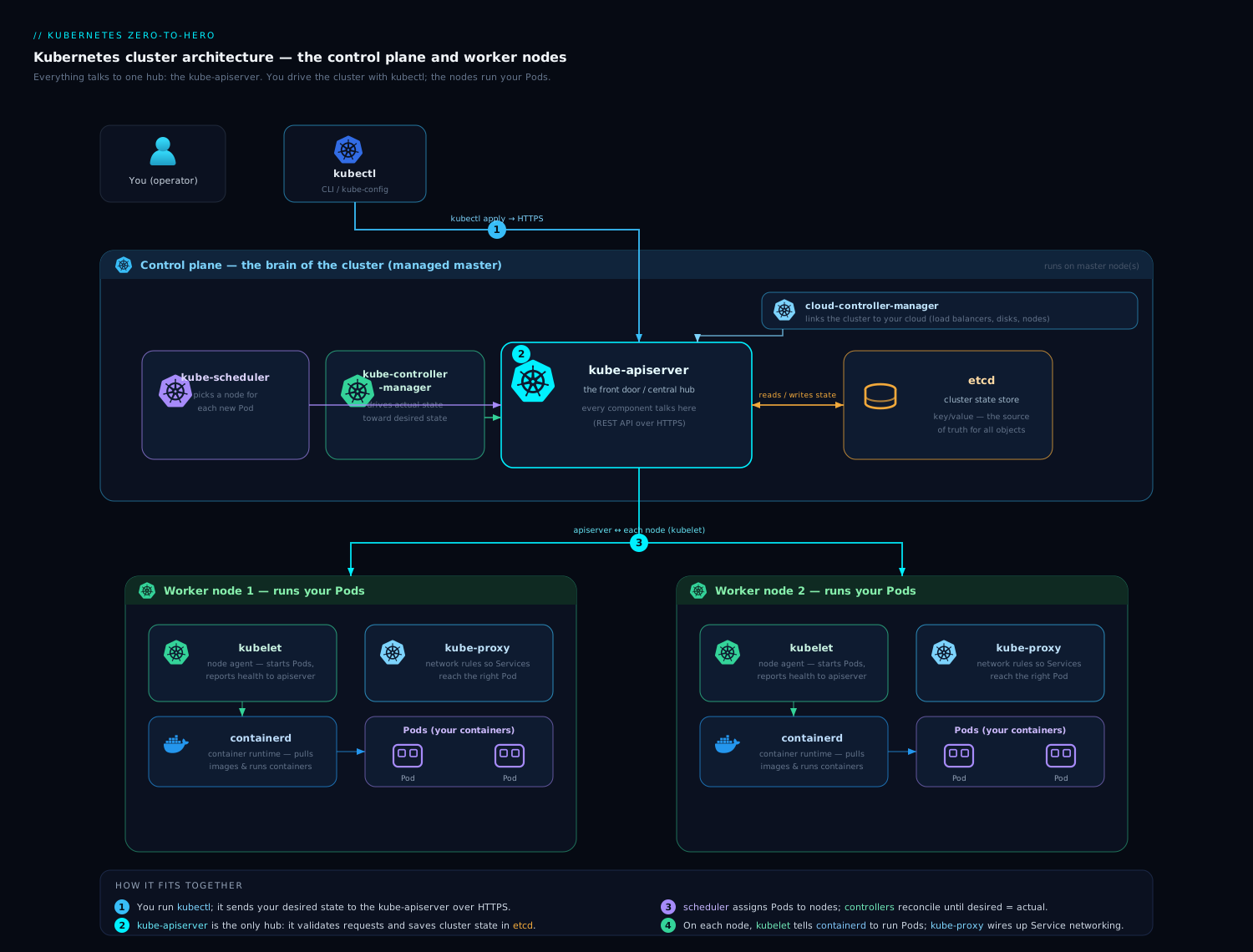
The diagram above is worth pausing on: notice that everything goes through the kube-apiserver. The scheduler, the controllers, the kubelets on each node, and your own kubectl all talk to the API server — never directly to each other or to etcd. That hub-and-spoke design is the single most important thing to internalise about Kubernetes.
The control plane, component by component
kube-apiserver
The kube-apiserver is the front door to the cluster — a REST API over HTTPS. Every read and write (from kubectl, from controllers, from kubelets, from CI/CD) goes through it. It handles authentication (who are you?), authorization (are you allowed?), admission control (should this request be modified or rejected?), and validation, then persists the result. It’s the only component that talks to etcd; everyone else talks to the API server. It is also stateless, which is why you can run several replicas behind a load balancer for availability.
etcd
etcd is a distributed, strongly-consistent key-value store — the cluster’s source of truth. Every object you create (Deployments, Pods, ConfigMaps, Secrets, the lot) is stored here. If etcd is lost and has no backup, the cluster’s entire state is gone, which is why backing up etcd is a core Day-2 operational task. It uses the Raft consensus algorithm and is typically run as a cluster of three or five members (an odd number, to form a quorum/majority for writes).
kube-scheduler
The kube-scheduler watches for newly created Pods that haven’t been assigned to a node yet and picks the best node for each one. It does this in two phases: filtering (which nodes are even feasible — enough CPU/memory, matching node selectors, no conflicting taints?) and scoring (of the feasible nodes, which is best — spread, affinity, resource balance?). The scheduler doesn’t start the container; it just records the chosen node on the Pod. The kubelet on that node takes it from there.
kube-controller-manager
The kube-controller-manager runs Kubernetes’ controllers — independent control loops, each responsible for one kind of object. Examples: the Deployment controller manages ReplicaSets; the ReplicaSet controller ensures the right number of Pod replicas exist; the Node controller reacts when a node goes unhealthy; the Job controller runs batch work to completion. They’re bundled into one binary for efficiency but are conceptually separate. Each controller embodies the same pattern: watch desired state, observe actual state, act to close the gap.
cloud-controller-manager
The cloud-controller-manager is the bridge between Kubernetes and your cloud provider’s API. It runs the controllers that need to talk to the cloud — for example, provisioning a real cloud load balancer when you create a LoadBalancer Service, attaching cloud disks, or removing a Node object when the underlying VM is deleted. On a laptop cluster or bare-metal install there’s no cloud, so this component is absent or a no-op. Splitting it out is what lets the core Kubernetes code stay cloud-neutral.
| Component | One-line job | Talks to |
|---|---|---|
| kube-apiserver | Front-door REST API; auth, validation, the only writer to etcd | Everyone |
| etcd | Distributed key-value store; the source of truth | kube-apiserver only |
| kube-scheduler | Assigns unscheduled Pods to the best node | kube-apiserver |
| kube-controller-manager | Runs control loops (Deployment, ReplicaSet, Node, Job…) | kube-apiserver |
| cloud-controller-manager | Integrates with cloud APIs (LBs, disks, nodes) | kube-apiserver + cloud |
The worker nodes, component by component
Every worker node runs three things that turn “a Pod was scheduled here” into “a container is actually running.”
kubelet
The kubelet is the node’s agent. It watches the API server for Pods assigned to its node, then tells the container runtime to pull images and start the containers. It continuously reports the node’s and Pods’ status back to the API server, and runs health probes (liveness/readiness checks) so the control plane knows whether a container is alive and ready for traffic. If a container dies, the kubelet restarts it per the Pod’s restart policy. The kubelet only manages Pods it was told about by the API server — it doesn’t make scheduling decisions itself.
container runtime (containerd)
The container runtime is the software that actually runs containers on the node — pulling images, unpacking them, and starting the isolated processes. Modern Kubernetes talks to the runtime through a standard interface called the CRI (Container Runtime Interface). The most common runtime is containerd (a graduated CNCF project, and the runtime under Docker as well); CRI-O is another. Note: Kubernetes removed support for Docker as a runtime via the old “dockershim” in v1.24 — but your Docker-built images still run fine, because they’re standard OCI (Open Container Initiative) images that any CRI runtime understands. You build with Docker; the node runs them with containerd.
kube-proxy
kube-proxy is the node’s networking helper. Kubernetes lets you reach a set of Pods through a stable virtual address called a Service (covered next lesson), even as individual Pods come and go. kube-proxy programs the node’s networking rules (using iptables or the faster IPVS) so that traffic sent to a Service’s address is load-balanced to one of the healthy backing Pods. Many clusters now use a CNI plugin (such as Cilium) that can replace kube-proxy, but the role — making Service virtual IPs work — is the same.
| Node component | One-line job |
|---|---|
| kubelet | Node agent: starts/monitors Pods, runs health probes, reports status |
| container runtime (containerd) | Pulls images and runs the actual containers (via CRI) |
| kube-proxy | Programs networking so Service IPs route to the right Pods |
The declarative model and the reconciliation loop
This is the idea that makes Kubernetes click. There are two ways to ask a computer to do something:
- Imperative — you give step-by-step commands: “create this, then start that, then…”. You own every step and every failure.
- Declarative — you describe the desired state (the end result you want), and the system figures out the steps to get there and keeps you there.
Kubernetes is declarative. You write a manifest (usually YAML) that says, in effect, “I want 3 replicas of myapp:1.0.” You hand it to the API server, which stores that desired state in etcd. From then on, controllers run a never-ending reconciliation loop:
- Observe the desired state (what you asked for, from etcd via the API server).
- Observe the actual state (what’s really running, reported by kubelets).
- Diff them. If they match, do nothing.
- Act to close the gap (create or delete Pods), then loop again — forever.
   desired state (etcd)            actual state (cluster)
        "3 replicas"   ───►  controller  ───►  "2 running"
                              observes diff
                              creates 1 Pod  ───►  "3 running"  ✓
                              (keeps watching, forever)
This single pattern explains Kubernetes’ best features. Self-healing: kill a Pod and a controller notices actual (2) ≠ desired (3) and recreates it. Scaling: change desired from 3 to 10 and the loop creates 7 more. Rolling updates: change the image and the Deployment controller reconciles old Pods out and new Pods in, a few at a time. You never script those actions — you just edit the desired state and let the loops do the work. (This is also why kubectl apply is preferred over imperative one-off commands; you’ll go deep on that in Module 2.)
Managed vs self-managed Kubernetes
You can run the control plane yourself, or let a cloud run it for you. With self-managed Kubernetes (e.g. installed with kubeadm, or distributions like k3s/RKE2/OpenShift), you own the control plane: etcd backups, version upgrades, certificate rotation, and high availability are your responsibility — maximum control, maximum operational burden. With managed Kubernetes — AKS (Azure), EKS (AWS), and GKE (Google) — the provider runs and patches the control plane (often the control plane is free or low-cost and you pay mainly for worker nodes), so you focus on workloads. For almost everyone starting out, and for most production teams, managed is the right default; you’d choose self-managed for on-prem/air-gapped environments, strict customisation, or deep learning. The architecture you learned above is identical in both cases — managed simply hides the control-plane machines from you.
Hands-on lab
You’ll create a real, single-machine Kubernetes cluster on your own computer, confirm its node is ready, and peek inside the control plane — all for free, nothing to provision in the cloud.
Prerequisites
- Docker Desktop (or Podman) running. Check with
docker version. - One local-cluster tool. We’ll use kind (Kubernetes-IN-Docker), with a minikube alternative shown. Both are free and open-source.
- kubectl, the Kubernetes command-line client.
Step 1 — Install the tools
# macOS (Homebrew)
brew install kind kubectl
# or minikube instead of kind:  brew install minikube

# Linux
# kubectl
curl -LO "https://dl.k8s.io/release/$(curl -L -s https://dl.k8s.io/release/stable.txt)/bin/linux/amd64/kubectl"
sudo install -o root -g root -m 0755 kubectl /usr/local/bin/kubectl
# kind
[ $(uname -m) = x86_64 ] && curl -Lo ./kind https://kind.sigs.k8s.io/dl/v0.23.0/kind-linux-amd64
chmod +x ./kind && sudo mv ./kind /usr/local/bin/kind
Verify the client is installed (it’s fine if it warns that there’s no server yet):
kubectl version --client
Step 2 — Create a cluster
Using kind:
kind create cluster --name k8s-intro
Expected output (abridged):
Creating cluster "k8s-intro" ...
 ✓ Ensuring node image (kindest/node:v1.30.0) 🖼
 ✓ Preparing nodes 📦
 ✓ Writing configuration 📜
 ✓ Starting control-plane 🕹️
 ✓ Installing CNI 🔌
 ✓ Installing StorageClass 💾
Set kubectl context to "kind-k8s-intro"
Prefer minikube? Run
minikube startinstead — every command below works the same.
kind just started a Kubernetes control plane inside a Docker container and pointed kubectl at it.
Step 3 — Confirm the node is Ready
kubectl get nodes -o wide
Expected output:
NAME                      STATUS   ROLES           AGE   VERSION
k8s-intro-control-plane   Ready    control-plane   60s   v1.30.0
STATUS: Ready means the kubelet on that node is healthy and reporting in. (A single-node kind cluster runs both the control plane and your workloads on the same machine — fine for learning.)
Step 4 — Look inside the control plane
Kubernetes runs its own components as Pods in the kube-system namespace. List Pods across all namespaces with -A:
kubectl get pods -A
Expected output (abridged):
NAMESPACE     NAME                                              READY   STATUS    RESTARTS   AGE
kube-system   etcd-k8s-intro-control-plane                      1/1     Running   0          70s
kube-system   kube-apiserver-k8s-intro-control-plane            1/1     Running   0          70s
kube-system   kube-controller-manager-k8s-intro-control-plane   1/1     Running   0          70s
kube-system   kube-scheduler-k8s-intro-control-plane            1/1     Running   0          70s
kube-system   kube-proxy-xxxxx                                  1/1     Running   0          60s
kube-system   coredns-xxxxxxxxxx-xxxxx                          1/1     Running   0          60s
There they are — every component from this lesson, running as real Pods: etcd, kube-apiserver, kube-controller-manager, kube-scheduler, and kube-proxy (plus CoreDNS for in-cluster DNS). On a managed cluster you would not see the control-plane Pods here — the provider hides them — which is a great way to tell the two apart.
Step 5 — Watch the API server respond, and a controller reconcile
Ask the API server about the cluster, then describe one control-plane Pod:
kubectl cluster-info
kubectl describe pod -n kube-system -l component=kube-apiserver | head -20
Now watch the reconciliation loop in action. Create a Deployment that wants 2 replicas, delete one of its Pods, and observe the controller replace it:
kubectl create deployment web --image=nginx --replicas=2
kubectl get pods -l app=web                # two Pods, give them a few seconds to be Running
kubectl delete pod -l app=web --field-selector=status.phase=Running --grace-period=0 --wait=false | head -1
kubectl get pods -l app=web -w             # actual<desired, so a new Pod appears; Ctrl-C to stop
You just saw it: actual state fell below desired state, and the ReplicaSet controller created a replacement — with no action from you. That’s the whole philosophy in one experiment.
Validation
Your lab is successful if:
kubectl get nodesshows one node withSTATUS: Ready.kubectl get pods -Ashowsetcd,kube-apiserver,kube-scheduler, andkube-controller-managerasRunning.- After you deleted a
webPod, a fresh one came back automatically (proving reconciliation).
Cleanup
Tear it all down so nothing lingers:
kubectl delete deployment web
kind delete cluster --name k8s-intro
# minikube users:  minikube delete
Cost note
Free / local. kind and minikube run entirely on your machine inside Docker — there is nothing to provision in the cloud and nothing to pay for. The only resources used are your own CPU, memory, and disk, which are reclaimed the moment you delete the cluster.
Common mistakes & troubleshooting
| Symptom | Likely cause | Fix |
|---|---|---|
kind create cluster fails immediately |
Docker isn’t running | Start Docker Desktop/Podman; confirm with docker ps |
kubectl errors: connection refused / no context |
kubeconfig not pointing at a running cluster | Recreate the cluster, or check kubectl config current-context |
Node stuck NotReady |
CNI/network add-on still initialising, or low resources | Wait 1–2 min; ensure Docker has ≥2 CPU / 4 GB RAM allocated |
No control-plane Pods in kubectl get pods -A |
You’re on a managed cluster (AKS/EKS/GKE) | Expected — the provider hides them; not an error |
A Pod sticks in Pending |
Scheduler found no feasible node (resources/affinity) | kubectl describe pod <name> and read the Events section |
ImagePullBackOff on a Pod |
Wrong image name/tag, or no registry access | Check the image name; kubectl describe pod <name> shows the pull error |
The universal first move when something’s wrong: kubectl describe <kind> <name> and read the Events at the bottom. Kubernetes tells you what it tried and why it failed.
Best practices
- Think declaratively from day one. Prefer describing desired state (YAML you can review and version-control) over imperative one-off commands. Your future self will thank you.
- Treat etcd as sacred. In any real cluster, back it up — it is your cluster’s state. (On managed Kubernetes the provider handles this.)
- Run the control plane highly available in production: an odd number of control-plane nodes (typically 3) and an etcd quorum, so losing one machine doesn’t lose the cluster.
- Start managed. Unless you have a strong reason (on-prem, air-gapped, deep customisation, or learning), let AKS/EKS/GKE run the control plane so you can focus on workloads.
- Use namespaces to organise, and never run real workloads in
kube-system— that namespace is for cluster components.
Security notes
The kube-apiserver is the cluster’s front door and primary attack surface — secure it well. Always require authentication and use RBAC (Role-Based Access Control) for least-privilege authorization (its own lesson later in the course). etcd holds everything, including Secrets — restrict network access to it, use TLS between all components, and enable encryption at rest for Secrets so they aren’t stored in plaintext. Never expose the API server or etcd to the public internet without strict controls. On managed Kubernetes the provider hardens and patches the control plane for you, which is a real security benefit of going managed.
Quick check
- Which control-plane component is the only one that reads from and writes to etcd?
- What does the kube-scheduler decide, and what does it explicitly not do?
- In the reconciliation loop, what are the two states being compared, and what happens when they differ?
- You run
kubectl get pods -Aon a cluster and see no etcd or kube-apiserver Pods. What does that tell you? - You build your image with Docker, but Kubernetes “removed Docker.” Will your image run on a node, and why?
Answers
- The kube-apiserver. Every other component (scheduler, controllers, kubelets, kubectl) goes through the API server; only it talks to etcd directly.
- The scheduler decides which node an unscheduled Pod should run on (filtering for feasible nodes, then scoring them). It does not start the container — that’s the kubelet on the chosen node.
- The desired state (what you declared, stored in etcd) and the actual state (what’s really running). When they differ, a controller acts to close the gap (e.g. creates or deletes Pods), then keeps watching.
- You’re almost certainly on a managed cluster (AKS/EKS/GKE), where the provider runs and hides the control plane. It’s expected, not a failure.
- Yes. Docker builds standard OCI images, and node runtimes like containerd run OCI images via the CRI. Only the old “dockershim” runtime integration was removed; your images are unaffected.
Exercise
Create a fresh local cluster (kind create cluster --name lab2). Then, without re-reading the tables above, write a one-sentence description of each of these from memory, and verify by inspecting the cluster: kube-apiserver, etcd, kube-scheduler, kube-controller-manager, kubelet, kube-proxy, containerd.
Next, demonstrate reconciliation in a different way than the lab did: run kubectl create deployment demo --image=nginx --replicas=3, then scale it to 1 with kubectl scale deployment demo --replicas=1 and watch with kubectl get pods -l app=demo -w. Note which Kubernetes component drove the change from actual (3) to desired (1). Finally, run kubectl get events -A --sort-by=.lastTimestamp | tail -20 and read the recent events to see the control plane narrating its own work. Clean up with kind delete cluster --name lab2. Free/local — nothing to pay for.
Interview questions
-
What are the main components of the Kubernetes control plane, and what does each do? kube-apiserver (the front-door REST API and the only writer to etcd), etcd (consistent key-value store / source of truth), kube-scheduler (assigns Pods to nodes), kube-controller-manager (runs control loops like Deployment/ReplicaSet/Node), and cloud-controller-manager (integrates with cloud APIs for load balancers, disks, nodes).
-
What runs on a worker node, and what is each component’s job? The kubelet (node agent that starts/monitors Pods and runs health probes), a container runtime such as containerd (pulls images and runs containers via the CRI), and kube-proxy (programs networking so Service virtual IPs route to the right Pods).
-
Explain the difference between imperative and declarative, and why Kubernetes is declarative. Imperative means giving step-by-step commands; declarative means describing the desired end state and letting the system reach and maintain it. Kubernetes stores desired state and runs reconciliation loops, which is what gives it self-healing, easy scaling, and safe rolling updates.
-
What is etcd, and why does it matter operationally? etcd is the distributed, strongly-consistent key-value store that holds the entire cluster state, including Secrets. It matters because losing it without a backup loses the cluster; so backups, TLS, restricted access, and encryption-at-rest for Secrets are essential (handled for you on managed Kubernetes).
-
“Kubernetes deprecated Docker.” Does that mean my Docker images stop working? No. Only the dockershim runtime shim was removed in v1.24. Images built with Docker are standard OCI images and run fine on containerd/CRI-O via the CRI.
-
When would you choose self-managed Kubernetes over managed (AKS/EKS/GKE)? When you need on-prem or air-gapped clusters, deep control-plane customisation, specific compliance, or hands-on learning. Otherwise managed is the sensible default because the provider runs, patches, and secures the control plane.
Certification mapping
This lesson maps directly to KCNA (Kubernetes and Cloud Native Associate), the entry-level CNCF certification:
- Kubernetes Fundamentals — cluster architecture, the control-plane and node components, and the API-server-centric design covered here.
- Cloud Native Architecture — the declarative model and controller/reconciliation pattern, and the role of the CNCF.
- Container Orchestration — why orchestration exists and what Kubernetes automates.
It also lays the groundwork for CKA (Certified Kubernetes Administrator), where you operate the control plane for real — including etcd backup/restore, control-plane upgrades, and troubleshooting node/component health — and gives CKAD candidates the architectural context behind the objects they’ll deploy.
Glossary
- Kubernetes (K8s) — open-source container-orchestration system; you declare desired state and it continuously reconciles reality to match.
- Cluster — a set of machines (control plane + worker nodes) acting as one Kubernetes system.
- Control plane — the components that store desired state and make decisions (apiserver, etcd, scheduler, controller-managers).
- Node — a worker machine that runs your application Pods, with a kubelet, runtime, and kube-proxy.
- Pod — the smallest deployable unit; one or more containers sharing network and storage (covered next).
- etcd — distributed, consistent key-value store that is the cluster’s source of truth.
- kubelet — the node agent that starts and monitors Pods and reports status to the API server.
- Container runtime / containerd — software that pulls images and runs containers on a node, via the CRI.
- Reconciliation loop — a controller’s never-ending cycle of comparing desired vs actual state and acting to close the gap.
- Declarative model — describing the desired end state rather than the step-by-step commands to reach it.
- Managed Kubernetes — a service (AKS/EKS/GKE) where the cloud provider runs and patches the control plane for you.
Next steps
You now know what a cluster is and what every component does. Next, meet the objects you’ll actually create and operate every day.