In the last lesson you saw the machinery of a cluster — the control plane that records what you want and the nodes that make it happen. This lesson is about the objects you actually create: the handful of building blocks you will use in almost every Kubernetes app. You will meet the Pod (the thing that runs your container), the Deployment (the thing that keeps the right number of Pods running and updates them safely), and the Service (the stable network address that sends traffic to those Pods).
The good news is that there are only a few of these, they fit together in an obvious way once you see the picture, and you can drive all of them from one command — kubectl. By the end you will have created a real Deployment on a local cluster, scaled it, put a Service in front of it, rolled out a new version, rolled it back, and torn it all down — for free, on your own laptop.
Learning objectives
By the end of this lesson you can:
- Explain what a Pod is, why it is the smallest deployable unit, and why Pods are ephemeral (disposable).
- Describe how a Deployment owns a ReplicaSet, which in turn owns Pods, and what each layer is responsible for.
- Perform a rolling update and a rollback with
kubectl, and explain what happens to Pods during each. - Choose the right Service type — ClusterIP, NodePort, or LoadBalancer — for a given need.
- Read a label selector and explain how a Service finds the Pods it should send traffic to.
- Say what ConfigMaps, Secrets, and Namespaces are for, in one sentence each.
Prerequisites & where this fits
You need only basic comfort with a terminal, plus the local cluster you set up earlier. If you have not installed the tooling yet, do the lab in What Is Kubernetes? Control Plane, Nodes, etcd & the kubelet first — it walks you through creating a free local cluster with kind or minikube and running kubectl get nodes. It also helps to know what a container image is, covered in Containers & Docker Basics: Images, Layers, and Registries. This is Lesson 3 of the Kubernetes Zero-to-Hero course — the workload-objects foundation that every later lesson (your first YAML deploy, autoscaling, the capstone) builds on.
Pods: the smallest unit you can run
A Pod is the smallest thing Kubernetes will schedule and run. The key mental shift from plain Docker: you do not run containers directly in Kubernetes — you run Pods, and a Pod wraps one or more containers.
Most Pods hold exactly one container — your app. A Pod can hold more than one when the containers are tightly coupled and need to share resources: they share the same network (one IP address, same localhost) and can share storage volumes. The classic example is a sidecar — a small helper container (say, a log shipper or a proxy) that lives alongside the main app in the same Pod. Rule of thumb for now: one container per Pod unless you have a specific reason for a sidecar.
Two properties matter enormously:
- A Pod gets its own cluster-internal IP address. Containers inside it talk to each other over
localhost; the Pod talks to other Pods over the cluster network. - Pods are ephemeral — treat them as disposable. If a node dies, or the Pod crashes, or you delete it, that exact Pod is gone. It is not restarted in place with the same identity; a new Pod is created to replace it, with a new name and a new IP. This is by design.
Because Pods come and go, you almost never create a bare Pod by hand for a real app — you would have nothing to recreate it when it disappears. Instead you let a controller manage Pods for you. That is what the next two objects do.
Jargon check. Ephemeral simply means short-lived and replaceable. Pods are cattle, not pets: you do not nurse a sick one back to health, you replace it. Designing apps to tolerate this (no important state written only inside the Pod) is what makes Kubernetes resilient.
ReplicaSets and Deployments: keeping Pods alive and up to date
A ReplicaSet is a controller with one job: keep exactly N identical Pods running at all times. You tell it “I want 3,” and it continuously compares desired (3) to actual. If a Pod dies and only 2 are running, it creates one. If somehow 4 are running, it deletes one. That is the reconciliation loop from the previous lesson, applied to Pods.
A ReplicaSet alone, though, has no idea how to update your app — change the image and it will not gracefully replace the old Pods. That is why you almost never create a ReplicaSet directly either. Instead you create a Deployment, the object you will use most.
A Deployment is a higher-level controller that manages ReplicaSets for you to give you safe, versioned updates. The ownership chain is the whole idea:
Deployment owns a ReplicaSet, which owns the Pods.
| Object | Its one job | You create it? |
|---|---|---|
| Pod | Run your container(s) | Rarely — directly only for debugging |
| ReplicaSet | Keep N identical Pods running | Almost never — the Deployment makes it |
| Deployment | Manage ReplicaSets for rolling updates & rollback | Yes — this is your workhorse |
When you change a Deployment (for example, bump the image from v1 to v2), the Deployment does not kill all the Pods at once. It performs a rolling update: it creates a new ReplicaSet for v2, brings up new Pods a few at a time, and scales the old ReplicaSet down in step, so there are always healthy Pods serving traffic. If the new version is broken, the old ReplicaSet is still there — so you can roll back to it almost instantly. We will do exactly this in the lab.
How the objects fit together
This is the picture worth committing to memory — workload objects on one side, networking on the other:
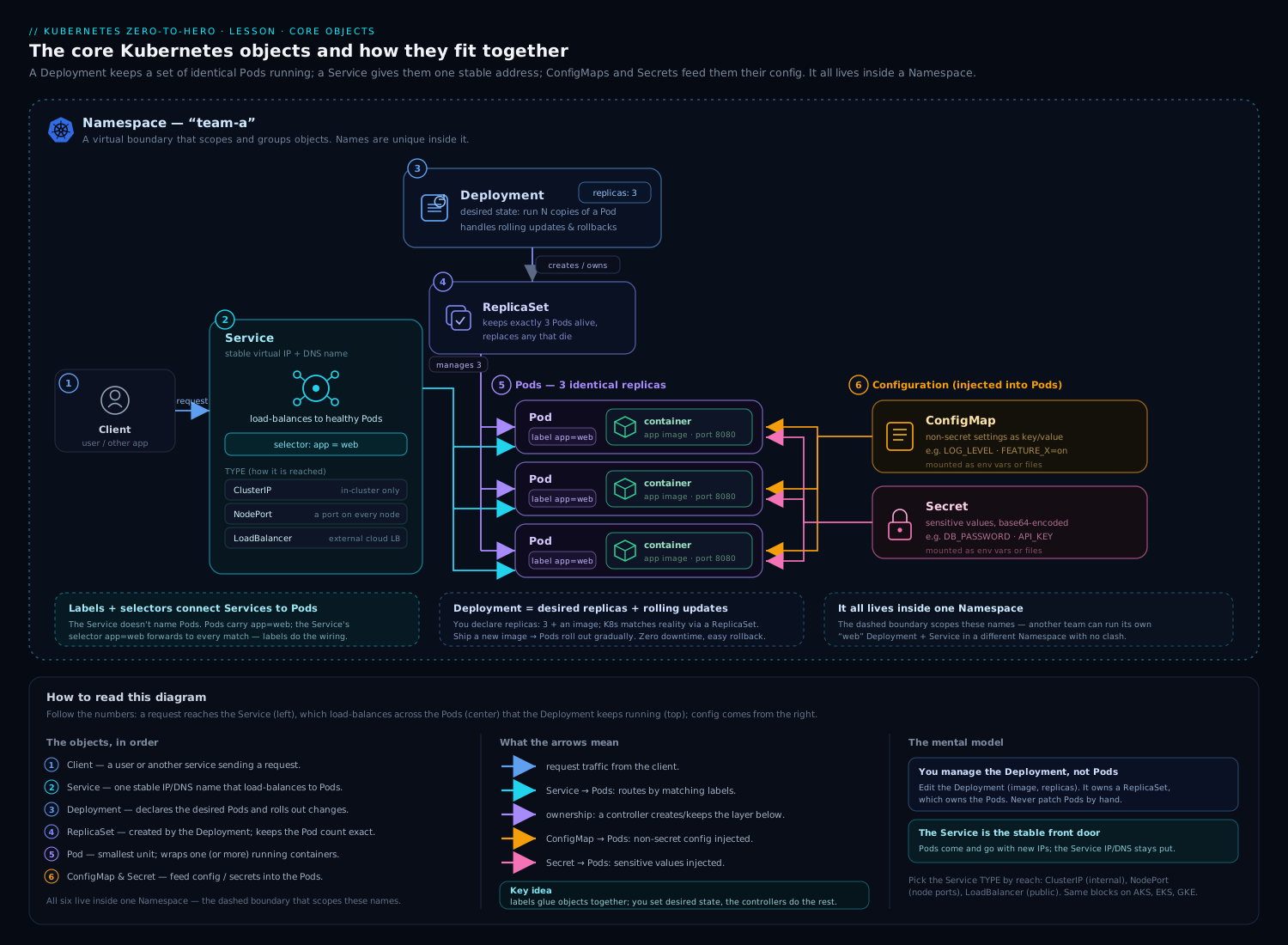
Reading the diagram from the top: a Deployment declares the desired image and replica count and creates a ReplicaSet; the ReplicaSet creates and maintains the Pods; each Pod carries labels (like app: web). A Service sits to the side with a selector that matches those labels, giving the group a single stable address. ConfigMaps and Secrets feed configuration into the Pods. Workloads flow top-down; traffic flows in through the Service.
Labels and selectors: how everything is wired
Before Services make sense, you need one small but central idea: labels. A label is a key: value tag you attach to objects — most importantly to Pods. For example, every Pod of your web app might carry app: web. Labels are not just decoration; they are how Kubernetes objects find each other.
A selector is a query over labels. When a Service (or a ReplicaSet, or many other objects) needs to act on “all the Pods that are part of the web app,” it does not list them by name — names change constantly as Pods come and go. Instead it says “select every Pod where app: web.” As Pods are created and destroyed, the set the selector matches updates automatically.
This loose coupling is one of Kubernetes’ best ideas. The Service does not know or care which Pods exist right now or what their IPs are — it just knows the label it is looking for. Add a Pod with the right label and it instantly starts receiving traffic; remove one and it stops. You will see this directly: a Service routes to Pods purely because their labels match its selector.
Services: a stable address for ephemeral Pods
Here is the problem Services solve. Pods are disposable and each new one gets a new IP. So how does anything reliably reach your app if the very address keeps changing? You cannot hard-code a Pod IP — it will be wrong within minutes.
A Service is a stable, long-lived network endpoint that sits in front of a set of Pods (chosen by a label selector) and load-balances traffic across them. The Service gets its own unchanging name and virtual IP. Clients talk to the Service; the Service forwards to whichever matching Pods are healthy right now. Pods churn underneath; the Service address never moves.
There are three Service types you must know, and they form a ladder of “how far out does this need to be reachable”:
| Type | Reachable from | Typical use | Beginner mental model |
|---|---|---|---|
| ClusterIP (default) | Inside the cluster only | One microservice calling another | The internal phone extension |
| NodePort | A port on every node’s IP, from outside | Quick external access, demos, on-prem | A fixed door on each machine |
| LoadBalancer | A real external IP / cloud load balancer | Public-facing apps in the cloud | The public front door with a street address |
A few clarifications that save confusion:
- ClusterIP is the default and the one you use most — most Services only ever need to be reached by other things inside the cluster.
- NodePort opens the same high port (in the
30000–32767range) on every node, soNodeIP:NodePortreaches your Service. It works anywhere but the high port and raw node IPs make it clumsy for real production. - LoadBalancer asks the cloud provider to provision an actual external load balancer with a public IP. On a managed cluster (EKS/AKS/GKE) you get a real IP; on a bare local cluster there may be no cloud to fulfil it, so the external IP can stay
<pending>— which is expected, and we will useport-forwardinstead in the lab. For real production HTTP traffic you usually graduate to an Ingress or the Gateway API (a topic for a later lesson).
The throughline: a Service decouples clients from Pods. Clients hold a stable name; the Service tracks the shifting set of Pods behind it via labels.
ConfigMaps, Secrets & Namespaces (briefly)
Three more objects round out the basics. You will not master them here, but you should know what each is for.
- ConfigMap — non-sensitive configuration kept out of your image: environment variables, feature flags, a config file. The point is that the same image runs in dev and prod with different ConfigMaps, so you never rebuild just to change a setting.
- Secret — the same idea for sensitive values: passwords, API keys, TLS certs. Secrets are stored and surfaced separately from plain config. Important honesty for beginners: a stock Kubernetes Secret is only base64-encoded, not encrypted by default — base64 is encoding, not security. Treat Secret manifests as sensitive, do not commit them to Git in the clear, and in production enable encryption at rest and tighten access (RBAC). We go deep on this in the security module.
- Namespace — a virtual partition of one cluster used to group and isolate resources (for example
dev,staging,team-a). Names must be unique within a Namespace, not across the whole cluster, so two teams can both have awebDeployment without colliding. New clusters give you adefaultNamespace, pluskube-systemwhere the control-plane components live.
Tip.
kubectlacts on thedefaultNamespace unless told otherwise. Add-n <name>to target another, or-A/--all-namespacesto list across all of them.
Hands-on lab
You will create a Deployment with kubectl, scale it, expose it with a Service, perform a rolling update and a rollback, inspect everything with kubectl describe, and then clean up. Everything runs on your free local cluster — there is nothing to pay for and no cloud account involved.
This lab uses the imperative style (kubectl create, kubectl scale) because it is the fastest way to see the objects behave. The next lesson moves you to the declarative YAML-and-kubectl apply workflow you will use in real projects.
Step 0 — Confirm your cluster is up
We assume a local cluster from the previous lesson (kind or minikube). Confirm a node is Ready:
kubectl get nodes
Expected (names vary by tool):
NAME                 STATUS   ROLES           AGE   VERSION
kind-control-plane   Ready    control-plane   3m    v1.30.0
No cluster yet? Create one in seconds:
kind create cluster(orminikube start). Both are free and run locally.
Step 1 — Create a Deployment
We will run a tiny, well-known web image. kubectl create deployment builds the whole chain — Deployment → ReplicaSet → Pod — in one command:
kubectl create deployment web --image=nginx:1.25 --replicas=3
Expected:
deployment.apps/web created
Now look at what was actually created. Notice you get one Deployment, one ReplicaSet, and three Pods — the ownership chain in action:
kubectl get deployments,replicasets,pods
Expected (hashes will differ):
NAME                  READY   UP-TO-DATE   AVAILABLE   AGE
deployment.apps/web   3/3     3            3           20s

NAME                             DESIRED   CURRENT   READY   AGE
replicaset.apps/web-7d9c8f6b5c   3         3         3       20s

NAME                       READY   STATUS    RESTARTS   AGE
pod/web-7d9c8f6b5c-2xkql   1/1     Running   0          20s
pod/web-7d9c8f6b5c-7n4mz   1/1     Running   0          20s
pod/web-7d9c8f6b5c-q8pwd   1/1     Running   0          20s
See the shared prefix? The ReplicaSet name embeds a hash of the Pod template, and every Pod it owns starts with that same prefix. That is the ownership chain made visible.
Step 2 — Prove that Pods are ephemeral
Delete one Pod and watch the ReplicaSet immediately replace it (use a name from your output):
kubectl delete pod web-7d9c8f6b5c-2xkql
kubectl get pods
You will still see three Pods — but one has a new name and an AGE of just a few seconds. You asked for 3; the controller keeps 3. You did not have to do anything: this is reconciliation. (You never lost capacity, because the other two kept serving.)
Step 3 — Scale the Deployment
Change the desired replica count. This edits the Deployment’s desired state; the ReplicaSet reconciles to match:
kubectl scale deployment web --replicas=5
kubectl get pods
Expected: five Pods now, two of them freshly created. Scale back down the same way:
kubectl scale deployment web --replicas=3
Within moments you are back to three. Scaling is just “change N and let the loop converge.”
Step 4 — Expose it with a Service
Put a stable address in front of the Pods. kubectl expose creates a Service whose selector matches the Deployment’s Pod labels:
kubectl expose deployment web --port=80 --target-port=80 --type=ClusterIP
Expected:
service/web exposed
Inspect the Service and, crucially, its endpoints — the live list of Pod IPs it is currently sending traffic to:
kubectl get service web
kubectl get endpoints web
Expected (IPs vary):
NAME   TYPE        CLUSTER-IP      EXTERNAL-IP   PORT(S)   AGE
web    ClusterIP   10.96.142.55    <none>        80/TCP    10s

NAME   ENDPOINTS                                   AGE
web    10.244.0.6:80,10.244.0.7:80,10.244.0.8:80   10s
Three endpoints — one per Pod. That is the selector at work: the Service matched all three app: web Pods automatically. (A Service with zero endpoints almost always means its selector matches no Pods — a top troubleshooting clue below.)
Step 5 — Reach the Service
A ClusterIP is reachable only inside the cluster, so forward a local port to it and curl it from your laptop:
kubectl port-forward service/web 8080:80
Leave that running, open a second terminal, and:
curl -s http://localhost:8080 | head -n 5
Expected — the nginx welcome HTML:
<!DOCTYPE html>
<html>
<head>
<title>Welcome to nginx!</title>
Press Ctrl+C in the first terminal to stop forwarding. (port-forward is the simplest way to hit an internal Service from your machine — no LoadBalancer or Ingress needed for local testing.)
Step 6 — Roll out a new version
Change the image. The Deployment performs a rolling update: a new ReplicaSet for the new image scales up while the old one scales down, with no full outage.
kubectl set image deployment/web nginx=nginx:1.27
kubectl rollout status deployment/web
Expected:
deployment "web" successfully rolled out
Now look at the ReplicaSets — there are two: the new one at 3 Pods, the old one scaled to 0 but kept for rollback:
kubectl get replicasets
NAME             DESIRED   CURRENT   READY   AGE
web-6f4b9c7d8e   3         3         3       30s     # new (nginx:1.27)
web-7d9c8f6b5c   0         0         0       6m      # old (nginx:1.25), retained
Check the rollout history:
kubectl rollout history deployment/web
Step 7 — Roll back
Pretend the new version is bad. Undo the last rollout — Kubernetes scales the previous ReplicaSet back up:
kubectl rollout undo deployment/web
kubectl rollout status deployment/web
Confirm you are back on the old image:
kubectl get deployment web -o jsonpath='{.spec.template.spec.containers[0].image}{"\n"}'
Expected:
nginx:1.25
A near-instant rollback — because the old ReplicaSet was never deleted, just scaled to zero. This is the single biggest reason to use a Deployment instead of bare Pods.
Step 8 — Inspect with describe (validation)
kubectl describe is your primary debugging tool: it shows an object’s full state and an Events log at the bottom — the timeline of what the controllers did.
kubectl describe deployment web
Scroll to Events and you will see the rollout story in plain English: Scaled up replica set ... to 3, Scaled down replica set ... to 0, and so on. Then describe a single Pod to see its image, node, IP, and lifecycle events:
kubectl describe pod -l app=web | head -n 40
Validation checkpoint — you have succeeded if all of these are true:
kubectl get deployment web        # READY shows 3/3
kubectl get endpoints web         # exactly 3 endpoint IPs
kubectl get rs                    # one RS at 3, the other at 0
If READY is 3/3, the Service has 3 endpoints, and you saw the curl succeed and the rollback land on nginx:1.25, every concept in this lesson is working on your machine.
Cleanup
Delete the objects you created. Removing the Deployment cascades to its ReplicaSet and Pods automatically; the Service is separate:
kubectl delete service web
kubectl delete deployment web
Confirm nothing is left in the default Namespace:
kubectl get all
If you also want to remove the whole cluster (recommended when you are done for the day):
kind delete cluster # or: minikube delete
Cost note: free / local. Everything ran inside a local cluster on your own machine — no cloud resources, no LoadBalancer, nothing billable.
Common mistakes & troubleshooting
| Symptom | Likely cause | Fix |
|---|---|---|
| Service has 0 endpoints, traffic fails | Service selector does not match any Pod’s labels | Compare them: kubectl get svc web -o wide vs kubectl get pods --show-labels; align the labels/selector |
Pod stuck in Pending |
No node has room (CPU/memory requests) or no node matches scheduling rules | kubectl describe pod <name> and read Events; lower requests or add capacity |
Pod in ImagePullBackOff / ErrImagePull |
Wrong image name/tag, or a private registry with no pull credentials | Fix the image reference; for private images add an imagePullSecret |
Pod CrashLoopBackOff |
The container starts then exits/errors repeatedly | kubectl logs <pod> (add --previous to see the last crash); fix the app or its config |
curl to a ClusterIP from your laptop times out |
ClusterIP is cluster-internal only | Use kubectl port-forward, or change the type to NodePort/LoadBalancer |
LoadBalancer EXTERNAL-IP stuck on <pending> |
Local cluster has no cloud to provision a load balancer | Expected locally — use port-forward, or install a tool like MetalLB; in the cloud it resolves automatically |
| Edited a Pod directly, change vanished | The Deployment/ReplicaSet reconciled it back | Edit the Deployment (the desired state), never the managed Pod |
Best practices
- Manage Pods through Deployments, never bare. A lone Pod has nothing to recreate it; a Deployment gives you self-healing, scaling, rolling updates, and rollback.
- Label everything consistently. A small, deliberate label scheme (e.g.
app,tier,env) is what Services, scaling, and monitoring all hang off. Sloppy labels break selectors silently. - Pin image tags; avoid
latest.nginx:1.27is reproducible and rolls back cleanly;latestmakes “which version is actually running?” unanswerable. - Keep config out of images. Use ConfigMaps and Secrets so one image promotes from dev to prod by changing config, not by rebuilding.
- Set resource requests/limits and health probes. Requests let the scheduler place Pods sensibly; readiness probes keep traffic off Pods that are not ready yet (deeper in later lessons).
- Use Namespaces to separate environments/teams. Cheap isolation that prevents name clashes and scopes access and quotas.
Security notes
A stock Kubernetes Secret is base64-encoded, not encrypted — anyone who can read it in the cluster (or in a committed manifest) can decode it instantly. So: never commit Secret manifests in the clear, restrict who can read Secrets with RBAC, and in production enable encryption at rest (or an external secrets manager). Beyond that, prefer images from trusted registries with pinned, scanned tags; run containers as non-root with a read-only root filesystem where you can; and remember that by default all Pods can talk to all other Pods — production clusters lock this down with NetworkPolicies (a later topic). Small habits now (no latest, no plaintext secrets, least access) become production hygiene.
Quick check
- Why do you almost never create a bare Pod for a real application?
- State the ownership chain between a Deployment, a ReplicaSet, and Pods, and what each layer does.
- During a rolling update, why can you roll back almost instantly?
- A Service has zero endpoints. What is the most likely cause?
- Which Service type would you use for one microservice that only needs to be reached by other services inside the cluster?
Answers
- Because Pods are ephemeral — if the node dies or the Pod is deleted, nothing recreates it. A controller (a Deployment) keeps the desired number running and replaces failures automatically.
- A Deployment manages ReplicaSets (for versioned, rolling updates and rollback); a ReplicaSet keeps N identical Pods running (self-healing); Pods run the actual containers. Deployment → ReplicaSet → Pods.
- The Deployment creates a new ReplicaSet for the new version and scales the old one to zero but keeps it. Rolling back just scales the old ReplicaSet back up — no rebuild, no re-pull from scratch.
- The Service’s selector does not match any Pod’s labels (a typo or mismatched
key: value), so it has selected no Pods to send traffic to. - ClusterIP — the default type, reachable only from inside the cluster, which is exactly what internal service-to-service calls need.
Exercise
Starting from a clean local cluster, recreate the workflow without copying the lab commands verbatim: create a Deployment named shop from the image nginx:1.25 with 2 replicas, label-check it with kubectl get pods --show-labels, then expose it as a ClusterIP Service on port 80. Confirm the Service has exactly two endpoints. Now scale to 4 replicas and re-check the endpoints — write down how many there are and explain why the number changed without you touching the Service. Finally, roll the image to nginx:1.27, watch kubectl rollout status, then kubectl rollout undo it and verify the image is back to nginx:1.25. Tear everything down with the cleanup commands. Bonus: create a Namespace shop-dev and redo the Deployment there with -n shop-dev, proving two shop Deployments can coexist in different Namespaces.
Interview questions
-
What is a Pod, and why is it the smallest deployable unit rather than a container? A Pod is a wrapper around one or more tightly-coupled containers that share a network namespace (one IP, same
localhost) and storage. Kubernetes schedules Pods, not bare containers, so that co-located helpers (sidecars) can share resources and be managed as a single unit. Most Pods hold one container. -
Explain the relationship between Deployments, ReplicaSets, and Pods. A Deployment manages ReplicaSets to provide rolling updates and rollback; each ReplicaSet keeps a fixed number of identical Pods running and self-heals failures. You create the Deployment; it creates and supervises the rest.
-
How does a rolling update work, and how does rollback stay fast? On a spec change the Deployment creates a new ReplicaSet and shifts Pods over gradually — new ones up, old ones down — so capacity is never lost. The previous ReplicaSet is retained at zero replicas, so
kubectl rollout undosimply scales it back up, making rollback near-instant. -
Compare ClusterIP, NodePort, and LoadBalancer Services. ClusterIP (default) is reachable only inside the cluster — for service-to-service traffic. NodePort opens a fixed high port on every node for external reach. LoadBalancer asks the cloud provider for a real external IP/load balancer. NodePort and LoadBalancer build on top of a ClusterIP.
-
How does a Service know which Pods to send traffic to? Through a label selector. The Service selects all Pods whose labels match (e.g.
app: web); the set of matching Pods (its endpoints) updates automatically as Pods come and go. There is no hard-coded list of Pod IPs. -
What is the difference between a ConfigMap and a Secret, and what is the catch with Secrets? Both inject configuration into Pods without baking it into the image; ConfigMaps hold non-sensitive data, Secrets hold sensitive data. The catch: a default Secret is only base64-encoded, not encrypted, so you must control access with RBAC and enable encryption at rest (or use an external secrets manager) in production.
Certification mapping
| Exam | Objective area this supports |
|---|---|
| KCNA (Kubernetes and Cloud Native Associate) | Kubernetes Fundamentals — Pods, Deployments/ReplicaSets, Services, ConfigMaps/Secrets, Namespaces, and the labels/selectors model. |
| CKAD (Certified Kubernetes Application Developer) | Application Deployment — create and roll out Deployments, perform rolling updates and rollbacks; Services & Networking — expose apps with the right Service type; Application Environment/Config — ConfigMaps and Secrets. |
Glossary
- Pod — the smallest deployable unit; wraps one or more containers that share a network and storage. Ephemeral.
- Ephemeral — short-lived and replaceable; a deleted or failed Pod is replaced by a new one with a new name and IP.
- ReplicaSet — a controller that keeps a fixed number (N) of identical Pods running and self-heals failures.
- Deployment — a controller that manages ReplicaSets to provide rolling updates and rollback; your primary workload object.
- Rolling update — replacing Pods gradually (new up, old down) so the app stays available during a version change.
- Rollback — reverting to a previous version by scaling its retained ReplicaSet back up.
- Service — a stable network endpoint that load-balances to a set of Pods selected by labels.
- ClusterIP / NodePort / LoadBalancer — Service types for internal-only, per-node external, and cloud-load-balancer external access.
- Label / Selector — a
key: valuetag on objects; a query that matches objects by those tags (how Services find Pods). - ConfigMap / Secret — objects holding non-sensitive / sensitive configuration injected into Pods.
- Namespace — a virtual partition of a cluster used to group and isolate resources; names are unique within it.
- Endpoints — the live list of Pod IPs a Service currently routes to.
Next steps
Continue the course with kubectl First Steps: Your First Local Cluster & Deployment — moving from these imperative commands to the declarative YAML + kubectl apply workflow you will use in real projects, and seeing exactly what happens inside the cluster when you apply a manifest. Then go further with:
- Docker, kubectl & Helm: The Practical Command Reference — keep this open in a second tab as you practise.
- Kubernetes Autoscaling: HPA, KEDA & Karpenter — once you can scale by hand, let the cluster scale Deployments for you automatically.