You enabled a managed identity, granted it access to the vault, deployed, and the app still crash-loops with 403 Forbidden — the user, group or application does not have secrets get permission on key vault. You open the vault, see the identity listed under Access policies, and stare. Or the opposite: you assigned Key Vault Secrets User as a role and the portal’s Access policies blade is empty, so you “fix” it by adding an access policy — and now two systems disagree about who can read what. Almost every Key Vault permission incident traces back to one root question that nobody asked up front: which authorization model is this vault using?
Azure Key Vault — the managed service that stores secrets (connection strings, API keys), keys (for encryption and signing), and certificates — has two completely separate ways to decide who can touch its data: the original vault access policies (a per-vault access list), and Azure RBAC (role assignments on the standard Azure control plane). They are not layered; a vault uses exactly one at a time, chosen by a single property. Grant access in the wrong system and the caller is denied even though everything looks configured. This is the single most common source of Key Vault 403s, and it is entirely avoidable once you hold the right mental model.
This article gives you that model: what each system is, how to tell at a glance which one a vault uses, the difference between the control plane (managing the vault) and the data plane (reading a secret), the built-in roles and access-policy permissions side by side, and a safe migration from access policies to RBAC you can run on a live vault without dropping access. By the end you pick the right model once, grant in the right place the first time, and read a 403 in seconds instead of an hour.
What problem this solves
In production, Key Vault authorization fails in a way that wastes time precisely because it looks solved. The app has a managed identity, someone “gave it access,” the deployment succeeded — yet reads return 403, the app won’t boot, and the on-call engineer cycles through restarts and re-grants while the real cause (access granted in the model the vault is not using) sits in plain sight.
It bites hardest in three situations. First, mixed estates: old vaults on access policies, newer ones on RBAC, and one Bicep module or runbook that assumes a single model silently no-ops against the other. Second, the day a vault flips from access policies to RBAC (or gets recreated by a newer template) and every previously-working access policy is instantly ignored — because RBAC on a vault does not read access policies at all — taking down a fleet of apps. Third, least-privilege reviews: access policies are coarse per-object checkboxes, so teams over-grant and can’t scope to a single secret; RBAC fixes that, but only if you know which roles map to which actions.
Who hits this: anyone wiring an App Service, Function, AKS workload, or VM to read secrets; platform teams standardising vault deployment; and security reviewers answering “who can read this secret” — a question with two entirely different answers depending on the model.
To frame the whole field before the deep dive, here is the one decision that drives everything else and where it lives:
| The question | Where the answer lives | If you get it wrong |
|---|---|---|
| Which auth model does this vault use? | properties.enableRbacAuthorization (true = RBAC, false/absent = access policies) |
Grant in the wrong system → 403 despite “access granted” |
| Who can read a secret? (data plane) | RBAC role assignment or an access policy entry | Look in the wrong place → “but they have access!” |
| Who can manage the vault? (control plane) | Always Azure RBAC (e.g. Contributor) — even on access-policy vaults | Confuse with data plane → grant Contributor, still can’t read secrets |
| Which identity is calling? | The app’s managed identity object ID, not the app name | Grant to the wrong principal → silent 403 |
Learning objectives
By the end of this article you can:
- Explain Key Vault’s two authorization models — vault access policies and Azure RBAC — and state, in one sentence each, how they differ.
- Determine which model any vault uses with a single
azcommand, and read theenableRbacAuthorizationproperty in Bicep/JSON. - Separate the control plane (managing the vault resource) from the data plane (reading/writing secrets, keys, certificates), and explain why Contributor on a vault does not let you read a secret.
- Map the common access-policy permission sets to their equivalent built-in RBAC roles (Secrets User, Secrets Officer, Crypto User, Certificates Officer, Administrator) and pick the least-privilege one.
- Grant data-plane access correctly in both models with
az keyvault set-policyandaz role assignment create, and the matching Bicep. - Choose a model for a new vault using a decision table, and justify why RBAC is the recommended default for new work.
- Run a safe, no-downtime migration from access policies to RBAC on a live vault, in the right order, with a rollback path.
- Diagnose a Key Vault 403 by localising it to the right cause: wrong model, wrong plane, wrong principal, missing role, RBAC propagation delay, or network/firewall.
Prerequisites & where this fits
You should know the basics of Key Vault as a service — that it stores secrets, keys, and certificates as versioned objects, and that apps read from it at runtime; the Azure Key Vault: Secrets, Keys and Certificates Done Right deep-dive is the upstream foundation. You should understand managed identities — that an Azure resource can have an Entra-issued identity with no secret to store — covered in Managed Identities Demystified: System vs User-Assigned and When to Use Each. Familiarity with running az in Cloud Shell, reading JSON output, and the idea of Azure scopes (management group → subscription → resource group → resource) helps; the Azure Resource Hierarchy Explained: Subscriptions, Resource Groups and Resources covers that hierarchy.
This sits in the Identity & access track. It is the authorization layer beneath everything that consumes secrets: an App Service or Function reading a connection string, an AKS pod pulling a certificate, a pipeline fetching a key. It pairs with App Registrations vs Enterprise Applications: The Service Principal Model Explained (the identities that get the roles) and with Azure App Configuration in Production: Dynamic Refresh, Feature Flags, Key Vault References, and Snapshots (App Configuration resolves Key Vault references using its own managed identity, which must be granted in the vault’s chosen model).
A quick map of who owns what during a Key Vault access incident, so you call the right person fast:
| Layer | What it controls | Model used | Who usually owns it |
|---|---|---|---|
| Vault resource (create, delete, network, model flip) | Control plane | Azure RBAC (always) | Platform / subscription owner |
| Secret/key/cert read & write | Data plane | RBAC or access policies | App team + platform |
| The calling identity (managed identity, SPN, user) | Who is asking | Entra ID | App team |
| Network reachability (firewall, Private Endpoint) | Can the caller reach the vault | Network ACLs (orthogonal to auth) | Network team |
Core concepts
Five mental models make every later decision and diagnosis obvious.
A vault uses exactly one data-plane authorization model, set by one flag. The property enableRbacAuthorization is the master switch. When true, the vault ignores access policies and authorizes every data-plane call through Azure RBAC. When false (or absent — the historical default), it uses vault access policies and ignores RBAC for data-plane checks. There is no “both” and no fallback: grant in the wrong system and the caller is denied. This is the first thing to check in any Key Vault permission incident.
Control plane and data plane are different doors with different keys. The control plane is the Azure Resource Manager surface — create/delete the vault, configure its firewall, read its properties, and manage access policies themselves — and is always governed by Azure RBAC (Owner, Contributor, Key Vault Contributor), whatever the data-plane model. The data plane is operations on the contents — GET/SET a secret, sign with a key, import a certificate. The classic trap: Contributor on the vault can change its settings but, on an RBAC vault, cannot read a secret without a data-plane role like Key Vault Secrets User. Contributor manages the box; it does not open it.
Access policies are a per-vault access list with coarse, fixed permission sets. A policy entry says “this principal (object ID + tenant) may perform these operations” across three independent groups — secret, key, and certificate permissions — each a list of verbs (Get, List, Set, Delete…). They live on the vault (properties.accessPolicies), grant at whole-vault granularity only, and cap at 1,024 entries. They are not inherited, not in Access control (IAM), and not reportable via RBAC tooling.
RBAC is the standard Azure role model, applied to the vault’s data actions. You assign a role (a named bundle of dataActions) to a principal at a scope (vault, resource group, subscription — and RBAC inherits down, so a role at the resource group covers every vault in it). Key Vault ships built-in data-plane roles (Secrets User, Secrets Officer, Crypto User, Certificates Officer, Administrator, Reader), and you can scope down to a single secret for true least privilege. Assignments appear in Access control (IAM), are auditable via az role assignment list, and obey deny assignments and PIM. The trade-off: a role assignment can take a few minutes to propagate.
The denial almost always names the missing piece — read it literally. “does not have secrets get permission” on an access-policy vault means the policy lacks the Get verb; on an RBAC vault it means no role grants the ...secrets/getSecret/action data action. “Caller is not authorized to perform action on resource” points at a missing role assignment. “ForbiddenByFirewall” is not authorization at all — it is the network ACL, orthogonal to whichever model you use. Matching the exact string to the layer skips the guesswork.
The vocabulary in one table
Before the deep sections, pin down every moving part. The glossary at the end repeats these for lookup; this table is the mental model side by side:
| Term | One-line definition | Model it belongs to | Why it matters |
|---|---|---|---|
enableRbacAuthorization |
The flag selecting the data-plane model | Both (it chooses) | True → RBAC; false/absent → access policies |
| Control plane | Managing the vault resource itself | Azure RBAC (always) | Contributor lives here; does not read secrets |
| Data plane | Operations on secrets/keys/certs | RBAC or access policies | Where 403s on GET secret come from |
| Access policy | Per-vault list: principal → verbs | Access policies | Whole-vault only, max 1,024 entries |
| Role assignment | Role + principal + scope | RBAC | Inherits down; scopable to one secret |
| Built-in role | Named bundle of data actions | RBAC | Secrets User, Crypto User, etc. |
| Principal / object ID | The identity being granted | Both | Grant to the identity’s object ID, not its name |
dataActions |
The specific data-plane operations a role allows | RBAC | What “Secrets User” actually permits |
| Scope | Where an RBAC assignment applies | RBAC | Vault, RG, subscription, or single secret |
| Network ACL / firewall | Whether the caller can reach the vault | Neither (orthogonal) | 403 ForbiddenByFirewall is not auth |
The two models, side by side
Both models answer the same question — “may this principal perform this data-plane operation?” — through entirely different machinery. Read this once and most later decisions make themselves.
| Dimension | Vault access policies (legacy) | Azure RBAC (recommended) |
|---|---|---|
| Selected by | enableRbacAuthorization = false (or absent) |
enableRbacAuthorization = true |
| Where access lives | On the vault: properties.accessPolicies |
Standard role assignments (Access control / IAM) |
| Granularity | Whole vault only | Vault, RG, subscription or a single secret/key/cert |
| Permission shape | Fixed verb checkboxes per object type | Named roles bundling dataActions |
| Inheritance | None (per-vault, flat) | Inherits down the scope hierarchy |
| Max entries | 1,024 access policies per vault | RBAC assignment limits (per subscription) |
| Auditability | Not in IAM; vault-specific tooling | Full IAM, az role assignment list, Activity Log |
| Works with PIM / deny assignments | No | Yes |
| Propagation delay | Effectively immediate | Typically seconds, can be a few minutes |
| Reuse across vaults | Re-enter on each vault | One assignment at RG/sub covers many vaults |
| Microsoft guidance | Legacy; supported, not recommended for new | Recommended default for new vaults |
Two clarifications prevent the most common misreadings. The models do not stack — “set both to be safe” is wrong, because a vault honours only its selected model for data-plane checks and silently ignores the other. And switching to RBAC does not change who can manage the vault — control-plane management is always RBAC; the flag only changes the data-plane model.
When access policies still make sense
RBAC is the recommended default, but access policies are not deprecated and remain reasonable in a few cases: a single, isolated vault where whole-vault grants are fine and you want zero propagation delay; legacy automation that already manages accessPolicies; or an environment where org RBAC governance is locked down and you can manage the vault but not create role assignments. For anything multi-vault, single-secret scoping, or access reviews, RBAC wins.
Control plane vs data plane (the door analogy)
The most expensive Key Vault misconception is conflating “I can manage the vault” with “I can read its secrets.” They are separate doors.
The control plane is Azure Resource Manager acting on the vault as a resource: create/delete it, set firewall and network rules, enable purge protection, and — crucially — edit access policies. All of this is Azure RBAC: Owner, Contributor, Key Vault Contributor. The sharp edge: on an access-policy vault, anyone with Contributor can add themselves an access policy and grant their own data-plane access — a privilege-escalation path that does not exist on RBAC vaults, where data-plane roles are separate, separately-governed assignments.
The data plane is operations on the contents: GET/SET/DELETE a secret, sign with a key, import a certificate. On an RBAC vault this needs a data-plane role (Secrets User, Crypto User, …); on an access-policy vault, an access-policy entry with the right verbs. Control-plane roles alone never grant data-plane access on RBAC — Contributor cannot read a secret.
The split, so you grant in the right plane every time:
| Operation | Plane | RBAC vault: what grants it | Access-policy vault: what grants it |
|---|---|---|---|
| Create / delete the vault | Control | Contributor / Owner / Key Vault Contributor | Same (control plane is always RBAC) |
| Configure firewall / network rules | Control | Contributor / Key Vault Contributor | Same |
| Edit who has data access | Control | Owner / User Access Administrator (role assignments) | Contributor (edits accessPolicies) |
Read a secret value (GET) |
Data | Key Vault Secrets User (or Officer/Admin) | Access policy with secret Get |
| Set / update a secret | Data | Key Vault Secrets Officer (or Admin) | Access policy with secret Set |
| Sign / wrap with a key | Data | Key Vault Crypto User (or Officer/Admin) | Access policy with key Sign/WrapKey |
| Import / manage a certificate | Data | Key Vault Certificates Officer (or Admin) | Access policy with certificate Import/Create |
| List object names (metadata) | Data | Reader-style data action (e.g. Secrets User includes list) | Access policy with List |
One subtlety worth internalising for least privilege: List is not Get. On both models, listing secret names and reading a secret value are separate permissions. A monitoring agent that only needs to enumerate names should get List without Get — over-granting Get to a “read-only” identity is a common audit finding.
The RBAC role reference
If you adopt RBAC, you mostly use a handful of built-in roles. Assigning Owner or a custom role with * data actions defeats the purpose; pick the narrowest role that covers the operation. Here are the ones that matter, what each actually permits, and when to use it:
| Built-in role | Scope of access | Key data actions (paraphrased) | Use it for | Don’t use it for |
|---|---|---|---|---|
| Key Vault Secrets User | Secrets (read) | Get & list secret values | An app reading connection strings / API keys | Writing secrets; keys or certs |
| Key Vault Secrets Officer | Secrets (manage) | Get, list, set, delete, recover, backup secrets | A pipeline that rotates / writes secrets | Day-to-day app reads (too broad) |
| Key Vault Crypto User | Keys (use) | Encrypt, decrypt, wrap, unwrap, sign, verify | An app doing crypto with a key (no key mgmt) | Creating / deleting keys |
| Key Vault Crypto Officer | Keys (manage) | Create, import, delete, rotate keys + crypto ops | Key lifecycle management | App-level read of secrets |
| Key Vault Certificates Officer | Certificates (manage) | Create, import, list, delete, manage cert policy | Cert issuance / renewal automation | Reading plain secrets |
| Key Vault Reader | Metadata (read-only) | Read vault & object metadata, not secret values | Inventory / compliance scanners | Anything that needs the secret value |
| Key Vault Administrator | All data plane | All secret/key/cert data actions | Break-glass / vault admin (rare) | Application workloads (far too broad) |
Two rules that keep these honest:
- Default to Secrets User for app reads. The overwhelming majority of workloads only need to read a secret or certificate. Secrets User is the right, least-privilege grant. Reach for Officer/Administrator only for the small set of identities that genuinely manage objects.
- Scope down when it matters. RBAC lets you assign a role at the level of a single secret (
.../vaults/<vault>/secrets/<name>). For a shared vault holding secrets owned by different teams, scope each app’s Secrets User to only the secrets it owns rather than the whole vault.
How to tell which model a vault uses
You can never grant access correctly until you know the model. One command answers it:
# Returns true (RBAC) or false/null (access policies)
az keyvault show --name kv-shop-prod \
  --query "properties.enableRbacAuthorization" -o tsv
A quick inventory across a subscription — invaluable in a mixed estate before you write any grant automation:
# List every vault and its data-plane model in one pass
az keyvault list \
  --query "[].{name:name, rg:resourceGroup, rbac:properties.enableRbacAuthorization}" \
  -o table
In Bicep/JSON the same property is explicit; treat an absent enableRbacAuthorization as access policies (the historical default), and pin it deliberately so a vault’s model is never ambiguous:
resource vault 'Microsoft.KeyVault/vaults@2023-07-01' = {
  name: 'kv-shop-prod'
  location: location
  properties: {
    tenantId: subscription().tenantId
    sku: { family: 'A', name: 'standard' }
    enableRbacAuthorization: true   // RBAC. Set false ONLY if you intentionally use access policies.
    enableSoftDelete: true
    enablePurgeProtection: true
  }
}
A fast portal tell: open the vault, go to Access configuration. The Permission model radio shows Azure role-based access control or Vault access policy. If it says RBAC, the Access policies blade is read-only/empty and irrelevant — stop adding policies there.
Granting access in each model
The same goal — let app app-shop-prod’s managed identity read secrets — is achieved in two different places depending on the model. First, get the principal you are granting to. You grant to the identity’s object/principal ID, not the resource name — a frequent cause of silent 403s:
# The managed identity's principal (object) ID — what every grant below targets
PRINCIPAL_ID=$(az webapp identity show \
  --name app-shop-prod --resource-group rg-shop-prod \
  --query principalId -o tsv)
On an RBAC vault — assign a role
Assign the least-privilege role at the vault scope (or narrower):
VAULT_ID=$(az keyvault show -n kv-shop-prod --query id -o tsv)

az role assignment create \
  --assignee-object-id "$PRINCIPAL_ID" \
  --assignee-principal-type ServicePrincipal \
  --role "Key Vault Secrets User" \
  --scope "$VAULT_ID"
To scope to a single secret instead of the whole vault — true least privilege on a shared vault:
az role assignment create \
  --assignee-object-id "$PRINCIPAL_ID" \
  --assignee-principal-type ServicePrincipal \
  --role "Key Vault Secrets User" \
  --scope "$VAULT_ID/secrets/Db--ConnectionString"
The Bicep equivalent uses the role’s GUID. Key Vault Secrets User is the well-known ID 4633458b-17de-408a-b874-0445c86b69e6:
@description('Object ID of the app managed identity')
param principalId string

var secretsUserRoleId = '4633458b-17de-408a-b874-0445c86b69e6' // Key Vault Secrets User

resource secretsUser 'Microsoft.Authorization/roleAssignments@2022-04-01' = {
  name: guid(vault.id, principalId, secretsUserRoleId)
  scope: vault
  properties: {
    roleDefinitionId: subscriptionResourceId('Microsoft.Authorization/roleDefinitions', secretsUserRoleId)
    principalId: principalId
    principalType: 'ServicePrincipal'
  }
}
On an access-policy vault — add a policy
The same outcome, in the vault’s access policy list, with the explicit verbs:
az keyvault set-policy --name kv-shop-prod \
  --object-id "$PRINCIPAL_ID" \
  --secret-permissions get list
In Bicep, access policies are a child resource of the vault:
resource policy 'Microsoft.KeyVault/vaults/accessPolicies@2023-07-01' = {
  name: 'add'                 // 'add' merges; 'replace' overwrites all policies
  parent: vault
  properties: {
    accessPolicies: [
      {
        tenantId: subscription().tenantId
        objectId: principalId
        permissions: {
          secrets: [ 'get', 'list' ]   // least privilege for a reader
        }
      }
    ]
  }
}
A few flags that cause real grief if you miss them:
| Trap | Access policies | RBAC |
|---|---|---|
| Granting to the wrong identity | --object-id must be the managed identity’s principal ID, not the app’s resource ID |
--assignee-object-id same; using app name can match the wrong principal |
| Over-granting | Easy to type --secret-permissions all and forget |
Easy to assign Administrator “to be safe” |
| Bicep overwrite | name: 'replace' wipes every other policy — use 'add' to merge |
Each role assignment is independent; no overwrite risk |
| Cross-tenant | Must pass the right tenantId |
Principal must exist in the assignment’s tenant |
Migrating from access policies to RBAC
This is the operation most teams fear and most need. The safe principle: add the new model’s grants before flipping the switch, so access is continuous. In this order there is no window where a workload loses access. In the wrong order — flip first, grant after — every app is denied the instant you flip, because the vault stops honouring the (still-present) access policies immediately.
The ordered playbook:
| # | Step | Command / action | Why this order |
|---|---|---|---|
| 1 | Inventory existing access policies | az keyvault show -n <v> --query properties.accessPolicies |
You must recreate every grant as a role; capture them first |
| 2 | Map each policy to a role | Use the role reference above (Get→Secrets User, Set→Secrets Officer, etc.) | Translate verbs to least-privilege roles |
| 3 | Assign roles (RBAC) while still in access-policy mode | az role assignment create ... --scope $VAULT_ID |
Assignments exist but are inert until the flip — pre-stage them |
| 4 | Wait for propagation | a few minutes; verify with az role assignment list |
RBAC can lag; confirm before flipping |
| 5 | Flip the model | az keyvault update -n <v> --enable-rbac-authorization true |
Now RBAC is authoritative; access policies ignored |
| 6 | Verify real data-plane access | az keyvault secret show ... as the app identity / a test read |
Prove no workload lost access |
| 7 | Clean up stale access policies (optional) | leave them or az keyvault delete-policy |
They are inert under RBAC; remove for hygiene |
The two commands at the centre of it:
# Step 3 — pre-stage the RBAC grant (do this for every mapped policy)
az role assignment create \
  --assignee-object-id "$PRINCIPAL_ID" \
  --assignee-principal-type ServicePrincipal \
  --role "Key Vault Secrets User" \
  --scope "$VAULT_ID"

# Step 5 — flip only after grants are in place and verified
az keyvault update --name kv-shop-prod \
  --enable-rbac-authorization true
In Bicep, the migration is a two-deploy sequence on purpose: first deploy adds the role assignments while enableRbacAuthorization is still its current value; the second deploy flips the flag. Combining both in one template risks the flag landing before the assignment propagates.
// Deploy 1: add role assignments (flag unchanged).  Deploy 2: set enableRbacAuthorization: true.
resource vault 'Microsoft.KeyVault/vaults@2023-07-01' existing = {
  name: 'kv-shop-prod'
}
resource grant 'Microsoft.Authorization/roleAssignments@2022-04-01' = {
  name: guid(vault.id, principalId, '4633458b-17de-408a-b874-0445c86b69e6')
  scope: vault
  properties: {
    roleDefinitionId: subscriptionResourceId('Microsoft.Authorization/roleDefinitions', '4633458b-17de-408a-b874-0445c86b69e6')
    principalId: principalId
    principalType: 'ServicePrincipal'
  }
}
Rollback is a one-line reversal: set the flag back to false and the access policies — which you intentionally left in place — become authoritative again immediately. That is exactly why step 7 (deleting policies) is optional and last; keeping them through the bake-in period is your safety net.
# Rollback — access policies (still present) resume control instantly
az keyvault update --name kv-shop-prod --enable-rbac-authorization false
Architecture at a glance
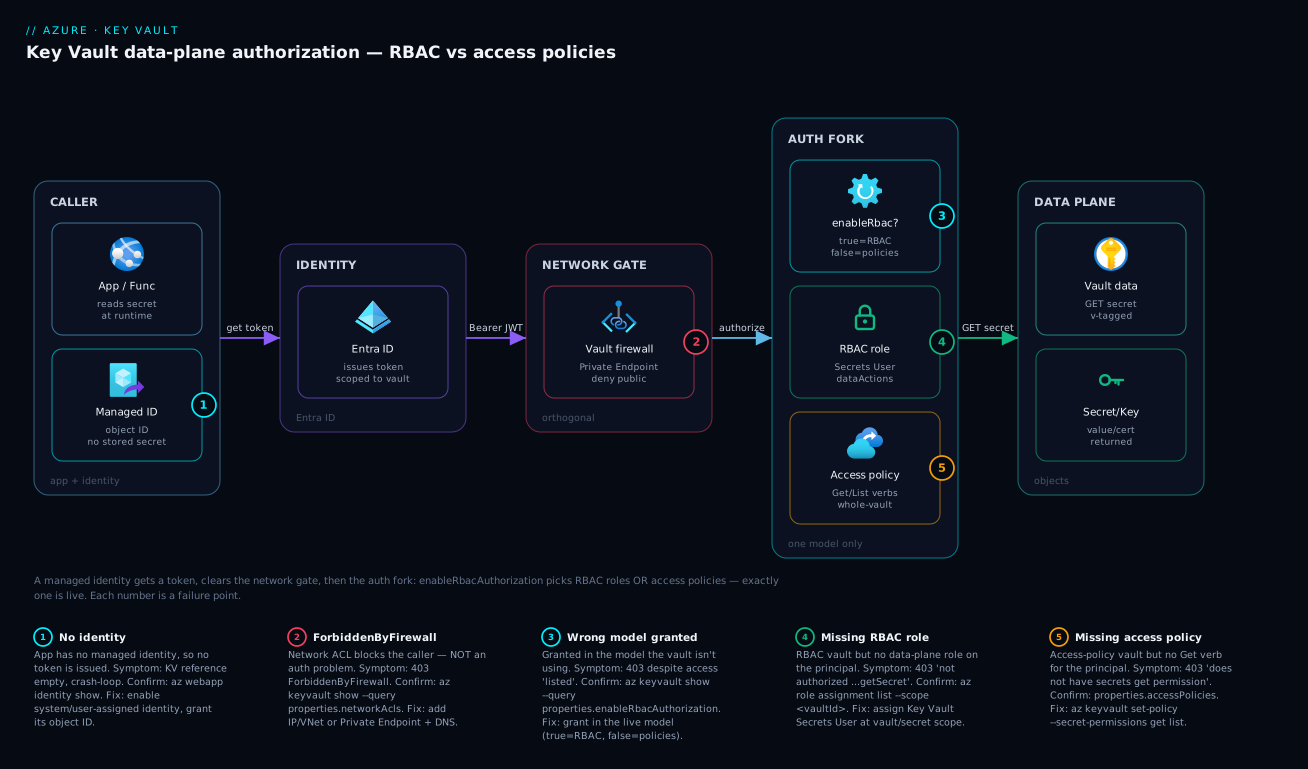
Trace a single secret read from left to right, because every Key Vault 403 lives on one specific hop of this path. The caller is an app (App Service, Function, AKS pod) carrying a managed identity — no stored secret of its own. It first proves identity to Entra ID, which issues a short-lived token scoped to the vault. The app presents that token to the vault. Before any object is returned, the request crosses two independent gates: the network gate (the vault firewall / Private Endpoint — “can this caller even reach me?”, orthogonal to who they are) and the authorization gate, which is where the model matters. On an RBAC vault the authorization gate checks role assignments for a data action like secrets/getSecret/action; on an access-policy vault it checks the vault’s policy list for the Get verb. Exactly one of those two paths is live — chosen by enableRbacAuthorization. Only if the right gate passes does the data plane return the versioned secret, key, or certificate.
The diagram maps the failure points onto that path: missing identity (no token), the network gate (ForbiddenByFirewall), the fork between the two models (grant in the wrong one and you’re denied), the missing-grant case on each side, and the data-plane success. Read the badges as a diagnostic order — if a read fails, walk left to right and the first failed gate is your answer.
Real-world scenario
Northwind Retail ran 40-some web apps and Functions across three subscriptions. Most vaults dated back years and used access policies; a newer platform team had started provisioning vaults with a Bicep module that set enableRbacAuthorization: true. Nobody had written down which vaults used which model — and the divergence was invisible until it wasn’t.
The incident began when a developer copied the platform team’s “golden” Bicep module to recreate a vault that an app team owned, kv-orders-prod. The module set RBAC. The redeploy succeeded with no warning. Within minutes the orders API began crash-looping at boot with 403 Forbidden — the user, group or application does not have secrets get permission on key vault kv-orders-prod. The on-call engineer saw the app’s managed identity still listed under the vault’s Access policies blade (the policy entries survived the flip, they were just inert now) and concluded “it has access” — and spent forty minutes restarting the app and re-saving the access policy, which did nothing, because the vault was now an RBAC vault ignoring policies entirely.
The breakthrough was one command: az keyvault show -n kv-orders-prod --query properties.enableRbacAuthorization returned true. The model had silently changed under the app. The fix was immediate — assign Key Vault Secrets User to the app’s managed identity at the vault scope:
PRINCIPAL_ID=$(az webapp identity show -n app-orders-prod -g rg-orders-prod --query principalId -o tsv)
VAULT_ID=$(az keyvault show -n kv-orders-prod --query id -o tsv)
az role assignment create --assignee-object-id "$PRINCIPAL_ID" \
  --assignee-principal-type ServicePrincipal \
  --role "Key Vault Secrets User" --scope "$VAULT_ID"
The app recovered after the assignment propagated (about two minutes). Northwind then drew the right lessons. First, the subscription-wide inventory (az keyvault list --query "[].{name:name, rbac:properties.enableRbacAuthorization}") found 11 vaults on RBAC, 29 on access policies, and three matching no Bicep in source control — drift. Second, they standardised on RBAC for all new vaults and ran the ordered migration on the rest during change windows: pre-stage roles, verify, flip, bake a week, remove policies. Third, they added an Azure Policy audit rule flagging any vault where enableRbacAuthorization is not true, so a future “golden module” copy could never silently change a model unseen. Total outage: 47 minutes — caused by one boolean nobody had agreed on, cured by agreeing on it once and enforcing it.
Advantages and disadvantages
Each model is genuinely better at something. The honest trade-off:
| Azure RBAC | Vault access policies | |
|---|---|---|
| Granularity | ✅ Down to a single secret/key/cert | ❌ Whole vault only |
| Scale across vaults | ✅ One assignment at RG/sub covers many vaults | ❌ Re-enter on every vault |
| Auditability | ✅ Full IAM, az role assignment list, Activity Log |
❌ Not in IAM; vault-specific |
| Governance | ✅ Works with PIM, deny assignments, access reviews | ❌ None of these |
| Least privilege | ✅ Narrow built-in roles + secret-level scope | ⚠️ Coarse verb sets, easy to over-grant |
| Propagation speed | ⚠️ Seconds to a few minutes | ✅ Effectively immediate |
| Simplicity for one vault | ⚠️ Requires role-assignment rights | ✅ Self-contained on the vault |
| Escalation surface | ✅ Data roles separate from Contributor | ❌ Contributor can self-grant via policy |
| Microsoft direction | ✅ Recommended for new work | ⚠️ Legacy, supported not advanced |
When each matters: RBAC is the right call for anything multi-vault, anything that must appear in access reviews, single-secret scoping, and separating “manage the vault” from “read its secrets”. Access policies still earn their place on a single self-contained vault where you want zero propagation delay and the managing team is the consuming team, or where org governance blocks you from creating role assignments. Propagation is the one operational edge access policies retain — an RBAC grant can take a couple of minutes, which matters in a tight deploy-and-immediately-read pipeline, so pre-stage the role earlier.
Hands-on lab
A free-tier-friendly walk-through: create an RBAC vault, grant a reader role scoped to one secret, prove it works, then flip a second vault from access policies to RBAC the safe way. Run in Cloud Shell (already authenticated). A standard-SKU vault has no hourly charge; you pay only per-operation (fractions of a paisa), so this lab costs effectively nothing — just purge the vaults at the end so soft-delete doesn’t hold the names.
1. Set variables and create an RBAC vault.
RG=rg-kv-lab
LOC=centralindia
VAULT=kv-lab-$RANDOM
az group create -n $RG -l $LOC
az keyvault create -n $VAULT -g $RG -l $LOC \
  --enable-rbac-authorization true --sku standard
2. Give yourself a data-plane role (creating the vault does not grant data access on an RBAC vault — the classic first surprise). Assign Secrets Officer so you can write a secret:
ME=$(az ad signed-in-user show --query id -o tsv)
VID=$(az keyvault show -n $VAULT --query id -o tsv)
az role assignment create --assignee-object-id "$ME" \
  --assignee-principal-type User \
  --role "Key Vault Secrets Officer" --scope "$VID"
# wait ~1-2 min for propagation, then:
az keyvault secret set --vault-name $VAULT --name DemoSecret --value "hello-rbac"
3. Create a reader identity and scope it to one secret. Use a user-assigned managed identity as the test principal:
az identity create -n id-kv-reader -g $RG -l $LOC
READER=$(az identity show -n id-kv-reader -g $RG --query principalId -o tsv)
az role assignment create --assignee-object-id "$READER" \
  --assignee-principal-type ServicePrincipal \
  --role "Key Vault Secrets User" \
  --scope "$VID/secrets/DemoSecret"   # single-secret scope, true least privilege
Expected: the reader can GET DemoSecret but is denied any other secret — confirm by listing the assignment scope:
az role assignment list --scope "$VID" \
  --query "[].{principal:principalId, role:roleDefinitionName, scope:scope}" -o table
4. Create a second vault on access policies and migrate it. First the legacy vault with a policy:
VAULT2=kv-lab2-$RANDOM
az keyvault create -n $VAULT2 -g $RG -l $LOC \
  --enable-rbac-authorization false --sku standard
az keyvault set-policy -n $VAULT2 --object-id "$READER" --secret-permissions get list
Now migrate safely — pre-stage the role, then flip:
VID2=$(az keyvault show -n $VAULT2 --query id -o tsv)
# Step 3: assign the equivalent role while still in access-policy mode
az role assignment create --assignee-object-id "$READER" \
  --assignee-principal-type ServicePrincipal \
  --role "Key Vault Secrets User" --scope "$VID2"
# wait for propagation, verify, THEN flip:
az keyvault update -n $VAULT2 --enable-rbac-authorization true
# the inert access policy is now your rollback net; verify the read still works
5. Verify the model on both vaults (the command you will use in every future incident):
az keyvault list --query "[?starts_with(name,'kv-lab')].{name:name, rbac:properties.enableRbacAuthorization}" -o table
6. Teardown — delete and purge so soft-delete doesn’t retain the vault names:
az keyvault delete -n $VAULT -g $RG;  az keyvault purge -n $VAULT
az keyvault delete -n $VAULT2 -g $RG; az keyvault purge -n $VAULT2
az group delete -n $RG --yes --no-wait
Common mistakes & troubleshooting
The failure modes below cover essentially every Key Vault permission incident. For each: the symptom, the root cause, exactly how to confirm it, and the fix.
| # | Symptom | Root cause | Confirm with | Fix |
|---|---|---|---|---|
| 1 | 403 “does not have secrets get permission” despite identity listed in Access policies | Vault is on RBAC; access policies are ignored | az keyvault show -n <v> --query properties.enableRbacAuthorization → true |
Assign Key Vault Secrets User via az role assignment create |
| 2 | 403 on read; you set a role but vault is access-policy | Vault is on access policies; RBAC ignored | same command → false/null | Add an access policy with az keyvault set-policy --secret-permissions get |
| 3 | Contributor on the vault, still 403 reading a secret | Contributor is control plane; no data-plane role | az role assignment list --scope $VID shows Contributor only |
Add a data-plane role (Secrets User), not more control-plane |
| 4 | Role assigned, still 403 for a few minutes | RBAC propagation delay | Re-run the read after 2–5 min; check az role assignment list |
Wait; pre-stage roles earlier in the pipeline |
| 5 | Grant created but caller still denied | Granted to the wrong principal (app resource ID, not identity object ID) | Compare az webapp identity show --query principalId to the assignment’s principalId |
Re-grant to the managed identity’s object ID |
| 6 | 403 “ForbiddenByFirewall” | Network ACL, not authorization | az keyvault show -n <v> --query properties.networkAcls |
Add caller IP/VNet, or use a Private Endpoint + DNS |
| 7 | Every app loses access right after a “harmless” redeploy | Template flipped the model (enableRbacAuthorization) |
Compare current flag to before; check deploy history | Pre-stage roles then flip; or roll the flag back |
| 8 | Bicep deploy wiped existing access policies | Used name: 'replace' instead of 'add' |
Inspect the access-policy child resource name | Use 'add' to merge; restore missing policies |
| 9 | “Read-only” identity can read every secret | Over-granted — whole-vault role or all verbs |
Inspect role scope / policy verbs | Scope role to a single secret; reduce verbs to get+list |
| 10 | List works but Get fails (or vice-versa) | List ≠ Get — separate permissions | Check which verbs/data actions are granted | Add the specific missing permission, not a broader role |
| 11 | App Configuration can’t resolve a Key Vault reference | App Config’s identity lacks data access in the vault’s model | az role assignment list / access policies for the App Config identity |
Grant App Config’s managed identity Secrets User (or policy Get) |
| 12 | Soft-deleted vault name can’t be reused | Purge protection / soft-delete retains the name | az keyvault list-deleted |
Purge it (if allowed) or pick a new name |
A compact decision table for the live incident — start here when a read returns 403:
| If you see… | It’s probably… | Do this first |
|---|---|---|
| “ForbiddenByFirewall” | Network, not auth | Check networkAcls; add IP/PE — stop looking at roles |
| “does not have secrets get permission” | Wrong model or missing grant | Check enableRbacAuthorization, then grant in that model |
| “Caller is not authorized to perform action …Microsoft.KeyVault/…/secrets/getSecret” | Missing RBAC role | Assign Key Vault Secrets User at vault scope |
| Works for you, fails for the app | Wrong principal / app has no identity | az webapp identity show; grant the identity’s object ID |
| Worked yesterday, fails today after deploy | Model flipped or policies replaced | Diff the vault’s flag and access policies vs source |
Best practices
- Default new vaults to RBAC. Set
enableRbacAuthorization: trueexplicitly; never leave it absent (absent = access policies, the model you didn’t choose). - Pin the model in source control and add an Azure Policy audit rule, so a vault’s model can never drift silently.
- Grant the narrowest role. For app reads use Key Vault Secrets User, not Officer or Administrator — most workloads only read.
- Scope to a single secret on shared vaults — assign each app’s role at the secret scope, not the whole vault.
- Separate control plane from data plane in your reviews: Contributor manages the vault, it is not how you read secrets on RBAC vaults.
- Grant to identities, not names — target the managed identity’s object ID; a display name can match the wrong principal.
- Pre-stage roles before any model flip or tight read — assign, wait for propagation, then deploy the reading code, never the reverse.
- Keep the old access policies through the migration bake-in as your instant rollback; remove them only after a clean week on RBAC.
- Distinguish List from Get for “read-only” — an enumerator needs List, not a value-read permission.
- Inventory regularly with the subscription-wide
enableRbacAuthorizationlisting; mixed-model estates breed silent 403s. - Track cross-service identities — App Configuration, Data Factory and others resolve Key Vault references with their own identity, which must be granted in the vault’s model.
Security notes
Authorization is a security control, so model choice has direct security consequences. RBAC’s biggest security win is removing the Contributor self-grant path. On an access-policy vault, anyone with control-plane Contributor can add an access policy granting themselves data-plane access — so “can manage the vault” leaks into “can read every secret.” On an RBAC vault, data-plane roles are independent assignments governed separately; managing the vault does not let you read its contents. For any vault holding production secrets, that separation alone justifies RBAC.
Beyond the model, standard Key Vault hardening still applies and is orthogonal to authorization — getting auth right does not make the vault network-safe. Use managed identities so no bootstrap secret is stored (managed identity patterns). Lock the network with Private Endpoints and publicNetworkAccess: Disabled (Private Link and Private DNS) — a network block surfaces as ForbiddenByFirewall, not an authorization 403. Enable soft-delete and purge protection so deletes are recoverable. Use least-privilege built-in roles and PIM for human break-glass access (Key Vault Administrator should be just-in-time, never standing). Turn on diagnostic logging to Log Analytics so every data-plane operation, including denials, is auditable.
Cost & sizing
Authorization model choice has no direct cost — neither RBAC nor access policies add a charge. Key Vault billing is driven by something else entirely, so “which model” is a security/operability decision, not a budget one.
| Cost driver | What it is | Standard tier | Premium tier | Notes |
|---|---|---|---|---|
| Operations | Per 10,000 secret/key/cert ops | a few INR per 10k | same base + HSM ops | The main line item; cache reads to cut it |
| HSM-protected keys | Hardware-backed keys | n/a (software keys) | per-key/month + ops | Only Premium; for FIPS/HSM needs |
| Certificate renewals | Issuance via integrated CA | per renewal | per renewal | Small, periodic |
| Soft-delete retention | Keeping deleted objects | free (within window) | free | No charge; just holds the name |
| RBAC role assignments | Authorization metadata | free | free | Model choice itself costs nothing |
| Access policies | Authorization metadata | free | free | Likewise free |
Right-sizing here is about operations, not the model: the most effective lever is caching secrets in-process so you don’t GET on every request (this also dodges the per-vault transaction throttle). RBAC’s single-secret scoping lets one shared vault stay least-privilege, which can reduce vault sprawl. The authorization model carries no charge; a standard vault as used in this lab costs only fractional per-operation amounts, effectively zero at low volume.
Interview & exam questions
Q1. What single property decides whether a Key Vault uses RBAC or access policies?
enableRbacAuthorization. When true, the vault authorizes data-plane operations via Azure RBAC and ignores access policies; when false or absent, it uses vault access policies and ignores RBAC for data-plane checks. A vault uses exactly one model at a time. (AZ-500, AZ-204.)
Q2. A user has Contributor on a Key Vault but gets 403 reading a secret. Why? Contributor is a control-plane role — it lets you manage the vault resource (settings, firewall, on an access-policy vault even the policies) but, on an RBAC vault, it grants no data-plane access. They need a data-plane role such as Key Vault Secrets User. (AZ-500.)
Q3. Which built-in role should an app that only reads connection strings get, and why? Key Vault Secrets User — it grants get/list on secret values and nothing more. It is the least-privilege fit for a read-only consumer; Secrets Officer (write) or Administrator (everything) would over-grant. (AZ-204, AZ-500.)
Q4. You flip a vault from access policies to RBAC and every app immediately 403s. What went wrong and how should it have been done? The flip made RBAC authoritative instantly, and no role assignments existed yet, so the (still-present) access policies were ignored. Correct order: assign the equivalent RBAC roles first, verify propagation, then flip — keeping the old policies as a rollback net. (AZ-500.)
Q5. What is the difference between “ForbiddenByFirewall” and a standard Key Vault 403? ForbiddenByFirewall is a network denial — the caller can’t reach the vault because of network ACLs/Private Endpoint config — and is independent of the authorization model. A standard 403 (“does not have … permission”) is an authorization denial. They live on different gates; fixing one never fixes the other. (AZ-500.)
Q6. How does RBAC let you achieve least privilege that access policies cannot?
RBAC assignments have a scope, so you can grant a role on a single secret (.../secrets/<name>) rather than the whole vault. Access policies grant at whole-vault granularity only. RBAC also offers narrow built-in roles per object type. (AZ-500.)
Q7. Why is RBAC considered more secure than access policies regarding privilege escalation? On an access-policy vault, a control-plane Contributor can add an access policy granting themselves data-plane access — so vault-management rights leak into secret-read rights. Under RBAC, data-plane roles are separate assignments, so managing the vault doesn’t grant reading it. (AZ-500.)
Q8. Where do RBAC role assignments appear that access policies do not?
In Access control (IAM) on the resource, and via az role assignment list, the Activity Log, and access reviews/PIM. Access policies live only in properties.accessPolicies on the vault and are invisible to IAM tooling — a reason RBAC is more auditable. (AZ-500.)
Q9. Why might an App Configuration Key Vault reference fail even though the app’s own identity has access? Because App Configuration uses its own managed identity to resolve the reference, not the app’s. That App Config identity must be granted data access in the vault’s model (Secrets User under RBAC, or a Get policy under access policies). (AZ-204.)
Q10. After assigning a role you still get 403 for a couple of minutes. Is something wrong?
Usually not — RBAC role assignments can take seconds to a few minutes to propagate. Verify with az role assignment list, retry the read after a short wait, and in pipelines pre-stage the role before the step that reads. Access policies, by contrast, take effect effectively immediately. (AZ-500.)
Quick check
- A vault has
enableRbacAuthorization: true. You add the app’s identity under Access policies. Will the app be able to read a secret? - Which built-in role is the least-privilege choice for an app that only reads secrets?
- Name the property that selects a vault’s data-plane authorization model.
- You’re migrating a live vault from access policies to RBAC. What must you do before flipping the flag?
- A secret read fails with “ForbiddenByFirewall”. Is this an authorization problem? What do you fix?
Answers
- No. With RBAC enabled the vault ignores access policies entirely — the access-policy entry is inert. The app needs an RBAC role (Key Vault Secrets User).
- Key Vault Secrets User — it grants get/list on secret values and nothing more.
enableRbacAuthorization—true= RBAC,false/absent = vault access policies.- Pre-stage the equivalent RBAC role assignments and verify they’ve propagated. Flipping first denies every workload because RBAC becomes authoritative instantly while no roles exist yet.
- No — it’s a network denial, not authorization. Fix the vault’s network ACLs / Private Endpoint configuration (add the caller’s IP or VNet); no role or policy change will help.
Glossary
- Key Vault — Azure’s managed store for secrets, keys, and certificates, consumed by apps at runtime.
enableRbacAuthorization— The vault property selecting the data-plane authorization model:true= Azure RBAC,false/absent = vault access policies.- Vault access policy — A per-vault entry mapping a principal to allowed verbs across secrets/keys/certificates; whole-vault granularity, max 1,024 per vault.
- Azure RBAC — The standard Azure role-based access control: a role (bundle of actions) assigned to a principal at a scope, inherited down the hierarchy.
- Control plane — Managing the vault resource (create, delete, firewall, policies); always governed by Azure RBAC.
- Data plane — Operations on the vault’s contents (get/set a secret, sign with a key); governed by the selected model.
- Built-in role — A predefined RBAC role; for Key Vault data, e.g. Secrets User, Secrets Officer, Crypto User, Certificates Officer, Administrator, Reader.
dataActions— The specific data-plane operations a role permits (e.g..../secrets/getSecret/action).- Scope — Where an RBAC assignment applies: management group, subscription, resource group, resource, or a single Key Vault object.
- Principal / object ID — The Entra identity (managed identity, service principal, user, group) being granted; grants target its object ID, not a display name.
- Managed identity — An Entra-issued identity for an Azure resource with no secret to store, used to authenticate to Key Vault.
- Network ACL / vault firewall — Controls whether a caller can reach the vault; orthogonal to authorization. A block surfaces as ForbiddenByFirewall.
- Soft-delete / purge protection — Recovery features that retain deleted objects/vaults (and their names) for a window.
Next steps
- Build the secret-storage foundation this article authorizes: Azure Key Vault: Secrets, Keys and Certificates Done Right.
- Get the identities right that receive these roles: Managed Identities Demystified: System vs User-Assigned and When to Use Each.
- Enforce the model across an estate with policy: Azure Policy Effects Decoded: Deny vs Audit vs Modify vs DeployIfNotExists.
- Resolve Key Vault references centrally: Azure App Configuration in Production: Dynamic Refresh, Feature Flags, Key Vault References, and Snapshots.
- Keep the vault off the public internet: Azure Private Link and Private DNS: Keeping PaaS Off the Public Internet.