A Kubernetes Pod is, underneath the abstraction, just one or more Linux processes wrapped in namespaces and cgroups. Whether those processes can read the host’s /etc/shadow, load a kernel module, raw-spoof packets, or escalate to root after a setuid binary fires is decided almost entirely by one block of YAML: the securityContext. Get it right and a compromised container is a sandboxed nuisance; get it wrong — or leave it empty, which is the insecure default — and a single application bug becomes a node takeover.
This guide is the field-by-field reference for that block. We cover every setting at both the Pod and container level, the precedence rules when they disagree, what each one maps to at the Linux kernel level, the default Docker/containerd capability set you are implicitly granting, the three seccompProfile types, the now-graduated appArmorProfile field, SELinux options, and procMount. We then map all of it onto the Pod Security Standards (baseline and restricted) and finish with a copy-paste hardened-pod recipe and a local lab that proves each control actually bites. This is the depth a CKS exam and a real security review both demand; the policy-enforcement machinery that requires these fields lives in the companion Pod Security Admission lesson, which this one is designed to pair with.
Learning objectives
By the end of this lesson you will be able to:
- Explain what a
securityContextis, the difference between the Pod-level (spec.securityContext) and container-level (spec.containers[].securityContext) blocks, and exactly which fields live where. - Apply every field —
runAsUser/runAsGroup/runAsNonRoot,fsGroup/fsGroupChangePolicy,supplementalGroups,allowPrivilegeEscalation,privileged,readOnlyRootFilesystem,capabilities,seccompProfile,appArmorProfile,seLinuxOptions,procMount— and state its default and trade-off. - Resolve pod-vs-container precedence correctly when both blocks set overlapping values.
- Drop the default capability set to
ALLand add back only what an app genuinely needs (e.g.NET_BIND_SERVICE). - Choose between the
RuntimeDefault,Localhost, andUnconfinedseccomp profiles and load a custom profile. - Map every field onto the baseline and restricted Pod Security Standards and write a Pod that passes
restricted. - Diagnose the classic failures:
runAsNonRootrejection, a read-only root filesystem breaking a process,fsGroupnot applying, and a dropped capability that the app actually needed.
Prerequisites
You should be comfortable with Pods, containers, probes and the Pod lifecycle and able to apply a manifest with kubectl. A working mental model of Linux users/groups and file permissions helps but is not assumed — we define the kernel terms as we go. This lesson sits in the Security module of the Kubernetes Zero-to-Hero course, immediately before Advanced scheduling and alongside RBAC & ServiceAccounts. RBAC controls what an identity may ask the API server to do; the securityContext controls what a running container may do to the node and kernel. You need both. All examples target Kubernetes v1.30+ with the containerd runtime and assume the RuntimeDefault seccomp profile is available (it is, on every mainstream distro).
Core concepts: what a securityContext actually controls
A securityContext is a set of kernel-level privilege and isolation settings that the kubelet hands to the container runtime (containerd/CRI-O), which in turn passes them to the OCI runtime (runc) when it clone()s and exec()s your process. There is no Kubernetes “security daemon” enforcing these at runtime — they are translated into ordinary Linux primitives: the process UID/GID, its capability sets, a seccomp BPF filter, an AppArmor or SELinux label, and assorted prctl() flags. Kubernetes’ job is purely to set them declaratively and consistently.
Five Linux mechanisms underpin almost everything here:
- User and group IDs. Every process runs as a numeric UID and GID. UID 0 is
rootinside the container’s user namespace — and unless user namespaces are remapped, that is the same root as the host. Running as non-root is the single highest-value control. - Linux capabilities. Since Linux 2.2, root’s monolithic power is split into ~40 discrete capabilities (e.g.
CAP_NET_BIND_SERVICEto bind ports < 1024,CAP_SYS_ADMINthe near-root catch-all,CAP_NET_RAWto craft raw packets). A process can hold a subset. The container runtime grants a default set (covered below); good hygiene drops all of them and adds back only what is needed. - The
no_new_privsbit. Aprctl(PR_SET_NO_NEW_PRIVS)flag that, once set, prevents a process and its children from gaining privileges viasetuid/setgidbinaries or file capabilities. This is whatallowPrivilegeEscalation: falsesets. - seccomp (secure computing mode). A BPF filter that whitelists/blacklists individual syscalls. A container can be confined so that exotic syscalls (e.g.
keyctl,ptrace,unshare) returnEPERMor kill the process. The runtime ships a sane default profile. - MAC: AppArmor and SELinux. Mandatory Access Control layers that confine a process to a policy regardless of its UID — AppArmor by file path, SELinux by label. They are belt-and-braces on top of capabilities.
The securityContext exposes a knob for each of these. Two scopes exist, and the distinction matters for the whole rest of the lesson:
| Scope | YAML path | Applies to | Notable: |
|---|---|---|---|
| Pod-level | spec.securityContext (a PodSecurityContext) |
All containers in the Pod (as a default) plus volume ownership | Only place for fsGroup, fsGroupChangePolicy, supplementalGroups; sysctls |
| Container-level | spec.containers[].securityContext (a SecurityContext) |
That one container only | Only place for capabilities, privileged, allowPrivilegeEscalation, readOnlyRootFilesystem, procMount |
Some fields exist in both structs (runAsUser, runAsGroup, runAsNonRoot, seccompProfile, appArmorProfile, seLinuxOptions) — and that overlap is where the precedence rules in the next-but-one section come in.
The Pod-level securityContext: every field
These belong under spec.securityContext. Several are only available here.
| Field | Type | Default if unset | What it does | Trade-off / gotcha |
|---|---|---|---|---|
runAsUser |
int64 (UID) | Image’s USER, else 0 (root) |
Default UID for every container in the Pod | A container-level value overrides it; the UID need not exist in /etc/passwd |
runAsGroup |
int64 (GID) | 0 (root group) — not the image’s group |
Default primary GID | Easy to forget; many “non-root” pods still run with primary GID 0 |
runAsNonRoot |
bool | false |
Asserts the container must not run as UID 0; kubelet refuses to start it if it would | An assertion, not a coercion — it does not change the UID; needs a non-root user in the image or an explicit runAsUser |
fsGroup |
int64 (GID) | unset (no ownership change) | A supplemental GID applied to volumes that support ownership management; the volume’s files are chowned/chmod g+rwxed to this GID so the container can write to them |
Recursive chown on huge volumes can make Pod start very slow — see fsGroupChangePolicy |
fsGroupChangePolicy |
enum | Always |
Always = chown the whole volume on every mount; OnRootMismatch = only chown if the top-level dir’s owner/perm is wrong |
Set OnRootMismatch for large persistent volumes to avoid multi-minute startup stalls |
supplementalGroups |
[]int64 | image-defined groups only | Extra GIDs added to the first process of every container, on top of the primary GID | Use for shared-NFS access; does not affect volume ownership the way fsGroup does |
supplementalGroupsPolicy |
enum (1.31+ beta) | Merge |
Merge = combine image /etc/group membership with supplementalGroups; Strict = use only the listed GIDs, ignoring the image’s group file |
Strict closes a subtle gap where image-baked group membership grants unexpected access |
seccompProfile |
object | unset → runtime’s behaviour (see seccomp section) | Pod-wide seccomp profile (inherited by containers that don’t set their own) | The cleanest place to set RuntimeDefault once for the whole Pod |
appArmorProfile |
object (1.30 GA) | unset | Pod-wide AppArmor profile (replaces the old annotation) | Container-level value wins; only on nodes with AppArmor loaded |
seLinuxOptions |
object | runtime-assigned label | Pod-wide SELinux user/role/type/level |
Mostly relevant on RHEL/OpenShift; mislabelling breaks volume access |
sysctls |
[]object | none | Set kernel sysctls for the Pod’s network/IPC namespaces |
“Unsafe” sysctls must be allow-listed on the kubelet; otherwise the Pod is rejected |
windowsOptions |
object | n/a | Windows-container equivalents (GMSA, runAsUserName) | Linux fields above are ignored on Windows nodes and vice-versa |
The
fsGroupmechanic in one sentence: when a Pod mounts a writeable volume (PVC,emptyDir, etc.) and you setfsGroup: 2000, the kubelet recursively makes the volume’s files group-owned by GID 2000 and group-writable, and adds 2000 to every container’s supplemental groups — which is how a non-root container is able to write to a freshly-provisioned PersistentVolume at all. Without it, arunAsNonRootPod frequently hitspermission deniedon its data directory.
The container-level securityContext: every field
These belong under spec.containers[].securityContext (and initContainers[], ephemeralContainers[]). The first three also exist at Pod level; the rest are container-only.
| Field | Type | Default if unset | What it does | Trade-off / gotcha |
|---|---|---|---|---|
runAsUser |
int64 | inherits Pod value, else image USER, else 0 |
UID for this container | Overrides the Pod-level value for this container |
runAsGroup |
int64 | inherits Pod value, else 0 | Primary GID for this container | Same override behaviour |
runAsNonRoot |
bool | inherits Pod value, else false | Per-container non-root assertion | Setting it true here is the restricted-profile expectation |
privileged |
bool | false |
Gives the container almost all host capabilities, access to all host devices, and effectively disables seccomp/AppArmor confinement — near-equivalent to running directly on the host as root | The single most dangerous field. Effectively a container escape by design. Forbidden by both baseline and restricted |
allowPrivilegeEscalation |
bool | true (but forced to false if privileged: false and no CAP_SYS_ADMIN… see gotcha) |
Sets the no_new_privs bit when false, blocking gain of privileges via setuid binaries/file caps |
Defaults to true, so you must set it false explicitly. It is implicitly true if privileged: true or CAP_SYS_ADMIN is added |
readOnlyRootFilesystem |
bool | false |
Mounts the container’s root filesystem read-only; writes fail with EROFS |
Breaks apps that write to /tmp, /var/run, /var/cache — give them an emptyDir mount on those paths |
capabilities |
object {add: [], drop: []} |
runtime default set (see next section) | Add or drop Linux capabilities relative to the default set; drop: ["ALL"] removes everything |
Capability names omit the CAP_ prefix here (NET_BIND_SERVICE, not CAP_NET_BIND_SERVICE). drop is applied after add semantics differ — drop ALL then add back is the safe idiom |
seccompProfile |
object | inherits Pod value | Per-container seccomp profile | A container value overrides the Pod default |
appArmorProfile |
object | inherits Pod value | Per-container AppArmor profile | Container wins over Pod |
seLinuxOptions |
object | inherits Pod value | Per-container SELinux label | Container wins over Pod |
procMount |
enum | Default |
Default masks/ro-mounts sensitive /proc paths (/proc/kcore, /proc/sys, etc.); Unmasked exposes the full /proc |
Unmasked requires the Pod to share the host… no — it requires user namespaces or relaxed policy; needed for nested containers/sysbox. Forbidden by baseline/restricted |
A few of these deserve their own treatment because they are where most real incidents and exam questions concentrate: capabilities, seccomp, and the precedence rules.
Linux capabilities: the default set and dropping to ALL
When you run a “non-privileged” container, you are not running with zero capabilities. The container runtime grants a default set — historically the Docker default, which containerd and CRI-O honour. Knowing exactly what is in it is the difference between thinking you’ve hardened a Pod and having hardened it.
The default set granted to a non-privileged container is (names shown without the CAP_ prefix):
| Capability | What it permits | Do most apps need it? |
|---|---|---|
CHOWN |
Change file ownership | Rarely |
DAC_OVERRIDE |
Bypass file read/write/execute permission checks | Rarely |
FOWNER |
Bypass permission checks on operations that need the file’s UID | Rarely |
FSETID |
Don’t clear setuid/setgid bits on modification | Rarely |
KILL |
Send signals to any process | Sometimes |
SETGID |
Manipulate GIDs / setgroups |
Rarely |
SETUID |
Manipulate UIDs (setuid) |
Rarely |
SETPCAP |
Modify process capabilities | Rarely |
NET_BIND_SERVICE |
Bind to ports below 1024 | Sometimes (legacy web servers) |
NET_RAW |
Use RAW and PACKET sockets (ping, packet spoofing) | Rarely — and a known attack vector |
SYS_CHROOT |
Use chroot() |
Rarely |
MKNOD |
Create special files with mknod |
Rarely |
AUDIT_WRITE |
Write to the kernel audit log | Rarely |
SETFCAP |
Set file capabilities | Rarely |
That is roughly 14 capabilities your application almost certainly does not use. NET_RAW alone enables ARP spoofing and DNS poisoning of neighbours on the Pod network — a real lateral-movement primitive that the restricted profile explicitly removes.
The correct idiom is drop everything, then add back the minimum:
securityContext:
  capabilities:
    drop: ["ALL"]            # remove the entire default set
    add: ["NET_BIND_SERVICE"] # ...add back only what this app needs, if anything
drop: ["ALL"] with an empty (or absent) add is what you want for the overwhelming majority of modern workloads, which listen on a port ≥ 1024. If a legacy process insists on binding port 80/443 directly, add NET_BIND_SERVICE — or better, listen on 8080 and let the Service remap. Never add SYS_ADMIN (it is “the new root” and re-opens most escape paths), SYS_PTRACE, NET_ADMIN, or SYS_MODULE unless you can articulate precisely why; each is a frequent CVE enabler.
A subtle interaction: adding CAP_SYS_ADMIN (or SETUID/SETGID via setuid binaries) forces allowPrivilegeEscalation to behave as true, because the kernel cannot honour no_new_privs while granting those. So a Pod that drops ALL and sets allowPrivilegeEscalation: false is internally consistent; one that adds SYS_ADMIN but claims allowPrivilegeEscalation: false is contradictory and will be admitted with escalation effectively enabled.
seccomp: RuntimeDefault, Localhost, Unconfined
seccomp filters syscalls. A Linux process makes hundreds of distinct syscalls; a typical web app uses maybe 60-70. seccomp lets you block the rest, so that if an attacker gains code execution they cannot reach into the kernel’s wide and bug-prone syscall surface (the source of many privilege-escalation CVEs). Kubernetes exposes three profile types via seccompProfile.type:
type |
What it does | When to use | Gotcha |
|---|---|---|---|
RuntimeDefault |
Applies the container runtime’s built-in default profile — a curated allow-list that blocks ~44 dangerous syscalls (keyctl, add_key, ptrace, mount, reboot, kexec_load, bpf …) while permitting everything normal apps need |
The default you should set on essentially every Pod. Zero compatibility risk for normal workloads | Must be set explicitly to satisfy the restricted profile; historically not applied unless requested (see version note) |
Localhost |
Loads a custom profile from a JSON file on the node, referenced by localhostProfile: my-profiles/app.json (relative to the kubelet’s seccomp root, default /var/lib/kubelet/seccomp) |
When you’ve profiled an app and want a tighter allow-list than RuntimeDefault, or to unblock one syscall RuntimeDefault denies | The file must already exist on every node that could schedule the Pod — distribute it via DaemonSet, node image, or the Security Profiles Operator |
Unconfined |
No seccomp filtering — every syscall allowed | Debugging only, or a workload that genuinely needs a blocked syscall and can’t use a Localhost profile | The least secure option; forbidden by the restricted profile (baseline allows it) |
# Recommended baseline for almost everything:
spec:
  securityContext:
    seccompProfile:
      type: RuntimeDefault
# A tailored custom profile, file living at /var/lib/kubelet/seccomp/profiles/audit.json on each node:
        seccompProfile:
          type: Localhost
          localhostProfile: profiles/audit.json
Version note that trips people up: in older clusters the runtime’s default seccomp profile was not applied to Pods unless you asked for it (
seccompProfilewas effectivelyUnconfinedby default). Modern clusters can opt every Pod intoRuntimeDefaultautomatically via the kubelet flag--seccomp-default=true(beta and on by default in recent versions). Even so, set it explicitly in your manifests — the restricted Pod Security Standard requires the field to be present and notUnconfined, and you should not rely on a node flag you don’t control.
The Security Profiles Operator (SPO) can record a profile by observing a running workload, then distribute the resulting Localhost profile cluster-wide — the practical way to go tighter than RuntimeDefault without hand-writing syscall lists.
appArmorProfile and seLinuxOptions: mandatory access control
AppArmor confines a process to a per-program policy keyed on file paths and capabilities. As of Kubernetes 1.30 it is a first-class field (appArmorProfile), retiring the old container.apparmor.security.beta.kubernetes.io/<container> annotation:
appArmorProfile.type |
Meaning |
|---|---|
RuntimeDefault |
Use the container runtime’s default AppArmor profile (cri-containerd.apparmor.d or docker-default) |
Localhost |
Use a named profile already loaded into the kernel on the node, via localhostProfile: k8s-myapp |
Unconfined |
No AppArmor confinement |
securityContext:
  appArmorProfile:
    type: Localhost
    localhostProfile: k8s-restrict-write   # must be loaded on the node with apparmor_parser
AppArmor only works on nodes whose kernel has AppArmor enabled (Ubuntu/Debian/SUSE) and where the named profile is already loaded — there is no Kubernetes mechanism to load it for you; use a DaemonSet or node image. If you reference a profile that isn’t loaded, the Pod fails to start.
SELinux is the RHEL/Fedora/OpenShift equivalent, label-based rather than path-based. seLinuxOptions sets the process label components:
securityContext:
  seLinuxOptions:
    level: "s0:c123,c456"   # the MCS category pair is the common one to set
    type: "container_t"
On an SELinux-enforcing node the kubelet assigns a label automatically; you usually only override level for multi-tenant volume isolation. The classic SELinux footgun is a volume relabelling stall or denial: a hostPath or shared volume not labelled container_file_t produces permission denied that looks exactly like a UNIX-permission problem but isn’t — check ausearch -m avc on the node. Most app teams should leave SELinux to the platform and not set seLinuxOptions at all.
Pod-vs-container precedence: the rules
When a field exists in both blocks, the resolution rules are simple but exam-critical:
- Container-level wins for the overlapping fields (
runAsUser,runAsGroup,runAsNonRoot,seccompProfile,appArmorProfile,seLinuxOptions). If a container setsrunAsUser: 2000, that container runs as 2000 even if the Pod saidrunAsUser: 1000; sibling containers without their own value still get 1000. - Pod-only fields are not overridable because they have no container equivalent:
fsGroup,fsGroupChangePolicy,supplementalGroups,sysctls. They apply Pod-wide, full stop. - Container-only fields have no Pod default to inherit:
privileged,allowPrivilegeEscalation,readOnlyRootFilesystem,capabilities,procMount. You must set them on each container — a value on one container does not propagate to its siblings, and there is no Pod-level shortcut. This is the most common omission: people harden the main container and forget the sidecar. runAsNonRootis enforced at the most specific level that sets it, and atrueanywhere in the resolution chain that resolves to UID 0 will block startup.
spec:
  securityContext:                 # Pod-level defaults
    runAsUser: 1000
    runAsNonRoot: true
    fsGroup: 2000                  # Pod-only — applies to volumes for all containers
    seccompProfile: {type: RuntimeDefault}
  containers:
    - name: app                    # inherits 1000 / non-root / RuntimeDefault
      securityContext:
        allowPrivilegeEscalation: false   # container-only — MUST be here
        readOnlyRootFilesystem: true      # container-only
        capabilities: {drop: ["ALL"]}     # container-only
    - name: sidecar
      securityContext:
        runAsUser: 1001            # overrides Pod default for THIS container only
        allowPrivilegeEscalation: false   # must be repeated — no inheritance
        capabilities: {drop: ["ALL"]}     # must be repeated
Mapping to the Pod Security Standards
The Pod Security Standards (PSS) are three cumulative profiles — privileged (anything goes), baseline (block known escapes), restricted (hardening best-practice) — and every control they check is a securityContext field. Pod Security Admission (PSA) enforces them at the namespace level. Here is exactly which fields each profile constrains:
| Control (securityContext field) | baseline requires |
restricted requires |
|---|---|---|
privileged |
must be false/unset |
must be false/unset |
host namespaces (hostNetwork/hostPID/hostIPC) |
must be unset/false | same |
hostPath volumes & host ports |
forbidden / restricted | same |
capabilities.add |
only a small allow-list (no SYS_ADMIN etc.) |
must drop: ["ALL"]; only NET_BIND_SERVICE may be added |
seccompProfile.type |
may be unset or Unconfined is allowed |
must be set to RuntimeDefault or Localhost (not Unconfined, not unset) |
allowPrivilegeEscalation |
not checked | must be false on every container |
runAsNonRoot |
not checked | must be true |
runAsUser |
not checked | must not be 0 if set |
procMount |
must be Default |
must be Default |
appArmorProfile/AppArmor |
must be RuntimeDefault/Localhost (not Unconfined) |
same |
seLinuxOptions |
type restricted to allowed values | same |
The practical reading: baseline ≈ “you didn’t do anything obviously dangerous” (no privileged, no host namespaces, no wild capabilities), while restricted ≈ “you actively hardened” (drop ALL caps, non-root, no escalation, seccomp on, read-only-ish). A Pod that satisfies restricted is what you should ship by default. readOnlyRootFilesystem is recommended but, interestingly, not strictly required by restricted — set it anyway.
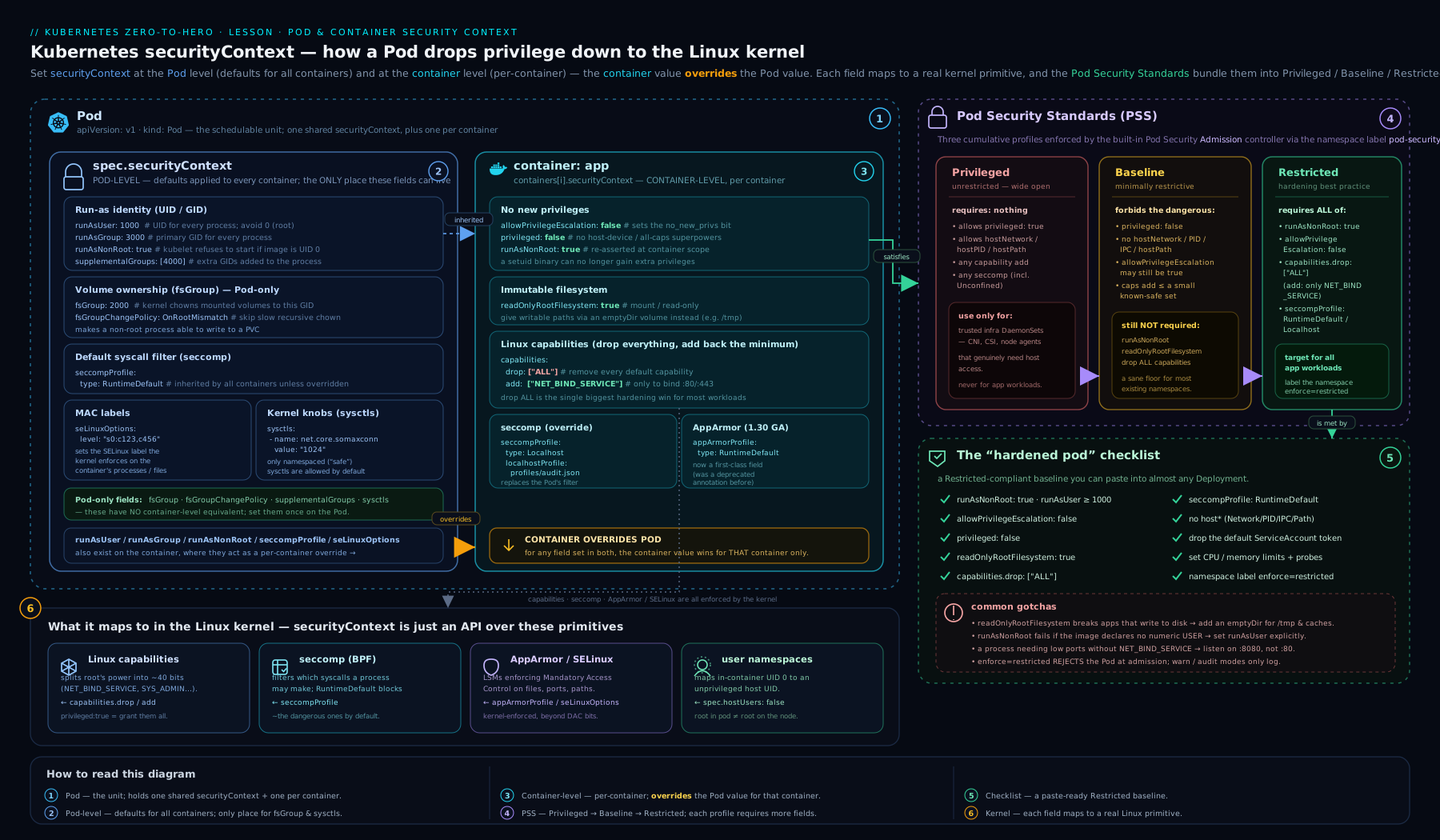
The diagram lays the two securityContext scopes side by side: on the left the Pod-level block with its volume-and-default fields (fsGroup, supplementalGroups, runAsUser, the Pod-wide seccompProfile); on the right the container-level block with the privilege fields that live only there (privileged, allowPrivilegeEscalation, readOnlyRootFilesystem, capabilities, procMount); and across the middle, arrows showing container-level values overriding the Pod defaults for the overlapping fields, plus a column mapping each field to the baseline or restricted PSS level it satisfies. Read it as: Pod sets the defaults and owns the volumes → each container can tighten further → PSA checks the result against the namespace’s profile.
The hardened-pod recipe
This is the manifest to start from for any new workload. It passes the restricted Pod Security Standard, runs as a non-root user, drops every capability, blocks privilege escalation, applies the default seccomp profile, and mounts a read-only root filesystem with explicit writeable scratch space.
apiVersion: v1
kind: Pod
metadata:
  name: hardened
  labels: {app: hardened}
spec:
  # Pod-level: defaults for all containers + volume ownership
  securityContext:
    runAsNonRoot: true
    runAsUser: 10001          # a non-root UID baked into the image
    runAsGroup: 10001
    fsGroup: 10001            # so the non-root user can write to volumes
    fsGroupChangePolicy: OnRootMismatch
    seccompProfile:
      type: RuntimeDefault
  containers:
    - name: app
      image: ghcr.io/example/app:1.4.2
      ports: [{containerPort: 8080}]   # >1024, so no NET_BIND_SERVICE needed
      securityContext:
        allowPrivilegeEscalation: false
        readOnlyRootFilesystem: true
        privileged: false
        capabilities:
          drop: ["ALL"]
      # Read-only root means we must provide writeable scratch explicitly:
      volumeMounts:
        - {name: tmp, mountPath: /tmp}
        - {name: run, mountPath: /var/run}
        - {name: cache, mountPath: /var/cache}
      resources:
        requests: {cpu: 50m, memory: 64Mi}
        limits: {memory: 128Mi}
  volumes:
    - {name: tmp, emptyDir: {}}
    - {name: run, emptyDir: {}}
    - {name: cache, emptyDir: {}}
The image must contain a non-root user (a USER 10001 line in the Dockerfile); runAsNonRoot: true is an assertion and the kubelet will refuse the Pod with container has runAsNonRoot and image will run as root if the image still defaults to UID 0. If the app needs port 80, swap to add: ["NET_BIND_SERVICE"] rather than running as root. This is the closest thing to a “rootless container” Kubernetes gives you without enabling the (separate, alpha-to-beta) user namespaces feature (spec.hostUsers: false), which remaps in-container root to an unprivileged host UID and is the strongest isolation when your nodes and runtime support it.
Hands-on lab: prove each control bites
Everything here runs on a free local cluster (kind or minikube) and is fully reversible. We will create an over-privileged Pod, observe what it can do, then lock it down field by field and watch each capability disappear.
1. Create a cluster and namespace
kind create cluster --name secctx
kubectl create namespace lab
kubectl config set-context --current --namespace=lab
2. The insecure baseline — see what an empty securityContext grants
kubectl run insecure --image=ubuntu:24.04 --command -- sleep 3600
kubectl wait --for=condition=Ready pod/insecure --timeout=60s

# It is root:
kubectl exec insecure -- id
# uid=0(root) gid=0(root) groups=0(root)

# It holds the full default capability set (look for cap_net_raw, cap_chown, ...):
kubectl exec insecure -- sh -c 'apt-get -qq update >/dev/null 2>&1; apt-get -qq install -y libcap2-bin >/dev/null 2>&1; capsh --print | head -3'
# Current: cap_chown,cap_dac_override,...,cap_net_bind_service,cap_net_raw,... =ep

# It can write anywhere on its root filesystem:
kubectl exec insecure -- touch /usr/local/proof && echo "root FS is writeable"
That is the default you inherit if you ship no securityContext: root, ~14 capabilities including NET_RAW, writeable root FS.
3. Drop capabilities and watch NET_RAW disappear
Apply a Pod that drops ALL:
cat <<'EOF' | kubectl apply -f -
apiVersion: v1
kind: Pod
metadata: {name: nocaps}
spec:
  containers:
    - name: c
      image: ubuntu:24.04
      command: ["sleep", "3600"]
      securityContext:
        capabilities: {drop: ["ALL"]}
        runAsNonRoot: false   # still root, but with no capabilities
EOF
kubectl wait --for=condition=Ready pod/nocaps --timeout=60s

kubectl exec nocaps -- sh -c 'apt-get -qq update >/dev/null 2>&1; apt-get -qq install -y iputils-ping libcap2-bin >/dev/null 2>&1; capsh --print | head -1'
# Current: =   <-- empty: no capabilities at all

# NET_RAW is gone, so raw-socket ping fails:
kubectl exec nocaps -- ping -c1 8.8.8.8 || echo "ping blocked (no CAP_NET_RAW) — as intended"
4. Block privilege escalation and prove no_new_privs
cat <<'EOF' | kubectl apply -f -
apiVersion: v1
kind: Pod
metadata: {name: nonewpriv}
spec:
  securityContext: {runAsUser: 1000, runAsNonRoot: true}
  containers:
    - name: c
      image: ubuntu:24.04
      command: ["sleep", "3600"]
      securityContext:
        allowPrivilegeEscalation: false
        capabilities: {drop: ["ALL"]}
EOF
kubectl wait --for=condition=Ready pod/nonewpriv --timeout=60s

# no_new_privs is set -> a setuid binary cannot raise us to root:
kubectl exec nonewpriv -- cat /proc/self/status | grep NoNewPrivs
# NoNewPrivs:  1
kubectl exec nonewpriv -- id
# uid=1000 gid=0(root) ...   <-- non-root
5. Enforce runAsNonRoot against a root-only image (see it rejected)
cat <<'EOF' | kubectl apply -f -
apiVersion: v1
kind: Pod
metadata: {name: mustfail}
spec:
  securityContext: {runAsNonRoot: true}   # but no runAsUser, and ubuntu defaults to root
  containers:
    - {name: c, image: ubuntu:24.04, command: ["sleep","3600"]}
EOF

kubectl get pod mustfail -w &
sleep 8; kill %1 2>/dev/null
kubectl describe pod mustfail | grep -A2 -i "runAsNonRoot"
# Error: container has runAsNonRoot and image will run as root
This is the single most common security-context failure in the wild — the assertion is correct, the image is the problem.
6. Read-only root filesystem + writeable scratch
cat <<'EOF' | kubectl apply -f -
apiVersion: v1
kind: Pod
metadata: {name: rofs}
spec:
  containers:
    - name: c
      image: ubuntu:24.04
      command: ["sleep", "3600"]
      securityContext: {readOnlyRootFilesystem: true}
      volumeMounts: [{name: tmp, mountPath: /tmp}]
  volumes: [{name: tmp, emptyDir: {}}]
EOF
kubectl wait --for=condition=Ready pod/rofs --timeout=60s

kubectl exec rofs -- touch /usr/local/blocked || echo "root FS write blocked (EROFS) — as intended"
kubectl exec rofs -- touch /tmp/allowed && echo "/tmp write allowed (emptyDir)"
7. Validate the full hardened recipe under the restricted profile
# Turn the namespace into a restricted-enforcing one:
kubectl label namespace lab \
  pod-security.kubernetes.io/enforce=restricted \
  pod-security.kubernetes.io/warn=restricted --overwrite

# The insecure pod from step 2 would now be REJECTED:
kubectl run insecure2 --image=ubuntu:24.04 --command -- sleep 3600
# Error from server (Forbidden): violates PodSecurity "restricted:latest":
#   allowPrivilegeEscalation != false, unrestricted capabilities,
#   runAsNonRoot != true, seccompProfile ...

# A pod that drops ALL, is non-root, blocks escalation, sets seccomp -> ADMITTED:
cat <<'EOF' | kubectl apply -f -
apiVersion: v1
kind: Pod
metadata: {name: passes}
spec:
  securityContext:
    runAsNonRoot: true
    runAsUser: 10001
    seccompProfile: {type: RuntimeDefault}
  containers:
    - name: c
      image: cgr.dev/chainguard/static:latest   # non-root, scratch-like image
      args: ["-text=hello"]
      securityContext:
        allowPrivilegeEscalation: false
        readOnlyRootFilesystem: true
        capabilities: {drop: ["ALL"]}
EOF
kubectl get pod passes
Cleanup
kind delete cluster --name secctx
Cost note
Zero. kind/minikube run entirely on your laptop; no cloud resources are created at any step.
Common mistakes & troubleshooting
| Symptom | Cause | Fix |
|---|---|---|
container has runAsNonRoot and image will run as root |
runAsNonRoot: true but image has no non-root USER and no runAsUser set |
Add USER 10001 to the Dockerfile or set runAsUser to a non-zero UID in the manifest |
App crashes with permission denied writing its data dir on a fresh PVC |
Non-root container, but fsGroup not set so the volume is owned by root |
Set fsGroup at Pod level to a GID the container runs with |
| Pod start takes minutes on a large PVC | fsGroup triggering a recursive chown of millions of files on every mount |
Set fsGroupChangePolicy: OnRootMismatch |
App fails with EROFS/read-only file system |
readOnlyRootFilesystem: true but the app writes to /tmp, /var/run, etc. |
Mount emptyDir volumes over exactly those paths |
Dropping ALL capabilities breaks the app |
The app legitimately needs one (e.g. binds port 80 → NET_BIND_SERVICE, or a debugger → SYS_PTRACE) |
drop: ["ALL"] then add the single needed capability; or change the app to need none |
allowPrivilegeEscalation: false ignored / escalation still possible |
privileged: true or capabilities.add: ["SYS_ADMIN"] forces escalation on |
Remove privileged and SYS_ADMIN; the two are mutually exclusive with no-escalation |
Pod rejected: seccompProfile ... must not be ... Unconfined under restricted |
Field unset (treated as not-RuntimeDefault) or explicitly Unconfined |
Set seccompProfile.type: RuntimeDefault at Pod level |
cannot load seccomp profile / no such file |
Localhost profile referenced but the JSON file isn’t on the node |
Distribute the profile to /var/lib/kubelet/seccomp/... on every node (DaemonSet, node image, or SPO) |
AppArmor: failed to apply ... profile not loaded |
appArmorProfile: Localhost names a profile not loaded in the node kernel |
apparmor_parser the profile onto every node first; or use RuntimeDefault |
| Sidecar still runs as root / privileged despite hardened main container | Container-only fields don’t inherit between containers | Repeat securityContext (drop ALL, non-root, no-escalation) on every container including sidecars and initContainers |
Best practices
- Treat the empty
securityContextas a bug. Every Pod template should set, at minimum:runAsNonRoot: true,allowPrivilegeEscalation: false,capabilities.drop: ["ALL"], andseccompProfile.type: RuntimeDefault. Bake this into your Helm/Kustomize base. - Drop ALL, add nothing unless you can name the capability and the line of code that needs it. The vast majority of workloads need zero capabilities.
- Bake a non-root
USERinto images at build time, with a fixed numeric UID (e.g. 10001). ThenrunAsNonRoot: trueis satisfiable everywhere and you avoid per-manifestrunAsUserdrift. - Set
seccompProfile: RuntimeDefaultexplicitly, even where the node defaults it — manifests should be self-contained and passrestrictedregardless of cluster flags. - Use
readOnlyRootFilesystem: truewith explicitemptyDirmounts for the handful of paths the app writes; it neutralises a whole class of “drop a binary and persist it” attacks. - Use
fsGroupChangePolicy: OnRootMismatchon any sizeable PersistentVolume to keep Pod startup fast. - Harden every container in the Pod — main, sidecars, initContainers, ephemeral debug containers — because container-only fields never inherit.
- Enforce, don’t hope: pair these manifests with Pod Security Admission at
enforce: restricted(or Kyverno/an OPA policy) so an un-hardened Pod is rejected, not merely discouraged. - Prefer distroless/scratch base images (
cgr.dev/chainguard/static,gcr.io/distroless/*): they ship no shell and run as non-root, making most of the above trivially satisfiable.
Security notes
privileged: trueis, by design, a container escape. It grants nearly all capabilities, every host device, and disables seccomp/AppArmor confinement. Treat any privileged Pod as equivalent to root on the node. Audit for it relentlessly:kubectl get pods -A -o json | jq '.items[]|select(.spec.containers[].securityContext.privileged==true)|.metadata.name'. The only legitimate users are a handful of node agents (CNI, CSI, some monitoring); regular workloads never need it.securityContextis process hardening, not a sandbox. It reduces the kernel attack surface but a kernel 0-day can still defeat it. For genuinely untrusted code, layer a sandboxed runtime — gVisor or Kata Containers viaRuntimeClass— on top of a hardenedsecurityContext. See containerd, gVisor & RuntimeClass.- It does not replace RBAC or NetworkPolicy.
securityContextgoverns kernel/host privilege; RBAC governs API access and NetworkPolicy governs traffic. A defence-in-depth posture needs all three. NET_RAWin the default set is a real risk — it permits ARP/DNS spoofing of Pod-network neighbours. DroppingALLremoves it; the restricted profile removes it; do not leave it granted.hostPath, host namespaces, andprocMount: Unmaskedall widen the blast radius dramatically and are forbidden by baseline/restricted for good reason — they let a container read or influence the host directly.- User namespaces (
spec.hostUsers: false) are the strongest single hardening when available: in-container root maps to an unprivileged host UID, so even arunAsUser: 0workload cannot act as real host root. Enable where your kernel/runtime support it.
Interview & exam questions
1. What is the difference between the Pod-level and container-level securityContext, and name a field that exists only in each.
Pod-level (spec.securityContext) sets defaults for all containers and owns volume ownership; container-level (spec.containers[].securityContext) applies to one container. Pod-only: fsGroup (also fsGroupChangePolicy, supplementalGroups, sysctls). Container-only: capabilities (also privileged, allowPrivilegeEscalation, readOnlyRootFilesystem, procMount).
2. When both blocks set runAsUser, which wins?
The container-level value wins for that container; sibling containers without their own value inherit the Pod-level default.
3. Does runAsNonRoot: true change the UID the container runs as?
No. It is an assertion. The kubelet refuses to start the container if it would run as UID 0, but it does not pick a UID for you — set runAsUser or bake a non-root USER into the image.
4. What is in the default capability set, and what’s the recommended way to handle capabilities?
~14 capabilities (CHOWN, DAC_OVERRIDE, FOWNER, FSETID, KILL, SETGID, SETUID, SETPCAP, NET_BIND_SERVICE, NET_RAW, SYS_CHROOT, MKNOD, AUDIT_WRITE, SETFCAP). Recommended: drop: ["ALL"] then add only the minimum (often none).
5. What does allowPrivilegeEscalation: false actually do, and what is its default?
It sets the kernel’s no_new_privs bit, preventing the process and its children from gaining privileges via setuid binaries or file capabilities. Default is true, so you must set it false explicitly. It cannot be honoured if privileged: true or CAP_SYS_ADMIN is added.
6. Compare the three seccompProfile types.
RuntimeDefault = the runtime’s curated syscall allow-list (set this by default); Localhost = a custom JSON profile that must exist on every node; Unconfined = no filtering (debugging only, forbidden by restricted).
7. Why might a non-root Pod get permission denied writing to a fresh PersistentVolume, and how do you fix it?
The volume is owned by root and the container runs as a non-root user with no group access. Set fsGroup at Pod level to a GID the container runs with; the kubelet then group-owns the volume to that GID and adds it to the container’s supplemental groups.
8. What does fsGroupChangePolicy: OnRootMismatch solve?
It avoids a recursive chown of the entire volume on every mount — Kubernetes only relabels if the volume’s top-level directory has the wrong owner/permissions — which prevents multi-minute Pod startups on large volumes.
9. How do securityContext fields map onto the Pod Security Standards?
Every PSS control is a securityContext (or host-namespace/volume) field. baseline blocks the obviously dangerous (privileged, host namespaces, wild capabilities). restricted additionally requires drop: ["ALL"] (+only NET_BIND_SERVICE), runAsNonRoot: true, allowPrivilegeEscalation: false, and seccompProfile = RuntimeDefault/Localhost.
10. Why is privileged: true so dangerous?
It grants nearly all capabilities, access to every host device, and disables seccomp/AppArmor confinement — effectively root on the node. It is a deliberate container escape and is forbidden by both baseline and restricted.
11. The appArmorProfile field replaced what, and what’s the catch with Localhost/RuntimeDefault?
It replaced the container.apparmor.security.beta.kubernetes.io/<container> annotation (GA in 1.30). The catch: a Localhost profile must already be loaded into the node kernel (Kubernetes won’t load it), and AppArmor must be enabled on the node at all.
12. You hardened the main container but the Pod still fails restricted. Why?
Container-only fields don’t inherit between containers — a sidecar or initContainer without its own hardened securityContext (drop ALL, non-root, no escalation) violates the profile. Repeat the block on every container.
Quick check
- True/false: leaving
securityContextempty means the container runs with no Linux capabilities. - Which field, and at which scope, makes a freshly-provisioned PVC writeable by a non-root container?
- What is the default value of
allowPrivilegeEscalation? - Which
seccompProfile.typedoes therestrictedprofile require you to avoid? - Where must
capabilities,privileged, andreadOnlyRootFilesystembe set — Pod level, container level, or either?
Answers
- False. It runs with the runtime’s default set (~14 capabilities including
NET_RAW), as root, with a writeable root FS. “Empty” is far from “minimal”. fsGroup, at the Pod level (spec.securityContext.fsGroup).true— you must set itfalseexplicitly.Unconfined(and it must not be left unset); useRuntimeDefaultorLocalhost.- Container level only — they are container-scoped fields with no Pod-level equivalent and no inheritance to siblings.
Exercise
Take an existing Deployment of yours (or nginx:latest as a stand-in) and harden it to pass the restricted Pod Security Standard without breaking it:
- Add a Pod-level
securityContextwithrunAsNonRoot: true, a non-zerorunAsUser,fsGroup, andseccompProfile: RuntimeDefault. - Add a container-level
securityContextwithallowPrivilegeEscalation: false,readOnlyRootFilesystem: true, andcapabilities.drop: ["ALL"]. - Because
nginx:latestruns as root and binds port 80, either switch tonginxinc/nginx-unprivileged(listens on 8080, non-root) or addNET_BIND_SERVICEand set a non-root user — decide which and justify it. - Mount
emptyDirs on every path the process writes (for nginx:/var/cache/nginx,/var/run, and the temp paths). - Label a namespace
pod-security.kubernetes.io/enforce=restrictedand confirm the Deployment is admitted and the Pods reachReady. Then temporarily removerunAsNonRootand confirm the namespace rejects it.
Success criteria: the hardened Deployment runs with non-root UID, zero capabilities, no escalation, read-only root FS, and is accepted by enforce: restricted; the un-hardened variant is rejected with a clear PodSecurity violation message.
Certification mapping
- CKS (Certified Kubernetes Security Specialist) — Cluster Hardening and Microservice Vulnerabilities domains:
securityContext, capabilities, seccomp, AppArmor, and Pod Security Standards are core, high-weight CKS material. This lesson covers them at exam depth. - CKAD (Certified Kubernetes Application Developer) — Application Environment, Configuration and Security: setting
securityContext,runAsUser/runAsNonRoot, capabilities, andreadOnlyRootFilesystemon a Pod spec. - CKA (Certified Kubernetes Administrator) — security touches on Pod Security Admission and the fields it enforces; useful background even though the deep security focus is CKS.
Glossary
- securityContext — the Pod/container block that sets kernel-level privilege and isolation (UID/GID, capabilities, seccomp, MAC labels, escalation).
- Linux capability — one of ~40 discrete slices of root’s power (e.g.
NET_BIND_SERVICE,SYS_ADMIN). Names in YAML omit theCAP_prefix. - default capability set — the ~14 capabilities a container runtime grants to a “non-privileged” container by default.
- no_new_privs — a kernel flag (
prctl) blocking privilege gain via setuid/file caps; set byallowPrivilegeEscalation: false. - seccomp — syscall filtering via BPF;
RuntimeDefaultis the runtime’s curated allow-list. - RuntimeDefault — the runtime’s built-in default profile for seccomp (and AppArmor); the recommended baseline.
- Localhost (profile) — a custom seccomp/AppArmor profile pre-placed/pre-loaded on the node and referenced by name.
- fsGroup — a supplemental GID applied to a Pod’s volumes so non-root containers can write to them.
- fsGroupChangePolicy —
AlwaysvsOnRootMismatch; controls whether volume ownership is reset on every mount. - AppArmor / SELinux — Mandatory Access Control systems (path-based / label-based) that confine a process regardless of UID.
- privileged — a container flag granting near-total host access; a deliberate escape, forbidden by baseline/restricted.
- Pod Security Standards (PSS) — the
privileged/baseline/restrictedprofiles; each control is asecurityContext/host field. - runAsNonRoot — an assertion (not a coercion) that the container must not run as UID 0.
- user namespaces (
hostUsers: false) — remaps in-container root to an unprivileged host UID; the strongest isolation knob.
Next steps
- Advanced Kubernetes Scheduling: Affinity, Topology Spread, Taints & Preemption — the next lesson: placing the hardened workloads you just built across nodes and zones.
- Migrating to Pod Security Admission — enforce every field in this lesson namespace-by-namespace; the policy layer that pairs with these manifests.
- Kubernetes RBAC & Service Accounts, In Depth — the complementary control plane: who may talk to the API server (vs. what a container may do to the kernel).
- Related: containerd, gVisor & RuntimeClass for sandboxed runtimes when hardening alone isn’t enough, and Network Policies to lock down traffic.