You have already met the Pod as “the thing that runs your container” — the smallest unit Kubernetes will schedule. That one-line definition is enough to deploy your first app, but the Pod is where almost every production problem actually lives. A container that restarts in a loop, a rollout that never finishes, a Pod that gets evicted under memory pressure, a deploy that drops requests every time you ship — all of these are Pod-level behaviours, controlled by fields most beginners never set. This lesson opens the Pod all the way up.
We will walk the PodSpec field by field, then every container field, all three probe types with each timing knob, init containers and the newer native sidecars, lifecycle hooks and graceful termination, resource requests and limits and the Quality of Service classes they produce, the securityContext, volumes, node-selection fields, and finally the status — phases and conditions — so you can actually read what a Pod is telling you. It is long on purpose: the goal is that after this lesson there is no field on a real-world Pod you cannot explain. Everything is current to Kubernetes v1.30+ and uses real kubectl and YAML you can run on a free local cluster.
Learning objectives
By the end of this lesson you can:
- Write a complete PodSpec and explain what every top-level field does, what values it accepts, and when to set it.
- Configure liveness, readiness and startup probes using
httpGet,tcpSocket,execandgrpc, and tune every timing field correctly. - Use init containers and native sidecar containers (the
restartPolicy: Alwaysinit container), and explain the multi-container patterns: sidecar, ambassador and adapter. - Set resource requests and limits and predict the resulting QoS class (
Guaranteed,Burstable,BestEffort) and what it means for eviction. - Implement graceful shutdown with
preStophooks andterminationGracePeriodSeconds, and choose the rightrestartPolicy. - Read a Pod’s status — its phase, its conditions, and per-container state — and map a symptom to the field that caused it.
Prerequisites & where this fits
You need a terminal, a local cluster (kind, minikube or k3d), and the basics of Pods, Deployments and Services — if any of that is new, do Pods, ReplicaSets, Deployments & Services: The Core Objects and kubectl & Your First Cluster Deploy first. It also helps to understand what a container image is, covered in Containers & Docker Basics. This is the Pod deep-dive lesson of the Kubernetes Zero-to-Hero course (Fundamentals module). Almost everything above the Pod — Deployments, DaemonSets, Jobs, StatefulSets — embeds a PodSpec inside a pod template, so every field you learn here applies to all of them. The next lesson, Kubernetes Deployments & ReplicaSets, In Depth, wraps this PodSpec in a controller.
Core concepts: what a Pod really is
A Pod is a group of one or more containers that share:
- A network namespace — one IP address for the whole Pod. Containers in the same Pod reach each other on
localhostand must not collide on ports. The Pod IP is what Services route to. - An IPC and (optionally) PID namespace — they can share inter-process communication, and with
shareProcessNamespace: truethey can see each other’s processes. - Storage volumes — any volume declared on the Pod can be mounted into any container in it, which is how containers in a Pod share files.
- A lifecycle and a scheduling unit — Kubernetes schedules the whole Pod onto one node; containers in a Pod are never split across nodes. They start, live and (mostly) die together.
Two properties drive almost everything else:
- Pods are ephemeral. You rarely create a bare Pod by hand in production. A controller (Deployment, etc.) creates them, and when one dies it is replaced, not repaired — and the replacement gets a new name and new IP. Never treat a Pod as a pet.
- The “pause” container. Behind the scenes each Pod has a tiny infrastructure container (the pause container) that holds the network namespace open so your containers can come and go while the Pod’s IP stays stable. You never manage it, but it explains how the shared network survives a container restart.
A minimal Pod looks like this:
apiVersion: v1
kind: Pod
metadata:
  name: web
  labels:
    app: web
spec:
  containers:
    - name: app
      image: nginx:1.27
      ports:
        - containerPort: 80
apiVersion, kind, metadata and spec are the four parts of every Kubernetes object. The interesting one is spec — the PodSpec — and the rest of this lesson is essentially a tour of it.
The PodSpec, field by field
The PodSpec has many fields. Here are the ones you will actually meet, grouped and explained. Container-level fields (which live under spec.containers[*]) get their own section next.
| PodSpec field | What it does | Values | Default | When to set | Gotcha |
|---|---|---|---|---|---|
containers |
The app container(s). At least one is required. | list of containers | — (required) | always | A Pod with zero containers is invalid. |
initContainers |
Containers that run to completion before the app containers start, in order. | list of containers | none | setup/migrations; native sidecars | They run sequentially; one failing blocks the Pod. |
ephemeralContainers |
Temporary debug containers injected into a running Pod via kubectl debug. |
list | none | live debugging only | You cannot add them in the original manifest; no probes/ports/resources. |
restartPolicy |
When the kubelet restarts containers in this Pod. | Always, OnFailure, Never |
Always |
OnFailure/Never for Jobs |
Applies to the whole Pod; controllers override what is sensible. |
terminationGracePeriodSeconds |
Seconds between SIGTERM and SIGKILL on deletion. | integer ≥ 0 | 30 |
long-draining apps | 0 means immediate SIGKILL — dangerous. |
activeDeadlineSeconds |
Hard wall-clock limit for the Pod’s run before it is failed. | integer | none | batch/Jobs | Pod is marked Failed when exceeded, regardless of progress. |
nodeSelector |
Schedule only onto nodes with these labels. | map of label=value | none | pin to node class (GPU, SSD) | All labels must match (AND); no expressions. |
affinity |
Richer node/pod (anti-)affinity rules. | object | none | spread, co-locate, attract/repel | required rules can make a Pod unschedulable. |
tolerations |
Allow scheduling onto tainted nodes. | list | none | run on control-plane/GPU/spot nodes | A toleration permits, it does not attract. |
topologySpreadConstraints |
Spread Pods evenly across zones/nodes. | list | none | HA across zones | whenUnsatisfiable choice (DoNotSchedule vs ScheduleAnyway) matters. |
priorityClassName |
Scheduling priority; high-priority Pods can preempt lower ones. | name of a PriorityClass | none | critical workloads | Preemption evicts lower-priority Pods. |
schedulerName |
Use a non-default scheduler. | string | default-scheduler |
custom schedulers | The named scheduler must exist. |
nodeName |
Bypass the scheduler and pin to one node by name. | string | none | rarely; debugging | Skips scheduling checks — no resource fit, no taints respected. |
serviceAccountName |
Identity the Pod uses to call the API server. | name | default |
grant/limit RBAC | The default SA usually has almost no rights — that is good. |
automountServiceAccountToken |
Whether to mount the SA token into the Pod. | true/false |
true |
set false if the app never calls the API |
Leaving it on needlessly is a small attack-surface. |
imagePullSecrets |
Credentials for pulling from a private registry. | list of secret refs | none | private images | Must be a kubernetes.io/dockerconfigjson Secret in the same namespace. |
volumes |
Storage available to mount into containers. | list | none | config, secrets, shared scratch, persistence | Declared here, mounted per-container via volumeMounts. |
hostNetwork |
Use the node’s network namespace (Pod shares host IP). | true/false |
false |
node-level agents | Ports bind on the host; collisions and security risk. |
hostPID / hostIPC |
Share the node’s PID/IPC namespace. | true/false |
false |
node agents/debug | Big security blast radius; usually disallowed by policy. |
shareProcessNamespace |
Containers in the Pod share one PID namespace. | true/false |
false |
sidecar that inspects app process | Process 1 changes; signals behave differently. |
dnsPolicy |
How the Pod’s DNS is configured. | ClusterFirst, Default, None, ClusterFirstWithHostNet |
ClusterFirst |
custom DNS | With hostNetwork, use ClusterFirstWithHostNet to keep cluster DNS. |
dnsConfig |
Extra nameservers/searches/options (e.g. ndots). |
object | none | tune DNS lookups | Pairs with dnsPolicy: None for full control. |
hostname / subdomain |
Set the Pod’s hostname and give it a DNS record via a headless Service. | strings | derived | stable per-Pod DNS | subdomain needs a matching headless Service to resolve. |
hostAliases |
Extra entries added to the Pod’s /etc/hosts. |
list | none | pin a hostname to an IP | Does not affect cluster DNS, only that file. |
securityContext (pod-level) |
Security settings applied to all containers (UID/GID, fsGroup, seccomp). | object | none | run as non-root, set fsGroup | Container-level securityContext overrides this per container. |
restartPolicy + initContainers[*].restartPolicy: Always |
Marks an init container as a native sidecar. | Always on an init container |
— | sidecars that must start first and stay up | Only valid on init containers; needs v1.29+ (stable). |
enableServiceLinks |
Inject env vars for every Service in the namespace. | true/false |
true |
set false to avoid env clutter/limits |
Many Services → many injected vars; can hit limits. |
preemptionPolicy |
Whether this Pod may preempt others. | PreemptLowerPriority, Never |
PreemptLowerPriority |
non-preempting high priority | Pairs with priorityClassName. |
runtimeClassName |
Select a container runtime (e.g. gVisor, Kata). | name of a RuntimeClass | node default | sandboxed/isolated workloads | The RuntimeClass and handler must be installed on nodes. |
overhead |
Extra resources the runtime itself consumes (set by RuntimeClass). | resource map | none | usually automatic | Counts against scheduling and quota. |
terminationGracePeriodSeconds (again on delete) |
Can be overridden at delete time with --grace-period. |
integer | spec value | force-kill stuck Pods | --grace-period=0 --force should be a last resort. |
You will not set most of these on a typical app. The ones you reach for constantly are containers, restartPolicy, volumes, serviceAccountName, securityContext, the node-selection trio, and terminationGracePeriodSeconds.
Container fields, field by field
Each entry under spec.containers (and spec.initContainers) is a Container. This is the part you edit most.
| Container field | What it does | Values | Default | When to set | Gotcha |
|---|---|---|---|---|---|
name |
Unique name within the Pod. | DNS-label string | — (required) | always | Must be unique across containers and init containers. |
image |
The image to run. | repo/name:tag or @sha256:… |
— (required) | always | Prefer a pinned tag or digest, never bare :latest. |
imagePullPolicy |
When to pull the image. | Always, IfNotPresent, Never |
IfNotPresent (or Always if tag is :latest) |
force re-pull of mutable tags | :latest silently flips the default to Always. |
command |
Overrides the image ENTRYPOINT. | list of strings | image’s ENTRYPOINT | run a different binary | This is the entrypoint, not “the shell command”. |
args |
Overrides the image CMD (args to the entrypoint). | list of strings | image’s CMD | pass flags | Set args alone to keep ENTRYPOINT but change its args. |
workingDir |
Working directory for the process. | path | image’s WORKDIR | app needs a specific cwd | Directory must exist in the image/volume. |
env |
Environment variables, literal or sourced. | list of name/value or valueFrom | none | config, secrets, field refs | valueFrom can read ConfigMap/Secret keys, or Pod fields via fieldRef/resourceFieldRef. |
envFrom |
Bulk-import a whole ConfigMap/Secret as env vars. | list of configMapRef/secretRef | none | many vars at once | Keys must be valid env-var names or they are skipped with a warning. |
ports |
Document/name ports the container listens on. | list (containerPort, name, protocol) | none | naming ports for Services/probes | Informational — not a firewall; the app must actually listen. |
resources.requests |
Resources the scheduler reserves. | cpu/memory/ephemeral-storage | none | always set, at least requests | No request → scheduler assumes ~0 → over-packing. |
resources.limits |
Hard ceiling enforced at runtime. | cpu/memory/ephemeral-storage | none | cap noisy neighbours | Memory over limit → OOMKilled; CPU over limit → throttled (not killed). |
livenessProbe |
Restart the container if it fails. | probe object | none | detect deadlocks/hangs | Too aggressive → restart loops on healthy-but-slow apps. |
readinessProbe |
Remove from Service endpoints if it fails. | probe object | none | gate traffic during startup/overload | Failing readiness does not restart; it just stops traffic. |
startupProbe |
Protect slow starters; disables the other probes until it passes. | probe object | none | apps with long init | Without it, slow boots get killed by liveness. |
lifecycle.postStart |
Hook run right after the container starts. | exec/httpGet | none | warmup, registration | Runs async with the entrypoint; no ordering guarantee. |
lifecycle.preStop |
Hook run before SIGTERM on shutdown. | exec/httpGet/sleep | none | graceful drain | Counts against the grace period; keep it short. |
securityContext (container) |
Per-container security (runAsUser, caps, readOnlyRootFilesystem, privileged). | object | inherits pod-level | harden each container | Overrides pod-level for this container only. |
volumeMounts |
Mount a Pod volume into this container’s filesystem. | list (name, mountPath, subPath, readOnly) | none | config files, shared data | The volume must exist in spec.volumes. |
volumeDevices |
Mount a raw block volume (no filesystem). | list (name, devicePath) | none | databases needing block devices | Different from volumeMounts; needs volumeMode: Block PVC. |
stdin / tty |
Keep stdin open / allocate a TTY. | true/false |
false |
interactive containers | Mostly for kubectl run -it style use. |
terminationMessagePath |
File whose contents become the termination message. | path | /dev/termination-log |
surface a reason on exit | Shown in kubectl describe under “Last State”. |
terminationMessagePolicy |
Where to read the termination message from. | File, FallbackToLogsOnError |
File |
get last log lines on crash | FallbackToLogsOnError is great for crash diagnostics. |
restartPolicy (container, on init only) |
Makes an init container a native sidecar. | Always |
none | sidecars | Only valid inside initContainers. |
command/args vs Dockerfile — the table that ends the confusion
| Dockerfile | Pod field | Effect | |
|---|---|---|---|
| Entrypoint | ENTRYPOINT ["/app"] |
command: ["/app"] |
The binary that runs |
| Default args | CMD ["--port=8080"] |
args: ["--port=8080"] |
Arguments passed to the entrypoint |
Set only args |
— | leave command unset, set args |
Keep image ENTRYPOINT, replace its arguments |
Set only command |
— | set command, leave args unset |
Replace ENTRYPOINT, image CMD is dropped |
A frequent beginner trap: putting a shell pipeline directly in command. To use shell features you must invoke a shell: command: ["/bin/sh", "-c"], args: ["echo hi && sleep 3600"].
Environment variables: every source
env:
  - name: LOG_LEVEL                 # literal
    value: "info"
  - name: DB_PASSWORD               # from a Secret key
    valueFrom:
      secretKeyRef:
        name: db-creds
        key: password
  - name: FEATURE_FLAG              # from a ConfigMap key
    valueFrom:
      configMapKeyRef:
        name: app-config
        key: feature_flag
  - name: POD_IP                    # from a Pod field (Downward API)
    valueFrom:
      fieldRef:
        fieldPath: status.podIP
  - name: CPU_LIMIT                 # from this container's resources
    valueFrom:
      resourceFieldRef:
        containerName: app
        resource: limits.cpu
envFrom:
  - configMapRef:                   # import every key as an env var
      name: app-config
  - secretRef:
      name: app-secrets
The Downward API (fieldRef/resourceFieldRef) is how a container learns about itself — its own name, namespace, Pod IP, node name, labels, and its resource requests/limits — without hard-coding them.
Multi-container Pods and the three patterns
Most Pods have one container. When you add more, they almost always fall into one of three named patterns. All three rely on the shared network and shared volumes of the Pod.
| Pattern | Idea | Example | Communicates via |
|---|---|---|---|
| Sidecar | A helper that augments the main app | log shipper, metrics exporter, service-mesh proxy | shared volume and/or localhost |
| Ambassador | A proxy that represents the outside world to the app | a local proxy to a sharded DB or remote API | localhost (app talks to the ambassador) |
| Adapter | Transforms the app’s output into a standard shape | reformat logs/metrics into a common format | shared volume and/or localhost |
The classic sidecar example — an app that writes logs to a shared volume and a helper that ships them:
spec:
  volumes:
    - name: logs
      emptyDir: {}
  containers:
    - name: app
      image: my-app:1.4
      volumeMounts:
        - name: logs
          mountPath: /var/log/app
    - name: log-shipper
      image: fluent/fluent-bit:3.0
      volumeMounts:
        - name: logs
          mountPath: /var/log/app
          readOnly: true
There is a real problem with sidecars defined as ordinary containers: ordering. A plain sidecar starts with the app (no guaranteed order), and on shutdown a sidecar might die before the app finishes — and in a Job, a long-running sidecar can stop the Job from ever completing. That is exactly what native sidecars fix.
Init containers and native sidecars
Init containers
initContainers run before the app containers, one at a time, in order, each to completion. If one fails, the kubelet retries it per restartPolicy, and the app containers do not start until all init containers have succeeded. They are perfect for one-shot setup: waiting for a dependency, running a schema migration, fetching config, or fixing volume permissions.
spec:
  initContainers:
    - name: wait-for-db
      image: busybox:1.36
      command: ["sh", "-c", "until nc -z db 5432; do echo waiting; sleep 2; done"]
    - name: migrate
      image: my-app:1.4
      command: ["/app", "migrate"]
  containers:
    - name: app
      image: my-app:1.4
Init containers can have their own resources, volumeMounts, securityContext and env. They cannot have livenessProbe, readinessProbe or lifecycle (a regular init container is expected to finish, not stay up) — unless you turn it into a native sidecar.
Native sidecars (the restartPolicy: Always init container)
A native sidecar is an init container with restartPolicy: Always. It changes the rules in three important ways, which is why this feature exists:
- It starts before the main containers (it is an init container) but, instead of running to completion, it stays running alongside them.
- The next init container / the main containers start as soon as the sidecar is started (or passes its
startupProbe), not when it exits. - It is terminated after the main containers on shutdown, and — crucially — it does not keep a Job from completing. This solves the “sidecar blocks Job” and shutdown-ordering problems in one stroke.
spec:
  initContainers:
    - name: mesh-proxy            # a native sidecar
      image: proxy:1.0
      restartPolicy: Always       # <-- this is what makes it a sidecar
      startupProbe:
        httpGet: { path: /ready, port: 15021 }
  containers:
    - name: app
      image: my-app:1.4
Plain sidecar (extra containers[] entry) |
Native sidecar (initContainers[] + restartPolicy: Always) |
|
|---|---|---|
| Start order vs app | No guarantee (roughly together) | Guaranteed before the app |
| Shutdown order | No guarantee | Terminated after the app |
| Effect in a Job | Can prevent the Job from completing | Job completes when the app container exits |
| Probes allowed | Yes | Yes (startupProbe gates app start) |
| Kubernetes version | Always | Stable from v1.29 |
Use native sidecars for mesh proxies, log/metric agents, and credential refreshers — anything that must be up before the app and gone after it.
Probes: liveness, readiness and startup
Probes are the kubelet’s health checks. There are three kinds, and confusing them is the single most common Pod mistake.
| Probe | Question it answers | On failure | On success | Typical use |
|---|---|---|---|---|
| liveness | “Is this container wedged/deadlocked?” | Restart the container | nothing changes | break out of hangs |
| readiness | “Can this container serve traffic right now?” | Remove Pod from Service endpoints (no restart) | add back to endpoints | gate traffic during startup, warmups, overload |
| startup | “Has this slow container finished booting?” | restart (after its own failures) | hand over to liveness/readiness | protect slow-starting apps |
Key relationships:
- The startup probe disables liveness and readiness until it succeeds once. This lets a slow app boot for minutes without liveness killing it, while still failing fast once it is up.
- Failing readiness never restarts the Pod. It only stops traffic. People reach for liveness when they actually want readiness, causing restart storms on an app that is merely busy.
- A container with no probes is considered ready as soon as its process starts — often too optimistic.
The four probe handlers
Every probe uses exactly one of these handlers:
| Handler | How it checks | Healthy when | When to use | Gotcha |
|---|---|---|---|---|
httpGet |
HTTP GET to path:port |
status 200–399 |
web apps with a health endpoint | Add httpHeaders if the endpoint needs them; scheme: HTTPS for TLS. |
tcpSocket |
Opens a TCP connection to port |
connection succeeds | non-HTTP servers (DBs, brokers) | “Port open” ≠ “app healthy”. |
exec |
Runs a command in the container | exit code 0 |
bespoke checks, CLI health tools | Forks a process each time — heavier; keep it cheap. |
grpc |
Calls the gRPC health-checking protocol on port |
SERVING |
gRPC services | App must implement the standard gRPC health service. |
Every probe timing field
These fields apply to all probe types:
| Field | What it does | Default | Minimum | When to change | Gotcha |
|---|---|---|---|---|---|
initialDelaySeconds |
Wait this long after start before the first probe | 0 |
0 |
slow boots without a startup probe | Prefer a startupProbe over a big liveness delay. |
periodSeconds |
How often to probe | 10 |
1 |
tune detection speed vs load | Too short adds load; too long delays detection. |
timeoutSeconds |
How long to wait for a single probe response | 1 |
1 |
slow endpoints | The default 1s is brutal for cold endpoints — a top cause of false failures. |
successThreshold |
Consecutive successes to be “passing” | 1 |
1 |
flappy services (readiness) | Must be 1 for liveness and startup. |
failureThreshold |
Consecutive failures before acting | 3 |
1 |
tolerate transient blips | For startup, total boot budget ≈ failureThreshold × periodSeconds. |
terminationGracePeriodSeconds (probe-level) |
Override the Pod grace period when this probe kills the container | Pod value | 0 |
kill a wedged container faster | Lets liveness use a shorter grace than normal deletes. |
A realistic, well-tuned set for a web app that takes up to ~50 seconds to boot:
startupProbe:                 # gives the app up to 10*5 = 50s to come up
  httpGet: { path: /healthz, port: 8080 }
  periodSeconds: 5
  failureThreshold: 10
livenessProbe:               # only active after startup passes
  httpGet: { path: /healthz, port: 8080 }
  periodSeconds: 10
  timeoutSeconds: 2
  failureThreshold: 3
readinessProbe:              # controls traffic independently
  httpGet: { path: /ready, port: 8080 }
  periodSeconds: 5
  timeoutSeconds: 2
  failureThreshold: 3
Design tip: /healthz (liveness) should be cheap and local — it answers “is the process alive?” /ready (readiness) may check dependencies (DB reachable, cache warm) so the Pod is pulled from traffic when it cannot actually serve.
Lifecycle hooks and graceful termination
The hooks
| Hook | Fires | Handlers | Use | Gotcha |
|---|---|---|---|---|
postStart |
Immediately after the container is created | exec, httpGet |
warmup, register with a discovery service | Runs concurrently with the entrypoint; not guaranteed to finish before the app serves. A slow/failing postStart blocks the container from reaching Running. |
preStop |
Just before SIGTERM, when the Pod is being deleted | exec, httpGet, sleep |
drain connections, deregister, flush | Runs inside the grace period — its time counts against terminationGracePeriodSeconds. |
The sleep handler (stable from v1.29) is a clean way to add a drain delay without shelling out:
lifecycle:
  preStop:
    sleep:
      seconds: 15
The shutdown sequence (memorise this)
When a Pod is deleted, this happens in order:
- The Pod is marked Terminating; the API server records a deletion timestamp.
- In parallel: the Pod is removed from Service endpoints (so new traffic stops) and the
preStophook runs. - After
preStopfinishes, the kubelet sends SIGTERM to PID 1 of each container. - The app should catch SIGTERM and shut down gracefully (finish in-flight requests, close connections).
- If the container is still running after
terminationGracePeriodSeconds(default 30), the kubelet sends SIGKILL.
Two beginner traps here. First, step 2 is eventually consistent — endpoint removal propagates to kube-proxy/ingress slightly after SIGTERM may arrive, so a short preStop sleep (a few seconds) prevents dropping requests that were already in flight. Second, your app must actually handle SIGTERM. Many do not (especially when wrapped in a shell), so they get SIGKILLed after the grace period and drop connections. Run your process as PID 1 (use the exec form of ENTRYPOINT, or an init like tini) so it receives the signal.
restartPolicy
| Value | Meaning | Default for | When to use |
|---|---|---|---|
Always |
Restart the container whenever it exits, success or failure | Deployments, DaemonSets, StatefulSets | long-running services |
OnFailure |
Restart only if it exits non-zero | (set on) Jobs/CronJobs commonly | batch work that should retry on error |
Never |
Never restart | (set on) one-shot Jobs | run once, leave the result for inspection |
restartPolicy is Pod-wide and applies to app containers and (in the failure sense) init containers. Restarts use exponential backoff capped at 5 minutes — that backoff is the CrashLoopBackOff you see in kubectl get pods. CrashLoopBackOff is not an error type; it is the kubelet saying “this container keeps dying and I am waiting before the next restart.” The real cause is in the container’s logs and its Last State (kubectl describe).
Resources and Quality of Service (QoS) classes
Requests and limits
- A request is what the scheduler reserves. The scheduler only places a Pod on a node that has enough unreserved request capacity. Requests do not cap usage.
- A limit is the hard ceiling enforced at runtime by the kernel via cgroups.
The two resources behave very differently when exceeded:
| Resource | Over the limit behaviour | Unit notes |
|---|---|---|
| CPU | Throttled — the container is slowed, never killed | 1 = 1 vCPU; 500m = 0.5 vCPU (m = millicores) |
| Memory | OOMKilled — the container is terminated and restarted | Mi/Gi are binary (1Gi = 1024Mi); M/G are decimal |
| ephemeral-storage | Pod evicted if it exceeds its ephemeral-storage limit | for logs, emptyDir, writable layer |
resources:
  requests:
    cpu: "250m"
    memory: "256Mi"
  limits:
    cpu: "1"
    memory: "512Mi"
You can also see hugepages-* and extended resources (e.g. nvidia.com/gpu) here; GPUs and hugepages must have request equal to limit.
The three QoS classes
Kubernetes derives a QoS class for each Pod from its requests and limits. It is computed for you and shown in kubectl describe pod. It decides the eviction order when a node runs out of memory: the kubelet kills BestEffort first, then Burstable, and Guaranteed last.
| QoS class | How a Pod gets it | Eviction priority (under node pressure) | Use when |
|---|---|---|---|
| Guaranteed | Every container has CPU and memory limits, and each limit equals its request | Evicted last (most protected) | latency-critical / stateful workloads |
| Burstable | At least one container has a request or limit, but the strict requests == limits rule is not met |
Evicted after BestEffort, before Guaranteed | most normal apps |
| BestEffort | No requests or limits on any container | Evicted first | throwaway/batch only — avoid in production |
The rule for Guaranteed is exact: set both CPU and memory requests and limits on every container, with limits equal to requests. Omit a single field and you drop to Burstable. Most workloads should be Burstable (set requests always, limits on memory); reserve Guaranteed for the few Pods that must never be evicted or throttled.
securityContext: pod-level and container-level
The securityContext hardens the Pod. There is a pod-level one (applies to all containers and to volume ownership) and a container-level one (overrides per container).
| Field | Level | What it does | Default | Good value | Gotcha |
|---|---|---|---|---|---|
runAsNonRoot |
both | Refuse to start if the container would run as root (UID 0) | false |
true |
The image must actually have a non-root user. |
runAsUser / runAsGroup |
both | Force a specific UID/GID for the process | image default | a non-zero UID | Files the app writes must be owned/writable by it. |
fsGroup |
pod | Group that owns mounted volumes; files get this GID | none | a shared GID | Can be slow on large volumes (it chowns them). |
fsGroupChangePolicy |
pod | Always vs OnRootMismatch for that chown |
Always |
OnRootMismatch |
Speeds up large-volume mounts. |
readOnlyRootFilesystem |
container | Make the root filesystem read-only | false |
true |
Add an emptyDir for any path the app must write. |
allowPrivilegeEscalation |
container | Allow gaining more privileges than the parent | true |
false |
Should be false for almost everything. |
privileged |
container | Full access to host devices — basically root on the node | false |
false |
Almost never needed; huge blast radius. |
capabilities |
container | Add/drop Linux capabilities | runtime default set | drop: ["ALL"], add only what is needed |
Dropping ALL is the strong default. |
seccompProfile |
both | Restrict syscalls | unset (often Unconfined) |
type: RuntimeDefault |
RuntimeDefault is a cheap, big win. |
seLinuxOptions / appArmorProfile |
both | MAC labels/profiles | platform default | platform-managed | Platform-dependent. |
A solid hardened baseline:
spec:
  securityContext:
    runAsNonRoot: true
    runAsUser: 10001
    fsGroup: 10001
    seccompProfile:
      type: RuntimeDefault
  containers:
    - name: app
      image: my-app:1.4
      securityContext:
        readOnlyRootFilesystem: true
        allowPrivilegeEscalation: false
        capabilities:
          drop: ["ALL"]
These settings are exactly what the Pod Security “restricted” standard enforces, so adopting them early means your Pods pass policy admission later.
Volumes and volumeMounts
A Pod declares volumes under spec.volumes; each container then mounts them with volumeMounts. The split exists so several containers in a Pod can mount the same volume. Volume types and persistence are a topic of their own (Kubernetes Storage, In Depth); here is what you must know to wire them into a Pod.
| Volume type | Lifetime | Use | Gotcha |
|---|---|---|---|
emptyDir |
Pod lifetime (deleted with the Pod) | scratch space, sharing files between containers | medium: Memory makes it a tmpfs (RAM-backed). |
configMap / secret |
Pod lifetime | mount config/secret files | Updates propagate (with a delay) unless subPath is used. |
downwardAPI |
Pod lifetime | expose Pod metadata as files | Pairs with the Downward API env vars. |
projected |
Pod lifetime | combine secrets/configmaps/token/downwardAPI under one dir | Cleanest way to mount a bound SA token. |
persistentVolumeClaim |
independent of the Pod | durable storage that survives restarts | Access mode (RWO/RWX) limits multi-Pod use. |
hostPath |
node lifetime | node-level agents (rarely apps) | Ties the Pod to a node and is a security risk. |
volumeMounts fields: name (must match a volume), mountPath (where it appears), readOnly, and subPath (mount a single file/sub-directory rather than the whole volume). A common gotcha: when you mount a ConfigMap with subPath, that file does not auto-update on ConfigMap changes — only whole-volume mounts get live updates.
spec:
  volumes:
    - name: config
      configMap:
        name: app-config
    - name: cache
      emptyDir: {}
  containers:
    - name: app
      image: my-app:1.4
      volumeMounts:
        - name: config
          mountPath: /etc/app
          readOnly: true
        - name: cache
          mountPath: /var/cache/app
Node selection: putting the Pod where you want
The scheduler decides which node runs a Pod. These fields let you constrain or influence that choice. (Scheduling has its own deep lesson — Scheduling, Affinity, Topology Spread & Preemption — so this is the Pod-side summary.)
| Field | What it does | Strength | Example |
|---|---|---|---|
nodeSelector |
Run only on nodes with all these labels | hard (AND) | disktype: ssd |
affinity.nodeAffinity |
Like nodeSelector but with expressions and soft/hard rules | hard (required…) or soft (preferred…) |
“require zone in {a,b}” |
affinity.podAffinity |
Co-locate near Pods that match a selector | hard or soft | put cache near the app |
affinity.podAntiAffinity |
Keep away from Pods that match a selector | hard or soft | spread replicas across nodes |
tolerations |
Permit scheduling onto tainted nodes | permission only | tolerate node-role.kubernetes.io/control-plane |
topologySpreadConstraints |
Spread Pods evenly across a topology key (zone, node) | DoNotSchedule (hard) or ScheduleAnyway (soft) |
even spread across zones |
nodeName |
Pin to a named node, bypassing the scheduler | absolute | debugging only |
The classic confusion: taints/tolerations versus affinity. A taint on a node repels Pods unless they tolerate it (a property of the node). Affinity attracts or repels from the Pod’s side. A toleration only allows a Pod onto a tainted node — it does not pull it there; pair it with affinity/nodeSelector if you want the Pod to actively prefer those nodes.
Pod status: phases, conditions and container states
When something is wrong, the Pod tells you — if you know where to look. There are three layers.
Phase (the top-level status.phase)
| Phase | Meaning |
|---|---|
Pending |
Accepted but not yet running — being scheduled, or pulling images, or waiting on init containers. |
Running |
Bound to a node; at least one container is running (or starting/restarting). |
Succeeded |
All containers exited 0 and will not restart (typical for restartPolicy: Never/OnFailure Jobs). |
Failed |
All containers terminated and at least one failed (non-zero exit, or the Pod was killed). |
Unknown |
The node’s state cannot be obtained (often the node is down/unreachable). |
Phase is coarse. Note that CrashLoopBackOff and ImagePullBackOff are not phases — they are container states/reasons shown per container; the Pod can sit in Pending or Running while a container is in those states.
Conditions (status.conditions)
Conditions are the diagnostic gold. Each has a type, a status (True/False/Unknown) and often a reason.
| Condition | True means | If False, look at |
|---|---|---|
PodScheduled |
A node was chosen for the Pod | resources, taints, affinity, quotas |
Initialized |
All init containers completed successfully | a failing/looping init container |
ContainersReady |
All containers are ready (probes passing) | readiness probes, crashing containers |
Ready |
The Pod is ready to serve and is in Service endpoints | readiness + readinessGates |
PodReadyToStartContainers |
The Pod sandbox/network is set up | CNI/network issues |
DisruptionTarget (when set) |
The Pod is being evicted/preempted | node pressure, preemption, drains |
You can add custom readinessGates to require external conditions (e.g. a load balancer reporting healthy) before a Pod is counted Ready.
Container states (status.containerStatuses[*].state)
| State | Meaning | Common reasons |
|---|---|---|
Waiting |
Not yet running | ContainerCreating, ImagePullBackOff, ErrImagePull, CrashLoopBackOff |
Running |
Process is up | — |
Terminated |
Process has exited | Completed (exit 0), Error, OOMKilled, ContainerCannotRun |
Read these with:
kubectl get pod web -o wide
kubectl describe pod web            # Events + per-container State and Last State
kubectl get pod web -o jsonpath='{.status.phase}{"\n"}'
kubectl get pod web -o jsonpath='{range .status.conditions[*]}{.type}={.status} {end}{"\n"}'
kubectl describe is the field-level X-ray: it shows the phase, each condition, each container’s current and Last State (with OOMKilled, exit codes and termination messages), and the Events list — which is where you find “Insufficient cpu”, “ImagePullBackOff”, “FailedScheduling” and “Liveness probe failed”.
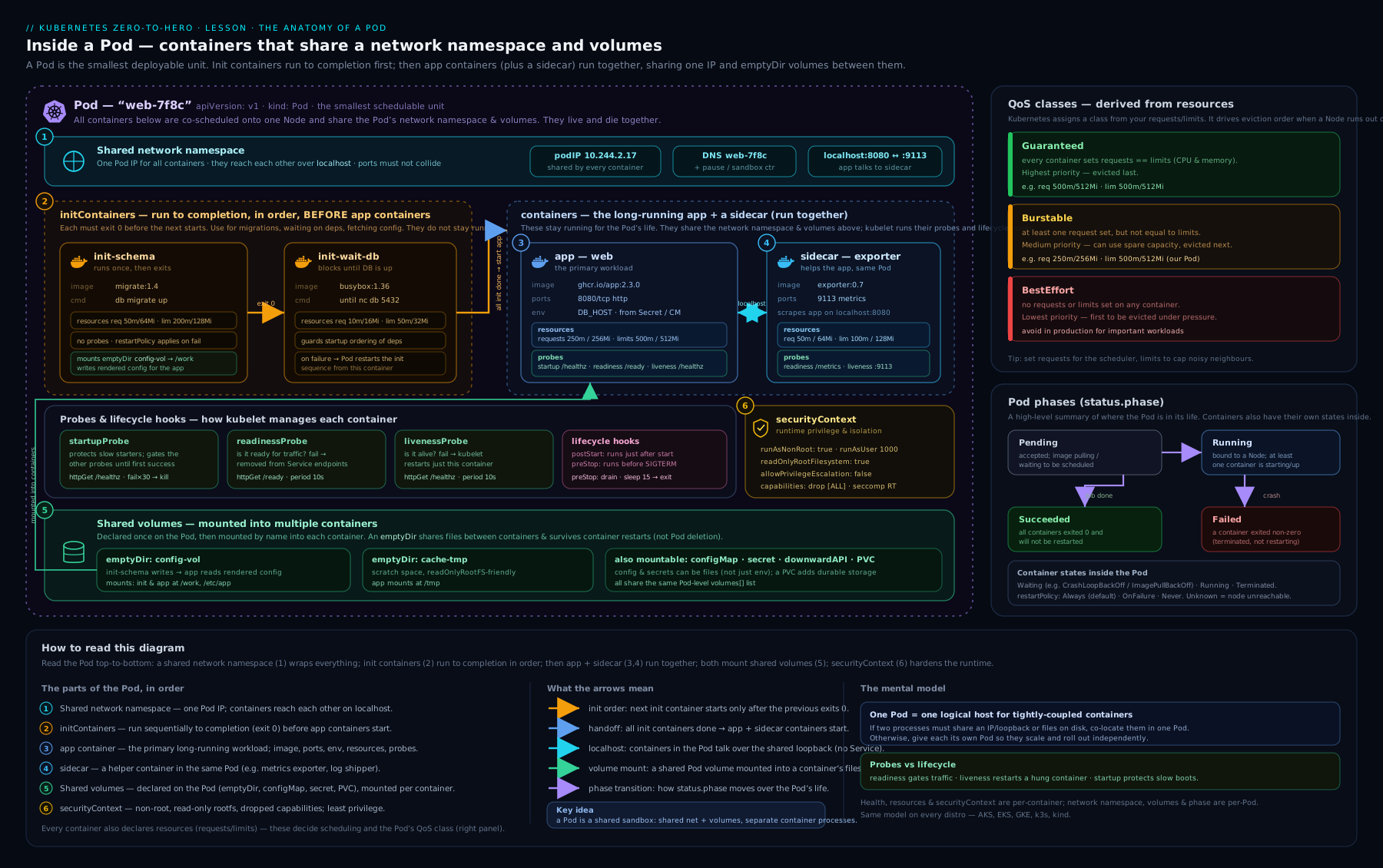
The diagram shows the whole Pod as one scheduling unit: the shared network namespace (one IP, the pause container), init containers running first and a native sidecar staying up, app containers with their probes and resources, mounted volumes, and the lifecycle (postStart → SIGTERM via preStop → SIGKILL after the grace period) — exactly the pieces we have walked through.
Hands-on lab
Free and local. Use kind, minikube or k3d — any cluster works.
# Create a local cluster (pick one)
kind create cluster --name pods-lab          # or: minikube start   /   k3d cluster create pods-lab
kubectl get nodes
1. A Pod with init, sidecar, probes, resources and QoS
cat <<'EOF' | kubectl apply -f -
apiVersion: v1
kind: Pod
metadata:
  name: lab
  labels: { app: lab }
spec:
  terminationGracePeriodSeconds: 20
  securityContext:
    runAsNonRoot: true
    runAsUser: 10001
    seccompProfile: { type: RuntimeDefault }
  volumes:
    - name: shared
      emptyDir: {}
  initContainers:
    - name: setup
      image: busybox:1.36
      command: ["sh", "-c", "echo hello > /work/index.html"]
      volumeMounts:
        - { name: shared, mountPath: /work }
    - name: ticker            # native sidecar: starts first, stays up
      image: busybox:1.36
      restartPolicy: Always
      command: ["sh", "-c", "while true; do date >> /work/ticks.log; sleep 5; done"]
      volumeMounts:
        - { name: shared, mountPath: /work }
  containers:
    - name: web
      image: ghcr.io/nginxinc/nginx-unprivileged:1.27
      ports: [{ containerPort: 8080 }]
      resources:
        requests: { cpu: "100m", memory: "64Mi" }
        limits:   { cpu: "200m", memory: "128Mi" }   # limits != requests -> Burstable
      readinessProbe:
        httpGet: { path: /, port: 8080 }
        periodSeconds: 5
      livenessProbe:
        httpGet: { path: /, port: 8080 }
        periodSeconds: 10
        timeoutSeconds: 2
      lifecycle:
        preStop:
          sleep: { seconds: 5 }
      securityContext:
        allowPrivilegeEscalation: false
        capabilities: { drop: ["ALL"] }
      volumeMounts:
        - { name: shared, mountPath: /usr/share/nginx/html, readOnly: true }
EOF
2. Inspect everything
kubectl get pod lab -o wide
kubectl wait --for=condition=Ready pod/lab --timeout=60s

# QoS class (expect: Burstable)
kubectl get pod lab -o jsonpath='{.status.qosClass}{"\n"}'

# Conditions
kubectl get pod lab -o jsonpath='{range .status.conditions[*]}{.type}={.status} {end}{"\n"}'

# Did init + sidecar work? (sidecar should still be running)
kubectl exec lab -c web -- cat /usr/share/nginx/html/index.html   # -> hello
kubectl exec lab -c ticker -- tail -n 3 /work/ticks.log           # -> recent timestamps

# Full X-ray: phase, per-container State/Last State, Events
kubectl describe pod lab | sed -n '1,40p'
Expected: qosClass: Guaranteed? No — because limits ≠ requests, you should see Burstable. To make it Guaranteed, set limits equal to requests for both cpu and memory on every container (try it and re-check).
3. See a probe and an OOMKill in action
# Break readiness: nginx-unprivileged serves on 8080, so hit a bad path? Instead, force OOM in a side pod:
kubectl run oom --image=busybox:1.36 --restart=Never \
  --overrides='{"spec":{"containers":[{"name":"oom","image":"busybox:1.36","command":["sh","-c","tail /dev/zero"],"resources":{"limits":{"memory":"16Mi"}}}]}}'
sleep 5
kubectl get pod oom -o jsonpath='{.status.containerStatuses[0].lastState.terminated.reason}{"\n"}'  # -> OOMKilled
kubectl describe pod oom | grep -i -A2 'Last State'
4. Watch graceful termination
# In one terminal, watch the Pod; in another, delete it and observe Terminating -> grace -> gone
kubectl delete pod lab        # honours preStop sleep + 20s grace period
Cleanup
kubectl delete pod lab oom --ignore-not-found
kind delete cluster --name pods-lab     # or: minikube delete / k3d cluster delete pods-lab
Cost note: entirely free — everything runs in local containers on your machine. Nothing is created in any cloud.
Common mistakes & troubleshooting
| Symptom | Likely cause | Fix |
|---|---|---|
CrashLoopBackOff |
App exits/crashes on start (bad config, missing dep, wrong command) |
kubectl logs <pod> -c <ctr> --previous; check Last State and exit code in describe. |
ImagePullBackOff / ErrImagePull |
Wrong image name/tag, private registry without imagePullSecrets, rate limit |
Fix the tag; add an imagePullSecrets; verify the image exists. |
Pod stuck Pending, event “Insufficient cpu/memory” |
No node has enough request capacity | Lower requests, add nodes, or check quotas; kubectl describe pod events. |
Pod stuck Pending, “untolerated taint” / “didn’t match node selector” |
Taints/affinity/nodeSelector exclude every node |
Add a toleration / fix labels / relax affinity. |
| Liveness restarts a healthy-but-slow app | initialDelaySeconds/timeoutSeconds too tight, no startupProbe |
Add a startupProbe; raise timeoutSeconds; loosen failureThreshold. |
| Requests dropped on every deploy | App ignores SIGTERM, or endpoints not yet drained | Handle SIGTERM as PID 1; add a short preStop sleep. |
Container OOMKilled repeatedly |
Memory limit too low for real usage | Raise the memory limit/request; profile the app. |
| Init container blocks the Pod forever | Dependency never becomes available | Fix the dependency; add a timeout/activeDeadlineSeconds; check init logs. |
| Sidecar prevents a Job from completing | Plain sidecar that never exits | Convert it to a native sidecar (initContainers + restartPolicy: Always). |
Best practices
- Always set resource requests, and memory limits at minimum. No requests means the scheduler treats the Pod as ~free and over-packs nodes.
- Use all three probes deliberately: cheap local
livenessProbe, dependency-awarereadinessProbe, and astartupProbefor anything that boots slowly. Never use liveness to do readiness’s job. - Pin images to a tag and ideally a digest; avoid
:latest(it flipsimagePullPolicytoAlwaysand makes rollbacks ambiguous). - Make shutdown graceful: handle SIGTERM as PID 1 and add a small
preStopdrain. This is what makes zero-downtime rollouts actually zero-downtime. - Prefer native sidecars for mesh proxies, log/metric agents and token refreshers — they fix start/stop ordering and don’t block Jobs.
- Harden by default:
runAsNonRoot,readOnlyRootFilesystem,allowPrivilegeEscalation: false,drop: ["ALL"],seccompProfile: RuntimeDefault. - Don’t create bare Pods in production. Wrap the PodSpec in a Deployment/Job/etc. so it is self-healing and re-creatable.
Security notes
- The ServiceAccount token is mounted by default. If the app never calls the API server, set
automountServiceAccountToken: falseto shrink the attack surface, and use a dedicated least-privilege ServiceAccount otherwise. - Avoid
privileged,hostPID,hostIPC,hostNetworkandhostPathunless you are writing a node-level agent — each one widens the blast radius from “the Pod” to “the node”. allowPrivilegeEscalation: falseanddrop: ["ALL"]stop a compromised process from gaining more rights than it started with; add back only the specific capabilities the app needs (often none).readOnlyRootFilesystem: truestops attackers writing tools into the container; give the app explicitemptyDirmounts for the few paths it must write.seccompProfile: RuntimeDefaultblocks dangerous syscalls cheaply and should be the baseline everywhere.- These choices line up with the Pod Security “restricted” standard, so a hardened Pod sails through admission policy you will meet later.
Interview & exam questions
-
What is a Pod, and why is it the smallest schedulable unit rather than a container? A Pod is one or more containers that share a network namespace (one IP), storage volumes and a lifecycle, scheduled together onto one node. Kubernetes schedules Pods (not containers) so tightly-coupled containers can share
localhostand volumes and always run together. -
Liveness vs readiness vs startup probe — what does each do on failure? Liveness failure restarts the container. Readiness failure removes it from Service endpoints (no restart). The startup probe disables liveness/readiness until it first succeeds, protecting slow starters; its failure restarts the container.
-
Name the four probe handlers and when you’d use each.
httpGet(web apps with a health endpoint),tcpSocket(non-HTTP servers — “port open”),exec(custom command, exit 0 = healthy),grpc(services implementing the gRPC health protocol). -
How is a Pod’s QoS class determined, and why does it matter?
Guaranteed= every container has CPU+memory limits equal to requests;Burstable= some requests/limits set but not the strict equality;BestEffort= none set. It sets the eviction order under node memory pressure: BestEffort killed first, Guaranteed last. -
What happens, step by step, when you
kubectl delete pod? Pod marked Terminating → in parallel it’s removed from endpoints andpreStopruns → SIGTERM to PID 1 → app drains → afterterminationGracePeriodSeconds(default 30) SIGKILL. -
Difference between requests and limits? What happens when each is exceeded? Requests are reserved by the scheduler (placement); limits are enforced at runtime. Over the CPU limit → throttled; over the memory limit → OOMKilled.
-
What is a native sidecar and what problems does it solve? An init container with
restartPolicy: Always. It starts before the app and is torn down after it, and it does not block a Job from completing — fixing the start/stop ordering and “sidecar blocks Job” problems that plain sidecars have. -
commandvsargsvs DockerfileENTRYPOINT/CMD?commandoverridesENTRYPOINT;argsoverridesCMD. Set onlyargsto keep the image’s entrypoint but change its arguments. To use shell features, setcommand: ["/bin/sh","-c"]. -
What is
CrashLoopBackOffand how do you debug it? Not an error type — the kubelet backing off (exponentially, capped at 5 min) between restarts of a container that keeps dying. Debug withkubectl logs --previousand the Last State/exit code inkubectl describe. -
initContainersvscontainers— give two uses for init containers. Init containers run sequentially to completion before app containers start. Uses: wait for a dependency, run a DB migration, fetch config, fix volume permissions. -
A Pod is stuck
Pending. What do you check?kubectl describe podevents: insufficient CPU/memory (requests too high or cluster full), untolerated taints, unmatchednodeSelector/affinity, or ResourceQuota limits. -
How do you ensure zero-downtime during a rollout at the Pod level? Correct
readinessProbe, handle SIGTERM as PID 1, add a shortpreStopdrain, and set a sensibleterminationGracePeriodSeconds— so endpoints drain before the process stops.
Quick check
- Which probe, on failure, removes a Pod from Service endpoints but does not restart it?
- What QoS class does a Pod get if no container sets any requests or limits?
- You want a logging agent to start before the app and shut down after it, without blocking a Job. What do you use?
- Over its CPU limit, is a container killed or throttled? Over its memory limit?
- What’s the default
terminationGracePeriodSeconds, and what signal is sent first on deletion?
Answers: 1) readiness probe. 2) BestEffort. 3) a native sidecar (an initContainers entry with restartPolicy: Always). 4) CPU → throttled; memory → OOMKilled. 5) 30 seconds; SIGTERM first, then SIGKILL if it doesn’t exit in time.
Exercise
Write a single Pod manifest that:
- Runs
ghcr.io/nginxinc/nginx-unprivileged:1.27on port 8080 as a non-root user, with a read-only root filesystem and all capabilities dropped. - Has an init container that writes a custom
index.htmlinto a sharedemptyDir, mounted read-only into the web container at the nginx web root. - Has a native sidecar that appends the date to a log file in the same volume every 5 seconds.
- Sets requests and limits so the Pod is
Guaranteed(verify withkubectl get pod <name> -o jsonpath='{.status.qosClass}'). - Has a
startupProbe, alivenessProbeand areadinessProbeall hitting/on 8080, plus a 10-secondpreStopsleep and a 25-second grace period.
Apply it, confirm qosClass: Guaranteed and all conditions True, then delete it and watch it terminate gracefully. Success: the init content is served, the sidecar log grows, the QoS class is Guaranteed, and deletion respects the grace period.
Certification mapping
- CKAD (Certified Kubernetes Application Developer): this lesson is core to the Application Design and Build and Application Observability and Maintenance domains — multi-container Pods, init containers, probes, resource requirements, and the Pod lifecycle are all directly examined, and you’ll author exactly these manifests under time pressure.
- CKA (Certified Kubernetes Administrator): the Workloads & Scheduling and Troubleshooting domains assume fluency in PodSpec fields, QoS-driven eviction, node selection (taints/tolerations/affinity), and reading Pod phase/conditions/container states to diagnose failures.
- KCNA: the Pod, the container lifecycle, and the basic health-check model appear in the Kubernetes Fundamentals domain at a conceptual level.
Glossary
- PodSpec — the
specof a Pod; the set of fields describing its containers, volumes, scheduling and lifecycle. - Pause container — the hidden infrastructure container that holds a Pod’s network namespace open so the Pod IP stays stable across container restarts.
- Init container — a container that runs to completion before app containers start; multiple run in order.
- Native sidecar — an init container with
restartPolicy: Alwaysthat starts before and stops after the app and never blocks a Job. - Liveness / readiness / startup probe — health checks that respectively restart a container, gate traffic to it, and protect it during slow startup.
- QoS class —
Guaranteed/Burstable/BestEffort, derived from requests and limits; determines eviction order under node pressure. - Request / limit — reserved capacity used by the scheduler / hard runtime ceiling enforced by the kernel.
- OOMKilled — a container terminated for exceeding its memory limit.
preStophook /terminationGracePeriodSeconds— the pre-SIGTERM action and the SIGTERM→SIGKILL window for graceful shutdown.- Downward API — mechanism to expose a Pod’s own metadata/resources to its containers as env vars or files.
- Phase / condition — the coarse Pod state (
Pending/Running/…) and the fine-grained boolean diagnostics (PodScheduled,Initialized,Ready, …).
Next steps
- Wrap this PodSpec in a controller: Kubernetes Deployments & ReplicaSets, In Depth: Rollouts, Rollback & Strategies.
- Package and template Pods at scale with Helm Fundamentals: Charts, Templates, Values, Releases & Repositories.
- Go deeper on placement with Kubernetes Scheduling, Affinity, Topology Spread & Preemption.
- Give Pods durable storage in Kubernetes Storage, In Depth: Volumes, PV, PVC, StorageClass & Access Modes.