Once you have written your third or fourth Kubernetes application, a pattern becomes painfully obvious: every app is almost the same pile of YAML — a Deployment, a Service, a ConfigMap, maybe an Ingress and a HorizontalPodAutoscaler — differing only in an image tag, a replica count, a hostname and a few environment variables. Copying that pile from app to app, and editing the same fields by hand for dev, staging and production, is tedious and error-prone. You forget to bump one value, you fat-finger an indent, and an environment drifts. Helm exists to end that misery. It is the package manager for Kubernetes — think apt, yum, npm or brew, but for clusters. It lets you bundle a set of Kubernetes manifests into a single, versioned, parameterised, shareable artefact called a chart, install that chart into a cluster as a named, tracked release, override its settings per environment without touching the templates, and upgrade or roll back the whole bundle as one atomic unit.
This lesson is deliberately exhaustive. We start from absolute zero — what Helm is and why it exists — and walk through every part of a chart, every major construct in the templating engine, the full rules of values precedence, the complete release lifecycle, repositories (classic and OCI), hooks, and the developer commands (lint, template, dependency) you will run a hundred times a day. By the end you will be able to read any chart on Artifact Hub, write your own from scratch, reason about exactly what Helm will send to the API server before it sends it, and upgrade and roll back releases with confidence. Everything is doable for free on your laptop with kind.
A quick orientation before we dive in: Helm 3 — the version everyone uses today — is a client-only tool. There is no server-side component (the old “Tiller” from Helm 2 is gone, which was a big security win). The helm CLI reads your chart, renders it into plain Kubernetes YAML locally, and then talks to the Kubernetes API server using your existing kubeconfig — exactly the same credentials and RBAC that kubectl uses. Helm can only do what you are allowed to do. It records what it installed by storing release metadata as Secrets inside the cluster. Hold onto those three facts; they explain almost everything about how Helm behaves.
Learning objectives
By the end of this lesson you can:
- Explain what Helm is, why it exists, and the client-only Helm 3 architecture (no Tiller; releases stored as Secrets).
- Identify and describe every file and directory in a chart —
Chart.yaml,values.yaml,templates/,charts/,_helpers.tpl,NOTES.txt,crds/,.helmignore,Chart.lock— and what each is for. - Use the Go templating engine confidently: the built-in objects (
.Values,.Release,.Chart,.Capabilities,.Files,.Template), functions and pipelines, named templates (define/include/template),tpl, and the control structureswith,range,if. - Apply values and overrides correctly and predict the result from Helm’s precedence rules (
--setbeats-fbeats subchart defaults beats parent defaults), including subchart and global values. - Manage the release lifecycle end to end —
install,upgrade,rollback,uninstall,history,status— and use--atomic,--wait,--install,--dry-runand--create-namespacesafely. - Work with repositories (
repo add/update/list,search) and OCI registries (helm push/pull/registry login), use hooks for ordered actions, and validate charts withhelm lint,helm templateandhelm dependency.
Prerequisites & where this fits
You should already be comfortable with the core Kubernetes objects — Pods, Deployments, Services, ConfigMaps and Secrets — and able to drive a cluster with kubectl apply. If “Deployment owns a ReplicaSet owns Pods” and “a Service is a stable address with a label selector” are familiar, you are ready; if not, do the Pods/Deployments/Services lesson first. You need Docker (or another container runtime) and the ability to run a local cluster — we use kind, but minikube or k3d work identically. This is the opening lesson of the Packaging module in the Kubernetes Zero-to-Hero course; it is the foundation that the more advanced Helm material — umbrella charts, library charts, hooks and rollback strategy and authoring production Helm charts — builds directly upon. A handy companion while you work is the Docker / kubectl / Helm command reference.
Core concepts
Before the mechanics, fix five mental models. They make every command and every file later feel inevitable rather than arbitrary.
A chart is a package; a release is an installation of it. This is the single most important distinction in all of Helm, and beginners trip over it constantly. A chart is the recipe — a directory (or a .tgz of one) containing templated manifests and default values. It is inert; it does nothing until you install it. A release is what you get when you install a chart into a cluster with a name: helm install web ./mychart creates a release called web. You can install the same chart many times under different release names (web-dev, web-staging, web-prod), each with its own values and its own independent lifecycle. Charts are to releases what a class is to an object, or what a Debian .deb is to the installed package on a running machine.
Helm renders templates into plain YAML, locally, then applies it. A Helm chart is not magic that the cluster understands — Kubernetes has never heard of Helm. The helm CLI takes your templates, substitutes your values, and produces ordinary Kubernetes manifests on your machine. Only then does it send that finished YAML to the API server. This means you can always see exactly what Helm will do before it does it, with helm template (render without touching the cluster) or helm install --dry-run --debug. There is no hidden server-side translation. When something goes wrong, render it and read the YAML — the bug is almost always visible there.
A release has revisions; upgrades and rollbacks move between them. Every time you install or upgrade a release, Helm stores a snapshot of the fully rendered manifests and the values used, tagged with an incrementing revision number. Revision 1 is the install; revision 2 is the first upgrade; and so on. Because Helm keeps these snapshots, helm rollback web 1 can put the cluster back exactly as revision 1 left it — it is just “apply the manifests we saved for revision 1, and record that as a new revision”. This history is what makes Helm safe: a bad upgrade is one command away from being undone.
Helm stores its state in the cluster, as Secrets. Helm 3 keeps the record of each release — which chart, which revision, which rendered manifests, what status — inside the cluster, by default as a Secret in the release’s namespace (one per revision), named like sh.helm.release.v1.<release>.v<revision>. That is why helm list only shows releases when you point kubectl at the right cluster and namespace: the truth lives in the cluster, not on your laptop. (You will occasionally see these Secrets when you kubectl get secret — do not delete them by hand or you orphan the release.)
Templating is just text substitution with a powerful engine. Helm’s templates are written in Go’s text/template language, augmented with the Sprig function library and a few Helm-specific functions. The engine does not understand Kubernetes; it produces text. That text happens to be YAML, so whitespace and indentation matter enormously — the most common Helm error by far is a template that renders structurally broken YAML. Once you internalise “I am generating text that must be valid YAML”, the dashes, the nindent, and the toYaml all make sense.
Key terms you will see throughout: chart (the package), release (a named install), revision (a versioned snapshot of a release), values (the parameters), template (a .yaml file with {{ }} directives), subchart / dependency (a chart bundled inside another), repository (a place charts are published), and hook (a resource that runs at a specific point in the release lifecycle).
Installing Helm and your first chart
Install the CLI (macOS shown; on Linux use the install script or your package manager, on Windows use winget/choco):
brew install helm                       # macOS
# curl https://raw.githubusercontent.com/helm/helm/main/scripts/get-helm-3 | bash   # Linux
helm version                            # expect v3.14+ (any 3.x is fine)
Helm 3 needs no server-side install — helm version showing only a client version is correct and expected. The fastest way to see a chart is to let Helm scaffold one:
helm create demo
This generates a complete, working, best-practice chart in ./demo. We will dissect exactly what it produced in the next section — it is the perfect specimen because every part of the chart anatomy is present.
Chart anatomy: every file and directory
Run find demo -maxdepth 2 and you get the canonical chart layout. Here is the full structure, then every part explained:
demo/
├── Chart.yaml          # chart metadata (name, version, dependencies)
├── values.yaml         # default configuration values
├── values.schema.json  # (optional) JSON Schema to validate values
├── .helmignore         # files to exclude when packaging
├── Chart.lock          # (generated) pinned dependency versions
├── charts/             # subcharts / vendored dependencies live here
├── crds/               # (optional) CustomResourceDefinitions, installed first
└── templates/
    ├── _helpers.tpl    # named templates (partials), not rendered directly
    ├── NOTES.txt       # post-install message shown to the user
    ├── deployment.yaml
    ├── service.yaml
    ├── serviceaccount.yaml
    ├── ingress.yaml
    ├── hpa.yaml
    └── tests/
        └── test-connection.yaml   # `helm test` pods
Here is what every element does, with the gotcha that bites beginners:
| File / dir | What it is | Required? | Rendered as templates? | Key fields / notes | Gotcha |
|---|---|---|---|---|---|
Chart.yaml |
Metadata: the chart’s identity and dependency list | Yes | No | apiVersion, name, version, appVersion, type, dependencies, kubeVersion, description, icon, maintainers |
version (the chart version) and appVersion (the app version, e.g. the image tag) are different things — bumping one does not bump the other. |
values.yaml |
Default configuration consumed via .Values |
No (but always present) | No (it is the data, not a template) | Any YAML structure you like | Keys here are the defaults; everything a user might tune should appear here, documented, even if commented. |
values.schema.json |
JSON Schema that validates the merged values | No | No | Standard JSON Schema | Validation runs on install/upgrade/lint/template; a typo’d value type fails fast — very useful, underused. |
templates/ |
The manifests, as Go templates | No (but the point of the chart) | Yes | Any .yaml/.tpl here is rendered, EXCEPT files starting with _ and NOTES.txt |
A plain .yaml with no {{ }} is still valid — it is rendered verbatim. |
templates/_helpers.tpl |
Named template definitions (partials) | No | Defines, not emitted | {{- define "name" -}}…{{- end -}} |
Files beginning with _ produce no output of their own; they are libraries you include. |
templates/NOTES.txt |
Usage notes printed after install/upgrade | No | Yes (templated) | Free text + {{ }} |
Rendered with the same context as templates; great for “how to reach your app” instructions. |
charts/ |
Subcharts: dependencies vendored or pulled here | No | Each subchart renders itself | Populated by helm dependency update or by dropping a chart dir in |
Anything in charts/ is a full chart and gets installed alongside the parent. |
crds/ |
Raw CustomResourceDefinition YAML | No | No (installed as-is) | Plain CRD manifests | CRDs here are installed before templates and are never templated, upgraded, or deleted by Helm — a deliberate, often-surprising safety choice. |
Chart.lock |
Pins resolved dependency versions + digest | Generated | No | Mirrors dependencies with exact versions |
Commit it for reproducible builds (like package-lock.json). |
.helmignore |
Glob patterns excluded when packaging | No | No | .git, *.tmp, etc. |
Without it, you can accidentally ship secrets or junk inside the .tgz. |
Chart.yaml in full
The metadata file deserves a closer look because its fields appear in templates (via .Chart) and govern dependencies. The most important fields:
| Field | Meaning | Example | Notes |
|---|---|---|---|
apiVersion |
Chart format version | v2 |
v2 = Helm 3 (dependencies live here); v1 is the legacy Helm 2 format. Always v2 today. |
name |
The chart’s name | demo |
Used in default resource names and the release. |
version |
The chart version (SemVer) | 0.1.0 |
Bump this on any change to the chart. This is what repositories index. |
appVersion |
The version of the app the chart deploys | "1.16.0" |
Free-form (quote it); typically your image tag. Exposed as .Chart.AppVersion. |
type |
application or library |
application |
library charts only provide reusable templates and are not installable on their own. |
kubeVersion |
SemVer range of supported Kubernetes versions | ">=1.27.0-0" |
Helm refuses to install on a cluster outside this range. |
dependencies |
List of subcharts | see below | Each has name, version, repository, optional condition, tags, alias, import-values. |
description, icon, home, keywords, maintainers, sources |
Catalogue metadata | — | Shown on Artifact Hub; good hygiene to fill in. |
deprecated |
Marks the chart deprecated | true |
Repos and Hub flag it. |
A dependencies entry looks like this and is what makes one chart pull in another:
# Chart.yaml
apiVersion: v2
name: demo
version: 0.1.0
appVersion: "1.16.0"
dependencies:
  - name: redis
    version: "^19.0.0"          # SemVer range
    repository: "https://charts.bitnami.com/bitnami"
    condition: redis.enabled    # only installed if .Values.redis.enabled is true
    alias: cache                # mount it under .Values.cache instead of .Values.redis
You then run helm dependency update demo, which downloads redis into demo/charts/ and writes Chart.lock.
The templating engine
This is the heart of Helm. A template file in templates/ is plain text with {{ ... }} actions that the engine evaluates. Open demo/templates/service.yaml and you will see the shape immediately:
apiVersion: v1
kind: Service
metadata:
  name: {{ include "demo.fullname" . }}
  labels:
    {{- include "demo.labels" . | nindent 4 }}
spec:
  type: {{ .Values.service.type }}
  ports:
    - port: {{ .Values.service.port }}
      targetPort: http
  selector:
    {{- include "demo.selectorLabels" . | nindent 4 }}
Everything between {{ and }} is code; everything else is emitted verbatim. Let us build up the full vocabulary.
Built-in objects
Helm hands every template a set of objects, all reachable from the root context . (a single dot). These are the data you template from:
| Object | What it holds | Common members | Example |
|---|---|---|---|
.Values |
The merged values (defaults + overrides) | whatever your values.yaml defines |
{{ .Values.replicaCount }} |
.Release |
Facts about this install | .Name, .Namespace, .Revision, .IsInstall, .IsUpgrade, .Service |
{{ .Release.Name }} |
.Chart |
The contents of Chart.yaml |
.Name, .Version, .AppVersion, .Type, … |
{{ .Chart.AppVersion }} |
.Capabilities |
What the target cluster supports | .KubeVersion, .APIVersions.Has, .HelmVersion |
{{ if .Capabilities.APIVersions.Has "autoscaling/v2" }} |
.Files |
Access to non-template files in the chart | .Get, .GetBytes, .Glob, .AsConfig, .AsSecrets, .Lines |
{{ .Files.Get "config/app.conf" }} |
.Template |
Info about the current template | .Name, .BasePath |
{{ .Template.Name }} |
.Release is worth memorising — .Release.Name, .Release.Namespace and .Release.Revision appear in almost every chart, typically to prefix resource names so multiple releases of the same chart never collide.
Functions and pipelines
A function transforms a value: {{ upper .Values.name }}. The real power is the pipeline — the | operator chains the output of one expression into the next as its last argument, exactly like a Unix pipe:
name: {{ .Values.name | lower | trunc 63 | trimSuffix "-" | quote }}
Read left to right: take name, lowercase it, truncate to 63 chars, strip a trailing dash, then wrap in quotes. Helm ships the entire Sprig library plus a few extras. The ones you will use constantly:
| Function | Purpose | Example | Result |
|---|---|---|---|
default |
Fallback when empty | `{{ .Values.tag | default “latest” }}` |
quote / squote |
Wrap in double / single quotes | `{{ .Values.name | quote }}` |
upper / lower / title |
Case | `{{ “Web” | upper }}` |
trunc / trimSuffix / trimPrefix |
Trim strings | `{{ “abc-” | trimSuffix “-” }}` |
indent / nindent |
Add N spaces (nindent adds a leading newline first) | `{{ toYaml .Values.x | nindent 4 }}` |
toYaml / toJson |
Serialise a structure | `{{ toYaml .Values.resources | nindent 2 }}` |
required |
Fail render if value missing | {{ required "image.repo is required!" .Values.image.repository }} |
error or value |
printf |
Format strings | {{ printf "%s-%s" .Release.Name .Chart.Name }} |
web-demo |
b64enc / b64dec |
Base64 (for Secret data) | `{{ “s3cr3t” | b64enc }}` |
eq / ne / lt / gt / and / or / not |
Logic / comparison | {{ if and .Values.a .Values.b }} |
bool |
hasKey / dig |
Map lookups safely | {{ dig "tls" "enabled" false .Values.ingress }} |
nested value or default |
The required function deserves special mention: it turns a missing value into a clear, fatal error at render time instead of a mysterious broken manifest — use it for values that have no sensible default (image repository, hostnames). And default is its gentler sibling for values that do have a fallback.
Named templates: define, include, template
Repeating the same block (labels, a name) across files is exactly the duplication Helm should remove. Named templates (often called partials or helpers) live in _helpers.tpl and are the answer. You define a snippet once and include it everywhere:
# templates/_helpers.tpl
{{- define "demo.fullname" -}}
{{- printf "%s-%s" .Release.Name .Chart.Name | trunc 63 | trimSuffix "-" -}}
{{- end -}}

{{- define "demo.labels" -}}
app.kubernetes.io/name: {{ .Chart.Name }}
app.kubernetes.io/instance: {{ .Release.Name }}
app.kubernetes.io/managed-by: {{ .Release.Service }}
helm.sh/chart: {{ printf "%s-%s" .Chart.Name .Chart.Version }}
{{- end -}}
There are two ways to call a named template, and the difference matters:
| Construct | Behaviour | Can be piped? | Use when |
|---|---|---|---|
{{ template "demo.labels" . }} |
Inserts the template’s output directly into the document | No — template is an action, not a function, so you cannot pipe it through nindent |
Almost never in modern charts; legacy. |
| `{{ include “demo.labels” . | nindent 4 }}` | Returns the output as a string you can pipe | Yes |
The recurring idiom {{- include "demo.labels" . | nindent 4 }} means: render the demo.labels partial, then indent the whole block by 4 spaces (with a leading newline so it sits correctly under its parent key). Note the second argument — the . — passes the current context into the partial; forget it and the partial cannot see .Values or .Release and renders empty. That single missing dot is one of the most common Helm bugs.
tpl: rendering strings as templates
Sometimes a value itself contains template syntax — for example a user supplies an annotation value of "{{ .Release.Name }}-tls". Normally values are not re-evaluated, so that would emit literally. The tpl function renders an arbitrary string through the templating engine using the current context:
annotations:
  cert: {{ tpl .Values.certName . }}     # evaluates {{ }} found *inside* the value
This is the standard trick for letting users put template expressions in their values.yaml — and for chart authors to render a multi-line config blob that references release facts.
Control structures: if, with, range
Templates are not just substitution — they have flow control.
if / else if / else conditionally emit blocks. Helm treats empty values — false, 0, "", an empty list/map, and nil — as false:
{{- if .Values.ingress.enabled }}
apiVersion: networking.k8s.io/v1
kind: Ingress
# ...
{{- else }}
# (no Ingress created)
{{- end }}
with narrows the scope — it rebinds . to a sub-object for the block, saving you long paths. Crucial gotcha: inside a with, the dot no longer points at the root, so .Release is unreachable unless you saved it ($ always means the root):
{{- with .Values.nodeSelector }}
nodeSelector:
  {{- toYaml . | nindent 2 }}     # here . is .Values.nodeSelector
{{- end }}
range iterates over a list or map. For a list, . is each element; for a map you get key and value:
env:
{{- range .Values.extraEnv }}
  - name: {{ .name }}
    value: {{ .value | quote }}
{{- end }}

# map form:
{{- range $key, $value := .Values.labels }}
  {{ $key }}: {{ $value | quote }}
{{- end }}
Again, inside range the dot is the current item — use $ to climb back to the root ($.Release.Name).
Whitespace control: the dashes
Because the engine emits text, stray newlines from the lines containing {{ }} would wreck your YAML. The - inside the braces trims whitespace: {{- trims everything (including the newline) before the action; -}} trims everything after. The reliable, readable convention — used by helm create and virtually every good chart — is to put {{- at the start of control-flow lines and pair structural output with nindent (which manages its own leading newline) rather than indent. When YAML comes out malformed, 90% of the time the fix is a dash you forgot or a nindent that should have been indent (or vice-versa). Always debug with helm template and read the raw output.
Values and overrides
Values are how a single chart serves dev, staging and production without edits. The chart ships sensible defaults in values.yaml; users override only what differs.
Supplying values
There are three ways to feed values, and they can be combined:
| Method | Syntax | Use for | Notes |
|---|---|---|---|
| Defaults | values.yaml in the chart |
The baseline | Always present; document every tunable. |
| A values file | -f my.yaml (or --values) |
Per-environment config | Repeatable — later files win; the idiomatic -f values.yaml -f values-prod.yaml. |
Inline --set |
--set image.tag=1.2.3 |
One-off / CI overrides | Highest precedence; supports --set-string, --set-file, --set-json. |
--set has its own mini-syntax worth knowing: dots descend (a.b.c=x), commas separate (a=1,b=2), braces make lists (ports={80,443}), and you escape dots in keys with a backslash. Because it is fiddly and unreadable for anything non-trivial, prefer -f files for real configuration and reserve --set for the single value CI needs to inject (typically the image tag).
Precedence — who wins
When the same key is set in several places, Helm merges them with this order, lowest to highest (higher overrides lower):
- The subchart’s own
values.yaml(lowest). - The parent chart’s
values.yaml. - Each
-f/--valuesfile you pass, in order (later files beat earlier ones). --set/--set-string/--set-file/--set-json(highest — these always win).
So --set beats -f, and a later -f beats an earlier one, and any value you pass beats the chart’s defaults. Merging is deep for maps (keys combine) but replace for lists (a list in a higher source replaces the lower list entirely — it does not append). That list behaviour surprises everyone once: setting extraEnv in --set does not add to the chart’s default extraEnv; it overwrites it.
Subchart and global values
When a chart has dependencies, the parent can configure them. Values for a subchart live under a key matching the subchart’s name (or its alias):
# parent values.yaml
redis:                 # configures the `redis` subchart
  auth:
    enabled: false
  replica:
    replicaCount: 2
Sometimes several charts need the same value — an image registry, a domain, a storageClass. Repeating it under every subchart is brittle. The reserved global key solves this: anything under .Values.global is visible to the parent and every subchart as .Values.global:
# parent values.yaml
global:
  imageRegistry: myregistry.example.com
  storageClass: fast-ssd
Now both the parent and the redis subchart can read {{ .Values.global.imageRegistry }}. Globals are the clean way to share cross-cutting settings; use them sparingly and document them, because they create coupling between charts.
Inspecting the effective values
To see exactly what a release is running with — defaults plus every override merged — use:
helm get values web              # only the user-supplied overrides
helm get values web --all        # the FULL computed values, defaults included
helm show values ./demo          # the chart's default values.yaml (before any install)
helm get values <release> --all is the definitive answer to “what is this release actually configured with?” — invaluable when debugging an environment that drifted.
Releases and revisions: the lifecycle
Now the commands that put charts into clusters and manage them over time. Every one of these operates on a release (a named install), and most produce a new revision.
Install
helm install web ./demo \
  -n web --create-namespace \
  -f values-prod.yaml \
  --set image.tag=1.4.2 \
  --wait --timeout 5m
This creates release web (revision 1) in namespace web. The flags you will reach for most:
| Flag | What it does | Why it matters |
|---|---|---|
-n, --namespace |
Target namespace | Releases are namespaced; the same name in two namespaces are two releases. |
--create-namespace |
Create the namespace if absent | Saves a separate kubectl create ns. |
--generate-name / --name-template |
Auto-name the release | For ephemeral installs. |
--wait |
Block until resources are Ready | Otherwise install returns as soon as the API accepts the objects, before Pods are up. |
--wait-for-jobs |
Also wait for Jobs to complete | Pairs with --wait when the release includes Jobs. |
--timeout |
How long --wait/hooks may take |
Default 5m; raise for slow images/migrations. |
--atomic |
If install fails, automatically uninstall the partial release | All-or-nothing; implies --wait. |
--dry-run |
Render + (optionally) server-validate without installing | --dry-run=server checks against the live API; =client is offline. |
--debug |
Print the rendered manifests and extra detail | Pair with --dry-run to preview. |
--values, -f / --set |
Supply overrides | As covered above. |
--description |
A human note stored with the revision | Shows in helm history. |
Idempotent install/upgrade is the CI-friendly pattern — helm upgrade --install web ./demo … installs the release if it does not exist and upgrades it if it does, so your pipeline runs the same command every time.
Upgrade
helm upgrade web ./demo -n web -f values-prod.yaml --set image.tag=1.5.0 --atomic --wait
This computes the difference between the new rendered manifests and revision 1, applies the changes, and records revision 2. Helm performs a three-way strategic merge: it compares the old chart’s manifests, the new chart’s manifests, and the live objects in the cluster, so changes made out-of-band are reconciled sensibly rather than blindly stomped. Key upgrade flags beyond the install set:
| Flag | What it does | Gotcha |
|---|---|---|
--atomic |
Roll back automatically to the previous revision if the upgrade fails | The safest way to upgrade in production. |
--install |
Install if the release does not yet exist | Enables the idempotent one-command pattern. |
--reset-values |
Ignore the previous release’s values; use chart defaults + this command’s overrides | Use when you want a clean slate. |
--reuse-values |
Reuse the last release’s values and merge this command’s --set on top |
Handy for tweaking one value, but can mask drift; be deliberate. |
--force |
Delete and recreate resources that cannot be updated in place | Causes downtime; last resort for “field is immutable” errors. |
--cleanup-on-fail |
Delete new resources created during a failed upgrade | Avoids orphaned leftovers. |
A subtle but important default governs which values an upgrade uses. By default, helm upgrade does not carry over the previous release’s overrides — it computes the new values from the chart’s values.yaml plus whatever -f/--set you supply on this command. If you want the last release’s values reused, you must opt in with --reuse-values (merge this command’s --set on top of the previous values) or --reset-values (explicitly ignore them and use chart defaults + this command’s overrides). The safe habit that sidesteps the whole question: always pass the same -f files on every upgrade, so the result is deterministic and never depends on what the last upgrade happened to set.
Rollback
helm history web -n web          # see all revisions and their status
helm rollback web 1 -n web --wait   # restore the cluster to revision 1
Rollback re-applies the saved manifests of the target revision and records the result as a new revision (rolling back from revision 3 to revision 1 creates revision 4 that is revision 1’s content). This is why history never shrinks and why rollback is itself reversible. helm rollback web with no revision number rolls back to the immediately previous revision.
Uninstall, history, status
| Command | What it does | Notes |
|---|---|---|
helm uninstall web -n web |
Delete the release and all its resources | Add --keep-history to retain the revision records (so you could see what was there); without it, the release is gone entirely. |
helm list -n web |
List releases in a namespace | -A/--all-namespaces for the whole cluster; --all includes failed/uninstalling. |
helm history web -n web |
Show every revision: number, status, chart, app version, description | The audit trail; --max limits rows. |
helm status web -n web |
Current status, last deployment time, and the rendered NOTES.txt | Add --show-resources to list the live objects. |
helm get manifest web -n web |
The exact YAML currently applied for the release | The ground truth of what Helm put in the cluster. |
helm get all web -n web |
Everything: values, manifest, hooks, notes | The kitchen-sink debug command. |
How many revisions Helm keeps is controlled by --history-max (default 10) on install/upgrade; older revision Secrets are pruned beyond that.
Repositories and OCI registries
Charts are shared through repositories. There are two kinds today.
Classic HTTP repositories
A classic repo is just a web server hosting chart .tgz files plus an index.yaml catalogue. You add it, refresh the index, search, and install:
helm repo add bitnami https://charts.bitnami.com/bitnami
helm repo update                                  # refresh all repos' indexes
helm repo list                                    # what's configured
helm search repo nginx                            # search added repos
helm search hub wordpress                         # search Artifact Hub (the public catalogue)
helm install my-redis bitnami/redis --version 19.0.1
helm search repo searches your added repositories (offline, against the cached indexes); helm search hub searches Artifact Hub, the public registry of thousands of published charts. Always pin --version for reproducibility — without it you silently get the newest, which can change under you.
OCI registries
Modern Helm treats container registries (anything OCI-compliant — GHCR, ECR, ACR, GAR, Docker Hub, Harbour) as first-class chart stores, so a chart lives right next to the images it deploys. There is no repo add; you reference charts by an oci:// URL:
helm registry login ghcr.io -u USERNAME            # authenticate (uses your registry creds)
helm package demo                                  # produces demo-0.1.0.tgz
helm push demo-0.1.0.tgz oci://ghcr.io/myorg/charts
helm pull oci://ghcr.io/myorg/charts/demo --version 0.1.0
helm install web oci://ghcr.io/myorg/charts/demo --version 0.1.0
OCI is the recommended direction for private charts — one registry, one auth model, one set of access controls for both images and charts. Note there is no central index to search; you address charts by their full path and version.
Hooks
Sometimes you need an action to happen at a precise point in the release lifecycle — run a database migration before the new app starts, seed data after install, or clean up before uninstall. Hooks are ordinary Kubernetes resources (usually Jobs) annotated with helm.sh/hook so Helm runs them at the right moment instead of treating them as part of the normal release:
apiVersion: batch/v1
kind: Job
metadata:
  name: "{{ .Release.Name }}-db-migrate"
  annotations:
    "helm.sh/hook": pre-upgrade,pre-install
    "helm.sh/hook-weight": "-5"               # lower weight runs first
    "helm.sh/hook-delete-policy": before-hook-creation,hook-succeeded
spec:
  template:
    spec:
      restartPolicy: Never
      containers:
        - name: migrate
          image: myorg/migrator:1.5.0
          command: ["./migrate.sh"]
The hook points, in lifecycle order:
| Hook | Fires | Typical use |
|---|---|---|
pre-install |
After templates render, before any resource is created | Pre-flight checks, create namespaces/secrets a resource needs. |
post-install |
After all resources are created | Seed data, register the release with an external system. |
pre-upgrade |
Before upgrade applies | Database migrations — the classic use. |
post-upgrade |
After upgrade applies | Cache warm-up, smoke checks. |
pre-rollback / post-rollback |
Around a rollback | Reverse migrations, notify. |
pre-delete / post-delete |
Around uninstall | Drain connections, deregister, clean external state. |
test |
On helm test |
Validate a release is working (the templates/tests/ Pods). |
Two annotations govern hooks: hook-weight orders multiple hooks at the same point (lower runs first, ascending), and hook-delete-policy controls cleanup — before-hook-creation (delete the previous run before re-running, the sane default), hook-succeeded (delete on success), or hook-failed (delete on failure). A subtle but important fact: hook resources are not tracked as part of the release — Helm does not delete them on uninstall unless their delete-policy says so, and they do not appear in helm get manifest. They are fire-and-forget by design.
Developer commands: lint, template, dependency
Three commands you run constantly while authoring, none of which touch the cluster (except dependency reaching out to fetch charts):
| Command | What it does | When |
|---|---|---|
helm lint ./demo |
Static checks: valid Chart.yaml, parseable templates, schema validation, common-mistake warnings |
Before every commit; in CI. |
helm template web ./demo -f values-prod.yaml |
Renders all templates to stdout without a cluster | To see the YAML, diff between value sets, or feed kubectl apply -f - in GitOps. |
helm template … --show-only templates/deployment.yaml |
Render just one file | Focus on the manifest you are editing. |
helm dependency update ./demo |
Resolve Chart.yaml dependencies, download into charts/, write Chart.lock |
After editing dependencies. |
helm dependency build ./demo |
Rebuild charts/ from an existing Chart.lock (exact pinned versions) |
Reproducible CI builds. |
helm dependency list ./demo |
Show dependencies and whether they are present | Quick status. |
helm test web -n web |
Run the test hooks against a live release |
After install, to prove it works. |
The workflow muscle memory is: edit → helm lint → helm template | less to eyeball the YAML → helm upgrade --install --dry-run=server to validate against the cluster → real install. Linting and rendering catch the overwhelming majority of mistakes before they ever reach the API server.
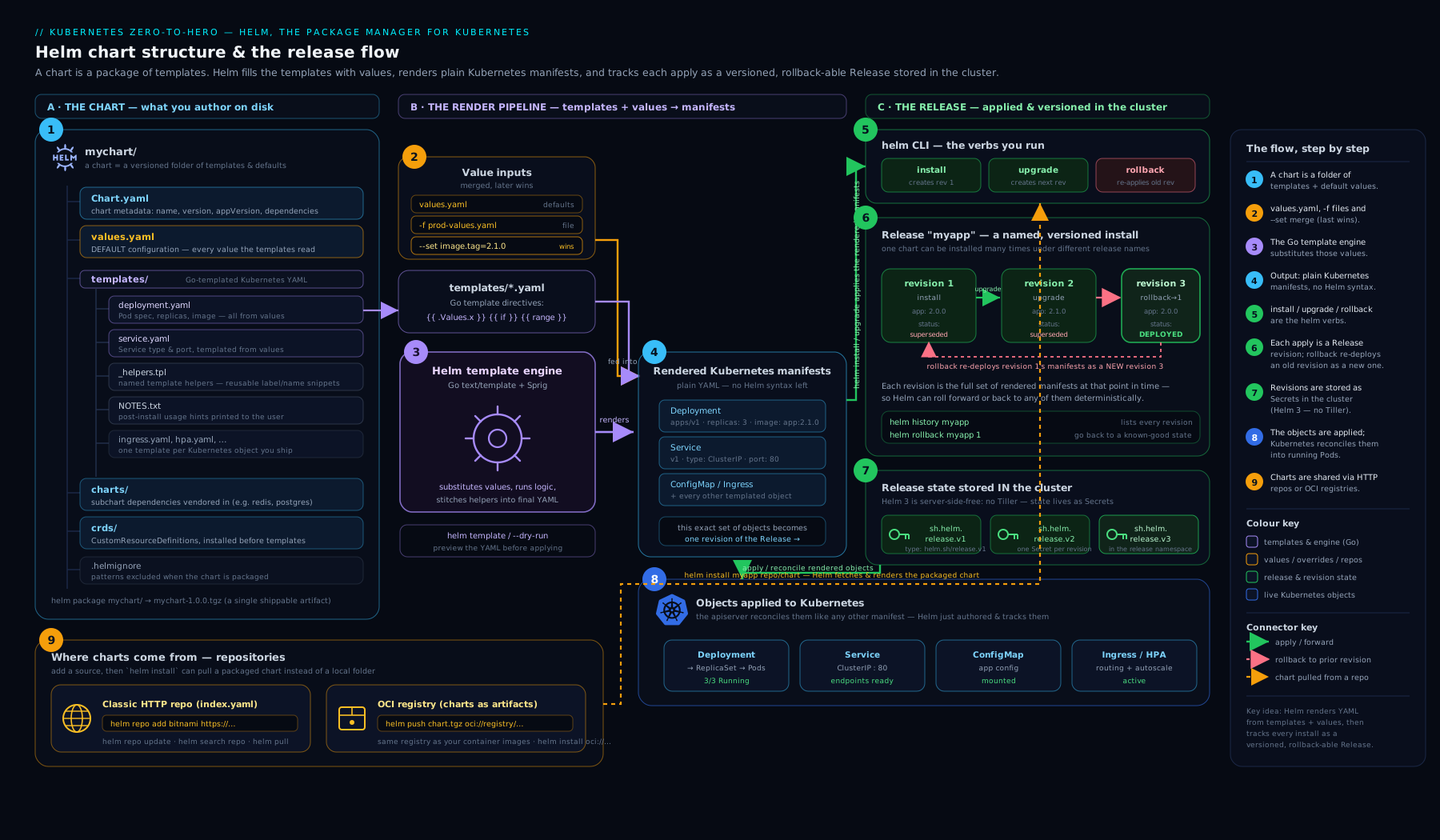
The diagram shows the full picture: a chart on the left (Chart.yaml, values.yaml, templates/, charts/, _helpers.tpl, NOTES.txt, crds/) feeding the templating engine — where .Values, .Release and .Chart are merged in and rendered to plain Kubernetes YAML — which Helm applies to the cluster as a named release, storing each revision as a Secret so it can upgrade and roll back.
Hands-on lab
You will scaffold a chart, render it, install it onto a free local cluster, override a value, upgrade it, roll it back, add a dependency, and clean up. Everything runs on your laptop at zero cost.
1. Create a cluster and a chart
kind create cluster --name helm-lab           # free local Kubernetes
helm create webapp                            # scaffold a working chart
Expected: kubectl get nodes shows one Ready node, and webapp/ contains the full chart layout from earlier.
2. Render before you install (see the YAML)
helm template demo ./webapp | head -40
helm template demo ./webapp --set replicaCount=3 --show-only templates/deployment.yaml | grep replicas
Expected: the first prints rendered manifests; the second shows replicas: 3. You just proved templating works without a cluster.
3. Lint, then install with a wait
helm lint ./webapp
helm install web ./webapp -n demo --create-namespace --wait --timeout 2m
Expected: 1 chart(s) linted, 0 chart(s) failed, then STATUS: deployed, and the rendered NOTES.txt printed. Verify:
helm list -n demo
kubectl get deploy,svc,pods -n demo
helm get values web -n demo --all | head
You should see the web release, a Deployment with 1 replica, a Service, and the fully computed values.
4. Override and upgrade (create revision 2)
helm upgrade web ./webapp -n demo --set replicaCount=3 --atomic --wait
helm history web -n demo
kubectl get pods -n demo
Expected: history shows revision 1 (deployed→superseded) and revision 2 (deployed), and three Pods are now running. Note the image and app version columns.
5. Roll back (create revision 3 = revision 1)
helm rollback web 1 -n demo --wait
kubectl get pods -n demo
helm history web -n demo
Expected: back to a single Pod; history now shows three revisions, with revision 3 marked deployed.
6. Add a dependency
cat >> webapp/Chart.yaml <<'EOF'
dependencies:
  - name: redis
    version: "^19.0.0"
    repository: "https://charts.bitnami.com/bitnami"
    condition: redis.enabled
EOF
helm repo add bitnami https://charts.bitnami.com/bitnami
helm dependency update ./webapp
ls webapp/charts/                # redis-*.tgz now vendored; Chart.lock written
Expected: a redis-*.tgz appears under charts/ and Chart.lock is created. (You need not install it — condition: redis.enabled defaults off — but you have proven dependency resolution.)
7. Validation
helm status web -n demo --show-resources
helm get manifest web -n demo | head -20
kubectl get secret -n demo | grep sh.helm.release    # the per-revision state Secrets
Seeing the sh.helm.release.v1.web.v* Secrets confirms Helm stored each revision’s state in the cluster, exactly as the architecture promised.
Cleanup
helm uninstall web -n demo
kubectl delete namespace demo
kind delete cluster --name helm-lab
Cost note
Everything here is free: kind runs Kubernetes in Docker on your machine, Helm is open source, and the Bitnami chart is pulled from a public repository. The only “cost” is local CPU/RAM and a few hundred MB of downloads. Nothing touches a paid cloud.
Common mistakes & troubleshooting
| Symptom | Likely cause | Fix |
|---|---|---|
error converting YAML to JSON / mapping values are not allowed on install |
A template rendered structurally broken YAML — almost always bad indentation or a missing whitespace dash | helm template ./chart | less, find the malformed block; fix with nindent/indent and {{-/-}}. |
A partial (include) renders empty |
You forgot the context argument: {{ include "x.labels" }} instead of {{ include "x.labels" . }} |
Add the trailing . so the partial can see .Values/.Release. |
nil pointer evaluating interface {} |
Walking into a value that does not exist (.Values.foo.bar where foo is unset) |
Guard with if, with, or default/dig; e.g. `{{ .Values.foo.bar |
--set extraEnv=... wiped the chart’s defaults |
List values replace, they do not merge | Provide the complete list, or model it as a map you can deep-merge. |
cannot re-use a name that is still in use |
A release by that name already exists (or a failed one lingers) | helm list -A to find it; helm uninstall, or use helm upgrade --install. |
| Upgrade succeeded but app is broken; rollback needed | A bad config or image reached the cluster | helm rollback <rel> <good-rev>; in future use --atomic so failures self-revert. |
another operation (install/upgrade) is in progress |
A prior command crashed leaving the release in pending-* |
helm rollback to the last good revision, or as a last resort delete the stuck pending release Secret. |
CRD changes in crds/ not applied on upgrade |
Helm installs CRDs once and never upgrades/deletes them | Update CRDs out of band (kubectl apply), or manage them via templates with care. |
--dry-run passes but real install fails on admission |
--dry-run=client does not contact the API; admission webhooks/quotas only check server-side |
Use --dry-run=server to validate against the live cluster. |
Best practices
- Render before you apply.
helm templateand--dry-run=servercost nothing and catch almost everything. Make eyeballing the YAML a reflex. - Pin everything. Always pass
--versionwhen installing from a repo, and commitChart.lock. Reproducible builds beat “it worked yesterday”. - Keep
values.yamlthe documentation. Every tunable should appear there with a sensible default and a comment. A user should be able to configure your chart by reading one file. - Validate values with
values.schema.json. It turns “someone passed a string where a number was expected” into a clear error at install time. - Use
--atomic(and--wait) for production upgrades. All-or-nothing deploys with automatic rollback are the single biggest reliability win Helm offers. - Make CI idempotent with
helm upgrade --install. The same command should be safe to run on a fresh cluster or an existing release. - Prefer
includeovertemplate, and always pass the context (.). And lean on the standardapp.kubernetes.io/*labels thathelm createscaffolds. - Use
-ffiles for configuration,--setonly for the one value CI injects. Layered values files keep environments readable and diffable. - Mind list-replace vs map-merge when designing your
values.yaml— model things users will add to as maps, not lists, so overrides merge.
Security notes
- Helm runs with your RBAC. It is not a privilege-escalation path — Helm can do exactly what your
kubeconfigallows, and no more. Treathelm installwith the same care askubectl apply; in shared clusters, scope each user/CI identity to least privilege. - Vet third-party charts before installing. A chart is executable templating plus arbitrary manifests;
helm templateit and read the rendered output before applying anything from the internet. Prefer charts you can audit and pin by version (and ideally by provenance). - Verify provenance where it matters. Charts can be signed;
helm install --verify(with a.provfile and keyring) checks integrity and authorship. For supply-chain rigour, host charts in an OCI registry with signing/scanning. - Secrets are not encryption. Helm renders
Secretobjects, but YAML in your chart and values files is plaintext. Never commit real secrets intovalues.yamlor a Git repo. Use a secrets manager (External Secrets Operator, the Secrets Store CSI driver, or SOPS/sealed-secrets) and reference, don’t embed. - Hooks run real workloads with real permissions. A
pre-installJob in a third-party chart executes in your cluster — review hook manifests as carefully as the app itself. - Lock down the release Secrets. The
sh.helm.release.*Secrets contain the full rendered manifests (which may include secret references); they inherit normal namespace RBAC, so guard the namespace.
Interview & exam questions
-
What is the difference between a chart and a release? A chart is the package — a versioned, templated bundle of Kubernetes manifests plus default values; it is inert. A release is a named installation of a chart into a cluster (
helm install web ./chart→ releaseweb). The same chart can be installed many times under different release names, each with its own values and lifecycle. -
How does Helm 3 differ architecturally from Helm 2? Helm 3 removed Tiller, the in-cluster server component. Helm 3 is client-only: it renders locally and talks to the API server using your
kubeconfig/RBAC. This eliminated Tiller’s cluster-admin attack surface and made Helm respect normal Kubernetes authorisation. Release state moved to Secrets in the release namespace. -
Where does Helm store release state, and why does it matter? In the cluster, as Secrets named
sh.helm.release.v1.<release>.v<revision>(one per revision) in the release’s namespace. It matters because the source of truth is the cluster, not your laptop —helm listreflects the cluster you are pointed at — and deleting those Secrets by hand orphans the release. -
Explain values precedence. Lowest to highest: subchart
values.yaml→ parentvalues.yaml→ each-ffile in order (later wins) →--set/--set-string/etc. (highest). Maps deep-merge; lists are replaced wholesale by a higher-precedence source rather than appended. -
What is the difference between
templateandinclude? Both invoke a named template.templateis an action that inserts output directly and cannot be piped (so you cannotnindentit).includeis a function that returns a string, so you can pipe it:{{ include "x.labels" . | nindent 4 }}. Preferinclude. -
What does
--atomicdo? It makes an install/upgrade all-or-nothing: it implies--wait, and if the operation fails (a resource never becomes ready within the timeout, or a hook fails), Helm automatically rolls back to the previous revision (or uninstalls, on a failed first install). It is the safest way to deploy. -
How do
helm rollbackand revisions work? Helm snapshots the fully rendered manifests of every install/upgrade as a numbered revision.helm rollback <rel> <n>re-applies revisionn’s manifests and records the result as a new revision (so rollback is itself reversible and history never shrinks). With no number it rolls back to the immediately previous revision. -
What is special about the
crds/directory? CRDs placed incrds/are installed before templates, are never templated, and are never upgraded or deleted by Helm. This is a deliberate safety measure (deleting a CRD would delete all its custom resources cluster-wide). To change a CRD you update it out of band. -
What is the
globalvalue for?.Values.globalis a reserved key whose contents are visible to the parent chart and all subcharts. It is the clean way to share cross-cutting settings (image registry, storage class, domain) across an umbrella chart without repeating them under each subchart. -
When and why would you use the
tplfunction? When a value itself contains template syntax that you want evaluated (e.g. a user supplies an annotation value of"{{ .Release.Name }}-tls"). Values are not normally re-rendered;tpl <string> .runs an arbitrary string through the engine with the current context. -
What are Helm hooks and name a classic use. Hooks are normal Kubernetes resources annotated with
helm.sh/hookto run at a specific lifecycle point (pre/post-install/upgrade/rollback/delete, andtest). The classic use is apre-upgradeJob that runs database migrations before the new application version starts. Ordering is byhook-weight; cleanup byhook-delete-policy. -
How do you preview what Helm will apply without touching the cluster?
helm template <name> ./chart -f values.yamlrenders to stdout offline;helm install/upgrade --dry-run=server --debugadditionally validates against the live API (admission, quotas). Use these before every real change.
Quick check
- You run
helm install web ./charttwice in the same namespace. What happens the second time, and how do you make the command safe to re-run? - The same key is set in
values.yaml, in-f prod.yaml, and via--set. Which value wins? - A named template you
includeis rendering nothing. What is the most likely single-character mistake? - You add a field to a CRD in
crds/and runhelm upgrade. The change does not appear. Why? - After a failed upgrade your app is broken. What one command restores the last good state, and what flag would have prevented the problem?
Answers
- The second
installfails with “cannot re-use a name that is still in use” — release names are unique per namespace. Make it safe withhelm upgrade --install web ./chart, which installs if absent and upgrades if present. --setwins. Precedence is subchart defaults < parent defaults <-ffiles (later beats earlier) <--set.- A missing context dot —
{{ include "x" }}instead of{{ include "x" . }}— so the partial cannot see.Values/.Releaseand renders empty. - Helm never upgrades or deletes CRDs placed in
crds/; they are installed once and then left alone. Update the CRD out of band withkubectl apply. helm rollback web <last-good-revision>(or justhelm rollback webfor the previous one). Deploying with--atomicwould have auto-rolled-back the failed upgrade in the first place.
Exercise
Take a small app you have written (or invent one: a web Deployment + Service + ConfigMap). Convert its raw manifests into a Helm chart by hand (do not just helm create and walk away — author the templates). Requirements: (a) parameterise the image repository and tag, replica count, service type/port, and resource requests/limits via values.yaml; (b) add a _helpers.tpl with a fullname and a labels partial and use include … | nindent in every manifest; © make the ConfigMap optional behind .Values.config.enabled with an if; (d) add a second values file values-prod.yaml that overrides replicas and resources; (e) write a values.schema.json that requires image.repository and types replicaCount as an integer; (f) add a pre-upgrade hook Job (it can just echo "migrating"); and (g) prove the whole thing with helm lint, helm template -f values-prod.yaml, then install, upgrade (change the tag), and helm rollback on kind. Bonus: add the Bitnami redis chart as a condition-gated dependency and configure it via subchart values, then run helm dependency update and confirm Chart.lock.
Certification mapping
CKAD (Certified Kubernetes Application Developer):
- Application Deployment — the CKAD curriculum explicitly lists using Helm to deploy existing packages. You must be able to
helm repo add/update,helm search,helm install/upgrade/rollback/uninstall, and inspect releases withhelm list/status/historyquickly under time pressure. - Application Environment, Configuration and Storage — Helm is the practical way you parameterise ConfigMaps, Secrets and resource settings across environments; understanding values and overrides reinforces this domain.
- Application Observability and Maintenance — rollouts and rollbacks: Helm’s revision/rollback model maps directly onto the rollout concepts CKAD tests.
While Helm is most prominent in CKAD, the same skills support day-to-day work for CKA (operating clusters where workloads arrive as charts) and appear constantly in real platform/SRE interviews.
Glossary
- Chart — a versioned, templated package of Kubernetes manifests plus default values; the unit Helm installs.
- Release — a named installation of a chart into a cluster; the same chart can have many releases.
- Revision — a numbered, immutable snapshot of a release’s rendered manifests and values, created on each install/upgrade/rollback.
- Values — the configuration parameters (
.Values), merged from chart defaults,-ffiles and--set. - Template — a file in
templates/containing Go-template{{ }}actions that render to Kubernetes YAML. - Named template / partial — a reusable snippet defined with
define(usually in_helpers.tpl) and used viainclude. includevstemplate—includereturns a string (pipeable);templateinserts output directly (not pipeable).- Pipeline — chaining expressions with
|, passing each result as the last argument to the next function. - Built-in objects —
.Values,.Release,.Chart,.Capabilities,.Files,.Template— the data templates render from. tpl— a function that renders an arbitrary string through the template engine with the current context.- Subchart / dependency — a chart bundled inside another (in
charts/), declared underdependenciesinChart.yaml. - Global values — the reserved
.Values.globalmap, visible to the parent and all subcharts. - Repository — a place charts are published: a classic HTTP repo with an
index.yaml, or an OCI registry (oci://). - OCI registry — a container registry (GHCR/ECR/ACR/…) used to store charts alongside images.
- Hook — a Kubernetes resource annotated
helm.sh/hookto run at a specific lifecycle point (e.g.pre-upgrade). --atomic— install/upgrade flag making the operation all-or-nothing with automatic rollback on failure.- Tiller — the removed Helm 2 in-cluster server component; gone in Helm 3.
- Artifact Hub — the public catalogue of Helm charts, searchable via
helm search hub.
Next steps
- Continue the course with Kubernetes Pods, In Depth: containers, probes, lifecycle, init & every field — now that you can package workloads, master the workload at the centre of every chart.
- Go deeper on chart authoring with Helm umbrella charts, library charts, hooks & rollback strategy and Authoring production Helm charts: library charts & tests.
- Compare templating philosophies with Kustomize overlays, components & strategic merge — the template-free alternative — and see how charts flow through GitOps in Argo CD: app-of-apps & progressive delivery.
- Keep the Docker / kubectl / Helm command reference handy as a cheat sheet.