A 30-person analytics-engineering team at a retail company has a dbt project with 1,400 models on Snowflake, and their pull-request checks have become the bottleneck nobody will admit to. Every PR triggers a full dbt build — all 1,400 models and their tests — against a CI schema, which takes 38 minutes and burns a frightening amount of Snowflake credits when six PRs are open at once. So engineers stop opening small PRs, batch their changes, and review quality drops. The fix is Slim CI: a dbt Cloud CI job that compares the PR’s state against the last successful production run and builds only the modified models plus their downstream children, deferring everything else to already-built production tables. A one-line change to a staging model goes from 38 minutes and a full warehouse spin-up to roughly 90 seconds. This guide stands that up end to end — the dbt Cloud job, the Snowflake permissions, the deferral and state-comparison wiring, and the surrounding identity, secrets, and observability that make it a real team workflow rather than a demo.
Prerequisites
- A Snowflake account where you can create a
RAW/ANALYTICSdatabase, a dedicated CI database, aTRANSFORMERrole, and a small warehouse. You needACCOUNTADMINor a role withCREATE DATABASE/CREATE ROLE/CREATE WAREHOUSEfor the one-time setup. - A dbt Cloud account (Team or Enterprise tier — Slim CI deferral and CI-on-PR are available on both) with admin access to create environments, jobs, and a connection.
- A Git repository (GitHub or GitLab) holding the dbt project, connected to dbt Cloud via the native integration so PR webhooks fire. This guide uses GitHub with GitHub Actions for the non-dbt parts of the pipeline (linting, IaC).
- dbt Core 1.7+ semantics (dbt Cloud’s “Versionless” or a pinned 1.7+ runner). Deferral and the
state:modifiedselector behave as described from 1.5 onward; 1.6+ adds the cleaner--defer --statedefaults. - The dbt project already runs locally:
dbt debugpasses anddbt buildsucceeds against a dev schema. - Local CLI for the setup steps:
snowsql(or the Snowflake web UI),git, and thedbtCLI 1.7+.
Target topology
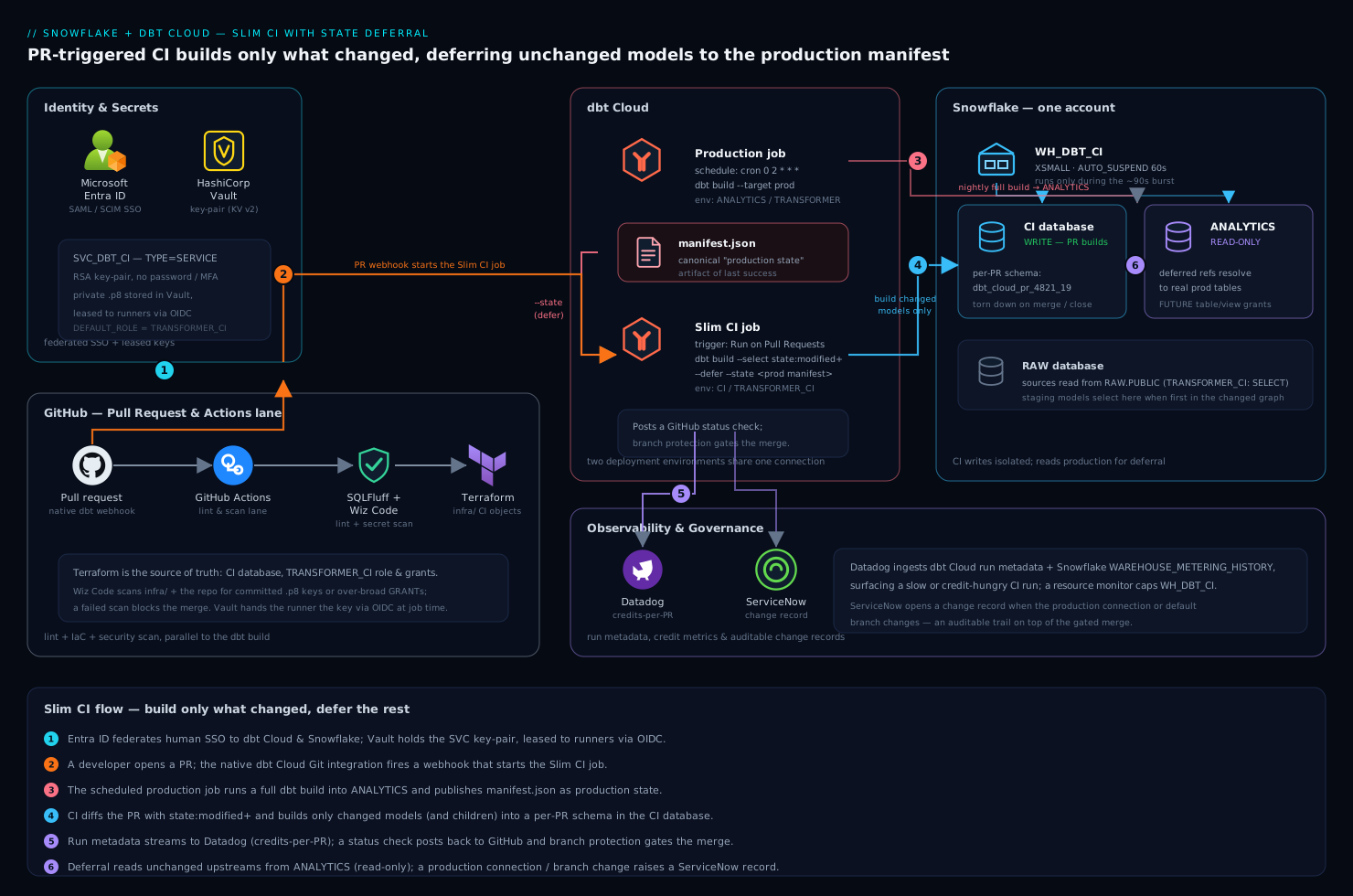
The flow has three actors that share one Snowflake account but live on different schedules. A scheduled production job runs the full dbt build nightly into the ANALYTICS database and, on success, publishes its manifest.json as the canonical “production state” artifact. A developer opens a pull request in GitHub; the native dbt Cloud Git integration fires a webhook that starts the CI job. The CI job pulls the production manifest.json, runs state:modified to diff the PR against it, and executes dbt build --select state:modified+ --defer --state <prod-manifest> against an ephemeral, PR-scoped schema in the CI database — building only changed models and reading every unchanged upstream from production via deferral. The result posts back as a GitHub status check; merge is gated on it.
Around that core: Microsoft Entra ID is the SSO IdP for dbt Cloud and Snowflake (SAML/OIDC) so humans never hold static passwords; HashiCorp Vault holds the Snowflake service-account key and dbt Cloud API token that the surrounding GitHub Actions pipeline needs; GitHub Actions runs SQLFluff linting and the Terraform that provisions Snowflake objects; Terraform is the source of truth for the CI database, role, and grants; Datadog ingests dbt Cloud run metadata and Snowflake query metrics so a slow or credit-hungry CI run is visible; ServiceNow receives a change record when the production environment’s connection or default branch changes; and Wiz Code scans the IaC and repo for exposed Snowflake keys or over-broad grants before they merge.
1. Provision the Snowflake CI objects
Slim CI needs a place to build that is isolated from production but can read production for deferral. Create a dedicated CI database, a transformer role, and a small auto-suspending warehouse. Run this once as a role with the right privileges (shown as raw SQL; in a real estate you would apply it through Terraform — see step 7).
-- One-time CI infrastructure in Snowflake
USE ROLE SYSADMIN;

CREATE WAREHOUSE IF NOT EXISTS WH_DBT_CI
  WAREHOUSE_SIZE = 'XSMALL'
  AUTO_SUSPEND   = 60          -- suspend after 60s idle; CI bursts are short
  AUTO_RESUME    = TRUE
  INITIALLY_SUSPENDED = TRUE;

CREATE DATABASE IF NOT EXISTS CI;            -- PR builds land here, never in ANALYTICS

USE ROLE SECURITYADMIN;
CREATE ROLE IF NOT EXISTS TRANSFORMER_CI;

-- CI role can build in CI and READ production for deferral
GRANT USAGE ON WAREHOUSE WH_DBT_CI TO ROLE TRANSFORMER_CI;
GRANT ALL ON DATABASE CI TO ROLE TRANSFORMER_CI;
GRANT USAGE ON DATABASE ANALYTICS TO ROLE TRANSFORMER_CI;
GRANT USAGE ON FUTURE SCHEMAS IN DATABASE ANALYTICS TO ROLE TRANSFORMER_CI;
GRANT SELECT ON FUTURE TABLES IN DATABASE ANALYTICS TO ROLE TRANSFORMER_CI;
GRANT SELECT ON FUTURE VIEWS  IN DATABASE ANALYTICS TO ROLE TRANSFORMER_CI;
GRANT SELECT ON ALL TABLES IN DATABASE ANALYTICS TO ROLE TRANSFORMER_CI;
GRANT SELECT ON ALL VIEWS  IN DATABASE ANALYTICS TO ROLE TRANSFORMER_CI;
GRANT USAGE ON DATABASE RAW TO ROLE TRANSFORMER_CI;  -- sources read from RAW
GRANT SELECT ON ALL TABLES IN SCHEMA RAW.PUBLIC TO ROLE TRANSFORMER_CI;
The two ideas that make this work: the CI role has write in CI (where PR models are built) and read-only in ANALYTICS (so deferred, unchanged models resolve to real production tables). Without the read grants on ANALYTICS, deferral fails the moment a changed model selects from an unchanged parent.
2. Create the CI service account
dbt Cloud’s CI environment needs a Snowflake login that is not a human and not your production deployment account. Use a service account with key-pair authentication — Snowflake is deprecating password-only auth, and a key pair is what Vault can hold and rotate cleanly.
USE ROLE SECURITYADMIN;
CREATE USER IF NOT EXISTS SVC_DBT_CI
  DEFAULT_ROLE      = TRANSFORMER_CI
  DEFAULT_WAREHOUSE = WH_DBT_CI
  TYPE              = SERVICE          -- service user: no password, no MFA prompt
  RSA_PUBLIC_KEY    = 'MIIBIjANBgkqh...';   -- paste the public key generated below
GRANT ROLE TRANSFORMER_CI TO USER SVC_DBT_CI;
Generate the key pair locally and store the private key in Vault — never in the repo, never in a dbt Cloud plaintext field you can avoid:
# Generate an encrypted RSA key pair for the service account
openssl genrsa 2048 | openssl pkcs8 -topk8 -v2 aes-256-cbc -inform PEM \
  -out rsa_dbt_ci_key.p8
openssl rsa -in rsa_dbt_ci_key.p8 -pubout -out rsa_dbt_ci_key.pub

# Store the private key in HashiCorp Vault (KV v2), not on disk long-term
vault kv put secret/dbt/ci/snowflake \
  private_key=@rsa_dbt_ci_key.p8 \
  passphrase='<the-passphrase-you-set>'

shred -u rsa_dbt_ci_key.p8   # remove the local copy once Vault holds it
Where the named tools fit on identity and secrets. Human access to both dbt Cloud and Snowflake is federated through Microsoft Entra ID (SAML to dbt Cloud, SCIM-provisioned, and SSO to Snowflake) so engineers log in with corporate credentials and conditional access — no shared Snowflake passwords. The one credential that is not a human — this CI service account’s private key — lives in HashiCorp Vault, leased to the surrounding GitHub Actions runners at job time rather than pasted into a CI variable. Wiz Code scans every PR and the Terraform state for an accidentally committed .p8 file or an over-broad GRANT, blocking the merge if it finds one.
3. Configure the dbt Cloud connection and environments
In dbt Cloud, the connection and environments are the scaffolding the jobs hang off. You need two deployment-class environments: Production and CI.
- Connection (Account Settings → Connections → Snowflake). Set the account identifier (
abc12345.ap-south-1.aws), databaseANALYTICS, warehouseWH_DBT_CIis not used here — production uses its own; the CI environment overrides the warehouse and database per environment. Set the connection’s auth to Key Pair and reference the service account where applicable. - Production environment (Deploy → Environments → Create). Type Deployment, deployment type Production, dbt version Versionless (or pin 1.7), target database
ANALYTICS, roleTRANSFORMER, warehouseWH_TRANSFORM. This is the environment whose successful runs produce the manifest that CI defers to. - CI environment. Type Deployment, deployment type General/Staging, target database
CI, roleTRANSFORMER_CI, warehouseWH_DBT_CI. Credentials: theSVC_DBT_CIkey-pair user. dbt Cloud builds PR work into schemas it generates per pull request in theCIdatabase (e.g.dbt_cloud_pr_4821_19), and tears them down on merge/close.
The critical pairing: the CI job will defer to the Production environment, so dbt Cloud knows which environment’s manifest.json is “production state.” You select that in the job (step 5), but both environments must exist first.
4. Add the deferral and state config to the project
dbt resolves deferral via --state (a directory containing the production manifest.json) and --defer. In dbt Cloud’s CI jobs this is largely automatic once you point the job at a production job, but make the project’s selectors explicit and lint-friendly. Add a CI-specific selector so the intent lives in version control, not only in the job UI.
# selectors.yml — committed to the repo root
selectors:
  - name: slim_ci
    description: >
      Build only models changed in this PR and everything downstream of them,
      plus any models whose upstream contracts/tests changed. Unchanged models
      are deferred to the production manifest.
    definition:
      union:
        - method: state
          value: modified
          # the '+' for downstream is applied via the job command, see step 5
        - method: state
          value: modified.body   # SQL body changed
Confirm dbt_project.yml cleanly separates production and CI schema generation so PR builds never collide with prod. The default dbt-Snowflake macro already namespaces by target; if you have a custom generate_schema_name, make sure it respects the per-PR schema dbt Cloud injects:
-- macros/generate_schema_name.sql (only if you override the default)
{% macro generate_schema_name(custom_schema_name, node) -%}
  {%- set default_schema = target.schema -%}
  {%- if custom_schema_name is none -%}
      {{ default_schema }}
  {%- else -%}
      {{ default_schema }}_{{ custom_schema_name | trim }}
  {%- endif -%}
{%- endmacro %}
For a Slim CI override of generate_schema_name, the safe rule is: in CI, always prefix with target.schema (the per-PR schema dbt Cloud sets) so a model with +schema: marts does not write into the production MARTS schema during a PR build.
5. Create the production job and the Slim CI job
Two jobs do the work. The production job runs on a schedule and produces state; the CI job runs on PRs and consumes it.
Production job (Deploy → Jobs → Create, in the Production environment):
# Commands for the scheduled production job
dbt build --target prod
- Trigger: schedule (e.g. cron
0 2 * * *— 2 AM nightly), plus optionally on merge tomain. - Under Execution settings, ensure “Generate docs on run” and that artifacts are kept — the CI job reads this job’s
manifest.json.
Slim CI job (Deploy → Jobs → Create, in the CI environment):
# Commands for the Slim CI job
dbt build --select state:modified+ --defer --state ./
Then in the CI job’s settings:
- Triggers → Run on Pull Requests: ON. This makes dbt Cloud register a webhook and post a GitHub status check on every PR to the connected repo.
- Defer to a previous run state → Production job: select the production job from step 5. dbt Cloud now fetches that job’s latest successful
manifest.jsonand passes it as--state, sostate:modifieddiffs the PR against production and--deferresolves unchanged refs to production tables. - Leave “Run on Pull Requests” as the only trigger — no schedule.
What dbt build --select state:modified+ means in practice: build every model that the diff marks as modified (new, changed SQL, changed config, changed tests, changed contracts) and everything downstream of them (the trailing +). A change to one staging model rebuilds that model and its marts children; the other 1,390 models are deferred, not rebuilt.
6. Wire the surrounding GitHub Actions pipeline
dbt Cloud handles the build, but the rest of the PR pipeline — linting, IaC, security scanning — runs in GitHub Actions so non-dbt concerns gate the merge too. This workflow lints SQL with SQLFluff and is the place the Vault-leased credentials and Datadog/Wiz steps attach. It does not duplicate the dbt build; that stays in dbt Cloud.
# .github/workflows/dbt-pr.yml
name: dbt PR checks
on:
  pull_request:
    branches: [ main ]
jobs:
  lint-and-scan:
    runs-on: ubuntu-latest
    steps:
      - uses: actions/checkout@v4

      - name: Fetch Snowflake key from Vault
        uses: hashicorp/vault-action@v3
        with:
          url: ${{ secrets.VAULT_ADDR }}
          method: jwt                      # OIDC from GitHub to Vault, no static token
          role: dbt-ci
          secrets: |
            secret/data/dbt/ci/snowflake private_key | SNOWFLAKE_PRIVATE_KEY

      - name: SQLFluff lint (Snowflake dialect)
        run: |
          pip install sqlfluff sqlfluff-templater-dbt
          sqlfluff lint models/ --dialect snowflake --templater dbt

      - name: Wiz Code IaC + secret scan
        run: wizcli iac scan --path infra/ && wizcli dir scan --path .

      - name: Notify Datadog of CI event
        run: |
          curl -sS -X POST "https://api.datadoghq.com/api/v1/events" \
            -H "DD-API-KEY: ${{ secrets.DD_API_KEY }}" \
            -d '{"title":"dbt PR checks","text":"PR #${{ github.event.number }}","tags":["team:analytics-eng","stage:ci"]}'
Here the named tools earn their place: GitHub Actions runs the lint/scan lane in parallel with the dbt Cloud Slim CI job; HashiCorp Vault hands the runner the Snowflake key via OIDC (no long-lived secret in GitHub); Wiz Code scans infra/ Terraform and the repo for exposed keys or risky grants; and Datadog gets a CI event so PR throughput and failures show on the data-platform dashboard. ServiceNow (not shown — a separate workflow on main) opens a change record when the production environment’s connection or default branch is altered.
7. Manage the Snowflake objects with Terraform
The SQL in steps 1–2 is fine for a first pass, but the CI database, role, grants, and service user belong in Terraform so they are reviewed, diffable, and reproducible. Use the official Snowflake provider; this is what infra/ (scanned by Wiz Code above) contains.
# infra/ci.tf — Snowflake CI objects as code
terraform {
  required_providers {
    snowflake = { source = "snowflakedb/snowflake", version = "~> 0.95" }
  }
}

resource "snowflake_warehouse" "dbt_ci" {
  name           = "WH_DBT_CI"
  warehouse_size = "XSMALL"
  auto_suspend   = 60
  auto_resume    = true
}

resource "snowflake_database" "ci" {
  name = "CI"
}

resource "snowflake_account_role" "transformer_ci" {
  name = "TRANSFORMER_CI"
}

resource "snowflake_grant_privileges_to_account_role" "ci_read_analytics" {
  account_role_name = snowflake_account_role.transformer_ci.name
  privileges        = ["USAGE"]
  on_account_object {
    object_type = "DATABASE"
    object_name = "ANALYTICS"
  }
}
terraform -chdir=infra init
terraform -chdir=infra plan -out ci.plan   # review the diff in the PR
terraform -chdir=infra apply ci.plan
The private key still lives in Vault, referenced by Terraform via the Vault provider data source rather than stored in state. Ansible is the right tool if you also manage a self-hosted dbt runner fleet or warehouse-adjacent VMs (a few teams run dbt Core on virtual appliances in a private subnet instead of dbt Cloud) — use an Ansible playbook to install the dbt CLI, drop the Vault-templated profile, and register the host; that path is out of scope here but mirrors these same grants.
Validation
Prove the loop works before you trust it. Three checks, escalating in confidence.
- State comparison is live. Open a trivial PR — change a comment in one staging model — and watch the dbt Cloud CI run. The run log should show a small number of selected models, not all 1,400, and lines like
Defer is on for ...confirming unchanged refs resolve toANALYTICS.
# In the dbt Cloud run log you want to see, roughly:
# Found 1400 models, 6 selected (state:modified+)
# Building into database=CI, schema=dbt_cloud_pr_4821_19
# Defer: unselected nodes resolved against the production manifest
-
Deferral actually reads production. Change a downstream mart model only. The CI build must succeed even though its upstream staging models are not in the PR — because deferral points their
ref()at the realANALYTICStables. If you instead seeObject 'CI...STG_ORDERS' does not exist, deferral is not wired (the job is not pointed at the production job, or the read grants from step 1 are missing). -
The status check gates merge. Confirm a GitHub branch-protection rule requires the dbt Cloud CI check, then verify a failing test in a PR turns the check red and blocks the merge button:
gh pr checks <PR-number>     # lists the dbt Cloud CI check and its state
gh pr view <PR-number> --json mergeStateStatus -q .mergeStateStatus
- Per-PR schemas are torn down. After merging the test PR, confirm dbt Cloud dropped its CI schema:
SHOW SCHEMAS LIKE 'dbt_cloud_pr_%' IN DATABASE CI; -- closed PRs should be gone
Rollback and teardown
If Slim CI misbehaves, you want a fast path back to a known-good state and a clean way to remove the experiment.
- Revert to full-build CI immediately: in the CI job, change the command to
dbt build(drop--select state:modified+ --defer --state ./) and turn off Defer to a previous run state. The job now does a full build into the CI database — slower and costlier, but unblocks PRs while you debug the deferral wiring. - Disable CI-on-PR without deleting the job: toggle Run on Pull Requests off; the GitHub webhook stops firing and the status check disappears from new PRs.
- Full teardown of the CI infrastructure (after removing the dbt Cloud jobs/environment in the UI):
terraform -chdir=infra destroy -target=snowflake_database.ci \
  -target=snowflake_warehouse.dbt_ci \
  -target=snowflake_account_role.transformer_ci
-- If you provisioned by hand instead of Terraform:
DROP USER IF EXISTS SVC_DBT_CI;
DROP DATABASE IF EXISTS CI;            -- removes all leftover PR schemas at once
DROP WAREHOUSE IF EXISTS WH_DBT_CI;
DROP ROLE IF EXISTS TRANSFORMER_CI;
- Revoke the service credential in an incident: remove the public key from
SVC_DBT_CI(ALTER USER SVC_DBT_CI UNSET RSA_PUBLIC_KEY;) and delete the Vault secret (vault kv delete secret/dbt/ci/snowflake). The CI job fails closed, which is the behavior you want.
Common pitfalls
- No production manifest yet. On day one the production job has never run, so the CI job has nothing to defer to and either errors or silently full-builds. Fix: run the production job once (
dbt build --target prod) before opening the first PR, so amanifest.jsonexists as state. - Missing read grants on
ANALYTICS. The single most common failure: deferral tries to read an unchanged parent and getsObject does not exist or not authorized. Re-check theGRANT SELECT ON FUTURE TABLES IN DATABASE ANALYTICSfrom step 1 —FUTUREgrants matter because production keeps creating new tables. state:modifiedflags everything. If every PR selects all 1,400 models, the manifests are not comparable — usually a dbt version mismatch (CI on 1.8, production on 1.6) or a changedvars/env that perturbs every node’s hash. Pin both environments to the same dbt version.- Custom
generate_schema_namewriting into production. An override that ignorestarget.schemamakes a PR build land in the realMARTSschema, contaminating production. Always prefix withtarget.schemain CI (step 4). - Warehouse never suspends. A CI warehouse without
AUTO_SUSPENDruns between bursts and quietly burns credits. Keep it at 60 seconds. - Source freshness in CI. Running
dbt source freshnessin the CI job adds time and flakiness for little value on a PR; keep freshness in the production/scheduled job. - Deferral vs.
defer-stateconfusion. In CI jobs, “Defer to a previous run state” is the toggle that supplies--state; setting--state ./in the command without that toggle leaves the state directory empty. Use the toggle.
Security notes
Human access to dbt Cloud and Snowflake is federated through Microsoft Entra ID with conditional access, so engineers never hold standing Snowflake passwords and offboarding is one IdP action. The CI service account is a key-pair, TYPE=SERVICE user scoped to TRANSFORMER_CI, which has write only in CI and read-only in ANALYTICS/RAW — a leaked CI key cannot mutate production. The private key lives in HashiCorp Vault and is leased to runners via OIDC, never pasted into a CI variable. Wiz Code scans every PR and the Terraform for committed keys and over-broad grants and blocks the merge. Branch protection requires the dbt Cloud check, so unreviewed or test-failing SQL cannot reach main, and a change to the production connection or default branch raises a ServiceNow record for an auditable trail. For the data-content layer (PII in models), enforce Snowflake masking policies and dynamic data masking in production rather than relying on CI to catch it.
Cost notes
Slim CI’s whole point is cost: building 6 models instead of 1,400 cuts both the wall-clock time and the Snowflake credits per PR by one to two orders of magnitude, and an XSMALL warehouse with AUTO_SUSPEND=60 means the warehouse is running only during the ~90-second burst. Deferral compounds the saving — unchanged upstreams are read, not rebuilt, so you pay for a SELECT against an existing table rather than a full materialization. Keep the CI warehouse separate from production so CI bursts never inflate the production warehouse’s auto-scaling. Pipe dbt Cloud run metadata and Snowflake WAREHOUSE_METERING_HISTORY into Datadog to watch credits-per-PR and catch the regression where someone reintroduces a full build; a single dashboard tile of “CI credits this week” keeps the win visible to whoever owns the Snowflake bill. Finally, set a resource monitor on WH_DBT_CI with a credit quota and a suspend action so a runaway loop of triggered builds cannot quietly drain the account.