A payments team runs about forty microservices on an EKS cluster, and right now their secrets are a mess: some database passwords are committed to a private repo’s values.yaml (the kind of thing that ends with a 3 a.m. rotation and a postmortem), API keys for a third-party fraud feed are pasted into a Helm chart, and the platform team has no idea which workloads hold which credentials. Two source-of-truth systems already exist in the org — HashiCorp Vault holds the dynamic database credentials and the internal PKI, and AWS Secrets Manager holds the managed-service secrets (RDS rotation, the fraud-feed token). The ask from security is simple to state and annoying to deliver: “stop putting secrets in Git, pull them from the systems that already own them, and make them rotate.” This guide wires External Secrets Operator (ESO) to do exactly that — sync values from both Vault and AWS Secrets Manager into native Kubernetes Secret objects that applications consume normally, with no secret material ever sitting in a manifest or a chart.
ESO is the right tool because it inverts the usual problem. Instead of pushing secrets into the cluster, it runs a controller that pulls from an external store on a schedule, reconciles the result into a Kubernetes Secret, and re-pulls on a refresh interval so a rotation upstream propagates automatically. Your apps keep reading from a Secret (via env var or mounted file) and never learn there is a Vault or an AWS account behind it.
Prerequisites
- A Kubernetes cluster, 1.27+ — this guide uses Amazon EKS 1.30 with an OIDC provider enabled (
aws eks describe-cluster --name <cluster> --query "cluster.identity.oidc.issuer"). kubectl,helmv3.14+, theawsCLI v2, and thevaultCLI 1.16+, all authenticated.- A reachable HashiCorp Vault (this guide assumes
https://vault.internal.kloudvin.com:8200) with KV v2 enabled and permission to create policies and a Kubernetes auth role. - An AWS Secrets Manager secret in the cluster’s account/region, plus rights to create an IAM policy and a role (we use IRSA — IAM Roles for Service Accounts).
- Human access to both control planes is brokered through your workforce IdP (Okta or Entra ID) — that is how you get a Vault token and an AWS session here; ESO itself uses workload identity, not your login.
Target topology
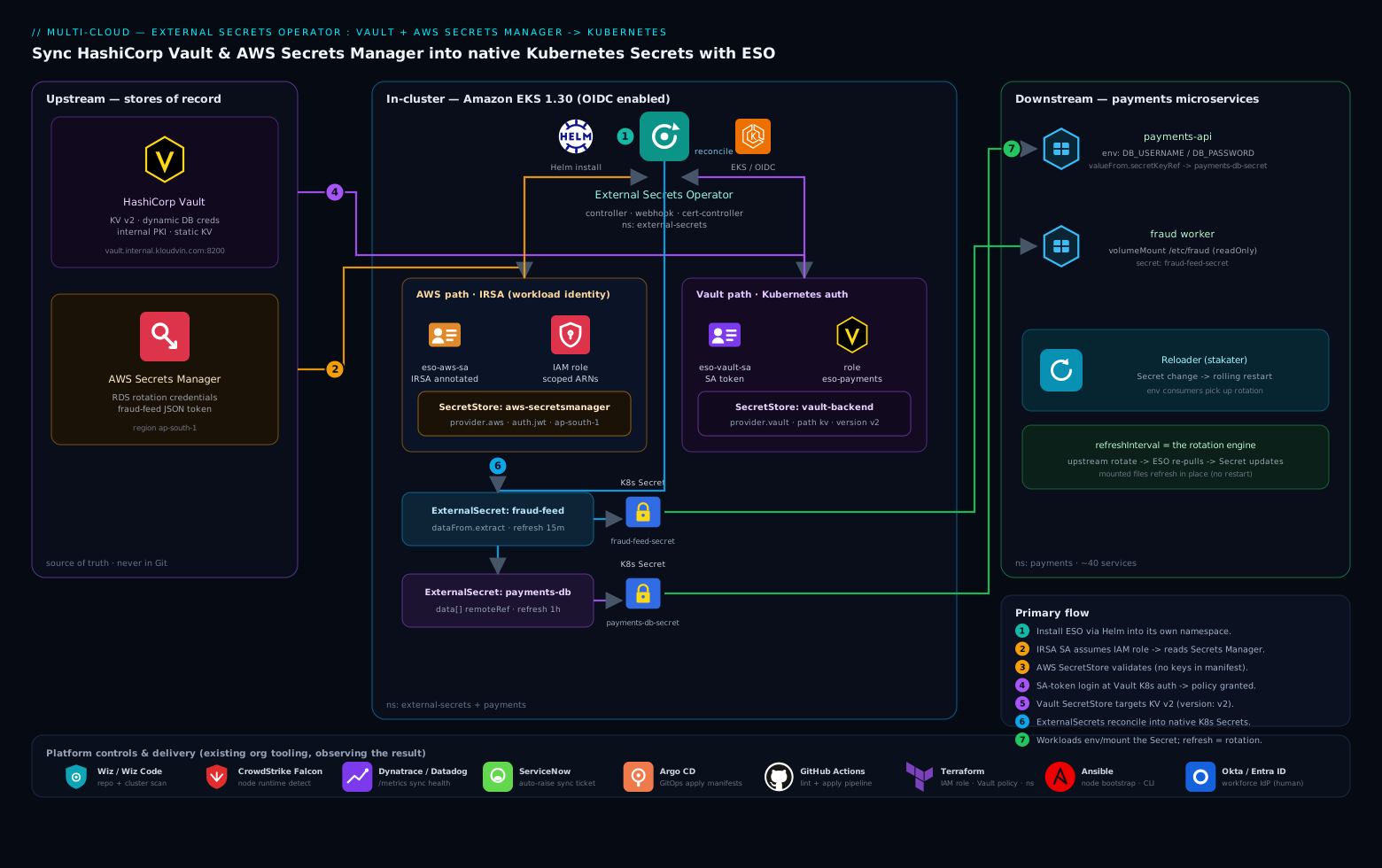
The flow has three planes. Upstream, two stores of record hold the real secrets: HashiCorp Vault (dynamic DB creds, PKI, static KV) and AWS Secrets Manager (RDS credentials, the fraud-feed token). In-cluster, the ESO controller authenticates to each store using workload identity — a Kubernetes ServiceAccount token exchanged at Vault’s Kubernetes auth backend, and an IRSA-annotated ServiceAccount that assumes an IAM role for AWS — then reconciles each ExternalSecret it watches into a standard Kubernetes Secret. Downstream, the payments microservices mount or env-inject those Secrets exactly as they always have. A refreshInterval on each ExternalSecret is what turns an upstream rotation into a fresh Secret without a redeploy. Around the edges, the platform team’s existing tools observe the result: Wiz / Wiz Code scans the repo and the cluster to confirm no plaintext secret is committed and that SecretStore configs are sane, CrowdStrike Falcon runs runtime protection on the nodes so a process that exfiltrates a mounted secret gets flagged, and Dynatrace (or Datadog) scrapes the ESO controller’s /metrics so a sync failure pages someone. Provisioning of the IAM role, the Vault policy, and the namespaces is codified in Terraform, node-bootstrap and CLI installs in Ansible, and the manifests below ship through Argo CD with GitHub Actions (or Jenkins) running the pipeline that lints and applies them.
1. Install External Secrets Operator with Helm
Add the chart repo and install the operator into its own namespace. The CRDs ship with the chart, so install them in the same step.
helm repo add external-secrets https://charts.external-secrets.io
helm repo update

helm install external-secrets external-secrets/external-secrets \
  --namespace external-secrets \
  --create-namespace \
  --version 0.10.4 \
  --set installCRDs=true \
  --set webhook.port=9443 \
  --set serviceMonitor.enabled=true \
  --wait
serviceMonitor.enabled=true exposes the controller’s Prometheus metrics so Dynatrace or Datadog can scrape sync health. Confirm the three components (controller, webhook, cert-controller) are up and the CRDs registered:
kubectl -n external-secrets get pods
kubectl get crd | grep external-secrets.io
You should see externalsecrets.external-secrets.io, secretstores.external-secrets.io, clustersecretstores.external-secrets.io, and pushsecrets.external-secrets.io, plus three Running pods.
2. Configure the AWS path: IRSA role for Secrets Manager
ESO must read Secrets Manager as an AWS principal, not with static keys. IRSA maps a Kubernetes ServiceAccount to an IAM role via the cluster’s OIDC provider — no keys land in the cluster. First, a least-privilege IAM policy scoped to the specific secrets (never *):
cat > /tmp/eso-sm-policy.json <<'EOF'
{
  "Version": "2012-10-17",
  "Statement": [
    {
      "Effect": "Allow",
      "Action": [
        "secretsmanager:GetSecretValue",
        "secretsmanager:DescribeSecret"
      ],
      "Resource": [
        "arn:aws:secretsmanager:ap-south-1:111122223333:secret:payments/fraud-feed-*",
        "arn:aws:secretsmanager:ap-south-1:111122223333:secret:payments/rds-app-*"
      ]
    }
  ]
}
EOF

aws iam create-policy \
  --policy-name eso-secretsmanager-read \
  --policy-document file:///tmp/eso-sm-policy.json
Create the IRSA role and bind it to the ServiceAccount eso-aws-sa in the payments namespace. eksctl writes the trust policy correctly for you (in production this block lives in Terraform):
eksctl create iamserviceaccount \
  --cluster payments-prod \
  --namespace payments \
  --name eso-aws-sa \
  --role-name eso-aws-secretsmanager \
  --attach-policy-arn arn:aws:iam::111122223333:policy/eso-secretsmanager-read \
  --approve
That produces a ServiceAccount annotated with eks.amazonaws.com/role-arn. Verify it:
kubectl -n payments get sa eso-aws-sa -o jsonpath='{.metadata.annotations}'
3. Create the AWS SecretStore
A SecretStore is namespaced and tells ESO how to reach a backend. This one points at Secrets Manager and authenticates via the IRSA ServiceAccount from Step 2 — note there are zero credentials in the manifest, only a reference to eso-aws-sa.
# aws-secretstore.yaml
apiVersion: external-secrets.io/v1beta1
kind: SecretStore
metadata:
  name: aws-secretsmanager
  namespace: payments
spec:
  provider:
    aws:
      service: SecretsManager
      region: ap-south-1
      auth:
        jwt:
          serviceAccountRef:
            name: eso-aws-sa
Apply it and confirm ESO can authenticate — a healthy store reports Valid:
kubectl apply -f aws-secretstore.yaml
kubectl -n payments get secretstore aws-secretsmanager
# NAME                 AGE   STATUS   CAPABILITIES   READY
# aws-secretsmanager   8s    Valid    ReadWrite      True
If READY is False, run kubectl -n payments describe secretstore aws-secretsmanager — the events almost always show an IAM AccessDenied (policy scope) or an OIDC trust mismatch.
4. Configure the Vault path: Kubernetes auth + policy
Vault needs to trust the cluster so ESO can log in with a ServiceAccount token. Enable the Kubernetes auth backend (skip if already enabled), then point it at the cluster’s API and CA. Run these against Vault with an admin token obtained through your Okta/Entra-brokered login:
vault auth enable kubernetes

vault write auth/kubernetes/config \
  kubernetes_host="https://kubernetes.default.svc" \
  token_reviewer_jwt="$(kubectl create token vault-auth -n payments)" \
  kubernetes_ca_cert=@/tmp/k8s-ca.crt \
  disable_iss_validation=true
Write a read-only policy scoped to just the secrets the payments app needs under the kv mount:
vault policy write payments-read - <<'EOF'
path "kv/data/payments/db" {
  capabilities = ["read"]
}
path "kv/data/payments/internal-api" {
  capabilities = ["read"]
}
EOF
Bind that policy to a Vault role tied to the Kubernetes ServiceAccount eso-vault-sa in the payments namespace, with a short token TTL so a leaked token expires fast:
vault write auth/kubernetes/role/eso-payments \
  bound_service_account_names=eso-vault-sa \
  bound_service_account_namespaces=payments \
  policies=payments-read \
  ttl=15m
Create the ServiceAccount ESO will use for Vault (it needs no IRSA annotation — Vault, not AWS, authenticates it):
kubectl -n payments create serviceaccount eso-vault-sa
5. Create the Vault SecretStore
This SecretStore targets the KV v2 engine and logs in at the eso-payments role using the eso-vault-sa token. version: v2 matters — pointing v2 config at a v1 mount is the single most common Vault-side mistake here.
# vault-secretstore.yaml
apiVersion: external-secrets.io/v1beta1
kind: SecretStore
metadata:
  name: vault-backend
  namespace: payments
spec:
  provider:
    vault:
      server: "https://vault.internal.kloudvin.com:8200"
      path: "kv"
      version: "v2"
      auth:
        kubernetes:
          mountPath: "kubernetes"
          role: "eso-payments"
          serviceAccountRef:
            name: eso-vault-sa
Apply and verify:
kubectl apply -f vault-secretstore.yaml
kubectl -n payments get secretstore vault-backend
A READY=True here means the full chain works: ESO minted a token for eso-vault-sa, Vault’s Kubernetes auth backend reviewed it, matched the eso-payments role, and granted the payments-read policy.
6. Define ExternalSecrets that produce Kubernetes Secrets
Now the payoff. An ExternalSecret declares what to pull and where to put it. The first reads two keys from Vault into one Secret; the second pulls the JSON fraud-feed secret from AWS and remaps fields. The refreshInterval is the rotation engine — ESO re-pulls on that cadence and updates the target Secret in place.
# externalsecret-vault-db.yaml
apiVersion: external-secrets.io/v1beta1
kind: ExternalSecret
metadata:
  name: payments-db
  namespace: payments
spec:
  refreshInterval: 1h
  secretStoreRef:
    name: vault-backend
    kind: SecretStore
  target:
    name: payments-db-secret      # the K8s Secret ESO will create/own
    creationPolicy: Owner
  data:
    - secretKey: DB_USERNAME
      remoteRef:
        key: payments/db          # path under kv/data/
        property: username
    - secretKey: DB_PASSWORD
      remoteRef:
        key: payments/db
        property: password
# externalsecret-aws-fraud.yaml
apiVersion: external-secrets.io/v1beta1
kind: ExternalSecret
metadata:
  name: fraud-feed
  namespace: payments
spec:
  refreshInterval: 15m
  secretStoreRef:
    name: aws-secretsmanager
    kind: SecretStore
  target:
    name: fraud-feed-secret
    creationPolicy: Owner
    template:
      type: Opaque
  dataFrom:
    - extract:
        key: payments/fraud-feed  # a JSON secret in Secrets Manager
dataFrom.extract flattens every top-level key of a JSON secret into the target Secret — so a Secrets Manager value {"api_key": "...", "endpoint": "..."} becomes keys api_key and endpoint. Apply both:
kubectl apply -f externalsecret-vault-db.yaml
kubectl apply -f externalsecret-aws-fraud.yaml
7. Consume the synced Secret from a workload
Nothing exotic on the app side — that is the whole point. Reference the ESO-produced Secret like any other, via env vars or a mounted file:
# deployment snippet
spec:
  containers:
    - name: payments-api
      image: 111122223333.dkr.ecr.ap-south-1.amazonaws.com/payments-api:1.8.2
      env:
        - name: DB_USERNAME
          valueFrom:
            secretKeyRef:
              name: payments-db-secret   # created by ESO in Step 6
              key: DB_USERNAME
        - name: DB_PASSWORD
          valueFrom:
            secretKeyRef:
              name: payments-db-secret
              key: DB_PASSWORD
      volumeMounts:
        - name: fraud
          mountPath: /etc/fraud
          readOnly: true
  volumes:
    - name: fraud
      secret:
        secretName: fraud-feed-secret
When Vault or AWS rotates the upstream value, ESO updates the Secret on the next refresh. The pod does not automatically see the new value if it read an env var at startup — pair ESO with Reloader (stakater/reloader) or a checksum/config annotation so a Secret change triggers a rolling restart. Mounted-file secrets are refreshed in place by the kubelet, so file-based consumers pick up rotation without a restart.
Validation
Confirm each ExternalSecret reconciled and produced its Secret:
kubectl -n payments get externalsecret
# NAME          STORE                STATUS         READY
# payments-db   vault-backend        SecretSynced   True
# fraud-feed    aws-secretsmanager   SecretSynced   True

kubectl -n payments get secret payments-db-secret fraud-feed-secret
Verify the data actually landed (decode one key; do this only in a scratch shell, never in CI logs):
kubectl -n payments get secret payments-db-secret \
  -o jsonpath='{.data.DB_USERNAME}' | base64 -d; echo
Now prove rotation end to end. Bump the value upstream, force a refresh, and re-read:
# rotate in Vault
vault kv put kv/payments/db username=app_user password='S0meNewRotatedPass!'

# force ESO to re-pull immediately instead of waiting for refreshInterval
kubectl -n payments annotate externalsecret payments-db \
  force-sync=$(date +%s) --overwrite

# confirm the K8s Secret now holds the new password
kubectl -n payments get secret payments-db-secret \
  -o jsonpath='{.data.DB_PASSWORD}' | base64 -d; echo
For ongoing assurance, watch the controller’s metrics — externalsecret_sync_calls_error and externalsecret_status_condition are the two to alert on in Dynatrace/Datadog:
kubectl -n external-secrets port-forward deploy/external-secrets 8080:8080 &
curl -s localhost:8080/metrics | grep externalsecret_sync_calls
Rollback / teardown
Tear down in reverse dependency order so workloads never reference a Secret mid-deletion. Because every ExternalSecret uses creationPolicy: Owner, deleting the ExternalSecret deletes the Secret it created — so scale or detach consumers first.
# 1. remove the ExternalSecrets (this also deletes the owned K8s Secrets)
kubectl -n payments delete -f externalsecret-aws-fraud.yaml
kubectl -n payments delete -f externalsecret-vault-db.yaml

# 2. remove the SecretStores
kubectl -n payments delete -f vault-secretstore.yaml -f aws-secretstore.yaml

# 3. remove the operator and its CRDs
helm uninstall external-secrets -n external-secrets
kubectl delete crd \
  externalsecrets.external-secrets.io \
  secretstores.external-secrets.io \
  clustersecretstores.external-secrets.io \
  pushsecrets.external-secrets.io
Then revoke the cloud-side grants: vault delete auth/kubernetes/role/eso-payments and vault policy delete payments-read, and eksctl delete iamserviceaccount --cluster payments-prod --namespace payments --name eso-aws-sa. If you need a partial rollback instead of a full teardown — say a bad ExternalSecret — set creationPolicy: Orphan before deleting it so the existing Secret survives while you fix the definition.
Common pitfalls
- KV v1 vs v2 path confusion. With KV v2, the API path includes
data/(kv/data/payments/db) but theSecretStorepathis just the mount (kv) andremoteRef.keyispayments/db. Mixing these yields a403or an empty secret. Setversion: "v2"explicitly. - IRSA token audience. ESO’s
jwtauth requires the projected ServiceAccount token to carry thests.amazonaws.comaudience. EKS sets this by default, but a hardened cluster that strips audiences breaks AWS auth silently — checkkubectl -n payments describe sa eso-aws-sa. - Over-broad IAM or Vault policy.
Resource: "*"or a Vault wildcard path defeats the purpose. Scope to named secret ARNs and exact KV paths, as shown. - Forgotten pod refresh. ESO updates the
Secret, but env-var consumers keep the old value until restarted. Use Reloader or mounted files for true zero-touch rotation. - Refresh interval too aggressive. A
refreshInterval: 10sacross hundreds ofExternalSecrets can rate-limit you at the AWS Secrets Manager API or hammer Vault. Tune per secret — 1h for slow-moving DB creds, 15m for short-lived tokens.
Security notes
ESO removes plaintext secrets from Git and Helm entirely — the source of record stays in Vault and AWS, and only short-lived, narrowly-scoped tokens reach the cluster. Keep the Vault role TTL short (15m here) and scope IAM to named ARNs. The Kubernetes Secret is still only base64-encoded at rest unless you enable etcd encryption-at-rest (EKS supports KMS envelope encryption — turn it on), so the Secret ESO writes deserves the same protection as any other. Lock RBAC down so only the operator and the owning namespace can read these Secrets. Layer the org’s existing controls on top: Wiz / Wiz Code continuously scans the repo for any committed credential and the cluster for misconfigured SecretStores, CrowdStrike Falcon provides node-level runtime detection if a compromised process reads a mounted secret, and a sync failure auto-raises a ServiceNow ticket so a broken rotation is tracked, not silently ignored. For non-Kubernetes systems in the same estate — legacy virtual appliances, an on-prem Moodle LMS, the Akamai edge config — keep using their native secret injection; ESO is for the cluster, and pretending otherwise over-centralizes risk.
Cost notes
ESO itself is open-source and free; the only direct cost is API calls to the backends. AWS Secrets Manager bills per secret per month plus per 10,000 API calls, so a tight refreshInterval on hundreds of secrets can add up — batch related values into one JSON secret consumed via dataFrom rather than many single-key secrets, and lengthen the interval for stable credentials. Vault API calls are free but each ESO login mints a token that counts against Vault’s lease budget; the short TTL keeps the active-lease count low. The real saving is operational: rotations that used to be a manual, error-prone redeploy become a config change upstream, which is the cost that actually hurt the payments team before this.