A media company finishes acquiring a 600-person studio and inherits the usual mess: the new hires exist in three HR systems, half have AWS accounts nobody can map to a person, and a leaver from the old org still has an active Entra ID guest account two months after their last day. The security team’s audit finding is blunt — “joiner/mover/leaver is manual, and we cannot prove a terminated user loses access on day one.” The mandate that lands on the identity team is to make Okta the single source of truth for workforce identity, and to have Okta push every account create, attribute change, and — critically — every deactivation into both Microsoft Entra ID (for Microsoft 365 and Azure) and AWS IAM Identity Center (for AWS console and CLI federation), automatically, over SCIM. This guide is the build: from enabling provisioning on each downstream app to attribute mappings, group push, validation that a deprovision actually revokes access, and a teardown you can run without orphaning anyone.
SCIM — System for Cross-domain Identity Management, RFC 7643/7644 — is the open REST+JSON standard for exactly this. Okta acts as the SCIM client; Entra ID and IAM Identity Center each expose a SCIM service provider endpoint with a bearer token. Okta sends POST /Users, PATCH /Users/{id} (including active:false to deprovision), and group operations; the downstream materialises or removes the account. Done right, an HR termination flowing into Okta revokes AWS and Microsoft access within minutes, with an audit trail in Okta’s System Log.
Prerequisites
- An Okta org (Workforce Identity) with Super Administrator rights, on a plan that includes Lifecycle Management (provisioning is not in the free OIE base SKU).
- Microsoft Entra ID tenant with at least one Entra P1 license; Global Administrator or Application Administrator to consent to and configure the Okta enterprise app.
- An AWS Organizations management account with IAM Identity Center (formerly AWS SSO) enabled in your home region, and admin access to it. Identity source must be switchable to external identity provider.
- A test population: 2–3 throwaway users and one test group you can safely create and delete in Okta.
- (Recommended for production) Terraform with the
oktaandawsproviders to codify apps and assignments, and HashiCorp Vault to store the SCIM bearer tokens these steps generate rather than leaving them in a browser tab or a wiki. - The Okta Admin Console, the Entra admin center (
entra.microsoft.com), and the AWS console open in separate tabs — you will copy a token and a URL between them and the values are shown exactly once.
Target topology
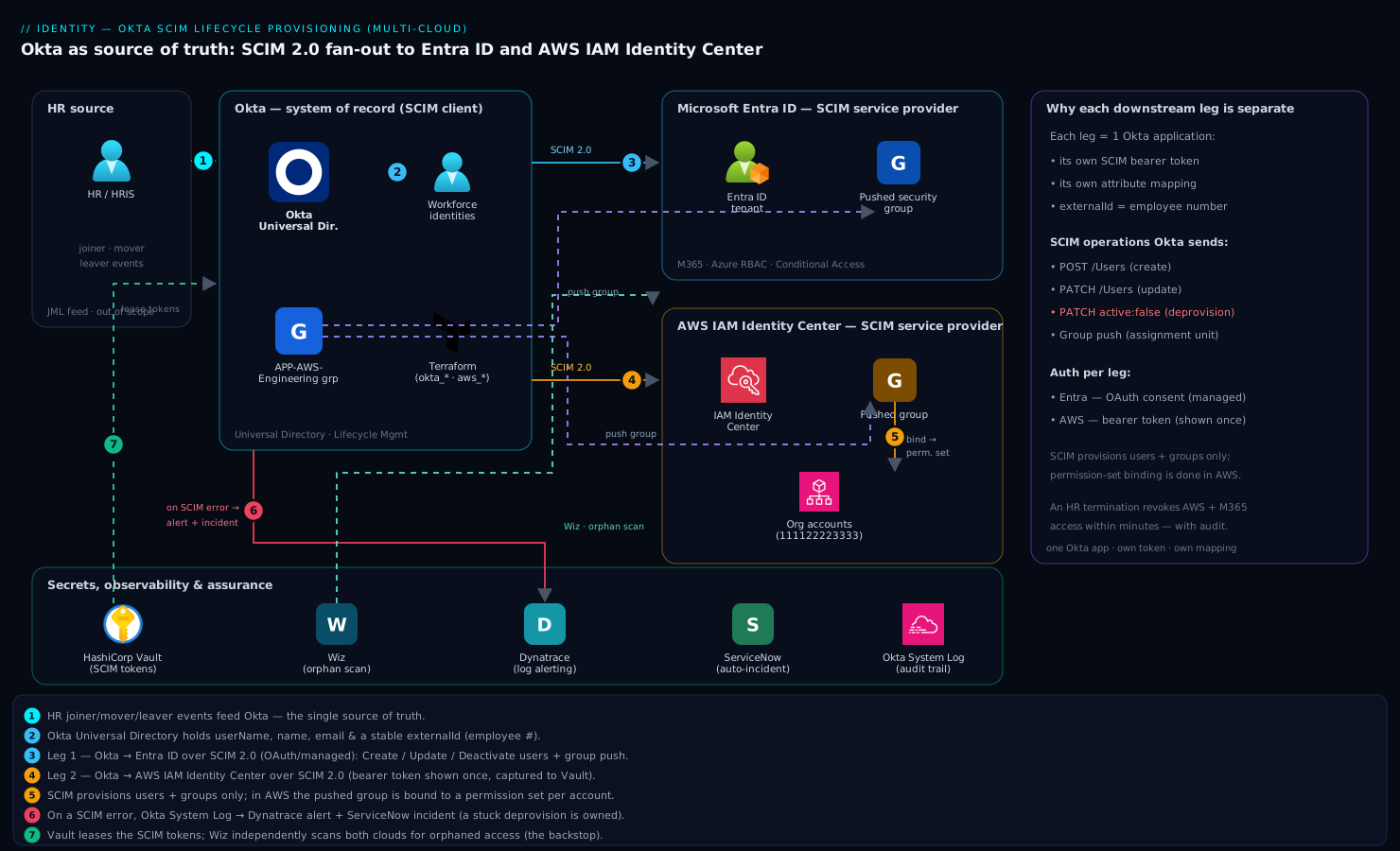
Okta is the hub and system of record. HR feeds Okta (via an HR-as-source integration or directory sync — out of scope here), and Okta fans identity out to two independent SCIM service providers:
- Okta → Entra ID over the Microsoft-published SCIM endpoint, governing M365 licenses, Azure RBAC subjects, and Conditional Access targeting.
- Okta → AWS IAM Identity Center over the Identity Center SCIM endpoint, governing permission-set assignments to AWS accounts in the org.
Each leg is one Okta application with its own provisioning configuration, its own bearer token, and its own attribute mapping. Groups pushed from Okta become the assignment unit on both sides: an Entra security group (for license/CA targeting) and an Identity Center group (bound to permission sets per account). Around the edges of the diagram sit the supporting cast that makes this operable in a regulated shop: HashiCorp Vault holding the two SCIM bearer tokens as short-lived leased secrets; Wiz continuously scanning AWS and Entra for identity misconfigurations and orphaned access that prove a deprovision was missed; Dynatrace ingesting Okta System Log events so a provisioning-failure spike pages someone; and ServiceNow receiving an auto-ticket when a SCIM sync errors, so a failed deprovision is an incident with an owner, not a silent log line.
1. Prepare the Okta source attributes and a clean test population
Before touching either downstream, make sure Okta’s universal directory has the attributes the two service providers will demand — chiefly userName (must be a routable UPN/email), givenName, familyName, and a stable external key. Create your test users and group so you can prove the pipeline end to end before any real human is affected. Using the Okta CLI / Admin API:
# Auth: export an Okta API token from Security > API > Tokens
export OKTA_ORG="https://yourorg.okta.com"
export OKTA_TOKEN="00xxxxxxxxxxxxxxxxxxxxxxxxxxxxxxxxxxxxxxxx"

# Create a disposable test user
curl -s -X POST "$OKTA_ORG/api/v1/users?activate=true" \
  -H "Authorization: SSWS $OKTA_TOKEN" \
  -H "Content-Type: application/json" \
  -d '{
    "profile": {
      "firstName": "Scim", "lastName": "Tester01",
      "email": "scim.tester01@yourorg.com",
      "login": "scim.tester01@yourorg.com"
    }
  }'

# Create the group that will be pushed downstream
curl -s -X POST "$OKTA_ORG/api/v1/groups" \
  -H "Authorization: SSWS $OKTA_TOKEN" \
  -H "Content-Type: application/json" \
  -d '{ "profile": { "name": "APP-AWS-Engineering", "description": "Pushed to Entra + AWS IIC" } }'
In production you would manage these with Terraform (okta_user, okta_group, okta_group_memberships) so the source population is reviewable and reproducible, not click-driven. Keep login/email aligned with the verified domain you will use downstream — a mismatch here is the number-one cause of SCIM create failures later.
2. Enable SCIM provisioning Okta → Microsoft Entra ID
Entra ID is provisioned from Okta using the gallery app “Microsoft Entra ID Provisioning” (the SCIM-capable connector; the plain “Microsoft Office 365” app does provisioning differently — use the Provisioning-specific one or the generic SCIM app pointed at Microsoft’s endpoint). In the Okta Admin Console:
- Applications → Browse App Catalog → search and add Microsoft Entra ID (provisioning-enabled). Set Application label to
Entra ID (SCIM Provisioning). - On the app’s Provisioning tab, click Configure API Integration → Enable API integration, then Authenticate with Microsoft Entra ID. This OAuth consent (you sign in as an Entra Global Admin) is what mints Okta’s credential to call the Microsoft SCIM endpoint
https://graph.microsoft.com/...on your tenant — no manually pasted token on this leg. - Under Provisioning → To App, enable:
- Create Users
- Update User Attributes
- Deactivate Users ← this is the one the audit cares about; it sends
active:false.
If your security policy forbids the gallery OAuth path, use the generic SCIM 2.0 app instead and point it at the Entra provisioning SCIM URL with a bearer token you generate in Entra (Enterprise applications → your app → Provisioning → Admin Credentials). The generic route is more work but keeps the token under your control in Vault:
# Store the Entra SCIM bearer token in Vault rather than the Okta UI alone
vault kv put secret/scim/entra \
  endpoint="https://login.microsoftonline.com/<tenant-id>/.../scim" \
  token="<entra-provisioning-secret-token>"
Click Test Connector Configuration / Test Connection in Okta and confirm a green result before proceeding. A 401 here means the token or consent is wrong; a 403 usually means the Entra app lacks the provisioning role.
3. Map attributes and push groups to Entra ID
Provisioning with bad mappings creates users that exist but cannot sign in. On the Okta Entra app, open Provisioning → To App → Show Logs / Attribute Mappings → Go to Profile Editor and confirm these mappings (Okta source → Entra SCIM attribute):
| Okta source | Entra SCIM target | Notes |
|---|---|---|
user.login |
userName |
Must equal a verified Entra domain UPN |
user.firstName |
name.givenName |
|
user.lastName |
name.familyName |
|
user.email |
emails[type eq "work"].value |
Primary work email |
user.employeeNumber |
externalId |
Stable correlation key — set this |
Set externalId from an immutable HR identifier (employee number), not email — emails change on marriage/rebrand and a changed userName without a stable externalId can orphan the downstream account. Then assign the test user and push the group:
- Assignments tab → assign
scim.tester01to the app. Okta immediately attempts thePOST /Users. - Push Groups tab → Push Groups → Find groups by name →
APP-AWS-Engineering→ Save. Okta creates the matching group in Entra and syncs membership. Targeting Conditional Access and M365 license groups on this pushed group means group membership in Okta now drives Entra access.
Watch Okta → Reports → System Log (filter eventType eq "application.provision.user.push") and confirm a success event. In Entra, the new user appears under Users, and the pushed group under Groups with the test member inside.
4. Switch AWS IAM Identity Center to an external IdP and capture its SCIM endpoint
AWS provisioning is the reverse handshake: IAM Identity Center generates the SCIM endpoint and token, and you paste them into Okta. First point Identity Center at Okta for sign-in (SAML), then enable SCIM. In the AWS console, in your Identity Center home region:
- IAM Identity Center → Settings → Identity source → Change to → External identity provider.
- AWS shows its service provider SAML metadata (download
AWS-SSO-metadata.xml) and asks for the IdP SAML metadata from Okta — you will get that from the Okta AWS IAM Identity Center app in the next step. Complete the SAML exchange so users can actually log in. - Back on Settings, find Automatic provisioning → Enable. AWS now reveals, once, two values:
- SCIM endpoint, e.g.
https://scim.us-east-1.amazonaws.com/AbCdEf123456-xxxx-xxxx-xxxx/scim/v2/ - Access token (bearer)
- SCIM endpoint, e.g.
Copy both immediately and store the token in Vault — AWS will not show it again:
vault kv put secret/scim/aws-iic \
  endpoint="https://scim.us-east-1.amazonaws.com/AbCdEf123456-aaaa/scim/v2/" \
  token="<aws-iic-bearer-token>"
You can confirm the endpoint is live and provisioning is on via the CLI:
aws sso-admin list-instances --region us-east-1
# note the IdentityStoreId + InstanceArn for later validation

# Verify nothing is provisioned yet (clean baseline)
aws identitystore list-users \
  --identity-store-id d-1234567890 --region us-east-1
5. Configure provisioning Okta → AWS IAM Identity Center
In Okta, add the AWS IAM Identity Center app (the catalog app supports both SAML SSO and SCIM provisioning in one):
- Applications → Browse App Catalog → AWS IAM Identity Center → Add. On Sign On, this app provides the Okta IdP metadata AWS asked for in step 4 — finish the SAML side now if you have not.
- Provisioning → Configure API Integration → Enable API integration. Paste:
- Base URL = the AWS SCIM endpoint (without the trailing
/scim/v2/if Okta’s field expects the base — follow the field hint; Okta typically wants the full endpoint URL). - API Token = the AWS bearer token (pull it from Vault:
vault kv get -field=token secret/scim/aws-iic).
- Base URL = the AWS SCIM endpoint (without the trailing
- Test API Credentials → expect green. A 401 means a mistyped token; a
404/endpoint not foundmeans a malformed base URL (the most common AWS-leg error). - Provisioning → To App → enable Create Users, Update User Attributes, Deactivate Users. Confirm the AWS-required mappings:
userName → userName,name.givenName,name.familyName,emails[type eq "work"].value, andexternalId(again, from employee number — AWS uses it to correlate, and it is what makes a later rename safe).
Now bind groups to AWS access. SCIM creates the users and groups; it does not assign permission sets — you still map a group to a permission set per account. Do the group push in Okta, then the permission-set assignment in AWS:
- Okta AWS app → Push Groups → push
APP-AWS-Engineering. It appears in Identity Center under Groups. - In AWS, attach it to accounts:
# Assign the pushed group to an AWS account with a permission set
aws sso-admin create-account-assignment \
  --instance-arn arn:aws:sso:::instance/ssoins-abc123 \
  --target-id 111122223333 --target-type AWS_ACCOUNT \
  --permission-set-arn arn:aws:sso:::permissionSet/ssoins-abc123/ps-engineering \
  --principal-type GROUP \
  --principal-id <identitystore-group-id> \
  --region us-east-1
The principal-id is the Identity Center group’s ID — get it with aws identitystore list-groups --identity-store-id d-1234567890. After this, membership of APP-AWS-Engineering in Okta controls who can assume the ps-engineering permission set in account 111122223333.
6. Codify the two legs in Terraform (production hardening)
Click-ops is fine to learn the flow; for production, the app assignments, group pushes, and AWS permission-set bindings belong in Terraform so they are reviewed, diffable, and rebuildable. A representative slice:
# AWS side: bind the Okta-pushed group to a permission set per account
resource "aws_ssoadmin_account_assignment" "eng" {
  instance_arn       = tolist(data.aws_ssoadmin_instances.this.arns)[0]
  permission_set_arn = aws_ssoadmin_permission_set.engineering.arn
  principal_id       = data.aws_identitystore_group.app_aws_eng.group_id
  principal_type     = "GROUP"
  target_id          = "111122223333"
  target_type        = "AWS_ACCOUNT"
}

# Okta side: assign people to the app via the source group only
resource "okta_app_group_assignments" "aws_iic" {
  app_id   = okta_app_saml.aws_iic.id
  group {
    id       = okta_group.app_aws_eng.id
    priority = 1
  }
}
Run this from your existing CI/CD — a GitHub Actions or Jenkins pipeline using OIDC to assume an AWS role and an Okta API token pulled from Vault at job time, never a static secret in the repo. Argo CD is not the right tool here (this is cloud IAM, not Kubernetes manifests); keep these in the Terraform pipeline. Gate terraform apply behind a ServiceNow change request so access-granting changes carry an approval record.
7. Validation — prove provision and deprovision both work
A provisioning system that only creates is half a system; the audit finding was about removal. Test both directions end to end.
Provision check:
# AWS: the test user now exists in the Identity Store
aws identitystore list-users --identity-store-id d-1234567890 \
  --region us-east-1 \
  --query "Users[?UserName=='scim.tester01@yourorg.com']"

# Entra: confirm the user via Microsoft Graph
az rest --method GET \
  --uri "https://graph.microsoft.com/v1.0/users?\$filter=userPrincipalName eq 'scim.tester01@yourorg.com'"
Have the test user actually log in to the AWS access portal and aws sso login, and to office.com, to confirm the accounts are usable, not just present.
Deprovision check (the important one): deactivate the user in Okta and watch both downstreams flip.
# Deactivate in Okta — fires SCIM PATCH active:false to both apps
curl -s -X POST "$OKTA_ORG/api/v1/users/<okta-user-id>/lifecycle/deactivate" \
  -H "Authorization: SSWS $OKTA_TOKEN"
Within a minute or two, re-run the two list-users/Graph queries. In AWS the user should be disabled (or removed, per your settings) and aws sso login must fail; in Entra the user shows accountEnabled: false. Confirm the corresponding application.provision.user.deactivate success events in Okta’s System Log. This is the evidence to hand the auditor. Pipe these System Log events into Dynatrace (or Datadog) so a deprovision failure — a SCIM 429/5xx from either endpoint — triggers an alert, and configure an Okta event hook to raise a ServiceNow incident on provision failures so a stuck termination is an owned ticket. Run Wiz across both clouds to independently catch any account that should be gone but is not — the backstop that proves the pipeline, rather than trusting it.
8. Rollback / teardown
Tear down in an order that never strands a real user. Because Okta is the source, remove access bindings first, then provisioning, then the apps — and never delete the Okta source group while real people depend on it.
# 1. AWS: remove the account assignment (revoke permission set first)
aws sso-admin delete-account-assignment \
  --instance-arn arn:aws:sso:::instance/ssoins-abc123 \
  --target-id 111122223333 --target-type AWS_ACCOUNT \
  --permission-set-arn arn:aws:sso:::permissionSet/ssoins-abc123/ps-engineering \
  --principal-type GROUP --principal-id <group-id> --region us-east-1
- Okta → each app → Push Groups → for the pushed group, choose Unlink pushed group and decide: delete the downstream group (removes it in Entra/AWS) or leave it (orphans it intentionally). For a clean teardown of test artifacts, delete it.
- Okta → each app → Provisioning → To App → disable Deactivate / Update / Create, then Configure API Integration → disable. This stops Okta from touching the downstream.
- To revert AWS entirely: IAM Identity Center → Settings → Identity source → Change to → Identity Center directory (or your prior source). Note this drops all externally provisioned users — only do it in a decommission, never as a quick fix.
- Revoke and delete the test users and group in Okta last:
curl -s -X DELETE "$OKTA_ORG/api/v1/users/<okta-user-id>" -H "Authorization: SSWS $OKTA_TOKEN" # (deactivate first; DELETE requires a deactivated user)
vault kv delete secret/scim/aws-iic
vault kv delete secret/scim/entra
If you ran the Terraform path, terraform destroy -target=aws_ssoadmin_account_assignment.eng (and the app assignment) is the reviewable equivalent of steps 1–2.
Common pitfalls
userNamenot matching a verified domain. Entra rejects aPOST /UserswhoseuserNameis not on a verified UPN domain; AWS is pickier still about format. Align Oktaloginwith the downstream domain before assigning anyone.- No stable
externalId. Mapping correlation to email means a surname change creates a duplicate downstream account and orphans the old one. Always mapexternalIdto employee number. - Assuming SCIM grants AWS permissions. SCIM provisions users and groups into Identity Center; it does not create permission-set assignments. You still bind group → permission set → account (step 5). Forgetting this yields users who exist but can access nothing.
- The token shown once. The AWS Identity Center bearer token (and a regenerated Entra one) is displayed a single time. Capture it to Vault immediately; if lost, you regenerate and re-enter it in Okta.
- Push-group name collisions. If a same-named group already exists downstream, Okta may link to it instead of creating — fine if intended, surprising if not. Use a clear prefix like
APP-and check the link result. - Deactivate not enabled. Teams enable Create/Update and forget Deactivate, so leavers linger — exactly the audit failure. Verify
active:falseactually fires in step 7. - Region mismatch on AWS. The SCIM endpoint,
sso-admin, andidentitystorecalls must target the Identity Center home region; cross-region calls fail confusingly.
Security notes
Treat the two SCIM bearer tokens as privileged credentials — they can create and disable accounts across your estate. Keep them in HashiCorp Vault with short rotation and audit, never in a wiki or the Okta UI alone, and rotate on any team change. Scope the Okta API token used by CI to the minimum, and prefer the OAuth/managed path on the Entra leg over a static token. Because Okta is now the chokepoint for cloud access, enforce strong phishing-resistant MFA and Conditional Access on Okta admins, and target Conditional Access policies on the pushed Entra group so policy follows provisioning. Use Wiz to continuously verify no orphaned or over-privileged identity survives a deprovision, and review Okta System Log + the AWS/Entra provisioning logs as a standing control — provisioning is only as trustworthy as your evidence that deprovision fired.
Cost notes
SCIM itself is free on all three platforms — the cost is in licensing: provisioning into Entra requires Entra ID P1 seats, and Okta provisioning requires the Lifecycle Management add-on, neither trivial at studio scale. The payoff is operational: automated joiner/mover/leaver removes the manual ticket queue (the labor line the acquisition exposed) and, more valuably, eliminates the standing risk of orphaned AWS and M365 access — a single missed termination that becomes a breach costs far more than the license. Keep the test users and pushed groups disposable so validation runs never accrue real license consumption, and right-size which groups you push — pushing only role-bearing groups, not every Okta group, keeps both clouds tidy and the Entra license count honest.