A fintech with three EKS clusters, ~140 Linux instances, and a fleet of PostgreSQL and MongoDB databases gets a finding from its auditor: there are 200-plus long-lived SSH private keys scattered across laptops, no record of who opened a production database shell last quarter, and kubectl access is gated by a shared kubeconfig that four people have copied to their home directories. The remediation ask is blunt — “nobody holds a standing credential to anything, every session is recorded, and access maps to a person and a role, not a key.” This guide builds exactly that with Teleport: a single access proxy that authenticates an engineer once against the corporate IdP, then mints short-lived certificates (default 8–12 hours, often minutes for break-glass) for SSH hosts, Kubernetes API servers, and databases — with RBAC, session recording, and a full audit log behind it. By the end you will have a working cluster that replaces the key sprawl with certificates nobody has to rotate because they expire on their own.
The pressure here is the one every platform team eventually meets: static credentials do not scale and cannot be audited. An SSH key copied to a laptop is a bearer token valid until someone remembers to revoke it across every authorized_keys file — which nobody does. A shared kubeconfig is a single point of total compromise. A database password in a .env is the breach waiting to be reported. Teleport’s answer is a certificate authority per protocol and an identity-aware proxy in front of every resource: you never distribute a long-lived secret, because the credential is issued on demand, scoped to your role, stamped with your identity, and gone by morning.
Prerequisites
- A Linux host (or small VM) for the Teleport Auth + Proxy service — 2 vCPU / 4 GB is enough to start; this guide uses Ubuntu 22.04.
- A DNS name you control for the proxy (this guide uses
teleport.kloudvin.io) and the ability to get a TLS cert for it (Teleport can use ACME/Let’s Encrypt, or bring your own from Akamai if it fronts your edge). tctlandtsh(the admin and client CLIs) — they ship in the same package as the server.- Cluster-admin on at least one Kubernetes cluster and network reachability to the databases you will register.
- An IdP for SSO: Okta or Microsoft Entra ID. SAML/OIDC connectors require Teleport Enterprise (or Teleport Cloud); the open-source edition uses GitHub SSO or local users. This guide shows the Okta SAML path and notes the local fallback.
- Ports open to the proxy:
443(web + reverse tunnel + TLS routing) is sufficient in modern single-port mode.
Target topology
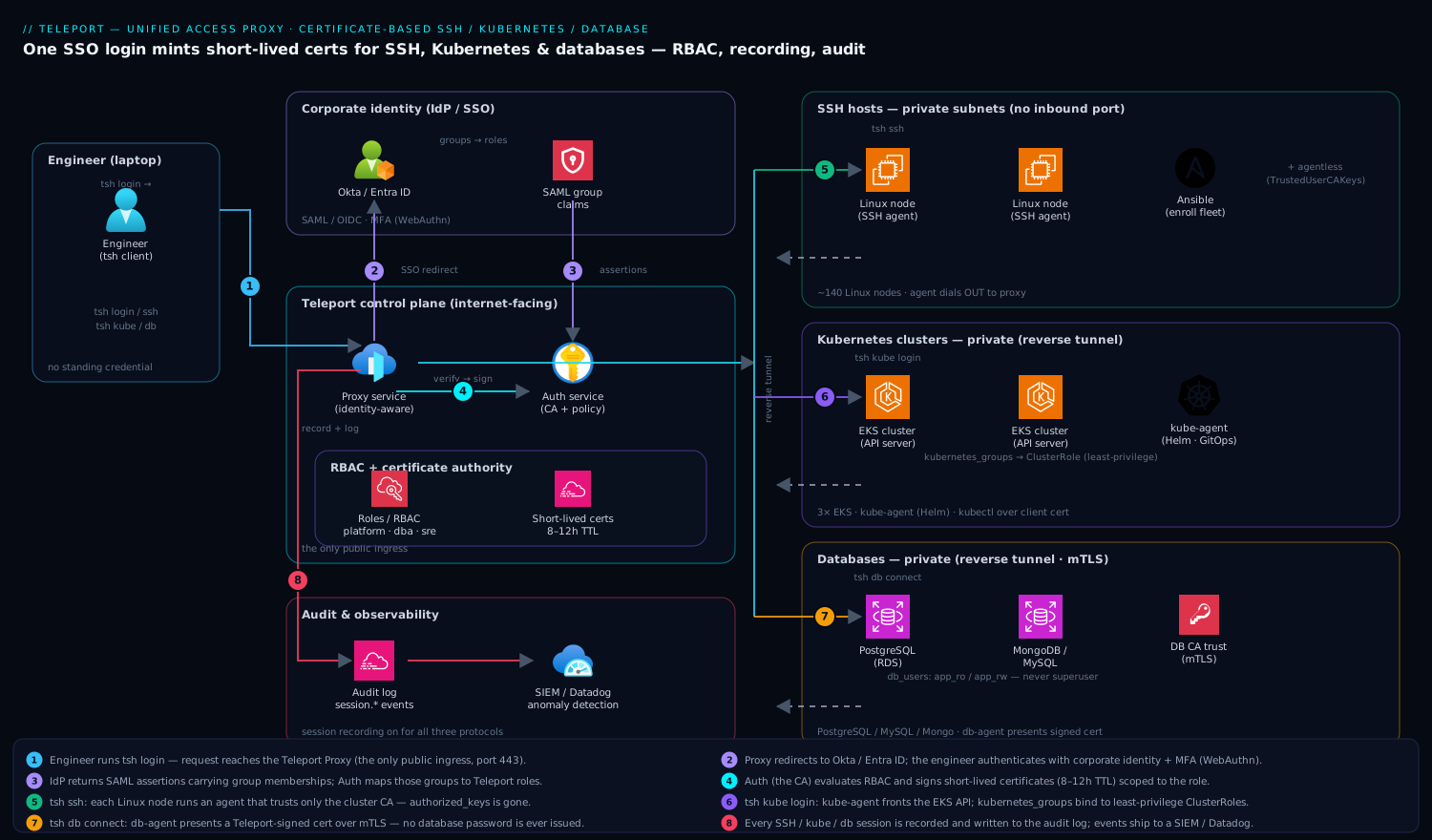
Teleport runs as a small set of cooperating services. The Auth service is the certificate authority and policy engine — it holds the cluster’s CAs, evaluates RBAC, and signs every certificate. The Proxy service is the only internet-facing component; engineers and resources connect to it, never directly to each other. Behind the proxy sit Teleport Agents — one process per protocol class (SSH node, Kubernetes, database) — each of which dials out to the proxy over a reverse tunnel, so the protected resources need no inbound ports and can live entirely in private subnets.
The flow is always the same. An engineer runs tsh login; the proxy redirects them to Okta (or Entra ID), they authenticate with the corporate identity and MFA, and Okta returns SAML assertions carrying their group memberships. The Auth service maps those groups to Teleport roles, mints short-lived certificates encoding exactly what those roles allow, and hands them back. From that moment tsh ssh, tsh kube login, and tsh db connect all work against the same certificate set — and every session is recorded and written to the audit log. The defining property: no resource trusts a password or a static key; each trusts only a certificate signed by the Teleport CA, valid for hours, scoped to a role.
1. Install and bootstrap the Auth + Proxy service
Install the Teleport binaries on the dedicated host. Pin a version so the cluster does not drift.
# Install the official repo and a pinned major version (Teleport 16.x here)
curl https://goteleport.com/static/install.sh | bash -s 16.4.6

# Confirm the CLIs are present
teleport version
tctl version
Write a minimal config. This single file runs Auth and Proxy on one host with ACME for TLS — fine for a first cluster; you split Auth and Proxy onto separate hosts as you scale.
# /etc/teleport.yaml
version: v3
teleport:
  nodename: teleport-auth-proxy-1
  data_dir: /var/lib/teleport
  log:
    output: stderr
    severity: INFO

auth_service:
  enabled: "yes"
  cluster_name: "kloudvin"
  # Require hardware MFA for every login and every privileged action.
  authentication:
    type: local            # 'saml' once the Okta connector is created (Step 2)
    second_factor: webauthn
    webauthn:
      rp_id: teleport.kloudvin.io

proxy_service:
  enabled: "yes"
  # Single-port mode: web UI, SSH, kube, db all multiplexed on 443.
  web_listen_addr: "0.0.0.0:443"
  public_addr: "teleport.kloudvin.io:443"
  acme:
    enabled: "yes"
    email: "platform@kloudvin.io"

ssh_service:
  enabled: "no"            # this host is control plane only; agents register resources
Enable and start the service, then create the first admin so you can log in to bootstrap everything else.
systemctl enable --now teleport

# Create a local break-glass admin (used only until SSO is live).
tctl users add admin --roles=editor,access --logins=root,ubuntu
# Open the printed URL, register a WebAuthn key, set a password.

# Sanity check: list the cluster's certificate authorities.
tctl get cert_authority --format=text | head
2. Wire SSO to Okta (or Entra ID) and define RBAC roles
Connect the corporate IdP so humans authenticate with their existing identity and MFA — this is what makes “access maps to a person, not a key” true. In Okta, create a SAML 2.0 app whose ACS URL is https://teleport.kloudvin.io:443/v1/webapi/saml/acs/okta, add a groups attribute statement (regex .* to pass all group memberships), assign the relevant groups (for example eng-platform, eng-dba, eng-oncall), and download the metadata. The same shape works for Entra ID as an Enterprise Application with a SAML SSO configuration and a group claim.
Create the connector and the roles. Roles are the heart of Teleport RBAC — they declare which logins, Kubernetes groups, and database users a person may assume, and the templating ({{external.groups}}, {{internal.logins}}) injects identity attributes at certificate-signing time.
# Save the Okta metadata, then create the SAML connector.
cat > okta.yaml <<'EOF'
kind: saml
version: v2
metadata:
  name: okta
spec:
  acs: https://teleport.kloudvin.io:443/v1/webapi/saml/acs/okta
  attributes_to_roles:
    - {name: "groups", value: "eng-platform", roles: ["platform-admin"]}
    - {name: "groups", value: "eng-dba",      roles: ["dba"]}
    - {name: "groups", value: "eng-oncall",   roles: ["sre-readonly"]}
  entity_descriptor_url: https://kloudvin.okta.com/app/XXXX/sso/saml/metadata
EOF
tctl create okta.yaml
# roles.yaml — three roles spanning all three protocols.
kind: role
version: v7
metadata: { name: platform-admin }
spec:
  options:
    max_session_ttl: 8h          # certs expire in 8 hours, no matter what
    record_session: { default: best_effort }
  allow:
    logins: ["ubuntu", "root"]                 # SSH OS logins this role may use
    node_labels: { "env": ["prod", "staging"] }
    kubernetes_groups: ["system:masters"]
    kubernetes_labels: { "*": "*" }
    kubernetes_resources:
      - { kind: "pod", namespace: "*", name: "*" }
    db_labels: { "*": "*" }
    db_users: ["teleport-admin"]
    db_names: ["*"]
---
kind: role
version: v7
metadata: { name: dba }
spec:
  options: { max_session_ttl: 4h }
  allow:
    db_labels: { "env": ["prod"] }
    db_users: ["app_ro", "app_rw"]             # never the superuser
    db_names: ["payments", "ledger"]
---
kind: role
version: v7
metadata: { name: sre-readonly }
spec:
  options: { max_session_ttl: 12h }
  allow:
    logins: ["ubuntu"]
    node_labels: { "env": ["prod"] }
    kubernetes_groups: ["view"]                 # bound to a read-only ClusterRole
    kubernetes_labels: { "*": "*" }
    request:
      roles: ["platform-admin"]                 # may *request* elevation, not hold it
      thresholds: [{ approve: 1, deny: 1 }]
tctl create -f roles.yaml
# Flip the auth type to SAML now that the connector exists.
tctl edit cluster_auth_preference   # set type: saml, connector_name: okta
The sre-readonly role above models Access Requests: an on-call engineer holds read-only access by default and must request platform-admin for a specific incident, which a peer approves — optionally routed as a change ticket into ServiceNow via Teleport’s access-request plugin, so the elevation has an audit trail and an approver on record.
3. Enroll SSH nodes with certificate-based access
Replace authorized_keys entirely. Each Linux host runs a Teleport SSH agent that registers with the proxy over a reverse tunnel and accepts only certificates signed by the cluster CA. Generate a join token, then install the agent via your existing config management — this is a natural unit of work for Ansible (a play that drops /etc/teleport.yaml and starts the service across the fleet) or for baking into a base image with Terraform + cloud-init.
# On the Auth host: mint a short-lived join token scoped to the 'node' role.
tctl tokens add --type=node --ttl=1h
# -> prints e.g. TOKEN=abc123...
# /etc/teleport.yaml on each Linux node (deployed by Ansible)
version: v3
teleport:
  nodename: "%{HOSTNAME}"
  data_dir: /var/lib/teleport
  auth_token: "abc123..."                  # the join token from above
  proxy_server: "teleport.kloudvin.io:443"
auth_service:  { enabled: "no" }
proxy_service: { enabled: "no" }
ssh_service:
  enabled: "yes"
  labels:                                  # labels drive RBAC node_labels matching
    env: "prod"
    role: "api"
  # Disable OpenSSH password/key auth at the OS so Teleport is the only path in.
  pam: { enabled: true, service_name: "teleport" }
systemctl enable --now teleport            # node dials out; no inbound port needed

# From a laptop, log in via SSO and use the host by name — no key involved.
tsh login --proxy=teleport.kloudvin.io:443
tsh ls                                      # lists nodes the role is allowed to see
tsh ssh ubuntu@api-prod-03                  # cert issued on the fly, session recorded
For appliances or network gear that cannot run an agent — load balancers, virtual appliances, legacy bastions — register them in agentless mode: Teleport configures the host’s sshd to trust the Teleport CA (TrustedUserCAKeys) so the same tsh ssh flow works without installing the agent, while still flowing through the recording proxy.
4. Register Kubernetes clusters for kubectl over certificates
Front every cluster’s API server with Teleport so kubectl traffic carries a Teleport-issued client cert and the user’s kubernetes_groups bind to RBAC inside the cluster. Deploy the Kubernetes agent with the official Helm chart — itself a clean GitOps unit you manage with Argo CD or apply from a Jenkins / GitHub Actions pipeline.
# Mint a join token for the kube agent.
tctl tokens add --type=kube --ttl=1h     # -> KUBE_TOKEN=...

helm repo add teleport https://charts.releases.teleport.dev
helm install teleport-kube-agent teleport/teleport-kube-agent \
  --namespace teleport-agent --create-namespace \
  --set roles=kube \
  --set authToken=KUBE_TOKEN \
  --set proxyAddr=teleport.kloudvin.io:443 \
  --set kubeClusterName=eks-prod-payments \
  --set "labels.env=prod"
Bind the Teleport kubernetes_groups to real ClusterRoles so the principle of least privilege holds inside the cluster, not just at the proxy.
# view-binding.yaml — sre-readonly's 'view' group -> read-only ClusterRole
apiVersion: rbac.authorization.k8s.io/v1
kind: ClusterRoleBinding
metadata: { name: teleport-view }
roleRef: { apiGroup: rbac.authorization.k8s.io, kind: ClusterRole, name: view }
subjects:
  - { apiGroup: rbac.authorization.k8s.io, kind: Group, name: "view" }
kubectl apply -f view-binding.yaml

# From the laptop: select the cluster and use plain kubectl.
tsh kube ls
tsh kube login eks-prod-payments
kubectl get pods -n payments              # client cert minted by Teleport, RBAC = 'view'
Now kubectl exec sessions are recorded too, and you can scope access down to individual resources with kubernetes_resources (shown in the platform-admin role) so a role can be limited to specific namespaces or even named pods.
5. Register databases for short-lived DB credentials
Give engineers a database shell without ever issuing a database password. The database agent presents a Teleport-signed client certificate to the database; you configure the database to trust the Teleport CA for mTLS. This guide shows PostgreSQL (RDS); the same pattern covers MySQL, MongoDB, Redis, and more.
# Export the database CA so the DB can be told to trust Teleport-issued client certs.
tctl auth sign --format=db \
  --host=payments-prod.cluster-xxxx.ap-south-1.rds.amazonaws.com \
  --out=server --ttl=2190h
# Configure the RDS instance / parameter group for SSL and IAM/cert auth per AWS docs.
# Add a db_service block to a database agent's /etc/teleport.yaml
db_service:
  enabled: "yes"
  databases:
    - name: "payments"
      protocol: "postgres"
      uri: "payments-prod.cluster-xxxx.ap-south-1.rds.amazonaws.com:5432"
      labels: { env: "prod" }
      aws: { region: "ap-south-1" }   # Teleport uses IAM auth to RDS under the hood
systemctl restart teleport             # registers the 'payments' database

# From the laptop: list, then connect as an allowed db_user — no password prompt.
tsh db ls
tsh db connect payments --db-user=app_ro --db-name=payments
# Or get a short-lived local proxy for a GUI tool / app:
tsh proxy db payments --db-user=app_ro --db-name=payments --tunnel
The dba role from Step 2 permits only app_ro/app_rw on the payments and ledger databases — never the Postgres superuser — and every query session is captured in the audit log with the engineer’s identity attached. For application (non-human) access, the same agent issues certs to workloads via Machine ID (tbot), so services authenticate with short-lived certs instead of a password in HashiCorp Vault — and where a secret genuinely must persist (a third-party API key, a legacy system’s static credential), it still lives in Vault, leased and rotated, rather than on disk.
Validation
Verify each plane end to end, then confirm the audit trail captured it.
# 1. Identity & expiry: confirm you hold a short-lived cert, not a static key.
tsh status                       # shows logged-in user, roles, and cert 'valid until'
tsh login --request-roles=platform-admin --request-reason="INC-4821"  # access request

# 2. SSH: a recorded session against a labeled prod node.
tsh ssh ubuntu@api-prod-03 'hostname && id'

# 3. Kubernetes: RBAC actually constrains the read-only role.
tsh kube login eks-prod-payments
kubectl auth can-i delete pods -n payments     # expect: no  (for sre-readonly)

# 4. Database: connect with no password and run a query.
tsh db connect payments --db-user=app_ro --db-name=payments -c "SELECT 1;"

# 5. Audit: every session above is on the record.
tsh recordings ls                # or the web UI 'Session Recordings' tab
tctl get events --type=session.start --last=1h
A green run means: you logged in once via SSO with MFA, received certificates that expire, reached all three protocol classes through the proxy, RBAC denied an action outside your role, and the session log shows your name on every action. Pipe these session.* and cert.create events to your SIEM and to Datadog or Dynatrace for dashboards and anomaly detection — an unusual db.session.start outside business hours is exactly the signal a SOC wants, and Teleport’s structured audit log makes it queryable.
Rollback / teardown
Teardown is clean because nothing depends on Teleport-distributed long-lived secrets staying valid.
# Drain a single resource: stop its agent and delete its registration.
systemctl disable --now teleport                 # on the node/db host
tctl rm node/api-prod-03                          # or db/payments, kube_cluster/...

# Remove the Kubernetes agent entirely.
helm uninstall teleport-kube-agent -n teleport-agent
kubectl delete ns teleport-agent

# Decommission the control plane.
systemctl disable --now teleport                  # on the Auth+Proxy host
tctl rm saml/okta                                 # remove the SSO connector first
rm -rf /var/lib/teleport                          # destroys the CA — irreversible
Because access certificates were short-lived, revocation is automatic: any cert already issued expires within its TTL (hours), and the moment the Auth service is gone or a node’s agent stops, new logins to that resource simply fail. To revoke a single person immediately rather than waiting for TTL, run tctl users rm <user> (or disable them in Okta) and lock active sessions with tctl lock --user=<user> --ttl=720h. Before destroying the CA, re-enable native sshd and database password auth on any host you intend to keep reachable, or you will lock yourself out — that is the one ordering mistake that turns a rollback into an incident.
Common pitfalls
- Forgetting to disable native auth. If OpenSSH still accepts keys and Postgres still accepts passwords, Teleport is a front door beside an unlocked back door. Disable OS-level password/key auth and database password auth so the Teleport CA is the only path in — that is the entire point.
- Clock skew. Certificate validity is time-bound; if a node’s clock drifts, freshly issued certs read as not-yet-valid or already-expired and connections fail mysteriously. Run NTP everywhere.
- TTL set too long. A 30-day
max_session_ttlrecreates the long-lived-credential problem you came to solve. Keep human TTLs in hours; use Access Requests for short, approved elevation instead of standing privilege. - Mapping IdP groups to
system:masters. It is tempting to give the platform group cluster-admin everywhere. Bindkubernetes_groupsto least-privilege ClusterRoles and reservesystem:mastersfor a tiny, request-gated role. - Single host for Auth + Proxy in production. Fine to start, but the proxy is your only ingress and the Auth service is your CA — split them, run each highly available behind a load balancer, and back the Auth state with a real datastore before you depend on it.
- Reverse-tunnel assumptions. Agents dial out to
443; if egress from a private subnet to the proxy is blocked, the resource never registers. Check the agent logs (journalctl -u teleport) — a missing node almost always means a blocked outbound connection, not a config error.
Security notes
This design is Zero Trust by construction: there is no standing credential to steal, every connection is mutually authenticated with a certificate signed by the Teleport CA, and access is least-privilege by role with MFA (WebAuthn) enforced at login. Treat the Auth host as crown-jewel infrastructure — it is the CA — and harden it accordingly: run a runtime sensor like CrowdStrike Falcon on it and on every node and database agent host to catch tampering, and keep its data directory off shared storage. Add Wiz / Wiz Code to the picture for posture: Wiz scans the cloud accounts for any host still exposing a public SSH port or a database open to the world (the exact drift Teleport is meant to eliminate), and Wiz Code checks the Terraform/Helm definitions in the pipeline so a regression that re-opens 0.0.0.0/0:22 is caught at PR time, not in production. Route every privileged Access Request approval — and any guardrail breach — into ServiceNow so security reviews a ticket with an approver, not a log line after the fact. Finally, keep session recording on for all three protocols; the recordings plus the structured audit log are what turn the auditor’s original finding into a closed item.
Cost notes
The open-source edition is free and covers SSH and Kubernetes for a small team, but SAML/OIDC SSO, Access Requests, and FedRAMP-grade features require Teleport Enterprise or Teleport Cloud, priced per protected resource — so the cost scales with how many nodes, clusters, and databases you enroll, which makes labeling and decommissioning stale resources a direct cost lever, not just hygiene. Self-hosting the control plane is a small always-on VM (2 vCPU / 4 GB to start) plus the storage backing the Auth service and the session recordings — recordings can be voluminous, so set a retention policy and ship them to cheap object storage. Teleport Cloud removes the control-plane ops burden for a per-resource fee; the trade is recurring spend versus the engineering time to run Auth/Proxy highly available yourself. The genuine saving is rarely on the line item — it is the eliminated toil and risk of rotating 200 SSH keys, the audit findings you no longer remediate by hand, and the breach you do not report because there was never a long-lived secret to leak. Internal training (a short Moodle course on the tsh login flow and how to file an Access Request) costs little and removes the support tickets that otherwise follow any access-tooling rollout.