A regional insurer runs roughly 320 VMs on a four-host vSphere 8 cluster, and the backup story is the kind that does not survive an audit: nightly jobs land on a single dedupe appliance in the same rack as production, retention is “whatever fits,” and the last restore test was an informal one nobody wrote down. Then the obvious thing happens to a peer in the sector — a ransomware crew finds the backup console, deletes the restore points, and then encrypts the VMs — and the insurer’s board asks one question: “if that were us, could we recover, and how do we know?”
Veeam Backup & Replication (VBR) is the answer most VMware estates reach for, and used properly it is a genuinely strong one: an agentless, image-level backup platform that reads VM data through the vSphere storage APIs, keeps fast restore points on local disk, tiers older points to S3-compatible object storage, and — the part that matters against a hostile administrator — locks those objects with S3 Object Lock in compliance mode so that nobody, including the backup admin and the storage admin, can delete them before the retention clock runs out. The construct that binds local disk and object storage into one logical target is the Scale-Out Backup Repository (SOBR): a performance tier for operational restores, a capacity tier for cheap immutable depth, and an optional archive tier for Glacier-class compliance holds.
This guide is the full build, in order, with the real wizard field names and the real PowerShell. You will design the component layout (backup server, proxies, repositories, WAN accelerators), choose transport modes and backup methods deliberately, build a hardened Linux repository whose files even root cannot delete, wire the SOBR’s copy and move policies to satisfy the 3-2-1-1-0 rule, add backup copy jobs with GFS retention, stand up replication with failover plans for the low-RTO tier, prove recoverability with SureBackup, and rehearse the restores that matter — instant VM recovery, file-level restore, application items. The hands-on lab is the centerpiece: every step has the command, the expected output, and the validation that an auditor (or an attacker) would respect.
What problem this solves
The classic mid-size VMware backup deployment fails in predictable ways. It is not that backups do not run — the jobs are green — it is that the design collapses under exactly the scenarios backups exist for. Ransomware crews now routinely spend their dwell time locating backup infrastructure first: the Veeam server, the repository shares, the storage console. If your restore points can be deleted by anyone with admin credentials, they will be deleted an hour before encryption starts. And if your restores have never been tested, the first real test happens during the worst week of your professional life.
| Legacy pattern | How it fails you | What this design does instead |
|---|---|---|
| Backups on one appliance in the production rack | Fire, flood, or a stolen hypervisor credential takes production and backups together | SOBR copies every restore point offsite to object storage the same day |
| Repository reachable as an SMB share with domain credentials | Ransomware encrypts or deletes .vbk files directly over the network |
Hardened Linux repository: no SMB, single-use credentials, XFS immutability |
| Backup console protected by one shared local admin login | Attacker with the console deletes all restore points in two clicks | Compliance-mode Object Lock: deletion is cryptographically refused until retention expires; console gets MFA and four-eyes approval |
| Retention is “whatever fits on the appliance” | Audit asks for a 7-year-old policy record; you have 23 days of depth | GFS retention: weekly/monthly/yearly fulls tiered to capacity and archive storage |
| Restore testing is ad-hoc or absent | RTO is a guess; corrupt chains are discovered during the incident | SureBackup boots and verifies restore points on schedule — the “0 errors” digit |
| One copy, one media type | Any single failure domain loss is total | 3-2-1-1-0 enforced structurally by the SOBR + copy job design |
Who hits this: any team running vSphere with a single-tier backup target, anyone whose cyber-insurance renewal now asks “are your backups immutable?” (they all ask), and every architect who inherited a Veeam install built in 2019 and never re-based onto v12’s hardened repository and direct-to-object capabilities.
Learning objectives
By the end of this article you can:
- Draw the full VBR component architecture — backup server, proxies, repositories, gateway servers, mount server, WAN accelerators — and size each role with Veeam’s published planning rules.
- Choose a transport mode (Direct SAN, hot-add, NBD) per proxy deliberately, and prove from a job session log which mode was actually used.
- Pick the right backup method (forward incremental with synthetic or active fulls, forever forward incremental) and explain why the chain-sealing behavior decides whether the SOBR move policy works at all.
- Build a hardened Linux repository with XFS fast clone and immutability, and explain the single-use credential and
veeamimmureposvcmechanics underneath. - Create an Object Lock-enabled S3 bucket correctly (versioning on, lock on at creation, no default retention rule), scope the IAM policy to the documented minimum, and wire it as an immutable capacity tier.
- Compose a SOBR with copy + move policies, an operational restore window, and an archive tier — and predict exactly which restore point lives where on any given day.
- Configure backup copy jobs with GFS retention, replication jobs with failover plans and re-IP, and SureBackup verification, then execute instant VM recovery and granular restores under time pressure.
- Defend the design in an audit: map every control to the 3-2-1-1-0 rule and demonstrate immutability with an S3 API call that fails with
AccessDenied.
Prerequisites & where this fits
You should be comfortable with vSphere administration (vCenter, datastores, snapshots, roles), basic Linux (XFS, systemd, users), and PowerShell. Concretely, the build assumes:
- VMware vSphere 8.0+ with vCenter reachable over TCP 443, and the ability to create a dedicated role and service account for Veeam (not Administrator).
- A Veeam Backup & Replication 12.x license that includes SOBR. Note the edition gate: Community (free) and Standard editions do not include Scale-Out Backup Repositories — use a 30-day trial or NFR license for the lab, which unlocks full Enterprise Plus functionality, or VUL (Veeam Universal License) in production.
- A Windows Server 2022 VM for the backup server — 8 vCPU / 32 GB RAM / 100 GB OS disk is a sane start for ~300 VMs. v12 installs PostgreSQL 15 as its default configuration database (SQL Server remains supported).
- A Linux server for the hardened repository — Ubuntu 22.04 LTS or RHEL 9, with a dedicated XFS data volume on fast block storage (NVMe/SAS RAID). Physical is best practice (no vSphere admin can delete a physical box), but a VM works for the lab.
- An S3 bucket with Object Lock — AWS S3, Wasabi, or an on-prem store like MinIO or Cloudian that implements S3 Object Lock. The bucket must be born with versioning + Object Lock; you cannot retrofit it.
- Outbound TCP 443 from the repository/gateway servers to the object endpoint, and NTP everywhere — immutability math depends on clocks.
- Optional but recommended: HashiCorp Vault (or equivalent) for the S3 keys and service-account passwords, and a SIEM/ITSM pipe (v12.1 can forward events via syslog) so failed jobs and immutability changes become tickets.
Where this sits: this is the VMware-estate implementation companion to Backup and Ransomware-Resilient Recovery for Multi-Cloud with Veeam and the strategy piece Ransomware Resilience: Immutable Backups, Recovery Vaults, and Isolated Recovery Environments. If your immutable target is self-hosted, build it first with Deploy MinIO with Object Locking and Site Replication for Immutable Backup Targets. Kubernetes estates get the same posture from Configure Kasten K10 Ransomware Protection with Immutable Backups and S3 Object Lock, and Azure-native workloads from Azure Backup and Site Recovery: Protecting Workloads from Loss.
Core concepts
The moving parts
VBR is a distributed system wearing a single console. Getting the roles straight is the difference between a design and a pile of servers. Every role below can be co-located on the backup server for a lab; in production you split them because each scales on a different axis.
| Component | What it does | Runs on | Planning rule of thumb |
|---|---|---|---|
| Backup server (VBR) | The brain: job scheduling, catalog, retention math, tape/cloud orchestration | Windows Server 2022 VM or physical | Start 8 vCPU / 32 GB for ~300 VMs; add ~1 core + 4 GB per ~10 additional concurrent jobs |
| Configuration database | Job definitions, sessions, object catalog | PostgreSQL 15 (v12 default) or SQL Server | Local for small estates; protect with the config backup job, not just DB dumps |
| Console | Fat-client UI; also carries the PowerShell module | Admin workstation / jump host | Install on a PAW, not on everyone’s laptop |
| Backup proxy | The data mover: reads VM disks via VADP, compresses, dedupes, ships to repository | Windows or Linux, VM or physical | ~1 vCPU + 2 GB RAM per concurrent task (1 task = 1 virtual disk); default 2 tasks per new proxy |
| Backup repository | Stores backup files; runs the target-side data mover | Windows/Linux server with block storage | ~1 core + 4 GB RAM per concurrent task slot; XFS (Linux) or ReFS (Windows) for fast clone |
| Hardened repository | Linux repository variant with immutability and single-use credentials | Ubuntu 22.04 / RHEL 9, ideally physical | Same sizing as repository; add 7–9999 day immutability window |
| Object storage repository | S3/Azure Blob/Glacier target definition | Cloud or on-prem object store | Immutability = versioning + Object Lock at bucket creation |
| Gateway server | Proxies traffic between Veeam data movers and object storage | Any managed Windows/Linux server | Needs 443 egress to the endpoint; pin it or let Veeam auto-select |
| Mount server | Hosts vPower NFS for instant recovery and mounts disks for file-level restore | Usually the repository server | Keep close (LAN) to the ESXi hosts you restore to |
| WAN accelerator | Global dedupe cache pair for copy/replica jobs over thin links | Source + target servers | Classic mode for <100 Mbps links; high-bandwidth mode up to ~1 Gbps |
| Enterprise Manager (optional) | Web UI, RBAC delegation, encrypted-password loss protection | Separate small VM | Wanted for self-service restore and key recovery; TCP 9443 |
Three of these deserve a sentence more. The proxy is where VMware integration happens: it uses the vStorage APIs for Data Protection (VADP) to open a VM snapshot and read changed blocks (via CBT — Changed Block Tracking), so proxy placement decides your transport mode and therefore your throughput. The repository is not passive storage — it runs a Veeam Data Mover service that receives, writes, and later transforms backup files, which is why repository CPU/RAM matter (synthetic full construction and health checks run there). The mount server is what makes restores fast: instant recovery publishes a backup file as an NFS datastore (vPower NFS) that ESXi mounts, so a VM can boot from the backup before any data is copied back.
Backup files and chains
Everything VBR writes is one of a small set of file types, and every troubleshooting session eventually comes down to which files form a backup chain — a full plus the increments that depend on it.
| File | What it is | Created by |
|---|---|---|
.vbk |
Full backup — self-contained image | Active full, synthetic full, or compact operation |
.vib |
Forward incremental — changed blocks since the previous point | Incremental runs of forward-incremental jobs |
.vrb |
Reverse incremental rollback (legacy; method deprecated in v12 for new jobs) | Reverse-incremental jobs created pre-v12 |
.vbm |
Backup metadata — chain description the console reads before any restore | Every job run; tiny but critical |
| Capacity-tier objects | Backup data re-chunked into immutable objects with per-object retention | SOBR offload/copy sessions |
Since v12, new repositories default to true per-machine backup chains: every VM in a job gets its own chain and its own metadata, instead of one giant multi-VM file. This is what makes SOBR extent rebalancing, single-VM restores, and immutability granular — and it is why a v12 job on an upgraded v11 repository behaves differently until you run the chain-upgrade. Leave per-machine enabled everywhere except a dedupe appliance that explicitly prefers large files.
The 3-2-1-1-0 rule
The design target for the whole build. Every digit maps to a concrete mechanism you will configure below — if you cannot name the mechanism, you do not have the digit.
| Digit | Meaning | How this build satisfies it |
|---|---|---|
| 3 copies of data | Production + two backups | Production VMFS + performance tier + capacity tier (copy policy) |
| 2 different media | Independent failure characteristics | Block storage (XFS RAID) + object storage (S3) |
| 1 copy offsite | Survives site loss | Capacity tier in a cloud region (or DR-site object store) |
| 1 copy offline / air-gapped / immutable | Survives a hostile administrator | Compliance-mode Object Lock + XFS immutability on the hardened repository |
| 0 errors after verification | Restores proven, not assumed | SureBackup jobs + scheduled health checks + quarterly live restore drills |
Transport modes, proxies, and the data path
The proxy’s transport mode is how VM disk data physically leaves vSphere. Veeam will auto-select if you let it, and auto-selection silently degrading to the slowest mode is the single most common reason a backup window blows out. Learn the three modes, pin your expectation, and verify the tag ([san], [hotadd], [nbd]) printed next to each disk in the job session log.
| Transport mode | How it reads data | Requirements | Throughput character | Restore support | Gotchas |
|---|---|---|---|---|---|
| Direct storage access (Direct SAN) | Proxy reads VMFS LUNs straight from the array over FC/iSCSI, bypassing ESXi | Physical (or raw-mapped) proxy zoned to the same LUNs; VMFS datastores | Highest and most predictable; offloads ESXi entirely | Backup: all disks. Restore: thick disks only — thin-disk restores fall back to another mode | Zoning mistakes are dangerous (proxy sees raw production LUNs); Windows auto-mount must be disabled |
| Virtual appliance (hot-add) | Proxy is a VM; target VM’s disks are hot-added to the proxy via the ESXi storage stack | Proxy VM in the same datacenter with access to the same datastores | Very good (near-SAN) with SSD-backed datastores; scales by adding proxy VMs | Full backup and restore, thin and thick | Snapshot attach/detach adds per-disk overhead; proxy needs free SCSI slots; keep proxies off the datastores they back up when possible |
| Network (NBD / NBDSSL) | Proxy reads over the ESXi management VMkernel interface via NFC (TCP 902) | Nothing — always works | Slowest historically; acceptable on 10 GbE management networks; NBDSSL adds TLS overhead | Full backup and restore | Shares the management NIC with vCenter/ESXi traffic; per-host NFC connection limits throttle high VM counts |
The decision is mostly made by your infrastructure shape:
| If your environment is… | Use | Why |
|---|---|---|
| FC/iSCSI array, physical proxy possible, big full backups | Direct SAN | Fastest fulls, zero ESXi CPU tax |
| All-virtual, VSAN or NFS datastores | Hot-add | Direct SAN cannot see VSAN/NFS; hot-add rides the hypervisor storage stack |
| Small estate, 10 GbE management network, mostly CBT incrementals | NBD | Incrementals are small; simplicity beats plumbing |
| Mixed cluster, want a default that self-heals | Auto with failover | Veeam tries SAN → hot-add → NBD; verify what it actually picked |
| Security policy forbids proxy seeing raw LUNs | Hot-add or NBD | Direct SAN’s zoning is the risk surface |
| Backing up across a WAN to a central proxy | Never do this | Place proxies next to the data; move compressed data, not raw VMDK reads |
Sizing is arithmetic, not art: one task processes one virtual disk, a proxy needs ~1 vCPU + 2 GB RAM per concurrent task, and a new proxy defaults to 2 tasks. For the insurer’s 320 VMs (~800 disks) and an 8-hour window, two 8-vCPU hot-add proxies (16 concurrent disks) comfortably clear nightly CBT incrementals; the constraint that actually bites is the weekend synthetic full I/O on the repository, not the proxies.
Add a proxy in the console (Backup Infrastructure → Backup Proxies → Add VMware Backup Proxy) or in PowerShell:
Connect-VBRServer -Server "vbr01.ins.local"

# Register the Windows server, then promote it to a proxy with explicit transport
$cred = Get-VBRCredentials -Name "ins\svc-veeam-install"
Add-VBRWinServer -Name "proxy01.ins.local" -Credentials $cred
Add-VBRViProxy -Server (Get-VBRServer -Name "proxy01.ins.local") `
  -Description "Hot-add proxy, cluster PROD-A" `
  -TransportMode HotAdd -MaxTasks 8
-TransportMode accepts Auto, DirectStorageAccess, HotAdd, Nbd. Pin HotAdd here so a datastore-access regression fails loudly in the session log instead of silently degrading to NBD at a third of the speed.
The port matrix
Firewall tickets sink more Veeam deployments than any technical fault. This is the complete set for the architecture in this guide — source, destination, port, and what breaks without it.
| From | To | Port | Purpose |
|---|---|---|---|
| Console / PowerShell | Backup server | TCP 9392 | Veeam Backup Service (console sessions) |
| REST API clients | Backup server | TCP 9419 | v12 REST API (automation, ServiceNow integration) |
| Browser | Enterprise Manager | TCP 9443 | EM web UI |
| Backup server | vCenter | TCP 443 | VADP orchestration, snapshot calls |
| Backup server / proxies | ESXi hosts | TCP 443, TCP 902 | Host management; NFC data channel (NBD mode) |
| Backup server | Any managed server | TCP 6160, 6162 | Veeam Installer Service; Data Mover service |
| Backup server | Linux repository (deploy only) | TCP 22 | SSH for component deployment — single-use credentials, then closed |
| Proxy | Repository | TCP 2500–3300 | Data mover transfer channels (dynamic range) |
| Repository / gateway server | Object storage endpoint | TCP 443 | Capacity/archive tier offload over HTTPS |
| ESXi hosts | Mount server | TCP+UDP 111, 1058+, 2049+ | vPower NFS datastore for instant recovery |
| Guest interaction proxy | Guest VMs | TCP 445, 135 + dynamic RPC | Application-aware processing (falls back to VIX via VMware Tools if blocked) |
Backup methods, chains, and application-aware processing
The four methods and the chain-seal rule
The backup method decides the shape of your chain, the I/O pattern on the repository, and — the part almost everyone misses — whether the SOBR move policy can ever offload anything. Move only relocates restore points that belong to a sealed (inactive) chain: a chain closed off by the creation of a new full. A job that never creates fulls never seals a chain, and its points sit on the performance tier forever while you wonder why the S3 bucket is empty.
| Method | Chain shape | Repository I/O | Space profile | Chain seals? | Use when |
|---|---|---|---|---|---|
| Forward incremental + synthetic full | .vbk ← .vib ← .vib …, new .vbk synthesized weekly from existing points |
Read+write during synthesis — near-free with XFS/ReFS fast clone (block cloning, no data copy) | One extra full per cycle logically; almost zero extra physically on fast-clone filesystems | Yes — weekly | The default for this design; pairs perfectly with SOBR move |
| Forward incremental + active full | Same, but the new .vbk is re-read entirely from production |
Heavy vSphere reads on full day; sequential repo writes | Full-size fulls each cycle | Yes — on the active full | Dedupe appliances; paranoia about inherited corruption; small estates |
| Forever forward incremental | One .vbk, endless .vibs; oldest increment is merged into the full when retention hits |
Daily merge I/O on the repo | Smallest footprint | No — never | Only when the target is a standalone repo and offload is copy-only; never with move-only SOBR |
| Reverse incremental (deprecated in v12) | Newest point is always the full; .vrb rollbacks stretch backward |
3× I/O per run (read, inject, write rollback) | Full always newest | No | Legacy jobs only; v12 blocks it for new jobs — migrate |
The house choice: forward incremental, daily, with a weekly synthetic full on Saturday, on an XFS fast-clone repository. You get sealed chains for the move policy, cheap fulls, and low production impact. Set it in the job wizard (Storage → Advanced → Backup tab: tick “Create synthetic full backups periodically”) or in PowerShell — and note the enum spelling, a historical typo that is baked into the product and will not be fixed for compatibility reasons:
$job = Get-VBRJob -Name "T1-VM-Daily"
# Yes, "Syntethic" — the misspelling is the real, shipping enum value
Set-VBRJobAdvancedBackupOptions -Job $job `
  -Algorithm Syntethic `
  -TransformFullToSyntethic:$false `
  -TransformToSyntethicDays Saturday
Fast clone: why the filesystem choice is a design decision
Fast clone lets the repository build a synthetic full by referencing existing blocks instead of copying them — a metadata operation instead of a multi-terabyte read/write. It is the reason weekly synthetic fulls cost almost nothing on the right filesystem and are ruinous on the wrong one.
| Filesystem | Requirement | What you get | Caveat |
|---|---|---|---|
| XFS (Linux) | mkfs.xfs -m reflink=1,crc=1, kernel 5.4+ (Ubuntu 20.04+/RHEL 8.2+) |
Reflink-based synthetic fulls and compact operations in minutes | Combine with hardened-repo immutability — the pairing this guide uses |
| ReFS (Windows) | ReFS 3.x, 64 KB cluster size | Block-clone synthetic fulls | 4 KB clusters silently disable block clone; format deliberately |
| NTFS / ext4 / SMB shares | — | Full data copy on every synthetic full | A 19 TB synthetic full = 19 TB read + 19 TB written, weekly |
| Dedupe appliances | Vendor-specific | Appliance-side dedupe | Prefer active fulls, per-vendor guidance; usually no fast clone |
Retention, GFS, and the knobs that interact
Retention looks like one number and is actually five interacting policies. The ones that matter, their ranges, and the traps:
| Knob | Where | Values | The trap |
|---|---|---|---|
| Retention policy | Job → Storage | N restore points or N days (7–999+) | Points ≠ days when the job runs multiple times daily; days-based is what auditors mean |
| GFS retention | Job → Storage (“Keep certain full backups longer for archival purposes”) | Weekly / monthly / yearly full flags | GFS flags only attach to fulls — a job with no periodic fulls silently keeps no GFS points |
| Deleted-items retention | Job → Storage → Advanced → Maintenance | “Remove deleted items data after N days” | Too short and a VM missing from one run loses its history; too long and dead VMs hoard space |
| Health check | Advanced → Maintenance (“Perform backup files health check”) | Monthly default schedule | CRC-verifies and self-heals chains from production reads — leave it on; schedule off-window |
| Immutability | Repository level | 7–9999 days (hardened repo); N days (capacity tier) | Effective deletion = max(retention, immutability); a 30-day lock under a 14-day retention keeps files 30 days, and that is intentional |
Background retention (a nightly system session) cleans up points that job-driven retention missed — orphaned chains from deleted jobs still age out. Do not “help” it by deleting files on disk; the catalog is authoritative, the filesystem is not.
Application-aware processing
An image-level backup of a running SQL Server without quiescence is a crash-consistent lottery ticket. Application-aware processing (AAP) uses VSS inside Windows guests (and scripts on Linux) to freeze applications at a transactionally consistent instant, and handles the log hygiene that DBAs otherwise script badly by hand. Configure it on the job’s Guest Processing step with a guest credential that has local admin (Windows) or an account with sudo for scripts (Linux).
| Workload | What AAP does | Key setting (Guest Processing → Applications) | If you skip it |
|---|---|---|---|
| SQL Server | VSS freeze; transaction-log truncation or periodic log backup to the repository | “Process transaction logs with this job” or “Backup logs periodically” (point-in-time restore) | Logs grow until the disk fills; restores are crash-consistent |
| Active Directory | VSS-aware backup enabling authoritative/non-authoritative restore logic | Defaults; ensure DC role detected | USN rollback risk on careless restores |
| Exchange | VSS freeze + log truncation | “Truncate logs” | Log drives fill within weeks |
| Oracle | Archived-log processing and RMAN-consistent image | Oracle tab: archived log deletion/backup policy | Archive destination fills; media recovery gets manual |
| Linux apps (PostgreSQL, MySQL…) | Pre-freeze / post-thaw scripts around the snapshot | Guest OS credentials + script paths | Databases restored mid-write; see the PITR guides below |
| File indexing | Guest file catalog for browsable/searchable FLR via Enterprise Manager | “Enable guest file system indexing” | FLR still works; searching across backups does not |
For the Linux database tier, image backups complement rather than replace native point-in-time tooling — pair this design with Configure PostgreSQL PITR with pgBackRest and S3 or Automate MySQL Backups with Percona XtraBackup and Binlog PITR where sub-VM RPO matters.
CBT is the other half of incremental speed: vSphere’s Changed Block Tracking hands Veeam the changed-block map so an incremental reads only deltas. It is enabled automatically, works until a storage vMotion or unclean power event corrupts the map, and the failure signature is unmistakable: incrementals suddenly read 100% of every disk. The session log says CBT data is invalid; the fix is a CBT reset (disable/enable ctkEnabled, or the job’s active full after Veeam’s automatic reset) — covered in the troubleshooting table.
The hardened Linux performance tier
The hardened repository is v12’s answer to the fact that most ransomware incidents kill backups through the backup server itself: compromise the console, and every repository the console holds standing credentials for is dead. The hardened repository breaks that chain three ways. First, single-use credentials: you type root-capable credentials once during deployment; Veeam uses them to install its data mover and then discards them — no standing SSH credential exists in the Veeam database for an attacker to replay. Second, the data mover runs as an unprivileged user, while immutability operations are brokered by a separate root-owned service (veeamimmureposvc) that only accepts requests from the local transport service — so even the Veeam server cannot shorten a lock remotely. Third, XFS immutability: every backup file gets the filesystem immutable attribute until its window lapses; rm fails even for root-adjacent processes, and chattr -i is refused for the repository user.
Prepare the Linux box (Ubuntu 22.04 shown) before touching the console:
# Dedicated XFS volume with reflink for fast clone — the flags are non-negotiable
sudo mkfs.xfs -m reflink=1,crc=1 -L veeamrepo /dev/sdb1
sudo mkdir -p /mnt/veeam-repo
echo 'LABEL=veeamrepo /mnt/veeam-repo xfs defaults,noatime,nodiratime 0 0' | sudo tee -a /etc/fstab
sudo mount -a

# Non-root repository owner; it will NEVER need sudo after deployment
sudo useradd -m -s /bin/bash veeamrepo
sudo chown veeamrepo:veeamrepo /mnt/veeam-repo
sudo chmod 700 /mnt/veeam-repo

# Clock discipline — immutability math runs on this
sudo apt-get install -y chrony && sudo systemctl enable --now chrony
chronyc tracking | grep -E 'Stratum|System time'
Then in the console: Backup Infrastructure → Backup Repositories → Add Repository → Direct attached storage → Linux (Hardened Repository). The wizard steps that matter:
- Server: add the Linux host with single-use credentials for
veeamrepo(temporarily grant it elevation for deployment, or use root once; the credential is not stored). SSH (22) is needed only for this step — firewall it off afterwards. - Repository: path
/mnt/veeam-repo; tick “Use fast cloning on XFS volumes (recommended)”. - “Make recent backups immutable for: N days” — the on-prem lock. 14 days here; minimum is 7, maximum 9999.
- Mount server: point at a Windows machine near production ESXi (instant recovery mounts from here); enable vPower NFS.
| Hardened repository decision | Recommended value | Why |
|---|---|---|
| Physical vs virtual | Physical if at all possible | A vSphere admin (or attacker with vCenter) can delete a repository VM in one action; a physical box needs a different key |
| Filesystem | XFS, reflink=1,crc=1 |
Fast clone for synthetic fulls + immutable attribute support |
| Immutability window | 14 days (≥ your operational restore window) | Locks the fast local restore points an attacker most wants gone |
| Repository account | Dedicated user, no sudo, no SSH keys | Post-deploy, the account can write backups and nothing else |
| SSH daemon | Disabled or firewalled after deployment | Single-use model means nothing legitimate needs it day-to-day |
| Time sync | chrony/NTP against the same source as the VBR server | Skew breaks lock expiry in both directions |
| Local console access | iDRAC/iLO with MFA, no shared passwords | The recovery path when SSH is off |
| Veeam ports | Allow only 6160–6162 + 2500–3300 from Veeam infrastructure | Everything else drops |
One habit worth stealing from Linux-native backup practice: the append-only mindset. If you run non-VMware Linux fleets alongside, the equivalent postures are Configure BorgBackup with Append-Only Repositories for Tamper-Resistant Server Backups and Deploy Restic to Back Up Linux Fleets to S3 with Snapshots, Pruning, and Verification — same threat model, same answer.
Object storage targets and immutability
Choosing the target
v12 treats object storage as a first-class repository: it can be a SOBR capacity tier, an archive tier, or even a direct backup target. For this design it is the capacity tier, and the decisive feature is immutability support — which means S3 Object Lock (or Azure’s version-level immutability), not marketing claims.
| Target | Veeam repository type | Immutability mechanism | Notes |
|---|---|---|---|
| AWS S3 | Amazon S3 | Object Lock, compliance mode, per-object retention set by Veeam | The reference implementation; pair with lifecycle discipline (Veeam manages objects — no bucket lifecycle rules) |
| Azure Blob | Azure Blob storage | Blob versioning + version-level immutability (enable on the storage account/container before adding) | v12 added immutability support; requires the version-level WORM feature, not the legacy container policy |
| Wasabi | S3 compatible | S3 Object Lock | Flat per-TB pricing, no egress fees — popular capacity tier for exactly this design |
| MinIO (self-hosted) | S3 compatible | S3 Object Lock (mc mb --with-lock) |
On-prem immutability; TLS with a private CA must be trusted by the gateway server |
| Cloudian / Scality / NetApp StorageGRID | S3 compatible | S3 Object Lock | Check the Veeam Ready Object with Immutability list for the exact model/firmware |
| S3 Glacier / Deep Archive, Azure Archive | Archive tier only | Object Lock carried into archive | Never a capacity tier; retrieval latency + minimum storage durations (90/180 days) |
Object Lock modes — and why compliance mode is the point
| Mode | Who can delete before expiry | Veeam’s use | Verdict |
|---|---|---|---|
| Governance | Any principal holding s3:BypassGovernanceRetention |
Optional (v12.1 exposes governance for test rigs) | Not ransomware protection — the attacker pivots to the privileged IAM role and bypasses it |
| Compliance | Nobody. Not root, not AWS support, not you | What Veeam sets when “Make recent backups immutable” is on | The control the auditor and the attacker both respect |
| Legal hold | Removable by s3:PutObjectLegalHold holders, but indefinite until removed |
Not used by Veeam; useful for litigation freezes | Complementary, not a substitute |
Creating the bucket properly
Three rules, all learned the expensive way. One: Object Lock must be enabled at bucket creation — it cannot be retrofitted. Two: versioning is mandatory (Object Lock is implemented on versions; a “delete” without a version ID merely adds a delete marker). Three — the one the official docs insist on and half the internet’s Terraform snippets get wrong: do not configure a default bucket retention rule. Veeam sets per-object retention itself, sized to your immutability setting plus block-generation math; a bucket-level default fights Veeam’s own housekeeping (it locks metadata and checkpoint objects Veeam must legitimately rewrite) and produces offload failures that look like permission bugs.
resource "aws_s3_bucket" "veeam_capacity" {
  bucket              = "ins-veeam-cap-prod"
  object_lock_enabled = true            # must be set at creation — cannot be retrofitted
}

resource "aws_s3_bucket_versioning" "veeam" {
  bucket = aws_s3_bucket.veeam_capacity.id
  versioning_configuration { status = "Enabled" }
}

# Deliberately NO aws_s3_bucket_object_lock_configuration default_retention rule:
# Veeam applies per-object compliance retention itself. A bucket default breaks offload.

resource "aws_s3_bucket_public_access_block" "veeam" {
  bucket                  = aws_s3_bucket.veeam_capacity.id
  block_public_acls       = true
  block_public_policy     = true
  ignore_public_acls      = true
  restrict_public_buckets = true
}
The IAM policy is the documented minimum for a capacity tier with immutability — note DeleteObjectVersion (Veeam must remove versions after their locks expire) and the two retention actions:
{
  "Version": "2012-10-17",
  "Statement": [{
    "Effect": "Allow",
    "Action": [
      "s3:ListBucket", "s3:ListBucketVersions", "s3:GetBucketLocation",
      "s3:GetBucketVersioning", "s3:GetBucketObjectLockConfiguration",
      "s3:GetObject", "s3:PutObject", "s3:DeleteObject",
      "s3:GetObjectVersion", "s3:DeleteObjectVersion",
      "s3:GetObjectRetention", "s3:PutObjectRetention",
      "s3:GetObjectLegalHold", "s3:PutObjectLegalHold"
    ],
    "Resource": [
      "arn:aws:s3:::ins-veeam-cap-prod",
      "arn:aws:s3:::ins-veeam-cap-prod/*"
    ]
  }]
}
Store the access keys in Vault (vault kv put secret/veeam/s3-capacity access_key=… secret_key=…) and read them back at configuration time; the wizard is the only place they should ever be typed.
Immutability math: block generation and effective lock time
Veeam’s capacity tier is forever-incremental at the object level: a restore point’s blocks are uploaded once and reused by later restore points. To avoid re-signing retention on millions of reused objects daily, Veeam locks blocks in generations — each object’s lock is set to your immutability period plus up to 10 extra days of block-generation headroom. The numbers you set and the numbers that result:
| Layer | You configure | What is actually enforced | Practical consequence |
|---|---|---|---|
| Hardened repository | Immutability 14 days | Each backup file locked ≥ 14 days from creation; locks on a chain are extended while the chain is active | The whole active chain is undeletable, not just the newest file |
| Capacity tier | Immutability 30 days | Per-object compliance retention of 30 days + up to 10 days block generation | Objects may show RetainUntilDate up to ~40 days out — expected, not a bug |
| Job retention | 30 days | Deletion happens at max(retention, immutability) | Shrinking retention does not free locked space early |
| Teardown | — | Bucket cannot be emptied or destroyed until every version’s lock expires | Budget the lock window into decommissioning plans |
Composing the Scale-Out Backup Repository
A SOBR federates one or more performance extents (your hardened repository), one capacity tier (the immutable bucket), and optionally one archive tier into a single logical target that jobs point at. The intelligence lives in the tiering policies.
Copy versus move — you want both
| Aspect | Copy policy | Move policy |
|---|---|---|
| Console wording | “Copy backups to object storage as soon as they are created” | “Move backups to object storage as they age out of the operational restore window” |
| What it does | Mirrors every new restore point to the capacity tier immediately | Detaches restore points older than the window from the performance tier, leaving only the object copy |
| Offsite RPO | Same-day — a backup is offsite within hours of creation | Only after points age past the window |
| Performance-tier space | Unchanged (copies, does not free) | Reclaimed — this is your local-capacity valve |
| Requires sealed chains? | No — copies active chains too | Yes — only inactive chains move |
| 3-2-1 role | The offsite “1” and (with Object Lock) the immutable “1” | The economics: expensive local disk holds only the fast-restore window |
| Failure it protects against | Site loss the same day as the backup | Performance tier filling up |
Run both: copy gives protection, move gives economics. The operational restore period (14 days here) is the pivot — restores inside it come from local XFS at LAN speed; older restores pull from S3.
Placement policy and extent behavior
| Setting / state | Options & behavior | Choose / expect |
|---|---|---|
| Placement policy | Data locality: all files of a chain on one extent. Performance: fulls and increments split across extents | Data locality, always, unless you run separate fast-full/slow-increment extents and understand the failure coupling |
| Per-machine backup files | On (v12 default) | Leave on — required for sensible extent balancing and per-VM immutability |
| Extent maintenance mode | No new tasks; required before evacuating | Use for planned repo servicing |
| Extent sealed | Existing chains restorable and age out; no new backups placed | Use to drain an extent you are retiring |
| Evacuate backups | Migrates files off a maintenance-mode extent to its peers | The clean decommission path |
| Extent offline/lost | New chains start on surviving extents (data locality permitting); points already offloaded remain restorable from the capacity tier | The recovery story: rescan the SOBR, import from object storage, restore |
Build it in PowerShell, then finish the two tiering checkboxes in the wizard (Backup Infrastructure → Scale-out Repositories):
$perf = Get-VBRBackupRepository -Name "hard-xfs-01"
$cap  = Get-VBRObjectStorageRepository -Name "cap-s3-immutable"

Add-VBRScaleOutBackupRepository -Name "SOBR-PROD" `
  -PolicyType DataLocality `
  -Extent $perf `
  -EnableCapacityTier `
  -ObjectStorageRepository $cap `
  -OperationalRestorePeriod 14
In the wizard’s Capacity Tier step, tick both “Copy backups to object storage as soon as they are created” and “Move backups to object storage as they age out of the operational restore window”, and enable “Encrypt data uploaded to object storage” with a key you escrow (Vault plus a sealed offline copy) — losing that key deletes every offsite restore point as surely as ransomware would. Offload runs as a system session every 4 hours (watch it under History → System); an offload window setting lets you keep uploads out of business hours if the WAN is thin.
The archive tier
The archive tier is for the GFS points an auditor asks about once a year, not for operational restores.
| Archive tier fact | Value |
|---|---|
| What is eligible | GFS-flagged fulls (and standalone fulls) already in the capacity tier, older than your archive threshold |
| Storage classes | S3 Glacier Flexible Retrieval / Deep Archive, Azure Archive |
| How data moves | A temporary archiver appliance (EC2 instance / Azure VM) Veeam provisions on demand, repacks blocks into standalone fulls, then deletes itself |
| Chain shape in archive | Self-contained standalone fulls — no block reuse, no dependency on capacity-tier objects |
| Immutability | Carried through — locked archive objects |
| The cost trap | Minimum storage durations (Glacier 90 days, Deep Archive 180 days) and retrieval fees; archive only what has a compliance reason to exist |
The offsite chain: backup copy jobs, GFS, and WAN accelerators
The SOBR capacity tier gives you an offsite object copy managed by tiering policy. A backup copy job is the second, independent mechanism: it reads existing restore points from a repository (never touching production vSphere again) and writes them to another repository — a DR-site hardened repo, a second SOBR, a service-provider cloud repository. Use it when you want a second offsite copy under different administrative control, or when GFS depth should live somewhere other than the primary SOBR.
| Aspect | Immediate copy mode | Periodic copy mode |
|---|---|---|
| Trigger | Event-driven — mirrors every new restore point (and, optionally, transaction-log backups) as soon as the source job finishes | Interval-driven — copies the latest available point per schedule |
| Offsite lag | Minutes to hours | Up to one interval |
| Bandwidth pattern | Follows the backup window’s bursts | Smoothable into quiet hours |
| Skipped points | Never | Intermediate points between intervals are skipped by design |
| Use for | Tier-1 workloads where copy lag = RPO | Bandwidth-constrained sites, weekly GFS seeding |
$src      = Get-VBRJob -Name "T1-VM-Daily"
$drRepo   = Get-VBRBackupRepository -Name "dr-hard-xfs-01"
New-VBRBackupCopyJob -Name "T1-Copy-DR" -Mode Immediate `
  -BackupJob $src -TargetRepository $drRepo
GFS (grandfather-father-son) retention is configured on the copy job’s Target step (and available on primary jobs too): flag certain fulls as weekly, monthly, or yearly keepers that outlive normal retention. A typical compliance ladder for the insurer:
| GFS tier | Setting | What exists | Where it lands |
|---|---|---|---|
| Daily (son) | 30 restore points | Rolling month of dailies | Performance tier (14 d) + capacity tier |
| Weekly (father) | Keep 8 weekly fulls | Two months of Saturdays | Capacity tier (block-reused, cheap) |
| Monthly (grandfather) | Keep 12 monthly fulls | A year of month-ends | Capacity tier |
| Yearly | Keep 7 yearly fulls | Seven year-ends for the regulator | Archive tier (standalone fulls in Glacier-class) |
WAN accelerators matter only for copy/replica traffic over thin links: a source/target pair maintains a global dedupe cache and block digests so repeated OS blocks never cross the WAN twice.
| Link | Use | Why |
|---|---|---|
| ≥ 1 Gbps clean | Direct transfer | Acceleration overhead costs more than it saves |
| ~100 Mbps – 1 Gbps | High-bandwidth mode (v10+) | Lighter dedupe, digest-driven, built for this band |
| < 100 Mbps / high latency | Classic mode with sized global cache (default 100 GB) | Maximum reduction; cache warm-up takes a few cycles |
Replication, failover, and failover plans
Backups optimize for retention depth; replicas optimize for RTO. A replication job maintains a powered-off clone of the source VM on a DR host/cluster, kept current by the same CBT-driven incremental engine, with restore points stored as VMware snapshots on the replica (up to 28). Failover is a right-click and a boot — no data movement at all.
| Aspect | Backup | Replica |
|---|---|---|
| Object | Compressed, deduped files in a repository | A real registered VM on DR compute |
| RTO | Minutes (instant recovery) to hours (full restore) | Seconds to low minutes — power on |
| RPO | Backup schedule (daily typical) | Replication schedule (15 min–hours) |
| Retention depth | Weeks to years (GFS) | ≤ 28 snapshot-based points |
| Cost | Storage only | Reserved DR compute + storage |
| Ransomware role | The immutable system of record | The fast-resume path — but replicas are online and reachable, so never the only copy |
| Use for | Everything | The tier whose outage cost justifies warm compute |
$vm     = Find-VBRViEntity -Name "app-sql01"
$drHost = Get-VBRServer -Name "esx-dr01.ins.local"
$ds     = Find-VBRViDatastore  -Server $drHost -Name "DR-DS01"
$rpool  = Find-VBRViResourcePool -Server $drHost -Name "Resources"

Add-VBRViReplicaJob -Name "SQL-Replica-DR" -Entity $vm `
  -Server $drHost -Datastore $ds -ResourcePool $rpool `
  -Suffix "_replica" -RestorePointsToKeep 8
In the job wizard, tick “Separate virtual networks (network mapping)” to map production port groups to DR port groups, and “Different IP addressing scheme (re-IP)” to rewrite static IPv4 configuration on failover (classically supported for Windows guests; script the change for Linux via failover scripts). Replication traffic across sites is where the WAN accelerator pair earns its licence.
Failover is a family of operations, and mixing them up during an incident is how split-brain happens:
| Operation | What it does | When | Undo path |
|---|---|---|---|
| Failover now | Boots the replica from a chosen restore point; source assumed dead | Real DR | Undo failover (discard DR changes) or failback |
| Planned failover | Final incremental sync, graceful source shutdown, zero-data-loss switch | Datacenter maintenance, hurricane windows | Failback |
| Permanent failover | Promotes the replica to be production; replication reverses roles conceptually | DR site becomes the site | None — this is the point |
| Undo failover | Powers off the replica, discards changes made while failed over | Test concluded, false alarm | — |
| Failback | Syncs DR-side changes to the original (or restored) source VM, switches back | Original site recovered | Commit failback / undo failback |
| Failover plan | Ordered, delayed boot of a whole application stack (DB → app → web), one action | Anything bigger than one VM | Undo failover plan |
# One-click DR for the three-tier app: DB boots first, app 120 s later, web last
$db  = New-VBRFailoverPlanObject -VM (Find-VBRViEntity -Name "app-sql01") -BootOrder 0 -BootDelay 0
$app = New-VBRFailoverPlanObject -VM (Find-VBRViEntity -Name "app-mid01") -BootOrder 1 -BootDelay 120
$web = New-VBRFailoverPlanObject -VM (Find-VBRViEntity -Name "app-web01") -BootOrder 2 -BootDelay 60
Add-VBRFailoverPlan -Name "PolicyAdmin-DR" -FailoverPlanObject $db, $app, $web

# The 02:00 drill (and the real thing):
Start-VBRFailoverPlan -Plan (Get-VBRFailoverPlan -Name "PolicyAdmin-DR")
Undo-VBRFailoverPlan  -Plan (Get-VBRFailoverPlan -Name "PolicyAdmin-DR")
If your DR target is cloud rather than a second datacenter, the same estate design extends there — see Set Up Azure VMware Solution Private Cloud with HCX Live Migration for the AVS landing zone this replication design plugs into.
SureBackup verification and the restore toolbox
SureBackup: manufacturing the zero
SureBackup is automated restore testing: it boots restore points inside an isolated virtual lab and runs verification tests, converting “the job was green” into “the VM demonstrably boots and serves.” The virtual lab is a proxy appliance VM that fences an isolated port group behind NAT with masqueraded IPs, so the verified copy of app-sql01 can run with its production IP without touching production. An application group defines the dependency spine (DC, DNS, database) booted first so the VM under test has a world to live in.
| Verification test | What it proves | Mechanism |
|---|---|---|
| Heartbeat | Guest OS booted | VMware Tools heartbeat |
| Ping | Network stack up | ICMP to the masqueraded IP |
| Application scripts | Service actually answers | Role-based port probes (DC 389, SQL 1433, web 80) or custom scripts |
| Backup file validation | Chain not corrupt | CRC check of the backup file contents |
| Malware scan | Restore point is clean, not just bootable | Secure-restore antivirus mount scan; YARA rules on v12.1 |
| The output | Evidence | Emailed/SNMP report per session — the artifact your auditor and cyber-insurer actually accept |
$vlab   = Get-VBRVirtualLab -Name "vlab-prod"           # built once in the console wizard
$agVMs  = New-VBRSureBackupVM -VM (Find-VBRViEntity -Name "dc01") -Role DomainController
$ag     = Add-VBRApplicationGroup -Name "AG-Core" -VM $agVMs
$linked = New-VBRSureBackupLinkedJob -Job (Get-VBRJob -Name "T1-VM-Daily")

Add-VBRSureBackupJob -Name "Verify-T1" -VirtualLab $vlab `
  -ApplicationGroup $ag -LinkedJob $linked
Start-VBRSureBackupJob -Job (Get-VBRSureBackupJob -Name "Verify-T1")
v12.1 adds detection before restore time: inline entropy analysis flags encryption patterns during backup, guest file-system comparison flags ransomware notes and mass renames, and suspicious points are marked in the console. Treat those signals as tripwires wired to your SIEM — v12.1 forwards events via syslog — so a flagged restore point opens a ServiceNow incident, not a shrug.
The restore toolbox
Restore choice is an RTO/granularity trade. Knowing the whole menu before the incident is the difference between a 10-minute fix and a 4-hour full restore nobody needed.
| Restore type | Granularity | Typical RTO | How it works / notes |
|---|---|---|---|
| Instant VM Recovery | Whole VM | 2–5 min to running | VM boots from the backup file via vPower NFS; migrate to production storage afterwards (Storage vMotion / Quick Migration) |
| Entire VM restore | Whole VM | Minutes–hours (size/tier dependent) | Full copy back to a datastore; fastest from the performance tier |
| Virtual disk restore | One VMDK | Minutes–hours | Replace a corrupted data disk without touching the OS disk |
| VM files restore | .vmx, .nvram… | Minutes | Config-level surgery |
| Guest file-level restore (FLR) | Files/folders | Minutes | Mounts the point on the mount server (C:\VeeamFLR\<vm>); Windows natively, other filesystems via the helper appliance |
| Application-item restore | DB/table/mailbox/object | Minutes | Veeam Explorers for AD, SQL, Exchange, SharePoint, Oracle, PostgreSQL — objects, not files |
| Restore to cloud | Whole VM | Hours | Direct restore to Azure/AWS/GCP — DR-to-cloud without a second datacenter |
| Export as disk | VMDK/VHD/VHDX | Minutes–hours | Hand a disk image to another platform |
Two habits: restore recent things from the performance tier (LAN speed, no egress), and remember that instant recovery from the capacity tier works but runs the VM’s I/O against S3 latency — acceptable for a domain controller, miserable for the SQL server. Restores from archive-tier points require a retrieval job first (Glacier thaw), measured in hours by design.
Architecture at a glance
Read the diagram left to right as a data journey. Proxies pull VM data from the vSphere cluster through VADP snapshots (hot-add here), compress and dedupe it, and land restore points on the hardened XFS performance tier — immutable locally for 14 days, synthesized into weekly fulls by reflink fast clone. The SOBR wraps that extent and, on its 4-hourly offload sessions, copies every new point (and moves every aged, sealed chain) through the gateway server to the S3 bucket, where each object carries compliance-mode Object Lock retention that no credential in the building can shorten. GFS yearly fulls continue onward to the Glacier-class archive tier as standalone fulls. A parallel replication stream keeps the tier-1 application’s replicas warm at the DR site behind a failover plan, and SureBackup’s virtual lab regularly boots restore points in a fenced sandbox to manufacture the “zero errors” evidence. Around the data path sit the control planes: MFA’d console access, Vault-held secrets, monitoring on job results and repository fill, and ticketing for every failure or immutability anomaly.
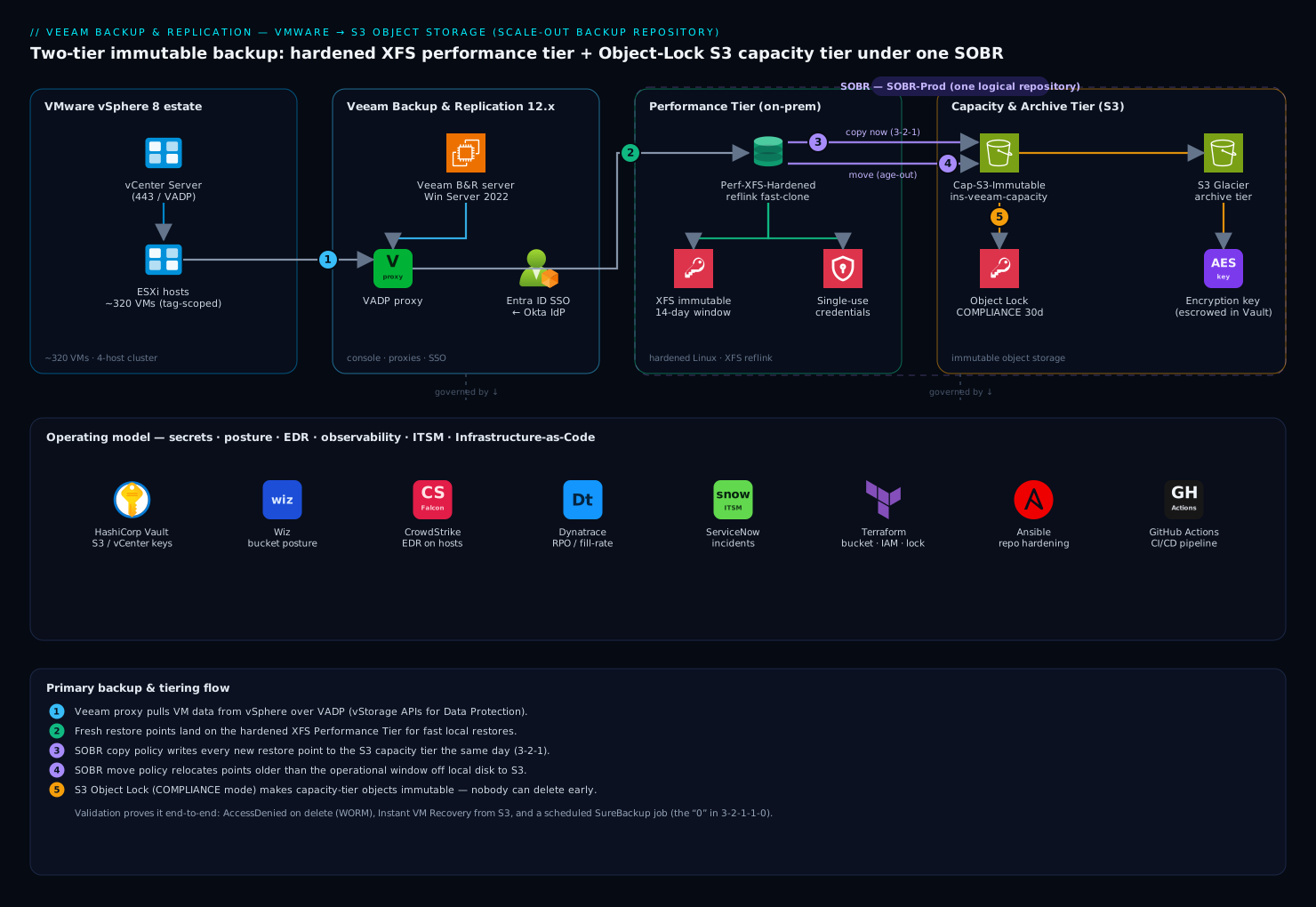
Real-world scenario
Meridian General Insurance (Pune) — 320 VMs across four vSphere 8 hosts, 38 TB of used data, 2.8% daily change rate, and a cyber-insurance renewal that arrived with a questionnaire: immutable backups? tested restores? offsite copies? The honest answers were no, no, and same-rack. The rebuild followed this guide: two 8-vCPU hot-add proxies, a physical hardened repository (12 × 10 TB NL-SAS, RAID-60, ~72 TB usable XFS), a SOBR over an ap-south-1 bucket with 30-day compliance-mode immutability, copy + move with a 14-day operational window, GFS at 8 weekly / 12 monthly / 7 yearly, and SureBackup nightly against a rotating slice of tier-1.
The numbers behaved. The initial full — 38 TB reading at an aggregated ~750 MB/s over hot-add — took a planned weekend (~14 hours). Nightly incrementals settled at ~1.1 TB read, ~550 GB written after compression, clearing in under two hours; Saturday synthetic fulls completed in 40 minutes of reflink metadata work instead of the 9 hours a full copy would have cost. Offload pushed roughly 600 GB/day to S3, and the first month’s bill surprised in the other direction once block reuse kicked in: monthly GFS fulls in the capacity tier were virtual, not 19 TB re-uploads.
Two things went wrong, both instructive. First, week one’s bucket sat empty despite a green “move” policy — the jobs had been created as forever forward incremental, so no chain ever sealed and nothing was eligible to move. Enabling weekly synthetic fulls fixed it; the first offload session moved 11 TB overnight. Second, during the audit demo, the engineer “proved” immutability by running aws s3api delete-object on a backup object — and it succeeded, to the auditor’s raised eyebrow. It had merely written a delete marker on the versioned bucket; the locked versions were intact underneath. The correct demonstration — deleting a specific --version-id and receiving Access Denied, then a live instant recovery from a capacity-tier point — passed, and the insurance premium landed 18% lower than quoted. The quarterly failover-plan drill (policy-admin stack: DB, two app servers, web) now runs in 11 minutes against a 15-minute RTO commitment, and the SureBackup report is a standing attachment in the renewal file.
Advantages and disadvantages
| Advantages | Disadvantages |
|---|---|
| True last-line defense: compliance-mode Object Lock survives full console and storage-admin compromise | Immutability is a commitment — mis-sized locks hold space (and cost) hostage until expiry, by design |
| SOBR separates restore speed (local XFS) from retention depth (cheap object storage) automatically | More moving parts than a single appliance: proxies, gateways, tiers, offload sessions all need monitoring |
| Fast clone makes weekly synthetic fulls a metadata operation — enterprise retention on mid-range hardware | XFS/ReFS formatting decisions are load-bearing; wrong flags quietly cost terabytes of I/O |
| Agentless VADP + CBT: no per-VM agents to patch, incrementals read only changed blocks | vSphere snapshot mechanics still apply — snapshot stun and consolidation on huge, busy VMs need care |
| Restore toolbox spans seconds (instant recovery) to objects (Explorers) to clouds (direct restore to Azure/AWS) | Restores from capacity/archive tiers ride WAN latency, egress fees, and Glacier thaw times |
| SureBackup turns verification into scheduled evidence — the 3-2-1-1-0 “zero” | Verification consumes real compute and a virtual-lab appliance per site |
| Licensing (VUL) is portable across VMware, Hyper-V, agents, and clouds | SOBR and key features are edition-gated; Community/Standard editions cannot build this design |
Hands-on lab: build the whole estate, prove every control
This is the centerpiece. You will build the bucket, the backup server, the hardened repository, the SOBR, the job, the copy job, and the verification — and validate each control the way an auditor would, including the deletion attempt that must fail. Budget 3–4 hours.
Lab bill of materials. A vSphere 8 environment with a few small test VMs (nested ESXi on a single homelab host is fine); a Windows Server 2022 VM (8 vCPU / 16 GB for the lab) for VBR 12.x using the 30-day trial license (Community Edition lacks SOBR); an Ubuntu 22.04 VM with a 200 GB second disk for the hardened repository; an AWS account (or MinIO — swap the endpoint and use the S3-compatible cmdlets shown); Terraform and the AWS CLI on your workstation. Everything below uses lab-scale sizes; the production deltas are noted inline.
Phase 1 — Terraform the immutable bucket
-
Apply the Terraform from the object-storage section above (bucket
kv-veeam-lab-capinap-south-1,object_lock_enabled = true, versioning enabled, public access blocked, no default retention rule), plus an IAM userveeam-offloadbound to the least-privilege policy shown earlier. -
Validate the lock configuration and the deliberate absence of a default rule:
aws s3api get-object-lock-configuration --bucket kv-veeam-lab-cap
Expected output — enabled, with no Rule block:
{
    "ObjectLockConfiguration": {
        "ObjectLockEnabled": "Enabled"
    }
}
- Park the keys in Vault so the console is the only place they are ever typed:
vault kv put secret/veeam/s3-capacity \
  access_key="AKIA…" secret_key="…" \
  endpoint="s3.ap-south-1.amazonaws.com" bucket="kv-veeam-lab-cap"
Phase 2 — Install VBR and register vCenter
-
Mount the VBR 12.x ISO on the Windows VM and install with defaults — v12 deploys its bundled PostgreSQL 15 instance. Take the trial license. (Unattended:
Veeam.Backup.Setup.exesupports silent flags; for one lab box, the wizard is faster.) -
Create a dedicated vCenter role
veeam-backupand a service account bound to it at the datacenter level. Minimum privilege families:Virtual machine → Snapshot management(create/remove snapshot),Virtual machine → Provisioning(allow read-only disk access, allow disk access),Virtual machine → Configuration → Disk change tracking,Datastore → Browse datastore+Low level file operations, andGlobal → Disable methods / Enable methods / Licenses. Do not hand VeeamAdministrator@vsphere.local. -
Register vCenter — console (Backup Infrastructure → Managed Servers → Add Server → VMware vSphere) or PowerShell:
Connect-VBRServer -Server localhost
Add-VBRvCenter -Name "vcenter.lab.local" `
  -User "lab\svc-veeam-vc" -Password (vault kv get -field=password secret/veeam/vcenter)
Get-VBRServer | Format-Table Name, Type
Expected: the vCenter row with Type: VC. The default “VMware Backup Proxy” role on the VBR server itself is fine for the lab (production: dedicated proxies, Phase 2 of the transport section).
Phase 3 — Build the hardened repository
-
On the Ubuntu VM, run the XFS + user preparation block from the hardened-repository section (
mkfs.xfs -m reflink=1,crc=1, mount at/mnt/veeam-repo,veeamrepouser, chrony). -
Console: Backup Infrastructure → Backup Repositories → Add Repository → Direct attached storage → Linux (Hardened Repository). Add the server with single-use credentials for
veeamrepo(tick “Elevate account privileges automatically” for the deployment; the credential is discarded after). Path/mnt/veeam-repo; tick “Use fast cloning on XFS volumes”; set “Make recent backups immutable for: 7 days” (lab minimum; production 14+). -
Validate from PowerShell, then slam the SSH door:
Get-VBRBackupRepository -Name "hard-xfs-01" | Format-List Name, Type, Path
# Expected: Type : LinuxHardened   Path : /mnt/veeam-repo
sudo ufw deny 22/tcp && sudo ufw enable # SSH was only needed for deployment
Phase 4 — Add the object storage repository
Console path: Add Repository → Object storage → Amazon S3 → Amazon S3 (for MinIO/Wasabi: S3 Compatible). Feed it the Vault-read keys, pick the bucket and a folder (sobr/), and on the Bucket step tick “Make recent backups immutable for: 7 days” (production: 30). The S3-compatible PowerShell equivalent:
$acct = Add-VBRAmazonAccount `
  -AccessKey (vault kv get -field=access_key secret/veeam/s3-capacity) `
  -SecretKey (vault kv get -field=secret_key secret/veeam/s3-capacity)

$conn   = Connect-VBRAmazonS3CompatibleService -Account $acct `
            -CustomRegionId "ap-south-1" -ServicePoint "https://s3.ap-south-1.amazonaws.com"
$bucket = Get-VBRAmazonS3Bucket -Connection $conn -Name "kv-veeam-lab-cap"
$folder = New-VBRAmazonS3Folder -Connection $conn -Bucket $bucket -Name "sobr"

Add-VBRAmazonS3CompatibleRepository -Name "cap-s3-immutable" `
  -Connection $conn -AmazonS3Folder $folder `
  -EnableBackupImmutability -ImmutabilityPeriod 7
If the wizard errors here, it is one of three things: Object Lock not enabled at creation (rebuild the bucket), missing s3:PutObjectRetention-family IAM actions, or (self-hosted) an untrusted TLS CA on the gateway server.
Phase 5 — Compose the SOBR
- Run the
Add-VBRScaleOutBackupRepositoryblock from the SOBR section (extenthard-xfs-01, capacitycap-s3-immutable,-OperationalRestorePeriod 7for the lab). - Open the SOBR’s wizard (Scale-out Repositories → SOBR-PROD → Edit → Capacity Tier) and tick both the copy and the move checkboxes, plus “Encrypt data uploaded to object storage” with a new key. Escrow the key password in Vault and somewhere offline.
- Validate:
Get-VBRBackupRepository -ScaleOut -Name "SOBR-PROD" | Format-List Name, PolicyType, Extent
# Expected: PolicyType : DataLocality   Extent : {hard-xfs-01}
Phase 6 — Create and run the backup job
- Tag three test VMs in vSphere with a
veeam-t1tag (tag-scoped jobs auto-protect future VMs), then:
$scope = Find-VBRViEntity -Tags -Name "veeam-t1"
Add-VBRViBackupJob -Name "T1-VM-Daily" -Entity $scope `
  -BackupRepository (Get-VBRBackupRepository -ScaleOut -Name "SOBR-PROD")

$job = Get-VBRJob -Name "T1-VM-Daily"
Set-VBRJobAdvancedBackupOptions -Job $job -Algorithm Syntethic -TransformToSyntethicDays Saturday
Set-VBRJobSchedule -Job $job -Daily -At "21:00" -DailyKind Everyday
Enable-VBRJobSchedule -Job $job
-
In the console, open the job → Guest Processing → tick “Enable application-aware processing” and set guest credentials for the Windows test VM. On Storage → Advanced → Storage, confirm compression Optimal and storage optimization 1 MB (note for later: 4 MB quarters your S3 PUT bill at the cost of coarser increments).
-
Run it and read the session like a senior engineer — the bottleneck line is the sizing tool nobody uses:
Start-VBRJob -Job $job
Expected in the session window: per-disk transport tags ([hotadd] or [nbd] — if you expected hot-add and see [nbd], fix proxy datastore access now), CBT in use from run 2, and a closing line like Load: Source 71% > Proxy 43% > Network 22% > Target 38% — whichever number is highest is the component to upgrade next.
Phase 7 — Watch the offload, then attack your own backups
- The offload session (History → System → “SOBR Offload”) fires within ~4 hours of the job — with copy mode, sooner. Confirm objects are landing:
aws s3 ls s3://kv-veeam-lab-cap/sobr/ --recursive --summarize | tail -3
# Expected: thousands of small objects; Total Size climbing toward your source size
- Now the audit moment. Prove compliance-mode retention on a real object, then try to destroy it — on a versioned bucket you must attack the version, otherwise you only write a delete marker and learn nothing:
read -r KEY VID <<< $(aws s3api list-object-versions --bucket kv-veeam-lab-cap \
  --prefix sobr/ --max-items 1 --query 'Versions[0].[Key,VersionId]' --output text)

aws s3api get-object-retention --bucket kv-veeam-lab-cap --key "$KEY" --version-id "$VID"
Expected:
{
    "Retention": {
        "Mode": "COMPLIANCE",
        "RetainUntilDate": "2026-06-24T00:00:00+00:00"
    }
}
(The date may run up to ~10 days past your immutability setting — block generation, not a bug.) Now the kill attempt:
aws s3api delete-object --bucket kv-veeam-lab-cap --key "$KEY" --version-id "$VID"
# Expected:
# An error occurred (AccessDenied) when calling the DeleteObject operation: Access Denied
- Repeat on-prem. On the repository:
lsattr /mnt/veeam-repo/T1-VM-Daily/*.vbk
# Expected: ----i---------------- (the immutable attribute)
sudo chattr -i /mnt/veeam-repo/T1-VM-Daily/*.vbk
# Expected: Operation not permitted (the veeamimmureposvc owns this, not you)
Screenshot both refusals. That pair of errors is your ransomware posture.
Phase 8 — Restore drills
-
File-level restore:
Start-VBRWindowsFileRestore -RestorePoint $rpmounts the point underC:\VeeamFLR\<vm>on the mount server; copy a file out, thenStop-VBRWindowsFileRestore. Target: under 5 minutes. -
Instant VM recovery — from the capacity tier, because a restore that only works when the performance tier is alive proves nothing about ransomware recovery. Put the extent into maintenance mode first (SOBR → hard-xfs-01 → Maintenance mode) to force S3 reads:
$rp  = Get-VBRRestorePoint -Name "web-test01" | Sort-Object CreationTime | Select-Object -Last 1
$esx = Get-VBRServer -Name "esx01.lab.local"
$ds  = Find-VBRViDatastore -Server $esx -Name "LAB-DS01"

Start-VBRInstantRecovery -RestorePoint $rp -Server $esx -Datastore $ds `
  -VMName "web-test01_ir" -PowerUp
Get-VBRInstantRecovery   # note the session; the VM is now running from object storage
Expected: the VM powers on within minutes, sluggish under S3 latency but alive. In production you would finish with Migrate to production; in the lab, Stop-VBRInstantRecovery -InstantRecovery (Get-VBRInstantRecovery) and take the extent out of maintenance mode.
- SureBackup: build a virtual lab (Backup Infrastructure → SureBackup → Virtual Labs → Add, accept the wizard’s single-host defaults — it deploys the proxy appliance and fenced network), then run the PowerShell from the SureBackup section. Expected result: heartbeat and ping green per VM, and a session report you should save as evidence.
Phase 9 — The second copy and the config backup
-
Create a second small repository (any Linux/Windows box) and the immediate-mode backup copy job from the offsite-chain section, with GFS 4 weekly / 3 monthly for the lab. Verify it produces points without touching vSphere (no new VM snapshots — check vCenter tasks).
-
Protect the brain. The configuration backup must live off-box and be encrypted — unencrypted config backups exclude stored credentials, which turns a bad day into a terrible one:
Add-VBREncryptionKey -Password (Read-Host -AsSecureString) -Description "cfg-backup-key"
Set-VBRConfigurationBackupJob -Enable `
  -Repository (Get-VBRBackupRepository -Name "copy-repo-01") `
  -EnableEncryption -EncryptionKey (Get-VBREncryptionKey -Description "cfg-backup-key")
Start-VBRConfigurationBackupJob
Phase 10 — Validation checklist and teardown
| # | Checkpoint | How verified | Pass looks like |
|---|---|---|---|
| 1 | Bucket lock-enabled, no default rule | get-object-lock-configuration |
ObjectLockEnabled present, no Rule |
| 2 | Hardened repo type + fast clone | Get-VBRBackupRepository |
Type: LinuxHardened; synthetic full in minutes |
| 3 | Transport mode as designed | Job session per-disk tag | [hotadd] (or your chosen mode) |
| 4 | Offload copying same-day | aws s3 ls --summarize after first job |
Object count and size climbing |
| 5 | Compliance retention on objects | get-object-retention |
Mode: COMPLIANCE, sane RetainUntilDate |
| 6 | Version delete refused | delete-object --version-id |
AccessDenied |
| 7 | XFS immutability | lsattr / chattr -i |
i flag; Operation not permitted |
| 8 | Restore from capacity tier | Instant recovery with extent in maintenance | VM boots from S3-backed point |
| 9 | FLR under 5 minutes | Start-VBRWindowsFileRestore |
File recovered from C:\VeeamFLR |
| 10 | SureBackup evidence | Verification session | Heartbeat + ping green, report saved |
| 11 | Second copy independent of vSphere | Copy job session + vCenter tasks | Points created, zero new snapshots |
| 12 | Config backup encrypted, off-box | Console → Menu → Configuration Backup | Encryption on, target = copy repo |
Teardown, in order: disable and remove jobs (Disable-VBRJob / Remove-VBRJob), remove the SOBR (Remove-VBRScaleOutBackupRepository), then the repositories (Remove-VBRObjectStorageRepository, Remove-VBRBackupRepository). Then the part every lab writeup skips: the locked objects and XFS files remain until their retention expires — you cannot force it, and that is the feature working. terraform destroy on the bucket fails with BucketNotEmpty until the last version’s lock lapses (lab: 7 days + block generation), so schedule the destroy, don’t fight it. The XFS immutable flags likewise lapse on their own; then delete the VMs.
Common mistakes & troubleshooting
The playbook. Symptoms first, because that is what you have at 02:00.
| # | Symptom | Root cause | Confirm | Fix |
|---|---|---|---|---|
| 1 | Backups crawl; session shows [nbd] where you expected hot-add/SAN |
Proxy lacks datastore access (wrong cluster/datacenter) or SAN zoning broken; auto-mode silently degraded | Per-disk transport tag in the session log | Fix proxy placement/zoning; pin -TransportMode so degradation fails loudly |
| 2 | Move policy on, S3 bucket empty for weeks | Forever-forward jobs never seal a chain — nothing is eligible to move | Job method in Storage settings; offload session says no eligible points | Enable periodic synthetic/active fulls; next offload moves the backlog |
| 3 | Offload fails: access/permission errors to S3 | IAM policy missing retention-family or version-family actions; or bucket lacks Object Lock | aws s3api get-object-lock-configuration; IAM policy diff vs the minimum set |
Rebuild bucket born with lock; add PutObjectRetention, ListBucketVersions, DeleteObjectVersion |
| 4 | Offload fails only on self-hosted S3 (MinIO/Cloudian) | Gateway server does not trust the private TLS CA | Test the endpoint in a browser on the gateway; certificate error | Import the CA into the gateway’s Windows/Linux trust store |
| 5 | “Delete backup” works but space never returns / teardown blocked | Object Lock still active; effective deletion = max(retention, immutability + block generation) | get-object-retention shows future RetainUntilDate |
Wait it out; that is the control working. Plan lock windows before committing |
| 6 | Incrementals suddenly read ~100% of every disk | CBT map invalidated (storage vMotion, unclean host power event) | Session warning that CBT data is invalid; read size ≈ disk size | Reset CBT for affected VMs; run one active full; verify next run reads deltas |
| 7 | Failed to prepare guest for hot backup / VSS errors |
Guest credential lacks admin; VSS writer failed/timeout inside guest | vssadmin list writers in the guest — look for failed writers |
Fix credentials; restart the failed writer service; stagger jobs hitting the same SQL host |
| 8 | vSphere warning: virtual disk consolidation needed; datastore filling | Backup snapshot removal failed (locks, latency); orphaned deltas accumulating | VM → Snapshots; datastore free space trend | Consolidate disks off-hours; keep 15–20% datastore headroom; stagger snapshot-heavy jobs |
| 9 | Hardened repo: immutability errors, or files deletable when they should not be | Clock skew between VBR, repo, and reality; or the volume is not the reflink XFS you think | chronyc tracking; xfs_info /mnt/veeam-repo (expect reflink=1) |
Fix NTP everywhere; rebuild the filesystem with correct flags if wrong |
| 10 | Restore from capacity tier unusably slow | Reading a large VM over WAN + S3 latency; or the point is in Glacier | Where the point lives (Backup Properties shows tier per point) | Restore recent points from performance tier; for archive, run retrieval first and plan hours |
| 11 | Job fails: no extents available / placement errors | All extents sealed, in maintenance, or full beyond the space threshold | SOBR extent states in Backup Infrastructure | Exit maintenance/seal; add an extent; check data-locality constraints |
| 12 | Backup copy job seems stuck in “idle” | Immediate mode is event-driven — idle is the working state between source runs | Copy session history shows syncs after each source run | Nothing, or switch to periodic mode if you expected interval behavior |
| 13 | S3 request costs rival storage costs | 1 MB block size → millions of PUTs per offload | Cost Explorer: PutObject request count |
Set storage optimization to 4 MB (takes effect after an active full); revisit offload frequency |
| 14 | Config DB restore works but every credential is missing | Configuration backup ran unencrypted — credentials are excluded by design | Configuration Backup settings show encryption off | Enable encryption with an escrowed key; re-run; store a copy off the Veeam server |
| 15 | Immutability window “wrong” — objects locked ~10 days past the setting | Block generation headroom added to reused blocks | RetainUntilDate vs setting |
Expected behavior; document it before the auditor finds it |
Two meta-rules. First, the job session’s bottleneck line (Source > Proxy > Network > Target) answers “what should I upgrade” — believe it over intuition. Second, when the console and the filesystem disagree, the console’s catalog is authoritative: never “clean up” repository files by hand; rescan the repository and let retention do its job.
Best practices
- Design for a hostile administrator, not a disk failure. Compliance-mode Object Lock, hardened repository, MFA on the console, and (v12.1) four-eyes authorization for destructive operations — assume the attacker holds every reusable credential you have.
- Keep the backup server out of the production domain. A separate workgroup or a dedicated management forest; production domain admins must not be backup admins by inheritance.
- Enable both copy and move on the SOBR capacity tier. Copy is protection, move is economics; either alone is half a design.
- Schedule periodic fulls (synthetic on fast clone) — sealed chains are what make the move policy, GFS flags, and health checks all work.
- Pin transport modes per proxy and alert on the tag in session logs; silent NBD degradation is the classic slow-creep failure.
- Size immutability deliberately: hardened repo ≥ operational restore window; capacity tier ≥ the time you would need to detect and eject an intruder (30 days is a defensible floor).
- Encrypt at three layers — job-level for backups at rest, capacity-tier upload encryption, and the config backup — and escrow every key outside the Veeam server (Vault + sealed offline copy).
- Verify continuously: SureBackup on a rotating tier-1 slice nightly, monthly health checks on chains, a quarterly live failover-plan drill with a stopwatch.
- Watch four numbers weekly: performance-tier fill %, offload session lag, job bottleneck distribution, S3 request spend. Each one leads a failure by weeks.
- Feed events out: syslog (v12.1) to the SIEM, failed jobs and immutability-change attempts to ServiceNow. A backup failure that pages nobody is a future incident with a countdown.
- Never reuse a bucket/folder across two Veeam installs, and never run bucket lifecycle rules against Veeam-managed objects — Veeam owns that object space.
- Document the restore decision tree (which restore type for which incident) and laminate it; the toolbox only saves RTO if the on-call knows the menu.
Security notes
Identity first: v12 supports MFA (TOTP) for console users — enable it for every human, and make service automation use dedicated non-interactive accounts. Put the console on a PAW/jump host gated by your IdP’s conditional access (Entra ID/Okta), keep the backup server itself out of the production AD blast radius, and turn on v12.1’s four-eyes authorization so no single account can delete backups or repositories. Least privilege runs through the whole chain: the vCenter role from the lab (snapshot + disk access, not Administrator), the S3 policy scoped to one bucket with no s3:*, the veeamrepo user with no sudo and no standing SSH. Secrets live in Vault and are read at configuration time; the encryption keys (job, capacity tier, config backup) get an offline escrow copy because losing them is equivalent to losing the backups. Defense of the infrastructure itself: EDR on the backup server, proxies, and repository hosts (backup infrastructure is a primary target, not collateral), v12.1 inline malware detection and YARA scans as tripwires, syslog to the SIEM, and CSPM watching the bucket for posture drift (public access, lock configuration changes, policy widening). The keystone remains the immutability pair — compliance-mode Object Lock offsite, XFS immutability on-prem — which converts “the attacker deleted our backups” from a failure mode into a waiting game the attacker cannot win.
Cost & sizing
What actually drives the bill, and the lever attached to each driver:
| Cost driver | What moves it | The lever |
|---|---|---|
| Performance-tier hardware | Operational restore window × daily change × reduction ratio | Shorten the window; fast clone makes fulls ~free; RAID-60 NL-SAS beats all-flash for this I/O pattern |
| Object storage capacity | Retention depth + GFS ladder | Block reuse makes capacity-tier GFS cheap; push yearly fulls to archive class |
| S3 API requests | Block size × change rate × offload frequency | 4 MB storage optimization ≈ ¼ the PUTs of 1 MB |
| Egress | Restores and DR tests from the capacity tier | Restore recent from local tier; consider Wasabi-style no-egress providers for the capacity tier |
| Archive retrieval | Glacier thaw per audit pull | Archive only compliance-mandated points; Deep Archive for 5+ year holds |
| DR compute | Replica count × reserved DR capacity | Replicate only the RTO-critical tier; failover plans make a small tier go far |
| Licensing | VUL per workload (10-packs), portable across platforms | Per-workload subscription; trial/NFR for labs — price via quote, so model workloads not sockets |
Worked month for the Meridian estate (38 TB used, 2:1 reduction, 30-day capacity immutability, GFS 8w/12m/7y, ap-south-1 list prices, ₹85/$):
| Item | Quantity | Unit price | Monthly |
|---|---|---|---|
| S3 Standard (capacity tier, steady state) | ~28 TB | ~$0.025/GB | ~$715 / ₹61,000 |
| S3 PUT requests (600 GB/day @ 1 MB blocks) | ~18.5M PUTs | $0.005/1k | ~$92 / ₹7,800 — or ~$23 at 4 MB blocks |
| Glacier Deep Archive (7 yearly standalone fulls) | ~133 TB | ~$0.002/GB | ~$265 / ₹22,500 |
| Egress (quarterly 2 TB DR-test restore, amortized) | ~0.7 TB/mo | ~$0.11/GB | ~$75 / ₹6,400 |
| Performance tier (72 TB usable, capex amortized 48 mo) | 1 server | — | ~₹25,000 equivalent |
| Object + hardware total | ~₹1.2L/month — the immutable, tested, 7-year-deep version of a design that previously cost one appliance and an audit finding |
Sizing arithmetic to reuse: performance tier ≈ (full × reduction) + (daily change × reduction × window) + 20% headroom → 19 TB + 14 × 0.55 TB + headroom ≈ 33 TB for Meridian, comfortably inside 72 TB with growth. Proxy tasks ≈ concurrent disks in the window; repository task slots ≈ proxy tasks; and the weekend synthetic full is repository-I/O bound, which is why the XFS box gets the fast disks.
Interview & exam questions
Mapped to the VMCE (Veeam Certified Engineer) blueprint and the DR-architecture questions senior interviews actually ask.
- Explain 3-2-1-1-0 and map a real control to each digit. Three copies (production, performance tier, capacity tier), two media (block + object), one offsite (cloud bucket), one immutable/offline (compliance-mode Object Lock + hardened repo), zero errors (SureBackup + health checks). The follow-up trap: “offsite” and “immutable” must be different properties, possibly on the same copy.
- Copy policy vs move policy on a SOBR capacity tier? Copy mirrors every new point immediately (protection, same-day offsite); move relocates points older than the operational restore window off local disk (economics). They are complementary; move additionally requires sealed chains.
- Why did a forever-forward-incremental job never offload with a move-only policy? Move operates on inactive (sealed) chains; forever-forward maintains one perpetually active chain. Fix: periodic synthetic/active fulls.
- Governance vs compliance Object Lock? Governance is bypassable with
s3:BypassGovernanceRetention— an escalation target; compliance is absolute until expiry, including for AWS root. Ransomware posture requires compliance. - Why do capacity-tier objects show retention ~10 days past the configured immutability? Block generation: Veeam locks reused blocks in generations to avoid re-signing retention on every offload, adding up to 10 days headroom.
- What makes a hardened repository “hardened”? Single-use credentials (nothing stored to replay), non-root data mover with a root-owned local-only immutability service, XFS immutable attribute on backup files for the configured window, no standing SSH.
- Choose a transport mode for an all-VSAN cluster and justify it. Hot-add: Direct SAN cannot address VSAN; NBD rides the management VMkernel and throttles. Hot-add proxies per cluster ride the hypervisor storage stack at near-SAN speed.
- How does instant VM recovery work and what is the catch? The mount server publishes the backup as a vPower NFS datastore; ESXi boots the VM from it in minutes. Catch: production I/O runs against backup storage until you migrate — schedule the Storage vMotion immediately.
- Replica vs backup for a 15-minute-RTO application? Replica: a registered, powered-off VM with snapshot restore points; failover is a boot, not a restore. Backups still exist for depth and immutability — replicas are online and therefore attackable.
- What does SureBackup actually prove that a green job does not? Boot, network, and service response of the restored VM in a fenced lab — plus optional malware/YARA scanning — producing scheduled evidence. Green jobs prove the write succeeded, not that the read will.
- Why must the S3 bucket have no default retention rule when Veeam manages immutability? Veeam sets per-object retention (including its own metadata/checkpoint housekeeping); a bucket default locks objects Veeam must rewrite and breaks offload in ways that masquerade as permission errors.
- An auditor watches you run
aws s3api delete-objecton a backup object and it succeeds. What happened? Versioned bucket: the call wrote a delete marker; every locked version is intact. The valid test deletes a specific--version-idand must returnAccessDenied.
Quick check
- Which SOBR policy requires sealed backup chains — copy or move?
- Name the three transport modes and the one that always works.
- What two bucket properties must exist at creation time for Veeam immutability, and what must not be configured?
- A restore point must survive console and storage-admin compromise. Which two controls deliver that in this design?
- What is the minimum immutability window on a hardened repository?
Answers
- Move. Copy mirrors active chains immediately; move only relocates points from inactive (sealed) chains.
- Direct storage access (Direct SAN), virtual appliance (hot-add), network (NBD/NBDSSL) — NBD always works because it needs only the ESXi management interface.
- Object Lock enabled and versioning enabled, both at creation; no default bucket retention rule — Veeam applies per-object compliance retention itself.
- Compliance-mode S3 Object Lock on the capacity tier and XFS immutability on the hardened repository — neither can be shortened by any credential in the estate.
- 7 days (maximum 9999).
Glossary
- VBR (Veeam Backup & Replication): the backup platform; the backup server is its orchestration brain with a PostgreSQL (v12 default) configuration database.
- VADP: VMware vStorage APIs for Data Protection — the snapshot-and-read interface proxies use for agentless image backups.
- CBT (Changed Block Tracking): vSphere’s changed-block map enabling incremental reads of only deltas.
- Backup proxy: the data mover reading VM disks via a transport mode (Direct SAN, hot-add, NBD) and shipping compressed data to a repository.
- Hardened repository: Linux repository with single-use credentials and XFS immutability; backups undeletable locally for the set window.
- Fast clone: XFS reflink / ReFS block-clone construction of synthetic fulls as metadata operations instead of data copies.
- SOBR (Scale-Out Backup Repository): logical repository federating performance extents, a capacity tier, and an archive tier under placement and tiering policies.
- Operational restore window: the age boundary; points newer stay on the performance tier, older ones are eligible to move to object storage.
- Capacity tier / archive tier: object-storage tiers of a SOBR — forever-incremental block-reusing storage vs standalone-full Glacier-class cold storage.
- Object Lock (compliance mode): S3 WORM retention that no principal can shorten before expiry; the offsite immutability mechanism.
- Block generation: Veeam’s lock-extension headroom (up to ~10 days) on reused capacity-tier blocks.
- GFS retention: grandfather-father-son — weekly/monthly/yearly fulls kept beyond normal retention for compliance depth.
- Backup copy job: a job that copies existing restore points to a second repository (immediate or periodic mode) without touching production.
- SureBackup / virtual lab / application group: automated restore verification — fenced network appliance, dependency boot group, and scheduled boot-and-test jobs.
- Instant VM recovery / vPower NFS: booting a VM directly from a backup file published as an NFS datastore, then migrating to production storage.
- Failover plan: ordered, delayed boot of replica groups for one-action application-level DR; paired with re-IP and network mapping.
- 3-2-1-1-0: three copies, two media, one offsite, one immutable/offline, zero verification errors.
Next steps
- Build the self-hosted immutable target end to end: Deploy MinIO with Object Locking and Site Replication for Immutable Backup Targets.
- Zoom out to the estate strategy this design implements: Backup and Ransomware-Resilient Recovery for Multi-Cloud with Veeam and Ransomware Resilience: Immutable Backups, Recovery Vaults, and Isolated Recovery Environments.
- Extend the posture to Kubernetes workloads: Configure Kasten K10 Ransomware Protection with Immutable Backups and S3 Object Lock.
- Give the database tier sub-VM RPO alongside image backups: Configure PostgreSQL PITR with pgBackRest and S3.
- If DR-to-cloud is the endgame, land the target first: Set Up Azure VMware Solution Private Cloud with HCX Live Migration.