The worst phone call of a career is not “the site is down.” It is “the site is down and the backups don’t restore.” A manufacturing client of mine backed up their file servers religiously for three years and never once tried to recover a whole machine. When ransomware encrypted their production estate on a Tuesday night, the backup jobs were green, the data was intact — and it still took eighteen hours to get the application serving customers, because nobody had ever built or rehearsed an orchestrated recovery. The data came back; the service did not, for the better part of a day, because restoring four hundred files is a different problem from standing up an application tier. That gap — between “I have the bytes” and “I can run the app” — is exactly the gap that Azure Backup and Azure Site Recovery (ASR) fill, and they fill different halves of it.
Azure Backup answers one question: can I get my data back to how it was at a point in time? It takes application-consistent point-in-time copies of VMs, files, SQL Server, SAP HANA, Azure Files and blobs into a hardened Recovery Services vault (or, for newer workloads, a Backup vault), and lets you restore a single file, a single disk, or an entire machine. Azure Site Recovery answers a completely different question: can I run my whole application somewhere else, fast, in a defined order? It continuously replicates a VM’s disks to a paired region, and on failover it powers on the replicas, attaches networking, and walks a recovery plan you authored — web tier, then app tier, then database, with scripts in between. Backup is your time machine against deletion and corruption; Site Recovery is your second site against a regional outage. You need both, and confusing them is how you end up with eighteen-hour Tuesdays.
This article is the production playbook for both. You will learn the vault model and why soft delete plus immutability is the only thing standing between you and a ransomware operator who got domain admin; every backup policy knob (frequency, retention tiers, instant-restore snapshots) and what each costs; how ASR replication actually works (the appliance, the cache storage account, crash- vs app-consistent recovery points, the RPO/RTO you can realistically promise); how to build and — the part everyone skips — test a recovery plan without touching production; and a structured failure→cause→confirm→fix table for the dozen ways these jobs break in the real world. Every operation gets the exact az command, a Bicep equivalent, and a KQL query where the answer lives in logs. The prose explains the why; the tables — there are many — are the reference you keep open at 02:00 when the vault is throwing UserErrorGuestAgentStatusUnavailable and the CFO is on the bridge.
What problem this solves
Data and applications die from causes that look nothing alike, and a single mechanism cannot defend against all of them. An engineer fat-fingers a DROP TABLE or deletes the wrong resource group. A bad deployment corrupts data subtly for six hours before anyone notices. A ransomware operator encrypts every reachable disk and then hunts down and deletes the backups, because they know that intact backups are the only thing that lets you refuse the ransom. An Azure region has a storage incident and your entire workload — perfectly healthy code — is unreachable for hours. Each of these is a different attack surface, and “we have backups” is a meaningless statement until you say which failure mode you mean.
What breaks without a real strategy is not the backup — it is the recovery. Teams discover, mid-incident, that their retention was 7 days and the corruption started on day 9; that the backups were in the same region that just failed; that the vault had no soft delete so the ransomware deleted the recovery points along with the data; that nobody knew the order to bring tiers up, or that the application needs a connection-string rewrite and a DNS swap that lives only in one person’s head — and that person is on a flight. The cruel truth of disaster recovery is that an untested recovery plan is a hypothesis, not a capability. DR plans decay silently: an IP changes, a dependency is added, a script rots, and the plan that worked at the last audit fails at the real incident.
Who hits this: everyone running production in the cloud, but it bites hardest on teams that treat backup as a checkbox rather than a tested capability. The finance and healthcare teams who must prove recoverability to auditors. The lean startups who set up daily VM backups, feel safe, and never once run a test restore. The enterprises with sprawling estates where backup coverage (is every new VM actually protected?) silently drifts. And anyone who thinks a snapshot is a backup — snapshots live next to the thing they protect and die with it, which is precisely useless against ransomware or a region loss.
To frame the whole field before the deep dive, here is the threat model: every loss event this article defends against, which service answers it, and the one control that actually saves you.
| Loss event | What’s lost | Primary defence | The control that saves you |
|---|---|---|---|
| Accidental delete (file/VM/RG) | Specific objects | Azure Backup | Soft delete on the vault + retention ≥ 14 days |
| Slow data corruption | Recent good state | Azure Backup | Long-enough retention + point-in-time choice |
| Ransomware encrypts disks | All reachable data | Azure Backup | Immutable vault + soft delete + MUA |
| Ransomware deletes backups | Your only recovery | Azure Backup | Immutability lock + Multi-User Authorization |
| Single-VM crash / OS rot | One machine | Azure Backup (restore VM) | Tested whole-VM restore, not just file restore |
| Availability-zone failure | One zone | Zone-redundant design | ZRS storage / zonal redundancy (often not DR) |
| Regional outage | The whole workload | Azure Site Recovery | Replication to a paired region + tested failover |
| Region loss + no order to recover | Time and sanity | ASR recovery plan | Sequenced, script-driven, rehearsed plan |
Learning objectives
By the end of this article you can:
- Decide, for any workload, whether you need Azure Backup, Azure Site Recovery, or both — and articulate the difference between “get my data back” and “run my app elsewhere.”
- Stand up a Recovery Services vault and a Backup vault, choose the right redundancy (LRS / ZRS / GRS), and enable soft delete and immutability so backups survive a ransomware operator with admin rights.
- Author an Azure Backup policy with the right frequency, retention tiers (daily/weekly/monthly/yearly) and instant-restore window — and know what each setting costs and where it bites.
- Configure Azure Site Recovery replication for an Azure VM, read crash- vs application-consistent recovery points, and set an RPO/RTO you can actually defend to the business.
- Build a multi-tier recovery plan with sequenced groups and pre/post scripts, then run a non-disruptive test failover in an isolated network — and clean it up.
- Drive the core operations fluently with
az backup,az site-recovery/ classic ASR cmdlets, Bicep, and KQL over the vault’s diagnostic logs. - Diagnose the dozen common failures — agent unreachable, restore-point gap, replication lag, failover stuck, soft-deleted item — with the exact command/portal path to confirm and the precise fix.
- Right-size the bill: understand what drives protected-instance, storage, snapshot and ASR replication charges, and where the free allowances and cheap tiers actually are.
Prerequisites & where this fits
You should already be comfortable with the Azure resource model — subscriptions, resource groups, regions and Azure paired regions — and able to run az in Cloud Shell, read JSON output, and reason about managed disks and VNets. Helpful but not required: a working mental model of RTO (how long until the app is back) and RPO (how much data you can afford to lose), and a passing familiarity with managed identities and RBAC, because the vault’s access model leans on both. If those resilience terms are fuzzy, the conceptual groundwork lives in High Availability vs Disaster Recovery: RTO and RPO Explained; the region/zone substrate these services replicate across is covered in Azure Regions and Availability Zones: Designing for Resilience.
This sits in the Resiliency & Business Continuity track. It is downstream of basic compute and storage and upstream of full multi-region architecture. Backup and ASR are components of a resilience strategy, not the whole thing: they pair with active-active patterns from Azure Multi-Region Active-Active Architecture: Designing for Zero-Downtime (for workloads that cannot tolerate even a short failover), with the storage redundancy concepts in Azure Storage Account Fundamentals: Blobs, Files, Queues and Tables (LRS/ZRS/GRS, which also govern vault redundancy), and with the secret-protection discipline in Azure Key Vault: Secrets, Keys and Certificates Done Right (because customer-managed keys and the keys your failed-over app needs both live there). The hardest ransomware variant of this topic — air-gapped, immutable, isolated recovery — gets its own deep treatment in Ransomware Resilience: Immutable Backups, Recovery Vaults, and Isolated Recovery Environments.
A quick map of who owns what during a recovery, so you call the right person fast:
| Layer | What lives here | Who usually owns it | Failure classes it causes |
|---|---|---|---|
| Source workload (VM/DB/files) | The data being protected | App / DBA team | Agent down → backup fails; app inconsistency |
| In-guest agent (MARS / VM ext) | Snapshot coordination | Platform + app | Extension unhealthy → job fails |
| Recovery Services / Backup vault | Recovery points, policy, soft delete | Backup / platform team | Misconfigured retention; no immutability |
| Vault redundancy (LRS/ZRS/GRS) | Where copies physically live | Platform / architecture | Same-region copy lost in a regional outage |
| ASR replication path | Disk replication + recovery points | Platform / network | Replication lag → RPO breach |
| Recovery plan + scripts | Failover order, automation | App + platform | Wrong order, stale script → long RTO |
| DNS / networking / identity | Cutover plumbing | Network + identity | App up but unreachable; auth broken |
Core concepts
Six mental models make every later decision obvious.
Backup protects state; Site Recovery protects service. This is the master distinction and it drives everything. Azure Backup captures point-in-time copies of data so you can roll an object back to how it was — a file, a disk, a database, a whole VM. Azure Site Recovery captures a continuously updated replica of a running machine so you can power it on elsewhere. Backup’s unit of value is a recovery point (a moment you can return to); ASR’s unit of value is a failover (the act of running the workload in the secondary site). Backup defends against deletion and corruption, which are time problems; ASR defends against unavailability, which is a location problem. A VM can need both: Backup to undo a bad change, ASR to survive a region outage.
The vault is the trust boundary — and its hardening is the whole game against ransomware. Recovery points live in a vault (Recovery Services vault for the classic estate; the newer Backup vault for blobs, disks, Azure Database for PostgreSQL flexible server, AKS and more). The vault is a control-plane object with its own RBAC, its own redundancy setting, and — critically — its own data-protection controls: soft delete (deleted recovery points are retained, recoverable, for a window rather than purged immediately), immutability (recovery points cannot be deleted or shortened before expiry), and Multi-User Authorization (MUA) (destructive operations require a second approver via a Resource Guard). A modern ransomware playbook is encrypt the data, then delete the backups; these three controls are specifically what defeat the second step. A vault without them is a backup that an attacker with your credentials can erase.
Crash-consistent is not application-consistent — and the difference is your data integrity. When Backup or ASR captures a recovery point, it is one of three consistency levels. A crash-consistent point is “as if you pulled the power cord” — disks captured at an instant, in-flight writes possibly torn; it boots, but a database may need crash recovery and could lose the last transactions. A file-system-consistent point flushes the OS file cache (Linux) so on-disk files are coherent. An application-consistent point uses VSS on Windows (or pre/post scripts on Linux) to quiesce the application — flush database buffers, freeze writers — so the recovery point is a clean, transactionally consistent moment. For databases and stateful apps you want application-consistent points; ASR creates them on a configurable cadence, and Backup uses VSS by default for VMs. If you only have crash-consistent points, plan for recovery time and possible last-seconds data loss.
RPO and RTO are promises with prices, not aspirations. RPO (Recovery Point Objective) is the maximum data loss you accept, measured in time — “we can lose at most 15 minutes.” It is governed by how often you create recovery points: backup frequency for Backup (hourly to daily), and continuous replication for ASR (RPO often a few minutes, app-consistent points every hour by default). RTO (Recovery Time Objective) is the maximum time to restore service — “we are back within 2 hours.” It is governed by how fast you can restore or fail over and re-plumb: restoring a 2 TB VM from backup takes real time; an ASR failover boots a replica in minutes but DNS, identity and dependency cutover add to it. Tighter RPO/RTO costs more (more frequent points, hot replicas, more automation). The discipline is to set them from business impact, not ambition, and then test that you meet them.
Restore is a spectrum, not a button. Azure Backup does not just “restore the VM.” It offers, from cheapest/fastest to most complete: file-level restore (mount a recovery point and copy individual files), disk restore (recover specific managed disks and attach them), replace existing (overwrite the source VM’s disks), and create new VM (build a fresh VM from the recovery point). Instant restore uses snapshots retained in the source region for a configurable window (1–5 days) so recent restores are near-instant and don’t pull from vault storage. Choosing the right restore type for the incident — one file vs a whole machine — is the difference between a five-minute fix and an hour-long rebuild.
Failover has phases, and “test” is the most important one. ASR failover is not a single act. A test failover spins up the replica in an isolated network with no impact to production or replication — this is your rehearsal and your audit evidence, and you should run it quarterly. A planned failover (zero data loss, for a controlled migration) shuts the source down cleanly first. An unplanned failover (the real disaster) runs from the latest available recovery point because the source is gone. After the dust settles you commit the failover (finalising it) and, when the primary region returns, re-protect and fail back. The lifecycle — replicate → test → fail over → commit → re-protect → fail back — is the thing you must understand, because skipping “test” is how the eighteen-hour Tuesday happens.
The vocabulary in one table
Before the deep sections, pin down every moving part. The glossary at the end repeats these for lookup; this table is the mental model side by side:
| Term | One-line definition | Which service | Why it matters |
|---|---|---|---|
| Recovery Services vault | Classic vault for VM/file/SQL/SAP backup + ASR | Both | The hardened store; RBAC + redundancy + soft delete live here |
| Backup vault | Newer vault for blobs, disks, AKS, flexible-server DBs | Backup | Where modern workload backups go; supports immutability + MUA |
| Recovery point | A point-in-time copy you can restore to | Backup / ASR | The unit of “how far back can I go” |
| Backup policy | Schedule + retention rules attached to items | Backup | Defines RPO and how long you keep history |
| Soft delete | Deleted points retained, recoverable, for a window | Both | Defeats “attacker deletes the backups” |
| Immutability | Points can’t be deleted/shortened before expiry | Both | The lock ransomware can’t pick |
| MUA / Resource Guard | Destructive ops need a second approver | Both | Stops a single compromised admin |
| RPO | Max acceptable data loss (in time) | Both | Set by frequency / replication cadence |
| RTO | Max acceptable time to restore service | Both | Set by restore/failover speed + plumbing |
| Crash- vs app-consistent | Power-pull vs quiesced (VSS) recovery point | Both | Data integrity of what you restore |
| Instant restore | Snapshot-backed fast restore in source region | Backup | Speeds recent restores; costs snapshot storage |
| Replication | Continuous disk copy to a target region | ASR | The mechanism behind regional DR |
| Recovery plan | Sequenced failover with groups + scripts | ASR | Turns a pile of VMs into a recoverable app |
| Test failover | Failover into an isolated network, no impact | ASR | The rehearsal that makes DR real |
| Failback / re-protect | Return to primary after it recovers | ASR | Closing the loop post-incident |
Backup vs Site Recovery: choosing the right tool
The single most expensive mistake in this space is reaching for the wrong tool — backing up a workload that needed replication, or replicating one that just needed a longer retention. They are complements, not substitutes. Here is the head-to-head that settles it:
| Dimension | Azure Backup | Azure Site Recovery |
|---|---|---|
| Question it answers | “Can I get my data back?” | “Can I run my app elsewhere?” |
| Protects | VMs, files, SQL, SAP HANA, Azure Files, blobs, disks | VMs (Azure + on-prem VMware/Hyper-V/physical) |
| Unit of value | Recovery point (point-in-time) | Failover (running replica) |
| Typical RPO | Hours to a day (per schedule) | Seconds to minutes (continuous) |
| Typical RTO | Minutes to hours (restore time) | Minutes (boot replica) + cutover |
| Defends against | Delete, corruption, ransomware | Regional / large-scale outage |
| Storage cost model | Vault storage for retained points | Continuous replica storage + cache |
| Granularity | File / disk / DB / whole VM | Whole VM (and its dependencies) |
| History retained | Days to years (LTR) | Hours of recovery points (e.g. 24–72h) |
| Orchestration | Restore (manual/automated) | Recovery plans (sequenced, scripted) |
The decision rule, as a table — match the workload requirement to the tool:
| If the requirement is… | Use | Why |
|---|---|---|
| Undo an accidental delete weeks later | Backup (long retention) | ASR keeps only hours of points |
| Recover one corrupted file | Backup (file-level restore) | ASR is whole-VM only |
| Keep 7 years of monthly snapshots for audit | Backup (yearly retention / LTR) | Compliance archive is Backup’s job |
| Survive a full region outage in minutes | Site Recovery | Continuous replica, fast failover |
| Sequence web→app→DB failover with scripts | Site Recovery (recovery plan) | Orchestration is ASR’s job |
| Protect against ransomware deleting backups | Backup (immutable vault + MUA) | Hardened vault controls |
| Both: undo bad changes AND survive region loss | Both | They cover different failure modes |
| Near-zero downtime, no failover step at all | Neither alone → active-active | DR ≠ HA; see multi-region design |
A blunt rule I give every team: Backup is mandatory for anything that holds data; Site Recovery is for the subset that cannot tolerate a prolonged regional outage. Most estates over-buy ASR (it is the more expensive, more operationally demanding service) and under-invest in testing Backup. Protect everything with Backup; reserve ASR for the tier-1 workloads where minutes of regional downtime translate to real money or real harm.
A snapshot is not a backup — and three other myths
The most dangerous belief in this space is “we take snapshots, so we’re covered.” A snapshot lives next to the thing it protects, shares its fate, and offers no immutability — it is a convenience, not a recovery strategy. Here is each common myth against the reality:
| Common belief | Reality | Why it bites |
|---|---|---|
| “Disk snapshots are our backup” | Snapshots sit in the same subscription/region and have no immutability | Ransomware/region loss takes them with the data |
| “RAID / ZRS protects our data” | That’s hardware/zone availability, not point-in-time recovery | A DROP TABLE or corruption replicates instantly to every copy |
| “GRS storage means we have DR” | GRS is async replication, not a tested failover capability | No orchestration, no restore test, surprise RTO |
| “Backups are green, so we’re safe” | A green job proves capture, not recoverability | Untested restores fail when you finally need them |
| “ASR replaces Backup” | ASR keeps only hours of points and is whole-VM only | Can’t undo a file delete from three weeks ago |
| “We can change vault redundancy later” | Redundancy is immutable once an item is protected | Stuck on LRS during a regional outage |
The vault: Recovery Services vs Backup vault
Everything Backup and ASR do is anchored to a vault. There are two kinds today, and picking the wrong one wastes a day of rework because you cannot migrate items between them.
Recovery Services vault is the long-standing vault. It backs up Azure VMs, on-prem files/folders (via the MARS agent), SQL Server in Azure VMs, SAP HANA in Azure VMs, and Azure File Shares — and it is the control plane for Azure Site Recovery. If you are protecting VMs or running ASR, this is your vault.
Backup vault is the newer model for workloads the Recovery Services vault never covered: Azure Blobs (operational + vaulted backup), Azure Managed Disks, Azure Database for PostgreSQL flexible server, AKS (cluster state), and Azure Database for MySQL/PostgreSQL. It has a cleaner data-protection model (native immutability, MUA) and is where Microsoft is investing for cloud-native workloads. It does not do VMs or ASR.
Here is which vault each workload belongs to — get this right before you create anything:
| Workload | Vault type | Backup style | Notes |
|---|---|---|---|
| Azure VM | Recovery Services | Snapshot + vault | VSS app-consistent by default (Windows) |
| On-prem files/folders (MARS) | Recovery Services | Agent → vault | The MARS agent, scheduled |
| SQL Server in Azure VM | Recovery Services | Stream (log/diff/full) | 15-min log RPO possible |
| SAP HANA in Azure VM | Recovery Services | Backint stream | Certified Backint integration |
| Azure File Share | Recovery Services | Snapshot-based | Snapshots managed by the vault |
| Azure Blob | Backup vault | Operational + vaulted | Point-in-time / continuous |
| Azure Managed Disk | Backup vault | Incremental snapshot | Snapshot in a resource group |
| PostgreSQL flexible server | Backup vault | Vaulted | Long-term retention beyond service default |
| AKS | Backup vault | Cluster + PV (via extension) | Backup extension + trusted access |
| Azure VM replication (DR) | Recovery Services | ASR replication | Not “backup” — it’s DR |
Create a Recovery Services vault and immediately set its storage redundancy (you can only change it before the first protected item exists):
# Recovery Services vault with GRS (cross-region) redundancy
az backup vault create \
  --name rsv-prod-cin --resource-group rg-resiliency \
  --location centralindia
# Set redundancy BEFORE protecting anything (GeoRedundant / LocallyRedundant / ZoneRedundant)
az backup vault backup-properties set \
  --name rsv-prod-cin --resource-group rg-resiliency \
  --backup-storage-redundancy GeoRedundant \
  --cross-region-restore-flag true
The Bicep equivalent, with soft delete and cross-region restore baked in:
resource rsv 'Microsoft.RecoveryServices/vaults@2024-04-01' = {
  name: 'rsv-prod-cin'
  location: location
  sku: { name: 'RS0', tier: 'Standard' }
  identity: { type: 'SystemAssigned' }
  properties: {}
}

resource rsvConfig 'Microsoft.RecoveryServices/vaults/backupconfig@2024-04-01' = {
  name: '${rsv.name}/vaultconfig'
  properties: {
    enhancedSecurityState: 'Enabled'        // soft delete + security features
    softDeleteFeatureState: 'Enabled'
    storageModelType: 'GeoRedundant'
    crossRegionRestoreFlag: true
  }
}
The vault redundancy choice is the same LRS/ZRS/GRS decision as a storage account, and it is consequential for DR — an LRS vault keeps every copy in one region, so a regional disaster takes the backups with the data. Match redundancy to the threat:
| Redundancy | Copies kept | Survives | When to use | Cost |
|---|---|---|---|---|
| LRS (Locally redundant) | 3 copies, one datacenter | Disk/rack/node failure | Dev/test; data with a separate regional copy | Lowest |
| ZRS (Zone redundant) | 3 copies across AZs | A whole availability zone | Prod where region loss is covered elsewhere | Medium |
| GRS (Geo redundant) | LRS + async copy to paired region | A whole region | Production default for backups | Higher |
| GRS + Cross-Region Restore | GRS, restorable from secondary on demand | Region loss, with self-service restore | Tier-1; restore without waiting for failover | Higher + restore I/O |
A note that has cost people their backups: redundancy is immutable once the vault holds a protected item. If you create an LRS vault, protect 200 VMs, then realise during a regional incident that you needed GRS — you cannot change it without deleting all protected items first. Decide redundancy at creation. For anything production, default to GRS with Cross-Region Restore enabled, which lets you restore in the paired region on your schedule rather than waiting for Microsoft to declare a failover.
Hardening the vault: soft delete, immutability and MUA
This is the section that matters most and that most teams skip. A backup an attacker can delete is not a backup. Three layered controls turn the vault from a convenience into a genuine ransomware defence, and they compound: soft delete buys you a recovery window, immutability removes the delete capability entirely, and MUA ensures no single compromised admin can disable either.
Soft delete retains deleted backup data — for 14 days by default, configurable up to 180 days, free of charge during the soft-delete window — so that an accidental or malicious “delete this backup item” can be undone. With enhanced soft delete you can make it always-on (irreversible: it cannot be turned off, closing the loop where an attacker simply disables soft delete first). Check and configure it:
# Inspect soft-delete state and retention
az backup vault backup-properties show \
  --name rsv-prod-cin --resource-group rg-resiliency \
  --query "{soft:softDeleteFeatureState, days:softDeleteRetentionPeriodInDays}" -o table

# Set enhanced soft delete to always-on (irreversible) with 30-day retention
az backup vault backup-properties set \
  --name rsv-prod-cin --resource-group rg-resiliency \
  --soft-delete-feature-state AlwaysON \
  --soft-delete-duration 30
Immutability makes recovery points un-deletable and un-shortenable before their expiry. You enable it on the vault and then optionally lock it. Unlocked immutability can be turned off (good while you pilot); a locked immutable vault is irreversible — not even Microsoft support can delete a recovery point before it expires. That irreversibility is the entire point: it is the property a ransomware operator cannot defeat with stolen credentials.
resource rsvImmutability 'Microsoft.RecoveryServices/vaults@2024-04-01' = {
  name: 'rsv-prod-cin'
  location: location
  sku: { name: 'RS0', tier: 'Standard' }
  properties: {
    securitySettings: {
      immutabilitySettings: {
        state: 'Locked'   // 'Unlocked' while piloting; 'Locked' is irreversible
      }
    }
  }
}
Multi-User Authorization (MUA) protects operations, not just data: critical actions (disable soft delete, reduce retention, delete a backup item, stop protection with delete) require approval through a Resource Guard held in a different subscription or tenant, governed by a security team the workload admins don’t control. So even a fully compromised backup admin cannot quietly weaken the vault — the destructive op stalls awaiting a second party. Configure the guard’s scope:
# Associate a Resource Guard (created by the security team) with the vault for MUA
az dataprotection resource-guard create \
  --resource-group rg-security --name rg-guard-prod --location centralindia
# Then link the vault to it and choose which operations are guarded in the portal/Bicep
These controls layer; understand what each stops and its escape hatch (or lack of one):
| Control | What it stops | Default | Can an admin disable it? | Recommended prod setting |
|---|---|---|---|---|
| Soft delete (basic) | Permanent loss on accidental/malicious delete | On, 14 days | Yes (then 14-day window still applies) | Enable, ≥ 30 days |
| Enhanced soft delete (Always-on) | Attacker disabling soft delete first | Off | No (irreversible) | Enable, Always-on |
| Immutability (Unlocked) | Deleting/shortening points before expiry | Off | Yes | Enable while piloting |
| Immutability (Locked) | Same, irreversibly | Off | No (irreversible) | Enable + Lock for tier-1 |
| Multi-User Authorization | A single compromised admin weakening the vault | Off | Only with the second approver | Enable for prod vaults |
| RBAC least privilege | Over-broad backup/restore rights | — | — | Backup Operator, not Owner |
And the ransomware kill-chain, mapped to the control that breaks each step — this is why you layer them:
| Attacker step | Without hardening | Control that breaks it |
|---|---|---|
| Gains admin via phishing | Full control of estate | (out of scope — identity hardening) |
| Encrypts production disks | Data unusable | Backup itself (restore clean points) |
| Deletes backup items | No recovery → pay ransom | Soft delete (retains them) |
| Disables soft delete, then deletes | Soft delete bypassed | Enhanced soft delete (Always-on) |
| Shortens retention to expire points | Points vanish “legitimately” | Immutability (Locked) |
| Uses one stolen admin to do all above | One credential = total loss | MUA / Resource Guard |
These controls have states with one-way doors — the irreversible transitions are deliberate (an attacker can’t undo them either), so understand them before you flip the switch:
| State / transition | Reversible? | Effect | When to choose |
|---|---|---|---|
| Soft delete → Off | Yes | No retention of deleted points | Never on prod |
| Soft delete → On (basic) | Yes | 14–180 day recovery window | Minimum baseline |
| Soft delete → Always-on | No (one-way) | Can’t be disabled by anyone | Production hardening |
| Immutability → Unlocked | Yes | Points protected, can be turned off | While piloting immutability |
| Immutability → Locked | No (one-way) | Points immutable, irreversibly | Tier-1, once confident |
| MUA → Enabled | Yes (via approver) | Destructive ops need 2nd party | All production vaults |
If you take one thing from this article: for any vault holding production backups, enable enhanced soft delete (always-on), immutability (locked) once you are confident, and MUA. Those three turn “we have backups” into “we have backups an attacker cannot erase.”
Azure Backup policy: every knob that sets your RPO and cost
A backup policy is the schedule-plus-retention contract attached to your protected items. It is where you set RPO (how often) and how much history you keep (retention), and it is the single biggest lever on both your recoverability and your bill. The Azure VM policy has these moving parts.
Backup frequency sets your RPO. Standard policy is daily (one recovery point per day); Enhanced policy (for VMs) supports hourly backups (every 4/6/8/12 hours), tightening RPO and enabling multiple-backups-per-day and support for Trusted Launch / larger VMs. SQL-in-VM goes far tighter — transaction-log backups as frequently as every 15 minutes.
Retention is tiered — daily, weekly, monthly and yearly points kept for different durations, the classic grandfather-father-son scheme. You keep many recent daily points and a few long-lived yearly points, balancing recoverability against storage cost. Azure Backup supports retention up to 99 years for long-term archival.
Instant-restore snapshot retention controls how many days (1–5) snapshots are kept in the source region for near-instant restores before the data is only in vault storage. Longer instant-restore = faster recent restores but more snapshot storage cost.
Create a policy and protect a VM with it:
# Show the default policy, then protect a VM with it
az backup policy show --vault-name rsv-prod-cin --resource-group rg-resiliency \
  --name DefaultPolicy -o json

# Enable backup for a VM under a named policy
az backup protection enable-for-vm \
  --vault-name rsv-prod-cin --resource-group rg-resiliency \
  --vm $(az vm show -g rg-app -n vm-web-01 --query id -o tsv) \
  --policy-name DefaultPolicy
A custom policy in Bicep — daily at 02:00 UTC, 30 daily / 12 weekly / 12 monthly / 7 yearly points, 5-day instant restore:
resource vmPolicy 'Microsoft.RecoveryServices/vaults/backupPolicies@2024-04-01' = {
  name: '${rsv.name}/pol-vm-prod'
  properties: {
    backupManagementType: 'AzureIaasVM'
    instantRpRetentionRangeInDays: 5
    schedulePolicy: {
      schedulePolicyType: 'SimpleSchedulePolicy'
      scheduleRunFrequency: 'Daily'
      scheduleRunTimes: [ '2026-06-23T02:00:00Z' ]
    }
    retentionPolicy: {
      retentionPolicyType: 'LongTermRetentionPolicy'
      dailySchedule:   { retentionTimes: ['2026-06-23T02:00:00Z'], retentionDuration: { count: 30,  durationType: 'Days'   } }
      weeklySchedule:  { daysOfTheWeek: ['Sunday'], retentionTimes: ['2026-06-23T02:00:00Z'], retentionDuration: { count: 12, durationType: 'Weeks' } }
      monthlySchedule: { retentionScheduleFormatType: 'Weekly', retentionScheduleWeekly: { daysOfTheWeek:['Sunday'], weeksOfTheMonth:['First'] }, retentionTimes:['2026-06-23T02:00:00Z'], retentionDuration: { count: 12, durationType: 'Months' } }
      yearlySchedule:  { retentionScheduleFormatType: 'Weekly', monthsOfYear:['January'], retentionScheduleWeekly: { daysOfTheWeek:['Sunday'], weeksOfTheMonth:['First'] }, retentionTimes:['2026-06-23T02:00:00Z'], retentionDuration: { count: 7, durationType: 'Years' } }
    }
  }
}
Every policy setting, its default, when to change it, and the trade-off — this is the option matrix to keep open while you design:
| Setting | Values | Default | When to change | Trade-off / gotcha |
|---|---|---|---|---|
| Policy type (VM) | Standard / Enhanced | Standard | Need hourly RPO, Trusted Launch, larger VMs | Enhanced costs more; some regions/SKUs only |
| Backup frequency | Daily / Hourly (4–12h) | Daily | Tighter RPO than a day | More points = more storage + snapshot churn |
| Daily retention | 7–9999 days | 30 days | Longer corruption-detection window | Storage grows with retention |
| Weekly retention | 1–5163 weeks | off | Keep weekly checkpoints | More long-lived points |
| Monthly retention | 1–1188 months | off | Compliance / monthly archive | Long-term storage cost |
| Yearly retention | 1–99 years | off | Audit / legal hold | Cheapest per-point but accumulates |
| Instant-restore days | 1–5 | 2 | Faster recent restores | Snapshot storage cost in source region |
| Time zone | Any TZ | UTC | Align backup window to off-peak local | Mis-set window can hit business hours |
| SQL log frequency | 15 min–24 h | — (when SQL) | Tight DB RPO | More log backups, more storage |
The retention-tier mental model, with the cost intuition for each tier:
| Tier | Typical retention | Recovers from | Cost intuition |
|---|---|---|---|
| Daily | 7–30 days | Recent accidents, fast corruption | Most points; bulk of recent storage |
| Weekly | 4–12 weeks | Slow corruption noticed weeks later | Fewer points, modest cost |
| Monthly | 6–36 months | Compliance “show me last quarter” | Long-lived, accumulates |
| Yearly | 1–10 (up to 99) years | Audit, legal hold | Cheap per-point but never-ending |
Two real-world rules: set daily retention to at least 14–30 days so corruption noticed a week or two late is still recoverable (7 days is a common, painful default that loses you the good copy); and keep instant-restore at 5 days for production VMs so the restores you actually run during an incident are fast rather than pulling slowly from vault tiers.
Restore is a spectrum — pick the cheapest type that solves the incident
A policy creates recovery points; a restore uses one, and Backup gives you several restore types ranging from “copy one file” to “rebuild the whole machine.” Reaching for “create new VM” when the incident was a single deleted file wastes an hour. Match the restore type to the failure:
| Restore type | What it does | Speed | Use when | Gotcha |
|---|---|---|---|---|
| File-level (item) restore | Mount the RP, copy individual files | Fast (no full restore) | One or few files lost/corrupted | Mounts via iSCSI; unmount after, or it lingers |
| Disk restore | Recover specific managed disks, attach | Medium | One disk corrupted; need data, not OS | You attach + reconfigure the VM |
| Replace existing | Overwrite the source VM’s disks from RP | Medium | Whole VM corrupted, same identity wanted | Original disks swapped; brief downtime |
| Create new VM | Build a fresh VM from the RP | Slowest (full copy) | Source gone; want a clean rebuild | New name/IP; re-plumb networking/DNS |
| Instant restore (snapshot) | Restore from source-region snapshot | Near-instant | Recent point within instant-restore window | Only covers the 1–5 day snapshot window |
| Cross-Region Restore | Restore in the paired region from GRS copy | Medium | Primary region unavailable | GRS vault + CRR flag only; egress cost |
The restore-type decision as a quick lookup:
| If you need to recover… | Use this restore type |
|---|---|
| A handful of files from last week | File-level restore |
| One corrupted data disk, keep the OS | Disk restore |
| The same VM rolled back in place | Replace existing |
| A clean machine because the original is wrecked | Create new VM |
| A recent point, as fast as possible | Instant restore (snapshot) |
| Anything while the primary region is down | Cross-Region Restore |
Workload-specific backup: SQL, SAP HANA and Azure Files
VMs are the common case, but the Recovery Services vault protects database and file workloads with their own mechanisms and far tighter RPOs than daily VM snapshots. Know the model per workload:
| Workload | Backup mechanism | Tightest RPO | Restore granularity | Key requirement |
|---|---|---|---|---|
| Azure VM | VM snapshot + vault | ~1 h (Enhanced) | File / disk / whole VM | Healthy VM Agent |
| SQL Server in Azure VM | Full + differential + log stream | 15 min (log) | Point-in-time to the second | SQL extension, db_backupoperator |
| SAP HANA in Azure VM | Backint full + log stream | 15 min (log) | Point-in-time | Certified Backint config |
| Azure File Share | Vault-managed snapshots | Per schedule (hourly+) | Individual files / full share | Share registered to vault |
| Azure Blob (Backup vault) | Operational + vaulted | Continuous (operational) | Point-in-time within window | Backup vault, not RSV |
| Azure Managed Disk (Backup vault) | Incremental snapshot | Per schedule | Whole disk | Snapshot resource group |
For SQL-in-VM specifically, the three backup types compose into point-in-time recovery — and missing the log backups is the usual reason “we can only restore to last midnight”:
| SQL backup type | What it captures | Typical frequency | Role in PITR |
|---|---|---|---|
| Full | Entire database | Daily/weekly | The base to restore from |
| Differential | Changes since last full | Daily | Speeds restore, less log replay |
| Transaction log | Every committed transaction | Every 15 min | Rolls forward to any point in time |
Azure Site Recovery: how replication actually works
Site Recovery’s job is to keep a bootable replica of your VM in another region, continuously, so you can fail over fast. Understanding the mechanism removes the mystery from the failure modes later.
For an Azure-to-Azure scenario (the common case), enabling replication on a source VM sets up the Site Recovery Mobility extension inside the VM, which intercepts disk writes and ships them to a cache storage account in the source region; ASR then asynchronously replicates that to target-region managed disks that form the replica. ASR continuously builds crash-consistent recovery points (typically every 5 minutes) and application-consistent recovery points on a configurable cadence (default every hour, using VSS on Windows / pre-post scripts on Linux). The result: an RPO usually in the single-digit minutes, and a menu of recovery points to fail over to. For on-premises sources (VMware, Hyper-V, physical), the architecture adds a configuration/process server appliance that aggregates and forwards replication, but the recovery-point concepts are identical.
ASR supports several source/target scenarios, and the moving parts differ — know which architecture you’re running before you debug it:
| Scenario | Source → target | Extra infrastructure | Typical use |
|---|---|---|---|
| Azure-to-Azure (A2A) | Azure VM → another Azure region | None (Mobility ext + cache SA only) | Regional DR for cloud VMs |
| VMware → Azure | On-prem VMware → Azure region | Configuration + process server appliance | Migrating/DR’ing VMware estates |
| Hyper-V → Azure | On-prem Hyper-V → Azure region | Provider on host (+ VMM if used) | DR for Hyper-V workloads |
| Physical → Azure | Bare-metal server → Azure region | Process server appliance | DR for legacy physical servers |
| Azure-to-Azure (zonal) | VM in one AZ → another AZ | None | Intra-region zone resilience |
Enable replication for an Azure VM from the CLI (modern az extension):
# Replicate an Azure VM to a target region via an ASR-enabled Recovery Services vault
az site-recovery protected-item create \
  --resource-group rg-resiliency --vault-name rsv-prod-cin \
  --fabric-name asr-cin --protection-container-name pc-cin \
  --replication-protected-item-name vm-web-01 \
  --policy-id "<replication-policy-id>" \
  --source-vm-id $(az vm show -g rg-app -n vm-web-01 --query id -o tsv) \
  --recovery-resource-group-id $(az group show -n rg-dr-southindia --query id -o tsv)
The replication policy itself controls the consistency cadence and how many points you keep:
resource asrPolicy 'Microsoft.RecoveryServices/vaults/replicationPolicies@2024-04-01' = {
  name: '${rsv.name}/pol-asr-a2a'
  properties: {
    providerSpecificInput: {
      instanceType: 'A2A'
      recoveryPointHistory: 1440           // minutes of recovery points retained (24h)
      appConsistentFrequencyInMinutes: 60  // app-consistent point cadence
      crashConsistentFrequencyInMinutes: 5 // crash-consistent point cadence
      multiVmSyncStatus: 'Enable'
    }
  }
}
The replication-policy knobs and their trade-offs:
| Setting | Values | Default | When to change | Trade-off |
|---|---|---|---|---|
| Recovery-point retention | 0–72 hours (A2A) | 24 h | More points to choose from | More cache + storage |
| App-consistent frequency | 1 min–12 h (or off) | 60 min | Tighter clean-restore granularity | VSS overhead in the guest |
| Crash-consistent frequency | 5 min (fixed for A2A) | 5 min | — | — |
| Multi-VM consistency | On / Off | Off | App spans VMs needing same instant | Groups VMs; shared replication group |
| Target region | Any paired/allowed region | paired | Compliance / latency | Egress + capacity in target |
| Target disk type | Standard/Premium SSD | match source | Cost vs failover IOPS | Cheaper disk = slower failover perf |
The three consistency levels, side by side — know which one your restore needs:
| Consistency level | How it’s captured | Data integrity on restore | Best for | Cost/overhead |
|---|---|---|---|---|
| Crash-consistent | Disk state at an instant (no quiesce) | Boots; DB may run crash recovery, lose last writes | Stateless tiers; tight RPO | Lowest (every 5 min) |
| File-system-consistent | OS cache flushed (Linux) | Files coherent on disk | General Linux servers | Low |
| Application-consistent | VSS / scripts quiesce the app | Transactionally clean moment | Databases, stateful apps | Higher (VSS pauses writers) |
The honest RPO/RTO you can promise — and what each tier actually costs in effort and money:
| Approach | Realistic RPO | Realistic RTO | Cost | When it’s the right call |
|---|---|---|---|---|
| Daily Backup only | Up to 24 h | Hours (restore time) | Low | Non-critical; data, not uptime |
| Hourly Backup (Enhanced) | ~1–4 h | Hours | Low-medium | Important data, lax uptime |
| ASR replication | Minutes | Minutes + cutover | Medium | Tier-1 needing fast regional DR |
| ASR + automated recovery plan | Minutes | Tighter, repeatable | Medium-high | Multi-tier apps, audited RTO |
| Active-active multi-region | ~Zero | ~Zero (no failover) | Highest | Can’t tolerate any failover gap |
A blunt truth about ASR RTO: the boot is fast (minutes), but your real RTO includes DNS propagation, identity/dependency cutover, and any manual verification. Teams that promise “15-minute RTO” because the VM boots in 15 minutes get a nasty surprise when DNS TTLs and a forgotten connection-string change add an hour. Measure RTO end-to-end in a test failover, not from the boot time.
Recovery plans and orchestrated failover
A pile of replicated VMs is not a recoverable application — the database must come up before the app tier, the app tier before the web tier, and somewhere in there a script rewrites a connection string and updates DNS. A recovery plan encodes that: an ordered set of groups of VMs, with pre/post actions (manual steps or Azure Automation runbooks) between groups, so a failover executes as a single, repeatable, auditable operation instead of a frantic improvisation.
A typical three-tier plan:
| Group | Contents | Pre-action | Post-action |
|---|---|---|---|
| Group 1 | Database VMs | (none) | Runbook: verify DB online, open firewall |
| Group 2 | App-tier VMs | Manual: confirm DB healthy | Runbook: update app config / conn string |
| Group 3 | Web-tier VMs | (none) | Runbook: update Traffic Manager / DNS |
| Post-plan | — | — | Runbook: smoke test, notify on-call |
Trigger the three failover types from the CLI:
# TEST failover into an isolated network (no production impact) — your rehearsal
az site-recovery recovery-plan failover-test \
  --resource-group rg-resiliency --vault-name rsv-prod-cin \
  --recovery-plan-name rp-shop-prod \
  --recovery-point-type Latest \
  --network-id $(az network vnet show -g rg-dr-southindia -n vnet-dr-isolated --query id -o tsv)

# UNPLANNED failover (the real disaster — source may be gone)
az site-recovery recovery-plan failover-unplanned \
  --resource-group rg-resiliency --vault-name rsv-prod-cin \
  --recovery-plan-name rp-shop-prod --recovery-point-type Latest

# COMMIT once you've verified the failed-over app
az site-recovery recovery-plan commit \
  --resource-group rg-resiliency --vault-name rsv-prod-cin \
  --recovery-plan-name rp-shop-prod
The failover types, when to use each, and the data-loss implication:
| Failover type | Source state | Data loss | When to use | Networking |
|---|---|---|---|---|
| Test failover | Source still running | None (isolated) | Quarterly rehearsal, audit evidence | Isolated VNet, no prod impact |
| Planned failover | Source healthy, controlled | Zero (clean shutdown first) | Migration, scheduled DR drill | Production target |
| Unplanned failover | Source degraded/gone | From latest available point (RPO) | Real disaster | Production target |
| Failback (re-protect) | Primary recovered | Minimal (reverse-replicate first) | Return to primary post-incident | Reverse direction |
The full failover lifecycle — the order is the discipline:
| Phase | What happens | You do | Common miss |
|---|---|---|---|
| Replicate | Continuous disk copy to target | Monitor RPO health | Ignoring replication-lag alerts |
| Test failover | Replica boots in isolated net | Verify app, then clean up | Forgetting cleanup → orphan cost |
| Unplanned failover | Replica boots in production | Run recovery plan, verify | No DNS/identity cutover plan |
| Commit | Failover finalised, points freed | Confirm before committing | Committing before verifying |
| Re-protect | Reverse replication primary↔secondary | Enable once primary returns | Skipping → no way back |
| Failback | Return workload to primary | Planned failover in reverse | Never testing failback |
The non-negotiable habit: run a test failover every quarter. It is the only thing that proves the plan works, surfaces drift (a new VM not in the plan, a script that rots, an IP that changed), and gives auditors evidence. A test failover into an isolated network has zero production impact — there is no excuse not to. Then clean up the test (a single action) so you are not paying for orphaned test VMs.
Architecture at a glance
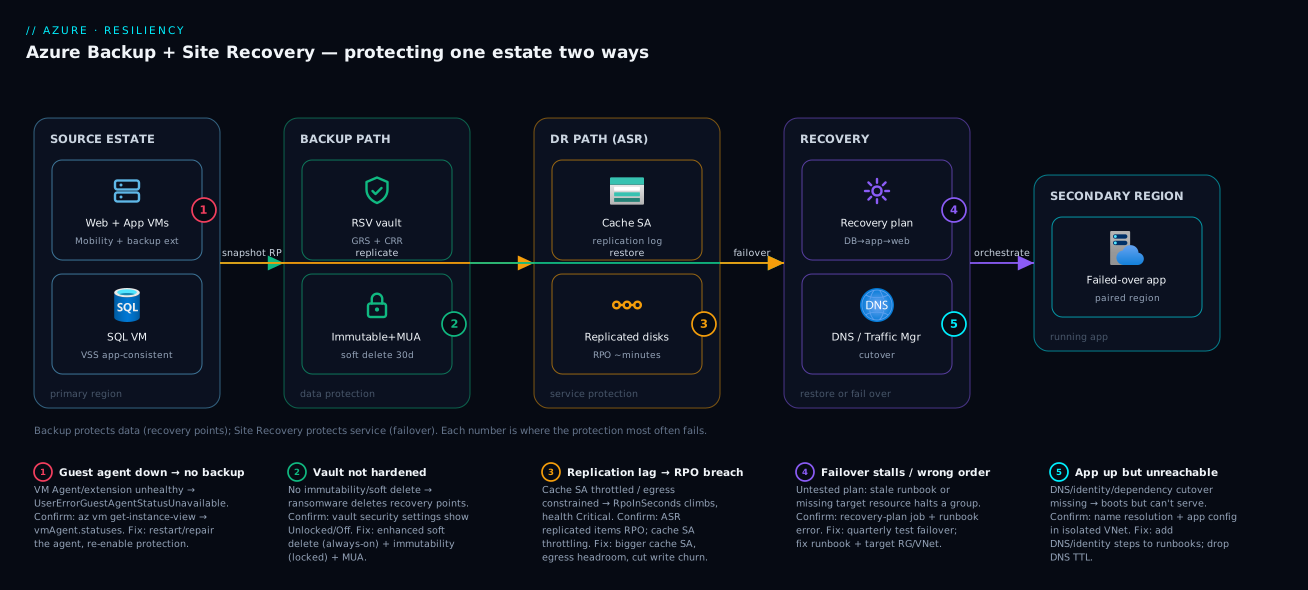
The diagram traces both protection paths from the same source workload, so you can see how Backup and Site Recovery operate in parallel on the very same VMs. Read it left to right. On the far left sits the source estate in the primary region — your web, app and database VMs, each with an in-guest agent (the Backup VM extension and the ASR Mobility extension) doing two jobs at once. The Backup path (top) snapshots each VM and writes application-consistent recovery points into a Recovery Services vault, where the hardening lives: soft delete, immutability (locked) and Multi-User Authorization are the controls that keep those points alive even if an attacker with admin rights tries to delete them. The vault’s GRS redundancy with Cross-Region Restore means a second copy already sits in the paired region, restorable on your schedule. The Site Recovery path (bottom) streams disk writes through a source-region cache storage account into continuously replicated target-region managed disks, building crash- and application-consistent recovery points minutes apart.
Follow the flows to the right and the two paths converge on recovery. From Backup you choose a restore type — file, disk, or whole VM — to undo a deletion or roll back corruption. From Site Recovery you trigger a failover that a recovery plan orchestrates: database group first, app group next, web group last, with runbooks rewriting connection strings and updating DNS / Traffic Manager in between, landing the running application in the secondary region. The numbered badges mark the five places this architecture most often fails — an unhealthy guest agent that silently breaks backups, a vault left without immutability that ransomware erases, replication lag that quietly breaches your RPO, a failover that stalls because the recovery plan was never tested, and the cutover plumbing (DNS, identity) that leaves the app running but unreachable. The legend narrates each as symptom, the command to confirm it, and the fix — the same method as every incident: localise the failure to one hop, confirm with the named tool, apply the fix.
Real-world scenario
Northwind Financial runs a customer loan-origination platform on Azure: a three-tier app — two web VMs, two app VMs, and a clustered SQL Server pair — on Standard D-series instances in Central India, fronted by Application Gateway, serving roughly 3,000 loan applications a day. Compliance requires a 4-hour RTO and a 15-minute RPO for the loan database, plus seven-year retention of monthly backups for audit. The platform team is five engineers; the resilience budget is about ₹85,000/month.
Their original setup looked responsible and wasn’t. Azure Backup ran daily VM backups with 7-day retention into a Recovery Services vault — LRS, in the same region. No Site Recovery. No immutability. They had never run a restore test. On paper: “we have backups.” In reality, three latent failures stacked: 7-day retention couldn’t satisfy a 7-year audit or a corruption noticed late; an LRS vault would die with the region in a regional outage; and without ASR there was no way to meet a 4-hour RTO if Central India went dark.
The wake-up call was a near-miss, not a disaster. A botched schema migration corrupted a loan-status column, and the bad data wasn’t noticed for nine days — by which point the only clean copy had aged out of the 7-day retention. They recovered by manually reconstructing the column from downstream audit logs over a weekend. The post-incident review was blunt: the backups had worked perfectly and were useless, because the retention window was shorter than their detection latency. That single sentence reset the whole programme.
The rebuild had three parts. First, the vault. They recreated it as GRS with Cross-Region Restore, enabled enhanced soft delete (always-on, 30 days), and turned on immutability (locked) plus MUA with the security team holding the Resource Guard — so a compromised platform admin could no longer weaken backups. Second, the policy. They moved to a tiered retention — 30 daily, 12 weekly, 36 monthly, 7 yearly points — and added SQL transaction-log backups every 15 minutes to hit the 15-minute database RPO, with a 5-day instant-restore window for fast recent restores. Third, Site Recovery. They enabled ASR replication of all five VMs to South India, authored a recovery plan sequencing SQL → app → web with runbooks to rewrite the app’s connection string and update Traffic Manager DNS, and — the crucial habit — scheduled a quarterly test failover into an isolated VNet.
The first test failover was humbling and exactly the point: the database came up, but the app tier failed because the runbook still pointed at the old connection string, and the measured end-to-end RTO was 5 hours 40 minutes — over their 4-hour target, almost entirely DNS TTL (set to 1 hour) and manual verification. They fixed the runbook, dropped the DNS TTL to 60 seconds, and automated the smoke test. The next quarterly test measured 2 hours 50 minutes, comfortably inside RTO, with the database at a 12-minute RPO. Eight months later, when Central India had a genuine storage-tier incident, they failed over for real in 2 hours 35 minutes with 9 minutes of data loss — inside both targets, no heroics, because the plan had been rehearsed four times. The lesson on the wall: “A green backup job is a hypothesis. A passed test restore is a capability. Only one of them pays out at 2 a.m.”
The programme as a before/after, because the gaps are the lesson:
| Aspect | Before (looked safe) | After (was safe) | Why it mattered |
|---|---|---|---|
| Vault redundancy | LRS (same region) | GRS + Cross-Region Restore | Survives a region loss |
| Soft delete / immutability | Off | Enhanced (always-on) + locked | Survives ransomware deleting backups |
| Daily retention | 7 days | 30 days | Corruption noticed day 9 still recoverable |
| Long-term retention | None | 12 wk / 36 mo / 7 yr | Meets the 7-year audit |
| Database RPO | 24 h (daily) | 15 min (log backups) | Meets compliance RPO |
| Regional DR | None | ASR replica to South India | Meets the 4-hour RTO |
| Recovery orchestration | None | Recovery plan + runbooks | Repeatable, auditable failover |
| Tested? | Never | Quarterly test failover | Found the broken runbook before the disaster |
| Measured RTO | Unknown (hope) | 2h35m (real incident) | A number, not a prayer |
Advantages and disadvantages
The Backup-plus-Site-Recovery model gives you broad, managed protection without a secondary datacenter to run — but it is not free, and it decays without discipline. Weigh it honestly:
| Advantages (why this model helps you) | Disadvantages (why it bites) |
|---|---|
| Backup gives granular recovery (file → disk → whole VM) for delete and corruption | Backup alone can’t meet a tight RTO for a region loss — restore takes real time |
| ASR gives whole-workload failover to another region in minutes | ASR is the more expensive, more operationally demanding service; over-buying it is common |
| Hardened vault (soft delete, immutability, MUA) defeats ransomware that deletes backups | Defaults are unsafe: LRS, no immutability, no MUA — you must turn the knobs |
| Recovery plans turn a pile of VMs into a sequenced, auditable failover | A recovery plan is a hypothesis until tested; plans decay silently (drift) |
| No secondary infrastructure to run/patch until you actually fail over | You pay continuously for replica storage and protected instances even when idle |
| Long-term retention (up to 99 years) covers compliance archival cheaply per-point | Storage cost accumulates relentlessly with retention; easy to over-retain |
| Cross-region restore lets you recover in the paired region on your schedule | Cross-region restore I/O and egress add cost; only on GRS vaults |
| Application-consistent points (VSS) give clean database restores | App-consistency adds in-guest overhead; misconfigured scripts give only crash-consistent |
The model is right for the overwhelming majority of estates: protect everything with Backup (it is cheap insurance against the most common loss — accidental deletion and corruption), and layer ASR onto the tier-1 subset that cannot tolerate regional downtime. It bites hardest on teams who confuse Backup with DR (and discover at the incident that restoring 50 VMs serially blows their RTO), who deploy with default redundancy and no immutability (and lose backups to ransomware), and who set up DR and never test it (and find the recovery plan broken when it matters). Every disadvantage is manageable — but only if you know it exists, which is the entire point of doing this deliberately.
Hands-on lab
Protect a VM with Azure Backup, harden the vault, take an on-demand backup, and run a file-level restore — all on a single small VM you delete at the end. Run in Cloud Shell (Bash).
Step 1 — Variables and resource group.
RG=rg-backup-lab
LOC=centralindia
VAULT=rsv-lab-$RANDOM
VM=vm-lab-01
az group create -n $RG -l $LOC -o table
Step 2 — Create a small Linux VM to protect.
az vm create -g $RG -n $VM --image Ubuntu2204 --size Standard_B1s \
  --admin-username azureuser --generate-ssh-keys --public-ip-sku Standard -o table
# Drop a file we'll later "lose" and restore
az vm run-command invoke -g $RG -n $VM --command-id RunShellScript \
  --scripts "echo 'critical-loan-data-v1' | sudo tee /home/azureuser/important.txt"
Step 3 — Create a Recovery Services vault and harden it.
az backup vault create -n $VAULT -g $RG -l $LOC -o table

# Enhanced soft delete (always-on, 14 days) — irreversible hardening
az backup vault backup-properties set -n $VAULT -g $RG \
  --soft-delete-feature-state AlwaysON --soft-delete-duration 14

# Confirm the hardening took
az backup vault backup-properties show -n $VAULT -g $RG \
  --query "{soft:softDeleteFeatureState, days:softDeleteRetentionPeriodInDays}" -o table
Expected: soft = AlwaysON, days = 14.
Step 4 — Enable backup on the VM with the default policy.
az backup protection enable-for-vm -v $VAULT -g $RG \
  --vm $(az vm show -g $RG -n $VM --query id -o tsv) \
  --policy-name DefaultPolicy -o table
Step 5 — Trigger an on-demand backup (don’t wait for the schedule).
CONTAINER=$(az backup container list -v $VAULT -g $RG \
  --backup-management-type AzureIaasVM --query "[0].name" -o tsv)
ITEM=$(az backup item list -v $VAULT -g $RG \
  --backup-management-type AzureIaasVM --query "[0].name" -o tsv)

az backup protection backup-now -v $VAULT -g $RG \
  --container-name "$CONTAINER" --item-name "$ITEM" \
  --retain-until $(date -d "+30 days" +%d-%m-%Y) -o table
Watch the job until it completes (this takes several minutes — the first backup copies the full disk):
az backup job list -v $VAULT -g $RG --query "[0].{op:properties.operation, status:properties.status}" -o table
Expected: eventually status = Completed.
Step 6 — List recovery points and start a file-level restore.
RP=$(az backup recoverypoint list -v $VAULT -g $RG \
  --container-name "$CONTAINER" --item-name "$ITEM" \
  --query "[0].name" -o tsv)

# Mount the recovery point as an iSCSI target with a download script (file recovery)
az backup restore files mount-rp -v $VAULT -g $RG \
  --container-name "$CONTAINER" --item-name "$ITEM" --rp-name "$RP" -o json
# The output gives a script + password; running it mounts the recovery point's disks
# so you can copy /home/azureuser/important.txt back. Unmount when done:
az backup restore files unmount-rp -v $VAULT -g $RG \
  --container-name "$CONTAINER" --item-name "$ITEM" --rp-name "$RP"
Validation checklist. You created a hardened vault (enhanced soft delete, always-on), protected a VM, took an on-demand application-consistent recovery point, and exercised file-level restore by mounting the recovery point — without ever needing the original VM intact. That is the whole Backup loop. What each step proves:
| Step | What you did | What it proves | Real-world analogue |
|---|---|---|---|
| 3 | Enhanced soft delete always-on | The vault resists “delete the backups” | Ransomware hardening |
| 4 | Enable backup with a policy | Protection is policy-driven, not ad-hoc | Onboarding every prod VM |
| 5 | On-demand backup | You can force a point before risky change | Pre-deployment safety snapshot |
| 6 | Mount RP for file restore | Granular recovery without a full VM rebuild | The 90% case: “restore one file” |
Cleanup (avoid lingering vault/VM charges). You must stop protection before deleting the resource group, or the vault blocks deletion:
# Stop protection AND delete backup data (lab only — never --delete-backup-data in prod casually)
az backup protection disable -v $VAULT -g $RG \
  --container-name "$CONTAINER" --item-name "$ITEM" \
  --delete-backup-data true --yes

az group delete -n $RG --yes --no-wait
Cost note. A B1s VM is a few rupees per hour and a single recovery point is a tiny storage charge; an hour of this lab is well under ₹50. Deleting the resource group (after disabling protection) stops everything.
Common mistakes & troubleshooting
This is the playbook — the part you bookmark. First as a scannable table you read mid-incident, then the entries that bite hardest with the full confirm-command detail.
| # | Symptom | Root cause | Confirm (exact cmd / portal path) | Fix |
|---|---|---|---|---|
| 1 | VM backup job fails with UserErrorGuestAgentStatusUnavailable |
VM Agent / extension not running or unhealthy | az vm get-instance-view -g RG -n VM --query "instanceView.vmAgent.statuses" |
Restart/repair VM Agent; reinstall the backup extension |
| 2 | Backup job stuck “In Progress” for hours | Snapshot/VSS hang, or another op holding the VM | Backup jobs blade; az backup job list; VM activity log |
Cancel job; check VSS writers; retry; reboot if VSS wedged |
| 3 | Need to restore but the recovery point you want isn’t there | Retention too short — point aged out | az backup recoverypoint list (oldest point’s date) |
Increase retention now; recover from CRR/secondary if any |
| 4 | “Cannot change vault redundancy” when moving LRS→GRS | Vault already holds a protected item | az backup item list shows items |
Decide redundancy at creation; new vault + re-protect |
| 5 | Deleted a backup item by mistake — is it gone? | Soft delete window (if enabled) still holds it | Backup items → “soft-deleted” filter | az backup protection undelete; re-enable protection |
| 6 | ASR replication health “Critical”, RPO climbing | Replication lag — network/throughput/cache full | Site Recovery → Replicated items → RPO; cache SA metrics | Increase cache SA, check egress/throughput, throttle source I/O |
| 7 | Test failover boots but app unreachable | DNS/identity/dependency cutover not done | App in isolated VNet; check name resolution + app config | Add DNS/identity to recovery-plan runbooks; verify in test |
| 8 | Failover stuck / fails at a recovery-plan group | Stale runbook, missing target resource, dependency miss | Recovery plan job; Automation runbook error | Fix runbook; ensure target RG/VNet/NSG exist; re-run group |
| 9 | Restored VM boots but the database needs recovery | Only crash-consistent points captured | Recovery points show consistency type | Enable app-consistent (VSS / scripts); pick app-consistent point |
| 10 | SQL-in-VM backup fails / no log backups | SQL extension/AAD config wrong; perms missing | Vault → Backup items (SQL); SQL ext logs | Re-register SQL, grant db_backupoperator, fix extension |
| 11 | Backup costs ballooning month over month | Over-retention + high churn + instant-restore days | Cost analysis by vault; protected-instance count | Trim retention tiers; review instant-restore days; archive tier |
| 12 | Can’t delete a recovery point / shorten retention | Immutability locked (working as intended) | Vault security settings show “Locked” | Wait for natural expiry; (locked = irreversible by design) |
| 13 | New VMs silently unprotected | No backup-coverage policy/automation | Backup center → protectable items; Azure Policy compliance | Azure Policy to auto-enable backup; Backup center coverage |
| 14 | Failback not possible after primary returns | Never re-protected after failover | ASR → replicated items show no reverse replication | Enable re-protect (reverse replication), then planned failback |
The expanded form, with the full reasoning for the entries that bite hardest:
1. VM backup fails with UserErrorGuestAgentStatusUnavailable (or ExtensionStuckInDeletionOrTransitioning).
Root cause: The Azure VM Agent is stopped, outdated, or the backup (VM snapshot) extension is unhealthy — Backup coordinates the snapshot through the agent, so a dead agent means no application-consistent point.
Confirm:
az vm get-instance-view -g rg-app -n vm-web-01 \
  --query "instanceView.vmAgent.{status:statuses[0].displayStatus, version:vmAgentVersion}" -o table
Fix: Ensure the VM Agent is running and current (restart it inside the guest), then let Backup re-deploy its extension (or remove and re-enable protection). On Linux, confirm the walinuxagent service is up; on Windows, the WindowsAzureGuestAgent service.
3. The recovery point you need isn’t there — retention was too short. Root cause: The classic Northwind failure — corruption noticed after the point aged out of retention. Backup did its job; the retention window was shorter than your detection latency. Confirm:
# Oldest available recovery point — if it's newer than the corruption, you're out of luck
az backup recoverypoint list -v rsv-prod-cin -g rg-resiliency \
  --container-name "$C" --item-name "$I" \
  --query "sort_by([].{time:properties.recoveryPointTime}, &time)[0]" -o table
Fix: There is no fix after the fact except recovering from a cross-region/secondary copy if one exists. The real fix is preventive: set daily retention to ≥ 14–30 days so late-noticed corruption is still recoverable. Treat 7-day retention as dev-only.
6. ASR replication health goes Critical and RPO climbs above target. Root cause: Replication lag — the source is generating writes faster than they replicate, usually because the cache storage account is throttled/full, egress bandwidth is constrained, or a burst of disk churn overwhelmed the pipe. Confirm: Site Recovery → Replicated items shows per-VM RPO and health; the cache storage account’s metrics show throttling. Via KQL over the vault’s ASR logs:
// ASR replication health / RPO breaches in the last 6 hours
ASRReplicationStats
| where TimeGenerated > ago(6h)
| where RpoInSeconds > 900   // your RPO target in seconds (15 min)
| project TimeGenerated, ReplicationProtectedItemName, RpoInSeconds, ReplicationHealth
| order by TimeGenerated desc
Fix: Move the cache to a higher-performance storage account, ensure the source region has egress headroom, reduce a runaway write workload, and verify the replication policy’s retention isn’t oversized for the available throughput. RPO health is a leading indicator — alert on it before a real failover needs a fresh point.
7. Test failover boots the VMs but the application is unreachable. Root cause: The VMs are up in the isolated network, but DNS, identity, and dependency cutover were never part of the plan — the app can’t resolve names, can’t authenticate, or points at a primary-region dependency that isn’t in the test bubble. Confirm: In the isolated VNet, check name resolution from a failed-over VM and inspect the app’s configuration for primary-region hostnames; the application logs will show connection failures to unresolvable or unreachable endpoints. Fix: Add DNS updates, identity/endpoint rewrites, and dependency stand-ins to the recovery-plan runbooks, and verify them in the test failover — which is exactly what test failovers are for. An app that boots but can’t serve is the most common “passed the failover, failed the recovery” trap.
9. The restored VM boots but the database runs crash recovery / lost recent transactions. Root cause: You restored from a crash-consistent recovery point, not an application-consistent one — the DB’s in-flight writes were torn at capture. Confirm: The recovery-point list shows each point’s consistency type; if your latest is crash-consistent, that’s why. Fix: Ensure application-consistent points are being created (VSS on Windows is default for VM backup; on Linux configure pre/post scripts), and when restoring a database, choose an application-consistent recovery point even if it is slightly older than the latest crash-consistent one — clean beats recent for stateful data.
13. New VMs are silently unprotected — coverage drift. Root cause: Backup is enabled per-item, and without automation, new VMs ship without protection. The estate’s coverage silently decays as it grows. Confirm: Backup center → protectable items lists VMs with no backup; Azure Policy compliance shows the gap. Fix: Use an Azure Policy that auto-enables backup on new VMs (built-in policies exist for “Configure backup on VMs”), and review Backup center coverage as a routine. Coverage is a governance problem; solve it with policy, not vigilance.
Best practices
- Protect everything with Backup; reserve ASR for tier-1. Backup is cheap insurance against the most common loss (deletion, corruption); ASR is for the subset that cannot tolerate a regional outage. Don’t over-buy ASR.
- Harden every production vault. Enable enhanced soft delete (always-on), immutability (locked) once confident, and Multi-User Authorization with the Resource Guard held by a separate team. These three defeat ransomware that deletes backups.
- Choose GRS + Cross-Region Restore at vault creation. Redundancy is immutable once the vault holds an item. An LRS vault dies with its region — useless for the regional disaster you’re insuring against.
- Set daily retention to at least 14–30 days. Seven days is a common, painful default that loses you the clean copy when corruption is noticed late. Match retention to your detection latency, not optimism.
- Test your recovery — restores and failovers — on a schedule. A green backup job and an enabled replication are hypotheses. Run a file/VM restore test and a test failover quarterly, then clean up. Untested DR is theatre.
- Sequence failover with recovery plans and runbooks. Encode the tier order (DB → app → web) and automate the cutover (connection strings, DNS) so a real failover is repeatable, not improvised.
- Make recovery points application-consistent for stateful workloads. VSS (Windows) / pre-post scripts (Linux) give transactionally clean restores; crash-consistent alone risks last-seconds data loss and DB recovery time.
- Set RPO/RTO from business impact and prove you meet them. Measure RTO end-to-end in a test failover (including DNS TTL and verification), not from VM boot time. A number from a rehearsal beats a number from a hope.
- Automate backup coverage with Azure Policy. New VMs should be protected by policy, not by someone remembering. Coverage drift is a governance failure.
- Right-size retention to control cost. Trim daily/weekly/monthly tiers to what compliance and recovery actually need; over-retention is the top cause of a ballooning backup bill.
- Tighten DNS TTLs on DR-fronted endpoints. A 1-hour TTL adds an hour to your failover RTO. Drop critical-path TTLs to 30–60 seconds so cutover propagates fast.
- Alert on leading indicators. ASR RPO health, backup job failures, and backup coverage — not just “the restore failed,” which is a lagging signal you find too late.
The alerts worth wiring before the next incident — the leading indicators:
| Alert on | Signal | Threshold (starting point) | Why it’s leading |
|---|---|---|---|
| Backup job failure | Failed backup jobs | ≥ 1 failure | Catches agent/extension breakage before a restore needs it |
| ASR RPO health | RpoInSeconds per item |
> your RPO target | Warns RPO is breaching before a real failover |
| Replication health | ASR item health = Critical | Any item Critical | Lag/throughput problem surfacing early |
| Backup coverage | Unprotected protectable VMs | ≥ 1 | Coverage drift as the estate grows |
| Soft-deleted items | Items in soft-delete state | ≥ 1 unexpected | Possible malicious/accidental deletion in flight |
| Vault security drift | Soft delete / immutability off | Any disabled on prod | Someone weakened the hardening |
Security notes
- Harden the vault as the primary control. Soft delete + immutability + MUA are security controls, not just operational ones — they are what stands between a credential-theft incident and total backup loss. Treat the vault’s data-protection settings as security-critical configuration.
- Least-privilege RBAC on backup operations. Grant Backup Operator (run backups/restores) or Backup Reader rather than Owner; reserve Backup Contributor for those who manage policy. Destructive operations should require MUA approval.
- Multi-User Authorization with a cross-boundary Resource Guard. Hold the Resource Guard in a different subscription/tenant controlled by a security team, so a compromised workload admin cannot both encrypt data and weaken the vault. This is the single most important anti-ransomware control after backup itself.
- Customer-managed keys (CMK) where compliance requires it. Vaults encrypt at rest with platform-managed keys by default; for regulatory control you can use CMK from Key Vault — but then guard the Key Vault as carefully as the backups, and keep the key recoverable (its loss makes backups undecryptable). See Azure Key Vault: Secrets, Keys and Certificates Done Right.
- Private endpoints for vault traffic. Use private endpoints so backup/restore traffic to the vault stays off the public internet, and so a compromised network can’t exfiltrate or tamper with recovery traffic.
- Isolate the recovery environment for ransomware. For the highest tier, recover into a clean, isolated environment (an Isolated Recovery Environment) so you don’t re-introduce the malware during restore — covered in depth in Ransomware Resilience: Immutable Backups, Recovery Vaults, and Isolated Recovery Environments.
- Protect the failed-over identity and secrets path. A failed-over app needs its secrets (Key Vault), identity (managed identity / Entra), and certificates available in the secondary region — replicate or co-locate them, or the app boots but can’t authenticate.
- Audit destructive operations. Send vault diagnostic logs to a Log Analytics workspace and alert on disable-soft-delete, retention-reduction, and delete-backup-item operations — these are the fingerprints of an attacker preparing to delete backups.
The security controls that also improve resilience — secure and recoverable pull together here:
| Control | Mechanism | Secures against | Also improves |
|---|---|---|---|
| Enhanced soft delete (always-on) | Vault data-protection setting | Attacker deleting backups | Accidental-delete recovery |
| Immutability (locked) | Vault security setting | Shortening/deleting points before expiry | Compliance retention guarantees |
| Multi-User Authorization | Resource Guard (separate tenant) | A single compromised admin | Change-control discipline |
| Least-privilege RBAC | Backup Operator/Reader roles | Over-broad backup/restore rights | Cleaner operational ownership |
| Private endpoints | Vault private link | Public exposure of backup traffic | Network reliability/isolation |
| CMK + guarded Key Vault | Customer-managed encryption keys | Regulatory key-control gaps | Defined key lifecycle |
| Diagnostic logging + alerts | Vault logs → Log Analytics | Silent malicious operations | Faster incident detection |
Cost & sizing
The bill has a few dominant drivers, and they interact with every design choice above.
- Protected-instance charge is the per-item monthly fee for each thing you back up (it scales by the size of the protected instance in tiers, e.g. up to 50 GB, 50–500 GB, then per 500 GB). This is often the largest line on small estates — every protected VM/DB carries it regardless of storage used.
- Backup storage is billed per GB of retained recovery-point data, and it is LRS/ZRS/GRS-priced — GRS storage costs more than LRS because it keeps a geo copy. Retention multiplies this: 7 years of monthly points accumulates relentlessly. Archive tier for long-term, rarely-touched points cuts this materially.
- Instant-restore snapshots are charged as managed-disk snapshots in the source region for the instant-restore window (1–5 days). More instant-restore days = faster recent restores = more snapshot cost.
- ASR replication charges a per-protected-instance monthly fee plus the target-region replica storage and cache storage plus egress for the replication traffic. ASR is materially more expensive than Backup per workload — which is why you reserve it for tier-1.
- Cross-region restore / egress adds I/O and egress when you actually restore in the paired region — cheap insurance relative to the outage it covers, but real.
Free and cheap angles worth knowing:
| Item | Cost reality | Cheap lever |
|---|---|---|
| Soft delete (within window) | Free during the soft-delete retention period | Always enable it — no cost to safety |
| First 5 GB / month per region (Azure Files snapshot) | Often within free allowance for small shares | Keep small-share snapshots lean |
| LRS vs GRS storage | GRS ~2× LRS storage price | Use LRS for dev; GRS only where region loss matters |
| Archive tier (LTR) | Far cheaper per-GB than hot vault storage | Tier long-term monthly/yearly points to archive |
| ASR per-instance fee | Charged per replicated VM, continuously | Replicate only tier-1, not the whole estate |
| Instant-restore days | Snapshot storage per day retained | Drop to 1–2 days for non-critical VMs |
A rough monthly picture for a small production estate (~10 VMs, ~2 TB protected, tier-1 subset of 3 VMs on ASR):
| Cost driver | What you pay for | Rough INR / month | What it buys | Watch-out |
|---|---|---|---|---|
| Protected instances (10 VMs) | Per-instance monthly fee | ~₹8,000–14,000 | Backup coverage of the estate | Scales with instance size tiers |
| Backup storage (GRS, ~2 TB retained) | Per-GB retained, geo-priced | ~₹10,000–20,000 | Recoverable history | Grows with retention; archive old tiers |
| Instant-restore snapshots (5 days) | Source-region snapshot storage | ~₹2,000–5,000 | Fast recent restores | Trim days on non-critical VMs |
| ASR (3 tier-1 VMs) | Per-instance fee + replica + cache | ~₹6,000–12,000 | Fast regional failover | Most expensive per-workload — tier-1 only |
| Cross-region restore / egress | Restore I/O + egress when used | Episodic | Self-service paired-region restore | Only on a real restore/failover |
| Log Analytics (vault logs) | Per-GB ingestion | ~₹1,000–3,000 | Alerting + audit on destructive ops | Sample/route verbosely-logged vaults |
The cost discipline is the same as the resilience discipline: right-size retention (don’t keep 7 years of daily points), tier long-term data to archive, reserve ASR for tier-1, and measure — Northwind ended up cheaper after redesign in some line items because they stopped over-retaining daily points and only replicated the three VMs that actually needed it. For estate-wide cost control, pair this with Azure FinOps and Cost Management: Controlling Cloud Spend at Scale.
Interview & exam questions
1. What is the fundamental difference between Azure Backup and Azure Site Recovery? Azure Backup protects data — it takes point-in-time recovery points so you can restore a file, disk, database or whole VM after deletion or corruption. Azure Site Recovery protects availability — it continuously replicates a VM to another region so you can fail the workload over during a regional outage. Backup answers “can I get my data back?”; ASR answers “can I run my app elsewhere?” Most production workloads need both because they cover different failure modes.
2. A team backs up VMs daily but has no DR. A region fails. Why can’t Backup meet a 1-hour RTO? Restoring from Backup means copying recovery-point data back and rebuilding VMs, which takes real time proportional to data size — restoring many multi-hundred-GB VMs serially blows a 1-hour RTO. Backup is optimised for granular data recovery, not fast whole-region failover. The tool for a tight regional RTO is Site Recovery, which boots an already-replicated replica in minutes.
3. How does Azure Backup defend against ransomware that deletes the backups? Three layered vault controls. Soft delete retains deleted recovery points for a window (14–180 days) so a malicious delete is recoverable; enhanced soft delete (always-on) makes that irreversible so an attacker can’t disable it first; immutability (locked) makes recovery points un-deletable and un-shortenable before expiry; and Multi-User Authorization requires a second approver (via a Resource Guard in a separate tenant) for destructive operations. Together they ensure a compromised admin cannot erase the backups.
4. What’s the difference between crash-consistent and application-consistent recovery points, and when does it matter? A crash-consistent point captures disks at an instant as if the power were pulled — it boots, but in-flight writes may be torn and a database may run crash recovery and lose the last transactions. An application-consistent point uses VSS (Windows) or pre/post scripts (Linux) to quiesce the application first, producing a transactionally clean moment. It matters for databases and stateful apps: always restore them from an application-consistent point, even if it’s slightly older than the latest crash-consistent one.
5. Why is vault redundancy a decision you must make at creation, and what should production use? Vault storage redundancy (LRS/ZRS/GRS) is immutable once the vault holds a protected item — you can’t change LRS→GRS without deleting all items. An LRS vault keeps all copies in one region, so a regional disaster destroys the backups with the data. Production backups should use GRS with Cross-Region Restore, which keeps a geo copy and lets you restore in the paired region on your schedule.
6. What is RPO vs RTO, and what governs each for Backup and ASR? RPO (Recovery Point Objective) is the maximum acceptable data loss in time — governed by how often you create recovery points (backup frequency for Backup; continuous replication for ASR, often minutes). RTO (Recovery Time Objective) is the maximum acceptable time to restore service — governed by how fast you restore/fail over and re-plumb (restore time for Backup; replica boot + DNS/identity cutover for ASR). Both should be set from business impact and proven in a test, not assumed.
7. Why must you test failovers, and what does a test failover do? A recovery plan is a hypothesis until exercised — DR plans decay (IPs change, scripts rot, new VMs aren’t added). A test failover boots the replicas in an isolated network with no impact to production or replication, so you can verify the app actually comes up, measure end-to-end RTO, and produce audit evidence — then clean it up. Skipping it is how “we have DR” becomes an 18-hour outage.
8. A recovery point you need to restore from has aged out of retention. What went wrong and how do you prevent it? The retention window was shorter than the detection latency — corruption was noticed after the clean point expired (e.g. 7-day retention, corruption found on day 9). There’s no fix after the fact except a cross-region/secondary copy if one exists. Prevent it by setting daily retention to at least 14–30 days so late-noticed corruption is still recoverable; treat 7-day retention as dev-only.
9. What does a recovery plan add over just replicating VMs with ASR? A pile of replicated VMs isn’t a recoverable application — tiers must come up in order and the cutover needs automation. A recovery plan sequences VMs into groups (DB → app → web) with pre/post actions (manual gates or Azure Automation runbooks) for things like rewriting connection strings and updating DNS, turning failover into a single repeatable, auditable operation instead of an improvisation under stress.
10. Your ASR replication health goes Critical and RPO climbs. What’s happening and what do you check? Replication lag — the source is generating writes faster than they replicate, usually due to a throttled/full cache storage account, constrained egress, or a churn burst. Check Site Recovery → Replicated items for per-VM RPO/health and the cache storage account’s throttling metrics. Fix by upgrading the cache storage, ensuring egress headroom, and reducing runaway write workloads. RPO health is a leading indicator — alert on it.
11. What’s the difference between a Recovery Services vault and a Backup vault? A Recovery Services vault is the long-standing vault for VM/file/SQL/SAP backup and Azure Site Recovery. A Backup vault is the newer model for cloud-native workloads the Recovery Services vault never covered — Azure Blobs, managed disks, PostgreSQL flexible server, AKS — with native immutability and MUA. You can’t migrate items between them, and ASR/VMs only live in the Recovery Services vault, so pick correctly before creating anything.
12. How do you ensure newly created VMs are actually protected? Backup is enabled per-item, so without automation new VMs ship unprotected and coverage drifts as the estate grows. Use an Azure Policy (built-in “Configure backup on VMs”) to auto-enable backup on new VMs, and review Backup center coverage routinely. Coverage is a governance problem solved with policy, not vigilance.
These map primarily to AZ-104 (Administrator) — implement and manage backup and recovery (Recovery Services vaults, backup policies, ASR) — and AZ-305 (Solutions Architect Expert) — design business-continuity solutions (RPO/RTO, backup vs DR, recovery objectives). The ransomware/immutability angle touches SC-100/AZ-500. A compact cert-mapping for revision:
| Question theme | Primary cert | Exam objective area |
|---|---|---|
| Backup vs ASR, RPO/RTO | AZ-305 | Design business-continuity solutions |
| Recovery Services vault, policies, retention | AZ-104 | Implement and manage backup |
| ASR replication, recovery plans, failover | AZ-104 / AZ-305 | Implement DR; design BC |
| Soft delete, immutability, MUA | AZ-500 / SC-100 | Secure backup; ransomware resilience |
| Crash- vs app-consistent, restore types | AZ-104 | Backup and recovery operations |
| Vault redundancy (LRS/ZRS/GRS) | AZ-305 | Design for resiliency / data redundancy |
Quick check
- A user accidentally deletes a critical file; you need it back from three weeks ago. Which service, and which restore type?
- Central India region goes fully offline and you must serve customers within 30 minutes. Which service, and why does daily Backup alone fail here?
- True or false: you can change a vault’s redundancy from LRS to GRS after you’ve been backing up 50 VMs into it for a year.
- A ransomware operator gets admin and deletes your backup items. Name the two vault controls that would still save you.
- Your test failover boots all VMs successfully but the application can’t serve traffic. What’s the most likely missing piece, and where do you fix it?
Answers
- Azure Backup, file-level restore — mount the recovery point from three weeks ago and copy the file back. This requires daily retention of at least 21 days; ASR keeps only hours of recovery points and is whole-VM only, so it can’t do this.
- Azure Site Recovery — it keeps a continuously replicated, bootable replica in a paired region you can fail over to in minutes. Daily Backup fails the 30-minute RTO because restoring means copying recovery-point data back and rebuilding VMs, which takes far longer than booting an already-replicated replica.
- False. Vault redundancy is immutable once the vault holds a protected item. To go LRS→GRS you’d have to stop protection and delete all backup data first (or create a new GRS vault and re-protect everything). Decide redundancy at creation.
- Soft delete (ideally enhanced/always-on) retains the deleted recovery points for a recoverable window even after deletion; immutability (locked) prevents the points being deleted or their retention shortened at all. Multi-User Authorization further blocks a single compromised admin from disabling either. Any of these defeats the “delete the backups” step.
- DNS / identity / dependency cutover wasn’t part of the plan — the VMs are up but can’t resolve names, authenticate, or reach a primary-region dependency. Fix it by adding those cutover steps (DNS updates, connection-string/identity rewrites) to the recovery-plan runbooks and verifying them in the test failover — which is exactly what test failovers exist to catch.
Glossary
- Azure Backup — the service that takes point-in-time recovery points of VMs, files, SQL, SAP HANA, Azure Files and blobs into a vault, for restore after deletion or corruption.
- Azure Site Recovery (ASR) — the service that continuously replicates VMs to another region and orchestrates failover for regional disaster recovery.
- Recovery Services vault — the classic vault for VM/file/SQL/SAP backup and the control plane for ASR; holds RBAC, redundancy and soft-delete settings.
- Backup vault — the newer vault for cloud-native workloads (blobs, managed disks, PostgreSQL flexible server, AKS) with native immutability and MUA; does not do VMs or ASR.
- Recovery point — a point-in-time copy you can restore to; the unit of “how far back can I go.”
- Backup policy — the schedule + tiered retention (daily/weekly/monthly/yearly) attached to protected items, defining RPO and history.
- Soft delete — retention of deleted backup data for a window (14–180 days) so deletion is recoverable; enhanced/always-on makes it irreversible.
- Immutability — recovery points cannot be deleted or have retention shortened before expiry; locked immutability is irreversible.
- Multi-User Authorization (MUA) — destructive vault operations require a second approver via a Resource Guard, typically in a separate tenant.
- RPO (Recovery Point Objective) — the maximum acceptable data loss, in time; set by backup frequency / replication cadence.
- RTO (Recovery Time Objective) — the maximum acceptable time to restore service; set by restore/failover speed plus cutover.
- Crash-consistent — a recovery point captured at an instant with no quiesce (as if power was pulled); boots but may lose last writes.
- Application-consistent — a recovery point taken after quiescing the app (VSS / scripts) for a transactionally clean restore.
- Instant restore — fast restore from snapshots kept in the source region for a 1–5 day window, before data is only in vault storage.
- Replication — ASR’s continuous copy of disk writes to a target region via a cache storage account, building recovery points.
- Recovery plan — an ordered set of VM groups with pre/post scripts/runbooks that orchestrate a sequenced, repeatable failover.
- Test failover — booting replicas in an isolated network with no production impact; the rehearsal that proves DR works.
- Failback / re-protect — reversing replication and returning the workload to the primary region after it recovers.
- Cross-Region Restore (CRR) — a GRS-vault capability to restore in the paired region on demand, without waiting for a Microsoft-declared failover.
- GRS / ZRS / LRS — geo-, zone-, and locally-redundant storage options for the vault; only GRS survives a regional loss.
Next steps
You can now protect data with Backup, defend it against ransomware with a hardened vault, and stand up regional DR with Site Recovery and a tested recovery plan. Build outward:
- Next: High Availability vs Disaster Recovery: RTO and RPO Explained — set the objectives that drive every choice in this article before you size anything.
- Related: Ransomware Resilience: Immutable Backups, Recovery Vaults, and Isolated Recovery Environments — go deep on the immutable-vault and isolated-recovery patterns that turn backups into a genuine ransomware defence.
- Related: Azure Regions and Availability Zones: Designing for Resilience — the region/zone substrate that backup redundancy and ASR replication depend on.
- Related: Azure Multi-Region Active-Active Architecture: Designing for Zero-Downtime — when minutes of failover are too many and you need active-active instead of (or alongside) ASR.
- Related: Azure Storage Account Fundamentals: Blobs, Files, Queues and Tables — the LRS/ZRS/GRS redundancy model that also governs your vault, plus blob backup.
- Related: Azure FinOps and Cost Management: Controlling Cloud Spend at Scale — keep retention and ASR spend honest as the estate grows.