In a nutshell
Imagine you look after forty servers and you need every one of them to do the same small thing right now — confirm it’s alive, restart a web server, install a package, or drop a file into place. You could log into each box and type the commands forty times. Or you could say it once, to all forty at once, and let Ansible fan it out for you. That one-liner is an ad-hoc command, and it is the fastest way to get real work done with Ansible — no files, no ceremony, just ansible <who> -m <what> -a "<details>".
Think of the ansible command as a universal remote for your whole fleet. The pattern (web, all, db:&prod) is which devices you’re pointing the remote at. The module (ping, copy, service, package) is the single button you press — each module is a tiny specialist that knows how to do exactly one job well and, crucially, tells you honestly whether it actually had to change anything. And ansible-doc is the instruction manual for every button, built right into the remote so it always matches the version in your hand.
The magic word threaded through all of it is idempotency: a good module makes only the change that’s needed and, run a second time, quietly reports “nothing to do.” That is what makes it safe to point this remote at production and press the button. Everything you learn here — the CLI shape, the module model, privilege escalation with -b, dry-runs with -C, reading the docs with ansible-doc — is the exact same vocabulary you’ll use in a playbook next lesson. A playbook is just these calls, written down in order instead of typed one at a time.
Level: Beginner (Foundation) · Time: ~35 min · You’ll need: a control node with ansible-core and at least one reachable host (or just localhost).
Before you ever write a playbook, you can already do a surprising amount of useful work with Ansible from a single line. Need to know whether forty servers are reachable? ansible all -m ansible.builtin.ping. Need to restart nginx on the web tier, right now, before lunch? ansible web -b -m ansible.builtin.service -a "name=nginx state=restarted". These are ad-hoc commands — one-off invocations of a single Ansible module against an inventory pattern, run straight from the shell with no YAML file in sight. They are Ansible’s equivalent of typing a command at a prompt versus writing a shell script.
Ad-hoc commands matter for two reasons. First, they are the quickest way to perform a one-time action across many machines — a reboot, a package install, gathering a fact, copying a file — without the ceremony of authoring, naming and version-controlling a playbook. Second, and more importantly for a beginner, they teach you the module model that underpins absolutely everything in Ansible. A playbook is, at heart, a structured list of the very same module calls you make ad-hoc. Master the CLI, the module options, fully-qualified collection names (FQCN) and ansible-doc, and the leap to playbooks in the next lesson becomes small. This lesson is exhaustive on exactly those four things.
Learning objectives
By the end of this lesson you will be able to:
- Construct any ad-hoc command from memory:
ansible <pattern> -m <module> -a "<args>"plus every common flag (-b,-K,-f,-i,-e,-u,--limit,-C,--diff,-v). - Explain the module execution model — how Ansible ships a module to the target, runs it with Python, captures structured JSON, and reports
ok/changed/failed. - Choose correctly between
command,shellandraw, and explain whycommandis the default and the safest of the three. - Use fully-qualified collection names (FQCN like
ansible.builtin.copy) and explain how Ansible resolves a short module name to a real module. - Reach for the right module from the essential-modules table for everyday tasks (ping, copy, file, package, service, user, get_url, uri, debug, setup, and more).
- Read module documentation offline with
ansible-doc(-l,-s,-F, snippet/example output) and list installed collections withansible-galaxy collection list. - Read an ad-hoc command’s JSON return values and raise verbosity with
-v/-vvvvwhen something misbehaves.
Prerequisites & where this fits
You should have a working control node with ansible-core installed and at least one managed node you can reach over SSH — exactly what the previous lessons set up. You need an inventory (even just the implicit localhost, or a small INI/YAML file) and the ability to resolve patterns like web, all or db:&staging, which were covered in Ansible Inventory, In Depth. This is lesson A4 in the Ansible Zero-to-Hero course, the last of the Foundation “core CLI” lessons; it sits directly before your first playbook, which reuses everything here in YAML form. Throughout, we use current ansible-core 2.17+ (Ansible 10+, 2026) and write FQCN everywhere, because that is what the exam and modern production both expect.
Core concepts
A handful of mental models make ad-hoc commands click. They are also exactly the concepts an interviewer probes when they ask “what actually happens when you run an Ansible module?”.
An ad-hoc command runs one module, once, against a pattern. The shape never changes: ansible <pattern> -m <module> -a "<arguments>". The <pattern> selects hosts from your inventory; -m names the module (the unit of work); -a passes the module’s arguments. Everything else on the line is a flag that tunes how the run happens (privilege, parallelism, which inventory, verbosity).
A module is a small, self-contained program that does one job idempotently and returns JSON. ansible.builtin.copy copies a file; ansible.builtin.service manages a service; ansible.builtin.user manages a user. Crucially a module is declarative: you tell it the desired state (state=present, mode=0644), and it makes only the changes needed to reach that state. Run it again and a well-written module reports ok (nothing to do) rather than blindly redoing the work — this is idempotency, the property that makes Ansible safe to re-run. Every module returns a structured JSON result that Ansible parses to decide the outcome colour: green ok, yellow changed, red failed (and unreachable if it could not even connect).
Modules run on the target, not on the control node. When you fire an ad-hoc command, Ansible does not run the module on your laptop and SSH the side effects across. Instead, for most modules, it: (1) connects to the managed node over the configured transport (SSH for Linux, WinRM/PSRP for Windows); (2) copies the module code to a temporary directory on the target; (3) executes it there with the target’s Python interpreter; (4) reads back the JSON the module prints on stdout; (5) deletes the temporary files. That is why the targets need Python (and why raw exists — see below — for the chicken-and-egg case where Python is not yet installed).
FQCN — fully-qualified collection name — is how a module is addressed. Modern Ansible ships content in collections: namespaced bundles like ansible.builtin, ansible.posix, community.general, amazon.aws. A module’s real name is namespace.collection.module, e.g. ansible.builtin.copy. The short name copy still works because of a search/redirect mechanism, but FQCN is unambiguous, future-proof and exam-mandated.
ansible-doc is the manual, offline. Every module documents itself — its options, defaults, return values and runnable examples — and ansible-doc prints exactly the docs for the version you have installed. It is the single most useful command for “what arguments does this module take, again?”.
The terms you will meet, in one place:
| Term | What it means |
|---|---|
| Ad-hoc command | A single-module action run from the CLI, no playbook |
| Module | A self-contained unit of work; idempotent; returns JSON; runs on the target |
| Plugin | Code that extends Ansible itself (connection, lookup, filter, callback…) — distinct from modules |
| Pattern | The host selector (all, web, db:&prod) applied to inventory |
| FQCN | namespace.collection.module, e.g. ansible.builtin.service |
| Collection | A versioned, namespaced bundle of modules/roles/plugins |
ansible.builtin |
The collection bundled inside ansible-core itself |
| Return values | The JSON keys a module emits (changed, rc, stdout, msg, …) |
| Idempotency | Re-running converges to the same state; reports ok once converged |
The ad-hoc command, in full
The canonical form is short but every position carries meaning:
ansible <pattern> -m <module> -a "<module arguments>" [connection/behaviour flags]
A worked, fully-qualified example with the common flags spelled out:
ansible web -i prod.ini -m ansible.builtin.service \
  -a "name=nginx state=restarted" -b -K -f 10 -u deploy -v
Read left to right: target the web group, from inventory prod.ini, run module ansible.builtin.service with arguments name=nginx state=restarted, become root (-b) prompting for the privilege-escalation password (-K), run up to 10 hosts in parallel (-f 10), connect as user deploy (-u), and show one level of verbosity (-v).
The pattern (positional, required)
The first non-flag word is the pattern — which hosts to act on, drawn from your inventory and resolved exactly as in lesson A3. all (or *) targets everything; a group name like web targets that group; you can union (web:db), intersect (web:&staging), and exclude (web:!web03). A single hostname or IP works too. If a pattern matches nothing, Ansible prints [WARNING]: No hosts matched and exits successfully (zero hosts is not an error) — a common first-run surprise.
-m / --module-name — which module to run
-m names the module. If you omit -m, Ansible runs the default module, which is ansible.builtin.command (this default is configurable via module_name in ansible.cfg, but almost nobody changes it). So ansible all -a "uptime" is shorthand for ansible all -m ansible.builtin.command -a "uptime". Always pass FQCN to -m in anything you keep.
-a / --args — the module’s arguments
-a carries the arguments for that module, and there are two accepted syntaxes:
key=valueform (the usual one):-a "name=nginx state=restarted enabled=true". Space-separated pairs; quote the whole thing so the shell does not split it. This is what almost every module expects.- JSON form:
-a '{"name":"nginx","state":"restarted"}'. Useful when a value itself contains spaces or you need a list/dict, e.g.-a '{"name":["nginx","git"],"state":"present"}'. - Free-form (only
command/shell/rawandscript): the args are the command line —-a "systemctl status nginx". For these modules you can still mix in specialkey=valueparameters such aschdir=,creates=,removes=before the free-form string when usingcommand/shell.
A subtle but vital rule: for key=value arguments, a value with a space must be wrapped so Ansible (not just the shell) keeps it together, e.g. -a 'line="Hello there"' or use the JSON form.
The complete common-flags table
These are the flags you will actually use. They apply to ad-hoc ansible (and most also to ansible-playbook).
| Flag | Long form | What it does | Notes / gotcha |
|---|---|---|---|
-m |
--module-name |
Module to run | Defaults to ansible.builtin.command if omitted |
-a |
--args |
Module arguments | key=value, JSON, or free-form (command/shell/raw) |
-i |
--inventory |
Inventory source (file, dir, or comma list) | Repeatable; a trailing comma makes a one-host list, e.g. -i host, |
-b |
--become |
Escalate privilege (run as root by default) | The modern replacement for the old sudo flag |
-K |
--ask-become-pass |
Prompt for the become (sudo) password | Needed when sudo is not passwordless |
--become-user |
— | Become a specific user, not root | e.g. --become-user=postgres |
--become-method |
— | sudo / su / doas / pbrun / runas… | Default is sudo |
-f |
--forks |
Parallelism: how many hosts at once | Default 5 (set by forks in ansible.cfg) |
-u |
--user |
Remote SSH user | Defaults to remote_user/your local user |
-k |
--ask-pass |
Prompt for the SSH connection password | For password (not key) SSH; needs sshpass |
--private-key |
--key-file |
SSH private key to authenticate with | Overrides private_key_file in config |
-e |
--extra-vars |
Set extra variables | -e "k=v", -e '{"k":"v"}', or -e @vars.yml |
-l |
--limit |
Further restrict the pattern at runtime | --limit web03 or --limit @retry.file |
-C |
--check |
Dry run — report what would change | Module must support check mode |
-D |
--diff |
Show line-level diffs of file changes | Great with copy/template/lineinfile |
-o |
--one-line |
Condense each host’s result to one line | Handy for scanning many hosts |
-t |
--tree |
Save per-host JSON output to a directory | -t /tmp/out writes one file per host |
-B / -P |
--background / --poll |
Run asynchronously / poll interval | For long tasks: -B 3600 -P 0 = fire and forget |
-v … -vvvvv |
--verbose |
Increase verbosity (more v = more detail) |
-vvv shows the connection; -vvvv adds connection debug |
-o/--become-* |
— | — | See become rows above |
A few flags deserve a closer look.
-b and become. By default Ansible connects as your SSH user and runs the module as that user. -b (become) escalates to root after connecting, using sudo by default. If sudo needs a password, add -K to be prompted. To become a non-root account use --become-user, e.g. run a postgres admin command: ansible db -b --become-user=postgres -m ansible.builtin.command -a "psql -c 'SELECT 1'". The full mechanics of become (methods, per-task escalation) are a topic in the playbooks lessons; for ad-hoc, -b/-K/--become-user are all you need.
-f / --forks controls blast radius and speed. With the default of 5, Ansible operates on five hosts simultaneously, then the next five, and so on. Raise it (-f 50) to go faster across a large fleet, or lower it (-f 1) to roll a change one host at a time and watch each result. The default lives in forks in ansible.cfg.
-i accepts more than a file. It can be a path to an INI/YAML inventory, a directory of inventory files (merged), or an inline comma-separated host list. The trailing-comma trick is the fastest way to target a single ad-hoc host with no inventory file at all: ansible -i 192.168.1.50, all -m ansible.builtin.ping.
-C/--check and -D/--diff are your safety net. --check performs a dry run: each module reports what it would do without making changes (if the module supports check mode — most core modules do; command/shell generally skip in check mode). Pair it with --diff to see the exact lines a copy/template/lineinfile would alter. Running ansible web -b -m ansible.builtin.copy -a "src=motd dest=/etc/motd" -C -D shows the diff and changes nothing — exactly what you want before touching production.
-e/--extra-vars injects variables, even ad-hoc. These are the highest-precedence variables in Ansible. You will use them constantly once templating arrives; ad-hoc, they let you parametrise a module argument: ansible all -m ansible.builtin.debug -a "msg={{ greeting }}" -e "greeting=hello".
When ad-hoc, when a playbook?
Ad-hoc is a scalpel; a playbook is a documented procedure. Use the right one.
| Use ad-hoc when… | Use a playbook when… |
|---|---|
| The action is a true one-off (reboot, ad-hoc check, urgent restart) | The procedure will be repeated or scheduled |
| You need an answer now and won’t keep the command | The steps must be version-controlled and reviewed |
| It’s a single module call | It’s multiple ordered steps, with handlers/conditionals |
| You’re exploring or debugging | You need idempotent, declarative, repeatable infra |
| Gathering a fact or copying one file | Configuring a service end-to-end across environments |
A good rule: if you would feel the need to write the command into a runbook so a colleague can repeat it, it should be a playbook. If you would throw the command away after running it once, ad-hoc is perfect. Ad-hoc commands are also superb for learning a module before you commit it to a play — run it ad-hoc, get the arguments right, then lift it into YAML.
The module model: how a module actually runs
Understanding the lifecycle of a single module call demystifies almost every error you will hit.
- Resolve the module name. Ansible turns
service(oransible.builtin.service) into a concrete module file, searching collections (more on FQCN below). - Build the payload. It packages the module code plus your arguments into a self-contained Python payload.
- Connect. Using the connection plugin (
sshby default for Linux), it opens a session to each targeted host, honouring-u, keys,-band so on. - Transfer & execute. It copies the payload to a temp dir under the remote user’s home (
~/.ansible/tmp/…) and runs it with the remote Python interpreter. Withpipeliningenabled inansible.cfg, it can stream the module over the existing SSH connection without writing a temp file, which is faster. - Capture JSON. The module prints a single JSON document to stdout describing the result. Ansible parses it.
- Decide the outcome. From the JSON it determines
okvschangedvsfailed, and surfacesunreachableif the connection itself failed. - Clean up. It removes the temp files and moves to the next batch (governed by
-f).
Two consequences worth internalising. First, targets need a working Python for nearly all modules — that is the agentless trade-off (no daemon, but you do need Python and SSH). Second, because the module reports change state itself, the quality of idempotency depends on the module: real modules like copy/service/package report changed honestly; the command/shell modules cannot know whether they changed anything and so report changed every time unless you tell them otherwise.
Reading return values (and turning up the volume with -v)
Every module returns JSON. The keys you will see most often:
| Return key | Meaning |
|---|---|
changed |
true if the module altered the system, else false |
failed |
true if the task failed |
msg |
A human-readable message (often the error) |
rc |
Return/exit code (command/shell/raw and many others) |
stdout / stderr |
Captured output (command/shell/raw/script) |
stdout_lines |
stdout pre-split into a list of lines |
results |
A list of per-item results (present when a module loops) |
ansible_facts |
Gathered facts (the setup module, and modules that register facts) |
path / dest / mode / uid … |
File metadata from file-touching modules |
invocation |
Echo of the module name and the arguments it ran with |
Normally Ansible shows a terse one-line summary per host. Add -v to see the full returned JSON; -vv adds more task detail; -vvv shows the SSH command and connection used (invaluable for “why can’t it connect?”); -vvvv adds connection-plugin debugging. When an ad-hoc command does something baffling, -vvv is almost always the next move.
command vs shell vs raw vs script — choose deliberately
These four “run a command” modules look interchangeable and are not. Knowing the difference is a classic interview question and a real source of production bugs.
| Module | Runs through a shell? | Idempotent? | Needs Python on target? | Use it when… | Avoid it when… |
|---|---|---|---|---|---|
ansible.builtin.command |
No (executes directly) | No (always changed) |
Yes | Default & safest: run a binary with simple args, no shell features | You need pipes, redirection, globbing, $VARS, && |
ansible.builtin.shell |
Yes (/bin/sh by default) |
No (always changed) |
Yes | You genuinely need shell features: ` | , >, *, $HOME, &&` |
ansible.builtin.raw |
Yes, but no module shipped | No | No | Bootstrapping a host that lacks Python; low-level SSH | Anything else — it bypasses Ansible’s safety/JSON entirely |
ansible.builtin.script |
Transfers & runs a local script on the target | No | Depends on the script | Run a script from the control node on remote hosts | A module or a templated file would be cleaner |
Why command is the default and the safest. command does not run your string through a shell. It splits the arguments and execs the binary directly. That means there is no shell injection, no surprise globbing, no $VARIABLE expansion, no ;/&&/| chaining. If you write ansible all -m ansible.builtin.command -a "echo $HOME", the $HOME is not expanded on the target — command has no shell to expand it. This restriction is a feature: it makes the behaviour predictable and safe. Because of that safety, command is the module Ansible runs when you omit -m entirely.
shell is command with a shell — and a shell’s risks. Reach for ansible.builtin.shell only when you actually need a shell feature: a pipe (ps aux | grep nginx), a redirect (> /tmp/out), a glob (rm /tmp/*.log), an environment variable (echo $HOME), or operators (a && b). Everything you gain comes with the shell’s hazards: injection if you interpolate untrusted variables, and quoting headaches. The rule of thumb: prefer command; escalate to shell only for an explicit shell feature.
raw is the bootstrap escape hatch. ansible.builtin.raw sends your command over SSH with no module transferred and no Python required. Its canonical use is the chicken-and-egg problem: a fresh host has no Python, but every module needs Python — so you use raw to install it: ansible new -b -m ansible.builtin.raw -a "apt-get install -y python3". Because raw bypasses Ansible’s module machinery, it returns almost no structured data and offers no idempotency or check-mode — use it only for bootstrapping or genuinely low-level SSH.
script runs a control-node script remotely. ansible.builtin.script copies a script that lives on your control node to each target and executes it there, then removes it — handy for a complex one-off where writing a module is overkill: ansible web -m ansible.builtin.script -a "/local/path/healthcheck.sh --fast". Like the others it is not idempotent, though it accepts creates=/removes= guards.
Taming non-idempotency (preview). All four are non-idempotent by default, reporting changed on every run. In playbooks you control this with changed_when: (define what counts as a change), creates=/removes= (skip if a file already exists/absent), and failed_when: (define failure). For example ansible.builtin.command with creates=/etc/foo.conf becomes a no-op once that file exists. You will see these patterns in the error-handling lesson; for now, just know why command/shell always look yellow.
FQCN and ansible.builtin: how module names resolve
Modern Ansible is collections all the way down. ansible-core ships exactly one collection in the box — ansible.builtin — containing the foundational modules (copy, file, service, command, setup, ping, and so on). Everything else (cloud modules, network modules, niche tools) lives in other collections you install separately, such as ansible.posix, community.general, community.docker, amazon.aws, azure.azcollection, kubernetes.core.
A module’s fully-qualified collection name has three dot-separated parts:
namespace . collection . module
   │           │            └── the module, e.g. copy
   │           └── the collection, e.g. builtin / posix / general
   └── the namespace, e.g. ansible / community / amazon
So ansible.builtin.copy, community.general.timezone, amazon.aws.ec2_instance.
Short names still resolve — here’s the rule. You can write -m copy, and Ansible will find ansible.builtin.copy. Resolution works via the collections search path: Ansible looks for the short name across the configured collections (the collections keyword in a play, then the ansible.builtin/ansible.legacy defaults), and ansible.builtin is searched implicitly, so bundled short names resolve. There is also a redirect mechanism: many modules that used to live in ansible-core were moved out to collections, and stubs redirect the old short name to the new FQCN so legacy content keeps working.
Why you should always write FQCN anyway:
| Reason | Explanation |
|---|---|
| Unambiguous | Two collections can define a module of the same short name; FQCN removes all doubt |
| Future-proof | Short-name redirects are a compatibility courtesy, not a guarantee |
| Exam requirement | RHCE EX294 and modern style guides expect FQCN |
| Readable | A reviewer instantly sees which collection a task depends on |
| Lint-clean | ansible-lint’s production profile flags non-FQCN module usage |
ansible.legacy is a special pseudo-collection that behaves like the old pre-collections search (it includes ansible.builtin plus any modules you’ve dropped in a local library/ directory). You rarely need it; mention it only because ansible-doc and error messages sometimes reference it.
Seeing which collections (and modules) you have
# List every installed collection and its version
ansible-galaxy collection list

# Where collections are searched (and installed)
ansible-config dump | grep -i collections_path

# Install a new collection (adds its modules to your toolbox)
ansible-galaxy collection install community.general
ansible-galaxy collection list is the answer to “do I even have the module for that?” — if amazon.aws is not listed, amazon.aws.ec2_instance will not resolve until you install it.
The essential modules table
These are the modules you will use on day one. Every one is in ansible.builtin (so no installs needed) unless noted. The “key options” column lists the arguments you reach for most; ansible-doc (next section) gives the exhaustive list for each.
| FQCN | Purpose | Key options | Idempotent? |
|---|---|---|---|
ansible.builtin.ping |
Connectivity + Python check (returns pong; not ICMP) |
(none) | Yes (read-only) |
ansible.builtin.command |
Run a binary directly, no shell | cmd, chdir, creates, removes, argv |
No (use creates/changed_when) |
ansible.builtin.shell |
Run a command through a shell | cmd, chdir, creates, removes, executable |
No |
ansible.builtin.raw |
Raw SSH, no Python/module (bootstrap) | free-form, executable |
No |
ansible.builtin.copy |
Copy a file (or inline content) to targets | src, content, dest, owner, group, mode, backup, validate |
Yes (hashes content) |
ansible.builtin.fetch |
Pull a file from targets to the control node | src, dest, flat |
Yes |
ansible.builtin.file |
Manage a file/dir/symlink’s state & attributes | path, state (file/directory/link/touch/absent), mode, owner, group, recurse |
Yes |
ansible.builtin.get_url |
Download a URL to the target | url, dest, mode, checksum, headers, validate_certs |
Yes |
ansible.builtin.uri |
Make an HTTP(S) request (REST/health checks) | url, method, body, body_format, status_code, return_content |
Depends |
ansible.builtin.package |
Install/remove packages, OS-agnostic | name, state (present/latest/absent), use |
Yes |
ansible.builtin.dnf |
RHEL/Fedora package manager (dnf) | name, state, update_cache, enablerepo |
Yes |
ansible.builtin.apt |
Debian/Ubuntu package manager | name, state, update_cache, cache_valid_time |
Yes |
ansible.builtin.service |
Generic service control (auto-detects init) | name, state (started/stopped/restarted/reloaded), enabled |
Yes |
ansible.builtin.systemd_service |
systemd-specific (alias systemd) |
name, state, enabled, daemon_reload, masked |
Yes |
ansible.builtin.user |
Manage a user account | name, state, groups, append, shell, home, password, generate_ssh_key |
Yes |
ansible.builtin.group |
Manage a group | name, state, gid, system |
Yes |
ansible.builtin.lineinfile |
Ensure a single line in a file | path, regexp, line, state, insertafter, backrefs |
Yes |
ansible.builtin.debug |
Print a message or variable | msg, var, verbosity |
Yes (read-only) |
ansible.builtin.setup |
Gather facts about the target | filter, gather_subset |
Yes (read-only) |
ansible.builtin.stat |
Inspect a file/path (exists, mode, checksum) | path, get_checksum |
Yes (read-only) |
ansible.builtin.reboot |
Reboot and wait for the host to return | reboot_timeout, msg, test_command |
N/A |
ansible.posix.synchronize |
rsync wrapper (community/posix) |
src, dest, mode, delete |
Yes |
A few of these are worth a sentence each for the newcomer:
pingis not ICMP.ansible all -m ansible.builtin.pingproves Ansible can SSH in and run Python on the target, returning"ping": "pong". A network ICMP ping proves neither, so this is the real “can I manage this box?” test.packagevsdnf/apt.ansible.builtin.packagedispatches to whatever package manager the OS uses, so one command works on RHEL and Ubuntu. Use the specific module (dnf/apt) only when you need an option unique to it (e.g.enablerepo,cache_valid_time).servicevssystemd_service.serviceis the generic, init-agnostic choice;systemd_service(aliassystemd) exposes systemd-only features such asdaemon_reloadandmasked.debugis yourprint(). Ad-hoc,ansible all -m ansible.builtin.debug -a "var=ansible_facts['os_family']"is a quick way to peek at a fact across hosts (it needs facts gathered; ad-hocdebugof a fact works because the play implicitly gathers them — or pair withsetup).setupis fact-gathering on demand.ansible web -m ansible.builtin.setupdumps the entire fact dictionary for the web tier; add-a "filter=ansible_distribution*"to narrow it.
ansible-doc: the manual, offline and version-accurate
ansible-doc reads the documentation embedded in the modules you actually have installed, so it can never drift from your version. Learn its handful of flags and you will rarely need a browser.
| Command | What it shows |
|---|---|
ansible-doc ansible.builtin.copy |
Full docs: every option, default, return value, and examples |
ansible-doc -s ansible.builtin.copy |
A snippet — a ready-to-edit YAML task stub of the options |
ansible-doc -l |
List every module available (huge; pipe to grep) |
ansible-doc -l ansible.posix |
List modules in a specific collection |
ansible-doc -F |
List modules with their file paths |
ansible-doc -t lookup -l |
List lookup plugins (use -t for other plugin types) |
ansible-doc -t become -l |
List become plugins; -t connection -l for connection plugins, etc. |
ansible-doc -j ansible.builtin.copy |
Emit the docs as JSON (for tooling) |
ansible-doc --metadata-dump |
Dump metadata for everything (scripting) |
Three high-value habits:
Read the full page before using an unfamiliar module. ansible-doc ansible.builtin.file lists the legal state values (absent, directory, file, hard, link, touch), every attribute you can set, and — critically — a RETURN section and runnable EXAMPLES you can copy almost verbatim into a task. The examples alone save hours.
Use -s to generate a task skeleton. ansible-doc -s ansible.builtin.service prints a commented YAML stub with all the options, which you paste into a playbook and fill in. It is the fastest way to remember an argument name without leaving the terminal.
-l is your discovery tool. Forgotten the module for time zones? ansible-doc -l | grep -i timezone finds community.general.timezone. Want everything in a collection you just installed? ansible-doc -l amazon.aws. The -t flag extends discovery beyond modules to plugins — lookups, filters, connections, callbacks, become methods — each documented the same way (ansible-doc -t lookup ansible.builtin.file).
Because ansible-doc resolves names exactly as the engine does, it is also a quick FQCN sanity check: if ansible-doc amazon.aws.ec2_instance errors with “module not found”, you have not installed the amazon.aws collection yet — confirm with ansible-galaxy collection list.
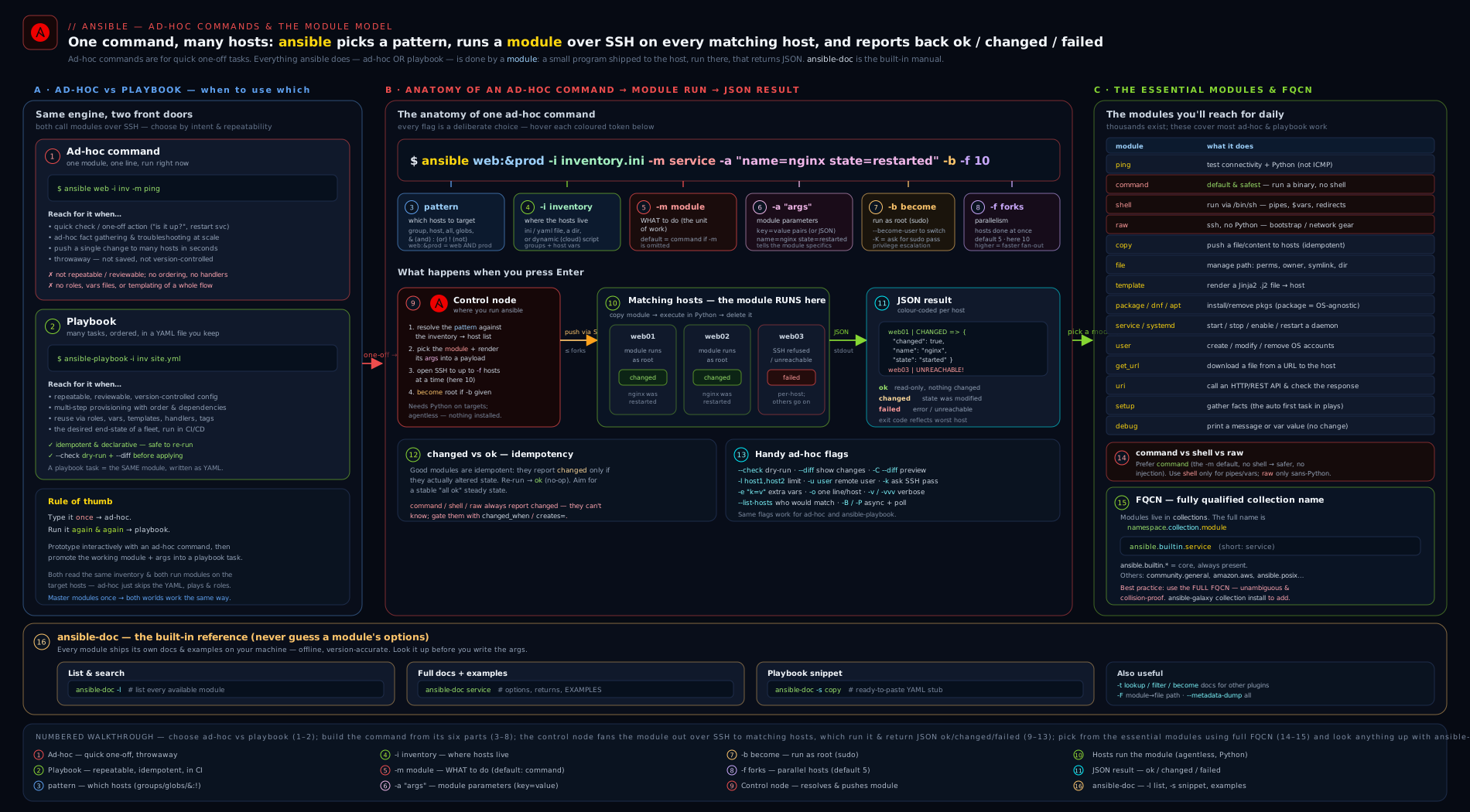
The diagram traces a single ad-hoc command from the CLI on the control node, through pattern resolution against the inventory, to the module being shipped and executed on each managed node, with the JSON result flowing back and colouring the output ok/changed/failed.
Hands-on lab: ad-hoc commands against localhost and a container
This lab runs entirely on your control node plus one or two throwaway containers — no cloud, no cost (₹0). You need ansible-core and either Docker or Podman installed locally. If you have no container runtime, every step that targets local still works against your own machine.
1. A minimal inventory
Create a tiny inventory so patterns have something to resolve. Put this in inventory.ini:
[local]
localhost ansible_connection=local

[web]
# filled in after we start a container
Verify it parses:
ansible-inventory -i inventory.ini --graph
Expected output shows the local group with localhost.
2. Your first ad-hoc command: ping
ansible local -i inventory.ini -m ansible.builtin.ping
Expected:
localhost | SUCCESS => {
    "changed": false,
    "ping": "pong"
}
changed: false because ping is read-only, and "ping": "pong" proves Ansible can run Python locally.
3. command vs shell — see the difference yourself
# command: $HOME is NOT expanded (no shell)
ansible local -i inventory.ini -m ansible.builtin.command -a 'echo $HOME'
# -> prints the literal string: $HOME

# shell: $HOME IS expanded (a shell runs it)
ansible local -i inventory.ini -m ansible.builtin.shell -a 'echo $HOME'
# -> prints your actual home directory, e.g. /home/vinod
This single experiment is the clearest demonstration of why command is safe and shell is powerful. Note both show CHANGED (yellow) — they cannot know they changed nothing.
4. Start a container as a second managed node (optional)
# Docker (or swap 'docker' for 'podman')
docker run -d --name web1 rockylinux:9 sleep infinity
docker exec web1 dnf install -y python3   # modules need Python
Add it to the [web] group of inventory.ini:
[web]
web1 ansible_connection=docker
Re-confirm reachability:
ansible web -i inventory.ini -m ansible.builtin.ping
If you skip the container, run the remaining steps against
localinstead ofweb— they behave identically.
5. Idempotency in action: file, then file again
# Create a directory — first run reports CHANGED
ansible web -i inventory.ini -m ansible.builtin.file \
  -a "path=/opt/demo state=directory mode=0755"

# Run the EXACT same command again — now reports ok (green)
ansible web -i inventory.ini -m ansible.builtin.file \
  -a "path=/opt/demo state=directory mode=0755"
The first run is changed, the second is ok. That colour change is idempotency you can see — the hallmark of a real module versus command/shell.
6. Copy with check + diff (touch nothing, see everything)
echo "Managed by Ansible" > /tmp/motd.txt
ansible web -i inventory.ini -b -m ansible.builtin.copy \
  -a "src=/tmp/motd.txt dest=/etc/motd mode=0644" -C -D
-C (check) plus -D (diff) shows the unified diff of what would change and makes no modification — the dry-run pattern you should use before any production change. Drop -C to actually apply it.
7. Gather a fact, and read the docs
# Gather just the distribution facts
ansible web -i inventory.ini -m ansible.builtin.setup \
  -a "filter=ansible_distribution*"

# Read the copy module's full docs, then a paste-ready snippet
ansible-doc ansible.builtin.copy | head -n 40
ansible-doc -s ansible.builtin.copy
8. Validation
You have succeeded if:
ansible <group> -m ansible.builtin.pingreturns"ping": "pong".- The
echo $HOMEexperiment behaves differently undercommandvsshell. - Re-running the
filecommand flips fromCHANGEDtook(idempotency). -C -Doncopyshows a diff but changes nothing.
9. Cleanup
docker rm -f web1 2>/dev/null || true   # remove the container
rm -f /tmp/motd.txt /tmp/inventory.ini  # remove temp files
# (the /opt/demo dir lived only inside the now-deleted container)
Cost note
₹0. Everything ran on your own machine and a local, ephemeral container. No cloud resources were created, so there is nothing billable to delete beyond stopping the container.
Going deeper
You now know the shape of an ad-hoc command and the everyday modules. This section is for when you want to understand why things behave as they do — the parts that separate someone who runs ansible from someone who can debug it under pressure and scale it to thousands of hosts. Skim it on a first read; come back when a command surprises you.
How a module is actually assembled and shipped (AnsiballZ)
When you run a Python module, Ansible does not copy a single .py file. It builds an AnsiballZ payload: a self-contained ZIP of the module plus every module_utils library it imports, base64-wrapped in a small bootstrapping Python script. That payload is what lands in ~/.ansible/tmp/… on the target, is executed by the remote Python, prints one JSON document, and is then deleted. Understanding this explains three things at once: why the target needs Python, why a syntax error surfaces as odd JSON-parse noise, and why -vvv (which prints the exec line) is the fastest way to see exactly what ran.
Two settings change this flow materially:
- Pipelining. With
pipelining = Trueinansible.cfg(under[ssh_connection]), Ansible streams the AnsiballZ payload straight into the remote Python over the existing SSH session — no temp file is written to disk. It is faster (fewer SSH round-trips) and slightly more secure (nothing left on disk mid-run). The catch: pipelining needsrequirettydisabled in the target’s sudoers, orbecomebreaks. This is the single highest-value ad-hoc speed-up after SSH multiplexing. - Interpreter discovery. The default
ansible_python_interpreter=autoprobes the target for a sensible Python at connect time (preferring the distro’spython3). When you see “Failed to discover a Python interpreter”, the target has an unusual layout — pin it explicitly:-e 'ansible_python_interpreter=/usr/bin/python3.11'.
Idempotency and change reporting, under the hood
A module decides changed itself by comparing desired state to actual state. That is why copy can hash the content and report ok on a second run, while command/shell/raw — which have no idea what your command did — always report changed. A crucial and often-missed nuance: ad-hoc gives you far fewer idempotency levers than a playbook. The task keywords that tame command/shell (changed_when:, failed_when:, no_log:) live in a play — you cannot pass them on the ad-hoc CLI. Ad-hoc, your only levers for a command/shell are the module arguments creates= and removes=:
# Idempotent-ish command ad-hoc: skip entirely if the marker already exists
ansible web -b -m ansible.builtin.command \
  -a "cmd=/opt/app/bootstrap.sh creates=/opt/app/.bootstrapped"
The first run executes and reports changed; every later run sees the marker file and reports ok (skipped). To define what counts as a change you must move to a playbook:
# In a PLAYBOOK (not ad-hoc) — command becomes idempotent AND honest:
- name: Rebuild the search index only when the source changed
  ansible.builtin.command:
    cmd: /opt/app/reindex.sh
    creates: /opt/app/.index.lock
  register: reindex
  changed_when: "'REBUILT' in reindex.stdout"
  failed_when: reindex.rc not in [0, 2]
This is the honest reason command/shell “always look yellow” ad-hoc: you have handed Ansible a black box, and it refuses to lie about whether the box changed anything.
Check mode (-C) and diff (-D): what’s really happening
--check is not magic — each module declares whether it supports check mode (supports_check_mode). File and package modules simulate correctly; command/shell do not support check mode and are simply skipped (they don’t run, and they don’t guess), which is safe but means -C is not a universal safety net for shell-type tasks. --diff is a separate contract: file-touching modules (copy, template, lineinfile, blockinfile) emit a before/after so you see the exact lines that would change. The pairing -C -D on copy/template is the closest thing Ansible has to a “show me the change without making it” button — but always ask yourself whether the module in question actually honours check mode.
Performance and scale: forks, pipelining, fact-gathering, async
Ad-hoc feels instant on three hosts and can crawl on three thousand. The levers:
| Lever | Flag / setting | Effect |
|---|---|---|
| Forks | -f N (cfg forks, default 5) |
How many hosts run the task in parallel — the biggest raw-throughput dial |
| Pipelining | pipelining = True in ansible.cfg |
Fewer SSH round-trips per task; no temp file written |
| SSH persistence | ControlPersist via ssh_args in ansible.cfg |
Reuses one TCP/SSH connection across tasks instead of reconnecting |
| Fact subset | gather_subset= on ansible.builtin.setup |
Collect fewer facts — fact gathering is often the slowest step |
| Async | -B <seconds> -P <poll> |
Run a long task in the background so a slow host doesn’t hold a fork |
-f is the throttle, but raise it with judgement: each fork is a process on the control node, so 500 forks can exhaust your CPU/RAM long before the targets feel it. For a genuinely long task (a big package upgrade, a database dump), fire it asynchronously so it doesn’t monopolise a fork slot:
# Kick off a long upgrade, don't wait (fire-and-forget), then poll later
ansible web -b -B 3600 -P 0 -m ansible.builtin.command -a "cmd=/opt/app/upgrade.sh"
# -B 3600 = allow up to 1h; -P 0 = return immediately with a job id
# poll the job later with the async_status module using that job id
And when you only need one fact, don’t pay for all of them:
# Only the distribution facts, minimal collector set — much cheaper at scale
ansible web -m ansible.builtin.setup -a "gather_subset=!all,min filter=ansible_distribution*"
Security depth: injection, secrets, and blast radius
Three things bite people ad-hoc, precisely because there’s no reviewed playbook standing between the human and the fleet:
shellis an injection surface. The moment you interpolate a variable you don’t fully control intoansible.builtin.shell, you’ve built a remote-code-execution path. Prefercommand(no shell) or, better, a purpose-built module with structured arguments.rawis worse still — it bypasses the module sandbox and the JSON contract entirely; treat everyrawcall as raw SSH and reserve it for bootstrapping.- Secrets on the command line leak. Anything in
-aor-e "password=…"lands in your shell history and is visible inpsto any other user on the box. Ad-hoc has nono_log:(that’s a play keyword), and worse,-vwill happily print a secret a module returns. Read secrets from Vault instead — ad-hoc can decrypt a vaulted vars file:ansible web -m … -e @secrets.yml --ask-vault-pass(or--vault-id prod@prompt). Vault gets a full lesson later; the habit to build now is never type a secret on the ansible line. becomewidens blast radius.-bruns as root across every matched host at once. Combine it with--limit(test on one host first) and a sane-fso a mistake hits one machine, not the whole tier. In regulated environments, run changes as reviewed playbooks (or via AWX/AAP) so there’s an audit trail — ad-hoc leaves no artefact in git.
Here is the crisp picture of what you can and can’t control from the ad-hoc CLI:
| Control | Ad-hoc? | How |
|---|---|---|
| Skip if a path already exists | Yes | creates=/path on command/shell/script |
| Skip if a path is absent | Yes | removes=/path |
| Define what counts as changed | No | changed_when: — needs a playbook |
| Define what counts as failed | No | failed_when: — needs a playbook |
| Hide secret output | No | no_log: — needs a playbook |
| Dry-run a change | Yes | -C (module must support check mode) |
| Show a line-level diff | Yes | -D |
| Run a long task in the background | Yes | -B <sec> -P <poll> |
| Escalate to another user | Yes | -b --become-user=<name> |
| Restrict which hosts run | Yes | --limit <pattern> |
FQCN resolution, ansible.legacy, redirects, and version pinning
When you type a short name like -m copy, Ansible resolves it by walking a search path. In a playbook, that path is the play’s collections: keyword, then the built-in defaults. Ad-hoc has no collections: keyword, so a short name resolves through ansible.legacy — which means: first any module you’ve dropped in a local library/ directory, then ansible.builtin. That is the subtle difference between the two ansible.* pseudo-collections:
ansible.builtin.copy— always the module shipped insideansible-core. Nothing can shadow it.ansible.legacy.copy(what a barecopyuses ad-hoc) — lets a locallibrary/copy.pyoverride the built-in. Handy for a custom drop-in, dangerous if you didn’t mean it. Writing the FQCNansible.builtin.copyguarantees you get the shipped module, every time.
Modules that were moved out of ansible-core into collections keep working through redirects declared in each collection’s meta/runtime.yml; a fully removed module leaves a tombstone that errors with a helpful “this moved to X” message rather than a bare “not found”. None of this is guaranteed forever — which is the real argument for FQCN plus version pinning. Capture your collections in a requirements.yml and install them reproducibly:
# requirements.yml pins exact collection versions; install them all
ansible-galaxy collection install -r requirements.yml
ansible --version                 # shows core version + config file in use
ansible-galaxy collection list    # shows every collection and its version
FQCN + pinned versions is what turns “works on my laptop” into “works identically on the grader’s box and in CI”.
Machine-readable output for scripting
The human-friendly output you see comes from the default stdout callback. When you want to consume ad-hoc results in a script, three levers help: -o/--one-line condenses each host to a single line (easy to grep/awk); -t <dir>/--tree writes one JSON file per host into a directory; and the ANSIBLE_STDOUT_CALLBACK environment variable swaps the whole renderer — e.g. ANSIBLE_STDOUT_CALLBACK=minimal for terse output, or the community.general.yaml callback for readable multi-line JSON. For anything beyond a quick scan, prefer -t and parse the per-host JSON — it is stable and complete, whereas the pretty output is meant for eyes, not scripts.
Practice challenges
Work these in order — they climb from “first command” to “scale and bootstrap”. Try each before opening the solution. Every answer uses FQCN and assumes the lab’s inventory.ini.
1. (Beginner) Prove the web group is manageable. Using FQCN, confirm Ansible can connect and run Python on every host in web.
<details> <summary>Solution</summary>
ansible web -i inventory.ini -m ansible.builtin.ping
ping returns "ping": "pong" only if SSH and a working Python are present — the real “can I manage this box?” test. It’s read-only, so changed: false.
</details>
2. (Beginner) Which module runs when you omit -m? Print uptime from every host without naming a module, then state which module actually executed and why it shows changed.
<details> <summary>Solution</summary>
ansible all -i inventory.ini -a "uptime"
Omitting -m runs the default, ansible.builtin.command. It reports changed on every run because command can’t know whether running uptime altered anything — it never assumes it didn’t.
</details>
3. (Intermediate) Idempotency you can see. Create /opt/app as a directory, mode 0750, owner deploy, on web with privilege escalation. Run it twice and explain the colour change.
<details> <summary>Solution</summary>
ansible web -i inventory.ini -b -m ansible.builtin.file \
  -a "path=/opt/app state=directory mode=0750 owner=deploy"
First run: changed (it created/adjusted the directory). Second run: ok — file compares desired vs actual state, finds nothing to do, and honestly reports no change. That green-on-rerun is idempotency, and it’s why real modules beat command/shell.
</details>
4. (Intermediate) Preview before you touch production. Show exactly which lines replacing /etc/motd from a local motd file would change — without changing anything — then apply it for real.
<details> <summary>Solution</summary>
# Preview: diff only, no change
ansible web -i inventory.ini -b -m ansible.builtin.copy \
  -a "src=motd dest=/etc/motd mode=0644" -C -D

# Apply: drop -C
ansible web -i inventory.ini -b -m ansible.builtin.copy \
  -a "src=motd dest=/etc/motd mode=0644" -D
-C (check) simulates and -D (diff) prints the unified before/after. copy supports check mode, so this is a true dry-run. (The same -C on a shell task would just be skipped, not simulated.)
</details>
5. (Advanced) Bootstrap a Python-less host. A freshly provisioned Debian box at 10.0.0.9 has no Python yet. Install python3 on it, then confirm with ping. Which module, and why is it the only one that can?
<details> <summary>Solution</summary>
# raw needs no Python and no module on the target
ansible -i '10.0.0.9,' all -b -m ansible.builtin.raw \
  -a "apt-get update && apt-get install -y python3"

# now every other module works
ansible -i '10.0.0.9,' all -m ansible.builtin.ping
raw sends the command straight over SSH with no AnsiballZ payload and no Python requirement — the chicken-and-egg escape hatch. Every other module (including apt) needs Python already present, so only raw can install the very thing they depend on. The trailing comma in -i '10.0.0.9,' makes a one-host inline inventory.
</details>
6. (Advanced) Cheap facts at scale. From web, gather only the OS-distribution facts (not the whole fact set), and describe how you’d make the same command fast across 500 hosts.
<details> <summary>Solution</summary>
ansible web -i inventory.ini -m ansible.builtin.setup \
  -a "gather_subset=!all,min filter=ansible_distribution*"
gather_subset=!all,min starts from nothing (!all) and adds only the minimal collector set, so Ansible skips the expensive hardware/network probes; filter=ansible_distribution* trims what’s returned. To scale to 500 hosts: raise forks (-f 50), enable pipelining = True, and turn on SSH ControlPersist in ansible.cfg — the per-host connection overhead, not the fact work, is usually the bottleneck.
</details>
Common beginner mistakes
These are conceptual traps — misunderstandings about how ad-hoc works — distinct from the symptom→fix table below. Get the mental model right and whole classes of error disappear.
- “
pingsends a network (ICMP) ping.” It doesn’t.ansible.builtin.pingproves Ansible can SSH in and run Python, returningpong. A box can answer ICMP and still be unmanageable (no SSH, no Python). Right model:pingis a manageability check, not a reachability check. - “I’ll just use
shellfor everything — it’s more flexible.” Flexibility is the problem.shellruns a real shell, which means injection risk, surprise globbing, and quoting pain. Right model: reach for a real module first (it gives idempotency and check-mode for free),commandsecond (safe, no shell), andshellonly when you genuinely need a pipe, redirect, glob, or$VAR. - “
commandkeeps sayingchanged— something’s broken or it’s re-doing work.” Neither.command/shell/rawcan’t tell whether they changed anything, so they always reportchanged— it’s honesty about ignorance, not a malfunction. Right model: if you need honest change reporting, use a real module or addcreates=/removes=(ad-hoc) orchanged_when:(in a play). - “Short names are fine; FQCN is just extra typing.” Short names rely on a redirect/search mechanism that is a courtesy, not a contract, and two collections can define the same short name. Right model: write
ansible.builtin.copy— it’s unambiguous, future-proof, and required by RHCE andansible-lint. - “The module runs on my laptop (the control node).” For nearly all modules it runs on the target, using the target’s Python; the control node only orchestrates. Right model: that’s exactly why managed nodes need Python — and why
rawexists for the host that doesn’t have it yet. - “
No hosts matchedis a syntax error I need to fix in the command.” Zero hosts is a successful run (exit 0). Right model: the problem is almost always the pattern or the inventory (-i), not the command’s syntax. Check withansible-inventory -i … --graphand verify the group name. - “
-C(check mode) guarantees nothing changes.” Only for modules that support check mode.command/shellare skipped in check mode, and a poorly written custom module might ignore it. Right model:-Cis a strong safety net for file/package modules, not a universal one — never trust it blindly for shell-type tasks. - “Putting a password in
-e "password=…"is fine for a quick job.” It lands in your shell history and is visible inpsto every other user on the box. Right model: prompt (-K,--ask-pass) or pull it from Vault; never type a secret on theansibleline.
Common mistakes & troubleshooting
| Symptom | Likely cause | Fix |
|---|---|---|
No hosts matched then exits 0 |
Pattern matches nothing / wrong group / wrong -i |
Check ansible-inventory -i … --graph; verify group name and inventory path |
command not found / $VAR not expanded under command |
Used command for something needing a shell (pipe, glob, $VAR, &&) |
Switch that task to ansible.builtin.shell; or restructure to avoid the shell |
Module reports changed every single run |
It’s command/shell/raw — inherently non-idempotent |
Add creates=/removes=, or changed_when: in a play; prefer a real module |
/usr/bin/python: not found or “Failed to discover a Python interpreter” |
Target has no Python (or it’s at an unusual path) | Bootstrap with ansible.builtin.raw to install Python; set ansible_python_interpreter |
Missing sudo password |
-b used but sudo needs a password and -K omitted |
Add -K (--ask-become-pass), or configure passwordless sudo |
couldn't resolve module/action 'ec2_instance' |
Collection not installed, or wrong/short name | ansible-galaxy collection install amazon.aws; use full FQCN |
Permission denied (publickey) / connection refused |
Wrong SSH user/key, host key, or SSH not up | Use -u/--private-key; check -vvv output; verify host_key_checking |
| Argument with spaces splits or errors | Unquoted key=value value containing a space |
Quote it: -a 'line="two words"' or use JSON -a '{"line":"two words"}' |
Unsupported parameters for … module |
Mistyped option name | ansible-doc <module> to confirm exact option names |
| Whole run hangs at one host | One unreachable host blocking a fork slot | Use --limit to exclude it; lower/raise -f; check connectivity with ping module |
Best practices
- Always pass FQCN (
ansible.builtin.copy, notcopy) — unambiguous, future-proof and exam-correct. - Prefer a real module over
command/shell. If a module exists for the job, use it: you get idempotency, check-mode and honest change reporting for free. - Escalate from
commandtoshellonly for an explicit shell feature (pipe, redirect, glob, env var,&&). Default tocommand. - Reserve
rawfor bootstrapping a Python-less host; never use it as a general command runner. - Dry-run first.
-C(and-Dfor files) before any change to production; it costs nothing and prevents disasters. - Start with a small
-fwhen rolling a risky change, then widen it; use--limitto test on one host first. - Use
ansible-docbefore guessing an option name — it’s faster and always matches your version. - Keep ad-hoc for one-offs. The moment a command becomes “the way we do X”, promote it to a playbook so it’s reviewed and repeatable.
- Quote
-aarguments, and use the JSON form for values with spaces or for lists/dicts. - Read the JSON. Add
-vwhen an outcome surprises you;-vvvwhen a connection fails.
Security notes
shellis an injection surface. Any time you interpolate a variable intoansible.builtin.shell, an attacker who controls that variable can run arbitrary commands. Prefercommand(no shell) or, better, a purpose-built module that takes structured arguments.rawbypasses Ansible’s safety entirely — no module sandbox, no JSON contract, no check-mode. Treat anyrawinvocation as raw SSH and limit it to bootstrapping.- Never put secrets in
-aor-eon the command line. They land in your shell history and in process listings (ps), visible to other users on the box. Use Ansible Vault (a later lesson) or prompt-based input. -k/-Kprompt rather than embed. Prefer SSH keys and passwordless sudo over passwords; when you must use passwords, the interactive prompts keep them off the command line.- Mind
host_key_checking. Disabling it (a tempting first-run “fix”) removes protection against man-in-the-middle attacks; better to manageknown_hostsproperly. becomewidens blast radius.-bruns as root across every matched host at once. Combine with--limitand a sane-fso a mistake hits one host, not the fleet.- Audit who can run ad-hoc. Ad-hoc commands leave no playbook artefact in git. In regulated environments, run changes as reviewed playbooks (or via AWX/AAP) so there is an audit trail.
Interview & exam questions
1. What is an ad-hoc command and how does it differ from a playbook?
An ad-hoc command runs a single module against a host pattern straight from the CLI (ansible <pattern> -m <module> -a "<args>"), with no YAML file. A playbook is a version-controlled YAML file describing multiple ordered tasks with conditionals, handlers and idempotent intent. Ad-hoc is for one-offs and exploration; playbooks are for repeatable, reviewed procedures.
2. Which module runs if you omit -m?
ansible.builtin.command — it is the default module (configurable via module_name in ansible.cfg, but rarely changed). So ansible all -a "uptime" runs command.
3. Explain command vs shell vs raw. Which is the default and why?
command executes a binary directly with no shell, so no pipes/globs/$VARS/operators — predictable and injection-free, which is why it’s the default. shell runs through /bin/sh, enabling shell features at the cost of the shell’s risks. raw sends the command over SSH with no module and no Python required, used to bootstrap Python onto a fresh host; it offers no idempotency, JSON or check-mode.
4. What is an FQCN and why use it?
A fully-qualified collection name, namespace.collection.module (e.g. ansible.builtin.service). It is unambiguous (two collections can share a short name), future-proof (short-name redirects aren’t guaranteed), readable, and required by RHCE/ansible-lint.
5. What does ansible.builtin.ping actually test? Is it ICMP?
No. It confirms Ansible can connect (SSH) and run Python on the target, returning "ping": "pong". ICMP ping proves neither, so the module is the real “can I manage this node?” check.
6. Where does a module run, and what must the target have?
On the target (not the control node): Ansible ships the module there and runs it with the remote Python interpreter, then reads back JSON. So managed nodes need Python (and the chosen transport, e.g. SSH) — except raw, which needs neither.
7. How do you escalate privilege in an ad-hoc command, and how do you handle a sudo password?
-b (become) escalates, to root by default; --become-user targets another account; --become-method changes sudo→su/doas/etc. If sudo needs a password, add -K (--ask-become-pass) to be prompted.
8. A command/shell task reports changed on every run. Why, and how do you fix it?
These modules can’t know whether they changed anything, so they always report changed. Fix with creates=/removes= guards, or changed_when:/failed_when: in a playbook to define real change/failure — or, best, switch to a module that reports honestly.
9. How do you find the exact options a module accepts, offline?
ansible-doc <fqcn> for the full page (options, defaults, RETURN, EXAMPLES); ansible-doc -s <fqcn> for a paste-ready snippet; ansible-doc -l to list all modules; ansible-doc -t <type> -l for other plugin types. It reads the docs bundled with your installed version, so it never drifts.
10. How do you control parallelism, and what’s the default?
-f/--forks sets how many hosts run simultaneously; the default is 5 (from forks in ansible.cfg). Raise it for speed across large fleets, lower it (even -f 1) to roll changes carefully.
11. How would you safely preview a file change before applying it?
Run the module with -C (check, dry-run) and -D (diff) — e.g. … -m ansible.builtin.copy -a "src=… dest=…" -C -D. It shows the line-level diff and makes no change. Most core modules support check mode; command/shell generally don’t.
12. You need to run a module from amazon.aws but get “couldn’t resolve module/action”. What’s wrong and how do you confirm?
The collection isn’t installed (or you used a short name). Confirm with ansible-galaxy collection list; install with ansible-galaxy collection install amazon.aws; then call it by full FQCN (amazon.aws.ec2_instance).
Quick check
- Write the ad-hoc command that restarts
nginxon thewebgroup with privilege escalation, using FQCN. - True or false:
ansible.builtin.pingsends an ICMP echo request. - Which of
command,shell,rawwould you use to install Python on a brand-new host with no Python, and why? - What is the default value of
--forks? - Which
ansible-docflag prints a ready-to-edit YAML snippet of a module’s options?
Answers
ansible web -b -m ansible.builtin.service -a "name=nginx state=restarted"(add-Kif sudo needs a password).- False. It confirms SSH connectivity and a working Python on the target, returning
pong; it is not ICMP. raw— it runs over SSH with no module and no Python requirement, so it can bootstrap Python itself (-m ansible.builtin.raw -a "apt-get install -y python3").command/shellboth need Python on the target.- 5.
-s(e.g.ansible-doc -s ansible.builtin.copy).
Exercise
On your control node plus one local container (Rocky 9 or Ubuntu — your choice):
- Build a two-group inventory (
localandweb) and confirm it withansible-inventory --graph. - Prove reachability of
webwithansible.builtin.ping. - Using only ad-hoc commands and FQCN, on the
webgroup: (a) install a package viaansible.builtin.package; (b) create the directory/opt/appmode0750withansible.builtin.file, then re-run it and confirm the second run isok(idempotency); © deploy a one-line file withansible.builtin.copyusing-C -Dfirst, then for real; (d) ensure a service isstartedandenabledwithansible.builtin.service; (e) demonstrate thecommandvsshell$HOMEdifference. - Use
ansible-doc -l | grepto discover a module you’ve not used, read its page, and run it ad-hoc once. - Re-run one of your change commands with
-vand read the returned JSON; identify thechanged,rcandmsgkeys. - Clean up the container and any temp files. Confirm the cost was ₹0.
Write up, in two or three sentences, why step 3(b)'s second run was ok while the command/shell step always shows changed.
Certification mapping
This lesson maps to Red Hat Certified Engineer (RHCE) EX294 objectives: “Run ad hoc Ansible commands”, “Use both static and dynamic inventories to define groups of hosts” (patterns), and “Understand core components of Ansible: modules… and use … documentation”. The ad-hoc CLI, the module model, command/shell/raw, FQCN, and fluent ansible-doc use are all directly examinable. It also underpins the broader “Be able to create simple shell scripts… and run ad hoc commands” expectations and is foundational for the EX294 playbook tasks built on these same modules. The FQCN and ansible-doc habits taught here are exactly what graders and ansible-lint look for.
Glossary
- Ad-hoc command — a one-off, single-module action run from the
ansibleCLI without a playbook. - Module — a self-contained, idempotent unit of work that runs on the target and returns JSON.
- Plugin — code that extends Ansible itself (connection, lookup, filter, callback, become…), distinct from a module.
- Pattern — the host selector applied against inventory (
all,web,db:&prod,web:!web03). - FQCN — fully-qualified collection name:
namespace.collection.module(e.g.ansible.builtin.copy). - Collection — a versioned, namespaced bundle of modules, roles and plugins.
ansible.builtin— the collection bundled insideansible-core, holding the foundational modules.ansible.legacy— pseudo-collection mirroring pre-collections behaviour, including locallibrary/modules; what a bare short name resolves through ad-hoc.- Control node — the machine you run
ansible/ansible-playbookfrom; it orchestrates but does not (for most modules) run the module code itself. - Managed node / target — a host Ansible configures over SSH (or WinRM/PSRP for Windows); needs Python for nearly all modules.
- Become — Ansible’s privilege escalation (
-b), defaulting to sudo→root. - Forks — the number of hosts Ansible operates on in parallel (
-f, default 5); each fork is a process on the control node. - AnsiballZ — the mechanism that packs a module plus its
module_utilsinto one self-contained Python payload shipped to and executed on the target. - Pipelining — streaming the module payload over the existing SSH connection instead of writing a temp file; faster, but needs
requirettydisabled when usingbecome. - Interpreter discovery — how Ansible auto-selects the target’s Python (
ansible_python_interpreter=auto); pin it when discovery fails. - Check mode — a dry run (
-C) that reports what would change without changing it; only for modules that support it (command/shellare skipped). - Diff mode —
-D, shows the line-level before/after for file-changing modules (copy,template,lineinfile). creates/removes— guard arguments that makecommand/shell/scriptskip when a path already exists / is absent — the only ad-hoc idempotency lever for those modules.- Free-form arguments — the
command/shell/raw/scriptstyle where-ais the literal command line rather thankey=valuepairs. gather_subset— thesetupoption selecting which fact collectors run (e.g.min,network,!all) to cut fact-gathering cost.- Async / poll —
-B/-P, run a long task in the background and poll (or fire-and-forget with-P 0). - Redirect / tombstone —
meta/runtime.ymlentries that forward an old module name to its new FQCN home (redirect) or error with guidance once it’s removed (tombstone). - Idempotency — re-running converges to the same state and reports
okonce converged. - Return values — the JSON keys a module emits (
changed,rc,stdout,msg,ansible_facts…). ansible-doc— the offline, version-accurate module/plugin documentation tool.
Next steps
You can now do real work from one line and read any module’s docs without leaving the terminal — the perfect foundation for structured automation. Next, turn these same module calls into a repeatable, idempotent file in Ansible Playbooks, In Depth: Plays, Tasks, Modules, Become & Your First Playbook, where become, --check, --diff, --tags and the play recap all reappear in YAML form. If you want to revisit how patterns and groups are defined first, return to Ansible Inventory, In Depth.