In a nutshell
Think of a playbook as a written recipe. An ad-hoc command is you standing at the stove shouting one instruction at a time; a playbook is the recipe card that you — or anyone on the team, or a CI robot at 3 a.m. — can follow to get the identical dish every single time. The recipe is made of sections (plays): “for the people at the grill, do these steps.” Each section is an ordered list of steps (tasks) like “preheat to 200°C” or “add salt,” and every step is carried out by a specialist (a module) who does that one thing perfectly. The specialist always checks first: if the oven is already at 200°C, they don’t touch it — that “only change what isn’t already right” habit is idempotency, and it is the whole point of Ansible. And when a step needs the keys to the locked pantry, you don’t hand everyone a master key: one trusted person unlocks it just for that step. That is become — privilege escalation.
You write a playbook as a YAML file, keep it in Git, review it like code, and run it with one command: ansible-playbook. Before running it for real you can syntax-check it (does it even parse?) and dry-run it (what would it change?) — the two habits that separate people who break production from people who don’t. This lesson is the grammar of that recipe: what a play is, what a task is, the exact order Ansible executes them across your machines, how become really works, and every flag of the ansible-playbook command. By the end you will have written, checked, and run your first real playbook against throwaway containers for ₹0.
Level: Beginner (Foundation) · Time: ~32 min
Ad-hoc commands are wonderful for a one-off ansible.builtin.ping or restarting a service across fifty boxes, but they are typed, ephemeral, and unreviewable. The moment you want to describe the state of a system — “this package is installed, this file has these contents, this service is enabled and running” — and have that description live in Git, be code-reviewed, run in CI, and re-applied a thousand times without drift, you have left ad-hoc territory and entered the world of playbooks. A playbook is the unit of automation in Ansible. Everything serious you will ever do — provisioning, configuration, deployment, orchestration — is a playbook.
This lesson is a deep, every-keyword tour of the playbook. We will take apart a play keyword by keyword (the table alone is worth bookmarking), then a task, then walk the exact order in which Ansible executes them across your hosts. We will spend a long time on become — privilege escalation — because it is simultaneously the feature people use every single day and the one they understand least, and it is a guaranteed interview and exam topic. Finally we will go through every flag of the ansible-playbook command, because the difference between a junior and a senior at the keyboard is usually --check --diff, --limit, --tags, and --start-at-task. By the end you will write, syntax-check, dry-run, and execute a real first playbook against localhost and a couple of containers — for ₹0.
Everything here targets ansible-core 2.17+ / Ansible 10+ (the 2026 baseline) and uses FQCN (fully-qualified collection names like ansible.builtin.copy) throughout, which is the modern, unambiguous, and exam-correct way to name modules.
Learning objectives
By the end of this lesson you will be able to:
- Read and write a play and explain every common play-level keyword (hosts, become, gather_facts, vars, vars_files, tasks, handlers, roles, serial, strategy, and more).
- Read and write a task and explain every common task-level keyword (name, the module, args, loop, when, notify, tags, register, changed_when, failed_when).
- Describe Ansible’s execution model precisely: top-to-bottom, one task at a time, across all targeted hosts (the “horizontal” model), and how
serialandstrategychange it. - Configure privilege escalation with
becomein full: the four become methods (sudo, su, doas, runas),become_user, where to set it (play / block / task), how passwords flow (--ask-become-pass,become_pass, Vault), and the classic gotchas. - Use
ansible-playbookconfidently, including--syntax-check,--check(-C),--diff,--limit,--tags/--skip-tags,--start-at-task,--step, and the verbosity flags. - Interpret the play recap line (ok / changed / unreachable / failed / skipped / rescued / ignored).
Prerequisites & where this fits
You should have completed Ansible Ad-Hoc Commands & Modules (ansible-ad-hoc-commands-modules-ansible-doc) — you need to be comfortable running ansible all -m ping, you need a working control node with ansible-core installed, an inventory (even a one-line one), and SSH access to at least one managed node (localhost counts). You should know what a module is (an idempotent unit of work that runs on the target and returns JSON) and what FQCN means. This lesson sits in the Foundation tier of the Ansible Zero-to-Hero course, module Playbooks. The very next lesson, Ansible Core Modules for Real Work (ansible-core-modules-package-service-copy-file-user), fills the playbooks you write here with the modules that do the actual work; this lesson is the grammar, that one is the vocabulary.
Core concepts: the playbook hierarchy
A playbook is a YAML file with a specific, layered structure. Get the four-level mental model straight and the rest is detail:
- Playbook — the file itself. It is a YAML list (
-at the top level). Each item in that list is a play. A playbook therefore contains one or more plays. - Play — a YAML mapping that binds a set of hosts (a pattern from your inventory) to a list of tasks (and handlers, roles, vars, and play-level settings). A play answers “on these machines, do these things, as this user.”
- Task — a single call to one module with its arguments. A task is the atomic unit Ansible executes and reports on (ok / changed / failed). “Install nginx” is a task; “ensure nginx is running” is another.
- Module — the code that actually runs (usually on the managed node) to make the task happen idempotently and report a JSON result.
ansible.builtin.package,ansible.builtin.copy,ansible.builtin.serviceare modules.
YAML basics you must respect: indentation is two spaces, never tabs; a list item starts with - ; a mapping is key: value; strings with special characters (:, {, }, [) should be quoted. The document may begin with ---. A single stray tab or a misaligned dash is the single most common reason a beginner’s playbook will not run, so let your editor show whitespace.
Here is the smallest complete playbook, annotated. Keep it in your head as the skeleton everything below decorates:
---
- name: Configure the web tier            # the PLAY (one item in the playbook list)
  hosts: web                              # which inventory hosts/groups this play targets
  become: true                            # escalate privilege for this whole play (→ root)
  gather_facts: true                      # collect system facts before tasks (default true)
  vars:                                   # play-scoped variables
    http_port: 80
  tasks:                                  # the ordered list of TASKS
    - name: Install nginx                 # task name (shown in output — always set one)
      ansible.builtin.package:            # the MODULE (FQCN)
        name: nginx                       #   module ARGS
        state: present
    - name: Ensure nginx is running
      ansible.builtin.service:
        name: nginx
        state: started
        enabled: true
Plays vs roles vs tasks (when you reach for each)
A common early confusion: tasks, roles, and plays all “contain things.” The distinction:
| Concept | What it is | Reusable across playbooks? | When you use it |
|---|---|---|---|
| Task | One module call | No (it lives inline) | The atomic action: install, copy, restart |
| Block | A group of tasks sharing keywords/error-handling | No (inline) | Apply when/become/rescue to several tasks at once |
| Play | hosts ↦ tasks/roles binding | No (it is the orchestration) | “On these hosts, run this work as this user” |
| Role | A packaged, parameterised bundle of tasks/handlers/templates/defaults | Yes (the unit of reuse) | Anything you will reuse: an nginx role, a users role |
Roles get their own lesson (ansible-roles-structure-dependencies-galaxy-collections). For now: a play can run tasks and roles; tasks are the literal grammar of work.
The play, keyword by keyword
A play is a mapping of keywords (sometimes called “directives”). The full set is large; the table below covers the ones you will actually use, with what each does, its accepted values, its default, and the gotcha. Keywords not in this table (e.g. connection, port, remote_user, vars_prompt, environment, module_defaults, collections, pre_tasks/post_tasks, run_once, throttle, order) are noted briefly after it.
| Play keyword | What it does | Values / type | Default | Gotcha |
|---|---|---|---|---|
name |
A human label for the play (printed in PLAY […]) |
string | unnamed | Not required but always set one — output is unreadable otherwise |
hosts |
The inventory pattern this play runs against | pattern string or list (web, all, web:!db, web[0:2]) |
required | If the pattern matches nothing, the play is skipped with a warning, not an error |
become |
Turn on privilege escalation for every task in the play | boolean (true/false) |
false |
Inherited by tasks; a task can override it. See the become section |
become_user |
The user to become | username string | root |
Becoming a non-root user is a frequent source of “permission denied” — see gotchas |
become_method |
How to escalate | sudo/su/doas/pbrun/pfexec/runas/ksu/machinectl/dzdo |
sudo |
runas is for Windows; su needs become_user’s password, not yours |
become_flags |
Extra flags passed to the become program | string | empty | e.g. -i to get a login shell for sudo |
gather_facts |
Run the implicit setup task to collect system facts before tasks |
boolean | true (configurable) |
Set false to speed up plays that don’t use facts; then ansible_* vars are unavailable |
gather_subset |
Limit which facts are gathered | list (min, network, hardware, !all, …) |
platform default | Use min for a big speed-up when you only need a little |
vars |
Variables scoped to this play | mapping | none | Lower precedence than -e extra-vars and task vars |
vars_files |
Files of variables to load into the play | list of paths | none | Loaded at play start; paths are relative to the playbook |
vars_prompt |
Prompt the operator for variables interactively | list of prompt specs | none | Breaks unattended/CI runs — avoid in automation |
tasks |
The ordered list of tasks to run | list of task mappings | none | The heart of the play |
pre_tasks |
Tasks that run before roles and before tasks |
list | none | Handlers notified here flush before roles run |
post_tasks |
Tasks that run after tasks |
list | none | Useful for smoke tests at the end |
roles |
Roles to apply (run after pre_tasks) |
list of role names/dicts | none | Role tasks run between pre_tasks and tasks |
handlers |
Handlers (tasks triggered by notify) |
list | none | Run once, at end of play, only if notified |
serial |
Rolling batch size: how many hosts to process at a time | int, percentage, or list ([1, 5, "30%"]) |
all hosts at once | The classic rolling-deploy lever; a failed batch can abort the rest |
strategy |
Host scheduling strategy | linear / free / host_pinned / debug |
linear |
free lets fast hosts race ahead; linear keeps them in lock-step per task |
max_fail_percentage |
Abort the play if more than N% of hosts in a batch fail | number (0–100) | 100 (effectively off) | Pairs with serial for safe rollouts |
any_errors_fatal |
If any host fails a task, stop all hosts | boolean | false |
“All or nothing” — good for tightly-coupled clusters |
ignore_unreachable |
Continue even if a host is unreachable | boolean | false |
Unreachable ≠ failed; this controls the former |
force_handlers |
Run notified handlers even if the play later fails | boolean | false (config: force_handlers) |
Without it, a failure mid-play means notified handlers never fire |
check_mode |
Force this play into check (dry-run) mode regardless of CLI | boolean | inherits CLI | check_mode: false forces a play to always really run |
diff |
Force diff output for this play | boolean | inherits CLI | Per-play override of --diff |
tags |
Tags applied to the whole play | list/string | none | --tags/--skip-tags select on these |
connection |
Connection plugin for this play | ssh / local / winrm / psrp / community.docker.docker … |
ssh (config) |
Use local for control-node-only plays |
remote_user |
The SSH login user (the user you connect as, before become) | username | ansible.cfg / current user |
Distinct from become_user (who you become after connecting) |
port |
SSH port for this play | int | 22 | Per-host ansible_port usually wins |
environment |
Environment variables for tasks (e.g. proxies, PATH) | mapping | none | Applies to module execution on the target |
module_defaults |
Default args applied to a module/group across the play | mapping | none | DRY way to set, e.g., a region for all amazon.aws.* tasks |
collections |
Search path for unqualified module names | list | none | Prefer FQCN instead — this is legacy convenience |
run_once |
Run a task on only the first host, share the result with all | boolean (task-level usually) | false |
Great for one-time actions (DB migration) in a multi-host play |
throttle |
Cap concurrent hosts for a specific task | int | 0 (no cap) | Finer than serial; per-task |
order |
Order hosts are processed within a play | inventory/sorted/reverse_*/shuffle |
inventory |
shuffle helps avoid always hammering the same host first |
That table is the play. Note three pairs people conflate: remote_user (who you log in as) vs become_user (who you become after); serial (batch size) vs strategy (scheduling within a batch); and any_errors_fatal (one host’s failure kills all) vs max_fail_percentage (a threshold). Interviewers love all three.
The task, keyword by keyword
Inside tasks: each list item is a task: a mapping with exactly one module key plus task-level keywords. Here is the exhaustive table of the keywords you will use on tasks. (Many also apply to blocks and roles — Ansible calls them “task keywords” generally.)
| Task keyword | What it does | Values / type | Default | Gotcha |
|---|---|---|---|---|
name |
The label printed in TASK […] |
string | unnamed | Always name tasks; --start-at-task matches on this |
| (the module) | The work itself, e.g. ansible.builtin.copy: |
one module key with its args | required | Exactly one module per task |
args |
Alternative way to pass module args (as a sub-mapping) | mapping | n/a | Rarely needed — pass args under the module key directly |
vars |
Variables scoped to this single task | mapping | none | Highest-but-one precedence among play vars |
when |
Run the task only if the condition is true | expression / list of expressions (AND) | always run | It’s Jinja without {{ }}; a list = all must be true |
loop |
Repeat the task once per item | list (or {{ var }}) |
no loop | The modern replacement for with_*; item is {{ item }} |
loop_control |
Tune the loop (loop_var, label, index_var, pause) | mapping | none | Use label: to keep loop output readable |
with_<lookup> |
Legacy looping (with_items, with_dict, …) |
varies | no loop | Prefer loop; with_* maps to lookup plugins |
notify |
Trigger handler(s) if this task reports changed | handler name or list | none | Fires only on changed, and handlers run at end of play |
register |
Save the task’s result into a variable | variable name | none | Inspect .rc, .stdout, .stdout_lines, .changed, .results (loops) |
changed_when |
Override when the task counts as changed | expression / bool | module decides | changed_when: false for read-only commands (a must for command/shell) |
failed_when |
Override when the task counts as failed | expression / bool | rc≠0 / module decides | Express your own failure condition (e.g. grep output) |
ignore_errors |
Continue the play even if this task fails | boolean | false |
Marks ...ignoring; the host is not removed from the play |
tags |
Tags for selecting/skipping this task | list/string | none | always always runs; never only when explicitly named |
become / become_user / become_method / become_flags |
Per-task privilege escalation (override the play) | as play-level | inherits play | Set become: true on just the one task that needs root |
delegate_to |
Run this task on a different host | hostname / localhost |
the current host | The facts/vars are still the original host’s |
run_once |
Run on first host only, copy result to the rest | boolean | false |
Combine with delegate_to: localhost for control-node one-offs |
local_action |
Shorthand for delegate_to: localhost |
module + args | n/a | Legacy; delegate_to is clearer |
no_log |
Suppress this task’s input/output in logs | boolean | false |
Always set on tasks handling passwords/secrets |
environment |
Env vars for this task only | mapping | inherits | Per-task proxy/PATH overrides |
retries / delay / until |
Retry the task until a condition holds | int / int / expression | no retry | Requires until:; without it retries is ignored |
async / poll |
Run the task asynchronously (fire-and-forget or poll) | int seconds / int seconds | sync | poll: 0 = fire-and-forget; check later with async_status |
throttle |
Max hosts running this task concurrently | int | 0 | Per-task concurrency cap |
check_mode |
Force this task into (or out of) check mode | boolean | inherits CLI | check_mode: false runs a read task for real even under --check |
diff |
Force/suppress diff for this task | boolean | inherits CLI | Pair with no_log to avoid leaking secrets in a diff |
delegate_facts |
Assign gathered/registered facts to the delegated host | boolean | false |
Subtle; for advanced delegation |
Two task keywords deserve a flag now because new users trip on them constantly:
changed_when: false—ansible.builtin.commandandansible.builtin.shellreport changed every single time they run, because Ansible cannot know whether your command altered anything. For a read-only command (grep,cat, a status check) you should addchanged_when: falseso it reportsok, notchanged. This is essential for honest idempotency and so it doesn’t spuriously trigger handlers.register+failed_when— capture a command’s result withregister: result, then decide failure yourself withfailed_when: "'ERROR' in result.stdout". This is how you make non-zero-but-fine, or zero-but-actually-broken, commands behave correctly.
The execution model: how a play actually runs
This is the concept that separates people who can debug Ansible from people who cannot. The default strategy is linear, and it works horizontally, task by task:
- Ansible reads the play and resolves
hostsinto a concrete list of target hosts (filtered further by--limit). - Unless
gather_facts: false, it runs the implicitsetuptask on every host to collect facts. - It takes task 1 and runs it on every host in parallel (up to
forks, default 5 — seeansible.cfg). It waits for all hosts to finish task 1. - Only then does it move to task 2, again across all hosts. And so on, top to bottom.
So the order is outer loop = tasks, inner loop = hosts — not “finish host A entirely, then host B.” A host that fails a task is removed from the rest of the play (it does not attempt later tasks) unless ignore_errors: true, rescue:, or ignore_unreachable says otherwise. The remaining hosts carry on. This is why a single failing host doesn’t abort everyone (unless you ask for that with any_errors_fatal or max_fail_percentage).
Two play keywords bend this model:
serialturns the single big pass into batches.serial: 1does one host completely through the play before starting the next (a true one-at-a-time rolling deploy);serial: "25%"does a quarter of the fleet at a time;serial: [1, 5, "50%"]ramps up. If a batch’s failure rate exceedsmax_fail_percentage, the whole play aborts before the next batch — the safety mechanism behind canary rollouts.strategychanges scheduling within a batch.linear(default) keeps hosts in lock-step on each task.freelets each host run through the tasks as fast as it can, so a fast host can be on task 10 while a slow one is on task 3 — great for heterogeneous fleets, but you lose the neat per-task synchronisation.host_pinnedis likefreebut keeps a host on one worker.debugdrops you into the playbook debugger on a task error.
forks (in ansible.cfg or -f) is the parallelism knob: how many hosts Ansible talks to at once within a batch. The default of 5 is conservative; bump it for large fleets.
Diagram-worthy summary: tasks march down the play; for each task, all targeted hosts run it together; failures peel hosts off; serial slices the fleet into waves; strategy decides whether hosts move in lock-step or run free.
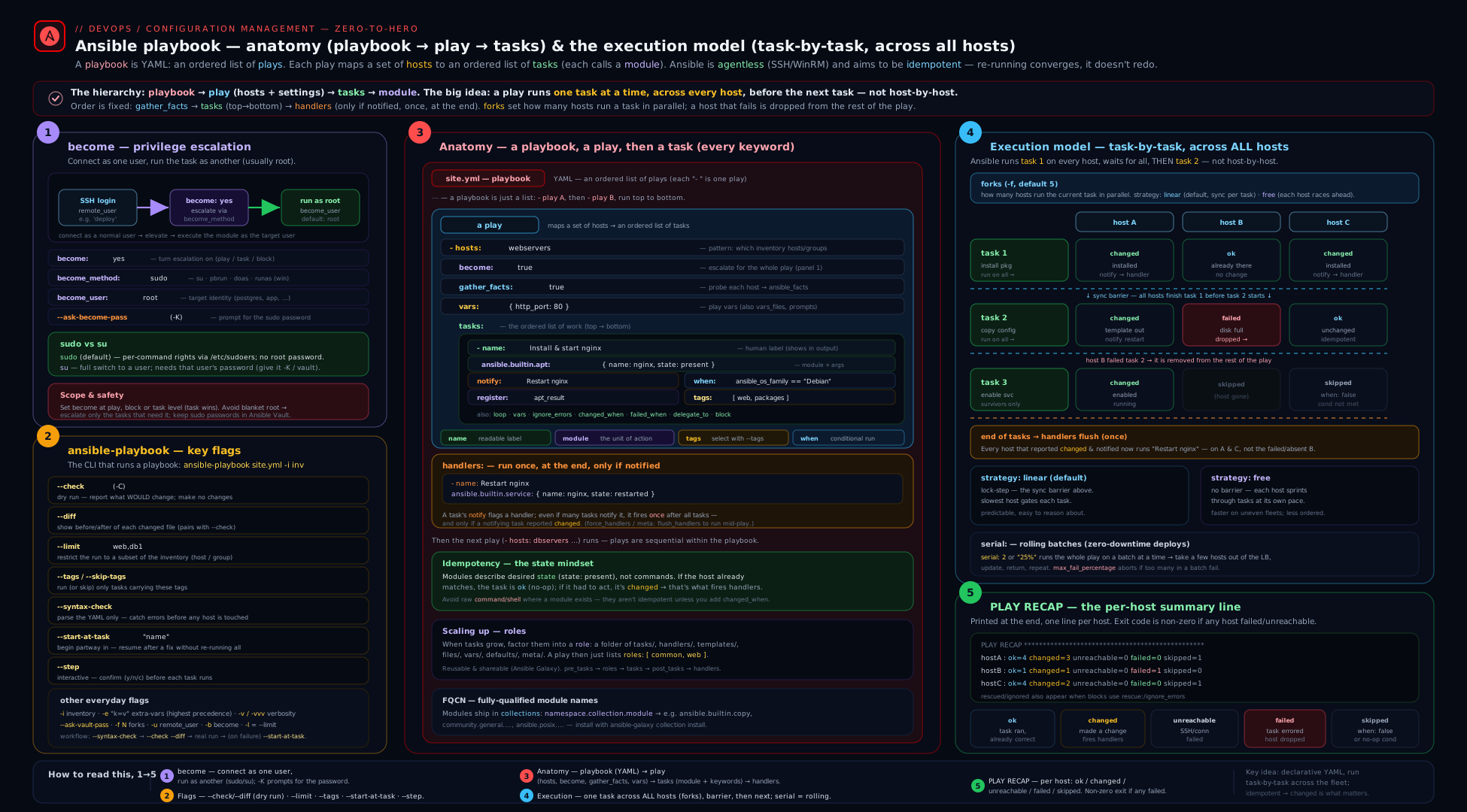
The diagram shows the playbook → play → task → module hierarchy on the left, the horizontal (task-by-task, host-by-host) execution sweep in the middle, and the privilege-escalation flow (connect as remote_user, then become become_user via become_method) on the right.
Privilege escalation: become in full depth
Most useful work needs root: installing packages, writing to /etc, managing services. But you should never SSH in as root (it’s a security anti-pattern, and many distros disable it by default). The pattern everywhere is: log in as an ordinary user, then escalate with sudo (or su, doas, etc.). Ansible’s name for this is become, and it is a small system with a few moving parts that you must understand precisely — this is the single most-tested operational topic in RHCE EX294.
The three become keywords (plus flags)
| Keyword | Question it answers | Default | Examples |
|---|---|---|---|
become |
Do we escalate? | false |
become: true |
become_user |
Who do we become? | root |
become_user: postgres |
become_method |
How do we escalate? | sudo |
become_method: su |
become_flags |
Extra flags for the become program | empty | become_flags: '-i' (login shell), '-s /bin/sh' |
Read them as one sentence: “become the become_user using become_method.” The default sentence is “become root using sudo.”
The become methods (every one)
become_method selects a become plugin. The complete set shipped with ansible-core / common collections:
| Method | Platform | What it runs | Password it needs | Notes |
|---|---|---|---|---|
sudo |
Linux/Unix | sudo |
your sudo password (if any) | The default; configured via /etc/sudoers |
su |
Linux/Unix | su |
the target user’s password | No sudoers needed; classic on older systems |
doas |
OpenBSD/Linux | doas |
your doas password (if any) | The minimalist sudo alternative; /etc/doas.conf |
pbrun |
Unix | PowerBroker pbrun |
per PowerBroker policy | Enterprise privilege management |
pfexec |
Solaris/illumos | pfexec |
RBAC profile | Solaris role-based access |
dzdo |
Unix | Centrify dzdo |
per Centrify policy | Centrify DirectAuthorize |
ksu |
Unix (Kerberos) | ksu |
Kerberos | Kerberised su |
runas |
Windows | run as another user | the target user’s password | The Windows escalation method (with WinRM) |
machinectl |
systemd Linux | machinectl shell |
polkit | For systemd-nspawn / user sessions |
The two you will use 99% of the time are sudo (default, policy in /etc/sudoers) and occasionally su (when there’s no sudoers entry but you know the password). Remember the password difference: sudo asks for your password; su asks for the destination user’s password. Mixing these up is the most common become failure.
Where to set become: play, block, and task scope
become (and its companions) can be set at three levels; the inner level wins:
- name: Mixed-privilege play
  hosts: web
  become: true                 # PLAY level: default to root for the whole play
  tasks:
    - name: Read a public file (no root needed)
      ansible.builtin.command: cat /etc/hostname
      become: false            # TASK override: drop privilege for this one task
      changed_when: false

    - name: Database maintenance as the postgres user
      block:                   # BLOCK level: applies to every task inside
        - name: Run a vacuum
          ansible.builtin.command: vacuumdb --all
          changed_when: false
      become: true
      become_user: postgres    # become a NON-root user for the whole block

    - name: Install a package (inherits play-level become → root via sudo)
      ansible.builtin.package:
        name: htop
        state: present
Precedence is simply task > block > play > ansible.cfg/CLI defaults. A widespread good practice is to leave become: false at the play level and switch it on only for the specific tasks/blocks that genuinely need it — least privilege, and it makes the intent obvious in review.
How the become password flows
When become_method requires a password (sudo configured with a password, or any su), you must supply it. There are four ways, in increasing order of how production-appropriate they are:
| Mechanism | How | Use when |
|---|---|---|
--ask-become-pass (-K) |
ansible-playbook site.yml -K prompts once for the become password |
Interactive runs from your laptop |
ansible_become_password var |
Set as a host/group var (ansible_become_pass is the older alias) |
Per-host, but must be Vault-encrypted |
| Ansible Vault | Put ansible_become_password in a vault-encrypted group_vars file |
The right way to store it for unattended runs |
| Passwordless sudo | Configure NOPASSWD in /etc/sudoers for the ansible user |
Common on cloud images; no password to manage at all |
Two related details: -K is become password; do not confuse it with -k (lowercase), which is the SSH connection password (--ask-pass). And there are matching ansible.cfg toggles under [privilege_escalation] (become, become_method, become_user, become_ask_pass) so you can set fleet-wide defaults. Environment overrides exist too (ANSIBLE_BECOME, ANSIBLE_BECOME_METHOD, ANSIBLE_BECOME_USER, ANSIBLE_BECOME_ASK_PASS).
The classic become gotchas
These cause real-world and exam failures, so internalise them:
- Becoming a non-root unprivileged user breaks file transfer. Modules need to write temp files that the target user can read. By default Ansible uses a world-readable temp dir or
setfacl; if neither works you’ll get"Failed to set permissions on the temporary files". The fix is to installaclon the target, or setallow_world_readable_tmpfiles(security trade-off), or usebecome_flags/pipelining appropriately. Becoming root never hits this; becomingpostgresoften does. become: truewithout a password where sudo needs one →Missing sudo password. Supply-Kor vaultansible_become_password, or grantNOPASSWD.sufailing with the wrong password — you supplied your password butsuwants the destination user’s. Switch to sudo, or supply the right password.requirettyin sudoers (old systems) blocks sudo over SSH. Either removeDefaults requirettyfor the ansible user or setbecome_flags: '-n'appropriately. Modern distros don’t set this.- Forgetting that
becomedoesn’t changeremote_user. You still connect asremote_user/ansible_user; become happens after the connection. Sudoers must permit that login user to sudo. pipelining+ sudorequirettyare incompatible; if you enable pipelining (a big speed-up) make surerequirettyis off.
Building your first real playbook
Let’s put the grammar to work. We’ll write a small web-server playbook that demonstrates: a named play, become, facts, vars, multiple tasks with different keywords, a handler, a tag, register, and changed_when. Save it as webserver.yml:
---
- name: Provision a simple web server
  hosts: web
  become: true                       # most tasks need root
  gather_facts: true
  vars:
    page_title: "Hello from Ansible"
  tasks:
    - name: Install nginx
      ansible.builtin.package:
        name: nginx
        state: present
      tags: [packages]

    - name: Deploy the index page
      ansible.builtin.copy:
        dest: /usr/share/nginx/html/index.html
        content: "<h1>{{ page_title }} on {{ ansible_facts['hostname'] }}</h1>\n"
        owner: root
        group: root
        mode: "0644"
      notify: Restart nginx          # only fires if this task reports 'changed'
      tags: [content]

    - name: Ensure nginx is enabled and running
      ansible.builtin.service:
        name: nginx
        state: started
        enabled: true

    - name: Check that nginx answers locally (read-only)
      ansible.builtin.command: "curl -fsS http://localhost/"
      register: curl_result
      changed_when: false            # a check never "changes" anything
      failed_when: page_title not in curl_result.stdout

  handlers:
    - name: Restart nginx
      ansible.builtin.service:
        name: nginx
        state: restarted
Notice how every keyword from the tables shows up: a play name/hosts/become/gather_facts/vars/tasks/handlers; task name/module/args/notify/tags/register/changed_when/failed_when; a Jinja reference to a fact (ansible_facts['hostname']) and to a var ({{ page_title }}). The handler runs once, at the end of the play, only if the copy task changed the file.
The ansible-playbook command, every flag
You run a playbook with ansible-playbook [options] playbook.yml. The flags are where day-to-day fluency lives. Here is the complete, grouped reference.
Selection & inventory
| Flag | Long form | What it does |
|---|---|---|
-i |
--inventory |
Inventory source(s); repeatable. A trailing comma makes a literal host list: -i host1, |
-l |
--limit |
Restrict to a subset/pattern of the play’s hosts: -l web02, -l 'web:!db', -l @retry.file |
-e |
--extra-vars |
Set variables (highest precedence): -e key=val, -e @vars.yml, -e '{"k":"v"}' |
--list-hosts |
Print the hosts each play would target, then exit (no execution) | |
--list-tasks |
Print the tasks that would run (respects tags), then exit | |
--list-tags |
Print all tags available in the playbook, then exit |
Dry-run, safety & diff
| Flag | Long form | What it does |
|---|---|---|
-C |
--check |
Dry run: report what would change without changing it (module-dependent) |
-D |
--diff |
Show line-by-line diffs of files/templates a task changes (pair with --check to preview) |
--syntax-check |
Parse the playbook (and includes) for YAML/structure errors only; run nothing | |
--step |
Prompt (N)o/(y)es/(c)ontinue before each task — step through interactively |
|
--start-at-task |
Begin execution at the first task whose name matches the given string | |
--flush-cache |
Clear the fact cache before running | |
--force-handlers |
Run all notified handlers even if a later task in the play fails |
Tags
| Flag | Long form | What it does |
|---|---|---|
-t |
--tags |
Run only tasks/blocks/roles with these tags (--tags content,packages) |
--skip-tags |
Run everything except these tags |
Special tag values: always runs unless explicitly skipped; never runs only if its tag is named; tagged / untagged / all are meta-selectors.
Privilege escalation & connection
| Flag | Long form | What it does |
|---|---|---|
-b |
--become |
Force become on (overrides the playbook) |
--become-user |
The user to become | |
--become-method |
sudo / su / doas / runas / … | |
-K |
--ask-become-pass |
Prompt for the become (privilege-escalation) password |
-k |
--ask-pass |
Prompt for the SSH connection password |
-u |
--user |
The remote SSH login user (the remote_user) |
-c |
--connection |
Connection plugin: ssh (default), local, winrm, docker … |
--private-key / --key-file |
SSH private key file | |
-T |
--timeout |
SSH connection timeout (seconds) |
--ssh-common-args / --ssh-extra-args |
Pass extra args to ssh/scp/sftp (e.g. a ProxyJump) |
Vault
| Flag | Long form | What it does |
|---|---|---|
-J |
--ask-vault-password |
Prompt for the Vault password |
--vault-password-file |
Read the Vault password from a file/script | |
--vault-id |
Specify a labelled vault: --vault-id prod@prompt |
Parallelism, output & verbosity
| Flag | Long form | What it does |
|---|---|---|
-f |
--forks |
Number of hosts to act on in parallel (default 5) |
-v … -vvvv |
--verbose |
Increase verbosity: -v results, -vv task input, -vvv connection, -vvvv connection debug |
--check + -D |
(combo) the standard “show me exactly what this would do” pre-flight |
The five flags you will reach for daily, in order of importance: --syntax-check (does it even parse?), --check --diff / -C -D (what would it do?), --limit / -l (do it to just this host first), --tags / -t (run only the relevant slice), and --start-at-task (resume a long playbook after fixing a failure). Commit those to muscle memory.
Reading the play recap
Every run ends with a PLAY RECAP line per host. Each counter has a precise meaning — interviewers ask “what’s the difference between changed and ok?” and “failed vs unreachable?”:
| Counter | Meaning |
|---|---|
ok |
Tasks that ran and the host was already in the desired state (no change made), plus successful gather_facts |
changed |
Tasks that made a change (this is your drift indicator — a fully converged system shows changed=0 on a re-run) |
unreachable |
Ansible could not connect (SSH/auth/host down) — a transport failure, not a task failure |
failed |
A task ran and failed (non-zero rc, module error, or failed_when) |
skipped |
Tasks skipped by when or tag selection |
rescued |
Tasks in a block that failed but were handled by a rescue: |
ignored |
Tasks that failed but had ignore_errors: true |
The single most useful thing to know: a correctly written, idempotent playbook re-run should report changed=0. If a re-run still shows changes, either the system genuinely drifted, or (more often) one of your tasks isn’t idempotent — usually a command/shell task missing changed_when: false.
Hands-on lab: write, check, and run your first playbook (₹0)
Everything here runs on your control node plus two throwaway containers, so there is no cloud spend. You need ansible-core and either Docker or Podman installed locally.
Step 1 — start two target containers. We use systemd-capable images so service/systemd work like a real box:
# Two CentOS-Stream-9 containers with systemd as PID 1
for n in 1 2; do
  docker run -d --name web0$n --hostname web0$n \
    --tmpfs /run --tmpfs /tmp -v /sys/fs/cgroup:/sys/fs/cgroup:ro \
    quay.io/centos/centos:stream9 /usr/sbin/init
done
docker ps --format '{{.Names}}\t{{.Status}}'
Step 2 — make an inventory that targets them via the Docker connection (no SSH needed). Create inventory.ini:
[web]
web01 ansible_connection=docker
web02 ansible_connection=docker

[web:vars]
ansible_python_interpreter=/usr/bin/python3
Confirm connectivity:
ansible -i inventory.ini web -m ansible.builtin.ping
# Expect: web01 | SUCCESS => {"ping": "pong"}  (and web02)
Step 3 — save the webserver.yml from the section above into the same directory.
Step 4 — syntax-check first (always):
ansible-playbook -i inventory.ini webserver.yml --syntax-check
# Expect: playbook: webserver.yml   (no errors)
Step 5 — see what it would do with a dry run + diff (note: under the Docker connection, become is unnecessary because the container’s default user is root, so these examples omit -K):
ansible-playbook -i inventory.ini webserver.yml --check --diff
# 'changed' items are previewed; the index.html diff is printed. Nothing is actually altered.
Step 6 — run it for real:
ansible-playbook -i inventory.ini webserver.yml
Expected recap (first run): every host shows several changed items and failed=0 unreachable=0, e.g.
PLAY RECAP *********************************************************************
web01  : ok=5  changed=3  unreachable=0  failed=0  skipped=0  rescued=0  ignored=0
web02  : ok=5  changed=3  unreachable=0  failed=0  skipped=0  rescued=0  ignored=0
Step 7 — prove idempotency. Run the exact same command again:
ansible-playbook -i inventory.ini webserver.yml
# This time: changed=0 on every host. The handler does NOT fire (nothing changed).
Seeing changed=0 on the second run is the whole point of Ansible. Let it sink in.
Step 8 — exercise the flags:
# Only the content task (by tag), only on web01:
ansible-playbook -i inventory.ini webserver.yml --tags content --limit web01

# List what would run, with current tags:
ansible-playbook -i inventory.ini webserver.yml --list-tasks
ansible-playbook -i inventory.ini webserver.yml --list-tags

# Resume from a named task:
ansible-playbook -i inventory.ini webserver.yml --start-at-task "Ensure nginx is enabled and running"

# Step through interactively:
ansible-playbook -i inventory.ini webserver.yml --step
Step 9 — confirm the result from inside a container:
docker exec web01 curl -s http://localhost/
# Expect: <h1>Hello from Ansible on web01</h1>
Validation checklist. You have succeeded if: --syntax-check passed; the first run showed changed>0, failed=0; the second run showed changed=0; --tags content ran only the copy task; and the curl inside the container returns your page.
Cleanup (remove every container — leave nothing behind):
docker rm -f web01 web02
docker ps -a --format '{{.Names}}' | grep -E 'web0[12]' || echo "cleaned up"
Cost note: ₹0. Local containers only — no cloud resources are created at any point. The only cost is the disk space of the CentOS image, reclaimed on cleanup.
Going deeper
You now have the grammar. This section is the engine underneath it — the parts that separate someone who writes playbooks from someone who can reason about why a playbook did what it did. None of it is required to clear the beginner bar; all of it shows up in real incidents and in the RHCE lab.
What become actually does under the hood
become is not a magic “run as root” switch — it is a become plugin that wraps your command inside another command. When a task escalates with the default sudo method, Ansible does not run your module directly; it builds something close to:
sudo -H -S -n -u root /bin/sh -c 'echo BECOME-SUCCESS-xxxxxxxx ; <the module invocation>'
Three things are happening at once. sudo performs the escalation; the shell runs your module as the target user; and Ansible prepends echo BECOME-SUCCESS-<random> so it can detect success by watching the output stream for that exact token. If it instead sees sudo’s password prompt, it knows to send the become password (from -K, ansible_become_password, or Vault); if it sees neither the token nor a prompt, it reports an escalation failure. Swapping become_method swaps the wrapper program (su -c …, doas …, runas, …) while the success-token handshake stays identical — which is exactly why become is pluggable, and why the password differs by method (sudo wants your password, su wants the target user’s).
Every become keyword also has an inventory-variable form, which is how you set escalation per host or per group instead of in the play:
| Keyword | Inventory variable |
|---|---|
become |
ansible_become |
become_method |
ansible_become_method |
become_user |
ansible_become_user |
become_flags |
ansible_become_flags |
| become password | ansible_become_password (alias ansible_become_pass) |
Put ansible_become_password in a Vault-encrypted group_vars file and unattended runs escalate with no -K prompt and no plaintext on disk.
Keyword inheritance and directive precedence
Play, block, and task all accept many of the same keywords, and for most of them the rule is simple: the nearest scope wins (task overrides block overrides play). become, become_user, connection, remote_user, environment, check_mode, diff, and no_log all resolve that way. Two keywords are special and catch people out because they do not merely override:
whenconditions combine with AND, down the tree. Awhenon a block and awhenon a task inside it means both must be true for the task to run.tagsaccumulate, down the tree. A task’s effective tags are the play’s plus the block’s plus its own — they add up, they do not replace.
- name: Precedence demo
  hosts: db
  become: true                 # PLAY: escalate (default target: root)
  tags: [database]             # PLAY tag → inherited by everything below
  tasks:
    - name: RedHat-only maintenance, as the postgres user
      when: ansible_facts['os_family'] == "RedHat"   # BLOCK condition
      become_user: postgres                          # BLOCK: override root → postgres
      tags: [maint]                                  # BLOCK tag (adds to 'database')
      block:
        - name: Vacuum the cluster
          when: run_vacuum | default(false)          # TASK condition — AND-ed with the block's
          ansible.builtin.command: vacuumdb --all --analyze
          changed_when: false
The Vacuum task runs only if the host is RedHat-family and run_vacuum is true; it escalates as postgres (inherited from the block, itself overriding the play’s implicit root); and its effective tags are [database, maint] (accumulated). Reading a task’s real behaviour means reading up the tree, not just the task line.
Handler mechanics: timing, ordering, and listen
Handlers feel trivial until a rollout depends on them. The precise model:
notifydoes not run a handler — it queues it. The queue is de-duplicated: a handler notified ten times still runs once.- Queued handlers run at the end of the play — and also at the end of each section (
pre_tasks,roles,tasks,post_tasks) and at the end of eachserialbatch. That per-batch flush is what makes rolling restarts safe. - Handlers run in the order they are defined in the
handlers:block — not the order they were notified. This surprises everyone exactly once. - If a host fails before the flush point, its queued handlers never run — unless you set
force_handlers: true(or pass--force-handlers).
Two tools give you control. ansible.builtin.meta: flush_handlers drains the queue right now, mid-play — essential when a later task depends on a restart having already happened. And listen: lets many handlers subscribe to one topic, so a single notify fans out:
  tasks:
    - name: Render the app config
      ansible.builtin.template:
        src: app.conf.j2
        dest: /etc/app/app.conf
      notify: app config changed        # notify a TOPIC, not a handler name

    - name: Make sure the reload happened before we smoke-test
      ansible.builtin.meta: flush_handlers

    - name: Smoke test the health endpoint
      ansible.builtin.uri:
        url: http://localhost/healthz
        status_code: 200

  handlers:
    - name: Reload app
      ansible.builtin.service:
        name: app
        state: reloaded
      listen: app config changed        # subscribes to the topic

    - name: Warm the cache
      ansible.builtin.command: /usr/local/bin/warm-cache
      changed_when: false
      listen: app config changed        # one notify → both handlers run
Prefer listen: topics to notifying handlers by name: it decouples the reason (“config changed”) from the reactions (reload, warm cache) and survives handler renames.
Strategy, serial, and forks in concert
These three knobs are orthogonal and compose:
forks(default 5) — how many hosts Ansible talks to at once. Pure parallelism; set it inansible.cfgor with-f.serial— how many hosts are in a wave (batch). The play runs to completion (including a handler flush) for one wave before the next begins.strategy— how hosts are scheduled within a wave.linear(default) puts a barrier after every task: all hosts finish task N before any starts task N+1.freeremoves the barrier, so each host races through the whole task list as fast as it can — great for slow, heterogeneous fleets, but you lose lock-step ordering and tidy output.host_pinnedis likefreebut keeps each host on one worker.
The classic safe rollout combines them:
- name: Rolling config push, one wave at a time
  hosts: web
  serial: "25%"                 # a quarter of the fleet per wave
  max_fail_percentage: 0        # abort the whole rollout if ANY host in a wave fails
  become: true
  tasks:
    - name: Push new config
      ansible.builtin.template:
        src: app.conf.j2
        dest: /etc/app/app.conf
      notify: Reload app
  handlers:
    - name: Reload app
      ansible.builtin.service:
        name: app
        state: reloaded
Because handlers flush per wave, the first 25% push config and reload and prove healthy before the next 25% is touched. Drop serial and every host reloads at once — the difference between a rolling restart and an outage.
Facts and the implicit setup task
gather_facts: true runs a hidden first task — ansible.builtin.setup — on every host, which is why ansible_facts exist before your first real task. It is not free: on a large fleet it is a full round-trip per host. Three levers keep it cheap: gather_facts: false when a play uses no facts; gather_subset: [min] (or ['!hardware'], etc.) to collect less; and fact caching ([defaults] fact_caching = jsonfile and friends) so later runs reuse facts instead of re-gathering. You can also gather on demand later with an explicit ansible.builtin.setup task.
Common beginner mistakes
These are mental-model errors — wrong ideas about how Ansible works — as opposed to the symptom-to-fix table below. Fixing the model fixes a whole class of bugs at once.
- “Ansible finishes host A, then does host B.” No. With the default
linearstrategy the loop is task-first: task 1 runs on every host, then task 2 on every host. Right model: outer loop = tasks, inner loop = hosts. A host that fails a task is quietly dropped from the rest of the play while the others carry on. - “
become: truemeans I log in as root.” No — you still connect as yourremote_user; escalation happens after the SSH session is open. Right model: connect-then-escalate. Your login user must be permitted to sudo in/etc/sudoers; becoming root does not skip the login. - “
commandandshellare idempotent like the other modules.” No — they run every time and report changed every time, because Ansible cannot know whether your command altered anything. Right model: prefer a state-based module (package,service,copy); when you must shell out, addchanged_when:/failed_when:to tell the truth. - “A handler runs the instant I
notifyit.” No —notifyqueues the handler; it runs once, at the end of the play (or batch/section), in definition order, and only if the task actually changed. Right model: notify is a subscription; the flush is the trigger. - “
-kand-Kare basically the same.” No — lowercase-kis the SSH connection password; uppercase-Kis the become password. Right model: lowercase k to connect, uppercase K to escalate. - “Setting
become: trueon the play forces every task to run as root.” No — nearest scope wins, so any task or block can flipbecome: falseor changebecome_user. Right model: default to least privilege and escalate only the tasks that truly need it. - “An unnamed task is fine, I’ll remember what it does.” Maybe today — but
--start-at-task,--list-tasks, and the run output all key off thename:. Right model: name every play and every task, always.
Common mistakes & troubleshooting
| Symptom | Likely cause | Fix |
|---|---|---|
ERROR! Syntax Error while loading YAML |
Tabs instead of spaces, or a misaligned -/key |
Use 2-space indent, no tabs; run --syntax-check; let your editor show whitespace |
Every re-run shows changed for a command task |
command/shell always reports changed |
Add changed_when: false (read-only) or a real changed_when: expression |
Missing sudo password |
become: true but sudo needs a password |
Add -K, or vault ansible_become_password, or grant NOPASSWD |
Failed to set permissions on the temporary files |
Becoming a non-root user without ACL support | Install acl on the target, or use a root become, or set allow_world_readable_tmpfiles (trade-off) |
| Handler never runs | The notifying task reported ok, not changed (or the play failed before end) |
Make the task actually change; or --force-handlers / force_handlers: true |
--start-at-task doesn’t start where expected |
It matches task names; unnamed tasks can’t be targeted | Name every task; match the exact name: string |
Variable looks like a string "{{ x }}" literally |
A bare {{ }} at the start of an unquoted value confuses YAML |
Quote the whole value: key: "{{ x }}" |
| Play runs on no hosts (“skipping: no hosts matched”) | hosts: pattern matches nothing in the inventory |
Check ansible-inventory --graph; verify group/host names and --limit |
Confusing -k and -K |
-k = SSH password, -K = become password |
Remember: lowercase k = connect, uppercase K = escalate |
Best practices
- Always name every play and every task. Output,
--start-at-task, and--list-tasksall depend on names. - Always
--syntax-check, then--check --diff, before a real run on anything you care about. - Default to least privilege: keep
become: falseat the play level; enablebecomeonly on the specific tasks/blocks that need it. - Use FQCN everywhere (
ansible.builtin.copy, notcopy). It’s unambiguous, future-proof, and exam-correct. - Make tasks idempotent — prefer state-based modules over
command/shell; when you must shell out, setchanged_when/failed_whenhonestly. - Tag thoughtfully so operators can run slices (
--tags deploy,--tags config) without running everything. - Test with
--limiton one host first, then widen. For fleets, combineserial+max_fail_percentagefor safe rollouts. - Keep playbooks in Git, code-reviewed. A playbook is the audit trail; treat it like application code.
- Don’t use
vars_promptin automation — it blocks unattended/CI runs.
Security notes
- Never SSH as root. Connect as an ordinary user and escalate with
become. Many distros disable root SSH by default — keep it that way. - Never put plaintext passwords in playbooks or inventory. Encrypt
ansible_become_password,ansible_password, and any secret with Ansible Vault (covered inansible-vault-secrets-encryption-vault-ids). - Set
no_log: trueon any task that handles a secret (a password module arg, a token in acommand). Otherwise-vand the diff will leak it to the console and CI logs. - Prefer
NOPASSWDsudo scoped to the ansible user over storing become passwords, where your security policy allows it; combine with key-based SSH auth. - Be deliberate with
allow_world_readable_tmpfiles— it makes the module temp dir world-readable to work around non-root become; only acceptable on trusted single-tenant hosts. - Mind
become_flags: '-i'(login shell): it sources the target user’s environment, which can change PATH and behaviour — use it knowingly. --diffcan print secrets in changed file contents; pair sensitive file tasks withno_log: trueor suppress per-taskdiff:.
Interview & exam questions
- What is the difference between a play and a task? A play maps a set of inventory hosts to an ordered list of tasks (and handlers/roles) plus play-level settings like
become; a task is a single call to one module. A playbook is a list of plays. - Explain Ansible’s execution order with the default strategy. Linear strategy runs task by task across all targeted hosts: it runs task 1 on every host (up to
forks), waits, then task 2 on every host, and so on. A host that fails a task is dropped from the rest of the play. - What does
becomedo, and what arebecome_userandbecome_method?becomeenables privilege escalation;become_useris who you become (defaultroot);become_methodis how (defaultsudo; alsosu,doas,runas, etc.). You connect asremote_user, then escalate. sudovssufor become — what’s the password difference?sudoprompts for your (the connecting user’s) password;suprompts for the target user’s password. Supplying the wrong one is a common failure.- What’s the difference between
-kand-K?-k(--ask-pass) prompts for the SSH connection password;-K(--ask-become-pass) prompts for the privilege-escalation password. - How do you do a dry run and preview changes?
ansible-playbook site.yml --check --diff(-C -D):--checkreports what would change without changing it;--diffshows the line-level changes. - Why might a
commandtask always reportchanged, and how do you fix it? Ansible can’t know whether an arbitrary command changed anything, socommand/shelldefault tochanged. Addchanged_when: falsefor read-only commands (or a properchanged_when:expression). - When do handlers run, and what triggers them? A handler runs once, at the end of the play, and only if a task that
notifys it reported changed.meta: flush_handlersforces them to run earlier;force_handlers/--force-handlersruns them even if the play later fails. - What’s the difference between
serialandstrategy?serialsets the batch size (how many hosts at a time — a rolling deploy);strategycontrols scheduling within a batch (linear= lock-step per task;free= each host races ahead). unreachablevsfailedin the recap?unreachableis a connection/transport failure (SSH, auth, host down);failedmeans a task ran and failed. They are counted separately.- How do you run only part of a playbook? By tags (
--tags/--skip-tags), by host (--limit), or by resuming at a named task (--start-at-task "name");--stepwalks task by task. - How should you handle the become password in an unattended pipeline? Store
ansible_become_passwordin a Vault-encrypted group/host var (or use scopedNOPASSWDsudo) — never plaintext, never--ask-become-passin CI.
Quick check
- In
ansible.builtin.copy:, the keys under it (src, dest, mode) are called what? - Which flag prompts for the privilege-escalation password —
-kor-K? - What does a re-run’s
changed=0tell you about your playbook? - At which scopes can you set
become(name three)? - Which
ansible-playbookflag parses the file for errors without running anything?
Answers
- The module’s arguments (module options/parameters).
-K(--ask-become-pass).-kis the SSH connection password.- It is idempotent — the system was already in the desired state, so nothing was changed (a converged, correct run).
- Play, block, and task level (also via
ansible.cfg/CLI). Inner scope wins. --syntax-check.
Practice challenges
Six exercises, easy to hard. Try each before opening the solution. They build on webserver.yml and the lab inventory (web01, web02) from earlier, but you can also run them against localhost.
1. (Beginner) A minimal, escalated install. Write a complete one-play playbook that installs git on the web group as root, using FQCN.
<details> <summary>Solution</summary>
---
- name: Install git
  hosts: web
  become: true
  tasks:
    - name: Ensure git is present
      ansible.builtin.package:
        name: git
        state: present
Why: become: true escalates to root (needed to install packages) and ansible.builtin.package is the FQCN, distro-agnostic way to declare package state.
</details>
2. (Beginner) Stop a check from lying. A task ansible.builtin.command: id -u reports changed on every run. Make it report ok instead.
<details> <summary>Solution</summary>
- name: Read the numeric uid (read-only)
  ansible.builtin.command: id -u
  register: uid_result
  changed_when: false
Why: command/shell always report changed; changed_when: false declares this task never alters state, so a re-run stays honest and won’t spuriously trigger handlers.
</details>
3. (Intermediate) Restart only on change. Add a handler that restarts nginx, wired so it fires only when a config-template task actually changes the file.
<details> <summary>Solution</summary>
  tasks:
    - name: Deploy nginx config
      ansible.builtin.template:
        src: nginx.conf.j2
        dest: /etc/nginx/nginx.conf
      notify: Restart nginx
  handlers:
    - name: Restart nginx
      ansible.builtin.service:
        name: nginx
        state: restarted
Why: notify only queues the handler when the task reports changed, so an unchanged config leaves nginx running untouched — no needless restart.
</details>
4. (Intermediate) A safe, targeted preview. Without changing anything, preview what the content-tagged tasks would do on web02 only.
<details> <summary>Solution</summary>
ansible-playbook -i inventory.ini webserver.yml \
  --tags content --limit web02 --check --diff
Why: --tags selects the slice, --limit narrows to one host, and --check --diff shows the line-level changes without applying them — the standard pre-flight.
</details>
5. (Advanced) Turn it into a rolling deploy. Modify the play so it updates one host at a time, aborts the entire run if any host fails, and reloads the service per wave.
<details> <summary>Solution</summary>
- name: Rolling web update
  hosts: web
  serial: 1                     # one host per wave
  max_fail_percentage: 0        # any failure in a wave aborts the rest
  become: true
  tasks:
    - name: Push config
      ansible.builtin.template:
        src: app.conf.j2
        dest: /etc/app/app.conf
      notify: Reload app
  handlers:
    - name: Reload app
      ansible.builtin.service:
        name: app
        state: reloaded
Why: serial: 1 processes the fleet in single-host waves and handlers flush at the end of each wave, so every host converges and reloads before the next is touched; max_fail_percentage: 0 stops the rollout the moment a wave sees a failure.
</details>
6. (Advanced) Inheritance and combined conditions. Write a block that runs only on RedHat-family hosts, as the postgres user, where each inner task is additionally gated on a db_maint boolean. Predict the effective tags if the play is tagged [db] and the block [maint].
<details> <summary>Solution</summary>
- name: DB maintenance
  hosts: db
  become: true
  tags: [db]
  tasks:
    - name: RedHat-only, as postgres
      when: ansible_facts['os_family'] == "RedHat"
      become_user: postgres
      tags: [maint]
      block:
        - name: Reindex
          when: db_maint | default(false)
          ansible.builtin.command: reindexdb --all
          changed_when: false
Why: when conditions AND down the tree (RedHat and db_maint), become_user is inherited from the block (overriding the play’s root), and tags accumulate, so the inner task’s effective tags are [db, maint].
</details>
Exercise
Extend webserver.yml into a small, production-flavoured playbook:
- Add a play-level
vars_files:that loadsvars/site.ymlcontainingpage_titleand a newadmin_user. - Add a block that runs as a non-root
become_user(create the user first withansible.builtin.useras root, then in a later blockbecome_user: "{{ admin_user }}"and write a file into that user’s home). - Add a
tags: [smoke]task at the end (apost_taskscommandwithchanged_when: false) that curls the page and usesfailed_whento fail if the title is missing. - Set
serial: 1so the play rolls one container at a time, and addmax_fail_percentage: 0. - Run it with
--check --diff, then for real, then again to provechanged=0; then run--tags smoke --limit web02only. Confirm the recap counters match your expectations, then clean up the containers.
Bonus: add no_log: true to a task that writes a fake “password” line and confirm -v no longer prints it.
Certification mapping
This lesson maps directly to the Red Hat Certified Engineer (RHCE) EX294 objectives:
- “Create Ansible plays and playbooks” — play vs task structure, the keyword set, the execution model.
- “Use Ansible modules for system administration tasks” — invoking modules from tasks with FQCN.
- “Work with roles” (foundation) — understanding where tasks sit before roles (
pre_tasks→ roles →tasks→post_tasks). - “Use Ansible to escalate privileges” —
become,become_user,become_method, password handling. Expect a hands-on become task on the exam. - “Run playbooks” — the
ansible-playbookcommand,--syntax-check,--check,--limit,--tags, verbosity. The exam is performance-based, so command fluency is graded implicitly.
It also underpins the broader DevOps/automation competencies tested in CKA-adjacent and platform-engineering interviews, where “explain how a playbook executes across hosts” and “how do you escalate privilege safely” are staple questions.
Glossary
- Playbook — a YAML file containing one or more plays; the unit of Ansible automation.
- Play — a mapping that binds a host pattern to an ordered list of tasks/roles plus settings (become, vars, strategy, serial).
- Task — a single call to one module with arguments; the atomic unit Ansible executes and reports on.
- Module — idempotent code (usually run on the target) that performs work and returns JSON (e.g.
ansible.builtin.copy). - FQCN — Fully-Qualified Collection Name:
namespace.collection.module(e.g.ansible.builtin.service). - Keyword / directive — a setting on a play or task (e.g.
hosts,become,when,loop,register). - become — Ansible’s privilege-escalation feature (run a task as another user, typically root).
- become_user / become_method — who you escalate to (default root) and how (default sudo; also su, doas, runas).
- remote_user — the user you SSH in as, before any privilege escalation.
- Handler — a task triggered by
notify, run once at the end of the play, only on change. - Idempotency — re-running yields the same state with no further changes (
changed=0). - Strategy — how hosts are scheduled within a batch:
linear(lock-step),free(race ahead),host_pinned,debug. - serial — the rolling batch size: how many hosts are processed per wave.
- forks — how many hosts Ansible acts on in parallel (default 5).
- Check mode — dry-run (
--check/-C): report what would change without changing it. - Play recap — the per-host summary line (ok / changed / unreachable / failed / skipped / rescued / ignored).
- Block — a group of tasks that share keywords (
become,when,tags) and enablerescue:/always:error handling. - Become plugin — the pluggable program behind escalation (
sudo,su,doas,runas, …); it wraps the command and confirms success via aBECOME-SUCCESStoken. - listen — a topic a handler subscribes to, so one
notifycan trigger many handlers and survive handler renames. - meta: flush_handlers — a special task that drains the notified-handler queue immediately, instead of waiting for the end of the play/batch.
- pre_tasks / post_tasks — task lists that run before / after roles and the main
tasks; handlers auto-flush at the end of each. - setup (fact gathering) — the implicit
ansible.builtin.setuptask that populatesansible_factsbefore your tasks run. - Fact caching — persisting gathered facts (e.g.
jsonfile,redis) so later runs can skipsetup. - register — capture a task’s JSON result into a variable (
.rc,.stdout,.changed,.results). - changed_when / failed_when — expressions that override when a task is counted as changed / failed.
- no_log — suppresses a task’s input and output in the console and logs; mandatory on secret-handling tasks.
- delegate_to — run a task on a different host than the one being iterated, using the current host’s variables.
- run_once — run a task on just the first host of the batch and share its result with the others.
- max_fail_percentage / any_errors_fatal — the batch failure threshold / “one host fails, stop everyone” switches for safe rollouts.
- sudoers —
/etc/sudoersand/etc/sudoers.d/*, the policy that decides who may sudo, as whom, and whether a password is required. - NOPASSWD — a sudoers option letting a user run sudo without being prompted for a password.
- pipelining — an SSH optimisation that cuts round-trips per task; incompatible with sudo
requiretty.
Next steps
- Next lesson: Ansible Core Modules for Real Work: package, service, copy, file, template, user & lineinfile — fill the playbooks you now know how to write with the modules that do the actual work.
- Previous lesson: Ansible Ad-Hoc Commands & Modules — the CLI foundation this builds on.
- Going deeper later: variables and the 22-level precedence (
ansible-variables-precedence-facts-register-set-fact), conditionals/loops/handlers/tags in depth (ansible-conditionals-loops-handlers-tags), and robust error handling with blocks and rescue (ansible-blocks-error-handling-changed-failed-when).