In a nutshell
Configuring a Linux server by hand means a long list of commands: install this, start that, drop a config here, add a user there. This lesson hands you the small set of Ansible modules that do each of those jobs — and, crucially, do them declaratively. You do not tell a module the steps; you tell it the end state (“nginx is installed”, “the service is running”, “this line is in the file”), and the module works out whether it needs to do anything at all. Re-run it and nothing already-correct is touched.
Think of each module as a specialist tradesperson you send to a site with a work order that describes the finished result, not step-by-step instructions. Hand a painter a note that says “the wall is blue” and they paint it if it is white and walk away if it is already blue — either way the wall ends up blue. That “walk away if it’s already right” behaviour is idempotency, and it is what lets you run the same playbook a hundred times without fear. The modules here are your core crew: package stocks the software, service keeps the daemons running, copy/template/file deliver and shape files, lineinfile/blockinfile make surgical edits to files someone else owns, user/group manage accounts, and get_url/unarchive/fetch move bytes on and off the host.
You do not need to memorise every option below on the first read. Skim the tables, run the lab, and come back to look up the one flag you need when you need it — that is exactly how this page is meant to be used.
Level: Junior · Time: ~40 min
You have learned what a playbook is — plays, tasks, become, the execution model. But a play is only ever as useful as the modules the tasks call, and a handful of modules do the overwhelming majority of real work. If you can install a package, manage a service, lay down a file (verbatim or rendered from a template), make a surgical edit to a config that something else owns, create a user, fetch a tarball and unpack it, and pull a log back for inspection — you can already automate the configuration of almost any Linux server. This lesson is the exhaustive reference for exactly that toolkit: ansible.builtin.package/dnf/apt, ansible.builtin.service/systemd, ansible.builtin.copy/template/file, ansible.builtin.lineinfile/blockinfile, ansible.builtin.user/group, and ansible.builtin.get_url/unarchive/fetch. For each one you get the key options laid out in a table — what it is, the choices, the default, when to reach for it and the gotcha — plus the single most important property of all of them: idempotency, the rule that re-running a task already in the desired state changes nothing and reports ok, not changed.
I have written this to be the page you keep open while you write playbooks. It is beginner-accessible — every option and every term is explained the first time it appears — but it is deliberately complete, because the difference between a fragile script and a production-grade playbook is almost always a module option somebody did not know existed: the backup that saves you, the validate that refuses to install a broken config, the mode you got wrong because you typed 644 instead of '0644', the create: yes that turns lineinfile from a surgical tool into a file generator. We use fully-qualified collection names (FQCN) throughout — ansible.builtin.copy, not bare copy — because that is the modern, unambiguous, lint-clean way to write Ansible in 2026, and the habit will save you the day two modules in different collections share a short name. By the end you will reach for the right module and the right option by reflex, and the closing “configure a web server” mini-playbook shows the whole toolkit working together to turn a bare host into a running, content-serving, hardened web server — idempotently, so the hundredth run is as safe as the first.
Learning objectives
After working through this lesson you will be able to:
- Install, upgrade and remove software with
ansible.builtin.packageand the OS-specificdnf/aptmodules, and know when to use the generic versus the specific module. - Start, stop, enable and restart daemons with
ansible.builtin.serviceandansible.builtin.systemd, and explainstateversusenabledand whendaemon_reloadis required. - Choose correctly between
copy(verbatim bytes),template(Jinja2-rendered), andfile(state of a path: file/directory/link/absent) — and set ownership and permissions on all three. - Make surgical, idempotent edits to files you do not fully own with
lineinfile(one line) andblockinfile(a managed region), usingregexp,line,insertafter/insertbeforeandvalidate. - Manage accounts and groups with
userandgroup— shells, supplementary groups, SSH keys, hashed passwords and system accounts. - Move files around with
get_url(download),unarchive(fetch + unpack), andfetch(pull a file back from a managed node). - Read and write Linux file modes in both octal (
'0644') and symbolic (u=rw,g=r,o=r) form, and avoid the classic YAML octal gotcha. - State the idempotency rule of each module — what makes it report
changedversusok— and use--check/--diffto verify before you act.
Prerequisites
You need a working control node and at least one managed node you can reach over SSH with privilege escalation, plus the playbook fundamentals: a play’s hosts, become, tasks, and the ansible-playbook command with --check and --diff. If you have read Ansible Playbooks, In Depth: Plays, Tasks, Modules, Become & Your First Playbook you have exactly the right footing — this lesson is the natural sequel, filling the otherwise-empty tasks: list with the modules that actually do the work. This is a Foundation (Playbooks) lesson in the Ansible Zero-to-Hero ladder: everything later — variables and facts, conditionals and loops, Jinja2 templating, roles — assumes you already know these modules cold, because they are what every role’s tasks/main.yml is built from. The lab at the end runs entirely against localhost and a free local container, so there is no cost to follow along.
Core concepts: modules, idempotency and the change report
Before the option tables, fix four ideas that apply to every module below.
A module is a small program that runs on the managed node and reports JSON. When a task calls ansible.builtin.copy, Ansible ships the module code (Python) plus your arguments to the target, runs it there against the target’s own Python interpreter, captures a JSON result, and removes the temporary code. Your control node never touches the target’s files directly — the module does, locally on the host. This is why modules are fast and why the target needs Python (for most modules), and why the result of every task is a structured object you can register and inspect (.changed, .rc, .stdout, module-specific keys).
Idempotency is the whole point — declare state, not steps. A well-written module is declarative: you describe the desired end state (“this package is present”, “this line exists in the file”, “this service is running and enabled”) and the module figures out whether reality already matches. If it does, the module does nothing and reports ok (unchanged); if it does not, the module makes the minimum change and reports changed. This is what lets you run the same playbook a hundred times safely. The two modules that are not idempotent — ansible.builtin.command and ansible.builtin.shell — run their command every time regardless, which is exactly why you prefer a purpose-built module whenever one exists, and why you use changed_when/creates/removes to teach the command modules when they really changed something.
changed versus ok is a status, and it drives handlers. Every task reports one of ok, changed, skipped, failed, or unreachable. The distinction between ok and changed is not cosmetic: a changed result is what fires a handler via notify (restart the service only if the config actually changed), and a clean run that reports all ok is your proof the system has converged on the desired state. If a task you expect to be idempotent reports changed on every run, that is a bug in how you described the state (a common cause: a command with no changed_when, or a lineinfile whose regexp does not match the line it just wrote).
Check mode and diff mode are your safety net. Run any playbook with --check (-C) and most of these modules will predict what they would change without touching anything (a “dry run”); add --diff and copy/template/lineinfile/blockinfile will show you the exact before/after of the file. Make this a reflex: --check --diff before a real run tells you precisely what is about to happen. (A few modules cannot fully support check mode — for example unarchive may report a change it cannot verify without extracting — but the core file/package/service modules support it well.)
Key terms used throughout: FQCN (fully-qualified collection name, namespace.collection.module, e.g. ansible.builtin.copy); idempotent (safe to re-run; converges on a declared state); become (privilege escalation, usually to root, required by most of these system-changing modules); handler (a task run only when notified by a changed result); mode (Unix permission bits, octal or symbolic); and fact (auto-discovered data about the host, e.g. ansible_facts['os_family'], used to pick the right package manager).
Managing software: package, dnf & apt
Installing and removing software is task number one on almost every host. Ansible gives you a generic module that auto-selects the right package manager and several specific modules (dnf, apt, yum, zypper, pacman, apk…) that expose options unique to one manager.
ansible.builtin.package is the portable choice: it inspects ansible_facts['pkg_mgr'] and dispatches to the right backend (dnf on RHEL/Fedora, apt on Debian/Ubuntu, and so on). Use it when your only requirement is “ensure this package is in this state” and the package name is the same across the distros you target. The moment you need a manager-specific feature — update_cache with a cache validity window on apt, enablerepo on dnf, autoremove, GPG-key handling — reach for the specific module.
| Option (package / dnf / apt) | What it does | Choices / default | Notes & gotchas |
|---|---|---|---|
name |
Package(s) to act on | A string or a list (['nginx','curl']); dnf/apt accept version pins |
Pin with nginx-1.24.* (dnf) or nginx=1.24.* (apt). A list installs all in one transaction — far faster than a loop. |
state |
Desired state | present (installed; default for package), latest (installed and upgraded to newest), absent (removed) |
latest makes the task non-idempotent in spirit — it may report changed whenever upstream publishes a newer version. Use present for reproducibility; latest only when you genuinely want rolling updates. |
update_cache |
Refresh the package index first | yes/no (default no) |
apt: equivalent to apt-get update; almost always needed before installing on Debian/Ubuntu or you get “package not found”. dnf: refreshes metadata. |
cache_valid_time (apt only) |
Skip the cache refresh if it ran within N seconds | integer seconds (default 0 = always refresh when update_cache: yes) |
Set e.g. 3600 to avoid hammering mirrors on every run while still keeping the cache reasonably fresh. |
autoremove |
Remove now-unneeded dependencies | yes/no (default no) |
apt: like apt autoremove. Pairs well with state: absent to clean orphaned deps. |
autoclean (apt only) |
Clear the local downloaded-package archive | yes/no (default no) |
Reclaims disk; cosmetic, not idempotent-relevant. |
enablerepo / disablerepo (dnf/yum) |
Temporarily toggle repositories for this transaction | repo id(s) | e.g. install from EPEL without leaving it enabled: enablerepo: epel. |
disable_gpg_check (dnf/yum) |
Skip package signature verification | yes/no (default no) |
Security gotcha: leaving signature checks on is the default for a reason. Only disable for trusted local repos. |
install_weak_deps (dnf) |
Pull in Recommends-style weak dependencies |
yes/no (default yes) |
Set no for lean/minimal images. |
allow_downgrade (dnf) |
Permit installing an older version when pinned | yes/no (default no) |
Needed when you pin a version lower than what is installed. |
validate_certs (apt/dnf for remote repos) |
Verify TLS to repo mirrors | yes/no (default yes) |
Keep yes in production. |
deb (apt only) |
Install a local/remote .deb file directly |
path or URL | Bypasses the repo for one-off packages; dependencies must already be satisfied. |
Idempotency rule. state: present/absent are fully idempotent — the module checks the package database and only acts if the package’s installed-ness does not match. state: latest is idempotent against the current newest version: it reports ok if you already have the newest, changed if it upgraded. The realistic, portable pattern that respects facts looks like this:
- name: Ensure the web server and tools are present
  ansible.builtin.package:
    name:
      - nginx
      - curl
      - vim
    state: present
  become: true
# Debian/Ubuntu: refresh the cache (cheaply) then install
- name: Install on apt systems with a cached index
  ansible.builtin.apt:
    name: nginx
    state: present
    update_cache: true
    cache_valid_time: 3600
  become: true
  when: ansible_facts['os_family'] == "Debian"
Managing services: service & systemd
A package installed is not a service running. Two modules manage daemons: ansible.builtin.service (generic — works across SysV init, systemd, BSD rc, etc. by detecting the init system) and ansible.builtin.systemd (systemd-specific, which is what virtually every modern Linux uses; exposes daemon_reload, masked, and unit scope). Use service for portability; use systemd when you need a systemd-only feature.
The single most important distinction here is state versus enabled, and beginners conflate them constantly:
statecontrols the service right now (started,stopped,restarted,reloaded).enabledcontrols whether it starts on boot (yes/no) — it is the equivalent ofsystemctl enable/disable.
A service can be running now but disabled at boot, or enabled at boot but stopped now. Production tasks almost always want both state: started and enabled: true.
| Option (service / systemd) | What it does | Choices / default | Notes & gotchas |
|---|---|---|---|
name |
The service/unit name | string (e.g. nginx, or nginx.service) |
systemd accepts the .service suffix; either form works. |
state |
The runtime state to enforce | started, stopped, restarted, reloaded (no default — omit to leave runtime untouched) |
started/stopped are idempotent (act only if needed). restarted/reloaded are not — they fire every run. For “restart only when config changed”, do not use state: restarted in the task; use a handler notified by the config task. |
enabled |
Start at boot? | yes/no (no default — omit to leave the boot setting untouched) |
Idempotent. Independent of state. |
daemon_reload (systemd) |
Run systemctl daemon-reload before acting |
yes/no (default no) |
Required after you add or change a unit file (e.g. you templated a new .service); without it systemd has not re-read the unit and your started may use the old definition. |
daemon_reexec (systemd) |
Re-execute the systemd manager itself | yes/no (default no) |
Rarely needed (after a systemd upgrade). |
masked (systemd) |
Mask/unmask the unit | yes/no |
A masked unit cannot be started by anything (symlinked to /dev/null). Stronger than disabled. |
scope (systemd) |
system vs user manager | system (default), user, global |
user/global manage per-user units (needs the right become_user/session). |
no_block (systemd) |
Do not wait for the operation to finish | yes/no (default no) |
For slow-starting units; you lose the success/fail signal. |
force (service) |
Force through init-script quirks | yes/no |
Backend-specific; rarely needed. |
Idempotency rule. started/stopped/enabled converge on a state and report ok if already there. restarted/reloaded are actions, not states — they always run and always report changed. This is why the canonical pattern separates the config change (idempotent) from the restart (a handler, fired only on change):
- name: Ensure nginx is running now and on boot
  ansible.builtin.systemd:
    name: nginx
    state: started
    enabled: true
  become: true

# elsewhere: a config task that notifies, and a handler that restarts
- name: Deploy nginx config
  ansible.builtin.template:
    src: nginx.conf.j2
    dest: /etc/nginx/nginx.conf
    validate: nginx -t -c %s
  become: true
  notify: Restart nginx

# handlers:
#   - name: Restart nginx
#     ansible.builtin.systemd:
#       name: nginx
#       state: restarted
#     become: true
Delivering files: copy vs template vs file
This trio is the heart of configuration management, and choosing the right one is mostly about where the bytes come from:
ansible.builtin.copy— put fixed bytes on the target: a static file from your control node (src), or literal inline content (content). No transformation.ansible.builtin.template— render a Jinja2 template (.j2) using your variables and facts, then write the result. Use this whenever the file content depends on anything (hostname, port, environment).ansible.builtin.file— do not deliver content at all; enforce the state of a path: create a directory, make a symlink, set ownership/permissions on something that already exists, or delete a path.
The rule of thumb: static file → copy; dynamic file → template; just a path’s existence/attributes/permissions → file.
copy
| Option (copy) | What it does | Choices / default | Notes & gotchas |
|---|---|---|---|
src |
Source file on the control node (or files/ in a role) |
path | A trailing-slash directory copies its contents; no slash copies the directory itself (rsync-style). Mutually relevant with content. |
content |
Inline literal content instead of src |
string | Handy for tiny files; but no Jinja transformation beyond normal var-substitution in YAML — for real templating use template. |
dest |
Destination path on the target (required) | path | If dest ends in /, it is treated as a directory and the basename of src is appended. |
mode |
Permission bits | octal string '0644' or symbolic u=rw,g=r,o=r |
Always quote octal ('0644'); see the modes section. preserve keeps the source’s mode. |
owner / group |
Ownership | username / group name | Needs become to change to another owner. |
backup |
Save a timestamped backup before overwriting | yes/no (default no) |
The single best habit when touching existing files — you get dest.NNNN.YYYY-...~ to roll back to. |
validate |
Run a command to check the file before putting it in place | a command with %s placeholder for the temp file |
If the command exits non-zero, the task fails and does not install the file. e.g. validate: visudo -cf %s for sudoers. The killer safety feature. |
force |
Overwrite when the dest differs | yes (default) / no |
no = “only create if absent, never overwrite”. |
remote_src |
src is on the target, not the control node |
yes/no (default no) |
Turns copy into a server-side copy (target → target). |
directory_mode |
Mode for directories created during a recursive copy | octal | Only applies to newly created dirs. |
decrypt |
Decrypt a Vault-encrypted src before copying |
yes (default) / no |
Lets you keep secrets vaulted in files/. |
template
template takes all the file-attribute options of copy (dest, mode, owner, group, backup, validate, force) plus the rendering controls below. The source is a .j2 file (looked up in a role’s templates/ automatically).
| Option (template-specific) | What it does | Choices / default | Notes |
|---|---|---|---|
src |
The Jinja2 template file | path to .j2 |
Has access to all variables, facts, and magic vars in scope. |
trim_blocks |
Remove the newline after a %} block tag |
yes (default in Ansible) / no |
Keeps rendered output tidy; the Ansible default differs from raw Jinja. |
lstrip_blocks |
Strip leading whitespace before a block tag | yes/no (default no) |
Lets you indent {% %} logic without it appearing in output. |
block_start_string / variable_start_string etc. |
Change the Jinja delimiters | strings | For templating files that themselves contain {{ }} (e.g. another templating system). |
newline_sequence |
Line ending of the output | \n (default), \r\n, \r |
Use \r\n for files destined for Windows. |
output_encoding |
Encoding of the rendered file | default utf-8 |
A good template starts with the ansible_managed marker so humans know not to hand-edit it: # {{ ansible_managed }}.
file
| Option (file) | What it does | Choices / default | Notes & gotchas |
|---|---|---|---|
path |
The path to manage (required) | path | Aliases: dest, name. |
state |
What the path should be | file (default — only sets attrs, errors if absent), directory (create, with recurse), link/hard (symlink/hardlink to src), touch (create empty / update mtime), absent (delete file/dir/link) |
state: directory is how you mkdir -p. state: absent is recursive for directories — careful. state: touch is not idempotent (always updates mtime → always changed). |
src |
Target of a link | path | Required when state: link/hard. |
mode / owner / group |
Permissions and ownership | octal/symbolic; names | Applied to the path. With recurse: yes on a directory, applied to all children. |
recurse |
Apply ownership/permissions recursively | yes/no (default no) |
Only valid with state: directory. |
follow |
Follow symlinks when setting attributes | yes (default) / no |
no operates on the link itself. |
force |
Force link creation over an existing file / cross-filesystem | yes/no (default no) |
Needed to replace a real file with a symlink. |
access_time / modification_time |
Set timestamps | preserve, now, or an explicit stamp |
Used with touch. |
setype/seuser/serole |
SELinux context | strings | For SELinux relabelling without restorecon. |
Idempotency rules. copy/template are idempotent by content checksum (and attributes): if the rendered/source bytes and the mode/owner already match the target, the task reports ok; otherwise it writes and reports changed (and with --diff shows you the change). file is idempotent for file/directory/link/absent — it only acts if the path’s state or attributes differ — except state: touch, which always updates the timestamp and therefore always reports changed.
Surgical edits: lineinfile & blockinfile
Sometimes you do not own a whole file — it is managed by a package, or shared, and you only need to ensure one setting is present (or absent). Dropping a full template over such a file is brittle. Two modules edit in place:
ansible.builtin.lineinfile— ensure a single line matches a state: present (optionally replacing a line that matches aregexp) or absent.ansible.builtin.blockinfile— manage a multi-line region delimited by auto-inserted# BEGIN/END ANSIBLE MANAGED BLOCKmarkers, so the whole block can be updated or removed as a unit.
The single biggest lineinfile gotcha: regexp finds the line to act on; line is what it becomes. If your regexp does not match the line you ultimately write, the task will append a duplicate on the next run and report changed forever. Write the regexp to match the key (e.g. ^PermitRootLogin) and the line to be the full desired line.
| Option (lineinfile) | What it does | Choices / default | Notes & gotchas |
|---|---|---|---|
path |
File to edit (required) | path | Alias dest. |
line |
The exact line to ensure (for state: present) |
string | What the matched line is replaced with, or appended if no match. |
regexp |
Pattern to find the line to replace/remove | a regex | Matches the last occurrence by default. Anchor it (^Key) to target the directive, not its value. |
state |
present or absent | present (default), absent |
With absent, every line matching regexp (or equal to line) is removed. |
insertafter |
Where to add the line if no match | a regex, or EOF (default) |
e.g. insertafter: '^\[main\]' to add under a section. |
insertbefore |
Add before a matching line / BOF |
a regex, or BOF |
Mutually exclusive with insertafter. |
backrefs |
Allow \1 back-references from regexp in line, and do nothing if no match |
yes/no (default no) |
With backrefs: yes, a non-matching regexp leaves the file untouched (no append) — useful to edit-only-if-present. |
create |
Create the file if it does not exist | yes/no (default no) |
Turns lineinfile into a tiny file generator; usually you want no so a missing file is an error. |
backup |
Timestamped backup before editing | yes/no (default no) |
Recommended for shared files. |
validate |
Validate the result before saving | command with %s |
e.g. validate: 'sshd -t -f %s' — refuses to write a broken sshd_config. |
mode/owner/group |
Set attributes (mainly with create) |
octal/symbolic; names | |
firstmatch |
Act on the first match rather than last | yes/no (default no) |
| Option (blockinfile) | What it does | Choices / default | Notes |
|---|---|---|---|
path |
File to edit (required) | path | |
block |
The multi-line content of the managed region | string (often a ` | ` block scalar) |
marker |
The marker comment template | default # {mark} ANSIBLE MANAGED BLOCK |
{mark} becomes BEGIN/END. Change the comment char for non-# files (marker: "// {mark} ..."). |
marker_begin / marker_end |
Custom BEGIN/END text | strings | Use distinct markers to manage multiple blocks in one file. |
insertafter / insertbefore |
Where to place the block | regex, EOF/BOF |
|
state |
present or absent | present (default), absent |
absent removes the whole marked region cleanly. |
create / backup / validate / mode etc. |
As lineinfile |
— |
Idempotency rules. Both are idempotent provided your markers/regexp are stable: lineinfile re-checks whether a line matching the final state exists; blockinfile re-checks the content between its markers. The classic non-idempotent failure is a lineinfile whose regexp does not match its own line (duplicates accumulate), or a blockinfile whose block contains something that changes every run.
Accounts: user & group
ansible.builtin.group ensures a group exists (or not); ansible.builtin.user manages a user account end to end — shell, home, supplementary groups, password, and even SSH keys. Create groups before users that reference them.
| Option (group) | What it does | Choices / default | Notes |
|---|---|---|---|
name |
Group name (required) | string | |
state |
present/absent | present (default), absent |
|
gid |
Numeric group id | integer | Pin for consistency across hosts. |
system |
Create as a system group | yes/no (default no) |
Allocates a GID from the low system range. |
| Option (user) | What it does | Choices / default | Notes & gotchas |
|---|---|---|---|
name |
Username (required) | string | |
state |
present/absent | present (default), absent |
absent removes the account; add remove: yes to also delete the home dir (like userdel -r). |
uid |
Numeric user id | integer | Pin for NFS/consistency. |
group |
Primary group | group name | Must exist (create with group first). |
groups |
Supplementary groups | list or comma string | See append. |
append |
Add to groups rather than replace |
yes/no (default no) |
Critical gotcha: the default no means groups: sets the exact list, removing the user from any group not listed. Use append: yes to add without clobbering (e.g. add to sudo/wheel). |
shell |
Login shell | path (e.g. /bin/bash, /usr/sbin/nologin) |
nologin/false for service accounts. |
home |
Home directory path | path | |
create_home |
Create the home dir | yes (default) / no |
|
password |
The already-hashed password for /etc/shadow |
a crypt hash | Never a plaintext password. Generate with mkpasswd --method=sha-512 or the password_hash('sha512') Jinja filter; store vaulted. A plaintext value here just sets a literally-wrong hash. |
password_lock |
Lock/unlock the password | yes/no |
Locks login via password without deleting the account. |
update_password |
When to (re)set the password | always (default) / on_create |
on_create avoids resetting an existing user’s password on every run. |
system |
Create as a system account | yes/no (default no) |
Low UID, no aging — for daemons. |
generate_ssh_key |
Generate an SSH keypair for the user | yes/no (default no) |
With ssh_key_bits, ssh_key_type, ssh_key_file. |
ssh_key_* |
Key parameters | type/bits/file/comment/passphrase | Generated under the user’s ~/.ssh. |
expires |
Account expiry as a Unix timestamp | float (epoch seconds), -1 to clear |
e.g. temporary contractor accounts. |
comment |
GECOS field (full name) | string | |
remove |
With state: absent, also delete home/mail spool |
yes/no (default no) |
The -r of userdel. |
To install a user’s authorized public key, prefer the dedicated ansible.posix.authorized_key module (FQCN, from the ansible.posix collection) over hand-editing ~/.ssh/authorized_keys — it is idempotent and supports exclusive, key_options, and removal.
Idempotency rules. user/group converge on the declared account state and report ok if nothing differs. The two re-run traps are: update_password: always with a password value (it may report changed each run depending on hashing — prefer on_create), and forgetting append: yes (so each run “corrects” the supplementary groups back to the listed set).
Moving files around: get_url, unarchive & fetch
The last three close the loop on getting bytes onto — and off — a host:
ansible.builtin.get_url— download a file from an HTTP(S)/FTP URL to the managed node, with checksum verification.ansible.builtin.unarchive— unpack an archive on the managed node; it can pull the archive from the control node or download it from a URL in one step.ansible.builtin.fetch— the reverse direction: copy a file from the managed node back to the control node (e.g. gather logs or generated certs).
| Option (get_url) | What it does | Choices / default | Notes & gotchas |
|---|---|---|---|
url |
Source URL (required) | http(s)/ftp/file | |
dest |
Where to save on the target (required) | path or dir | If dest is a directory, the filename is taken from the URL/headers. |
checksum |
Verify the download | algorithm:value or algorithm:url |
e.g. sha256:abc... or sha256:https://.../SHA256SUMS. Use this — it makes the download verifiable and idempotent (skips re-download if the file matches). |
mode/owner/group |
Attributes on the saved file | octal/symbolic; names | |
force |
Re-download even if dest exists |
yes/no (default no) |
With no and no checksum, an existing dest is left as-is. |
headers |
Extra HTTP headers | dict | For auth tokens, custom UA. |
url_username / url_password |
HTTP basic auth | strings (vault the password) | |
validate_certs |
Verify TLS | yes (default) / no |
Keep yes; no is for internal self-signed only. |
timeout |
Request timeout (seconds) | default 10 |
|
tmp_dest |
Temp dir for the download | path | Useful when /tmp is small or noexec. |
| Option (unarchive) | What it does | Choices / default | Notes & gotchas |
|---|---|---|---|
src |
The archive | path (control node) or URL | With remote_src: yes, src is a path/URL on the target. |
dest |
Directory to extract into (required) | path | Must exist (create with file: state=directory first). |
remote_src |
src is already on the target (or a URL to fetch on the target) |
yes/no (default no) |
no = copy from control node then extract; yes + URL = download-and-extract on the target. |
creates |
Skip if this path already exists | path | The idempotency lever: set it to a file the archive produces so re-runs are no-ops. |
extra_opts |
Extra args to the archive tool | list (e.g. ['--strip-components=1']) |
Very commonly needed to flatten a top-level dir. |
owner/group/mode |
Attributes on extracted files | names; octal | |
keep_newer |
Do not overwrite files newer on disk | yes/no (default no) |
|
list_files |
Return the list of files in the archive | yes/no (default no) |
Populates .files in the result. |
include/exclude |
Extract only / skip listed members | lists |
Idempotency note for unarchive: by itself it tends to report changed because it cannot cheaply diff every extracted file (and check mode is limited). Give it a creates: path (something the archive yields) so subsequent runs skip extraction and report ok. get_url with a checksum is genuinely idempotent — it skips the download when the target already matches.
| Option (fetch) | What it does | Choices / default | Notes & gotchas |
|---|---|---|---|
src |
File on the managed node to pull (required) | path | Must be a single file, not a directory. |
dest |
Directory on the control node to store it (required) | path | By default Ansible nests the file under dest/<hostname>/<src-path> so files from many hosts do not collide. |
flat |
Store directly at dest without the host/path nesting |
yes/no (default no) |
With flat: yes, dest ending in / keeps the basename; otherwise dest is the exact filename. |
fail_on_missing |
Fail if src does not exist on the target |
yes (default in modern versions) / no |
|
validate_checksum |
Verify the file arrived intact | yes (default) / no |
Idempotency rule. fetch is idempotent by checksum — it only re-downloads if the control-node copy differs from the target’s file.
File modes: octal vs symbolic (and the YAML gotcha)
Every file/copy/template/get_url task can set mode, and getting it right matters for security. Linux permissions are three triads — owner, group, other — each with read (r=4), write (w=2), execute (x=1).
| Octal | Symbolic equivalent | Meaning |
|---|---|---|
'0644' |
u=rw,g=r,o=r |
Owner read/write; everyone else read. The default for most files. |
'0600' |
u=rw,g=,o= |
Owner read/write only. Secrets (keys, vaulted material on disk). |
'0755' |
u=rwx,g=rx,o=rx |
Executable/dir everyone can traverse; only owner writes. Scripts, directories. |
'0750' |
u=rwx,g=rx,o= |
Owner full, group read/traverse, others nothing. Group-shared dirs. |
'0700' |
u=rwx,g=,o= |
Owner only. ~/.ssh style. |
'1777' |
symbolic + sticky | World-writable with sticky bit (/tmp). The leading 1 is the sticky bit; 2=setgid, 4=setuid. |
The single most common Ansible-beginner bug: writing mode: 0644 unquoted. YAML interprets a leading-zero integer differently from the octal you intended, and Ansible can apply the wrong permissions silently. Always quote octal modes — mode: '0644' — or use the unambiguous symbolic form mode: u=rw,g=r,o=r. Symbolic also supports relative changes (mode: u+x to add execute for the owner without restating the rest), which is handy for file tasks that adjust one bit.
Diagram
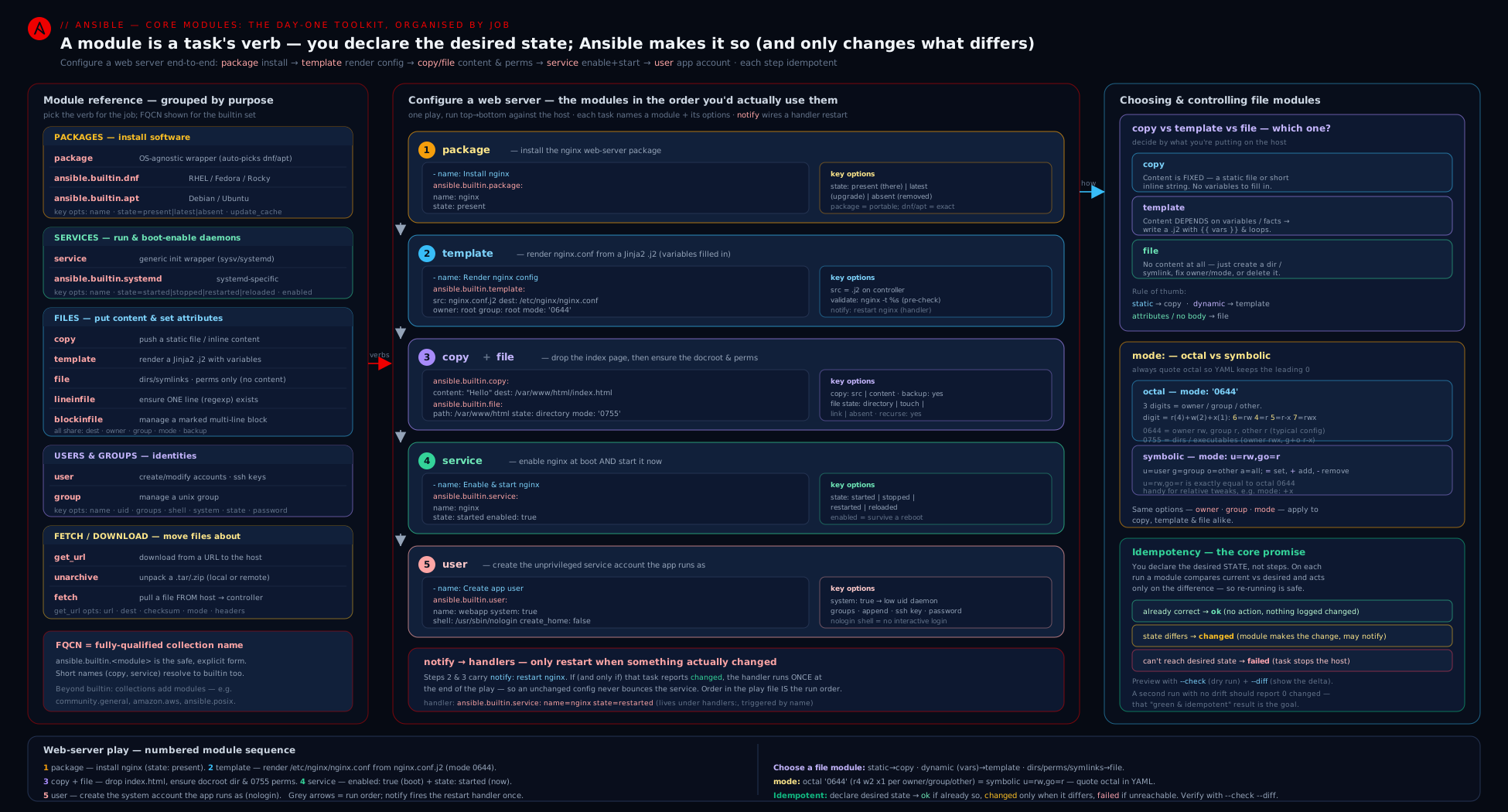
The diagram groups the core modules by job — install (package/dnf/apt), run (service/systemd), deliver (copy/template/file), edit in place (lineinfile/blockinfile), accounts (user/group) and transfer (get_url/unarchive/fetch) — and shows each acting on the managed node while reporting ok/changed back to the control node, the loop that makes idempotent convergence visible.
Hands-on lab
We will build a real, running web server with this exact toolkit — package install, a directory and a templated config, content, a service, a hardened sshd edit, an account, a downloaded file and a fetched log — entirely free. You have two ways to run it; pick one:
- Option A (recommended, zero cost, isolated): a local container as the managed node (Docker/Podman). We use a systemd-capable image so the
service/systemdmodule works. - Option B (also free): target
localhostwithconnection: localandbecome: true. Only do this on a throwaway VM, because it really installs nginx and edits sshd on the machine running it.
0. Prerequisites check. On the control node confirm Ansible is present:
ansible --version # ansible-core 2.17+ expected
1. (Option A) Start a systemd-capable container as the target.
# Podman or Docker; this image runs systemd as PID 1
docker run -d --name web1 --hostname web1 \
  --tmpfs /tmp --tmpfs /run -v /sys/fs/cgroup:/sys/fs/cgroup:ro \
  registry.access.redhat.com/ubi9/ubi-init:latest /sbin/init
Create an inventory inventory.ini that reaches the container through the Docker connection plugin (no SSH needed):
[web]
web1 ansible_connection=docker
(For Option B instead, use web1 ansible_connection=local ansible_host=localhost and run on a disposable VM.)
2. Create the project files. Make a folder ansible-webserver/ containing the inventory above, the template, the homepage, and the playbook.
nginx_index.html.j2 (a Jinja2 template so it shows facts):
{# This is rendered by ansible.builtin.template #}
<!doctype html>
<html>
  <head><title>Served by {{ inventory_hostname }}</title></head>
  <body>
    <h1>Hello from {{ inventory_hostname }}</h1>
    <p>OS family: {{ ansible_facts['os_family'] }} — managed by Ansible.</p>
  </body>
</html>
site.yml — the mini web-server playbook that exercises the whole toolkit:
---
- name: Configure a web server end to end
  hosts: web
  become: true

  vars:
    web_root: /usr/share/nginx/html
    app_user: webadmin

  tasks:
    # --- install (package) ---
    - name: Ensure nginx and tools are installed
      ansible.builtin.package:
        name:
          - nginx
          - curl
        state: present

    # --- account (group + user) ---
    - name: Ensure the web group exists
      ansible.builtin.group:
        name: web
        state: present

    - name: Ensure a non-login web admin user exists
      ansible.builtin.user:
        name: "{{ app_user }}"
        groups: web
        append: true
        shell: /usr/sbin/nologin
        create_home: true
        state: present

    # --- deliver (file: a dir; template: rendered config & homepage) ---
    - name: Ensure the document root exists
      ansible.builtin.file:
        path: "{{ web_root }}"
        state: directory
        owner: "{{ app_user }}"
        group: web
        mode: '0755'

    - name: Render the homepage from a template
      ansible.builtin.template:
        src: nginx_index.html.j2
        dest: "{{ web_root }}/index.html"
        owner: "{{ app_user }}"
        group: web
        mode: '0644'
        backup: true

    # --- deliver (copy: inline static content) ---
    - name: Drop a static health-check file (verbatim)
      ansible.builtin.copy:
        content: "ok\n"
        dest: "{{ web_root }}/health.txt"
        mode: '0644'

    # --- download (get_url) ---
    - name: Download a static asset with checksum verification
      ansible.builtin.get_url:
        url: https://raw.githubusercontent.com/torvalds/linux/master/README
        dest: "{{ web_root }}/README.txt"
        mode: '0644'
      # In a locked-down lab without egress, comment this task out.

    # --- surgical edit (lineinfile) on a file we do not own ---
    - name: Harden sshd — disable root login (validated)
      ansible.builtin.lineinfile:
        path: /etc/ssh/sshd_config
        regexp: '^#?PermitRootLogin'
        line: 'PermitRootLogin no'
        validate: 'sshd -t -f %s'
        backup: true
      notify: Restart sshd

    # --- run + enable (service) ---
    - name: Ensure nginx is started and enabled
      ansible.builtin.service:
        name: nginx
        state: started
        enabled: true

  handlers:
    - name: Restart sshd
      ansible.builtin.service:
        name: sshd
        state: restarted
3. Dry-run first (the safety reflex).
ansible-playbook -i inventory.ini site.yml --check --diff
Expected: every task shows what it would do; --diff prints the rendered index.html, the health.txt content, and the one-line change to sshd_config. Nothing is applied.
4. Apply for real.
ansible-playbook -i inventory.ini site.yml
Expected recap: a row of changed= for the first run. Read it — package install changed, the user/group changed, the directory and both files changed, the sshd line changed (and the handler Restart sshd runs once, at the end, because the line changed).
5. Validate it actually serves.
# From inside the container (Option A):
docker exec web1 curl -s localhost/health.txt          # -> ok
docker exec web1 curl -s localhost/ | grep "Hello from" # -> the templated homepage
docker exec web1 grep '^PermitRootLogin' /etc/ssh/sshd_config  # -> PermitRootLogin no
docker exec web1 id webadmin                            # -> shows the 'web' group
docker exec web1 systemctl is-enabled nginx             # -> enabled
6. Prove idempotency — run it again.
ansible-playbook -i inventory.ini site.yml
Expected: the recap now shows changed=0 (or close to it; get_url with a checksum and the rest all converge). The handler does not run, because no config changed. This ok-everywhere second run is the proof your playbook is idempotent — the single most important property to demonstrate in an interview.
7. Pull a file back (fetch).
# Append a fetch play, or run ad-hoc:
ansible -i inventory.ini web -b -m ansible.builtin.fetch \
  -a "src=/var/log/messages dest=./pulled/ flat=no"
ls -R pulled/   # -> pulled/web1/var/log/messages
8. Cleanup.
docker rm -f web1            # Option A: removes the whole target — nothing left behind
rm -rf ./pulled              # remove fetched files
For Option B (you targeted a real VM), reverse the changes by setting state: absent/stopped or simply discard the throwaway VM. Cost note: the entire lab runs on your machine — a local container or VM and Ansible itself — so the cost is ₹0. No cloud resources are created.
Going deeper
The tables above give you each module’s options; this section is for the reader who wants to know why the idempotency works, where it quietly breaks, and what Ansible is doing under the hood. None of this is required to write a working playbook — but it is the difference between a playbook that passes today and one that stays green on its thousandth run.
The idempotency contract, module by module
“Idempotent” is not magic — each module has a concrete comparison key: the specific thing it checks to decide ok versus changed. Knowing the key tells you exactly when a task will (and won’t) report a change.
| Module | What it compares to decide changed |
The subtle case |
|---|---|---|
package (present/absent) |
The package database: is the package installed or not | Fully deterministic. |
package (latest) |
Installed version vs the newest available version | Non-deterministic over time — a new upstream release turns a green task red with no change on your side. |
service/systemd (started/stopped/enabled) |
The unit’s current active/enabled state | Deterministic. |
service/systemd (restarted/reloaded) |
Nothing — these are actions, not states | Always changed; belongs in a handler. |
copy/template |
SHA checksum of the final bytes and stat of mode/owner/group |
A one-byte or one-permission difference is a change; identical content + attrs is ok. |
file |
stat of the path’s type and attributes |
state: touch is the exception — it rewrites mtime, so it is always changed. |
lineinfile |
Whether a line matching the final state already exists (via regexp/line) |
A regexp that doesn’t match its own line never “finds” the line → appends forever. |
blockinfile |
The exact bytes between the BEGIN/END markers |
Anything dynamic inside block (a timestamp, an unsorted set) re-triggers every run. |
user/group |
The relevant fields in /etc/passwd, /etc/group, /etc/shadow |
A freshly-salted password hash differs every run — see the salt trap below. |
get_url |
The checksum (if given) or merely whether dest exists |
No checksum + force: no = “download once, never re-check”. |
unarchive |
The creates path, else a best-effort per-file mtime/size heuristic |
Without creates it usually reports changed because it cannot cheaply prove the tree is unchanged. |
fetch |
The control-node copy’s checksum vs the remote file | Deterministic. |
Check mode: what each module can and cannot predict
Every module declares whether it supports_check_mode. Under --check, a supporting module simulates and reports the change it would make without touching the host; a non-supporting task is skipped in check mode (shown as skipped), because Ansible will not pretend to know a result it cannot compute.
- Full support:
copy,template,file,lineinfile,blockinfile,user,group,service/systemd, andpackageon most backends. These are safe to dry-run and pair beautifully with--diff. - Partial / unreliable:
unarchive(it may not be able to tell what an extraction would change), and anyget_urlwhose idempotency depends on a download it won’t perform in check mode. - No prediction:
command,shell,raw— they are skipped under--checkunless you force them withcheck_mode: falseon the task (useful for a read-only fact-gathering command you want to run even during a dry run).
Two task-level keywords let you correct a module’s self-assessment:
changed_when:overrides the change status — e.g.changed_when: falsemarks a read-onlycommandas never-changing so it stops polluting your recap.check_mode: trueforces a task to always run as a simulation (never mutate), even on a real run — handy for a “what would this do” probe embedded in a play.
- name: Read a value without ever reporting a change
  ansible.builtin.command: cat /etc/os-release
  changed_when: false          # a pure read — never "changed"
  check_mode: false            # run it even during --check
  register: os_release
Atomic writes, and where validate really runs
copy, template, lineinfile, and blockinfile never edit the live file in place. They write the new content to a temporary file on the same filesystem, then rename() it over the destination. On a POSIX filesystem that rename is atomic: any other process reading the path sees either the entire old file or the entire new file, never a half-written mixture, and a crash mid-task cannot leave a truncated config. This is also why validate: is safe and powerful — the validator (sshd -t -f %s, nginx -t -c %s, visudo -cf %s) runs against that temp file, and if it exits non-zero the rename never happens, so a broken config is discarded before it can reach the running service. The %s placeholder is mandatory; it is where Ansible substitutes the temp path.
One consequence worth knowing: because the temp file must live on the destination’s filesystem to be rename-able, a dest on a full or read-only mount fails at the write, not at the rename. And backup: true captures the previous destination (as dest.NNNN.YYYY...~) before the rename, so the registered backup_file in the result always points at exactly what you replaced.
The package abstraction and choosing a backend
ansible.builtin.package is an action plugin, not a conventional module: at runtime it reads ansible_facts['pkg_mgr'] and dispatches to the concrete module (dnf, apt, zypper, …). You can override the auto-detection with use: (e.g. use: dnf) when the fact guesses wrong. Because the generic module only exposes the common options, manager-specific flags (update_cache, enablerepo, deb, autoremove) simply are not available on it — that limitation, not preference, is often what pushes you to the specific module.
Two related tools round this out: ansible.builtin.package_facts populates ansible_facts.packages so you can branch on what is installed (when: "'nginx' not in ansible_facts.packages"), and on very recent Fedora/RHEL where DNF5 is the system default you need an ansible-core new enough that the dnf/package path targets it correctly (newer cores ship a dedicated dnf5 module). Pin your ansible-core when this matters.
The salt trap in user: password:
The lesson says: pass a hash, never plaintext. The deeper trap is how you generate that hash. "{{ 'S3cret' | password_hash('sha512') }}" generates a new random salt every time it is evaluated, so the resulting hash string differs on every run — and with the default update_password: always, the user module dutifully rewrites /etc/shadow and reports changed every single run. Two correct fixes:
- Set
update_password: on_createso the password is only ever written when the account is first created (the pragmatic default for most playbooks). - Or pin the salt so the hash is stable:
"{{ 'S3cret' | password_hash('sha512', 'a_fixed_salt') }}"— now identical input yields an identical hash and the task is idempotent. Keep both the password and the salt in Ansible Vault.
A last file-mode subtlety that bites the unwary: when copy/template creates a brand-new file and you omit mode:, the file is created using the remote user’s umask, which may be more permissive than you expect. Always set mode: explicitly on files that carry secrets — never rely on the umask to make them private.
Practice challenges
Work these in order — each builds a reflex the next one assumes. Write the task(s), predict the first-run and second-run status before you run, then check yourself with --check --diff. Solutions use full FQCN.
1 (beginner) — Install a set of packages in one transaction. Ensure git, curl, and vim are present using the portable module, escalating privilege.
<details> <summary>Solution</summary>
- name: Ensure base tools are installed
  ansible.builtin.package:
    name:
      - git
      - curl
      - vim
    state: present
  become: true
Why: a single name: list is one package-manager transaction (fast), state: present is fully idempotent, and package picks apt/dnf/… from facts so the same task works across distros.
</details>
2 (beginner) — Run now and on boot. Ensure chronyd is started immediately and also starts at boot, in one task.
<details> <summary>Solution</summary>
- name: Ensure time sync is running and enabled
  ansible.builtin.systemd:
    name: chronyd
    state: started
    enabled: true
  become: true
Why: state (runtime) and enabled (boot) are independent — you need both; each is idempotent, so a converged host reports ok.
</details>
3 (intermediate) — A directory, then a rendered file inside it. Create /opt/app/etc owned by appsvc:appsvc with mode 0750, then render app.conf into it from a template with mode 0640.
<details> <summary>Solution</summary>
- name: Ensure the config directory exists
  ansible.builtin.file:
    path: /opt/app/etc
    state: directory
    owner: appsvc
    group: appsvc
    mode: '0750'
  become: true

- name: Render the application config
  ansible.builtin.template:
    src: app.conf.j2
    dest: /opt/app/etc/app.conf
    owner: appsvc
    group: appsvc
    mode: '0640'
    backup: true
  become: true
Why: file: state=directory is the idempotent mkdir -p; quoting '0750'/'0640' avoids the YAML-octal trap; template re-writes only when the rendered bytes or the attributes differ.
</details>
4 (intermediate) — An idempotent, validated sshd edit. Ensure MaxAuthTries 3 is set in /etc/ssh/sshd_config, replacing any existing (possibly commented) directive, validated and backed up.
<details> <summary>Solution</summary>
- name: Limit SSH auth tries (validated)
  ansible.builtin.lineinfile:
    path: /etc/ssh/sshd_config
    regexp: '^#?MaxAuthTries'
    line: 'MaxAuthTries 3'
    validate: 'sshd -t -f %s'
    backup: true
  become: true
Why: the regexp anchors on the directive key (matching both MaxAuthTries and a commented #MaxAuthTries) so it reconciles with the line it writes — no duplicate on re-run — and validate refuses to install a config sshd would reject.
</details>
5 (advanced) — Add to a group without clobbering, with a stable password. Ensure user deploy exists, is a member of wheel in addition to its other groups, has /bin/bash, and a password that does not flip the task to changed on every run.
<details> <summary>Solution</summary>
- name: Ensure the deploy user (idempotent password)
  ansible.builtin.user:
    name: deploy
    groups: wheel
    append: true
    shell: /bin/bash
    password: "{{ vaulted_deploy_hash }}"
    update_password: on_create
  become: true
Why: append: true adds wheel without removing existing memberships; update_password: on_create writes the (vaulted, pre-hashed) password only at creation, so a re-run does not rewrite /etc/shadow — the cure for the freshly-salted-hash trap.
</details>
6 (advanced) — Verified download, then idempotent extract, then handler restart. Download app-1.4.0.tar.gz with a SHA256 checksum, ensure /opt/app exists, extract it there once (flattening the top-level directory), and restart appd only if something changed.
<details> <summary>Solution</summary>
tasks:
  - name: Download the release with checksum verification
    ansible.builtin.get_url:
      url: https://downloads.example.com/app-1.4.0.tar.gz
      dest: /tmp/app-1.4.0.tar.gz
      checksum: "sha256:{{ app_sha256 }}"
      mode: '0644'
    become: true

  - name: Ensure the target directory exists
    ansible.builtin.file:
      path: /opt/app
      state: directory
      mode: '0755'
    become: true

  - name: Extract the release once
    ansible.builtin.unarchive:
      src: /tmp/app-1.4.0.tar.gz
      dest: /opt/app
      remote_src: true
      creates: /opt/app/bin/appd
      extra_opts: ['--strip-components=1']
    become: true
    notify: Restart appd

handlers:
  - name: Restart appd
    ansible.builtin.systemd:
      name: appd
      state: restarted
    become: true
Why: checksum: makes get_url skip an already-correct download; creates: makes unarchive a no-op once bin/appd exists; and the restart lives in a handler fired by notify, so it runs once, only when the extract actually changed something.
</details>
Common beginner mistakes
These are misconceptions — the wrong mental model that produces the bug — not symptoms. (For “I see this error, what do I do?” use the troubleshooting table below instead.)
| The belief | Why it’s wrong | The right mental model |
|---|---|---|
“state: latest is the safe, up-to-date default.” |
latest re-checks upstream every run and reports changed whenever a newer version exists — your builds stop being reproducible and CI goes red for reasons outside your change. |
Declare the state you can reproduce: present (plus an explicit version where it matters). Reach for latest only on hosts you deliberately roll forward. |
“copy with content: will fill in my variables.” |
content is written literally; there is no Jinja rendering step. Only ordinary YAML variable interpolation applies. |
If any byte of the file depends on a variable or fact, it is a template job, not a copy job. |
“user: password: takes my password.” |
That field is the /etc/shadow hash, not a plaintext password. A plaintext value is stored as a literal (wrong) hash, and the account can no longer be logged into with that password. |
password: = a pre-computed crypt hash (password_hash('sha512', 'salt')), kept in Vault. Plaintext never goes there. |
“enabled: true starts the service.” |
enabled only controls boot; it does nothing to the current runtime. Your freshly-configured host has an installed, boot-enabled, not-running service. |
state: runs it now; enabled: runs it on boot. Production wants both. |
“I’ll just put state: restarted on the service task.” |
restarted is an action, so the service restarts on every play run — needless churn, and a play that is never fully idempotent. |
Make the config task idempotent and have it notify: a handler that restarts once, only when something changed. |
“mode: 0644 is obviously octal.” |
Unquoted, YAML may parse the leading-zero number in a way that does not equal the octal 0644 you meant — and Ansible can silently apply the wrong bits. |
Quote octal (mode: '0644') or use symbolic (u=rw,g=r,o=r). Treat an unquoted numeric mode as a bug. |
“groups: wheel adds the user to wheel.” |
With the default append: no, groups: sets the exact supplementary list — the user is removed from every group you did not name. |
groups: is a full replace unless you add append: true. Use append whenever you mean “also a member of…”. |
“file: state: touch is idempotent like the others.” |
touch updates the modification time every run, so it is always changed — it is an action, not a converged state. |
Use touch only when you truly want an mtime bump; for “ensure the file exists with content” prefer copy/template/get_url. |
Common mistakes & troubleshooting
| Symptom | Likely cause | Fix |
|---|---|---|
A lineinfile task appends a duplicate line every run (always changed) |
The regexp does not match the line you write, so Ansible never “finds” its own line |
Make regexp match the key (^PermitRootLogin) and line the full desired line; they must reconcile |
mode applied wrong permissions silently |
You wrote mode: 0644 unquoted — YAML mis-parses the octal |
Always quote: mode: '0644', or use symbolic u=rw,g=r,o=r |
| Service “started” but the new unit file is ignored | You templated a .service but did not reload systemd |
Add daemon_reload: true to the systemd task (or notify a reload handler) |
apt: “package not found” / stale versions |
Cache not refreshed | Add update_cache: true (with cache_valid_time to avoid over-refreshing) on Debian/Ubuntu |
user keeps removing the user from other groups |
append defaults to no, so groups: sets the exact list |
Add append: true to add supplementary groups without clobbering |
user’s password set to a literally-wrong value / login fails |
You put a plaintext password in password: |
Pass a hash (password_hash('sha512') filter or mkpasswd), vaulted; consider update_password: on_create |
unarchive reports changed on every run |
It cannot cheaply detect already-extracted content | Add creates: <a path the archive produces> so re-runs are no-ops |
service: restarted restarts on every run even when nothing changed |
restarted is an action, not a state |
Move the restart into a handler and notify it only from the config task |
copy/template overwrote a file and you needed the old one |
No backup taken | Add backup: true; the timestamped backup lets you roll back |
| A bad config got installed and broke the service | No validation | Add validate: '<checker> %s' (e.g. nginx -t -c %s, sshd -t -f %s, visudo -cf %s) so a broken file is refused before install |
get_url keeps re-downloading |
No checksum and force defaults make it re-fetch in some flows |
Provide checksum: sha256:... so an up-to-date file is skipped |
Best practices
- Prefer the purpose-built module over
command/shell. If a module exists for the job (it almost always does), use it — you get idempotency, check mode and diff for free. Drop tocommand/shellonly as a last resort, and then addcreates/removes/changed_whento restore idempotency. - Use FQCN everywhere (
ansible.builtin.copy, notcopy). It is unambiguous, lint-clean, and future-proofs you against short-name collisions between collections. - Always quote octal modes and reach for symbolic when adjusting a single bit. Set the least permission that works —
'0600'for secrets on disk. - Make the second run prove itself. A correct playbook reports
changed=0on a no-op re-run. Run--check --diffbefore applying and re-run after applying to confirm convergence. - Separate “change the config” from “restart the service.” The config task is idempotent and
notify:s a handler; the handler does the (non-idempotent) restart only when something actually changed, once, at the end of the play. - Validate before you install (
validate:) and back up before you overwrite (backup:) on every task that touches an existing, load-bearing file (sshd_config, sudoers, nginx.conf). - Install lists, not loops.
package: name: [a, b, c]is one transaction; aloopover packages is N transactions and far slower. - Pin where reproducibility matters. Use
state: present(notlatest) and explicit versions for deterministic builds; reservelatestfor hosts you intend to roll forward. - Reach for
lineinfile/blockinfileonly on files you partly own; for files you fully control, atemplateis clearer and atomically correct.
Security notes
These modules are your security posture on a host, so a few rules carry weight. File modes and ownership are the front line: lay secrets down as '0600' owned by the right user, document roots as '0644'/'0755', and never world-write a config — a stray '0666' from an unquoted mode is a real vulnerability. Never put a plaintext password in user: password: — it expects a hash; pass "{{ 'S3cret' | password_hash('sha512') }}" and keep the source vaulted, and prefer update_password: on_create so you are not rewriting /etc/shadow on every run. Keep TLS and signature verification on: get_url’s validate_certs: true and dnf/apt’s GPG checks default to secure for a reason — disable them only for trusted internal sources, never as a blanket workaround. validate: is a security control, not just a convenience: validating sshd_config (sshd -t -f %s) or sudoers (visudo -cf %s) before installation prevents a templating mistake from locking you out or escalating privilege. When you download-and-extract with unarchive from a URL, verify the source (pin the URL, supply a checksum to get_url and extract the verified file) rather than piping arbitrary internet bytes into tar. Finally, become only where needed — these tasks need root, but scope become: true to the play or the specific tasks that require it rather than leaving it on globally where a templating bug could write somewhere sensitive.
Interview & exam questions
1. What is idempotency, and which two core modules are not idempotent by default?
Idempotency means re-running a task already in the desired state changes nothing and reports ok. Modules declare a desired state and only act if reality differs. ansible.builtin.command and ansible.builtin.shell are not idempotent — they run their command every time — which is why you prefer purpose-built modules or add creates/removes/changed_when.
2. In the service/systemd module, what is the difference between state and enabled?
state controls the service right now (started/stopped/restarted/reloaded); enabled controls whether it starts on boot (yes/no). They are independent — a service can be running now but disabled at boot, or vice versa. Production usually wants both state: started and enabled: true.
3. When do you need daemon_reload: true?
After you add or change a systemd unit file (e.g. you templated a new .service). Without daemon-reload, systemd has not re-read the unit, so a started/restarted may act on the old definition.
4. copy vs template vs file — when each?
copy puts fixed bytes (a static src or inline content) on the target with no transformation. template renders a Jinja2 .j2 using variables/facts, then writes the result — use it whenever content depends on anything. file delivers no content; it enforces a path’s state (directory/link/touch/absent) and attributes (mode/owner/group).
5. Why might a lineinfile task be changed on every run, and how do you fix it?
Because its regexp does not match the line it writes, so on the next run Ansible doesn’t recognise its own line and appends a duplicate. Fix: anchor regexp to the directive key (^PermitRootLogin) so it matches the line line produces.
6. How do you restart a service only when its config changed?
Put the restart in a handler and notify: it from the config task. The config task is idempotent (reports changed only on a real change), and a handler runs once at the end of the play, only if notified. Using state: restarted directly in a task restarts on every run.
7. What is the mode: 0644 (unquoted) gotcha?
YAML parses a leading-zero integer in a way that does not match the octal you intended, so Ansible can apply the wrong permissions silently. Always quote octal ('0644') or use symbolic (u=rw,g=r,o=r).
8. In the user module, what does append default to and why does it matter?
append defaults to no, which means groups: sets the user’s exact supplementary group list — removing them from any group not listed. Use append: true to add a user to a group (e.g. wheel/sudo) without clobbering their other memberships.
9. How should a password be supplied to the user module?
As an already-computed hash (e.g. "{{ 'pw' | password_hash('sha512') }}" or mkpasswd --method=sha-512), stored vaulted — never plaintext, which would set a literally-wrong hash. Prefer update_password: on_create to avoid rewriting /etc/shadow each run.
10. How do you make unarchive idempotent, and how is that different from get_url?
Give unarchive a creates: path (a file the archive produces) so re-runs skip extraction. get_url is idempotent natively when you supply a checksum: — it skips the download if the target file already matches.
11. What does fetch do, and how does it avoid filename collisions across hosts?
fetch copies a file from the managed node back to the control node (the reverse of copy). By default it nests the file under dest/<hostname>/<src-path>, so the same file pulled from many hosts does not overwrite. flat: yes disables the nesting.
12. What is the purpose of the validate: option, and give two real uses?
validate: runs a command (with %s as the temp file) to check the file before it is installed; a non-zero exit fails the task and nothing is written. Real uses: validate: 'sshd -t -f %s' for sshd_config and validate: 'visudo -cf %s' for sudoers — preventing a broken config from being deployed.
13. Why prefer package sometimes and dnf/apt other times?
package is portable — it auto-selects the host’s package manager via facts — so use it when the package name is the same across distros and you need no manager-specific feature. Use dnf/apt when you need features unique to one manager (update_cache/cache_valid_time, enablerepo, autoremove, deb).
Quick check
- Which option makes
unarchiveidempotent by skipping extraction when a path already exists? - True or false:
mode: 0755andmode: '0755'are equivalent in a YAML playbook. - You need a config change to trigger a service restart only when it actually changes. What mechanism do you use?
- Which module copies a file from the managed node to the control node?
- In the
usermodule, what must you add so thatgroups:adds memberships instead of replacing them?
Answers
creates:— set it to a path the archive produces; subsequent runs reportokinstead ofchanged.- False. Unquoted
0755can be mis-parsed by YAML and apply the wrong bits; always quote octal modes (or use symbolic form). - A handler plus
notify:— the idempotent config task notifies a handler that does the restart, which runs once at the end of the play only if something changed. (Do not usestate: restarteddirectly in the task.) ansible.builtin.fetch— the reverse ofcopy; it pulls a file back to the control node (nesting it under the hostname by default).append: true— without it,groups:sets the exact supplementary-group list and removes the user from any group not listed.
Exercise
Extend the lab’s site.yml into a more production-shaped web role-in-a-playbook:
- Replace the inline
copyhealth file with a templatedhealth.json(ansible.builtin.template) that includes{{ ansible_facts['hostname'] }}and a{{ ansible_managed }}header comment, withmode: '0644'. - Add a
blockinfiletask that manages a custom# BEGIN/END ANSIBLE MANAGED BLOCKregion in a file under/etc/, withvalidate:where the file type supports it, and prove with--diffthat it is added on the first run and unchanged on the second. - Create the web admin user’s SSH key with the
usermodule’sgenerate_ssh_key: true(andssh_key_type: ed25519), then useansible.builtin.fetchto pull the generated public key (~webadmin/.ssh/id_ed25519.pub) back to your control node. - Download a release tarball with
get_urlwith achecksum:, thenunarchiveit (remote_src: true, acreates:path, andextra_opts: ['--strip-components=1']) into a directory you first ensure exists withfile: state=directory. - Convert the nginx restart to a proper handler notified by the template task, and demonstrate that editing the template fires exactly one restart while a no-op run fires none.
Write two or three sentences explaining which tasks reported changed on your second run and why each one did or did not — the ability to reason about ok vs changed per module is the core skill this lesson builds.
Certification mapping
This lesson maps to the Red Hat Certified Engineer (RHCE), exam EX294 — “Use Ansible modules for system administration tasks” and “Create and use templates to create customised configuration files.” Specifically it covers: software management with package/dnf/apt (state present/latest/absent, update_cache); service management with service/systemd (state vs enabled, daemon_reload); delivering files with copy (src/content, validate, backup), template (Jinja2 rendering, trim_blocks/lstrip_blocks, ansible_managed) and file (directory/link/touch/absent, recurse); editing with lineinfile and blockinfile (regexp, insertafter, validate); user and group administration with user (groups/append, shell, hashed password, SSH keys, system accounts) and group; and file transfer with get_url (checksum), unarchive (creates, extra_opts) and fetch. The EX294 exam is hands-on and explicitly tests idempotency, correct mode handling, and using validate/backup on edited config files — all drilled above. The same modules underpin Ansible work in the broader DevOps and Red Hat administration tracks.
Glossary
- Module — A small, idempotent program shipped to and run on the managed node; reports a JSON result (
changed,rc, module-specific keys). - FQCN — Fully-qualified collection name,
namespace.collection.module(e.g.ansible.builtin.copy); the unambiguous modern way to name modules. - Idempotent — Safe to re-run: the module converges on a declared state and reports
okwhen reality already matches,changedwhen it had to act. changedvsok— The two convergence statuses;changedis what fires a handler vianotify, and an all-okre-run proves convergence.- Handler — A task that runs only when a
changedtasknotify:s it, once at the end of the play; used for restarts/reloads. become— Privilege escalation (usually to root) required by most system-changing modules.state(service) — The runtime state to enforce now:started/stopped/restarted/reloaded.enabled(service) — Whether the service starts at boot, independent ofstate.daemon_reload— Re-read systemd unit files (systemctl daemon-reload); needed after adding/changing a unit.copy— Deliver fixed bytes (srcfile or inlinecontent) verbatim.template— Render a Jinja2.j2with variables/facts, then write the result.file— Enforce a path’s state (file/directory/link/touch/absent) and attributes (mode/owner/group); no content.lineinfile/blockinfile— Idempotent in-place editing of a single line / a marker-delimited managed region.mode— Unix permission bits, written octal (quoted,'0644') or symbolic (u=rw,g=r,o=r).validate— A command (with%sfor the temp file) that must succeed before a file is installed; a safety/security gate.backup— Save a timestamped copy before overwriting/editing, enabling rollback.append(user) — Add supplementary groups rather than replacing the whole list (defaultno).creates— A path whose existence makesunarchive/commandskip its action — the idempotency lever for those.get_url/unarchive/fetch— Download to the target / unpack on the target / pull a file back to the control node.ansible_managed— A configurable marker string you put in templated files so humans know not to hand-edit them.- Check mode (
--check) — A dry run: supporting modules simulate and report the change they would make without touching the host; non-supporting tasks are skipped. - Diff mode (
--diff) — Prints the exact before/after of file-changing modules (copy/template/lineinfile/blockinfile); pair it with--checkto preview. changed_when— A task keyword that overrides the reported change status (e.g.changed_when: falsefor a read-only command).check_mode(keyword) — A task keyword forcing a task to always simulate (true) or to run even under--check(false).removes— The mirror ofcreates: a path whose absence makescommand/shellskip — the idempotency lever for “only run if this still exists”.- Atomic write — The temp-file-then-
rename()mechanismcopy/template/lineinfile/blockinfileuse, so a file is never seen half-written andvalidatecan vet it before it goes live. - Salt — The random (or pinned) value mixed into a password hash; an unpinned salt makes
password_hashreturn a different string every call, which breaks idempotency. pkg_mgrfact —ansible_facts['pkg_mgr']; howansible.builtin.packagedecides which backend (dnf/apt/…) to dispatch to.package_facts/service_facts— Modules that populateansible_facts.packages/ansible_facts.servicesso a play can branch on what is installed or running.remote_src— Tellscopy/unarchivethatsrcis already on the managed node (target-side), not on the control node.no_log— A task keyword that suppresses logging of a task’s arguments and output; use it on tasks handling secrets so they do not leak into--diff/logs.
Next steps
You now command the day-one module toolkit — installing software, running services, delivering and editing files, managing accounts, and moving bytes on and off a host, all idempotently. Every option here becomes far more powerful once it can react to data, so the natural next move is the data layer. Continue with Ansible Variables & Facts, In Depth: the 22-Level Precedence, Facts, register & set_fact, which explains where variables come from and in what order they win, how to capture a task’s result with register, and how facts feed the when conditions and templates that make these modules adapt per host. And to go deeper on the rendering engine behind the template module — filters, tests, loops and lookups — see Ansible Jinja2 Templating, In Depth: the template Module, Filters, Tests & Lookups.