In a nutshell
A variable is a named value that Ansible fills in when the play runs instead of you hard-coding it. Write {{ http_port }} in a template and the same playbook can put 80 on one server, 443 on another, and 8080 in your test lab — because the value is looked up per host at run time, not baked into the file. Variables are the single feature that turns Ansible from “a list of commands I run” into “one description of how every machine should look.”
The catch — and what this lesson is really about — is that the same variable can be set in a dozen places at once: a role ships a default, your group_vars sets it for all web servers, host_vars sets it for one machine, and someone types -e "http_port=9999" on the command line. When they disagree, which value wins? Ansible answers with one fixed rule called precedence. Picture a form that several people have scribbled suggestions on, each with a different rank: the intern’s pencil note (a role default) is the weakest, your team lead’s memo (group and host vars) is stronger, and the site director’s direct order (--extra-vars) overrides everyone. Ansible’s ranking is just longer — about 22 rungs — and it never changes. Learn the ladder once and “why is this host reading the wrong value?” stops being a mystery.
Three more features create variables while the play is running rather than declaring them up front. Facts are what Ansible discovers about each machine before it starts — its OS, CPU count, IP address — like a nurse taking your vitals on the way in. register captures what a task just did (a command’s output, its exit code) so the next task can react to it. set_fact computes a fresh value mid-play and pins it to that host. Finally, magic variables (hostvars, groups, inventory_hostname) are read-only windows onto your inventory, so one host can look up another host’s IP or list every member of a group.
You do not need to memorise all 22 rungs today. Anchor two facts — role defaults are the weakest, -e extra-vars are the strongest — plus the idea that “more specific beats more general,” and the rest of this lesson fills in the middle.
Level: Intermediate · Time: ~30 min
Variables are where Ansible stops being a list of commands and starts being configuration management. The same playbook installs httpd on RHEL and apache2 on Ubuntu, listens on port 80 in staging and 443 in production, and templates a different worker_processes value onto every host — all because a value was looked up at run time instead of hard-coded. Get variables right and a single role serves a hundred different machines; get them wrong and you spend an afternoon asking why is this host reading the wrong value?
That “why is it reading the wrong value” question has one answer in Ansible, and it is precedence. A variable named http_port can be set in a dozen places at once — a role default, a group_vars file, the inventory, a set_fact, and -e on the command line — and Ansible has a single, fixed, documented rule for which one wins. This lesson covers that rule exhaustively: the full ~22-level precedence ladder as an ordered table you can actually use to debug. It then covers the three things that generate variables at run time rather than declaring them up front — facts (what Ansible discovers about a host), register (capturing the result of a task), and set_fact (computing a variable mid-play) — plus the magic variables that expose inventory and play state. By the end you will never again be surprised by which value a host actually used.
This is an Intermediate lesson in the Variables module of the Ansible Zero-to-Hero course, written for ansible-core 2.17+ / Ansible 10+ (2026), using fully-qualified collection names (FQCN) such as ansible.builtin.debug throughout.
Learning objectives
By the end of this lesson you will be able to:
- Define variables in every supported location — extra-vars, play vars, inventory,
group_vars/host_vars, role defaults and vars, registered results, andset_fact— and predict which wins. - Read and apply the full ~22-level variable precedence order to debug “wrong value” problems.
- Reference variables correctly, choose the right data type, and avoid the bare-string and unquoted-
{{ }}YAML gotchas. - Use gathered facts (
ansible_facts, thesetupmodule,gather_subset) and write custom facts withfacts.d. - Capture task output with
registerand consume.stdout,.rc,.changed, and.results(for loops). - Compute variables at run time with
set_fact, understandcacheable: true, and know when to reach for it. - Use the magic variables —
hostvars,groups,group_names,inventory_hostname,ansible_play_hosts— to write inventory-aware playbooks.
Prerequisites & where this fits
You should be comfortable with playbook anatomy — a play has hosts, tasks, and keywords like become; a task names a module and passes it arguments — and with static inventory (groups, host_vars/, group_vars/). If those are shaky, read Ansible Playbooks, In Depth and Ansible Inventory, In Depth first; this lesson assumes that vocabulary and builds the variable system on top of it. It sits immediately after the core-modules lesson and immediately before Conditionals, Loops, Handlers & Tags — because conditionals and loops are driven by variables, so you must understand where variables come from before you branch on them. Everything here maps directly to the RHCE (EX294) objectives for variables and facts.
Core concepts
A variable in Ansible is a named value — a string, number, boolean, list, or dictionary — that is resolved when a task runs, using Jinja2 templating. You reference a variable by wrapping its name in double curly braces: {{ http_port }}. Internally every variable lives in a single namespace per host: when a play runs against web01, Ansible builds one merged dictionary of variables for that host, and {{ http_port }} is a lookup into it.
The subtlety is that the same key can be supplied from many sources at once, and Ansible must decide which value populates the merged dictionary. That decision is precedence: a strict, fixed ordering from “weakest” (most easily overridden) to “strongest” (overrides everything). The canonical mental model has two anchors you should memorise:
- Role defaults are the weakest of all.
roles/<name>/defaults/main.ymlexists precisely so a role author can ship a sensible value that any other source can override. Defaults are the floor. - Extra-vars (
-e/--extra-vars) are the strongest of all. Nothing overrides a value passed on the command line. Extra-vars are the ceiling.
Everything else slots between those two anchors. A second mental model governs how Ansible decides between sources at the same level or across the inventory hierarchy: “more specific beats more general.” A value set on a host beats the same value set on a group the host belongs to; a value on a child group beats one on its parent; and among sibling groups, the one that sorts last alphabetically wins (unless you change a group’s ansible_group_priority). Hold those two ideas — the precedence ladder and specificity within the inventory — and the rest is detail.
One more concept underpins facts: gathering. Before a play’s tasks run, Ansible can connect to each host and discover properties of it — OS family, IP addresses, memory, mounted disks — by running the ansible.builtin.setup module. The results are facts, exposed under ansible_facts (and, with the legacy inject_facts_as_vars setting on, as top-level ansible_* variables). Facts are how a playbook adapts to the machine in front of it.
Variable types and how to reference them
Ansible variables are typed by YAML. The five types you use daily:
| Type | YAML example | Reference | Notes |
|---|---|---|---|
| String | app_name: webapp |
{{ app_name }} |
Quote if it contains :, {, #, or leading !/@. |
| Number (int/float) | http_port: 8080 |
{{ http_port }} |
Unquoted YAML numbers stay numeric; quoting makes them strings. |
| Boolean | enabled: true |
{{ enabled }} |
Use true/false. YAML 1.1 also accepts yes/no/on/off but true/false is clearest. |
| List (array) | pkgs: [git, vim] |
{{ pkgs }}, {{ pkgs[0] }} |
Iterate with loop: "{{ pkgs }}". |
| Dictionary (map) | limits: {soft: 1024, hard: 4096} |
{{ limits.soft }} or {{ limits['soft'] }} |
Dot vs bracket — see the gotcha below. |
Dot versus bracket notation. {{ limits.soft }} and {{ limits['soft'] }} usually mean the same thing, but bracket notation is safer. Dot notation breaks if the key collides with a Python dictionary method or attribute — {{ mydict.keys }} returns the built-in keys method, not a key named keys; and keys containing hyphens or starting with a digit ({{ my-dict.0 }}) are not valid dot syntax at all. Use brackets when a key is dynamic or might collide: {{ ansible_facts['distribution'] }}.
The bare-variable and unquoted-{{ }} gotchas
Two YAML-versus-Jinja2 traps catch everyone learning Ansible.
1. A value that starts with {{ must be quoted. YAML sees a leading { as the start of an inline dictionary (flow mapping), so this is a syntax error:
# WRONG — YAML thinks { } is a dict, then chokes
- ansible.builtin.debug:
    msg: {{ app_name }}
Quote the whole value so YAML treats it as a string and hands it to Jinja2:
# RIGHT
- ansible.builtin.debug:
    msg: "{{ app_name }}"
The rule is simple: if a value begins with {{, wrap it in quotes. If {{ }} appears in the middle of a string (msg: "Port is {{ http_port }}") you would have quoted it anyway.
2. The bare-variable when exception. The when:, failed_when:, changed_when:, and assert.that: keys are already Jinja2 expressions — Ansible wraps them in {{ }} for you. So you write the bare variable name, no braces:
# RIGHT — when is implicitly a Jinja2 expression
- ansible.builtin.service:
    name: httpd
    state: started
  when: enable_web        # NOT  when: "{{ enable_web }}"
Putting {{ }} inside when works but Ansible warns about it (“{{ }} should not be used”), because you are templating a template. Bare name in conditionals; braces everywhere else.
3. vars: can reference other vars, but order is not guaranteed across files. Within a single vars: block you may build one variable from another (base_url: "https://{{ host }}"), and Ansible resolves the chain lazily at use time. But do not rely on a variable defined in one source being visible to a higher-precedence source that is evaluated earlier — resolve such dependencies explicitly with set_fact if you hit ordering surprises.
The full variable precedence: the ~22-level ordered table
This is the heart of the lesson. When the same variable name is set in more than one place, Ansible applies a fixed precedence. The list below is the official ordering from lowest (most easily overridden) to highest (overrides everything). The last entry wins.
| # | Source (lowest → highest) | Where it lives | Scope | Typical use |
|---|---|---|---|---|
| 1 | Command-line values (non--e) |
e.g. -u/--user on the CLI |
Run | Connection defaults like remote user; weakest of all. |
| 2 | Role defaults | roles/<r>/defaults/main.yml |
Role | The intended-to-be-overridden floor for a role. |
| 3 | Inventory file / script group vars | groups defined in inventory (INI/YAML) or a dynamic-inventory script |
Group | Vars written next to group definitions in the inventory. |
| 4 | Inventory group_vars/all |
inventory_dir/group_vars/all |
All hosts | Site-wide defaults living beside the inventory. |
| 5 | Playbook group_vars/all |
group_vars/all next to the playbook |
All hosts | Project-wide defaults beside the playbook. |
| 6 | Inventory group_vars/* |
inventory_dir/group_vars/<group> |
Group | Per-group vars beside the inventory. |
| 7 | Playbook group_vars/* |
group_vars/<group> next to the playbook |
Group | Per-group vars beside the playbook. |
| 8 | Inventory file / script host vars | host lines / dynamic-inventory _meta |
Host | Vars written next to host definitions in the inventory. |
| 9 | Inventory host_vars/* |
inventory_dir/host_vars/<host> |
Host | Per-host vars beside the inventory. |
| 10 | Playbook host_vars/* |
host_vars/<host> next to the playbook |
Host | Per-host vars beside the playbook. |
| 11 | Host facts / cached set_fact |
gathered facts; set_fact with cacheable: true |
Host | Discovered facts and persisted computed facts. |
| 12 | Play vars |
vars: in the play |
Play | Values scoped to one play. |
| 13 | Play vars_prompt |
vars_prompt: in the play |
Play | Interactive prompt values. |
| 14 | Play vars_files |
vars_files: in the play |
Play | External files loaded into the play. |
| 15 | Role vars |
roles/<r>/vars/main.yml (and include_vars) |
Role | Role-internal vars meant to be hard to override. |
| 16 | Block vars |
vars: on a block: |
Block | Values shared by tasks in a block. |
| 17 | Task vars |
vars: on a single task |
Task | Values scoped to one task. |
| 18 | include_vars |
ansible.builtin.include_vars at run time |
Play (from load point) | Dynamically loaded var files. |
| 19 | set_fact / register |
ansible.builtin.set_fact; task register: |
Host | Run-time computed and captured values. |
| 20 | Role (and include_role) params |
params passed to a role via roles:/import_role/include_role |
Role invocation | Per-call role parameters. |
| 21 | include params |
params passed to an included task file (include_tasks / vars on import_tasks) |
Include | Per-include parameters. |
| 22 | Extra vars | -e/--extra-vars on the CLI |
Global | Always wins. Nothing overrides this. |
A few load-bearing observations about this ladder:
-e/ extra-vars is absolute. It overrides facts,set_fact, role params — everything. That is why-eis the right tool for a one-off override (-e "http_port=8443") and the wrong tool for routine config, because once a value is in extra-vars nothing inside the playbook can change it.- Role defaults (level 2) are deliberately near the bottom, while role
vars(level 15) are high up. This is the single most important role-authoring rule: put a value indefaults/main.ymlif you want users to override it; put it invars/main.ymlif you want it locked. Mixing these up is the #1 cause of “mygroup_varswon’t take effect” — becausegroup_vars(levels 3–10) cannot override rolevars(level 15). - Inventory vars lose to play/role vars. Notice that all inventory sources (levels 3–10) sit below play
vars(12) and rolevars(15). A value ingroup_vars/allis easily overridden by avars:block in the play. Inventory is for site facts, not for forcing values. host_varsbeatsgroup_vars. Within inventory, host-level (8–10) always beats group-level (3–7), because a host is more specific than a group.- Connection vars are not magic.
ansible_user,ansible_host, etc. follow this same table — they are just ordinary variables that connection plugins read. Setansible_userinhost_varsand it beats one ingroup_varslike any other variable.
Specificity within the inventory: groups, child groups, and priority
Levels 3–10 collapse to a sub-rule when one host belongs to several groups. Ansible flattens group vars in this order:
- Child beats parent. If
webserversis a child ofall(it always is) and you also nestprod_webunderwebservers, a var onprod_webbeats the same var onwebservers, which beats one onall. Depth wins. - Among sibling groups at the same depth, the last alphabetically wins. If
web01is in bothdatacentre_aandzone_blue(siblings, same depth) and both setdns_server,zone_bluewins becausez>d. This is surprising and a classic interview trap. ansible_group_priorityoverrides the alphabetical tiebreak. Setansible_group_priority: 10on a group (default is1) to make it win regardless of name. Higher number wins; ties fall back to alphabetical. Note priority only breaks ties between groups at the same level — it does not let a group beat a host or a child.
After all groups are merged, host vars are layered on top, so any host-level value beats any group-level value.
Debugging tip: when a value is wrong, run
ansible <host> -m ansible.builtin.debug -a "var=http_port"to see the resolved value for that one host, then walk this table top-down to find which source is providing it.ansible-inventory --host <host>dumps all inventory-sourced vars for a host, which usually reveals the culprit at levels 3–10.
Facts: what Ansible knows about a host
Facts are variables Ansible discovers about a managed node by running the ansible.builtin.setup module at the start of a play. They let one playbook adapt to many machines — install dnf packages on RedHat hosts and apt packages on Debian hosts by reading ansible_facts['os_family'].
Gathering: gather_facts and where facts appear
By default every play runs an implicit setup task before its first real task; the play-level keyword controls it:
- hosts: web
  gather_facts: true     # default; set false to skip and speed up
  tasks:
    - ansible.builtin.debug:
        var: ansible_facts['distribution']
Facts appear under the ansible_facts dictionary — the modern, recommended namespace: ansible_facts['distribution'], ansible_facts['default_ipv4']['address'], ansible_facts['memtotal_mb']. Historically Ansible also injected each fact as a top-level ansible_-prefixed variable (ansible_distribution, ansible_default_ipv4). That injection is controlled by the inject_facts_as_vars setting (in ansible.cfg or INJECT_FACTS_AS_VARS), which still defaults to true for backward compatibility but is deprecated; prefer the ansible_facts['...'] form, which always works regardless of the setting.
The most-used facts:
Fact (ansible_facts[...]) |
What it tells you | Example value |
|---|---|---|
distribution |
OS distribution | Ubuntu, RedHat, CentOS |
distribution_version / distribution_major_version |
OS version | 22.04 / 9 |
os_family |
Distro family (great for branching) | Debian, RedHat |
architecture |
CPU architecture | x86_64, aarch64 |
processor_vcpus / processor_cores |
CPU counts | 4 / 2 |
memtotal_mb |
RAM in MB | 7976 |
default_ipv4['address'] |
Primary IPv4 | 10.0.1.12 |
all_ipv4_addresses |
List of all IPv4s | ["10.0.1.12", "172.17.0.1"] |
hostname / fqdn |
Names | web01 / web01.corp.local |
mounts |
List of mounted filesystems (size, used) | [{mount: "/", size_total: ...}] |
service_mgr |
Init system | systemd |
pkg_mgr |
Package manager | dnf, apt |
python['version']['major'] |
Target Python major | 3 |
date_time['iso8601'] |
Time on the host at gather | 2026-06-15T09:00:00Z |
gather_subset: gather less (or more)
Fact gathering is the slowest part of many plays. gather_subset controls which facts are collected, trading completeness for speed. Pass it as a play-level keyword or as the setup module’s gather_subset argument. Valid tokens (combine with commas; prefix with ! to exclude):
| Token | Collects |
|---|---|
all |
Everything (default behaviour). |
min |
A minimal, fast core set (distribution, hostname, etc.). |
hardware |
CPU, memory, devices, mounts (can be slow — scans disks). |
network |
Interfaces and IP addressing. |
virtual |
Virtualisation role/type. |
ohai / facter |
Pull in Chef Ohai / Puppet Facter facts if installed. |
!hardware, !all, !min |
Exclude a subset (e.g. !all,!min,network = network only). |
- hosts: web
  gather_facts: true
  gather_subset:
    - "!all"
    - "!min"
    - network          # gather network facts only — much faster
Two related knobs: gather_timeout (seconds before a slow fact subset gives up, default 10) and running setup explicitly with filter to fetch only matching keys: ansible.builtin.setup: filter=ansible_default_ipv4*.
Fact caching (teaser)
Because gathering is expensive, Ansible can cache facts between runs so a play with gather_facts: false can still read facts gathered earlier. You enable it in ansible.cfg with a fact_caching plugin — jsonfile (a directory of JSON files), redis, or memcached — plus fact_caching_connection (the path or server) and fact_caching_timeout. With a cache, set_fact ... cacheable: true values also persist across runs (see below). Fact caching is covered in depth in a later operations lesson; for now, know that cached facts enter the precedence ladder at level 11, same as freshly gathered facts.
Custom facts: facts.d
You can teach a host to report your own facts. Drop an executable or INI/JSON file ending in .fact into the directory /etc/ansible/facts.d/ on the managed node. At gather time the setup module reads them and exposes the results under ansible_facts['ansible_local'].
- An INI
.factfile produces a section→key→value map. - An executable
.fact(script) must print JSON on stdout.
Example — /etc/ansible/facts.d/app.fact:
[deployment]
tier=frontend
version=4.2.1
After gathering, ansible_facts['ansible_local']['app']['deployment']['tier'] is frontend. You can point the setup module at a different directory with fact_path. Custom facts are perfect for surfacing data only the host knows — a build number written by a previous deploy, a hardware asset tag, a feature flag.
register: capturing a task’s result
Modules return structured JSON when they run. register saves that JSON into a variable so later tasks can branch on it. This is how you turn “run a command” into “run a command and react to what happened.”
- name: Check if the service is active
  ansible.builtin.command: systemctl is-active httpd
  register: svc
  changed_when: false           # a read-only check never "changes" anything
  failed_when: false            # don't fail the play just because it's inactive

- name: Restart only if it was not active
  ansible.builtin.service:
    name: httpd
    state: restarted
  when: svc.stdout != "active"
The registered variable is a dictionary. The keys you will actually use:
| Key | Meaning | Typical use |
|---|---|---|
.stdout |
Command’s stdout as one string | when: result.stdout == "active" |
.stdout_lines |
stdout split into a list of lines | loop: "{{ result.stdout_lines }}" |
.stderr / .stderr_lines |
Standard error | Diagnostics, error matching. |
.rc |
Return/exit code (command/shell) | when: result.rc != 0 |
.changed |
Did this task report a change? | when: result.changed |
.failed |
Did the task fail? | when: not result.failed |
.skipped |
Was the task skipped (by when)? |
Guard downstream tasks. |
.msg |
Human-readable message from the module | Logging, asserts. |
.results |
List of per-item results when the task has a loop |
Iterate over loop outcomes. |
.attempts |
How many tries (with until/retries) |
Retry diagnostics. |
Three things people get wrong with register:
- A registered variable is per-host and persists for the rest of the play. Each host has its own copy; do not assume one host’s registered result is visible to another (use
hostvarsfor that — see below). - Registering inside a
loopgives you.results, not.stdout. The top-level variable becomes a wrapper; the real per-iteration data is the listresult.results, each element having its own.stdout,.rc,.item(the loop value), and.changed. Iterate it:loop: "{{ result.results }}"then reference{{ item.stdout }}. - A skipped task still registers a variable — one with
.skipped == trueand no.stdout. Referencingresult.stdoutafter a skip throws “dict object has no attribute ‘stdout’”. Guard withwhen: not result.skippedor use thedefaultfilter:{{ result.stdout | default('') }}.
A registered variable is just data, so you can post-process it with filters: {{ pkglist.stdout | from_json }}, {{ df.stdout_lines | select('match', '/dev') | list }}.
set_fact: computing variables at run time
Sometimes the value you need does not exist until the play is running — it is computed from a fact, a registered result, or another variable. ansible.builtin.set_fact creates or updates a variable mid-play, on a per-host basis, and it sits high in precedence (level 19), so it overrides almost everything except role/include params and extra-vars.
- name: Derive the package name from the OS family
  ansible.builtin.set_fact:
    web_pkg: "{{ 'httpd' if ansible_facts['os_family'] == 'RedHat' else 'apache2' }}"

- name: Build a value from a registered result
  ansible.builtin.set_fact:
    short_hostname: "{{ inventory_hostname.split('.')[0] }}"
    worker_count: "{{ ansible_facts['processor_vcpus'] | int * 2 }}"

- ansible.builtin.debug:
    msg: "Will install {{ web_pkg }} with {{ worker_count }} workers"
Key properties of set_fact:
- Per-host and persistent within the play. Like
register, each host gets its own value, and it lives for the remainder of the play (and into later plays in the same run, for that host). - It is not a fact in the gathered sense — by default it does not survive into a future
ansible-playbookrun. To make it persist across runs, addcacheable: true, which writes it through the active fact-caching plugin. A cacheableset_factis stored underansible_factsand re-enters precedence at level 11 (cached facts) on the next run, while still being usable at level 19 in the current run. - Use it for derived values, not for overriding config. A good
set_factcomputes something (worker_countfrom CPU count); a bad one tries to force a config value that should have come fromgroup_vars. Becauseset_factis high precedence, over-using it makes playbooks hard to override from the outside. - Booleans vs strings.
set_fact: ready: "{{ x }}"yields a string; if you need a real boolean for awhen:, cast it:ready: "{{ (x | int) > 0 }}"or apply| bool.
A common, legitimate pattern is the OS-conditional set_fact to normalise differences once, then write the rest of the play in terms of your own variable:
- name: Normalise per-distro names once
  ansible.builtin.set_fact:
    web_pkg: "{{ 'httpd' if ansible_facts['os_family'] == 'RedHat' else 'apache2' }}"
    web_svc: "{{ 'httpd' if ansible_facts['os_family'] == 'RedHat' else 'apache2' }}"
    conf_dir: "{{ '/etc/httpd' if ansible_facts['os_family'] == 'RedHat' else '/etc/apache2' }}"
Magic variables: inventory and play state
Magic variables are special, always-available variables Ansible populates itself. You do not set them; you read them to make a playbook inventory-aware. They are not affected by the precedence table (you cannot meaningfully override them). The essentials:
| Magic variable | What it holds | Use |
|---|---|---|
inventory_hostname |
The name of the current host as written in inventory | Per-host filenames, identity. |
inventory_hostname_short |
The part before the first . |
web01 from web01.corp.local. |
hostvars |
Dict of every host’s variables and facts, keyed by inventory name | Read another host’s facts: hostvars['db01']['ansible_facts']['default_ipv4']['address']. |
groups |
Dict mapping group name → list of member hosts | Loop over all DB servers: loop: "{{ groups['db'] }}". |
group_names |
List of groups the current host belongs to | when: "'prod' in group_names". |
ansible_play_hosts |
Hosts in the current play still active (not failed/unreachable) | Quorum logic, “all the web nodes”. |
ansible_play_hosts_all |
All hosts targeted by the play, including failed ones | Reporting. |
ansible_play_batch |
Hosts in the current serial batch |
Rolling-update awareness. |
play_hosts |
Deprecated alias of ansible_play_hosts |
Avoid in new code. |
ansible_host |
The address Ansible actually connects to | May differ from inventory_hostname. |
ansible_hostname |
The host’s discovered short hostname (a fact) | Contrast with inventory_hostname (inventory’s name). |
inventory_dir |
Directory of the inventory source | Locate companion files. |
playbook_dir |
Directory of the running playbook | Build paths relative to the playbook. |
ansible_check_mode |
true when running with --check |
Skip destructive steps in dry-run. |
ansible_version |
Dict of the controller’s Ansible version | Feature gating. |
omit |
A sentinel meaning “drop this parameter” | `mode: "{{ file_mode |
Two patterns make magic variables click:
Cross-host data with hostvars. A web server often needs the database server’s IP. The DB host gathered its own facts; the web host reads them through hostvars:
- name: Template the app config with the DB address
  ansible.builtin.template:
    src: app.conf.j2
    dest: /etc/app/app.conf
  vars:
    db_ip: "{{ hostvars['db01']['ansible_facts']['default_ipv4']['address'] }}"
This only works if db01 has been gathered (was in a prior play, or facts are cached) — otherwise its facts are not in hostvars yet.
Iterating a group with groups. Build an /etc/hosts or a load-balancer backend list from inventory:
- name: List every web node's IP
  ansible.builtin.debug:
    msg: "{{ hostvars[item]['ansible_facts']['default_ipv4']['address'] }}"
  loop: "{{ groups['web'] }}"
The classic confusion to settle now: inventory_hostname is what you named the host in inventory; ansible_hostname (and ansible_facts['hostname']) is what the machine calls itself. They are often different (an inventory alias web-prod-01 pointing at a box whose hostname is ip-10-0-1-12). Use inventory_hostname for identity in your automation; use the fact when you need the machine’s actual hostname.
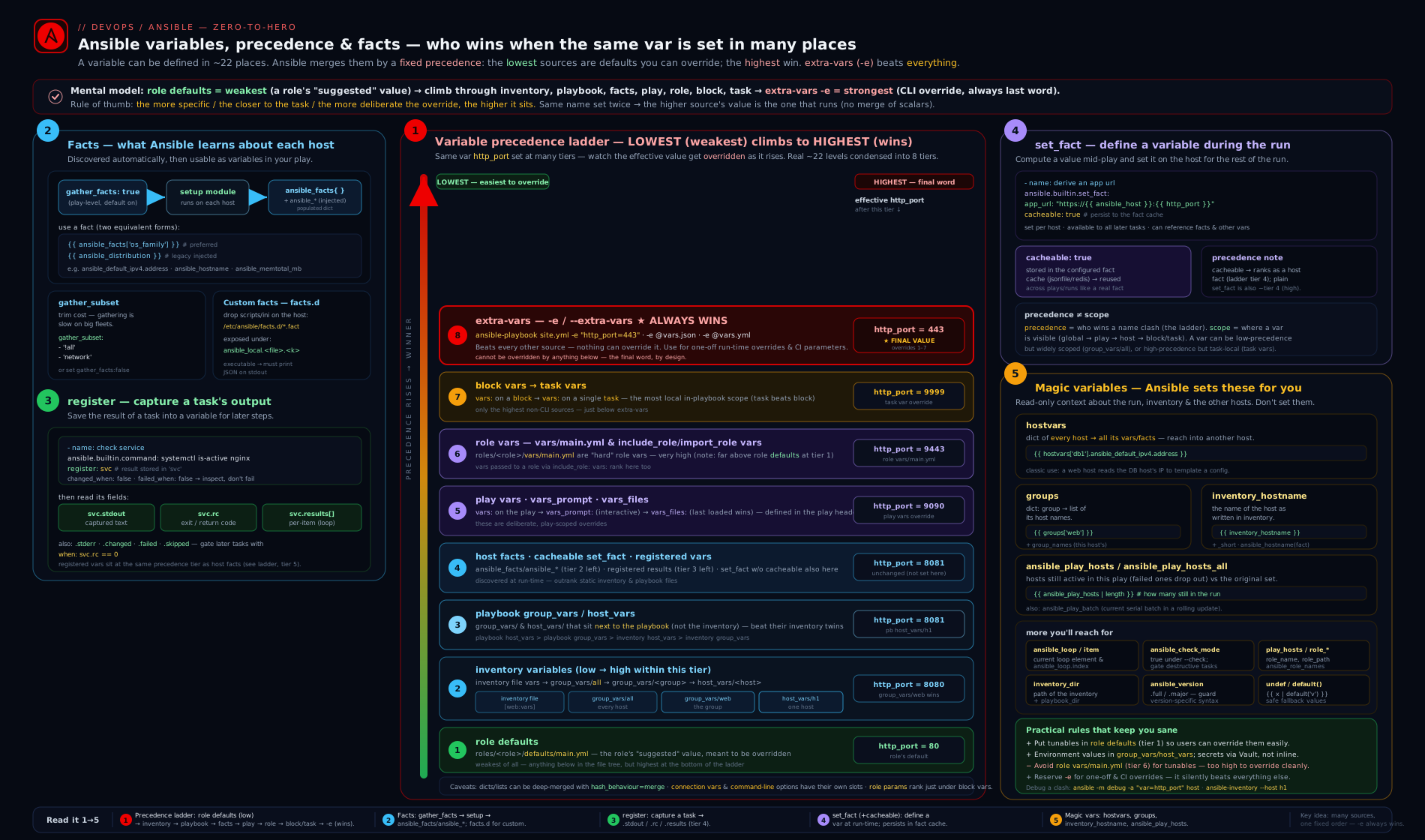
The diagram shows the precedence ladder on the left (extra-vars overriding everything down to role defaults at the floor) and, on the right, the four run-time sources — gathered facts, custom facts.d facts, register, and set_fact — feeding the per-host variable namespace that magic variables like hostvars then expose.
Going deeper
The precedence table and the fact system look tidy on paper; production behaviour has sharp edges. This section is for the engineer who already writes playbooks and wants to know what Ansible is actually doing.
How the per-host variable dict is built (and why late binding matters)
Ansible does not evaluate variables when it reads your YAML. It builds, per host, a layered mapping in the internal VariableManager, then resolves each {{ }} lazily at the moment it is used (late binding). Two consequences follow. First, a vars: entry can reference another variable defined “later” in the same file or in a higher layer, because nothing is computed until a task actually needs it — base_url: "https://{{ host }}" works even if host is set elsewhere. Second, the value a task sees is whatever won precedence at that instant; a set_fact earlier in the play can therefore change what a later template resolves to. When a value surprises you, remember it was assembled at use time, not at parse time — which is also why ansible-inventory --host <h> (parse-time, inventory-only) and debug: var=x (run-time, fully merged) can disagree.
Hashes are replaced, not merged — the combine rule
This bites everyone eventually. When the same dictionary variable is set at two precedence levels, Ansible’s default hash_behaviour = replace throws away the lower-precedence dict entirely — it does not deep-merge the keys:
# group_vars/all.yml
app: {port: 80, workers: 4, name: web}

# host_vars/web01.yml
app: {port: 443}          # web01 now sees ONLY {port: 443}; workers & name are GONE
There is a global hash_behaviour = merge in ansible.cfg, but it is discouraged: it is process-wide, invisible at the call site, and makes playbooks non-portable to anyone using the default. The supported fix is to merge explicitly with the combine filter, keeping a base dict and a small per-host delta:
# host_vars/web01.yml
app_overrides: {port: 443}

# in the play or role
- name: Merge per-host overrides onto the base app config
  ansible.builtin.set_fact:
    app: "{{ app | combine(app_overrides | default({}), recursive=True) }}"
recursive=True deep-merges nested dicts; omit it for a shallow (top-level) merge. The self-reference is safe: the right-hand app resolves the lower-precedence value before set_fact writes the new one at level 19.
set_fact, register, idempotency, and check mode
set_fact and register change controller-side state, not the managed host, so they always report ok (never changed) and never break idempotency on their own. The idempotency hazard is the command you register: ansible.builtin.command/shell report changed: true every run unless you tell them otherwise. Pair every read-only check with changed_when: false (and often failed_when: false) so it stays honest.
Under --check (dry run) the rules differ by module:
Behaviour under --check |
Detail |
|---|---|
set_fact runs normally |
It only sets a controller variable, so a dry run still computes it — usually what you want. |
| Fact gathering runs | setup is read-only, so facts are still available in check mode. |
A command/shell is skipped |
Command/shell refuse to run in check mode; a task that must run (e.g. a read-only probe your later logic needs) requires check_mode: false. |
ansible_check_mode is true |
Read it to guard genuinely destructive steps: when: not ansible_check_mode. |
- name: Probe that MUST run even in --check (read-only, so it is safe)
  ansible.builtin.command: cat /etc/somefile
  register: probe
  check_mode: false        # force execution during a dry run
  changed_when: false      # it never changes anything
Fact gathering at scale: caching and smart gathering
Gathering runs a full setup on every host at play start — the single biggest time cost on large fleets. Three levers:
gathering = smart(inansible.cfg,[defaults]) gathers each host’s facts once per run and reuses them across later plays, instead of the defaultimplicitre-gather. Setgathering = explicitand no play gathers unless it saysgather_facts: true— the tidy default for role-heavy repos.- Fact caching persists facts between runs. Configure a plugin —
fact_caching = jsonfile(a directory),redis, ormemcached— withfact_caching_connection(path/host) andfact_caching_timeout. Now a play withgather_facts: falsestill reads yesterday’s facts, andset_fact ... cacheable: truevalues persist too. Cached facts re-enter precedence at level 11. gather_subset(covered above) plusgather_timeouttrims what each gather collects.
# ansible.cfg
[defaults]
gathering = smart
fact_caching = jsonfile
fact_caching_connection = /var/tmp/ansible_facts
fact_caching_timeout = 7200
Load timing: vars_files vs include_vars, and clearing facts
vars_files (level 14) load when the play is parsed, so their paths cannot use run-time facts. ansible.builtin.include_vars (level 18, higher) loads at task run time, so its path can be built from facts — include_vars: "vars/{{ ansible_facts['os_family'] }}.yml" — and you can capture the result into a namespace with name:. Two meta tasks round out run-time control: meta: clear_facts discards gathered facts for the current hosts (forcing a re-gather), and meta: refresh_inventory reloads a dynamic inventory mid-run.
Vault, version, and collection notes
- Vaulted variables keep their normal precedence — an
!vault-tagged string produced byansible-vault encrypt_string --name db_password 's3cr3t'pasted intogroup_vars/all.ymlis still just a group var (levels 3–7); Ansible decrypts it lazily at use. Pair it withno_log: trueon tasks that consume it. - All the machinery here is
ansible.builtin—set_fact,setup,include_vars,gather_factsship with ansible-core, so no extra collection is needed. This lesson targets ansible-core 2.17+ / Ansible 10+. inject_facts_as_varsstill defaults totruebut is deprecated; the top-levelansible_distributionform will eventually stop being injected. Writeansible_facts['distribution']now and you are future-proof.hostvarsis a lazy proxy into every host’s namespace — cheap to reference one key, but iterating it across a very large inventory (or templating it whole) costs real time and memory, and a host you have not gathered yet resolves toundefined.
Hands-on lab
This lab is free — it runs entirely on localhost plus one or two local containers, costs ₹0, and needs only Ansible installed.
Goal: prove precedence, gather and read facts, write a custom fact, use register and set_fact, and read magic variables.
Step 0 — Set up a tiny inventory
Create a working directory and an inventory with a group var, a host var, and overlapping values to demonstrate precedence.
mkdir -p ~/ansible-vars-lab/group_vars ~/ansible-vars-lab/host_vars
cd ~/ansible-vars-lab
inventory.ini:
[web]
localhost ansible_connection=local

[web:vars]
http_port=80
group_vars/web.yml:
http_port: 8080      # overrides the inventory [web:vars] value (level 7 > level 3)
greeting: "from group_vars"
host_vars/localhost.yml:
greeting: "from host_vars" # host beats group → this wins
Step 1 — Watch precedence resolve
play-precedence.yml:
- name: Demonstrate precedence
  hosts: web
  gather_facts: false
  vars:
    http_port: 9090            # play vars (level 12) beat all inventory/group_vars
  tasks:
    - ansible.builtin.debug:
        msg: "http_port={{ http_port }} | greeting={{ greeting }}"
Run it, then override with extra-vars:
ansible-playbook -i inventory.ini play-precedence.yml
ansible-playbook -i inventory.ini play-precedence.yml -e "http_port=443"
Expected: the first run prints http_port=9090 (play vars beat group_vars 8080 and inventory 80) and greeting=from host_vars (host beat group). The second run prints http_port=443 — extra-vars override even the play vars. You have just watched levels 3, 7, 12, and 22 fight, and the higher level win every time.
Step 2 — Gather and read facts
play-facts.yml:
- name: Read gathered facts
  hosts: web
  gather_facts: true
  gather_subset:
    - "!all"
    - "!min"
    - network
  tasks:
    - ansible.builtin.debug:
        msg: >-
          os={{ ansible_facts['distribution'] }}
          ip={{ ansible_facts['default_ipv4']['address'] | default('n/a') }}
          cpus={{ ansible_facts['processor_vcpus'] | default('n/a') }}
ansible-playbook -i inventory.ini play-facts.yml
Expected: your machine’s distribution and primary IP, gathered quickly because only the network subset (plus the implicit minimum) was collected.
Step 3 — Write and read a custom fact
sudo mkdir -p /etc/ansible/facts.d
printf '[deployment]\ntier=lab\nversion=1.0\n' | sudo tee /etc/ansible/facts.d/app.fact
play-localfacts.yml:
- hosts: web
  gather_facts: true
  tasks:
    - ansible.builtin.debug:
        var: ansible_facts['ansible_local']['app']['deployment']['tier']
ansible-playbook -i inventory.ini play-localfacts.yml
Expected: lab. You taught the host a fact and read it back through ansible_local.
Step 4 — register and set_fact
play-register.yml:
- hosts: web
  gather_facts: true
  tasks:
    - name: Capture the kernel version
      ansible.builtin.command: uname -r
      register: kern
      changed_when: false

    - name: Derive values at run time
      ansible.builtin.set_fact:
        kernel: "{{ kern.stdout }}"
        double_cpus: "{{ ansible_facts['processor_vcpus'] | int * 2 }}"

    - ansible.builtin.debug:
        msg: "kernel={{ kernel }} rc={{ kern.rc }} double_cpus={{ double_cpus }}"
ansible-playbook -i inventory.ini play-register.yml
Expected: the kernel string, rc=0, and twice your CPU count — proof that register captured the command result and set_fact computed a new value from a fact.
Step 5 — Magic variables (optional, with a container)
If Docker or Podman is available, add a second target to see hostvars/groups span hosts:
docker run -d --name node2 --rm rockylinux:9 sleep infinity
Append to inventory.ini:
node2 ansible_connection=docker
play-magic.yml:
- hosts: all
  gather_facts: true
  tasks:
    - ansible.builtin.debug:
        msg: >-
          I am {{ inventory_hostname }};
          groups={{ group_names }};
          web members={{ groups['web'] }}
ansible-playbook -i inventory.ini play-magic.yml
Expected: each host prints its own inventory_hostname, the groups it belongs to, and the shared member list of web — the magic variables exposing inventory state.
Validation
# Resolved value for one host, walking precedence:
ansible web -i inventory.ini -m ansible.builtin.debug -a "var=http_port"
# All inventory-sourced vars for the host (levels 3–10):
ansible-inventory -i inventory.ini --host localhost
Cleanup
docker rm -f node2 2>/dev/null || true
sudo rm -f /etc/ansible/facts.d/app.fact
rm -rf ~/ansible-vars-lab
Cost note
₹0. Everything ran on localhost and an ephemeral local container; nothing was provisioned in any cloud.
Practice challenges
Six graded exercises, beginner → advanced. Try each before opening the solution. They are small and self-contained; wire them into the lab inventory above to run them for real.
Challenge 1 (Beginner) — Reference a value that starts with {{. Given a play var greeting: hello, write a debug task whose msg is exactly the value of greeting — and that actually parses.
<details> <summary>Solution</summary>
- ansible.builtin.debug:
    msg: "{{ greeting }}"
Why: a value beginning with {{ must be quoted, or YAML reads the leading { as an inline dictionary and errors.
</details>
Challenge 2 (Beginner) — Predict the winner. http_port is set three ways: [web:vars] http_port=80 in the inventory, http_port: 8080 in group_vars/web.yml, and vars: {http_port: 9090} in the play. What does the host print, and what single flag forces it to 443?
<details> <summary>Solution</summary>
Prints 9090. Force 443 with ansible-playbook … -e "http_port=443".
Why: play vars (level 12) beat playbook group_vars (7) which beat inventory group vars (3); extra-vars (22) override everything.
</details>
Challenge 3 (Intermediate) — Normalise an OS difference once. Using ansible_facts, set a single variable web_pkg to httpd on the RedHat family and apache2 everywhere else, so the rest of the play never repeats the check.
<details> <summary>Solution</summary>
- name: Pick the web package for this distro
  ansible.builtin.set_fact:
    web_pkg: "{{ 'httpd' if ansible_facts['os_family'] == 'RedHat' else 'apache2' }}"
Why: one set_fact collapses the branch to a single variable instead of sprinkling os_family conditionals through twenty tasks.
</details>
Challenge 4 (Intermediate) — Read results from a looped register. Run which over [git, curl, wget], capture the results, and print each binary with its return code — without the play failing when one is missing.
<details> <summary>Solution</summary>
- name: Check each binary
  ansible.builtin.command: "which {{ item }}"
  loop:
    - git
    - curl
    - wget
  register: bins
  changed_when: false
  failed_when: false

- name: Report each result
  ansible.builtin.debug:
    msg: "{{ item.item }} -> rc={{ item.rc }}"
  loop: "{{ bins.results }}"
Why: a looped register wraps per-iteration data in the list bins.results; each element carries its own .item (the loop value) and .rc. failed_when: false stops a missing binary aborting the play.
</details>
Challenge 5 (Advanced) — Read another host’s IP. From the web host, print db01’s primary IPv4, but do not crash if db01 was never gathered this run.
<details> <summary>Solution</summary>
- ansible.builtin.debug:
    msg: "db01 IP = {{ hostvars['db01']['ansible_facts']['default_ipv4']['address'] | default('unknown') }}"
Why: hostvars exposes any host’s facts, but only if that host was gathered (this run or from cache); default('unknown') guards the undefined case.
</details>
Challenge 6 (Advanced) — Partially override a dictionary. group_vars/all.yml defines app: {port: 80, workers: 4, name: web}. One host must run on port 443 but keep workers and name. Setting app: {port: 443} in host_vars breaks it — explain why, then fix it.
<details> <summary>Solution</summary>
Setting app: {port: 443} in host_vars makes the host see only {port: 443} — Ansible replaces dicts across precedence sources (hash_behaviour = replace), it does not merge them, so workers and name vanish. Fix by keeping the base and merging a delta:
# host_vars/web01.yml
app_overrides: {port: 443}

# in the play or role
- name: Merge the per-host override onto the base config
  ansible.builtin.set_fact:
    app: "{{ app | combine(app_overrides | default({}), recursive=True) }}"
Why: the combine filter is the explicit, local deep-merge; it is safer than the global hash_behaviour = merge, which is process-wide and surprising.
</details>
Common beginner mistakes
These are misconceptions — wrong mental models — not symptom lookups (those are in the troubleshooting table below). Each pairs the belief with the model that replaces it.
- “
-eis just a handy way to set a variable.” It is the highest precedence and cannot be overridden by anything inside the playbook. Right model:-eis a sledgehammer for genuine one-offs (-e "http_port=8443"); routine config belongs ingroup_vars/host_vars, where the playbook can still shape it. - “My
group_varsshould override the role’s value.” Only if the role put that value indefaults/main.yml(level 2). If it lives in the role’svars/main.yml(level 15), no inventory source (levels 3–10) can touch it. Right model: roledefaults= an overridable floor; rolevars= a locked constant. - “
set_factpersists to the next run like a gathered fact.” By default it lasts only for the current run. Right model:set_factis a mid-play scratchpad; it becomes durable only withcacheable: trueand a configured fact cache. - “A
register/set_factvalue is a number (or boolean).” Jinja returns strings —"{{ 2 * 2 }}"is the string"4", andsvc.rccompared to a bare0can surprise you. Right model: cast at the point of use with| int,| bool. - “
when: {{ ready }}is how you write a condition.”when:(andchanged_when:,failed_when:,assert.that:) are already Jinja expressions; braces trigger a warning. Right model: bare variable name in those keys,{{ }}everywhere else. - “
ansible_hostnameandinventory_hostnameare the same thing.” One is the machine’s discovered short hostname (a fact); the other is the name you wrote in inventory (possibly an alias). Right model: useinventory_hostnamefor automation identity; use the fact when you need the box’s own name. - “Overriding one key of a dict in
host_varskeeps the other keys.” Dicts are replaced wholesale across precedence, not merged. Right model: keep a base dict and merge a small delta withcombine. - “
gather_facts: falsestill lets me readansible_facts.” Only if those facts were gathered in an earlier play this run or loaded from a fact cache; otherwise they areundefined. Right model: no gather + no cache = no facts.
Common mistakes & troubleshooting
| Symptom | Likely cause | Fix |
|---|---|---|
group_vars value “won’t take” |
The value is also set in role vars/main.yml (level 15) which beats inventory (levels 3–10) |
Move the role value to defaults/main.yml (level 2), or override with -e. |
template error ... expected token ':' on a task value |
Value starts with {{ and is unquoted — YAML parses { as a dict |
Quote it: msg: "{{ x }}". |
Ansible warns “{{ }} should not be used” |
{{ }} inside when:/changed_when: etc. |
Use the bare variable name; those keys are already Jinja2. |
dict object has no attribute 'stdout' |
Reading .stdout from a skipped task or a looped register |
Guard with when: not r.skipped; for loops read r.results[*].stdout. |
| Wrong value when a host is in two groups | Sibling groups — the one sorting last alphabetically won | Set ansible_group_priority on the group that should win. |
set_fact value gone on the next playbook run |
set_fact is per-run unless cached |
Add cacheable: true and enable a fact_caching plugin. |
hostvars['db01'][...] is undefined |
db01’s facts were never gathered this run |
Gather it in an earlier play, enable fact caching, or run setup against it. |
| A number is treated as a string in a comparison | Value came from register/set_fact as text |
Cast: `{{ r.stdout |
ansible_distribution undefined |
gather_facts: false, or inject_facts_as_vars=false |
Gather facts, and prefer ansible_facts['distribution']. |
Best practices
- Name with the source in mind. Reserve
defaults/main.ymlfor everything a user might tune; put only locked, role-internal constants invars/main.yml. This single discipline prevents most precedence pain. - Use
host_vars/group_varsfor configuration; use-eonly for genuine one-offs. Because extra-vars cannot be overridden, routine config in-eis a trap. - Prefer
ansible_facts['x']overansible_x. It is the supported form and survivesinject_facts_as_vars: false, which is the future default. - Gather only what you need.
gather_subset(andgather_facts: falsewhere you can read cached facts) shaves real time off large fleets. - Make read-only commands honest. Pair
registerwithchanged_when: falseon checks so they do not pollute the changed count. - Normalise per-OS differences once with a single
set_fact, then write the rest of the play against your own variables — never sprinkleos_familyconditionals through twenty tasks. - Cast types explicitly (
| int,| bool) whenever a value originates fromregister/set_fact, which are strings by default. - Keep variable scope as narrow as it can be. A task-scoped
vars:is clearer than a play var that only one task uses.
Security notes
- Never store secrets in plain
group_vars/host_vars. Encrypt them with Ansible Vault (ansible-vault encrypt_string) — covered in Ansible Vault, In Depth. A password ingroup_vars/allis a password in your Git history. - Treat extra-vars as visible. Values passed with
-eappear in shell history, process listings, and CI logs. Pull secrets from a vault file (-e @vault.yml) or a secret store, not inline on the command line. - Use
no_log: trueon tasks that handle secrets, including those thatregistersensitive output — otherwise the secret is printed at-vand in callbacks. - Custom facts run code on the target. An executable
.factin/etc/ansible/facts.d/runs as part of gathering; restrict who can write to that directory (root-owned,0755) so a compromised user cannot inject facts — or worse, code. - Cached facts can leak. A
jsonfilefact cache is plaintext on the controller; if facts include anything sensitive (acacheable: truetoken, an internal IP map), protect the cache directory and consider its retention. - Magic variables expose your inventory.
hostvarsandgroupsreveal every host and its facts to any play; be deliberate about printing them in logs that others can read.
Interview & exam questions
-
What overrides everything in Ansible variable precedence, and what is at the very bottom? Extra-vars (
-e/--extra-vars) override everything; role defaults (defaults/main.yml) are the weakest, overridden by every other source. -
A value in
group_vars/allis being ignored in favour of one in a role. Why? The role almost certainly sets it invars/main.yml(precedence level 15), which beats all inventory sources (levels 3–10). Move it to the role’sdefaults/main.yml(level 2) sogroup_varscan override it. -
host_varsvsgroup_vars— which wins, and why?host_varswins. A host is more specific than a group, and the precedence table places host-level inventory vars above group-level ones. -
A host belongs to two groups that both set the same variable. Which value applies? Among sibling groups at the same depth, the last alphabetically wins, unless you set
ansible_group_priorityto break the tie. Child groups always beat parent groups regardless of name. -
What is the difference between
registerandset_fact?registercaptures the JSON result of a task into a variable (.stdout,.rc,.changed,.results);set_factcreates or computes a variable explicitly from any expression. Both are per-host.set_factcan persist across runs withcacheable: true;registercannot. -
What does
cacheable: trueonset_factdo? It writes the value through the configured fact-caching plugin so it survives into futureansible-playbookruns, entering precedence at level 11 (cached facts) next time, while still usable at level 19 this run. -
You looped a task and registered the result;
result.stdouterrors. Why and what’s the fix? With aloop, the registered variable wraps a list inresult.results; each element has its own.stdout/.rc/.item. Iterateresult.resultsand readitem.stdout. -
Difference between
inventory_hostnameandansible_facts['hostname']?inventory_hostnameis the name you gave the host in inventory (could be an alias);ansible_facts['hostname'](a.k.a.ansible_hostname) is the short hostname the machine reports. They are frequently different. -
How do you read another host’s IP from the current play? Through the
hostvarsmagic variable:hostvars['db01']['ansible_facts']['default_ipv4']['address']— provideddb01’s facts were gathered (this run or from cache). -
How do you speed up a play that doesn’t need every fact? Set
gather_subsetto only the needed subsets (e.g.["!all","!min","network"]), raise/limitgather_timeout, or skip gathering (gather_facts: false) and rely on cached facts. -
Why must a value beginning with
{{be quoted, but awhen:condition must not be? A leading{{makes YAML try to parse a flow mapping, so it must be quoted to be a string;when:(andchanged_when:,failed_when:) are already Jinja2 expressions, so you supply the bare variable and adding{{ }}is redundant (and warned against). -
Where do custom facts live and where do they appear? Executable or INI/JSON files ending in
.factgo in/etc/ansible/facts.d/on the managed node (or a path set viafact_path); they surface underansible_facts['ansible_local'].
Quick check
- Which is higher precedence: play
varsorhost_vars? - True/false:
set_factvalues automatically persist to the next playbook run. - What key holds per-item results when you
registera task that has aloop? - Which
gather_subsetvalue collects the least? - Name the magic variable that maps each group name to its list of member hosts.
Answers
- Play
vars(level 12) beatshost_vars(levels 8–10). - False — only if you add
cacheable: trueand a fact-caching plugin is configured; otherwise they last only for the current run. .results— a list, each element with its own.stdout,.rc,.item,.changed.min(or excluding everything with!all,!min,...leaving a single small subset).mincollects a minimal fast core.groups(e.g.groups['web']).
Exercise
Build a two-host setup (e.g. localhost plus one container) and a playbook that:
- Sets
app_port: 8080ingroup_vars/all,app_port: 9090inhost_varsfor one host only, and proves with adebugtask that the two hosts resolve different values. - Gathers facts with only the
networksubset and prints each host’s primary IPv4. - Adds a custom fact
facts.d/build.factreporting aversion, and reads it back viaansible_local. - Runs
df -h /withregister+changed_when: false, then usesset_factto computeroot_fs_linefrom.stdout_lines. - Uses
hostvarsandgroups['all']to print every host’s IP from a single play. - Finally, override
app_portwith-e "app_port=1234"and confirm both hosts now report1234, demonstrating extra-vars at the top of precedence.
Bonus: add cacheable: true to a set_fact, enable the jsonfile fact cache in ansible.cfg, run twice, and confirm the value is available on the second run even with gather_facts: false.
Certification mapping
This lesson maps to the RHCE (EX294) exam objectives:
- “Use variables” and “Manage variable precedence” — the full precedence table and the role
defaults-vs-varsrule. - “Use Ansible facts” —
gather_facts,ansible_facts,gather_subset, and custom facts in/etc/ansible/facts.d. - “Create and use roles” (variable portion) — defaults vs vars precedence for roles.
- “Work with the registered variables” and run-time variable creation —
register,set_fact, and consuming results. - Magic variables (
hostvars,groups,inventory_hostname) recur throughout the exam’s inventory and templating tasks.
Glossary
- Precedence — the fixed ordering Ansible uses to choose a value when a variable is set in multiple places; extra-vars highest, role defaults lowest.
- Extra-vars — variables passed with
-e/--extra-vars; the highest precedence; cannot be overridden. - Role defaults — variables in
roles/<r>/defaults/main.yml; the lowest precedence, meant to be overridden. - Fact — a property of a managed node discovered by the
setupmodule and exposed underansible_facts. gather_subset— controls which categories of facts are collected (all,min,hardware,network,virtual, with!to exclude).- Custom fact (
facts.d) — a user-supplied.factfile on the host, surfaced underansible_facts['ansible_local']. register— keyword that stores a task’s JSON result in a variable for later use.set_fact— module that creates or computes a variable mid-play;cacheable: truepersists it via the fact cache.- Magic variable — an Ansible-populated, always-available variable such as
hostvars,groups,group_names,inventory_hostname,ansible_play_hosts. hostvars— magic dictionary of every host’s variables and facts, keyed by inventory name; used to read another host’s data.inventory_hostname— the host’s name as written in inventory (may be an alias), distinct from the discoveredansible_hostnamefact.ansible_group_priority— per-group setting that breaks the alphabetical tie between sibling groups (higher wins).combinefilter — Jinja filter that deep-merges dictionaries on purpose (recursive=Truefor nested); the safe alternative to the globalhash_behaviour = merge.hash_behaviour— globalansible.cfgsetting (replacedefault, ormerge) controlling whether same-named dicts merge across precedence; prefer the localcombinefilter instead.- Fact caching — persisting gathered facts between runs via a plugin (
jsonfile/redis/memcached) sogather_facts: falseplays can still read them; cached facts enter precedence at level 11. gathering—ansible.cfgsetting (implicit/explicit/smart) that controls when facts are gathered;smartgathers each host once per run and reuses it.- Check mode (
--check) — a dry run;ansible_check_modeistrue,set_factand fact gathering still run, andcheck_mode: falseforces an individual task to execute for real. - Late binding — Ansible resolves each
{{ }}when it is used, not when defined, sovars:chains and forward references work and aset_factcan change what a later template sees. vars_files/include_vars— external variable files loaded at play parse time (vars_files, level 14) versus task run time (include_vars, level 18, so its path can use facts).
Next steps
- Ansible Conditionals, Loops, Handlers & Tags, In Depth — branch and iterate using the variables, facts, and registered results you just learned to create.
- Ansible Playbooks, In Depth — the play and task keywords (
vars,vars_files,register) that this lesson’s precedence table references. - Ansible Jinja2 Templating, In Depth — the filters and tests (
default,int,bool,from_json) you use to shape variables and facts. - Ansible Vault, In Depth — encrypt the sensitive variables that must never live in plaintext
group_vars.