In a nutshell
This lesson is about two things that sound similar but do opposite jobs: a collection and an Execution Environment (EE). A collection is how you package your Ansible work — roles, modules, plugins, and playbooks — into one versioned, installable bundle that a teammate grabs with a single command. An EE is how you freeze the runtime — a container image holding the exact ansible-core, collections, and libraries a playbook needs — so it runs the same on your laptop, in CI, and in production.
Think of a collection as a shippable toolbox: a labelled box of tools (your modules and roles) with a parts list on the lid (galaxy.yml) and a version number stamped on the side. Anyone can order that exact box by name and version. An EE is a sealed workshop container: the toolbox plus the workbench, the power supply, and every dependency, welded shut and stamped with a tag — open it anywhere and the workshop is bit-for-bit identical. You build the toolbox with ansible-galaxy collection build and build the sealed workshop with ansible-builder build; the toolbox usually ships inside the workshop.
If those two sentences land, the rest of this lesson is detail: every directory in the toolbox, every field on its parts list, how the sealed container is specified and built, and how you run a playbook inside it. Beginners: read the analogy, skim the tables, and do the offline lab — you do not need a container engine for the core of it. Experienced readers: the Going deeper section covers signing, the multi-stage image layers, and the honest limits of the word “reproducible.”
Level: Advanced · Time: ~45 min
You have written roles (reusable units of automation), modules (the things that run on targets), and plugins (the things that run on the control node). Two questions remain before you can ship automation like a professional. First: how do you package and distribute all of that as one versioned, installable thing — so a teammate, a CI runner, or a customer gets your roles, modules, plugins, and docs with one ansible-galaxy collection install? That is a collection. Second: how do you guarantee the runtime is the same everywhere it runs — the same ansible-core, the same collections, the same Python libraries and system packages — so a playbook that works on your laptop works identically in CI and in production, with no “but it worked on the jumpbox”? That is an Execution Environment (EE): a container image that bundles ansible-core plus your collections and their Python and system dependencies into one immutable, portable artifact.
These two ideas are the backbone of the modern Ansible ecosystem and of Red Hat Ansible Automation Platform (AAP). A collection is what you build; an Execution Environment is what you run it inside. This lesson is the exhaustive, authoring-side treatment of both. You will learn every directory in a collection and every field of galaxy.yml, the namespace.name identifier and the semantic-versioning rules Galaxy enforces, how to build a collection into a tarball with ansible-galaxy collection build and publish it to Ansible Galaxy or a private Automation Hub, how collection dependencies and meta/runtime.yml redirects work, and then — the runtime half — the precise problem EEs solve, ansible-builder and the execution-environment.yml version 3 schema field by field (images, dependencies with galaxy/python/system/ansible_core/ansible_runner, additional_build_steps, options), how to run a playbook against an EE with ansible-navigator (--eei, --mode, --pull-policy), how an EE differs from a Python venv, and how AAP consumes EEs. Every option gets the same treatment — what it is · the choices · the default · when to use it · the trade-off · the gotcha — with real commands throughout. This is the building-and-running companion to the hands-on AWX guide, which shows the same EEs and collections operated inside a controller at scale; here we go deep on authoring them. Everything reflects current ansible-core 2.17+ / Ansible 10+ / ansible-builder 3.x / ansible-navigator 24.x (2026).
Learning objectives
By the end of this lesson you can:
- Lay out a collection in the full directory structure and explain what each top-level directory holds.
- Write a correct
galaxy.yml— every field — and reason about thenamespace.nameidentifier and semantic-versioning constraints Galaxy enforces. - Build a collection to a tarball with
ansible-galaxy collection buildand publish it to Ansible Galaxy or a private Automation Hub (token auth, server config). - Declare collection dependencies and use
meta/runtime.ymlforrequires_ansibleand module redirects/deprecations. - Explain the dependency-hell problem Execution Environments solve and contrast an EE with a venv and with the old bare control node.
- Write an
execution-environment.yml(version 3) field by field and build the image withansible-builder build(understanding the generatedcontext/andContainerfile). - Run a playbook against an EE with
ansible-navigator(--eei,--mode stdout|interactive,--pull-policy) and describe how AAP uses EEs.
Prerequisites & where this fits
You should already understand roles and collections at the consumer level — the namespace.collection FQCN, ansible-galaxy collection install, and requirements.yml from the roles & collections lesson — and ideally have written a custom module and a plugin (so the plugins/ directory of a collection means something concrete). Basic familiarity with containers (an image, a registry, podman/docker build) helps for the EE half, though the lab assumes nothing beyond “a container is a packaged filesystem you run.” In the Ansible Zero-to-Hero programme this lesson sits at the top of the Developing tier: it is where “automation that runs on my machine” becomes “a versioned, published artifact that runs identically anywhere.” It builds directly on the roles/collections lesson and leads into the Ansible Automation Platform architecture lesson (Controller, Automation Hub, and Event-Driven Ansible), where these collections and EEs become first-class platform objects. Keep one mental split front of mind throughout: a collection is content you build and publish; an EE is a runtime you build and run — different tools (ansible-galaxy collection build vs ansible-builder build), different artifacts (a .tar.gz vs a container image), often combined (an EE contains collections).
Core concepts
A collection is the modern unit of Ansible content distribution: a bundle identified as namespace.name (for example community.general, amazon.aws, or your own kloudvin.platform) that can ship modules, plugins, roles, and playbooks together, all versioned with semantic versioning and described by a single manifest file, galaxy.yml. Since Ansible 2.10 split the old monolith, almost every module you use lives in a collection and is addressed by its FQCN (namespace.name.module). ansible-core itself ships only the ansible.builtin collection. A collection is built into a tarball (namespace-name-version.tar.gz) and published to a registry — public Ansible Galaxy (galaxy.ansible.com) or a private Automation Hub / galaxy_ng server — from where consumers install it.
An Execution Environment (EE) is a container image that packages a complete, self-contained Ansible runtime: a pinned ansible-core, ansible-runner (the library that actually launches Ansible inside the container), your collections, and the Python libraries and system packages those collections need. The point is reproducibility and portability: instead of every engineer maintaining a fragile control node where pip install history determines whether a playbook works, you ship one image and every run — laptop, CI, AAP — uses the identical bytes. An EE is built with ansible-builder from a declarative execution-environment.yml and run with ansible-navigator (locally) or by AAP (in production).
The tools map cleanly to the two artifacts. ansible-galaxy collection (init, build, publish, install) handles collections. ansible-builder (create, build, introspect) handles EEs — it reads execution-environment.yml, generates a build context and a Containerfile, and drives podman/docker to produce the image. ansible-navigator is the modern front-end for running content (it replaces typing ansible-playbook directly when you want EE-based, container-isolated execution) and has both an interactive text UI and a plain stdout mode.
Three relationships tie it together, and they are the most-tested framing: (1) a collection is content, an EE is a runtime; (2) an EE typically contains collections (you list them in the EE’s galaxy dependencies, and ansible-builder installs them into the image at build time); (3) requirements.yml is the bridge — the same collections: requirements file you use to install collections locally is what an EE’s dependencies.galaxy points at to bake those collections into the image. Hold those three ideas and the rest is detail.
The collection directory structure: every directory
Scaffold an empty collection with ansible-galaxy collection init <namespace>.<name>, which creates the canonical layout. The full structure (more than init generates by default — the optional dirs are added as you need them) is:
kloudvin/                         # namespace directory (created by init)
└── platform/                     # collection name directory
    ├── galaxy.yml                # THE manifest: namespace, name, version, deps, build_ignore…
    ├── README.md                 # collection-level documentation (shown on Galaxy)
    ├── LICENSE                   # the licence file
    ├── meta/
    │   └── runtime.yml           # requires_ansible, action_groups, plugin_routing (redirects)
    ├── plugins/                  # ALL non-module plugins + modules live here
    │   ├── modules/              #   custom modules            → kloudvin.platform.<module>
    │   ├── module_utils/         #   shared Python for modules → import via ansible_collections.…
    │   ├── filter/               #   filter plugins
    │   ├── lookup/               #   lookup plugins
    │   ├── inventory/            #   inventory plugins
    │   ├── callback/             #   callback plugins
    │   ├── connection/           #   connection plugins
    │   ├── action/               #   action plugins
    │   ├── become/  cache/  test/  vars/  …  (one dir per plugin type)
    ├── roles/                    # roles, each in the normal role layout
    │   └── webserver/
    │       ├── tasks/main.yml
    │       ├── defaults/main.yml
    │       └── meta/{main.yml,argument_specs.yml}
    ├── playbooks/                # distributable playbooks → run as kloudvin.platform.<play>
    │   └── site.yml
    ├── docs/                     # extra documentation (docsite, rST)
    ├── tests/                    # sanity/unit/integration tests
    │   ├── sanity/
    │   ├── unit/
    │   └── integration/
    ├── changelogs/               # changelog fragments (antsibull-changelog)
    │   └── fragments/
    └── requirements.txt          # (optional) Python deps, referenced by EE builds
Each top-level directory has one job. This is the table to internalise.
| Directory / file | What it holds | How it is addressed at runtime | Notes / gotcha |
|---|---|---|---|
galaxy.yml |
The collection manifest (namespace, name, version, dependencies, metadata, build_ignore) |
n/a — read at build time | Required. Becomes MANIFEST.json inside the built tarball. The single source of truth for identity and version. |
plugins/modules/ |
Custom modules | namespace.name.module (FQCN) |
Modules run on the target; this is where a collection’s modules live (not library/). |
plugins/module_utils/ |
Shared Python imported by those modules | from ansible_collections.<ns>.<name>.plugins.module_utils.x import y |
Note the long, collection-qualified import path — different from a role’s module_utils/. |
plugins/<type>/ |
Plugins of every other type (filter, lookup, inventory, callback, connection, action, become, cache, test, vars, cliconf, httpapi, netconf, terminal, strategy, shell, doc_fragments) |
by plugin name, FQCN where applicable | One directory per plugin type; auto-discovered when the collection is installed. |
roles/ |
Roles, each in the standard role directory layout | namespace.name.rolename |
A collection can ship many roles; address each by FQCN. |
playbooks/ |
Distributable playbooks | ansible-playbook namespace.name.playname |
Since 2.11 you can run a playbook shipped inside a collection by FQCN — a powerful, under-used feature. |
meta/runtime.yml |
requires_ansible, action_groups, plugin_routing (redirects/deprecations/tombstones) |
read by Ansible at load time | This is the collection’s meta/ (do not confuse with a role’s meta/main.yml). |
docs/ |
Extra documentation, docsite source | rendered on Galaxy / docsite | Optional but expected for published collections. |
tests/ |
sanity/, unit/, integration/ tests |
run by ansible-test |
The home of ansible-test sanity/units/integration. |
changelogs/ |
changelog.yaml + fragments/ |
assembled by antsibull-changelog |
The convention for generating release notes from per-change fragments. |
README.md / LICENSE |
Docs and licence | shown on Galaxy | Galaxy displays the README; a licence is required to publish. |
Three rules tie this together:
- Everything that is not a role lives under
plugins/— including modules (plugins/modules/). This is the single biggest structural difference from a standalone role (where modules went inlibrary/). A collection has oneplugins/tree with a sub-directory per plugin type. meta/runtime.ymlis the collection’s metadata file, and it is not the same as a role’smeta/main.yml. The collection-levelruntime.ymldeclares the minimum Ansible version (requires_ansible) and any plugin redirects (more below). Each role insideroles/still has its ownmeta/main.yml.- Identity comes only from
galaxy.yml. The directory names (kloudvin/platform/) are conventional, but the authoritativenamespace,name, andversionare the fields insidegalaxy.yml— that is what ends up in the tarball’sMANIFEST.jsonand what consumers resolve against.
The minimal publishable collection is galaxy.yml + a README.md + at least one piece of content (a module, a role, or a plugin). Everything else (docs/, tests/, changelogs/, playbooks/) is added as the collection matures.
galaxy.yml: every field
galaxy.yml is the collection manifest — the equivalent of a package.json or pyproject.toml. ansible-galaxy collection init generates a stub; you fill it in. At build time its contents are written into the tarball as MANIFEST.json (plus a FILES.json checksum manifest). Here is a complete, annotated example, followed by the field-by-field table.
# galaxy.yml
namespace: kloudvin                 # REQUIRED — your Galaxy namespace (lowercase, [a-z0-9_])
name: platform                      # REQUIRED — the collection name (lowercase, [a-z0-9_])
version: 1.4.0                      # REQUIRED — strict SemVer (MAJOR.MINOR.PATCH)
readme: README.md                   # REQUIRED — path to the README, relative to galaxy.yml

authors:                            # REQUIRED — list of "Name <email> (url)" strings
  - Vinod H <h.vinod@example.com>

description: >-                     # one-line summary shown on Galaxy
  KloudVin platform automation: nginx, hardening, and cloud bootstrap roles and modules.

license:                            # SPDX licence id(s); use this OR license_file, not both
  - GPL-3.0-or-later
# license_file: LICENSE             # alternative: point at a licence file for non-SPDX licences

tags:                               # search/discovery tags on Galaxy (lowercase, no spaces)
  - infrastructure
  - linux
  - cloud
  - security

dependencies:                       # OTHER COLLECTIONS this one needs, with version ranges
  "ansible.posix": ">=1.5.0,<2.0.0"
  "community.general": ">=8.0.0"

repository: https://github.com/kloudvin/platform-collection      # SCM URL
documentation: https://kloudvin.github.io/platform-collection    # docs site URL
homepage: https://kloudvin.example/automation                    # project homepage
issues: https://github.com/kloudvin/platform-collection/issues   # bug tracker URL

build_ignore:                       # glob patterns EXCLUDED from the built tarball
  - "*.tar.gz"                      # never bundle previously-built artifacts
  - ".git"
  - ".github"
  - "tests/output"
  - "*.pyc"
  - "__pycache__"
  - ".venv"

# manifest:                         # (advanced, mutually exclusive with build_ignore)
#   directives:                     #   MANIFEST.in-style include/exclude for fine control
#     - "recursive-include plugins **"
#     - "exclude galaxy.yml"
The fields, exhaustively:
| Field | Required? | What it is | Constraints / choices | Notes / gotcha |
|---|---|---|---|---|
namespace |
Yes | The owning namespace (the part before the dot in namespace.name) |
Lowercase letters, digits, underscores; cannot start with a digit or underscore | Must match a Galaxy namespace you own to publish there. Half of the FQCN. |
name |
Yes | The collection name | Same charset rules as namespace |
The other half of the FQCN. namespace.name must be globally unique on the registry. |
version |
Yes | The release version | Strict SemVer MAJOR.MINOR.PATCH (e.g. 1.4.0, 2.0.0-beta.1) |
Galaxy rejects non-SemVer and rejects re-publishing an existing version — every publish needs a new, higher version. |
readme |
Yes | Path to the README file | A path relative to galaxy.yml (usually README.md) |
Rendered on the collection’s Galaxy page. |
authors |
Recommended | List of author strings | Name <email> (url) format, e-mail/url optional |
A list, even for one author. |
description |
Recommended | One-line summary | A string | Shown in search results and on the collection page. |
license |
One of license/license_file | SPDX licence identifier(s) | A list of SPDX ids (e.g. GPL-3.0-or-later, MIT, Apache-2.0) |
Use either license or license_file, not both. Use valid SPDX strings. |
license_file |
One of license/license_file | Path to a licence file | A filename (e.g. LICENSE) |
For licences without an SPDX id, or to ship the full text. |
tags |
Recommended | Discovery tags | List of lowercase, space-free strings; max 20 | Drives Galaxy search/filter facets. |
dependencies |
Optional | Other collections this collection depends on | A map of "ns.name": "version range" |
These are collection deps (resolved/installed transitively), not Python or system deps. Always range-pin. |
repository |
Recommended | Source-control URL | A URL | Surfaced on Galaxy; used by tooling to find the source. |
documentation |
Recommended | Docs site URL | A URL | Link to the rendered docs. |
homepage |
Optional | Project homepage URL | A URL | — |
issues |
Recommended | Bug-tracker URL | A URL | The “report an issue” link on Galaxy. |
build_ignore |
Optional | Glob patterns to exclude from the tarball | A list of fnmatch-style globs |
Mutually exclusive with manifest. The simple way to keep .git, build artifacts, and caches out of the build. |
manifest |
Optional (advanced) | MANIFEST.in-style include/exclude directives |
A directives: list |
Mutually exclusive with build_ignore; use only when you need fine-grained control over what is bundled. |
The two fields most worth dwelling on:
versionand SemVer. Galaxy enforces strict semantic versioning and is append-only: you cannot overwrite a published version. Bump PATCH for backwards-compatible fixes, MINOR for backwards-compatible features, MAJOR for breaking changes (a removed module, a changed default, a renamed parameter). Pre-releases use the SemVer suffix (2.0.0-rc.1). Consumers pin against this with ranges (">=1.4.0,<2.0.0") precisely because you promise SemVer — so MINOR/PATCH upgrades are safe and MAJOR is opt-in.dependencies. These are collection dependencies only. When someone installskloudvin.platform,ansible-galaxyautomatically resolves and installsansible.posixandcommunity.generalin the declared ranges. It does not install Python (pip) packages — those are declared separately (in arequirements.txtand consumed by an EE build or installed by the user), which is one of the classic confusions this lesson exists to clear up.
meta/runtime.yml: requires_ansible, action_groups & redirects
The collection’s meta/runtime.yml is small but important — and distinct from any role’s meta/main.yml. It does three jobs:
# meta/runtime.yml
---
requires_ansible: ">=2.16"          # minimum ansible-core this collection supports

action_groups:                      # group modules so module_defaults can target them
  kloudvin:
    - create_vhost
    - rotate_certs

plugin_routing:                     # redirects, deprecations, and tombstones
  modules:
    old_vhost:                      # someone calling kloudvin.platform.old_vhost…
      redirect: kloudvin.platform.create_vhost   # …is transparently sent here
    legacy_thing:
      deprecation:                  # still works, but warns
        removal_version: 3.0.0
        warning_text: "Use create_vhost instead."
    ancient_thing:
      tombstone:                    # removed: using it errors with this message
        removal_version: 2.0.0
        warning_text: "ancient_thing was removed in 2.0.0; use create_vhost."
| Key | What it does | When you use it |
|---|---|---|
requires_ansible |
Declares the minimum (and optionally maximum) ansible-core version the collection supports (a SpecifierSet like ">=2.16") |
Always set it — it makes incompatible installs fail with a clear message instead of a mysterious runtime error. |
action_groups |
Names a group of modules so users can set defaults for all of them at once via module_defaults |
Handy for cloud collections (amazon.aws.aws group lets you set region/credentials once). |
plugin_routing → redirect |
Transparently sends an old plugin/module name to a new one | When you rename a module but want old playbooks to keep working. |
plugin_routing → deprecation |
Marks a name as deprecated (still works, emits a warning, with a planned removal_version) |
The polite first step before removing something. |
plugin_routing → tombstone |
Marks a name as removed — using it now errors with your message | After the deprecation window, when the thing is gone in this MAJOR. |
This is how mature collections evolve without breaking the world: rename via redirect, deprecate with a removal_version, then tombstone in the next MAJOR. It is also EX374 territory — knowing that redirect/deprecation/tombstone live in meta/runtime.yml (not galaxy.yml) is a frequent exam discriminator.
Building & publishing a collection
With galaxy.yml correct and content in place, building is one command and publishing is one more.
Build the tarball
# From inside the collection directory (where galaxy.yml is):
ansible-galaxy collection build

# Build into a chosen output dir, overwriting an existing artifact:
ansible-galaxy collection build --output-path ./build --force
This reads galaxy.yml, applies build_ignore/manifest, and produces namespace-name-version.tar.gz (e.g. kloudvin-platform-1.4.0.tar.gz) containing your content plus a generated MANIFEST.json (the metadata) and FILES.json (SHA256 checksums of every file). The tarball is the only thing you publish or install — it is the unit of distribution.
build flag |
Effect |
|---|---|
--output-path PATH |
Write the tarball to PATH (default: the current directory). |
--force / -f |
Overwrite an existing tarball of the same name. |
You can install the built tarball directly to test it before publishing:
ansible-galaxy collection install ./build/kloudvin-platform-1.4.0.tar.gz -p ./collections --force
ansible-doc -t module kloudvin.platform.create_vhost     # confirm the module is discoverable
Publish to Ansible Galaxy or a private Automation Hub
Publishing pushes the tarball to a registry. You authenticate with an API token (from your Galaxy/Hub account) — never a password.
# Publish to public Ansible Galaxy (default server)
ansible-galaxy collection publish ./build/kloudvin-platform-1.4.0.tar.gz \
  --api-key "$GALAXY_TOKEN"

# Publish and block until import finishes (CI-friendly: fails the job if import fails)
ansible-galaxy collection publish ./build/kloudvin-platform-1.4.0.tar.gz \
  --api-key "$GALAXY_TOKEN" --wait
For a private Automation Hub (galaxy_ng, the on-prem registry that ships with AAP) or a custom Galaxy server, define servers in ansible.cfg and select one with --server:
# ansible.cfg
[galaxy]
server_list = automation_hub, release_galaxy

[galaxy_server.automation_hub]
url = https://hub.internal.kloudvin.example/api/galaxy/content/published/
token = <automation-hub-token>          ; keep this out of git — inject in CI

[galaxy_server.release_galaxy]
url = https://galaxy.ansible.com/
token = <galaxy-token>
# Publish to the named private server
ansible-galaxy collection publish ./build/kloudvin-platform-1.4.0.tar.gz \
  --server automation_hub
publish flag |
Effect |
|---|---|
--api-key KEY |
The API token used to authenticate to the server (prefer an env var / CI secret). |
--server NAME|URL |
Publish to a named server from server_list (or a raw URL) instead of public Galaxy. |
--wait |
Block until the server finishes the import and report success/failure (CI gate). |
--import-timeout N |
How long to wait for the import when --wait is set. |
Three publishing facts that matter:
- Versions are immutable and append-only. You cannot re-publish
1.4.0; bump to1.4.1. This is by design and is why your release pipeline must bumpversioningalaxy.ymlon every release (tools likeantsibull-changelogautomate this alongside the changelog). - The server runs an import job that validates the tarball (structure, metadata, sometimes sanity tests).
--waitsurfaces import failures in CI; without it the command returns as soon as the upload is accepted. - Namespace ownership is enforced. You can only publish under a
namespaceyou own on that server; on Automation Hub, namespaces and signing can be governed centrally.
A typical release pipeline therefore reads: lint and test (ansible-test sanity/units/integration) → assemble the changelog and bump version → ansible-galaxy collection build → ansible-galaxy collection publish --wait. The consumer side is unchanged from what you already know: a requirements.yml with collections: entries and ansible-galaxy collection install -r requirements.yml.
The problem Execution Environments solve
Picture the control node the AWX guide opens with: a shared “automation jumpbox” with seven years of pip install --user, two conflicting boto3 versions, system packages nobody documented, and a Python that is whatever the OS shipped. Three failure modes follow inevitably:
- “Works on my machine.” A playbook needs
amazon.aws, which needs a specificboto3/botocore, which needs a specific Python. Engineer A has it; the CI runner does not; the on-call’s account does not. The same playbook behaves differently — or fails — depending on where it runs. - Dependency conflicts. Collection X wants
boto3>=1.34and collection Y is pinned to an olderbotocore; you cannot satisfy both in one shared environment. Upgrading for one team breaks another. - No reproducibility or rollback. You cannot say “run exactly the runtime we used last release,” because the runtime is a mutable pile of state on a host, not an artifact you can pin and roll back.
An Execution Environment dissolves all three by making the runtime an immutable, versioned container image. The image contains a pinned ansible-core, the exact collections, and their Python and system dependencies — resolved once at build time, frozen, tagged (awx-ee-aws:1.4.0), and shipped. Every run uses the identical bytes: your laptop via ansible-navigator, CI via the same image, AAP via the same image. To change the runtime you build a new image with a new tag; to roll back you point at the previous tag. The mutable jumpbox becomes a reproducible artifact — which is the entire reason EEs exist and replaced the older “Ansible Tower virtualenv” model.
ansible-builder & execution-environment.yml v3: every field
ansible-builder is the tool that turns a declarative spec into an EE image. You do not write a Dockerfile by hand; you write execution-environment.yml and ansible-builder generates a build context (a context/ directory containing a Containerfile, your requirements files, and helper scripts) and then drives podman (default) or docker to build it. The current schema is version 3 (ansible-builder 3.x). Here is a complete, annotated definition followed by the field-by-field tables.
# execution-environment.yml  (schema version 3)
---
version: 3                          # REQUIRED — the schema version

images:
  base_image:
    name: quay.io/ansible/awx-ee:24.6.1   # the base EE image to build FROM
    # options:
    #   pull_policy: missing       # always | missing | never  (when to pull the base)

dependencies:
  ansible_core:
    package_pip: ansible-core==2.17.4     # pin ansible-core via pip
  ansible_runner:
    package_pip: ansible-runner           # the runner library (usually unpinned/latest)

  galaxy: requirements.yml          # collections file → installed INTO the image
  python: requirements.txt          # pip packages → installed INTO the image
  system: bindep.txt                # system (OS) packages via bindep → installed INTO the image

  # python_interpreter:             # (optional) pick/override the Python in the image
  #   package_system: python3.11
  #   python_path: /usr/bin/python3.11

options:
  package_manager_path: /usr/bin/microdnf   # the OS package manager in the base image
  relax_passwd_permissions: true            # fix passwd perms for arbitrary UIDs (OpenShift)
  workdir: /runner                          # working dir baked into the image
  tags:                                     # extra image tags applied at build
    - ghcr.io/kloudvin/awx-ee-aws:1.4.0
  skip_ansible_check: false                 # don't skip the post-build ansible sanity check
  user: '1000'                              # the UID the container runs as

additional_build_steps:
  prepend_base:                     # injected near the TOP, before base setup
    - RUN echo "building KloudVin EE"
  append_base:                      # after base setup, before galaxy/python/system install
    - RUN $PKGMGR install -y git
  prepend_galaxy:                   # before collections are installed
    - COPY ansible.cfg /etc/ansible/ansible.cfg
  append_galaxy:                    # after collections are installed
    - RUN ansible-galaxy collection list
  prepend_final:                    # near the top of the FINAL build stage
    - ENV ANSIBLE_FORCE_COLOR=1
  append_final:                     # at the very END of the final image
    - LABEL org.opencontainers.image.source="https://github.com/kloudvin/awx-ees"
    - RUN ansible --version
The inline files referenced above are exactly the formats you already know, plus one new one:
requirements.yml (the galaxy: dependency) — the standard collection requirements file:
---
collections:
  - name: amazon.aws
    version: ">=8.0.0,<9.0.0"
  - name: ansible.posix
  - name: community.general
  - name: community.hashi_vault
requirements.txt (the python: dependency) — a normal pip requirements file:
boto3>=1.34.0
botocore>=1.34.0
hvac>=2.1.0
jmespath
bindep.txt (the system: dependency) — bindep format, with per-platform profile markers:
# package [platform marker]   — installed only on matching platforms
openssh-clients [platform:rpm]
rsync [platform:rpm]
gcc [platform:rpm compile]
git [platform:rpm]
The top-level keys
| Key | What it is | Notes |
|---|---|---|
version |
The schema version | Use 3. (Version 1 was the original; version 2 added structure; version 3 is the current, AAP-aligned schema.) |
images |
The base image to build from | Holds base_image.name and optional pull_policy. |
dependencies |
What to install into the image | ansible_core, ansible_runner, galaxy, python, system, python_interpreter. |
options |
Build/image knobs | Package-manager path, UID, workdir, extra tags, permission relaxations, sanity-check skip. |
additional_build_steps |
Raw Containerfile lines injected at defined points | The escape hatch for anything the schema does not model. |
images
| Field | What it is | Choices / default | Gotcha |
|---|---|---|---|
base_image.name |
The image you build FROM | Commonly quay.io/ansible/awx-ee:<tag> (community, no entitlement) or registry.redhat.io/.../ee-minimal/ee-supported (RH, needs entitlement) |
Pin the tag, never latest — the base determines the OS, Python, and package manager, so an unpinned base makes your EE non-reproducible. |
base_image.options.pull_policy |
When to pull the base before building | always | missing | never (default behaviour pulls if absent) |
Use missing for pinned bases (avoids a needless pull); always only when chasing a moving base. |
dependencies
| Field | What it installs | How you specify it | Notes / gotcha |
|---|---|---|---|
ansible_core |
The pinned ansible-core |
package_pip: ansible-core==2.17.4 |
Pin it explicitly. Relying on whatever the base ships will drift when the base is rebuilt — the single most important pin for reproducibility. |
ansible_runner |
ansible-runner (the in-container launcher) |
package_pip: ansible-runner |
Usually unpinned (latest), but you can pin. Required for the image to run jobs (AAP/navigator drive ansible-runner). |
galaxy |
Collections baked into the image | A path to a requirements.yml, or an inline mapping |
This is the bridge: the same collection requirements file you use locally, now baked in. Pin ranges here. |
python |
pip packages | A path to a requirements.txt, or an inline list |
The Python libs your collections need (boto3, hvac, …). ansible-builder introspect can discover what installed collections declare. |
system |
OS packages | A path to a bindep.txt, or an inline list |
Uses bindep with [platform:rpm]-style markers; for build-only tools mark them compile so they can be excluded from the final image. |
python_interpreter |
Override the Python in the image | package_system: + python_path: |
Use when you need a specific Python (e.g. python3.11) different from the base default. |
A key efficiency feature: ansible-builder can introspect installed collections’ declared Python/system requirements (each collection may ship requirements.txt/bindep.txt under meta/) and merge them, so you often do not hand-list every transitive dependency — listing the collection in galaxy: pulls its declared deps in. Run ansible-builder introspect --sanitize <path> to see the merged set.
options
| Field | What it does | Default / choices | When you set it |
|---|---|---|---|
package_manager_path |
Path to the OS package manager used for system: installs |
e.g. /usr/bin/microdnf, /usr/bin/dnf |
Set it to match the base image’s package manager. |
relax_passwd_permissions |
Relax /etc/passwd perms so the container works under an arbitrary UID |
boolean | Needed for OpenShift, which runs containers as a random non-root UID. |
workdir |
The working directory baked into the image | e.g. /runner |
AAP/runner conventions expect /runner. |
user |
The UID/user the image runs as | e.g. '1000' |
For least-privilege / non-root execution. |
tags |
Extra image tags to apply at build | a list | Convenient when you want the build to tag the registry path directly. |
skip_ansible_check |
Skip the post-build sanity check that ansible/collections work |
boolean (default false) |
Leave false so a broken image fails the build, not a job later. |
additional_build_steps
Raw Containerfile (Dockerfile) instructions injected at named hook points — the escape hatch for anything the schema does not model (extra LABELs, custom RUN steps, copying a CA cert in). The hooks, in build order:
| Hook | Where it runs |
|---|---|
prepend_base |
Near the top, before base setup. |
append_base |
After base setup, before galaxy/python/system installs. |
prepend_galaxy |
Before collections are installed (e.g. COPY an ansible.cfg so private Galaxy auth works during the build). |
append_galaxy |
After collections are installed (e.g. RUN ansible-galaxy collection list to bake an inventory). |
prepend_final |
Near the top of the final build stage. |
append_final |
At the very end of the final image (labels, a final ansible --version smoke check). |
The prepend_base/append_base/prepend_galaxy/append_galaxy/prepend_final/append_final split exists because ansible-builder produces a multi-stage build (a _base stage that sets up the OS and a final stage that becomes your image), and you sometimes need to inject steps into a specific stage at a specific moment.
Building and inspecting the image
# Build the EE (podman by default; --container-runtime docker to use Docker)
ansible-builder build \
  --tag ghcr.io/kloudvin/awx-ee-aws:1.4.0 \
  --file execution-environment.yml \
  --verbosity 2

# Just GENERATE the build context (Containerfile + copied requirements) without building,
# so you can inspect or build it yourself / in a different pipeline:
ansible-builder create --file execution-environment.yml --context ./context

# See the merged python/system deps ansible-builder derives from installed collections:
ansible-builder introspect --sanitize ~/.ansible/collections

# Verify the collections actually landed in the finished image:
podman run --rm ghcr.io/kloudvin/awx-ee-aws:1.4.0 ansible-galaxy collection list
podman run --rm ghcr.io/kloudvin/awx-ee-aws:1.4.0 ansible --version
ansible-builder command / flag |
Effect |
|---|---|
build |
Generate the context and build the image. |
create |
Generate the context only (Containerfile + copied requirements) — build it yourself later. |
introspect |
Show the Python/system deps discovered from installed collections (use --sanitize to de-dupe/clean). |
--tag |
The image tag(s) to apply. Always a semantic version, never latest — a pinned tag is what makes the runtime immutable. |
--file / -f |
Path to execution-environment.yml (default: execution-environment.yml in cwd). |
--context / -c |
Where to write the generated build context. |
--container-runtime |
podman (default) or docker. |
--verbosity / -v |
0–3; 2+ shows the install steps, invaluable when a dependency fails to resolve. |
--build-arg |
Pass a build argument through to the container build. |
Tagging with a semantic version (1.4.0), never latest, is the discipline that makes an EE’s runtime immutable: a rebuild under a new tag cannot silently change what a pinned job already runs.
Running a playbook against an EE with ansible-navigator
ansible-builder builds the EE; ansible-navigator runs content inside one. It is the modern front-end that replaces typing ansible-playbook directly when you want container-isolated, EE-based execution — the same isolation AAP uses, but on your laptop. It has a rich interactive text UI (browse plays, tasks, hosts, and results live) and a plain stdout mode that behaves like classic ansible-playbook output.
# Run a playbook inside a specific EE, classic streaming output:
ansible-navigator run site.yml \
  --execution-environment-image ghcr.io/kloudvin/awx-ee-aws:1.4.0 \
  --mode stdout \
  --pull-policy missing \
  -i inventory.ini

# The same with short flags (--eei = execution-environment-image, --pp = pull-policy):
ansible-navigator run site.yml --eei ghcr.io/kloudvin/awx-ee-aws:1.4.0 --mode stdout --pp missing

# Interactive TUI (drill into plays → tasks → results):
ansible-navigator run site.yml --eei ghcr.io/kloudvin/awx-ee-aws:1.4.0

# Other subcommands also run INSIDE the EE — same content the image ships:
ansible-navigator collections --eei ghcr.io/kloudvin/awx-ee-aws:1.4.0   # browse bundled collections
ansible-navigator doc community.general.ufw --eei ghcr.io/kloudvin/awx-ee-aws:1.4.0
ansible-navigator images                                                # list known EE images

# Disable the EE to run on the bare host instead (rarely what you want):
ansible-navigator run site.yml --execution-environment false --mode stdout
| Flag | Short | What it controls | Choices / default |
|---|---|---|---|
--execution-environment-image |
--eei |
Which EE image to run inside | any image ref; defaults to a community EE if unset |
--execution-environment |
--ee |
Whether to use an EE at all | true (default) | false (run on the host) |
--mode |
-m |
UI mode | interactive (default — the TUI) | stdout (classic streaming) |
--pull-policy |
--pp |
When to pull the EE image | always | missing | never | tag |
--container-engine |
--ce |
The container runtime | auto (default) | podman | docker |
--inventory |
-i |
Inventory source | path/plugin, as with ansible-playbook |
--playbook-artifact-enable |
--pae |
Save a replayable run artifact (JSON) | true/false; replay later with ansible-navigator replay <artifact> |
These map to a settings file — ansible-navigator.yml — so a project pins its EE once and every contributor runs identically:
# ansible-navigator.yml
---
ansible-navigator:
  execution-environment:
    image: ghcr.io/kloudvin/awx-ee-aws:1.4.0
    pull:
      policy: missing
  mode: stdout
  playbook-artifact:
    enable: true
Two facts worth holding: --mode stdout makes ansible-navigator a near drop-in for ansible-playbook in CI (same-looking output, but inside the pinned EE), and the --playbook-artifact feature records a full, replayable run you can inspect later with ansible-navigator replay — closing the “what exactly ran last Tuesday” gap the bare jumpbox could never answer.
EE vs venv vs the bare control node
A frequent interview probe is “why an EE instead of a Python virtualenv?” Both isolate dependencies; the differences are what matter.
| Bare control node | Python venv | Execution Environment (container) | |
|---|---|---|---|
| Isolates Python packages | No (system-wide) | Yes | Yes |
Isolates system packages (OS libs, openssh-clients, gcc) |
No | No (venv is Python-only) | Yes (the whole OS userland is in the image) |
Bundles ansible-core + collections |
Whatever is installed | Whatever you pip-install | Yes, baked in and pinned |
| Portable across machines/CI/AAP | No | Partially (same OS/Python needed) | Yes — identical bytes anywhere a container runs |
| Versioned & rollback-able as one artifact | No | No | Yes (an image tag; roll back by repointing the tag) |
| Used by AAP natively | n/a | Legacy (old Tower virtualenvs) | Yes — the supported model |
The crux: a venv isolates only Python, so it cannot pin the OS-level packages (system SSH client, gcc to build a wheel, rsync) that real collections need, and it is not portable to a different base OS. An EE isolates the entire userland and ships ansible-core + collections + Python + system deps as one tagged, immutable image — which is exactly why EEs replaced the per-environment virtualenvs that older Ansible Tower used. Use a venv for quick local development of a single project; use an EE when you need the runtime to be reproducible and portable (CI and especially AAP).
How Ansible Automation Platform uses EEs
In AAP, the EE is a first-class platform object and the thing that every job runs inside. The flow (covered hands-on in the AWX/AAP guide) is: you build the EE with ansible-builder, push it to a registry, and register it in the Controller as an Execution Environment object (with a pull credential for private registries). A Job Template then names that EE; when the job launches, the Controller asks Kubernetes (or a container group) to spin up a short-lived automation pod from your EE image, clones the project’s playbooks into it, injects credentials at runtime, and runs the playbook inside the container against the target inventory. When the job ends, the pod is reaped. Automation Hub (the private collection registry that ships with AAP) is where the collections baked into those EEs are published and governed (including signing). So the two artifacts of this lesson map directly onto the two AAP services: collections live in Automation Hub, EEs are referenced by Job Templates and executed as pods. The authoring you have just learned (galaxy.yml, ansible-galaxy collection build/publish, execution-environment.yml, ansible-builder build) is precisely the supply chain that feeds an AAP installation.
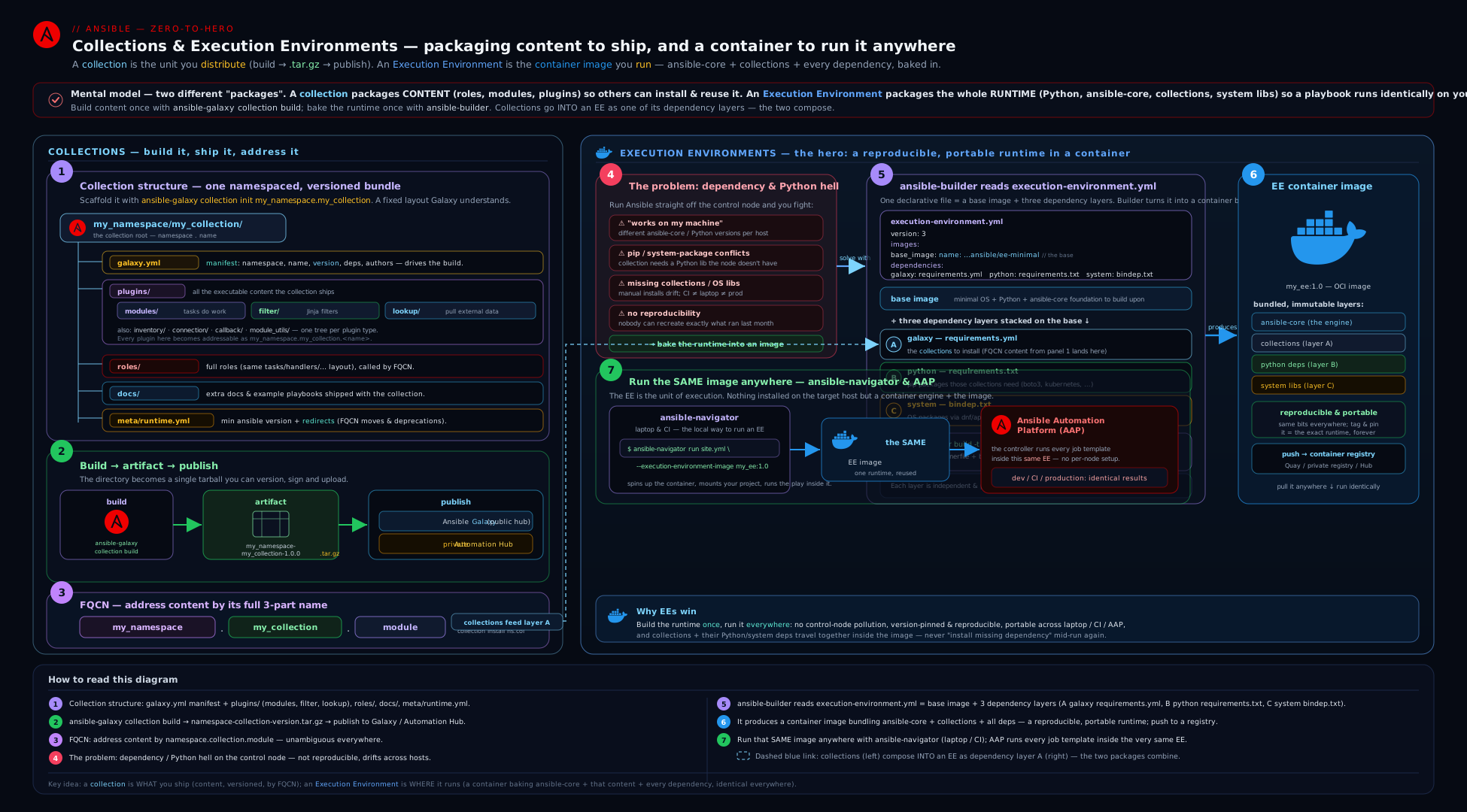
The diagram shows the two supply chains side by side: on the left, a collection (plugins/, roles/, playbooks/, meta/runtime.yml) described by galaxy.yml is built into namespace-name-version.tar.gz and published to Galaxy or a private Automation Hub; on the right, an execution-environment.yml points ansible-builder at a base image and bakes in ansible-core, collections (via requirements.yml), Python deps (requirements.txt) and system deps (bindep.txt) to produce a tagged EE image; and at the bottom, ansible-navigator (locally) and AAP (as ephemeral pods) both run playbooks inside that EE — the collection feeding the EE that the runtime executes.
Going deeper
The lesson so far is the authoring map. This section is the advanced ground the map glosses over — the parts that separate “I built a collection once” from “I run a governed, reproducible Ansible supply chain.”
requirements.yml does more than collections — it also installs roles
You met requirements.yml as the collections: file an EE bakes in. The same file has a second top-level key, roles:, and ansible-galaxy install -r requirements.yml resolves both in one pass (collections via the Galaxy collection API, roles via the older role API or SCM). Each entry can name a source, a type, and a version:
---
collections:
  - name: community.general
    version: ">=8.0.0,<10.0.0"
    source: https://galaxy.ansible.com          # override the default server per-entry
  - name: https://github.com/kloudvin/net.git    # a collection straight from git
    type: git
    version: v2.3.0                               # a tag, branch, or commit
  - name: ./build/kloudvin-platform-1.4.0.tar.gz  # a local tarball (air-gap friendly)
    type: file

roles:
  - name: geerlingguy.nginx                       # a role from Galaxy
    version: "3.1.4"
  - src: https://github.com/kloudvin/hardening.git
    scm: git
    name: kloudvin.hardening                      # the local name to install it as
    version: main
The distinctions that trip people up: type: for collections is galaxy (the default), git, file, url, or dir; roles use the older src:/scm: keys, not type:. In an EE, dependencies.galaxy reads exactly this file — so a git-sourced collection or a local tarball is baked into the image the same way a Galaxy one is, which is how air-gapped builds pull internal content. (Roles listed here are installed by the umbrella ansible-galaxy install -r; an EE’s galaxy layer only bakes in the collections:.)
Signing and verifying collections — the client side
The Security notes below say Automation Hub can sign collections; here is the half that runs on your machine. Signed collections ship a detached GPG signature alongside the tarball. On install you verify it against a keyring of trusted public keys:
# Import the publisher's public key into a keyring, then install with verification:
ansible-galaxy collection install kloudvin.platform \
  --keyring ~/.ansible/pubring.kbx

# Verify an already-installed collection's files against the server manifest:
ansible-galaxy collection verify kloudvin.platform -p ./collections
You can make verification mandatory in ansible.cfg so an unsigned or badly-signed collection fails to install rather than being silently trusted:
[galaxy]
gpg_keyring = ~/.ansible/pubring.kbx
required_valid_signature_count = 1        ; a count or "all"; prepend "+" to fail when none is found
ignore_signature_status_codes = NO_PUBKEY ; GPG status codes to tolerate (use sparingly)
ansible-galaxy collection verify recomputes SHA256 checksums of the installed files and compares them to FILES.json — catching tampering or a corrupted install. The signature (--keyring) proves who published the collection; verify proves the bytes are unchanged. EX374’s “manage content in private automation hub” leans on exactly this pairing: publish signed to Hub, require signatures on the consumers.
Inside ansible-builder build: the multi-stage image
The schema section notes that ansible-builder produces a multi-stage build; the actual shape (ansible-builder 3.x) is four stages, and knowing them explains several gotchas:
| Stage | What happens | Why it exists |
|---|---|---|
base |
Starts FROM base_image, applies prepend_base/append_base, sets up Python and the package manager |
The common foundation the later stages build on. |
galaxy |
Installs the collections (dependencies.galaxy) into a staging directory |
So their declared Python/system deps can be introspected in the next stage. |
builder |
Compiles Python wheels — needs gcc, headers, the [platform:rpm compile] bindep packages |
Compilers live here and are thrown away, keeping them out of the final image. |
final |
Copies the built wheels + collections from earlier stages, installs only runtime system packages, runs append_final |
The image you ship — small, no compilers. |
This is why a bindep line marked compile (e.g. gcc [platform:rpm compile]) lands in builder but not final: you compile a wheel once at build time and ship only the result. It is also why ansible-builder introspect matters — in the galaxy stage the builder reads each installed collection’s meta/ requirements and merges them, so listing a collection in galaxy: usually drags in its Python/system deps without you re-typing them. ansible-builder create writes this whole Containerfile (plus the copied requirements) into the context dir so you can read the stages yourself.
The reproducibility ceiling — what “pinned” really guarantees
Pinning ansible_core, collection ranges, and a base-image tag gets you most of the way — but a tag is mutable: quay.io/ansible/awx-ee:24.6.1 can be re-pushed to different bytes, and >=8.0.0 happily floats to a newer community.general on the next build. For a runtime that is byte-identical months later, tighten three screws:
- Pin the base by digest, not tag:
name: quay.io/ansible/awx-ee@sha256:…— a digest is content-addressed and immutable. - Exact-pin, don’t range-pin, for a release:
community.general==9.4.0,boto3==1.34.140. Ranges are for development; a shipped EE wants exact versions. - Hash-pin the pip layer with
--require-hashesinrequirements.txtso a yanked-and-replaced PyPI artifact can’t slip in.
Even then the honest ceiling is: your inputs are frozen, but you are still trusting upstream registries not to disappear. Serious shops vendor — mirror collections into a private Automation Hub and pip packages into a private index — so the EE builds only from content they control. “Reproducible” is a spectrum: from tag-pinned (good) to digest-and-hash-pinned against internal mirrors (audit-grade).
Building EEs against a private hub or air-gapped
An EE build resolves collections over the network by default. To build against a private Automation Hub (or with no internet at all), give the build an ansible.cfg pointing at your hub and copy it in before the galaxy install:
additional_build_steps:
  prepend_galaxy:
    - COPY ansible.cfg /etc/ansible/ansible.cfg   # token-less config → private hub URL
Keep the token out of the image — bake a token-less ansible.cfg and inject the credential via a build secret or --build-arg, because anything COPYd becomes a permanent, inspectable layer. Fully offline, list collections as local tarball paths in requirements.yml (type: file) so no registry is contacted at all. This is the standard pattern for regulated and disconnected environments, and it is why the requirements.yml source types above matter in practice.
Hands-on lab
This lab builds a real collection from scratch, builds it into a tarball, installs and uses it locally, then writes an execution-environment.yml, generates the EE build context, and (optionally) builds and runs the EE — entirely on your control node + localhost + a local container engine. No cloud, no registry account required, ₹0. Steps that need a container engine or internet are clearly marked optional so the core (collection authoring) runs fully offline.
0. Prerequisites & a clean project dir.
python3 -m pip install --user 'ansible-core>=2.17' ansible-builder ansible-navigator
mkdir -p ~/ee-collections-lab && cd ~/ee-collections-lab
ansible --version          # confirm ansible-core 2.17+
ansible-builder --version  # confirm ansible-builder 3.x
1. Scaffold a collection with ansible-galaxy collection init.
ansible-galaxy collection init kloudvin.platform
ls -R kloudvin/platform | head -40
Expected: a kloudvin/platform/ tree containing galaxy.yml, README.md, docs/, plugins/, roles/, and meta/runtime.yml (a MANIFEST.json-style stub generated for you).
2. Fill in galaxy.yml and add a tiny module + a role.
cd kloudvin/platform

cat > galaxy.yml <<'EOF'
namespace: kloudvin
name: platform
version: 1.0.0
readme: README.md
authors:
  - Vinod H <h.vinod@example.com>
description: "KloudVin platform automation (lab)."
license:
  - MIT
tags: [linux, lab]
dependencies:
  "community.general": ">=8.0.0,<10.0.0"
repository: https://github.com/kloudvin/platform-collection
build_ignore:
  - "*.tar.gz"
  - ".git"
  - "__pycache__"
EOF

# A trivial module: kloudvin.platform.greet
mkdir -p plugins/modules
cat > plugins/modules/greet.py <<'EOF'
#!/usr/bin/python
from __future__ import annotations
DOCUMENTATION = r'''
---
module: greet
short_description: Return a greeting (lab module)
options:
  name:
    description: Who to greet.
    type: str
    default: world
author: [Vinod H]
'''
EXAMPLES = r'''
- name: Greet
  kloudvin.platform.greet:
    name: Vinod
'''
RETURN = r'''
message:
  description: The greeting.
  type: str
  returned: always
'''
from ansible.module_utils.basic import AnsibleModule

def main():
    module = AnsibleModule(
        argument_spec=dict(name=dict(type='str', default='world')),
        supports_check_mode=True,
    )
    module.exit_json(changed=False, message="Hello, %s!" % module.params['name'])

if __name__ == '__main__':
    main()
EOF

# A trivial role inside the collection: kloudvin.platform.hello
ansible-galaxy role init roles/hello
cat > roles/hello/tasks/main.yml <<'EOF'
---
- name: Use the collection's own module by FQCN
  kloudvin.platform.greet:
    name: "{{ hello_name | default('collection') }}"
  register: _greet
- name: Show it
  ansible.builtin.debug:
    msg: "{{ _greet.message }}"
EOF

# Declare requires_ansible in the collection's runtime.yml
cat > meta/runtime.yml <<'EOF'
---
requires_ansible: ">=2.16"
EOF
3. Build the collection into a tarball.
ansible-galaxy collection build --output-path ../../build --force
ls -l ../../build
Expected: ../../build/kloudvin-platform-1.0.0.tar.gz. That single file is the unit of distribution (it contains your content plus generated MANIFEST.json and FILES.json).
4. Install the built tarball locally and use it.
cd ~/ee-collections-lab
ansible-galaxy collection install ./build/kloudvin-platform-1.0.0.tar.gz \
  -p ./collections --force

export ANSIBLE_COLLECTIONS_PATH="$PWD/collections:$HOME/.ansible/collections"

# Confirm the module is discoverable by FQCN:
ansible-doc -t module kloudvin.platform.greet | head -20

# Run the module ad-hoc against localhost:
ansible localhost -c local -m kloudvin.platform.greet -a "name=Vinod"
Expected: ansible-doc shows your module’s docs, and the ad-hoc run returns "message": "Hello, Vinod!" — proving Ansible resolved kloudvin.platform.greet from your project-local, freshly-built collection.
5. Run the collection’s role and its bundled-content path via a playbook.
cat > inventory.ini <<'EOF'
[local]
localhost ansible_connection=local
EOF

cat > play.yml <<'EOF'
---
- hosts: local
  gather_facts: false
  roles:
    - role: kloudvin.platform.hello   # role addressed by FQCN
      vars:
        hello_name: "from the lab"
EOF

ansible-playbook -i inventory.ini play.yml
Expected: the play runs the collection’s hello role, which calls the collection’s own greet module by FQCN and debugs Hello, from the lab!.
6. Write an execution-environment.yml and generate the build context. (The create step needs no container engine.)
cat > requirements.yml <<'EOF'
---
collections:
  - name: community.general
    version: ">=8.0.0,<10.0.0"
EOF

cat > requirements.txt <<'EOF'
jmespath
EOF

cat > bindep.txt <<'EOF'
git [platform:rpm]
EOF

cat > execution-environment.yml <<'EOF'
---
version: 3
images:
  base_image:
    name: quay.io/ansible/awx-ee:24.6.1
dependencies:
  ansible_core:
    package_pip: ansible-core==2.17.4
  ansible_runner:
    package_pip: ansible-runner
  galaxy: requirements.yml
  python: requirements.txt
  system: bindep.txt
additional_build_steps:
  append_final:
    - RUN ansible-galaxy collection list
EOF

# Generate the build context WITHOUT building (works offline):
ansible-builder create --file execution-environment.yml --context ./ee-context
ls ./ee-context
sed -n '1,30p' ./ee-context/Containerfile     # inspect the generated Containerfile
Expected: an ee-context/ directory containing a generated Containerfile plus copies of your requirements.yml/requirements.txt/bindep.txt and helper scripts — the exact context ansible-builder build would feed to the container engine.
7. (Optional — needs podman/docker + internet) Build and run the EE.
# Build the image (downloads the base + installs deps; a few minutes):
ansible-builder build \
  --tag localhost/kloudvin-ee:1.0.0 \
  --file execution-environment.yml \
  --container-runtime podman --verbosity 2

# Confirm the collections baked in:
podman run --rm localhost/kloudvin-ee:1.0.0 ansible-galaxy collection list | head

# Run the lab playbook INSIDE the EE with ansible-navigator (classic output):
ansible-navigator run play.yml \
  --eei localhost/kloudvin-ee:1.0.0 \
  --mode stdout --pp missing -i inventory.ini
Expected: the navigator run executes the same play.yml inside the container image, producing the same Hello, from the lab! — but now the runtime (ansible-core, collections, Python) is the frozen image, identical to what CI or AAP would use.
Cleanup.
podman rmi localhost/kloudvin-ee:1.0.0 2>/dev/null || true     # if you built it
rm -rf ~/ee-collections-lab
unset ANSIBLE_COLLECTIONS_PATH
Expected: the lab directory (collection source, built tarball, installed copy, EE context, and any built image) is gone; the machine is back to its prior state.
Cost note: ₹0. Steps 1–6 run entirely offline against localhost with no cloud and no registry account. Only the optional step 7 uses the network (pulling the base image and collections, a few hundred MB) and a local container engine — still ₹0 on your own machine. No managed nodes, no AAP, no paid registry are required to complete the core lab.
Practice challenges
Six graded exercises, beginner to advanced. Try each before opening the solution. All run on localhost (plus a local container engine for the optional bits) — ₹0, no cloud.
1. (Beginner) Scaffold and locate. Create an empty collection kloudvin.demo and, without looking back, say which file is its manifest and which directory a custom module goes in.
<details><summary>Solution</summary>
ansible-galaxy collection init kloudvin.demo
The manifest is kloudvin/demo/galaxy.yml; a custom module goes in kloudvin/demo/plugins/modules/ and is called as kloudvin.demo.<module>. Why: identity (galaxy.yml) and content location (plugins/) are the two things every collection task starts from.
</details>
2. (Beginner) A publishable galaxy.yml. Write the smallest galaxy.yml that Galaxy would accept for version 0.1.0 under an SPDX MIT licence.
<details><summary>Solution</summary>
namespace: kloudvin
name: demo
version: 0.1.0
readme: README.md
authors:
  - Vinod H <h.vinod@example.com>
license:
  - MIT
Why: namespace, name, version (strict SemVer), and readme are the required fields; a valid SPDX license (or license_file) is needed to publish.
</details>
3. (Intermediate) One requirements file, two content types. Write a requirements.yml that installs the community.general collection (>=8,<10) and the geerlingguy.nginx role pinned to 3.1.4, then give the single command that installs both.
<details><summary>Solution</summary>
---
collections:
  - name: community.general
    version: ">=8.0.0,<10.0.0"
roles:
  - name: geerlingguy.nginx
    version: "3.1.4"
ansible-galaxy install -r requirements.yml
Why: the umbrella ansible-galaxy install -r resolves both the collections: and roles: keys in one pass — collections use name/version, roles the same or src/scm.
</details>
4. (Intermediate) A three-layer EE spec. Write an execution-environment.yml (v3) that pins ansible-core 2.17.4, bakes in amazon.aws, adds the boto3 pip package, and installs the git system package — all three dependency layers inline.
<details><summary>Solution</summary>
---
version: 3
images:
  base_image:
    name: quay.io/ansible/awx-ee:24.6.1
dependencies:
  ansible_core:
    package_pip: ansible-core==2.17.4
  ansible_runner:
    package_pip: ansible-runner
  galaxy:
    collections:
      - name: amazon.aws
  python:
    - boto3
  system:
    - git [platform:rpm]
Why: the three layers are distinct — galaxy (collections), python (pip), system (bindep with a [platform:rpm] marker) — and each accepts either an inline value or a file path.
</details>
5. (Advanced) Rename without breaking anyone. You renamed module old_vhost to create_vhost. Add the meta/runtime.yml that keeps old playbooks working, and say in one line why it goes there and not in galaxy.yml.
<details><summary>Solution</summary>
---
plugin_routing:
  modules:
    old_vhost:
      redirect: kloudvin.platform.create_vhost
Why: plugin_routing redirects live in meta/runtime.yml (the collection’s runtime metadata), not galaxy.yml (identity/build metadata) — a frequent EX374 discriminator; follow a redirect with a deprecation, then a tombstone in the next MAJOR.
</details>
6. (Advanced) Make it truly reproducible. Harden the spec from #4 so a rebuild months later is byte-identical, then give the command to verify a signed copy of amazon.aws after install.
<details><summary>Solution</summary>
images:
  base_image:
    name: quay.io/ansible/awx-ee@sha256:<digest>   # digest, not a mutable tag
dependencies:
  galaxy:
    collections:
      - name: amazon.aws
        version: "==9.4.0"                          # exact-pin for a release
  python:
    - boto3==1.34.140                               # exact pip pin (add --require-hashes for audit-grade)
ansible-galaxy collection verify amazon.aws --keyring ~/.ansible/pubring.kbx
Why: a tag is mutable and a range floats — pinning the base by digest and dependencies by exact version freezes the inputs; verify --keyring checks the GPG signature and file checksums so provenance and integrity are both proven.
</details>
Common beginner mistakes
These are conceptual traps — the wrong mental model, not a broken command (those are in the troubleshooting table below). Unlearn them early.
- “A collection is just a bigger role.” Wrong. A role is one unit of tasks/handlers/vars; a collection is a distribution package that can hold many roles plus modules, plugins, and playbooks, versioned as a whole and addressed by
namespace.name. Right model: a role is a tool; a collection is the toolbox that ships tools by name and version. Modules live inplugins/modules/, not a role’s oldlibrary/. - “An EE is basically a Python venv.” Wrong. A venv isolates only Python packages; it cannot pin the OS-level pieces real collections need (
openssh-clients,rsync,gccto build a wheel) and it is not portable to a different base OS. An EE isolates the whole userland — system packages, a pinnedansible-core, and collections — as one tagged image. Right model: a venv is a Python sandbox; an EE is a sealed machine. - “I tagged the base
latest, so everyone gets the same thing.” Wrong.latest(and even a version tag) is mutable — it can point at different bytes tomorrow, so two builds a month apart can differ silently. Right model: reproducibility comes from pinning — a base by digest (@sha256:…),ansible-coreby exact version, collections by fixed version — and tagging your EE with a SemVer, neverlatest. - “
galaxy.ymldependencies will install myboto3.” Wrong.galaxy.yml’sdependencies:are other collections only. Python packages come from arequirements.txt(the EE’spython:layer) and system packages from abindep.txt(system:). Right model: three separate layers — collections, pip, OS — never one. - “I put the collection in my playbook repo’s
collections/folder, so the EE has it.” Wrong. An EE bakes in only what itsdependencies.galaxy(requirements.yml) declares at build time; acollections/folder beside the playbook is unrelated to the image. Right model: the EE is the dependency boundary — declare collections in the EE, not next to the playbook. - “I’ll just re-publish
1.4.0with the fix.” Wrong. Galaxy is append-only; a published version is immutable. Right model: every release is a new, higher SemVer — bump to1.4.1(PATCH) and publish that. - “
redirect/tombstonego ingalaxy.yml.” Wrong.plugin_routing(redirect, deprecation, tombstone) andrequires_ansiblelive inmeta/runtime.yml;galaxy.ymlis identity and build metadata. Right model: identity ingalaxy.yml, runtime behaviour inmeta/runtime.yml.
Common mistakes & troubleshooting
| Symptom | Likely cause | Fix |
|---|---|---|
ERROR! Galaxy import process failed / “version already exists” |
Re-publishing an already-published version (Galaxy is append-only) |
Bump version in galaxy.yml (PATCH at least), rebuild, and publish the new version. |
| Module/role “not found” after installing the collection | Wrong collections_path, or you called it without the FQCN, or namespace.name in galaxy.yml doesn’t match the dir |
Install with -p ./collections, set ANSIBLE_COLLECTIONS_PATH, and always call content by FQCN (ns.name.thing). |
| EE build fails resolving a Python dependency | A collection needs a boto3/botocore/etc. you didn’t list (and didn’t introspect) |
Add it to requirements.txt, or rely on ansible-builder introspect to merge the collection’s declared deps; rebuild with -v 2 to see the failing step. |
| EE built but a playbook errors “module not found” at runtime | The collection wasn’t baked in — it was in a Git collections/ folder instead of the EE’s galaxy: deps |
Put collections in the EE via dependencies.galaxy (a requirements.yml), not in the playbook repo — that is the whole point of an EE. |
| EE drifts: behaviour changed after a rebuild with no code change | ansible-core (or the base image) wasn’t pinned |
Pin ansible_core: package_pip: ansible-core==X.Y.Z and pin the base image tag; never latest. |
system: packages don’t install in the EE |
bindep.txt missing the platform marker, or wrong package_manager_path |
Use pkg [platform:rpm] markers and set options.package_manager_path to the base’s manager (/usr/bin/microdnf or /usr/bin/dnf). |
| Private Galaxy/Hub publish gets 401/403 | Missing/expired token, or wrong --server, or publishing under a namespace you don’t own |
Set the token in ansible.cfg’s [galaxy_server.*] (inject in CI), select with --server, and ensure the namespace is yours on that server. |
ansible-navigator runs on the host, not in the EE |
EE disabled (--ee false) or no image set |
Pass --eei <image> (or set it in ansible-navigator.yml); confirm --execution-environment true (the default). |
Best practices
- Treat the collection version as a contract. Follow SemVer strictly — PATCH for fixes, MINOR for features, MAJOR for breaking changes — because consumers range-pin against your promise. Automate the bump and changelog with
antsibull-changelog. - Put modules in
plugins/modules/, share code viaplugins/module_utils/, and address everything by FQCN. A collection has oneplugins/tree; thelibrary/of a standalone role does not exist here. - Keep
galaxy.ymlhonest: realrepository/issues/documentationURLs, an SPDXlicense, and a tightbuild_ignoreso.git, caches, and old tarballs never ship. - Use
meta/runtime.ymlto evolve safely:requires_ansibleto fail incompatible installs early, andredirect/deprecation/tombstoneto rename and retire content without breaking users. - Pin everything in the EE —
ansible-core, the base image tag, and collection ranges — and tag the image with a SemVer, neverlatest. This is what makes the runtime immutable and roll-back-able. - Put collections in the EE, not in the playbook repo. The EE is the dependency boundary; mixing a Git
collections/folder back in defeats reproducibility. - Let
ansible-builder introspectdo the heavy lifting for transitive Python/system deps that collections already declare, rather than hand-maintaining a giantrequirements.txt. - Pin the EE in
ansible-navigator.ymlso every contributor and every CI job runs inside the identical image — and enableplaybook-artifactso runs are replayable. - Build the same EE locally that AAP runs. Develop with
ansible-navigator --eei <image>against the very image you register in the Controller, so “works locally” genuinely predicts “works in AAP.”
Security notes
- Pin and verify your supply chain. Pin collection versions in the EE and the base image by digest or fixed tag; an unpinned dependency means a future upstream change runs (often as root) on your hosts without review — both a stability and a supply-chain risk.
- Use signed collections and a private Automation Hub for internal content. AAP/
galaxy_ngsupports collection signing and signature verification — turn it on so the Controller only runs collections whose provenance is verified, and keep internal collections off public Galaxy. - Scan EE images for CVEs before promotion. An EE is a container image full of OS and Python packages; run an image scanner (Trivy, Grype, or a platform scanner) in the build pipeline and rebuild on critical CVEs. A stale base image is a stale, vulnerable OS.
- Never bake secrets into a collection or an EE. Both are distributable, inspectable artifacts (a tarball, an image). Keep credentials out of
defaults//vars/, out ofgalaxy.yml, and out of build steps; inject them at run time (Ansible Vault, or AAP credentials sourced from an external vault). - Keep registry/Galaxy tokens out of git and out of build logs. Tokens belong in CI secrets and in
ansible.cfg’s[galaxy_server.*]injected at runtime; aCOPY ansible.cfgbuild step that carries a token will bake the token into an image layer — copy a token-less config, or use build secrets. - Run EEs as non-root where possible. Set
options.userandrelax_passwd_permissionsso the image runs under an arbitrary UID (as OpenShift/AAP do); the automation container executes arbitrary playbooks and is a real attack surface. - Review what a collection’s modules/plugins do before bundling them. Anything in
plugins/runs code (modules on targets, plugins on the control node/inside the EE) — vet third-party collections and pin them, exactly as you would any executable dependency.
Interview & exam questions
- What is a collection, and what is the difference between
galaxy.ymland a role’smeta/main.yml? A collection is the modern distribution unit —namespace.namebundling modules, plugins, roles, and playbooks, semantically versioned.galaxy.ymlis the collection’s manifest (namespace, name, version, dependencies, build settings) and becomesMANIFEST.jsonin the tarball. A role’smeta/main.ymlholds that role’s dependencies andgalaxy_info. They live at different levels and are not interchangeable; the collection-level metadata file ismeta/runtime.yml. - Where do modules live in a collection, and how is shared Python imported? In
plugins/modules/(notlibrary/). Shared code goes inplugins/module_utils/and is imported asfrom ansible_collections.<ns>.<name>.plugins.module_utils.x import y— the collection-qualified import path. - How do you build and publish a collection, and why can’t you re-publish a version?
ansible-galaxy collection buildproducesnamespace-name-version.tar.gz;ansible-galaxy collection publish <tarball> --api-key … [--server …] [--wait]uploads it. Galaxy enforces strict SemVer and is append-only — versions are immutable, so each release needs a new, higherversion. - What goes in
meta/runtime.yml?requires_ansible(minimumansible-core),action_groups(group modules formodule_defaults), andplugin_routing—redirect(rename),deprecation(warn with aremoval_version), andtombstone(removed; now errors). It is how a collection evolves without breaking consumers. - What problem do Execution Environments solve, and how do they differ from a venv? They make the Ansible runtime an immutable, portable container image — fixing “works on my machine,” dependency conflicts, and lack of reproducibility/rollback. A venv isolates only Python; an EE isolates the whole userland (system packages too) and bundles
ansible-core+ collections + Python + system deps as one tagged image. EEs replaced the old Tower virtualenvs. - Walk through
execution-environment.ymlversion 3.version: 3;images.base_image.name(the base to build FROM, pinned);dependencieswithansible_core(pin it),ansible_runner,galaxy(arequirements.ymlof collections),python(arequirements.txt),system(abindep.txt);options(package-manager path, UID, workdir, tags); andadditional_build_steps(prepend_/append_×base/galaxy/final— raw Containerfile lines).ansible-builder buildturns it into an image. - What’s the difference between
requirements.yml,requirements.txt, andbindep.txtin an EE build?requirements.ymllists collections (thegalaxydependency),requirements.txtlists pip/Python packages (thepythondependency), andbindep.txtlists OS/system packages in bindep format with[platform:rpm]markers (thesystemdependency). Three different layers; a frequent confusion. - What does
ansible-navigatordo, and what do--eeiand--modecontrol? It runs content inside an EE (the modern front-end replacing directansible-playbookfor container-isolated execution).--eei/--execution-environment-imagepicks the EE image;--modechoosesinteractive(the TUI, default) orstdout(classic streaming, CI-friendly).--pull-policy/--ppcontrols when the image is pulled. - How does
ansible-builder builddiffer fromansible-builder create?creategenerates only the build context (aContainerfile+ copied requirements) so you can inspect or build it elsewhere;buildgenerates the context and runs the container build to produce the tagged image.introspectshows the merged Python/system deps derived from installed collections. - How does AAP consume collections and EEs? Collections are published to and governed (including signing) by Automation Hub (private
galaxy_ng). EEs are registered as Controller objects and named by Job Templates; at launch the Controller runs the playbook inside an ephemeral pod built from the EE image, injecting credentials at runtime and reaping the pod after. The collection feeds the EE; the EE is the runtime the job executes in. - Why tag an EE with a SemVer instead of
latest, and how do you roll back? A pinned tag makes the runtime immutable — a rebuild under a new tag cannot silently change what a running Job Template executes. To roll back, repoint the template (oransible-navigator) at the previous tag — no rebuild, no downtime. - A collection you depend on renamed a module you call. How can the upstream keep your playbook working, and what should you eventually do? The upstream adds a
redirectunderplugin_routinginmeta/runtime.yml, so the old FQCN transparently resolves to the new module (often via adeprecationfirst, then atombstonein the next MAJOR). You should update your playbook to the new FQCN before the tombstone lands.
Quick check
- Which file is a collection’s manifest, and which directory holds its custom modules?
- Name the three EE dependency layers and the file format each uses (
galaxy,python,system). - Why can’t you re-publish version
1.4.0of a collection to Galaxy? - Which tool builds an EE image, and which tool runs a playbook inside one?
- In one sentence, why does an EE isolate more than a Python venv?
Answers
galaxy.ymlis the manifest; custom modules live inplugins/modules/(addressed by FQCNnamespace.name.module).galaxy→ arequirements.yml(collections);python→ arequirements.txt(pip packages);system→ abindep.txt(OS packages, with[platform:rpm]markers).- Galaxy is append-only with strict SemVer — published versions are immutable, so a new release must use a new, higher
version. ansible-builder buildbuilds the EE image;ansible-navigator run --eei <image>runs a playbook inside it.- A venv isolates only Python packages, whereas an EE isolates the entire userland — system packages plus a pinned
ansible-coreand collections — as one portable, versioned image.
Exercise
Author and run a small collection-plus-EE supply chain entirely on localhost (cost ₹0). (a) ansible-galaxy collection init yourname.toolkit, then write a correct galaxy.yml (SemVer 0.1.0, SPDX license, one dependencies entry range-pinned, a tight build_ignore) and a meta/runtime.yml with requires_ansible: ">=2.16". (b) Add a real module under plugins/modules/ (with DOCUMENTATION/EXAMPLES/RETURN) and a role under roles/ that calls it by FQCN. © ansible-galaxy collection build, install the tarball with -p ./collections, and prove the module is discoverable with ansible-doc and runnable ad-hoc. (d) Bump version to 0.1.1, rebuild, and confirm both tarballs exist — explaining in one sentence why you could not have just overwritten 0.1.0 on Galaxy. (e) Write an execution-environment.yml (version 3) that bakes your collection’s requirements.yml, a requirements.txt, and a bindep.txt, pinning ansible-core and the base image; run ansible-builder create --context ./ctx and read the generated Containerfile, identifying where prepend_galaxy vs append_final steps would land. (f) Optional, if you have podman/docker: ansible-builder build it and run your role inside it with ansible-navigator run --eei <image> --mode stdout. (g) Clean up. In two sentences, explain why the collection (ansible-galaxy collection build) and the EE (ansible-builder build) are different artifacts built by different tools, and how requirements.yml is the bridge between them.
Certification mapping
- EX374 (Developing Automation with Ansible Automation Platform) — “Create and manage collections”: this is a direct, core objective. Expect to lay out a collection (
plugins/,roles/,meta/runtime.yml), editgalaxy.yml(namespace/name/version/dependencies), build withansible-galaxy collection build, and publish/install to Automation Hub — exactly the workflow here. Knowing where modules live (plugins/modules/) and that metadata splits betweengalaxy.ymlandmeta/runtime.ymlis frequently tested. - EX374 — “Build and use execution environments”: writing
execution-environment.yml, building withansible-builder, and running content withansible-navigatoragainst an EE map directly to exam tasks. Know the v3 schema (images,dependencieswithgalaxy/python/system/ansible_core,additional_build_steps) and theansible-navigatorflags (--eei,--mode,--pp). - EX374 — “Manage content in private automation hub”: publishing collections to a private Hub (token auth via
[galaxy_server.*],--server, signing) and consuming them in EEs is squarely in scope; themeta/runtime.ymlredirect/deprecation/tombstone mechanics support the “manage and evolve content” objectives. - Beyond EX374: the collection model also appears in RHCE (EX294) at the consumer level (installing and using collections by FQCN,
requirements.yml) — the roles & collections lesson covers that side; this lesson is the author/build/run counterpart that AAP-focused exams probe.
Glossary
- Collection — the modern distribution unit
namespace.name, bundling modules, plugins, roles, and playbooks, semantically versioned and described bygalaxy.yml. namespace.name— a collection’s globally-unique identifier; the first two segments of any FQCN (namespace.name.thing).galaxy.yml— the collection manifest (namespace, name, version, dependencies, metadata,build_ignore); becomesMANIFEST.jsonin the built tarball.meta/runtime.yml— the collection-level metadata file:requires_ansible,action_groups, andplugin_routing(redirect/deprecation/tombstone).plugins/— the single tree holding a collection’s modules (plugins/modules/),module_utils/, and every plugin type.- SemVer (semantic versioning) —
MAJOR.MINOR.PATCH; the versioning Galaxy enforces and consumers range-pin against. Versions are immutable/append-only on Galaxy. ansible-galaxy collection build— builds a collection intonamespace-name-version.tar.gz(withMANIFEST.json+FILES.json).ansible-galaxy collection publish— uploads a collection tarball to Ansible Galaxy or a private Automation Hub (token auth,--server,--wait).requirements.yml— the shared install file listingcollections:and/orroles:;ansible-galaxy install -rresolves both, and an EE’sgalaxylayer points at itscollections:to bake them into the image.- Collection signing — publishing a detached GPG signature with a collection so consumers can prove who built it; verified on install with
--keyringand enforced viarequired_valid_signature_countinansible.cfg. ansible-galaxy collection verify— recomputes installed files’ SHA256 checksums against the server manifest (FILES.json) to prove the bytes are unchanged.- Execution Environment (EE) — a container image bundling a pinned
ansible-core,ansible-runner, collections, and their Python/system dependencies; the portable, immutable Ansible runtime. ansible-builder— the tool that readsexecution-environment.yml, generates a build context (Containerfile), and builds the EE image (build/create/introspect).execution-environment.yml(v3) — the declarative EE spec:version,images,dependencies(ansible_core/ansible_runner/galaxy/python/system),options,additional_build_steps.- Multi-stage EE build — the
base→galaxy→builder→finalstagesansible-buildergenerates, so compilers used to build Python wheels are discarded from the shipped image. - Digest pinning — referencing a base image by its immutable content hash (
@sha256:…) instead of a mutable tag, so a rebuild cannot silently change the base. bindep.txt— the bindep format for declaring system/OS packages with[platform:rpm]-style markers; thesystemdependency of an EE.ansible-runner— the library that launches Ansible inside an EE/container; what AAP andansible-navigatordrive to run jobs.ansible-navigator— the modern front-end that runs content inside an EE (--eei), withinteractive(TUI) andstdoutmodes, pull policies, and replayable artifacts.- Automation Hub — the private collection registry (
galaxy_ng) shipped with AAP, where internal collections are published, governed, and signed. - AAP (Ansible Automation Platform) — Red Hat’s enterprise platform whose Controller runs Job Templates inside EEs (as ephemeral pods) and whose Automation Hub stores collections.
Next steps
You can now package Ansible content as a versioned collection (the full directory layout, every galaxy.yml field, meta/runtime.yml, SemVer, build and publish to Galaxy or a private Automation Hub) and ship a portable runtime as an Execution Environment (the dependency-hell problem it solves, ansible-builder and the execution-environment.yml v3 schema field by field, running with ansible-navigator, EE vs venv, and how AAP consumes both). The natural next move is to see these artifacts become first-class platform objects: read the Ansible Automation Platform architecture lesson to understand the Controller (RBAC, projects, job templates, workflows), Automation Hub (where your collections live and are signed), and Event-Driven Ansible (running automation in response to events). For the hands-on, end-to-end operator’s view — installing AWX/AAP on Kubernetes, registering the very EE you built, wiring Vault-backed credentials, and governing runs with surveys and approval gates — work through the Configure AWX with custom Execution Environments and Job Templates guide, which operates exactly the collections and EEs you have just learned to author.