In a nutshell
Most of the time you want Ansible to do the same thing to every server: “install nginx everywhere” should touch all the web hosts and be done. But two jobs break that mould. First, acting on a shared machine on behalf of each host — before you upgrade web1 you must tell the load balancer to stop sending it traffic, and the load balancer is a different box entirely. Second, not upgrading the whole fleet at once — if you restart every web server together, the site goes dark for a moment; you want to touch a few at a time so the rest keep serving.
This lesson gives you the two controls those jobs need. Delegation (delegate_to) answers where a task runs — “iterate the web hosts, but run this task on the load balancer.” Batching and strategies (serial, strategy, forks) answer how the fleet is walked — a few hosts at a time, in a chosen order, at a chosen level of parallelism. Put them together and you get a rolling update: upgrade the fleet in waves, each host quietly pulled out of rotation, upgraded, health-checked, and put back — with an automatic abort if too much starts failing.
The mental picture is repainting a long bridge one lane at a time. You never close the whole bridge — traffic keeps flowing on the open lanes while you cone off a single lane, paint it, let it dry, re-open it, then move to the next. serial is “how many lanes at once,” the drain and add-back are “coning off and re-opening the lane,” and max_fail_percentage is the foreman’s rule: “if the paint keeps failing, stop the whole job before you wreck the bridge.”
If you are new to this, read that analogy twice — everything below is the detail of how Ansible spells it. If you are experienced, skip to Going deeper for add_host/group_by runtime inventory, the ansible_play_* variable family, batch-failure semantics, and check-mode behaviour.
Level: Advanced · Time: ~40 min
By default Ansible runs every task of a play on every host in that play, host after host, batch after batch, until the whole inventory is done. That is exactly what you want for “install nginx on all web servers” — and exactly what you must not do for “upgrade the web tier without taking the site down”. A real production change needs two extra dimensions of control that the playbook basics never give you: where a task actually executes (you want the health-check to hit the load balancer, not the web node you are upgrading) and how the fleet is walked (a few hosts at a time, drained out of the pool first, with the whole rollout aborting if too many fail). This lesson is the complete reference for both dimensions. We cover delegation (delegate_to, delegate_facts, local_action, connection: local, run_once) and execution control (serial, the strategy plugins, forks, throttle, order), and then we assemble them into the single most important pattern an Ansible operator must be able to write from memory: a zero-downtime rolling update.
By the end you will know precisely which host a delegated task runs on and which host’s variables it sees, why run_once plus delegate_to: localhost is the idiomatic “do this exactly once, here” construct, the difference between serial: 2 and serial: "30%" and a ramp-up list like [1, 5, "30%"], how forks and serial interact (and which one actually limits concurrency), what the free strategy changes about play semantics, and how max_fail_percentage together with a pre_tasks drain and a post_tasks add-back gives you a rollout that fails safe.
Learning objectives
- Use
delegate_toto run a task on a different host than the one being iterated — the “act on the load balancer / DNS / monitoring / database” pattern — and understand exactly which host’s facts and variables are in scope, including the effect ofdelegate_facts. - Run tasks on the control node with
local_actionandconnection: local, and know when each is the right tool versusdelegate_to: localhost. - Apply
run_oncecorrectly, on its own and paired withdelegate_to, and explain how it behaves underserialand thefreestrategy. - Control fleet traversal with
serial(integer batches, percentages, and ramp-up lists), thestrategyplugins (linear,free,host_pinned,debug),forks,throttle, andorder(inventory,sorted,reverse_sorted,reverse_inventory,shuffle). - Explain the
serial/forksrelationship and size both correctly for a given fleet. - Write a complete, production-grade zero-downtime rolling update:
serial+max_fail_percentage+ apre_taskshealth-drain viadelegate_to+ the upgrade + apost_tasksadd-back, with health gating between steps.
Prerequisites & where this fits
You should be comfortable writing multi-task plays with become, registering results and referencing variables and facts, and using when, loop, and handlers — the material in Ansible Conditionals, Loops, Handlers & Tags, In Depth and Ansible Error Handling, In Depth. Delegation leans on register/hostvars constantly, and the rolling-update pattern is built directly on max_fail_percentage and any_errors_fatal from the error-handling lesson, so have those fresh. This is lesson C1 in the Advanced tier of the KloudVin Ansible Zero-to-Hero course, in the Execution module. Everything here is ansible.builtin and ships with ansible-core (2.17+ assumed, Ansible 10+ in 2026) — no collections are required for the features themselves, though the lab uses community.docker to create throwaway practice hosts. FQCN (ansible.builtin.*) is used throughout. The next lesson, Tuning Ansible for Speed & Scale, In Depth, picks up forks and the free strategy from the performance angle.
Core concepts
Five mental models carry this entire lesson. Internalise them and the rest is detail.
- The “current host” and the “executing host” are two different things. Normally they are the same: Ansible iterates the play’s hosts, and for each one it runs the task on that host.
delegate_tobreaks them apart — the play is still iterating hostweb1, but the task physically runs on, say,lb1. Crucially, the variables and facts in scope are stillweb1’s (the inventory_hostname you are looping over), unless you change that withdelegate_facts. This single distinction explains almost every delegation gotcha. - The control node is just another host you can target. “Run this on the machine running Ansible” is delegation to
localhost(or aconnection: localtask).local_action,connection: local, anddelegate_to: localhostare three spellings of closely related ideas; knowing which to reach for is half the battle. run_oncecollapses a per-host task into a once-per-play task. Without it, a task in a play targeting 50 hosts runs 50 times. Withrun_once: trueit runs once, on the first host of the (current batch of the) play, and Ansible makes the result available to all hosts. Pair it withdelegate_toto say “do this exactly one time, and do it there”.serialslices the play into sequential batches;strategycontrols ordering within a batch;forkscaps how many hosts run in parallel at any instant. These three are orthogonal knobs that people constantly conflate.serialis about how the play is partitioned and walked (this is what makes a rolling update);strategyis about whether hosts move through tasks in lock-step or independently;forksis the parallelism ceiling. A play can have all three set at once.- A rolling update is
serial+ a way to fail safe + drain/add-back. The shape never changes: take a small batch out of the load balancer (delegated to the LB), upgrade just that batch, health-check it, put it back, move to the next batch — and if more than N% of hosts fail, stop the whole rollout before you have broken the fleet. That is the canonical pattern this lesson builds to.
Keep those five sentences in your head.
delegate_to: running a task on a different host
delegate_to: <hostname> is a task-level keyword that says “run this one task on <hostname> instead of on the host currently being iterated”. The play keeps iterating its normal hosts (web1, web2, …); but for the delegated task, the connection, the module execution, and any files are handled on the delegate.
The textbook use case is acting on infrastructure that is shared across the hosts you are looping over — a load balancer, a DNS server, a monitoring system, a database — once per iterated host. While upgrading web1, you delegate “remove web1 from the pool” to the load balancer; while upgrading web2, you delegate “remove web2” to the same load balancer; and so on.
- name: Take this web host out of the HAProxy pool before upgrading it
  community.general.haproxy:
    state: disabled
    host: "{{ inventory_hostname }}"     # the host being iterated…
    socket: /var/run/haproxy.sock
    backend: web-backend
    wait: true
  delegate_to: lb1                         # …but the action happens ON lb1
The mental model: you are still “on” web1 (that is what inventory_hostname resolves to, and that is whose hostvars you can read), but the task executes on lb1. This is why the example reads naturally — host: "{{ inventory_hostname }}" passes the iterated host’s name as the thing to disable, and delegate_to: lb1 chooses where the disabling happens.
Which variables and facts are in scope
This is the number-one delegation exam point and the number-one source of bugs:
| Quantity | Value during a delegate_to: lb1 task while iterating web1 |
|---|---|
inventory_hostname |
web1 (the iterated host, not the delegate) |
| Regular vars, host_vars, group_vars | web1’s |
ansible_facts / ansible_* |
web1’s gathered facts (delegate’s facts are not substituted by default) |
| Connection (user, host, port, become) | the delegate’s connection settings (it really connects to lb1) |
hostvars['lb1'] |
available, so you can explicitly read the delegate’s vars/facts if you need them |
| Registered result | stored against web1 (the iterated host), as usual |
So a delegated task connects to the delegate but “thinks” in terms of the original host’s data. If you need the delegate’s facts (e.g. the load balancer’s own IP), read them explicitly via hostvars['lb1']['ansible_facts'][...] — they exist only if lb1 was in a prior play that gathered facts, or you gather them, or you use delegate_facts (below).
delegate_to: localhost — the most common delegate
By far the most frequent delegate is the control node itself. “Send a Slack notification”, “call a cloud API”, “render a report locally”, “look something up” — none of those should run on the managed host; they should run where Ansible runs:
- name: Post a deploy notification (runs on the control node, once)
  community.general.slack:
    token: "{{ slack_token }}"
    msg: "Deploying build {{ build_id }} to {{ ansible_play_hosts | length }} hosts"
  delegate_to: localhost
  run_once: true
delegate_to: localhost runs the task on the control node but still with the iterated host’s variables in scope — which is exactly why it pairs so naturally with run_once (do it one time) and with reading hostvars (gather data from all hosts, act once locally).
Connection details for the delegate
The delegate must be reachable and connectable like any host. Practical points:
- The delegate’s connection variables come from its own inventory entry:
ansible_host,ansible_user,ansible_port,ansible_connection,ansible_python_interpreter. Iflb1needs a different SSH user, set it onlb1in inventory, not on the iterated host. - A delegate that is not in the play’s
hosts:is still fine — it does not need to be a target of the play, only present in inventory (or belocalhost, which is always implicitly available). becomeon a delegated task escalates on the delegate.- You can template the delegate:
delegate_to: "{{ groups['loadbalancers'][0] }}"delegates to the first load balancer;delegate_to: "{{ primary_db_host }}"to a variable.
delegate_to with loops and vars per delegate
delegate_to is evaluated per item when combined with loop, so you can delegate each iteration to a different host. And vars: on a delegated task lets you override connection variables for that task only — handy when the delegate needs special settings:
- name: Add each app host to the monitoring server's target list
  ansible.builtin.lineinfile:
    path: /etc/prometheus/targets.yml
    line: "  - {{ hostvars[item]['ansible_host'] }}:9100"
  delegate_to: monitor1
  loop: "{{ groups['app'] }}"
delegate_facts: storing gathered facts on the delegate
By default, facts gathered during a delegated task are attributed to the iterated host, not the delegate — which is usually not what you want when the whole point was to learn something about the delegate. delegate_facts: true flips this: facts set or gathered during the task are stored against the delegate instead.
The classic use is gathering facts about a host that is not in the current play, so you can read them from hostvars:
- name: Gather facts about the database host even though it's not in this play
  ansible.builtin.setup:
  delegate_to: "{{ db_host }}"
  delegate_facts: true
  run_once: true

- name: Now use the DB host's memory to size a connection pool
  ansible.builtin.debug:
    msg: "DB has {{ hostvars[db_host]['ansible_facts']['memtotal_mb'] }} MB RAM"
  run_once: true
| Setting | set_fact/gathered facts during the task are stored on… |
Read later via |
|---|---|---|
delegate_facts omitted (default false) |
the iterated host (inventory_hostname) |
hostvars[inventory_hostname] |
delegate_facts: true |
the delegate host | hostvars[<delegate>] |
The gotcha: people set delegate_to: dbhost, gather facts, then try to read hostvars['dbhost'].ansible_facts and find it empty — because without delegate_facts: true the facts landed on the iterated host. Set delegate_facts: true whenever you gather or set_fact on a delegate and intend to read it back as the delegate’s data.
local_action and connection: local: running on the control node
There are three ways to make a task run on the control node; they overlap but are not identical.
connection: local
connection: local overrides the connection plugin so Ansible executes the task on the control node as the host it is iterating — i.e. it does not open SSH; it runs the module locally, but inventory_hostname is still the target. This is what you put on a whole play whose hosts are abstract (e.g. cloud resources you are creating via API, where “the host” is just a name to iterate):
- name: Provision cloud VMs (no SSH; everything runs locally via API)
  hosts: to_create
  connection: local
  gather_facts: false
  tasks:
    - name: Create each VM through the provider API
      community.general.<provider>_instance:
        name: "{{ inventory_hostname }}"
        state: present
You can also set connection: local on a single task. Set it at the play level when every task runs locally; set ansible_connection=local in inventory for hosts that are always local (e.g. localhost ansible_connection=local).
local_action
local_action is shorthand for a single task with delegate_to: localhost and connection: local. It runs the task on the control node. The syntax is more compact (and older — you will see it in legacy playbooks):
# These two are equivalent:
- name: Wait for the host's SSH to come back (run from the control node)
  local_action:
    module: ansible.builtin.wait_for
    host: "{{ inventory_hostname }}"
    port: 22
    delay: 10
    timeout: 300

- name: Same thing, modern spelling
  ansible.builtin.wait_for:
    host: "{{ inventory_hostname }}"
    port: 22
    delay: 10
    timeout: 300
  delegate_to: localhost
local_action also has a terse single-line form — local_action: ansible.builtin.command echo hi — but prefer the dictionary form (or delegate_to: localhost) for readability. wait_for from the control node, waiting for a rebooted host’s port to reopen, is the textbook local_action/delegate_to: localhost use (you obviously cannot run the wait on the host that is rebooting).
The three spellings compared
| Construct | Runs on | inventory_hostname is |
Variables in scope | Typical use |
|---|---|---|---|---|
connection: local (play or task) |
control node | the iterated host | the iterated host’s | whole-play local work (API provisioning) where no SSH is wanted |
delegate_to: localhost |
control node | the iterated host | the iterated host’s | one task locally (notify, lookup, render, wait_for) while iterating real hosts |
local_action: {...} |
control node | the iterated host | the iterated host’s | exact shorthand for delegate_to: localhost + connection: local; legacy |
In practice: use delegate_to: localhost for one-off local tasks inside a play that targets real hosts; use connection: local on a play whose hosts are abstractions you drive via API; reach for local_action only when maintaining code that already uses it. Note a subtle difference: delegate_to: localhost uses whatever connection localhost has (usually local), while connection: local forces local on the iterated host without changing the executing host’s identity. For 99% of cases the behaviour is identical and delegate_to: localhost is the clearer choice.
A small but important gotcha: delegate_to: localhost and delegate_to: 127.0.0.1 can behave differently if your inventory defines localhost with ansible_connection=local but treats 127.0.0.1 as an SSH host. Standardise on localhost.
run_once: do this exactly once for the whole play
run_once: true makes a task execute a single time, on the first host in the current play (or current serial batch), rather than once per host. Ansible then copies that result to every host in the play, so hostvars and register see the same value everywhere.
Use it whenever the task’s effect is fleet-global, not per-host: run a database migration once, create a shared resource once, send one notification, compute one value all hosts will use.
- name: Run the schema migration exactly once
  ansible.builtin.command: /opt/app/migrate.sh
  run_once: true                 # runs on the first host of the play only
  register: migration

- name: Every host can now read the migration result
  ansible.builtin.debug:
    msg: "Migration applied: {{ migration.stdout }}"
  # migration.stdout is available on ALL hosts, not just the first
run_once paired with delegate_to — the canonical idiom
On its own, run_once still picks some host (the first iterated one) to run the task on. Usually you do not care which managed host runs a fleet-global task — and often you do not want it to run on a managed host at all. The idiomatic construct is therefore run_once: true + delegate_to: localhost (“do this one time, on the control node”) or run_once: true + delegate_to: <shared-host> (“do this one time, on the load balancer / DB”):
- name: Notify the team once, from the control node
  community.general.slack:
    token: "{{ slack_token }}"
    msg: "Rollout complete across {{ ansible_play_hosts_all | length }} hosts"
  run_once: true
  delegate_to: localhost

- name: Reload the load balancer once after all hosts are back in the pool
  ansible.builtin.command: /usr/local/bin/lb-reload
  run_once: true
  delegate_to: lb1
Without delegate_to, run_once would run the migration/notification on web1 (the first web host) — usually harmless for a local-effect task but wrong for anything that should run on the control node or a specific shared host. run_once chooses how many times; delegate_to chooses where. Together they express “once, here”.
run_once behaviour under serial and free
These edges are heavily tested:
| Context | run_once behaviour |
|---|---|
Normal linear play, no serial |
runs once on the play’s first host; result shared to all |
With serial |
runs once per batch — i.e. once for each serial group, on that batch’s first host (a frequent surprise: it is not once for the entire play when serial is set) |
With free strategy |
still runs once, but which host is “first” is less predictable; combine with delegate_to to make it deterministic |
Failure of the run_once task |
by default fails only the one host it ran on; pair with any_errors_fatal: true to abort the play, since a failed global step usually invalidates the whole run |
The serial interaction is the one to remember: run_once is once per batch, not once per play, when serial is in effect. If you truly need once-per-entire-rollout, run that task in a separate, non-serial play (e.g. a pre_tasks-style play that targets the group once before the rolling play begins), or guard it so only the very first batch runs it.
serial: batching the play for rolling updates
By default a play runs all its tasks on every host before finishing — but it walks the hosts in waves of forks for each task. serial changes the unit of work: instead of “task by task across all hosts”, the play runs the entire play, start to finish, on a subset of hosts, then repeats on the next subset. Each subset is a batch (also called a serial group). This is the foundation of every rolling update: finish hosts 1–2 completely (drain, upgrade, verify, restore) before touching hosts 3–4.
Integer, percentage, and ramp-up list
serial accepts three forms:
serial value |
Meaning | Example walk for 10 hosts |
|---|---|---|
| an integer | that many hosts per batch | serial: 2 → batches of 2 → 5 batches of 2 |
| a percentage string | that fraction of the current host count, rounded down, minimum 1 | serial: "30%" → 3, 3, 3, 1 |
| a list (ramp-up / canary) | each element is one batch size, applied in order; the last element repeats for the remainder | serial: [1, 5, "30%"] → 1, then 5, then 30% (=3, since 30% of the original 10 → but applied to remaining), then the last element repeats until done |
The list form is the canary pattern: roll one host first (1), watch it, then a small wave (5), then larger waves. Mixing integers and percentages in the list is allowed: serial: [1, "10%", "25%"].
- name: Rolling upgrade of the web tier, canary first
  hosts: webservers
  serial:
    - 1            # batch 1: a single canary host
    - 5            # batch 2: five hosts
    - "30%"        # batch 3 onward: 30% of the hosts each, then repeat the last size
  tasks:
    - name: ...the drain / upgrade / verify / restore tasks...
Three precise rules people get wrong:
- Percentages are of the play’s host count and round down, with a floor of 1.
"30%"of 4 hosts is1(1.2 rounded down)."10%"of 3 hosts is1(the floor kicks in), not0— Ansible never makes an empty batch. - In a list, the final element is reused for all remaining batches.
serial: [1, 2]over 10 hosts is1, 2, 2, 2, 2, 1(the last2repeats; the final partial batch is whatever is left). serialon a play means each batch runs the whole play. Handlers flush at the end of each batch, not at the very end.run_onceis per batch.max_fail_percentageis evaluated per batch (see the rolling-update section).
Where serial goes and what it touches
serial is a play keyword (you cannot set it per task). It interacts with several other play settings:
- Handlers run at the end of each batch (each batch is a complete mini-play).
max_fail_percentageis checked per batch — if exceeded, the whole play aborts (the safety mechanism for rolling updates).any_errors_fatalwithin a serial play aborts the play if any host in the current batch fails.pre_tasks/post_tasks/rolesall run within each batch.
Execution strategies: linear, free, host_pinned, debug
A strategy plugin decides how hosts move through the tasks of a play. It is set with the play-level strategy: keyword (or strategy = ... in ansible.cfg, or ANSIBLE_STRATEGY). There are four built-in strategies.
| Strategy | How it walks tasks | Sync point | When to use | Trade-off / gotcha |
|---|---|---|---|---|
linear (default) |
All hosts run task 1, Ansible waits for every host to finish task 1, then all run task 2, and so on — lock-step | After every task (a barrier per task) | The default; predictable, required when later tasks depend on all hosts finishing a prior one; rolling updates | The whole batch moves at the pace of the slowest host on each task |
free |
Each host races through all its tasks as fast as it can, independently — host A may be on task 9 while host B is still on task 3 | None until the end of the play | Many hosts, independent work, latency-bound tasks, big fleets where you want max throughput | No cross-host ordering; you cannot rely on “all hosts did X before any does Y”; handler/run_once timing is less predictable |
host_pinned |
Like a bounded free: each worker (fork) picks a host and runs all that host’s tasks before picking the next host, instead of round-robining hosts per task |
None per task; per-host completion | Fewer connections churned; useful with connection plugins where setup/teardown is expensive; keeps a host on one worker | Still no global ordering; behaves like free for dependency purposes |
debug |
linear, but drops into the interactive playbook debugger on a task error (or when debugger: triggers) |
After every task (like linear) | Developing/troubleshooting a playbook interactively | Not for unattended runs — it pauses for input on failure |
The two that matter day to day are linear and free.
linear (the default) and its barriers
With linear, there is a barrier after every task: Ansible will not start task N+1 on any host until task N has completed (or been skipped/failed-and-handled) on every host in the batch. This is what makes “gather facts from all hosts, then act on the aggregate” work, and it is essential for rolling updates where a pre_task must complete on all of a batch before the upgrade begins. The cost is that each task runs at the speed of the slowest host.
free and what it changes
- name: Independent maintenance on a large fleet, as fast as possible
  hosts: all
  strategy: free
  tasks:
    - name: Each host patches and reboots on its own timeline
      ansible.builtin.dnf:
        name: '*'
        state: latest
free removes the per-task barrier: every host charges through its task list independently. On a 500-host fleet of independent, latency-bound work, this can be dramatically faster. But you lose all cross-host ordering guarantees — so free is wrong for any play where a later task assumes an earlier one finished everywhere, and it muddies run_once/handler timing. Use free for embarrassingly parallel, host-independent maintenance; keep linear for anything with cross-host dependencies or rolling semantics. We revisit free from the performance angle in the next lesson.
forks: the parallelism ceiling
forks is the maximum number of hosts Ansible talks to at the same time. It is a global setting (not per-play): ansible.cfg [defaults] forks = N, the -f/--forks N command-line flag, or ANSIBLE_FORKS. The default is 5, which is conservative — five hosts in flight at once.
How forks interacts with the strategies:
- Under
linear, for each task Ansible runs it on up toforkshosts in parallel, waits for that wave, runs the next wave, until the whole batch has done that task; then the barrier; then the next task. - Under
free,forksis the number of hosts actively progressing through their (independent) task lists at once. forksis capped by the number of hosts in play — settingforks: 100for 10 hosts just uses 10.
Sizing forks: raise it well above 5 for any non-trivial fleet (50–100 is common), but mind (a) the control node’s CPU/RAM and open-file limits — each fork is a process and SSH connection — and (b) downstream rate limits (a package mirror, a cloud API). On big runs, forks plus SSH multiplexing (ControlPersist) and pipelining are the main throughput levers (next lesson).
The serial / forks relationship — the classic confusion
This is the single most-asked interview question in this area, so be exact:
serialdecides how many hosts are in a batch (a complete pass of the whole play).forksdecides how many hosts run a single task in parallel at any instant.- They are independent, and the effective concurrency for a task is
min(forks, current_batch_size).
Worked example: 30 hosts, serial: 10, forks: 5. The play runs in 3 batches of 10. Within a batch of 10, each task runs on at most 5 hosts at a time (two waves of 5 to cover the batch’s 10), with a barrier after the task (linear). So at no point are more than 5 hosts executing a given task, and the rollout proceeds 10 hosts at a time.
| Setting | Unit it controls | Scope | Default |
|---|---|---|---|
serial |
hosts per batch (whole-play passes) | per play | unset (= all hosts in one batch) |
forks |
hosts per task running concurrently | global | 5 |
throttle |
hosts per task running concurrently, but for that task only | per task/block | unset (= bounded by forks) |
A common rolling-update setup makes forks >= serial so that an entire batch runs each task in one wave (no sub-batching within the batch). If serial: 10 and forks: 5, each task in the batch still happens in two waves of 5 — fine, but be aware of it. If you want the batch to truly move in lock-step, set forks at least as large as the batch.
throttle: a per-task concurrency limit
throttle: N caps how many hosts run a specific task (or block) at once, below whatever forks allows. Where forks is a global ceiling, throttle is a local one for a task that must not be hammered in parallel — e.g. a step that hits a fragile licence server, or writes to a shared resource that tolerates only a few concurrent writers, or a database step you want done two-at-a-time even though forks is 50.
- name: Register each host with the licence server — only 2 at a time
  ansible.builtin.command: /opt/app/register-licence.sh
  throttle: 2          # at most 2 hosts run THIS task concurrently, regardless of forks
Rules:
throttleonly ever lowers concurrency for its task; it cannot raise it aboveforks. Effective parallelism for the task ismin(forks, throttle, batch_size).- It is a task or block keyword (not play-level) — so you can throttle just the sensitive step while the rest of the play runs at full
forks. - It does not change ordering, only how many run together.
This is the surgical tool: keep forks high for speed, drop a throttle onto the one task that cannot take the parallelism.
order: the sequence hosts are processed in
order is a play keyword controlling the order in which Ansible walks the play’s hosts (which also determines who lands in which serial batch and which host run_once/linear treats as “first”).
order value |
Host order | Use |
|---|---|---|
inventory (default) |
the order hosts appear in the inventory | predictable, matches your inventory layout |
sorted |
alphabetical/natural sort by name | deterministic regardless of inventory order |
reverse_sorted |
reverse alphabetical | deterministic, opposite end first |
reverse_inventory |
reverse of inventory order | walk the fleet from the other end |
shuffle |
random each run | spread risk / avoid always hitting the same host first; load-test ordering |
- name: Walk hosts in a stable alphabetical order so batches are reproducible
  hosts: webservers
  order: sorted
  serial: "25%"
  tasks: ...
Why it matters for this lesson: with serial, order decides which hosts go in which batch. order: sorted makes your canary and batches reproducible run-to-run; order: shuffle is useful when you do not want the same host to always be the canary (so a latent “always upgrade web1 first” assumption never hardens). order also fixes which host is “first” for run_once and for the head of a linear wave.
The complete zero-downtime rolling-update pattern
This is the payoff — the pattern an Ansible operator must be able to write from memory. The shape is always the same:
serialto upgrade a few hosts at a time (often a canary list).max_fail_percentageso the rollout aborts before too much of the fleet is broken.pre_tasksto drain each host out of the load balancer (adelegate_tothe LB), and optionally wait for in-flight connections to drain.- The upgrade itself (deploy code, restart the service) plus a health check that the host is actually serving before proceeding.
post_tasksto add the host back into the pool (againdelegate_tothe LB), and verify it is back in rotation.
Because the host is out of the pool while it is being touched, users never hit a half-upgraded or restarting instance — that is what “zero-downtime” means here.
- name: Zero-downtime rolling upgrade of the web tier
  hosts: webservers
  become: true
  serial:
    - 1                       # canary: one host first
    - "30%"                   # then 30% per batch
  max_fail_percentage: 25     # abort the whole rollout if >25% of a batch fails
  order: sorted               # reproducible batch membership

  pre_tasks:
    - name: Drain this host out of the load balancer pool
      community.general.haproxy:
        state: disabled
        host: "{{ inventory_hostname }}"
        backend: web-backend
        socket: /var/run/haproxy/admin.sock
        wait: true                 # wait until it stops receiving new connections
        drain: true                # let existing sessions finish
      delegate_to: "{{ groups['loadbalancers'][0] }}"

    - name: Give in-flight requests a moment to complete
      ansible.builtin.wait_for:
        timeout: 15
      delegate_to: localhost

  tasks:
    - name: Deploy the new application build
      ansible.builtin.unarchive:
        src: "/builds/app-{{ build_id }}.tar.gz"
        dest: /opt/app
        remote_src: false
      notify: Restart app

    - name: Apply the restart now (don't wait for end of batch)
      ansible.builtin.meta: flush_handlers

    - name: Confirm the app is healthy on its own port before re-adding it
      ansible.builtin.uri:
        url: "http://{{ ansible_host | default(inventory_hostname) }}:8080/health"
        status_code: 200
      register: health
      until: health.status == 200
      retries: 12
      delay: 5
      delegate_to: localhost       # poll from the control node, not the host itself

  post_tasks:
    - name: Put this host back into the load balancer pool
      community.general.haproxy:
        state: enabled
        host: "{{ inventory_hostname }}"
        backend: web-backend
        socket: /var/run/haproxy/admin.sock
        wait: true
      delegate_to: "{{ groups['loadbalancers'][0] }}"

    - name: Verify it is actually back in rotation
      ansible.builtin.uri:
        url: "http://{{ ansible_host | default(inventory_hostname) }}:8080/health"
        status_code: 200
      delegate_to: localhost

  handlers:
    - name: Restart app
      ansible.builtin.service:
        name: app
        state: restarted
Walk through why each piece is there:
serial: [1, "30%"]rolls a single canary, then proceeds in 30% waves. If the canary breaks, you have damaged exactly one host.max_fail_percentage: 25is the safety valve: after each batch, if more than 25% of that batch’s hosts failed, the entire play aborts rather than marching on through the fleet — you stop with most of the site still healthy. (max_fail_percentage: 0means “abort if even one host fails”; pairing serial with this is what turns a rollout from reckless to safe.)pre_tasksdrain,delegate_tothe LB: the disable/drain runs on the load balancer but names the iterated host (inventory_hostname) as the backend member to pull.wait: true+drain: truelets existing sessions finish before we touch the host — true graceful drain.flush_handlersforces the restart immediately so the health check tests the restarted app, not the old one (without it, the handler would fire only at the end of the batch, after the health check).- Health check with
until/retries,delegate_to: localhost: we poll the host’s health from the control node (delegating theuritolocalhost), because we are checking reachability of the host; we do not proceed to the add-back until it returns 200. If it never does, the task fails this host, counting towardmax_fail_percentage. post_tasksadd-back,delegate_tothe LB: re-enable the member on the load balancer, then confirm it is serving again before the batch completes and the next batch starts.
The reason this is per-host within a serial batch matters: each iterated host is independently drained, upgraded, verified, and restored, but the batch moves through these stages together (linear barriers), and the play only advances to the next batch when the current one is within tolerance. That is the whole machine.
Variations and add-ons
- Pre-drain DNS / monitoring the same way:
delegate_toa DNS host to drop a record, ordelegate_toa monitoring host to silence alerts during the window — all keyed oninventory_hostname. any_errors_fatal: trueinstead of (or with)max_fail_percentageif any failure in a batch must stop everything immediately.run_once+delegate_to: lb1for a single “reload the LB config” after a batch, if your LB needs an explicit reload.- Database tier: the same pattern with
serial: 1, draining a replica out, upgrading, re-adding — never two DB nodes at once.
Diagram
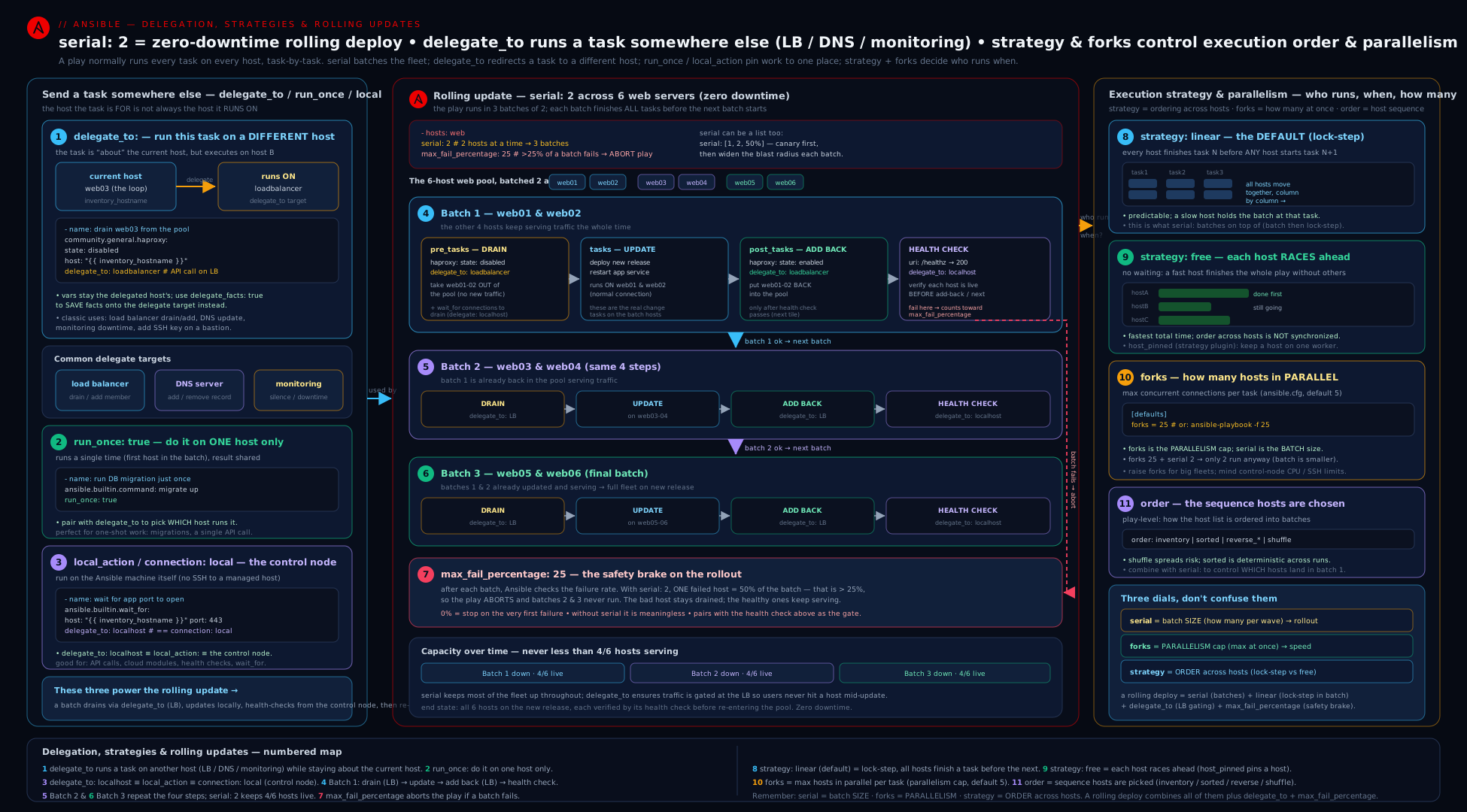
The diagram shows the two dimensions side by side: on the left, a play iterating web1..webN with one task delegated to lb1 (the arrow leaving the host lane), a run_once task collapsing to a single execution, and forks/throttle shown as the width of the concurrent wave; on the right, serial slicing the fleet into ordered batches, each batch flowing through drain → upgrade → health-check → restore, with max_fail_percentage as the gate that aborts the rollout if a batch fails too heavily.
Going deeper
Everything above is the working toolkit. This section is the layer underneath it — the runtime-inventory tricks, the magic-variable family the examples quietly leaned on, what actually happens to a host that fails mid-rollout, and how these keywords behave in check mode and under the free scheduler. None of it is required to write a correct rolling update, but all of it is what separates “I copied the pattern” from “I know why it holds.”
Building inventory at runtime: add_host and group_by
Two ansible.builtin modules let a play change the inventory while it runs — the natural partners to connection: local provisioning plays, where “the host” starts life as just a name.
add_host creates (or updates) a host in the in-memory inventory and can drop it into a group, so a later play in the same run can target it over SSH. The canonical flow is provision-then-configure: play 1 calls a cloud API locally, captures the new instance’s IP, and registers it; play 2 targets the freshly-created group.
- name: Provision, then register the new VM for later plays
  hosts: localhost
  connection: local
  gather_facts: false
  tasks:
    - name: Create the instance via the provider API
      community.general.<provider>_instance:
        name: app-77
        state: present
      register: created

    - name: Add it to in-memory inventory so the next play can reach it
      ansible.builtin.add_host:
        name: app-77
        ansible_host: "{{ created.instance.public_ip }}"
        groups: freshly_built
      changed_when: false          # add_host mutates inventory; it never "changes" a managed host

- name: Now configure everything we just built
  hosts: freshly_built
  become: true
  tasks:
    - name: Prove we can reach the brand-new host over SSH
      ansible.builtin.ping:
Two things to internalise: add_host effectively acts once on a single shared inventory (loop it to add several hosts, but the inventory it mutates is global), and the host exists only for the remainder of this run — nothing is written back to your inventory files.
group_by buckets the current play’s hosts into new groups from a key you compute, almost always a fact. It turns “gather facts, then fan out by OS/region/role” into two lines:
- name: Sort hosts into per-distribution groups
  hosts: all
  tasks:
    - name: Create groups like os_Ubuntu / os_RedHat on the fly
      ansible.builtin.group_by:
        key: "os_{{ ansible_facts['distribution'] }}"

- name: Do RedHat-only work without editing the inventory file
  hosts: os_RedHat
  become: true
  tasks:
    - name: Install a package only on that group
      ansible.builtin.dnf:
        name: chrony
        state: present
group_by is the idiomatic alternative to a wall of when: ansible_facts['distribution'] == '...' conditionals: group once, then write clean per-group plays. Like add_host, the groups live only for the current run.
The ansible_play_* magic variables
The examples earlier used ansible_play_hosts, ansible_play_hosts_all, and ansible_play_batch without introducing them. They are the connection-independent way to ask “who is in this play/batch right now?” — and the differences bite the moment serial and failures enter the picture.
| Variable | Contains | Shrinks when a host fails? | Affected by serial? |
|---|---|---|---|
ansible_play_hosts_all |
every host the play targeted | No — static for the whole play | No (spans all batches) |
ansible_play_hosts |
active hosts in the current run, failed/unreachable removed | Yes | Yes — scoped to the current batch |
ansible_play_batch |
active hosts in the current serial batch |
Yes | Yes — the batch’s members |
Use ansible_play_hosts_all | length when you want the original fleet size for a notification (“deploying to 40 hosts”) — it does not shrink as hosts drop out. Use ansible_play_hosts / ansible_play_batch when you need the survivors — e.g. a run_once aggregation that should act only on hosts still standing. (ansible_play_hosts and ansible_play_batch are near-synonyms today; reach for ansible_play_hosts_all specifically when you need the unfiltered total.)
Reading the delegate’s own data: ansible_delegated_vars
When a task is delegated, Ansible exposes the delegate’s connection variables under ansible_delegated_vars[<delegate>], so you can reference where the task actually landed without hard-coding it:
- name: Show where this delegated task really ran
  ansible.builtin.debug:
    msg: "Ran on {{ ansible_delegated_vars['lb1']['ansible_host'] | default('lb1') }}"
  delegate_to: lb1
This complements the core rule: inventory_hostname and the ordinary vars stay the iterated host’s, while ansible_delegated_vars (and hostvars[<delegate>]) are how you reach the delegate’s own facts and connection details when you genuinely need them.
What happens when a host fails mid-rollout
A precise model of failure is what makes max_fail_percentage trustworthy:
- When a task fails on a host, that host is removed from the rest of the play — it sits out every subsequent task and drops out of
ansible_play_hosts/ansible_play_batch. It is not retried in a later batch. max_fail_percentageis evaluated at the end of each batch, against that batch’s size. Cross the line and the whole play aborts immediately — no further batches start.max_fail_percentage: 0means “any single failure aborts.”any_errors_fatal: trueis stricter and earlier: the moment any host in the batch fails a task, the batch (and play) stops — you do not even finish the current batch.- A
block/rescuethat handles an error means the host did not fail as far as these counters are concerned — therescuesucceeded, so it neither leaves the play nor counts towardmax_fail_percentage. Use that deliberately:rescuewhen you want a host to recover and stay in the rollout; let it fail when you want it to count against the tolerance.
run_once, throttle, and the free strategy
run_once is implemented as “run on the first host, then broadcast the result,” which is deterministic under linear (the first host of the batch in order) but fuzzy under free, where “first to arrive” depends on scheduling. The fix is the idiom you already know — pin it with delegate_to so where it runs is fixed even when which iterated host triggered it is not. Note too that run_once already implies a concurrency of one for that task, so adding throttle to a run_once task is redundant; throttle exists for tasks that run on many hosts but must not all run at once.
Rolling updates under check mode
--check (dry run) interacts with this pattern in ways worth rehearsing before you rely on it:
- Read-only pollers you want to run even in a dry run — a
urihealth check,wait_for— should carrycheck_mode: falseso they execute normally instead of being skipped. - Drain/add-back modules that mutate a load balancer will report “would change” and do nothing in check mode; a check-mode rollout therefore cannot actually drain a host, so treat
--checkhere as a syntax-and-logic rehearsal, not a true zero-downtime test. ansible_check_modeis available if you need to branch (when: not ansible_check_mode) around a step that is meaningless in a dry run.
Strategy plugins are pluggable
linear, free, host_pinned, and debug are the built-ins, but strategy is a plugin type — ansible-doc -t strategy -l lists what is installed, and it can be set globally with ANSIBLE_STRATEGY or ansible.cfg [defaults] strategy as well as per play. Third-party strategy plugins exist for extra throughput; treat any out-of-tree strategy as a compatibility risk to pin and test against your exact ansible-core version rather than a default to reach for. For the exam and for almost all production work the choice is simply linear (ordering guaranteed) versus free (throughput, ordering surrendered).
Hands-on lab
You will build and run a miniature rolling update on localhost plus a few throwaway containers — no cloud, no cost. You need ansible-core 2.17+ and either Docker or Podman; we use community.docker only to create the practice hosts. The delegation/serial features themselves are pure ansible.builtin.
Step 0 — set up
ansible --version                                  # expect 2.17 or newer
ansible-galaxy collection install community.docker # only to spin up practice hosts
mkdir -p ~/ansible-c1 && cd ~/ansible-c1
Create inventory.ini — three “web” hosts, one “lb” host, and the control node:
[web]
web1 ansible_connection=community.docker.docker
web2 ansible_connection=community.docker.docker
web3 ansible_connection=community.docker.docker

[lb]
lb1 ansible_connection=community.docker.docker

[local]
localhost ansible_connection=local
Step 1 — create the practice containers
Create setup.yml:
- name: Spin up practice containers
  hosts: localhost
  connection: local
  gather_facts: false
  tasks:
    - name: Run lightweight containers we can target
      community.docker.docker_container:
        name: "{{ item }}"
        image: python:3.12-slim     # has python so Ansible modules work
        command: sleep infinity
        state: started
      loop: [web1, web2, web3, lb1]
ansible-playbook setup.yml # changed (or ok on a re-run)
Step 2 — prove delegation, run_once, and serial
Create delegate.yml. There is no real load balancer, so we simulate the pool with a file on lb1 that we add/remove the host from — which is exactly the delegation pattern, just with lineinfile standing in for the HAProxy module.
- name: Demonstrate delegate_to, run_once, serial, throttle, order
  hosts: web
  gather_facts: true
  order: sorted                 # reproducible batches: web1, web2, web3
  serial:
    - 1                         # canary: web1
    - "100%"                    # then the rest in one batch (web2, web3)

  pre_tasks:
    - name: ANNOUNCE which batch we are in (runs once per BATCH, on the control node)
      ansible.builtin.debug:
        msg: "Starting batch containing: {{ ansible_play_batch | join(', ') }}"
      run_once: true
      delegate_to: localhost

    - name: Remove THIS host from the simulated LB pool (action happens ON lb1)
      ansible.builtin.lineinfile:
        path: /tmp/pool.txt
        line: "{{ inventory_hostname }}"
        state: absent
        create: true
      delegate_to: lb1

  tasks:
    - name: "\"Upgrade\" the app — at most 2 hosts at a time even if forks is higher"
      ansible.builtin.command: "echo upgrading {{ inventory_hostname }}"
      changed_when: true
      throttle: 2

    - name: Health check, polled from the control node (delegate_to localhost)
      ansible.builtin.command: "echo healthy {{ inventory_hostname }}"
      delegate_to: localhost
      changed_when: false

  post_tasks:
    - name: Add THIS host back to the simulated LB pool (on lb1)
      ansible.builtin.lineinfile:
        path: /tmp/pool.txt
        line: "{{ inventory_hostname }}"
        state: present
        create: true
      delegate_to: lb1
Step 3 — run it and read the output
ansible-playbook -i inventory.ini delegate.yml -f 5
Expected observations:
- The play runs in two batches because of
serial: [1, "100%"]— firstweb1alone (the canary), thenweb2andweb3together.order: sortedmakes that membership reproducible. - The ANNOUNCE debug prints once per batch (twice total), and it runs on the control node — proof that
run_onceis per batch underserialand thatdelegate_to: localhostredirects execution. - The pool-file edits all happen on
lb1even though the play is iteratingweb*— proof ofdelegate_to. Confirm:
ansible -i inventory.ini lb1 -m ansible.builtin.command -a "cat /tmp/pool.txt"
# After a full successful run, all three web hosts are present (added back in post_tasks).
- The “upgrade” task is throttled to 2 — in the second batch (
web2,web3) at most two run at once (here both, since the batch is 2); if you add more web hosts you would see the throttle cap them in pairs.
Now see a strategy difference. Create strategy.yml:
- name: Compare linear vs free pacing
  hosts: web
  gather_facts: false
  strategy: free               # try 'linear' too and compare ordering
  tasks:
    - name: A slow step whose duration varies per host
      ansible.builtin.command: "sleep {{ 2 if inventory_hostname == 'web1' else 1 }}"
      changed_when: false
    - name: A second step
      ansible.builtin.debug:
        msg: "{{ inventory_hostname }} reached step 2"
ansible-playbook -i inventory.ini strategy.yml          # free: fast hosts reach step 2 first
sed -i.bak 's/strategy: free/strategy: linear/' strategy.yml
ansible-playbook -i inventory.ini strategy.yml          # linear: ALL finish step 1 before ANY do step 2
With free, web2/web3 print “reached step 2” while web1 is still sleeping; with linear, nobody reaches step 2 until every host has finished step 1 — the per-task barrier made visible.
Validation
# The simulated pool should contain all three web hosts after a clean run:
ansible -i inventory.ini lb1 -m ansible.builtin.command -a "sort /tmp/pool.txt"

# Confirm delegate_to really executed on lb1 (the file exists THERE, not on web hosts):
ansible -i inventory.ini web -m ansible.builtin.stat -a "path=/tmp/pool.txt" \
  | grep -E '"exists": (true|false)'   # expect false on web hosts — the file lives on lb1
Cleanup
cat > teardown.yml <<'YAML'
- hosts: localhost
  connection: local
  gather_facts: false
  tasks:
    - name: Remove practice containers
      community.docker.docker_container:
        name: "{{ item }}"
        state: absent
      loop: [web1, web2, web3, lb1]
YAML
ansible-playbook teardown.yml
rm -rf ~/ansible-c1
Cost note
₹0. Everything runs on localhost and four local containers using a public base image. No cloud resources are created, so there is nothing to bill and nothing left running after teardown.
Common beginner mistakes
These are misconceptions about the model, not symptoms to look up — the troubleshooting table below is for when something already broke. Fix the mental model here and most of those symptoms never appear.
- “
delegate_toswitches me over to the other host’s variables.” It does not. Delegation changes only where the task executes;inventory_hostname, the host/group vars, andansible_factsall stay the iterated host’s. Right model: the execution host and the data host are two separate things — the task runs onlb1but still “thinks” asweb1. Reach forhostvars['lb1']/ansible_delegated_varsonly when you deliberately want the delegate’s own data. - “
run_onceruns once for the whole play.” Only when there is noserial. Withserialit runs once per batch. Right model:run_oncemeans “once per current play-run,” and eachserialbatch is a play-run. For genuinely-once-per-rollout work, use a separate non-serial play before the rolling one. - “
serialandforksare two names for the batch size.” They are orthogonal.serial= how many hosts make up a batch (a whole-play pass);forks= how many hosts run a single task at the same instant. Right model:serialwalks the fleet in waves;forkscaps parallelism inside a wave; effective per-task concurrency ismin(forks, batch_size). - “
freeis just a fasterlinear.”freeis faster because it drops the per-task barrier — which silently removes every “all hosts finished X before any starts Y” guarantee. Right model: choosefreeonly when tasks are genuinely host-independent; keeplinearwhenever a later task assumes an earlier one finished everywhere (which includes most rolling updates). - “A rolling update is safe because it’s
serial.”serialon its own will happily break your whole fleet — one polite batch at a time. Right model: safety comes fromserialplusmax_fail_percentage(orany_errors_fatal) to abort the rollout, plus a health gate so a host that comes back broken actually counts as failed. - “Health-checking right after the deploy tests the new version.” Not if a handler is doing the restart — handlers do not fire until the end of the batch, so you would be probing the old process. Right model:
meta: flush_handlersimmediately after the deploy step, then health-check, so you verify the restarted app before re-adding the host. - “
delegate_to: localhostandconnection: localare interchangeable.” Almost, but not identical:delegate_to: localhostchanges which host runs the task (the control node, via the localhost connection), whileconnection: localkeeps the iterated host’s identity and merely skips SSH. Right model: usedelegate_to: localhostfor one local task amid real hosts; useconnection: localfor a whole play whose “hosts” are abstractions you drive by API.
Common mistakes & troubleshooting
| Symptom | Likely cause | Fix |
|---|---|---|
| Delegated task uses the delegate’s facts, but they’re empty | facts were never gathered on the delegate; by default a delegated task sees the iterated host’s facts | gather the delegate’s facts with delegate_to + delegate_facts: true, then read hostvars[delegate] |
hostvars['lb1'].ansible_facts is empty after gathering on lb1 |
gathered without delegate_facts: true, so facts landed on the iterated host |
add delegate_facts: true to the gather task |
run_once task ran multiple times |
serial is set — run_once is once per batch, not once per play |
move it to a separate non-serial play, or accept per-batch, or guard to the first batch |
run_once ran on a random/unexpected host |
run_once picks the first host of the batch; with free that is non-deterministic |
add delegate_to: localhost (or a fixed host) to control where it runs |
| Health check passes against the old app version | the restart handler hasn’t fired yet (handlers flush at end of batch) | insert ansible.builtin.meta: flush_handlers before the health check |
| Rolling update marched on and broke the whole fleet | no max_fail_percentage/any_errors_fatal, so failures didn’t stop the rollout |
set max_fail_percentage (or any_errors_fatal: true) on the serial play |
serial: "30%" made batches of 1 on a small fleet |
percentages round down with a floor of 1 | use integers for small fleets, or accept the rounding |
| Whole batch crawls at one host’s pace | linear has a barrier after every task — slowest host paces each step |
use free/host_pinned if tasks are host-independent; otherwise it’s inherent |
throttle didn’t speed anything up / had no effect |
throttle only lowers concurrency below forks; setting it above forks does nothing |
raise forks; use throttle only to limit a sensitive task |
delegate_to: localhost connected over SSH unexpectedly |
inventory defined localhost as an SSH host, or you used 127.0.0.1 |
ensure localhost ansible_connection=local; standardise on localhost |
Effective concurrency lower than forks |
the current serial batch is smaller than forks (min(forks, batch)) |
enlarge the batch, or accept it — batch size caps per-task parallelism |
Delegated become escalated on the wrong host |
become on a delegated task escalates on the delegate, not the iterated host |
set become/become_user mindful of where the task runs |
Best practices
- Always key delegated drain/add-back on
inventory_hostname. The whole pattern relies on “act on the LB, naming the host I’m currently iterating”. Read the delegate’s own data viahostvars[delegate]only when you specifically need it. - Pair
run_oncewithdelegate_tofor fleet-global side-effects so it runs exactly once, in a known place (usuallylocalhostor the shared resource), and remember it is per batch underserial. - Use
delegate_to: localhostfor control-node work (notifications, API calls,wait_fora rebooting host, local rendering) — never run those on the managed host. - Make rolling updates fail safe. A
serialplay withoutmax_fail_percentage(orany_errors_fatal) is a footgun: it will happily break your entire fleet one batch at a time. Always set a tolerance. - Canary with a ramp-up list:
serial: [1, ...]so the first failure costs one host, then widen. Combine withorder: sorted(reproducible) ororder: shuffle(don’t always burn the same canary). flush_handlersbefore any in-play health check that must see the post-restart state.- Size
forksto the fleet and the control node, not the default 5; setthrottleonly on the specific task that cannot take the parallelism (licence servers, shared writers). - Prefer
delegate_to: localhostoverlocal_actionin new code — it is the clearer, current spelling. Useconnection: localat play level for API-driven “hosts are abstractions” plays. - Keep
linearunless you have proven host independence.freeis a throughput optimisation that silently removes ordering guarantees; reach for it deliberately, not by default. - Health-gate every stage of a rollout (after upgrade and after add-back) so a host that comes back unhealthy counts toward
max_fail_percentageinstead of silently serving errors.
Security notes
- Delegation widens the blast radius and the access surface. A
delegate_to: lb1task means your control node (or the run user) must be able to connect to and act on the load balancer — often via an admin socket or privileged API. Lock those credentials down and scope the automation account’s rights on the LB/DNS/monitoring host to exactly what the drain/add-back needs. delegate_to: localhostruns with the control node’s identity and secrets. Tasks delegated locally execute with the operator’s local credentials and can read the control node’s environment and vault contents. Be deliberate about what you run there, and useno_log: trueon local tasks that handle tokens (the Slack/API examples).run_onceglobal steps deserveany_errors_fatal. A failed once-per-play migration or shared-resource step usually invalidates the entire run; without aborting, the rest of the fleet proceeds on a broken assumption. Make global steps stop the play on failure.- Drain before you touch a host, add back only after a passing health check. Re-enabling an unhealthy host in the load balancer (skipping the post-upgrade health gate) routes live traffic to a broken instance — a self-inflicted outage. The health gate is a safety control, not a nicety.
- Beware secrets in delegated task output and in
hostvars. Readinghostvars[delegate]can surface the delegate’s sensitive vars into a play that targets other hosts; combine withno_logand carefullabel/debugso you don’t print another host’s secrets to the console or CI logs.
Practice challenges
Work these top to bottom — they escalate from a single delegated task to reasoning about a full rollout. Try each before opening the solution. Assume an inventory with groups web, lb (one host lb1), db (one host db1), and a reachable localhost.
1 (beginner) — Delegate one task. While iterating hosts: web, append each iterated host’s name to /etc/haproxy/pool.txt on lb1 (use lineinfile; create the file if absent). Nothing should be written on the web hosts.
<details> <summary>Solution</summary>
- name: Register this web host in the pool file that lives on lb1
  ansible.builtin.lineinfile:
    path: /etc/haproxy/pool.txt
    line: "{{ inventory_hostname }}"
    create: true
    state: present
  delegate_to: lb1
Why: delegate_to: lb1 runs the module on lb1, while inventory_hostname still resolves to the web host being iterated — the “act on the shared box, named for the current host” pattern.
</details>
2 (beginner) — One notification, from the control node. Emit a single debug message "Deploying to N hosts" where N is the original fleet size, running exactly once and on the control node.
<details> <summary>Solution</summary>
- name: Announce the rollout once, locally
  ansible.builtin.debug:
    msg: "Deploying to {{ ansible_play_hosts_all | length }} hosts"
  run_once: true
  delegate_to: localhost
Why: run_once fires the task a single time and delegate_to: localhost pins it to the control node; ansible_play_hosts_all is the unshrinking total, so the count is the original fleet size.
</details>
3 (intermediate) — Canary, then waves. Turn a plain hosts: web play into a rolling one: a single canary host first, then 25% of the fleet per wave, with reproducible batch membership and an abort if more than 20% of a batch fails.
<details> <summary>Solution</summary>
- name: Rolling deploy — canary then 25% waves
  hosts: web
  order: sorted
  serial:
    - 1
    - "25%"
  max_fail_percentage: 20
  tasks:
    - name: Stand-in for drain / upgrade / verify / restore
      ansible.builtin.ping:
Why: serial: [1, "25%"] rolls one host then 25% per batch (the last element repeats); order: sorted makes membership reproducible; max_fail_percentage: 20 aborts the whole play if a batch exceeds the tolerance.
</details>
4 (intermediate) — Gather a non-play host’s facts. From this play (which targets web), gather db1’s facts once and print its total memory, reading it back from hostvars.
<details> <summary>Solution</summary>
- name: Gather the DB host's facts exactly once
  ansible.builtin.setup:
  delegate_to: db1
  delegate_facts: true
  run_once: true

- name: Read the delegate's memory back from hostvars
  ansible.builtin.debug:
    msg: "db1 has {{ hostvars['db1']['ansible_facts']['memtotal_mb'] }} MB"
  run_once: true
Why: delegate_facts: true stores the gathered facts against db1 (not the iterated web host), so hostvars['db1'].ansible_facts is populated; run_once avoids re-gathering per web host.
</details>
5 (advanced) — Provision then configure with runtime inventory. In one playbook, use a first connection: local play to register two hosts (app-1, app-2) into a group built via add_host, then a play that groups those hosts by a fact and targets only the group it creates.
<details> <summary>Solution</summary>
- name: Register hosts at runtime
  hosts: localhost
  connection: local
  gather_facts: false
  tasks:
    - name: Add two hosts to an in-memory group
      ansible.builtin.add_host:
        name: "{{ item.name }}"
        ansible_host: "{{ item.ip }}"
        groups: built
      changed_when: false
      loop:
        - { name: app-1, ip: 10.0.0.11 }
        - { name: app-2, ip: 10.0.0.12 }

- name: Fan out the freshly-built hosts by OS
  hosts: built
  tasks:
    - name: Bucket into per-distro groups at runtime
      ansible.builtin.group_by:
        key: "os_{{ ansible_facts['distribution'] }}"

- name: Configure just one distro group
  hosts: os_RedHat
  become: true
  tasks:
    - name: Do RedHat-only work
      ansible.builtin.dnf:
        name: chrony
        state: present
Why: add_host mutates the in-memory inventory so a later play can target built; group_by then creates os_* groups from a fact — both live only for this run, replacing static inventory edits and walls of when:.
</details>
6 (advanced) — Reason about concurrency. You run 45 hosts with serial: 15, forks: 6, and a single task carrying throttle: 2. (a) How many batches? (b) For an ordinary task in a batch, how many hosts run it at once? © For the throttle: 2 task? (d) What does adding max_fail_percentage: 10 protect that a bare serial: 15 does not?
<details> <summary>Solution</summary>
- (a) 3 batches (45 ÷ 15).
- (b)
min(forks, batch_size)=min(6, 15)= 6 at a time, so an ordinary task sweeps the batch of 15 in three waves of 6, 6, 3, with alinearbarrier after the task. - ©
min(forks, throttle, batch_size)=min(6, 2, 15)= 2 at a time for that one task. - (d) It aborts the whole play once more than 10% of a batch fails (2+ of 15), instead of marching through all three batches breaking hosts — the difference between a safe rollout and a fleet-wide outage.
Why: serial sets batch size, forks caps per-task parallelism, throttle lowers it further for one task, and max_fail_percentage is the only knob here that makes the rollout stop on trouble.
</details>
Interview & exam questions
- When a task has
delegate_to: lb1while the play is iteratingweb1, which host’s facts and variables are in scope?web1’s — the iterated host. The task executes onlb1(its connection, become, files), butinventory_hostnameisweb1and the variables/facts areweb1’s. To use the delegate’s own data, readhostvars['lb1'], and to gather the delegate’s facts, adddelegate_facts: true. - What does
delegate_facts: truechange? It stores facts gathered/set_fact-ed during the task against the delegate instead of the iterated host, sohostvars[delegate].ansible_factsis populated. Without it, delegated-gathered facts land on the iterated host — the classic “why ishostvars['db'].ansible_factsempty?” bug. - Explain
run_onceand how it behaves underserial.run_once: trueruns the task once (on the batch’s first host) and shares the result to all hosts. Underserialit runs once per batch, not once per play — a frequent surprise. Pair it withdelegate_toto control where the single execution happens. - Why is
run_once: true+delegate_to: localhostsuch a common idiom?run_oncecontrols how many times (once);delegate_to: localhostcontrols where (the control node). Together they express “do this fleet-global thing exactly once, locally” — perfect for notifications, API calls, or computing a value all hosts will use. - What is the difference between
serialandforks?serialis the number of hosts in a batch — a complete pass of the whole play (the rolling-update unit).forksis the number of hosts running a single task concurrently (the parallelism ceiling, default 5, global). They are independent; effective per-task concurrency ismin(forks, batch_size). - Walk 30 hosts with
serial: 10andforks: 5. What happens? Three batches of 10. Within each batch, every task runs on at most 5 hosts at once (two waves of 5), with alinearbarrier after each task. So never more than 5 hosts execute a given task, and the rollout advances 10 hosts at a time. - What does
serial: [1, 5, "30%"]mean, and how are percentages computed? Batch 1 = 1 host (canary), batch 2 = 5, batch 3 onward = 30% of the host count, and the last element repeats for the remainder. Percentages are of the play’s host count, rounded down, with a floor of 1 (so"30%"of 2 hosts is 1, never 0). - Compare the
linearandfreestrategies.linear(default) has a barrier after every task — all hosts finish task N before any starts N+1, so cross-host ordering holds and the batch moves at the slowest host’s pace.freelets each host race through all its tasks independently — maximum throughput, but no ordering guarantees and murkierrun_once/handler timing. Usefreeonly for host-independent work. - What is
host_pinnedand how does it differ fromfree?host_pinnedis a boundedfree: each worker (fork) takes a host and runs all of that host’s tasks before moving to the next host, rather than round-robining hosts per task. It reduces connection churn but, likefree, gives no global ordering. - How does
throttlerelate toforks?throttle: Ncaps concurrency for a single task/block belowforks; it can only lower, never raise (min(forks, throttle, batch)). Use it to protect a fragile or shared step while the rest of the play runs at fullforks. - What does
max_fail_percentagedo in a rolling update and why is it essential? Evaluated per batch, it aborts the entire play once more than that percentage of a batch’s hosts fail — stopping a bad rollout before it breaks the whole fleet. Without it (orany_errors_fatal), aserialplay happily marches through every batch, breaking hosts as it goes.max_fail_percentage: 0means “stop on any failure”. - Describe the complete zero-downtime rolling-update pattern.
serial(often a canary list) +max_fail_percentagefor safety;pre_tasksto drain each host from the LB (delegate_tothe LB, keyed oninventory_hostname, with graceful drain); the upgrade +flush_handlers+ a health check (oftendelegate_to: localhost, withuntil/retries);post_tasksto add the host back to the LB and verify it is serving. Each host is out of rotation while touched, so users never hit a half-upgraded instance. - Why use
flush_handlersin a rolling update? Handlers normally fire at the end of the batch — after your in-play health check.meta: flush_handlersforces the restart immediately so the health check tests the restarted application, not the old one, before you re-add the host to the pool. - What does
order: shufflegive you in a rolling context, versussorted?shufflerandomises host order each run, so the same host is not always the canary/first — spreading risk and preventing a hidden “always upgrade web1 first” assumption from hardening.sortedgives reproducible batch membership instead. Both override the defaultinventoryorder.
Quick check
- During
delegate_to: lb1while iteratingweb1, whose facts does the task see by default? - Under
serial, how many times does arun_oncetask run — once per play or once per batch? - Which keyword limits how many hosts run a single task in parallel:
serialorforks? - What play keyword aborts a rolling update once too many hosts in a batch fail?
- Which strategy removes the per-task barrier so hosts progress independently?
Answers
web1’s — the iterated host’s facts/vars are in scope; the task merely executes onlb1. Usedelegate_facts: true(to store) andhostvars['lb1'](to read) for the delegate’s own data.- Once per batch.
run_onceis perserialbatch, not per whole play — a common gotcha. forks(global per-task parallelism, default 5).serialsizes the batch, not per-task concurrency. (throttlelowers it further for one task.)max_fail_percentage(orany_errors_fatal: trueto stop on any single failure).free(each host races through all its tasks; no cross-host ordering).host_pinnedis its bounded cousin.
Exercise
Write a single playbook rolling.yml for hosts: appservers (assume groups appservers and loadbalancers exist, and a database group with one host) that performs a safe rolling deploy. (a) Use serial: [1, "25%"] with order: sorted and max_fail_percentage: 20. (b) In pre_tasks, run a single schema-readiness check once per play (not per batch) by giving it run_once: true delegated to the database host and gathering that host’s facts with delegate_facts: true so a later step can read hostvars[db].ansible_facts; then drain the current host from the load balancer with a task delegate_to the first member of loadbalancers, keyed on inventory_hostname. © In tasks, deploy the build, notify a Restart app handler, flush_handlers, then a health check with until/retries/delay delegated to localhost; throttle a “warm the cache” task to throttle: 1. (d) In post_tasks, add the host back (delegate_to the LB) and verify, then send one Slack-style notification with run_once: true + delegate_to: localhost. Finally, in two sentences, explain (i) why the schema check uses run_once and delegate_to while the drain uses only delegate_to, and (ii) what max_fail_percentage: 20 protects you from that a bare serial does not.
Certification mapping
- RHCE (EX294): This lesson maps to the published objectives “Work with Ansible variables and facts” (delegation’s
hostvars/delegate_factsinterplay), “Use conditionals to control play execution”, and especially the rolling-update mechanics that show up in tasks requiring you to update hosts in batches and act on a different host than the one being configured. Expect to be asked to: write a play withserialto update a tier in waves; usedelegate_toto perform an action on a control or shared host (e.g. add a line to a file on a different machine while iterating the fleet); userun_oncefor a once-only step; and usemax_fail_percentage/any_errors_fatalso a partial failure stops the run. Practise the drain → upgrade → verify → restore shape until you can write it fast and correctly under time pressure — it is the single most likely “real-world” scenario task. - The
serial/forksdistinction, thedelegate_to+delegate_factssemantics, and the strategy choices (linearvsfree) are frequently probed in interviews for senior automation roles — know them cold and be able to draw the rolling-update diagram on a whiteboard.
Glossary
delegate_to— task keyword that runs the task on a different host than the one being iterated; the iterated host’s variables/facts stay in scope.delegate_facts— whentrue, facts gathered/set during a delegated task are stored against the delegate rather than the iterated host.local_action— shorthand for a task withdelegate_to: localhost+connection: local; runs on the control node (legacy spelling).connection: local— connection override that runs the task on the control node without SSH; used at play level for API-driven “hosts are abstractions” plays.run_once— runs a task a single time (on the first host of the play/batch) and shares the result to all hosts; once per batch underserial.serial— play keyword splitting execution into sequential batches (whole-play passes); accepts an integer, a percentage string, or a ramp-up list.- Batch (serial group) — the subset of hosts that runs the entire play before the next subset starts.
strategy— plugin controlling how hosts move through a play’s tasks:linear(barrier per task),free(independent),host_pinned(bounded free),debug(interactive).forks— global maximum number of hosts contacted in parallel for a single task; default 5.throttle— task/block keyword capping concurrency for that task belowforks.order— play keyword setting host processing order:inventory,sorted,reverse_sorted,reverse_inventory,shuffle.max_fail_percentage— play keyword that aborts the whole play once more than that percentage of a batch’s hosts fail.- Rolling update — upgrading a fleet a few hosts at a time, draining each out of the load balancer, upgrading, health-checking, and re-adding — with
serial+ a fail-safe. - Drain / add-back — pulling a host out of (and later returning it to) the load balancer pool, performed via
delegate_tothe load balancer keyed oninventory_hostname. hostvars— magic dictionary of every host’s variables/facts; how a delegated orrun_oncetask reads another host’s data.add_host—ansible.builtinmodule that adds or updates a host (and optionally a group) in the in-memory inventory during a run, so a later play can target it; the change is not written to inventory files.group_by—ansible.builtinmodule that creates and populates groups at runtime from a computedkey(usually a fact), e.g.os_{{ ansible_facts['distribution'] }}; groups live only for the current run.ansible_play_hosts_all— magic variable listing every host the play targeted; static (does not shrink on failure) and spans allserialbatches.ansible_play_hosts/ansible_play_batch— magic variables listing the active hosts of the current run/batch (failed and unreachable hosts removed); scoped to the currentserialbatch.ansible_delegated_vars— magic dictionary exposing a delegate’s own connection variables, e.g.ansible_delegated_vars['lb1']['ansible_host'].any_errors_fatal— play keyword that aborts the batch and play the instant any host fails a task (stricter and earlier thanmax_fail_percentage).flush_handlers—ansible.builtin.meta: flush_handlers, which runs all pending handlers immediately instead of waiting for the end of the play/batch.- Canary — a first, single-host batch (
serial: [1, …]) used to validate a change before wider waves, so a first failure costs exactly one host. - Check mode — a dry run (
--check); delegated read-only pollers can force real execution withcheck_mode: false, andansible_check_modelets tasks branch on it. - Barrier — the
linearstrategy’s per-task synchronisation point: no host starts task N+1 until every host has finished task N.
Next steps
You can now control where a task runs (delegate_to, delegate_facts, local_action, connection: local), how many times (run_once), and how the fleet is walked (serial batches, the linear/free/host_pinned/debug strategies, forks, throttle, and order) — and you can assemble them into a safe, zero-downtime rolling update with max_fail_percentage and a delegated drain/add-back. The next lesson, Tuning Ansible for Speed & Scale, In Depth, takes the forks and free levers further into pure performance — SSH multiplexing and pipelining, fact gathering and caching, async/poll for long-running tasks, and profiling — so your rollouts are not just safe but fast. To revisit the flow-control primitives these patterns build on, see Ansible Conditionals, Loops, Handlers & Tags, In Depth; and for the failure-handling foundations under max_fail_percentage and any_errors_fatal, return to Ansible Error Handling, In Depth.