You have a brand-new Kubernetes cluster and a list. Before a single one of your own services can run, the cluster needs ingress-nginx, cert-manager, external-dns, a metrics stack, a secrets operator, network policies, an image-pull secret, three AppProject guardrails, and then — finally — your dozen microservices. That is thirty-odd Argo CD Application objects, and every one of them is a small YAML file that has to be created on the cluster before Argo CD will do anything with it.
So here is the question that stops everyone the first time: Argo CD reconciles Application objects, but who creates the Applications? You cannot kubectl apply thirty files by hand on every new cluster and call it GitOps — the moment you do, “what is installed here?” lives in your shell history again, and cluster number two drifts from cluster number one. There has to be a way to say “here is the whole platform, go” in one committed, reviewable action.
That way is the app-of-apps pattern. It is deceptively simple: one root Application whose Git source is a directory full of child Application manifests. Sync the root, and Argo CD applies those child manifests; each child is itself an Application, so the controller picks it up and deploys its workload. One kubectl apply of the root plants an entire cluster. This lesson builds that root and its children as complete, real manifests, orders the bootstrap with sync waves, handles the delete cascade, and draws the honest line between app-of-apps and its templated cousin, ApplicationSet.
This lesson assumes you can already read an
Applicationspec —source,destination,project,syncPolicy. If any of those feels shaky, read Your First Application first; everything here is that same object, pointed at a directory of other Applications.
Why this matters
Every GitOps platform hits the same wall on day one: the bootstrap problem. Argo CD is a controller that turns Application objects into running workloads, but an Application is itself a Kubernetes object that something must create. If a human creates them imperatively, you have reintroduced exactly the “runbook in someone’s head” that GitOps was supposed to kill. If a CI job creates them with kubectl apply, you have a push pipeline gluing your pull-based platform together, and the list of what-should-exist lives in a pipeline, not in Git.
App-of-apps closes the loop. You commit one root Application to Git. That root’s source is a directory of child Application manifests, also in Git. Applying the root once — the only imperative step, and even that can be made declarative (the trade-offs of imperative vs declarative are covered in UI, CLI & declarative vs imperative) — causes Argo CD to create every child, and each child deploys its piece of the platform. From that point on, adding a component to the cluster is a pull request that adds a child manifest to the directory; removing one is a PR that deletes a file. The entire installed surface of the cluster becomes a reviewable Git diff.
Hold this mental model for the whole lesson: a root Application is a gardener that plants a directory of seeds, and each seed grows its own plant. The root does not deploy ingress or monitoring itself — it deploys the Applications that deploy ingress and monitoring. That one level of indirection is the entire trick, and it is worth being precise about what it buys you and what it does not:
| App-of-apps does | It does not |
|---|---|
Create many child Application objects from one committed root |
Template or generate those children — you hand-write each one |
Make “install the whole platform” a single kubectl apply |
Build images, run CI, or replace your pipeline |
| Let sync waves order the children (infra before apps) | Order resources across unrelated Applications by magic |
| Cascade-delete the whole tree when you delete the root | Protect you from cascade-deleting the whole tree when you delete the root |
Manage AppProjects, repo Secrets, even Argo CD itself declaratively |
Guarantee correctness if a child points at the wrong project or repo |
| Give you an explicit, curated, reviewable platform manifest set | Scale gracefully to “the same app across 50 clusters” — that is ApplicationSet’s job |
Get this pattern right and a fresh cluster goes from empty to a full platform with one commit and one apply. Get it wrong and you learn — usually at the worst moment — that deleting the root deletes everything, or that your children all tried to sync at once and stampeded the API server. Both outcomes are in this lesson.
The bootstrap problem: who creates the Applications?
Picture a genuinely fresh cluster. It has a control plane and some nodes and nothing else useful. Your platform team’s definition of “ready for workloads” is a stack of shared components, and — crucially — those components depend on each other in an order. cert-manager must be running and its CRDs and webhook established before any Certificate resource or any Ingress that annotates for TLS. The ingress controller should exist before an app that publishes an Ingress. Your AppProject guardrails should exist before the apps that reference them, or those apps get rejected. A naive “apply everything at once” loses to these dependencies.
Spelling out the dependency chain makes the ordering problem concrete:
| Platform component | Cannot usefully start until… | Why |
|---|---|---|
AppProjects (guardrails) |
— (first) | Child apps that name a missing project are rejected on sync |
| Namespaces + ResourceQuotas | — (first) | Everything else lands in these namespaces |
| cert-manager (+ its CRDs, webhook) | CRDs Established, webhook serving | A Certificate or TLS Ingress before this fails admission |
| Ingress controller (nginx / ALB / App Gateway) | Namespace + RBAC exist | Apps that publish an Ingress need a controller watching |
| Secrets operator (ESO / Sealed Secrets) | CRDs Established | Apps whose Secrets are synced need the operator first |
| Monitoring stack | Namespace exists | ServiceMonitors from apps need the CRDs present |
| Your workloads | All of the above | They consume ingress, TLS, secrets, and quotas |
The naive answer is a shell script or a CI stage that runs kubectl apply -f app-ingress.yaml -f app-certmanager.yaml … in the right sequence. It works exactly once. Then a second cluster appears and the script drifts; a component is added and someone forgets to update the script; the “order” lives in the ordering of lines in a bash file that no reviewer reads carefully. You have rebuilt imperative deployment on top of a declarative engine.
The app-of-apps answer replaces the script with data in Git: a directory of child Application manifests plus a single root that points at that directory. Compare the two approaches honestly:
| Imperative bootstrap (script / CI apply) | App-of-apps (root Application) | |
|---|---|---|
| What “the platform” is | A sequence of commands | A committed directory of manifests |
| Reproducible on cluster #2 | Only if the script is perfect and re-run | Yes — apply the same root, same result |
| Add a component | Edit the script, hope it’s re-run | Add a file to the directory, open a PR |
| Ordering | Line order in a script | sync-wave annotations, reviewed in Git |
| Drift visible? | No — the script is fire-and-forget | Yes — root goes OutOfSync when reality ≠ Git |
| Rollback | Re-run an older script (if you kept it) | git revert the commit |
| Source of truth | The pipeline | Git |
One line of good news before the mechanics: this pattern is completely cloud-neutral. A root Application that bootstraps a kind cluster on your laptop bootstraps an AKS, EKS, or GKE cluster identically — the root and children are the same YAML. What differs per cloud is the cloud edges the children install (an ALB vs App Gateway vs GCLB ingress, IRSA vs Workload Identity for a secrets operator, registering the remote cluster in the first place), and each of those has its own lesson. Here, everything is the platform-assembly machinery, and that machinery does not care which cloud is underneath:
| Cloud-neutral (this lesson) | The cloud edge (deferred to its own lesson) |
|---|---|
The root + child Application objects |
Registering a remote AKS/EKS/GKE cluster as a destination |
directory.recurse, sync waves, cascade, prune |
Identity for controllers (Entra Workload ID · IRSA/Pod Identity · GKE Workload Identity) |
| App-of-apps vs ApplicationSet choice | The actual ingress/secrets/registry the children install |
App-of-apps: one parent that plants the children
Here is the whole pattern in two objects. First, the root (also called the parent) — an ordinary Application whose only unusual quality is what it points at: a directory of manifests that happen to themselves be Applications.
# root-app.yaml — the one object you apply by hand (once)
apiVersion: argoproj.io/v1alpha1
kind: Application
metadata:
  name: root
  namespace: argocd                       # the root Application lives in argocd
  finalizers:
    - resources-finalizer.argocd.argoproj.io   # delete root => delete its children
spec:
  project: default
  source:
    repoURL: https://github.com/your-org/platform-gitops.git
    targetRevision: main
    path: bootstrap                        # a DIRECTORY of child Application YAMLs
  destination:
    server: https://kubernetes.default.svc # child Application objects land in-cluster
    namespace: argocd                      # ...specifically in the argocd namespace
  syncPolicy:
    automated:
      prune: true                          # remove a child file => remove the child app
      selfHeal: true
Second, a child — one of the manifests sitting inside that bootstrap/ directory. It is a completely normal Application too; the root will apply it exactly like any other Kubernetes resource, and then the controller reconciles it on its own.
# bootstrap/20-guestbook.yaml — a child the root will create
apiVersion: argoproj.io/v1alpha1
kind: Application
metadata:
  name: guestbook
  namespace: argocd
  annotations:
    argocd.argoproj.io/sync-wave: "2"      # ordering, explained below
  finalizers:
    - resources-finalizer.argocd.argoproj.io
spec:
  project: default
  source:
    repoURL: https://github.com/argoproj/argocd-example-apps.git
    path: guestbook
    targetRevision: HEAD
  destination:
    server: https://kubernetes.default.svc
    namespace: guestbook
  syncPolicy:
    automated:
      prune: true
      selfHeal: true
    syncOptions:
      - CreateNamespace=true
Four fields on a child carry special weight because it is a child in an app-of-apps — get these wrong and the bootstrap misbehaves in the exact ways the troubleshooting table lists:
| Field on a child | Why it matters specifically in app-of-apps |
|---|---|
metadata.annotations → sync-wave |
Orders this child relative to its siblings during the root’s sync |
metadata.finalizers |
Cascade-deletes this child’s workloads when the child is deleted or pruned |
syncPolicy.automated |
Lets the child self-sync, so the root’s wave gate can watch it go Healthy |
spec.project |
Must permit the child’s repo + destination, or the child’s sync is denied |
The insight that makes this work is quiet but profound: an Application is just a Kubernetes object, so an Application can deploy other Applications. When the root syncs, Argo CD renders the bootstrap/ directory, finds a Service… no — finds three Application objects, and applies them to the destination (argocd namespace, in-cluster). The application-controller then notices three new Applications in its own namespace and reconciles each one, deploying its workload. There is nothing recursive in the code; it is the same reconcile loop running one level up.
Keep the two levels straight, because nearly every app-of-apps confusion comes from blurring them:
| Root (parent) Application | Child Application | |
|---|---|---|
Its source points at |
A directory of Application manifests (bootstrap/) |
A directory of workload manifests (a chart, overlay, or plain YAML) |
| What it creates | Child Application objects in argocd |
Real workloads — Deployments, Services, CRDs — in a target namespace |
Its destination is |
In-cluster argocd namespace (where child objects live) |
Wherever the workload runs (any namespace, any registered cluster) |
| You apply it | Once, by hand (or a bootstrap job) | Never by hand — the root creates it |
| Deleting it | Cascades to all children (and their workloads) | Cascades to that one child’s workloads |
The most important subtlety is where objects versus workloads land. The root’s destination.namespace is argocd because that is where child Application objects must live to be reconciled — the controller only watches Applications in the argocd namespace (unless an admin has enabled apps-in-any-namespace). But each child’s destination is about its workload, which can be any namespace and even a completely different, remote cluster:
| Object | Lives in | Set by |
|---|---|---|
Root Application |
argocd namespace, local cluster |
You, once |
Child Application objects |
argocd namespace, local cluster |
Root’s destination.namespace: argocd |
| Child workloads (Deployments, etc.) | Any namespace, any registered cluster | Each child’s own destination |
So a single root running on your management cluster can plant a child whose workload lands on a remote EKS cluster in another account — the child object sits in argocd locally, its Deployment runs in us-east-1. The root neither knows nor cares; it just created an Application object.
The repo layout and the parent’s directory knobs
The layout is the pattern’s backbone, and the one rule that keeps it sane is: the bootstrap directory contains only child Application manifests — nothing else. Workload manifests (the actual Deployments, charts, overlays) live elsewhere in the repo (or in other repos), and the children point at them. Mixing the two is the fastest way to make a mess, for a reason we will see in a moment.
A concrete, monorepo layout:
platform-gitops/
├── root-app.yaml                # the root Application (applied by hand once)
├── bootstrap/                   # <-- root.source.path — ONLY child Applications
│   ├── 00-namespaces.yaml       #     child: namespaces + quotas   (wave 0)
│   ├── 10-monitoring.yaml       #     child: monitoring placeholder (wave 1)
│   └── 20-guestbook.yaml        #     child: the demo app           (wave 2)
└── platform/                    # <-- workload manifests (NOT in bootstrap/)
    ├── namespaces/              #     Namespace + ResourceQuota YAML
    │   ├── platform-namespace.yaml
    │   └── monitoring-namespace.yaml
    └── monitoring/              #     the "monitoring" placeholder config
        └── configmap.yaml
Read that top to bottom and the separation is clear: root-app.yaml names bootstrap/; bootstrap/ holds three child Applications; each child names a path under platform/ (or an external repo, as guestbook does). The directory a child points at is its concern; the root never looks inside platform/.
| Path | What lives here | Who reads it |
|---|---|---|
root-app.yaml |
The root Application |
You (kubectl apply once) |
bootstrap/*.yaml |
Child Application manifests only |
The root’s sync |
platform/namespaces/ |
Namespace + ResourceQuota objects |
The namespaces child’s sync |
platform/monitoring/ |
Monitoring placeholder config | The monitoring child’s sync |
(external) argocd-example-apps/guestbook |
The guestbook workload | The guestbook child’s sync |
Now, how does the root decide which files in bootstrap/ to treat as manifests? Through the source.directory block — the plain-YAML rendering knobs. These are the fields that make or break an app-of-apps root:
source.directory field |
Type | What it does | Bootstrap use |
|---|---|---|---|
recurse |
bool | Read manifests from sub-directories too, not just the top level | On if you nest children in sub-folders; off for a flat bootstrap/ |
include |
glob | Only render files matching this pattern | Whitelist child manifests: "*.yaml" or "{a.yaml,b.yaml}" |
exclude |
glob | Skip files matching this pattern | Drop a README.md or a values.yaml that isn’t an Application |
jsonnet |
object | Jsonnet-specific rendering (TLAs, ext vars) | Only if your children are generated by Jsonnet |
For the flat layout above, the root needs no directory block at all — the three files sit directly in bootstrap/, and Argo CD reads top-level YAML by default. The moment you nest, or drop a non-Application file into the directory, you reach for these knobs:
spec:
  source:
    repoURL: https://github.com/your-org/platform-gitops.git
    targetRevision: main
    path: bootstrap
    directory:
      recurse: true            # children are organised into sub-folders
      include: "*.yaml"        # ...but only *.yaml files are Applications
      exclude: "README.md"     # never try to apply the readme as a manifest
This is where the “bootstrap directory contains only Applications” rule earns its keep. With recurse: true, Argo CD walks every sub-directory and tries to apply every manifest it finds as a Kubernetes object. If a stray kustomization.yaml, a Helm values.yaml, or a chart’s templates/ slips into the tree, the root will try to kubectl apply it — and either error out (ComparisonError) or, worse, apply something you never meant to. The fix is discipline plus include: keep workloads out of the bootstrap dir, and whitelist the file shape you expect. We will see this exact failure in troubleshooting.
Syncing the root walks this whole structure left to right — from the Git directory, through the root Application, through the controller that applies the children in wave order, out to each child’s workload on the cluster:
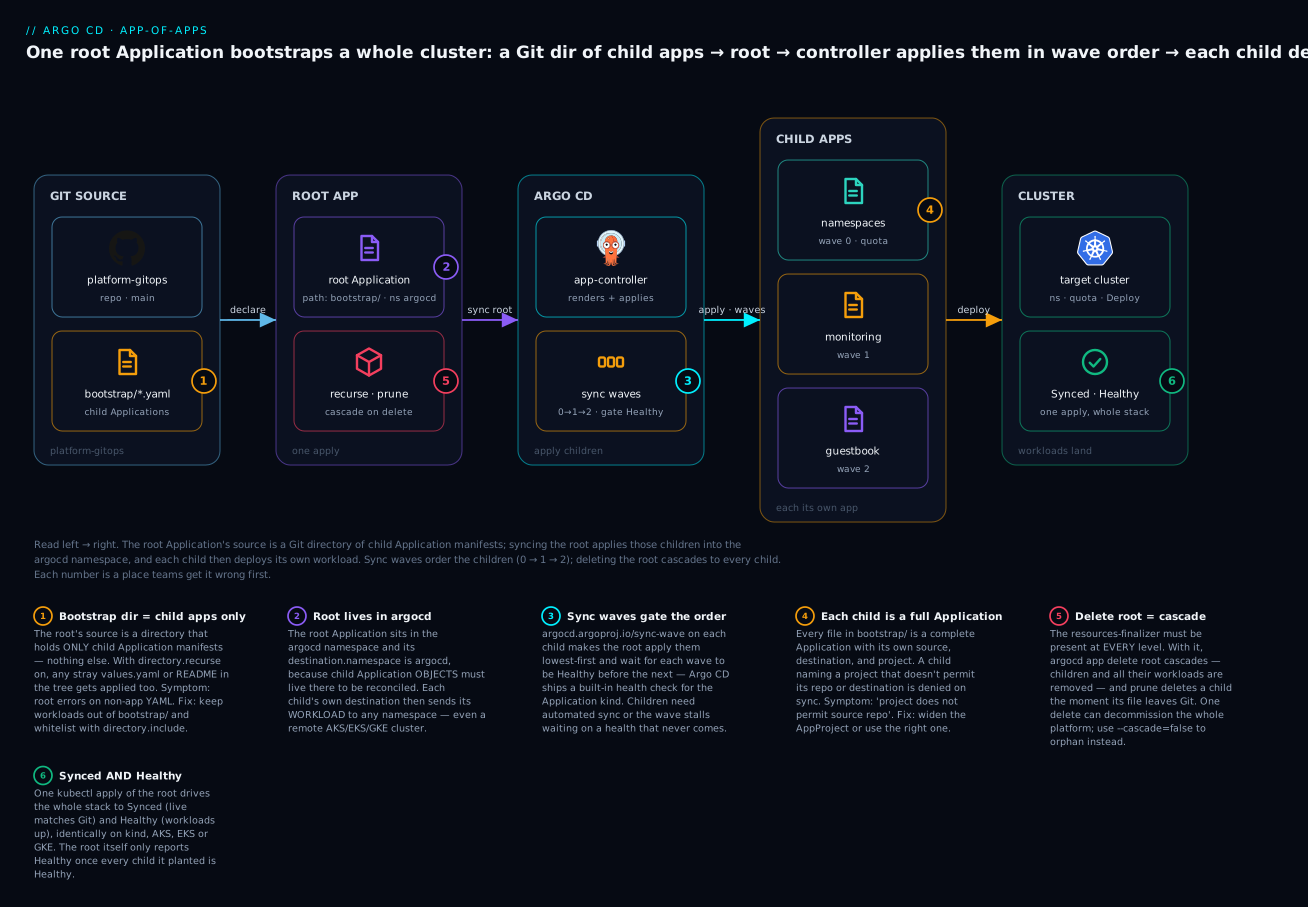
The badges mark the load-bearing ideas: the bootstrap directory holds only child Application manifests (1); the root points at that directory and its own destination is the argocd namespace (2); sync waves gate the children so wave 0 finishes healthy before wave 1 starts (3); every child is a full Application with its own source, destination, and project (4); deleting the root cascades through the finalizer and nukes every child and its workloads (5); and the whole tree drives toward Synced and Healthy (6).
Bootstrap order: sync waves on the children
If you apply a root with five children and no ordering, Argo CD applies all five child Application objects in the same sync, and all five children begin reconciling their workloads at once. Sometimes that is fine. Often it is not: the monitoring child’s ServiceMonitor needs the monitoring-operator’s CRDs that another child installs; an app child needs the namespace-and-quota child to have run first; a Certificate needs cert-manager’s webhook to be serving. Simultaneous sync turns these dependencies into a race, and races fail intermittently — the worst kind of failure.
Sync waves impose order. The annotation argocd.argoproj.io/sync-wave carries an integer (default 0); Argo CD applies resources from the lowest wave to the highest, and — this is the part that makes it ordering and not just sequencing — waits for each wave to become Healthy before starting the next. In an app-of-apps, you put the annotation on the child Application manifests, so the root’s sync applies child wave 0, waits for it to be Healthy, then applies wave 1, and so on.
# bootstrap/00-namespaces.yaml
metadata:
  name: namespaces
  namespace: argocd
  annotations:
    argocd.argoproj.io/sync-wave: "0"     # foundational — goes first
---
# bootstrap/10-monitoring.yaml
metadata:
  name: monitoring
  namespace: argocd
  annotations:
    argocd.argoproj.io/sync-wave: "1"     # after namespaces exist
---
# bootstrap/20-guestbook.yaml
metadata:
  name: guestbook
  namespace: argocd
  annotations:
    argocd.argoproj.io/sync-wave: "2"     # last — the actual app
Why does “wait for Healthy” work when the wave-0 resource is itself an Application? Because Argo CD ships a built-in health check for the argoproj.io/Application kind. A child Application’s health is read from its own status.health.status: freshly created, its status is empty and it is assessed Progressing; once its own controller has synced its workload and that workload is up, it reports Healthy. The root’s wave-0 step therefore blocks on the namespaces child reaching Healthy before the root applies the wave-1 monitoring child. That is genuine dependency ordering, not a hopeful sleep.
This mechanism has a consequence people miss and then spend an afternoon debugging: the children generally must have automated sync, or at least be synced somehow. A child with manual sync, once created by the root, sits at OutOfSync/Missing forever — it never becomes Healthy on its own — so the root’s wave gating waits on a health state that will never arrive, and the bootstrap stalls on wave 0. Give each child syncPolicy.automated and it self-syncs the instant the root creates it, its health flips to Healthy, and the next wave proceeds. In the lab, every child is automated for exactly this reason.
A pragmatic wave assignment for a real platform bootstrap (all cloud-neutral — the same numbers work on AKS, EKS, or GKE):
| Wave | Child Applications | Rationale |
|---|---|---|
-1 or 0 |
AppProjects, namespaces, quotas, image-pull secrets |
Guardrails and landing zones exist before anything references them |
1 |
CRDs / operators: cert-manager, external-secrets, prometheus-operator | Establish CRDs + webhooks before any custom resource is created |
2 |
Ingress controller, monitoring stack, network policies | Platform services that apps depend on |
3 |
Your workloads | They consume ingress, TLS, secrets, and metrics from earlier waves |
Two honest caveats keep this from being over-sold. First, there is a well-known race: a just-created child Application can momentarily report Healthy (empty status is briefly interpreted before its controller writes a real state) and let the next wave slip in early. In practice automated children plus idempotent workloads absorb this, but do not treat waves as a hard barrier for tightly coupled installs — for genuinely strict ordering inside a single app (a DB migration before the Deployment) you also use waves and hooks within that child, which is the subject of Sync waves & resource hooks. Second — and this is the classic Argo CD gotcha — sync waves order resources within one Application’s sync. In app-of-apps that is the root’s sync ordering the child objects, which works precisely because the root is one Application applying many child resources. It does not mean two independent Applications elsewhere honor each other’s wave numbers; they do not. The whole reason app-of-apps can order a platform is that it collapses “many apps” into “one root app applying many child resources,” bringing them under a single sync’s wave engine.
| Sync-wave annotation on… | Orders… | Works? |
|---|---|---|
Child Application manifests (in bootstrap/) |
The root’s application of the child objects | Yes — one root sync applies many children |
| Resources inside one child’s workload | That child’s own resource apply order | Yes — ordinary within-app waves |
| Two unrelated standalone Applications | Nothing — they share no sync | No — waves never cross Applications |
Self-management, cascade, and pruning
Once you accept that the root can create any Kubernetes object — because children are just objects — a powerful idea follows: the root can manage the platform’s control plane itself. The bootstrap directory does not have to contain only workload apps. It can contain a child that installs AppProjects, a child that reconciles repository-credential Secrets, and even a child that manages Argo CD’s own installation. This is “declarative everything”: the thing that installs the cluster also installs, and keeps in sync, the guardrails and the installer.
| The root can plant a child that manages… | Which means… |
|---|---|
AppProject objects |
Your multi-tenancy guardrails are in Git and reconciled, not clicked in |
Repository Secrets / repo-creds |
Repo connections are declarative and rotate via commits |
Other Argo CD config (argocd-cm, RBAC, notifications) |
The control plane’s settings are versioned and auditable |
| Argo CD itself (the Helm chart or install manifests) | Argo CD upgrades are a targetRevision bump, reviewed like any change |
| More app-of-apps roots (roots of roots) | You can layer a platform-root over per-team roots |
Self-management is elegant and it is also where you can shoot the whole platform in the foot, so name the risk plainly: circular self-management. If a child manages Argo CD’s own resources and you enable aggressive prune + selfHeal, a bad commit (or a bad diff Argo CD computes against a Helm upgrade) can have Argo CD delete or mangle the very controller doing the reconciling — and now nothing is left running to fix it. Mitigations that experienced teams use: keep the Argo-CD-manages-Argo-CD child on a pinned targetRevision (never a moving branch), consider leaving prune off for that one child, exclude the most dangerous resources from its scope, and always have an out-of-band way to re-apply the install manifests. Self-management is worth it — but treat the app that manages Argo CD as the most dangerous file in the repo.
The delete cascade
The flip side of “one apply installs everything” is “one delete removes everything,” and the mechanism is the Kubernetes finalizer resources-finalizer.argocd.argoproj.io. When present on an Application, deleting that Application does not return immediately — Kubernetes holds it Terminating while Argo CD deletes the resources it owns, then removes the finalizer. Stack that two levels deep and deleting the root deletes the children, and (if the children also carry the finalizer) deleting each child deletes its workloads. That is the full cascade:
| How you delete the root | Root finalizer? | Child finalizers? | Result |
|---|---|---|---|
argocd app delete root |
CLI adds it | present | Full cascade — children and all their workloads deleted |
kubectl delete app root -n argocd |
present in YAML | present | Full cascade — same as above |
kubectl delete app root -n argocd |
present | absent | Children deleted, but their workloads orphaned (left running) |
argocd app delete root --cascade=false |
ignored | — | Only the root object removed; children keep running (now unmanaged) |
kubectl delete app root -n argocd |
absent | — | Only the root object removed; children orphaned |
The row that surprises people is the third: for a complete teardown, the finalizer has to be present all the way down. A root with the finalizer but children without it will delete the child Application objects and leave every Deployment, Service, and CRD they created running as orphans that nothing manages. Conversely, the very first row is the one that ruins someone’s afternoon: a casual argocd app delete root on a platform root cascades through the entire cluster. Deleting the root is not “remove the root app” — it can be “decommission the platform.”
Pruning individual children
prune: true on the root governs the steady-state version of deletion. Remove a child’s file from bootstrap/ and commit; on the next reconcile the root sees a child object that exists in the cluster but not in Git, and — because prune is on — deletes that child Application. If the child has its finalizer, its workloads cascade away too. This is how “uninstall a component” becomes “delete a file in a PR.”
| Action in Git | Root prune |
Effect |
|---|---|---|
Add a child manifest to bootstrap/ |
any | Root creates the new child on next sync |
Delete a child manifest from bootstrap/ |
true |
Root deletes that child app (workloads cascade if child has finalizer) |
Delete a child manifest from bootstrap/ |
false |
Child app is left orphaned in the cluster — Git no longer matches reality |
Edit a child’s targetRevision in bootstrap/ |
any | Root updates the child object; the child then rolls its workload |
Leaving prune: false quietly breaks the GitOps contract: files you delete from the bootstrap directory keep running on the cluster, so “what is installed” drifts from “what is in Git” — precisely the disease app-of-apps was meant to cure. Turn prune on, and let git revert be your undo.
App-of-apps vs ApplicationSet: the honest comparison
The question every team asks around cluster three is: should this be app-of-apps or an ApplicationSet? They overlap enough to confuse and differ enough to matter, and choosing wrong means either hand-writing hundreds of near-identical manifests or fighting a template to express a curated stack that is different in every line.
The distinction in one sentence: app-of-apps is explicit — you hand-write each child; ApplicationSet is generated — a controller templates children from a generator. App-of-apps is a root Application pointing at a directory of literal, committed child manifests. An ApplicationSet is a different CRD (argoproj.io/v1alpha1, kind ApplicationSet) run by a separate controller that takes a template plus one or more generators (list, cluster, git, matrix, pull-request, SCM) and renders one Application per generated parameter set. (Generators are the whole subject of ApplicationSets & generators.)
| Dimension | App-of-apps | ApplicationSet |
|---|---|---|
| What it is | A root Application pointing at a dir of child manifests |
A separate CRD (kind: ApplicationSet) + controller |
| How children are defined | Hand-written, one YAML each, committed | Generated from a template + generator |
| Best when children are | Heterogeneous — each different (ingress, cert-manager, monitoring) | Homogeneous — the same app across N clusters/envs/PRs |
| Templating | None — each child is literal | Full — {{.cluster}}, Go templating, generators |
| The reviewable diff | The child manifest itself (exactly what runs) | The template + generator (you infer the rendered apps) |
| Shows in the UI as | An app with child apps under it (a tree) | Not an app; it owns generated Applications |
| Add one more child | Add a file | Nothing — a new generator input creates it |
| Add 50 clusters’ worth | Write 50 files (boilerplate hell) | One generator, zero new files |
| Delete behavior | Finalizer cascade from the root | preserveResourcesOnDeletion (default false → generated apps removed) |
| Sweet spot | A curated platform stack on a cluster | Fan-out: same workload to many clusters/tenants/PRs |
The decision rule is about variety versus multiplicity. If you have twenty different components to install once on a cluster — this stack, curated, each with its own repo and quirks — app-of-apps is exactly right, because there is nothing to template; each child genuinely is different, and hand-writing twenty explicit manifests is clearer than contorting a template. If you have one component to install on twenty similar targets — the same tenant app across every prod cluster, or a preview env per open PR — ApplicationSet is exactly right, because the twenty are identical but for a cluster name or a values path, and writing twenty files is pure boilerplate that will drift.
And the best real platforms combine them, because an ApplicationSet is itself just a manifest — so a child in your app-of-apps can be an ApplicationSet:
| Layer | Pattern | Why |
|---|---|---|
| Bootstrap / platform stack | App-of-apps (root → curated children) | Each platform component is different; you want explicit, reviewable manifests |
| Homogeneous leaves | An ApplicationSet as one of the children | The per-tenant or per-cluster app is templated fan-out |
| Multi-cluster fan-out | ApplicationSet with a cluster generator | Same app to every registered AKS/EKS/GKE cluster by label |
So the two are not rivals; they are a hierarchy. Use app-of-apps (or a single root ApplicationSet) to bootstrap, hand-write the children that are genuinely bespoke, and let one of those children be an ApplicationSet that generates the parts that are homogeneous fan-out. “Curated stack → app-of-apps; same-thing-times-N → ApplicationSet; and an ApplicationSet can live inside the app-of-apps” is the whole rule.
Hands-on lab
You will build a mini platform: a bootstrap/ directory with three child Applications — a namespaces-and-quotas app (wave 0), a monitoring placeholder (wave 1), and the guestbook (wave 2) — and a root Application that points at that directory. Applying the root plants all three in wave order; argocd app list then shows all four apps. Everything runs on a free local cluster (kind or minikube), so there is nothing to bill. Finally you delete the root and watch the cascade take the whole platform down.
Prerequisites. A local cluster with Argo CD installed in argocd, and you logged in with the argocd CLI — the state the install lesson leaves you in. Verify:
kubectl -n argocd get pods            # server, repo-server, application-controller Running
argocd version --short                # Argo CD 2.13+/3.x
Step 1 — Create the platform repo. App-of-apps children need a real repoURL, so the one unavoidable setup is a Git repo you control. Create this tree, then push it to your own Git host (GitHub/GitLab/etc.) and note the URL.
platform-gitops/
├── bootstrap/
│   ├── 00-namespaces.yaml
│   ├── 10-monitoring.yaml
│   └── 20-guestbook.yaml
└── platform/
    ├── namespaces/
    │   ├── platform-namespace.yaml
    │   └── monitoring-namespace.yaml
    └── monitoring/
        └── configmap.yaml
The workload manifests under platform/ — platform/namespaces/platform-namespace.yaml:
apiVersion: v1
kind: Namespace
metadata:
  name: platform
---
apiVersion: v1
kind: ResourceQuota
metadata:
  name: platform-quota
  namespace: platform
spec:
  hard:
    requests.cpu: "4"
    requests.memory: 8Gi
    pods: "20"
platform/namespaces/monitoring-namespace.yaml:
apiVersion: v1
kind: Namespace
metadata:
  name: monitoring
platform/monitoring/configmap.yaml — a lightweight stand-in for a real metrics stack (a full kube-prometheus-stack is a Helm chart for another lesson; here a ConfigMap keeps the lab free and fast, and it deliberately lands in the monitoring namespace that wave 0 creates):
apiVersion: v1
kind: ConfigMap
metadata:
  name: monitoring-placeholder
  namespace: monitoring
data:
  note: "Stands in for kube-prometheus-stack. Proves wave 1 lands after wave 0's namespace."
What just happened: you have the workloads three children will deploy. Note monitoring-placeholder targets the monitoring namespace but does not create it — that dependency on wave 0 is the whole point of ordering.
Step 2 — Write the three child Applications. bootstrap/00-namespaces.yaml:
apiVersion: argoproj.io/v1alpha1
kind: Application
metadata:
  name: namespaces
  namespace: argocd
  annotations:
    argocd.argoproj.io/sync-wave: "0"
  finalizers:
    - resources-finalizer.argocd.argoproj.io
spec:
  project: default
  source:
    repoURL: https://github.com/your-org/platform-gitops.git
    path: platform/namespaces
    targetRevision: main
  destination:
    server: https://kubernetes.default.svc
    namespace: platform
  syncPolicy:
    automated:
      prune: true
      selfHeal: true
bootstrap/10-monitoring.yaml:
apiVersion: argoproj.io/v1alpha1
kind: Application
metadata:
  name: monitoring
  namespace: argocd
  annotations:
    argocd.argoproj.io/sync-wave: "1"
  finalizers:
    - resources-finalizer.argocd.argoproj.io
spec:
  project: default
  source:
    repoURL: https://github.com/your-org/platform-gitops.git
    path: platform/monitoring
    targetRevision: main
  destination:
    server: https://kubernetes.default.svc
    namespace: monitoring
  syncPolicy:
    automated:
      prune: true
      selfHeal: true
bootstrap/20-guestbook.yaml:
apiVersion: argoproj.io/v1alpha1
kind: Application
metadata:
  name: guestbook
  namespace: argocd
  annotations:
    argocd.argoproj.io/sync-wave: "2"
  finalizers:
    - resources-finalizer.argocd.argoproj.io
spec:
  project: default
  source:
    repoURL: https://github.com/argoproj/argocd-example-apps.git
    path: guestbook
    targetRevision: HEAD
  destination:
    server: https://kubernetes.default.svc
    namespace: guestbook
  syncPolicy:
    automated:
      prune: true
      selfHeal: true
    syncOptions:
      - CreateNamespace=true
The three children at a glance:
| Child | Wave | Source | Destination ns | Creates its ns? |
|---|---|---|---|---|
namespaces |
0 | platform/namespaces (your repo) |
platform |
It is the namespace-maker |
monitoring |
1 | platform/monitoring (your repo) |
monitoring |
No — relies on wave 0 |
guestbook |
2 | upstream argocd-example-apps |
guestbook |
Yes — CreateNamespace=true |
What just happened: three normal Applications, each automated (so they self-sync and the root’s waves can gate on their health), each carrying a sync-wave and a finalizer. Replace your-org/platform-gitops.git with your pushed repo URL, and commit.
Step 3 — Write and apply the root. Save root-app.yaml (adjust repoURL):
apiVersion: argoproj.io/v1alpha1
kind: Application
metadata:
  name: root
  namespace: argocd
  finalizers:
    - resources-finalizer.argocd.argoproj.io
spec:
  project: default
  source:
    repoURL: https://github.com/your-org/platform-gitops.git
    path: bootstrap
    targetRevision: main
  destination:
    server: https://kubernetes.default.svc
    namespace: argocd
  syncPolicy:
    automated:
      prune: true
      selfHeal: true
kubectl apply -f root-app.yaml -n argocd
# application.argoproj.io/root created
What just happened: the single imperative act of the whole platform. The root is automated, so it immediately syncs, reads bootstrap/, and starts applying the three child Application objects in wave order — you did not create the children, the root did.
Step 4 — Watch the children appear in wave order.
# Watch the Application objects show up (Ctrl-C when all four are present)
kubectl get applications -n argocd -w
# representative output (abridged, over ~30s)
NAME         SYNC STATUS   HEALTH
root         Synced        Progressing
namespaces   OutOfSync     Missing        <- wave 0 applied first
namespaces   Synced        Healthy        <- wave 0 healthy...
monitoring   OutOfSync     Missing        <- ...THEN wave 1 starts
monitoring   Synced        Healthy
guestbook    OutOfSync     Missing        <- ...THEN wave 2
guestbook    Synced        Healthy
root         Synced        Healthy        <- root healthy once all children are
What just happened: the root applied the children lowest-wave-first and waited for each to go Healthy before the next — namespaces healthy before monitoring was even created. That ordering is the sync waves doing their job through the root’s single sync.
Step 5 — See the root’s tree: an app whose resources are apps.
argocd app get root
# representative output (tail)
Name:               argocd/root
Sync Status:        Synced to main (a1b2c3d)
Health Status:      Healthy

GROUP        KIND         NAMESPACE  NAME         STATUS  HEALTH   HOOK  MESSAGE
argoproj.io  Application  argocd     namespaces   Synced  Healthy
argoproj.io  Application  argocd     monitoring   Synced  Healthy
argoproj.io  Application  argocd     guestbook    Synced  Healthy
What just happened: the root’s “resources” are three argoproj.io/Application objects — the visual proof that an Application deployed Applications. In the web UI this is the root tile with three child app tiles hanging off it.
Step 6 — Confirm all four apps and their workloads.
argocd app list
# representative output
NAME               CLUSTER                         NAMESPACE   PROJECT  STATUS  HEALTH   SYNCPOLICY
argocd/root        https://kubernetes.default.svc  argocd      default  Synced  Healthy  Auto
argocd/namespaces  https://kubernetes.default.svc  platform    default  Synced  Healthy  Auto
argocd/monitoring  https://kubernetes.default.svc  monitoring  default  Synced  Healthy  Auto
argocd/guestbook   https://kubernetes.default.svc  guestbook   default  Synced  Healthy  Auto
kubectl get ns platform monitoring guestbook          # all three exist
kubectl get resourcequota -n platform                 # platform-quota present
kubectl get cm monitoring-placeholder -n monitoring   # wave-1 config landed
kubectl get deploy -n guestbook                        # guestbook-ui Running
What just happened: one root, three children, real workloads across three namespaces — the whole mini platform, from one kubectl apply.
Step 7 — Teardown (watch the cascade).
argocd app delete root
# are you sure you want to delete 'root'? [y/n] y
# application 'root' deleted
# Watch children and their workloads disappear with the root:
kubectl get applications -n argocd
# NAME   SYNC STATUS   HEALTH
# root   Synced        Progressing   (Terminating; children being deleted first)
# ...then empty
kubectl get ns platform monitoring guestbook
# eventually: NotFound for all three
What just happened: because every manifest carried resources-finalizer.argocd.argoproj.io, deleting the root cascaded to the three children, and each child cascaded to its own workloads and namespaces. One delete decommissioned the entire platform — exactly the power, and the danger, to respect in production. (If you want to keep the workloads, argocd app delete root --cascade=false removes only the root and orphans the children.)
Common mistakes and troubleshooting
Almost every app-of-apps failure is one of two shapes: the root can’t find or render the children, or the finalizer/prune cascade did something more (or less) than you expected. Learn to read the state — Argo CD names these precisely.
| Symptom | Likely cause | Fix |
|---|---|---|
Root is Synced/Healthy but no children appear |
source.path points at the wrong dir, or children are nested and recurse is off |
Point path at the bootstrap dir; set directory.recurse: true for sub-folders; argocd app manifests root to see what it rendered |
| Children created but deploy in the wrong order / intermittently fail | No sync-wave annotations — all children sync at once |
Add argocd.argoproj.io/sync-wave to each child; lower = earlier |
| A child stalls the whole bootstrap; wave never advances | Child has manual sync, so it never becomes Healthy for the wave to gate on |
Give children syncPolicy.automated, or sync them; the root waits on child health |
Child sync denied: project 'X' is not permitted to deploy ... / does not permit source repo |
Child’s spec.project names an AppProject that doesn’t allow its repo or destination |
Add the child’s repoURL to the project’s sourceRepos and its dest to destinations |
| Root sync denied creating children | Root’s own project forbids the Application kind or the argocd namespace |
Use default, or allow argoproj.io/Application + argocd in the root’s project |
| Deleting the root nuked the entire cluster unexpectedly | Finalizers all the way down + argocd app delete root cascades everything |
Expected behavior — use --cascade=false to orphan; treat root deletion as decommission |
| Deleted the root but workloads kept running | Children lacked resources-finalizer.argocd.argoproj.io |
Add the finalizer to every child for full-cascade teardown |
Root stuck OutOfSync and won’t settle |
A child Application object drifted from its Git manifest (someone argocd app set a child, or an ApplicationSet also manages it) |
Revert the live edit; ensure one owner per app (app-of-apps or ApplicationSet, not both); let root selfHeal |
Child: ComparisonError / repository not found / error: failed to get repo |
Child’s repoURL wrong, or a private repo with no credentials registered |
Fix the URL; argocd repo add credentials for private repos |
Root applies a README or values.yaml and errors |
directory.recurse: true is pulling non-Application YAML from the bootstrap tree |
Keep only child Applications in bootstrap/; add directory.include: "*.yaml" / exclude |
| Only one of two children survives; names collide | Duplicate app names — two child manifests share metadata.name |
App names are unique per namespace; rename one child |
| Argo CD deleted/degraded itself after a commit | Circular self-management — a child manages Argo CD with aggressive prune | Pin that child’s targetRevision, drop prune for it, keep an out-of-band re-apply path |
Three failure modes deserve extra words, because they cost the most:
1. “I applied the root and nothing happened.” The root shows Synced/Healthy but argocd app list has only the root. Ninety percent of the time the root rendered zero manifests — its path is wrong, or the children live in sub-folders and recurse is off. Do not guess; run argocd app manifests root. If it prints nothing, the root is faithfully deploying an empty directory. Point path at the real bootstrap dir (and set recurse: true only if you actually nest children — then guard it with include).
2. The stalled wave. You annotated waves correctly, wave 0 goes Healthy, and the bootstrap sits there forever with wave 1 never applied. The usual cause is a wave-0 child that cannot become Healthy — most often because it is manual-sync (created but never synced, so perpetually Missing), or its own workload is genuinely Degraded (a crash-looping Pod). The root’s wave gate is doing exactly what it should: refusing to start wave 1 until wave 0 is healthy. Make children automated, and fix any genuinely broken wave-0 workload — the bootstrap resumes on its own.
3. Two owners, one app. A child Application keeps flipping OutOfSync and the root won’t go green. Look for a second controller managing the same app — commonly an ApplicationSet whose template renders an app with the same name as a hand-written child, or a teammate running argocd app set on a child the root owns. Two owners fight over the object forever: the root’s selfHeal reverts it to the bootstrap YAML, the other owner rewrites it, repeat. The rule is one owner per Application — if a set of apps is generated, let the ApplicationSet own them and remove them from the app-of-apps directory (and vice versa).
Cheat-sheet
Bookmark this. The root skeleton, the child skeleton, the verbs, and the one-line rule for choosing app-of-apps vs ApplicationSet.
The root (parent) Application:
apiVersion: argoproj.io/v1alpha1
kind: Application
metadata:
  name: root
  namespace: argocd
  finalizers: [resources-finalizer.argocd.argoproj.io]   # cascade delete
spec:
  project: default
  source:
    repoURL: https://github.com/your-org/platform-gitops.git
    targetRevision: main            # pin in prod; branch is a moving target
    path: bootstrap                 # a DIRECTORY of child Applications
    directory:
      recurse: true                 # only if children are nested
      include: "*.yaml"             # whitelist Application manifests
  destination:
    server: https://kubernetes.default.svc
    namespace: argocd               # child Application OBJECTS live here
  syncPolicy:
    automated: { prune: true, selfHeal: true }
A child Application (one file in bootstrap/):
apiVersion: argoproj.io/v1alpha1
kind: Application
metadata:
  name: cert-manager
  namespace: argocd
  annotations: { argocd.argoproj.io/sync-wave: "1" }     # ordering
  finalizers: [resources-finalizer.argocd.argoproj.io]
spec:
  project: platform                 # must permit this repo + destination
  source:
    repoURL: https://charts.jetstack.io
    chart: cert-manager
    targetRevision: v1.15.0
  destination:
    server: https://kubernetes.default.svc
    namespace: cert-manager
  syncPolicy:
    automated: { prune: true, selfHeal: true }            # so waves can gate on health
    syncOptions: [CreateNamespace=true]
The verbs and fields:
| Command / field | What it does |
|---|---|
kubectl apply -f root-app.yaml -n argocd |
Bootstrap the platform (the one imperative act) |
argocd app get root |
Show the root’s tree — its resources are child Applications |
argocd app manifests root |
Print what the root rendered from bootstrap/ (debug “no children”) |
argocd app sync root |
Manually sync the root (if it isn’t automated) |
argocd app delete root |
Delete root → cascade to all children + workloads |
argocd app delete root --cascade=false |
Delete only the root; orphan the children |
spec.source.path |
The bootstrap directory of child manifests |
spec.source.directory.recurse |
Read child manifests from sub-folders too |
spec.source.directory.include / exclude |
Whitelist/blacklist files in the bootstrap dir |
spec.destination.namespace: argocd |
Where child Application objects land (must be argocd) |
argocd.argoproj.io/sync-wave: "N" |
Order children (lower first; waits for Healthy) |
resources-finalizer.argocd.argoproj.io |
Cascade-delete finalizer (needed at every level) |
syncPolicy.automated.prune |
Deleting a child’s file deletes the child app |
The choosing rule:
| If you have… | Use… |
|---|---|
| A curated stack of different components to install once | App-of-apps (hand-written children) |
| The same app across many clusters / envs / PRs | ApplicationSet (a generator) |
| Both (a platform stack plus homogeneous fan-out) | App-of-apps whose children include an ApplicationSet |
Interview and exam questions
Q: What is the app-of-apps pattern, in one sentence?
A: It is a single “root” Application whose Git source is a directory of child Application manifests, so syncing the root creates all the children — each of which then deploys its own workload — letting one kubectl apply bootstrap an entire cluster’s platform.
Q: Why can an Application deploy other Applications?
A: Because an Application is an ordinary Kubernetes object (argoproj.io/v1alpha1). The root’s directory of child manifests is, to Argo CD, just a set of resources to apply into the argocd namespace; once applied, the application-controller reconciles each child like any other Application. There is no special recursion — it is the same reconcile loop one level up.
Q: Where do the child Application objects live, versus where do their workloads run?
A: The child objects must live in the argocd namespace of the cluster Argo CD runs on (that is what the root’s destination.namespace: argocd sets), because the controller only reconciles Applications there. Each child’s workload runs wherever the child’s own destination points — any namespace, and even a different registered remote cluster.
Q: How do you control bootstrap order in app-of-apps, and why does it actually work?
A: Put argocd.argoproj.io/sync-wave annotations on the child Application manifests. The root applies children lowest-wave-first and waits for each wave to be Healthy before the next. It works because Argo CD has a built-in health check for the Application kind — a child reports Healthy once its own workload is up — so the root’s single sync can gate one wave of children on the previous wave’s health.
Q: Why do the children usually need automated sync?
A: The root’s wave gating waits for each wave’s children to become Healthy. A manual-sync child, once created, never syncs itself, so it stays Missing/OutOfSync forever and the wave never advances. Giving children syncPolicy.automated makes them self-sync the moment the root creates them, so their health flips to Healthy and the bootstrap proceeds.
Q: What happens when you run argocd app delete root on a platform root?
A: If the root and its children all carry resources-finalizer.argocd.argoproj.io, the delete cascades: the root deletes the child Applications, and each child deletes its own workloads. One command can decommission the entire platform — which is why you treat root deletion carefully and use --cascade=false when you only mean to remove the root object.
Q: A child is missing a finalizer. What breaks at teardown?
A: Full cascade needs the finalizer at every level. If a child lacks resources-finalizer.argocd.argoproj.io, deleting the root deletes that child Application object but orphans its workloads — Deployments and Services keep running with nothing managing them.
Q: When should you reach for ApplicationSet instead of app-of-apps? A: When the children are homogeneous — the same app fanned across many clusters, environments, or PRs — because that is pure boilerplate an ApplicationSet generator eliminates. App-of-apps is for a heterogeneous curated stack where each child is genuinely different and hand-writing explicit manifests is clearer. And you can combine them: an ApplicationSet can be one of the children in an app-of-apps.
Q: Your root is Synced/Healthy but no child apps exist. Diagnose it.
A: The root almost certainly rendered zero manifests. Run argocd app manifests root; if it’s empty, the source.path is wrong or the children are nested with directory.recurse off. Fix the path (or set recurse: true and guard it with include: "*.yaml").
Q: The root won’t stop showing OutOfSync even though Git looks right. What’s a common cause specific to app-of-apps?
A: A child Application object has drifted from its bootstrap manifest — often because a second owner is managing the same app (an ApplicationSet rendering the same name, or someone running argocd app set on a child). The root’s selfHeal and the other owner fight forever. Ensure exactly one owner per Application.
Q: What does directory.recurse: true risk in a bootstrap directory, and how do you contain it?
A: It makes the root try to apply every manifest in every sub-folder — so a stray values.yaml, kustomization.yaml, or README rendered as YAML gets applied (or errors). Contain it by keeping only child Applications in the bootstrap tree and adding directory.include: "*.yaml" (and exclude for known non-apps).
Q: How does removing a component work in app-of-apps, and what setting makes it stick?
A: Delete the child’s manifest file from the bootstrap directory and commit. With syncPolicy.automated.prune: true on the root, the next reconcile sees the child object exists in the cluster but not in Git and deletes it (cascading to its workloads if the child has a finalizer). Without prune, the child is orphaned and Git stops matching reality.
Q: What is “circular self-management” and how do you make it safe?
A: It’s when a child in the app-of-apps manages Argo CD’s own resources. A bad commit plus aggressive prune/selfHeal can have Argo CD delete or break the controller doing the reconciling, leaving nothing to recover with. Make it safe by pinning that child’s targetRevision, considering prune: false for it, scoping out the riskiest resources, and always keeping an out-of-band way to re-apply the install manifests.
Key takeaways
- App-of-apps solves the bootstrap problem: one root
Applicationwhose source is a directory of childApplicationmanifests, so a singlekubectl applyplants an entire cluster’s platform and every “install/uninstall a component” becomes a Git PR. - An
Applicationcan deployApplications because they are ordinary Kubernetes objects. The root creates child objects in theargocdnamespace; each child then deploys its workload wherever its owndestinationpoints — including remote AKS/EKS/GKE clusters. - Keep the bootstrap directory pure — only child Applications belong there; workloads live elsewhere. Use
directory.recurseonly when children are nested, and guard it withdirectory.include/excludeso non-app YAML is never applied. - Sync waves order the bootstrap. Annotate children with
argocd.argoproj.io/sync-wave; the root applies them lowest-first and waits for each wave to beHealthy— which works because Argo CD has a built-in health check for theApplicationkind. Children needautomatedsync or the waves stall. - Cascade and prune cut both ways. The
resources-finalizer.argocd.argoproj.iofinalizer must be present at every level for a full teardown; deleting the root then removes the whole platform.prune: truemakes deleting a child’s file remove the child app. Respect both — a casualargocd app delete rootcan decommission everything. - Self-management is powerful and sharp. The root can manage
AppProjects, repo Secrets, and even Argo CD itself. Pin and de-risk the child that manages Argo CD to avoid circular self-management. - App-of-apps vs ApplicationSet is variety vs multiplicity. Hand-written app-of-apps for a curated stack of different components; templated ApplicationSet for the same app across many targets — and combine them by making an ApplicationSet one of the app-of-apps children.
- The pattern is cloud-neutral. The root and children are identical whether the target is
kind, AKS, EKS, or GKE; only the cloud-specific components they install (and the registration of remote clusters) differ, and those live in their own lessons.