If you have used Helm before Argo CD, you carry a mental model that is about to get you into trouble. You are used to helm install: a command that talks to the cluster, records a release as a Secret, tracks revisions so you can helm rollback, and runs lifecycle hooks in a real install/upgrade sequence. Almost none of that is how Helm works under Argo CD — and the mismatch is the single most common source of “why is my chart behaving strangely?” tickets on GitOps teams.
This lesson fixes the model first, because everything else — precedence, hooks, CRDs, lookup, diff noise — falls out of that one correction. Then we go field by field through source.helm, walk the three ways to point Argo CD at a chart (including the multi-source pattern that lets you keep an upstream chart pristine and layer your own values on top), and finish with a real multi-source lab, a troubleshooting table, and a cheat-sheet. Target is Argo CD 2.13+/3.x on Kubernetes 1.29+.
This is a Tier 1 lesson, but it is the bridge into Tier 2: once you understand that Argo CD renders and reconciles rather than installs, sync waves, hooks, diffing, and drift (the whole intermediate tier) stop being surprising.
Why this matters
Helm is the most widely used way to package Kubernetes applications, and the overwhelming majority of third-party software you will deploy — ingress controllers, cert-manager, Prometheus, databases, your own services — ships as a Helm chart. So “how do I run a Helm chart through Argo CD?” is not an edge case; it is most of the job. Getting the model right is the difference between a chart that reconciles cleanly for years and one that shows OutOfSync forever, regenerates its passwords on every reconcile, or silently drops its CRDs.
The trap is that Helm-on-Argo looks like Helm-with-helm. You write the same Chart.yaml, the same values.yaml, the same {{ .Values.image.tag }} templates. The commands you run are different (argocd app sync, not helm upgrade), but the artifacts are identical — so it is natural to assume the runtime behaviour is identical too. It is not. Argo CD deliberately throws away most of Helm’s client-side lifecycle and keeps only its templating engine.
Here is the one sentence to anchor the whole lesson: Argo CD does not run helm install or helm upgrade; its repo-server runs helm template to render the chart into plain Kubernetes manifests, and then Argo CD’s own application-controller applies and continuously reconciles those manifests — exactly as if you had written them by hand. Helm is a template preprocessor in this world, nothing more. Hold that, and the rest of this lesson is detail.
The rendering model: helm template, not helm install
Walk the path a chart takes. You commit a chart (or point at one in a registry) and an Application that references it. On each reconcile, Argo CD’s repo-server fetches the chart, resolves your values, and runs the equivalent of helm template — producing a stream of plain YAML: a Deployment, a Service, a ConfigMap, whatever the chart emits. That rendered YAML becomes Argo CD’s desired state. The application-controller then diffs desired against the live cluster and applies the difference through the Kubernetes API, and it keeps doing that forever. Helm’s job ended the moment the templates were rendered.
Contrast the two worlds directly:
| Step | helm install (Helm CLI) |
Argo CD |
|---|---|---|
| Who renders templates | Helm client, locally | repo-server, helm template |
| Who talks to the cluster | Helm client (applies + waits) | application-controller (applies + reconciles) |
| Rendered output is | streamed straight to the API and discarded | Argo CD’s stored desired state, re-diffed every loop |
| Reruns are | new revisions of a release | the same continuous reconcile |
| Ongoing behaviour | none — install is one-shot | drift detection + optional self-heal, forever |
The consequences of “render, don’t install” are not cosmetic. They change what exists in the cluster and which Helm features work at all:
| Helm concept | Under a real helm install |
Under Argo CD (helm template) |
|---|---|---|
| Tiller | Gone since Helm 3 (was Helm 2’s in-cluster server) | Never involved — Argo CD renders client-side in the repo-server |
| Release object | Stored as a Secret (sh.helm.release.v1.<name>.<rev>) |
Not created — Argo CD tracks state itself, no release Secret |
helm list |
Shows your release | Shows nothing — there is no release to list |
helm history / helm rollback |
Walk/restore revisions | Do not apply — rollback is git revert + resync |
helm get values |
Reads stored release values | Nothing to read — values live in Git and the Application |
| Revision numbers | Incremented per upgrade | No revisions; Git SHAs are your history |
| Lifecycle hooks | Run in a real install/upgrade/delete sequence | Translated to Argo CD sync phases (see below) |
.Release.IsUpgrade |
True on upgrades | Always false — every render looks like a fresh install |
lookup function |
Queries the live cluster | Returns empty — repo-server has no cluster connection at render time |
Internalise the middle rows: helm list is empty on a cluster Argo CD manages, and that is correct, not broken. New GitOps engineers routinely open a ticket (“Argo says Synced/Healthy but helm list shows nothing!”) that is really just this model working as designed. There is no release because Argo CD never made one — it applied plain manifests. Your “release history” is your Git log, your “rollback” is reverting a commit, and your “current values” are whatever is in Git plus the Application spec.
Helm hooks become Argo CD sync phases
Charts often carry lifecycle hooks — a Job annotated helm.sh/hook: pre-install to run a schema migration, say. Since Argo CD never performs a Helm install, it cannot honour those hooks literally. Instead it translates the install/upgrade hooks onto its own sync-phase model:
| Helm hook annotation | Argo CD behaviour | Typical use |
|---|---|---|
helm.sh/hook: pre-install |
Runs as a PreSync resource | Create namespaces, pre-flight checks |
helm.sh/hook: pre-upgrade |
Runs as a PreSync resource | DB schema migration before new pods |
helm.sh/hook: post-install |
Runs as a PostSync resource | Seed data, smoke test |
helm.sh/hook: post-upgrade |
Runs as a PostSync resource | Post-deploy verification |
helm.sh/hook: post-delete |
Runs as a PostDelete resource | Cleanup on app deletion |
helm.sh/hook: pre-delete |
Not honoured — no Helm delete lifecycle | — |
helm.sh/hook: pre-rollback / post-rollback |
Not honoured — no Helm rollback lifecycle | — |
helm.sh/hook: test |
Not run — Argo CD has no helm test step |
— |
helm.sh/hook: crd-install |
Ignored (deprecated in Helm 3) | — |
Hook ordering survives the translation too: Helm’s helm.sh/hook-weight is respected within a phase (lower weight runs first), exactly analogous to Argo CD’s own argocd.argoproj.io/sync-wave. And the cleanup annotation maps across as well:
| Helm annotation | Maps to Argo CD | Meaning |
|---|---|---|
helm.sh/hook-delete-policy: before-hook-creation |
BeforeHookCreation |
Delete the previous hook object before re-running (the default) |
helm.sh/hook-delete-policy: hook-succeeded |
HookSucceeded |
Delete the hook resource once it completes successfully |
helm.sh/hook-delete-policy: hook-failed |
HookFailed |
Delete the hook resource if it fails |
The practical rule: a chart whose install/upgrade hooks do meaningful work (migrations, seeding) will usually behave correctly on Argo CD because those map cleanly to PreSync/PostSync. A chart that leans on helm test, delete/rollback hooks, or .Release.IsUpgrade branching will need attention — you either map the behaviour to native sync waves yourself or accept that those paths do not fire. Sync waves and hooks get a full lesson of their own in Tier 2; here, just know why Helm hooks turn into sync phases.
We will look at the render model as one picture at the end of the next section, once you have seen where charts and values come from.
Three ways to source a chart
Argo CD can find a chart in three places. The Application field that matters is source (or sources, plural — more on that shortly), and the shape changes depending on where the chart lives. If the Application CRD, targetRevision, path, and destination are still new to you, the Your First Application lesson walks the spec field by field; here we focus only on the source.helm block.
| Method | Where the chart is | Key source fields |
targetRevision means |
Use it when |
|---|---|---|---|---|
| 1. Chart in Git | A directory in your Git repo | repoURL (Git) + path |
Git ref (branch / tag / SHA) | You author and own the chart |
| 2. Chart from a Helm/OCI repo | A packaged chart in a registry | repoURL (registry) + chart |
Chart version (semver) | You consume an upstream/published chart |
| 3. Umbrella chart | A parent chart with dependencies: |
path (Git) or chart (repo) |
Git ref or chart version | You compose several subcharts into one app |
Method 1 — a chart you keep in Git
The chart’s Chart.yaml and templates/ live in your repository; path points at the directory and targetRevision is a Git ref.
apiVersion: argoproj.io/v1alpha1
kind: Application
metadata:
  name: web
  namespace: argocd
spec:
  project: default
  source:
    repoURL: https://github.com/acme/charts.git   # a GIT repo
    targetRevision: main                            # a git ref
    path: charts/web                                # the chart directory
    helm:
      valueFiles:
        - values.yaml
        - values-prod.yaml
  destination:
    server: https://kubernetes.default.svc
    namespace: web
Argo CD detects it is a Helm chart because path contains a Chart.yaml, then renders charts/web with the two value files layered in order.
Method 2 — a chart from a Helm or OCI registry
Here there is no path. Instead repoURL is the registry, chart is the chart name, and — this trips people up — targetRevision is the chart version, not a Git ref.
spec:
  source:
    repoURL: https://stefanprodan.github.io/podinfo   # a HELM repo (has index.yaml)
    chart: podinfo                                     # chart name
    targetRevision: 6.7.0                              # CHART VERSION (semver)
    helm:
      valuesObject:
        replicaCount: 2
For an OCI registry the repoURL is the registry path without a scheme, and the repository must be registered with OCI enabled:
spec:
  source:
    repoURL: ghcr.io/stefanprodan/charts   # OCI registry (no https://)
    chart: podinfo
    targetRevision: 6.7.0
Argo CD needs to know a registry repoURL is a Helm repo (not Git), so you register it once, e.g. argocd repo add https://stefanprodan.github.io/podinfo --type helm --name podinfo (add --enable-oci for OCI). Registry authentication — ACR, ECR, Artifact Registry, private OCI — is its own topic; the Connecting Repositories lesson covers per-registry credentials in depth.
targetRevision value |
Behaviour | Verdict |
|---|---|---|
6.7.0 |
Pins one exact chart version | Recommended for prod — reproducible |
6.7.x |
Newest patch in 6.7 | Acceptable; controlled drift |
~6.7.0 / >=6.0.0 |
Semver range | Risky in prod — resolves to newest match each reconcile |
* |
Newest published version, always | Avoid — silent, unreviewed upgrades |
Method 3 — an umbrella chart
An umbrella (or “parent”) chart is a Chart.yaml whose real content is its dependencies: — it stitches subcharts together.
# charts/platform/Chart.yaml
apiVersion: v2
name: platform
version: 1.0.0
dependencies:
  - name: podinfo
    version: 6.7.0
    repository: https://stefanprodan.github.io/podinfo
  - name: redis
    version: 20.1.0
    repository: https://charts.bitnami.com/bitnami
Argo CD’s repo-server runs helm dependency build to pull the subcharts before templating, so the dependency repos must be reachable (and, if private, their credentials passed — see passCredentials below). You override subchart values by nesting under the subchart name in your values file:
podinfo:
  replicaCount: 3
redis:
  architecture: standalone
The multi-source pattern: upstream chart + your own values in Git
The most valuable pattern in this lesson: you want to deploy an upstream chart (say, podinfo from its Helm repo) but keep your own values-prod.yaml in your Git repo, under review and version control, without vendoring or forking the chart. Argo CD 2.6+ solves this with multiple sources (spec.sources, plural): one source is the chart, another is a Git repo contributing only files, referenced by a ref.
spec:
  sources:
    - repoURL: https://stefanprodan.github.io/podinfo
      chart: podinfo
      targetRevision: 6.7.0
      helm:
        valueFiles:
          - $values/apps/podinfo/values-prod.yaml   # resolved against the ref below
    - repoURL: https://github.com/acme/app-config.git
      targetRevision: main
      ref: values                                    # names this source "$values"
The mechanics are worth pinning down:
| Element | What it does |
|---|---|
sources: (list) |
Replaces the singular source:; each entry is a source |
| The chart source | Has chart + repoURL + targetRevision (the upstream chart) |
ref: values |
Labels the Git source so others can reference its files as $values |
$values/path/to/file.yaml |
In valueFiles, resolves a path inside the ref source |
| The ref source | Has no chart and no path — it contributes files only, renders nothing itself |
This is the pattern to reach for whenever you consume someone else’s chart: the chart stays pristine and version-pinned, your values stay in your repo behind a pull request, and a chart upgrade is a one-line targetRevision bump. We use exactly this in the lab.
Here is the whole render model as one picture — chart (from Git or a registry) plus your values flow into the repo-server, which runs helm template (render, not install), producing plain manifests that the application-controller applies and reconciles against the cluster. Note the marked fact on the right: no Tiller and no Helm release live in that cluster.
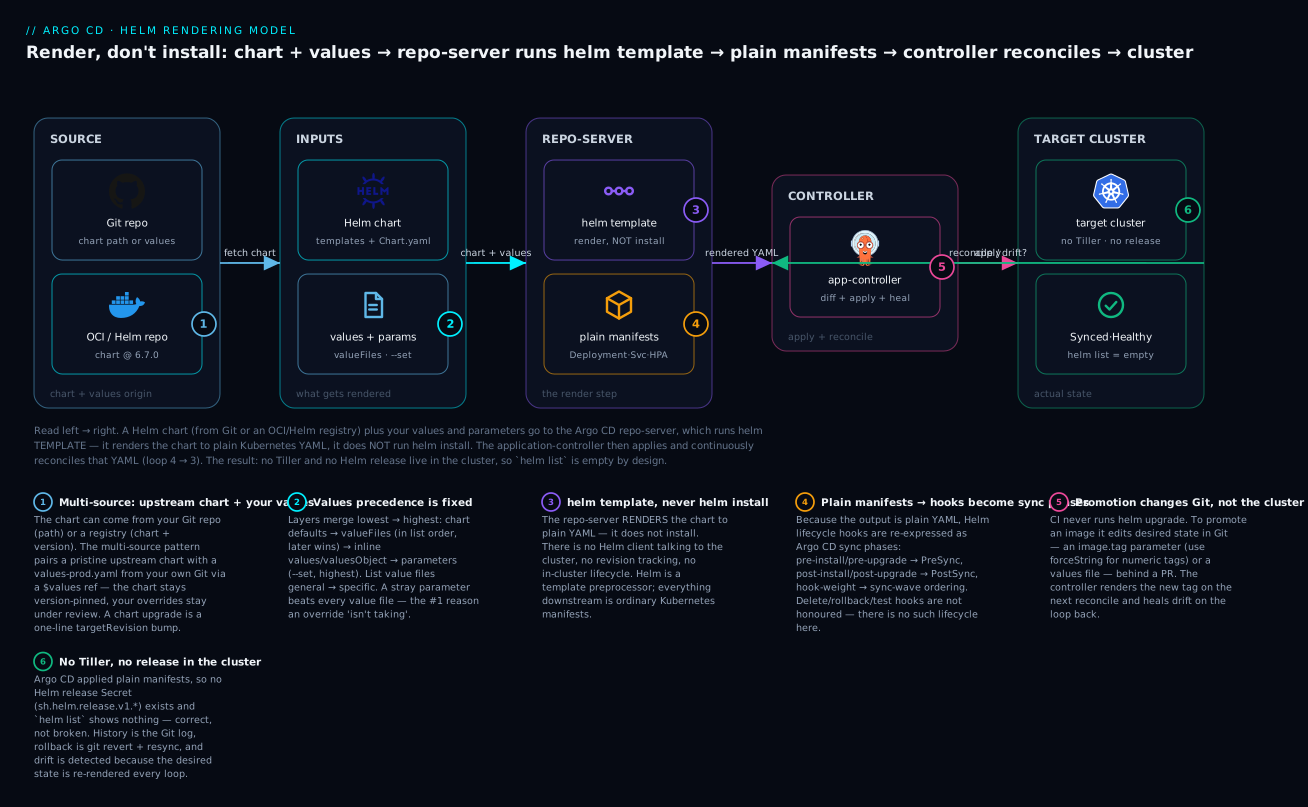
The badges mark the load-bearing ideas: values and parameters layer with a strict precedence (1); the repo-server runs helm template, never helm install (2); the output is plain YAML, so Helm hooks are re-expressed as sync phases (3); CI promotes an image by changing a parameter or a values file in Git (4); and the target cluster holds no Tiller and no release object, which is why helm list is empty (5).
The source.helm options, field by field
Everything that shapes how a chart renders lives under source.helm (or sources[].helm). This is the reference table to bookmark — every field, its type, and what it does.
| Field | Type | Equivalent Helm flag | What it does |
|---|---|---|---|
valueFiles |
[]string |
-f file.yaml (repeatable) |
Value files to apply, in order (later overrides earlier) |
values |
string |
inline -f |
Inline values as a raw YAML string block (legacy; prefer valuesObject) |
valuesObject |
object |
inline -f |
Inline values as a structured YAML map (type-safe; preferred) |
parameters |
[]{name,value,forceString} |
--set / --set-string |
Individual overrides, highest precedence; forceString: true ⇒ --set-string |
fileParameters |
[]{name,path} |
--set-file |
Set a value from a file’s contents (certs, scripts) |
releaseName |
string |
helm template <name> |
Sets .Release.Name; defaults to the Application name |
version |
string |
(Helm binary) | Helm version used to render (3; Helm 2 is removed — rarely set) |
namespace |
string |
--namespace |
Namespace used at render time (.Release.Namespace); defaults to destination.namespace |
passCredentials |
bool |
--pass-credentials |
Pass the repo’s credentials to dependency chart repos on the same host |
ignoreMissingValueFiles |
bool |
— | A missing file in valueFiles is skipped instead of failing the sync |
skipCrds |
bool |
drops --include-crds |
true ⇒ omit chart crds/; default false ⇒ CRDs are rendered |
kubeVersion |
string |
--kube-version |
Sets .Capabilities.KubeVersion for charts that gate on cluster version |
apiVersions |
[]string |
--api-versions |
Sets .Capabilities.APIVersions for charts that branch on available APIs |
A few of these deserve their own words because they cause real incidents.
parameters vs valuesObject vs fileParameters. All three inject values, but they differ in precedence and ergonomics:
| Mechanism | Precedence | Best for | Watch out for |
|---|---|---|---|
valuesObject |
Below parameters | Structured, multi-key overrides inline in the Application |
Merges as a map; readable in Git |
parameters |
Highest | A single scalar CI wants to bump (an image tag) | Type coercion — see forceString |
fileParameters |
Highest (with parameters) | Injecting a file’s contents (a cert, a config blob) | The file must exist in a source repo |
skipCrds and the CRD gotcha. Helm treats a chart’s crds/ directory specially: a real helm install applies those CRDs, but plain helm template omits them unless you pass --include-crds. Argo CD passes --include-crds by default, so CRDs in crds/ are rendered and applied — which is usually what you want. Set skipCrds: true to suppress them (for example, when a cluster-admin manages CRDs out-of-band and app teams must not touch them). The failure mode is subtle: a chart that ships CRDs only in crds/ will appear to work, but if you had skipCrds: true set, the CustomResources it also ships fail to apply because their definitions were never created.
kubeVersion / apiVersions and .Capabilities. During a real helm install, Helm queries the live cluster to populate .Capabilities.KubeVersion and .Capabilities.APIVersions — so a chart can render autoscaling/v2 on new clusters and autoscaling/v2beta2 on old ones. Argo CD renders in the repo-server, which has no live connection to the target cluster at render time, so .Capabilities fall back to Helm’s built-in defaults. If a chart branches on .Capabilities.APIVersions.Has or .Capabilities.KubeVersion, set these fields explicitly to match your cluster, or the chart may render the wrong API version.
ignoreMissingValueFiles. By default, listing a valueFile that does not exist fails the sync with a hard error. Turn this on when a per-environment overlay is optional — e.g. valueFiles: [values.yaml, values-$ENV.yaml] where some environments have no override file. The missing file is skipped instead of breaking the app.
Values precedence: who wins
When the same key is set in several places, Argo CD applies the layers in a fixed order and the last writer wins. From lowest to highest priority:
| Priority | Layer | Notes |
|---|---|---|
| 1 (lowest) | Chart’s built-in values.yaml |
The chart author’s defaults |
| 2 | valueFiles |
Applied in list order; a later file beats an earlier one |
| 3 | Inline values / valuesObject |
Applied after all value files |
| 4 (highest) | parameters / fileParameters |
--set beats every -f |
Trace one key, replicaCount, through a real config to see it concretely:
helm:
  valueFiles:
    - values.yaml         # replicaCount: 1   (chart default region)
    - values-prod.yaml    # replicaCount: 3
  valuesObject:
    replicaCount: 4
  parameters:
    - name: replicaCount
      value: "6"
| Layer | Sets replicaCount to |
Winning value so far |
|---|---|---|
Chart values.yaml |
1 | 1 |
values.yaml (your file) |
1 | 1 |
values-prod.yaml |
3 | 3 |
valuesObject |
4 | 4 |
parameters |
6 | 6 — final |
The rendered Deployment gets replicas: 6. The order inside valueFiles is the part people get wrong most: [base.yaml, prod.yaml] means prod wins; reverse them and base silently clobbers your production override. List value files from most-general to most-specific, always.
Image tags and promotion via parameters
In GitOps, CI never runs kubectl set image or helm upgrade against the cluster — it changes desired state in Git, and Argo CD reconciles. For a Helm app there are three clean ways to move a new image tag into that desired state:
| Approach | How CI promotes | Pros | Cons |
|---|---|---|---|
parameters in the Application |
Edit image.tag in the Application manifest (in Git) |
Explicit, highest precedence, visible in one place | CI must edit the Application object |
| A values file in Git | CI bumps image.tag in values-prod.yaml |
Clean separation; the Application stays static |
The value is one layer lower (parameters can still override) |
| Argo CD Image Updater | A controller watches the registry and writes the tag back to Git | Fully automated | Extra component; needs registry read + Git write creds |
The parameters approach, matching the way most CI pipelines wire it:
helm:
  parameters:
    - name: image.repository
      value: ghcr.io/acme/web
    - name: image.tag
      value: "1.16.2"
      forceString: true   # keep the tag a STRING, not a number
The forceString: true is not optional decoration — it prevents a whole class of outages. parameters map to helm --set, which infers types: a tag like 1.16 can be parsed as the float 1.16, and a date-style tag like 20240115 as an integer. Either can render a broken image reference (web:1.16 becoming web:1 after float truncation in some templates, or YAML re-serialising the number). forceString: true switches Argo CD to --set-string, quoting the value so it stays exactly "1.16.2". Any tag that is all digits, or looks like a number, needs forceString.
A CI job’s promotion step is therefore just a Git write: open a pull request that changes the image.tag line (in the Application or in values-prod.yaml), get it reviewed, merge, and Argo CD renders the new tag on the next reconcile. The image build still happens in CI; only the desired-state change is committed. Automating even that write-back is exactly what Argo CD Image Updater does — it watches ACR/ECR/Artifact Registry, and on a new matching tag commits the change back to Git so the promotion happens without a human editing YAML.
Helm vs Kustomize: an honest comparison
Argo CD supports both Helm and Kustomize as first-class config tools, and teams argue about which to use. They solve the same problem — parameterising manifests per environment — with opposite philosophies.
| Dimension | Helm | Kustomize |
|---|---|---|
| Core idea | Templating — Go templates + a values file | Overlays — patch a base with deltas |
| Logic | Conditionals, loops, functions, range |
None by design — declarative patches only |
| Input | values.yaml (and --set) |
kustomization.yaml + patches |
| Packaging / distribution | Yes — versioned, publishable chart artifacts | No native packaging; it is just directories |
| Ecosystem | Huge — most third-party software ships a chart | Growing; great for first-party manifests |
| Readability of the override | A values file (can be large) | A patch (usually small — just the delta) |
| Argo CD renders it with | helm template |
kustomize build |
| Failure mode | Template logic bugs, whitespace, type coercion | Patch targets a field that moved; strategic-merge surprises |
When to reach for which:
| Choose | When |
|---|---|
| Helm | Consuming upstream/community software; you need real templating logic; you want versioned, distributable artifacts; the app is parameter-heavy |
| Kustomize | You own the base YAML; you want plain manifests with no templating; per-environment change is a small delta; you dislike template debugging |
| Both together | An upstream Helm chart you must post-process — inflate the chart, then patch its output with Kustomize |
You can combine them: Kustomize can inflate a Helm chart via its helmCharts: field, which Argo CD enables when the repo-server is configured with kustomize.buildOptions: --enable-helm. But note the boundary — a single Argo CD source renders with one tool. A source is either Helm or Kustomize; if you need both, it is Kustomize-driving-Helm within one source, not two engines side by side. For most teams the honest rule is: Helm for other people’s software, Kustomize for your own — and do not template what a small overlay can express. The Kustomize with Argo CD lesson covers the overlay side in full.
Hands-on lab: multi-source podinfo with your own values
You will deploy the public podinfo chart using the multi-source pattern — the upstream chart from its Helm repo, layered with a values-prod.yaml from a Git repo — set an image tag via parameters, inspect the rendered manifests, change a value, and re-sync. A local kind cluster keeps it free and cloud-neutral.
Note on outputs: the manifests and command output below are representative — real
helm template/argocdoutput shaped for teaching, not a transcript. Field names, thesource.helmschema, and theApplicationstructure are exact and valid for Argo CD 2.13+/3.x.
Step 1 — A cluster and Argo CD.
kind create cluster --name helm-lab
kubectl create namespace argocd
kubectl apply -n argocd -f https://raw.githubusercontent.com/argoproj/argo-cd/stable/manifests/install.yaml
kubectl -n argocd rollout status deploy/argocd-repo-server   # wait for it
What just happened: a throwaway cluster with a full Argo CD control plane. The argocd-repo-server — the component that will run helm template — is the one to watch.
Step 2 — Log in and register the Helm repo.
argocd admin initial-password -n argocd          # print the initial admin password
kubectl -n argocd port-forward svc/argocd-server 8080:443 &
argocd login localhost:8080 --username admin --insecure
# Tell Argo CD this URL is a HELM repo, not Git:
argocd repo add https://stefanprodan.github.io/podinfo --type helm --name podinfo
What just happened: Argo CD now knows podinfo is a Helm repository, so it will resolve chart: podinfo + a version against its index.yaml.
Step 3 — Put a values file in a Git repo. In your own Git repo (here acme/app-config), commit apps/podinfo/values-prod.yaml:
# apps/podinfo/values-prod.yaml
replicaCount: 2
ui:
  message: "hello from prod (GitOps)"
resources:
  requests:
    cpu: 50m
    memory: 32Mi
What just happened: your environment config now lives in Git, under review — separate from the upstream chart you do not own.
Step 4 — Declare the multi-source Application. Multi-source apps are declarative (the CLI cannot express two sources cleanly), so apply YAML:
# podinfo-app.yaml
apiVersion: argoproj.io/v1alpha1
kind: Application
metadata:
  name: podinfo
  namespace: argocd
spec:
  project: default
  sources:
    - repoURL: https://stefanprodan.github.io/podinfo
      chart: podinfo
      targetRevision: 6.7.0
      helm:
        valueFiles:
          - $values/apps/podinfo/values-prod.yaml
        parameters:
          - name: image.tag
            value: "6.7.0"
            forceString: true
    - repoURL: https://github.com/acme/app-config.git
      targetRevision: main
      ref: values
  destination:
    server: https://kubernetes.default.svc
    namespace: podinfo
  syncPolicy:
    syncOptions:
      - CreateNamespace=true
kubectl apply -f podinfo-app.yaml
What just happened: Argo CD pairs the upstream chart (podinfo 6.7.0) with your Git values via the $values ref, and pins the image tag as a string.
Step 5 — See the RENDERED manifests before syncing.
argocd app manifests podinfo # what helm template produced (desired state)
# representative rendered output (helm template result Argo CD will apply)
apiVersion: apps/v1
kind: Deployment
metadata:
  name: podinfo
  namespace: podinfo
  labels:
    app.kubernetes.io/name: podinfo
spec:
  replicas: 2                      # from values-prod.yaml
  template:
    spec:
      containers:
        - name: podinfo
          image: ghcr.io/stefanprodan/podinfo:6.7.0   # tag forced to string
          ports:
            - name: http
              containerPort: 9898
          env:
            - name: PODINFO_UI_MESSAGE
              value: "hello from prod (GitOps)"        # from values-prod.yaml
What just happened: this is the whole point of the render model made visible — Argo CD’s desired state is plain YAML, not a Helm release. replicas: 2 and the UI message came from your Git values file; the image tag stayed a string.
Step 6 — Sync and check status.
argocd app sync podinfo
argocd app get podinfo
# representative
Name:               argocd/podinfo
Project:            default
Sync Status:        Synced to 6.7.0
Health Status:      Healthy

GROUP  KIND        NAMESPACE  NAME     STATUS  HEALTH
       Service     podinfo    podinfo  Synced  Healthy
apps   Deployment  podinfo    podinfo  Synced  Healthy
Now prove the render model with your own eyes:
helm list -n podinfo
# (empty)  <-- CORRECT: Argo CD applied plain manifests, there is no Helm release
What just happened: Synced/Healthy, yet helm list is empty — exactly as the model predicts. There is no Tiller and no release Secret; Argo CD tracks state itself.
Step 7 — Change a value and re-sync (the GitOps loop). Edit values-prod.yaml in Git — replicaCount: 3 — and commit. Then:
argocd app diff podinfo
# representative
===== apps/Deployment podinfo/podinfo =====
-  replicas: 2
+  replicas: 3
argocd app sync podinfo # (or let automated sync pick it up)
What just happened: the diff is computed between the newly rendered manifests (Git desired state) and the live cluster — not between Helm revisions. Reconciliation is manifest-level, always.
Step 8 — Teardown.
kubectl delete -f podinfo-app.yaml     # remove the Application (and its resources)
kind delete cluster --name helm-lab    # delete the whole cluster
What just happened: the app and cluster are gone. Because there was never a Helm release, there is nothing else to clean up — deleting the Application and cluster is complete.
Common mistakes and troubleshooting
Nearly every Helm-on-Argo problem traces back to the render model or to values precedence. Keep this table close. The states referenced below — Synced, OutOfSync, Healthy, Degraded — are defined in full in the Sync Status & Health Assessment lesson.
| Symptom | Cause | Fix |
|---|---|---|
helm list shows nothing though the app is Synced |
Render model — Argo CD never created a Helm release | Expected. Track state via argocd app get; “history” is Git |
A valueFiles override is ignored |
Wrong order — a later file overrode it, or a parameter beat it |
Order files general → specific; remember parameters win over all files |
Image tag renders wrong (web:1 from 1.16, number instead of string) |
--set coerced a numeric-looking tag |
Set forceString: true on the tag parameter |
Sync fails: values file ... does not exist |
A valueFile path is missing (typo or optional overlay) |
Fix the path, or set ignoreMissingValueFiles: true for optional files |
| CustomResources fail to apply; CRDs missing | skipCrds: true, or the chart ships CRDs only in crds/ and they were skipped |
Ensure skipCrds is false (default) so --include-crds is passed |
| Chart silently upgrades itself | targetRevision: '*' or a semver range on a Helm-repo source |
Pin an exact chart version (targetRevision: 6.7.0) |
A chart’s lookup/.Release.IsUpgrade logic misbehaves |
No live cluster at render time; every render is a fresh “install” | Do not rely on lookup; supply values explicitly or use an external secret store |
App is perpetually OutOfSync with changing values |
Chart generates randomness (randAlphaNum, genSignedCert) each render |
Pin the generated value in Git, or move it to Sealed Secrets / ESO |
A chart’s helm.sh/hook Job never runs at the right time |
It is a delete/rollback/test hook, unsupported in the render model | Re-express it as a native Argo CD sync wave / hook |
Umbrella chart fails: found in Chart.yaml, but missing in charts/ |
Dependencies were never built or a dep repo is unreachable/private | Ensure dep repos are reachable; for private ones set passCredentials: true |
| OCI chart pull fails with auth error | The registry is private and Argo CD has no OCI credentials | Register the repo with --enable-oci and credentials (see the repositories lesson) |
.Capabilities.APIVersions.Has renders the wrong API |
repo-server has no cluster capabilities at render time | Set kubeVersion and apiVersions on source.helm |
Three gotchas cost the most hours and deserve extra words:
1. Diff noise from generated values. Charts that call randAlphaNum, genCA, or genSignedCert produce a new random value on every render. Under helm install the release Secret preserves the first value; under Argo CD there is no release Secret, so each reconcile renders a fresh secret and Argo CD reports a perpetual OutOfSync (and would rewrite the secret on every self-heal). The real helm workaround — an {{ if not (lookup ...) }} guard that reuses the existing value — does not work, because lookup returns empty in the repo-server. The correct fixes are to (a) generate the secret once and commit it via Sealed Secrets/SOPS, or (b) let the External Secrets Operator own it and tell Argo CD to ignoreDifferences on that field. Secrets in GitOps have a dedicated Tier 2 lesson.
2. parameters beat everything — including your carefully layered value files. Because --set has the highest precedence, a stray parameter in the Application will override a value you thought you controlled in values-prod.yaml. If a change to a value file “isn’t taking”, check the Application’s parameters list first — that is almost always the culprit.
3. The crds/ split. helm template skips crds/ unless --include-crds is passed; Argo CD passes it by default. The failure only appears if someone sets skipCrds: true “to be safe” and then wonders why the chart’s CustomResources will not apply — their definitions were never created. Leave skipCrds at its default unless a cluster-admin genuinely owns those CRDs elsewhere.
Cheat-sheet
source.helm fields at a glance:
| Field | One-liner |
|---|---|
valueFiles: [] |
Value files, applied in order (later wins) |
values: "..." |
Inline values as a YAML string (legacy) |
valuesObject: {} |
Inline values as a structured map (preferred) |
parameters: [{name,value,forceString}] |
--set overrides; highest precedence |
fileParameters: [{name,path}] |
--set-file — value from a file |
releaseName |
Sets .Release.Name (defaults to app name) |
passCredentials: true |
Share repo creds with dependency repos |
ignoreMissingValueFiles: true |
Skip missing value files instead of failing |
skipCrds: true |
Omit chart crds/ (default false ⇒ CRDs applied) |
kubeVersion / apiVersions |
Set .Capabilities.* for version-gated charts |
Precedence (low → high): chart values.yaml → valueFiles (in order) → valuesObject/values → parameters/fileParameters.
Chart-source shape: Git chart ⇒ repoURL(git) + path + targetRevision(git ref). Registry chart ⇒ repoURL(registry) + chart + targetRevision(chart version). Multi-source ⇒ chart source uses $ref/path in valueFiles; the values source carries ref: and no chart/path.
Helm-vs-Kustomize rule: Helm for other people’s software and template-heavy apps; Kustomize for your own YAML and small per-env deltas; do not template what an overlay can patch.
Commands:
| Command | What it does |
|---|---|
argocd repo add <url> --type helm --name X |
Register a Helm repo (--enable-oci for OCI) |
argocd app manifests <app> |
Show the rendered desired-state manifests |
argocd app diff <app> |
Diff rendered desired state vs live cluster |
argocd app get <app> |
Sync status, health, resource tree |
argocd app set <app> --helm-set image.tag=1.2.3 |
Set a Helm parameter imperatively |
argocd app sync <app> |
Apply the rendered manifests now |
helm list -n <ns> |
(Under Argo CD: empty — no release exists) |
Interview and exam questions
Q: Does Argo CD run helm install? Walk through what actually happens when it deploys a Helm chart.
A: No. The repo-server runs the equivalent of helm template to render the chart into plain Kubernetes manifests using your value files and parameters. Those manifests become Argo CD’s desired state. The application-controller then diffs them against the live cluster and applies the difference, and keeps reconciling on every loop. Helm is only a template preprocessor; it never touches the cluster.
Q: Why does helm list show nothing on a cluster Argo CD manages?
A: Because Argo CD never performed a Helm install, so no Helm release object (the sh.helm.release.v1.* Secret) was ever created. There is nothing for helm list to enumerate. Argo CD tracks state itself; your history is the Git log and rollback is git revert + resync.
Q: What is the values precedence order in source.helm?
A: Lowest to highest: the chart’s built-in values.yaml, then valueFiles in the order listed (later files win), then inline values/valuesObject, then parameters/fileParameters (--set, highest). If a key is set in several places, the highest layer wins.
Q: What does forceString: true do on a parameter, and when do you need it?
A: It switches Argo CD from --set to --set-string, so the value is treated as a literal string rather than type-inferred. You need it for any numeric-looking value — image tags like 1.16 (parsed as a float) or 20240115 (parsed as an int) — that must stay a string, or the rendered image reference breaks.
Q: How do you deploy an upstream community chart but keep your own values under review in Git, without forking the chart?
A: Use the multi-source pattern. One source is the chart (chart + repoURL + targetRevision); a second Git source carries only your values file and is labelled with ref: values. The chart source references it as $values/path/to/values.yaml in valueFiles. The chart stays pristine and version-pinned; a chart upgrade is a one-line targetRevision change.
Q: For a chart pulled from a Helm repo, what does targetRevision mean?
A: The chart version (semver), not a Git ref. targetRevision: 6.7.0 pins that exact chart version. For a chart in a Git repo, targetRevision is instead a Git branch/tag/SHA.
Q: A chart’s pre-upgrade hook Job needs to run before the new pods. Does Argo CD honour it?
A: Yes — Argo CD translates Helm install/upgrade hooks to its own sync phases. pre-install/pre-upgrade map to PreSync, post-install/post-upgrade to PostSync, and helm.sh/hook-weight orders them like sync waves. Delete/rollback/test hooks are not honoured, because there is no Helm delete/rollback/test lifecycle in the render model.
Q: A chart works with helm install but is perpetually OutOfSync under Argo CD, and its generated password changes every reconcile. Why, and how do you fix it?
A: The chart generates a random value (randAlphaNum/genSignedCert) on each render. With helm install, the release Secret preserves the first value; Argo CD has no release Secret, so every render produces a new value and reports a perpetual diff. The usual lookup-based reuse guard fails because lookup returns empty in the repo-server. Fix it by pinning the value in Git (Sealed Secrets/SOPS) or letting the External Secrets Operator own it and ignoreDifferences on that field.
Q: Why might a chart render the wrong API version (e.g. autoscaling/v2beta2) under Argo CD, and how do you correct it?
A: The chart branches on .Capabilities.APIVersions/.Capabilities.KubeVersion. A real helm install queries the live cluster to fill those; Argo CD renders in the repo-server with no live cluster, so capabilities fall back to Helm defaults. Set kubeVersion and apiVersions on source.helm to match the target cluster.
Q: When would you choose Kustomize over Helm for a workload? A: When you own the base manifests, want plain YAML with no templating logic to debug, and the per-environment change is a small delta best expressed as a patch. Helm suits consuming upstream software, template-heavy parameterization, and versioned/distributable artifacts. A pragmatic rule: Helm for other people’s software, Kustomize for your own.
Q: How does CI promote a new image tag in a Helm-based GitOps setup?
A: CI builds and pushes the image, then changes desired state in Git — either the image.tag parameter in the Application or image.tag in a values file — via a reviewed commit/PR. Argo CD renders the new tag on the next reconcile. CI never runs helm upgrade or kubectl against the cluster. Argo CD Image Updater can automate the Git write-back.
Q: What is the difference between values, valuesObject, and parameters?
A: values is inline values as a raw YAML string (legacy); valuesObject is the same but as a structured, type-safe map (preferred); parameters are individual --set overrides with the highest precedence. Use valuesObject for structured inline config and parameters for the one scalar CI needs to bump.
Key takeaways
- Argo CD renders, it does not install. The repo-server runs
helm template; the application-controller applies and reconciles the resulting plain manifests. Helm is a template preprocessor, nothing more. - No Tiller, no release, empty
helm list. There is no in-cluster Helm release object.helm listshowing nothing is correct. History is your Git log; rollback isgit revert+ resync. - Precedence is fixed: chart defaults →
valueFiles(in order, later wins) → inlinevalues/valuesObject→parameters(highest). Order value files general → specific, and rememberparametersbeat every file. - Three chart sources, one killer pattern. Chart-in-Git (
path), chart-from-registry (chart+ version), or an umbrella chart — and the multi-source pattern ($ref+valueFiles) to layer your own Git values onto a pristine upstream chart. - The render model creates gotchas:
lookupreturns empty,.Release.IsUpgradeis always false, generated randomness causes perpetualOutOfSync,.CapabilitiesneedkubeVersion/apiVersions, andcrds/needs--include-crds(default on;skipCrdsturns it off). forceStringfor numeric-looking tags. Any all-digits or dotted image tag set viaparametersneedsforceString: trueor--setwill coerce it and break the image reference.- Helm hooks become sync phases. Install/upgrade hooks map to PreSync/PostSync with
hook-weightacting like sync waves; delete/rollback/test hooks are not honoured. - Helm for other people’s software, Kustomize for your own — and never template what a small overlay can patch. A single Argo CD source renders with exactly one tool.