You have one application and three environments — dev, staging, prod — and they are almost identical. Almost. Prod runs three replicas, dev runs one. Prod pins image v1.2.3, dev runs whatever came off the last build. Prod lives in namespace web-prod, dev in web-dev. The naive answer is to copy the Deployment YAML three times and hand-edit the differences. Do that and within a month the three copies have silently drifted — a resources: limit someone bumped in prod but forgot in staging, a label that exists in dev and nowhere else. The copies stop being three views of one app and become three different apps that happen to share a name.
Kustomize is the tool that kills the copy-paste. You write the shared manifests once in a base, and each environment gets a small overlay that expresses only its deltas. And Argo CD loves Kustomize for a specific reason: it needs no configuration to use it. Drop a kustomization.yaml in the directory an Argo Application points at, and Argo’s repo-server detects it and runs kustomize build for you — the same way it detects a Helm chart from a Chart.yaml. This lesson is the complete beginner’s path from “what is a base” to “two Argo Applications, one per overlay, both Synced and Healthy.”
Why this matters
Every GitOps repo eventually faces the same fork in the road: how do you keep N environments from drifting apart? Argo CD is the delivery engine — it pulls desired state from Git and reconciles it onto clusters — but it does not, by itself, tell you how to express “the same app, slightly different per environment.” That is a packaging problem, and Kustomize is one of the two standard answers (Helm is the other; we compare them at the end and go deep on Helm in Helm with Argo CD: values and parameters).
The mental model to hold from the start: Kustomize is template-free. There is no {{ .Values.replicas }}, no Go templating language to learn, no if/range. Every file in a Kustomize tree is valid, plain Kubernetes YAML that kubectl apply would accept on its own. Kustomize’s job is purely to take that valid YAML and transform it — rename it, relabel it, swap an image tag, bump a replica count — by layering declarative instructions on top. Because the inputs are real manifests, you can open any file and understand it without mentally rendering a template first. That property is exactly why large platform teams reach for it.
The second thing to internalise: Argo CD does not run a special “Kustomize mode” you have to enable. Argo’s repo-server inspects the directory your Application’s source.path points at. If it finds a kustomization.yaml, it runs kustomize build on that directory and treats the rendered output as the desired state. If it finds a Chart.yaml, it runs Helm. If it finds neither, it applies the raw YAML directly. This auto-detection is the whole integration — there is no glue to write. Your job is to structure the repo correctly and point each Application at the right overlay.
What Kustomize is (and why Argo CD auto-detects it)
Kustomize renders manifests by overlaying transformations onto a base, not by filling in a template. You start from complete manifests and describe the changes you want as data. Here is how that philosophy contrasts with the template approach you may have seen in Helm:
| Dimension | Kustomize (overlay) | Helm (template) |
|---|---|---|
| Source files | Valid, applyable Kubernetes YAML | Go-template YAML with {{ }} — not valid until rendered |
| Customisation via | Transformers + patches layered over a base | Values injected into template placeholders |
| Logic (if/loops) | None — declarative only | Full templating language |
| Learn a new syntax? | No — it’s just YAML + a small field vocabulary | Yes — Go templates + Sprig functions |
| Packaging/registry | Directories in Git (or remote refs) | Versioned chart tarballs in a repo/OCI registry |
| Ships with kubectl | Yes — kubectl kustomize / kubectl apply -k |
No |
| Best at | Environment overlays of your own manifests | Distributing a configurable app to many consumers |
Neither is “better” — they solve different problems, and Argo CD supports both first-class. Kustomize shines when you own the manifests and need per-environment variants; Helm shines when packaging an app for others to install with knobs.
Argo CD picks the tool by looking at the files in source.path. You do not set a “type” field:
File found in source.path |
Tool Argo CD runs | Effective command (conceptually) |
|---|---|---|
kustomization.yaml (or .yml / Kustomization) |
Kustomize | kustomize build <path> |
Chart.yaml |
Helm | helm template <path> |
| A configured config-management plugin match | That CMP | plugin’s generate command |
Plain .yaml manifests, none of the above |
Directory apply | applies the YAML as-is (recurse optional) |
The practical rule that trips up newcomers: point source.path at the overlay directory, not the base. The overlay is the thing that references the base and adds the environment’s deltas; the base on its own is usually not what you want to deploy. Point at overlays/prod, and Argo renders prod. Point at base, and you get the un-customised skeleton (wrong image tag, wrong replica count) — or, if the base has no kustomization.yaml, a ComparisonError.
The base + overlay model
A Kustomize project has two kinds of directory, and understanding the split is 80% of the skill.
| Base | Overlay | |
|---|---|---|
| Purpose | The shared, environment-neutral manifests | One environment’s specific deltas |
| Contains | Full Deployment, Service, etc. + a kustomization.yaml listing them under resources: |
A small kustomization.yaml that references the base and layers changes |
| References | Nothing (it is the root) | The base, via resources: [../../base] |
| How many | One per app (usually) | One per environment (dev, staging, prod, …) |
| Typical size | The full manifests | Tens of lines — only the diff |
| Deployed directly? | Rarely | Yes — this is what an Argo Application points at |
Every kustomization.yaml starts with the same two lines that identify it to Kustomize:
apiVersion: kustomize.config.k8s.io/v1beta1
kind: Kustomization
A base’s kustomization.yaml mostly just enumerates the manifests it owns:
# base/kustomization.yaml
apiVersion: kustomize.config.k8s.io/v1beta1
kind: Kustomization
resources:
  - deployment.yaml
  - service.yaml
Those referenced files are ordinary manifests — nothing Kustomize-specific about them:
# base/deployment.yaml
apiVersion: apps/v1
kind: Deployment
metadata:
  name: web
  labels:
    app: web
spec:
  replicas: 1
  selector:
    matchLabels:
      app: web
  template:
    metadata:
      labels:
        app: web
    spec:
      containers:
        - name: web
          image: ghcr.io/kloudvin/web:latest
          ports:
            - containerPort: 8080
An overlay’s kustomization.yaml references the base and states only what differs. The resources path is relative to the overlay’s own directory, which is why the classic layout overlays/prod/kustomization.yaml reaches the base with ../../base:
# overlays/prod/kustomization.yaml
apiVersion: kustomize.config.k8s.io/v1beta1
kind: Kustomization
resources:
  - ../../base
namespace: web-prod
replicas:
  - name: web
    count: 3
images:
  - name: ghcr.io/kloudvin/web
    newTag: v1.2.3
commonLabels:
  env: prod
Read that overlay out loud and you have described prod entirely: take the base, put it in namespace web-prod, run three replicas, pin the image to v1.2.3, stamp env: prod on everything. There is not a single duplicated container spec. The canonical directory layout:
web-config/
  base/
    kustomization.yaml
    deployment.yaml
    service.yaml
  overlays/
    dev/
      kustomization.yaml       # namePrefix dev-, replicas 1, image :dev
    staging/
      kustomization.yaml
    prod/
      kustomization.yaml       # replicas 3, image :v1.2.3, env: prod
The transformers and generators you’ll actually use
Everything an overlay does falls into three buckets: transformers (rename/relabel/retag existing resources), generators (create ConfigMaps/Secrets from literals or files), and patches (surgical edits to specific fields). Here are the transformers you will reach for constantly:
| Transformer field | What it does | Example value |
|---|---|---|
namePrefix |
Prepends a string to every resource name | dev- → web becomes dev-web |
nameSuffix |
Appends a string to every resource name | -v2 → web becomes web-v2 |
namespace |
Sets .metadata.namespace on all namespaced resources |
web-prod |
commonLabels |
Adds labels to all resources and their selectors | env: prod |
commonAnnotations |
Adds annotations to all resources (not selectors) | team: platform |
replicas |
Overrides replica count by resource name | - {name: web, count: 3} |
images |
Overrides image name / tag / digest | see below |
labels |
Newer, selector-safe labels (with includeSelectors) |
see the selector note |
Two of these carry a sharp edge worth flagging now. First, commonLabels writes into the pod selector (spec.selector.matchLabels), and a Deployment’s selector is immutable after creation. Setting commonLabels on a fresh deploy is fine — it stamps the selector once. But adding a new commonLabels key to an already-running Deployment changes the selector, which the API server rejects, forcing a delete-and-recreate. When you only want a label for humans/queries and not in the selector, use the newer labels: transformer with includeSelectors: false:
labels:
  - pairs:
      env: prod
      team: platform
    includeSelectors: false   # add the labels, but leave the pod selector alone
The images transformer is the single most important one for GitOps, because image promotion is how you ship a new version: your CI builds and pushes an image, then a one-line change to newTag in the prod overlay (a reviewable Git commit) is the entire production rollout. Its anatomy:
images key |
Meaning | When to use |
|---|---|---|
name |
The image reference in the base to match (must match exactly) | Always — this is the selector |
newName |
Replace the repository/name | Moving registries (e.g. Docker Hub → ECR) |
newTag |
Replace the tag | The everyday promotion knob |
digest |
Pin to an immutable sha256: digest |
Prod hardening — digests can’t be re-pushed |
images:
  - name: ghcr.io/kloudvin/web      # must equal the image in base (sans tag)
    newTag: v1.2.3                  # promote to this version
  # or pin immutably:
  - name: ghcr.io/kloudvin/api
    digest: sha256:9b2c...af10
The commonest mistake here: the name must match the image string in the base exactly (excluding the tag). If the base says ghcr.io/kloudvin/web but your override says kloudvin/web, Kustomize silently matches nothing and your tag override is a no-op — the app deploys :latest and you spend an hour wondering why.
Generators build ConfigMaps and Secrets from literals, files, or env files, and they do something clever that plain manifests cannot:
| Generator field | Produces | Key sub-fields |
|---|---|---|
configMapGenerator |
A ConfigMap per entry |
name, literals, files, envs, behavior |
secretGenerator |
A Secret per entry |
name, literals, files, envs, type, behavior |
generatorOptions |
Tunes generator behaviour globally | disableNameSuffixHash, labels, annotations |
configMapGenerator:
  - name: web-config
    literals:
      - LOG_LEVEL=info
      - FEATURE_X=true
    # behavior: merge   # merge/replace/create — merge onto a base-defined generator
The clever part is the content hash. Kustomize appends a hash of the contents to the generated name — web-config becomes web-config-9f8b7c6d5e — and rewrites every reference to it (in a Deployment’s envFrom, volumes, etc.) to point at the hashed name. Change a literal and the hash changes, so you get a new ConfigMap name, and the Deployment now references a name that didn’t exist before, which triggers a rolling update. This is how a config edit safely restarts your pods with the new config — no manual kubectl rollout restart. The behaviours you can set per generator:
behavior |
Effect | Use in |
|---|---|---|
create (default) |
Make a brand-new ConfigMap/Secret | Base, or a new one in an overlay |
merge |
Add/override keys on a same-named generator from the base | Overlay adding env-specific keys |
replace |
Replace the base’s generator entirely | Overlay fully redefining it |
⚠️ Never put a real secret’s value in a
secretGeneratorcommitted to Git — even base64 is not encryption. Use it for structure and non-sensitive defaults, and inject real secret material with Sealed Secrets, the External Secrets Operator, or SOPS. We cover this failure mode again in troubleshooting.
Patches are for edits the transformers above can’t express — changing a specific container’s memory limit, adding a nodeSelector, deleting a field. Kustomize offers two patch styles, unified under one modern patches: field:
| Patch style | Looks like | Best for | Gotcha |
|---|---|---|---|
| Strategic-merge | A partial copy of the resource with only the fields you change | Adding/overriding whole blocks; merges lists by key | Needs the right apiVersion/kind/name to target |
| JSON6902 (RFC 6902) | A list of op/path/value operations |
Surgical edits, remove, array-index ops |
path uses /slashes; wrong index/path fails or no-ops |
The modern, recommended way to write either is the single patches: field, with an inline patch: (or a path: to a file) plus a target: selector:
patches:
  # strategic-merge: bump the web container's memory limit
  - target:
      kind: Deployment
      name: web
    patch: |-
      apiVersion: apps/v1
      kind: Deployment
      metadata:
        name: web
      spec:
        template:
          spec:
            containers:
              - name: web
                resources:
                  limits:
                    memory: 512Mi
  # JSON6902: add an annotation via an explicit operation
  - target:
      kind: Deployment
      name: web
    patch: |-
      - op: add
        path: /spec/template/metadata/annotations/prometheus.io~1scrape
        value: "true"
Kustomize infers the style from the patch body: a YAML fragment that looks like a resource is treated as strategic-merge; a list of op: entries is treated as JSON6902. The valid JSON6902 operations are add, remove, replace, move, copy, and test. (You may still see the older, separate patchesStrategicMerge: and patchesJson6902: fields in real repos — they work but are deprecated in favour of the unified patches:.)
Wiring Kustomize into Argo CD
An Argo CD Application that deploys an overlay is almost boring — that is the point. You point source.path at the overlay and Argo does the rest. (If Applications are new to you, start with Your first Application: source and destination.)
apiVersion: argoproj.io/v1alpha1
kind: Application
metadata:
  name: web-prod
  namespace: argocd
spec:
  project: default
  source:
    repoURL: https://github.com/kloudvin/web-config.git
    targetRevision: main
    path: overlays/prod          # the OVERLAY, not the base
  destination:
    server: https://kubernetes.default.svc
    namespace: web-prod
  syncPolicy:
    automated:
      prune: true
      selfHeal: true
    syncOptions:
      - CreateNamespace=true
There is no kustomize: block above and it still works, because auto-detection handles everything — the overlay’s own kustomization.yaml carries the image tag, replica count, and namespace. The kustomize: block is only needed when you want to override at the Application level, on top of what the overlay already says. That is useful when CI updates the Application (not the repo) with a freshly built tag, or when the platform team pins something centrally:
spec:
  source:
    path: overlays/prod
    kustomize:
      images:
        - ghcr.io/kloudvin/web:v1.2.4   # wins over the overlay's newTag
      replicas:
        - name: web
          count: 5
      namePrefix: eu-
Everything Argo exposes under spec.source.kustomize maps to a Kustomize transformer, so you can reproduce most of an overlay from the Application itself:
source.kustomize field |
Type | Effect | Kustomize equivalent |
|---|---|---|---|
namePrefix |
string | Prepend to resource names | namePrefix |
nameSuffix |
string | Append to resource names | nameSuffix |
images |
[]string |
Override image, as name:tag, name=newname:tag, or name@digest |
images |
replicas |
[{name,count}] |
Override replica counts | replicas |
commonLabels |
map | Add labels to all resources (and selectors) | commonLabels |
commonAnnotations |
map | Add annotations to all resources | commonAnnotations |
commonAnnotationsEnvsubst |
bool | Expand $VARS inside commonAnnotations values |
Argo feature |
namespace |
string | Set namespace on all namespaced resources | namespace |
version |
string | Which bundled Kustomize binary to render with | — |
forceCommonLabels |
bool | Allow overriding labels that already exist | — |
forceCommonAnnotations |
bool | Allow overriding annotations that already exist | — |
components |
[]string |
Pull in extra Kustomize component directories | components |
patches |
[{patch/path,target}] |
Apply strategic-merge / JSON6902 patches at app level | patches |
labelWithoutSelector |
bool | Add commonLabels without touching pod selectors (newer) |
labels: includeSelectors:false |
Note one field that is not on this list and that beginners expect to be: buildOptions. There is no spec.source.kustomize.buildOptions. Build options (like enabling Helm-chart inflation, or relaxing the load restrictor) are a global setting, configured once in the argocd-cm ConfigMap and applied to every Application the repo-server renders:
| Setting | Where it lives | Scope | Example value |
|---|---|---|---|
kustomize.buildOptions |
argocd-cm ConfigMap |
All Applications | --enable-helm --load-restrictor LoadRestrictionsNone |
kustomize.buildOptions.v5.4.3 |
argocd-cm ConfigMap |
Apps pinned to that version | version-specific flags |
kustomize.version.v5.4.3 |
argocd-cm ConfigMap |
Registers an extra Kustomize binary | path to the binary in the repo-server image |
spec.source.kustomize.* |
The Application manifest |
That one Application only | images, namePrefix, patches, … |
Keeping the global-vs-per-app distinction straight saves real confusion: you enable --enable-helm once in argocd-cm, not on every Application.
You can also set these from the CLI, which is handy for one-offs and CI. Every source.kustomize field has a matching flag on argocd app create/argocd app set:
# Point an app at an overlay and set an Application-level image override
argocd app create web-prod \
  --repo https://github.com/kloudvin/web-config.git \
  --path overlays/prod \
  --dest-server https://kubernetes.default.svc \
  --dest-namespace web-prod \
  --sync-policy automated

# Later, promote by overriding the image from CI (updates the Application)
argocd app set web-prod --kustomize-image ghcr.io/kloudvin/web:v1.2.4
One Application per overlay — and how it scales
The clean pattern is one Argo Application per overlay. Three environments, three Applications, each pointed at its overlay directory and its destination namespace:
| Environment | source.path |
destination.namespace |
Overlay deltas |
|---|---|---|---|
| dev | overlays/dev |
web-dev |
namePrefix: dev-, replicas 1, image :dev |
| staging | overlays/staging |
web-staging |
replicas 2, image :rc-* |
| prod | overlays/prod |
web-prod |
replicas 3, image :v1.2.3, env: prod |
Hand-writing three Applications is fine. Hand-writing thirty — three environments across ten clusters — is the boilerplate trap, and it is exactly what ApplicationSet exists to eliminate. An ApplicationSet is a controller that stamps out one Application per generated parameter set from a template. A Git-directory generator can produce one Application per overlay directory automatically; a cluster generator can fan the same overlay across every registered cluster:
| Scale | Approach | What generates the Applications |
|---|---|---|
| A few envs, one cluster | One Application per overlay, hand-written |
You (committed once) |
| Many envs, one cluster | ApplicationSet + Git-directory generator over overlays/* |
The ApplicationSet controller |
| Same app across many clusters | ApplicationSet + cluster generator (or a matrix of overlays × clusters) | The ApplicationSet controller |
This is where the “cloud-neutral” promise of Kustomize meets the multi-cloud reality of Argo CD. The overlay model is deliberately cloud-agnostic — a namespace, an image tag, and a replica count don’t care which cloud they run on. But the destination clusters do: your dev overlay might target an AKS cluster in Azure, staging an EKS cluster in AWS, and prod a GKE cluster in Google Cloud, each registered with Argo CD as a separate cluster secret. The same base and overlays render identically; only the Application’s destination.server (which cluster) changes per environment. The matrix generator (overlays × clusters) that turns “one base” into “the same app on AKS + EKS + GKE” is the subject of the multi-cluster tier — for now, hold the thought that one overlay maps to one environment today and one cluster-per-cloud tomorrow, from the same base.
The rendering model: what Argo actually applies
Three facts about how Argo renders Kustomize will save you from the nastiest surprises.
1. kustomize build output is the desired state. Argo’s repo-server runs the equivalent of kustomize build <path> and treats the resulting plain YAML as what should be on the cluster. The application-controller diffs that against live objects and applies the difference. There is no kustomize apply — that command does not exist. The manual equivalent of the whole pipeline is kustomize build overlays/prod | kubectl apply -f -, and Argo is essentially doing the automated, continuously-reconciled version of exactly that. The practical upshot: run kustomize build overlays/prod locally and you are looking at precisely what Argo will apply. No hidden step, no surprise.
2. Argo renders with its own bundled Kustomize version, not your laptop’s. The repo-server ships a specific Kustomize version baked into its image. If your local kustomize is a different version, subtle differences (field ordering, generator-hash algorithm changes, deprecated-field handling) can make the two render differently — and then a diff never converges, or you get churn you can’t reproduce locally. Check the bundled version and match your local one:
# The version Argo CD renders with (reported alongside the server version)
argocd version
# ... shows the bundled kustomize version, e.g. kustomize: v5.x.x
When the repo-server carries multiple Kustomize binaries (configured via kustomize.version.* in argocd-cm), pin a specific one per app with spec.source.kustomize.version. Version drift between local and Argo is a top-three cause of “works on my machine, OutOfSync in the cluster.”
3. Kustomize can inflate Helm charts — but only if you enable it. Kustomize’s helmCharts: field lets a kustomization pull in and template a Helm chart, then patch the result. This requires the --enable-helm build option, which (per the table above) you set globally in argocd-cm as kustomize.buildOptions: --enable-helm, not on the Application. It is a useful escape hatch for “I love this upstream chart but need to patch two fields Kustomize-style,” and a common source of a ComparisonError that reads like a Helm failure when the flag is missing.
When to reach for Kustomize versus Helm (the honest, one-table version — the full Helm treatment is the next lesson):
| Choose Kustomize when | Choose Helm when |
|---|---|
| You own the manifests and want env overlays | You’re packaging an app for others to install |
| You want plain, reviewable YAML with no templating | You need conditionals, loops, computed values |
| The per-env diff is small (tags, replicas, labels) | Consumers need many tunable knobs |
| You want zero new syntax to learn | You want versioned, distributable releases (OCI/repos) |
Do not mix both engines for the same app unless you deliberately use Kustomize’s Helm inflation; pick one packaging tool per app and keep the override surface small.
Here is the whole flow end to end. The base and overlays live in Git; Argo’s repo-server detects the kustomization.yaml, runs kustomize build on the overlay, and hands the rendered plain manifests to the application-controller, which diffs them against the target cluster and syncs. One overlay per environment becomes one Application per environment — and, later, one cluster per cloud.
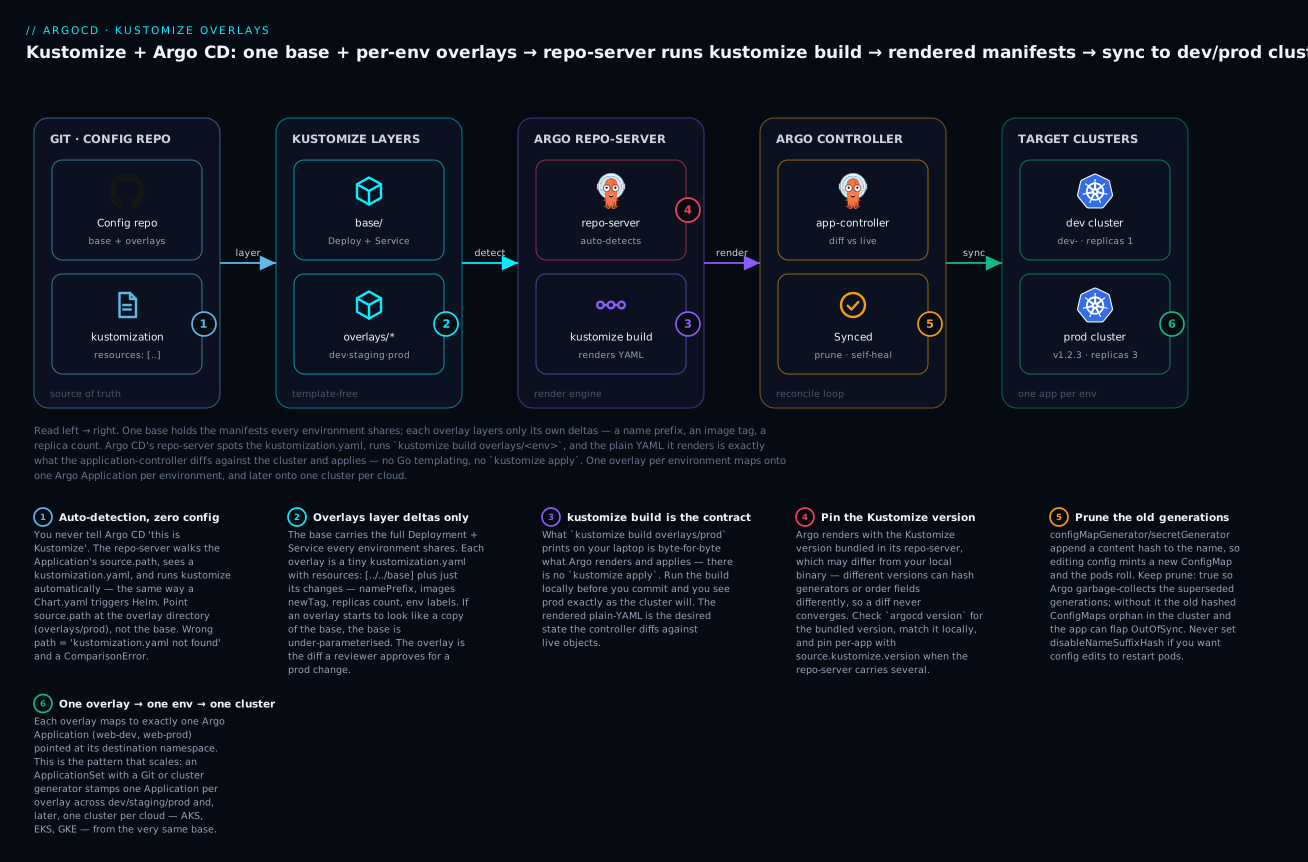
The badges mark what to get right: Argo auto-detects the kustomization.yaml with zero config (1); overlays carry only deltas, never a copy of the base (2); kustomize build output is the exact contract of what gets applied (3); pin the Kustomize version so local and Argo agree (4); keep prune on so old generated ConfigMaps are garbage-collected (5); and one overlay maps to one environment now and one cluster-per-cloud later (6).
Hands-on lab
You will build a base and two overlays, render prod locally to see the output, then hand both overlays to Argo CD as two Applications. This lab is cloud-neutral — it runs on a free local kind cluster (kind create cluster), so anyone can follow it. You need kubectl, kustomize (or kubectl’s built-in -k), a running Argo CD, and the argocd CLI logged in.
Step 1 — Create the base.
mkdir -p web-config/base web-config/overlays/dev web-config/overlays/prod
cd web-config
Write base/deployment.yaml and base/service.yaml (the full manifests from earlier), then the base kustomization:
# base/kustomization.yaml
apiVersion: kustomize.config.k8s.io/v1beta1
kind: Kustomization
resources:
  - deployment.yaml
  - service.yaml
# base/service.yaml
apiVersion: v1
kind: Service
metadata:
  name: web
  labels:
    app: web
spec:
  selector:
    app: web
  ports:
    - port: 80
      targetPort: 8080
What just happened: You now have a complete, applyable app in base/ — no environment assumptions baked in.
Step 2 — Write the dev overlay.
# overlays/dev/kustomization.yaml
apiVersion: kustomize.config.k8s.io/v1beta1
kind: Kustomization
resources:
  - ../../base
namePrefix: dev-
namespace: web-dev
replicas:
  - name: web
    count: 1
images:
  - name: ghcr.io/kloudvin/web
    newTag: dev
What just happened: dev takes the base, renames everything with a dev- prefix, lands it in web-dev, runs one replica, and pins the :dev image tag — in eleven lines, no duplicated container spec.
Step 3 — Write the prod overlay.
# overlays/prod/kustomization.yaml
apiVersion: kustomize.config.k8s.io/v1beta1
kind: Kustomization
resources:
  - ../../base
namespace: web-prod
replicas:
  - name: web
    count: 3
images:
  - name: ghcr.io/kloudvin/web
    newTag: v1.2.3
commonLabels:
  env: prod
What just happened: prod uses no name prefix (production names stay clean), three replicas, a pinned release tag, and an env: prod label on everything.
Step 4 — Render prod locally and READ it. This is the step that makes Kustomize click.
kustomize build overlays/prod
# (or, with no separate binary: kubectl kustomize overlays/prod)
Representative output (this is what Argo will apply — abbreviated):
apiVersion: v1
kind: Service
metadata:
  labels:
    app: web
    env: prod            # <- commonLabels
  name: web
  namespace: web-prod    # <- namespace transformer
spec:
  ports:
    - port: 80
      targetPort: 8080
  selector:
    app: web
    env: prod            # <- commonLabels also entered the selector
---
apiVersion: apps/v1
kind: Deployment
metadata:
  labels:
    app: web
    env: prod
  name: web
  namespace: web-prod
spec:
  replicas: 3            # <- replicas transformer
  selector:
    matchLabels:
      app: web
      env: prod
  template:
    metadata:
      labels:
        app: web
        env: prod
    spec:
      containers:
        - image: ghcr.io/kloudvin/web:v1.2.3   # <- images transformer
          name: web
          ports:
            - containerPort: 8080
What just happened: You just watched every transformer fire — namespace, replicas, image tag, and labels — producing plain YAML with zero templating. Run the dev build too (kustomize build overlays/dev) and note the dev-web names and :dev tag. This local render is byte-for-byte what Argo renders.
Step 5 — Create the two Argo Applications. Assuming you’ve pushed web-config/ to a Git repo Argo can read:
# dev
argocd app create web-dev \
  --repo https://github.com/kloudvin/web-config.git \
  --path overlays/dev --dest-server https://kubernetes.default.svc \
  --dest-namespace web-dev --sync-policy automated --sync-option CreateNamespace=true

# prod
argocd app create web-prod \
  --repo https://github.com/kloudvin/web-config.git \
  --path overlays/prod --dest-server https://kubernetes.default.svc \
  --dest-namespace web-prod --sync-policy automated --sync-option CreateNamespace=true
What just happened: Two Applications now exist, each auto-detecting Kustomize from its overlay’s kustomization.yaml. No --config-management-plugin, no “type” flag — the kustomization.yaml is the signal.
Step 6 — Sync and verify.
argocd app sync web-dev web-prod
argocd app get web-prod
Representative tail of argocd app get web-prod:
Name:               argocd/web-prod
Sync Status:        Synced to main (a1b2c3d)
Health Status:      Healthy

GROUP  KIND        NAMESPACE  NAME  STATUS  HEALTH   HOOK  MESSAGE
       Service     web-prod   web   Synced  Healthy        service/web created
apps   Deployment  web-prod   web   Synced  Healthy        deployment.apps/web created
kubectl get deploy,svc -n web-prod
kubectl get deploy -n web-dev
# web-prod: deployment "web" with 3/3 ready, image ...:v1.2.3
# web-dev:  deployment "dev-web" with 1/1 ready, image ...:dev
What just happened: The same base produced two genuinely different running apps — dev-web (1 replica, :dev) in web-dev and web (3 replicas, :v1.2.3) in web-prod — each Synced and Healthy, with no copy-pasted YAML anywhere.
Step 7 — Teardown.
argocd app delete web-dev web-prod --cascade
kubectl delete namespace web-dev web-prod --ignore-not-found
cd .. && rm -rf web-config
What just happened: --cascade removes the apps and the resources they created; deleting the namespaces cleans up anything left. Nothing bills on a local kind cluster, but always tear down cloud clusters to avoid control-plane and load-balancer charges.
Common mistakes and troubleshooting
Kustomize + Argo failures are almost always one of these. The Argo states referenced here (OutOfSync, ComparisonError, Degraded) are covered in depth in Sync status and health assessment.
| Symptom | Cause | Fix |
|---|---|---|
ComparisonError: kustomization.yaml not found |
source.path points at a dir with no kustomization.yaml (often the base, or a typo) |
Point path at the overlay dir; ensure it has a kustomization.yaml |
accumulating resources ... no such file or directory |
Overlay’s resources: [../../base] path is wrong for its depth |
Count the ../ from the overlay to the base; fix the relative path |
Image tag override does nothing (:latest still deployed) |
images[].name doesn’t match the base image string exactly |
Make name equal the base image minus the tag; verify with kustomize build |
| A patch silently changes nothing | target selector (kind/name) doesn’t match any resource |
Fix the target; confirm the resource name after any namePrefix |
App stuck OutOfSync after every config edit |
configMapGenerator hash changes name each edit; old generations orphan without prune |
Keep prune: true; don’t set disableNameSuffixHash if you want rollouts |
| Diff never converges; differs from local render | Argo’s bundled Kustomize version ≠ your local kustomize |
Match versions (argocd version); pin source.kustomize.version |
| Resources land in the wrong namespace | kustomization.yaml namespace: differs from Application destination.namespace |
Make them agree; the Kustomize namespace wins for stamped resources |
| Secret values readable in Git | secretGenerator literals committed as plaintext (base64 ≠ encryption) |
Use Sealed Secrets / External Secrets Operator / SOPS instead |
Error: strategic merge patch ... on a JSON6902 body |
Patch style mismatch — a op: list treated as strategic-merge or vice-versa |
Let patches: infer, or ensure the body matches the intended style |
ComparisonError: helm ... --enable-helm |
Kustomize helmCharts: used but Helm inflation not enabled |
Set kustomize.buildOptions: --enable-helm in argocd-cm |
Three of these bite hardest and deserve extra words.
The image name-match no-op. This one wastes the most hours because nothing errors — the deploy succeeds, just with the wrong image. Kustomize’s images transformer matches by the exact image reference in the base (excluding the tag). Base ghcr.io/kloudvin/web, override name: kloudvin/web → no match → no override → base’s tag ships. Always confirm by rendering: kustomize build overlays/prod | grep image:. If the tag you expect isn’t there, your name is wrong.
The namespace tug-of-war. Argo’s destination.namespace and Kustomize’s namespace: transformer are two different mechanisms. The Kustomize namespace: stamps .metadata.namespace into the rendered YAML for namespaced resources; Argo’s destination.namespace is the default namespace for resources that don’t specify one. When they disagree, the stamped one wins for those resources, so your app can land in web-prod even though the Application says default — and CreateNamespace=true creates the destination’s namespace, not the stamped one, leaving you with an empty namespace and pods somewhere else. Keep the two identical unless you have a deliberate reason not to.
Generator hash churn. The content-hash suffix is a feature (config edits roll pods), but it has two failure modes. First, if you turn off prune, every edit leaves the previous hashed ConfigMap orphaned in the cluster, and the app can flap OutOfSync as live and desired diverge — keep prune: true and Argo garbage-collects them. Second, if Argo’s Kustomize version hashes differently from your local one, the generated name differs between what you rendered and what Argo renders, and the diff never settles — the same version-pinning fix from the table applies.
Cheat-sheet
kustomization.yaml fields (the vocabulary of a base/overlay):
| Field | Purpose |
|---|---|
resources |
Files/dirs to include (../../base, deployment.yaml) |
namePrefix / nameSuffix |
Rename resources |
namespace |
Set namespace on all namespaced resources |
commonLabels |
Labels on all resources and selectors (immutable-selector caveat) |
labels |
Labels with includeSelectors: false — selector-safe |
commonAnnotations |
Annotations on all resources |
images |
Override image name/newName/newTag/digest |
replicas |
Override replica count by name |
configMapGenerator / secretGenerator |
Generate ConfigMaps/Secrets (+ content hash) |
generatorOptions |
disableNameSuffixHash, generator labels/annotations |
patches |
Strategic-merge or JSON6902 edits with a target |
components |
Reusable Kustomize components to include |
helmCharts |
Inflate a Helm chart (needs --enable-helm) |
Argo CD spec.source.kustomize fields: namePrefix, nameSuffix, images, replicas, commonLabels, commonAnnotations, commonAnnotationsEnvsubst, namespace, version, forceCommonLabels, forceCommonAnnotations, components, patches, labelWithoutSelector. (buildOptions is not here — it’s kustomize.buildOptions in the argocd-cm ConfigMap.)
Commands:
| Command | What it does |
|---|---|
kustomize build overlays/prod |
Render an overlay to plain YAML (what Argo applies) |
kubectl kustomize overlays/prod |
Same, using kubectl’s built-in Kustomize |
kubectl apply -k overlays/prod |
Render and apply directly (the manual, non-GitOps way) |
kustomize build overlays/prod | grep image: |
Verify image overrides took effect |
argocd app create <n> --path overlays/prod ... |
Create an Application pointed at an overlay |
argocd app set <n> --kustomize-image repo:tag |
Override the image at the Application level |
argocd app diff <n> |
Diff the rendered desired state against live |
argocd version |
Show the Kustomize version Argo renders with |
Interview and exam questions
Q: Why does Kustomize need no templating language, and why is that an advantage?
A: Kustomize inputs are complete, valid Kubernetes YAML; it customises them by layering declarative transformations (rename, relabel, retag, patch) rather than substituting into placeholders. The advantage is that every file is independently readable and kubectl-applyable — a reviewer never has to mentally render a template to understand what a manifest does, and there’s no new syntax to learn.
Q: How does Argo CD know to use Kustomize for an Application?
A: The repo-server inspects the directory at spec.source.path. If it finds a kustomization.yaml, it runs kustomize build; a Chart.yaml triggers Helm; otherwise it applies raw YAML. There is no “type” field to set — detection is by file presence.
Q: What is the difference between a base and an overlay?
A: The base holds the shared, environment-neutral manifests plus a kustomization.yaml that lists them under resources:. An overlay is a small kustomization.yaml that references the base (resources: [../../base]) and layers only that environment’s deltas — namespace, image tag, replica count, labels. You deploy overlays, not the base.
Q: What does the images transformer do and why is it central to GitOps?
A: It overrides an image’s name, tag, or digest by matching the base’s image reference. It’s central because image promotion — shipping a new version — becomes a one-line, reviewable change to newTag (or digest) in the environment’s overlay, which Argo then reconciles onto the cluster. CI builds the image; the overlay change is the deploy.
Q: Why does editing a configMapGenerator literal restart your pods?
A: The generator appends a hash of the ConfigMap’s contents to its name and rewrites references to it. Changing a literal changes the hash, producing a new ConfigMap name; the Deployment now references a name that didn’t exist, which the API treats as a spec change and triggers a rolling update — so config changes safely roll pods without a manual restart.
Q: When would you use a JSON6902 patch instead of a strategic-merge patch?
A: JSON6902 (a list of op/path/value operations) is for surgical edits — removing a field, operating on a specific array index, or targeting a path where strategic-merge’s key-based merging is awkward. Strategic-merge is easier for adding or overriding whole blocks. Both are written under the unified patches: field with a target: selector.
Q: A teammate says “set buildOptions on the Application to enable Helm inflation.” What’s wrong?
A: There is no spec.source.kustomize.buildOptions field — build options are global. You enable Helm inflation by setting kustomize.buildOptions: --enable-helm in the argocd-cm ConfigMap, which applies to every Application the repo-server renders. Per-Application overrides are the transformer fields (images, namePrefix, patches, …), not build options.
Q: Your prod overlay sets newTag: v1.2.3 but the cluster still runs :latest. What’s the likely cause?
A: The images[].name doesn’t match the base’s image reference exactly (excluding the tag), so the override matches nothing and no error is raised. Confirm by running kustomize build overlays/prod | grep image: — if the tag isn’t there, fix name to equal the base image string.
Q: Why can the same manifests render differently in Argo than on your laptop?
A: Argo renders with the Kustomize version bundled in its repo-server, which may differ from your local binary. Version differences in field ordering or generator hashing can make renders diverge and a diff never converge. Check the bundled version with argocd version, match it locally, and pin per-app via source.kustomize.version when multiple are configured.
Q: How does the one-Application-per-overlay pattern scale to many clusters and clouds? A: Each overlay maps to one Application pointed at a destination. To scale, replace hand-written Applications with an ApplicationSet: a Git-directory generator stamps one Application per overlay; a cluster (or matrix) generator fans the same overlays across every registered cluster — including AKS, EKS, and GKE — from the identical base, so the packaging stays cloud-neutral while destinations vary.
Q: Why is commonLabels risky on an already-running Deployment, and what’s the fix?
A: commonLabels writes into the pod selector (spec.selector.matchLabels), which is immutable after creation, so adding a new key later forces a delete-and-recreate. Use the newer labels: transformer with includeSelectors: false (or Argo’s labelWithoutSelector) when you want the label for humans/queries but not in the selector.
Q: What’s the manual command equivalent to what Argo does with a Kustomize app, and why does that matter?
A: kustomize build overlays/prod | kubectl apply -f -. It matters because it proves kustomize build output is the desired state Argo applies — there’s no kustomize apply and no hidden step — so rendering an overlay locally shows you exactly what will hit the cluster.
Key takeaways
- Kustomize is template-free customisation: every input is valid, applyable Kubernetes YAML, and you layer declarative transformations on top — no Go templating, no new syntax.
- The model is base + overlays: one base holds shared manifests; each overlay references it (
resources: [../../base]) and expresses only that environment’s deltas. If an overlay looks like a copy of the base, the base is under-parameterised. - Argo CD auto-detects Kustomize from a
kustomization.yamlinsource.path— point Applications at the overlay, not the base, and there’s nothing else to configure. - Know your transformers and generators:
namePrefix/namespace/replicas/commonLabelsfor the basics,imagesfor GitOps image promotion,configMapGenerator/secretGeneratorfor the content-hash that rolls pods on config change, andpatches:(strategic-merge + JSON6902) for surgical edits. spec.source.kustomizeoverrides at the Application level (images,namePrefix,replicas,patches, …) — butbuildOptionsis not there; it’s the globalkustomize.buildOptionsinargocd-cm.kustomize buildoutput is the contract: it’s byte-for-byte what Argo applies, so render overlays locally to preview prod exactly — but render with the same version Argo bundles or the diff won’t converge.- One overlay → one environment → one cluster-per-cloud: the pattern starts as one Application per overlay and scales, via ApplicationSet generators, to the same cloud-neutral base fanned across AKS, EKS, and GKE.
- Never commit real secrets through
secretGenerator; use Sealed Secrets, External Secrets Operator, or SOPS, and keepprune: trueso old generated ConfigMaps are garbage-collected.