There are two questions people quietly confuse in their first week with Argo CD, and untangling them is most of this lesson. The first is “how do I drive Argo CD?” — and the answer is two interfaces: a polished web UI and a command-line tool, argocd. The second, deeper question is “who owns the truth about what should be running?” — and the answer is two philosophies: imperative (you issue commands that change the cluster now) versus declarative (you commit the desired state to Git and let Argo CD make the cluster match). These are two different axes, not two names for the same thing, and holding them apart is the mental model the rest of the course builds on.
If you have only ever typed kubectl apply, that command is a perfect bridge. kubectl apply -f app.yaml is declarative (you hand it a description of the end state); kubectl scale deploy/web --replicas=5 is imperative (you order a specific change). Argo CD takes the declarative idea and makes it continuous and Git-backed. Everywhere you see a command below, it’s a real argocd/kubectl command against Argo CD 2.13+/3.x; where a cluster would print something, the output shown is representative — the shape to expect — not a live capture.
Why this matters
Almost every Argo CD mess I have been called to clean up traces back to one root cause: someone managed a real, production application imperatively — they ran argocd app create or clicked New App in the UI, it worked, and they moved on. Six months later nobody can say why it’s configured the way it is, no pull request introduced it, and a cluster rebuild makes it vanish because its definition lived only inside the cluster. The interface was never the problem. The management philosophy was.
The interface is a real choice you make many times a day, and both are excellent. The UI is unbeatable for seeing — the resource tree, red/green health, the live diff, streaming logs. The CLI is unbeatable for doing at speed and for scripting — argocd app sync, argocd app wait, JSON you can pipe into jq. You’ll use both constantly, and neither is “more GitOps” than the other. Interface is just how you look at and poke the system.
The philosophy is the choice that actually decides whether your platform is trustworthy. Declarative management — the desired state committed to Git, Argo CD reconciling the cluster to it forever — is what makes a deployment versioned, reviewed, reproducible, and self-documenting. Imperative management is faster in the moment and perfect for exploring, but the state it produces lives only in the cluster, drifts from any Git copy, and evaporates on a rebuild. This lesson teaches both interfaces fluently while defaulting, for anything real, to the declarative way — the GitOps way.
If Argo CD is not yet running for you, do the installation and first-login lesson first; and if the pull-based reconcile loop underneath all of this is still fuzzy, the GitOps principles: push vs pull lesson is the companion to this one.
Two interfaces, two philosophies — the map
Draw the two axes as a grid and every workflow in Argo CD lands in one of four cells. The columns are the interface (how you interact); the rows are the management model (who owns the truth).
| Imperative (command changes state now) | Declarative (Git owns the desired state) | |
|---|---|---|
| UI (web console) | Click New App, fill the form, Create; click Sync | Browse an app that was defined in Git; watch it reconcile; read the tree |
CLI (argocd) |
argocd app create …, argocd app set …, argocd app sync … |
argocd app diff, argocd app get against a Git-defined app; commit YAML, kubectl apply |
Read two things out of that grid. First, the interface axis is cosmetic to correctness — a Sync you trigger from the UI and one you trigger with argocd app sync do the identical thing through the identical API. Second, the philosophy axis is where durability lives — the top-left cell (imperative, via either interface) creates state that exists only in the cluster; the right column keeps Git as the source of truth. The goal isn’t “always CLI” or “always UI” — it’s “keep the source of truth in Git,” whichever interface you have open.
One framing saves endless confusion: both the UI and the CLI are thin clients of the same argocd-server (the API server), and neither talks to your cluster directly. That is why they behave identically — and why “I can do it in the UI but not the CLI” is almost always a login or context problem, not a capability difference.
The CLI tour: argocd from login to rollback
The argocd binary is a gRPC client of the argocd-server: every subcommand is a call the server executes for you, and nothing you type reaches the Kubernetes API directly (unless you use core mode, below). Get comfortable here and you can manage a fleet from a terminal or a CI job.
Logging in and choosing a context
You log in once per server; the CLI caches a token in ~/.config/argocd/config and remembers multiple servers as contexts, just like kubectl.
# Log in to the Argo CD API server (TLS on 443 by default)
argocd login argocd.example.com --username admin --grpc-web
# 'admin:login' logged in successfully
# Context 'argocd.example.com' updated

# No ingress yet? Port-forward the service and log in to localhost.
kubectl -n argocd port-forward svc/argocd-server 8080:443
argocd login localhost:8080 --username admin --insecure
The flags that matter for connecting:
| Flag | What it does | When you need it |
|---|---|---|
--username / --password |
Log in with a local account (e.g. admin) |
First login before SSO is wired up |
--sso |
Open a browser for OIDC / Dex single sign-on | Any real team login (Entra ID, Okta, Google) |
--grpc-web |
Wrap gRPC in HTTP/1.1 (gRPC-Web) | Behind ingress/proxies that don’t speak HTTP/2 gRPC |
--insecure |
Skip TLS cert verification | Local port-forward / self-signed dev only — never prod |
--port-forward / --port-forward-namespace argocd |
Let the CLI open its own port-forward to the service | Quick access without a manual kubectl port-forward |
--core |
Talk straight to the Kubernetes API, no argocd-server | Scripting where the API server isn’t exposed |
Switch between logged-in servers with argocd context:
argocd context                 # list known contexts; * marks the current one
argocd context argocd.prod     # switch the CLI to the prod server
The argocd app verbs — the heart of the CLI
Ninety percent of daily CLI work is argocd app <verb>. Learn these and you can inspect, change, and repair applications without ever opening a browser.
| Command | What it does | Typical use |
|---|---|---|
argocd app list |
List all applications you can see | -l team=payments to filter, -p prod by project |
argocd app get <app> |
Full status: sync, health, source, per-resource state | The first thing you run when something looks off |
argocd app create <app> … |
Imperative: build and register an Application from flags | Fast one-offs, demos, exploration |
argocd app set <app> … |
Imperative: mutate a field on the live Application | Flip a setting quickly (and create drift — see below) |
argocd app sync <app> |
Apply the desired state to the cluster now | Trigger a deploy on a manual-sync app |
argocd app diff <app> |
Show desired (Git) vs live, without changing anything | Pre-flight before a sync; confirm what will move |
argocd app history <app> |
List past synced revisions with IDs | Find the ID to roll back to |
argocd app rollback <app> <id> |
Re-sync to a previous history revision | Fast recovery from a bad deploy |
argocd app wait <app> |
Block until the app reaches a condition | --health / --sync in CI gates |
argocd app manifests <app> |
Print the rendered Kubernetes manifests | See exactly what Helm/Kustomize produced |
argocd app delete <app> |
Remove the Application (and, by default, its resources) | --cascade controls whether children are deleted too |
A get is worth seeing because its shape teaches the whole model:
argocd app get guestbook
# Name:               argocd/guestbook
# Project:            default
# Server:             https://kubernetes.default.svc
# Namespace:          demo
# Repo:               https://github.com/argoproj/argocd-example-apps
# Path:               guestbook
# SyncWindow:         Sync Allowed
# Sync Policy:        <none>
# Sync Status:        Synced to HEAD (53e28ff)
# Health Status:      Healthy
#
# GROUP  KIND        NAMESPACE  NAME           STATUS  HEALTH   HOOK  MESSAGE
#        Service     demo       guestbook-ui   Synced  Healthy        service created
# apps   Deployment  demo       guestbook-ui   Synced  Healthy        deployment created
That block names the two statuses you will live inside: Sync Status (does the cluster match Git — Synced / OutOfSync / Unknown) and Health Status (is the workload actually well — Healthy / Progressing / Degraded / Suspended / Missing / Unknown). They are independent: an app can be Synced (matches Git) yet Degraded (the pod is crash-looping), or OutOfSync yet Healthy.
Output formats — machine-readable when you need it
Every read command takes -o to change the output, which is what makes the CLI scriptable.
-o value |
Output | Use it for |
|---|---|---|
| (default) | Human table | Reading at the terminal |
-o wide |
Table with extra columns (repo, path, target) | Quick fleet overview |
-o name |
Just the resource names | Piping into xargs/loops |
-o json |
Full JSON | argocd app get web -o json | jq '.status.sync.status' |
-o yaml |
Full YAML (the live Application object) | Exporting an app to a manifest (see below) |
-o tree |
The resource tree (on app get) |
The UI’s tree, in the terminal |
Beyond apps: repos, clusters, projects, accounts
The other noun groups configure what apps are allowed to reference. They map one-to-one onto the Settings screens in the UI.
| Command group | Manages | Key subcommands |
|---|---|---|
argocd repo |
Git/Helm repositories Argo CD may pull from | add <url>, list, rm <url> |
argocd cluster |
Target clusters Argo CD may deploy to | add <kube-context>, list, rm <server> |
argocd proj |
AppProject tenancy boundaries (allowed repos/dests/kinds) |
create, list, get, add-source, add-destination, role |
argocd account |
Local accounts, tokens, and permission checks | list, get-user-info, can-i, update-password, generate-token |
# Which clusters can this Argo CD deploy to?
argocd cluster list
# SERVER                          NAME        VERSION  STATUS      MESSAGE
# https://kubernetes.default.svc  in-cluster  1.30     Successful
# https://prod-eu.example.com     prod-eu     1.29     Successful

# Am I even allowed to sync this app? (RBAC dry-run, no change made)
argocd account can-i sync applications 'default/guestbook'
# yes
argocd cluster add, argocd repo add, and SSO wiring are the cloud-specific edges of Argo CD — registering an EKS cluster with IRSA, an AKS cluster with Entra ID, or a GKE cluster with Workload Identity each differ. This lesson is otherwise cloud-neutral; those edges get the full AKS/EKS/GKE treatment in the installation and cluster-registration lessons.
The CLI ↔ API-server relationship
It is worth being precise about what runs where, because “the CLI didn’t work” almost always means a wrong hop in this chain, not a broken command.
| Component | Runs where | Role | You reach it via |
|---|---|---|---|
argocd CLI |
Your laptop / CI runner | gRPC client; formats requests and output | You type it |
| argocd-server (API server) | In the cluster (argocd ns) |
The single gateway; authN/authZ; serves UI + CLI | argocd login, browser |
| repo-server | In the cluster | Clones Git, renders Helm/Kustomize to manifests | Never directly |
| application-controller | In the cluster | Diffs desired vs live, applies, reports status | Never directly |
| Kubernetes API | The target cluster(s) | Stores Application CRs; runs your workloads |
Argo CD, or kubectl |
The mental picture: CLI → argocd-server → (repo-server + application-controller) → Kubernetes API. The UI plugs into the same argocd-server at the second box. That is why the two interfaces are interchangeable, and why core mode (--core) — which skips argocd-server and talks to the Kubernetes API using your kubeconfig — is the one exception where the CLI behaves differently from the UI.
The UI tour: the applications grid and the resource tree
The web UI is the same argocd-server rendering an SPA. It shines at comprehension — the shape and health of everything at a glance — and at guided actions like a sync with checkboxes instead of remembered flags.
The applications grid
The landing page is a grid (or list) of every application you can see, one tile each. Learn to read a tile and filter the wall of them.
| Tile / control | Shows | Why you look |
|---|---|---|
| App name + project | Identity and its AppProject tenancy |
Confirm you’re touching the right app/tenant |
| Sync pill | Synced (green) / OutOfSync (yellow) |
Does the cluster match Git? |
| Health pill | Healthy (green) / Degraded (red) / Progressing (blue) / Suspended / Missing |
Is the workload actually well? |
| Sync/refresh buttons | Trigger a sync or a re-compare | Deploy, or force a fresh diff |
| Filters (left rail) | By project, cluster, namespace, health, sync, label | Find the 3 broken apps among 300 |
| Search box | Name substring | Jump straight to an app |
The app detail: the resource tree
Click an app and you land on its detail view, dominated by the resource tree — a live, left-to-right graph of every Kubernetes object the app owns, from the Application down through Deployment → ReplicaSet → Pod, plus Service, Ingress, ConfigMap, and so on. Each node is colour-coded twice over (sync and health), so a single glance localises trouble.
| Node element | Meaning |
|---|---|
| Node icon + kind | The resource kind (Deployment, Service, Pod, …) |
| Border / heart colour | Health: green Healthy, red Degraded, blue Progressing, grey Suspended/Unknown |
| Sync badge | Sync: green Synced, yellow OutOfSync, arrow = pending |
| Anomaly badges | Out-of-sync marker, hook/skipped/pruned indicators |
| Node menu (⋮ / click) | Per-resource actions: Diff, Live/Desired manifest, Events, Logs, Delete, Sync |
From a node (or the tabs at the top) you reach the panels that replace a dozen kubectl commands:
| Panel | Equivalent CLI | What you get |
|---|---|---|
| Diff | argocd app diff / kubectl diff |
Side-by-side desired (Git) vs live, field by field |
| Desired / Live Manifest | argocd app manifests / kubectl get -o yaml |
The rendered YAML Argo wants vs what’s running |
| Events | kubectl describe events |
Why a resource is stuck (FailedScheduling, ImagePullBackOff) |
| Logs | kubectl logs -f |
Streaming pod logs, right in the browser |
| Summary / parameters | argocd app get |
Source, destination, sync policy, Helm/Kustomize params |
The sync panel and its options
Click Sync and a panel opens instead of firing blindly — the UI surfaces the sync options as checkboxes, a friendlier way to learn them than memorising --sync-option strings.
| Sync option (UI checkbox) | Effect | Equivalent |
|---|---|---|
| Prune | Delete live resources no longer in Git | --prune |
| Dry Run | Compute the sync without applying | --dry-run |
| Apply Only | Skip hooks, just kubectl apply |
ApplyOutOfSyncOnly family |
| Force | kubectl apply --force (replace on conflict) |
--force |
| Server-Side Apply | Use SSA field management | ServerSideApply=true |
| Prune Propagation | foreground / background / orphan | PrunePropagationPolicy=… |
| Resource checkboxes | Sync only selected resources | --resource <group:kind:name> |
Below the sync panel sit two more everyday actions: App Diff (the same as the CLI diff, before you commit to syncing) and History and Rollback — a timeline of past synced revisions with a Rollback button on each, the UI face of argocd app history + argocd app rollback.
Settings — repos, clusters, projects, RBAC
The gear-free Settings area (reachable from the left nav) is where the argocd repo / cluster / proj / account commands live as screens:
| Settings screen | Configures | CLI twin |
|---|---|---|
| Repositories | Git/Helm repos + credentials | argocd repo add/list |
| Clusters | Registered target clusters | argocd cluster add/list |
| Projects | AppProject allow-lists and roles |
argocd proj … |
| Accounts | Local users, tokens | argocd account … |
| RBAC (config) | argocd-rbac-cm policy mapping SSO groups to actions |
edit the ConfigMap in Git |
Notice the tell in that last row: the right way to manage repos, clusters, projects, and RBAC is to edit their manifests in Git, even though the UI lets you click them in — which is the whole point of the next sections.
Imperative vs declarative: the central lesson
Here is the idea the entire lesson orbits. You can bring an application into existence two ways, and they diverge not in what runs but in where the truth lives.
Imperative. You issue a command that changes the cluster now — argocd app create demo … on the CLI, or New App → Create in the UI. Argo CD writes an Application object into the cluster and starts managing it. It works immediately. But the definition of that app — its repo, path, destination, sync policy — now exists only as a live object in the cluster. No commit, no review, no file documents it. Rebuild the cluster and it is gone.
Declarative. You write the same Application as a YAML file, commit it to Git, and let it be applied — either by kubectl apply -f, or (the real pattern) by a parent Application that syncs a directory of these manifests. Now Git is the source of truth. The app is versioned (every change is a commit with an author and a SHA), reviewed (it arrived through a pull request), reproducible (re-apply the repo and it’s back, identical), and self-documenting (the file is the documentation). This is what “GitOps” means in practice.
The same task, both ways, side by side:
# IMPERATIVE — one command, state lands only in the cluster
argocd app create demo \
  --repo https://github.com/argoproj/argocd-example-apps \
  --path guestbook \
  --dest-server https://kubernetes.default.svc \
  --dest-namespace demo
# DECLARATIVE — the identical app as data in Git: demo-app.yaml
apiVersion: argoproj.io/v1alpha1
kind: Application
metadata:
  name: demo
  namespace: argocd
spec:
  project: default
  source:
    repoURL: https://github.com/argoproj/argocd-example-apps
    path: guestbook
    targetRevision: HEAD
  destination:
    server: https://kubernetes.default.svc
    namespace: demo
Applied with kubectl apply -f demo-app.yaml, that produces an identical app in the same UI — but now backed by a file you can review, diff, and revert. (The first-application lesson walks that source/destination spec field by field.) Weigh the two models honestly:
| Property | Imperative (app create / New App) |
Declarative (Application YAML in Git) |
|---|---|---|
| Where the truth lives | Live object in the cluster only | Git repository |
| Versioned / auditable | No — no commit, no author, no SHA | Yes — git log is the audit trail |
| Peer-reviewed | No | Yes — via pull request |
| Reproducible on rebuild | No — must remember the exact flags | Yes — re-apply the repo |
| Self-documenting | No | Yes — the manifest is the doc |
| Drift-resistant | No self-heal of the definition | Yes — Argo can self-heal it |
| Speed to first result | Fastest | A commit slower |
| Best for | Exploring, debugging, throwaway demos | Anything real |
Imperative isn’t evil — it’s the fast path, with honest uses: exploring a chart you’ve never deployed, spinning a throwaway app to reproduce a bug, a one-off you’ll delete in an hour. The rule to memorise: if it will outlive the afternoon, or anyone else needs to know it exists, it must be declarative.
Two paths, one API server — the picture to keep in your head:
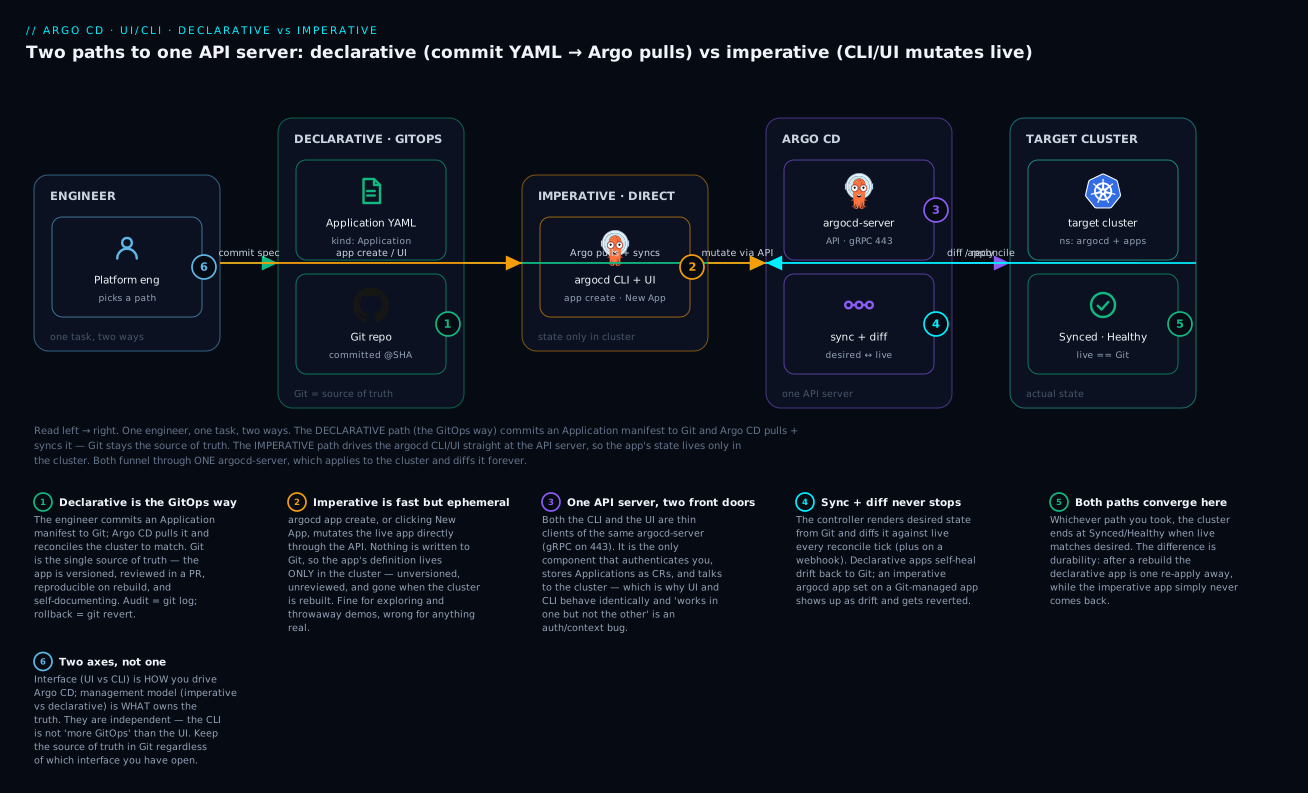
The badges mark the load-bearing ideas: Git as the single source of truth on the declarative path (1); the imperative path being fast but ephemeral, its state trapped in the cluster (2); one argocd-server that both paths funnel through (3); the reconcile-and-diff loop that never stops (4); the cluster converging to Synced/Healthy (5); and interface and philosophy being two different axes (6).
A decision table for when you’re unsure:
| Situation | Imperative OK? | Do this instead if not |
|---|---|---|
| Trying out an unfamiliar Helm chart locally | Yes | — |
| Reproducing a bug in a throwaway app | Yes | — |
| Deploying anything to staging or prod | No | Commit an Application manifest |
| Registering a repo/cluster the team relies on | No | Declare it in Git; apply via bootstrap |
| Changing an app’s target revision for a release | No | PR the manifest / update the image tag in Git |
Quick read-only inspection (get, diff, logs) |
Yes | — (reads change nothing) |
| A demo you will delete in an hour | Yes | argocd app delete when done |
| Standing up Argo CD’s own config | No | Declare it — Argo CD manages itself (next section) |
Argo CD managing itself: the self-management pattern
The most persuasive proof that declarative wins is that mature Argo CD installs use it on Argo CD itself. Instead of installing Argo CD with a one-shot kubectl apply and then clicking apps into being, you keep Argo CD’s own install manifests, its AppProjects, its repositories, and every Application as declarative YAML in a Git repo — and you let Argo CD sync them. Argo CD becomes just another application that Argo CD manages.
The lever is the app-of-apps pattern: one parent Application whose source is a directory of child Application manifests. Sync the parent and the children appear; commit a new child manifest and a new app is born through Git, reviewed and versioned like everything else.
# root.yaml — the one app you apply by hand, once, to bootstrap everything
apiVersion: argoproj.io/v1alpha1
kind: Application
metadata:
  name: root
  namespace: argocd
spec:
  project: default
  source:
    repoURL: https://github.com/acme/platform-gitops
    path: apps                 # a directory full of child Application manifests
    targetRevision: main
  destination:
    server: https://kubernetes.default.svc
    namespace: argocd
  syncPolicy:
    automated:
      prune: true
      selfHeal: true
After that single kubectl apply -f root.yaml, adding an app to the platform is a pull request into apps/, not a click. And because selfHeal is on, if someone imperatively changes one of those child Applications, Argo CD reverts it — the cluster is pulled back to what Git says. That is self-management: the platform’s entire configuration is code, and Argo CD keeps the cluster honest to it.
Actually bootstrapping an install this way (Helm vs manifests, ordering, HA) is its own lesson; for now, hold the shape: one manually-applied root app, everything else declarative underneath it. It is the endgame that makes the imperative-vs-declarative choice concrete.
argocd app set vs editing YAML — when the two fight
argocd app set is the CLI’s imperative mutator: it reaches into a live Application and changes one field. It is genuinely handy — until the app is also defined declaratively in Git, at which point set and the YAML are two sources of truth for the same object, and they will fight.
# Imperatively flip the demo app to auto-sync, live, right now
argocd app set demo --sync-policy automated
# application 'demo' updated
If demo was created imperatively (never in Git), fine — there is only one copy and you just changed it. But if demo came from demo-app.yaml in Git (which has no syncPolicy.automated), you have just created drift: the live Application now says “auto-sync”; the file in Git still says “manual.” Nothing in Git changed — git status is clean — so the drift is invisible in your editor and very visible in the cluster.
What happens next depends on whether that Application is itself managed:
- Standalone (
demo-app.yamlapplied once by you): the imperative change sticks until someone re-runskubectl apply -f demo-app.yaml, which silently reverts it. The truth quietly flip-flops depending on who ran what last. - Under an app-of-apps with
selfHeal: Argo CD treats the Application object as a managed resource, notices it diverged from Git, and reverts yoursetautomatically. The imperative change loses the fight, usually within a couple of minutes, and often confuses the person who made it (“my change disappeared!”).
Common set flags and the manifest field each one fights with:
argocd app set flag |
Live field it mutates | The YAML it conflicts with |
|---|---|---|
--sync-policy automated|none |
spec.syncPolicy |
syncPolicy: block in the manifest |
--revision <ref> |
spec.source.targetRevision |
targetRevision: |
--path <dir> |
spec.source.path |
path: |
--dest-namespace <ns> |
spec.destination.namespace |
destination.namespace: |
-p key=value (Helm) |
spec.source.helm.parameters |
helm.parameters: |
--sync-option <Opt>=true |
spec.syncPolicy.syncOptions |
syncOptions: |
The rule that keeps you sane: on a Git-managed app, treat argocd app set (and UI field edits, and kubectl edit application) as debugging only. Make the real change in the file and commit it; anything you poke into the live object is transient or about to be reverted.
Exporting an imperatively-made app back to YAML
Say you did create an app imperatively and now want it in Git. You don’t have to reconstruct the flags from memory — the live Application is the YAML; read it out.
| Technique | Command | Notes |
|---|---|---|
| Read the live Application | argocd app get demo -o yaml |
Full object; strip status: and Argo-managed metadata |
| Read it with kubectl | kubectl -n argocd get application demo -o yaml |
Same object, straight from the API |
| Preview a create without applying | argocd app create demo … --dry-run -o yaml |
Emit the manifest the flags would create, apply nothing |
| See rendered child manifests | argocd app manifests demo |
The deployed resources, not the Application itself |
# Capture the live app, drop the runtime noise, keep it as reviewable source
argocd app get demo -o yaml > demo-app.yaml
# then delete spec-irrelevant keys: status:, metadata.uid, resourceVersion,
# creationTimestamp, generation, managedFields — commit the rest
Once demo-app.yaml is committed and applied (ideally under the app-of-apps), the app is fully declarative and the imperative version can be forgotten. That round trip — explore imperatively, then export and commit — is a legitimate workflow, and how many good GitOps repos got started.
Hands-on lab
You will do one task both ways and feel the difference. Prerequisites: a Kubernetes cluster (a free local kind/minikube is perfect), Argo CD installed in the argocd namespace, and a working argocd login. Every output below is representative — the shape to expect — and nothing here bills anything; it’s a local cluster and a public example repo.
Step 0 — Log in and confirm you’re connected.
kubectl -n argocd port-forward svc/argocd-server 8080:443 &   # background the forward
argocd login localhost:8080 --username admin --insecure
argocd app list
# NAME  CLUSTER  NAMESPACE  PROJECT  STATUS  HEALTH  ...   (empty list is fine)
What just happened: the CLI is authenticated to the argocd-server through the port-forward; an empty list means a clean slate.
Step 1 — Imperative: create the app with one command.
argocd app create demo \
  --repo https://github.com/argoproj/argocd-example-apps \
  --path guestbook \
  --dest-server https://kubernetes.default.svc \
  --dest-namespace demo
# application 'demo' created
What just happened: Argo CD wrote an Application object into the cluster. It exists nowhere in Git — its entire definition is now a live cluster object and nothing else.
Step 2 — Inspect it, then sync it.
argocd app get demo
# Sync Status:   OutOfSync from HEAD (53e28ff)
# Health Status: Missing
argocd app sync demo
# ... Operation succeeded
argocd app get demo -o tree
# demo
# ├── Service/guestbook-ui      Synced  Healthy
# └── Deployment/guestbook-ui   Synced  Healthy
What just happened: it started OutOfSync/Missing (defined, not yet applied). argocd app sync applied it; now the tree is Synced/Healthy. Open the UI — the app appears in the grid with green pills, identical to anything created declaratively. The interface didn’t determine the philosophy; the command did.
Step 3 — Delete the imperative app (it leaves no trace in Git).
argocd app delete demo --cascade      # confirm the prompt
# application 'demo' deleted
What just happened: the app and its resources are gone, and there is nothing to bring it back — no file, no commit. If this had been production, its definition just died with it. That is the imperative trap, felt directly.
Step 4 — Declarative: write the same app as a manifest.
cat > demo-app.yaml <<'EOF'
apiVersion: argoproj.io/v1alpha1
kind: Application
metadata:
  name: demo
  namespace: argocd
spec:
  project: default
  source:
    repoURL: https://github.com/argoproj/argocd-example-apps
    path: guestbook
    targetRevision: HEAD
  destination:
    server: https://kubernetes.default.svc
    namespace: demo
EOF
kubectl apply -f demo-app.yaml
# application.argoproj.io/demo created
What just happened: the identical app is back — but this time its definition is a file. In a real repo you’d git add demo-app.yaml && git commit; that file is now the source of truth. Refresh the UI: same app, same tree.
Step 5 — Change it the GitOps way: edit the file, re-apply.
# Turn on automated sync — but in the FILE, the source of truth
sed -i.bak 's/  destination:/  syncPolicy:\n    automated:\n      selfHeal: true\n  destination:/' demo-app.yaml
kubectl apply -f demo-app.yaml
# application.argoproj.io/demo configured
argocd app get demo | grep 'Sync Policy'
# Sync Policy:  Automated (self-heal)
What just happened: you changed behaviour by changing the declared desired state and re-applying — versioned, reviewable, repeatable. (In production this is a commit and a PR, not a sed.)
Step 6 — Watch imperative and declarative fight.
# Imperatively mutate the live app away from the file
argocd app set demo --sync-policy none
argocd app get demo | grep 'Sync Policy'
# Sync Policy:  <none>          <- live now DISAGREES with demo-app.yaml

# The file still says automated; re-apply the source of truth
kubectl apply -f demo-app.yaml
argocd app get demo | grep 'Sync Policy'
# Sync Policy:  Automated (self-heal)   <- declarative wins on re-apply
What just happened: argocd app set created drift — the live Application diverged from the file, while git status stayed clean. Re-applying the manifest reverted it. Under a real app-of-apps with selfHeal, Argo CD would have reverted your set on its own. This is the single most important thing to feel in this lesson: imperative changes to a Git-managed app are temporary by design.
Teardown.
kubectl delete -f demo-app.yaml     # removes the Application (and its resources)
rm -f demo-app.yaml demo-app.yaml.bak
kill %1 2>/dev/null                 # stop the port-forward
You created the same app both ways, saw them render identically, changed the declarative one through its file, and watched argocd app set lose to the manifest on re-apply — the whole lesson in six steps.
Common mistakes and troubleshooting
| Symptom | Likely cause | Fix |
|---|---|---|
| Imperative app is a mystery — no YAML, no PR | Created with argocd app create / New App; state lives only in the cluster |
Export it: argocd app get <app> -o yaml, strip status:, commit; manage via app-of-apps |
argocd app set change vanishes after a minute |
App is Git-managed with selfHeal; Argo reverted your live mutation to match Git |
Make the change in the manifest and commit — not with set |
Live app disagrees with the file but git status is clean |
Someone ran argocd app set / edited the live object / used the UI |
kubectl apply -f the manifest (or let self-heal run); stop editing live |
argocd says rpc error: code = Unauthenticated |
Not logged in, or the cached token expired | argocd login <server> … again; check argocd context |
| CLI hits the wrong Argo CD | Current context points at another server | argocd context to list, argocd context <name> to switch |
| UI shows stale sync/health | Cached view, or the reconcile hasn’t run since your change | Hard-refresh the browser; click Refresh / argocd app get <app> --refresh |
| An app you know exists isn’t visible | RBAC / AppProject scope hides it from your account |
Check argocd account can-i get applications '<proj>/<app>'; ask for project access |
| Port-forward dies mid-session | The kubectl port-forward process dropped |
Restart it; prefer a real ingress or argocd login --port-forward for stability |
| Imperative app gone after a cluster rebuild | Its definition was never in Git | Everything real must be a committed manifest; rebuild = re-apply the repo |
argocd login hangs / TLS or gRPC errors behind ingress |
Proxy doesn’t speak HTTP/2 gRPC | Add --grpc-web (and confirm the ingress passes gRPC-Web) |
| Sync from UI and CLI seem to “differ” | Different sync options selected, not different engines | They call the same API — match the checkboxes to your --sync-option/--prune flags |
Three that cost the most hours deserve extra words.
1. Silent drift from argocd app set. The nastiest part isn’t that set mutates the live app — it’s that git status stays clean, so the drift hides exactly where you look for changes. On any Git-managed app the manifest is the truth and set is a debugger; if you must set to test something, reconcile back with kubectl apply -f (or let self-heal do it).
2. “It works in the UI but not the CLI.” Same server, so a capability difference is nearly impossible — it’s almost always auth or context: wrong context, expired token, or an RBAC rule one login has and the other doesn’t. Check argocd context and argocd account can-i before suspecting a bug.
3. The vanishing imperative app. Teams hit this during a migration or DR drill: they rebuild the cluster, re-apply the GitOps repo, and most apps return — except the handful someone argocd app create’d by hand, gone because they never existed in Git. The fix is cultural: nothing real is created imperatively. Inherit a cluster? argocd app list and export every app not already backed by a file.
Cheat-sheet
Essential argocd verbs:
| Command | Does |
|---|---|
argocd login <server> [--sso|--grpc-web|--insecure] |
Authenticate; cache a token as a context |
argocd context [<name>] |
List / switch server contexts |
argocd app list [-o wide|json] |
List applications you can see |
argocd app get <app> [-o tree|yaml|json] [--refresh] |
Full status; the tree; the live object |
argocd app create <app> --repo --path --dest-server --dest-namespace |
Imperative create from flags |
argocd app set <app> --sync-policy|--revision|--path |
Imperative live mutation (drift on Git apps) |
argocd app sync <app> [--prune|--dry-run] |
Apply desired state now |
argocd app diff <app> |
Desired (Git) vs live, no change |
argocd app history <app> / argocd app rollback <app> <id> |
List revisions / roll back |
argocd app wait <app> --health |
Block until healthy (CI gates) |
argocd app manifests <app> |
Print rendered child manifests |
argocd app delete <app> --cascade |
Remove app (and its resources) |
argocd repo|cluster|proj|account … |
Manage repos / clusters / projects / accounts |
argocd app get <app> -o yaml > app.yaml |
Export a live app to a manifest |
kubectl apply -f app.yaml |
Declarative create/update from Git |
The UI map (screen → job):
| UI location | What you do there | CLI twin |
|---|---|---|
| Applications grid | Scan sync/health of everything; filter | argocd app list |
| App detail → resource tree | See every object; localise trouble by colour | argocd app get -o tree |
| Node → Diff / Manifest / Events / Logs | Inspect one resource deeply | argocd app diff / manifests, kubectl logs |
| Sync panel (checkboxes) | Deploy with explicit options | argocd app sync --prune … |
| History and Rollback | Roll back to a prior revision | argocd app history / rollback |
| Settings → Repos/Clusters/Projects/RBAC | Configure sources & tenancy | argocd repo/cluster/proj, edit Git |
The one rule: interface is a preference; source of truth is not. Use whichever of UI/CLI you like — but keep the desired state in Git. Imperative to explore; declarative for anything that will outlive the afternoon.
Interview and exam questions
Q: What is the difference between the two interfaces and the two management models in Argo CD?
A: The interfaces are how you interact — the web UI and the argocd CLI, both thin clients of the same argocd-server, so they’re interchangeable and equally “GitOps.” The management models are who owns the truth — imperative (a command changes the live cluster now) versus declarative (the desired state is committed to Git and Argo CD reconciles to it). Interface is cosmetic to correctness; the model decides whether your platform is versioned and reproducible.
Q: You run argocd app create and it works. What’s wrong with leaving it there for a production app?
A: The app’s definition now lives only as a live object in the cluster — no commit introduced it, no PR reviewed it, no file documents it, and it won’t survive a cluster rebuild. It’s fast for exploring, but for anything real you should export it (argocd app get <app> -o yaml) and commit the manifest so it’s versioned, reviewed, and reproducible.
Q: The CLI and UI seem to behave identically. Why? A: Both are clients of the same component, the argocd-server (API server). Neither touches the cluster directly; they issue the same gRPC calls, hit the same authN/authZ, and the server does the work via the repo-server and application-controller. So a sync from either is the same operation, and “works in one but not the other” is almost always an auth/context problem.
Q: What does argocd app set do, and when does it cause trouble?
A: It imperatively mutates a field on the live Application. If the app is only defined imperatively, that’s fine. If it’s defined declaratively in Git, set creates drift — the live object diverges from the file while git status stays clean. On a self-healed, Git-managed app, Argo CD reverts the change automatically; otherwise the next kubectl apply reverts it. Treat set as a debugger on Git-managed apps.
Q: How do you export an app that was created imperatively into declarative YAML?
A: Read the live Application: argocd app get <app> -o yaml (or kubectl -n argocd get application <app> -o yaml), strip runtime fields (status:, uid, resourceVersion, managedFields, etc.), and commit the remainder. You can also preview a create without applying via argocd app create … --dry-run -o yaml.
Q: Name the two independent statuses Argo CD reports for an app and what each means.
A: Sync status — does the live cluster match Git (Synced / OutOfSync / Unknown). Health status — is the workload actually well (Healthy / Progressing / Degraded / Suspended / Missing / Unknown). They’re independent: an app can be Synced but Degraded (matches Git but crash-looping), or OutOfSync but Healthy.
Q: What is the “self-management” / app-of-apps pattern and why does it matter here? A: Argo CD’s own install, projects, repos, and every Application are kept as declarative YAML in Git, and an app-of-apps (a parent Application whose source is a directory of child Application manifests) syncs them. You apply one root app by hand, and everything else is added by pull request. It’s the strongest evidence that declarative wins: a rebuild is just a re-apply.
Q: Give three legitimate uses of imperative commands in Argo CD.
A: Exploring an unfamiliar chart you’ve never deployed; spinning up a throwaway app to reproduce a bug; and read-only inspection (argocd app get/diff, viewing logs), which changes nothing. The rule: imperative for things that won’t outlive the afternoon or that nobody else needs to know exist.
Q (scenario): A teammate says “I changed the sync policy this morning but it’s back to manual now.” What happened?
A: They almost certainly used argocd app set (or edited the live object) on a Git-managed app with self-heal on. The manifest in Git still said manual, so Argo CD reverted their imperative change to match Git. The fix is to change the syncPolicy in the manifest and commit it, not to poke the live app.
Q: When would you reach for --grpc-web on argocd login?
A: When the Argo CD server sits behind an ingress or proxy that doesn’t speak HTTP/2 gRPC. --grpc-web wraps the gRPC calls in HTTP/1.1 so they survive the proxy. It’s a connectivity setting, not a security one.
Q: Why is argocd app diff safe to run anytime but argocd app sync is not?
A: diff is read-only — it compares desired (Git) vs live and changes nothing, so it’s a perfect pre-flight. sync applies the desired state to the cluster, which is a real mutation (and may prune resources). Diff first, sync deliberately.
Key takeaways
- Two axes, not one. Interface (UI vs CLI) is how you drive Argo CD; management model (imperative vs declarative) is who owns the truth. Don’t conflate them — the CLI is not “more GitOps” than the UI.
- The UI and CLI are the same server. Both are thin clients of the argocd-server, so they’re interchangeable; “works in one but not the other” is an auth or context problem, not a capability gap.
- Imperative is fast but ephemeral.
argocd app create/ New App put state only in the cluster — unversioned, unreviewed, and gone on rebuild. Legit for exploring and one-offs. - Declarative is the GitOps way. An
Applicationmanifest in Git is versioned, reviewed, reproducible, and self-documenting. Default to it for anything that will outlive the afternoon. argocd app setfights the YAML. On a Git-managed app it creates silent drift (cleangit status, changed cluster); self-heal or the nextkubectl applyreverts it. Usesetas a debugger, change the manifest for real.- Export, don’t reconstruct. Turn an imperative app into a proper one with
argocd app get <app> -o yaml→ strip runtime fields → commit. Imperative-to-explore then export-and-commit is a fine workflow. - Argo CD manages itself. The app-of-apps / self-management pattern keeps Argo CD’s own config declarative in Git — one root app applied by hand, everything else by pull request. It’s the proof that declarative scales.
- Learn the verbs, read the tree.
login,app get/diff/sync/history/rollback, and the resource tree cover the vast majority of daily work across both interfaces.