Argo CD deploys from Git. That one sentence hides a requirement that trips up almost everyone on their first private repo: before Argo CD can sync anything, it has to be able to clone the source — and a private repo, a Helm chart in a locked-down registry, or a container image in your cloud’s registry all say “no” to an anonymous clone. This lesson is about saying “yes” correctly: how to register repositories, how to hand Argo CD the right credential in the right shape, and how to do it across GitHub, GitLab, on-prem Git, public Helm repos, and — the part that actually differs per cloud — the managed container registries ACR (Azure), ECR (AWS) and Artifact Registry (GCP).
You have already stood up Argo CD and logged in (Installing Argo CD: Helm, Manifests, HA & First Login) and created a first Application pointing at a public repo (Your First Application: spec.source & spec.destination). Everything there worked because the repo was public. Real platforms are private. This lesson closes that gap.
One promise up front, because it matters for trust: we never put a real secret in a manifest. Every token, key, and password below is a labelled placeholder. In production these values come from a secret store (Sealed Secrets, the External Secrets Operator, SOPS, or your cloud’s secret manager) — a topic with its own dedicated lesson later in the course. Here we teach the mechanics of the credential objects so that when the secret store injects the real value, it lands in exactly the right field.
Why this matters
Picture the first time you point Argo CD at your company’s real GitOps repo. You create the Application, and instead of Synced you get a red banner and this in the UI and CLI:
ComparisonError: rpc error: code = Unknown desc = authentication required
Nothing is broken. Argo CD simply cannot read the repo, because the repo is private and you never told Argo CD who it is. That single failure mode — “Argo CD can’t clone the source” — is behind a large share of first-week support tickets, and it shows up in four flavours: a Git repo needs a PAT or an SSH key, a Helm chart lives behind a password, an OCI registry needs enableOCI, and a cloud registry needs a cloud identity that a plain username/password can’t express.
The mental model to hold is small and precise. Argo CD’s repo-server is the component that clones repositories and renders manifests (Helm template, Kustomize build, or plain YAML). It runs as a Pod in the argocd namespace. When you register a repository, you are giving that Pod a credential it can use to authenticate the clone or the Helm pull. The application-controller then diffs the rendered output against the live cluster. So “connecting a repository” is really “handing the repo-server a working credential, in the shape it expects, for a URL it will encounter.”
Get the shape right and everything downstream — sync, diff, self-heal, ApplicationSets — just works. Get it wrong and you get one of a small, recognisable set of errors. By the end of this lesson you will be able to register any repo two ways, pick HTTPS vs SSH deliberately, stop repeating yourself with credential templates, reach Helm/OCI registries, and — the multi-cloud payoff — pull from ACR, ECR and Artifact Registry using each cloud’s native identity instead of a fragile static password.
| What Argo CD needs to reach | Anonymous clone works? | What you must provide |
|---|---|---|
| Public Git repo (GitHub/GitLab public) | Yes | Nothing — no registration needed |
| Private Git repo over HTTPS | No | Username + password/PAT in a repository Secret |
| Private Git repo over SSH | No | SSH private key (sshPrivateKey) + host key in known_hosts |
Public Helm repo (https://charts...) |
Usually | type: helm entry; creds only if the repo is private |
OCI Helm registry (oci://...) |
Rarely | type: helm, enableOCI: "true", plus registry creds |
| Cloud registry (ACR/ECR/GAR) | No | A cloud identity (workload identity/IRSA) or a short-lived token |
How Argo CD reaches a repository: the repo-server clone model
Before configuring anything, understand which component does the reaching, because that tells you where the credential has to live and why.
Argo CD is several deployments working together. Three matter for this lesson:
| Component | Role in the repo flow | Why it matters here |
|---|---|---|
argocd-repo-server |
Clones repos, caches them, runs Helm/Kustomize to render manifests | This is the process that authenticates. Credentials are mounted/looked-up here. |
argocd-application-controller |
Diffs rendered manifests vs live cluster, applies changes | Consumes the repo-server’s output; never talks to Git itself. |
argocd-server (API/UI) |
Serves the API, UI, and argocd CLI; validates repo connections |
Where argocd repo add and argocd repo list land; runs the connection test. |
The flow for a private source is:
- You register a repository (a Secret, or via the CLI which creates that Secret for you).
- The repo-server needs the source; it looks for a matching credential — first an exact
repositoryentry, then arepo-credstemplate whose URL prefix matches. - It authenticates: HTTPS presents
username/password; SSH presents thesshPrivateKeyand checks the server’s host key againstknown_hosts. - It clones (or
helm pulls), caches, and renders. argocd repo listand the UI show the connection state —SuccessfulorFailedwith a message.
The single most useful consequence: the connection test is independent of any Application. You can register a repo and confirm it is Successful before you ever create an Application that uses it. That decoupling is your best debugging tool — it isolates “can Argo CD read the repo?” from “is my Application spec correct?”.
Here is the whole picture. Read it left to right: the repo-server reads a credential Secret, authenticates over HTTPS or SSH, reaches private Git and Helm/OCI registries, and — for charts and images stored in the clouds — fans out to ACR, ECR and Artifact Registry, each with its own identity model.
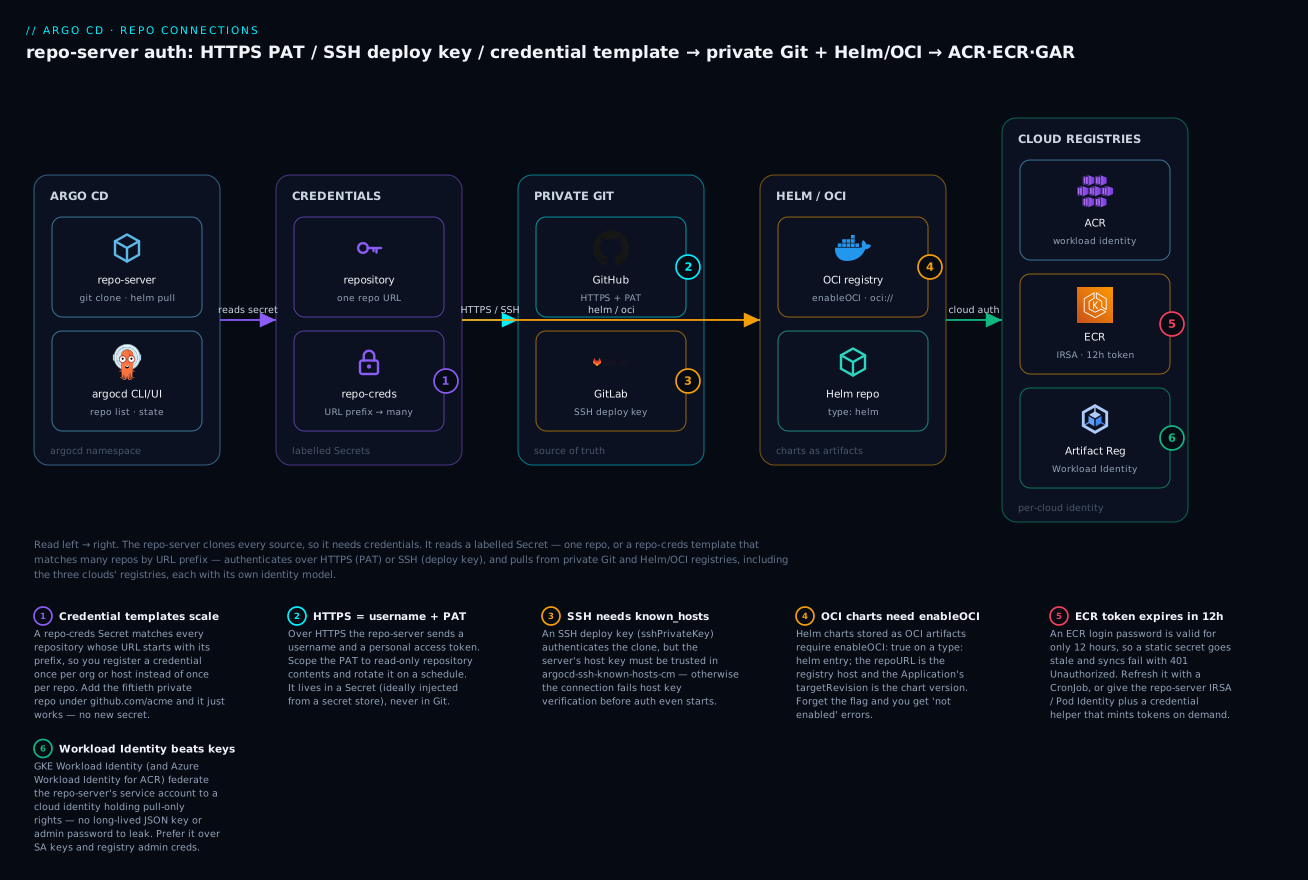
The badges mark the six decisions that decide whether a repo turns green: credential templates let one secret cover many repos (1); HTTPS means username + PAT (2); SSH means a deploy key plus a trusted host key (3); OCI charts need enableOCI (4); ECR tokens die after 12 hours (5); and workload identity beats a long-lived key for cloud registries (6). The rest of the lesson is those six ideas in depth.
Two ways to register a repo: declarative Secret vs argocd repo add
There are exactly two supported ways to register a repository, and the choice is philosophical, not technical — both end up as the same Kubernetes Secret.
The declarative way (the GitOps way). You write a Secret with the label argocd.argoproj.io/secret-type: repository and kubectl apply it. This is the recommended approach because the repo registration itself is now version-controlled, reviewable, and reproducible — it is GitOps applied to Argo CD’s own config.
# private-repo.yaml — a repository Secret (HTTPS auth)
apiVersion: v1
kind: Secret
metadata:
  name: repo-acme-gitops           # any name; convention: repo-<something>
  namespace: argocd                 # must be Argo CD's namespace
  labels:
    argocd.argoproj.io/secret-type: repository   # THIS label makes it a repo
stringData:
  type: git                         # git | helm
  url: https://github.com/acme/gitops.git
  username: git                     # for a PAT, any non-empty value works on GitHub
  password: ghp_PLACEHOLDER_REPLACE_ME   # PAT — inject from a secret store in prod
# Apply it and confirm Argo CD registered it
kubectl apply -f private-repo.yaml
# secret/repo-acme-gitops created

argocd repo list
# TYPE  NAME             REPO                                  INSECURE  OCI    CREDS  STATUS      MESSAGE  PROJECT
# git   repo-acme-gitops https://github.com/acme/gitops.git    false     false  true   Successful
What just happened: the label is the whole trick — Argo CD watches Secrets in its namespace and treats any with secret-type: repository as a repo definition. The CREDS true column confirms Argo CD found credentials; STATUS Successful means the repo-server actually cloned it.
The imperative way. argocd repo add is faster for a one-off or for interactive exploration. Under the hood it creates the very same labelled Secret.
# Same repo, added imperatively
argocd repo add https://github.com/acme/gitops.git \
  --username git \
  --password ghp_PLACEHOLDER_REPLACE_ME
# Repository 'https://github.com/acme/gitops.git' added

# Prove it created a Secret identical in kind to the declarative one
kubectl get secret -n argocd -l argocd.argoproj.io/secret-type=repository
# NAME                             TYPE     DATA   AGE
# repo-2094810352                  Opaque   4      6s
What just happened: the CLI wrote a Secret with an auto-generated name and the same label. Functionally identical — but now the credential exists only in the cluster, not in Git, so it is invisible to review and lost if the cluster is rebuilt. That is why teams prefer declarative.
| Dimension | Declarative Secret (kubectl apply) |
Imperative (argocd repo add) |
|---|---|---|
| Where the definition lives | In Git (a YAML file you commit) | Only in the cluster |
| Reviewable / auditable | Yes — it’s a PR | No |
| Reproducible on rebuild | Yes — re-apply | No — must re-run the command |
| Speed for a quick test | Slower (write a file) | Fast (one command) |
| Secret hygiene | Pair with a secret store; never commit the real value | Real secret typed on the command line (shell history!) |
| Recommended for | Production, everything permanent | Throwaway tests, learning |
The legacy
argocd-cmConfigMap once heldrepositories:andrepository.credentials:YAML lists. That still works but is deprecated in favour of labelled Secrets — you will see it in old blog posts, but write new config as Secrets. Do not mix the two for the same repo.
The repository Secret fields, in full
Every field you can put in a repository Secret, so you never guess:
Field (stringData key) |
Applies to | What it does |
|---|---|---|
type |
all | git (default) or helm |
url |
all | The repo/registry URL. Must match the Application’s repoURL exactly |
name |
helm, display | Friendly name; required to name a Helm repo |
username |
HTTPS | Username (or any non-empty string when using a PAT on GitHub) |
password |
HTTPS | Password or personal access token |
sshPrivateKey |
SSH | The private key (deploy key). Mutually exclusive with username/password |
enableOCI |
helm | "true" to treat the URL as an OCI registry |
tlsClientCertData / tlsClientCertKey |
HTTPS mTLS | Client cert + key for mutual TLS |
insecure |
HTTPS | "true" to skip TLS verification (avoid; use a CA instead) |
insecureIgnoreHostKey |
SSH | "true" to skip host-key check (avoid; use known_hosts) |
proxy |
all | Per-repo HTTP(S) proxy |
project |
all | Restrict this repo to one AppProject (project-scoped repo) |
forceHttpBasicAuth |
HTTPS | Force basic-auth header (some servers/proxies need it) |
HTTPS authentication: username + password/PAT
HTTPS is the path of least resistance and the one most teams start with. The repo-server presents an HTTPS Basic-auth credential: a username and a password, where the “password” is almost always a personal access token (PAT) rather than a human password. PATs are better because they can be scoped to read-only, tied to a bot account, and revoked without changing anyone’s login.
The critical detail beginners miss is PAT scope. A token with too-broad scope is a security liability; a token with too-narrow scope produces a confusing authentication required even though the token is valid — it simply can’t read repo contents. Argo CD only needs to read Git.
| Provider | Token type | Minimum scope for read-only clone | Username to use |
|---|---|---|---|
| GitHub | Fine-grained PAT | Contents: Read-only on the specific repos | any non-empty (e.g. git) |
| GitHub | Classic PAT | repo (classic tokens can’t go narrower for private) |
any non-empty |
| GitLab | Project/Group access token | read_repository |
the token name, or oauth2 |
| GitLab | Personal access token | read_repository |
your username, or oauth2 |
| Bitbucket Cloud | App password | Repositories: Read | your Bitbucket username |
| Azure DevOps | PAT | Code: Read | any non-empty |
The HTTPS repository Secret shape, annotated:
apiVersion: v1
kind: Secret
metadata:
  name: repo-github-https
  namespace: argocd
  labels:
    argocd.argoproj.io/secret-type: repository
stringData:
  type: git
  url: https://github.com/acme/payments.git    # note the .git and the https:// scheme
  username: git                                 # GitHub ignores the value with a PAT
  password: ghp_PLACEHOLDER_fine_grained_read_only
Two rules keep HTTPS painless:
- The
urlmust match the Application’srepoURLbyte-for-byte, including the.gitsuffix and trailing-slash conventions.https://github.com/acme/paymentsandhttps://github.com/acme/payments.gitare treated as different URLs; the credential for one will not apply to the other. - Use the HTTPS URL with the HTTPS credential. Pasting an SSH URL (
git@github.com:acme/payments.git) into an HTTPS secret — or vice-versa — is a top-three cause of failures, covered in troubleshooting.
# Verify just this repo's connection state and message
argocd repo get https://github.com/acme/payments.git
# TYPE  NAME               REPO                                   ...  STATUS      MESSAGE
# git   repo-github-https  https://github.com/acme/payments.git   ...  Successful
GitHub is deprecating long-lived classic PATs in favour of fine-grained tokens with an expiry. Argo CD does not auto-refresh a PAT, so an expired token yields
rpc error: code = Unauthenticatedovernight. Track token expiry the same way you track a TLS cert — and prefer GitHub App credentials (supported viagithubApp*fields) for long-lived automation, which we cover when the course reaches GitHub App auth.
SSH authentication: deploy keys and known_hosts
SSH is the alternative when your organisation prefers keys over tokens, or when a provider’s deploy-key model fits better. A deploy key is an SSH key pair whose public half you add to a single repository (read-only), and whose private half you give to Argo CD. It grants access to exactly that one repo — tighter blast radius than a PAT that can often see many repos.
When should you pick one over the other? For most teams on cloud-hosted Git, HTTPS with a fine-grained PAT is the pragmatic default; SSH earns its keep where policy mandates keys or you want per-repo isolation:
| Consideration | HTTPS + PAT | SSH + deploy key |
|---|---|---|
| Setup effort | Low — no host keys to manage | Medium — needs a known_hosts entry |
| Credential scope | Often spans many repos (unless fine-grained) | Exactly one repo per deploy key |
| Expiry to track | Yes — PATs expire and need rotation | No expiry (rotate keys on policy) |
| Scaling to many repos | Excellent via repo-creds templates |
Keys are per-repo; less template-friendly |
| Network | Port 443 (usually open) | Port 22 (may be blocked by egress rules) |
| Best default for | Cloud-hosted Git, most teams | Key-first orgs, strict per-repo isolation |
SSH has one extra moving part that HTTPS does not: host-key verification. When any SSH client connects, it checks the server’s presented host key against a known list to prevent man-in-the-middle attacks. Argo CD keeps that list in a ConfigMap called argocd-ssh-known-hosts-cm. If the host key for your Git server is not in there, the clone fails before authentication even begins — a failure that confuses everyone because the key is correct.
Argo CD ships known_hosts entries for GitHub, GitLab, Bitbucket, and Azure DevOps out of the box. For a self-hosted or on-prem Git server you must add the entry yourself.
The SSH repository Secret:
apiVersion: v1
kind: Secret
metadata:
  name: repo-github-ssh
  namespace: argocd
  labels:
    argocd.argoproj.io/secret-type: repository
stringData:
  type: git
  url: git@github.com:acme/payments.git          # SSH URL form: git@host:org/repo.git
  sshPrivateKey: |
    -----BEGIN OPENSSH PRIVATE KEY-----
    PLACEHOLDER_DO_NOT_COMMIT_A_REAL_KEY
    -----END OPENSSH PRIVATE KEY-----
Adding an on-prem server’s host key to the known_hosts ConfigMap:
# Fetch the server's host key and APPEND it (verify the fingerprint out-of-band!)
ssh-keyscan git.internal.acme.corp 2>/dev/null
# git.internal.acme.corp ssh-ed25519 AAAAC3NzaC1lZDI1NTE5AAAAI...

# Preferred: edit the ConfigMap and add the line under known_hosts,
# or use the CLI which does it for you:
argocd cert add-ssh --batch < <(ssh-keyscan git.internal.acme.corp)
# Certificate added

# Confirm it's registered
argocd cert list --cert-type ssh
# HOSTNAME                SUBTYPE   FINGERPRINT/SUBJECT
# git.internal.acme.corp  ssh-ed25519  SHA256:....
| SSH concept | Where it lives | Failure if missing |
|---|---|---|
| Private key (deploy key) | sshPrivateKey in the repository Secret |
Permission denied (publickey) |
| Public key | Added to the repo’s Deploy keys on the provider | Permission denied (publickey) |
| Server host key | argocd-ssh-known-hosts-cm ConfigMap |
Host key verification failed |
| Escape hatch (avoid) | insecureIgnoreHostKey: "true" on the Secret |
Skips the check — MITM risk |
Do not paste the wrong URL scheme. SSH secrets use
git@github.com:acme/payments.git(note the colon, nossh://, nohttps://). If you put anhttps://URL in a Secret that carriessshPrivateKey, Argo CD tries HTTPS, ignores the key, and fails with an auth error that looks nothing like an SSH problem.
Credential templates: one credential, many repos (repo-creds)
Here is the pattern that separates a toy setup from a real platform. Imagine 50 private repos under github.com/acme/. Registering a repository Secret per repo means 50 copies of the same PAT — 50 things to rotate, 50 places for the secret to leak. That does not scale.
A credential template solves it. You create one Secret labelled argocd.argoproj.io/secret-type: repo-creds, and its url acts as a prefix. Any repository whose URL starts with that prefix, and which has no more specific repository credential of its own, inherits these credentials. Register one template for https://github.com/acme and every current and future repo under that org is covered.
# One credential template covers every repo under the org prefix
apiVersion: v1
kind: Secret
metadata:
  name: creds-acme-github
  namespace: argocd
  labels:
    argocd.argoproj.io/secret-type: repo-creds    # repo-creds, NOT repository
stringData:
  type: git
  url: https://github.com/acme                     # a PREFIX, not a full repo URL
  username: git
  password: ghp_PLACEHOLDER_org_read_only_bot_pat
kubectl apply -f creds-acme-github.yaml
# secret/creds-acme-github created

# Now add repos WITHOUT credentials — they inherit the template
argocd repo add https://github.com/acme/payments.git
argocd repo add https://github.com/acme/inventory.git

argocd repo list
# TYPE  NAME  REPO                                    INSECURE  OCI    CREDS  STATUS      MESSAGE
# git         https://github.com/acme/payments.git    false     false  true   Successful
# git         https://github.com/acme/inventory.git   false     false  true   Successful
What just happened: neither repo add supplied a password, yet CREDS shows true and both are Successful. The repo-server matched each URL against the https://github.com/acme prefix and reused the template. Add a third repo under that org next month and it works with zero new secrets.
The imperative equivalent is argocd repocreds add:
argocd repocreds add https://github.com/acme \
  --username git --password ghp_PLACEHOLDER_org_read_only_bot_pat
# Repository credentials for 'https://github.com/acme' added

argocd repocreds list
# URL                          USERNAME  SSH_CREDS  TLS_CREDS
# https://github.com/acme      git       false      false
Matching rules — the part to get right:
| Rule | Behaviour |
|---|---|
| Prefix match | A repo URL must start with the template url to match |
| Longest prefix wins | If two templates match, the more specific (longer) prefix is used |
| Explicit beats template | A repository Secret with exact url always overrides any template |
| Scheme matters | https://github.com/acme does not match git@github.com:acme — separate templates for HTTPS vs SSH |
| No partial-segment match | https://github.com/acme matches .../acme/x but the prefix should end at a path boundary to avoid acme-corp surprises |
repository vs repo-creds — the distinction in one table:
repository Secret |
repo-creds Secret |
|
|---|---|---|
| Label value | repository |
repo-creds |
url meaning |
An exact repo URL | A prefix matching many repos |
| Creates a repo entry? | Yes — appears in argocd repo list |
No — only supplies credentials |
| Typical count | One per repo that needs unique creds | One per org/host |
| Use when | A repo needs its own special credential | Many repos share one credential |
Credential templates and per-repo Secrets coexist. The usual production shape is: one
repo-credstemplate per Git org/host for the common case, plus a handful of explicitrepositorySecrets for the exceptions (a repo needing a different key, an mTLS endpoint, a project-scoped restriction). Least secrets, least rotation.
Helm repositories and OCI registries
Argo CD can consume Helm charts as a source, not just Git. There are two shapes, and the difference is where the chart bytes live.
Classic Helm repositories are an HTTP index — a https://charts.example.com URL serving an index.yaml and .tgz chart archives. You register them with type: helm and a name.
apiVersion: v1
kind: Secret
metadata:
  name: repo-bitnami
  namespace: argocd
  labels:
    argocd.argoproj.io/secret-type: repository
stringData:
  type: helm
  name: bitnami                        # REQUIRED for helm repos — this is the repo alias
  url: https://charts.bitnami.com/bitnami
  # username / password only if the Helm repo is private
OCI registries store charts as OCI artifacts inside a container registry (oci://). This is now the dominant distribution model — the same registry that holds your images can hold your charts. Register with type: helm and enableOCI: "true", and the url is the registry host (no oci:// scheme in the Secret; the scheme is conceptual).
apiVersion: v1
kind: Secret
metadata:
  name: repo-oci-ghcr
  namespace: argocd
  labels:
    argocd.argoproj.io/secret-type: repository
stringData:
  type: helm
  name: ghcr-charts
  url: ghcr.io/acme/charts             # registry host + path, NO oci:// prefix here
  enableOCI: "true"                     # THE flag that makes it an OCI registry
  username: acme-bot
  password: ghp_PLACEHOLDER_read_packages
An Application then references the chart by name and version, with the OCI registry as repoURL:
apiVersion: argoproj.io/v1alpha1
kind: Application
metadata:
  name: redis
  namespace: argocd
spec:
  project: default
  source:
    repoURL: ghcr.io/acme/charts       # matches the Secret url
    chart: redis                        # the chart name in the registry
    targetRevision: 18.6.1              # the CHART VERSION (not a git ref)
    helm:
      valueFiles: []
  destination:
    server: https://kubernetes.default.svc
    namespace: redis
| Aspect | Classic Helm repo | OCI Helm registry |
|---|---|---|
| URL scheme | https:// |
oci:// (conceptually); host in the Secret |
Secret type |
helm |
helm |
| Extra flag | none | enableOCI: "true" |
| Chart discovery | index.yaml |
Registry tags/manifests |
targetRevision means |
Chart version from the index | Chart version = OCI tag |
| Common hosts | charts.bitnami.com, ChartMuseum |
ghcr.io, Docker Hub, ACR/ECR/GAR |
Registering the repo is only half the job — once it’s connected, you feed the chart its configuration with helm.valueFiles and helm.parameters, which the dedicated lesson Helm Integration: Values, Parameters & Overrides covers in depth. Here we only need the connection to be Successful.
The most common OCI mistake is forgetting
enableOCI: "true". Without it Argo CD treats an OCI host as a classic Helm repo, fails to findindex.yaml, and reports something likefailed to get index: ... 404. If a Helm-OCI source can’t be read, check that flag first. The imperative form needs--enable-oci:argocd repo add ghcr.io/acme/charts --type helm --name ghcr-charts --enable-oci --username acme-bot --password <token>.
The multi-cloud edge: pulling from ACR, ECR & Artifact Registry
Everything so far is cloud-neutral: a PAT is a PAT, an SSH key is an SSH key. The moment your charts or images live in a managed cloud registry, the edge becomes cloud-specific — because these registries don’t really want a static username/password. They want a cloud identity. This is where AKS, EKS and GKE genuinely differ, so we cover all three.
The core tension is token lifetime. A registry login token is short-lived by design, but a Kubernetes Secret is static. Bridge that gap one of two ways: (a) grant the repo-server a cloud identity (workload identity / IRSA) so it mints fresh tokens itself, or (b) run a small job that refreshes the Secret before the token expires. Which you pick depends mostly on the token’s lifetime — and ECR’s is famously short.
Here is the per-cloud reality in one table — the reference you will come back to:
| Cloud registry | Recommended auth | Token / credential lifetime | The gotcha |
|---|---|---|---|
| ACR (Azure Container Registry) | Azure Workload Identity → managed identity with AcrPull; or a repository-scoped ACR token |
Federated WI token ~1 h, auto-refreshed by the identity; az acr login token ~3 h; scoped token expiry configurable |
Attaching ACR to AKS (az aks update --attach-acr) gives the kubelet pull rights for pod images only — it does not let the Argo CD repo-server pull charts. The repo-server needs its own identity or a token Secret. |
| ECR (Amazon Elastic Container Registry) | IRSA (or EKS Pod Identity) on a token-refresh CronJob writing the repo Secret; or a credential helper | aws ecr get-login-password token = 12 hours, hard limit |
A static ECR Secret dies after 12 h → 401 Unauthorized mid-sync. You must refresh it or mint it just-in-time. This is the classic “it worked yesterday” ECR failure. |
| Artifact Registry (Google, GAR) | GKE Workload Identity → Google service account with roles/artifactregistry.reader |
WI token ~1 h, auto-refreshed; SA JSON key: no expiry until rotated; gcloud auth print-access-token: ~1 h |
The easy _json_key path uses a long-lived JSON key — a standing credential you must guard and rotate. Workload Identity avoids the key entirely; prefer it. |
And how the cloud identity actually binds to Argo CD’s Pods:
| Cloud | Bind what to what | Mechanism | Grant needed |
|---|---|---|---|
| Azure (AKS) | argocd-repo-server ServiceAccount → Entra managed identity |
Azure Workload Identity (OIDC federation) + Pod labels/annotations | AcrPull on the ACR |
| AWS (EKS) | argocd-repo-server (or a refresh Job’s) ServiceAccount → IAM role |
IRSA (OIDC) or EKS Pod Identity | ecr:GetAuthorizationToken, ecr:BatchGetImage, ecr:GetDownloadUrlForLayer |
| GCP (GKE) | argocd-repo-server KSA → Google service account |
GKE Workload Identity | roles/artifactregistry.reader |
ACR (Azure) — paired setup
The clean production path is Azure Workload Identity: no password in any Secret. The simpler-but-weaker path is a repository-scoped ACR token stored as Helm-OCI credentials.
# --- ACR: Option A — Workload Identity (recommended, no static secret) ---
# 1. Create/point to a user-assigned managed identity and grant AcrPull
az identity create -g rg-gitops -n id-argocd-acr
PRINCIPAL=$(az identity show -g rg-gitops -n id-argocd-acr --query principalId -o tsv)
az role assignment create --assignee "$PRINCIPAL" \
  --role AcrPull \
  --scope $(az acr show -n acmeacr --query id -o tsv)

# 2. Federate it to the repo-server ServiceAccount (OIDC issuer from the AKS cluster)
az identity federated-credential create \
  --identity-name id-argocd-acr -g rg-gitops \
  --name argocd-repo-server \
  --issuer "$(az aks show -g rg-aks -n aks-prod --query oidcIssuerProfile.issuerUrl -o tsv)" \
  --subject system:serviceaccount:argocd:argocd-repo-server
# Then annotate/label the SA + Pod for azure-workload-identity (webhook injects the token).
# --- ACR: Option B — repository-scoped token as Helm-OCI creds (simpler, static) ---
apiVersion: v1
kind: Secret
metadata:
  name: repo-acr-charts
  namespace: argocd
  labels:
    argocd.argoproj.io/secret-type: repository
stringData:
  type: helm
  name: acr-charts
  url: acmeacr.azurecr.io/helm        # ACR login server + repo path
  enableOCI: "true"
  username: acme-charts-token          # ACR scoped-token name
  password: PLACEHOLDER_acr_token_password   # inject from Key Vault in prod
ECR (AWS) — paired setup
ECR’s 12-hour token is the whole story. Option A (IRSA + refresh) is production-grade; Option B shows the raw token Secret so you see what the CronJob must regenerate.
# --- ECR: Option A — a CronJob refreshes the repo Secret every ~11h (uses IRSA) ---
apiVersion: batch/v1
kind: CronJob
metadata:
  name: ecr-cred-refresh
  namespace: argocd
spec:
  schedule: "0 */11 * * *"             # before the 12h token expiry
  jobTemplate:
    spec:
      template:
        spec:
          serviceAccountName: ecr-refresher     # bound to an IAM role via IRSA
          restartPolicy: OnFailure
          containers:
            - name: refresh
              image: amazon/aws-cli:2
              command: ["/bin/sh","-c"]
              args:
                - |
                  TOKEN=$(aws ecr get-login-password --region eu-west-1)
                  kubectl create secret generic repo-ecr-charts -n argocd \
                    --from-literal=type=helm \
                    --from-literal=name=ecr-charts \
                    --from-literal=url=1234567890.dkr.ecr.eu-west-1.amazonaws.com \
                    --from-literal=enableOCI=true \
                    --from-literal=username=AWS \
                    --from-literal=password="$TOKEN" \
                    --dry-run=client -o yaml | \
                  kubectl label --local -f - argocd.argoproj.io/secret-type=repository -o yaml | \
                  kubectl apply -f -
# --- ECR: Option B — the raw login (token valid 12h, username is literally 'AWS') ---
aws ecr get-login-password --region eu-west-1
# eyJwYXlsb2FkIjoiPLACEHOLDER...   <-- expires in 12 hours
# username for ECR is always: AWS
# A static Secret built from this WILL fail with 401 after 12h — hence the CronJob above.
Artifact Registry (GCP) — paired setup
GAR’s clean path is GKE Workload Identity. The static path uses a service-account JSON key with the special _json_key_base64 username.
# --- GAR: Option A — Workload Identity (recommended, no key) ---
# 1. Grant a Google SA read on Artifact Registry
gcloud projects add-iam-policy-binding acme-prod \
  --member="serviceAccount:argocd-gar@acme-prod.iam.gserviceaccount.com" \
  --role="roles/artifactregistry.reader"

# 2. Bind the repo-server KSA to that GSA
gcloud iam service-accounts add-iam-policy-binding \
  argocd-gar@acme-prod.iam.gserviceaccount.com \
  --role roles/iam.workloadIdentityUser \
  --member "serviceAccount:acme-prod.svc.id.goog[argocd/argocd-repo-server]"
# Then annotate the KSA: iam.gke.io/gcp-service-account=argocd-gar@acme-prod.iam.gserviceaccount.com
# --- GAR: Option B — SA JSON key as Helm-OCI creds (simple, but a standing key) ---
apiVersion: v1
kind: Secret
metadata:
  name: repo-gar-charts
  namespace: argocd
  labels:
    argocd.argoproj.io/secret-type: repository
stringData:
  type: helm
  name: gar-charts
  url: europe-west1-docker.pkg.dev/acme-prod/charts    # GAR host + path
  enableOCI: "true"
  username: _json_key_base64                # the literal special username for a base64 key
  password: PLACEHOLDER_base64_encoded_sa_json_key    # inject from Secret Manager in prod
The through-line across all three clouds: a long-lived password in a Secret is the fallback, not the goal. ACR and GAR both let you eliminate the standing credential with workload identity; ECR forces the refresh pattern because its token is capped at 12 hours. When you reach the dedicated secrets lesson, every PLACEHOLDER_ above becomes a reference into Key Vault / Secrets Manager / Secret Manager via the External Secrets Operator, so the plaintext never touches Git or a kubectl history.
TLS, self-signed CAs & project-scoped repos
Two more edges you will hit on real infrastructure: on-prem Git over self-signed TLS, and restricting a repo to one team.
Self-signed / private CA over HTTPS. If your internal Git server presents a certificate signed by a private CA, the repo-server’s clone fails TLS verification with x509: certificate signed by unknown authority. The right fix is not insecure: "true" — it is to trust the CA. Argo CD keeps trusted CA certs in the ConfigMap argocd-tls-certs-cm, keyed by hostname.
# Add your internal CA so the repo-server trusts the on-prem Git server's cert
argocd cert add-tls git.internal.acme.corp --from ./internal-ca.pem
# Certificate added for server git.internal.acme.corp

argocd cert list --cert-type https
# HOSTNAME                SUBTYPE  ...
# git.internal.acme.corp  https    ...
| On-prem HTTPS problem | Wrong fix | Right fix |
|---|---|---|
x509: certificate signed by unknown authority |
insecure: "true" (disables verification) |
Add the CA to argocd-tls-certs-cm (argocd cert add-tls) |
| mTLS required by the Git server | share a password | tlsClientCertData + tlsClientCertKey in the repo Secret |
| Self-hosted SSH server | insecureIgnoreHostKey: "true" |
Add host key to argocd-ssh-known-hosts-cm (argocd cert add-ssh) |
Project-scoped repositories. By default a registered repo is usable by any Application in any AppProject. In a multi-tenant Argo CD you often want a repo usable by only one team. Set project: on the repository Secret and it becomes scoped to that AppProject — Applications in other projects can’t use it.
stringData:
  type: git
  url: https://github.com/acme/payments-gitops.git
  username: git
  password: ghp_PLACEHOLDER
  project: team-payments          # only Applications in AppProject team-payments may use this repo
We only forward-reference projects here — the full AppProject model (source/destination restrictions, RBAC, cluster-resource whitelists) is a Tier-2 lesson of its own. For now, know that project: on a repo is the hook that ties repository access to a tenant boundary.
Hands-on lab
This lab connects a private repo two ways, adds a Helm OCI registry, and shows the per-cloud registry step — all with placeholder credentials. It assumes a running Argo CD (any cluster, including local kind/minikube from the install lesson) and a logged-in argocd CLI. Nothing here bills, because we register credentials and inspect connection state without deploying cloud infrastructure. ⚠️ The one rule that matters: never commit a file containing a real token or key — treat every PLACEHOLDER_ literally.
Step 1 — Register a private Git repo declaratively (HTTPS + PAT).
cat > /tmp/lab-repo.yaml <<'EOF'
apiVersion: v1
kind: Secret
metadata:
  name: lab-private-repo
  namespace: argocd
  labels:
    argocd.argoproj.io/secret-type: repository
stringData:
  type: git
  url: https://github.com/acme/lab-gitops.git
  username: git
  password: ghp_PLACEHOLDER_replace_with_a_read_only_pat
EOF

kubectl apply -f /tmp/lab-repo.yaml
# secret/lab-private-repo created
What just happened: you created the labelled Secret Argo CD recognises as a repo. (With a real PAT and repo, the next step shows Successful; with the placeholder it will show Failed with an auth message — that is expected and itself instructive.)
Step 2 — Confirm the connection state.
argocd repo list
# TYPE  NAME              REPO                                   INSECURE  OCI    CREDS  STATUS      MESSAGE
# git   lab-private-repo  https://github.com/acme/lab-gitops.git false     false  true   Successful
What just happened: CREDS true confirms Argo CD matched a credential; STATUS Successful confirms the repo-server actually cloned. This is the decoupled connection test — it proves repo access with no Application involved.
Step 3 — Replace the per-repo secret with a credential template.
# Delete the per-repo secret and register one template for the whole org
kubectl delete secret lab-private-repo -n argocd
argocd repocreds add https://github.com/acme \
  --username git --password ghp_PLACEHOLDER_org_bot_pat
# Repository credentials for 'https://github.com/acme' added

# Add TWO repos with no credentials — both inherit the template
argocd repo add https://github.com/acme/lab-gitops.git
argocd repo add https://github.com/acme/lab-infra.git

argocd repo list
# git  https://github.com/acme/lab-gitops.git  ...  true  Successful
# git  https://github.com/acme/lab-infra.git   ...  true  Successful
What just happened: one repocreds entry now covers every repo under github.com/acme. Both repo add calls omitted a password yet show CREDS true. This is the scaling pattern — you would never again add a per-repo PAT for this org.
Step 4 — Add a Helm OCI registry.
argocd repo add ghcr.io/acme/charts \
  --type helm --name ghcr-charts --enable-oci \
  --username acme-bot --password ghp_PLACEHOLDER_read_packages
# Repository 'ghcr.io/acme/charts' added

argocd repo list
# helm  ghcr-charts  ghcr.io/acme/charts  false  true  true  Successful
#                                                    ^OCI column is true
What just happened: the OCI column shows true because --enable-oci set enableOCI in the Secret. An Application can now use repoURL: ghcr.io/acme/charts, chart: <name>, targetRevision: <chart-version>.
Step 5 — The per-cloud registry step (choose your cloud).
# AKS / ACR — register a scoped-token as Helm-OCI creds (WI is the prod path)
argocd repo add acmeacr.azurecr.io/helm --type helm --name acr-charts --enable-oci \
  --username acme-charts-token --password PLACEHOLDER_acr_token

# EKS / ECR — username is always 'AWS'; token expires in 12h (refresh via CronJob)
argocd repo add 1234567890.dkr.ecr.eu-west-1.amazonaws.com --type helm --name ecr-charts \
  --enable-oci --username AWS --password "$(echo PLACEHOLDER_ecr_token)"

# GKE / GAR — SA-key path uses the special _json_key_base64 username (WI is the prod path)
argocd repo add europe-west1-docker.pkg.dev/acme-prod/charts --type helm --name gar-charts \
  --enable-oci --username _json_key_base64 --password PLACEHOLDER_base64_sa_key
What just happened: each cloud’s registry is just an OCI Helm repo with cloud-specific credentials. The commands are identical in shape; only the username convention (AWS, _json_key_base64, an ACR token name) and the identity story behind the password differ. In production you would replace these static passwords with workload identity (ACR/GAR) or a refresh CronJob (ECR).
Step 6 — Teardown. Always remove credentials you created for a lab.
# Remove repos and credential templates
argocd repo rm https://github.com/acme/lab-gitops.git
argocd repo rm https://github.com/acme/lab-infra.git
argocd repo rm ghcr.io/acme/charts
argocd repo rm acmeacr.azurecr.io/helm 2>/dev/null || true
argocd repocreds rm https://github.com/acme

# Belt-and-braces: delete any leftover labelled Secrets and the temp file
kubectl delete secret -n argocd -l argocd.argoproj.io/secret-type=repository --field-selector metadata.name=lab-private-repo 2>/dev/null || true
rm -f /tmp/lab-repo.yaml
# repositories and credentials removed
What just happened: every credential and repo entry from the lab is gone, and the temp file with the placeholder token is deleted. In a real workflow those Secrets would be managed by your secret store and this teardown would be a Git revert.
Common mistakes and troubleshooting
Repository failures are noisy but finite. Almost every one maps to a row below. The connection message in argocd repo get <url> or the UI’s Settings → Repositories is your primary signal.
| Symptom / message | Cause | Fix |
|---|---|---|
rpc error: code = Unauthenticated / authentication required |
Missing, wrong, or expired PAT/password/key | Recreate the Secret with a valid credential; check PAT expiry and rotate |
error: failed to get repo / connection Failed |
URL typo, wrong scheme, or network/egress blocked | Verify url matches the Application repoURL exactly; test egress from the repo-server Pod |
Host key verification failed |
SSH server host key not in argocd-ssh-known-hosts-cm |
argocd cert add-ssh (or ssh-keyscan → ConfigMap) for that host |
Permission denied (publickey) |
Deploy key not added to the repo, or wrong key in sshPrivateKey |
Add the public half as a repo Deploy key; confirm the private half in the Secret |
| Auth fails though token is valid | HTTPS URL in an SSH Secret (or vice-versa) | Match scheme to auth: https:// with username/password, git@host: with sshPrivateKey |
ECR repo 401 Unauthorized after ~12h |
ECR login token expired (12h hard limit) | Refresh the Secret via CronJob, or use IRSA/Pod Identity + a credential helper |
ACR/GAR pull denied despite setup |
Workload identity/IRSA not bound to the repo-server SA | Verify federation/annotations on argocd-repo-server SA and the role grant (AcrPull / artifactregistry.reader) |
Credential template ignored (CREDS false) |
repo-creds url prefix doesn’t match the repo URL |
Fix the prefix (scheme + host + path); remember longest-prefix-wins and scheme sensitivity |
Helm-OCI failed to get index ... 404 |
enableOCI not set — treated as a classic Helm repo |
Set enableOCI: "true" (or --enable-oci) on the type: helm entry |
x509: certificate signed by unknown authority |
Self-signed/private CA not trusted | Add the CA to argocd-tls-certs-cm (argocd cert add-tls); do not use insecure |
PAT valid but authentication required on private repo |
PAT scope too narrow (no repo-contents read) | Re-issue with read-only Contents/read_repository/Code: Read scope |
Three gotchas cost the most hours, so they deserve prose:
1. The URL-mismatch trap. Argo CD matches credentials to Applications by string URL. https://github.com/acme/app and https://github.com/acme/app.git are different strings, so a credential registered for one silently fails to apply to the other, and you get authentication required with a correct PAT. The habit that prevents it: pick one canonical form (with .git), and make the repo Secret’s url and every Application’s repoURL identical. When a repo “should work but doesn’t,” diff the two URLs character by character before touching the credential.
2. The 12-hour ECR cliff. An ECR credential built from aws ecr get-login-password is valid for exactly 12 hours. The failure is diabolical because it works when you test it. Twelve hours later, mid-afternoon, syncs that touch ECR start failing 401 Unauthorized and nobody changed anything. The only real fixes are to stop storing a static token: either a CronJob that rewrites the Secret every ~11 hours (shown in the lab) or, better, IRSA/Pod Identity on the repo-server plus a helper that mints tokens on demand. If you remember one cloud-specific fact from this lesson, make it this one.
3. insecure is not a fix, it’s a future incident. Every “just make it work” instinct — insecure: "true", insecureIgnoreHostKey: "true" — disables a security check that exists for a reason (TLS verification, MITM protection). It turns a red repo green by removing the guardrail. The correct fixes take five more minutes: add the CA to argocd-tls-certs-cm, add the host key to argocd-ssh-known-hosts-cm. Do those instead, and you will not be explaining an insecure flag to an auditor later.
Cheat-sheet
Two credential-object shapes, side by side (the thing you will copy most):
# repository  →  ONE exact repo, appears in `argocd repo list`
metadata:
  labels: { argocd.argoproj.io/secret-type: repository }
stringData: { type: git, url: https://github.com/acme/app.git, username: git, password: <PAT> }
---
# repo-creds  →  MANY repos by URL prefix, supplies creds only
metadata:
  labels: { argocd.argoproj.io/secret-type: repo-creds }
stringData: { type: git, url: https://github.com/acme, username: git, password: <PAT> }
argocd repo/credential verbs:
| Command | What it does |
|---|---|
argocd repo add <url> [--username --password] |
Register a repo (creates a repository Secret) |
argocd repo add <url> --ssh-private-key-path key |
Register a repo with an SSH deploy key |
argocd repo add <url> --type helm --name <n> [--enable-oci] |
Register a Helm / OCI-Helm repo |
argocd repo list |
List repos + connection STATUS and CREDS/OCI columns |
argocd repo get <url> |
One repo’s state and connection message |
argocd repo rm <url> |
Remove a repo registration |
argocd repocreds add <prefix> --username --password |
Create a credential template for a URL prefix |
argocd repocreds list / rm <prefix> |
List / remove credential templates |
argocd cert add-ssh --batch < <(ssh-keyscan host) |
Trust an SSH host key (argocd-ssh-known-hosts-cm) |
argocd cert add-tls <host> --from ca.pem |
Trust a TLS CA (argocd-tls-certs-cm) |
argocd cert list [--cert-type ssh|https] |
List trusted host keys / CAs |
Key fields, by auth method:
| Auth | Required stringData keys |
|---|---|
| HTTPS PAT | type, url, username, password |
| SSH deploy key | type, url (git@host:org/repo.git), sshPrivateKey |
| Classic Helm | type: helm, name, url (+ creds if private) |
| OCI Helm | type: helm, name, url, enableOCI: "true" (+ creds) |
| mTLS | tlsClientCertData, tlsClientCertKey |
| Project-scoped | any of the above + project: <appproject> |
Per-cloud registry auth quick map:
| Cloud | Registry host form | Username convention | Best-practice identity |
|---|---|---|---|
| Azure (ACR) | <name>.azurecr.io |
ACR token name / 00000000-... |
Azure Workload Identity → AcrPull |
| AWS (ECR) | <acct>.dkr.ecr.<region>.amazonaws.com |
AWS |
IRSA / Pod Identity + refresh (12h token) |
| GCP (GAR) | <region>-docker.pkg.dev/<proj>/<repo> |
_json_key_base64 (key) / oauth2accesstoken |
GKE Workload Identity → artifactregistry.reader |
Interview and exam questions
Q: Which Argo CD component actually clones the repository, and why does that matter for credentials?
A: The argocd-repo-server. It clones repos and renders manifests, so the credential must be reachable by that Pod. The application-controller never talks to Git — it diffs the repo-server’s rendered output. This is also why you can test repo connectivity (argocd repo list) independently of any Application: the repo-server validates the clone on registration.
Q: What are the two ways to register a repository, and which is preferred?
A: Declaratively — a Secret labelled argocd.argoproj.io/secret-type: repository, applied with kubectl — or imperatively with argocd repo add. Both produce the same labelled Secret. Declarative is preferred because the registration is version-controlled, reviewable, and reproducible (GitOps applied to Argo CD itself); the CLI creates the same object but only in-cluster.
Q: What does a credential template (repo-creds) solve, and how does matching work?
A: It removes per-repo credential duplication. One Secret labelled secret-type: repo-creds with a url prefix supplies credentials to every repository whose URL starts with that prefix and has no more-specific credential. Matching is longest-prefix-wins, scheme-sensitive, and an explicit repository Secret always overrides a template. Register one template per Git org/host and every repo under it is covered.
Q: You switched a repo from HTTPS to SSH and now get Host key verification failed. Why, and what’s the fix?
A: SSH verifies the server’s host key against argocd-ssh-known-hosts-cm before authenticating. Your Git host’s key isn’t in that ConfigMap. Fix it by adding the host key — argocd cert add-ssh or ssh-keyscan <host> appended to the ConfigMap. The deploy key being correct is irrelevant; verification fails before auth.
Q: A teammate set insecure: "true" to fix an on-prem Git TLS error. Why is that wrong, and what should they do?
A: insecure: "true" disables TLS certificate verification entirely — it hides a self-signed-CA error by removing MITM protection. The correct fix is to trust the CA: add it to argocd-tls-certs-cm via argocd cert add-tls <host> --from ca.pem. Same principle for insecureIgnoreHostKey on SSH — add the host key instead.
Q: Explain the ECR 12-hour problem and two ways to solve it.
A: aws ecr get-login-password returns a token valid for only 12 hours, so a static repo Secret built from it starts failing 401 Unauthorized after 12 hours even though nothing changed. Solutions: (1) a CronJob (running with IRSA/Pod Identity) that regenerates the Secret every ~11 hours; (2) give the repo-server an IAM identity via IRSA/EKS Pod Identity plus an ECR credential helper that mints tokens on demand. The goal is to stop storing a static token.
Q: How do ACR, ECR and Artifact Registry differ in the identity Argo CD should use?
A: ACR: Azure Workload Identity federating the repo-server ServiceAccount to a managed identity with AcrPull (no static secret); a scoped ACR token is the simpler fallback. ECR: IRSA/Pod Identity + token refresh because the login token is 12-hour-capped. GAR: GKE Workload Identity binding the KSA to a Google SA with roles/artifactregistry.reader; a _json_key_base64 SA key is the simpler-but-standing-credential fallback. ACR and GAR can eliminate the static secret; ECR forces the refresh pattern.
Q: What makes a Helm source an OCI registry rather than a classic Helm repo, and what breaks if you forget?
A: enableOCI: "true" (or --enable-oci) on a type: helm entry. The url is then the registry host and targetRevision is the chart’s OCI tag. Forget it and Argo CD treats the OCI host as a classic Helm repo, looks for index.yaml, and fails with a 404-style “failed to get index” error.
Q: An Application shows authentication required but the PAT is valid and unexpired. Name two likely causes.
A: (1) URL mismatch — the repo Secret’s url and the Application’s repoURL differ (e.g. .git suffix), so no credential matches. (2) PAT scope too narrow — the token lacks repository-contents read (Contents: Read / read_repository / Code: Read), so it authenticates the user but can’t read the repo. Both present as auth errors despite a “valid” token.
Q: What does project: on a repository Secret do?
A: It scopes the repository to a single AppProject — only Applications in that project may use it. It ties repository access to a tenant boundary, so one team’s repo isn’t usable by another team’s Applications. It’s the repository-side hook into the broader AppProject multi-tenancy model.
Q: Where do the real secret values belong, if not in the manifests? A: In a secret store — Sealed Secrets, the External Secrets Operator backed by Azure Key Vault / AWS Secrets Manager / Google Secret Manager, or SOPS — which injects the value into the labelled Secret’s field at runtime. The manifest carries a reference or placeholder; the plaintext never lands in Git or shell history. Best of all, use workload identity so there is no long-lived secret to store.
Key takeaways
- The repo-server clones; credentials live where it can read them. Registering a repository means handing that Pod a working credential in the shape it expects, for a URL it will match exactly. Test it with
argocd repo listbefore building any Application. - Two registration paths, one object. A labelled
repositorySecret (declarative, GitOps, preferred) orargocd repo add(imperative) both create the same Secret. Commit the declarative form; keep real values out of it. - HTTPS is a scoped PAT; SSH is a deploy key plus a trusted host key. Match the URL scheme to the auth method, scope tokens to read-only, and remember SSH needs the server’s key in
argocd-ssh-known-hosts-cmor it fails before auth. - Credential templates (
repo-creds) are the scaling pattern. One prefix-matched credential covers a whole org — register once per Git org/host instead of once per repo. - Helm/OCI needs
enableOCI: "true". OCI registries store charts as artifacts; theurlis the registry host andtargetRevisionis the chart version. - The cloud registries are where it gets cloud-specific. ACR → Azure Workload Identity (
AcrPull); ECR → IRSA/Pod Identity + refresh because the token dies in 12 hours; GAR → GKE Workload Identity (artifactregistry.reader). Prefer workload identity; treat a static registry password as the fallback. insecureflags are not fixes. Trust the CA (argocd-tls-certs-cm) and the host key (argocd-ssh-known-hosts-cm) instead of disabling verification.- Real secrets belong in a secret store. Everything here used placeholders on purpose; the secrets lesson wires these fields to Key Vault / Secrets Manager / Secret Manager (or eliminates them with workload identity) so plaintext never touches Git.